Tag: tools

  • Atlassian Adds Pre-Configured Pipelines to Bitbucket CI/CD

    Atlassian Adds Pre-Configured Pipelines to Bitbucket CI/CD

    One of the primary reasons DevOps processes have not been widely adopted across the enterprise is that building pipelines across all the tools required is a painstaking effort. As a result, most pipelines today are constructed using manual pipelines. However, Atlassian has announced it is now making available pre-configured Bitbucket Pipelines that DevOps teams can access via a simple drag-and-drop interface.

    Harpreet Singh, head of product for Bitbucket Cloud at Atlassian, said DevOps teams that rely on the Atlassian Bitbucket continuous integration/continuous deployment (CI/CD) platform will be able to employ a series of pre-configured Bitbucket Pipelines built by Atlassian or one of its third-party partners, rather than having to manually build every pipeline.

    The goal is to make it much easier for DevOps teams to incorporate, for example, a new cloud platform into an existing set of DevOps processes without waiting for someone on the DevOps team to write, test and validate a script, said Singh. IT vendors that have worked with Atlassian to create Bitbucket Pipelines include Google Cloud, Microsoft, Slack and Amazon Web Services (AWS).

    One of the ironies of DevOps is that while CI/CD platforms make it easier to build and deploy applications, constructing the CI/CD platform can be exceedingly complex. A recent survey conducted by Atlassian found DevOps teams rely on 4.3 tools to move code from development into production environments. A full 62 percent of respondents reported they resort to performing manual testing due to insufficient automated test coverage, additional manual processes or a lack of build/deployment pipeline automation.

    While some organizations might have the engineering resources required to build pipelines, he noted, the average IT organization can’t afford to hire operations specialists that have the requisite programming skills required to build pipelines manually.

    Best of all, noted Singh, the pre-configured Bitbucket Pipelines that Atlassian makes available will be maintained and updated by their original authors.

    It’s too early to say to what impact pre-configured pipelines is likely to have on DevOps adoption in the enterprise. But most enterprise IT organizations won’t significantly alter their process until it becomes relatively easy to make that transition. Enterprise IT organizations have relied on administrators to manage IT for decades, and most of those administrators wouldn’t know where to begin if asked to manually construct a pipeline. The few enterprise developers who might be able to build those pipelines are simply to busy writing application code. The result is a paralysis that prevents organizations from modernizing their application development and deployment processes.

    Of course, any meaningful change in the enterprise also involves a chicken-and-egg debate. Lacking skills and tools, enterprise IT organizations are unable to overcome internal inertia, which in turn results in conservative IT organizations preferring to rely on known processes no matter how inefficient they might be. The real challenge facing IT leaders trying to advance DevOps adoption is to remove as many excuses for resisting change whenever and wherever possible, starting with how pipelines are constructed and maintained.

    — Mike Vizard

  • 7 DevOps Lessons in 2018: The Path to DevOps Success in 2019

    7 DevOps Lessons in 2018: The Path to DevOps Success in 2019

    We all learn from mistakes, right? But it would be better if we learned faster and didn’t repeat them in our future exercises. And this is exactly what we will discuss here in this blog.

    For a while now, we’ve been overwhelmed by the idea of the DevOps principle. We love how the collaboration between development and operations provides room for automation, continuous integration/delivery and enhanced time-to-market.

    But what about the tiny shortcomings we overlook in the process of continuous delivery?

    Listed below are some of the don’ts—or, rather, lessons learned from our DevOps implementation in 2018:

    Gauging Employee Capacity Over DevOps Delivery

    When Carmen DeArdo, Tasktop’s senior value stream management strategist, posed two questions to a crowd of 200 people, they had no answer to give. What were the questions, you might ask?

    • How many treat their delivery pipeline tooling as an integrated product with a product owner and an architect?
    • How many have any measure of how long it takes for them to deliver a feature or defect?

    Companies treat their delivery pipeline tooling as different components along the delivery chain. And, when it comes to measuring time taken, all that matters is getting the product to the finish line.

    These components are important if companies need to avoid obvious mistakes on the path to success. Consider the above questions the next time you set out on your DevOps mission. Within this aspect, measuring team happiness is as important as an integrated delivery pipeline tooling, and time is taken to introduce a feature.

    Companies need to strike a balance between managing work and achieving team happiness. This is important if the company has a long-term vision. Unhappy employees burdened with work don’t deliver the expected results. A sustainable pace helps companies ensure that employees don’t succumb to pressure.

    Revise the Management Strategy

    Organizations need to encourage their managers in a way that they are not put off by the DevOps process but rather motivated to build and maintain their team.

    Most organizations emphasize giving managers incentives to deliver expected results, maintain quality, expand team size, set immediate goals and rake larger profits. However, this strategy could backfire when applied to a DevOps implementation.

    Companies instead should encourage their managers to create an environment where the teams grow and become flexible, not only contributing to that process but also adding value to other processes, hence, the organization’s overall success. This thought process will lead to a chain of positive outcomes.

    Upskilled and Cross-Skilled

    Gone are the days when specializing in a particular skill was rewarding! The competitive market is looking for a workforce that is upskilled and cross-skilled. In short, employees need to be a package of multiple skills, with an emphasis on soft skills.

    Being multi-skilled not only supports transformational goals but also supports an organization’s goals. When the lack of new skills becomes a constraint, companies must invest in hiring individuals to propel transformation, which is equivalent to investing in automation.

    Automation ≠ DevOps Success

    Somewhere between adopting the DevOps culture and being DevOps-equipped, professionals have shifted from the purpose of DevOps to automation.

    In the process, people have lost control over the overall management of DevOps. Either professionals are in a situation in which the code is not built in the intended way or that the automated part is managed but the steps required for automation are not.

    Organizations instead should refocus their attention on the scalable nature of DevOps, building a new, fully automated process rather than automating an end-to-end process over time, as it is difficult and also time-consuming. Hence, automation does not equal the DevOps mission accomplished!

    From Idea to Blackboard

    DevOps once was more an idea of a team discussion rather than full-fledged process. But we saw 2018 transform DevOps from a mere idea to a part and parcel of everyday business—so much that it defines the way businesses plan their finances, regulations and organizational strategy as a whole.

    Additionally, DevOps experts in 2018 emphasized the need for value delivery than just focusing on details of technical practices. This can be achieved by constructing a managerial framework that bridges the gaps between business and technology.

    Relieve Your DevOps of Old Tech

    Last year also witnessed DevOps professionals moving toward new technology such as containers, Kubernetes and serverless. Why? It’s obviousthese technologies enable DevOps to deliver its promises. Trying to innovate the DevOps process or even innovate its end product with old technology will only take you backwards in the DevOps process.

    In 2019, we should realize that holding on to old technology will mean limiting your organization’s capabilities and impact.

    Identifying the Right DevOps Adoption Patterns

    While there are several DevOps adoption patterns out there, some organizations choose a central DevOps team enabling standard CI/CD tooling. The approach is in sync with DevOps thought leaders’ approach of reducing global complexity.

    However, this approach fails at catering to the needs of different teams. With the focus only on addressing CI/CD tooling, many centralized teams struggle with adoption.

    In another approach, companies seek to engage ambitious and autonomous tools to use DevOps tools and practices.

    This approach tends to match the common DevOps belief, ‘First prove that new work methods fit the enterprise, then spread.’ However, these teams are only successful in delivering projects with high levels of automation involved but have quickly failed to convert team-level experience to company-level.

    A 2019 DevOps adoption approach should focus on having high levels of team autonomy and reducing global complexity.

    Here are some tips to help you achieve this:

    • The central architecture team collect and share recommendations about languages, libraries and tools.
    • Teams consider these recommendations and experiment to see if there’s an opportunity for greater gain.
    • If things aren’t working, teams can change change and undo dead-end technology decisions/ideas.

    Now that we are ready with our lessons, it’s time to go live! Are you ready for your DevOps 2019 showdown?

    — Veritis

  • Best of 2018: Log Monitoring and Analysis:  Comparing ELK, Splunk and Graylog

    Best of 2018: Log Monitoring and Analysis: Comparing ELK, Splunk and Graylog

    As we close out 2018, we at devopsy.kinsta.cloud wanted to highlight the five most popular articles of the year. Following is the fifth in our weeklong series of the Best of 2018.


    As organizations face outages and various security threats, monitoring an entire application platform is essential to understand the source of threat or where the outage occurred, as well as to verify events, logs and traces to understand system behavior at that point in time and take predictive and corrective actions. Monitoring the logs and logs analysis are important for any IT operations teams to identify intrusion attempts and misconfigurations, track application performance, improve customer satisfaction, strengthen security against cyberattacks, perform root cause analysis and analyze system behavior, performance, measures and metrics based on the logs analysis.

    According to a Gartner report, the market for monitoring tools and APM tools is expected to grow to $4.98 billion by 2019, and log monitoring and analytics will become a de facto part of AI Ops. Log analysis tools are emerging as a low-cost solution for monitoring both application and infrastructure (hardware and network).

    There are mix of commercial and open source tools available as the log monitoring analysis tools market has matured. Some of the key features of log monitoring tools include powerful search capabilities, real-time visibility with dashboards, historical analytics, reports, alerts notifications, thresholds and trigger alerts, measurements and metrics with graphs, application performance monitoring and profiling and tracing events. This article focuses mainly on the differences in log monitoring tools ELK, Splunk and Graylog.

    ELK, Splunk and Graylog

    Elastic has put together arguably the most popular log management platform for both open source and commercial (cloud and enterprise) log monitoring tools. The Elastic Stack—more commonly known as ELK Stack—combines Elasticsearch, Logstash and Kibana. Elasticsearch is a modern search and analytics engine based on Apache Lucene, while Logstash provides data processing and enrichment. Kibana offers logs discovery and visualization.

    Splunk is a platform for searching, analyzing and visualizing the machine-generated data gathered from the websites, applications, sensors, devices etc. covering the entire infrastructure landscape. It communicates with different log files and stores files data in the form of events into local indexes. It provides the easiest way of search capabilities and has wide array of options to collect logs from multiple sources. Splunk is available in both SaaS and enterprise editions.

    Graylog offers open source log monitoring tools providing capabilities similar to ELK and Splunk. Graylog performs centralized log monitoring; where Graylog is used for data processing and Elasticsearch, MongoDB used for search and storage. It provides log archival and drill-down of metrics and measurements.

    The below table provides the comparison analysis based on the open source/free trial editions of ELK, Splunk and Graylog.

    Top 10 Companies using log monitoring tools (ELK Stack, Splunk, Graylog). Information source collected from ELK, Splunk and Graylog websites.


    Features Comparison

    Features Elastic Stack Splunk Graylog
    General
    License/Edition Available Open source, Commercial

    Cloud: based on the cluster (memory, storage, data center region)

    Enterprise: pricing based on / instance

    Free Trail: Available for 14 days

    Commercial

    Free: 500MB indexing / day

    Splunk Cloud: Pricing based on ingested data to cloud / day & Free Trial of 15 days with 5GB data

    available for search & analysis

    Splunk Enterprise: Pricing based on ingested data


    Open Source: Based on daily volume, price per month

    Enterprise: Free for Under 5 GB/day

    Implementation Language & Logging Format Java

    JSON

    C++, Python

    JSON,.CSV, Text file

    Java

    GLEF-Graylog Extended Log Format

    Community Support

    Enterprise Support

    Available: Well Documented

    Available 24* 7 Support


    Available: Well Documented

    Available: Direct access to the Customer Support Team

    Available: Well Documented

    Available : Unlimited Support from the Graylog Engineers

    Supported Server Platforms All OS-x, Window, Red hat Linux,OS Solaris and Windows Linux ,Ubuntu, Centos, Windows
    Ease of Configuration Need to set up Elasticsearch, Logstash, Kibana, beats with cluster configuration and medium complex to setup. Single platform with server and forwarder from clients, with less complexity to set up. Need to set up Graylog – Graylog web server, Elasticsearch, MongoDB and medium complex to set up.


    Basic Components Involved Elasticsearch – Search and storage

    Logstash – data processing

    Kibana – visualization

    Beats – logs collector and shipper

     Splunk Server

    Splunk Forwarder

    Graylog – Data processing and web interface

    Elasticsearch – log storage

    MongoDB – Configuration data storage

    Data
    Data Collection Beats, Logstash, Elasticsearch Ingest nodes


    Using app-add-ons and Splunk forwarders


    GELF TCP/UDP

    Message Inputs & Content Packs (inputs, extractors, outputs streams, dashboard configuration)

    Graylog Side car


    Data Formats Common Log files format

    Ex: nginx, tomcat logs common formats.

    Accepts any data type including .csv, JSON, log  files , xml, etc. Common log files formats. Ex: nginx [ error_logs, access_logs]

    Syslogs, rsyslogs, GLEF format

    Additional Data Inputs HTTP,TCP, Scripted inputs, Syslog input HTTP, TCP, Syslog input, various Log stash plugin


     GLEF Kafka, GLEF HTTP, Beats, Message Inputs, rsyslog and syslog-ng
    Data Base & Database Schema Creation With Fields Elastic search – document oriented DB

    Schema defined in the specific beats plugins / log forwarders.

    Splunk uses built-in data structure, and stores the indexes to disk.


    Elasticsearch – to store the logs

    MongoDB – storing metadata and dead letter queue messages

    Schema defined in the specific content packs

    Data Correlation

    & Aggregation

    Done through Aggregate filter and logstash correlation event filters Done through index event correlate commands

    Decorators.

    Done through aggregate filters, decorators.
    Centralized Logging Support Available with log shippers Available with Splunk Enterprise Forwarder, Universal Forwarder Available with Logs collector Graylog sidecar, RSyslog.
    Data Import / Export Import / Export data from various sources like Influx DB Export / Import can be done through Splunk DB Connect to relational databases GELF output plugin

    REST API

    Data Transport Kafka, RabbitMQ, Redis Persistent Queue

    Processing Pipeline Components

    Apache Kafka, RabbitMQ (AMPQ)
    Data Collection Intervals Real time Stream and in Batches Real time Stream and in Batches Real time Stream and in Batches
    Search      
    Search Capabilities Provides a highly scalable full-text search and analysis engine with Elastic search Offer dynamic data exploration to extract everything as it having its ow search language. Full-text based search on Real-time UDP/GELF logging with Intuitive Search interface
    Search Language Query DSL (Lucene) SPL (Splunk Processing Language) Very close to the Lucene Syntax
    Protocol  Used For Read / Write operations REST API, HTTP API  REST API, HTTP API HTTP API, REST API
    Log Filter

    Search filtering

    Grok Filter Plugin


    Search filter with fields levels, saved searches, graphs, etc.

    Filter logs applying transforms to events Uses Drools rules, extractors, fields filter

    Blacklisting,


    Visualization      
    Reporting

    Historical Data Management


    Available in X-Pack component

    Quickly generate reports of any kibana visualization or dashboard and any raw data.


    Each report is print-optimized, customizable and PDF-formatted


    Built-in feature

    Reports are created for saved search, visualization or dashboard, set up schedule report, configure the priority of schedule report with support on  Historical and streaming data


    No built-in reporting capability

    REST API can be used to generate own reports on the history data and streaming data.


    Alerting Supported through X-pack / watcher configurations can be created

    Integrations available to send alerts to AIOps tools

    Built-in feature, support real time or scheduled alerting

    Integrations available to send alerts to AIOps tools

    Built-in feature

    Alerts raised based on stream

    Integrations available to send alerts to AIOps tools

    Monitoring
    Server, Device Logs Monitoring Uses Metricbeat, Filebeats for capturing server-related logs Using Splunk Insight For Infrastructure Uses Graylog Beat , NXlog
    Network Logs Monitoring Captures network logs through Packetbeat Uses Splunk MINT to capture network logs  Uses SNMP & netflow Plugin
    Cloud Logs Monitoring Using Logstash, Filebeat, modules Configurable via add-ons in Splunk, for different clouds


    Plugins available to pull logs from cloud.
    Containers Log Monitoring Using Logstash, File Beat & Metric Beat, Logstash processors for Docker logs Splunk logging driver for Docker Uses Filebeat & Native Graylog (GELF logging driver) Integration
    Kubernetes Orchestration Monitoring Using Fluentd, metric beat to ingest logs from Kubernetes Using collector built for Kubernetes Using Filebeat collector sidecar
    DB Log Monitoring Enabled through Filebeat modules, Logstash Enabled through Splunk add-ons for different databases and Splunk DB connect Enabled through Add-on plugins and GLEF libraries for different databases including mysql, mongodb, etc.
    End User Transactions Monitoring, Application Performance Monitoring Enabled through APM and different beats, Logstash correlation, X-Pack components. Enabled through Splunk App for Synthetic monitoring, Splunk ITSI Modules, Splunk MINT SDK. Application logs and add-ons from marketplace.
    Analytics

    (Causal Analysis,  Anomaly detection, etc)

    Supports Machine Learning via X-Pack. Splunk IT Service Intelligence Modules provides machine learning algorithms for anomalies, etc. No out-of-box machine learning support
    Others
    Customization / Extensibility Can create customized dashboards with Kibana controls and search queries.


    Custom Metricsets and Plugins


    Custom rules can be created to define thresholds and alerts


    Can extend / integrate with other tools via webhooks / plugins and programmatic access via REST HTTP/JSON API


    Hosted Elastic Stack provides out-of-box user management features, via X-Pack.


    Flexible to add/ edit new components and views to Splunk dashboards using SplunkJs stack and Javascripts.


    Can create custom metrics indexes and collect data using statsD, collectD.


    Can extend / integrate with other tools via webhooks / plugins and programmatic access via REST HTTP/JSON API with 1000+ add-ons.


    Out-of-box user management.

    Slunk Enterprise Security


    Flexible to add Custom dashboards based on stream using widgets, graphs, CLI stream dashboards.


    Can create custom index models, custom extractors with metrics needed using REST API, content packs.


    Provides few out-of-box alerting with default conditions with custom alerts defined on the streams and conditions.


    Plugins are available in Graylog, to integrate with other tools


    Provides user-management, LDAP and other authentication mechanisms (single-sign on/two-factor) integrations.


    Scalability Supports scalability(horizontal) and high availability with master / slaves cluster. Scalable with distributed deployment of Splunk Enterprise components for data input, indexing and search. Scalable with multiple nodes on ES, MongoDB, Graylog server, along with any queues (Kafka / RabbitMQ).
    Backup / Restore Can take snapshots backup of indexes to any external repository such as S3, Azure, etc.

    Retention on ES through Elasticsearch curator.

    Supports backup of configuration, indexes, warm db buckets based on policies. Archival Plugin available in Graylog Enterprise, to back up indexes and restore to new cluster, via web UI, Rest API


    Log monitoring is very essential as part of full stack monitoring, which can provide better insights for faster troubleshooting. The choice of log monitoring tools will depend on your requirements, infrastructure, price and monitoring and maintenance needs. Elasticstack, Splunk and Graylog have enterprise-ready platforms and solutions for log monitoring, and all are widely used across multiple enterprises and domains.

    — Ritu Bhargava

  • Best of 2018: 11 Popular Open Source DevOps Tools Worth Knowing

    Best of 2018: 11 Popular Open Source DevOps Tools Worth Knowing

    As we close out 2018, we at devopsy.kinsta.cloud wanted to highlight the five most popular articles of the year. Following is the fourth in our weeklong series of the Best of 2018.


    Companies implementing the best practices of DevOps have demonstrated that they are more effective and flexible in implementing as well as designing IT tools and practices, resulting in higher revenue generation at a lower cost. For traditional organizations looking to embrace new inventions such as bitcoin wallet, the adoption of DevOps tools provides consistency, quality and efficiency.

    Open source DevOps tools are used as a way to streamline the process of development and deployment. The benefit of using open source software is that it is built with enhanced collaboration which can drive innovation and enhance flexibility in handling transforming markets and needs. Visibility into the code helps enhance overall quality and security, and also helps companies prevent vendor lock-in from proprietary vendors.

    Open Source DevOps Tools to Know

    If you are looking to accelerate an already existing program or just getting started with DevOps, below are 11 open source DevOps tools worth considering.

    Behat

    Behat is a php framework for auto testing the expectations laid by your business. It is a behavior-driven, open source development framework for php. This tool supports you in providing software that matters via test automation, deliberate discovery, and continuous communication.

    Watir

    Watir is a web application cross-platform open source testing tool. It is the most flexible and reliable tool of Ruby libraries for automating the web browsers. Just like a human being, this tool communicates with the browser so it validates text, fills out forms and clicks links.

    Supergiant

    Built on top of Kubernetes, Supergiant is an open source platform for container management. It is utilized for Kubernetes deployment on multiple clouds in a matter of minutes. The Supergiant API is used for streamlining production deployment. With the help of the packing algorithm of Supergiant, hardware costs can be lowered and the hardware you require with computed efficiency can only be utilized.

    Ansible

    Ansible automates various common tasks related to IT operations such as application deployment, configuration management and cloud provisioning. It is owned by Red Hat. It integrates with numerous other famous tools for DevOps, including Jenkins, JIRA, Git and many others. The free open source version of Ansible is available on GitHub. Red Hat offers three paid versions—premium, standard and self-support—with prices that differ depending on the required level of support and number of nodes in production.

    Nagios

    Infrastructure monitoring is an area that has numerous solutions, from Zabbix to Nagios to various other open source tools. In spite of the fact that there are much newer tools in the market today, Nagios is a well-established monitoring solution that is highly efficient due to the large contributor community creating plugins for it. Nagios has the capability to deliver results in different visual reports and representations.

    SaltStack

    SaltStack is the paid enterprise version of Salt. Salt is a highly flexible, powerful and intelligent open source software for event-driven orchestration, cloud control, configuration automation and remote execution. It helps DevOps companies by orchestrating the effective movement of code into production and keeping the complex infrastructures tuned for optimal application delivery and business service. Saltstack orchestrates the value chain of DevOps and helps to deploy as well as configure dynamic applications.

    Chef

    Chef makes it possible to manage both traditional and cloud environments with one single tool. While maintaining high availability, Chef promises to accelerate cloud adoption. The chef development kit provides you with the tools you need to develop as well as test your infrastructure automation code from your workstation locally prior to deploying changes into production. On the Chef site, many technical resources and a lot of documentation is available including various resources designed to help organizations transition to DevOps and scale their implementations of DevOps.

    Docker

    You can expect portability with Docker, which is transforming IT environments. The portability is made possible via its special containerization technology, quite often found in self-contained units. It packages everything than an application is required to run: libraries, system tools, runtime, etc. Due to this, the applications can function the same way irrespective of their deployment location. A part of Docker known as Docker Engine is a tool responsible for creation and running of Docker containers. Another part of Docker known as the Docker Hub is a service application based on cloud encompassing the concept of application-sharing and workflow automation.

    Git

    Git has become incredibly popular in the recent years for managing the source code. It has become famous, especially as a site, for hosting open source projects. Because of the ease with which it handles merging and branching, it stands out from other version control management. Many DevOps teams utilize it for managing the source code of their applications. It has great pull request and forking features. It also consists of plugins that can link with Jenkins to facilitate deployment and integration.

    Hudson

    Hudson is a tool for managing and monitoring continuous testing and integration. The key features of Hudson include support for various systems for management of source code, application servers, code analysis tools, testing frameworks, build tools, real-time notifications of test failures, change set support and easy process for installation and configuration. A huge library of plugins is present that further extend its capabilities.

    Puppet

    No matter where it runs, Puppet promises a standard way of operating and delivering software. Puppet automates deployment to boost auditability, reliability and agility. The products of Puppet provide continuous automation and delivery across the complete software delivery life cycle. The latest version of Puppet features Node Manager and Puppet Apps, which help handle large number of dynamic, variable systems.

    Conclusion

    The world of DevOps is full of unique and outstanding open source tools. The above mentioned popular DevOps tools can help effectively bridge the gap between development and production environments when compared previously. You can opt for the tool that suits your business needs and can instantly observe the difference in your business operations. And not only do these different DevOps tools function well individually, they also play well together.

    If you’re looking to build out your toolset, consider open source DevOps tools in addition to proprietary software.

    — savaramravindra

  • Using Trade Studies in Vetting Tool Stacks

    Using Trade Studies in Vetting Tool Stacks

    Adding to your tool stack should entail more thought than, “Start your free trial today!” It’s great when there is an application need and cloud-based tools are easily grabbed with a few clicks. However, surveying alternatives before making a tool stack change can prevent costly mistakes. Trade studies can help vet best-fit tools for evaluation.

    Short for trade-off, trade studies originated in the aerospace industry as a decision-making aid. Teams of engineers (or developers) usually generate multiple proposed technical solutions for any non-trivial problem. A little searching will find the term multiple criteria decision analysis, with three popular techniques: the analytic hierarchy process, the Kepner-Tregoe method and the Pugh method.

    For DevOps teams, I lean toward variants of the Pugh method because it avoids creating an overly complex weighting and scoring scheme. Pugh analysis has gained popularity among Six Sigma aficionados for the same reason. Multi-disciplinary teams find the process easy to understand and the results just as useful as more algebraic methods taking longer and needing more input.

    Let’s look at three steps in a practical approach: setting criteria, ranking best-fits and starting evaluation.

    Setting Trade Study Criteria

    Most tool stack disasters result from discovering a tool doesn’t meet all the requirements as the project unfolds. In my previous life, our IT team went all-in on a big-name ERP application partly because it featured web-based portals for suppliers. My e-business team discovered those portals required specific port numbers be opened at the firewall, which corporate security immediately rejected. We coded a way out, using Adobe ColdFusion querying the database directly and securing it with LDAP sign-on, but it took months.

    You could search for the “information I could have used YESTERDAY” gif or you can spend time setting the right criteria. Pugh analysis starts with a matrix of criteria rows versus candidate tool columns. What most sources won’t tell you about Pugh analysis is a trick in generating that criteria list:

    • Start with must-have features, with current requirements and anticipated future requirements.
    • Research tools (data sheets!) for near-fits against those must-have criteria and create the matrix.
    • Add all the features prominently listed for each of those near-fit tools to the criteria.
    • Search again for more near-fit tools matching features on the extended list, adding to the matrix.

    A common mistake is stopping after the first two bullets. Almost every trade study I’ve done discovers more tools fit the must-have list but didn’t emphasize all those features on their website. It’s a bit time-consuming, because every time you find a feature of interest you must go back and recheck all the other tools on your near-fit list for it.

    Adding non-requirements? You’ll miss innovation opportunities outside the Venn diagram intersection. My recent client study on marketing reporting tools found one touting support for a dream-list feature. Digging into that tool found it may not support two must-have requirements but does support the others.

    Ranking Best-Fits

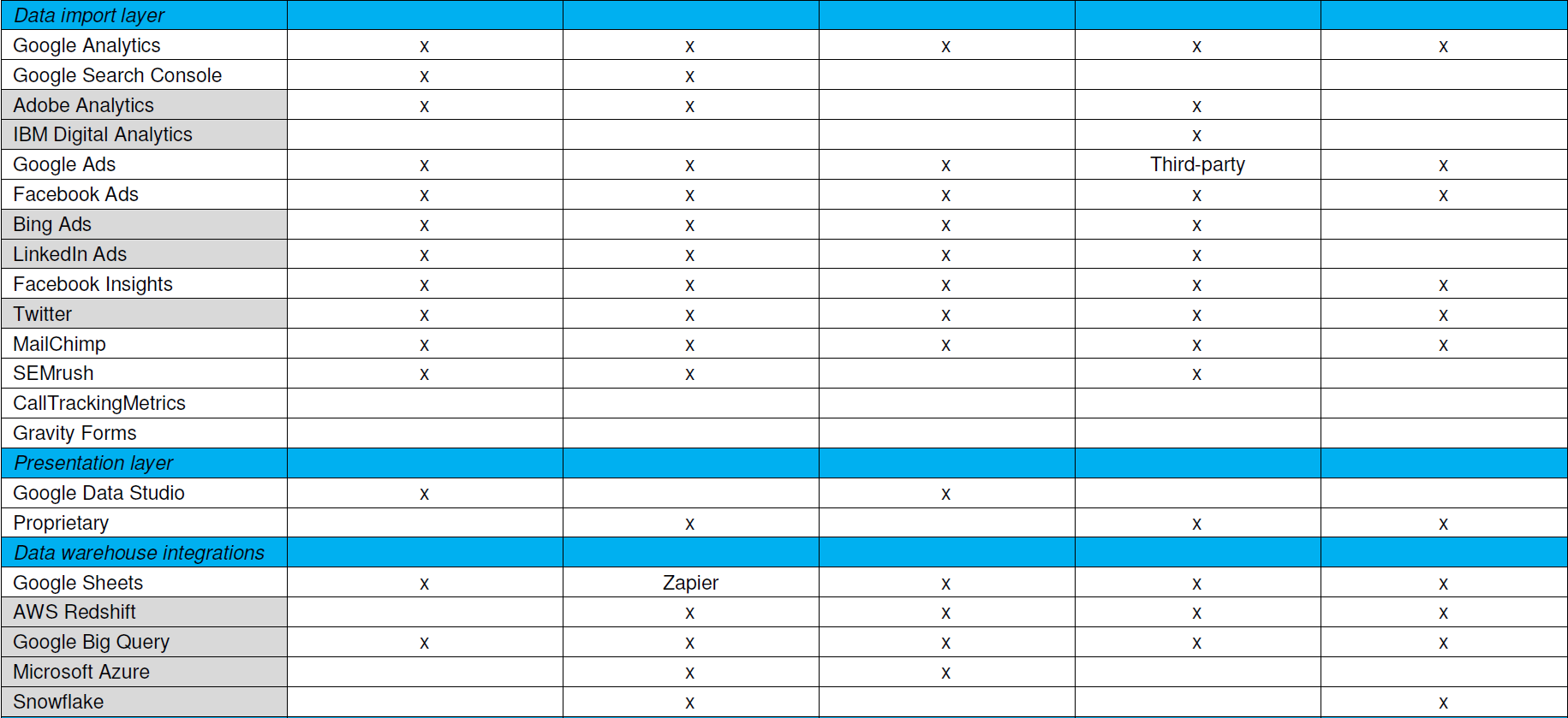
    That’s why the trade study criteria list should visually differentiate must-haves from extended features. I usually shade the extended feature rows, then plot how near-fit tools stack up against all criteria. You can certainly add weighting to features for a more sophisticated analysis, but I find a simple must-have versus nice-to-have usually suffices.

    Now start scoring. A strict Pugh analysis uses a plus-same-minus scoring system. Plus means the tool has a clear advantage on that feature, same is same, and minus means that tool is at a disadvantage compared to the others. I sometimes simplify that to just X for a tool having the feature, blank for it doesn’t. This is mostly a data sheet comparison, and you may want to inject other information such as found reading reviews.

    What you’ll find is a best-fit list, and it probably won’t be perfect. You’d like to see a couple tools capturing most or all the must-haves, and a few more capturing some of them and extended features for contrast. As an example, here’s the trade study matrix for that marketing reporting tool assessment I mentioned with the vendor names omitted.

    Trade studies provide simpler, faster, actionable analysis

    Starting Evaluation

    Notice this doesn’t have cost information yet. Cost biases technical decisions if applied too early, and feature coverage doesn’t necessarily correlate with cost. Vendors also don’t price their stuff the same way. Some price by developer seats, some by data source integrations, some by monthly tracked users (MTUs) on the web.

    With a best-fit list in hand, it’s time to discuss the findings with your team and add information for evaluation. Confirm the scoring, check the vendor pricing models, ask the vendors about unclear feature support and download those free trials to see how they work. Consider how to cover those uncovered must-have features, or if those even are must-haves if few tools support them. Maybe swapping out another tool in the tool stack gets better coverage. Think about innovation those extended features may enable.

    Want simpler, faster, actionable analysis without a massive RFP? Trade studies do that. I think it’s valuable to have one person on your team be the keeper of trade studies, someone skilled at interviewing for requirements and refereeing debates during evaluation. You may want to bring in a consultant skilled at competitive research and analysis to help develop your process. In any case, adapt your approach until trade studies help you make better selections—there is no one right answer.

    — Don Dingee

  • DevOps Transition: The Cultural Commitments and Challenges

    DevOps Transition: The Cultural Commitments and Challenges

    Enterprises can achieve certain levels of success by filling a need in the market, hiring skilled teams and utilizing cutting-edge tools and technologies. However, to set themselves apart and chart a course for long-term success, they need to address the values, beliefs and behaviors that make up organizational culture as carefully as they address business decisions. It’s culture that ultimately informs the decisions made about how a company evolves its concepts from idea to value, so when you want to make a change and grow, that’s where you need to start.

    One area where culture is particularly important is the introduction of new practices and processes applied to software engineering and the role that a DevOps strategy plays within organizations. DevOps encourages a mindset of communication, collaboration, integration and automation among software developers and IT operations, so it’s more than just a new set of tools; it’s a cultural shift. This change doesn’t happen immediately or automatically, it requires deliberate steps and actions to be taken, and calculated decisions to be made.

    The shift also requires commitment. A recent Gartner report, “New Insights into Success with Agile in Digital Transformation,” found that organizations must be prepared for a commitment of three or more years to ensure success when moving to a more agile development process. Teams with less than a year of experience with a new development process show a success rate of 34 percent, while that rate jumps to 64 percent with between one and three years of experience. After three years of agile experience, the success rate skyrockets to 81 percent.

    New Technologies Accelerate Momentum, not Create It

    Implicit in the decision to move to DevOps is the desire to develop faster. To do that, organizations often begin the process by saying to themselves, “We need to automate things.” They buy a variety of testing automation tools, production delivery tools and anything they think will make them more agile. However, if they don’t take steps to prepare the people in the organization, things can get worse, not better, because the new elements can create isolated teams centered around “campfires” where separate teams use the various new automation tools individually.

    When teams are undergoing transformation, we often see them go through a roller coaster of up-and-down results. This was illustrated in the DORA report, “Accelerate: State of DevOps 2018: Strategies for a New Economy.” When the transformation begins, teams quickly identify wins and automation helps lower performers improve, creating an uptick in overall performance. However, as the process moves along, automation increases test requirements, which are still dealt with manually, and a pile of technical debt blocks progress. At the same time, the mounting technical debt and increased complexities cause additional manual controls and layers of process around changes that, more often than not, slows work. Teams generally don’t see an upswing in results until putting in relentless efforts toward improvement, leveraging expertise and learning from their environments, which finally results in a jump in productivity.

    This is a moment when organizations need to lead with their brains, not their pocketbooks, and stay committed to the process. To minimize the risk of failure, they must address the people and the process with the same rigor and commitment they address the technology. In fact, evolving the culture and process associated with how people work is the biggest challenge in adopting DevOps. People resist change and no amount of technology makes change easier.

    Any initiative that begins with just buying software or technology to make the organization agile is a mistake. The best way for a business of any size to launch a DevOps initiative is to get people comfortable with the vernacular and the process before changing anything. I’ve seen organizations go so far as to change the name of existing processes just to get teams thinking differently before the real change is made.

    Putting in Tools Before a Plan is Like the Cart Before the Horse

    After seeding the terminology and idea of change, the next step has to be tactically thinking through how the organization will evolve. It’s often thought that tools will make an immediate impact, but not enough planning is done to integrate the tools before being taken out of the box. Basically, they end up like a bunch of kindergartners at recess: Everyone has their own toy to play with but they do it alone and no one works together.

    Before putting in new tools and changing processes, there needs to be understanding around where the gaps and inefficiencies are so KPIs and metrics can be mapped back to tell where progress is being made. You can’t manage what you can’t see, so you have to develop visibility into the process to understand where those inefficiencies currently are. When that is achieved, remaining constantly vigilant to understand the constraints that exist while establishing new processes and using the new DevOps tools will allow you to continuously improve.

    It needs to be known that the reward is worth the risk. Making the move to DevOps can’t be thought of as a decision or a choice, it’s an imperative for organizations that want to remain competitive. Every organization needs to become a software company and to do that they need to move to DevOps and make continuous improvement part of their DNA. Organizations can’t fear the move, they just need to be diligent with the transition, monitoring and follow up when adopting DevOps.

    — Bob Davis

  • Roadblocks to Successful DevOps Often Human, Not Technical

    Roadblocks to Successful DevOps Often Human, Not Technical

    Usually, when people talk about DevOps, they focus on the technical aspects. However, in my experience we need to highlight what lies behind technology: the people. To effectively implement DevOps, we have to understand that many obstacles are not technical, but human.

    In working with various organizations in their DevOps journeys, I have seen six main roadblocks to a successful DevOps implementation:

    1. We mistakenly blame technical obsolescence: Tech teams should avoid justifying slow processes and lengthy deployments just because of the existence of old systems. To do the best with current systems, analyze your workflow and decide whether the problem is less a matter of technical tools, but one of attitude and organization.
    2. We don´t cooperate: DevOps doesn’t work unless teams can work together. There are three steps to building collaborative teams. First, work hard. Your good work speaks for you; it gains you the respect and cooperation of your colleagues. Second, highlight the contributions of others. Offering recognition shows that each member of these diversified teams is important. Finally, learn how other teams are being evaluated so that you better understand their behavior and can work with them in achieving real cooperation.
    3. Our egos get in the way: Ego leads us to believe that our approach and knowledge apply to every problem and that we can simply solve these issues. It prevents empathy and the ability to properly help to those who come from a different context or background. In DevOps teams where people come together from different perspectives and backgrounds, this is particularly important. So please check your ego at the door.
    4. We are unwilling to leave our comfort zone or the status quo: DevOps is about speeding up processes and providing new ways to work. As a result, DevOps teams should question traditional methods and understand that some rules no longer apply in the digital world.
    5. There is a lack of leadership: DevOps teams succeed under real leadership. Real leaders give visibility to everyone and understand that anyone can offer critical contributions, even when least expected.
    6. We suffer from cognitive bias: Cognitive bias comes from our background, our personal experiences and our careers. However, we shouldn’t let this condition us. It is essential to move forward and understand that our experiences and knowledge do not apply to every context. DevOps teams must be aware of cognitive biases to build a proper solution for problems that may arise.

    These six human aspects can often form obstacles to DevOps implementation. To help overcome these challenges, I typically recommend three broad strategies to organizations:

    • Technology is a means but not an end. It is important to understand that technology is what helps us solve problems, but it’s not the solution in and of itself.
    • Understand the problem and find balance. Avoid over-engineering; you do not need to prove how much you know about technology in general, you need to find the proper solution.
    • Be humble and curious. Technology is never static. There is always something new to learn. In the field of DevOps, it’s critical to constantly investigate and renew ideas.

    A successful implementation of DevOps is not only about automation. It is also about people who make decisions and use tools. However, for many enterprises, transitioning to DevOps represents a fundamental shift in how individuals and teams will have typically worked in the past. This is why I encourage DevOps teams to evaluate their workflow and be aware of aspects such as ego or biases, as they do affect performance. Handling these situations might require professional assistance. I suggest working closely with human resource professionals or turning to business psychologists to understand these human aspects. In turn, this will enable your DevOps teams to walk toward success.

    — Ernesto Cardenas

  • DevOps is Failing, But Here’s How to Succeed

    DevOps is Failing, But Here’s How to Succeed

    As the Data Economy continues to gain momentum, many companies have turned to DevOps in hopes of achieving agility and velocity to compete and win. Whereas it’s no secret that DevOps can have a major impact on agility, what’s not widely known is that most DevOps projects actually fail. In fact, a simple search of “DevOps failures” returns a range of recent results from minor issues to major fiascos. So, what are the warning signs that an initiative is failing to live up to expectations, and how can you fix it before it’s too late?

    Focus on People, Not Tools

    There are several types of potential problems that undermine the efficacy of DevOps, and the most common one—which is the easiest to overlook—is failing to recognize that DevOps is a changing of processes. So, as with any kind of process change, it can only be effective when it’s embraced and adopted by all people involved. Organizations that are successful are able to not only shift processes, but also win the hearts and minds of workers and get their buy-in early on.

    When leaders approach DevOps as a tools-first methodology without addressing outdated legacy systems or the underlying IT cultural issues required to make newer tools work for their organization, projects have a tendency to either fail or fall short of expectations. In today’s competitive digital business landscape, DevOps teams need to be able to deploy multiple test environments multiple times a day to collaborate and test effectively.

    But deploying DevOps technology is often the easiest part. The real problem is trying to use the same tired data management techniques with those new tools. If marrying new tools with old structures (or systems) were simple, most companies today would already have DevOps approach in place. For initiatives to be successful, though, requires a significant shift in thought from leaders and workers alike to achieve both short and long-term development goals.

    Slow-to-Change Culture

    DevOps is all about using rapid iterations and collaboration without requiring formalized meetings to move forward, broker alliances or seek permissions. Given that DevOps is a people-driven process at its core, you know you’re in trouble when your teams are holding routine meetings lasting 30 minutes or longer. If you are doing this, it means the organization is still operating in a siloed manner, which undermines DevOps efforts.

    Creating a successful initiative takes clear communication, because even though everyone wants the same result, they often want said result on their own terms. Introducing DevOps efforts into a well-established organization isn’t easy, and often there can be culture shock and even pushback from rank-and-file workers all the way to mid-management or senior leaders.

    With that in mind, to build a culture that enables agile development, it’s important to communicate objectives clearly and act with discipline early. There should be a well-defined explanation of the objectives, metrics and goals by which your DevOps initiatives will be measured across the organization. It’s not enough to adopt DevOps practices just because it’s the buzz right now; rather, you need to be able to understand how it can help you rebuild your business process and achieve specific development goals—or else your success is not likely.

    You can’t evolve a company culture overnight, but with the right approach and commitment to the DevOps journey, you can lay the groundwork for organizational change and achieve more agility.

    Inefficient Workflows (Data Friction)

    DevOps initiatives are often dependent on applications, which are powered by business data, but getting that data to the right teams can create an enormous amount of drag on the workflow. We often call this data friction. This is a prime example of data friction, or the tension between demand for data access and the constraints that stand in the way.

    This commonly leaves DevOps teams in one of three places, each with their own drawbacks: using stale and polluted data sets, stopping Dev and Test to wait on data provisions and refreshes, or just developing on purely synthetic data (punting the data problem to Test). To avoid returning to the same constraints, we need to rethink the way our teams access data in a way that minimizes the current friction so that we’re no longer choosing between quality, security and agility.

    Data should flow securely, freely and at lower cost, eliminating the friction around data. Synthetic data should be used for development because it is the correct data to use for development, not simply because it is the fastest. Taking a DataOps approach—tackling the data constraints around people, process and technology—is the only way to ensure you are eliminating data friction, rather than shifting it to someone else.

    Conclusion

    Companies set themselves up to repeat mistakes when they try to throw even more technology at the problem, without considering how existing infrastructure, culture and tools will work together in a DevOps strategy. At the end of the day, a tool is only as good as the teams who use it, and DevOps as a methodology should always be considered a continuous cycle of improvement. It’s time to broaden our perspective on the aspects of data management that we can improve upon to also include the people behind the tools. The future of DevOps depends on our own team’s flexibility and willingness to continually improve our own processes.

    — Adam Bowen

  • DevOps & DataOps: Catalysts for Organizational Transformation

    DevOps & DataOps: Catalysts for Organizational Transformation

    Over the past few decades, use of the internet has increased exponentially. Nowadays, the need to build quality web applications and managing its huge data effectively is a huge concern of any organization. Thus, there has been continuous exploration for finding better methods of software development and data management.

    To meet the need of today’s internet users, many technology companies have stepped up and are continuously utilizing their resources to find more efficient ways of developing web applications in less time and with better quality, and are finding more effective ways to manage and analyze its data.

    To achieve the same in application development and data pipelining management, many big organizations have started following a set of practices—DevOps and DataOps respectively.

    In this article, we’ll take a look at what DevOps and DataOps are, and then we will focus on the ultimate question: Are they really worth to implement in an organization, and will following the same set of practices really improve the application development and data management—and consequently the growth—of an organization?

    DevOps and DataOps: An Introduction

    In simple words, DevOps and DataOps are a set of practices for development of software and management of data respectively, for a particular project or to follow at an organization level.

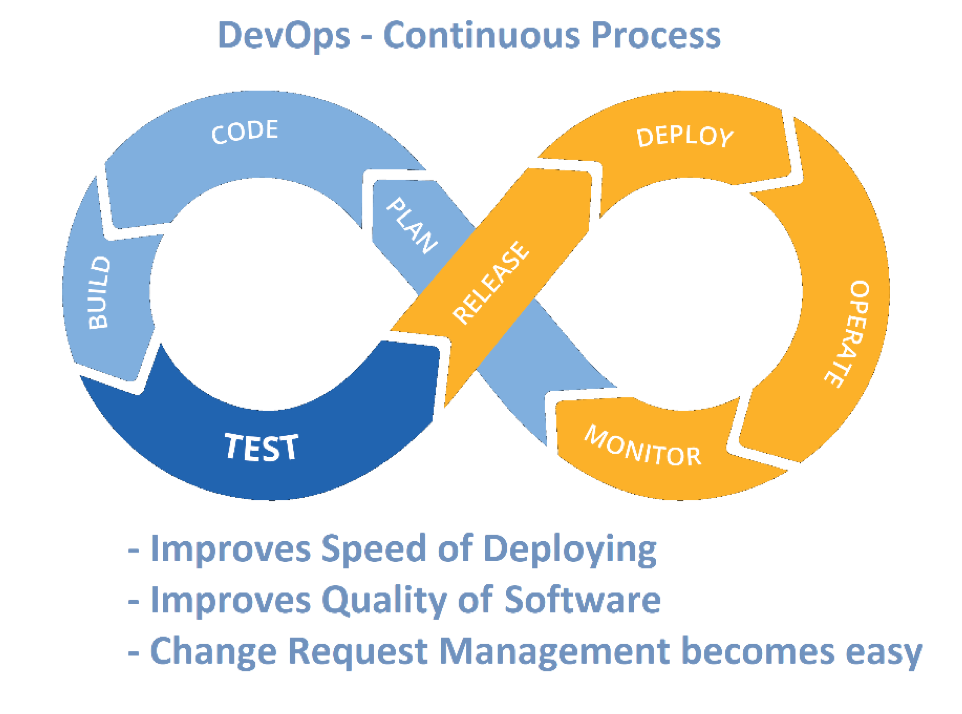
    DevOps emphasizes on automation of processes of various teams—software development team, quality assurance team and IT operational team—so as they can complete the relevant tasks (i.e. plan, code, build, test, release, deploy, operate and monitor) of application development quickly. Also, the these teams will be able to maintain the higher quality of software application by delivering/publishing software in smaller parts with higher deployment frequency while keeping the cost low, thus following the agile methodology more seamlessly.

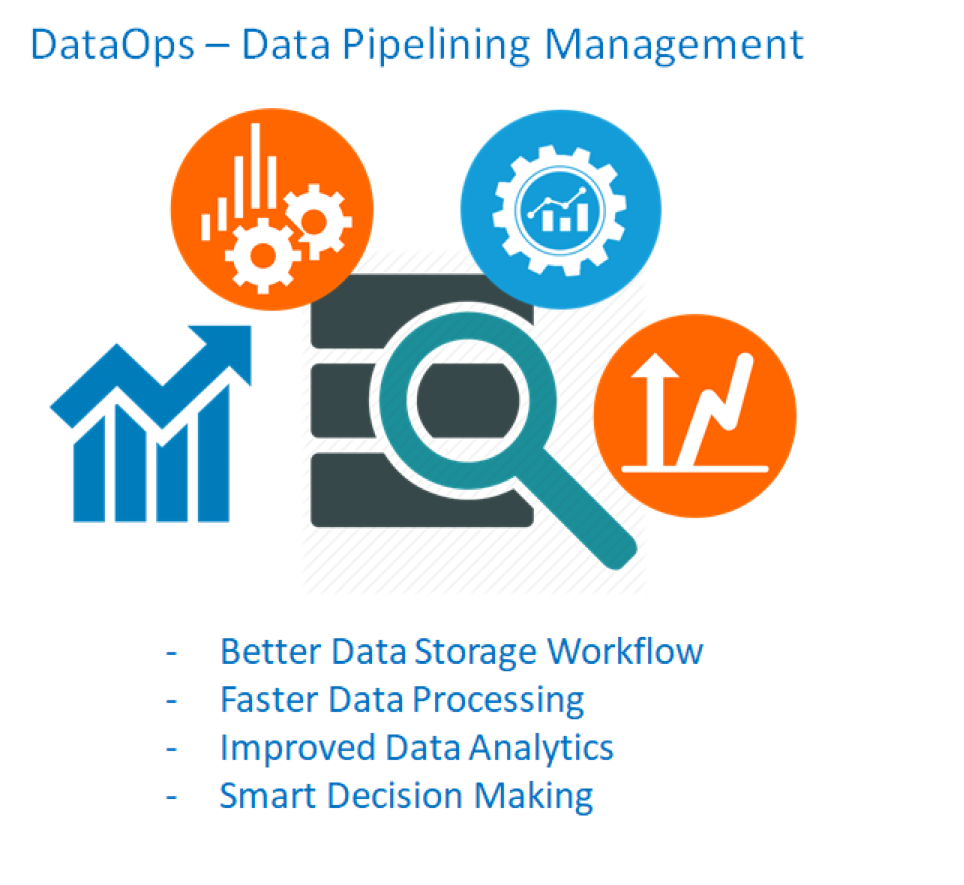
    DataOps, in comparison, can be defined as DevOps with data analytics.

    As mentioned earlier, we know that DevOps emphasizes the collaboration of software development team (including testers) with system administrators (operational team). In a similar manner, DataOps weighs on collaborating the teams of data engineers, data scientists and other data professionals who are handling the data-related processes (i.e. store data, analyze data, deriving decisions from data, archive data or deliver data).

    The concept emphasizes both communication and collaboration between various teams of the same organization. The combined team can have more visibility of the project and come up with faster results. It also will improve the morale of the organization by proving the fact that people will be always above processes and tools when it comes to management of projects.

    DevOps DataOps
    Automation and Monitoring of Software Development Automation and Monitoring of Data Pipelining/Management
    Combination of

    –       Software Development

    –       Quality Assurance

    –       Technology Operations

    Combination of

    –       Data Engineering

    –       Data Integration

    –       Data Quality

    –       Data Security/Privacy

    Collaboration of

    –       Software Engineers (Developers)

    –       System Administrators (Operational Team)

    –       Testers

    Collaboration of

    –       Data Engineers

    –       Data Scientists

    –       Data Analysts

    –       Data Professionals

    Typically aims at

    –       Shorter development cycles

    –       Increased deployment frequency

    –       Quickly moving from Dev –  to/from Test – to Production

    –       More dependable releases

    Typically aims at

    –       Automation of Storage Workflows

    –       Monitoring the Operational Flow

    –       Optimization of Data Analytics

    –       Creating Infrastructure that will enforce data quality rules

    Now that we’ve gone through the basic details regarding DevOps and DataOps and what they are doing for software development and data management respectively, let’s take a look at some of their potential benefits to see if they can really act as a stimulator for an organizational transformation.

    Benefits of DevOps and DataOps to adapting Organization

    There are numerous benefits of adapting the defined processes of DevOps and DataOps in project execution and running the organization. Here are some of the key benefits for applying the practices of DevOps for applications development in an organization.

    Benefits of DevOps

    • Transparent Processes and Culture across Organization – By continuous communication and collaboration between the development team, QA team and IT operations team for every deployment cycle, each employee will be updated regarding latest information of project and will be more aware regarding the processes of other departments.
    • Quicker and Higher Quality Deployment Cycles – By applying the set of practices of DevOps, especially the shorter development cycle, will boost the frequency of deployment. As the focus of teams will be limited—i.e. on small task/module—for a deployment cycle, quality of each deployment will improve.
    • Faster Resolution of Bugs – As tasks are smaller and continuously deployed on relevant servers, the development team will be given feedback very quickly from the QA team, thus enabling the development team to provide much quicker resolution of any non-working functionality. Application stability will be a byproduct of this process, as the reason behind any error can be identified very easily (because particular deployment cycle of an error is known).
    • Flexibility to Handle Unplanned Work – As agile methodology insists on the handling of the raised change request, teams streamlined with DevOps will be able to handle such unplanned work more efficiently.

    Benefits of DataOps

    • Faster Processing of Data – As various teams are getting collaborated, communicating continuously and working on micro databases rather than all at a time, processing of data at various process stages are done much quicker.

    • Quicker Solution of Problems – Similarly to DevOps, in DataOps data are being processed in bunches rather than at once. This approach can help to identify issues pertaining to a bunch of data more quickly, and their resolution can be derived more quickly, as the focus is limited.
    • Better Data Security – As the data security professionals are in continuous touch with data integrators and data analysts, securing data at each process level becomes easier.
    • Improved Resource Output – When the team adheres to the fundamentals of DataOps, seamless communication and transparency between the various teams will aid in the performance of each team member and will lead to better resource output.

    Implementation Procedure of DevOps and DataOps

    Defining the processes for implementing DevOps and DataOps is simple, but implementing same processes do require tremendous dedication of teams. Let’s focus first on the general steps for implementing DevOps processes:

    • Collaboration, communication/seamless integration between formerly siloed teams, i.e. software development team, quality assurance team and IT operations team
    • Breaking down the major modules/big development tasks in particular smaller tasks
    • Processes for DevOps should be followed for each deployment cycle/each smaller tasks
    • Tools – There are various tools available in the market to accomplish processes of DevOps, and there are some techniques for continuous development and performing agile operations‚ such as Kanban, Scrum, etc., which should be followed for seamless application deployment.

    With DataOps, there are no specific software tools available in the market to implement DevOps. But there are some frameworks and its supporting tools that can assist the DataOps approach for agile-based project management.

    • Data storage and analytics infrastructure should be redefined, i.e. cluster-based or redundant data storage approach is recommended. Also some latest data analytics techniques should be adopted.
    • Use of microservices-based architecture and software that can allow blending of various type of data, i.e. structured and unstructured, are also recommended
    • Implement ‘built for purpose’ database engines – By doing such, accessing and analyzing large quantities of data become much easier (these are the same type of database engines that drive Google Search, YouTube etc.)
    • Supporting tools – Tools that aid to agility of project and collaboration between teams i.e. ETL/ELT tools, data curation and cataloging tools and log analysers should be used. For data blending, software tools such as Map Reduce, HDFS, Kafka, Hive and Spark can be used

    Conclusion

    All IT organizations have been managing software application development and its relevant data for a long time. But right now, we are in an era where managing the same with velocity and quality can make your organization stand above the rest of peer companies. Adopting DevOps and DataOps demand sheer dedication and focus of the teams, but the output after implementation will be very positive and such followed standards will definitely transform the organization constructively.

    — Vikash Kumar

  • DevOps Chat: ‘Day 2 DevOps’ with IBM’s Eric Minick

    DevOps Chat: ‘Day 2 DevOps’ with IBM’s Eric Minick

    Now that the concept of DevOps has been around for a few years and more organizations have embraced it, the natural question for many is, “What now?”—especially considering DevOps success is measured by different yardsticks. IBM’s Eric Minick is has been grappling with the concept of “Day 2 DevOps”—enterprisewide rollouts, multiple toolchains, etc.—and the  best way to get organizations from point A to point  B.

    In this DevOps Chat, we discuss Day 2 DevOps and what IBM is doing in the tool space to help organizations move forward, as well as what other projects Eric and his group are working on.

    As usual, the streaming audio is immediately below, followed by the transcript of our conversation.

    ​Alan Shimel: ​Hey everyone, it’s Alan Shimel devopsy.kinsta.cloud and you’re listening to another DevOps chat. This episode of DevOps chat features a friend of devopsy.kinsta.cloud, frequent contributor, author, podcast guest – none other than Eric Minick of IBM and UrbanCode. Eric, welcome to DevOps chat.

    Eric Minick: ​Hey, it’s good to be with you Alan as always.

    Shimel: ​Fantastic. So, Eric, you’ve been with UrbanCode since like about 2008 but your role has changed a little bit. What exactly is kind of the title role these days?

    Minick: ​​Yeah, I’m looking after product management responsibility across the UrbanCode portfolio as well as rational testing. So have just a wonderful team and boy we’re doing some good things, so having fun.

    Shimel: ​Very cool. So Eric we only have 15, 20 minutes here – I wanted to jump right into a couple of topics I want to talk. The first thing that I wanted to bring up was this concept of like a Day 2 DevOps as you call it or DevOps Day 2. Let’s explore that. First let’s tell our audience what do you mean by that?

    Minick: ​I think, you know, we look at how things were a couple years ago and there were a lot of organizations running their DevOps pilots, trying to figure out, “Is this going to work for us?” and all that sort of stuff. But I think we know it works, don’t we, by this point?

    Shimel: Well, I hope so but we’ll just keep publishing on it until everyone finally agrees, but yes, you’re right.

    Minick: ​So I think people are looking at like, “All right, I’ve got little pockets of DevOps here, some DevOps teams over there. How am I going to roll this out across my enterprise? I think we’ve got good stuff here, how are we going to do it at scale?” So there’s some scalability challenges, there’s also, you know in organization that had some really good ground-up work – like you have a couple of different teams who built stuff ground up and then they look across the way and they’re using totally different toolchains.

    ​And then you’ve got some poor guy who’s been dubbed the VP of DevOps and is being asking, “Well, how’s the DevOps going?” And so it kind of makes sense out of teams that are on different toolchains and try to pull data out of that, get new teams onto maybe one or both or some other toolchain. And so the scaling and trying to reconcile across all these different tools seems to be the challenge of the hour.

    Shimel: Yeah, I do agree. You know Eric it’s funny you mentioned this whole thing like “Can we agree it works?” and what have you because you, like me, we probably live in a little bit of a DevOps bubble where we’re not really talking to companies who either haven’t already started their DevOps journey or are contemplating starting their DevOps journey. But there are people outside of our bubble, right?

    Minick: ​There are. I think I saw one of the analysts who just said, “Yeah, but it’s,” – 40 percent are well on their way through their journey; 40 percent are seriously kicking it off now; and then there’s 20 percent– I spoke to a different analyst who said, “Yeah, I just think that 20 percent is just going to go out of business.” And you saw my article the other day: I agree.

    ​So yeah, if you’re not at least getting ready to start the journey – well, I guess I should just say I’m really worried about you. I was going to say I’m not that worried about you but it’s go time.

    Shimel: Yeah, it is, no doubt about it. So Eric for those folks who are sort of entering day 2 of DevOps – and I think this is a problem, so many people prepare for that D Day assault of day 1 and don’t really have the day 2 plan in place. What words of sage advice do we have for them? Where can they go to get information on this? What can they do?

    Minick: ​So I think it’s really important not to disrupt what’s working. If you’ve got teams that are out on some weird toolchain that’s not the enterprise standard but it’s really, really working: let them run. I think that sort of data has come out – we saw in the Accelerate book by ______ it all that, yeah, you want to empower teams, you want to let them run with good tool chains that are working – the ones that are – hey, this is why I have a very active tools business – this is replacing tools that don’t work with tools that work really well or helping teams that don’t have good automation capabilities around continuous delivery or testing.

    ​But then I think you’ve got to really look at, “How am I going to get a view across what’s going on? How do I normalize some data?” If we know that the key metrics for DevOps are things like lead time from code to production – all right, “How am I going to understand that across a number of tools and normalize that?”

    ​So it’s an area we’ve been doing a lot of work on in the tool space – and some other folks are doing that as well – it’s pretty achievable these days.

    Shimel: Agreed. So I guess when we start talking about issues around – and blueprints and plans for day 2 – the logical next step is, “What about day 3?”

    Minick: ​Well, let’s see what breaks in day 2 first. I don’t know it yet. I guess my dream, right – if day 1 is you have a bunch of DevOps pilot projects and day 2 is you hire a VP of DevOps to spread these new ways of working across your enterprise – day 3 is you don’t need that VP anymore, right – that you’re dedicated – you know, we bring the DevOps group within your organization – isn’t needed because your transformation is complete, you’re an agile technology powerhouse within your business helping the business along – you don’t need that transformation team anymore; this is just the way that you work.

    ​So I’m hoping that’s day 3 – that all these people do transformations and move onto the next big thing.

    Shimel: ​Fair enough. You know I’m hoping so too Eric, though I hope that doesn’t put me out of a job. Anyway –

    Minick: ​​I think we’ve got a decade or two, man.

    Shimel: Yeah, I think I’ve got enough runway. So Eric let’s turn from DevOps day 2 and DevOps day 3 to what’s going on specifically with UrbanCode. You’ve got some new releases out both community and enterprise or commercial editions, so what’s up?

    Minick: ​​Yeah. So UrbanCode Velocities are kind of a brand new star. So we shipped a community edition earlier this yar and then in the last little bit we came out with the full commercial edition. And I mentioned earlier there’s tools that pull together data from different tool chains – yep, that’s where we’re running with Velocity – you know, looking at things like a lot of our customers have anUrbanCode Deploy for a huge chunk of their workload and they’ve got some teams doing something else – oftentimes it’s simpler apps, they’re running it just on a Jenkins pipeline or something – and they want a view across that.

    ​Very often they need to coordinate a delivery across the two where, “Hey, I need to kick this thing to Jenkins and that thing and maybe they could deploy at the same time.” So we want to make sure that you’ve got a common view of what’s in your test environment even if different pieces and parts of your application are being delivered by different tools, and that you’re able to understand things like lead time, cycle time, deployment success rates – kind of the heartbeat pulse/health of your continuous delivery flow.

    ​So really excited about Velocity. It’s in this brand new market space. Some people are calling it Value Stream Management, others are calling it DevOps Tool Chain Orchestration – but it gets into this idea that lots of people are using lots of different tools to get value out the door as part of your organization, and having a view across that and a way to kind of orchestrate across that is really powerful.

    ​So yeah, people are checking it out, they’re loving it – it’s a ton of fun – the funnest time in a product manager’s life is launching that new product, so good times.

    Shimel: Absolutely. So in a way though this kind of goes back to Urbancode’s roots, right, with UrbanCode’s roots in open source and free software, commercial editions and all that – nostalgia Eric in that or lessons learned doing it better?

    Minick: ​​Yeah. I think a little better. We did start out with good old Ant Hill as an open source product – you know, to have a community edition and just say, “Yeah, here’s what you get for free,” which is really a lot of reporting right now for UrbanCode Deploy, “And here’s what you get when you step up,” that feels good and a lot cleaner than the press but – you know, we had tried 15 years ago and we tried to build an open source business.

    Shimel: No doubt about it. Eric, then you have another version of UrbanCode out – was it 7 or something?

    Minick: ​​Yeah, we shipped 7.0 for UrbanCode Deploy – and that’s a big deal for us. You know UrbanCode Deploy started at like 4 so 7 is not – you know, we do big, chunky versions for this – 6 came out a few years ago.

    ​So what got us over to a 7 is some re-architecture under the hood – that’s getting us up from being able to manage in the neighborhood of 10,000 machines on a master cluster of UrbanCode Deploy to being able to deploy to something closer to 100,000. So often 10X is a pretty good improvement.

    Shimel: Not too shabby.

    Minick: ​​Not too shabby. And you know that’s where we’re ______ of the day 2, right? You know, when we were shipping this thing five years ago we asked clients, “Well, what’s the most you’d anticipate ever deploying to?” and they’d say, “I don’t know, a couple thousand machines might be appropriate for this.” But now you walk into a bank and they’ve got 100,000 VMs under management and they want to get to all of it – they want to scale.

    ​And so I guess the two sides of the coin here – so UrbanCode Deploy saying, “Hey, if you’ve got something that works in UrbanCode Deploy and you want it everywhere in your organization we’re going to make sure there aren’t barriers to that,” right? Big emphasis on that.

    ​All right, if you’ve got a little of everything and you want to make sense of that we don’t want to tell you you’ve got to throw it all out and adopt UrbanCode Deploy: we want to bring in something like Velocity and say, “All right. You’ve got a mess. You’ve got 97 instances of Jenkins with 50,000 jobs across them. Let’s bring some order to that chaos. Let’s give you a view across that. Let’s help you orchestrate across that.”

    ​So that’s kind of the two sides to the day 2 coin from our perspective. A bunch of good stuff in Deploy 7 so it’s not just the scalability we redid the UI to make it a little easier to work with, a little cleaner – I think it’s really beautiful.

    ​You know, we made it easier to kind of manage your processes – your automation processes that could easily be shared across a bunch of different applications. It lets you kind of change them in a little sandbox and code review them and then publish them out to all of those applications that share them – we’re calling that a safe edit capability – we’ve added a graphical designer for Terraformdocuments – so you want to describe how you’re going to publish out your workload we’ll do that nicely with Terraform.

    ​So just a ton of great stuff in there. Big emphasis on helping our customers scale really cleanly and then making sure we pick up all those new tech stocks like Terraform.

    Shimel: Got it. Cool stuff. So Eric we continue to see IBM moving forward with UrbanCode and obviously you’ve spoken a lot about a lot of the big developments there within the context of the continuing maturation of DevOps. But you mentioned that you’re also doing or helping to manage some of the testing and – I’m drawing a blank now –

    Minick: ​​Yeah. So testing and service virtualization – so rational test workbench, rational –

    Shimel: Rational. Excuse me. That’s what I was thinking of. I apologize.

    Minick: ​​Yeah.

    Shimel: You know, we only have a minute or two but give us a little update on that.

    Minick: ​​We’ve been doing a lot of good stuff, expanding some integrations for mobile testing. The service virtualization is always really nice particularly – you know, we’ve got a lot of customers trying to modernize their apps – they say, “Okay, I’ve got some big workload. I like to bring it over to Kubernetes, containerize it,” and then you’ve got like the one thing that doesn’t fit in a container – some crummy appliance from a vendor or – maybe it’s your mainframe that’s part of the app – and so service virtualization is really having a good day to say, “Okay, we’re going to stub out, we’re going to virtualize out,” you know this thing that’s holding you back from being able to really leverage cloud or dynamic infrastructure, and then you’re going to – you’ll be able to leverage it into all these lower test environments – we’ll bring that component back in for late testing – and obviously it’s there in production.

    ​So yeah, the test area is really dynamic. A lot of fun. I’m surrounded by a bunch of great people in that area too. So, yeah, it’s a lot of fun.

    ​And I’d say how I look at it is the build/deploy automation you have in something like UrbanCode that’s the skeleton for your continuous delivery – that’s not the path. All the work you do is testing, right? You’re doing performance testing and security testing and functional testing and API testing and unit testing – we could go on for hours – and so these things come together to really be the heartbeat of your continuous delivery.

    Shimel: Cool. Well, Eric it seems like you know you’re certainly busy enough, huh?

    Minick: ​​Not bored.

    Shimel: Absolutely, man. Hey, we’re about out of time here but I wanted to thank you for joining us today and we’ll have you back on soon – we’ll probably be ramping up for IBM Think in San Francisco in a couple months so maybe before then we can catch up.

    Minick: ​​Absolutely. I’m going through session proposals now. I’m super excited.

    Shimel: Cool beans. Eric Minick always a pleasure to have you here on DevOps chat. Thanks for the updates and keep doing what you do, man, it’s great.

    Minick: ​​Cheers Alan.

    Shimel: ​All right. That was Eric Minick, UrbanCode and IBM Rational. And this is Alan Shimel of devopsy.kinsta.cloud. You just listened to another DevOps chat. Have a great day everyone.

    — Alan Shimel