Author: Don Dingee

  • Harmonizing Real-Time on Edge Platforms

    Harmonizing Real-Time on Edge Platforms

    Edge computing platforms sit at the boundary between the real-time world and the digital enterprise. Uninterrupted, uncorrupted data from the edge is a must if analytics in the cloud drive reliable business decisions. What’s the best approach: using Linux, an RTOS (real-time operating system), a hypervisor or something else for edge platforms?  Let’s talk about harmonizing real-time on edge platforms and introduce a new foundation project in the Linux Foundation’s LF Edge family.

    Real-Time and Deterministic

    Real-time only means events are captured, tagged and processed as they unfold in the real world. That cadence can be seconds, milliseconds or microseconds depending on how many events and how often they occur and how tasks and algorithms stay in control. Three operating system characteristics determine how well real-time execution keeps pace: prioritization, interrupt response time and context switch time.

    Prioritization ensures that tasks receive resources when needed. Tasks at a lower priority should pre-empt when a higher priority task requests service. A task refusing to yield to pre-emption can throw off the prioritization scheme, causing missed deadlines.

    Interrupt response time measures the latency from the time an event requests service via a hardware interrupt to when the handler task executes. Real-time hardware platforms often place high-priority events on hardware interrupts for fastest pre-emption.

    Context switch time is softer scheduling at work. It measures the time for a change in processing control from one execution entity to another, swapping out resources including registers, cache and memory as needed.

    Deterministic means there are no surprises in behavior. The faster real-time events happen, and the harder a system works, the more likely non-determinism surfaces. One venture into virtual memory paging or a burst of networking activity can show up at an inopportune time, even though under most conditions real-time performance is adequate.

    ‘Hard’ vs. ‘Soft’ Real-Time

    That’s why most people think of real-time as “hard” with a fast, deterministic operating system. RTOS platforms optimize the kernel and only build things in around it that are necessary, providing rigorous and sometimes mathematically proven scheduling for many tasks.

    “Soft” real-time is more forgiving. On a fast processor, interrupt response time is tiny compared to the execution window. A system that isn’t deterministic can, if there is enough margin in context switch time, keep up with real-time events on a slower scale. Linux, while not deterministic, can handle some real-time needs through minimizing packages and tuning the kernel for better prioritization.

    Linux also benefits from lighter context switching. Originally, execution entities in Linux were resource-heavy processes. Now, threads can handle tasks with far less switching overhead. POSIX threads standardized the approach with portability between Linux and RTOS environments.

    How fast are threads? According to a recent synthetic thread benchmark by Eli Bendersky, switching on server-class platforms with enough memory, cache and storage can be in the range of 2 microseconds with 10,000 threads under ideal conditions. Eli pointed out his test environment has more RAM than many edge hardware platforms provide, but most edge applications won’t need that many threads, either.

    So, the line for soft real-time has moved down into new territory, making the trade-off between hard and soft a bit blurrier.

    Hypervisors and Orchestration

    If your DevOps team commits to an RTOS, you may give up some familiar functionality and have a learning curve to deal with, but you get assured hard real-time performance. If you go with Linux, you get the tools and coding practices you’re used to, but soft real-time performance can be an issue as code piles up.

    The leaders in RTOS platforms with enterprise networking noticed this, too. Recently they’ve turned to hypervisors in a bare-metal approach. A hypervisor can capture the benefits of environments working together, so teams are not forced into an either/or operating system choice. This is especially important if the edge application requires some form of certification, such as in medical, industrial or defense applications. Certified code can be compartmentalized on an RTOS, while Linux runs alongside.

    Linux providers are turning more toward orchestration layers and containers. It’s an application focus speeding up deployment, with more scalability and less hardware dependence. It also brings the edge into the enterprise faster with the same application deployment strategy anywhere. More code means more determinism risk.

    Convergence is a faint hope on this landscape with competing objectives, but a new approach offers a path for software reuse and rapid deployment.

    Harmonizing the Edge

    The Linux Foundation is active across the spectrum of IoT development, from the Zephyr open source RTOS to various embedded Linux projects. One of the newest projects in the LF Edge initiative is a foundation targeting a blend of deployment models in a consistent, open approach.

    Project EVE (short for Edge Virtualization Engine) supports containers, clusters, virtual machines and unikernels simultaneously. It’s a slim bare-metal runtime offering hardware root of trust, device resource management and software update and patch functions. EVE can host any combination of apps in virtual machines or containers, including running an RTOS with its application in a virtual machine. It can even assign CPU and GPU cores to specific applications for enhanced determinism.

    On the EVE road map is support for the ACRN hypervisor (another LF Edge project) and shrinking the EVE runtime for smaller embedded-class edge platforms. These efforts are essential where real-time requirements become harder and a hypervisor plus an RTOS makes sense. For softer real-time environments, EVE is adding support for Kubernetes K3S, Docker Compose, VPNs for public clouds and mesh networking for data flow between edge platforms.

    While the project is still young, EVE holds great promise for DevOps teams working the edge. We’d look forward to seeing some benchmarking on a real-time scale; it likely handles soft real-time needs as well as Linux today. By harmonizing a range of diverse approaches into one foundation, EVE is creating a space for real-time on edge platforms no matter which development perspective teams come from.

  • When Gateways Go Away with Cellular IoT

    When Gateways Go Away with Cellular IoT

    Gateways have been an essential piece of three-tier IoT architecture for years. Their traditional spot between the edge and the cloud is in flux as cellular IoT technology rolls out. When are gateways still the right approach? How will gateways go away with cellular IoT? Here’s the trade-off between traditional three-tier and cellular IoT architecture for DevOps teams.

    Spanning the Gaps

    IoT edge devices and enterprise networks are often incompatible. Enterprises and clouds run on IP packets and heavier protocols such as HTTPS, TLS and XML. It takes processing power to run these–power often beyond the reach of smaller battery-powered edge devices. Even with improvements, Wi-Fi is enterprise network compatible but too heavy for many edge devices.

    That’s why wireless sensor networks such as Bluetooth, Thread, ZigBee, Z-Wave and others evolved. These compact, efficient stacks run on tiny microcontrollers, sipping power as sensors send data in small bursts. Alongside wired control networks are more wireless technology such as 6LoWPAN, ISA100 and WirelessHART. Real-time protocol conversion in a gateway brings data from these devices into IP-based enterprise networks.

    In some cases, a gateway might be as simple as a smartphone, tablet or a small board. Some gateways have faster processors, AC power, better cooling and packaging for harsh environments. Faster gateways can also pre-process data streams in an edge computing role. This reduces network traffic and speeds up decision-making without relying on cloud analytics.

    Setting up a few gateways inside an industrial facility is easy. Clusters of far-flung sensors call for many gateways spanning the gaps. As IoT applications grow, gateways carry development and deployment costs. Every time another gateway drops, DevOps must secure and update it.

    A Towering Alternative

    There was no alternative to three-tier IoT architecture until recently. Wireless sensor networks appropriate for edge devices lack range for many use cases. What if instead of extending device range one could extend network coverage? Low-power, wide-area network (LPWAN) technologies take on that challenge.

    Three main classes of LPWAN technology exist today: Sigfox, LoRaWAN and cellular IoT. Sigfox is a low data rate uplink solution connecting devices and Sigfox towers within 30 to 50km in rural areas. LoRaWAN uses unlicensed spectrum limiting its duty cycle to around 1% and requires a wireless gateway for a five to 7km rural range. Urban ranges are shorter for both technologies, still a few kilometers. Both work for sensors that mostly sleep and transmit small amounts of data.

    Cellular IoT technology got a late start, with good reason. Specifications for faster, yet low-cost, low-power radios with cellular-grade range and security was a massive undertaking. The 3GPP defined two paths: LTE-M and NB-IoT. LTE-M offers a 1Mb/s data rate and lower latency. NB-IoT concentrates on lower data rates without duty cycle limitations. With about 200kb/s data rates up and down it is still much faster compared with Sigfox or LoRaWAN. NB-IoT also penetrates buildings better, avoids interference and targets a 10-year battery life in devices.

    Mobile network operators (MNOs) worldwide are racing to get NB-IoT and LTE-M networks deployed. In the latest GSMA Mobile IoT Rollout Report, NB-IoT is leading in adoption. These rollouts are not tied to expensive 5G infrastructure, so MNOs are investing incrementally.

    After towers are ready, the last piece is support for Remote SIM Provisioning (RSP). Cellular IoT devices typically work with an eSIM like in the latest Apple iPhones, with one major difference. An iPhone user scans a QR code, pulling a profile over RSP.

    Pushing Across Networks

    Cellular IoT devices use a push model for RSP. When an edge device with an eSIM powers up, it uses a bootstrap network profile. It can then communicate with an RSP server to load an operational profile of choice. With this over-the-air profiling one device configuration can go practically anywhere in coverage. It opens powerful use cases such as agriculture or oil and gas, with wide-spread sensors in both indoor and outdoor settings.

    All this happens without a DevOps team planning and investing in infrastructure. MNOs are making the major investment. The variables for IoT application developers are network coverage, operator profile creation and setting up devices for streaming. If one MNO proves costly or unreliable in a specific location, devices can receive another profile over the air.

    Cellular IoT can deploy one sensor, or many, without a gateway. The cellular IoT advantage becomes even stronger with more dispersed locations. A simplified network architecture looks more like the IoT should look–with every device addressable.

    Alternatives exist because they serve some use cases well, with some persisting for years after new technology arrives. For some DevOps teams risk is a strong factor, and they may prefer the control a gateway-based architecture offers. In tight sensor clusters, the life cycle costs for a few gateways may turn out lower. If gateways aren’t cutting it for an application, they may go away quickly with cellular IoT rollouts.

    I see ubiquitous coverage driving cellular IoT momentum. Providing IoT services is a priority for mobile network operators as consumer growth flattens. There are plenty of resources for understanding cellular IoT technology in depth–get in touch with me if I can help point you in the right direction.

    — Don Dingee

  • Before We Burn the Martech Silo

    Before We Burn the Martech Silo

    There’s an ongoing debate about where marketing technology (martech) should sit in an organization. Does it live with the CMO, the CIO, the CXO–a hybrid strategist with both IT and marketing background–or some collaboration? As technology use grows, it’s tempting to move martech under another role. Before we burn the martech silo, like how McDonald’s, Uber, Mastercard and others are doing, let’s look at the implications for DevOps teams.

    A recent article in PR Week cited a University of Texas study claiming “only 40% of a corporation’s marketing-related activities today report to the CMO.” Martech is being siphoned off into other areas–sometimes slowly, sometimes abruptly. It’s because the tech outweighs the marketing, at least in the eyes of the C-suite.

    In March 2019, McDonald’s announced they were acquiring Dynamic Yield for $300 million. Dynamic Yield rose to fame as one of the leaders in omnichannel personalization. Translation: they watch visitors searching, viewing and ordering. Then, they show those related results to other visitors. With the deal closed, McDonald’s announced they were eliminating their CMO position and creating an SVP of martech reporting to the CIO. Automating the customer experience with in-store kiosks and mobile app ordering is their top priority.

    Another case where mobile app ordering dominates, Uber clobbered both its CMO and COO in June 2019, right after going public. Their rockstar CEO said he wants to be more involved in day-to-day operations. Uber rolled non-martech functions into a VP of marketing communications. For Uber, martech is the product–an automated experience connecting riders and eaters with drivers. Everything else is branding and communications.

    There’s a third org chart option: the CXO, or chief experience officer. More digital customer interaction is forcing a partnership between technology and marketing insight. Mastercard hired its first CXO earlier this year, bringing in a veteran from the digital marketing industry.

    What do these three moves have in common, besides moving martech out of traditional marketing?

    • All have powerful, ubiquitous brands with huge recognition.
    • Their core product shouldn’t change much moving forward.
    • Personalization shapes their offers using global and local trends.

    Here’s the thing: Marketing automation automates what marketing knows. When the current and future requirements are clear, evaluating martech tools is easier. Moving martech out of branding, advertising and communication to IT sounds reasonable until you realize what you don’t know.

    The martech silo often houses hunters, not farmers. Marketers have different metrics. They discuss impressions, and click-thru, and time viewed, and calls-to-action, and conversions. Strategy and content often have more impact on results than the delivery technology. In a fast-moving environment with many product or service offerings, what works once may not work elsewhere. Creativity comes into play, with cycles of learning.

    In today’s SaaS model, marketing can pick a cloud-based tool and explore possibilities with minimal IT support. That’s good, until data and process accumulate, needing a bigger silo. Be careful. Burning the martech silo can be far worse for the organization than leaving it alone, even with all the shadow IT downside. No matter who does it, picking tools for a martech suite before understanding requirements is a formula for disaster. Without integrated marketing experience, IT is set up for failure. It can cascade into marketing failure and finger-pointing.

    For a fluid marketing environment, a CXO is best suited for the job. They speak the language of both sides, along with representing external customers and their experience. If your organization doesn’t have a CXO, modeling a DevOps team responsible for martech in that image is the next best option.

    DevOps solves the problem of speed marketing needs in making changes. Teams also have deep experience in maintaining applications and overseeing security IT wants. Many teams already have a product marketing person managing their software requirements. What a martech DevOps team needs is people with customer and digital marketing expertise. This include creative writers, graphics artists and advertising and social media specialists.

    If that sounds like a problem without a CXO running air cover, you’re right. Budget and headcount come from somewhere. Both the traditional marketing team and the IT team want input, perhaps even control. The key for a martech DevOps team is behaving as if the silo had disappeared, no matter what the org chart says. The DevOps leader should keep everyone informed, managing up and across. It usually means creating different presentation views, one for marketing, one for IT and maybe one for the CEO. Make sure everyone gets answers to their questions in their language.

    We’re going to have more martech moving forward. Creating effective martech DevOps teams is a priority, even without sweeping C-level reorganization. Don’t just burn the martech silo–reclaim the pieces that work for both marketing and IT and build the right team around the customer experience. If you need help getting started on a bigger martech mission, let’s talk marketing strategy.

    — Don Dingee

  • Keeping NoOps From Going Rogue

    Keeping NoOps From Going Rogue

    “We’re NoOps—everything is in the cloud and we have no infrastructure to manage.” Before running that victory lap and shifting everyone to the dev side, consider several NoOps risks carefully. I’m really thinking about teams using all-SaaS stacks, especially in martech, edtech and other areas. However, the rise in microservices and serverless means more teams are leaning toward NoOps. At least a few people on your team should always watch for rogue issues on the ops side of the equation.

    Locked-in Vendors

    Risk: Cloud-based tools in the same category rarely have the same functionality. Once one is selected, you’re committed to its specific features. Moving away from a tool may mean dropping a popular application feature or changing workflow with coding to recreate functionality.

    Mitigation: Evaluate unique features and customized data fields carefully before use. Solving data format differences is relatively easy for common fields. Look for tools with well-documented APIs and integrations or connector support for analytics. If there are no integrations out there, that’s a red flag.

    Ghosting

    Risk: Lock-in becomes a big problem if the vendor ghosts. SaaS startups often meet one of two fates: they are acquired or they crash and burn. A tool critical to your workflow may disappear overnight. In the acquisition scenario, you may have some time and support in migrating from your tool to its successor.

    Mitigation: Always have a Plan B for every cloud-based tool in your stack. Competitors are introducing new tools frequently. A trade study done two years ago may be completely obsolete on today’s fast-moving landscape. Proactive migration to newer solutions may reduce vendor risk and improve features.

    Limited Observability

    Risk: Overheard in a conference recently—Those who develop the code are more motivated to build in useful observability for those in operations if those folks are the same team. In NoOps, that’s not in play. If a cloud-based tool in your stack is down frequently or providing strange results, it may be very difficult to tell what is happening. Observability is often replaced by faith that the SaaS vendor has done its job and you aren’t experiencing a corner case it hasn’t tested.

    Mitigation: Observability and monitoring aren’t the same, but when you don’t have observability inside SaaS tools, monitoring helps. Application performance management (APM) tools are emerging with new ways to build instrumentation around microservices. Create test cases with synthetic data to check your functionality—you’ll need these to provide evidence for the vendor in any bug report.

    Unoptimized Workloads

    Risk: You’re also often at the mercy of the SaaS vendor when it comes to speed of results. It’s a common tripping point to pilot a SaaS workflow with a few users and test cases, and then find out it doesn’t scale when everyone is brought in.

    Mitigation: This is one the biggest NoOps risks where ops expertise pays off. Where is the problem, exactly? Application problems may be candidates for workload acceleration—such as running on a GPU (or FPGA) enabled cloud instance. Reporting problems may be better-suited for an analytics tool, which can be run offline with extracted data.

    Tangled Analytics

    Risk: Every SaaS tool reports different metrics in different ways. Worse, users in a multi-cloud environment face learning and visiting multiple applications to look at data. Different applications report similar facts using different terms. As the tool stack and data sets grow, it takes longer and longer to analyze data.

    Mitigation: Dashboards pay off early with one destination for data across the stack. Earlier, I mentioned the need for integrations or connectors—this should be a requirement for tool selection, both in the stack and the analytics tool. Deciding on which KPIs to track in the dashboard also focuses conversation and minimizes digging.

    Closing NoOps Risks

    There’s also the big topic of multi-cloud security and compliance, probably worth a series of posts by themselves. An Ops team working proactively in tool selection can comprehend many security risks before committing to tools and exposure. More value unfolds over time, as the security posture evolves with discovery of new threats.

    The tech pendulum is always swinging. For many organizations, NoOps swings the pendulum a bit too far from DevOps and leaves risks open. A better philosophy is MinOps, where a small team is deployed, watching for and even anticipating problems.

    I’d be interested to hear if you’ve tried NoOps and been successful over time, or if you reverted to a MinOps approach.

    — Don Dingee

  • The New AI Overseer Role in DevOps

    The New AI Overseer Role in DevOps

    Robot overlords are the stuff of science fiction fantasy. Today, with more teams implementing artificial intelligence (AI), DevOps teams need a hard, continuous look at reality. An AI overseer watching apps at work could make the difference between sadness and euphoria in your efforts.

    We’re seeing AI misses more and more often. Facebook recently admitted its algorithms failed to stop uploads of a particularly heinous live-streamed video. Autonomous vehicles have struck cars and people. Jaywalkers in China have been misidentified and publicly shamed in error. It’s not for lack of effort in development. The adage “If it were easy, anyone could do it” applies.

    A few weeks back, I was in a Twitter chat session on AI led by Kirk Borne, data scientist at Booz Allen Hamilton. The question came up of what organizations should consider when creating guidelines for use of data and bias-free AI. Here’s my response:

    A4: DevOps teams should have someone whose role is AI oversight—actually watching what it’s doing and constantly testing/validating its findings #MITSMRChat

    — Don Dingee (@StratisetDon) February 14, 2019

    Common Problems

    Most fails are due to fire-and-forget, wherein AI systems are trained, tested against training and turned loose. Even a well-designed AI system is subject to several problems:

    Errors: This is where AI makes a factually incorrect decision. False positives and false negatives are in this category, along with miscategorization problems.

    Gaps: There are situations in which AI understands conflicting options and is unable to choose. Then, there are situations in which the AI doesn’t recognize what it sees.

    Bias: Maybe the system prefers green M&Ms or German shepherds because there was some subtle trend in the training data for “candy” or “dog.”

    Ethics: This can be a higher level of bias, where preference is given based on age, gender or race. Sometimes it’s the classic no-win scenario in which both options are harmful.

    An AI overseer guards against these types of problems in near real-time, every day, for as long as it takes to weed them out. Some problems are easier than others. An example of a more difficult problem came when autonomous vehicle researchers realized that not all traffic signs are brand new and well-lit. Shade, branches, wind, scratches, dings, bullet holes, stickers, graffiti and many more types of defects exist in the real world.

    Increased Complexity

    Inevitably, part of the solution the AI overseer leads is better scenario-planning and more training data. Retraining becomes a way of life and at some point, bigger data sets also lead to more complex implementations and another challenge: speed—after retraining to correct issues, the reloaded real-time classification engine runs like it’s stuck in molasses, producing correct results too late to be useful.

    While the A system is running, a B version should be in development with new training and classifier boxes. For very large data sets, teams should consider designing a workload-optimized training server complex instead of relying on elastic cloud resources. This was behind NVIDIA’s recent acquisition of Mellanox—using InfiniBand for more bandwidth between GPU clusters in AI server complexes.

    Where training systems often scale, real-time systems usually don’t. They are optimized for size and power consumption and can only accept so many additions. When a bottleneck emerges, it can kill the entire application. New generations of CPUs, GPUs and FPGAs keep pushing the envelope for designers tackling AI challenges.

    Human-in-the-Loop

    In many use cases, the job of the AI system is not to make every single decision autonomously. Instead, the system should make routine decisions and lead the AI overseer to look at exception cases. Directing humans quickly to areas needing attention is often more valuable than risking bad decisions. Human-in-the-loop is something DevOps teams should architect into systems more often.

    This may all sound obvious, but it points out a big difference in developing AI versus developing code-based algorithms. If there’s a bug in code, you can debug it and find the offending lines of code to fix. But debugging AI is a lot more difficult. Digital twin implementations come into play using playback of real-work inputs to look at what happens inside the classifier black box. There are usually hints of problems developing before catastrophe strikes. Running data both good and bad can help spot issues.

    Ideally, the AI overseer is a hybrid of a data scientist plus a systems architect. Look for someone who understands both data sets and hardware implementations, at least at a high level. They may have to call in other resources on the team for detailed investigations.

    The last thing you want after all the hard work in developing a system is to have it run amok months or years later. It’s just Murphy’s Law. AI systems will do something entirely unexpected at the worst possible time. An AI overseer can help a DevOps team get ahead of AI problems.

  • IoT Future-Proofing for the Long Haul

    IoT Future-Proofing for the Long Haul

    Think about this: The IoT application your DevOps team is developing right now, if successful at scale, will likely be the longest-living application in your shop. It may even outlive the tenure of many of your team members with your company. Is IoT future-proofing possible over a life cycle of 10 years or more? Yes, with some insight for the long haul borrowed from industrial and defense computing experience.

    That may sound counterintuitive for DevOps because those industries aren’t exactly known for agile processes. They’re designed around minimizing change and containing risk in mission-critical situations. IoT technology is evolving rapidly and it’s difficult to say what things may look like in a year or two, much less 10. What IoT applications have in common with industrial and defense systems is that they are often complex. Your operational technology (OT) people probably appreciate how complex their existing production environments have been. IoT applications add elements of wireless connectivity, cloud architecture, real-time performance, end-to-end security and algorithmic sophistication.

    At-scale IoT applications will require mastery of complexity, and lessons learned can help. The objective is not to avoid change but rather to “build the airplane while flying.” The core DevOps concept of continuous application release and testing needs to extend beyond just the application code. Teams will need to be detail oriented, looking at device configurations, interoperability, data integrity and how analytic insights evolve as data accumulates.

    Device Configurations

    Buying an enterprise server usually means selecting a commodity: Pick a processor model and frequency, memory size, number of Ethernet and USB ports, storage interfaces and packaging. In the cloud, selections in elastic instances are even easier. As long as the box fits and runs the desired operating system, the details of what’s inside aren’t that important. If you have to buy another one in two or three years, there are likely higher performance choices available.

    In long-lifecycle computing for IoT applications, boxes aren’t commodities. Real-time performance drives differences in processor and board architecture. If you have to buy another one in two or three years, that could be a problem. Vendors often offer industrial and defense customers revision control services, ranging from notification of changes to extended availability of specific configurations. Assuring supply sometimes means a lifetime purchase of components, perhaps as bonded inventory for a customer.

    Interoperability

    Even simple IoT devices, such as wireless sensors, can present a problem on a 10-year scale. Connectivity specifications evolve, with both major changes and minor revisions. Cellular standards reach sunset as mobile subscribers leave them behind. Vendor support for older gear is often given reluctantly, frequently expensive and sometimes non-existent unless an upgrade is executed.

    Choosing interoperable frameworks with robust ecosystems will be critical for success in the long haul. Teams should be prepared with a “plan B” if a vendor is acquired and stops offering a specific configuration, or if they cease operations altogether. Devices with over-the-air (OTA) programming help keep pace with specification changes and alleviate security concerns as they arise.

    Data Integrity

    Teams won’t be able to just stop the IoT plane and work on it. Data collected on day 1 will be just as valuable as data collected on day 3650, if it’s handled correctly through IoT future-proofing tactics. Often, IoT devices connect to networks easily. The real test of an IoT application comes when data starts flowing, perhaps from thousands of devices. Is the data from an authorized device? Is all the data in the correct format? Is it time-stamped properly? Is it checked for errors and missing frames?

    Presumably, when an IoT application succeeds, the temptation to scale quickly sets in. Suppose a new group of sensors is added with the same class of information in a slightly different format. The system should abstract formats and sanitize data at the edge, so all data reaching the cloud is ready for algorithmic processing. For example, JSON is one tool that can help with abstraction. Edge computing may also use generative models to reduce data transmitted to the cloud, forwarding only out-of-bounds conditions for further analysis.

    Analytic Insights

    At the onset of an IoT project, teams have an idea of what they have set out to accomplish. Inevitably, as projects mature new insights come out of analytics. The architecture may not be optimized to deliver those insights in real-time, and changes may be necessary to speed up delivery of algorithmic results. Workflow optimization is an ongoing process for IoT teams. This is the ultimate instance of rebuilding the plane while in flight, extracting more value from an in-place system.

    The Ethos of IoT Future-Proofing

    IoT future-proofing is possible by embracing both the longevity and the complexity of the application. Shifting your team ethos from maintaining a static configuration to developing a living application architecture, helps overcome events certain to happen over a 10-year life cycle and beyond.

    — Don Dingee

  • In AI Initiatives and Hybrid Clouds We Trust

    In AI Initiatives and Hybrid Clouds We Trust

    The 2019 State of the Union Address, delivered Feb. 5, was light on anything tech-related. But just a week later, Feb. 11, technology was the focus of an executive order that launched The American Artificial Intelligence (AI) Initiative. Why do we need a national AI initiative, and what does it have to do with DevOps? (Hint: You may need hardware and a hybrid cloud strategy for your AI initiative.)

    Investments in AI technology are exploding worldwide. Most analysts believe that while the total number of startups and equity deals to date still favors the United States, China is spawning startups rapidly, thanks to their recent AI initiative. According to just-released data from CB Insights:

    “While China accounted for only 10% of global AI deals in 2017, Chinese AI startups took 48% of all AI funding dollars that year, surpassing the US in AI funding for the first time.”

    The long tail doesn’t lie. A big global competition here is a good thing, though, and the scoreboard has spurred movement. The American AI Initiative lays out five principles, paraphrased in brief:

    1. We need to drive technological breakthroughs in AI.
    2. We need technical standards for development and testing.
    3. We need workforce training in skills and applications.
    4. We need to be able to trust AI solutions for privacy.
    5. We need both open markets and protection for “critical” technologies.

    Go, Team America! What, you expected more than motherhood and apple pie out of the White House? I’m not going there. I don’t think any administration could prepare the level of technical insight needed for something of this magnitude. It can, however, lay a course and task agencies for technology plans and funding proposals—and about two-thirds of this executive order is devoted to timelines for those.

    Let’s assume this AI initiative comes together with real dollars, and everyone including your competition is at work on AI. You may be thinking, “This is easy. I’m looking at a prominent cloud vendor’s machine learning webpage right now and it says, ‘No machine learning skills required.’ Its solution is based on its libraries of algorithms plus cloud-based workload acceleration hardware.”

    If that approach solves your specific problem, that’s great. Many use cases will fit those offerings. However, I’m thinking that a lot of you out there won’t turn over your data and your privacy control to a single vendor. Based on what I’ve seen, while the public cloud may be fast enough for some use cases, it’s woefully non-deterministic for others. You may be able to afford all kinds of time and elastic cloud resources for training, where time may be measured in weeks or months on bigger machine learning data sets.

    Real-time inference is a different game. There. Will. Be. Slowness. One missed result can be very costly—ask any autonomous vehicle developer, then look at all the hardware sitting in the trunk. Public cloud solutions are woefully non-deterministic, especially as everyone and their dog starts using them. The CEO of another big cloud vendor just said in an event keynote that most AI solutions will split 40/60 private/public cloud. She went on to say if you’re regulated, it’ll be more like 60/40.

    Most current startup investment is headed for AI chips. Machine learning is the ultimate workload optimization problem. By adding compute nodes with clusters of GPUs, FPGAs or dedicated system-on-chip (SoC) designs, inference speed-up is achievable. Whatever approach you chose, you’re probably going to want workload optimization safely in your private cloud instance within a hybrid cloud AI solution.

    You’re also going to want control over differentiation of your solution. Open source AI software solutions are great because they handle a fundamental base of value. However, AI-enabled applications are very likely to run into problems at scale. Open source will get you to prototyping quickly. Your innovation will be tested as real-world, real-time issues develop. If you can get a truly differentiated hybrid cloud AI solution that proves to be fast, reliable and secure, you’ll have a huge competitive advantage.

    Again, this looks like a perfect job for a DevOps team. Here’s where to start on your AI initiative, in increasing order of difficulty:

    • Have someone get familiar with machine learning and AI public cloud solution offerings—those vendors are easily found.
    • Also get familiar with open source frameworks such as TensorFlow, Caffe, Cognitive Toolkit, PyTorch, MXnet, DeepLearning4J and others.
    • Look at your preferred distributed computing framework for recent innovations in AI workload optimization; for instance, a lot of work is happening around Hadoop and Spark.
    • Inventory the problems you think AI might solve in your organization and see how they line up with those potential solutions.
    • Experiment and discover where the bottleneck in your preferred algorithms might be; those will be candidates for a hybrid cloud workflow optimized solution.
    • If there’s a profound bottleneck, you’ll need to evaluate the best hardware solution, meaning someone on your team (or a consultant) should understand GPU code or FPGA design.
    • For the most severe AI challenges, more companies will be considering either off-the-shelf AI chips or custom SoC designs—even companies that have never designed chips.

    My point here wasn’t to provide a primer on AI technology; that’s a huge topic. The American AI Initiative is a call that teams need to move on AI now or risk being left behind in the competitive prop wash. You also shouldn’t wait for someone to generate the exact solution you need out in the marketplace. With the feds driving a sea change in AI, investments and technology will be shifting even more rapidly, and it’s best to get in front of it.

    For the curious, here’s the entire executive order on the American AI Initiative.

    If you’ve started already, how’s your AI initiative going? Are there other areas in AI or machine learning you’re curious about that would be a good topic for future posts? Reach out if you’d like to discuss this.

    — Don Dingee

  • Edge Computing: Saving the Cloud from Ephemeral Data

    Edge Computing: Saving the Cloud from Ephemeral Data

    Edge computing is rapidly gaining momentum. Last week’s Linux Foundation news on the launch of LF Edge is one more sign of accelerating growth at the edge. What’s driving this sudden intense interest? It’s more than just the sheer number of edge devices or mounting concerns around interoperability and security. Pushing compute resources closer to the edge can save the cloud and networks from waves of ephemeral data.

    The concept of edge computing certainly isn’t new. In years BC (“before connectivity”), there were plenty of edge computing boxes. These featured single-board computers designed to specifications such as VMEbus, STDbus, PC/104, CompactPCI, AdvancedTCA and many others. Processing happened at the edge as data arrived. Ethernet connections made administration and results-sharing easier, but very few architectures relied on shipping all the data into the network.

    Of course, there was one big exception: a business model pulling all the data into the network. Telecom providers aggregated traffic from the edge into their core networks. As data traffic joined voice traffic, core networks grew with monstrous bandwidth and increased services. Core networks interconnected. Data traffic rose even faster, pushing the network into a cloud architecture. In years AD (“after distribution”), everything from the edge is now connecting to the cloud.

    Much of the increase in data traffic came from the shift to video content. Users expect higher resolution video programming with the same lag-free performance. Streaming networks and quality of service (QoS) implementations have made great strides in content delivery. 5G infrastructure rollouts in progress will keep mobile a strong downstream contender.

    What about upstream applications such as the IoT? Nearly the same terminology applies there. Devices gather data on the edge and transmit it to the cloud through a gateway. There are two key differences with most IoT applications, however. Real-time data may be lost if the streaming connection into the cloud is interrupted. Also, the fallacy of low bandwidth does not work at scale if all the data is transmitted. At some point—perhaps ten thousand, a hundred thousand, or a million or more sensors—an aggregate bandwidth problem develops.

    Just as in the BC age, it’s time to rethink shipping all that IoT data upstream, instead taking steps at the edge. Cisco Systems has studied data trends extensively, producing its white paper, “Cisco Global Cloud Index: Forecast and Methodology, 2016-2021.” The company points to the IoT ushering in the “yottabyte era” very soon. Cisco estimates that 220ZB of data was generated in 2016 and projects that by 2021, there will be nearly 850ZB from people, machines and things combined.

    Now for the interesting part: Cisco also estimates that as much as 90 percent of that data is ephemeral, short-lived data not useful to save. Even if only 10 percent of data is useful, it will swamp projected data center traffic by an estimated factor of four in 2021. Here’s Figure 24 from the Cisco white paper:

    Edge computing, or its close cousin fog computing, allows two things to happen: It can pre-process ingested data, ironing out protocols and format differences such that everything arriving at the cloud is immediately ready for algorithms. Any savings in the cloud from not shuffling data before computation are valuable, increasing processing and network bandwidth availability. Parts of an algorithm could easily be farmed out toward the edge, perhaps decimating or filtering data before shipping it upstream for heavy analysis.

    A bigger use for edge computing may be using algorithms to avoid shipping ephemeral data upstream altogether. Using generative models at the edge could make a huge difference in identifying useful data. Most of us have heard that no human can sit and watch hours and hours of surveillance video from multiple sources looking for one moment of a problem developing. Consider another example with an EKG monitor attached to a smartphone: While the patient is at home, at rest and unstressed, the EKG is in a perfectly normal range as learned by the application. Doctors are alerted when readings slip out of normal range, with raw data transmitted for observation if required. A similar example is waiting for a motor to fail while monitoring its operation.

    Both the LF Edge initiative and work happening in the OpenFog Consortium are creating specifications for edge computing. These initiatives are aimed at interoperable, secure architectures where cooperative processing mines data. If items of interest can be extracted efficiently from useful and ephemeral data at the edge, loads on the cloud and networks would be lighter. Edge computing will likely detect exceptions more quickly, bringing people in to look at what is going on faster. The result will be more scalable IoT applications with better chances of delivering value from all that data.

    — Don Dingee

  • IoT, Not People, Now the Weakest Link in Security

    IoT, Not People, Now the Weakest Link in Security

    Do a quick search on “people weakest link” and you’ll see a raft of articles in which cybersecurity experts and computer scientists point to employees or end users as the biggest vulnerability. No doubt, people do silly (or outright abusive) stuff and open the door for a variety of enterprise security problems. Spoiler alert: There’s this technology called the Internet of Things (IoT) and it’s a bigger security risk than people ever were. The new theme of this rapidly changing IoT security story is data integrity.

    Increased cybersecurity risk is due in part to the variety of environments IoT applications touch. Most at-scale IoT deployments use some form of a three-tier architecture, with edge, gateway and cloud components.

    • Edge devices are those connected sensors and actuators touching the real world. They are usually small, low-power devices often running a wireless protocol such as Bluetooth, Thread, ZigBee, Z-Wave, sub-GHz, low power wide area (LPWA) networks, cellular IoT technology, Wi-Fi or other protocol.
    • Gateway devices are hubs that groups of sensors connect with. One big role of the gateway is to translate the various protocols from edge devices into Internet Protocol (IP) for transmission into an enterprise network. Gateways also perform a key role in provisioning edge devices securely. Smartphones running Android or iOS often serve as a gateway for consumer IoT devices. For industrial IoT devices, multiprotocol gateways typically are built on a small form factor computer running a real-time operating system or Linux. Edge computing or fog computing architectures use enhanced gateways for more algorithm processing.
    • Cloud platforms are very familiar to most enterprise developers. In IoT apps, data from the edge arrives for processing, storage and presentation. Algorithms can run on a server cluster or in a distributed computing framework such as Hadoop or Apache Spark. Business intelligence and predictive and prescriptive analytics also reside in the cloud.

    In our practice, we see many IoT cybersecurity issues that can be mitigated with proper attention to two areas. The first is shutting down simplistic endpoint attacks by using basic connected device security measures. Avoid edge devices that ship with a well-known default password or PIN—compromising those defaults can be as easy as a battery pull and a factory reset. If a device uses encryption, make sure it doesn’t use a hardcoded key that, if cracked, compromises an entire family. Look for edge devices using over-the-air (OTA) programming allowing for security updates over a long life cycle. As more device developers gain IoT security experience and provide the right features, closing these basic weakest links is easy.

    Now, for the more startling weakest link. When the IoT application runs, is the data any good? According to a just-released survey of 950 IT and business decision-makers, only about 48 percent of companies are confident they can detect an IoT security breach. (BTW, don’t get me started on blockchain; it’s one tool, not a panacea.) A lot can happen before your people get involved. By then, it may be too late.

    Data integrity needs constant monitoring during at-scale IoT deployment, not just during pilot. An easy way into an unprotected IoT network is to add an unauthorized edge device at a gateway, then use it to access other devices. Gaps in end-to-end encryption are also easy exploits. Untrustworthy public cloud elements are also bad news—a big reason we recommend hybrid cloud architecture. A private cloud layer gives you more control over algorithm performance and data stream security. Presentation and archiving can be left to a public cloud layer.

    Bad data can come from either a compromised or faulty device. It propagates quickly across a system, and when an unwitting user at the presentation layer runs a business intelligence tool on it, the bad data could cause issues. How do teams hunt down vulnerabilities and faults that lead to corrupted data and results?

    • Hire a penetration tester, preferably a contractor removed from your day-to-day development who can objectively assess your architecture during pilot and reassess it during deployment.
    • Ensure your architecture can tolerate edge device or gateway failures without ripple effects in algorithms; in other words, protect the application from prolonged operation on bad data streams.
    • Before turning AI loose on automated decision-making, consider an AI-based IoT security analytics tool to spot anomalies and quickly bring people into the loop.
    • Retarget at least part of your cybersecurity experts to ongoing data integrity efforts and help them stay abreast of IoT technology and trends.

    This all sounds like a good job for DevOps, doesn’t it? You know what to do about people; now you’ll need to work magic with devices. The long-held security axiom that people are the weakest link is no longer true when IoT applications run unattended all the way to presentation. There are a few exceptions when people have more interaction at the edge, particularly in the medical device arena. Generally, we’ll see bigger and bigger IoT applications with more data, more processing and less interaction with people.

    If someone on the IoT says there’s a security hole you can drive a truck through, they may mean it literally. Data integrity measures will be critical for DevOps teams moving forward. Do you agree? What types of data integrity issues are you seeing in IoT applications?

    — Don Dingee

  • Using Trade Studies in Vetting Tool Stacks

    Using Trade Studies in Vetting Tool Stacks

    Adding to your tool stack should entail more thought than, “Start your free trial today!” It’s great when there is an application need and cloud-based tools are easily grabbed with a few clicks. However, surveying alternatives before making a tool stack change can prevent costly mistakes. Trade studies can help vet best-fit tools for evaluation.

    Short for trade-off, trade studies originated in the aerospace industry as a decision-making aid. Teams of engineers (or developers) usually generate multiple proposed technical solutions for any non-trivial problem. A little searching will find the term multiple criteria decision analysis, with three popular techniques: the analytic hierarchy process, the Kepner-Tregoe method and the Pugh method.

    For DevOps teams, I lean toward variants of the Pugh method because it avoids creating an overly complex weighting and scoring scheme. Pugh analysis has gained popularity among Six Sigma aficionados for the same reason. Multi-disciplinary teams find the process easy to understand and the results just as useful as more algebraic methods taking longer and needing more input.

    Let’s look at three steps in a practical approach: setting criteria, ranking best-fits and starting evaluation.

    Setting Trade Study Criteria

    Most tool stack disasters result from discovering a tool doesn’t meet all the requirements as the project unfolds. In my previous life, our IT team went all-in on a big-name ERP application partly because it featured web-based portals for suppliers. My e-business team discovered those portals required specific port numbers be opened at the firewall, which corporate security immediately rejected. We coded a way out, using Adobe ColdFusion querying the database directly and securing it with LDAP sign-on, but it took months.

    You could search for the “information I could have used YESTERDAY” gif or you can spend time setting the right criteria. Pugh analysis starts with a matrix of criteria rows versus candidate tool columns. What most sources won’t tell you about Pugh analysis is a trick in generating that criteria list:

    • Start with must-have features, with current requirements and anticipated future requirements.
    • Research tools (data sheets!) for near-fits against those must-have criteria and create the matrix.
    • Add all the features prominently listed for each of those near-fit tools to the criteria.
    • Search again for more near-fit tools matching features on the extended list, adding to the matrix.

    A common mistake is stopping after the first two bullets. Almost every trade study I’ve done discovers more tools fit the must-have list but didn’t emphasize all those features on their website. It’s a bit time-consuming, because every time you find a feature of interest you must go back and recheck all the other tools on your near-fit list for it.

    Adding non-requirements? You’ll miss innovation opportunities outside the Venn diagram intersection. My recent client study on marketing reporting tools found one touting support for a dream-list feature. Digging into that tool found it may not support two must-have requirements but does support the others.

    Ranking Best-Fits

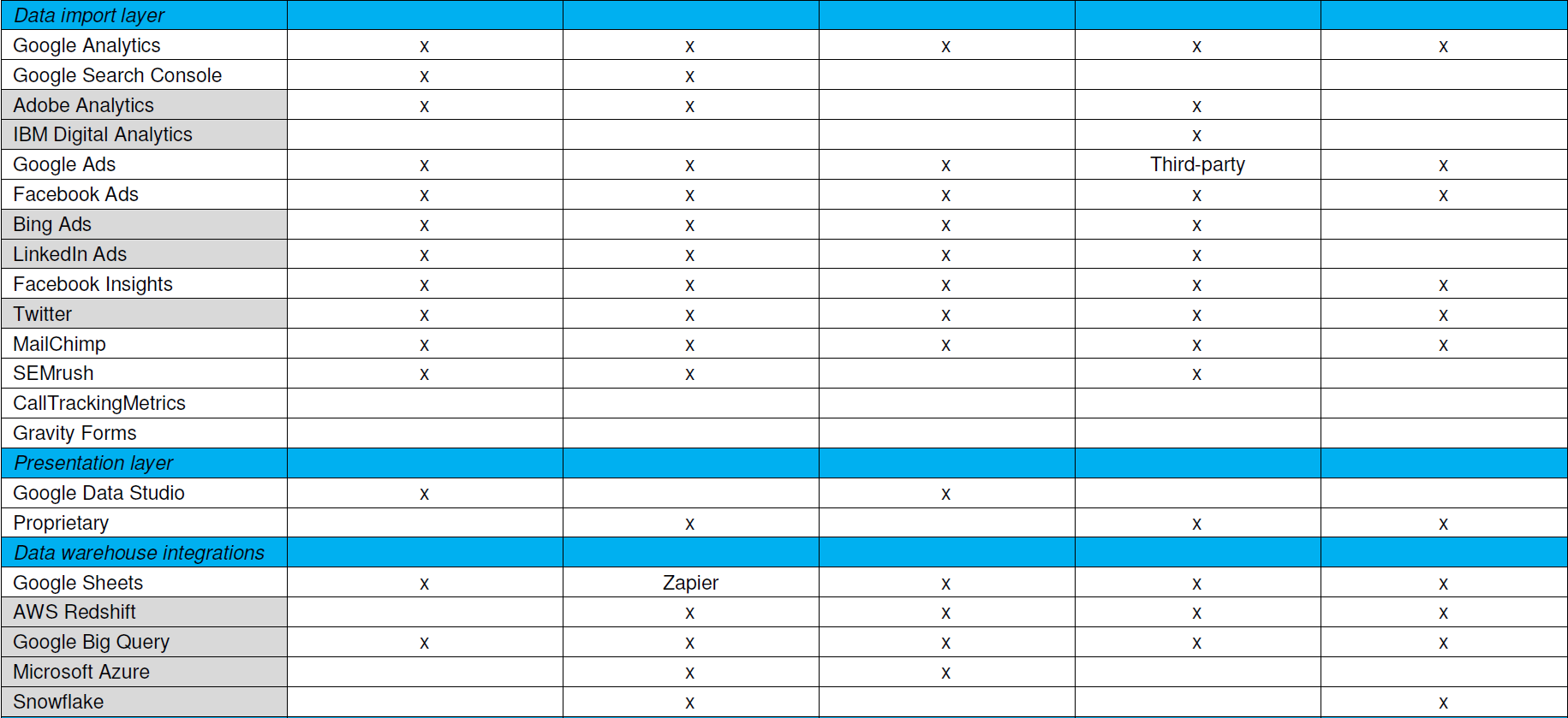
    That’s why the trade study criteria list should visually differentiate must-haves from extended features. I usually shade the extended feature rows, then plot how near-fit tools stack up against all criteria. You can certainly add weighting to features for a more sophisticated analysis, but I find a simple must-have versus nice-to-have usually suffices.

    Now start scoring. A strict Pugh analysis uses a plus-same-minus scoring system. Plus means the tool has a clear advantage on that feature, same is same, and minus means that tool is at a disadvantage compared to the others. I sometimes simplify that to just X for a tool having the feature, blank for it doesn’t. This is mostly a data sheet comparison, and you may want to inject other information such as found reading reviews.

    What you’ll find is a best-fit list, and it probably won’t be perfect. You’d like to see a couple tools capturing most or all the must-haves, and a few more capturing some of them and extended features for contrast. As an example, here’s the trade study matrix for that marketing reporting tool assessment I mentioned with the vendor names omitted.

    Trade studies provide simpler, faster, actionable analysis

    Starting Evaluation

    Notice this doesn’t have cost information yet. Cost biases technical decisions if applied too early, and feature coverage doesn’t necessarily correlate with cost. Vendors also don’t price their stuff the same way. Some price by developer seats, some by data source integrations, some by monthly tracked users (MTUs) on the web.

    With a best-fit list in hand, it’s time to discuss the findings with your team and add information for evaluation. Confirm the scoring, check the vendor pricing models, ask the vendors about unclear feature support and download those free trials to see how they work. Consider how to cover those uncovered must-have features, or if those even are must-haves if few tools support them. Maybe swapping out another tool in the tool stack gets better coverage. Think about innovation those extended features may enable.

    Want simpler, faster, actionable analysis without a massive RFP? Trade studies do that. I think it’s valuable to have one person on your team be the keeper of trade studies, someone skilled at interviewing for requirements and refereeing debates during evaluation. You may want to bring in a consultant skilled at competitive research and analysis to help develop your process. In any case, adapt your approach until trade studies help you make better selections—there is no one right answer.

    — Don Dingee