
Author: Don Dingee

  • 5 Ways KPI Analysis Helps DevOps

    5 Ways KPI Analysis Helps DevOps

    Four Vs drive big data solutions: volume, velocity, variety and veracity. Volume and velocity are technical considerations usually receiving a healthy dose of attention among architects and coders. However, variety and veracity often determine success or failure, and they tend to sneak up on teams who haven’t fully considered them. Key performance indicator, or KPI, analysis can head off variety and veracity problems before they escalate.

    When some folks say “KPI analysis,” they mean KPI monitoring and evaluation—the business intelligence perspective. I’m talking about a DevOps analysis discovering which KPIs should be monitored and what data is needed. One step in this analysis traces each desired KPI back through necessary transforms to its required data sources, often termed as facts. Such an analysis clarifies variety and quickly establishes a path to veracity.

    From a strategy perspective, KPI analysis can also mitigate the symptoms of “big bad data” that devour an organization, consuming people and resources rapidly. Here are five ways KPI analysis helps DevOps teams get a handle on big data.

    1. It prevents over-measuring. If you don’t know what you’re looking for, more data probably won’t help you find it. Teams experiencing FOMO (fear of missing out) expand their data gathering, hoping more variety uncovers something interesting. Once your KPIs have been discovered and fully analyzed, stop exploring and start exploiting. Stick to monitoring KPIs directly driving the most impact for your business.
    2. It minimizes bloating. In any computational system, the most expensive operation is moving data. Simply moving stuff around eats processor, network and storage bandwidth. Even with cost-effective storage available, unnecessary data means a bloated infrastructure and less efficiency. KPI analysis identifies a minimum spanning set of data sources. A workload-optimized solution then concentrates on efficient algorithm implementations, yielding results aligned with your KPIs.
    3. It stops wallowing. Allowing people too close to raw big data is extremely dangerous. Off-the-shelf analytics tools often carry a lot of non-KPI variables with them. Cloud-based martech tools are some of the biggest offenders; they are essentially showing off how many ways they can expose their underlying data. Avoiding the temptation to wallow through intriguing but ultimately irrelevant data saves precious brain cells. Customize reports and optimize dashboards around your KPIs.
    4. It de-obfuscates conversations. Nope, not talking about JavaScript here. We want everyone in the organization talking about the same KPIs and only those KPIs. You’ve seen those presentations where someone tries to dazzle an audience with mostly meaningless charts and graphs. Obfuscating your KPIs underneath a pile of other observations wastes time and risks defeating the purpose. Trust your KPIs and focus all organizational conversation on those.
    5. It thwarts non-causality. This is one place where data scientists and analysts really earn their money. Part of a solid KPI analysis determines causality—if your data sources change by some amount, the KPI needle responds by a quantified amount. Understanding those relationships is critical in avoiding false conclusions from data. If your KPI isn’t moving despite changes at the data sources, or your KPI is changing and the obvious data sources aren’t, step back and look at causality and transforms again.

    If you’re seeing these symptoms developing in your organization, it might be a sign automation was rushed in before KPIs were completely analyzed. At that point the toughest symptom to deal with is bloating. You may be stuck with a sized and funded infrastructure, and you really shouldn’t throw out good data already captured. Ongoing KPI analysis can lead your team to optimizations moving forward.

    Ideally, KPI analysis is performed upfront and these symptoms never develop. Realistically, complex systems have cycles of learning before their behavior is fully understood. Even a good upfront analysis may benefit from a revisit as trends start becoming apparent. When KPIs are rolled up periodically, you’ll need a minimum of six periods of results before expected causality is confirmed, maybe more. If that period is monthly, you’ll need ample patience.

    You’re spending too much on a big data solution to afford a big bad data outcome. KPI analysis is an important step, one DevOps teams with both technical and business expertise can excel at with some practice.

    — Don Dingee

  • Too Many Projects: Breaking Initiative Overload

    Too Many Projects: Breaking Initiative Overload

    Initiative overload. Those words send a chill down the spine of IT leaders everywhere. Not only are overloaded teams juggling too many projects, morale is usually low, with long hours every week and no end in sight. Yet, leaders can’t arbitrarily kill or stall projects without suffering blowback from somewhere. If you’ve been tapped to lead a DevOps team and you see too many projects in play, breaking initiative overload is a top priority. Here’s where to start.

    It’s very common that highly productive DevOps teams suddenly end up with a list of 20 or 30 “priorities” and rapidly developing gridlock. As the team’s newly anointed coach, you get one shot to fix it. What’s your strategy? Addressing these objectives is critical in breaking initiative overload:

    • Prioritize the right initiatives.
    • Shorten the priority list, ideally to five or fewer projects.
    • Allocate resources so priority projects start and finish promptly.
    • Communicate and defend prioritization with a transparent metric.
    • Identify and plan the “next project up” as priority projects finish.
    • Empower the team with “not a priority right now” if approached.
    • Get buy-in and hold all team members accountable.

    Gather the List

    Sounds complicated, right? Keeping it simple is usually good advice. When you’ve got a long list of projects, first recognize they are not all created equal. Some are truly initiatives, such as that mandate from the CEO for tracking widget sales in real-time. Functional departments have their important projects, providing needed cost reduction or efficiency improvement. You’ll probably see a few wish list projects from various sponsors with weaker justification.

    Next, understand that every project carries a couple of hidden costs. One is the opportunity cost of assigning precious resources to it and not to something else. Another is the switching cost teams incur when they are multitasking too heavily. Neither of these costs can be eliminated; however, they can be optimized within the context of what resources are needed.

    So, make a list of every development project on your radar. List the untouchable initiatives with C-level sponsors. Add the functional projects and those pet project requests. Don’t filter the list at all—anything consuming resources or awaiting start needs visibility. Now, you should see what all the initiative overload chatter in the hallways is about. Take a deep breath, call your team leads together and order your preferred brainstorming chow for a meeting.

    Create the Plot

    Seated around you should be a mix of your best technologists and line-of-business experts. Look at the list together. Sponsors may have justified a project request without a real assessment of merit. If you need someone to speak to a project that team leads haven’t seen, bring in a departmental expert. If they can’t explain it or it’s an outdated request they want to revise, put it in a parking lot. When you’re sure your team leads all understand every project on the list, assign a letter designation for each project.

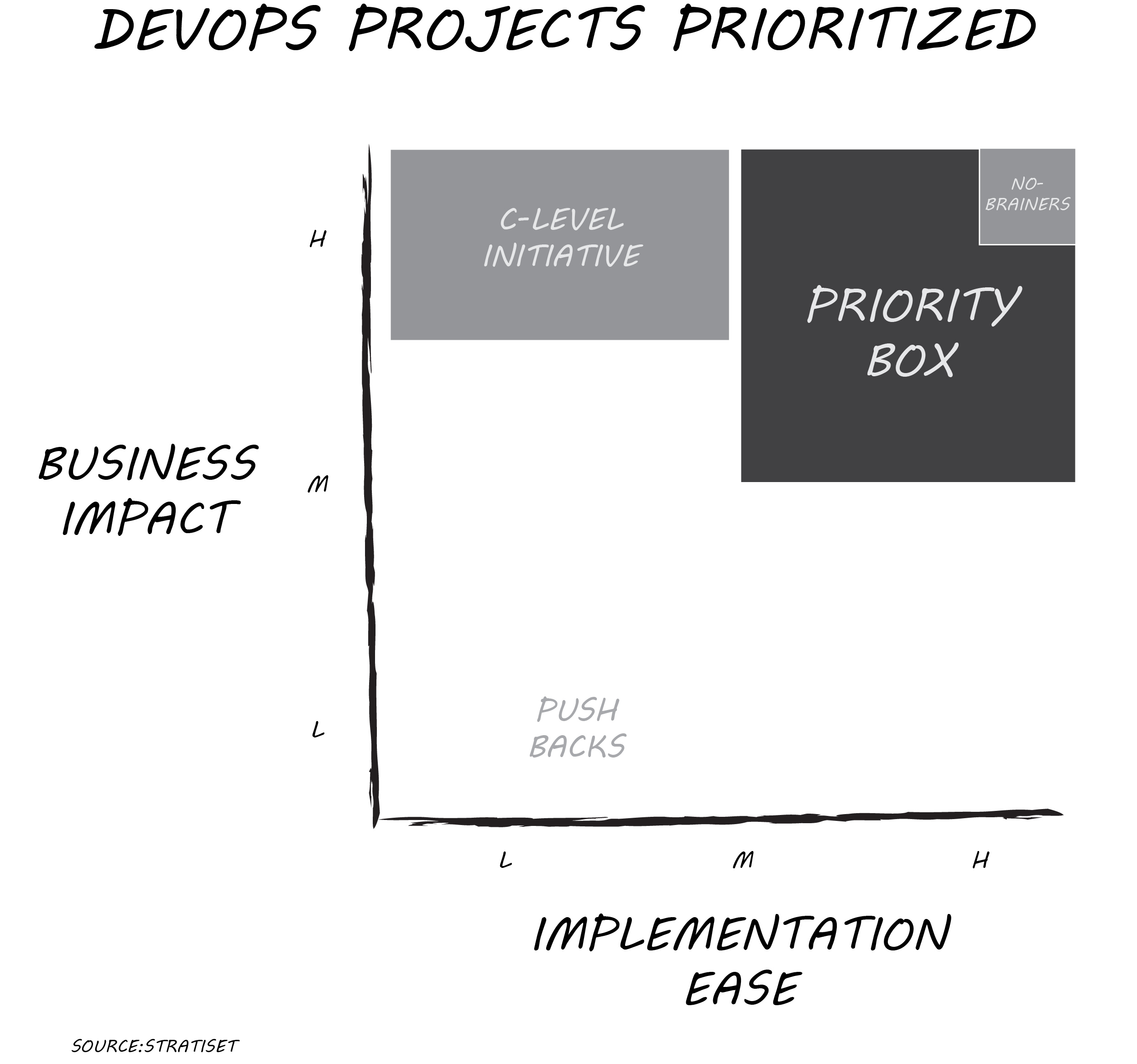
    On your whiteboard or shared screen, plot each project against two dimensions: implementation ease and business impact. Use a relative scale of low, medium or high for each axis. Implementation ease can incorporate many variables including cost of tools, technical difficulty, in-house expertise and more. Business impact can address revenue increase, cost reduction, competitive advantage or regulatory compliance. Don’t worry about absolutes; you’re looking to see how a project compares to all other opportunities. Adjust the pins if necessary after the first few projects are plotted. You’ll get the hang of it in just an hour or two, even if it’s a long list.

    Line Up Priorities

    Few projects are priority no-brainers with high business impact and high implementation ease. More likely, you have several projects in the “priority box,” scoring better than medium/medium. If you have more than five projects there, take another look and jostle pins a bit to get a manageable list. Make sure your available resources match projects identified in the priority box. Allow one exception: That C-level initiative may score as high business impact and low/medium implementation ease. Killing it just because it’s difficult isn’t a good move, but prioritization within context can help address resourcing.

    That’s the priority list you take back to your team. If it’s on that list, work it and finish it. If something isn’t on that list, your team kicks any inquiries on those projects back to you. Push projects with low business impact and low/medium implementation ease back to their sponsors for justification or removal. When one of the priority projects finishes, then and only then start the next best ranking project. Rescore the entire project list after the first group of projects is complete.

    Too easy? Here’s a recent HBR article, “Too Many Projects,” describing a more elaborate approach for bigger initiatives. You may need such in-depth analysis for a C-level initiative requiring more resources. For most projects on your list, more analysis takes substantially more time and likely produces the exact same prioritization as this faster method.

    The key to breaking initiative overload is starting and finishing the right projects. Creating a vetted priority list quickly and getting the team rolling again is well worth the price of an afternoon and some food. Morale will improve rapidly as your team sees progress and the business sees value faster.

    I’d enjoy your feedback on how this process works for you.

    — Don Dingee

  • How DevOps Can Nurture the IoT Brownfield For Results

    How DevOps Can Nurture the IoT Brownfield For Results

    Your latest IoT project sailed through proof-of-concept but started running into problems during rollout. Fortunately, your DevOps superhumans got things running. Now, perhaps a year or more later, you’re seeing more and more issues crop up as the project grows. If this scenario sounds vaguely familiar, or you’re worried you may be headed there, you’re not alone. Welcome to the IoT brownfield.

    “Nah, can’t be. We selected and evaluated all-new hardware and software during the PoC. This has been a greenfield project from the start.” Be careful of this trap. Many IoT projects indeed start off as greenfield efforts, free of the constraints of integrating legacy hardware and software. Your team developed requirements with collaboration between IT and line-of-business folks. You introduced these new tools, and got results on a small scale. According to Cisco’s 2017 IoT survey of 1,845 IT and line-of-business decision makers, 60 percent of IoT projects stall at PoC, so you’re ahead of the game.

    Or so it would seem. Now comes the escalating commitment. Management assumes that if it worked on a small scale, it should just work when rolled out across the enterprise. Data and insight will just come pouring in, and everyone will have visibility to what’s happening everywhere in real-time. They write a big check for the rollout, and away you go.

    First Signs of Trouble

    At the first rollout project review, folks start splitting hairs over the definition of “complete success.” You rolled out X locations, Y of them are working, X-Y of them are in various states of triage. How can that be? You took the “same” configuration and scaled it. As the team investigates the non-working population, you’re finding little things that aren’t the same, calling for tweaks here and there.

    Tossing out the trivial, over scale and time there is no such thing as an IoT greenfield project. Every IoT project with an extended life cycle becomes a brownfield, with a mix of new and old hardware and software. Rigorously controlling a configuration, à la defense or medical applications, is prohibitively expensive and unnecessary for most IoT applications. Your vendors won’t sell you the exact same hardware or software two years from now, five years from now, 10 years from now. Unless, that is, you pay them for things such as lifetime buys of electronic components or freezing open source code releases.

    Ideally, we should send DevOps teams into IoT projects. With a big tool stack acquiring data, the line-of-business types figure out more things to do as the picture develops. The whole point is gaining insight and adjusting for optimized results. Cycles of learning and security enhancements are part of the game.

    Coping with an IoT Brownfield

    Here’s the paradox: the longer your IoT application survives, the more complex this situation gets. How can you improve your chance of success by applying IoT brownfield thinking? Technical requirements vary, but some core philosophical tenets can help.

    Roll with the changes. Your team is already skilled at quickly rolling application software releases. Get more aggressive with ongoing changes at the firmware and network level. Incorporate over-the-air (OTA) technology for updating code on any wireless devices. Deploy multi-protocol gateways that can deal with revised protocol stacks (or entirely new ones) as IoT specifications continue evolving. Update security vulnerabilities relentlessly.

    Abstract everything. You’ll read tons about IoT interoperability, and what people typically mean is wire-level interoperability of protocols. Those multi-protocol gateways have one job—getting real-time data onto an IP network and into the cloud. What keeps me up at night is data-level interoperability. Use edge or fog computing for pre-processing streams so the cloud isn’t stuck sorting out various formats of the same class of data. Abstract your data using JSON or other lightweight techniques so that if a next-generation sensor outputs data in a slightly different format, pre-processing can be revised close to the source. Consider a publish-subscribe protocol for easier routing between nodes.

    Optimize the cloud. Scale can bite hard in the cloud tier. Heterogenous, distributed architectures usually win. Deploy a hybrid cloud solution where there is real-time data. Let the public cloud do what it’s good at: presentation, business intelligence and archiving. In a private cloud instance for heavier analytics lifting, use a framework such as Apache Spark to minimize data movement, with faster nodes sprinkled in for critical algorithms. Try dedicating a small processing core to each data stream for predictable deadlines, or using FPGAs in workflow optimized nodes for boosting compute performance.

    After All, It’s Just Business

    Ultimately, the evaluation of complete success of an IoT application will be up to the line-of-business decision-makers who wrote that big rollout check. A DevOps model is ideal for nurturing the IoT brownfield over scale and time, featuring ongoing strong collaboration between technologists and line-of-business types. Early in the project, reach out for some external IoT expertise until you have a few cycles of learning under your belt.

    As that Cisco 2017 IoT survey alluded to, 61 percent of practitioners believe we’re barely scratching the surface of IoT transformation for businesses. Avoiding the greenfield trap and incorporating these IoT brownfield coping strategies sets you up for the best possible chance of success in the long run.

    — Don Dingee

  • Security Through ‘Legisurity’: Impacts of SB-327

    Security Through ‘Legisurity’: Impacts of SB-327

    With more devices connecting to the internet every day, security through obscurity should have died a long time ago. Still, high-profile cases of devices with mass-produced default login credentials and easily cracked crypto keys persist. As a result, say hello to security through “legisurity”: California SB-327—“Information privacy: connected devices”—became law Sept. 28. How will this impact DevOps teams?

    What SB-327 Does and Doesn’t Do

    Here’s a quick look at what SB-327 does, starting with its timing and scope. The provisions go into effect Jan. 1, 2020, giving teams a little more than a year to prepare compliant connected device designs. The legislation defines a connected device as one “… capable of connecting to the Internet, directly or indirectly, and that is assigned an Internet Protocol address or Bluetooth address.” Authentication is “… a method of verifying authority of a user, process, or device to access resources in an information system.”

    The operative passage in SB-327 calls for a “reasonable security feature … appropriate to the nature and function of the device.” (Before you get too excited, it explicitly shuts the door for individuals suing manufacturers over non-compliance.) With implementation left open, the legal standard is very clear. Reasonableness is a device with features meeting either of two requirements:

    “(1) The preprogrammed password is unique to each device manufactured,

    “(2) The device contains a security feature that requires a user to generate a new means of authentication before access is granted to the device for the first time.”

    Also written into SB-327 is a list of things it does not do. The law does not extend these requirements to third-party software a user installs, and it does not force retailers or software providers to review compliance of a device. It doesn’t apply to devices sold only to federal agencies or the military, and it yields to HIPAA requirements. It does not permit manufacturers to hinder law enforcement agency access to a device with these required features.

    What Should DevOps Do Now?

    As with most first attempts at legislation, the unwritten implications of SB-327 may be even more interesting. Here are a few things I see changing for DevOps teams securing devices and infrastructure:

    • SB-327 only applies to devices sold or offered for sale in California. However, setting up California-only design efforts, supply chains and customer support would be costly. (For $20,000 cars? Sure. For $200 devices? Not so much.) Practically, I see these becoming de facto requirements nationwide by the 2020 rollout. Companies should start now to be ready.
    • If you’re a device manufacturer, you should add both requirements into your minimum viable product baseline, if you haven’t already. You’ll obviously need a strategy for assigning and tracking default passwords and a crypto key authentication method for setup connection. Customer support procedures and documentation also need to change. Consider using one-time programmable non-volatile memory or PUFs (physically unclonable functions) to establish a unique device identity.
    • On the deployment side, you’ll need added tracking for unique default passwords in your device provisioning database. Your customer support teams will need device-specific information at their fingertips to get new or factory-reset devices back online quickly. Crypto key authentication methods will be a more important criterion for device evaluation and selection.
    • If you don’t have a good UX person and an experienced pen tester on your team, hire or contract those roles right now. Simplicity with security is always going to be the right answer.

    More Laws Ahead?

    Will the debut of “legisurity” satisfy lawmakers and stem connected device breaches? My guess is this is only the beginning; SB-327 does nothing about requiring stronger passwords or thwarting more sophisticated protocol-based cyberattacks. The main point of SB-327 doesn’t seem about securing a single device, although it should help; rather, it’s trying to prevent rapid compromise of an entire population of that device. (Pro tip: whatever you do, don’t use a device’s MAC address in a simplistic algorithm, or you’ll end up like this sad, not-so-smart lock story. Cracking one device cracked them all.)

    For the more curious, here’s the entire text of SB-327, and some other analysis on legislative proposals at the federal level. What are your thoughts on SB-327, how you see it affecting DevOps, and if legislation is the right path for securing connected devices?

    — Don Dingee