Tag: tools

  • VC Predicts Major Shift to AI-Infused Applications in 2018

    VC Predicts Major Shift to AI-Infused Applications in 2018

    Thanks to the rise of artificial intelligence (AI), the nature of DevOps is about to change as developers spend less time writing code in favor of training models based on various types of algorithms to accomplish a task.

    Dan Scholnick, general partner with Trinity Ventures, an early investor in companies such as New Relic and Docker Inc., says developers in 2018 will absolutely be required to gain mastery over how to implement machine and deep learning algorithms to stay relevant. Once a model based on those algorithms is incorporated into an application, the challenge for the DevOps team will be implementing the processes needed to make sure the AI created based on those models remains tuned and optimized to the business process it’s supposed to drive.

    Now that the price of cloud services based on graphical processor units (GPUs) has dropped and open source tools for building AI models such as TensorFlow are readily available, Scholnick says the cost of infusing AI models into applications has dropped considerably. Before the end the end of the year, most users of business-to-business (B2B) applications will expect that application to exhibit many of same natural language and speech recognition capabilities that already are becoming commonplace in many consumer applications, he says.

    Serverless computing frameworks also will make it easier to scale those applications up and down as needed using event-driven architectures. Most instances of serverless computing, such as AWS Lambda on the Amazon Web Services (AWS), are employed on a public cloud. But as serverless computing becomes more common, Scholnick says Trinity Ventures is expecting competition for workloads among cloud service providers to become fierce as IT organizations continue to shy away from proprietary technologies.

    Scholnick says the rise of serverless computing doesn’t necessarily means batch-oriented applications will disappear. But it does mean that a much higher percentage of the applications being built will be either real time or near real-time.

    The challenge most organizations will face building these applications is not necessarily developing them, as the tools needed to infuse AI into applications are themselves becoming more automated. The challenge will be in collecting enough data to inform the AI model. Most of the algorithms being employed to build AI applications are decades old; the only thing that has really changed is the cost of acquiring all the data required to drive those algorithms—it has dropped substantially, thanks primarily to the rise of cloud computing. Because of those lower costs, DevOps teams can expect that not only will new applications be infused with AI capabilities, but also there will be a significant effort to modernize or replace legacy applications.

    At this juncture it’s not at all clear that DevOps teams are prepared to incorporate AI technologies into application development processes. But pressure to accomplish that goal is about to  increase: A new market research report published by Tractica forecasts that annual worldwide AI software revenue will increase in 2016 to $89.8 billion by 2025 from $3.2 billion in 2016. Most of that growth will be driven by 266 AI use cases distributed across 29 industries, according to Tractica. Whatever the outcome, however, the DevOps landscape in 2018 is about to transformed utterly once again.

    — Mike Vizard

  • Top 5 Best Practices for DevOps Monitoring

    Top 5 Best Practices for DevOps Monitoring

    Today organizations are required to deliver on higher levels of customer satisfaction for their online services. Many, however, are forced to support these initiatives with an interrupt-driven approach as they react to fix things after they break. However, for a more proactive approach and to manage expected high levels of SLAs, organizations can opt to reduce their amount of unscheduled downtime by implementing a continuous delivery (CD) model to their development efforts.

    What is critical in the CD model is the ability to monitor and manage systems in a structured way, getting early detection of problems so organizations can make changes before the system is impacted. While unexpected failures make interrupt-driven work unavoidable at times, organizations can become more proactive by examining their current approach and toolset against business needs to help create a path to continuous service delivery optimization.

    Effective CD Models Need Effective Monitoring

    As a starting point, organizations need control and visibility into their DevOps environment by collecting and instrumenting everything. Considering the amounts of data, this can be an insurmountable challenge for most organizations. To get started, follow these five best practices to perform DevOps monitoring efficiently and quickly in a measurable and scalable way.

    Step 1: Collect the Data. You can’t manage what you don’t measure! It is important to take inventory of what is being collected today and align with business and executive teams to collaborate on the aim of the services delivered. Analyze the inventory collection of metrics with questions such as: “Why aren’t we collecting this? How does this fit into our goals? Have you ever seen a failure in X? How often should we be measuring this? How long should we keep it for? Is that important?” Teams also should evaluate how they are collecting the information and consider the best architectural approach for collecting their metrics, including whether pull, push or pull collection methods are better. Once goals are understood and the inventory of data is collected, look at what else your organization should consider collecting.

    Step 2: Correlate and Triage. Correlation of data is needed to understand it, but data comes in at different frequencies, in different time frames and from different sources. Work to normalize the data to understand it, perform comparisons against the different incoming metrics and establish baselines for basic service availability. Since organizations aim to go beyond basic service level agreements (SLAs) and offer a high-performing solution, constantly ask what the organization is missing from a data perspective and how it relates to business initiatives. Asking that question from the collection, correlation and triage perspective is critical.

    Step 3: Identify Trends. Organizations need to examine historical data to identify trends and take action before issues arise and customers complain. Establish alerting thresholds by outlining what a normal day looks like from a monitoring performance and customer perspective, and then identifying examples of what makes an abnormal day. This ties in with managing infrastructure inventory and understanding safety thresholds for each of the components that potentially could impact the service offering. It’s critical to communicate these findings with teams and business-line managers to prevent service delivery problems from happening and optimize offerings based on identified trends.

    Step 4: Notify and Act (Automation). In manual mode, a notification is delivered and then the team reacts. But teams are continually pushed to do things faster, and automation can help. To get to that point, organizations must understand where best to add more automation. How do you gather the right telemetry that delivers consistent answers that the machine can operate rules against, and do you leverage an automated process or notify a person? The desire to improve to a faster process requires a shift from manual to automated practices.

    Step 5: Predict (What-if Analysis). If you don’t take the time to go through the first four steps in a methodical way, it’s very difficult to reach this final step without always remaining in a manual mode. To balance costs and availability, it’s critical to discuss with the executive team how to predict customer service consumption (revenue) against the amount your services are going to cost the business.

    For example, developing a service that can alert customers of a potential service disruption due to disk space can be accomplished only by clearly setting business goals, then using the right metrics and events platform leveraging a time series database. In this case, the business goal is to ensure no service disruption due to failures such as low disk space; the metric monitoring is for disk space for each customer instance with the appropriate threshold alert set off by an automated trigger; and the action is an email to the customer letting them know of the situation and what action they can take (reduce load or upgrade for more disk space). In this example, it is important to marry business logic with the monitoring practice to make service a successful experience for customers. Furthermore, this approach will help teams to not only predict user experience but also help to predict OpEx and CapEx better into the future.

    That’s the benefit of the ability to predict with the right monitoring approach—to make informed business decisions based on results. Customers appreciate that, and proactive support is much better than being reactive.

    Emerging trends such as microservices, containerization, elastic storage, software defined networking and hybrid clouds are pushing the boundaries of DevOps monitoring. The right monitoring plan can identify and resolve problems before they affect critical business processes and enables customers to plan for upgrades before outdated systems begin to cause failures and outages for users.

    About the Author / Mark Herring

    Mark Herring is CMO at InfluxData. He is a well-rounded silicon-valley executive with proven experience in taking complex technology and making it understandable to the broader audience. His deep developer roots are never far from his mind as he looks at trends and asks the tough questions on whether the technology is here to stay or just another fad. Currently Mark is Chief Marketing Officer at InfluxData. Follow him on Twitter and connect with him on LinkedIn.

  • How an Integrated Tool System Helps Implement DevOps

    How an Integrated Tool System Helps Implement DevOps

     DevOps is the marriage of application development teams with system operations teams, their philosophies and actions.

    In an agile environment, development, testing and operations all must work together to meet frequent iterations, releases and delivery goals. This calls for a collaborative development environment that supports data orchestration with other lifecycle tools.

    The article will explain how multitool integration support can help organizations perform the DevOps life cycle, which includes continuous planning, continuous integration, continuous testing, continuous monitoring, continuous delivery and continuous feedback mechanism.
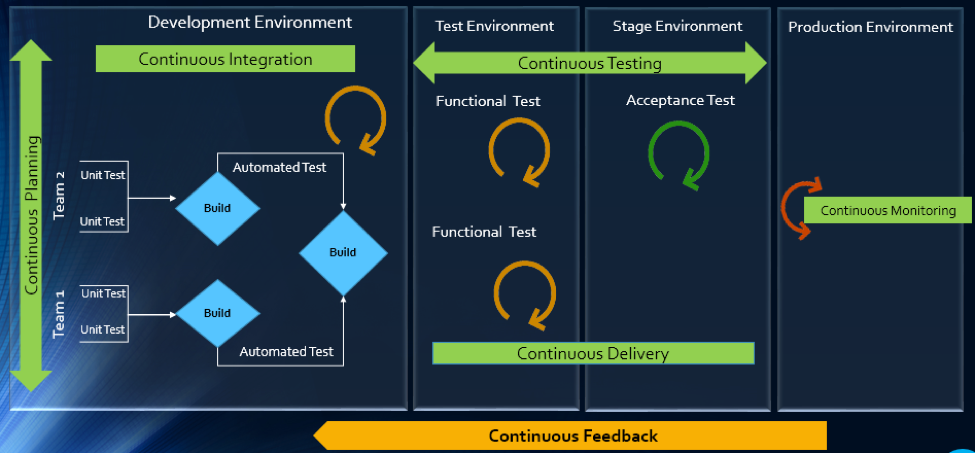
    The Drivers of DevOps

    Today, with the increasing competition and the need for an early market release, the software development industry is undergoing a paradigm shift. Agility has become an inevitable process across all organizations. In addition, shorter ROI cycle spans, frequent releases, increased CRs and different IT systems and tool technologies have made the situation critical.

    The industry demands higher transparency, maximum visibility, minimum turn-around time, lesser human intervention and efficient processes at every stage, from development to delivery.

    However, organizations that use specialized tools to manage builds, deployments and delivery processes continue to face difficulties when it comes to data orchestration and process automation across the tool chain.

    In an agile environment, developers and testers need to ensure not only that code changes work and integrate well, but also  that frequent iterations do not make the product unstable. Hence, seamless cross-tool collaboration is very important here.

    The process chain consisting of Code –> Build –> Provision –> Test –> Defect Fix –> Deploy –> Release needs to run continuously and smoothly without compromising delivery deadlines or the product quality.

    Automation is the Catch Line

    With the rising demand for continuous delivery and sprint-based development, manually setting up a test, build and deployment environment is burdensome and time-consuming.

    Software teams need to automate the entire cycle of build, provisioning and deployment of test environments, including the tools, scripts and test data to ensure rapid delivery. They also need to collaborate around the application architecture and monitor event-action-based mechanism for seamless data flow across the tool chains.

    Reports show the most important DevOps components are IT automation, agile development and collaborative teaming of personnel. Therefore, without centralized orchestration of tools, achieving DevOps is not a realistic situation. Since organizations spend around 73 percent of their DevOps budget in tool acquisition, it is important they know how to get the tools working together to overcome DevOps obstacles.

    In the process of connecting their existing and new toolsets, most organizations search for an integration methodology that is scalable, reliable and easy to maintain. Point-to-point integration between tools help, but to a limited extent. Even a single change in integration rules involves complex coding and high maintenance across development, test and deployment cycles.

    How ESB-based Integration Can Help

    An enterprise service bus (ESB)-architected integration hub connects both the existing and the new tools to support a seamless data flow between them across the DevOps life cycle.

    Once integrated, the data from both the development and the operations tools become readily available for use to every stakeholder. The benefit of using ESB-based integration is that you can add or remove any tool based on your connectivity requirements.

    In a typical scenario, DevOps teams use a series of cross-functional tools starting from project planning to delivery and operations. Neither of these tools comes with built-in integration features, which results in inconsistent flow of information among tool users.

    Project managers use application lifecycle management (ALM) or Agile planning tools to detail the scope of work and tracking progress reports. Upon unit testing, developers use a different tool to check in a code from their integrated development environment (IDE) to the source code management (SCM) repository. They also perform a code quality analysis before committing to the SCM.

    In such a scenario, continuous integration (CI) can be achieved only when developers bring these planning, unit testing, code analysis and SCM tools under one roof. That is, connecting the tools through a common integration hub. It also helps developers to manage everything from within the IDE.

    After successful check-ins, build engineers trigger the SCM tools for automated build and testing. Upon a successful build, testers engage in continuous testing using manual and test automation tools, followed by provisioning for continuous deployment. They also perform load testing, API testing and security testing using separate tools. An integration support helps to keep the real-time data flowing between the build and the testing tools uninterrupted and seamless.

    A DevOps system also includes application performance monitoring (APM) tool for continuous monitoring of memory consumption, CPU usage, database health and release tracking. Operations team use help desk/ IT service management (ITSM) tools for continuous feedback generation and customer support. And delivery managers use continuous delivery tools for defining and tracking release pipeline through graphical interface.

    When all these tools are connected to a central integration hub, product release and help desk operations become faster and efficient. The integration between development and ITSM tools facilitates continuous feedback generation, which helps to improve the product quality.

    Through an integrated tool ecosystem, project managers can create a DevOps workflow based on business logic and automate the data movement across tool systems. Business analysts, developers, testers and delivery managers can also get real-time update on development progress and keep track of actionable items. Supervisors can route cross-tool data to a central repository and generate meaningful reports and analytics before taking business decisions.
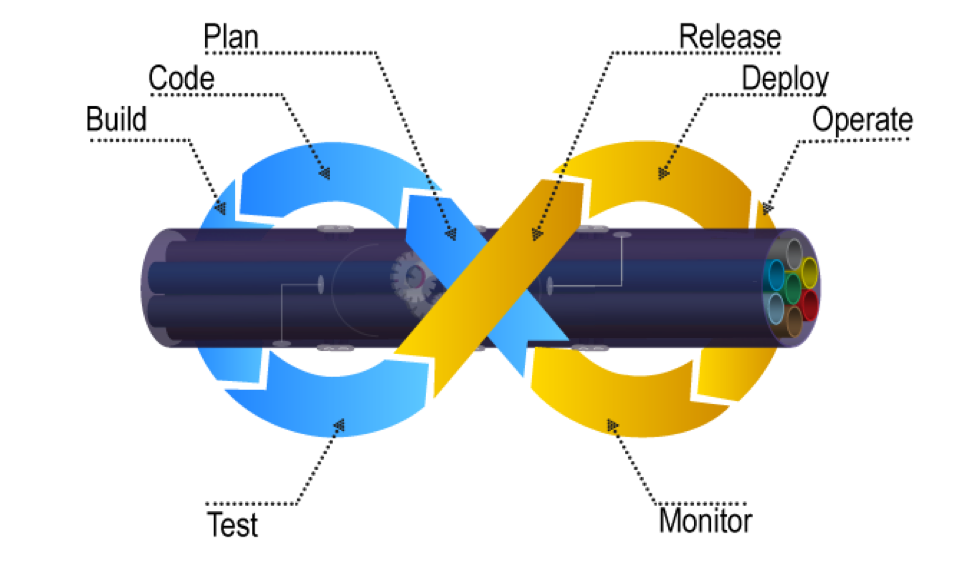
    Fig: ESB Integration Bus Facilitating Adoption of DevOps

    An ESB-based integration tool helps organizations to implement and leverage the best DevOps practices by establishing connections across all participating tools. An integrated tool ecosystem helps achieve the following:

    • Real-time collaboration between development, delivery and operations tools
    • Continuous planning from requirements capturing and review to design and code analysis
    • Cross-tool traceability for defining relationships between various data objects
    • Test strategy implementation for continuous testing
    • Continuous integration through automatic triggering of build on successful completion of code check-in
    • Continuous testing through workflow based automatic triggering of both manual and automated test cases
    • Scheduled test automation script execution enabling continuous delivery
    • Continuous monitoring of release quality through reports and dashboards
    • Automated defect identification and resolution for faster help desk response
    • End-to-end traceability providing better release predictability and change impact analysis
    • Meaningful reports, metrics and KPIs for quick decision-making
    • Continuous delivery through tracking release pipeline

    How Inter-tool Connectivity Brings Continuity

    To understand the stages of engineering practice, let us consider a sample DevOps scenario in an IT service organization.

    The organization uses an ITSM tool to manage support tickets submitted by customers. On submission of a ticket, it is automatically passed on to an ALM tool as user stories or defects for internal development.

    On allotting to a sprint, developers and testers view the user stories or defects from IDE, SCM and test tool. Once the coding is complete and codes get checked in at an SCM tool, an automatic build gets triggered using a build tool. Upon successful completion of the build, tool provisioning is done through a virtual machine.

    The successful build can be automatically deployed using a deployment tool and automated tests can be executed through a test automation tool. The test results are then captured and linked with test cases and the source requirements for traceability.

    The defects that are raised in the defect tracking tool for failed test cases can be automatically routed to developers for fixing.
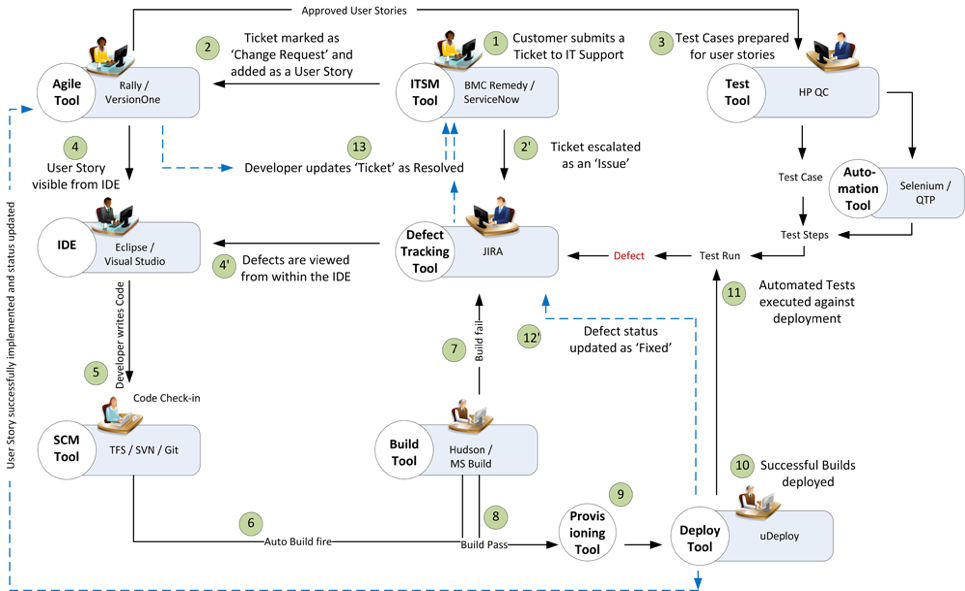
    Fig: DevOps scenario achieved in a collaborative tool environment

    Once connected to an integrated tool system, users get a complete visibility of the tool records and their relationships from within their own tools. Developers, testers and help desk managers can get complete traceability view between development artifacts and change requests or defects.

    When all the tools participating in DevOps sync with each other, developers can easily view the support tickets reported by the operations team right from their own IDE.

    The help desk team also gets a real-time update whenever a change request gets implemented or a defect is resolved by the development team. It eliminates the latency in communication between the Dev and Ops teams to a great extent.

    In addition, customers get frequent updates from the help desk team, which makes them happy and confident about the product performance.

    Conclusion

    Implementation of DevOps is not a “Do once and forever” type of task. Just deploying the right set of tools to the right users will not serve the purpose. Proper connectivity between and across the DevOps tools chain is necessary if you want to create a collaborative work environment around the Dev and Ops teams.

    An integrated tool system saves considerable amount of time and effort, which would otherwise be wasted on manual execution, monitoring and reporting of data during DevOps implementation.

    About the Author / Sanat Singha

    Sanat Singha is a senior technical and web marketing writer. He takes special interest in ALM process, technologies and tools integration as an industry. Sanat does content marketing, professional blogging, social media promotion and website analytics.


  • SlashData Report: Developers Influence Tool Selection

    SlashData Report: Developers Influence Tool Selection

    SlashData has just released its “State of The Developer Nation Report for Q3 2017.” Here at Heavybit, a program that helps developer and infrastructure startups take their product to market, we look forward to SlashData’s reports that allow us to keep up to date on the shifts in the developer landscape.

    In 2013, Stephen O’Grady published, “The New Kingmakers: How Developers Conquered the World,” sending shockwaves through the ecosystem about just how important individual developers are when it comes to making technology purchasing decisions in companies.

    SlashData provides compelling data that backs up O’Grady’s book, showing how influential developers are within an organization and how targeting individual developers at organizations is a viable strategy for enterprise sales. The research only includes professional developers in organizations who buy tools or components and exclude lone wolves—developers who work on their own and where a purchase decision is purely personal.

    Key report highlights Include:

    More than 87 percent of developers with a leadership function, no matter how small, as well as two-thirds of front-line coders, are somehow involved in purchasing decisions.

    For developers that are not in a top leadership position, between half and two-thirds are in a position to make recommendations or influence decisions. In particular team leaders (i.e., senior developers) are big influencers (68 percent).

    Thirty-nine percent of developers acquire tools for their personal use.

    The ability for developers to pick and use their own tools shows that they have the power to make their own decisions and a budget to spend (even if it is small). It’s through this personal use that a tool can get introduced to an organization and is the first step in evangelizing the tool to the greater developer community.

    Up to a third of mid-level developer leaders (team leaders and product managers) hold the pen when writing specs for tools (32 percent and 31 percent, respectively), or even get the final word on which tool to adopt (30 percent and 27 percent).

    This fact is even more proof that individual developers at all levels matter. “Even when in a majority of cases developers still need management to sign off on purchases, the days are over when an inadequate tool could be pushed from the top down because it appeared attractive to CFO’s or top brass,” the report states.

    Developer influence, when it comes to making technology decisions in companies, continues to grow. To harness this shift, companies need to focus on creating tools that developers will come to love and evangelize on your behalf within their organization.  

    — Malia Powers

  • Patrick McClory on Building Successful DevOps Organizations

    Patrick McClory on Building Successful DevOps Organizations

    Patrick McClory has been writing code, managing DevOps and designing scalable application infrastructures for more than 10 years. Most recently, as COO and CTO of DualSpark, he served as an expert Amazon Web Services consultant, helping clients capitalize on the benefits of cloud architecture and design with modern and innovative software, infrastructure and automation strategies leveraging AWS. After DualSpark’s recent acquisition by Datapipe, McClory assumed the role of SVP of Platform Engineering and Delivery Services, where his expertise is put to good use overseeing Datapipe’s global automation and DevOps, as well as its strategic consulting and platform teams. In this role, he manages several teams, including Datapipe’s client-focused service delivery team focused on enabling customers to transform their businesses by leveraging cloud-based patterns and practices.

    devopsy.kinsta.cloud: Tell us a little about your cloud experience, your consulting background and your role with Datapipe?

    McClory: I found myself in the Amazon partner channel probably a little over eight years ago. I worked for a couple of Amazon partners, and then I eventually went to work for Amazon. After having helped lead some of their consulting work in their professional services organization, which was fairly fledgling at the time, I left to form my own organization. It proved to be an interesting divergence for me. Where I previously spent a lot of time helping clients solve technical cloud problems—which is typically technical and very straightforward—I found myself transitioning to the greater software- and people-problem challenges around effectively taking advantage of cloud technologies.

    That’s really how DualSpark was born, both in terms of cloud data architecture, design and consulting. We helped customers understand how to take advantage of the cloud from a business perspective, as well as dive all the way down into the deep, nitty-gritty of exactly how they should technically do it. After eight years of consulting in that world and Datapipe acquiring DualSpark, I found myself in an interesting place where I now run the consultative, the engineering, the client-face role for Datapipe. I also run our platform-engineering team. The big story behind that is trying to take all the knowledge and all the patterns and all of the collective wisdom that we’ve gained over the years, between myself and the team, and building product to help our customers get there faster.

    devopsy.kinsta.cloud: We’re many years into the movement toward DevOps. What do you think we’ve learned the biggest challenges to be when it comes to getting DevOps right?

    McClory: What we’ve learned is that the technical side of the argument, when it comes to actually achieving a DevOps workflow, is probably the least complicated. The real challenge is getting people aligned and focusing the effort in the right direction. For me, that’s been the challenge. But people gravitate toward the tools because they’re easy. Realistically, you can’t take advantage of the tools if you don’t get yourself organized and going in the right direction.

    I’m going to tell a story. There was probably a span of six months where I had the, “What continuous integration tool should I use?” discussion. Invariably, every time, everyone ends up with the same sets of tools. Everybody ends up with Jenkins and, realistically, no one’s always terribly happy with it. Still, it was a six-week conversation, no matter what they eventually chose. Then, rather than starting from nothing, I decided to come to these meetings with a pre-configured system. I would load it into their AWS account, or wherever made sense. They’d see Jenkins hooked up, fully, to their source control toolset. It was highly available and had all of the plug-ins they sought. We took away everything to discuss. We’d then take the next two hours to configure it, play around with the bells and whistles and knobs. Fit it to their purpose. They could always shift to something else down the line.

    We couldn’t believe it, but that tactic worked. I no longer had six-week discussions about CI and what tool to use. I had a two-hour, fit-for-purpose discussion. At that point, bells going off in my head, going this is very interesting. What if we could do this more deeply? What if we did this all the way through the entire stack? What if I gave people multiple options and we just went through and picked it, like a menu? I’m not going to say that’s the overall product design. It’s a little bit more complicated and more intricate than that. The whole goal is to help customers get to the transformative place where they want to be, faster, by avoiding some of the common pitfalls of technologists who like to chase shiny things.

    devopsy.kinsta.cloud: With that in mind, what are some of the biggest challenges when it comes to getting the processes and people in place?

    McClory: IT as an organizational concept within companies that hasn’t done themselves any favors in the last 20 years. There are several different takes on this, but all basically converge on the idea that since the IT service management boom, IT as a discipline hasn’t really matured. Since then, there have been many, many inflection points and/or maturity moments when IT can provide services. But there’s this awesome gap that continues to grow between what the typical IT organization can deliver and what the business is demanding. That’s where shadow IT shows up. It’s like to divergent lines and that gap is shadow IT.

    What’s happened is that IT never, and I say this with the internal acknowledgment that I’m a part of this community as well, really done a great job of connecting our mission to the value of the business. The cost center, the revenue center, there’s all these ways to look at it but at the end of the day, IT is a burden, not an enabler. That’s why a lot of these technologies in DevOps are such a focus. The pain is so great that organizations don’t want to fix the systemic problem because they need to stop the bleeding. Often, what we’ve found is that there’s a combination approach that’s really necessary to build trust within that relationship.

    devopsy.kinsta.cloud: What do you think IT teams must do to flip IT from that unhelpful department to become more aligned with business objectives and profitability? Not that IT must be a profit center, but be more aligned with the business.

    McClory: Being more aligned with delivering value, right? I think it’s two vectors. There’s the one half that’s easy and stereotypical and that’s just because that discipline hasn’t really aligned that way for so long. As silly as it sounds, I find that there’s so much animosity between business and technology organizations on the stereotypical kind of day. There’s a little bit of corporate therapist that we play and we help build bridges, help to realign, help to translate. It’s a surprisingly entrenched issue of people at an interpersonal level.

    It’s not simply between the technologist and the company and the business. It’s also even within the technology organization, between your typical developers and operations organizations. Getting those three views aligned to serving the value of the business is, a lot of times, a matter of helping people to acknowledge that other people are a part of it and that they’re all there to serve the same mission.

    On the other side, there’s also this misnomer that there is a silver bullet, from a tooling capabilities perspective. There are some great tools out here and I’ve both built partnerships with them and used their tooling heavily. One that comes to mind, particularly, is Chef. I love their tools. They don’t solve every problem I have, though. There’s a landscape of tooling that I tend to end up back at that standard configuration management, continuous integration, testing and deployment management, monitoring and alerting. You end up finding good options in each one. Not that they’re perfect solutions, but a lot of organizations are looking for that DevOps in a box. They’re looking for that one capability and they forget that it’s not one thing. Even if people have tried to market it that way. It’s very much a technology plus an organizational culture issue. Not a single technology.

    devopsy.kinsta.cloud: Where do you see your clients now in the curve of DevOps adoption?

    McClory: If you’re looking at a bell curve and cut it into quarters, I think we’re probably in the early phase of the second quarter of adoption. There’s a ton of interest and I think that’s what I would look at, in terms of volume. I see lots of people who’re interested. I don’t remember who said it but to paraphrase, there’s a lot of people talking about it. There are very few people who actually achieve it.

    At the same time, I don’t believe that, to your point, DevOps isn’t a destination, it’s a way of doing things. It puts you on a vector, it pushes you in a direction. It’s never about the destination, it’s about the journey.

    In that respect, I think there are a lot of DevOps practices that start to seep in at the cultural level. As organizations try to be more efficient, we see them coming into some of the automation practices and the tooling side of things much more eagerly than they are the organizational collaboration side. Even that’s starting to break down and, oddly enough, I don’t know that I would blame it on the influx of newer developers or younger developers into the market. Certainly, it plays a role as the—not to wax poetic—the culture of sharing economy, the open visibility outcry from the hipsters perspective, or the millennial view. I think a lot of that I really positively impacted organizations behind the scenes, to open up a lot of that collaboration and visibility that’s necessary to get DevOps right.

    — George V. Hulme

  • Splunk and the ELK Stack: A Side-by-Side Comparison

    Splunk and the ELK Stack: A Side-by-Side Comparison

    This article’s purpose is to compare the “big two” in the log analytics world—Splunk and the ELK Stack. But before we go into details, a short introduction to the competitors is required.

    Splunk is the “Google for log files” heavyset enterprise tool that was the first log analysis software and has been the market leader ever since. The open-source ELK Stack of Elasticsearch, Logstash and Kibana is an up-and-coming rival that is a consolidated data analytics platform. The two compete in terms of features, usability and cost.

    Overview

    Splunk and the ELK Stack use two different approaches to solve the same problem. People typically choose one or the other based on how their organizations are structured and how much time they want to devote to log analytics. Splunk takes a pile of data and allows people to search through the information to extract what they need. ELK requires more work and planning in the beginning, but the value extraction is easier at the end.

    The three key components of Splunk are its forwarder, which pushes data to remote indexers; indexer, which has roles for storing and indexing data and responding to search requests; and search head, which is the front end of the web interface where these three components can be combined or distributed over servers. Splunk also supports the integration of its functionalities in applications via SDKs. Common use cases include operational monitoring, security and user behavior analytics. Splunk is a paid service wherein billing is generated by indexing volume.

    The ELK Stack is a set of three open-source products—Elasticsearch, Logstash and Kibana—all developed and maintained by Elastic. Elasticsearch is NoSQL database that uses the Lucene search engine. Logstash is a data processing and transportation pipeline used to populate Elasticsearch with the data (though also it supports other destinations including Graphite, Kafka, Nagios and RabbitMQ). Kibana is a dashboard that works on top of Elasticsearch and facilitates data analysis using visualizations and dashboards.

    Both Splunk and the ELK Stack can be used to monitor and analyze infrastructure in IT operations as well as for application monitoring, security and business intelligence.

    ELK vs. Splunk

    Loading Data

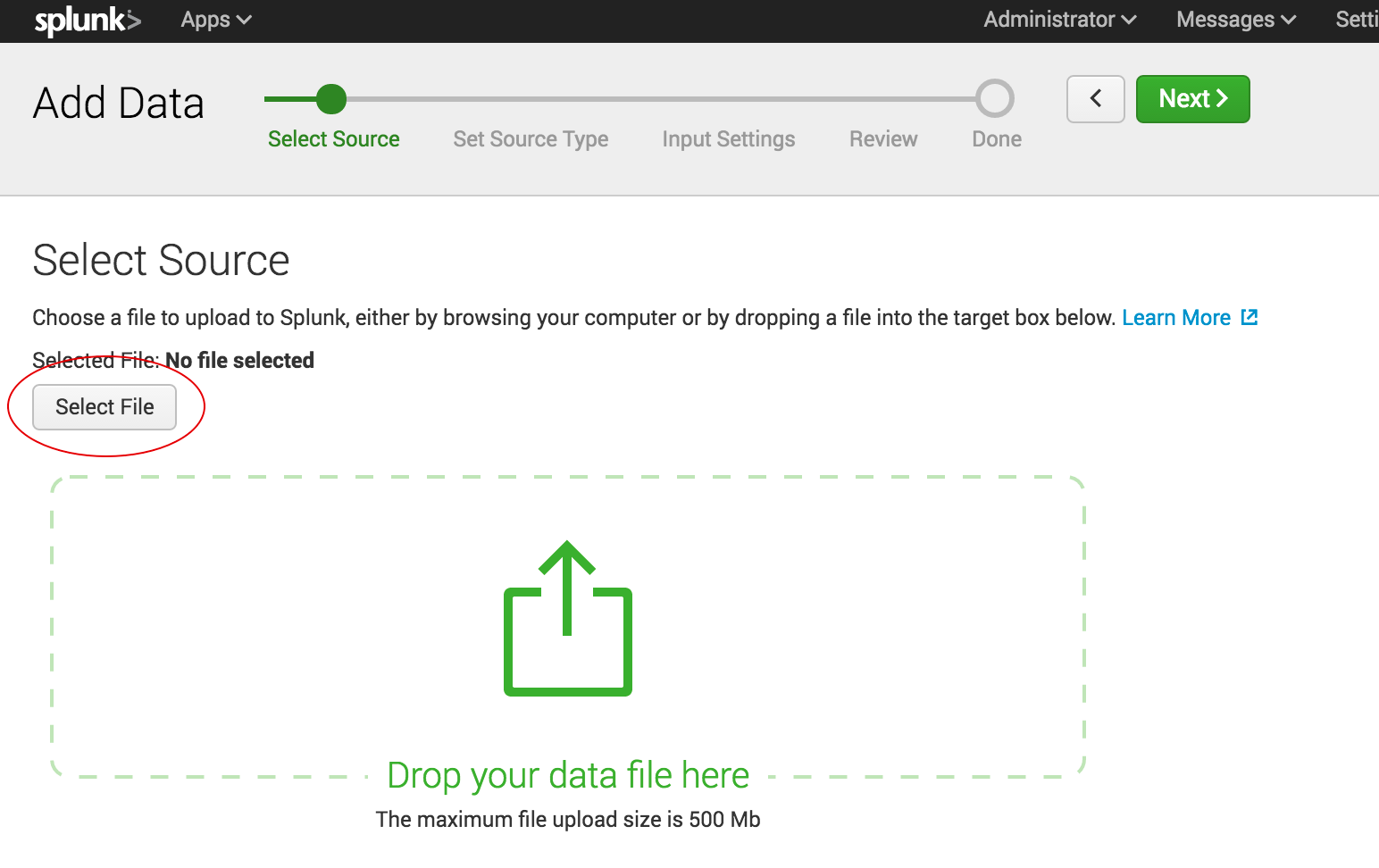
    Shipping data to Splunk is fairly easy. After installation, the forwarders come pre-configured for a wide selection of data sources such as files and directories, network events, windows sources and application logs, and they are used to import data into Splunk as shown:

    import data into splunk

    In the ELK Stack, Logstash is used to ship data from the source to the destination. However, Logstash needs to be configured so that each field is identified before the data is shipped to Elasticsearch. This kind of configuration can be tricky for those who do not work with scripting languages (such as Bash, Python or Ruby), but there is good support online that can be found quite easily.

    Visualizations

    The Splunk web UI includes flexible controls that allow you to edit and add new components to your dashboard. Management and user controls can be configured differently for multiple users, with each having a customized dashboard. Splunk also supports visualizations on mobile devices with application and visualization components that are easy to customize using XML.

    splunk xml customization

    Kibana is the visualization tool in the ELK Stack, and like Splunk, the platform supports the creation of visualizations such as line charts, area arts and tables and the presentation of them in a dashboard. The search filter is always shown above the different views: If a query is used, it is automatically applied on elements of the dashboard. Splunk also has a similar option, but it involves configuration in XML. Still, Kibana does not support user management, but hosted ELK solutions provide it out of the box.

    kibana

    Search Capabilities

    The search function is a key capability of any log management platform. Both the Splunk and ELK Stack’s web UIs support searching using a dedicated search field. The query syntax on Kibana is based on the Lucene query syntax while Splunk uses its own Splunk Search Processing Language (SPL). Those familiar with scripting languages may already be familiar with Lucene while SPL is proprietary and must be learned.

    One other difference is that Splunk offers dynamic data exploration to help users to find and extract everything as a searchable field when formatted in a manner that allows searching for non-configured fields. Elasticsearch fields, on the other hand, need to be defined in advance to use aggregation over the log properties.

    Here is one example of a query for each platform.

    Kibana:

    (beat.hostname: ES1 AND metricset.name: process) AND (system.process.username: root OR system.process.username: admin)

    Splunk:

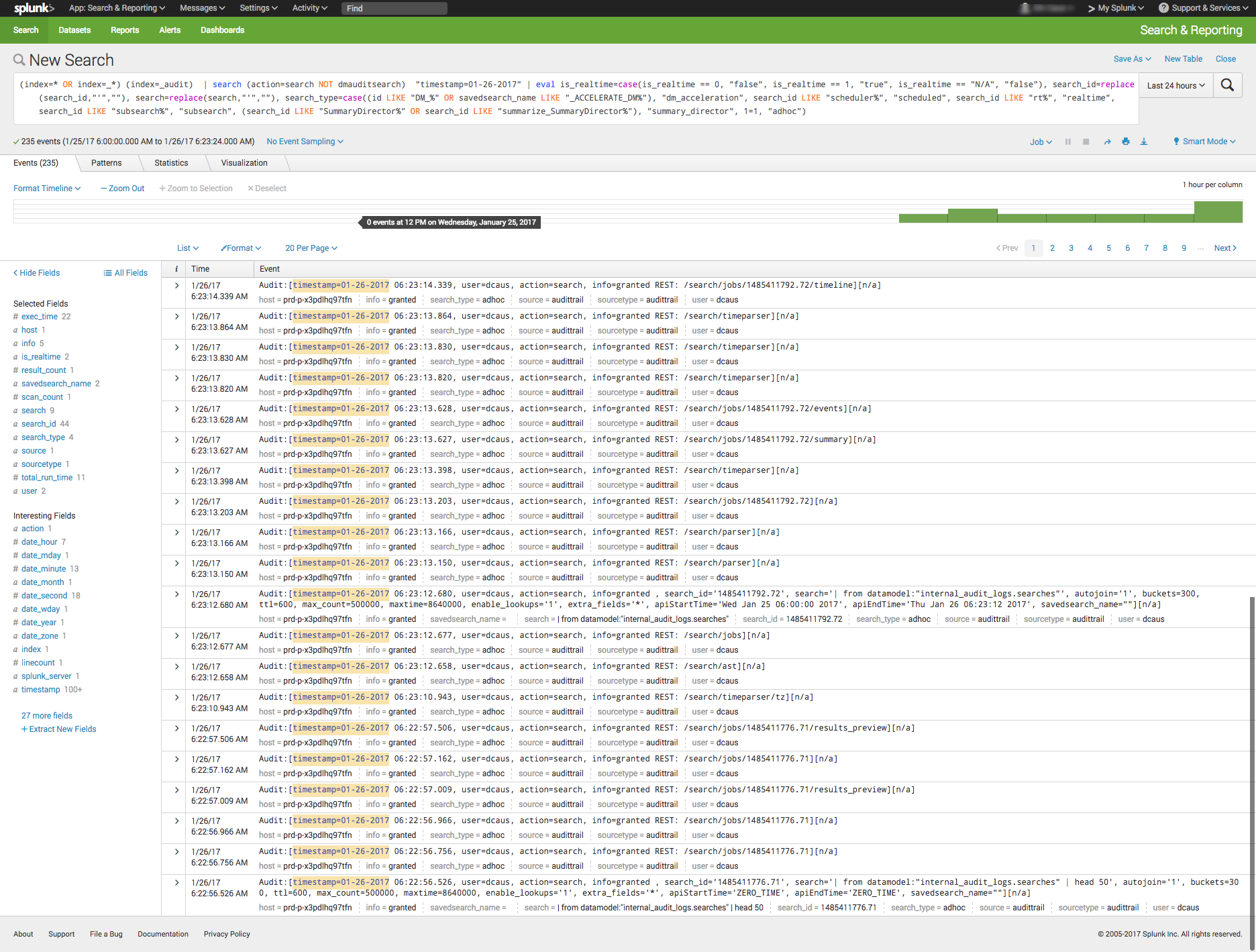
    (index=* OR index=_*) (index=_audit)   | search ( action=search NOT dmauditsearch )  "06:54"

    The difference between SPL syntax and Lucene queries is that SPL supports the search pipeline (as in the example above) in which consecutive commands are chained together using a pipe character that allows the output of one command to be used as the input of the next one. Lucene query syntax is more straightforward and can work to generate the output from the query without additional transforming.

    Traction and Community Support

    Both Splunk and ELK Stack have large communities of users and supporters. ELK also has its own clear and extensive documentation for each separate tool, making it easy to get started. In addition, Elastic itself offers educational sessions worldwide.

    In addition to having good documentation and a forum, Splunk, too, has customer and support platforms that offer various professional services. Splunk’s education program and instructors are available virtually or on site.

    The Learning Curve

    The ELK Stack’s learning curve is flat for what it’s meant to do. Elastic offers paid courses, but there is a lot of free material online due to the popularity of the open-source platform.

    For Splunk, the learning curve is moderate in size, especially when carrying out more specialized analyzes. The company offers a trial period with extensive documentation, but the advanced Splunk educational courses are fairly expensive.

    User Management

    The ELK Stack provides role-based security as a separate paid tool. Splunk and managed-ELK services offer user management out of the box with user auditing included.

    Pricing Levels

    As already mentioned, Splunk is proprietary software with a price tag. After one integrates several data sources with the platform, the cost will increase greatly as data is continuously generated.

    The open-source ELK Stack is free, but the true picture is not so black and white. The cost of the platform’s hardware and maintenance also adds up. To lower the cost of using ELK, features, plugins and tools must be developed.

    Vendor Lock-In

    Splunk’s high price tag comes with the benefit of offering an overall, well-rounded product. Users might be locked into a vendor, but that one vendor is all that is needed to do nearly anything. The open-source ELK Stack is seemingly free, but it does not provide many functionalities such as alerting out of the box—and it costs money to develop and maintain them.

    Spunk is Splunk. There are many varieties of ELK:

    One way to look at the Splunk-versus-ELK discussion is to frame it as the old Microsoft-versus-Linux debate. If you like Microsoft, you will probably prefer Splunk. If you like Linux, you will likely want to use the ELK Stack.

    Final Thoughts

    When one decides between these solutions, the ultimate choice should reflect not only on the platform but also on the customer’s specific needs.

    Both Splunk and the ELK Stack are currently popular. But what might the future hold?

    splunk vs elk
    Splunk (Blue) vs. Elasticsearch (Red) on Google Trends

    According to Google Trends, the ELK Stack has now overtaken Splunk in terms of the proportion of Google searches. But ELK’s traction does not stop there. As mentioned earlier, Splunk self-reports 12,000 total users. Elasticsearch is reportedly downloaded 500,000 times every single month. In IT departments, then, it is far more likely to meet people who are familiar with ELK than with Splunk, meaning that the adoption rate of the ELK Stack could “snowball” and increase even more in the future whenever ELK users join new companies or teams. People tend to use whatever software they already know or is already being used.

    It’s clear that many functionalities are being added to the open-source ELK Stack. This, in turn, is shrinking the gap between it and Splunk. hose features currently found only in Splunk are likely to be added to ELK at some point in time.

    So, if a more mature product is what you need, go with Splunk. But if you like a product that is more flexible, ELK is the way. Either way, it’ll be interesting to see how these two continue to compete.

    — Asaf Yigal

  • Continuous Testing: Solving the Biggest DevOps Bottleneck

    Continuous Testing: Solving the Biggest DevOps Bottleneck

    It’s time to start implementing the practices of Continuous Testing

    Earlier this year, Computing Magazine conducted a fascinating study around the adoption and benefits of DevOps in its DevOps Review 2017 publication. The findings that stood out most fascinating to me where around quality assurance and testing.

    In this survey, the question was asked, “Where are the main holdups in the software production process?” Of all the self-proclaimed DevOps practitioners, a whopping 63 percent said the biggest delays occurring in the QA/Test phase. In fact, this cited bottleneck was more than 2 times greater than the next proclaimed bottleneck, which they felt was in planning (29 percent).  In this same survey, another question asked, “What tends to lose out more in DevOps environments?” While 43 percent said, “Nothing,” nearly 30 percent of these DevOps practitioners said that quality was being sacrificed. When asked which area they wanted to focus on improving in the next year, over 40 percent opted for quality.

    Why is it that quality has taken such a hit?  The study cited two issues: 1) Testing and QA is often siloed from the other parts of the organization, and 2) Testing tools haven’t matured much in the past five years.

    Testing must become a cross-functional operation across the software development lifecycle (SDLC) spectrum, one that involves all teams. Agile developers and testing teams don’t have weeks to test, but hours. Testing hasn’t kept up because it hasn’t applied the methods and concepts of agile development have not been applied to testing and QA processes. By removing the constraints that force testing to the end of a development cycle, developers and QA teams can achieve accurate, automated testing from day one. They can create an integrated pipeline, capable of taking an idea from design to deployment, at speed, without compromising quality.

    Open-source, cloud-based solutions can be the catalyst that brings the speed of agile to testing.  Here are a few examples.

    Better In-Sprint API Testing: Since APIs have become the major component of applications, organizations are shifting their approach from starting testing when the user interface is complete to shifting the focus of testing at the API level.  But the hard thing is finding enough time in a development sprint to test them sufficiently.

    Today’s applications are a collection of microservices and API calls. UI testing alone just won’t cut it. UI testing is very brittle, and whenever it changes, testing breaks. Testing needs to shift left into the development cycle—into sprints. But if you shift testing left to be a focus of the sprints, what kind of API testing can you really do? How comprehensive can they really be?  Creating those API tests has to be quick, and simple.

    Dev and Test teams must utilize automated tools that not only generate API tests, but create an exhaustive set of test cases from the API, then execute those tests. These tools also need to support the most popular open-source testing frameworks allowing developers to run functional API tests as performance tests without any proprietary conversion issues. And, vice versa, developers must be able to take open-source performance tests and be able to run them as functional API tests.

    Orchestrating Testing: A Continuous Delivery Pipeline Manager: “Faster” is becoming table stakes with automation.  The facts show that companies who have widespread agile adoption and are deploying more frequently with significantly reduced lead times. But, this too often leads to release failures, quality issues and disorder with multiple—if not hundreds—of applications rolling through the SDLC. Plus, things slow down significantly with time-consuming handoffs and rework in the release process. DevOps teams, who release features and fixes frequently while significantly reducing errors and manual processes, need toolchain-agnostic pipeline planning, orchestration and optimization solutions that enable them to eliminate spreadsheets, automate test processes and feedback, and continually improve the delivery of revenue-generating features to end-customers. New CD SaaS tools help make this orchestration process easy.

    Performance and Functional Testing Using Open Source Frameworks: More and more organizations are trying to move from legacy testing tools. It’s not so much that these don’t adequately test, but they were never designed to meet the needs of agile development approaches. Rather, they were designed for releases that occurred two to three times per year. But that won’t cut it anymore.

    And as developers begin to incorporate testing activities in the coding process, they need simple-to-use, open-source tools. Luckily, there are such tools like JMeter, Selenium, Gatling, Locust and others. There are even tools that help you convert from legacy platforms to open source technology with ease, and guides to transform existing functional tests created with other tools over to load tests.

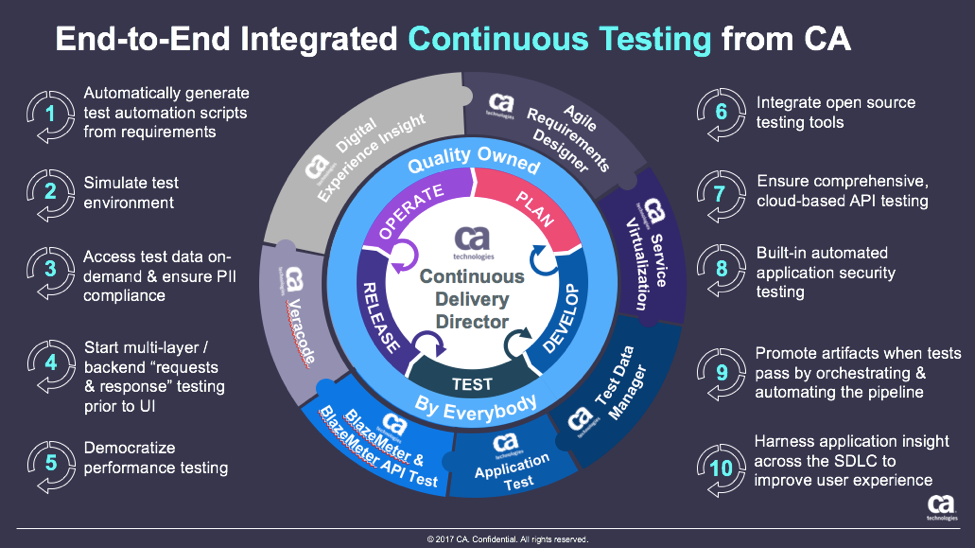
    These are just a few examples of how continuous testing eliminates the testing hurdle. With continuous testing, organizations can:

    • Automatically convert user stories from requirements management tools like CA Agile Central or Atlassian JIRA into the minimum number of test cases required for complete code coverage, and being able to adapt automatically to changing business requirements.
    • Reduce test cycle prep time by requesting test data from within requirements.
    • Request, reserve, and create test data at any time, even from requirements phase.
    • Virtualize APIs for better testing, while managing API access to developers.
    • Institute easy API testing that can generate comprehensive test cases (positive, negative, edge case, and SQL injection) and execute those tests automatically.
    • Democratize testing with SaaS-based testing tools so that developers can test early and test often.
    • Speed testing by feeding test data directly and securely to virtual services.
    • Use open-source testing tools such as JMeter, Selenium, Jenkins, Jenkins, Appium, Taurus, Gatling, Locust and more.
    • Orchestrate the application delivery pipeline to promote releases from one environment to the next as soon as all the tests pass and enable faster feedback loops.

    This is testing unleashed, going hand in hand with agile development to accelerate quality into production.

    By adopting next-generation testing practices, DevOps teams have the ability to test early, often, automatically and continuously. To learn more about continuous testing and why it is critical to DevOps and Continuous Delivery initiatives, visit this Continuous Testing informational page.

    — Aruna Ravichandran

  • In DevOps, Figure Out Why Before Considering How

    In DevOps, Figure Out Why Before Considering How

    It has been fairly well-established that DevOps is primarily a function of the underlying culture—about breaking down barriers and shifting roles so that teams and individuals are empowered to come up with innovative ideas and execute them without the burden of traditional corporate bureaucracy. It is also understood that there are a variety of tools and platforms that enable and automate processes. However, before an organization can even get to the “How”—the culture and tools of DevOps—it should be able to answer the question, “Why?”

    I reached out to organizations that have embraced DevOps and leaders in the field to see what they had to say about the “why.” What benefits can businesses expect, and what goals can adopting DevOps help them achieve—or achieve faster, or achieve cheaper?

    “Delay in delivering innovation comes with an increasingly high price tag, perhaps the loss of an entire market to competitors,” says Forrester Analyst Charles Betz. “DevOps accelerates and improves the quality of software delivery, but that is not an end in itself. The increased speed provided by DevOps is essential to achieving the fast product feedback needed for digitally transforming enterprises to stay relevant and competitive.”

    As Betz points out, companies should implement DevOps for the competitive advantage. Dave Lindquist, IBM Fellow and VP of Private Cloud for IBM, puts it another way: “DevOps is at the heart of the digital transformation. It’s how the next wave of disruptions are being developed and delivered.”

    DevOps bridges the gap between development and operations teams. Inspired by agile development and continuous integration, and incorporating their principles, it addresses the challenges of today’s condensed timeline for application development.

    In that way, the line between the “Why” and the “How” blurs into a bit of a gray area. Companies should adopt DevOps with specific goals in mind—a vision for what they expect it to do for them—because simply eliminating barriers or implementing tools and platforms without a strategy in place for what that is expected to accomplishment is likely to be a waste of time, money and effort. On the other hand, it is very difficult to execute or achieve those goals without also successfully navigating the “How.”

    “Enterprises are navigating major technology shifts and demand is therefore higher than ever for simple and consistent automation and management across hybrid infrastructure and application portfolios,” says Marc Holmes, VP of Product and Revenue Marketing at Chef. “Organizations should adopt DevOps practices for both the culture and tooling to create a consistent and collaborative workflow so enterprises can build, manage and deploy software quickly and safely in any environment.”

    “DevOps can have a direct effect on your bottom line. According to a recent study from Enterprise Management Associates (EMA), ‘Companies that excel at DevOps interactions are 11 times more likely to see double-digit annual revenue growth. It doesn’t stop at revenue growth either. According to EMA, 49 percent of organizations also agree that accelerated delivery frequency leads to higher customer satisfaction, and 35 percent find that it enables them to be more agile and competitive,’” notes Chris Lippi, VP of product at NGINX.

    With its focus on automation, DevOps also helps to ensure predictability, efficiency, accuracy and the standardization of operational, development and testing processes. This, in turn, saves time and money by shortening the release cycle, reducing errors and lessening the need for time-consuming fixes. It also frees up resources to focus on more creative endeavors and on tackling larger problems as they arise.

    Lippi sums it up this way: “Once implemented, DevOps tends to prove its business value in terms of time and cost savings. Making the business value of DevOps clear—to the newly unified team and beyond—helps DevOps culture take root.”

    There are lots of tools and practices out there to choose from, and plenty of guidance and advice on how to implement a DevOps culture. Before you go down that path, though, step back and figure out what you hope to accomplish by adopting the culture, tools and practices.

    — Tony Bradley

  • Top 5 Issues Curtailing DevOps Adoption

    Top 5 Issues Curtailing DevOps Adoption

    DevOps may seem simple and logical on the surface, yet most of the companies we talk to are struggling in one aspect or another. This is no surprise: Successful DevOps initiatives require putting together a full toolset and simultaneously creating a smart team of developers, testers and project managers who are well-versed in cloud and agile technologies.

    Those tasks alone can take many months of trial and error until you are ready to start DevOps in earnest. After a period of experimentation, it’s time to refine and optimize. Focus shifts to more mature issues such as creating a fully integrated tools stack, supporting a rich test data environment that doesn’t undermine privacy and security, and determining the best DevOps infrastructure strategy for your company.

    Regardless of your DevOps maturity, we’ve outlined some top issues to consider and mitigate, as your DevOps practice evolves.

    Integrating Tools

    As the practice of DevOps matures, we have seen an explosion of tools, both open-source and commercial. These tools serve every discrete need in the process: requirements management, test management, defect tracking, agile planning, source code management, build, deployment, monitoring and more. We calculate there are at least 1,500 such tools available today.

    So, while developers, testers, project managers and business analysts have many sophisticated capabilities to streamline DevOps, those tools must work together. It’s imperative that tools and groups don’t work in silos, but are part of an integrated pipeline. This allows the code to flow seamlessly according to business objectives, from requirements definition to test and dev, production and deployment. Organizations may choose to create these integrations themselves—although that gets costly fast, both at the onset and with ongoing maintenance. Some vendors offer out-of-box integrations with popular tools, although you must consider if these will fit your workflows and needs. A few vendors now offer the best of both worlds—connectors that are simple to set up and with the ability to easily customize the integration when needed.

    Configuration as Code

    A common problem in DevOps is the need to align the environment configuration present when/where the code is written with the environment configuration used in production. By adopting configuration as code (consisting of tools and processes), you can store all configuration data as a file alongside the code. This is valuable because if there are bugs or UI issues, your staff can quickly locate the version of the configuration that matches the code/feature in question and load it into that environment quickly. If we are confident that the environment configuration is accurate, we can narrow down the app failure being most likely due to the code itself.

    Having both code and the configuration setup information in one place is also useful for testing purposes, as infrastructure configurations sometimes differ between development and testing worlds.

    Fast is Not Free

    Software teams have always wrestled with the need to balance speed with quality and cost. You can’t get the best of everything, so teams should figure out where they can compromise and where they can’t. In DevOps, however, the emphasis is almost always on speed. Once you reach maturity, you usually go fast and achieve high-quality results, yet this requires investing in tools, process and people.

    Working smartly can go a long way toward moving faster without sacrificing quality. If your team can figure out how to be efficient and precise, with clear objectives, then you won’t have to do much rework, which adds cost and time. Many people will flaunt the benefits of full automation to work faster. In many cases, however, automation ends up being a more expensive solution to the problem. Automation adds additional maintenance and overhead that needs to be outweighed with saved effort; you will have more tools and integrations to maintain, and more pieces that will break.

    Justify how much automation you need and acquire only the tools necessary to meet your goals. Ideally, organizations should determine the need for speed based on business requirements. Many industries are not driven by speed to market and benefit more by working in a steady, iterative fashion. Make sure you have a sound business reason for working faster and releasing faster, and that you can effectively manage the automation and staff needed to work at that pace.

    Acquiring Test Data

    For high-stakes applications, such as a new e-commerce site or mobile customer app, there is a great deal of risk in launching an app that hasn’t been tested on representative data. Accumulating enough high-quality test data to find bugs and optimize all the key features and scenarios before going live can be a monumental task given today’s big data initiatives, fragmented DB technologies and data privacy/security concerns. Specifically, when companies are dealing with sensitive data, such as customer information and credit card numbers, this is a tricky endeavor.

    One common option is to use real customer data and “scrub” it to remove identifying characteristics. If the cleansing process is not thorough, however, you’re creating tremendous security risks for customers. Another basic option is to create fake data that’s representative of production data. However, that data might not be accurate in all key scenarios, nor comprehensive enough to meet your QA objectives.

    Our analysis is that test data is a complex problem that no one tool can solve, and should be handled with importance as a cross-functional initiative. It’s not unusual to see security, compliance, testing, development and business personnel involved in test data management activities, especially for companies handling sensitive data.

    Internal vs. External Hosting

    DevOps environments seem to run optimally in the cloud. Cloud infrastructure gives organizations the optimal scale, flexibility and speed to run more builds and test faster through highly automated services. Top providers including AWS and Azure offer a full range of DevOps-oriented services to manage infrastructure for you, such as load balancing, log and instance monitoring and automatic backup/failover. With many DevOps vendors hosting their products and services in the cloud as well, it’s logical to host the entire environment there.

    However, this isn’t possible for many organizations with strict security and compliance requirements. Running a DevOps infrastructure internally requires a great deal of configuration, maintenance and software, not to mention staff to maintain it all. Automated testing often can be time-intensive when limited machines are available in the internal network for testing. Running those tests may require waiting for the weekend to free up resources, given the many hours required to complete those jobs. This, in turn, causes significant delays in testing and code quality feedback.

    One solution to this problem is using containers to scale the internal DevOps infrastructure. This allows more tests to run at once and reduces the overall build process time. Companies strictly doing web development can use open-source tools to do this. Conversely, large enterprises with apps on multiple platforms will need to build out a great deal of their own infrastructure.

    It’s a Process

    All of this might seem overwhelming to organizations just getting started with DevOps. But remember that DevOps is a journey taken over time; it is more than just new tools and skills. DevOps is a dramatic and evolving way to develop software and services that meet the frequently changing demands of customers. DevOps is the only way organizations can truly become data-driven operations, supporting new revenue streams and product innovation. When viewing it through this lens, we know that change will be gradual. Celebrate the small wins with low-risk projects first, and work to drive efficiency wherever possible.

    About the Author / Kevin Dunne

    Kevin Dunne pic

    Kevin Dunne is vice president of strategy and business development at QASymphony. Prior to joining QASymphony, Dunne was a business technology analyst at Deloitte. He can be found online at Twitter and LinkedIn.


  • DevOps Needs a New Cloud Solution for Best Practices

    DevOps Needs a New Cloud Solution for Best Practices

    Imagine this scenario: You are a company building modern software which is a key driver of your business. To support this, you have grown your infrastructure organically over time by adding servers, storage, networks, security, virtualization software, monitoring, alerting and analytics tools. You have also added a plethora of other middleware, databases, messaging and operating systems that your developers need to build, test and deliver their applications.

    Because of this unplanned organic growth, there is no consistency in the environment. You manage, maintain and operate much of this environment manually. Your various specialist teams (storage, networking, security) begin to form fiefdoms around their respective functional areas. Change becomes extremely difficult and automating across silos turns into a maintenance nightmare. You over-purchase to meet the demand and risk under-utilizing resources. Your costs spiral out of control. You are now finding it a hopeless challenge to meet the needs of your developers—which was the primary purpose of doing all of this in the first place.

    Moving to a Modern Platform

    A modern DevOps platform should address the requirements of both your development and IT/operations teams. It should give software development teams an easy way to consume on-demand compute, storage and networking as well as provide easy access to continuous integration and continuous deployment (CI/CD) tooling and software services that help increase their development throughput and shorten product delivery. In addition, the platform should also empower operation teams to manage, maintain and operate the entire infrastructure environment with very few people using smart software that drives automation and intelligence into the entire stack.

    In short, it should have the ability to break the silos within your IT environment and between development, QA and operations teams. By doing this, you can increase the velocity of software development, improve infrastructure utilization, increase overall operational efficiency and reduce costs.

    Requirements for a Cloud Infrastructure That Streamlines DevOps

    There are several requirements for a modern, cloud-based DevOps platform. Let’s look at the key essentials of such a solution.

    Self-service API-driven infrastructure is a fundamental requirement to enable infrastructure as code, a key attribute to enable DevOps best practice. It allows developers to write code (which can be done using their favorite programming language) and make RESTful API calls to the underlying programmable infrastructure to manage initial deployments and configurations. It also enables them to manage ongoing automated dynamic provisioning of infrastructure, auto-scaling, monitoring and alerting.

    All this automation removes the confusion and error-prone manual steps for the entire application delivery process, including development, testing, staging and production deployments. This, in turn, accelerates software delivery and increases quality.

    However, building such a self-service API-driven infrastructure by yourself is not easy. The key component that drives up the cost is the operational complexity and the cost of experts needed to build and operate it.

    Smart software that drives intelligence into the stack. Very few solutions in the market automatically handle the full life cycle (deployment, upgrades, monitoring, alerting and ongoing resource management) of infrastructure and also allow seamless migration of workloads between private environments and public clouds. Additionally, if self-service is available as a SaaS-based delivery model, it is easy to add more features and workflows very quickly without having IT perform a major upgrade. If your solution comes with an on-premises install, ask how much work IT has to do to maintain this environment and how often new features will get added.

    Hyper-converged Infrastructure (HCI): Eliminating silos in the infrastructure. As mentioned earlier, silos impede velocity because they lead to complexity of operations, lack of consistency in the environment and lack of automation. A hyper-converged cloud design with a software-centric architecture tightly integrates compute, storage, networking and virtualization resources and other technologies from scratch in a commodity hardware box supported by a single vendor. This approach eliminates silos and lowers costs and complexity. It also makes it easy to start small and grow on demand while staying tightly right-sized on capacity and cost.

    A built-in browse-able categorized application store. DevOps engineers need readily accessible CI/CD tools such as Jenkins, Git, Maven or JUnit to automate the development and test pipelines. Additionally, tools such as Ansible, Puppet and Chef help with automated configuration and lifecycle management of workloads. Application developers need to quickly integrate and deploy middleware services such as RabbitMQ, Redis or storage back-ends including MySQL, Postgres, Cassandra or MongoDB. Single-click deployment of such services and other complex multitier network tools and applications greatly automates, accelerates and simplifies the development process.

    Seamless migration between private and public clouds. Developers and testers often need much greater capacity than is available on-premises for scale testing, and they should be able to move their application to a public cloud for such purposes. Alternatively, they may already have some applications running on a public cloud and they may want to bring them back to their private cloud for cost savings or better performance. For these use cases, a private cloud solution should offer seamless bi-directional migration between the public cloud and the private cloud.

    Dashboards and visibility for troubleshooting. One of the key advantages for a private cloud is that you can get complete visibility across the infrastructure and applications. In a public cloud, you can only get VM-level stats but have no control or visibility below that. Make sure that your private cloud solution can provide visibility to developers directly. Many vendors only provide access to IT, thereby controlling what developers can do and making IT a bottleneck in the application development and deployment process.

    Better insights to improve efficiency and capacity management. A cloud requires capacity planning, utilization monitoring, right-sizing of workloads and detecting zombie VMs and unused resources. Look for a solution that comes with built-in analytics, management tools and insights. An even better approach would be having a solution where you don’t have to install the management tool on-premises so that it can deliver its value as a service.

    To meet the needs of application developers and development frameworks and to create an efficient DevOps platform, companies should look at consistent converged architectures managed via smart software. This empowers application developers and operations teams to leverage a consumption model they want, while providing control to IT and making them relevant to your business success.

    Integrated intelligence and insights delivered as a service ensure that you never have to use spreadsheets to decide what to purchase and when. Cloud solutions with smart software ensure that you never have to make a Level 1 support call again; your management software can do that for you.

    About the Author / Kamesh Pemmaraju

    Kamesh Pemmaraju leads product management, product marketing, and technology partnerships at ZeroStack. Kamesh is a seasoned product management/marketing leader with a strong engineering and consulting background. In his most recent product roles at Mirantis and Dell, he focused on delivering private and hybrid cloud solutions to enterprises. He holds a Master of Science in Computer Science from Indian Institute of Science. Connect with him on LinkedIn and Twitter.