Tag: tools

  • The Emergence of UI and UX in DevOps Tools

    The Emergence of UI and UX in DevOps Tools

    Most of the popular DevOps tools on the market such as Puppet, Chef and Jenkins, are open-source and require a high level of proficiency. With the complexity comes the challenge of learning new frameworks and paradigms, a benefit to those who want to challenge themselves and learn new skills.

    But while these tools have become widely adopted, the widespread adoption of DevOps is creating a need for interfaces that cater to all users, from the most technical engineers to those who don’t want to learn, don’t see the value in learning or don’t need some of the top-end power that a complex scripting interface provides.

    It is for this reason that CloudBees developed Blue Ocean, a new interface for its continuous delivery tooling, and Red Hat released a user interface (UI) for Ansible.

    The Right Time for UI?

    Why have there not been UIs before now?

    I would say two reasons:

    1. Users did not demand nor care for one until now. A UI in many circles is seen to been more presciptive/restrictive of what can be achieved, and that only scripting/programming interfaces expose the real power to an engineer. Also, many of the most progressive engineers like scripting; they derive satisfaction from learning new skills, especially those that are the most highly desirable/in demand. And, I think many engineers like things because they are difficult to do; it’s a challenge, they have bragging rights and means they likely are getting paid more/are in demand.
    2. The open-source community is not as good at or geared toward building UIs.

    Why has a UI become important now?

    At MidVision, like many of the other commercial automation tool vendors, we have always believed that user experience and accessibility is critical, so we have provided command-line, scripted, API and GUI interfaces to our tooling. But this has not been the common approach.

    What makes this moment different is the wider adoption of DevOps automation tooling by groups that want at least graphical user interfaces (GUIs) and improvements to user experience such that you don’t need to be super-technical to be able to use them.

    The main groups we see are:

    • Business users within an organization. Continuous delivery/release automation tooling very much promotes collaboration, interaction and self-service, allowing release managers to see the status or pipelines, approve releases or initiate deployments. Managers may want to see dashboards and metric, produce reports or usage data. Other less technical staff, offshore teams, second level support, etc., may want to be able to provision, clone environments or deploy changes.
      There is a gap between the nerds in the basement speaking one language – and the business users who speak another which accessibility, UI and UX hopes to bridge.
    • Operations. There are certain parts of IT Operations that have welcomed the technical script-based tooling with open arms—it was a natural evolution for a UNIX system admin to become a DevOps/automation engineer. They can still script in shell (or are they meant to be doing it all in Python? ?). Again, some of the security tooling, storage, etc., are generally more comfortable down in the weeds. As you move up the stack however, toward the business application deployments, users are much more familiar and comfortable with UIs. Also, at this level dashboard, metrics, access control and reporting are much more important—and all of which are very hard to achieve without a proper UI.
    • Wider industry adoption. Adoption of the tools and techniques that are often advocated in the DevOps world started with the same poster child companies—Netflix, Twitter, Facebook, Google—and other newer companies that are cloud-native, have an open-source-first policy and are unencumbered by heritage technology stacks.

    We have then seen parts of enterprises adopt DevOps practices and tooling. Obviously, it is important to start small, establish value and then scale—running an initiative like you would a startup within an enterprise works well.

    Now that there is a compelling body of evidence to suggest that DevOps practices provide competitive advantage, cost savings, improved time to market, etc., other industries that are heavily dependent on technology have not had yet adopted these practices for varying reasons. Some parts of the finance and healthcare industries are two such areas. These industries have concerns around security and stability that may have slowed their adoption to date.

    Overall, however, this wider adoption means we need to cater not just for the new breed of DevOps engineers that are both system administrators and programmers and can script in Shell, Rudy and Python. We also need to cater to a wider group that either don’t have the skills to use these tools or don’t care for them.

    What change, then, are we likely to see?

    I believe DevOps tooling will evolve to provide new interfaces to cater to business users and self-service, and to make it easier to achieve the same thing without needing years of experience using a tool before being considered a competent user.

    I would compare many of the current tools today to a map and compass. Lovers of orienteering or mountaineering may suggest using a GPS or map on a mobile phone is cheating, cannot be relied upon or won’t provide the same same information as the contours on a 1 to 10,000 map. Or maybe you prefer vinyl to Spotify.

    Neither of these things are wrong; they are just not the only right. If you want to nerd out with your map and compass, vinyl LPs and Python scripts, I say fill your boots. All of which, BTW, I have some passion for! However, if you also want to get in your car, enter a zip code and know that it will get you there (accepting there is maybe a route that is slightly quicker if only you had done your research more thoroughly), this makes perfect sense to me.

    User experience is at the heart of the most of the other products we choose to consume, and I think many new and existing users will be pleased with UX becoming more important as tools like ours and others put this at the forefront of their design.

    About the Author / Dave Sayers

    Dave Sayers is a co-founder and technical services director of MidVision, a provider of Release Automation and Continuous Delivery Software. He works closely with customers and partners on DevOps and Automation initiaitves throughout Europe and North America and is responsible for devising and managing the partner and channel strategy. Connect with him on LinkedIn.
  • Container Considerations on Your DevOps Journey

    Container Considerations on Your DevOps Journey

    Containers are things for your things. That is true in the development world, too—containers are things for your software, and, like containers for your things, software containers can help you be organized, efficient and secure.

    Chris Morgan (@cmorgan_cloud), the Technical Director, OpenShift Partner Ecosystem at Red Hat, delivered a keynote at the 2016 All Day DevOps conference. Chris lives and breathes containers and recently discussed how they are transforming DevOps pipelines.

    Chris started with an encouraging figure: DevOps has a 74 percent adoption rate (at least on a path toward full adoption) at the enterprise level. The reason is that DevOps helps solve issues around:

    • Slow service delivery
    • Poor service quality
    • Frequent down times

    However, the needs of development and the desires of IT can often hamper full DevOps adoption, which is where containers can help. Containers allow apps to be easily shared and deployed with:

    • Consistent environment and tools
    • Predictable building tools
    • Faster deployment

    In short, containers can act as a common language between development and IT operations. And when configured properly, the operations team can utilize containers to assemble environments without compromising security.

    The survey that revealed a 74 percent adoption rate for DevOps in the enterprise also shows an 18 percent adoption rate of containers in the enterprise. Why the difference? Containers sometimes can be difficult to implement across multiple hosts.

    If you are gearing up to consider the use of containers across your IT environment, Chris offered up some things to consider:

    • Where do you store the container image?
    • Which container on which host? Which has enough capacity?
    • How do you monitor the health of the containers?
    • What do you do if a container crashes?
    • How can I address scale?

    When you have large apps that span multiple containers?

    • Which containers can access others?
    • Which containers should be deployed together?
    • How do I limit certain containers?
    • How do they find each other?
    • Is there malicious software on any containers?
    • How do I handle persistent storage?

    The bottom line is that you need more than just containers. You need a host, a platform, management and persistent storage.

    Is your organization ready to at least consider containers for DevOps? Chris reminded us, “Technology should not dictate the process. Identify the ideal process first, and then ensure the technology is flexible enough.” Start by finding some low-hanging fruit, assess skills and capabilities on your team and engage in a discovery session.

    Chris’ full keynote went into more detail, notably some solutions to implementing containers at the enterprise. You can watch Chris’ full All Day DevOps conference session (just 40 minutes) or you can view the other 56 presentations from the 2016 conference online and free of charge here.  This blog series is reviewing sessions from the 2016 All Day DevOps, which hosted over 13,500 registered attendees. Next week, look for “Ops Happens: DevOps Beyond Deployment” with Damon Edwards.

    Finally, be sure to register you and the rest of your team for the 2017 All Day DevOps conference here. This year’s event will offer 96 practitioner-led sessions (no vendor pitches allowed).  It’s all free, online Oct. 24.

    — Derek E. Weeks

  • ShiftLeft & DevOps: A Narrative Within a Narrative?

    ShiftLeft & DevOps: A Narrative Within a Narrative?

    I procrastinated watching the season finale of “Westworld” just because I ended up reading a day later how Dolores ended the episode! I don’t know who to blame: my inquisitiveness or that guy who couldn’t hold himself. It kind of feels stale when you know the ending.

    Finally, I finished weeding through the multiple narratives across the episodes, and the flashback narrative merged seamlessly with the current one. That got me thinking about using that as an analogy and maybe understand whether the concept of ShiftLeft is really actually a “narrative within a narrative” of #DevOps.

    Ok, so what is ShiftLeft?

    I came across the term at my fav go-to source, @devopsy.kinsta.cloud, where Alan wrote on how much to Shift Left and its diminishing returns, and another very old article on the continuous testing approach, which primarily seeks to test early and often, to catch defects, yeah, early!

    Then it was thrown at me in the context of identifying repeatable activities, often manual with consistent results, performed by the Support & Operations team, and moving that work left from Level-3 all the way to L-0. Empowering the help desk, I would say!

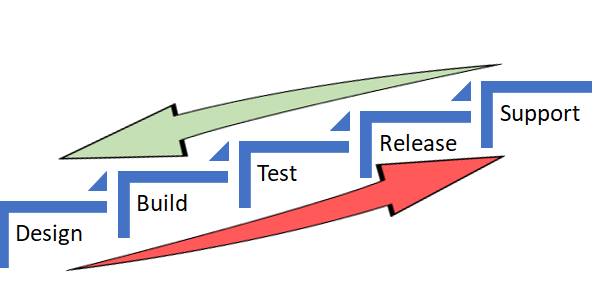
    In both the scenarios, the underlying objective was to catch defects and or reduce life support activities early in the cycle (below) which costs more and more as we move up the food chain, which in turn makes a release and subsequent maintenance cheaper.


    As Alan also referred in the same article to the IBM Study, it’s almost 100 times more expensive to fix an eventual production defect which cost about six times more if caught at Implementation stage or about 15 times more if found during testing. Thus, “Early identification and prevention can improve reliable software delivery” would be the mantra.

    Now, to the crux of this article, Is ShiftLeft not what we aim to achieve via DevOps?

    DevOps basically creates a collaborative, non-siloed cultural change to bring both Development and Operations together early in the game.

    Throw in a bunch of tools to facilitate CI/CD, pull in the security guys early, expand automated testing coverage, include change and release—who are the catalysts, as I call these functions in my earlier article here—squeeze in a few monitoring tools and dashboards and voila! You have a complete and mostly successful DevOps team to dish out the most appetizing feast of quality software repeatedly.

    A table for two (Dev & Ops) has become a party of six! Yaaay!!

    So, from DevOps standpoint, ain’t we doing the same as ShiftLefting (If I may coin the word) with the resulting cost effectiveness, more efficiently?

    We do when we as a team make shorter and frequent sprints; gain insight, not just on how to code better or leaner but also by learning from the masters in Operations who run that software on the infrastructure they monitor and support daily. Or perform the VA scan early, or push a scenario as unit test instead of regression, and/or raise flags on potential capacity challenges.

    So again, isn’t DevOps team already doing that ShiftLefting as part of its charter?

    There is a limit to moving things left, but then, if your organization is still doing wireframes under a waterfall or is in the process of setting up a DevOps team, then this approach could be a stop-gap arrangement, an eventual merging of a narrative within a new narrative.

    But then my argument would be, Why stop-gap and why not a full frontal? Why not embrace the DevOps model, which comes preinstalled with all the ShiftLeft possibilities?

    Even if we are aware how an episode ends, procrastinating raises the risk of being left behind in the race to deliver quality, cost-effective product quickly.

    Technology is redefining businesses: Transportation is an app and soon probably will be driverless; banks are rebranding as tech companies in FinServ business; a fridge can reorder milk; trash cans can be Wi-Fi-enabled! Ah, the internet of things. Is Alexa listening?

    My other relevant posts are here and here.

    Thank you for the time.

    — Abdul Salaam Khurram

  • Avoid Crashes: 5 Best Practices for Load Testing

    Avoid Crashes: 5 Best Practices for Load Testing

    Demanding customer expectations and the rapid distribution of information across social media have made website and applications crashes an off-limits path for today’s companies and organizations.

    Crashes resulting from traffic spikes cause immediate and long-term loss of sales, as well as tarnishing the brand name. When servers or websites go down during highly anticipated events such as Black Friday, the Big Game or before a major concert, the repercussions can be permanent.

    Yet, avoiding the “website temporarily unavailable” screen is also easier than ever before. By performance testing your website continuously and proactively you can easily detect errors, bottlenecks and bugs, and then fix them to ensure your website handles any amount of traffic.

    Here are five best practices for load testing your website or app:

    Define Your Load Goals

    Before starting your tests, you need to figure out what it is that you need to test.

    This includes the number of concurrent users, traffic patterns and areas that users can visit on your site. For example, if your site has 10,000 users concurrent at its peak, but  3,000 arrive in the morning and that total slowly climbs up to 10,000 in the afternoon—and these visitors mostly just browse your homepage—you’ll need to run a different test than if you have 10,000 concurrent users on your website all day long, constantly browsing multiple pages.

    To determine your load goals, you need to engage directly with your business colleagues. For instance, get your product manager to set the system’s expected abilities, ask the marketing team to inform you about any special campaigns that might increase website traffic, and then look at server logs and tools such as Google Analytics to determine previous customer patterns.

    Choose Your Load Testing Tools

    There are multiple open-source load-testing tools that you can use to run your tests.

    JMeter is the most popular tool, but you can also use Gatling, Locust, Tsung, The Grinder or Selenium. See here to learn more about the differences between these toolsets.

    Does this seem complicated? Taurus is an open-source automation test framework that simplifies running these tools, by using a simple YAML script. If you need to run your tests from the cloud, utilizing rich analytics or requiring user collaboration, you might consider using BlazeMeter.

    Take Your System to the Limit

    To make sure you stand up to your load goals, you need a buffer; specifically, you need to make sure that your system can handle heavier loads.

    This ensures that the CPU stays low and you don’t experience memory leaks. However, we also recommend you take your system to the limit and see when and how it fails. This ensures that you know exactly what your system’s weaknesses are, giving you a better ability to fix any errors that might occur.

    This is especially important if you come across an unexpected traffic spike—say, if your competitor’s website crashes and all their customers come running to you. Wouldn’t you rather be prepared for that?

    Monitor Test Results

    Set aside resources for looking at test results.

    Examine KPIs including Response Time and Hits/s, as well as the correlations between them, to learn what your system’s abilities and bottlenecks are. This information will help you see what needs fixing.

    As you continue testing over time, you will be able to identify KPI trends, which will help you monitor system health. We also recommend you monitor backend KPIs like DB Queries, with APM tools.

    Test Again

    So, you’ve tested, you’ve analyzed, and you’ve fixed.

    Now you have one last thing to do: Run your tests again to make sure everything is working smoothly after the committed changes. That ensures nothing gets overlooked. It would be a shame if all your hard work went down the drain due to a minor oversight.

    Now, let’s get testing!

    To get more load testing tips, check out this free whitepaper, “How to Ensure Your Website or App Won’t Fail at Peak Times.” To learn more about BlazeMeter, request a demo.

    — Noga Cohen

  • DevOps is a Lifeline to Connected Mainframe ROI

    DevOps is a Lifeline to Connected Mainframe ROI

    A new IDC white paper sponsored by IBM and CA Technologies reveals the adoption of DevOps is a hallmark of those organizations that are actively modernizing and integrating legacy systems such as a mainframe to support digital transformation.

    Early adopters are blazing a path for faster innovation and greater ROI.

    DevOps Delivers Mainframe Modernization and Integration

    I’m encouraged to see DevOps recognized as an important element in realizing a “connected mainframe” vision. Respondents demonstrated a continued commitment to modernizing their mainframe environment.

    The IDC study confirmed that leveraging Java on the mainframe was one of the most popular approaches. In fact, I’m constantly surprised at how few managers realize that these days, Java and Git can be used by developers in such a way that allows them to completely separate themselves from the mainframe “green screen” environment when coding or maintaining applications.

    DevOps automation has also helped organizations overcome many of the cultural and operational challenges to a fully end-to-end enterprise by aligning application development tools and orchestration chains across multiple platforms and teams.

    Adopt a Business-First Approach

    Customers I’ve spoken with are experimenting with DevOps for mainframe tools and practices, with many piloting new approaches across the life cycle. They’re immediately becoming more agile, realizing shortened development cycles, improved collaboration between distributed and mainframe teams and faster MTTR that maximizes availability. In all, these early adopters have benefited from increased speed to market, improved business agility and better platform economics.

    The IDC study concurs, identifying more effective delivery of applications and services as a powerful cost-saver, with savings of $58,900 per application achieved through increased developer productivity and day-to-day support efficiencies. By helping mainframe organizations to realize improvements at every stage of the application life cycle—from build through test, deploy and operate—DevOps delivers compelling benefits; for example, from our recent study Accelerating Velocity and Customer Value with Agile and DevOps:

    • Advanced DevOps users reduce the time taken to develop, test and release new applications by 42 percent.
    • Advanced agile users reduce their time to decide and act on new opportunities by 40 percent.
    • Advanced agile users accelerate the time to develop, test and release new apps by 36 percent.1

    Excited? I encourage you to catch up on the full IDC White Paper here.

    — Aline Gerew

  • CD 101 Podcast: The What, How and Future of Continuous Delivery

    CD 101 Podcast: The What, How and Future of Continuous Delivery

    Now that we’ve arrived at Episode 4 of our CD 101 Podcast, let’s address some basic concepts—like the what and how of it all and the future.

    Wait … perhaps we could—or should—have touched on these key topics earlier. Or not. At least not the future part? Anyway …

    While this (mostly) backwards-looking orientation may seem a bit odd, I’d argue that we’re actually navigating the conversation on precisely the correct path. Let’s rewind for a moment to look at where we’ve come from.

    Episode 1: We highlighted many of the fundamentals of this thing called CD, yet we did so from more of a conceptual and best-practices standpoint. While the ideas and processes involved do resonate in the real world, the topics we cover in this episode are bit closer to the water-cooler conversations we’re hearing about CD as it grows in practical adoption.

    In Episode 2: We covered the whole how do you “realize agility” piece of the conversation. This is important and a precursor to some of these other basic questions. The entire process of digital transformation begins with getting agile and you can’t truly adopt continuous delivery without doing so; therefore, this was another good place to feed today’s discussion.

    In Episode 3: We looked at the prospect of re-inventing the “Modern Software Factory” with agile development and continuous delivery. OK, so, perhaps we were getting a bit ahead of the basics here, but I’d maintain that this is an important piece to consider upfront that builds on these other building blocks. As with the topics covered in Episode 2, it is critical to understand the big picture challenges and benefits before you begin to get your hands dirty.

    And now for some nitty gritty.

    In Episode 4, we hear from Shamim Ahmed, CTO of Continuous Delivery Solutions at CA Technologies, as he answers the nine burning questions he most often hears in speaking to enterprise practitioners as they look to employ DevOps and Continuous Delivery practices in the real world.

    So, while these previous conversations were material, this is a crucial set of topics to consider as you invoke your own strategy, including:

    1. What is the difference between DevOps and continuous delivery?
    2. What are the key impediments/obstacles to achieving speed/quality in CD?
    3. How do we overcome these obstacles?
    4. How do we get started on the CD journey?
    5. What are the key top-level metrics you want to track in a CD program?
    6. What org changes do we need to make to implement CD?
    7. What the key capabilities we need to implement?
    8. How do we integrate all the different tools we have in our environment?
    9. How will the future of continuous delivery evolve?

    OK, that last part is a bit more postulation on our part—though we like to think on the practical side, based on the answers to all these other important real-world adoption dynamics.

    Tune in and hopefully learn a good deal about where your approach stacks up, and needs to evolve.

    As always, you can find said Episode 4 of the Continuous Delivery 101 Podcast by:

    • Listening to it on your computer on YouTube
    • Downloading it from iTunes store
    • Downloading it via the Podcast App by searching for “Continuous Delivery 101 podcast”

    Enjoy!

    — Scott Edwards

  • The devopsy.kinsta.cloud Application Performance Management Leadership Links Guide

    The devopsy.kinsta.cloud Application Performance Management Leadership Links Guide

    Businesses today are largely defined by the applications they run. And to stay competitive enterprises must continuously update their software and performance issues must be identified and solved swiftly.

    This drive toward more rapid software iterations and enterprise development and IT management efficiency is one of the biggest reasons why more companies have embraced DevOps and continuous integration and deployment pipelines.

    But how do enterprises make certain they can continuously deploy and delivery new software apps and features and not inadvertently impact user experience? Precisely how are mistakes and failures, or app performance issues quickly identified and remedied? How are application issues managed so that there aren’t costly outages or development teams aren’t getting texts in the middle of the night for emergency software change requests? This is where application performance management (APM) comes in.

    According to the market research firm Markets and Markets, the APM Market is expected to reach nearly $5 billion by 2019, up from $2.72 billion in 2014.

    There is a significant intersection between DevOps and application performance management. It’s also essential for application management teams, development teams and operations teams, and needs to be integrated in many DevOps processes. In this devopsy.kinsta.cloud Survival Guide, we provide resources to help you to get the skinny on using application performance management to help more tightly integrate Dev and Ops, find the right APM tools and successfully manage today’s more complex environments with application performance management.

    APM Prepares Prep Sportswear for Promising Growth – devopsy.kinsta.cloud

    In this story, David Geer looks at how custom sportswear vendor Prep Sportswear is using APM to prepare for growth

    14 Tools That Raise Web and App Performance – devopsy.kinsta.cloud

    Asaf Yigal lists his 14 Tools That Raise Web and App Performance

    Gartner Evaluates APM Tools for DevOps – devopsy.kinsta.cloud

    Grab this Gartner report on APM toolsets.

    5 Ways APM Can Solve Your DevOps Worries – devopsy.kinsta.cloud

    To have tight control over Devop’s environments we need APM at every step, contends this post by IBM’s Payal Chakravarty. APM can help break down the Chinese wall between Dev and Ops and eliminate the finger pointing that happens during outages. Here he lists five APM best practices to enable a smooth DevOps working environment.

    Continuous Monitoring: The Role of DevOps and APM – devopsy.kinsta.cloud

    IBM’s Arun Biligiri discusses the intersection of DevOps and APM.

    APM On-Premises or SaaS: What’s the Best Fit? – devopsy.kinsta.cloud

    Which APM deployment option makes most sense for your organization? There‘s no simple answer to this question. A lot depends on your environment and requirements. This post explores the points to consider in deciding between SaaS and on-premises monitoring.

    Webinar: Using APM to Turbocharge Continuous Integration – devopsy.kinsta.cloud

    Check out this Webinar with CA Technologies and CloudBees to learn how APM can Turbocharge CI.

    Can Your DevOps and APM Initiatives Increase Customer Loyalty?

    Can APM help to increase customer loyalty, CA’s Peter Waterhouse thinks so.


    — George V. Hulme

  • Challenges in DevOps Standardization

    Challenges in DevOps Standardization

    Many organizations still face challenges in their Devops adoption journey enterprise-wide, especially when there is no standardization in tools, non-repeatable processes and adhoc practices and culture barriers. Here are some of the challenges in standardization and possible solutions to achieve standardization in DevOps as part of DevOps transformation journey.

    Business Case

    A survey conducted within multiple customer teams revealed they face challenges in standardization of tools and streamlining the process gaps due to lack of end-to-end orchestration, manual intervention, legacy practices, inconsistent environments, longer provisioning time and several other factors. Taken together, they necessitate standardization in DevOps across the enterprise to make it repeatable, predictable and consistent.

    Challenges in Standardization of DevOps

    Tools Challenges

    1. Multiple tools to evaluate with one or more overlapping features in the tools, learning curve involved to evaluate/do proof of concept and choosing the tools with short-term goals instead of long-term perspective.
    2. Limited knowledge of tools, used from the perspective of automation in their specific area, resulting in siloed automation and using manual, ad hoc process.
    3. Lack of out-of-box integration with most tools used in the CD pipeline and teams investing time to build custom integrations.

    Process Challenges

    1. There is no central DevOps team who can evaluate and recommend the right set of tools to be used, with individual project teams/groups try to set up their desired tools and serve their teams (Dev/QA/Ops), with no clarity on availability of infrastructure that can be shared across groups.
    2. There is no defined process framework detailing the different tenets in DevOps, including what activities and approach are needed to move to desired state, leaving teams to achieve their desired state of automation without a structured approach.
    3. There is a lack of knowledge on defining right KPI for each DevOps capability and how to measure the metrics to determine efficiency of the DevOps automation process and identify scope of optimization.
    4. There is a lack of SME knowledge on the application, application stack and environment management flowing between Dev and Ops teams to arrive at a standardized process.
    5. Multiple vendors are managing the different stages of an application and each following their own defined process for development life cycle.

    Cultural Challenges

    1. Standardization on metrics, process, practices, governance and organization-level control over DevOps implementation is challenging without a central authority (a central DevOps team) driving these practices across the enterprise.
    2. Teams operate in silos and follow their own DevOps practices and think in silos without having a holistic view, resulting in broken processes that are inconsistent.
    3. Teams still lack training in DevOps on the tools, practices to be followed in CI, continuous testing, continuous deployment and operations. Lack of DevOps skilled resources/expertise brings challenges in implementing end-to-end automation.
    4. DevOps is considered a concept, with every DevOps implementation unique for every organization and no standard approach for adoption of DevOps, causing confusion where to start and how to start. In addition, there is a conflict of interest and power of influence from multiple stakeholders while standardizing on tools.

    Proposed Solution(s)

    DevOps Adoption Framework (DAF)

    DevOps adoption framework (DAF) is a comprehensive framework for due-diligence, tools support and solution accelerators to create systematic and well planned-out transition road map and implement a continuous delivery toolchain and overcome the common challenges in DevOps implementation.

    Choosing the Right Set of Tools and Stack

    Tools selection should be based on the requirements and what best suits the need, decided based on various factors discussed in the attached whitepaper, and using one of the methodologies such as points given for out of box features and different factors/constraints.

    DevOps Automation Platform with Template-Based Infrastructure and Toolchain Orchestration

    DAAS (DevOps as a service) is an automation platform, which serves as a central platform to drive standardization across tool use, provisioning infrastructure, toolchain, managing the life cycle of VMs, bringing in central authority and governance, defining the KPI, monitoring and measuring the metrics, monitoring end-to-end pipeline giving real time analytics, providing self-service capabilities across multiple teams, bringing in audit and compliance, continuous improvement and drive consolidation and standardization.

    Future Direction

    • Increased focus on standardization of DevOps metrics with analytics and monitoring to identify the bottlenecks early and big data used for predictive analytics through the delivery pipeline.
    • Rapid DevOps adoption across the enterprise, with standardization and consolidation critical factors for scale, compliance and utilization with self-service DevOps automation platform enabling end-to-end pipelines.

    Conclusion

    The critical success factors for enabling DevOps adoption across enterprise needs focus on central DevOps team driving DevOps adoption with governance enabled with DevOps adoption framework and consolidation of the processes, standardization on metrics and tools, enabled with a DevOps automation platform.

    For a deeper look at the survey, download the white paper here.

    About the Author / Lavanya Subbarayalu

    Lavanya Subbarayalu is Senior Architect working with Technology Office in HCL Technologies. She has expertise in Azure, DevOps consulting & Microsoft technologies. She is associated with DevOps COE, working on design and Development of DevOps solutions and consulting tools. Connect with her on LinkedIn.

  • When DevOps Disrupts DevOps

    When DevOps Disrupts DevOps

    As longtime readers of my blogs will know, one of my hobbies—when not writing about or playing with technology—is modeling. There is a similarity between quality tech work and quality modeling, but the brain power involved in modeling is much less, leaving me time to think about tech issues or listen to audiobooks (when I’m not listening to music, anyway).

    In modeling, as in tech, there is a process. The process varies based upon what you’re working on, but is largely the same, with some steps slightly different or skipped altogether and others taking longer. At the moment, I’m building the first day of Gettysburg from the American Civil War, but I simply enjoy modeling—and wargaming with the models, but that’s a separate story for a hobby-focused blog.

    The thing is, that process is nailed down, and to the extent it can be, is automated. One step leads reasonably to the next, and while one step is completing on a given model (glue or paint drying, etc.), there is an opportunity to advance a separate project.

    Sounds a lot like DevOps, doesn’t it?

    The thing is, every once in a while, you will get something that is so different, it totally interferes with the carefully planned flow. My current primary project is a little over 300 figures. While one unit is getting the final two coats of finish (that are basically the same or every model), the next unit is getting primed. Assembly of all the figures came first, so there is only the priming step before painting can commence.

    Picture, but you missed it.
    Piper Millin and Lord Lovat cross Pegasus Bridge.

    But here is a work-in-progress picture of Pegasus Bridge. This came as a complete set, and took a large chunk of time to get together, find the correct water for, get placed on foundation boards, etc. This is outside the normal process of assemble/paint/base figures and vehicles. The set is beautiful, and even this picture, which was taken well before completion and only to study color and weathering effects versus reality, shows how truly nice the model was. But it totally disrupted the process flow.

    DevOps and Multisystem Installations

    That’s what complex system installations such as Hadoop or OpenStack do. You’re installing across multiple systems, configuring them for load-sharing and communication, and doing it by hand is a long process that interrupts the normal DevOps flow. Crafting scripts to install them is possible but highly complex and frustrating, simply because of the complexity and interrelationship of the nodes in the system.

    Having installed both by hand, and installed both with tools designed to make it easier, I will happily tell you that yes, you will understand more if you do it by hand, and no, that immediate understanding is not necessarily worth the cost of weeks or months figuring it out and getting it installed.

    You see, to operate these systems, you will need much of the knowledge you would gain hand-installing, so you’re going to learn it either way. Your choice is a simple one: Get a working system and learn by tweaking settings or swapping nodes in and out, or have no working system and learn by the frustrating process of trying to figure out what you’re supposed to do next, and why that step is failing for your specific hardware.

    DevOps and Multisystem Maintenance

    The only real problem is that it is painful to maintain these systems. It’s not as simple as

    yum update [[packagename]]

    because that would only upgrade one package on one system. But these tools span multiple systems, and even just dependencies generates a massive list for each system in the cluster. Seeing the need, most of the traditional application provisioning tools (Puppet, Ansible, et al) have built or cobbled together solutions that will get the job done. But custom solutions exist for these products, too. The problem is that, like Pegasus Bridge, as beautiful as they are they disrupt the DevOps flow. No system goes without exceptions, and I’ll go out on a limb and say that custom solutions to install and maintain solutions such as Hadoop and OpenStack are worth having yet another tool in the DevOps tool chain. The trend is multipurpose tools to be used on many projects, but the importance of a cloud or big data cluster in your IT operations makes them worth the extra tool. As long as the extra tool reduces the amount of work and the chances for human error (which, in my opinion they do—it is kind of their selling point).

    That Leaves Time

    These tools (a good example, though in general I won’t be talking about the competing vendors here, is the Mitaka-based release of Mirantis) allow not just installation but also ongoing management of the OpenStack cloud or big data cluster. That means there is less nitty-gritty for DevOps (or operations for that matter) teams to worry about, freeing time for working on what actually gets built on top of these powerful platforms. Cloud and big data both are just enablers for more functionality when looked at in the right light, which means more work (and often more meaningful work) for DevOps teams.

    When you consider either of these technologies, check out what’s available for installation and maintenance, even if it is outside your normal DevOps tool chain. Like Pegasus Bridge, the change is likely to disrupt you for a bit, but once you have a tool and process in place, it will just be something that happened—and was going to happen with or without the tools. They just make it less painful.

    — Don Macvittie

  • Configuration Management vs. Application Release Automation

    Configuration Management vs. Application Release Automation

    There are many areas of Development and Operations toolchains that are clear to understand and compartmentalize. CI/bBuild, source control, artifact repositories, log management, APM and others each are relative easy to comprehend what they do and what tools are available within each area. There may be debates about whether Git is better than Subversion, AppDynamics or New Relic, or whether to choose Splunk vs Elastic Stack, etc., but what the tools are used for is in little doubt.

    I don’t think this is as clear for configuration management and application release automation areas. Both of these areas overlap in multiple areas—both are fundamentally providing automation capabilities, they share common taxonomy such as “desire state” and “declarative/imperative,” both are looking to achieve streamlining of system and application updates, and both are concerned with issues including reliability, audit and accelerating release cycles.

    So what is the difference between them? This is what I intend to try to highlight in this post.

    What Are Configuration Management Tools Best Used For?

    So the very short answer is configuration management tools—Puppet, Chef, Ansible and Salt, for example—are server configuration management tools. They are primarily used for the provisioning and ongoing configuration management of servers. They apply changes to infrastructure using an “infrastructure as code” approach where the “desired state” of infrastructure is stored in a repository—usually a source control system—and updates are applied to managed systems to ensure they are in compliance with the infrastructure’s “desired state.”

    Changes to these systems should be made using the config management tool interface/language, with the automation routines normally written in Ruby or Python and configurations exposed as properties in something like JSon or YAML. Any changes made directly on a target server, will likely be reverted to the “desired state” definition when the agents or systems next synchronize with the master.

    They can also be used to deploy and manage certain types of applications very effectively. This is I believe is the route of much of the confusion, as some organizations/applications use configuration management systems for provisioning, infrastructure configuration and application deployments. They normally do this by deploying system and application changes in exactly the same way.

    What is Application Release Automation, Then?

    So the predominant difference in my opinion is that application release automation does not see an “application” and a “server” as the same thing. The application, rather than the server, is the core construct. An application is often made up of many components, each of which may run on the same or different servers; they may have relationships with each other or they may be version-dependent on other components.

    Application release automation tools allow organizations to define the components and structure of an application within a deployment tool, often allowing components to be released together—in many cases, orchestrated in a specific order.

    Why Are Configuration Management Tools Used to Manage Applications?

    Configuration management tools can be used very effectively to manage certain types of application runtimes—predominantly those where the server and the application are synonymous. So, for example, if you have an Ubuntu server, which runs a stateless application or microservice and is not version-dependent or closely coupled with other applications components in your environment, it may be right to use a configuration management tool for the application as well. The server and the application in this sense are one—much in the same way a container and an application are often see as one and the same. Many cloud native applications are designed in this way.

    How is Enterprise Release Automation Different?

    The short answer is that today most enterprise organizations may have components of their infrastructure that are loosely coupled based on cloud native runtimes, but the majority of it has not been designed this way. Certain hubs within the organization may be architecting and designing much more contemporary cloud native architectures that require no orchestration, but much of services and core systems were implemented prior to this.

    In these organizations, the server and the application are different things. They are not synonymous. A server will have:

    • JBoss or WebSphere installed on it;
    • Some configuration that joins it to a cluster or cell or domain;
    • An application that is deployed to it via some external controller using a REST API, JMX or some proprietary API (not just by connecting to the underlying operating system and copying something onto it); and
    • Some relationships with other components that make it not loosely coupled (web servers, databases, etc.).

    These types of application deployments require a certain amount of coordination and orchestration, which server configuration management tools were not designed to do and are not usually best suited to achieve.

    ARA tools generally allow application release processes to be designed and orchestrated, building in dependencies and processes into the workflows, to support more sophisticated (or complex!) application deployments. It is not the automation they are better at doing for enterprise releases but the the coordination, orchestration and processes they provide.

    This comes to the heart of what I feel is often not a mature understanding of the tooling: One category of automation tooling is not applicable for all use cases. I am not saving any of the ARA tools are better than Ansible, Puppet or Chef; I am saying one is a truck and one is a car: They are good at different things. ARA tools won’t effectively provision a 25,000-node cluster like Facebook does using Chef, nor can Chef effectively be used to manage most enterprise release automation requirements that are not based on loosely coupled cloud-native applications.

    Are There Other Differences?

    The obvious answer is, of course, yes. There are many differences between the configuration management tools themselves, let alone between the server configuration management and application release automation tools. However, one noticeable difference I often point out is that in most ARA tools, users create their automation process in a graphical user interface, not using a scripting framework.

    Server configuration management tools generally have a scripting framework, configured using a text editor with formats in Python, Ruby, YAML, etc. They require the user to have a significant experience and skills do this if they are to be effectively implemented.

    Most ARA tools use a graphical editor to perform these activities. So, instead of writing scripts in shell with if, for and while loops, calling recipes in a Python script to install a product, users achieve much of this capability using a visual editor. Now in the DevOps world the mention of a UI often gets people running—a lot of DevOps or automation engineers like scripting, they are familiar with it and enjoy learning new languages. Much as they probably like using vi as a text editor. But having to know that “ESC, :, wq” is how you save and a close a document in vi is not for everybody. File, save or file, close works for other people.

    I started Ultra Trail Running recently, and there is a lot of machismo about routes not being marked and GPSes not used. Part of the attraction is that you use a map and a compass. Well, personally I’d rather have a GPS and focus on just running. Much the same as I would prefer to get something automated without having to script it if I didn’t need to. Power capabilities are usually provided in ARA tools for people to invoke scripts in Shell, Python, Ruby, PowerShell, etc., but they attempt to cover the most common tasks without the need to script.

    Let Your Requirements Determine Your Tooling

    If I were building a next-generation platform as a service (PaaS) using Docker and Kubernetes, I would recruit a small number of highly skilled and highly paid individuals to do this and let them take a lead on the tools they chose to deliver that—accepting Ansible, Stackstorm or something similar most likely fits the bill.

    However, if I worked in an enterprise organization with 20 or 200 different applications to manage and operations staff who are not programmers, then application release automation tools are probably more appropriate for the organization. It is these organizations that ARA tools are designed for.

    Scaling DevOps projects and resourcing them is also becoming increasingly problematic for organizations today—and one of the reason for this is that the most commonly used configuration management tooling was designed by an extremely smart open-source community trying to address issues for technology startups looking to scale modern relatively homogenous technology stacks to often massive scale.

    This, however, is not the problem for most enterprises. Citibank, Barclays, GlaxoSmithKline or other such companies are not deploying massive amounts of the same types of servers. They are deploying a large number of different applications, each with many different development and test instances, at a relatively small scale (perhaps in the hundreds for a particular type in production).

    Server configuration management tooling is likely appropriate to manage the operating system and basic configuration of hundreds or thousands of servers that exist in these organizations, but they are not designed—nor, in my experience, being implemented—to manage the application that sit on top of them.

    Summary

    Server configuration management tooling was designed and is most effective at managing large homogeneous infrastructures. If you were designing a new application infrastructure today, then it would absolutely make sense to standardize on a small number of common runtimes with loosely coupled applications that can be released, scaled and managed independently. If your environment looks like this and you have or are willing to recruit a new breed of DevOps engineer that is technically competent with config management tooling, then open-source config management tools may be appropriate for both your infrastructure and your applications.

     Application release automation tooling was designed to meet the release automation challenges that exist in most enterprise organizations—i.e. the ones that have a long established investment in technology services and are not able or willing to move to the most modern application and infrastructure design patterns. The problem statement here is not managing a small number of runtimes at scale, but instead they have a large number of disparate applications, each at relatively small scale. These heterogeneous environments often have relatively complex release processes that necessitate orchestration and coordination, which is what ARA tools are best suited for.

    However, even organizations with the largest variety of application runtime have normally standardized the provisioning, operating system, storage, security and other things so the underlying infrastructure is relatively homogeneous. In this case, server configuration management tools are mostly likely the best choice to manage the infrastructure, combined with an application release automation tool to manage the applications that sit on top of them.

    About the Author / Dave Sayers

    Dave Sayers is a co-founder and technical services director of MidVision, a provider of Release Automation and Continuous Delivery Software. He works closely with customers and partners on DevOps and Automation initiaitves throughout Europe and North America and is responsible for devising and managing the partner and channel strategy. Connect with him on LinkedIn.