Tag: tools

  • A Holiday Tradition: 2017 Continuous Delivery Predictions

    A Holiday Tradition: 2017 Continuous Delivery Predictions

    It’s that time of year. As the calendar year comes to a close, many of us are following time-honored traditions: making preparations for the holidays, planning some much-deserved time off and enjoying time with friends and family.

    In the business world, the year-end also brings its own traditions, and first among those is making predictions for the coming year. I’m not one to forgo traditions, so in this article I’ll share my thoughts on the upcoming year within the context of the continuous delivery movement.

    To level set, continuous delivery is the most evolved and modern state of software development and testing—and is core to a successful DevOps strategy. Organizations that are able to achieve continuous delivery can rapidly develop, test and release applications—with higher quality and at lower costs.

    Simply put, the ability to more continuously deliver software is one of the biggest advantages to attain in the application economy, where the battleground for consumer loyalty is most often found in the ability to deliver superior applications.

    Now that we know what continuous delivery means, let’s get to my predictions for 2017:

    1. Continuous Delivery Means Continuous Everything

    Continuous delivery is still a relatively new concept, and one that many organizations strive to achieve. As a new concept, it suffers from some of the misconceptions that often plague emerging technologies or trends. Many technology providers latch on to the term and claim to provide “continuous delivery solutions” that in reality only address a small part of the continuous delivery challenge.

    Truly delivering software continuously means that all the tasks within the software development life cycle (SDLC) must be optimized to occur in parallel and continuously. This means development must be continuous, testing must be continuous, and likewise for release and operations.

    2017 will be the year that industry embraces the importance of an end-to-end continuous delivery value stream. In 2016, many organizations began their continuous delivery journey by addressing certain aspects of the SDLC; in 2017 many organizations will begin to realize a truly open and integrated continuous delivery workflow.

    1. Democratization of Continuous Delivery Tools (via the Cloud)

    Optimizing all aspects of the SDLC for continuous delivery, as mentioned above, means that related tools need to be easier to use and easier to access. Developers who have access to testing tools (left-shift) can improve the quality of code they produce. Similarly, QA engineers who have access to design requirements sooner can create more accurate test data and scenarios, earlier.

    However, for this to occur, the tools have to be both easy to access and simple to use. Developers have avoided complex testing frameworks, but with simple, easy-to-use tools available—often in SaaS forms—developers can certainly incorporate testing into their methodologies.

    In 2016, CA acquired BlazeMeter, which pioneered the notion of cloud-based performance testing employing a simple and easy-to-use (yet very powerful) product. We expect to see this trend expand into other tools within the continuous delivery value chain in 2017.

    1. The Industry Embraces Open Source (Really)

    In the past, we’ve noted that commercially motivated technology providers have tried to keep open-source technology “at arm’s length.” There may have been some lip service paid to openness, but in reality many commercial providers felt threatened by open-source solutions that were seen as competitive to their products.

    This perception has already started to change, but I believe 2017 will mark the tipping point where companies will truly embrace open-source solutions as part of their strategy; those companies that continuously resist (pun intended) will be at a significant disadvantage.

    Open source is important for many of the same reasons as the cloud: It is broadly adopted because it creates advantage in time to market, quality and cost effectiveness. Embracing open source—and by that I mean both integrating with open-source solutions and using them as part of a product strategy—only makes good business sense. It helps software development teams meet their objectives in delivering quality software faster, and at lower cost.

    Another year is rapidly coming to a close and we have a lot to look forward to in 2017.

    On the topic of continuous delivery, looking forward means spreading continuous delivery throughout the SDLC, using the cloud more and embracing open source.

    All of those things combined will help us advance the continuous delivery movement together as an industry. Here’s to another year of continuous delivery advancements!

    Don’t forget, you can also take a closer look at the ongoing evolution of continuous delivery and other DevOps-related trends by picking up a copy of my colleagues’ new book, “DevOps for Digital Leaders: Reignite Business with a Modern DevOps-Enabled Software Factory.” If you have some extra time over the holidays, you’ll find it to be an interesting deep-dive.

    — Jeff Scheaffer

  • Assembling the Key Components of Continuous Delivery

    Assembling the Key Components of Continuous Delivery

    As agile methodology was popularized at the start of last decade, engineering teams gained the opportunity to begin producing software in shorter cycles, while releasing it reliably at more frequent intervals.

    This concept garnered greater attention in 2009, when Tim Fitz published his thoughts on continuous deployment. By the time Jez Humble authored his seminal book, “Continuous Delivery: Reliable Software Releases through Build, Test, and Deployment Automation,” in 2010, the approach started to get significant mindshare. In the book, Humble advanced the three building blocks of continuous delivery: configuration management, continuous integration and continuous testing.

    Thereafter, Agile Operations—the practice of using end-to-end monitoring, fueled by analytics, to increase operational agility—appeared. This complemented continuous delivery, with the goal of increasing the quality and velocity of software delivery while minimizing overhead.

    Since then, and particularly over the last six years as DevOps adoption has exploded, there’s been significant discussion (and confusion) over the opportunity to embrace “continuous everything” across the software development life cycle (SDLC) to deliver functionality continuously and optimize end-user experience.

    Today, having spoken to hundreds of organizations employing agile and DevOps, it’s possible to expand on these concepts to better define the key components of continuous delivery.

    In this blog, I’ll detail the precepts of “CD” that CA’s customers recognize as critical in reducing the time, risk and expense of software delivery by frequently releasing smaller batches of code with extensive visibility and traceability.

    These building blocks of continuous delivery are:

    • Continuous development & integration,
    • Continuous testing. and
    • Continuous release.

    Continuous Development and Integration

    When it comes to delivering quality apps faster, every second counts.

    That’s why it’s important to automate the planning, development, unit testing and integration of code with different inter-dependent components, all while packaging it for quality assurance. We categorize these activities under continuous development and integration, as shown in Fig 1.

    This all starts with sprint planning and modeling of requirements in agile management software. Unit tests can be created automatically, based on requirements and use case stories. These unit tests then can be executed automatically based on pre-defined criterion, using automatically generated synthetic data.

    Fig 1: Continuous Development and Integration

    Next, virtual service interfaces can be generated automatically by simulating unavailable systems across the SDLC, allowing developers, testers, integration and performance monitoring teams to work in parallel—driving faster delivery, along with higher quality and reliability.

    The integrated code can be built and tested automatically against validation criterion, and upon passing, made available for continuous testing. This later phase, after code development and before QA, is also commonly referred to as continuous integration.

    Continuous Testing

    Continuous testing across app delivery not only enables enterprises to shift testing left, engaging it earlier in the SDLC, but it also helps them shift right, leveraging the same processes throughout staging and production.

    After the unit tests are passed and integrated builds are made available for QA, functional and performance tests can be completed—before the build is made available for staging and production. Various activities during continuous testing are shown in Fig 2.

    Before the functional and performance tests are performed, the build promotion criterion and configuration also need to be validated. Testers require provisioning of QA environments to deploy the build, along with virtual services and test data. Using test data management to create a subset of production data and mask sensitive information is another continuous testing requirement.

    Fig 2: Continuous Testing

    It’s also important to engage application performance monitoring in the QA environment before running automated tests, providing feedback about any problems back to developers.

    After the automated tests are executed and promotion criterion are met, the build is ready for deployment in staging or production environments.

    Continuous Release

    Continuous release matches release velocity to development velocity through controlled and scalable deployments.

    The goal of continuous release (sometimes referred to as continuous deployment) is to continually and automatically deploy the build into production; similar activities also can be performed in a staging environment.

    As shown in Fig 3, build configuration needs to be validated, with the production environment configuration updated before being sent to production. As with application code, configuration is also maintained in the version control system and can be automated for deployment.

    Fig 3: Continuous Release

    After the build is deployed into production, application monitoring should be initiated to track performance and customer experience. Feedback from the production environment can be passed back to developers to guide enhancements or sprint backlogs.

    This blog aims to outline core CD activities, and in subsequent articles I’ll provide additional details on entry and exit criterion, as well as metrics useful in tracking continuous development & integration, continuous testing and continuous release.

    In the meantime, check out, “DevOps for Digital Leaders: Reignite Business with a Modern DevOps-Enabled Software Factory,” a new book authored by my colleagues Aruna Ravichandran, Kieran Taylor and Pete Waterhouse.

    Based on learnings gained from numerous customers who have already embraced CD and DevOps, it highlights key practices for starting this journey, related ROI metrics and other useful tips.

    — Anand Akela

  • To DevOps Or Not To DevOps

    To DevOps Or Not To DevOps

    Although enterprises today all claim to be software companies, there remain four distinct groups of organizations: the technology leaders, the technology followers, the technology hopefuls and the technology laggards.

    The first group are the industry leaders who are paving the way. These are the organizations coming up with new technologies, processes and cultural shifts. They write articles and books and present at conferences, and despite perhaps working at smaller companies, they are the names you may recognize. These are the companies the rest of us aspire to be—the Googles, the Amazons and the Microsofts that keep the rest of the industry hanging on to every word.

    The technology followers typically are smaller organizations that tend to adopt the latest and the greatest technologies. They are the leaders’ first wave of followers who are not afraid to try new things, nor afraid to fail. They have cultures that allow them to experiment and adapt and are given a lot of free time to invest in learning and implementation, after they watch the big guys successfully implement.

    However, the first two groups are the minority of software organizations, since not everyone can lead the way, nor can everyone have the luxury of spending a significant portion of their time experimenting with new methods. After all, most of the new technologies do not have a long lifespan. They appear, generate some attention and then disappear.  Front-end frameworks provide a great example of this: new ones pop up and exist for a few months before being superseded by other frameworks.

    Another example of technology followers is containers—few doubt their usefulness and most of us are convinced they are the best solution. The only question is which cluster orchestration framework to choose. These frameworks are evolving so rapidly, with new ones introduced on a weekly basis, that it’s almost certain most will be defunct within a year. So, if you are into experimenting with the latest offerings, chances are you could make a wrong choice. Will it be Kubernetes? Docker Swarm? Mesosphere Marathon? Rancher OS? Cloud Foundry’s Diego? CoreOS Fleet? The question is not whether to adopt one of those tools, but rather, which one has the best shelf life.

    Most of us fall under the third group, the technology hopefuls. We don’t have the ability to lead the way, nor do we have the luxury to explore the latest and greatest technologies. Yet, we cannot allow ourselves to become obsolete. The industry is moving so fast that just a few years can leave you at the back of the pack where no effort or investment can get you back in the game.

    The technology laggards are the software companies that have fallen behind. This group includes businesses that are struggling to remain intact and run the risk of disappearing. These are the organizations that do not innovate, do not adapt, do not invest (enough) in improvements and do not even understand the current industry trends. They are the organizations that do not comprehend that becoming obsolete doesn’t take decades, but years—sometimes even months.

    Based on the definitions of these groups, chances are, unless you are Google or Microsoft, you are not in the first or even second groups. By reading this article you are making the effort to be informed so you don’t lack the self-awareness that places you in the fourth group. Like most software organizations, you fall into the third group of technology hopefuls.

    As part of this group, you have to balance between the latest and the greatest technologies and the chance of becoming obsolete. You cannot try every new solution that comes along, nor you can let years pass by until you jump on the train. The big questions you have to ask are, How can I distinguish what will stay and what will disappear? How do I make a choice between what to adopt and what to ignore?

    There may not be a one-size-fits-all answer, but one process you absolutely cannot ignore is DevOps. If you’re asking yourself whether your organization should adopt DevOps, the answer is a resounding “yes.” And I encourage you to adopt it now, before you are replaced by other companies that are already living and breathing DevOps. Otherwise, you’ll be unable to adapt to the speed needed to keep up in today’s market and understand the cloud and scale accordingly when an avalanche of users come to your site after a successful marketing campaign. Lacking preparedness could cost you your business, especially in a competitive market.

    DevOps is here to stay, evolving similarly to Agile by providing value and answering many of today’s challenges. The only problem is that adopting DevOps can be difficult. To implement DevOps, you might have to change your company’s culture; you might need to adopt new tools; you might need to change processes; and, you might need to change your software architecture. Changing any of those aspects is hard, but changing all of them is very hard.

    Your culture and company structure need to be agile (in the literal meaning of the word). The old, monolithic tools need to be replaced with smaller, much more dynamic ones that will work well with the ever-changing nature of cloud infrastructure. Processes need to be automated, since there is no time to pause for manual intervention. To accommodate the needs of automation and frequent deployments, your applications and services will need to be relatively small for continuous delivery or deployment to become a standard process. Your teams need to be highly specialized and fully capable of working on all aspects of the software development life cycle, from requirements to post-production support.

    It’s a harsh and challenging road ahead, but at the end of it lies success. You’ll experience faster time to market, greater reliability, high availability and faster adaptability to market changes. Some are already there, while others already embarked on the journey. Don’t be left out—the alternative will leave you obsolete.

    To DevOps or not to DevOps is not the question. For most organizations, adopting DevOps is the answer.

    About the Author / Viktor Farcic

    viktorfarcicViktor Farcic is a Senior Consultant at CloudBees, a member of the Docker Captains group, and books author. He coded using a plethora of languages starting with Pascal (yes, he is old), Basic (before it got Visual prefix), ASP (before it got .Net suffix), C, C++, Perl, Python,ASP.Net, Visual Basic, C#, JavaScript, Java, Scala, etc. His big passions are Microservices, Continuous Integration, Delivery and Deployment (CI/CD) and Test-Driven Development (TDD). He published “The DevOps 2.0 Toolkit: Automating the Continuous Deployment Pipeline with Containerized Microservices,” and  “Test-Driven Java Development.” He is currently working on his third book, “The DevOps 2.1 Toolkit: Docker Swarm.” Connect with him on Twitter.

     

  • Continuous Integration vs. Continuous Delivery: There’s an Important Difference

    Continuous Integration vs. Continuous Delivery: There’s an Important Difference

    If you read DevOps blogs today, it can be easy to assume that Continuous Integration (CI) and Continuous Delivery (CD) are synonymous terms. People often use them that way. But that’s a mistake.

    As an example of conflation of the terms CI and CD, take this page, which purports to be a “history of CI/CD tools.” The author does provide a truly excellent history of CI platforms.

    But CI tools are the only subject that the page discusses. It’s not a history of CI and CD. It’s just a history of CI platforms. To work the history of CD into the picture would require discussion of how software testing and delivery practices have changed over time, not just an overview of the history of CI software over the past several years.

    I don’t mean to knock the page. It’s a great read, and the mistake the author makes in treating CI and CD as synonymous is hardly rare. He or she is just repeating a common confusion. You see the same lack of distinction between CI and CD on Docker’s discussion of CI/CD, for instance.

    The Difference between CI and CD

    It’s unclear how this conflation of the two terms originated. But it’s easy enough to clear up.

    Simply put, CI is the process of integrating code into a mainline code base. In almost all scenarios today, CI is done using platforms designed specifically for the purpose. Implementing CI is, therefore, as simple as using the right tools.

    CD is more complicated. CD is about the processes that have to happen after code is integrated for app changes to be delivered to users. Those processes involving testing, staging and deploying code. There is no single type of tool that does all these things. These processes take different forms, depending on the culture of the team and the type of app it is creating.

    In actuality, then, CI and CD share little in common. Besides starting with the same word (“continuous”) and being different stages in modern software delivery pipelines, they don’t have much to do with one another.

    Why the Difference Matters

    Why is it important to steer clear of this confusion? The main reason is because, by conflating CI with CD, organizations can end up doing only the former but thinking they have implemented the latter.

    Setting up a CI server such as Jenkins or Bamboo to integrate code changes continuously does not mean you are doing CD. It just means you are using a CI server.

    To get to CD, you also have to organize your software testing, staging and deployment processes in a way that automates them as much as possible and makes them continuous. Doing so requires more than simply turning on a certain type of tool.

    How you actually do CD is fodder for a separate, much longer article (or you could just read the book about it). But recognizing that CI is not CD, and avoiding confusing formulations including CI/CD, is a start.

    — Chris Tozzi

  • Keep Applications Running by Testing Early, Continuously

    Keep Applications Running by Testing Early, Continuously

    Almost every product we buy or use today goes through some form of extensive testing before it’s released on the market; typically, these tests are designed to replicate the worst-case scenarios that a product may encounter under real-world conditions.

    Automobiles, for example, go through extensive hot and cold weather testing in remote locations, and are driven over obstacle-laden tracks designed to push the limits of their durability. Even seemingly mundane objects such as children’s toys are exposed to abusive simulations to ensure that they don’t harbor any potentially hidden and harmful effects.

    On the current landscape, applications are the face of your business, often serving as the battleground where consumer loyalty is won or lost. Given this reality, it seems crazy to think that any applications are released having only been exposed to a minimum of tests. Yet, in the name of getting to market quickly, that’s far too often the case.

    As disciplines including agile and continuous delivery continue to increase the speed at which development teams can release software, it’s easy to put the crunch on testing in the rush to get an update released. But that’s a costly mistake in the long run, as research has shown that it is 50 percent less expensive to find an error in testing than to address the same error once it has reached production, and more than 90 percent cheaper  when addressed in the development/coding phase.

    Given the dramatic cost savings of addressing errors in development, clearly the goal of any organization focused on continuous delivery should be to shift testing left so a greater number of defects are found early in the development process. This is what we refer to as continuous testing, and it’s a huge part of the reason why I am so excited about CA’s acquisition of BlazeMeter.

    Performance load testing should be a core element of any continuous testing strategy because it is a critical factor in determining system reliability. Similar to the worst-case scenario testing that consumer products undergo, performance testing can quickly uncover applications defects that might otherwise go unnoticed. After all, the manner in which a system operates with a few hundred concurrent users may be very different than how it runs with thousands of users.

    BlazeMeter enables today’s development, operations and DevOps teams to conduct this critical performance testing earlier in the development process, saving countless hours and resources. The company is also competing—and winning—in a highly competitive marketplace where it has been pitted against much larger, more entrenched competitors.

    Part of the reason BlazeMeter is winning is its focus on offering a SaaS-based solution that is highly cost-effective and easy to engage. Using this model, customers can try  out the testing software with a few clicks, and then quickly move forward to broadly adopt the system. Another catalyst to its success: BlazeMeter was built using open source tools, such as Apache JMeter, used widely in the development community for performance and load testing. As a result, BlazeMeter can easily run and analyze JMeter and other open source-based load tests—such as Selenium, Gatling and Locust—within a commercial-grade performance testing system.

    This combination of a SaaS delivery model and incorporation of open-source tools, augmenting strong performance testing functionality, make BlazeMeter very complementary to CA’s existing continuous delivery solutions, including its CA Service Virtualization, CA Test Data Manager, CA Agile Requirements Designer and CA Release Automation products.

    At CA, we’re committed to providing the most comprehensive, integrated and open continuous delivery ecosystem, allowing our customers to release swiftly, test agilely and constantly increase reliably. The addition of BlazeMeter will further enable customers test continuously, thereby increasing agility and the overall quality of their software, to ensure that applications don’t break down on the side of the virtual road.

    — Aruna Ravichandran

  • Last-Mile DevOps: How to Keep Employees Happy

    Last-Mile DevOps: How to Keep Employees Happy

    Chances are that your company is embracing DevOps to make sure you can get fresh, new digital capabilities to your customers ASAP. That’s because in today’s market, you either have to be first—or quickly close any gaps between you and your more digitally innovative competitors.

    But when it comes to getting new capabilities into the hands of your own employees, things probably move much slower. That’s because your internally facing apps have to clear a hurdle that your customer-facing apps don’t: administration of access privileges that often are poorly defined and inadequately automated.

    That’s a problem. People can’t be productive if they don’t have access rights for the IT resources they need, when they need them. The growing Millennial workforce is going to be especially unhappy if IT is slow to meet their digital needs. And from a security perspective, slow administration of access privileges is also a problem—because your company must be able to automatically and immediately revoke employee access privileges the moment they’re fired or they quit.

    This automated, accelerated management of internal users’ access rights is the missing “last mile” for DevOps. And it’s something you have to address if you’re going to fulfill the needs of the business with the same excellence as you fulfill the expectations of your customers.

    What Makes the Last Mile So Tough?

    If you bank with Chase or ride with Uber, your access to your personal data is gated by your personal login. But, as a customer, you essentially use the same app as everyone else.

    Application privileges within your own company are entirely different for two reasons:

    • Privileges for your internal workforce are much more complex than for customers. Salespeople have sales apps. Your finance department uses finance systems. Your service reps may be allowed to see RMA numbers, but not SSNs. So you must quickly give each person access to only the resources appropriate to their specific role and responsibilities—or risk consequences that include lost productivity, security breaches, compliance failures and excess software licensing costs.
    • Management of internal privileges is an ongoing activity. Productivity, security and compliance demand that you provision each user account for each application with the right privileges at the right time. Privileges must be immediately and appropriately modified every time an employee is promoted or transferred. Privileges must be terminated immediately when someone leaves your company. Privileges may also have to be temporarily modified in real time due to session context—such as use of non-secure public WiFi or an access attempt from a questionable location or at a questionable time.

    Simply put, for internally facing apps, getting code onto a production server isn’t enough. You also need to automate and accelerate management of the “last mile” between servers and employees.

    What Are ‘Last-Mile’ DevOps Requirements?

    DevOps toolchains automate and monitor the software life cycle from design and development through testing and deployment on a production server. What’s missing is automated provisioning and governance of the “last mile” between the server and the individual worker.

    These tasks include:

    • Capture of current user role/responsibility profiles from HR
    • Provisioning of application-specific accounts with profile-appropriate privileges and controls
    • Self-service inputs from authorized LOB managers
    • Detection of session context (network connection, time of day, location, etc.)
    • Real-time modification of privileges based on that session context
    • Automated revocation of access privileges upon termination, transfer, etc.
    • Employee self-service for permitted optional applications and services
    • Monitoring and reporting on employee account activities and events

    Your team probably performs many of these “last mile” tasks manually. Some may also be automated using homegrown scripts. Excessive dependency on scripts is a bad practice, though. Scripts usually are poorly understood by anyone but the original writer—which makes them difficult to maintain and update over time. They also don’t typically integrate well with DevOps, HR systems or other key pieces of the app delivery puzzle. This lack of integration slows your processes down and opens the door for human error.

    Automation of last-mile DevOps makes much more sense. Automation speeds processes, reduces cost and optimizes accuracy. Integrated automation also gives you a dependable, centralized point-of-control for defining and editing policies—as well as for capturing the event logs necessary for compliance and security reporting. The right automation solution will also integrate with the rest of your operations environment (including directories, VDI, and mobile management tools) to ensure secure, reliable application access.

    Why is ‘Last-Mile’ DevOps Important?

    Most business leaders already understand why rapid rollout of customer-facing applications is so important. Unfortunately, many fail to recognize the importance of being just as fast and accurate when it comes to supporting their own workforce.

    The truth, however, is that automation of last-mile DevOps benefits your business in several important ways:

    • Improved employee productivity and engagement. Your workforce will be much more productive and more engaged when everyone has immediate access to the digital tools they need. That improved employee performance will benefit your customers as well.
    • Higher IT efficiency. The sooner you automate the many everyday service provisioning tasks that your skilled IT staff now performs manually, the sooner they can to shift their precious time and energy from routine work to higher-value projects.
    • Enhanced security and compliance. Well-defined access policies, diligent enforcement of those policies with rules-based automation and centralized logging of access provisioning activities all reduce your IT-related risks—as does immediate, automatic and complete revocation of all access privileges the moment any employee or contractor is terminated.
    • Reduced “Shadow IT.” When IT is more responsive to people’s needs, they are far less inclined to turn to alternative digital resources that aren’t properly monitored, governed or secured.
    • Greater business agility. M&A, reorgs and other organizational moves are chronically bottlenecked by manual execution of mass changes to the workforce’s digital access privileges. Rules-based automation of last-mile DevOps eliminates this agility-killing process friction.

    The bottom line: To achieve true digital agility, your company must automate the “last-mile” tasks that give your people access to the IT resources they need—when they need them.

    About the Author / Stacy Leidwinger

    stacy-leidwingerStacy is the VP of Products at RES where she is responsible for defining overall product direction, roadmap and positioning, to drive product excellence, company growth and customer success in the areas of end user computing and security. Her background is in both product marketing and product management helping to positioning B2B software companies for growth and market leadership. Prior to RES, Stacy led the product management team at Directworks, a cloud-based sourcing and supplier management solution. Before Directworks, she managed the roadmap, product positioning, and go-to-market strategy for Vivisimo, an enterprise search solution, which was acquired by IBM. While at IBM, Stacy was responsible for the integration of Vivisimo’s product line into IBM’s big data portfolio. Connect with her on LinkedIn / Twitter.

  • Creating a Continuous Integration Delivery Pipeline

    Creating a Continuous Integration Delivery Pipeline

    This article will provide an example delivery pipeline used through continuous integration, as well as the DevOps tools involved in the automation of building, testing and deploying code through your software development life cycle (SDLC).

    Background

    These days, it’s almost impossible to go anywhere without hearing about DevOps. In short, DevOps is the effort to improve communication and synergies between development organizations and operations organizations—hence the term, “DevOps.” The main focus is to improve the efficiency, quality and speed to market within the software development world.

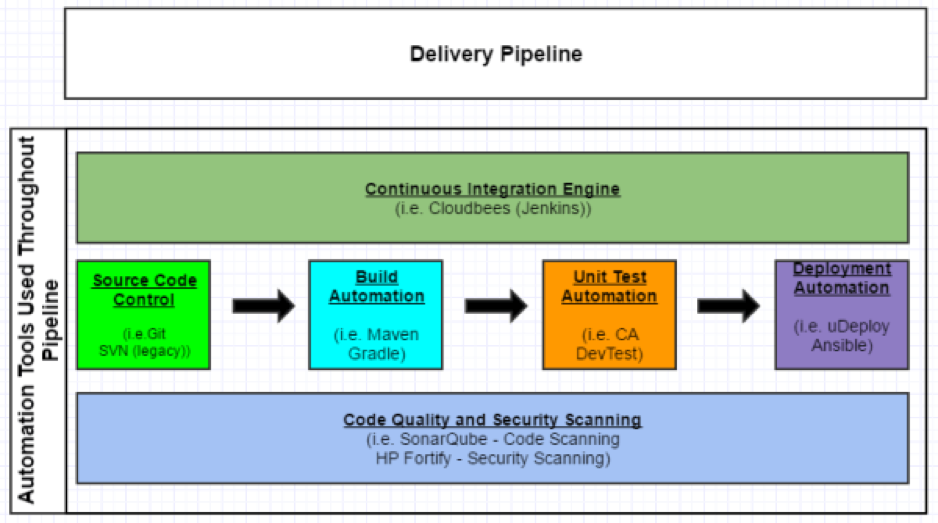
    Today, you also may hear and see a lot about continuous integration and continuous delivery/deployment. There are differences between the two for sure, but for simplicity’s sake, this blog focuses on breaking down the different stages of the process. This way you can get the basics and hit the ground running with a delivery pipeline in your organization. The delivery pipeline can be broken down into a few major buckets of work, or stages, as mentioned below.

    In my opinion—and, again, trying to keep things simple for now—the stages can be broken down as follows:

    1. Source Code Control (Management)
    2. Build Automation
    3. Unit Test Automation (could also include Integration Testing here as well)
    4. Deployment Automation
    5. Monitoring – not included in this discussion, and can be added at any time

    I have outlined the progression of these stages in Figure 1 below. Let’s review each of the stages in a little more detail.

    picture1

    Figure 1 – Continuous Integration Delivery Pipeline Sample

    Source Code Control (Management)

    Background

    Source code management, or source code control, certainly is not a new topic. This has been around for decades and has evolved over time. In a nutshell, an organization stores its code in a source code control system or repository so it can be tracked, maintained, versioned and audited. Developers should not store the code on their laptops or virtual machines and trust that will suffice for managing the code.

    Possible Tools

    1. Git is probably the most widely used SCM system out there. It is an open-source system.
    2. Subversion (SVN) has been around for quite some time. It is also an open-source system and is heavily used in many organizations, but there has been more of a push toward Git.

    Git and Subversion comparison can be found here.

    Build Automation

    Background

    Once a source code management system is in place and actively being used by a development team, the team will need to be able to compile and build their code. This is probably the first step in the whole chain of continuous integration events—it’s what gets the ball rolling. The code needs to build cleanly before an organization can even think about deploying out to its environments for testing and production.

    Possible Tools

    1. Gradle is an open-source build automation system used by top companies including Netflix, Google and LinkedIn.
    2. Maven is another open-source build automation system.

    Gradle and Maven comparison can be found here and here.

    Unit Test Automation

    Background

    Developers unit test their code to ensure the functionality they are building works as expected. In an ideal world, the development team should be saving these unit tests so they can be reused and put into a regression test bed.

    Possible Tools

    There are multiple tools out there for helping developers unit test their code. Many of these tools are open-source and can be used freely.

    1. JUnit is an open-source unit test framework pretty widely used.
    2. CA DevTest allows for the automation of unit testing, as well as a few other bells and whistles, such as service virtualization.

    Deployment Automation

    Background

    For the last stage in the process, delivery teams need to deploy their code/applications out to various test environments and, of course, production. To reduce errors and overhead in the deployment process, while increasing speed to market, this step can be automated through a variety of tools and methods.

    Possible Tools

    1. IBM Urbancode uDeploy allows users to model a process and orchestrate their deployment. This process then can be repeated across all an organization’s environments, and tweaked for each environment as needed.
    2. Ansible is an open-source IT automation tool. It can be used for everything from configuration management to product installation to application deployments.This tool is rapidly gaining acceptance and momentum in the DevOps community.

    Conclusion

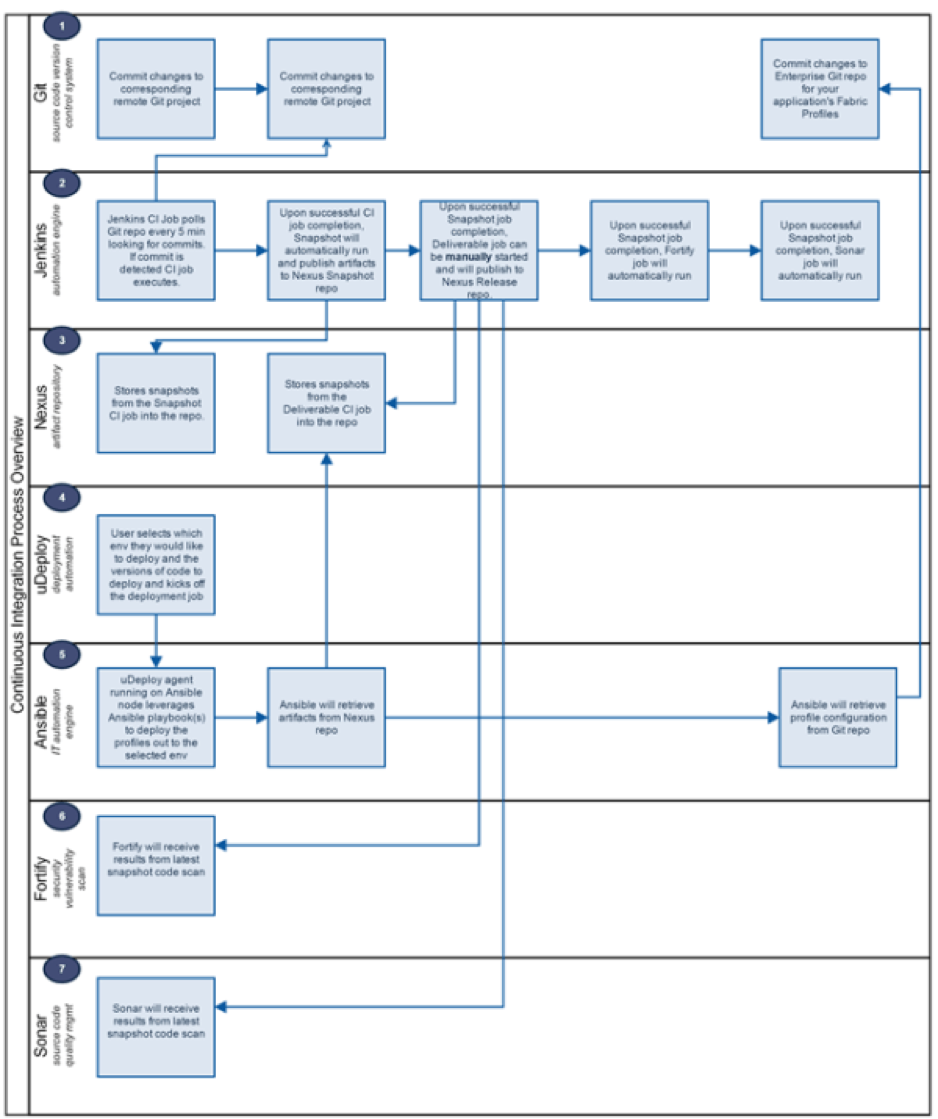
    This was simply a quick overview for companies to get started down the path of continuous integration and the DevOps world. Figure 2 is an example of what the whole flow looks like from committing the code to repo to deploying the code to an environment, to help put things into perspective. It’s easy to see how the tools interact with each other on the journey to production.

    picture2

    Figure 2 – Continuous Integration Process Flow

    About the Author / Seth Gagnon

    seth-gagnon-head-shotSeth Gagnon is a Middleware / Infrastructure / DevOps architect with more than 12 years’ experience in the field. Please visit sethgagnon.com for additional related articles. Connect with him on LinkedIn and Twitter.

  • Get to Know the New DevOps Stack

    Get to Know the New DevOps Stack

    Deploying software has always been manual and labor-intensive. That’s fading into the past as continuous innovation has become a competitive differentiator for companies of all stages and sizes across every industry.

    DevOps has become a hot investment market in recent years. The mega-rounds we’ve been seeing show the massive demand for tools that enable optimal runtime. Moreover, IT leaders are ready to spend to promote the DevOps culture.

    Companies increasingly are turning to DevOps processes and tools to automate the development life cycle and position themselves to adapt and scale nimbly. But for some companies, the idea of completely overhauling their IT operations processes can seem daunting—they don’t know where to begin. The thing is, adopting DevOps is actually quite simple.

    Examining the Stack

    Developers should bake in automation and agile development from the beginning. The good news, though, is that a defined set of tools to automate each step of the deployment process has emerged. Here’s a breakdown of the new DevOps stack, layer by layer:

    Source Code Repository: Let’s start from the bottom of the stack—from the moment you write the first line of code. Before the open-source movement took off and the cloud enabled easy sharing, developers had to work much more slowly to ensure that the necessary improvements were inserted in the right version of a product. Companies such as GitHub, Atlassian and GitLab provide source-code repositories that facilitate collaboration. Now, engineers can work on the same projects at the same time from halfway around the world without worrying about duplicating efforts.

    Continuous Integration: Newer tools such as CircleCI and TravisCI, as well as older tools such as those offered by Jenkins, automate testing and integration and provide repeatability in the deployment process. Using these tools, developers are able to test their code for failures and bugs as they write it so the code can be fixed before users ever experience the bugs. CI tools give developers something they desperately need to succeed in today’s competitive marketplace: timely feedback. By spending less time waiting on feedback for new code, engineers can resolve software bugs before they grow into full-scale crises.

    Binary Repository: Jfrog and Sonatype provide an end-to-end solution for storing and managing binary artifacts. The binary repository is the system of record closest to the production runtime environment. When something goes wrong, a binary repository such as Artifactory is the first port of call for operations teams. In addition, these tools scan for security vulnerabilities and make it easy to seamlessly distribute software to every corner of the globe.

    Continuous Development: Companies including Chef, Puppet and Ansible automate the next phase of taking data into production. The holy grail for software developers is zero downtime; continuous development tools allow developers to update software while everything remains up and running. These tools also streamline the delivery process by automatically configuring servers and ensuring repeatability of the deployment process.

    Production Environment: Google Cloud, Amazon Web Services and Microsoft Azure are in a war over runtime market share in the public cloud. Behind the firewall, Mesosphere, Kubernetes and Docker are trying to dominate the orchestration layers of enterprise private clouds. Customers want the agility and automation that comes from a cohesive DevOps stack but are refusing to be locked into a single vendor at any level. Whichever stack emerges as the default DevOps stack will have to ensure compatibility across public and private clouds.

    About the Author / Andy Vitus

    andyvitusAndy Vitus is a Partner at Scale Venture Partners. He has been investing with Scale for over 12 years and focuses on next-generation enterprise software and new data center technologies, including virtualization and cloud computing. Andy sits on the boards of Arena, Crittercism, DataStax, JFrog, PubNub, Realm Stormpath and Treasure Data. Connect with him on LinkedIn and Twitter.

  • Q&A: BDO’s Coffman on Change Management, Security and DevOps, Part 2

    Q&A: BDO’s Coffman on Change Management, Security and DevOps, Part 2

    As we covered in part one, DevOps’ best asset and biggest risk factor may be one and the same: swift and precious change. In part two, we continue our discussion of the challenges and solutions with Deena Coffman, managing director of BDO Consulting’s Technology Advisory Services practice.

    David Geer: What specific tools and technologies can help DevOps teams to address change management in these ways?

    Coffman: There are a variety of tools and technologies to address some of the inefficiencies in change management, allowing DevOps teams to automate most of the process. For example, teams can leverage change management software to build pre-authorization processes and workflows to speed up change management approvals. On the security side, infrastructure monitoring tools will alert an organization when a discrepancy is discovered on the network, providing application visibility to the users and monitoring for unauthorized changes. DevOps teams should also consider using a collaboration platform like Slack to improve communication via virtual meeting places.

    Geer: What will these tools accomplish and how should teams be using them?

    Coffman: These tools are only useful if used properly. Deployments that require change management approval can go through the automated workflows. If a change requires approval, developers can use Slack or any other collaboration platform to contact the required party and explain the reasoning behind the modification. DevOps teams must also take the time to identify and automate as many “standard” changes as possible to reduce the reliance on change control meetings to speed up their deployments.

    Additionally, DevOps teams need to consider using an infrastructure monitoring tool to ensure all changes to the production environment are known and authorized. If a change finds its way to production without getting the appropriate authorization, the monitoring tools can detect it and report it to the team so they can rectify the issue.

    Geer: What kinds of things do DevOps teams need to do to address security to the satisfaction of the business?

    Coffman: The development team and security do not need to be at odds. By working in unison, both sides can reach their objectives.

    The InfoSec team would help the development team by making efforts to reduce the latency of security projects. The development team would help not only the InfoSec team—but potentially the entire organization—by preventing an expensive and embarrassing security incident by diligently supporting tools that automate security checks.

    Additionally, the build process needs to run unit testing, integration testing, functional testing, regression testing and information security testing before the code reaches QA. Security testing is often insufficient or not performed at all. DevOps teams need to understand that security testing performs an important function of catching issues early so as to avoid expensive, embarrassing issues downstream.

    Geer: What specific tools and technologies can help DevOps teams to address security in these ways?

    Coffman: Several tools are available to help DevOps teams address security in many different capacities, including setting up continuous integration/continuous delivery processes, automating server configuration, automating UI testing and functional security tests, testing the security requirements of applications and automating the vulnerability scan of applications and infrastructure.

    Geer: What will these tools accomplish and how should teams be using them?

    Coffman: DevOps teams should integrate these tools as part of their continuous delivery process. As soon as a developer checks his code in, the continuous delivery system should run the functional security tests, non-functional security tests and the security scan to ensure that the developer did not introduce a security vulnerability to the application and the infrastructure. These tools are only as powerful as the test scenarios they run. Therefore, teams should write exhaustive test cases to ensure the security of the application.

    Geer: How can teams do all these things and still maintain all the benefits and expectations that people have of DevOps itself?

    Coffman: By deliberately working toward improved collaboration and communication, teams can take advantage of the integration and efficiency benefits of a DevOps structure without sacrificing security or quality. Technical knowledge is important, without a doubt. To be exceptional, though, teams need equally strong teamwork and communication skills to actively support all important functions in the organization.

    — David Geer

  • Chef Boards the DevOps Express with CloudBees, Others

    Chef Boards the DevOps Express with CloudBees, Others

    You often may have more questions than answers as you progress along your DevOps journey. Which tools should I choose? Do these tools work well together? What have other people done in my situation? You’re often left Googling to find the right integrations and piece together an architectural solution.

    Today, I’m excited to announce that Chef is joining DevOps Express, a new industry initiative comprised of 14 leading DevOps vendors and service providers. Led by CloudBees and Sonatype, and including everyone from Atlassian to GitHub, this initiative is focused on creating solutions that will help you adopt DevOps practices. Specifically, by defining reference architectures and highlighting best practices, supported integrations and solutions, we believe that DevOps Express will simplify and accelerate DevOps adoption for organizations of all kinds.

    DevOps Express uses popular technologies spanning multiple solution components to provide a framework for building reference architectures that are better integrated and supported. Creating reliable and actionable reference architectures for organizations will ease DevOps adoption and minimize risk for organizations.

    DevOps is collaborative by its very nature—it’s all about bringing teams together. This includes cultural transformation, breaking down silos between disparate teams and working together around the common goal of adding value for customers. These principles are just as true for us, the vendors providing tools to help you on your DevOps journey. We, too, must break down silos and work together to provide more value for you, our common customer. I’m looking forward to what we’ll build.

    About the Author / James Casey

    james_caseyJames Casey is vice president of Partner Integration at Chef. His career spans more than 15 years in companies ranging from mobile and finance startups to CERN, the birthplace of the World Wide Web. He specializes in building tools for operating large computing infrastructures. He previously created monitoring tools at CERN for the Large Hadron Collider.