Category: IT Administration

  • OpsRamp Extends AI Reach to Incident Management

    OpsRamp Extends AI Reach to Incident Management

    OpsRamp today extended its IT operations platform infused with machine learning algorithms, also known as AIOps, into the realm of incident management.

    The Summer 2021 release of the company’s namesake platform adds alert predictions for preventing outages and incidents, alert enrichment policies for faster incident troubleshooting and enhancements for automatically ingesting metrics data collected from the Alibaba Cloud environment and open source Prometheus monitoring software as well as Hitachi, Poly, VMware and Dell EMC platforms.

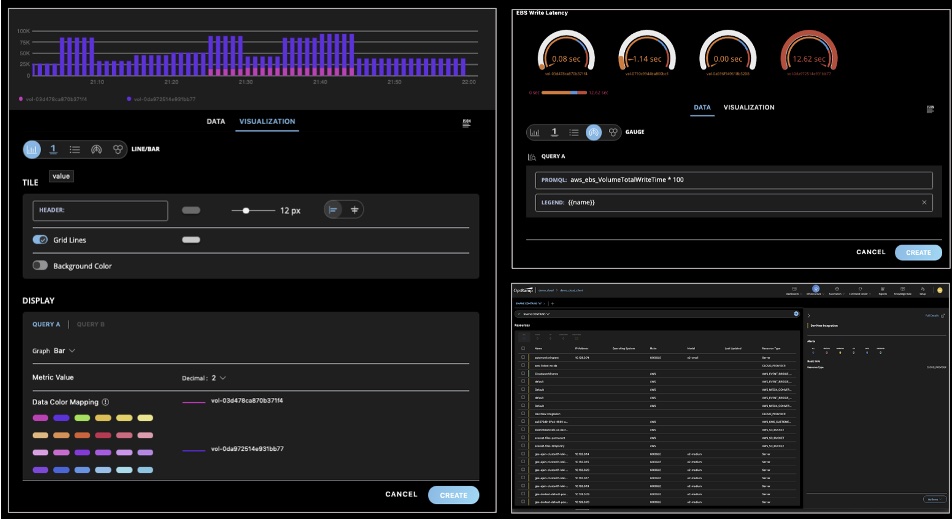
    IT operations teams can now also visualize metric values that can increase or decrease within a fixed range using Gauge charts. IT teams can also now add alert context details to provide more relevant information. There’s also now a mobile app for both Apple iOS and Google Android devices through which IT teams can now respond to alerts and incidents.

    Finally, OpsRamp is also making available a beta release of dynamic Workflows, which enable IT team to maintain a single decision table to address specific operational scenarios.

    Sheen Khoury, chief revenue officer at OpsRamp, said the goal is to leverage artificial intelligence (AI) to increase application availability by enabling IT teams to better predict when there are indicators of an incident caused by, for example, higher volumes of seasonal traffic that could lead to an outage.

    At the same time, IT operations teams can improve overall time-to-value by leveraging the automatic monitoring tools that are embedded in the platform, he added.

    OpsRamp is betting that rather than waiting for incumbent providers of IT operations platforms to add AI capabilities, many IT teams will opt to deploy a new IT management framework altogether. Many of the manual tasks IT operations teams regularly perform today can then be automated faster, noted Khoury.

    Naturally, it takes time for machine learning algorithms to be trained, so the benefits of AIOps are not instantaneous. However, those algorithms will continuously learn the unique attributes of an IT environment in a way that makes it easier for IT teams to manage an IT environment more proactively. The algorithms provide the added benefit of making it easier for new members to join an IT operations team without having to spend months learning all the nuances that are unique to that environment.

    Each IT team will need to decide for itself the degree to which they want to rely on an AIOps platform to manage their IT environment. Initially, most IT teams will need to evaluate the recommendations made by an AI platform. However, as they gain confidence in the recommendations, they will trust the platform to automate more processes in response to events occurring in the IT environment in real-time.

    Regardless of how much faith IT teams put in AI, it has become apparent that enterprise IT environments are only going to become more complex. Many IT teams will not be able to manage some environments without the aid of an AI platform. Many IT professionals may not want to work for organizations that don’t provide some way to augment their skills using AI—the stress level would simply be too high.

    One way or another, DevOps teams that are highly committed to ruthlessly applying automation will be at the forefront of AI adoption in the enterprise.

  • CircleCI Bets on Webhooks to Streamline DevOps Integrations

    CircleCI Bets on Webhooks to Streamline DevOps Integrations

    CircleCI today announced CircleCI webhooks, a feature that enables software engineering teams to build integrations that react to CircleCI job and workflow status notifications in near-real-time.

    Tom Trahan, vice president of business development at CircleCI, said this latest iteration of the company’s implementation of webhooks, which send messages any time an event occurs, will become the foundation upon which CircleCI will expand the ecosystem surrounding its continuous integration/continuous delivery (CI/CD) platform.

    For example, the CircleCI platform can now employ webhooks to integrate with a CI visibility tool from Datadog that can now be used to surface CicleCI metrics. Sumo Logic is similarly employing webhooks to enable its Continuous Intelligence observability platform to track events on the CircleCI platform. Those capabilities are now available via the software-as-a-service (SaaS) edition of the CircleCI platform.

    Trahan said the primary goal is to reduce the amount of friction within DevOps workflows that span multiple platforms by increasing the level of orchestration DevOps teams can take advantage of without having to create and maintain integrations using low-level application programming interfaces (APIs).

    Webhooks make it possible to streamline developer workflows while also increasing overall engineering velocity, he added. In addition, it should also become simpler for DevOps teams to triangulate events in a way that results in incidents being resolved faster, noted Trahan.

    CircleCI is relying on webhooks to strengthen its case for a best-of-breed approach to DevOps that enables organizations to mix and match tools as they best see fit rather than getting locked into a single integrated DevOps platform. The best-of-breed approach often makes it simpler to take advantage of new tools as they become available. The downside is the level of integration that DevOps teams need to maintain after they integrate all the tools that make up a DevOps workflow.

    It’s not clear what impact relying on webhooks to share messages in real-time about events as they occur across multiple platforms will have on integrations. However, any effort to streamline DevOps environments without requiring DevOps teams to abandon one tool for another is likely to be well-received. After all, every minute spent managing a DevOps platform means much less time that can be applied to building and deploying applications.

    It will be up to each DevOps team to decide to what degree a best-of-breed approach to DevOps suits their organization. As more organizations realize how dependent they have become on software to, for example, drive digital business transformation initiatives, many IT leaders are making a case to standardize DevOps platforms across their organization. Achieving that goal, however, may be difficult given all the various departments within an enterprise that have already adopted a wide range of tools and platforms.

    In the meantime, the focus on developer and engineering productivity will only increase as organizations look for ways to further accelerate application development and deployment at a time when software updates can now have a profound impact on profits and revenue. In fact, a delay to one software project can have a cascading impact on a wide range of initiatives that can’t go forward because of their dependency on a delayed project. Given the impact all those delays might have on revenue, the tolerance organizations have for delays to software development projects is understandably lessening by the day.

  • Federal IT Must Embrace Automation

    Federal IT Must Embrace Automation

    In the private sector, an automation explosion is underway.

    One major retailer, for example, is using a new automated system to increase speed and accuracy in how freight is handled at its regional distribution centers. Another retail giant is relying on new automated processes to replenish store shelves more efficiently, reduce excess inventory and free employees from mundane sorting tasks.

    They are among the retailers using automation to make the networks that interconnect all their locations easier to deploy and manage. But what about federal agencies, which are among the largest enterprises in the world?

    The story there is more of a mixed bag.

    At first glance, it may seem like apples and oranges to compare government agencies with some of the world’s largest retailers. But both are responsible for serving millions of people during a time of dramatic digital advancement, which requires significant reengineering of operations, systems and processes.

    In the case of federal agencies, digital pressures have intensified as citizens have come to expect service experiences similar to those they encounter every day in the commercial sector, and as the volumes and types of data that agencies must deal with have surged.

    The Benefits of Automation

    Agencies can leverage intelligent automation for a range of benefits, from relieving employees of rote, low-value work so they can contribute in more meaningful ways to making digital services faster and more responsive through the automation of manual, backend processes.

    Let’s say, for example, that a government website serving millions of citizens is prone to slowing down and even crashing. Automated software tools that analyze huge volumes of network data can proactively identify a potential issue and fix it before it becomes a problem.

    Sounds great, right? But uptake of automation technologies in federal agencies remains a work in progress.

    A recent survey found that 63% of federal agency executives thought they could benefit from intelligent automation and that 38% have already started implementing it. However, a large number–30%–remain on the fence and said they didn’t know if automation could help them.

    Interestingly, automation’s top benefits as perceived by the survey respondents were: Moving employees away from redundant or low-value work, reducing errors and offering a better experience to citizens and other users. Reducing costs was lower on the list, which is a good sign because it shows that more in the government sector are recognizing automation’s strategic value rather than fearing it as a job killer.

    Federal Adoption of RPA

    As a reflection of how automation is changing the nature of work and making employees’ jobs more interesting and productive, the federal government has stepped up a push to adopt robotic process automation (RPA) over the last few years. RPA is a technology that uses software robots to automate highly repetitive tasks that people would otherwise perform manually. This frees up human employees for higher-value work.

    These tasks can include extraction of data from websites and email text into a structured form for processing, data reconciliation and monitoring and responding to common IT and networking issues.

    In 2018, the White House Office of Management and Budget directed federal agencies and heads of executive departments to identify more opportunities to streamline operations via RPA.

    In 2020, the General Services Administration estimated that current automation programs “operating within agencies are achieving roughly five hours of workload elimination per employee. If the government deployed RPA at scale and achieved only 20 hours of workload elimination per employee, the net capacity gained would be worth $3 billion–and that is only scratching the surface.”

    The GSA leads the federal RPA Community of Practice to help agencies overcome the technical, management, and operational challenges in designing and deploying RPA programs.

    “At a government-wide level, RPA can represent a profound change, with the potential to empower non-IT professionals and process owners with the tools to automate a significant share of their workload,” the group’s report said. “RPA is considered transformative because it establishes the building blocks for artificial intelligence in terms of information technology infrastructure and task standardization. With effective RPA deployment, machine learning and intelligent automation are only a few, manageable steps away.”

    According to the group, “many agencies across the federal government have initiated RPA programs to automate tasks of varying complexity. Automations developed to date have focused on multiple functional areas including finance, acquisition, IT, human resources, mission organizations and security/mission assurance.”

    My own experience in working with federal customers is that many are at least dipping their toes into the automation waters, but not quickly enough and certainly not at the pace seen in some parts of the private sector.

    Why the continued reluctance? I think much of it comes down to trust. Worries remain that automation will take jobs when, in fact, machines should be thought of as non-human team members who take care of the drudgery while the humans contribute their knowledge and creativity to more important work. Federal enterprises should embrace the opportunity to test automation to prove it works as they expect, similar to interviewing a new employee. This is how to gain the trust needed to deploy automation to augment humans’ work.

    Automation also faces resistance from older employees who, on the verge of retirement, aren’t interested in learning new technology.

    The fact is, though, the federal government is on the cusp of an automation boom. More and more, it will become critical to agencies’ success. The time for fear and mistrust is over.

    Automation is here to stay, and agencies should embrace it.

  • Kentik Open Sources Five Projects to Advance Network Observability

    Kentik Open Sources Five Projects to Advance Network Observability

    Kentik today unfurled a developer hub, dubbed Kentik Labs, through which it is making five open source projects available as part of an effort to advance observability across network operations (NetOps).

    The five projects are:

    kTranslate: A system for pulling and pushing network data that is the basis of the Kentik Firehose integration the company created for the New Relic observability platform

    NetDiag: Scalable, asynchronous implementations of low-level network diagnostics

    Convis: Example code showing how to attribute process and container information to network traffic via the Linux kernel using eBPF

    kProbe: A high-performance host and sensor network probe (PCAP)

    Grafana App: A real-time tool for ingesting and querying network data

    Nick Stinemates, vice president of business development at Kentik and co-chair of Kentik Labs, said the goal is to enable DevOps teams to incorporate NetOps within the workflows already being employed to programmatically manage the rest of IT.

    Stinemates noted that, as IT environments become more distributed, managing NetOps has become more challenging. If there is a failure, it can be difficult for DevOps teams to determine if the issue is due to application code, the underlying infrastructure or some other root cause. Kentik Labs is committed to providing tools that will help DevOps teams reduce their mean time to recovery (MTTR), he added.

    Most NetOps teams increasingly rely on software to manage distributed networks either in the form of graphical tools provided by router and switch vendors or by using the Python programming language and the open source Ansible automation framework that enables IT teams to declaratively manage IT infrastructure.

    As the teams that manage network operations gain more proficiency with those tools, it becomes simpler to incorporate them within the construct of a larger DevOps team. While DevOps teams have been programmatically managing IT infrastructure-as-code (IaC) for years, network management has largely remained in a separate silo. However, as more applications are deployed in the cloud, it’s clear NetOps needs to become more integrated with the rest of the workflows employed to deploy and manage a highly distributed IT environment, said Stinemates.

    Less clear is to what degree the networks that make up a hybrid cloud computing environment will continue to be managed by network administrators versus site reliability engineers (SREs) that are starting to assume responsibility for managing compute and storage.

    Regardless of who manages the network, the next generation of microservices-based applications that are dependent on application programming interfaces (APIs) to call various services are much more latency-sensitive than previous generations of applications. Many of those applications will regularly experience performance issues due to networking issues that are often not readily apparent to DevOps teams. The goal should be to, at the very least, arm those DevOps teams with the tools required to confirm the source of those issues before a “war room” is convened to determine how to address the issue.

  • The Future of IT: Smart Tools, Intelligent Technology

    The Future of IT: Smart Tools, Intelligent Technology

    In the last few years, the lines between information technology and development have been blurred. Developers need to know about infrastructure, and administrators need to know how to code. Advances like containerization, orchestration, continuous integration and infrastructure-as-code (IaC) happened in tandem with DevOps’ rise. The advantage of DevOps is that you can quickly build and deploy products. That comes at a cost, though, and that cost is infrastructure complexity. The answer to managing that complexity lies in technologies such as artificial intelligence (AI) and machine learning (ML).

    How can AI Help IT?

    Intelligent technology has come a long way in recent years. Machine learning and artificial intelligence are finding their way into more and more technology. New tools are beginning to emerge that can monitor and manage complex systems with relative ease. There are several clear upsides to using these systems in IT:

    • Instant notifications when there is a problem.
    • The automation of tedious IT tasks.
    • Dynamic infrastructure adjustments to help with traffic spikes and other changes.

    Training an AI to keep systems running optimally, apply updates and alert IT staff to problems in real-time is entirely possible today. By automating away a lot of tedious, manual work like digging through logs, IT is free to focus on mission-critical objectives instead of babysitting servers and monitoring dashboards.

    What Does That Mean for IT Jobs?

    Some people worry that advances in AI will lead to a world where robots take human jobs. While there will undoubtedly be some domains in which AI and ML make more sense than a person, those same technologies will also create new jobs. As IT teams are unburdened from tedious tasks, they can expand into working with ML and AI technology. IT teams are ideal for guiding business decisions about what tasks benefit the most from intelligence technology. So while IT jobs may be transformed by AI, there is no reason to believe that they will disappear. It is more helpful to think of AI as a new tool for IT instead.

    Where can IT Implement AI Tools?

    AI is best used for tasks where there is a lot of data. Having a human comb through log files, databases and dashboards is a slow process. An AI could continuously monitor everything, all the time, freeing up the IT staff to focus on the solution instead of tracking down which piece of the infrastructure is experiencing a problem.

    One area in particular that could benefit from AI/ML is fraud detection. Machine learning can analyze data to find fraudulent transactions much faster than a person ever could. And over time, it will get faster and more accurate at detection.

    Another area with potential for AI is the customer-facing helpdesk. Intelligent systems that have access to ticket resolution histories and device data may be able to handle a majority of requests without needing to use the time of an actual technician. If the AI fails to solve the problem, it can escalate the issue to a technician. As these tools mature, they’re impacting customer service processes, too; let the AI go as far as it can and then escalate less common and/or more complicated issues to a technician. This is an excellent example of how AI and IT can work together to provide the best possible outcome.

    AI and ML tools are the future for IT teams. These tools will be able to handle a lot of the tedious work that is currently done by people such as parsing logs, monitoring traffic and providing some measure of technical support. That leaves IT to focus on mission-critical issues and problems that AI and ML  cannot easily solve.

  • Datadog Cloud Security Platform Advances DevSecOps

    Datadog Cloud Security Platform Advances DevSecOps

    Datadog has launched a Datadog Cloud Security Platform that promises to advance DevSecOps by identifying potential threats using the same agent software many DevOps teams already rely on to instrument applications.

    Renaud Boutet, senior vice president of product for Datadog, said organizations that rely on the Datadog software-as-a-service (SaaS) platform can now more easily invoke security services based on the same data model used to observe applications.

    The security services provided by Datadog include a cloud security posture management (CSPM) offering that identifies misconfigurations and applications that are not compliant with industry standards such as the Payment Card Industry Data Security Standard (PCI DSS).

    A cloud workload security (CWS) offering, meanwhile, detects threats to production workloads by monitoring file and process activity, while a monitoring tool identifies threats to cloud environments by analyzing operational and security logs. It also provides integrations and threat detection rules that are easy to extend and customize.

    Finally, there is an application security tool, currently in beta, that identifies and blocks attacks that target code-level vulnerabilities, such as SQL injections and cross-site scripting (XSS) exploits.

    Boutet noted that many DevOps teams are reluctant to roll out security platforms that require them to deploy, manage and update an additional set of agents across their application environment. Datadog is now effectively unifying application observability and security in a way that makes it simpler for those DevOps teams to embrace DevSecOps best practices, added Boutet.

    In some cases, the dashboards surfaced by Datadog will be employed by DevOps teams that have assumed responsibility for cybersecurity as part of an effort to shift more responsibility for application security further left, noted Boutet. In other instances, cybersecurity teams will be able to view the same alerts shared with their DevOps colleagues, he added.

    Pressure to address DevSecOps is mounting in the wake of a spate of high-profile software supply chain breaches. While the majority of organizations have not been breached, questions are now being asked at the boardroom level as concerns over application security increase. Many organizations are wondering if they should slow down the pace of application development to ensure better security and to what degree.

    Regardless of the path forward, awareness of application security has never been higher. An executive order issued by President Biden calling for improvements to security will likely have a cascading effect across not just government agencies but also on organizations that do business with those agencies. One way or another, DevOps teams and cybersecurity professionals will be required to work more closely together. The challenge is striking the right balance between security and productivity. Most developers are never going to become world-class security experts. Conversely, most security professionals know next to nothing about coding. That doesn’t mean, however, that efforts shouldn’t be made to educate both camps as much as possible. After all, even a small amount of education can have a profound impact when most of the attacks being made against applications are not especially sophisticated.

  • Why You Should Embrace Incidents and Ditch MTTR

    Why You Should Embrace Incidents and Ditch MTTR

    The cliché is that everyone in IT hates incidents, and the natural reaction when assembling incident response metrics is to look for numbers that you can lower over time. Fewer incidents and shorter incident response times must be better, we think. You might already be familiar with the common metrics associated with these goals, including mean time-to-resolution (MTTR) and total incident count.

    As it turns out, however, these metrics actually work against your company’s resilience goals. To understand why, let’s look at the industry that birthed most of our modern incident management practices and has learned the most about how to properly apply them: the airline industry.

    What the Airlines Can Teach Us

    From the 1950s to the 1990s, the airline industry built and refined best practices for incident management that we have since simplified and that have been widely adopted across the tech industry. What’s often termed “modern incident management” simply means the predictable and repeatable approach to handling unexpected disasters and the learnings-driven remediation steps that are prized when building a DevOps or SRE practice.

    One of the most important findings to come out of this research is the somewhat surprising fact that incidents weren’t being declared often enough. Instead, incident reports were created and the carefully assembled response and cataloging process was only followed after catastrophic events, which meant earlier opportunities to catch the underlying problem during a less severe incident were being missed.

    So why did an industry with such incredibly high stakes take so long to realize that more incidents were actually a good thing? You guessed it: a misguided desire to decrease the incident count. In chasing this goal of “lowering the number,” pilots and mechanics were often reluctant to file incident reports for anything less than the most critical situations, which meant the powerful, learnings-focused response and remediation process was only triggered in response to relatively rare and critical situations.

    This is a textbook example of Goodhart’s Law in action. To paraphrase, Charles Goodhart posited that any metric created will ultimately become the goal. In other words, if the incentives are aligned to reduce incidents, no matter how good your response and learning process is, it will only be executed in the most dire and unavoidable circumstances. After discovering this, the industry rapidly moved their focus towards expanding the use of the incident process by working to expand the spectrum of situations that could be classified as incidents with the goal of triggering the formal incident response process more often, distributing learnings for more incidents of lower relative severity and, yes, ultimately resetting the goal to increase the number of incidents.

    This approach effectively turned Goodhart’s Law to the airlines’ advantage—any effort to game the metric(s) meant more learning, not less. Filing incidents became directly and heavily incentivized and these metrics were never used as a justification for punitive action. This resulted in the safest decade of commercial aviation on record, with over 12 billion passengers traveling and no fatal accidents.

    What IT Can Learn About Successful Incident Response

    As technology companies, there is much for us to learn from this exercise in achieving resilience versus chasing “lower numbers.” The primary learning is this: increasing your incident count by incentivizing the use of your incident management process for more non-critical incidents—likely your SEV2s and below—and focusing your metrics and incentives on that goal, is likely the best way to reduce your overall count of catastrophic failures.

    For most companies, this means putting MTTR on the back burner and instead focusing on making the incident process itself more accessible throughout your company and across your organizations. It means leaders should talk about impactful and recent postmortems publicly and that postmortem distribution should be a priority; it should also be something that’s measured. Most importantly, it means opening up the incident management process more widely. Ideally, everyone at your company should have access to systems that allow them to file incidents, read incidents in progress and review postmortems from previous incidents.

    I like to reference the “big red button” philosophy of factory floors, where the decision-making power to declare an incident is in the hands of every employee. An unsafe situation shouldn’t be up for discussion, debate or approval before being acted on, even if the situation is later determined to be less severe than originally thought. The context of why that incident was filed—why that big red button was pressed—may prevent larger, more catastrophic failures in the future.

    So if you’re just getting started building out an incident management practice at your company, or you’ve been chasing MTTR metrics and focusing on pushing your incident count down as a primary goal, consider taking these learnings to heart and creating a positive incident culture with positive metrics meant to encourage and reward incident responders and reporters. Your company’s future depends on it.

  • Visualize Logs to Get More Value from Data

    Visualize Logs to Get More Value from Data

    Why do you keep logs? Regardless of the type of logs we’re talking about, you keep them because you expect them to provide some value for the organization. Maybe the logs will help you improve profitability; perhaps they will help you recover from downtime or perhaps they are expected to alert you to a security incident in progress. If you’re a system administrator or someone tasked with infrastructure reliability and maintenance, you’d agree that logs are critical. They represent the source of truth you go to for information about your server status and activity, website traffic, application performance and much more.

    No matter the intended purpose of logs or how you use them, the information in these logs should be easy to access and interpret. Today’s complex systems generate enormous amounts of log data, making it almost impossible to dig through tons of data in raw text files to find important information. Finding valuable information is immensely difficult in text logs but not in the visual world. This is precisely where log visualization comes into play. What if the data in your logs could transform into graphic shapes and patterns? Wouldn’t it be much easier and faster to decipher information from log data and understand it better?

    What are Logs, and What are They Used For?

    Before going any further, let’s make sure everyone is on the same page about the meaning of logs. A log is a textual, timestamped record that tells us what happened and when. DevOps engineers have to rely on a combination of logs from various system components and data sources to understand why an event occurred, and perhaps even predict future events.
    logs value unknown


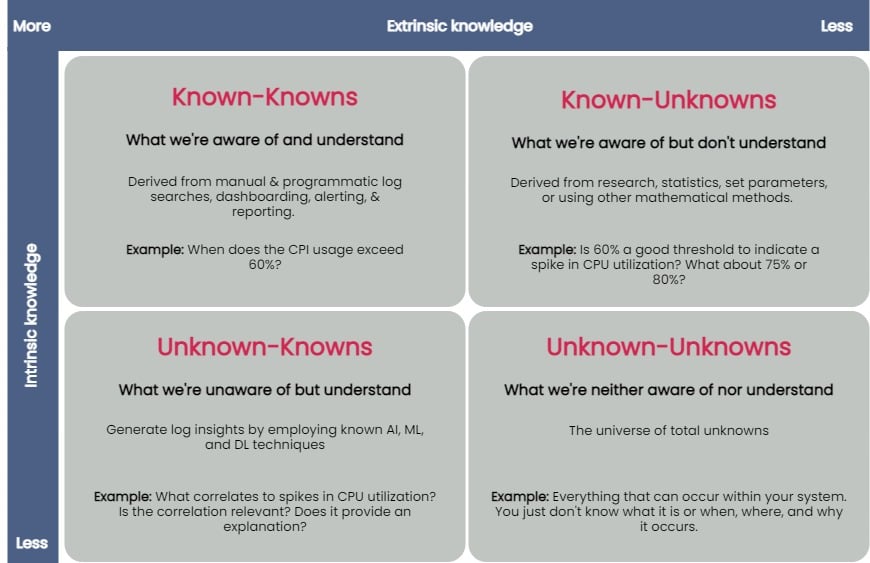
    You can taxonomize knowledge extracted from log data into four key groups: known-knowns, known-unknowns, unknown-knowns and unknown-unknowns. Manual and programmatic log searches, dashboarding, alerting and reporting manually extracted log fields are common ways to extract and analyze known-knowns. These methods assume that the engineer is already familiar with the data and knows where to look for answers. You can use statistics or other mathematical means to algorithmically resolve the known-unknowns, such as search terms and thresholds. The unknown-knowns are taken care of using AI/ML/DL techniques that generate log insights such as event correlations, log pattern clustering and known anomaly detection. But what about the unknown-unknowns?

    Uncovering Unknown-Unknowns

    With raw text logs, it’s relatively simple for engineers to conduct machine searches or set alerts upon encountering certain specific errors or specific types of behavior. However, to search through logs or even set up alerting parameters requires you to know what you’re looking for. If you have no idea what kind of errors or threshold limits for which you need to be alerted, it’s impossible to set these up.

    Modern applications are incredibly complicated, and one can not honestly understand everything about how they work or even always ask the right questions when things go wrong. But if an engineer reviewing logs doesn’t even know what to search for, it becomes impossible to figure out without an assistance tool like a purpose-built log visualization solution.

    For the most part, none of the techniques used to uncover the known-knowns, known-unknowns, and unknown-knowns of log data can help reveal the unknown-unknowns. An effective way of unraveling them is to rely on human intelligence to explore the unknown-unknowns space. Supplementing human intellect with a purpose-built log visualization tool can significantly help analyze the unknown-unknowns. Once you’ve recognized the unknown-unknowns, you can quickly feed this knowledge back into the appropriate, less esoteric groups (known-knowns, known-unknowns and unknown-knowns) and get more value from your log data.

    A good log visualization tool can aid in gathering knowledge from unknown-unknowns and can inform proactive log analysis or fast reactive log analysis use cases. Current log analysis practices center around reactiveness; the focus is to minimize and resolve issues after a problem has occurred. Using a log visualization tool, you can quickly isolate subtle and anomalous changes within a system by visualizing patterns generated from log data and exploring unknown-unknowns before an incident occurs.

    Current log visualizations are limited in display log count distribution and its variations. They do not visualize other log attributes or log combination attributes.

    All the UIs shown have similar function usage and displays. Drilling into an example of UI windows gives one the feeling of a typical log analytics practice. The figure below annotates different log analysis functions in the labeled, boxed area. None-visual log analytics functions such as search, tag, and log display are all required time-range input.

    log metrics annotate UI

    An ideal log visualization tool should not rely on just one information type. Log data is multifaceted. A log visualization tool can only begin to be valuable when it lets you focus on as many facets of log data as you can derive.

    Log Visual Pattern Discrimination

    The power of log visualizations comes from humans’ ability to recognize visual patterns. It’s hard to spot a pattern among raw log data, but it becomes easier once you can visualize that data.

    When an experienced DevOps operator looks at a log visualization, they can easily see where the anomaly is, even with no previous understanding of how the system works or where the anomaly might be coming from.

    Visualizations allow engineers to identify visual patterns and quickly understand what is going on in the system—whether it’s a hack in progress or an error causing a poor user experience. Visualizations are compelling, as they help shed light on important events, even if the engineer has no idea where to look or had no idea there was a hack going on in the first place.

    For instance, consider a scenario where a complex system generates millions of logs daily. Suppose we were to establish a baseline of the number of logs the system would generate when functioning normally. In that case, we’d have to take a daily count over a couple of weeks, or at least a month, to deduce a good-enough baseline.

    Even if we derive an acceptable baseline, we’d have to keep recording daily counts and compare it with this baseline to detect an anomaly. Doing this can be time-consuming and counterproductive as you might end up discovering an anomaly when it’s already too late to take any action.

    Once we plot logs daily on a graph, we can immediately figure out the baseline by observing it visually. Once we’ve visually established a baseline, we can instantly identify anomalies when we see values plotted above or below that established baseline. The following image visualizes logs ingested over ten days, illustrating how simple it is to establish baselines and identify when a system is doing something outside its usual behavior. This graph can deduce the baseline to be around 38,000 log records, with anything above denoting abnormal behavior within the system.

    log visualization

    Better Log Visualizations

    There are a few essential criteria for creating good log visualization analytics. They are:

    Use original log data. Data strategy is important. Most log data is unstructured by default, and many organizations tend to convert it to structured data before doing anything else with it. Doing so is a mistake, as you can lose vital pieces of information in the process. Good visualizations should be based directly on the logs exactly as the system produces them.

    Log data consistency. The format for the visualization should be consistent because if there are constantly changing variables, it becomes harder for humans involved to spot patterns.

    Choose robust log attributes and use them wisely. Instead of using just one log attribute for visualization (such as time distributed log density), you should look at visualizing more facets. Doing so gives analysts a better grasp of—and an intuitive understanding of—the log data set. For example, multiple pictures of an elephant taken from different angles help people understand elephants better than showing them only a single photo of an elephant taken from one angle. Similarly, if we break down logs by each of their attributes and then plot their frequency, we can better visualize how a system is performing. However, the attributes you pick are critical to providing valuable visualizations.

    With modern systems becoming even more complex, deciphering logs and uncovering unknown-unknowns will never be easy. The time is right to introduce new log visualization techniques to handle these unknown-unknowns. With log visualization becoming more user-friendly, you no longer need to count on people to be familiar with log interpretation or be aware of statistical, mathematical or AI techniques to analyze log data. Visualizing log data is not just a decision-making aid to human intelligence, discriminating between what is and isn’t acceptable and quickly identifying and remediating issues—the knowledge gained from unraveling the unknown-unknowns also helps advance AI/ML and automation techniques used to ascertain the knowns of your log data.

  • Using ML/AI to Support Infrastructure Monitoring

    Using ML/AI to Support Infrastructure Monitoring

    Successful infrastructure monitoring enables IT teams to ensure constant uptime and performance of their company’s systems. Technologies like machine learning (ML) and artificial intelligence (AI) benefit infrastructure monitoring by more quickly collecting and analyzing data from all of the hardware and software components that comprise the IT stack. Infrastructure changes are occurring faster than ever before, but complex systems, the unique nature of applications and lack of IT skillsets can cause challenges when integrating with these newer technologies. However, it’s more important than ever that sysadmins and DevOps teams understand how ML and AI can mitigate these roadblocks, support them in staying on top of infrastructure performance and rapidly address issues that arise.

    Intelligent Monitoring Support for Complex Systems

    The most tangible result of intelligent infrastructure monitoring tools and processes is near-immediate alerting of performance and uptime issues, which can then be addressed in an efficient and effective manner so no business interruptions occur. However, complex systems can stunt these benefits if ML and AI are not being used and manual monitoring protocols are still in place.

    Tools that use ML or AI lessen the work of IT staff immensely, freeing up critical business resources and aiding in overall productivity. Both technologies can automatically identify and update all IT stacks that comprise an enterprise’s infrastructure to keep systems up-to-date and aligned with established key performance indicators (KPIs). In addition, intelligent offerings can detect and factor those metrics against set standards so that early alerts to an “unhealthy” section of infrastructure can be identified, even as the IT stack is constantly changing. This drastically speeds up troubleshooting efforts.

    Differentiation in Applications

    The different applications supported by the various IT stacks will most often have unique service-level agreements (SLAs) for their performance and uptime, as well as remedies or penalties should those service levels not be achieved. Plus, system loads that stress the underlying infrastructure are frequently changed. For these reasons, it is important to identify what constitutes a “healthy” IT stack so that these minute parts of the infrastructure are not overlooked due to the variation involved.

    ML and AI can be programmed to track system baselines that support a “healthy” IT stack. These technologies are particularly great at finding novel and unusual patterns in data. As the monitoring and observability landscape becomes more complex over time, driven by real changes in how developers build applications and systems, the ability to spot and detect such patterns in data can be crucial in helping make sense of it, further cutting down efforts on manual searching, detective work and “death by dashboards,” which we’ve all experienced at one time or another.

    Supporting IT Team Skills with Intelligence Technology

    The role of sysadmins—and to a greater extent, developers—has shifted over the past few years to become nearly as complex as the infrastructure they oversee. Nowadays, it seems as though developers are required to have expertise in all aspects of infrastructure, from monitoring to Kubernetes to machine learning. This can take quite the toll on developers who possess such skills, but in a more realistic sense, developers that can do all these things are very hard to come by. The lack of these skillsets is pervasive in the industry, which is why ML and AI can be seen as supporting technologies—they can fill in these gaps, to an extent.

    With built-in intelligence and automation, ML/AI can enable even the most inexperienced sysadmin or DevOps professional to monitor complicated infrastructure like a pro, taking on most of the time-intensive work around collecting and analyzing the data and identifying where to troubleshoot. The main goal is to put humans in the driver’s seat, utilizing ML and AI for granular discovery of system issues, providing the metrics or charts that might be most relevant to IT staff as they troubleshoot their system and reducing the cognitive load of developers.

    With the vast benefits that intelligent technologies possess, integrating them into your IT stack can help mitigate challenges experienced with complex systems, application differentiation and the skills deficit experienced in the IT team. The important ingredient in making ML and AI effective in infrastructure monitoring is using tools that incorporate the right formulas, algorithms and automation that can best help determine success when it comes to your desired outcome.

  • CloudBolt Adds Cloud Cost Tool to Hybrid Management Platform

    CloudBolt Adds Cloud Cost Tool to Hybrid Management Platform

    CloudBolt Software this week added cost management capabilities for Amazon Web Services (AWS) and Microsoft Azure public clouds along with codeless integrations with additional platforms to its hybrid cloud management platform.

    Grant Ho, chief marketing officer for CloudBolt, said the Spring Release of the company’s platform, now generally available, enables IT operations teams to rely much less on custom code to integrate the various elements of a hybrid cloud computing environment. The Spring edition adds support for the VMware vRealize Automation 8 automation platform, the configuration management database provided by ServiceNow as a cloud service and the IP address management platform from SolarWinds.

    CloudBolt

    In the wake of the COVID-19 pandemic, CloudBolt is betting more organizations will look to centralize IT management as part of an effort to reduce the total cost of IT. The cost management capabilities added to the platform enable IT teams to position themselves as more of an independent arbiter of where certain classes of workloads should run, based on cost, at a time when organizations have never had as many options as they do today, noted Ho.

    A recent survey published by CloudBolt found 80% of respondents are prioritizing real-time insight into cost optimization and security remediation. A total of 71% want self-service to be easy for end users, while 62% want an approach to integration that doesn’t require deep domain knowledge or special expertise.

    A full 94% of respondents also noted hybrid cloud computing will be critical to digital transformation. A total of 92% also noted that empowering end users through self-service IT is a digital transformation accelerator, while 99% said successful automation depends on streamlining integrations.

    More than three quarters (78%) noted they lack the visibility necessary to optimize cloud deployments. More than half (56%) also admitted their self-service offerings fail to meet user needs and more than three-quarters (76%) still rely on some form of custom coding when it comes to integration.

    Most enterprise IT organizations are trying to strike a balance between cost and flexibility as IT environments become more distributed. Each time a new platform is added to an IT environment, the total cost of IT rises because additional consoles for managing those platforms need to be staffed. The challenge is finding a way to centralize the management of IT in a way that reduces the number of consoles that have to be mastered without requiring every business unit to standardize on a platform that locks an organization into a single provider.

    It’s unclear to what degree IT organizations will rely on traditional IT service management (ITSM) platforms manned by administrators versus DevOps platforms deployed by site reliability engineers (SREs) to achieve that goal. However, one way or another, the cost of distributed computing environments needs to be reduced, even as they are becoming more complex. The primary issue now is deciding how best to achieve that goal in an IT environment where every application owner tends to view themselves as master of their own IT domain.