Category: IT Administration

  • JumpCloud Brings Zero-Touch Provisioning to the Mac

    JumpCloud Brings Zero-Touch Provisioning to the Mac

    JumpCloud today announced it is adding a zero-touch enrollment for Macs capability to its cloud directory platform that will also be extended over time to applications.

    Greg Keller, JumpCloud CTO, said this new capability extends Apple Business Manager, formerly known as Apple Device Enrollment Program (DEP), all the way down to specific users by leveraging data that resides in the JumpCloud platform.

    Whenever a user logs into a new Mac, it can automatically be synchronized with the JumpCloud Directory, which then uses the identity of that end user to configure the device in addition to providing the appropriate access to all corporate resources via their JumpCloud credentials.

    Keller said the need for zero-touch approaches to IT administration has become more acute in the wake of the COVID-19 pandemic. With employees working from home more frequently even after the pandemic eventually subsides, Keller noted the days when IT teams could physically provision a Mac are on the wane.

    While Apple Macs still represent less than 10% of all the PCs shipped in a year, Keller noted small-to-medium (SMB) businesses are adopting Macs at a faster rate than large enterprises. As the endpoints become more diverse, Keller said the JumpCloud platform provides an alternative to Microsoft Active Directory for managing both Windows and Mac devices. Apple, of course, last year acquired Fleetsmith to gain access to provisioning tools. However, those tools are not yet integrated with any type of directory.

    Most recently, JumpCloud has added a tool that enables IT teams to remotely install software onto end user Windows devices, as well as integrations with Slack, Salesforce, Atlassian, GitHub and Amazon Web Services (AWS).

    Fresh from raising an additional $100 million in funding, JumpCloud is making a case for a zero-trust approach to managing endpoints using a directory that verifies the identity of each end user. JumpCloud, which makes a free edition of its platform available for individuals and small teams, is already being used by more than 100,000 organizations spanning more than a hundred countries. More than 3,700 of those organizations, including Cars.com, GoFundMe, Nimbus Therapeutics, Grab, Pulselive, SlimPay, Foursquare, Beyond Finance and Funding Societies, are paying customers.

    In the longer term, there may come a day when verbal commands are employed to provision endpoints for specific end users. In the meantime, the process of configuring and provisioning those endpoints is becoming more automated. IT teams are now able to remotely manage fleets of endpoint devices without having to physically touch them. In fact, there may be no need for IT managers to return to an office, as tasks become increasingly automated and able to be performed remotely.

    While there are a lot of options available to achieve that goal, Keller said the number of them that are tightly integrated with a directory to ensure the right system winds up in the right end user’s hands is few and far between. The challenge now is getting organizations to rethink their directory requirements at a time when IT teams are increasingly expected to deliver personalized, white-glove services regardless of where an end user is located.

  • VMware Enhances Management Portfolio

    VMware Enhances Management Portfolio

    VMware today rolled out a series of updates to its automation and monitoring portfolio as part of an ongoing effort to simplify management of highly distributed IT environments.

    Updates to the VMware vRealize Cloud automation portfolio include VMware vRealize Automation 8.4’s tighter integration with the open source Salt automation framework the company gained by acquiring SaltStack last year, in addition to a range of tools for provisioning and governing instances of VMware software running on Google Cloud, Microsoft Azure and VMware Cloud on Amazon Web Services (AWS).

    There is also a set of tools to enable organizations running NSX network virtualization software for vSphere to migrate to NSX-T, an instance of network virtualization software that can be deployed anywhere.

    VMware vRealize Operations, meanwhile, is being updated to support a total of 57 AWS services along with the ability to predict the cost of deploying VMware Cloud on AWS. The latter capability includes tracking potential savings generated by powering off idle or unused virtual machines as well as snapshots, orphaned disks and oversized virtual machines. There are also now ten additional dashboards for tracking various costs, including return on investment, total cost of ownership and potential cost savings. IT teams can also more easily track capacity utilization trends on AWS.

    VMware is adding support for the open source Telegraf Agent to enable IT teams to collect metrics from any platform, in addition to providing an update to VMware vRealize Log Insight 8.4 and vRealize Log Insight Cloud that enables these monitoring tools to store data collected from multiple cloud services more efficiently. IT teams will also be able to collect logs from both Microsoft Azure and AWS.

    Finally, VMware is expanding its network monitoring tools to provide greater visibility across multiple clouds.

    Fidelma Russo, senior vice president and general manager for cloud services at VMware, said the rate at which IT teams are consuming the software-as-a-service (SaaS) editions of VMware management and observability tools or full-blown managed services has increased sharply since the start of the COVID-19 pandemic, as IT teams managed on-premises and cloud instances of VMware software from home.

    It’s not clear what percentage of VMware’s installed base are now consuming the company’s automation and monitoring tools, but as the number of VMware instances deployed on public clouds increases alongside on-premises IT environments, so, too, do the management challenges. The choice IT teams generally have to make is deciding between automation and observability tools that are optimized for a specific platform versus adopting frameworks that work more broadly. With the acquisition of Salt and support for Telgraf, it is apparent VMware is moving to expand the reach of its management portfolio beyond its own software.

    In the meantime, IT teams are not only being asked to manage more complex IT environments, but the expectation that, through automation, they will be able to more effectively implement cost controls. This is happening at a time when many organizations have not been quite so sensitive to the total cost of IT. The challenge, of course, is those organizations are being asked to spend money on automation today in the hopes of spending less because of it tomorrow.

  • How to Eliminate Incident Inefficiencies

    How to Eliminate Incident Inefficiencies

    In today’s complex, dynamic IT environments, the proliferation of disparate IT Ops, NOC, DevOps and SRE teams and tools is a given – and usually considered a necessity. This leads to the inevitable truth that when an incident happens, often the biggest challenge is collaborating between these teams to understand what happened and resolve the issue. Inefficiencies suffered during this critical stage can have huge impacts on how much each incident costs the business.

    I recently sat down (virtually) with Sid Roy, VP of client services at Scicom, to get a deeper understanding of how IT leaders can more effectively size up these inefficiencies and eliminate them.

    The Costs of IT Incidents

    When asked what a minute of downtime costs, analysts and vendors may provide different answers – but they are more or less aligned around the same order of magnitude – several thousands of dollars per minute. And with an average of five major incidents a month and an average time of six hours for resolution, this easily amounts to millions of dollars a year.

    The three key drivers of these costs are:

    Staffing and team member costs: This includes full-time employees (FTEs), consultants, and overhead when other teams are pulled in to deal with the incident. For many organizations, this can include offshore incident response teams.

    The direct and indirect costs of an IT incident: This includes your infrastructure or capital expenditures like software licenses for monitoring, log and event management, notification, ticketing, collaboration, etc.

    The business impact of an IT incident: This is one of the most challenging and unpredictable variable costs to calculate or manage, and is often the highest of all three drivers. It includes revenue loss/delay or reduction due to a major incident, and the profit or loss due to brand or goodwill impact. It also includes inefficiencies suffered by other parts of the business when critical services they depend on are degraded or unavailable.

    Fragmented Teams Magnify the Challenge

    The incident volume, complexity and throughput obviously affect the number of people and amount of time needed to deal with them and often drive more indirect costs as needed resources pile up. To save on these millions of dollars of costs, you need to be able to collaborate and lower MTTR. As mentioned above, this becomes a challenge in agile IT environments. To help streamline operations, teams need to start asking and answering several key questions:

    • Do you have an up-to-date map of your critical services?
    • Are they prioritized by business criticality (revenue, number of customers, other supported services in the supply chain)?
    • What are the upstream and downstream dependencies of these applications?
    • Have you identified the major infrastructure and application elements in your environment?
    • Are you aligned with the owners of these systems?
    • Do you have real-time knowledge of changes being done to the infrastructure and applications?
    • Do you have monitoring gaps?
    • Which monitoring tools provide you with the best value?

    Answering these questions involves overcoming fragmentation across teams of people, processes and tools – essentially integrating ITSM and ITOM to enjoy the benefits of contextual full-stack visibility and streamlined processes within the organization.

    The Right Combination for Incident Response

    What is the right combination of people, processes and tools we just discussed? Here are the two main guidelines:

    • Set up a major incident management team – ideally, from your existing staff. This team includes three vital roles:
      • The incident manager/incident response commander. This is a designated role in charge of declaring a major incident and taking ownership of it. Their job is to, essentially, stop the bleeding of revenue and costs.
      • The NOC/monitoring team. This is your front line defense. When things go bump in the night or boom in the day, they’re the ones picking it up with their “eyes on the glass” – 24/7. And, they’re in charge of reporting and creating full situational awareness for the incident command through bidirectional communications.
      • The production support team. This team actually effects the required changes and executes the remediating action.
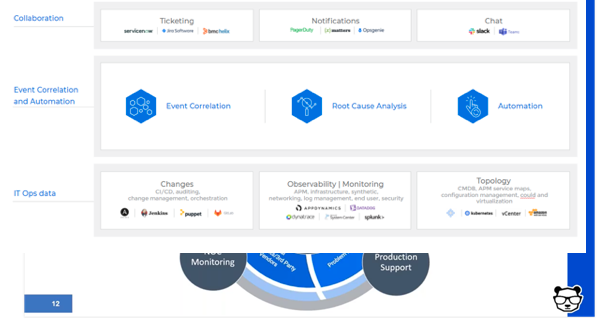
    • Deploy event correlation and automation tools to enable the incident management team. These tools are key, allowing your team to perform the required actions.
      • First, correlate the alerts created by your monitoring and observability tools into a drastically reduced number of high-level, insight-rich incidents by using machine learning and artificial intelligence (ML/AI). Add context to these incidents by ingesting and understanding topology sources, as well. This creates the necessary full-stack visibility and situational awareness.
      • Then, use ML and AI to determine the root cause of these incidents, including correlating them with data streams from your change tools: CI/CD, orchestration, change management and auditing to identify whether any changes in your environment caused these incidents.
      • Finally, automate as many processes as you can to free your IT Ops team from manual, time-consuming tasks. By integrating with collaboration tools, you can also enable the above-mentioned bidirectional communications.


  • Despite the Pandemic, DevOps Salaries Rose in 2020

    Despite the Pandemic, DevOps Salaries Rose in 2020

    Puppet today published the results of an annual global DevOps survey that found, despite the downturn in the global economy brought on by the COVID-19 pandemic, most DevOps professionals saw their salaries rise in 2020.

    However, for the first time since Puppet started collecting this data, DevOps professionals working in the life sciences, health care and pharmaceutical sectors, on average, made more than those working in the financial services sector. Not surprisingly, the report also found that DevOps professionals working in the U.S. made more than their global counterparts.

    Nearly two-thirds of respondents in the life sciences, health care and pharmaceutical sectors earn more than $100,000. That compares to 53% in the financial services sector and 45% of those working for technology companies.

    The survey was based on responses from 2,243 DevOps professionals, and noted that organizations with highly evolved DevOps practices pay better than those that are less evolved. Among respondents working at highly evolved companies, 80% earn $75,000 per year or more. That compares to 57% that earn as much at less evolved companies. Much of that discrepancy is attributable to DevOps managers that make much more at highly evolved companies compared to their counterparts at less-evolved companies, the report noted. Two‑thirds of practitioners make less than $100,000 per year, the survey found. In general, respondents working at companies with revenue over $1 billion had the highest percentage of those earning $150,000 to $250,000 (22%).

    The largest percentage increases in salaries among DevOps professionals occurred in Japan and the United Kingdom (UK). Salaries, on average, did not rise in Singapore, Germany, New Zealand and Australia. In the U.S., the demographic that saw the most growth was among DevOps professionals earning between $150,000 to $250,000, most of whom are managers. More than half of all DevOps managers in the U.S. fall within this salary range, the report noted.

    The Puppet report also noted that DevOps professionals working in dedicated engineering and application development tend to make more than those that are part of a larger IT team. A third of respondents in engineering or development report salaries over $125,000 per year, compared to 22% percent in IT and 15% percent in information security.

    The Puppet report also showed a divergence between what men and women earn as salary ranges increase. For both men and women earning up to $75,000 a year, salaries are similar. Between $100,000 and $125,000, women actually earn more. However, at $125,000, men (28%) earn more than women (17%). The survey, however, does not mention the experience levels of any respondents.

    It’s also not clear whether the higher salaries among DevOps professionals found in the life sciences, health care and pharmaceutical sectors represent a fundamental shift, or is an aberration based on the amount of COVID-19 research being conducted.

    Alanna Brown, a senior director of marketing for Puppet, said the one thing that COVID-19 has changed forever is that competition for DevOps expertise is now global. Organizations are no longer limiting themselves to hiring individuals within 50 miles of their office. In fact, DevOps professionals that have shown they can successfully work remotely will, in the months and years ahead, be in greater demand than those that have only worked in an office setting, Brown predicted. Organizations of all sizes are trying to reduce their commercial real estate expenses, Brown added.

    In the meantime, the most important thing for IT professionals is to stay relevant. Site reliability engineers (SREs) with certified programming skills will make more than a traditional IT administrator. It’s up to each IT professional to make sure they have the skills that are highest in demand at a time when many IT functions are being ruthless automated by increasing numbers of DevOps professionals.

  • How to Build Actionable Logging Systems

    How to Build Actionable Logging Systems

    Logging is often considered an automatic process that doesn’t require much thought. We see logs, in general, from any system and take for granted that those logs have the information that’s needed. However, thinking through a logging strategy and architecture is extremely important for troubleshooting and performance efficiency. Regardless of how you log, the most important part of logging, after simply having logs in the first place, is having logs you can actually use. Actionable logs provide enough information, enough detail and enough history to ensure you can use the logs to get something done.

    Let’s examine an example system. This example system is an application, with a microservices architecture, running on a Kubernetes cluster that lives on top of an RHEL box. By default, you get logs from the operating system and Kubernetes. But to get logs for the different microservices, you have to program those logs into your application while building the codebase. So how do you set up useful, actionable logs successfully?

    Three Main Considerations

    Consider the following elements when you think about building actionable logs.

    Enough Information

    Your logs should provide enough information to answer ‘when,’ ‘who’ and ‘where’ for any event. As an example, let’s say you want access logs. If there was an access event for your system, the log line for that access event should tell you when that access occurred; this is known as the timestamp. The log line should also include information about who accessed the system. Often, this detail comes in the form of an IP address or other identifier, and the ‘who’ should include not just human interaction, but also actions by other systems. Always log every access! Finally, the log line should include the location from where the system was accessed, meaning which service or which part of the platform was accessed.

    Enough Details

    Your logs should provide enough details to tell you exactly what happened during any single event. Simply answering the who, when and where doesn’t actually tell you what happened, and a basic answer such as “This pod started,” doesn’t provide enough detail to differentiate a code change triggering a pod restart from a system crash triggering the orchestrator to restart pods.

    Enough History

    Finally, your logs should provide enough history to understand why something happened. Logs, overall, help you understand the context of the action that was taken. Writing log lines to a terminal somewhere without storing them is pointless. A single log line doesn’t provide you with enough context to understand the “why” for any action or event. How could you tell if an event was normal for a system without an easily accessible history?

    All three of these components are necessary to create a plan that will lead to actionable logs—logs you can actually use to understand what happened, why it happened, and how you can act to handle the situation. If you can answer who, what, where, when and why from your logs, you probably have actionable logs, and are well on your way to meeting or exceeding logging best practices.

    Next-Level Considerations

    Once you’ve thought through those higher-level considerations, you can think about the nitty-gritty of your logs themselves. When I think about the practicalities of logging, I think about these main considerations: log levels and data needs, format and structure and security and compliance

    Log Levels and Data Needs

    Using log levels properly ensures that you collect and store the data that you need, and only that data. Logging can get very noisy, very fast in modern environments. Log levels provide the ability to fine-tune your logs to store only what you need; this can help you find information quickly in an emergency, rather than digging through the haystack for the proverbial needle. In addition, someone is more likely to keep logging capabilities turned on when it gets noisy if they have the ability to reduce the noise and fine-tune the information, versus having only an on-off switch.

    Different programming languages use different combinations of log levels, but all of them have general categories of major, minor and debug logs. Major logs, as you might guess, should be on for all environments. Minor logs, generally, are turned on in environments for which you need to be able to understand the data flow without necessarily knowing the minute details. Finally, debug logs are generally turned on in dev or QA environments, and only when you need to know every detail – such as when you’re looking for issues that could turn into problems later on. You will need to ensure the necessary log levels are set in your code, as they aren’t necessarily automatic, but taking this extra step is worthwhile.

    Format and Structure

    You need to think about who or what is the primary audience of your logs. If you anticipate sifting through the logs yourself, you’ll likely not mind a text-based format. However, most modern logging uses machines to parse the logs and make the mounds of data more useful. In that case, you should use structured logging; JSON is the standard for structured logs due to the plethora of tools available for working with the standard.

    Security and Compliance

    Logging for security and compliance could be (and has been!) a full article, on its own. The short version, however, is that logging is a key pillar of a compliant system that is aware of, and actively monitoring, its security. If your stack doesn’t log everything to one or more append-only log files, stored in secure location(s) with a read-only archive stored in a separate location, then you’re at risk of an attacker coming in and modifying or deleting logs so you can’t track their actions across your system.

    Your logging processes shouldn’t store personally identifiable information (PII) in clear text or behind an easily broken cypher, either. It’s better to keep that PII in a secured and hashed database, with a unique identifier (UID) that correlates to the database, if you definitively need to keep that PII in your logs in some form, or strip it out if you don’t need it.

    Working Together

    All of these tips are fine and dandy, until you realize that you cannot get enough buy-in from others to ensure everyone follows the same best practices. It’s generally best to come to an agreement as to logging standards and practices across an organization. That will also help, as anyone working on a different system will start from the same baseline, and not have to understand another team’s standard, if they come in to help in an emergency. Ops teams working across many systems will appreciate the standards, as well. To get everyone to the table in the first place, start by appealing to each of their needs. Ask about people’s problems with logging and listen to responses. You likely will need to address assumptions folks make, misconceptions, complacency and resentment. The key is listening; you won’t get buy-in until everyone feels heard and validated.

    To get everyone on the same page, you should first identify, as an entire organization, the needs you have from your logs based on the components of actionable logs. Ensure everyone has a seat at the table and the ability to discuss and unearth all needs, so no one is tempted to go around the team’s decision. One team’s needs will not match another’s, so you need to ensure that all viewpoints are heard and accounted for. Then, organize related needs and set standards for those needs. Once you’ve agreed to your new standards, work together to update your systems. This will take time, just like it does with resolving any technical debt! Start with smaller systems, or less-critical systems, so you can monitor how the standards are surfacing in real life, and how well everyone’s needs are met. Adjust, if you need to, with everyone’s agreement. Needs and standards will change, just like your systems will, and they need to adapt to fulfill the needs of your teams. If you take the time to get everyone to the table and make sure everyone is on board, you’ll be better off.

    What You Need to Succeed

    Logging may seem like simple magic that ‘just works,’ but there’s a lot to think about before you can have a successful, useful system. You need actionable logs that have enough information, details and history to be useful. You need to think about the data you need for all of your various systems, how you’ll structure that data and how you’ll ensure you stay secure and compliant. Finally, you need to ensure your team is on board with standards so logging can be as useful as possible. If you do all of that, though, you’ll find logging becomes a great way to communicate across teams and organizations to ensure you deliver the best product possible.

  • SolarWinds Unveils Revamped APM Platform

    SolarWinds Unveils Revamped APM Platform

    SolarWinds is unifying its various application performance management (APM) tools within a single suite accessed via a software-as-a-service (SaaS) platform.

    Denny LeCompte, senior vice president for products at SolarWinds, said the APM Integrated Experience offering combines the company’s AppOptics, Loggly and Pingdom tools to collect metrics, traces and logs along with real user monitoring capabilities and tools to simulate application traffic.

    APM Integrated Experience also provides access to a landing page that identifies what has changed in an IT environment over the previous week and highlights which of those changes might become an issue. As most IT professionals well understand, most IT issues can be traced directly back to a recent change made to an IT environment that was previously running as intended.

    Other capabilities include advanced search tools and the ability to inspect lists and maps for hosts, containers and plugins for web servers and databases. In addition, APM Integrated Experience is integrated with both Amazon Web Services (AWS) and the Microsoft Azure cloud.

    LeCompte said the goal is to make it less expensive for the average IT organization to broadly instrument applications using an agent developed by SolarWinds that can automatically be installed.

    Ultimately, the goal is to enable organizations to better manage their software supply chains, LeCompte added. Of course, SolarWinds is at the heart of the software supply chain breach that involved its Orion network management software. That software runs on-premises. In comparison, APM Integrated Experience is a SaaS platform that is more secure. In fact, LeCompte said, IT professionals that manage software supply chains are generally sympathetic to the challenge the company currently faces. Most of those organizations have dealt with similar software supply chain issues, albeit on a smaller scale, LeCompte added.

    In general, LeCompte said it’s apparent most organizations need access to an APM platform that costs substantially less than rival platforms and still delivers 90% of the capabilities they require. In many cases, IT organizations are paying for extra capabilities that only very high-end enterprises require, LeCompte noted. In fact, one of the primary reasons APM platforms are not as widely employed is most organizations have found rival APM platforms simply too expensive to deploy, said LeCompte.

    LeCompte declined to speculate whether there is a meaningful difference between what has been historically known as monitoring and so-called observability platforms that have emerged in recent months. Regardless of approach, however, it’s clear as distributed IT environments become more diverse and complex, the number of organizations that need more visibility into their application environment is steadily increasing, said LeCompte.

    Of course, with the rise of microservices-based applications, that level of IT complexity is only going to increase. As applications grow and expand, the number of dependencies between microservices starts to increase. Understanding how an issue with one microservice is impacting a distributed computing environment will undoubtedly require more instrumentation. The challenge, going forward, will be determining how best to achieve that goal at a reasonable cost.

  • ZeroNorth Adds Analytics App to Advance DevSecOps

    ZeroNorth Adds Analytics App to Advance DevSecOps

    ZeroNorth today added an Advanced AppSec Risk Analytics module to its platform for orchestrating DevSecOps processes.

    John Worrall, ZeroNorth CEO, said the analytics tool pulls vulnerability data generated by a variety of security tools to provide both DevOps and cybersecurity professionals with a single source of truth for assessing security within an application environment.

    The ZeroNorth platform is designed to enable IT organizations to orchestrate multiple vulnerability scanning tools within the context of a larger DevSecOps workflow, and can apply analytics to a large pool of security data. That data can be viewed in the context of specific groups, such as a business unit or specific application development and deployment team, or within the context of whichever application generates the most revenue for the business, Worral said.

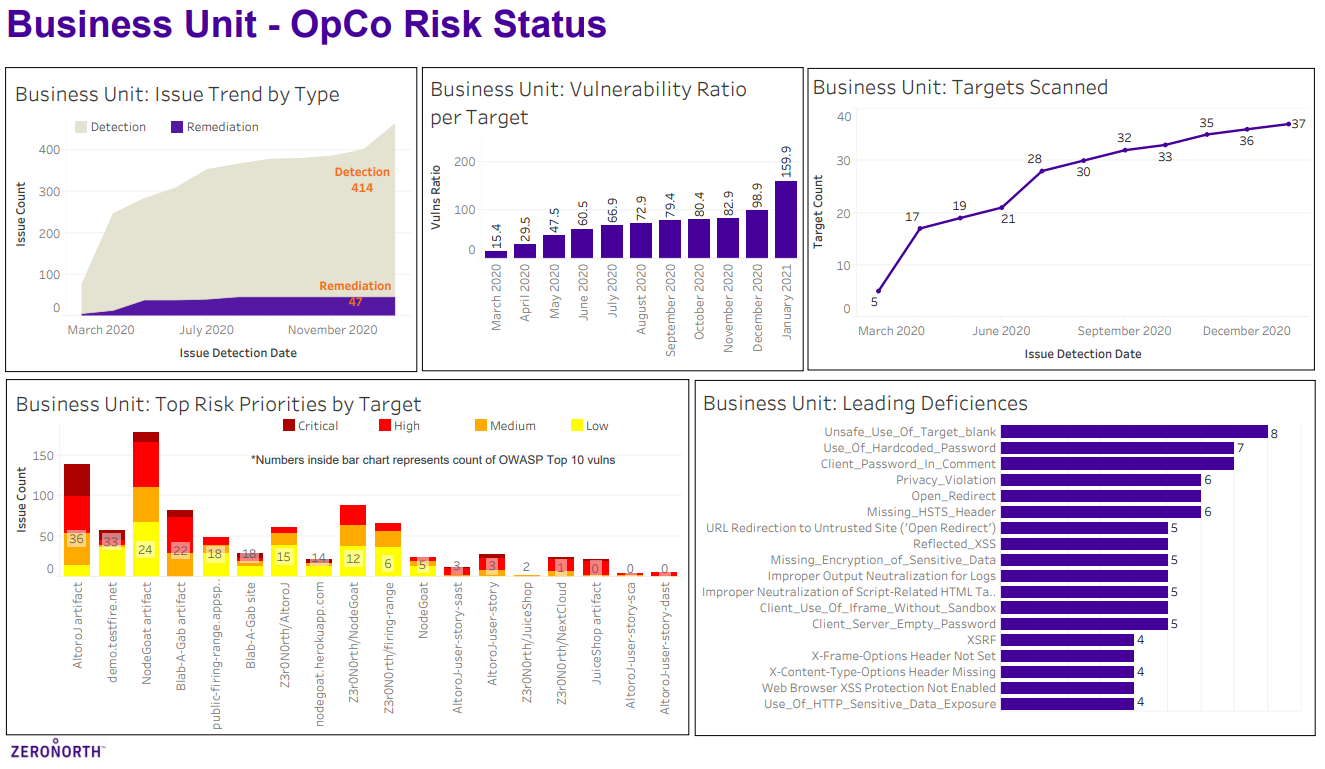
    Additionally, the Advanced AppSec Risk Analytics module will surface types of vulnerabilities detected and the vulnerabilities most encountered, ranked by criticality, along with other trends in types and number of vulnerabilities detected/remediated, such as the number and criticality of vulnerability findings per specific scanner. It also tracks the applications and entities scanned, number of vulnerabilities detected per application/entity and the applications/entities that have the highest risk.

    ZeroNorth

    Armed with that analytics data, Worral said it becomes easier for IT teams to prioritize and focus their efforts, in addition to identifying areas of the business that may need additional cybersecurity resources and training. IT leaders can also get a snapshot view of the top application security risks to better assess the organization’s overall security posture, Worral noted.

    The Advanced AppSec Risk Analytics module will also surface vulnerability remediation bottlenecks spanning multiple applications within the context of a software development life cycle (SDLC), Worral added. Longer term, Worral said the data collected by the ZeroNorth analytics application will also create an opportunity for the company to apply machine learning algorithms to DevSecOps.

    In general, Worral said the only viable path toward achieving DevSecOps is to foster more collaboration between developers and cybersecurity teams. Getting those teams on the same page in terms of the security data that needs to be analyzed is a crucial first step, Worral said.

    It’s still early on in the adoption of DevSecOps best practices within organizations, however, it’s apparent a lack of cohesion between software developers and cybersecurity teams about which vulnerabilities to prioritize is a major source of dysfunction. Cybersecurity teams tend to create long lists of vulnerabilities discovered within applications without providing much context. Developers are then left to weigh, on their own, when to address a vulnerability versus focusing on writing additional code needed to make an application delivery deadline. Developers take potential vulnerabilities seriously, but there are only so many hours in a day to write code.

    Unfairly or not, developers are being held more accountable for application security. The challenge – and the opportunity – is to find a way to make the entire DevSecOps workflow a whole lot less contentious by helping DevOps and DevSecOps teams more aware of which tasks should be prioritized when.

  • EraDB Launches Log Management Alternative

    EraDB Launches Log Management Alternative

    EraDB today launched EraSearch to provide IT teams with an alternative to open source ElasticSearch software for managing logs at scale.

    Todd Persen, EraDB’s CEO, said EraSearch is based on a modern database that decouples storage and compute. In this way, EraSearch can scale more efficiently than ElasticSearch, while providing IT teams with the same familiar construct for managing logs.

    Persen said EraDB also uses true zero-schema data representation, and an indexing engine based on machine learning algorithms, to enable EraSearch to scale better. This approach also cuts cloud and operational costs by as much as 30% and 70%, respectively, by relying, in part, on object-based storage systems to store log data.

    As IT environments become more complex and continue to scale, organizations that standardized on ElasticSearch are discovering that a platform based on decades-old search engine technology is not keeping pace with their needs.

    EraSearch provides an alternative, based on a commercial time-series database platform that EraDB created, to address such use cases as an alternative to database platforms such as InfluxDB.

    The question is whether IT organizations, that have relied on ElasticSearch for years, are ready to abandon an open source platform in favor of a proprietary platform, even if it provides a similar user experience. EraDB, however, is betting there are enough IT organizations willing to make that shift to justify its investment in EraSearch.

    Persen said one issue with ElasticSearch is that, as log volumes increase beyond a few terabytes, the platform becomes inefficient and difficult to efficiently scale. That leads to higher costs in terms of both raw storage, as well as all the manual effort on the part of software engineers, required to maintain the platform.

    EraDB, of course, is making a classic case for a proprietary platform over an open source platform: that open source, while free, often proves more expensive to support. Persen said EraDB decided to eschew the open source model altogether, because it is too difficult to prevent nullification of the benefits open source could bring to a small company by open source project forks.

    The ElasticSearch community, meanwhile, is roiled by Elastic’s decision to change the licensing terms under which it makes ElasticSearch available. Elastic is shifting away from an Apache license to a dual-license strategy that includes a Server-Side Public License, or SSPL, along with an Elastic License. That shift was made to help ensure more of the revenue generated by Elastic search winds up in the hands of Elastic, rather than cloud service providers, such as Amazon Web Services (AWS), that routinely launch paid services based on open source code. AWS responded to the Elastic move by announcing plans to fork ElasticSearch code that it will now curate.

    Regardless of how that battle ends, however, EraDB is making it clear it views its platforms as too critical to its customers’ IT operations to get caught up in a similar maelstrom over business models and associated licensing terms.

  • AIOps Builds Organizational Efficiency, Survey Finds

    AIOps Builds Organizational Efficiency, Survey Finds

    Enterprises entered 2020 with big plans. Post-pandemic, AIOps could help them achieve those goals, according to a new research survey from Digitate and CorporateLeader.

    Enterprises entered 2020 with the best-laid plans; many had efforts lined up to expand their use of cloud services and continue their steady efforts to digitally transform their businesses. Then the pandemic happened, and business and IT teams found themselves scattered and with a new playbook: make the organization as effective as it can be while working remotely.

    This sudden shift to remote work exacerbated existing challenges within organizations, from managing hybrid environments, personnel management challenges and teams finding themselves struggling to adjust. Meanwhile, enterprises still had to focus on staying ahead of their competitors technologically. All of these challenges meant there was no room for wasted or time-consuming efforts to manage the underlying business-technology systems.

    To help increase efficiencies, some contend that the answer is artificial intelligence for IT operations, or AIOps. Proponents of AIOps say that AI is needed to augment human decision-making today because of the complexity of modern enterprise environments. Today’s environments often find their operational data spread across on-premises and multiple cloud systems. The result is difficulty in managing infrastructure issues as they arise, and the considerable time it takes to identify and fix IT issues.

    According to a survey of leading European IT analysts and advisories, conducted in fall 2020 by operations automation software provider Digitate and executive network forum CorporateLeaders, the drudgery of managing routine tasks was the most commonly cited reason for turning to AIOps, which was followed by “no proactive capability of detection and correction of system issues” at 64% and “no flexibility to scale with business needs,” also cited by 64% of respondents.

    When respondents were asked to identify the key benefits of AIOps, they highlighted common strategic and operational issues that hinder performance. According to respondents, these include the removal of manual processes (91%), improvements in agility and reliability (82%) and reach predictability (73%). More swift problem resolution also was cited by 73% of respondents.

    In a case study shared within the CorporateLeaders report, Marion Fokkinga, technology advancement manager at Netherlands-based semiconductor maker NXP explained that NXP’s move to AIOps was driven by the company’s swift expansion. “Since 2015, we have been busy with multiple merger and acquisition projects,” Fokkinga explained. “As a result of this, there was less time for innovation and transformation in IT and in the business.”

    The company set out to automate routine operations tasks with AIOps so that their resources could be freed to focus on higher-value tasks. According to Fokkinga, AIOps enables tasks, such as report generation, that previously consumed half a workday to be completed in several minutes. Saving time is the most significant result, said Fokkinga. With AIOps, NXP reports a 97% improvement in incident response time and a 95% reduction of manual effort in some of its supply chain planning work.

    Of course, in the current treacherous business environment, there’s a lot more at stake than simply building enterprise operational efficiencies. Over time, it may come down to the very success of the organization. According to the survey, a full 82% of respondents said that AIOps is necessary to the future growth and transformation of their business. “Respondents who went on to give qualitative answers later in the survey explained that the complexity of hybrid and multi-cloud infrastructures, increasing transactional volumes and the criticality of online business systems make it impossible for traditional IT systems to manage every application and infrastructure without recourse to automation. It was highlighted that the overwhelming amount of data in today’s Operations are simply beyond human analysis capacity,” the report stated.

    One respondent said that, through AI, the performance of some tasks and decisions were improved, as routine tasks were eliminated. That has to be welcome news to enterprises struggling to remain competitive while simultaneously striving to remain productive and agile during a global pandemic.

  • Lightstep Delivers Next Generation Observability Platform

    Lightstep Delivers Next Generation Observability Platform

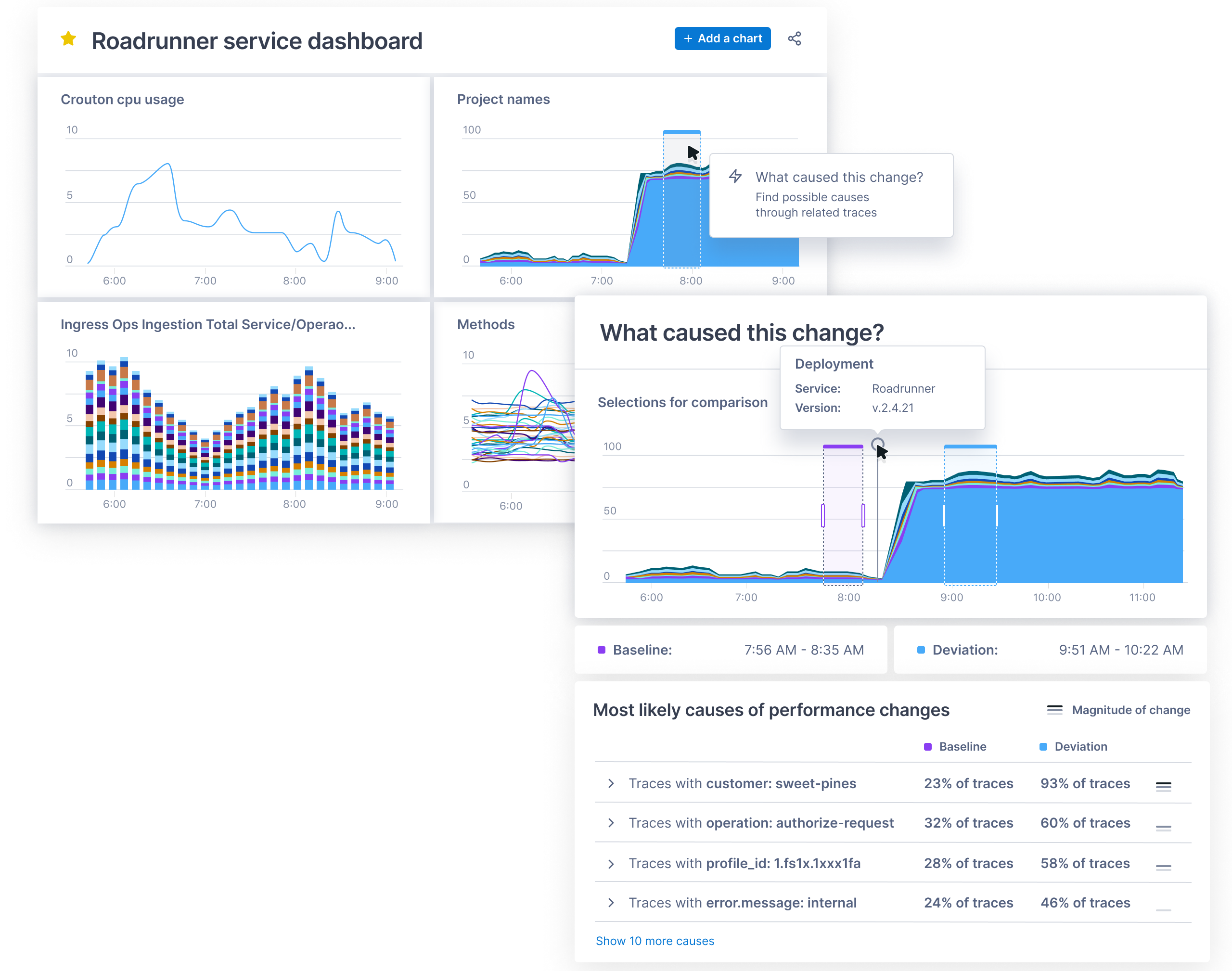
    Lightstep this week announced general availability of a Change Intelligence observability platform based on a time-series database that is capable of processing a trillion events each day.

    Ben Sigelman, Lightstep’s CEO, said as IT environments become more complex, thanks to the rise of microservices and cloud-native computing platforms, existing monitoring and observability tools will not be able to keep pace with the rate of change in what have become highly dynamic IT environments.

    While AIOps promises to address that complexity by employing machine learning algorithms to analyze IT environments and surface recommendations, Sigelman said there will always be the need for observability platforms that enable IT teams to discover the root cause of an issue in a way that surfaces the insights needed to fix the problem in real-time.

    The Lightstep database was built by the same team that created Monarch, the globally-distributed in-memory time series database system that Google employs to monitor its applications and systems. Lightstep’s database makes it possible to collect metrics, in the form of distributed traces, at a level of scale that allows IT teams to analyze events across a distributed IT environment made up of both monolithic and microservices-based applications, said Sigelman.

    Lightstep is the latest entrant in an already crowded field of observability platforms, all seeking to consolidate the wide range of monitoring tools IT teams have used for decades.

    The challenge IT teams face is that each of those monitoring tools is focused on a narrow range of platforms. IT teams often lack context when an issue arises, and wind up trying to correlate reports from multiple monitoring tools in the hopes of discovering the root cause of an issue. Observability platform providers are making the case for a single platform that correlates application and infrastructure events in a way that makes it easier for IT to fix issues faster.

    Observability, of course, has been a core tenet of DevOps for years. The tools for achieving that goal, however, have been cumbersome to implement and maintain using legacy application performance management (APM) platforms. Most of those platform providers, have rolled out what are positioned as next-generation observability platforms. Now, IT organizations will need to decide if they want to maintain investments in existing platforms versus moving to one of the raft of upstarts looking to dethrone APM incumbents.

    The startups are counting on a massive expansion in demand for observability platforms. IT organizations have tended to limit their usage of APM platforms to mission-critical applications due to cost and the challenges associated with maintaining the agent software needed to collect metrics from each application. Modern observability platforms have automated much of the metrics collection process, while open source software promises to make metrics collection more affordable..

    The challenge, of course, is that many organizations are already struggling to manage complex IT environments, and can’t necessarily wait for that open source software to mature.