Category: IT Administration

  • Are We Nearing the End of IT Service Outages?

    Are We Nearing the End of IT Service Outages?

    Over the last two decades, the evolution of IT has been more like something a revolution—in some cases, the transformation even unpinning real-life uprisings. Today we’re acutely aware of advances in technology and the internet, particularly as the global COVID-19 pandemic creates a sweeping reliance on tele-everything and online commerce to sustain companies’ livelihood.

    The current surge in online traffic underscores the massive strides made across IT, ensuring critical support functions largely go uninterrupted—quietly impacting millions of lives. Behind the scenes, ITOps teams continue working to ensure the customer experience is resilient and incidents are addressed even before end users notice an issue. The irony of these seamless digital experiences, though, is that the delivery is built on escalating complexity. Providers seeking agility, speed and efficiency are increasingly adopting virtualization, microservices, containerization and cloud-based services. These capabilities often meet their designated needs, but the trade-offs can be costlier than expected.

    IT Complexity Demands Smart, Machine Intelligence

    The industry has rallied around AIOps, looking to AI and machine learning to scale to modern complexity. The goal is to evolve from human-driven monitoring and analysis to automated detection and remediation. The human inability to keep up with service alerts derived from machine-driven operations has created a gulf between machine speed and the traditional, event-correlation approach to troubleshooting.

    The issue is clearly—and commonly—illustrated by the war room-style positioning assumed when a service degradation occurs and ITOps teams are besieged by demands for situation reports, impact assessments and projected resolution timelines. Amid a “sea of red,” when the operator has no idea which of the volumes of trouble tickets to work on first or where to focus attention, it’s undeniable that events correlation is wholly inadequate in navigating the modern-day minefields of data exhaust. It’s like diagnosing an illness solely by taking a patient’s temperature.

    Applying advanced AI/ML will improve the thermometer, but it won’t fundamentally improve the patient’s diagnosis. Similarly, it’s much more promising to work through service interruptions by taking a holistic approach, tracking and connecting behavioral attributes and anomalies across the IT estate instead of solely relying on event data.

    Behavioral correlation provides a deeper, more contextual understanding of what’s happening at the service level, starting with dynamic baselines of “normal” activity levels upon which ML is applied to detect and flag anomalies captured across a broad variety of real-time data. With an aggregated, service-level topology, it’s much easier to assess service health through availability and risk, so that decision-makers can prioritize what’s most pressing and visualize potential business impact.

    Traversing New Realities: Technology as a Front-Line Offense

    As the global COVID-19 pandemic continues to transform how people live and work, it’s clear that technology is the most common and often the most important tool in moving forward. By now most of the workforce has straightened out the initial kinks in telework and figured out general best practices. With some sense of stability now in place, leaders are shifting their focus to ensuring business continuity and instituting the necessary infrastructure to sustain new operational models indefinitely.

    In organizations where digital transformation is already underway, adopting new tools and protocols will benefit from foundational support. Companies and agencies already making strides in harnessing IT to boost operations and outcomes will already be on their way to achieving better visibility and improved efficiency. Implementing behavioral correlation will, in those cases, apply the power of ML to aid in faster root-cause analysis and resolution—and a better overall customer experience.

    That’s not to say that organizations less mature in their digital transformation won’t also benefit from eschewing the ineffective methodologies of event correlation and reactive ITOps. By evolving beyond legacy systems of piecemeal products and services, IT teams instead can leapfrog ahead to sophisticated analytics, data synthesis and comprehensive modeling that monitors for and detects anomalous activity—correlating broader behaviors, not just events. By jettisoning the focus on events and instead incorporating behavioral correlation into IT service, troubleshooting and remediation become fluid.

    Amid seismic shifts in the demands on IT services, it’s more crucial than ever to deliver reliable services and capabilities. That means getting to the root causes of problems quickly and resolving them faster—a feat that’s now a reality through the integration of service metrics and IT automation.

    The world of IT has changed dramatically over the past 10 years, and especially in the past few months. Traditional processes and tools are inadequate to manage the speed and complexity of the modern IT environment. A new era is arriving, and not a moment too soon.

  • The IT Admin’s Checklist for a Newly Remote Company

    The IT Admin’s Checklist for a Newly Remote Company

    A few simple tips can help keep your remote workers productive and relatively stress-free during the new WFH paradigm

    Months into adjusting to COVID-19 impacts, organizations are now living in the day-to-day that was built on—let’s be honest—somewhat rushed plans to get everyone remote as quickly as possible. The image of repairing a bus while the bus is also driving its normal route comes to mind. Quick reactivity like this is vital in the moment, but it can be easy to miss a step along the way.

    Of course, IT is central to business continuity. This has only been made more true when so much of remote work relies on technology. Now is the time to make sure that your organization is truly set up to excel in remote conditions.

    But the mission for IT teams can’t just be to remain operational in the short term. We’ve got to look ahead and chart a course for long-term success: processes, tools, security measures and automation. We must ask, as IT admins, how can we help our teams thrive in this pivotal moment as well as the next?

    We’ve broken down the steps IT admins can take to ultimately set their entire team up for success as we all adjust to remote work.

    How an IT Admin Can Support Remote Work

    Step 1: Safety First

    With changes in every part of their life, your workforce is focused on one thing first: their personal safety and that of their loved ones.

    If you haven’t already shifted as much of your team as possible to a work-from-home model, now is better than never. This demonstrates to your people that you care about them and trust them, which is foundational for getting amazing work done.

    For organizations that are already remote, now is the time to dot the I in information and cross the T in technology. Do your due diligence as an IT team to ensure you have taken all of the necessary steps to make remote work a sustainable practice. Fortunately, you’re in just the right spot for that—just keep reading!

    Step 1.5: Professional Safety, Too

    Safety also encompasses job security. People fear for themselves and their families in this tumultuous time. Economic downturn brings anxiety, period. Even when your company has prioritized personal safety by going remote, there can still be uncertainty in whether someone’s paycheck is safe.

    You might not realize it, but as IT professionals, you have influence over job anxiety within your organization. Every time a tool or system functions perfectly, you’ve made what could have been a stressful day that much better. Simply put, you let people focus on their jobs instead of technology.

    Take pride in this! Give your team members comfort that you are going to make it as easy as possible for them to take care of their responsibilities. You’ll ensure that they have the tools and systems to succeed to help them retain their jobs. People who can focus on their jobs instead of stressing about tools are more able to make a big impact.

    Step 2: Make Remote Work Happen for Your Team

    Once safety is covered, it’s about the technology—hardware and software. There’s good news here: According to Buffer’s “2020 State of Remote Work,” 98% of employees would like to work remotely at least some of the time. That means that what we’re all going through to support the necessity of remote work now will hopefully set up organizations for higher employee satisfaction in the future.

    Whether you’re still in the process of streamlining remote work or you had to rush the process, let’s start at the beginning. You’ll need to ensure that everybody has systems that they can take home with them. If everyone doesn’t have a laptop, create a sign-out process for their desktop machines and any other equipment that they may need. (Psst … You can do this retroactively if your organization already let folks take technology home without a formal process.)

    In the beginning, it may have seemed like we could get through this time with the bare minimum, but making employees work harder because of a lack of resources simply won’t benefit the bottom line. It’s not too late to set up your team’s homes with high-quality monitors, printers, other peripherals and even chairs and desks, if necessary.

    Pro tip: Educate your team on how to adjust their screen resolutions, if that’s a feature on their computer. It’s not something the average computer user knows to do, but it can eliminate the need for a larger monitor and save a few headaches (literally!).

    Step 3: Provide Access to IT Resources

    The next tick on the checklist is to ensure that everybody knows how to access their IT resources. For better or worse, no one is walking over to your desk to ask how to login to their email anymore. (Actually, that’s almost certainly for the better.) Now is the time for education and self-serve training to benefit the entire team while we’re working away from the office.

    If your organization is accustomed to a mobile environment, your users should know how to VPN into the network or securely access applications in the data center or elsewhere. If not, now is the time to teach them.

    As with all times of change, there will be (and probably have already been) many questions. Tighten your process for accepting requests and answering questions. Survey the rest of the IT team for gaps and pain points that have come up in the initial months to ensure you can efficiently continue to support the adjustment period.

    And, most importantly, take the time to document all of the pathways for people to be productive and do their work. Regardless of your company’s familiarity, this will enable better training going forward and give you resources to use when colleagues have questions.

    Step 4: Manage the IT Fleet

    Now that your team is generally enabled to do their work, you need to ensure that you have visibility into the entire environment. Ask yourself these important questions:

    • Do you know all of the IT resources in use across your organization?
    • Do you have full control over access to all IT resources?
    • What about full control over their systems to ensure that you can fix issues, maintain security and configure and control their computer environment properly?

    Insight into these mission-critical questions doesn’t always come easy, but it enables your IT team to manage, control and secure all systems. It’s also foundational to being compliant with regulations and company security policies (which don’t stop, even when the whole world does).

    If any of the above questions gave you pause, we probably don’t have to tell you that something needs to change. Rogue IT resources threaten the organization legally and can be a financial drain—but the solution can be as simple as one tool to manage the whole suite. More on that later.

    Step 5: Secure Your Now-Dispersed Environment

    A key part of gaining control is securing the environment without making security the bane of your team’s existence.

    Security isn’t a new imperative, so let’s revisit the six core activities we recommend here:

    1. Enforce unique access and segment resources.
    2. Lock down computers and servers.
    3. Enable multi-factor authentication (MFA).
    4. Implement full disk encryption (FDE).
    5. Enforce password complexity and MFA.
    6. Conduct regular security awareness training.

    Don’t forget to train your team and provide strong guidance on how you would like them to operate to ensure security. Make compliance a team effort by explaining the why behind all of your security guidance to make it more tangible for people.

    Can Your Technology Support Remote Work?

    Your management tools will largely define your ability to operate securely. The right tool will make something essential like MFA seamless, ensuring end user security without adding friction to anyone’s day. If you’re not happy with your current system, now’s a great time to do the research to find one that makes everyone happy, from IT to the end users.

    Of course, the exact features you’ll prioritize in your search will depend on your specific organization. To get you started here’s a list of the basics of what you should expect your IT management tool to do for you in this remote work period:

    • Compliance-focused security. Look for password complexity management, multi-factor authentication (MFA), policy management, and SSH key authentication, plus whatever’s important for your individual organization’s priorities.
    • Easy integration with all of your current tools. Does your team use both G Suite and Microsoft 365? A good management tool shouldn’t make you pick.
    • A streamlined database that centralizes the IT environment. When all users and IT resources are integrated into a directory service, IT admins gain a controlled, automated environment.
    • Provides easy-to-use single sign-on (SSO) to web applications. Secure, convenient application access is essential and made simple with SSO.
    • Built to optimize your team’s productivity. Technology is only as important as the people who wield it. Choose technology that is intuitive and built with humans in mind.

    Final Thoughts

    While we may not have much certainty right now, one thing is for sure: Success largely will be built from home in the coming months and perhaps years. Being productive while also creating a healthy WFH culture is paramount, and IT teams have a huge role in accomplishing this task.

    The steps we’ve reviewed above are an effective way to help your team feel safe physically and be able to succeed at their jobs. Here they are again, a bit more boiled down:

    1. Prioritize employee safety.
    2. Support teams with the tools they need.
    3. Provide seamless, managed access to IT resources.
    4. Maintain and, if possible, increase security.

    Besides the supporting technology, the most important thing for these steps to be successful is the IT professionals guiding them! Remember how positive your impact can be during this stressful time and set your sights on not just reacting to this moment but proactively preparing your team for any remote working circumstance.

    Recommended for you: Want more on how to be your team’s IT key to successful remote work? For the A-Z handbook that covers everything from password policies to directory integration, download the IT Admin’s full guide to working at home here.

  • Atlassian Adds Asset Management to ITSM Portfolio

    Atlassian Adds Asset Management to ITSM Portfolio

    Atlassian this week announced it has acquired Mindville, a provider of IT asset management software that the company plans to integrate with its Jira ServiceDesk platform.

    Edwin Wong, head of product for IT at Atlassian, said Mindville will extend the reach of its IT service management (ITSM) portfolio, which includes Opsgenie for incident management, Jira for project management and the recently acquired Halp software for conversational ticketing.

    Mindville, which already makes its software available on the Atlassian marketplace, has more than 1,000 customers including NASA, Spotify and Samsung. The acquisition of Mindville presents an opportunity for those IT teams to manage IT assets within the Jira ServiceDesk platform, which is widely employed as a help desk to manage interactions with end users, said Wong.

    Atlassian has been steadily bolstering its ITSM portfolio at a time when competition across the sector is fierce. In the wake of the COVID-19 pandemic, many IT organizations are re-evaluating their IT help desk platforms now that it has become apparent many employees will be working from home much more regularly.

    At the same time, IT organizations are looking to reduce the total cost of IT, which becomes easier to achieve if they acquire all their ITSM tools from a single vendor. Going forward, Wong said IT teams should expect Atlassian to continue to tighten integration across both its ITSM and DevOps tools portfolio. The goal is not so much to converge every offering into a single platform as much as it is to seamlessly share data between all the tools that make up that portfolio, he said.

    Atlassian this week disclosed it generated $1.6 billion in revenue for the fiscal year, a 33% increase over the prior year. Total revenue was $430.5 million for the fourth quarter of fiscal 2020, up 29% from $334.6 million for the fourth quarter of fiscal 2019. Atlassian ended the fourth quarter of fiscal 2020 with a total of 174,097 customers based on an active subscription or maintenance agreements. The company said it added 3,046 net new customers during the quarter. However, it recorded a net loss of $385.2 million for the fourth quarter of fiscal 2020, which included a non-cash charge of $382.7 million.

    Atlassian tools can be deployed on-premises or in the cloud and the company has been offering discounts to IT organizations as an incentive to entice customers to shift to the cloud. In the wake of the economic downturn, it’s not clear to what degree organizations will prioritize spending on ITSM tools. However, with more employees and IT administrators now working from home, the need for cloud-based tools to manage a highly distributed IT environment has never been more apparent. One of the things that will differentiate Atlassian is the teams-centric approach the company takes toward ITSM and DevOps, said Wong.

    In the meantime, as the Atlassian ITSM and DevOps portfolio expand, IT teams should expect the divide these two distinct approaches to managing IT to continue to narrow.

  • observIQ Lauches Open Source Log Agent Project

    observIQ Lauches Open Source Log Agent Project

    Blue Medora, after selling its core monitoring integration platform to VMware, today changed its name to observIQ and launched an open source agent project that will serve as the foundation of a log management tool to be delivered as a software-as-a-service (SaaS) application.

    Company CTO Mike Kelly said the observIQ agent, which is written in the Go programming language, will provide IT teams with access to highly configurable agent software that doesn’t adversely impact performance. In contrast, existing open source log agent software requires IT teams to sacrifice one for the other, he said.

    Because the observIQ agent is highly configurable, it will also serve to make it easier to collect a wide range of metrics that can be consumed by a wide variety of management tools, Kelly added.

    The company will employ observIQ to collect metrics for observIQ Cloud, a SaaS platform currently in beta, in addition to continuing to invest in BindPlane, an IT operations data management platform developed by Blue Medora that delivers a relationship-aware stream of metrics and logs in real-time.

    Kelly said IT teams need access to a highly configurable agent software because the types of metrics that need to be collected continue to expand and evolve.

    At the same time, Kelly notes IT teams need to be able to affordably instrument many more applications, which becomes difficult to achieve when relying on commercial agent software.

    Finally, as IT environments become more complex, organizations are embracing best DevOps practices to manage applications, which requires organizations to increase dramatically the level of observability they have into any application environment. The issue DevOps teams encounter is they wind up having to support multiple agents, so if an open source project leads to fewer agents that need to be maintained and updated, that might be a benefit that resonates.

    In the meantime, as log management heads into the cloud along with most other IT management services it’s also becoming easier for IT teams to manage applications from anywhere. Most IT teams are going to be working remotely much more often than they did prior to the onslaught of the COVID-19 pandemic. That transition is easier to achieve when the tools being relied on reside in the cloud.

    Many IT teams also tend to limit their use of log analytics because of the costs associated with storing and collecting data. To limit those costs many IT organizations opt to only store log data for a limited time or only collect metrics for their most critical applications. The challenge is, the percentage of applications deemed critical continues to increase.

    Of course, competition across providers of log management tools that can be accessed as a service is already fierce, so observIQ will have its work cut out establishing another platform. However, if DevOps teams adopt its open source agent software, there’s naturally a much higher chance organizations will wind up employing observIQ Cloud.

  • Puppet Brings Orchestration to IT Automation

    Puppet Brings Orchestration to IT Automation

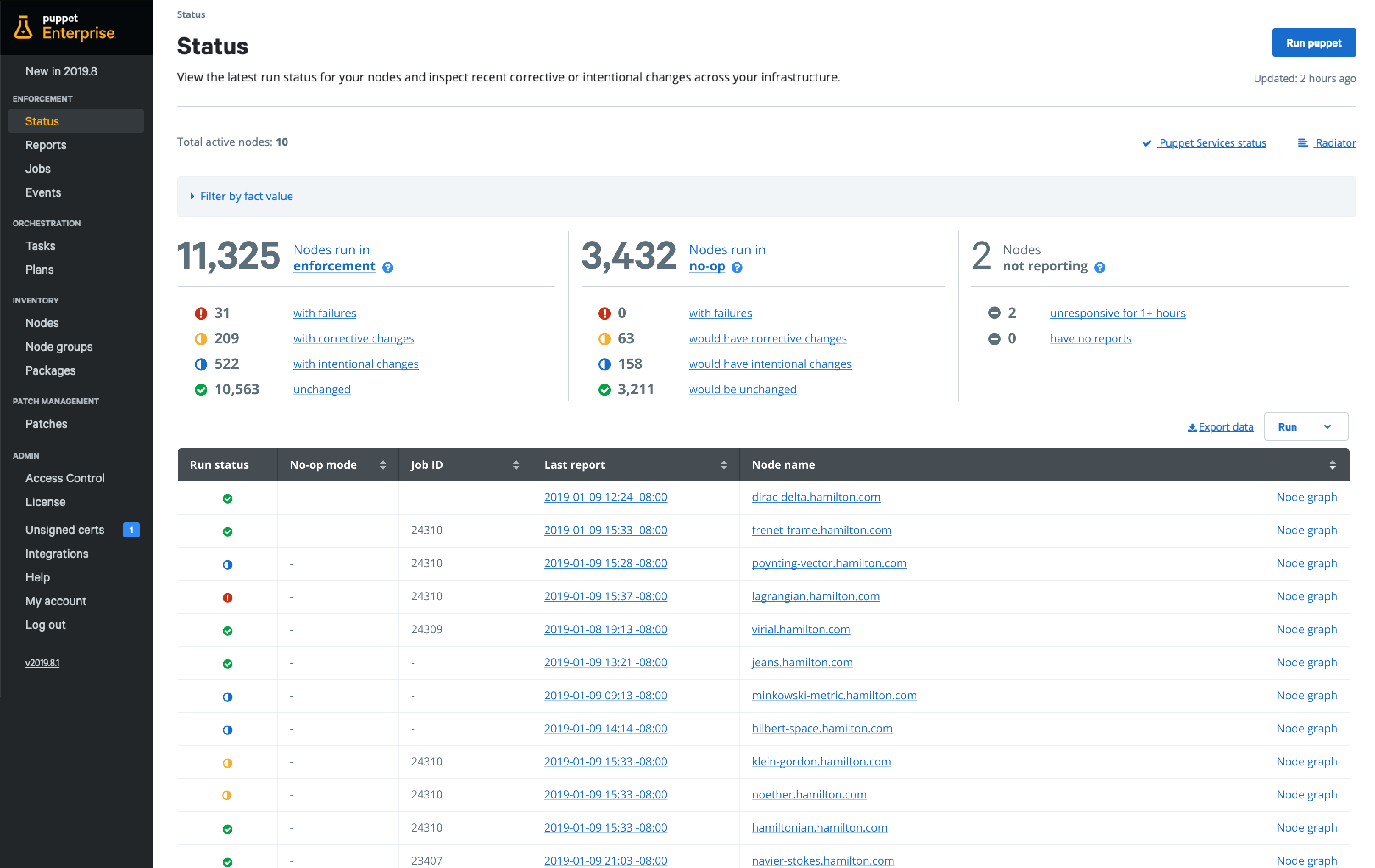
    Puppet today unveiled its summer release of Puppet Enterprise that promises to make it easier for DevOps teams to construct automated workflows within a Puppet console.

    DevOps teams can now mix and match thousands of declarative state-based modules available on Puppet Forge repository to compose and orchestrate workflows.

    At the same time, Puppet has added out-of-the-box guided patch management workflows that replace standalone patch management tools with orchestrated workflows. That capability is based on a Relay tool that Puppet launched earlier this year.

    Finally, Puppet is now also including an upgrade pre-check module that assesses and identifies potential risks along with surfacing what changes should be made before running an upgrade.

    Puppet CTO Deepak Giridharagopal said in the wake of the economic downturn brought on by the COVID-19 pandemic, more IT teams will need to rely heavily on automation. Most IT teams either will remain the same size or be downsized. The IT environment, however, will continue to grow more complex. The only way to enable IT teams to do more with less is to automate more rote tasks, he said.

    Automation is not likely to replace the need for IT administrators, added Giridharagopal. Rather, investments in automation will augment those teams in a way that enables IT teams to scale.

    In fact, Giridharagopal said, resistance to IT automation is declining as IT teams continue to appreciate the scope of the challenge they now face as IT environments not only continue to expand but also become more heterogeneous. Most business leaders now expect smaller IT teams to be able to automate a wide range of tasks as part of their overall strategy, he noted.

    Longer-term, Giridharagopal said IT organizations will also discover that many rote tasks will be performed more consistently once automated. Patches, for example, are not always applied as quickly or as often as they should be simply because there isn’t enough time for the IT team to manually install them.

    The latest update to Puppet Enterprise comes on the heels of a $40 million investment made in Puppet led by BlackRock, a private equity firm. As more IT teams recognize the need to automate tasks, competition to automate those tasks has intensified among providers of frameworks.

    It’s not clear how deeply and how many IT tasks can be automated. The more standardized an IT environment is, the easier it becomes to automate. Additionally, the amount of time an IT organization devotes to writing scripts to automate tasks should be reduced sharply. Instead, IT teams will increasingly employ a mix of modules that already exist to address a broad range of use cases. The challenge going forward isn’t so much finding the right IT automation tool, but rather constructing an IT environment that lends itself to being automated.

  • Jump Over the Hidden Barriers to Digital Transformation

    Jump Over the Hidden Barriers to Digital Transformation

    Digital transformation is critical to success in the new normal. Here’s how to achieve it in an uncertain economy

    Bit by bit, we’re reopening the economy. No one knows how long it’ll take to get the economy back on track or what kind of regulations there will be to keep everyone safe. But we do know it’ll take a great deal of tech to get the machinery running again.

    Consumer expectations have changed. Many in-demand employees have learned how much they prefer the flexibility of working from home—so much so that startups and even large corporations are launching “work from home forever” plans (and we can expect companies in other sectors of the economy to follow), and they need to adjust their tech to make this possible.

    Digital transformation—the term we seem to be stuck with—will be the answer; companies that put it off now have to play catch-up.

    Everyone’s trying to regain lost customers. They also don’t want to lose their top employees, who now expect to have a remote workplace (or at least the option of one).

    We’re in a reluctant revolution, and many companies are short on cash because incoming revenue isn’t quite what it was before. There’s never been such a big need for digital transformation while keeping a close eye on the budget line.

    Speak the Language of Business

    Before COVID-19, a McKinsey survey concluded transformation is more challenging to pull off than traditional change efforts: Fewer than one-third of organizational transformations succeed at improving a company’s performance and sustaining those gains.

    A key reason for the failures: a lack of clear, measurable business goals. Right now, no matter the business, eyes everywhere are on IT. To push through the transformation, you need to benefit not just yourself but your organization. You need to be able to speak the language of business, and here’s how you can do it.

    Make It C-Suite Friendly

    If you’re going to ask the company to support your program, talk about it in a way the C-suite can understand. Think about the use case they’ll be most interested to hear about. Shortening customer wait times? They’ll care. Aiding supply chains? They’ll listen.

    Remember, they’ll want numbers, too. The C-suite will do a cost-benefit analysis, but you should preempt this by conducting one beforehand. This shows your commitment to making the company more successful and inspires trust in the project through data. Avoid using too much technical jargon; doing so will get glassy-eyed looks and perhaps inspire them to give some other department a budget increase or greenlight a different project.

    Develop Your Soft Skills

    Never make the C-suite do your work for you: Make them understand the value of your plans. Doing so may develop your soft skills.

    At SolarWinds, we goad each other with the line, “Explain it to me like I’m 5.” If we can’t do it, then we know we don’t understand the concept well enough to “sell” someone else on it.

    Explain your program to someone using simple language and measurable goals, but explain it so clearly a 5-year-old can understand it.

    And remember, if you’re working remotely, you’ve lost the possibility of a hallway conversation. You can’t meet somebody in an elevator and throw them a pitch. You may only get a moment on a Zoom call. So work on your game. Practice your pitch on someone not involved—even a loved one at home—who can give feedback on the level of comprehension for the end goal.

    It’s not always as simple as you think, and sometimes you’ll need to go above and beyond. This may mean taking a course, reading a book, or watching a YouTube video to improve communication. But do it anyway. You’re learning a new language, so use every tool at your disposal to relay your transformation pitch.

    Develop the Process Documents

    Once you have approval for your initiative, nurture it. Make sure it succeeds.

    If the program has been customized, explain why and give out customized documentation. Your goal is to turn end users and the staff into evangelists.

    In departments I’ve worked in over the years, I’ve often noticed a failure in this area. No one properly explained the goal. They maybe have buttoned down the tech, but the humans didn’t understand why they were using it instead of something else. They couldn’t explain it to someone new because no one produced the process documents.

    And when they can’t explain it, here’s what always happens: One person makes an effort and becomes the department expert. False information develops. No one wants the program to succeed because they hate it. You end up with a boondoggle.

    Clean Out Your Closets

    While working from home, you probably focused on your closets and were amazed at the stuff jammed in there.

    Do the same at work. What’s the business value for those apps you have? Do you have multiple systems in different departments?

    Use monitoring to assess usage. You may save money when you realize there are plenty of apps on hand you’re not using to their full capability.

    You could also discover you already have the functionality you need—you just didn’t know it because only one department used the app.

    I’ve worked with a lot of companies where one person was using an app nobody else knew about. Someone had to approve the budget line, but it was a blip on the radar. When you have ten blips on the radar, it can add up. Do you need all those blips?

    I can’t count the number of times I’ve seen people with oddball applications somebody built at some point. Clean out the closets. Taking inventory will help you find ways to work toward business efforts at little to no additional cost. Saving the business money while achieving progress toward digital transformation during this time is a big deal.

    Monitor Your Whole Stack

    If you can monitor from the database to the network connection and then from the application to the front end, you get the entire story without the guesswork. This is why I like to monitor the whole stack.

    You can correlate this data and see what went wrong. You get the information capable of helping you fix the problem and prevent it from happening again.

    But monitoring is different than alerting. I’ve come across this countless times: People set up too many alerts, which they later ignore because of fatigue. No one wants to discover their website has been down for a half-hour and no one knew about it because the emails were ignored.

    Instead, start by setting up monitoring on anything potentially important. Then get alerts on actionable things: You need to know about them because you can do something about these issues when you receive an alert. If you’re not going to work on issues until the next day, maybe you don’t need an alert at 2 a.m. Better still, automate actions where you can with alerting.

    Conclusion

    It’s a confusing time. No one knows how this story will end, so let’s button up the details. Learn how to speak the language of the business sending you a paycheck.

    Help those paychecks keep coming by thinking in terms of what will help the company transform and succeed. Then communicate those thoughts in the language of business.

    Monitor your stack and clean up: If you can clean out the mess, you’ll save money, and maybe you’ll be ready for what’s to come.

  • VMware’s Blue Medora Buy Advances AIOps

    VMware’s Blue Medora Buy Advances AIOps

    VMware has announced it will acquire Blue Medora, a provider of a service for integrating data collected by IT monitoring tools, to expand its efforts to advance the adoption of artificial intelligence to automate IT operations (AIOps).

    Roy Ritthaler, vice president of cloud management for VMware, said Blue Medora provides VMware with a software-as-a-service (SaaS) platform that is employed to inform VMware vRealize, an IT automation suite that is now being used by more than 400 customers.

    The data Blue Medora collects will also be employed within Project Magna, a research and development initiative that applies machine learning algorithms and other forms of artificial intelligence (AI) to automate IT operations, he said. Project Magna is based on a reinforcement learning engine that automates the tuning of multiple sub-components of the overall IT environment, resulting in what VMware calls “self-driving data centers.”

    Ritthaler said the goal is not to replace IT professionals as much as it is to eliminate rote tasks while making it easier to manage increasingly complex IT environments at scale. It then will become feasible for a smaller number of IT professionals to manage hybrid cloud computing environments, he noted.

    Blue Medora’s True Visibility Suite provides VMware with visibility not just into IT infrastructure but also all the way up the application stack.

    Ritthaler said it’s only a matter of time before most management frameworks are accessed as service, given all the data that needs to be collected and then analyzed to surface meaningful insights. It’s not clear how roles with IT organizations will evolve once those insights are surfaced regularly. Most enterprise IT organizations today rely on multiple specialists to optimize all the components that make up the IT environment. In theory, AIOps will make it possible for IT generalists to manage an IT environment without having to rely on so many specialists.

    AIOps undoubtedly will also have a profound impact on DevOps processes. As more IT operations become automated, the amount of time and effort spent managing IT infrastructure should decline.

    Interest in IT automation is on the rise in the wake of the COVID-19 pandemic. With many IT professionals working from home as much as possible, organizations are looking to automate rote IT processes to make them easier to manage remotely. In many cases, achieving that goal will require IT teams to rely more on tools that are accessed as a cloud service.

    Regardless of the path forward, it’s apparent the management of IT is about to be utterly transformed.

    It’s not that IT organizations will suddenly have a greater appreciation of IT automation. However, the pandemic has added more urgency to an IT transition that was already underway prior to the pandemic. The issue now is not so much whether to embrace IT automation as it is determining what can be automated for a consistent outcome across IT environments that frequently are made up of a diverse yet not especially well-integrated range of platforms.

  • DevOps Deeper Dive: Apple Adds Fuel to ITSM Fire

    DevOps Deeper Dive: Apple Adds Fuel to ITSM Fire

    Apple’s acquisition this week of Fleetsmith, a provider of IT service management (ITSM) tools for Apple devices, is reigniting a fierce debate over how best to manage endpoints in heterogeneous IT environments.

    Fleetsmith, along with rivals including Jamf Software and IBM, provides ITSM tools that only manage Apple devices. The company argues that the IT teams managing Apple devices prefer to use tools that feel like MacOs or iOS applications. However, both enterprise environments typically have both Apple and Windows devices. As such, many IT teams have adopted ITSM tools that allow them to centrally manage both platforms.

    Until now, Apple has been relatively neutral in terms of how best to manage its devices. The acquisition of Fleetsmith signals the company is about to focus more on ITSM at a time when many organizations need to revamp their approach to managing endpoints in the wake of the COVID-19 pandemic.

    With more individuals likely to be spending more time working from home, the management of highly distributed endpoints becomes even more challenging. Apple has yet to outline its plans for Fleetsmith or say whether it will continue to support Fleetsmith customers. The assumption is the company will incorporate the Fleetsmith ITSM tools into its portfolio.

    Mac and Windows: Can’t We All Get Along?

    In the meantime, providers of platforms capable of managing heterogeneous endpoints are pressing their cases for increased centralization. Many IT organizations have adopted separate tools for managing Windows and Apple devices; centralizing the management of endpoints presents those organizations with an opportunity to reduce costs.

    “IT teams don’t want to hop around infrastructure, said Greg Keller, CTO for JumpCloud, a provider of ITSM tools. “Centralization creates this single-pane-of-glass efficiency.”

    The need to centralize endpoint management will become even more pronounced as desktop computing moves into the cloud, added Pradyut Roy, a product manager for ManageEngine, a provider of ITSM tools that also span multiple types of endpoints.

    “There is going to be a huge drive to centralize the control plane,” said Roy.

    A survey of 519 IT professionals published this week by ManageEngine finds 47% of organizations are planning to provide more mobile-capable assets to employees. As those endpoints are rolled out, IT teams will need ITSM platforms accessible from anywhere that enable them to manage devices regardless of what network they are connected to at any given time.

    Apple doesn’t have the greatest reputation when it comes to appreciating ITSM requirements in the enterprise. For example, it often changes application programming interfaces (APIs) in ways that are not backward-compatible, so providers of ITSM tools often must make significant updates to their tools. That API issue is likely to become even more significant as organizations that have adopted best DevOps practices look to extend them to applications running on Apple devices.

    ITSM is clearly in a state of flux. Most IT organizations rely on legacy ITIL-based processes to manage IT infrastructure consistently. As businesses begin to require more flexibility, many of those ITIL-based processes will need to be revisited. The opportunity—and the challenge—now is finding a way to converge ITIL and DevOps practices across as many different types of endpoints as possible.

  • Red Hat Extends Reach of Ansible Automation Framework

    Red Hat Extends Reach of Ansible Automation Framework

    Red Hat this week launched a collection of downloadable workflows for automating IT processes that will be made available via the Ansible Automation Hub.

    At the same time, Red Hat has updated the Red Hat Ansible Automation Platform to add an automation services catalog to keep track of workflows and a return on investment (ROI) calculator that enables IT teams to determine which workflows are the most valuable based on usage.

    Red Hat also updated the core Red Hat Ansible Tower automation engine to streamline processes and reduce bottlenecks.

    Tom Anderson, vice president for the Red Hat Ansible Automation Platform at Red Hat, said Red Hat Certified Ansible Content Collections includes workflows from Red Hat and vetted third-party providers. As such, IT teams employing Ansible to automate the management of IT can have confidence these playbooks and workflows are both secure and supported, he said.

    Red Hat decided to separate the management of Ansible workflow content from the underlying platform because it’s become apparent new workflows are being made available at a faster cadence than updates to the core Red Hat Ansible Automation Platform, he noted.

    As part of that effort, Red Hat this week is also making available additional automated workflows that leverage Red Hat Tower to automate tasks and jobs via a centralized console, along with workflows that leverage Red Hat Satellite systems management software and the Red Hat Insights monitoring service.

    Anderson said interest in IT automation has expanded significantly in the wake of the economic downturn brought on by the COVID-19 pandemic. Many organizations have either frozen IT headcount or been forced to reduce the size of their IT staff. However, managing IT environments continues to grow more complex as emerging technologies such as microservices and Kubernetes clusters gain momentum.

    Some organizations may, of course, opt to put a hold on adopting new platforms, but just as many are continuing to invest in cloud-native technologies necessary to drive digital business transformation initiatives, which require applications that are both more flexible and resilient. Because of that, Anderson said, the urgency surrounding IT automation project has increased.

    In fact, he noted, Red Hat has created “office hours” during which the company provides IT teams with access to Red Hat personnel at specific times to provide additional guidance.

    As an open source project, Ansible is gaining traction as a management framework because it provides a declarative approach to automating IT that doesn’t require IT operations teams to learn how to code. Ansible is also being embraced by IT infrastructure providers including Cisco Systems and Dell Technologies, which makes it easier for IT teams to create playbooks that automate tasks across multiple platforms. Over time, those cross-platform capabilities foster the creation of an ecosystem that further increases Ansible momentum, Anderson noted.

    There’s no doubt IT teams were increasing their reliance on IT automation frameworks prior to the pandemic. Now, however, automating the management of IT is not just about increasing productivity and efficiency; in many cases, it’s become a matter of survival.

  • It’s Time to Take a Customer-First Approach to AIOps

    It’s Time to Take a Customer-First Approach to AIOps

    Artificial intelligence for IT operations (AIOps) has several use cases that IT operations managers can’t deny: reduce alert noise with statistically significant outcomes (up to 80%), correlate alerts and events to uncover the critical business issues immediately, analyze data across environments to find root causes and resolve routine issues (like patching) automatically. Gartner predicts that large enterprise use of AIOps tools to monitor applications and infrastructure will rise from 5% in 2018 to 30% in 2023.

    I’ve been working in the AIOps field for a few years now, and I’ve learned that many organizations, even with relatively modern IT operations management (ITOM) software, are behind the curve. Vendors keep releasing new algorithms, yet the original ones are barely being used or worse, still sitting on the shelf in the customer’s environment. This is because it can be difficult to understand when and how to use artificial intelligence (AI) tools in the daily workflow, and because IT professionals may not inherently trust (or even want) machine-driven recommendations and actions. 

    AI and machine learning technologies are upending traditional assumptions and conventions in many industries – and IT is no exception. In the land grab to bring to market the latest sensational AIOps capabilities, vendors have unwittingly deprioritized customer adoption. This has resulted in a chasm: The technology is getting ahead of the customer’s willingness and ability to implement these solutions in their production environment. 

    The feature-first perspective in the software industry is nothing new, yet for AIOps to reach its full potential, it’s time to take a customer-first perspective.

    Let’s walk through a few ideas to minimize barriers to adoption and speed up time to value for AIOps:

    Start on Adoption During Build

    Machine learning developers and product managers need to understand potential customer barriers during the design and test phase and put themselves in the user’s shoes. How will an individual interact with the system and what level of transparency is appropriate to ensure a frictionless experience? This is a best practice for any software development team, but given the mystique of AI software, it’s even more important. Document expectations for the user experience by giving users early access to the software, such as a beta program, where they can freely deliver feedback on UI, workflows and outcomes of AIOps features.

    Connect the Dots with Visualizations

    A significant barrier for any machine learning application is that users may not fully understand the use cases nor trust what the algorithms are doing. Ensure that software-driven actions and recommendations are transparent at the moment and location they occur in the application. It should be easy for users to see the cause and effect of machine-driven actions as well as how the AI reached a conclusion.

    The concept of “explainable AI” has become popular in the last year and vendors can help by introducing visualizations into their tools.  For instance, you could have graphs showing the progression of a model being trained or the learned sequences in alert correlations. In-app simulation tools can help a customer see the impact of an AI-delivered recommendation without actually making the change.

    Amp Up Training

    Create internal-facing white papers or videos to demonstrate the workings behind algorithms to your technical staff and tools especially designed for users. The best way to learn is by doing, so designing visual cues and tutorials within the application will be most effective. Ensure that you have dedicated AIOps subject matter experts who can guide customers through implementations and be on call for advice as needed. Common questions include, when should the AI be allowed to automate an action or decision and how can you override an automated decision? It’s not a bad idea to involve machine learning developers in creating training sessions and guides. Finally, the age-old concept of nurturing power users within the customer organization can go a long way.

    Diffuse Concerns Over Jobs

    Nobody wants to use a new technology which might eventually replace them. For the most part, AIOps is not going to jettison IT operations staff. Instead, AIOps will empower operations and support teams to handle increasing alert volume and complexity with existing staff, while ensuring that expensive engineers such as SREs can focus on higher-level data performance analysis and optimization initiatives.

    Design Algorithms for Flexibility

    Machine learning algorithms break if they cannot respond to the dynamic nature of modern workloads. For instance, if you design the algorithm based on rules dictating actions between specific applications and infrastructure components, what happens when those technologies disappear or are replaced, as they often do in the cloud? Now you’ve got gaps that could result in a catastrophic system failure and an AIOps tool that requires heavy maintenance. Algorithms should be responsive to environmental changes – such as incorporating neural net technology that can adapt to the shifting sands of the IT landscape.

    A survey conducted in April by OpsRamp found that nearly 70% of IT operations leaders plan to invest in AIOps to improve incident diagnosis, troubleshooting and resolution. By all accounts, the year 2020 has raised the bar for IT expectations around resiliency and user experience. AIOps promises to be a pivotal strategy for IT operations success, but it all depends upon user satisfaction and adoption of the technology. Vendors that incorporate customer adoption and value tactics into their development processes will be instrumental in pushing this market forward in a positive way.