Category: IT Administration

  • What’s the Difference Between SLI, SLA and SLO?

    What’s the Difference Between SLI, SLA and SLO?

    If you’re just getting into site reliability engineering (SRE) or platform engineering, you’ve probably come across a bunch of new terminologies, like SLI, SLA and SLO. These benchmarks are commonly referenced in the day-to-day life of an SRE but may seem foreign to outsiders. So, what are the differences between these abbreviations?

    Well, one of the hallmarks of the SRE approach is to gauge performance and set targets for application metrics. These targets can be thought of as reliability thresholds. If a site’s latency reaches a certain point, for example, it may break the agreement the software provider has with its consumer.

    SREs create and monitor service-level performance benchmarks for all sorts of metrics, such as uptime, latency, error count, mean-time-to-recovery and throughput, among others. But not all these performance goals are part of public agreements. Companies usually take a more proactive approach to setting more internal targets to stay far away from breaking external agreements and user trust. It’s become a best practice to set these baselines to retain functional, reliable systems.

    As mentioned, the type of targets range from firm partner commitments to more internal goals. Below, we’ll attempt to define, in simple terms, the differences between service-level agreement (SLA), service-level objective (SLO) and service-level indicator (SLI). While these concepts share many similarities, it’s important to understand how they are applied in practice. Keep in mind that each company may have a nuanced understanding of these terms and may conceive and apply them differently.

    Service-Level Indicator (SLI)

    First off, service-level indicators (SLIs) refer to the actual metrics produced by software services. This is a direct measurement of a service’s behavior. These are the real numbers that indicate overall performances, such as error rate and latency over time.

    One example of SLI would be the number of successful requests out of total requests over a one-month period. Say an engineer used an application monitoring tool that ingests data from production logs. This data showed that out of one million requests made, ten requests failed. An SLI for availability would thus be 99.999% uptime.

    Service-Level Agreement (SLA)

    Second, most technologists are familiar with service-level agreements (SLAs). Even if you’re not, you’ve likely agreed to many throughout your history as a digital user. SLAs are like a pact between the software provider and the software user or client. These binding commitments often note availability expectations that must be upheld. SLAs may also include responsiveness to incidents and bugs. It depends on the contract, but if an SLA is broken, some kind of penalty may be incurred such as a refund or a service subscription credit.

    These days, the average business relies on many cloud-based SaaS, PaaS and IaaS. Just to initiate something as simple as an online payment might require hitting multiple remote servers. But if all these services just went offline whenever they felt like it, our digital operations would come to a grinding halt. SLAs are thus necessary for enterprise software contractual agreements to ensure both parties meet specific standards.

    Once an engineer tracks SLIs and has an idea of typical behavior, they can then set an SLA that makes sense. If we take the example above, an SRE may consider guaranteeing a lower threshold than what is being actively monitored. This would ensure that application performance, at its current pace, doesn’t break any legal or contractual obligations. In this scenario, perhaps the SLA mentions an availability objective: No more than 100 requests fail per one million requests made. This would essentially equate to 99.99% uptime.

    Service-Level Objective (SLO)

    Lastly, service-level objectives (SLOs) are similar to SLAs but explicitly refer to the performance or reliability targets. An SLA may refer to specific SLOs. Or SLOs may be tracked just for internal purposes. As Google described, “the availability SLO in the SLA is normally a looser objective than the internal availability SLO.”

    You don’t want the end users to be the first people clamoring about a 400%+ latency rise in your mobile web apps. Thus, SRE teams typically keep a close eye on performance to ensure they never even get close to breaking SLAs. Some do this by setting and monitoring internal baselines that are more ambitious than the SLA threshold.

    If we take our example above, if an SLA guarantees a service uptime of 99.99%, the business may set an internal target of 99.995%. In other words, for every one million requests, no more than 50 should fail. If software systems aren’t hitting these marks, it’s a sign that the company must reevaluate designs and search for bottlenecks. Or, perhaps engineering teams have goals to improve the average downtime for the next quarter—an internal objective could be set at a higher standard than the currently perceived performance.

    As the Google Cloud blog described, “every service should have an availability SLO—without it, your team and your stakeholders cannot make principled judgments.” It’s a good reminder to be modest in your reliability commitments, they added, as consumers will come to expect this level of performance. On the other hand, setting more ambitious internal performance targets has the benefit of delivering a better result than the agreement on paper, increasing a software service’s competitiveness.

    Real-World Performance Benchmarks

    Keep in mind that the above numbers are simply for demonstration purposes. One interesting resource for real-world figures is API.Expert, a service that queries popular APIs and posts weekly performance statistics. Since APIs are the heart of many UI-based platforms (and our digital economy at large), these benchmarks stand as a good indicator of average uptimes and latencies in the industry.

    For example, at the time of writing, API.Expert’s Enterprise APIs collection ranked Microsoft Office365 and Pivotal Tracker at the top, both with a 100.00% pass rate and a 220 ms and 248 ms latency, respectively. On the other end of the spectrum, Docusign is at 99.93% with an 877 ms latency and Box is at 99.99% with 414 ms latency.

    SLIs, SLAs and SLOs—Oh My!

    Although it may sound good to an unpracticed ear, an SLA of 99.99% still equates to 52 minutes and 36 seconds of downtime per year. That’s nearly an hour of downtime in which customers are left scratching their heads or, worse, searching for other options. For traumatic health care situations, a loss of connectivity could be a matter of life and death.

    Although creating SLAs and SLOs is important to gauge system health, the reality is that it can be challenging to track and enforce them. “These agreements—generally written by people who aren’t in the tech trenches themselves—often make promises that are difficult for teams to measure,” according to the Atlassian knowledge center.

    In summary, SLIs demonstrate the real behavior of software systems. These metrics inform the creation of SLAs, which must be met to ensure B2B agreements. These SLAs often reference particular service-level objectives (SLOs) that must be met, which usually give more breathing room around SLIs. Lastly, in a digital economy with accelerating digital expectations, it makes sense to monitor internal SLOs and improve baselines over time.

  • CircleCI Report: Pipeline Optimization Best Practices

    CircleCI Report: Pipeline Optimization Best Practices

    CircleCI today published a report that found most successful software engineering teams have average workflow durations of five to 10 minutes, with any failed run being fixed or reverted in under an hour.

    The report was based on two years of data gathered from more than a quarter-billion workflows and collected from nearly 50,000 organizations using its continuous integration/continuous delivery (CI/CD) platform. The CircleCI 2022 State of Software Delivery Report also found those teams have success rates that are above 90% for the default branch of their application and deploy at least more than once per day.

    Mike Stahnke, vice president of platform for CircleCI, said the report also makes it clear there is no correlation between team size and the level of DevOps success achieved.

    Organizations that focus on optimizing pipelines are also better able to integrate testing within their DevOps workflows, he noted.

    In general, Stahnke said more DevOps teams are relying on cloud-based CI/CD platforms versus opting to deploy and maintain infrastructure themselves. That shift also lowers the barrier to entry for organizations looking to embrace DevOps best practices to accelerate application development, he added.

    Less clear is the degree to which organizations have embraced both CD and CI. While many developers routinely employ CI to accelerate application development, CD has proven to be a more elusive goal. Each platform a DevOps team supports tends to have unique attributes that require them to rely on manual processes to deploy applications. However, as DevOps processes continue to mature, Stahnke said the CI and CD integration will become more seamless. In fact, as the number of applications that organizations build simultaneously increases, the pressure to automate CD will also rise.

    However, it remains to be seen to what percentage of organizations will opt for a tightly integrated CI/CD platform versus separate CI platforms for developers and CD platforms for IT operations teams that are more loosely coupled.

    In the meantime, organizations of all sizes are clearly more focused than ever on developer productivity. In the wake of the downturn brought on by the COVID-19 pandemic, there was a rush to launch a range of digital business transformation initiatives. The issue that many organizations are now encountering is they need to find ways to enable a finite number of developers to simultaneously build and deploy multiple applications with multiple interdependencies. Many organizations are trying to address that challenge by sharing best practices across DevOps teams that have varying levels of maturity. Few organizations have a set of standardized DevOps practices that are consistently employed across every application development team within an enterprise.

    It will be up to each organization to decide whether to compare their level of DevOps expertise to other organizations. Each application development team faces a unique set of challenges. The most important goal is simply to continuously improve at a time when demand for custom applications has never been greater.

  • Elevating Agile With Financial Discipline

    Elevating Agile With Financial Discipline

    A corporate axiom is changing, shifting from “Big eats small” to “Fast eats slow.” But change doesn’t happen overnight.

    While Agile and lean methods continue to chip away at the status quo, making gains and increasingly moving beyond pockets of teams to the portfolio and then enterprise-wide adoption levels, waterfall approaches to delivery persist.

    Rumors of waterfall’s demise, it seems, have been somewhat exaggerated. A survey conducted by the Scrum Alliance (2017) of Scrum practitioners revealed that 78% of respondents said they used Agile-Scrum practices in parallel with waterfall practices. Mixed waterfall/Agile environments are complex. For many large companies, this is the norm. This is when the cohabitation challenges of agile and traditional workstyles become more glaring.

    Importantly, as IT finance management (ITFM) leaders know, becoming “more agile” doesn’t give you a pass when it comes to financial discipline and oversight. Agile organizations are still responsible for their ROI and saying you’ve adopted lean methods doesn’t automatically make you lean. Or fiscally responsible. Or well-governed. Or profitable.

    ITFM Leaders are Under Pressure

    Technical organizations are in the midst of evolving from being project-centered to product-oriented solution delivery and scaling Agile from the team level up to the portfolio/enterprise. In these evolving, hybrid working environments, faced with larger and more vocal agile communities, ITFM managers are facing increasing process dissonance between traditional and agile methods, wreaking havoc with their reporting, planning, budgeting and oversight.

    In a blended traditional/agile financial portfolio, understanding the true cost of projects, portfolios, value streams and OKRs helps companies make better use of their financial resources to drive profitable outcomes.

    And with interest in the value of IT spreading beyond the CIO to the rest of the C-suite, integrated reporting and decision-making that combine Agile work with traditional IT projects, the ITFM role itself is even more essential.

    Technology Business Management: Accurately Measuring the Cost of IT

    For many ITFM leaders, a focus on the discipline of technology business management (TBM) has improved their ability to better understand IT costs and influence governance and behavior through targeted analysis of real-time reporting (and chargeback) for IT resources. TBM provides a decision-making framework to help leaders understand the true costs involved in the delivery of products and services to customers. That has worked well, particularly in industries where project-centric, traditional waterfall projects are the norm. As it turns out, it works very well for supporting Agile, too.

    As agile gains momentum, finance is where it collides with P&L statements, budget dollars and fiscal quarters. With the seemingly irreconcilable Agile release trains and program increments, story points and cycle times, it can be difficult to see an integrated path forward. Fortunately, for teams that have embraced it, TBM provides a well-tested, proven framework that is easily extended to support enterprise Agile transformation.

    Agile transformation and scaling initiatives occur as teams of teams seek to reap the rewards of end-to-end enterprise agility.

    And, as enterprise agility expands, ITFM leaders will likely encounter process improvement initiatives that are key to an Agile transformation and that directly influence IT finance. Central among them are lean portfolio management (LPM) and value stream management (VSM). Due to their direct influence on ITFM and their intertwined agile characteristics, these two especially deserve early focus. And, while there are certainly more dimensions to enterprise agility, this is a good place to start.

  • Best of 2021 – Torvalds’ Bug Warning is a Lesson for Linux Users 

    Best of 2021 – Torvalds’ Bug Warning is a Lesson for Linux Users 

    As we close out 2021, we at devopsy.kinsta.cloud wanted to highlight the most popular articles of the year. Following is the third in our series of the Best of 2021.

    Linux does, occasionally, raise security concerns. While many users see it as the most secure, robust and versatile operating system available — that’s this writer’s opinion, as well — security precautions still have to be taken.

    A recent, widely publicized case illustrated this point; Linux creator himself, Linus Torvalds, warned against the use of the Linux 5.12 release. He described a “nasty bug,” and wrote that the situation is a “mess,” due to the use of swap files when adding Linux updates. This nasty bug, in fact, had the potential to destroy entire root directories.

    Some of the main takeaways following this “mess” include: tread very carefully when installing early Linux releases, especially those that involve swapping files instead of partitions, and especially, despite Linux’s well-known security advantages, avoid becoming complacent, because Linux security is not always foolproof.

    Hence, while the “state of Linux security today is quite good, and has evolved in a positive way with more visibility and security features built, like many operating systems, you must install, configure and manage it with security in mind; that is how cybercriminals take advantage, [via] the human touch,” said Joseph Carson, chief security scientist and advisory CISO at Thycotic, a provider of privileged access management (PAM) solutions.

    A Patch for Nastiness

    As Torvalds noted a few weeks ago, “most people don’t use a swap file, but a separate swap partition and the bug in question really only happens when you have a regular file system, and put a file on as a swap.”

    “The bad news is that the reason we support swap files in the first place is that they do end up having some flexibility advantages, and so some people do use them for that reason. If so, do not use [release candidate] RC1,” Torvalds wrote. “Thus, the renaming of the tag.”

    After issuing the warning, Torvalds released a patch that he says prevents the bug from destroying swap file systems. However, it may have already been too late for early adopters of release 5.12. Ubuntu, a leading Linux distro, can swap files by default.

    “It is nasty bug if you are still using swap files,” Carson said. “If you do still use swap files, then you could be impacted, resulting in potential data loss or a corrupted system.”

    DevOps teams – or anyone else running Linux and installing patches, whether on multi-servers or on individual workstations – still need, of course, to follow strict best practices. “Like any operating system, security depends entirely on how you use, configure or manage the operating system,” Carson said. “Each new Linux update tries to improve security; however, to get the value, you must enable and configure it correctly.”

    Linux Goodness

    The fact that Torvalds was so forthcoming about the bug, as well as the level of transparency that the Linux kernel offers, also demonstrates one of the many reasons Linux remains popular. Given that the Linux kernel, in one variety or another, is used “not only in about 50% of the internet servers of the world, but also in a substantial part of all our smartphones, it is good to see this level of transparency at ‘root level,” said Dirk Schrader, global vice president, security research at New Net Technologies (NNT), which providers cybersecurity and compliance software.

    “The security of Linux is based on its transparency; the ability to review the code of a distribution,” says Schrader. “Quite often forgotten is that transparency also involves talking about the mistakes, the errors, those nasty bugs.”

    Citing National Institute of Standards and Technology (NIST) vulnerability database statistics, Schrader described how, compared to the Windows family of desktop and server operating systems, for example, the Linux kernel shows better results for overall vulnerabilities. The number of vulnerabilities have also declined over the past four years, while Microsoft’s operating systems do not display the same trend, according to NIST’s national vulnerability database.

    Since Linux’s famous kernel is open source and transparent, it is possible to extrapolate that there are a greater number of potential vulnerability watchdogs compared to those monitoring vulnerabilities in closed systems. Some may argue that Microsoft has been, at times, less successful at detecting vulnerabilities and issuing much-needed patches.

    However, Linux users still must remain vigilant.

    “Still, for any of the Linux distributions, anyone using the early release candidates — RC1 in particular — should make sure that their own development or build process is undergoing change control, so that no mishaps will transfer the nasty bug into a production environment,”  said Schrader.

  • Red Hat Adds Service to Customize RHEL Images

    Red Hat Adds Service to Customize RHEL Images

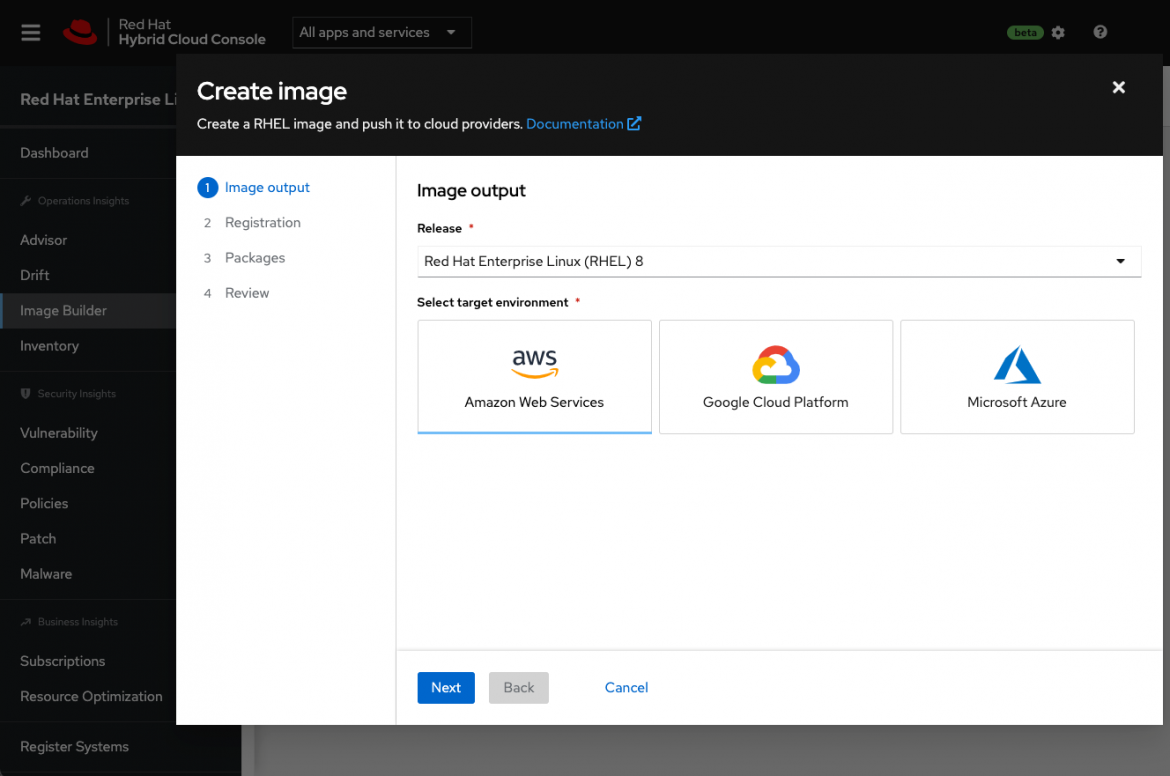
    Red Hat this week announced a public beta of an Image Builder service that streamlines the process of building customized instances of the Red Hat Enterprise Linux (RHEL) operating system.

    Scott Herold, director of product management for RHEL at Red Hat, said the Image Builder service enables an IT team to define a “gold” template for each target deployment environment that only contains the RHEL code required. Initially, Image Builder is configured to default to build a minimal, recommended RHEL server image for Amazon EC2, Microsoft Azure and Google Cloud Platform (GCP) cloud services.

    Future updates to the service will add support for VMware vSphere platforms as well as downloadable images and installation media for physical servers, customized filesystem layouts and versions 9.0, 8.5, 8.4 and 7.9 of RHEL. The service itself is accessed via the Red Hat Hybrid Cloud Console that is currently being made available in beta.

    Herold said building or installing operating systems is often a slow, tedious and error-prone process that needs to be manually performed in a slightly different way for each platform. Each physical server or edge computing platform requires different configurations and workflows. As a result, the chances mistakes will be made is high; Image Builder can greatly reduce the possibility of mistakes because there is no guesswork required, noted Herold.

    IT teams can also opt to include additional content from Red Hat in those builds to further streamline deployment processes, noted Herold. Those images can then be automatically registered with Red Hat to ensure future updates are received.

    The ability to customize those images also serves to reduce the overall size of the codebase that needs to be secured, added Herold. At a time when there is increased focus on software supply chains in the wake of a series of high-profile security breaches, many IT teams are revisiting their software deployment processes, he noted.

    Ultimately, Herold said Red Hat is moving toward providing IT teams with a more cloud-like experience regardless of where they deploy Red Hat’s curated open source software. The goal is to reduce as much friction as possible so that IT teams can more easily manage infrastructure at scale, he added.

    One way or another, the entiree software deployment process is becoming more automated. Much of the drudgery that has historically made it challenging to deploy and manage IT platforms at scale can be traced back to manual processes created when organizations ran a much smaller number of applications in on-premises IT environments. As IT teams increasingly deploy more applications in the cloud and at the network edge, it’s become more apparent that manual legacy processes won’t scale—especially when it’s already challenging to hire and retain IT personnel.

    It’s not clear how quickly IT teams will modernize software deployment processes using automated DevOps processes. Simple inertia is often a powerful force to overcome; however, most IT professionals can easily find something more compelling to do with their time that doesn’t involve using manually customizing operating system images.

  • Log4j Puts Effective IT Operations at Center Stage

    Log4j Puts Effective IT Operations at Center Stage

    News of the Apache Log4j vulnerability exploit is striking fear into the hearts of both software makers and users. Log4j is the most popular Java logging service used today, with over 400,000 GitHub downloads and has been embedded in most internet services and products from companies all over the world, including Apple, Amazon, Cloudflare, Steam, Tesla, Twitter and Baidu, just to name a few.

    Exploiting this vulnerability is simple and allows threat actors to control Java-based web servers and launch remote code execution (RCE) attacks. New variations of the original exploit are being introduced rapidly—over 60 in less than 24 hours. The attack surface grows by the minute. Good credential management and advanced authentication will not help as this exploit is pre-authentication, which means an attacker doesn’t need to authenticate to your web applications to attack. Your web server is vulnerable.

    The good news is your organization likely has a team of seasoned IT operations pros that can help protect against the worst of Log4j’s devastation.

    How IT Operations Can Protect Against Log4j Vulnerabilities

    Step One: Find Log4j Wherever it Exists

    You need to investigate every internet-facing application, website and system that you own or use. This includes self-hosted installations of vendor products and cloud-based services. Focus on systems that are internet-facing that contain sensitive data. Once you’ve completed assessing your hosted apps and vendor systems, move on to endpoint applications. Java-based apps like WebEx, Minecraft, Citrix and many more.

    Step Two: Patch, Patch, Patch

    Patch in the same order as above: Internet-facing applications, websites and systems. If no patch is yet available for your apps and systems, uninstall.

    The pandemic has forced many endpoints into workers’ home environments, which creates extra challenges for patching those endpoints and keeping them compliant. Operations teams can’t rely on work-from-home folks to patch their own systems, even if they’re given clear instructions. Many of them will just ignore those directions, so you need to adopt systems that enforce continuous compliance.

    Step Three: IT Operations is Essential

    Communicate with your senior leaders. They should be in the know about this one! Senior leadership needs to position their IT operations teams among their most vital employees. Don’t think this is going to go away any time soon—we’re just starting to get a glimpse of what is being tried out there in the wild. Buckle up. 


  • AWS Unfurls Bevy of Automation Tools to Streamline DevOps

    AWS Unfurls Bevy of Automation Tools to Streamline DevOps

    At the AWS re:Invent conference, Amazon Web Services (AWS) added a bevy of tools to its portfolio intended to accelerate the pace of application development while simultaneously simplifying DevOps processes.

    AWS development tools unveiled this week include AWS Amplify Studio, a visual development environment that allows developers to create web application user interfaces (UIs) with minimal coding.

    Ken Exner, head of product for developer tools at AWS, said as an extension of an existing AWS Amplify Studio tool, this latest addition allows developers to customize application UIs at a higher level of abstraction using a library of components while enabling them to drop down to a lower level of coding to customize their application further whenever required. After the UI is designed, AWS Amplify Studio automatically generates the associated JavaScript or TypeScript code for the developer.

    In general, AWS is committed to improving developer productivity by providing, for example, automated reasoning tools that automate processes without locking devs into a layer of abstraction that, ultimately, may create a wall that blocks them from meeting customization requirements, he said.

    Other developer tools launched by AWS this week include updates to Amazon CodeGuru Reviewer that adds a secrets detector that uses machine learning algorithms to identify hardcoded secrets that can be secured using AWS Secrets Manager; a revamped Amazon Inspector vulnerability management tool that provides automated assessment scans, automated resource discovery, support for container-based workloads, improved risk scoring, integration with Amazon EventBridge and AWS Security Hub and the removal of the stand-alone Amazon Inspector scanning agent.

    AWS also revealed it has eliminated the need to manually pull images from the Amazon Elastic Container Registry (ECR) repositories by adding automated synchronization capabilities that keep private and public registries consistent with each other.

    In terms of IT operations tools, AWS added a managed database service to its Amazon Relational Database Service portfolio that allows IT teams to customize the underlying database and operating system using an RDS Custom option, a new table class for Amazon DynamoDB designed to reduce storage costs for infrequently accessed data and a service for RDS, dubbed Amazon DevOps Guru, that extends existing machine learning capabilities to automatically detect and diagnose performance bottlenecks and operational database issues.

    Jeff Carter, vice president for relational databases at AWS, said that as databases are increasingly managed by DevOps teams rather than traditional database administrators (DBAs), the cloud service provider is moving to reduce friction by automating as many manual tasks as possible. That’s critical at a time when IT teams are deploying a much wider range of purpose-built databases that are optimized for different classes of applications, he added. The overall goal is to rely more on automation to reduce friction across the IT environment, said Carter.

    Overall, there are two classes of AWS customers: The first are development teams that are increasingly relying on managed services provided by AWS to automate a wide range of DevOps processes. The second tend to be enterprise IT organizations that prefer to manage cloud services themselves.

    Mitch Ashley, a principal for Techstrong Research, an arm of the parent company of devopsy.kinsta.cloud, noted that, in many cases, enterprise IT teams are managing DevOps workflows that span multiple clouds. As such, they tend to prefer tools and platforms that can be applied to both multiple clouds and on-premises IT environments. The more those organizations rely on managed services provided by a cloud service provider the more difficult it becomes to consistently manage DevOps workflows across multiple IT environments.

    It’s too early to say just how much IT organizations will rely on managed services going forward. However, at a time when more organizations are using more IT platforms than ever, it’s clear the DevOps management challenge increases with each new platform introduced into the IT environment.

  • Plutora Enhances VSM Platform with Release Insights

    Plutora Enhances VSM Platform with Release Insights

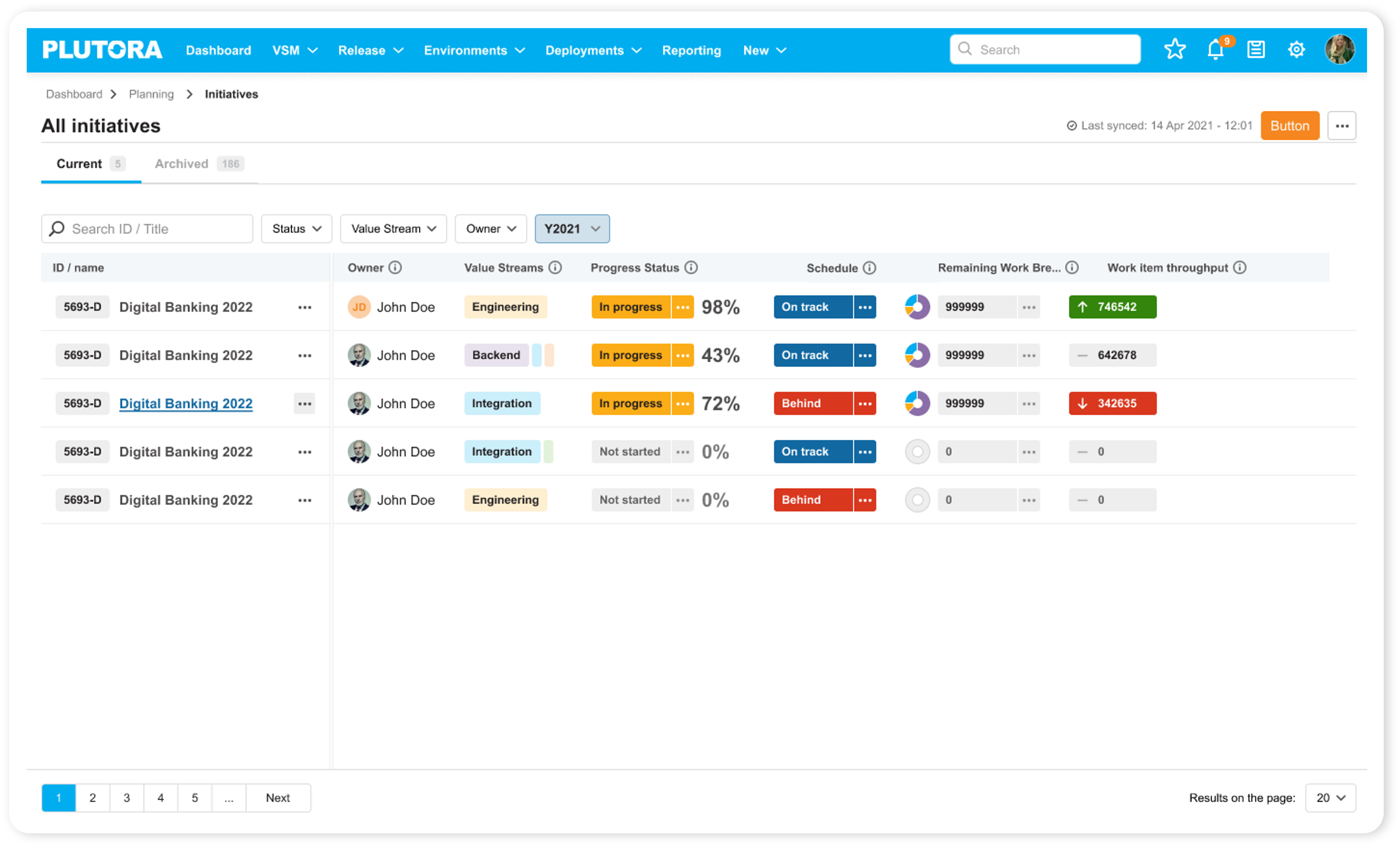
    Plutora has enhanced its value stream management (VSM) platform to provide dashboards that enable DevOps teams to better optimize application delivery.

    Jeff Keyes, vice president of product marketing and strategy for Plutora, said dashboards added to the platform will make it possible for application release managers to leverage predictive analytics to manage application delivery in a more progressive way rather than always having to react to an unexpected event.

    To enable that approach, Plutora has revamped its release insights dashboard that surfaces problem areas and hot spots in addition to adding analytics that track both software builds and larger project initiatives.

    That latter capability is especially critical for executives that currently find it challenging to keep track of multiple software development initiatives, especially those that may have fallen behind schedule without senior leaders being aware of the implications, said Keyes.

    While VSM platforms are typically used by senior IT and business leaders to keep track of how software deadlines are impacting key performance indicators (KPIs) for the business, Keyes said it’s become apparent that application release managers need access to more advanced analytics to optimize application deployment schedules. The Progressive Release Management capability surfaces insights via dashboards in the Plutora platform; that makes it simpler for application delivery managers to optimally orchestrate allocation of resources.

    Release managers, of course, already have access to a wide range of platforms for automating the application delivery process. However, Keyes said, those platforms don’t provide enough insights into how to optimize application delivery across a DevOps workflow made up of disparate tools and platforms. Plutora enables release managers to employ value stream flow metrics and more traditional DevOps metrics to reduce cycle times and improve overall DevOps throughput.

    Keyes said once organizations are provided with that insight, they should also be able to reduce the overall fatigue level many DevOps teams currently experience by removing friction within those workflows. In fact, that fatigue level is a major reason why there is so much turnover in many DevOps teams, he noted.

    It’s not clear how many organizations have a dedicated application release team, but optimizing the software delivery process is a major challenge for almost every DevOps team. While many organizations routinely make use of continuous integration (CI) tools to build applications faster, continuous delivery of applications has proven to be a more elusive goal. This is largely because each platform on which applications are deployed tends to be unique. As a result, many DevOps teams still rely on spreadsheets to manually manage application deployments.

    However, as the pace at which applications are being built continues to accelerate, it’s clear that application delivery is becoming a bottleneck. VSM platforms provide a means of applying analytics to optimize a process that can then be used to make better-informed decisions that might convince more organizations to automate application delivery. That assumes, of course, that the organization had the foresight to invest in a VSM platform capable of surfacing those insights in the first place.

  • Nobl9 Adds Hydrogen Platform to Surface Technical Debt Issues

    Nobl9 Adds Hydrogen Platform to Surface Technical Debt Issues

    Nobl9 today unveiled a Hydrogen platform that makes it simpler for DevOps teams to identify technical debt issues as they manage service level objectives (SLOs) as code.

    Hydrogen enables DevOps teams to define SLOs using a simple wizard or by embedding code within their application as part of a DevOps workflow. That code is then used to automatically collect data from platforms such as Datadog, New Relic, Prometheus, Splunk and others with requiring any additional instrumentation.

    Nobl9 COO Kit Merker said that approach also makes it possible to surface technical debt that inhibits achieving those goals via the Hydrogen platform. Armed with those insights, it then becomes easier for DevOps teams to focus on reducing or eliminating that technical debt because Hydrogen automatically generates a ticket in the Jira project management application—widely used by DevOps teams—to make sure the issue is addressed. Otherwise, in the heat of a DevOps sprint, the issue is likely to be forgotten as the application development project continues to move forward, noted Merker.

    The ability to identify that technical debt is an outgrowth of the ability to manage SLOs as code that is enabled by the core Nobl9 software-as-a-service (SaaS) platform. Hydrogen extends that capability by automating workflows whenever a specific service shows indications that it cannot meet objectives because of a dependency on a legacy platform that needs to be upgraded, added Merker.

    There is also a service health dashboard that organizes SLOs into logical groups that are mapped to features via labels, which Merker noted makes it possible for multiple stakeholders to easily identify which issues affect a particular service most. Hydrogen can also trigger a variety of automated workflows to prompt additional investigations that escalate as services worsen.

    Overall, Hydrogen is designed to provide engineering teams with more accurate context that can be used to prioritize which issues should be addressed first during any technical debt planning cycle, said Merker. Hydrogen can enforce code release policies based on technical debt budgets that are enforced via integrations with continuous integration/continuous delivery (CI/CD) platforms.

    Technical debt generally refers to any code change that is required to optimize a service that is not immediately addressed. The more legacy platforms there are in an IT environment, the higher that technical debt tends to become. At a time when more organizations are building and deploying microservices-based applications, that technical debt, over time, tends to adversely affect applications that are much more dependent on external services than a traditional monolithic application. A single technical debt issue can have a cascading impact on multiple microservices-based applications that would, otherwise, would be difficult to detect.

    The challenge, of course, is that technical debt doesn’t always get the attention it deserves when most of the IT team is focused on rolling out the next great application. However, as application environments become more complex it may only be a matter of time before all the technical debt that is being accumulated becomes unsustainable.

  • BMC Looks to Advance ServiceOps Approach to Managing IT

    BMC Looks to Advance ServiceOps Approach to Managing IT

    During an online BMC Exchange event, BMC announced it expanded its portfolio of IT management offerings as part of an ongoing effort to unify traditional IT service management and DevOps processes under an integrated ServiceOps framework.

    The latest additions to the BMC portfolio includes an update to its Control-M workload automation platform that adds observability tools for monitoring application and data workflows along with additional integrations for cloud services such as AWS Glue, Google Cloud Dataflow and Function and Microsoft Azure Data Factory and platforms such the data lake from Databricks.

    BMC is also making available a preview of a Control M Python client that will extend the reach of the workload automation platform to the code data science teams employ to build artificial intelligence (AI) models.

    In addition, BMC is adding a BMC Helix Digital Workplace studio to make it easier for IT teams to customize the software-as-a-service (SaaS) platform it provides for IT service management (ITSM). Finally, BMC is also making available a version of BMC Helix that is optimized for communications service providers.

    BMC CEO Ayman Sayed said overall the current emphasis on digital business transformation is driving a need to converge the management of multiple IT platforms as organizations reinvent how core processes work across their organization. It’s not possible to drive that level of reengineering across multiple IT platforms without centralizing the management of those platforms using a ServiceOps framework that unifies DevOps and existing ITSM platforms, he noted.

    At the same time, Sayed said organizations need to invest more in artificial intelligence to automate IT operations, also known as AIOps, to augment IT staff that is hard-pressed by the need to manage both emerging and legacy IT platforms. The latest investment BMC has made in AIOps came earlier this month with the acquisition of StreamWeaver, a provider of a set of tools that make it easier to collect massive amounts of data that can be used to more easily train AI models.

    It’s too early to say to what degree IT management processes might become unified. In addition to centralized IT teams, most organizations have business units that often drive their own IT initiatives. However, as organizations realize how many platforms a digital process needs to access the need to centralize the management of IT becomes more apparent. The issue each organization will need to determine is the degree to which that centralization needs to occur.

    It’s clear in the wake of the COVID-19 pandemic that many IT organizations have never been more agile. In some cases, those IT teams are now able to drive a rate of change that is too fast for many businesses to even absorb. In fact, it’s arguable that entire businesses will need to adopt DevOps principles to manage that rate of change.

    In the meantime, IT teams will need to take a harder look at how much time is being spent on manual tasks that could be automated in a way that enables them to be lot more productive than they are today.