Category: DevOps in the Cloud

  • Using Laravel and AWS: What You Need to Know

    Using Laravel and AWS: What You Need to Know

    Most likely, you have heard about and Laravel, the open source PHP framework, and you might be planning to go to the next level to modernize your PHP Laravel application. AWS offers a number of features to help organizations scale to support millions of users, not to mention the agility and cost benefits associated with a cloud infrastructure. These features and capabilities are the compelling promoters to transform your application into a high-performing and resilient PHP Laravel application.

    In this article, I will describe how to architect your software-as-a-service (SaaS) Laravel application with high-level scalability standards on AWS to help you understand what is required and discuss the considerations and action items to gain business value and resiliency. We chose the AWS cloud since is the most mature infrastructure-as-a-service (IaaS) provider and makes things easier to innovate; however, these practices can be applied to any cloud platform.

    I also will explain why AWS is a vital option to scale and grow your SaaS Laravel application and present the current/future enterprise architecture. In part two of this series, I will discuss the importance of the 12-factor app methodology and multiple lessons to include in your strategy when architecting on AWS DevOps.

    The Value of Migrating Your Laravel App to AWS

    In an article I wrote for my company blog on running the digital transformation on AWS for your enterprise or web application, I explained the business benefits that brings the AWS cloud adoption, including a reduced IT labor force, pre-configured services to achieve faster implementations and minimal downtime, due to the repeatable and flexible infrastructure. The cloud is an essential environment to scale SaaS Laravel applications—in there, you can decouple your architecture into multiple service pieces, including cloud storage (Amazon S3 and CDN) and automatic scaling EC2 instances (AWS Auto Scaling), and integrate various SaaS/platform-as-a-service (PaaS) AWS components for your modern, cloud-native application. Also, if you are planning to move to the AWS cloud, you could use this AWS Migration Checklist to prepare for your journey.

    “Web Applications and enterprises need to transform, they need to transform to a continuous transformation, and the cloud is the key.”

    – Stephen Orban

    I really enjoyed this phrase from AWS’ Stephen Orban, because you’re not only transforming your application; once on board the AWS cloud, you are in an infinite journey of continuous innovation: pay-as-you-go, microservices, serverless and so on.

    Laravel Architecture on Docker and Microservices

    Throughout the AWS cloud journey, there have been multiple disruptive evolutions, and one of them is the microservices, although, I won’t cover the microservices (Docker) approach. As a first step to transforming your application toward a cloud-native application, start with a monolithic approach. As your application matures and user base increases, I suggest jumping into a Laravel microservice approach, i.e., dockerize your Laravel PHP product using Docker, AWS ECS, Kubernetes or AWS Fargate. I’ve found many digital agencies that are adopting the AWS Cloud and DevOps practices with Docker/Serverless strategies and are getting overwhelmed with these sophisticated technologies, which has led to project failure because they were not ready to this stage.

    Here’s how to avoid that: Grow gradually.

    However, if your Dev team has enough experience with Docker and microservices, I wouldn’t hesitate to architect with microservices. This will be covered in the next article in this series, “Microservices with Laravel, Docker and AWS ECS.”

    Who is This Article For?

    Whether you are kicking off an MVP app on Godaddy/Hostgator, deploying Laravel on AWS with basic principles or ready to jump from hundreds of users into million users, this article is for you and will help you in your Laravel architecture on AWS.

    Laravel for Large-Scale SaaS Architecture on AWS

    So, let’s start by making clear what do you most need to scale a Laravel application on AWS.

    The diagram below illustrates how a next-generation Laravel application should be architected with the full range of AWS DevOps components. Each piece mentioned in this AWS stack is highly elastic, scalable and resilient.

    AWS Laravel Architecture Diagram

    AWS Auto Scaling and Load Balancing

    Initially, the dynamic traffic comes from AWS Route53, which will route all requests to the Application Load Balancing, which the AWS ALB will load balance across a fleet of EC2 instances ( 2…N Instances). This fleet should “scale” horizontally according to the traffic demands or the AWS CloudWatch metrics.

    Amazon S3 and CloudFront CDN

    All static content including images, videos and HTML will be hosted on Amazon S3, the cloud storage with infinite storage and elasticity. In front of Amazon S3, we will compound AWS CloudFront to cache the entire static content and reduce bandwidth costs. Integrating this pair of components is crucial.

    AWS RDS Aurora (Managed Database Services)

    The database data should be placed on AWS Aurora or RDS and AWS ElastiCache (Redis) for session management and cache user data. These AWS components are elastic and scalable, which helps to design the AWS Well-Architected framework with the highest fault-tolerance and resiliency.

    Amazon VPC and Networking

    In the AWS Networking level, we propose AWS VPC with a public/private enterprise network. Following PCI and HIPAA practices, there should be a VPN encapsulating the Laravel application within the private AWS enterprise network. Also included should be an AWS VPN connection and OpenVPN service to access the private network to your multiple Laravel environments.

    Route53

    From the DNS perspective, Route53 is needed to manage the application domain, DNS scalability, routing latency and more features to reduce failures.

    AWS Lambda

    This serverless component will be used for async jobs and backend scripts to minimize load in your AWS Auto Scaling cluster.

    We will explore these AWS components substantially in detail, later in the third article of this series.

    Web applications that can fit within this architecture:

    • API Laravel applications
    • Mobile backend applications
    • Laravel enterprise applications: CRMs, ERPs and back-office systems
    • SaaS Laravel applications
    • Front-end applications. i.e., Angular, React, Vue.js or any HTML site
    • ANY web platform: Python, Node.js, Ruby, PHP, Zend, CakePHP, Yii and Symfony

    A word of warning: Don’t use Cpanel for any web application. It is not recommended to scale as it can slow down your application performance.

    — Alfonso Valdés

  • SnapLogic Extends DevOps Reach via GitHub

    SnapLogic Extends DevOps Reach via GitHub

    SnapLogic has extended the reach of its SnapLogic Enterprise Integration Cloud into the realm of DevOps by making it possible to store integrations creating using Snap connectors in GitHub.

    The company also announced integration with the DC/OS platform from Mesosphere along with a new service catalog and several updates to the Iris artificial intelligence (AI) software it uses make recommendations concerning the construction of integration pipelines. At the same time, SnapLogic has enhanced both its monitoring tools for application programming interfaces (APIs) and search tools for discovering broken integration pipelines.

    Craig Stewart, vice president of product management for SnapLogic, said support for GitHub makes it easier for developers at all skill levels to share preconfigured integrations via GitHub alongside all the other code they already share via the widely employed repository. That capability also makes it easier for DevOps teams to include preconfigured Snap connectors within a continuous integration/continuous development (CI/CD) pipeline, he noted, adding those integrations now can be more easily discovered within a Patterns Catalog to help developers discover and reuse integration patterns.

    Support for Mesosphere, Stewart said, is being provided by customer request. That effort will then be extended to include support for Kubernetes, which SnapLogic expects will become the de facto standard for container orchestration engine.

    Finally, SnapLogic updated its Iris AI software to provide an additional option for users to build their integration workflows starting with the last Snap of the integration pipeline. Previously, the Iris recommendation engine started with the first Snap connector. Now, when a user first places the last Snap on the canvas, the Integration Assistant will display suggested previous Snaps until the pipeline is complete. Users also have the option to start with the first and last Snaps of the pipeline and the Integration Assistant will work from the outside-in to recommend Snaps to build out the entire pipeline.

    SnapLogic is making investments designed to facilitate self-service capabilities that promote reuse of integrations, Stewart said. A recent survey of 500 IT decision-makers conducted by Vanson Bourne on behalf of SnapLogic finds on average organizations expect to generate a 547 percent return on their data investments, increasing revenue by an average $5.2 million by using data more effectively. But the survey also finds that on average organizations are using only half (51 percent) the data they collect or generate, and data drives less than half (48 percent) of the decisions being made. Organizations will spend $1.7 million on an average to operationalize data over the next five years to rectify that problem, according to the survey results, which is more than double what they currently spend.

    Much of that effort will be driven by so-called citizen integrators that reside within various lines of business outside the traditional IT department. In many cases those citizen integrators will be leveraging prebuilt integration patterns created by developer working within the internal IT department. The challenge now is finding a way to make sure all those integration patterns can be slipstreamed into a larger set of DevOps processes that are increasingly spanning the entire enterprise.

    — Mike Vizard

  • A Matter of Trust: Survey Examines Impact of EV Certificates

    A Matter of Trust: Survey Examines Impact of EV Certificates

    When it comes to interacting online, everything is a matter of trust. Spam emails and clever phishing attacks make it more challenging to determine what’s legitimate and what isn’t and have put businesses and consumers on edge. Without trust, customers are reluctant to share sensitive information or conduct transactions online. According to a recent survey, EV certificates have a significant impact on customer confidence and trust.

    First, let me explain what an EV certificate is. Most people are familiar with the basic SSL certificate. The EV, or extended validation, certificate requires more comprehensive and strenuous research into the organization requesting the it. As a result, it provides stronger verification and authentication.

    Websites protected with a standard SSL certificate typically are indicated with a locked padlock icon in the web browser address bar. Websites that are secured with an EV certificate also include the padlock, but the address info is displayed in a distinct green color to indicate that it’s safe and the full name of the company that obtained the EV certificate is displayed.

    I’m not as vigilant as I ought to be, perhaps, but I honestly do glance at the browser address bar to double-check that the padlock is locked, and the connection is over HTTPS instead of standard HTTP. If I don’t see those things, I will stop and examine the URL and web page more closely. I certainly wouldn’t enter any financial or sensitive personal information in a site that was not secure. The bright green company name and locked padlock on a site protected with an EV certificate stands out more and makes it immediately obvious that the site is secure.

    If your website does not instill confidence, customers will not trust you. We gathered input from more than 350 individuals around the world and found that the EV certificate has a significant impact on that trust. Eight out of 10 survey respondents indicated that their perception of a brand or company is influenced by the green address bar of a website protected with an EV certificate. More than 50 percent stated that it has a significant influence.

    When presented with two virtually identical images of a banking website—one protected with a standard SSL certificate and the other with an EV certificate—survey participants overwhelmingly favored the EV certificate website. Here is a quick look at how much more the survey respondents agreed with these statements when it comes to the EV certificate website:

    • “I am safe doing business with this site.” 6 times more
    • “This business is trustworthy.” 8.6 times more
    • “This business is secure.” 10.8 times more

    Perception is reality. Whether a website has no certificate, a standard SSL certificate or an EV certificate may not necessarily dictate that the company is more trustworthy. But, our survey determined that it is perceived to be more secure and more trustworthy, and—in the end—that is all that counts. Companies that want to project the image that they are concerned about security and care about the privacy and security of customer data should invest in an EV certificate.

    Check out the full report yourself to learn more about the survey, and what the findings indicate about the value of EV certificates.

    — Tony Bradley

  • How Cloud-Native Computing Is Changing IT Job Roles

    How Cloud-Native Computing Is Changing IT Job Roles

    The cloud native age is upon us. This means not only that infrastructure, application deployment and security strategies look very different than they did just a few years ago, but also that the way companies design and fill IT jobs has changed—or should change, at least, for those seeking to stay relevant in our fast-changing, cloud-centric world.

    Which types of new roles are emerging in the cloud-native age? What should employers and employees be doing to make sure that the roles they design and fill meet today’s needs? Keep reading for insight into these questions.

    Traditional IT Job Roles

    Traditionally, IT job roles have been pretty consistently and clearly defined. They broke down into two main groups.

    First, there were developers—who may also have been called software architects, application programmers or software engineers. Whatever the exact job title was, the role centered on designing and writing code.

    Second, there were support people. They might have been called sysadmins, tech support, problem analysts or IT Ops. Their roles could include end user support, backend system management or both. In any case, their task list was limited primarily to deploying and managing software that was written by other people.

    There are a variety of traditional IT job roles as well, such as business analysts, network engineers and security analysts. But programmers and sysadmins were the two main types of IT positions that virtually every organization filled; the other roles addressed specialist needs that may or may not have been a requirement at a given organization.

    The Rise of the DevOps Engineer

    The DevOps movement has changed IT job roles a bit over the past decade. Inspired by the DevOps mindset, companies have moved to create roles that blend development and IT Ops together.

    This is where the SRE and DevOps engineer roles (for both of which there are hundreds of available positions on Monster.com at the time of this writing) came from.

    Yet, although the DevOps movement has spawned the creation of these new roles, it hasn’t killed off traditional IT job titles. People who specialize in just development or IT Ops can still find plenty of jobs.

    Cloud-Native Computing and the Future of IT Job Roles

    That may not remain the case in the future. As the trend toward cloud-native computing redefines everything about the way applications are designed, deployed and managed, the viability of traditional IT job roles is somewhat in doubt.

    To be clear, when I mention cloud native computing, I am referring to the present era in which virtually everything is designed to run by default in the cloud. I’m not suggesting that everything runs in the cloud; that is obviously not the case. What I mean is that we are living in a time when the norm is to deploy in the cloud (often using next-generation infrastructure technologies such as containers or serverless) and conventional on-premises infrastructure has become the exception.

    In an age when sophisticated cloud-based deployment environments have emerged as the default, IT job roles need to change. The landscape as it currently exists (where most professionals fall into either the developer or IT Ops camp, and a handful of DevOps engineers or SRE positions help to unite them) no longer works well.

    Why? Because in the cloud-native age, it is becoming increasingly difficult to fulfill a job role competently without a meaningful understanding of both application development and IT Ops. And having a few SREs on staff is no longer enough to bridge the gap.

    For example, if you want to deploy an application in a container, you’re going to need to know something about scripting and possibly infrastructure-as-code. At the same time, if you are writing application code that will run inside a container, you’ll need an understanding of how containerized infrastructure works, how to break down stateless from stateful components, how to implement communication between microservices and how to handle the unique security challenges associated with containers and microservices.

    In other words, it would be pretty hard to write or deploy a secure, well-designed, efficient containerized application without having some mastery of both software development and software administration.

    On top of this, cloud-native deployments also often require expertise in areas including software-defined networking or scale-out storage. Unless your company hires engineers who specialize in those specific areas (which is often not realistic or efficient, because the company may not need full-time positions in those niche roles) the rest of your IT staff will need to be able to address this need.

    To make things even more challenging, your IT team needs to be able to achieve all of the above while keeping pace with the rapid demands of continuous delivery. Typically there is little time to step back and make a plan for addressing unexpected skills gaps if you don’t have the right roles from the get-go.

    Conclusion

    Ultimately, what all this means is that we are moving toward a future where IT job roles will increasingly involve a broad mix of diverse skills, and specific specializations will become less common.

    That’s not to say that specialist IT job titles will entirely disappear. Some companies will always have a need for people who only do programming, only do system administration or only do software testing, for example. But creating, deploying and managing a cloud-native workload often requires each team member to possess a mix of specific skills that don’t align cleanly with traditional IT job roles.

    That’s why companies need to start hiring for this type of role (call it Cloud-Native Engineer, if you like), and IT professionals should begin preparing to fill it.

    — Ben Bernstein

  • DevOps 2.0: A New Evolution of Serverless Cloud Architecture

    DevOps 2.0: A New Evolution of Serverless Cloud Architecture

    Science teaches us to formulate hypotheses and test them experimentally to advance systematically. While this sounds logical, DevOps—and software architecture in particular—does not follow this approach because current tools make this too cumbersome. So, architecture choices are frequently made by HiPPO (highest paid person’s opinion).

    However, the rate of development, especially in the serverless or function-as-a-service (FaaS) space, makes it difficult to gather all necessary information for HiPPO to work effectively. For example, according to AWS, it publishes on average two new cloud services per day, with similar development rates at other public cloud providers. With so many very nuanced choices, picking the optimal architecture without experimentally testing them is impossible.

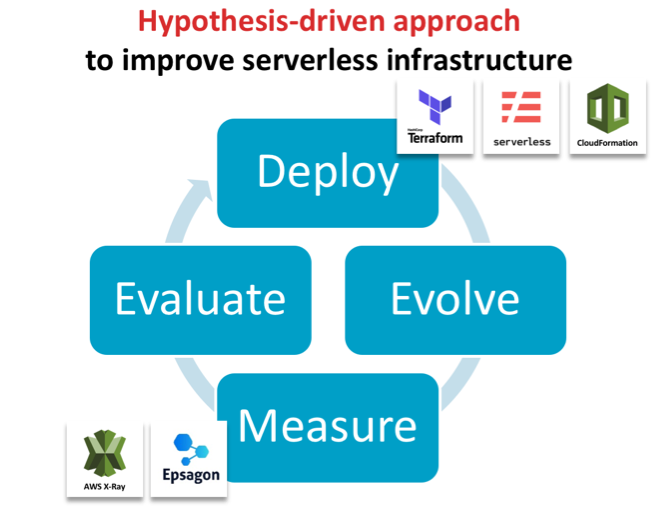
    We propose a fundamentally different approach for developing efficient and robust serverless architectures: hypothesis-driven architecture evolution, which consists of the steps deploy, evolve, measure, evaluate and iterate. In this blog post, we will go through each component and demonstrate how this can be done in an automated fashion to bring out the inner scientists in all of us.

    Deploy with Code as Text

    To deploy easily and consistently, the serverless architecture stack needs to be fully defined through code/text. This is widely known as infrastructure as code (IaC) and comprises the full infrastructure, from the computational core in the serverless functions all the way to permissions, databases and connecting services.  Frameworks such as Serverless Framework and Terraform or vendor-specific tools such as AWS CloudFormation enable this by allowing a single file to define the infrastructure used and to automatically deploy these services. This ensures that multiple versions can be deployed in isolation even though they are hosted to the same availability zone for reducing confounding factors when comparing performance.

    Evolve the IaC for Hypothesis-Driven Advancements

    This infrastructure file can then be modified and re-deployed to systematically test hypotheses, such as whether an algorithm is faster or a particular autoscaling group is more efficient. This idea was proposed first by James Lewis from ThoughtWorks in the context of general software architecture development, but is particularly applicable for the serverless space.

    Measure Performance of the Newly Evolved Architecture

    The second key element to this novel way of evolving architecture is the automatic evaluation of any newly deployed architecture without manually recording runtime or specifying interactions between services. Here, tools such as Epsagon can help in automatically detecting the workflows in architectures and analyzing their performance.

    Evaluate and Iterate

    In this approach, evaluation needs to keep pace with the overall process. To be effective, it is imperative to be able to identify errors and bottlenecks across the entire architecture in a timely fashion. In serverless architectures, most tools focus on the individual function rather than a full transaction from end to end. You may be made aware of a long-running function but you have to scrape logs and go through your code to perform root cause analysis. Tools such as Honycomb or Epsagon help to collide errors across multiple layers or the entire data flow.

    Case Study: Improve Runtime Performance of a Bioinformatics Tool

    We now describe the two key aspects (deploy and evaluate) on a practical example showcasing how it has helped improve the runtime of a serverless application. We chose the bioinformatics software framework GT-Scan, which is used by Australia’s premier research organization to conduct medical research, to improve its runtime by 85 percent.

    GT-Scan was one of the first serverless architectures (Jeff Barr Blog) with a focus on burstable web services that conducts data- and compute-intensive tasks. As such, it relies heavily on all of its components to be as time- and resource-efficient as possible.

    We contrast the automated approach against a previous approach in which the performance was evaluated using AWS X-Ray (AWS Public Sector Blog) and summarize our three learning outcomes:

    Visualizing the Current Architecture Automatically is Important

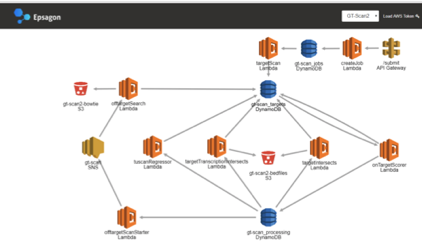
    Key to rapid architecture evolution visual feedback, especially so if only small changes to the architecture are evaluated. Hence having a visual representation of the architecture helps differentiate deployments and focuses in on differences.

    Figure 1: X-Ray view of the functional architecture vs the view of Epsagon’s automatically detected architecture


    Use Invocation Count and Runtime to Identify Which Function is the Bottleneck

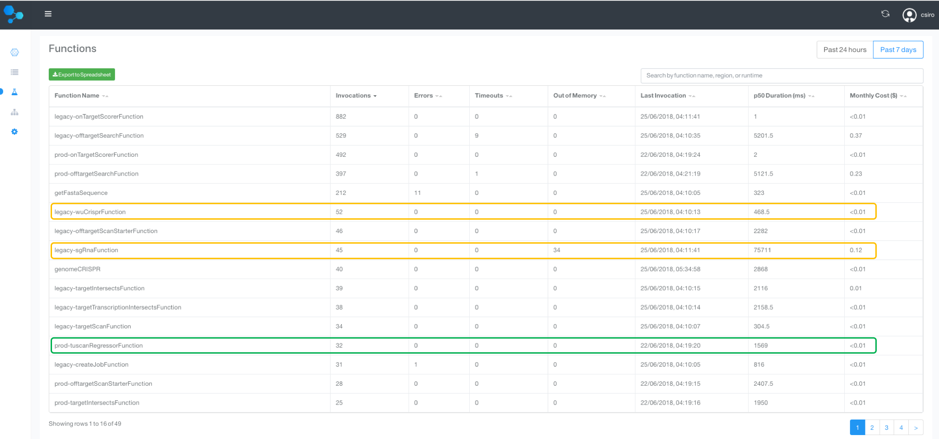
    To identify the bottlenecks in the system, a tabular view over the runtimes of all functions is essential. This also allows us to weed out obsolete or unused functions. A similar analysis can be done for memory use.

    We therefore sort by invocation count, which allows us to focus in on the most frequently used methods to target optimization efforts. We can now compare the old and new deployment side by side, by labeling one as “legacy.”

    Figure 2: A tabular view of all Lambda functions and their invocation count and runtime

    As seen in the functions table, the longest running  function and its precursor is from the legacy deployment with its median (p50) duration :

    • legacy-sgRnaFunction: 75.7 seconds
    • legacy-wuCrisperFunction: 468 ms
    • Total: 76 seconds

    In contrast, the new tuscanRegressorFunction, which replaces the two legacy-functions, runs in just 1.6 seconds! This is a 97.8 percent reduced running time, which is 47x faster!

    Assess Entire Data Flows to Target Top-Down Improvement Efforts

    Complex production applications typically contain many managed services and asynchronous events, whose interplay determines the overall performance. In addition to spotting individually slow functions, it is worthwhile to evaluate entire workflows to prioritize optimization efforts to the main data flows.

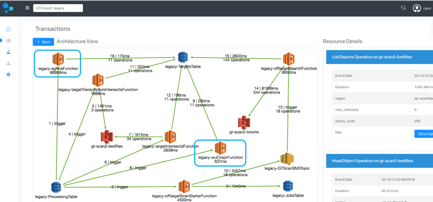
    For each of the GT-scan deployments, the solution identifies two flows: one comprising services watching DynamoDB and the other the API-gateway.

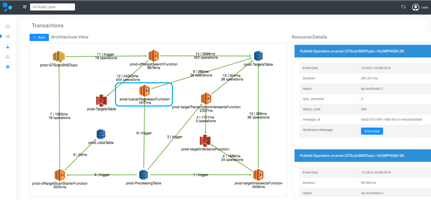
    Comparing the two deployments at this level reveals that the main flow in GT-Scan2_legacy takes on average 97.7 seconds before the optimization, while the average runtime for the corresponding data flow in GT-Scan2_prod is 14.1 seconds—a reduction of 85.5 percent—and an overall runtime improvement of 7x!


    Figure 3: Comparison between the automatically detected data flows between the prod and legacy deployment.

    Visualizing the data flow of the two architectures highlights that our optimization efforts were indeed targeted at the root problem: The legacy deployment uses the two inefficient Lamdba functions, while the production deployment contains only a single more efficient function.

    Figure 4: Architecture comparison of the transaction containing the difference between the prod and legacy deployment.

    Bringing It All Together

    Improving serverless architecture can be done systematically and efficiently by deploying the entire cloud infrastructure stack through code and using an evaluation system to automatically interrogate runtime. Specialized tools such as Epsagon can offer substantial improvements over AWS X-Ray for the evaluation step, by providing a tabular view to easily identify underperforming Lambda functions and offer an interpretable view of the architecture. Detecting data flows in the system helps prioritize optimization efforts to the main transactions of the architecture. Specialized tools help developers save time when documenting performance improvements; using hypothesis-driven evolution principles, we were able to improve the efficiency of GT-scan’s serverless system by 85 percent.

    This article was co-authored by the following:

    Aidan O’Brien is the main developer on the GT-Scan2 project. He is a Doctoral research student with joint appointment at CSIRO and one of the most impactful CRISPR research facilities in Australia.


    Nitzan Shapira is co-founder and the CEO of Epsagon. He is a software engineer, highly experienced in infrastructure technologies and cyber-security.


    Shannon Brown is the Senior Director of Growth of Epsagon. She is a software engineer with over 20 years of experience in software development, management, and sales.
    — Denis Bauer

  • Bridging the Multi-Cloud, DevOps Skills Gap

    Bridging the Multi-Cloud, DevOps Skills Gap

    The cloud is driving a digital transformation revolution throughout the world, as traditional “brick and mortar” companies morph into software companies. This is easy to see with retailers and publishers, but it’s also happening at companies such as ZipCar, Boeing and Liberty Mutual (more about them later). This transformation, while driving radical performance and cost improvements, has caused the skills gap to widen substantially as businesses struggle to find top developer talent—competing with the likes of traditional software companies such as Google and Microsoft. I attend the Cloud Foundry Summit in Boston to verify my assumptions.

    The diversity of offerings of cloud products has opened up a variety of possibilities, and one specific usage is on the rise: the multi-cloud strategy. This means that a company is using multiple cloud providers to host its services. There are numbers of reasons to do this: to take advantage of price differences, distribute the traffic to serve different geographical regions or as part of a disaster recovery plan, to name a few.

    Having a multi-cloud infrastructure brings a lot of complexity and challenges. Fortunately, solutions such as Cloud Foundry are designed to help companies embrace what the cloud industry has to offer, including the multi-cloud aspect. Cloud Foundry has actually seen a 12 percent increase in adoption from 2017 to 2018, and 42 percent of its users consider themselves developers or DevOps engineers.

    The 2018 GitHub developer survey confirms the trend: “DevOps and machine learning are important trends in the software industry today. Languages and frameworks associated with these kinds of works are on the rise, and developers working in these areas command the highest salaries.” DevOps engineers are not only the second most well-paid developers, but they are also among the ones with the most experience.

    DevOps engineers or site reliability engineers (SREs) are a rare type of talent, because these professionals need a wide range of knowledge within the software scope—more specifically, development skills and infrastructure/system administration skills. The fact that DevOps engineers are generally more experienced is because most people start as developers and then end up learning about infrastructure on the job, and this takes time. And our education system is to blame.

    Most computer science degree programs do not focus on practical computer science and software development. System administration skills are often not covered at all, so there are hardly any graduates taking on this type of position. As a result, many engineers learn on the job rather than during their degree programs.

    I heard time and again from attendees at Cloud Foundry Summit how difficult it is to find talent. When I asked about students graduating from colleges (even top colleges), they universally responded that new graduates were far “too green,” required months of training and were not familiar with or attracted to the DevOps/SRE career path.

    Taos, a prominent Silicon Valley IT consulting and services provider, is among some that are getting creative when it comes to attracting and developing quality DevOps talent. “Our customers are increasingly investing in projects that require engineers trained in cloud technologies and DevOps,” said Trish Palumbo, vice president of Talent at Taos. “To meet the demand, we look for knowledge-seekers with a baseline of CS fundamentals to join the Taos DevOps Bootcamp.” The training is free and students get paid to attend.

    As more businesses digitally transform, more developer talent will be needed. The Cloud Foundry Foundation has been aware of this skills gap for some time, having published a full report on the topic in 2016. The foundation continues to work hard to close this gap by hosting summits where developers can take training sessions, participate in a hack-athon and learn about a career in DevOps, while networking with experienced developers and organizations seeking talent. Cloud Foundry Summit is a crucial event for organizations in need of digital transformation, as this is one of the best industry conferences to meet top-tier talent.

    — Sylvain Kalache

  • Successfully Integrating DevOps while Deploying Cloud Applications

    Successfully Integrating DevOps while Deploying Cloud Applications

    Transforming to a high-performance DevOps environment can provide competitive advantages, but it requires change—and that doesn’t come easily to most organizations. DevOps requires cultural changes that are inherent to automating previously manual tasks: They are perhaps intimidating to those involved and they require flexibility and enterprisewide buy-in to get right. Furthering these people-side transformational complications are cloud application deployments, creating a need for enterprises to deliver innovative technologies and services with greater speed and quality—without hits to reliability and security.

    DevOps Blended with AWS Proficiency

    One approach to this problem is blending DevOps knowledge and Amazon Web Services (AWS) proficiency to guide development teams to better align the people, processes and technology needed to facilitate successful cloud initiatives.

    In transitioning to a more modern, DevOps-driven approach, companies often encounter a number of challenges, on both a technological and cultural level. The most successfully integrated DevOps occurs as a function of value analysis and process overview, addressing the individual needs of an enterprise rather than fitting them into a preset mold.

    Implemented correctly, DevOps blended with AWS proficiency allows organizations to maintain quality and configuration of their infrastructure environments, allowing application development teams to retain control over their processes and toolsets. AWS also allows the enterprise to maintain security: Rather than protocols that are standalone, they’re built into IT processes from the beginning, allowing customization with ease.

    AWS understands what is important to its partners when building tools, successfully addressing needs while staying ahead of the demand and, in turn, saving time. They accelerate the ability to deliver and allow an enterprise to focus on what’s most important during their journey to the cloud: value analysis.

    Fundamentally Designed to Refine Business Processes

    It is very important to approach projects first from a top-level view: Where does this piece of work fit into my broader organization?

    DevOps at its core is fundamentally about incorporating different disciplines of a business to create better practices than what are already in place. When an enterprise chooses to implement automation, it typically gains a better view of its business as a whole, incrementally increasing awareness at a birds-eye level. When complex business functions and operations are laid out in more mathematical terms and formulas, it suddenly becomes clear where applying automation can reduce waste.

    Getting these changes implemented quickly and with as little effort as possible naturally leads to successful automation. Enterprises remove such tasks that traditionally required an excess in resources by asking, “What value doe this process add? Is there a more efficient alternative?” With automation, these useless business practices are eliminated, freeing resources for more important initiatives.

    Increase Employee Awareness, Increase Productivity   

    One of the most important parts of the entire DevOps integration process is ensuring that everyone understands each other and their role. Properly embraced, a DevOps culture will be characterized by increased collaboration, shared responsibility and autonomous teams—leading to improved quality, valued feedback and the end goal of increased automation.

    People are naturally resistant to change. Members need to be aware of the business and how they—and will continue to—fit in.

    Ultimately, DevOps is not something that can simply be bought. Success during implementation requires the application of technologies, tools and products that are actually a fit between new processes and existing systems.

    — Ashley Stovall

  • Hosting Scalable WordPress on AWS

    Hosting Scalable WordPress on AWS

    Do you own or manage a WordPress site? Is it complex, with a lot of traffic? I’m going to show you the ideal architecture to host a highly available and scalable WordPress site on AWS.

    This blog is intended to show a distributed architecture in AWS for WordPress CMS websites. You will be able to identify the different layers of services needed to run a high-traffic WordPress site.

    The Concepts of a Highly Scalable and Available Environment

    Let’s start by looking at what a highly scalable and available environment means—and what it includes:

    High Availability: On IT it means that a system can operate without any service disruption or interruption for a long time, as well as a system that has redundant components. (In our case, the redundant Infrastructure will be our high availability — thanks, AWS, for making this easier!)

    Distributed Services — Loose Coupling: The art of distributing different components of a system in the same network. We will be doing this to leverage the load of any resource and have dedicated hosts for a service.

    Scalability: A system’s ability to monitor the user demand and automatically increase or decrease resources. This scalability will be provided by the following AWS Resources: AWS ELB, AWS EC2, AWS S3, AWS RDS.

    One essential part of innovation is always to stay up to date and implement the best technology available.

    First Things First

    If you are planning to follow this blog, it is because you are looking to migrate to Amazon Web Services or you already have an environment or some resources allocated there.

    If you are already on AWS, we have also compiled a very concise checklist, which is available here.

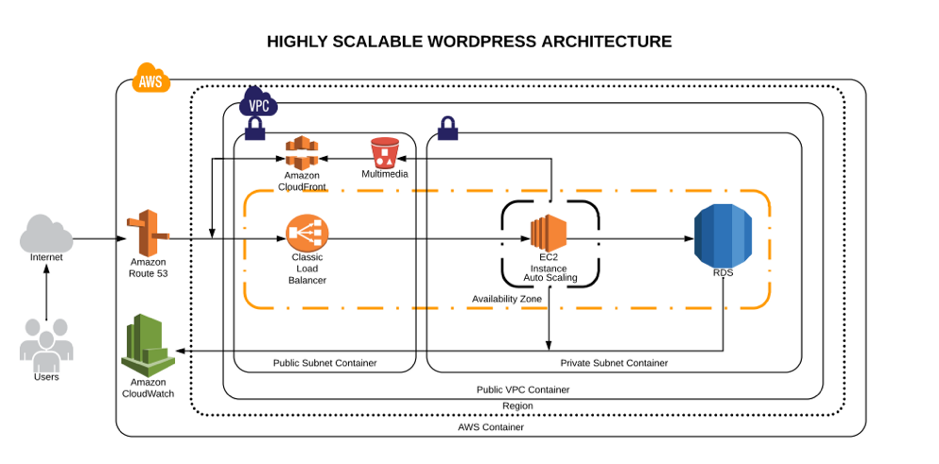
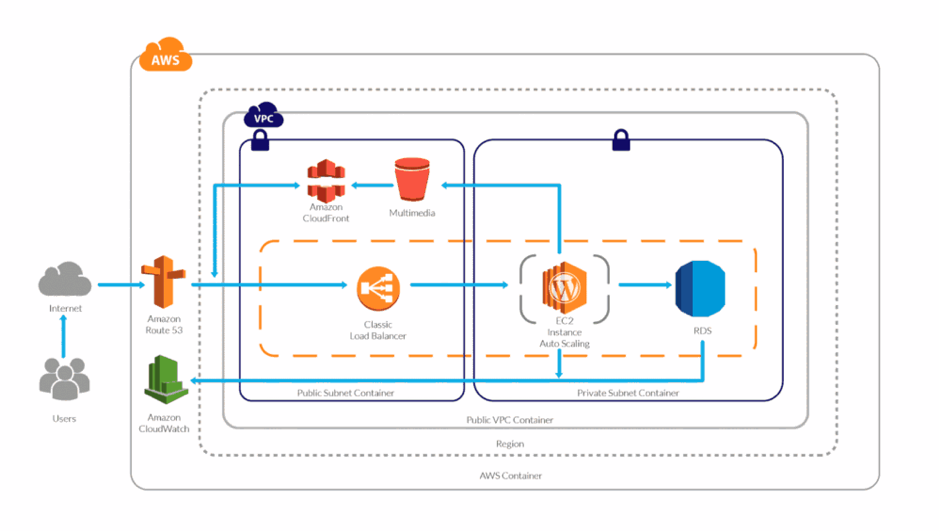
    Architecture Diagram

    High scalable and available WordPress environment on AWS Cloud

    AWS Services Explained

    1. Route53: This service will help us to manage all the upcoming requests (traffic) for our domain. AWS Route53 will also be the DNS manager, so here we will point our domain registrar to be the manager. Once it has been migrated here, we can add the A records, Cnames or TXT records and many other more.
    2. AWS VPC: The AWS VPC is a service that allows us to have a private network in which we will allocate our cloud computing resources. That means nobody has access to it—only ourselves.
    3. AWS Private Subnet: The private subnet is the subnet in which we are going to deploy the resources we don’t want outsiders to have access to. In this case, our database will be only accessible by the application.
    4. AWS Public Subnet: The public subnet is the subnet in which we are going to deploy the resources we want to make public — such as the server for our website.
    5. AWS S3: Amazon Simple Storage Service will be our content storage solution. Here, our WordPress installation(s) will have the content available whenever it scales up or off.
    6. AWS CloudFront: CloudFront combined with S3 will help us to spread the content faster to the end users. This way our WordPress multimedia content will be spread all over the AWS CDN network (edge locations), which will be used from our application to reduce the latency. Users will be served by the closest edge location available. So faster content = faster site.
    7. AWS Load Balancer: Here is the tricky part. The AWS ELB will allow us to distribute the traffic load between our instances available or in use depending on how the auto scaling is set.
    8. AWS EC2: Instances—also called “VMs”—the service on AWS for acquiring computing power. AWS EC2 will allow us to host our WordPress site and files we need.
    9. AWS Autoscaling: This will be the solution for our highly available and scalable WordPress site. AWS Autoscaling will take care of always having a minimum quantity of instances available for the public, and in case something goes wrong, it will replace the instance with a healthy one. This way our site will always be available. Autoscaling will also benefit our WordPress by creating instances based on the traffic demand and will help us to save costs while the traffic is low.
    10. AWS RDS and Multi A-Z: RDS will be the service in which we will host our WordPress database. The service is completely free and fully managed by AWS, which means we won’t need to worry about the database management anymore. Also useful is that RDS instances can have replication between them, which adds even more scalability. Also, enabling the Multi-Availability Zone (Multi A-Z) feature will provide us high availability. Keep an eye on this, however, since the price will is double for the RDS.
    11. AWS Cloudwatch: AWS Cloudwatch will be our trusted supervisor. Cloudwatch will be in charge of monitoring all the resources in our AWS account. It will keep an eye on the metrics that are predefined or as default by AWS resources, such as CPU usage, memory usage, disk IO and networking.

    Did I forget about EFS? Nope. In my experience, EFS has not been a huge help when it comes to sharing the WordPress files only. However, you can try using EFS; that way, the content will be replicated much faster and easier.

    If you want to learn more about the technologies and the approach that should be taken to create this kind of environments, take a look at this post.

    Millions of Page Views Served

    Here’s how this environment will be able to serve millions of page views/visitors:

    Traffic Flow

    Once visitors hit your domain on their browser their request is passed to the internet, then routed to your DNS manager. The DNS manager (Route53) will solve the request to the specified server and the web server then will serve the application.

    WordPress High Performance

    What will happen when your traffic increases? Here is an example:

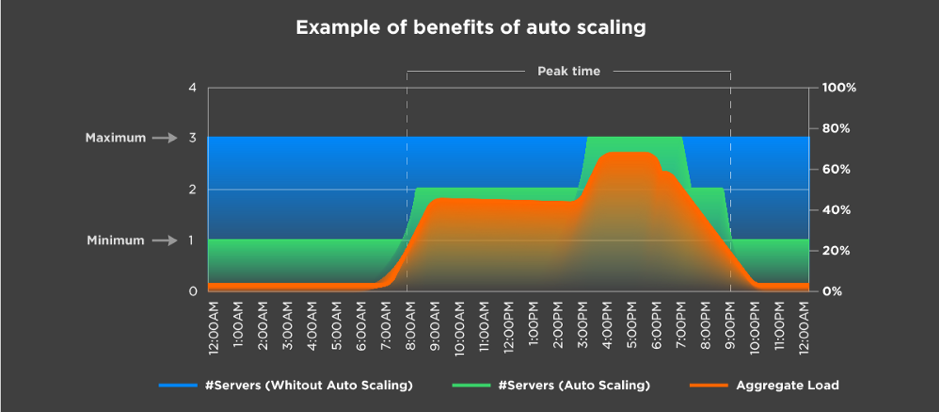
    Autoscaling example

    Let’s say you have set the autoscaling to one as the minimum number of instances and a maximum number of three instances. Based on different metrics, your environment will be able to scale out depending on the load it receives.

    In the image above, we can see that depending on the aggregate load, the environment continues to satisfy the demand by creating more instances as it grows. The same happens the other way.

    This means a lot when you are calculating the TCO of your cloud environment. It also means you won’t run out of memory or other resources; instead, you will have a more available system.

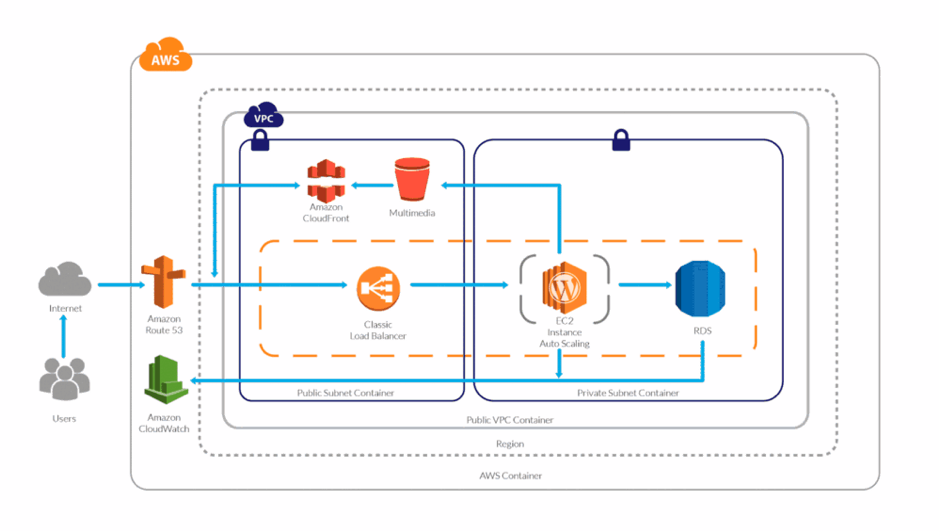
    And you might be wondering, What is going to happen to my AWS Resources? Here’s a visual:

    WordPress High Performance Scaling

    The answer is simple: More demand or traffic, more servers to meet it.

    Server Caching/WordPress Caching

    Server-side caching or WordPress-side caching happens with a plugin or is embedded in AH host. Whenever someone requests the homepage, for example, the request is passed to the database to retrieve the homepage information. Caching creates a temporary file (I say temporary, because you can specify the expiration) so when your request comes, it will check for the files it generates instead of processing the request to the database.

    This way, we can serve faster pages/content to our users and reduce the database consumption.

    If you yet don’t have a caching system implemented, make sure you do from now on, as it speeds up your website dramatically.

    Content Delivery Network

    In a few words,  the content delivery network (CDN) the network of servers or services in which your content will be hosted and this network will be used to transfer the content to all the visitors. Using a CDN will help you to spread your content around the world faster than having it hosted on your server.

    CPU/Memory Performance

    Based on the CPU and memory metrics, our stack will be able to scale up or scale in as desired. This way our response time will always be the same between all the servers and no instance will experience overload due to CPU or memory (these are the annoying 500’s errors).

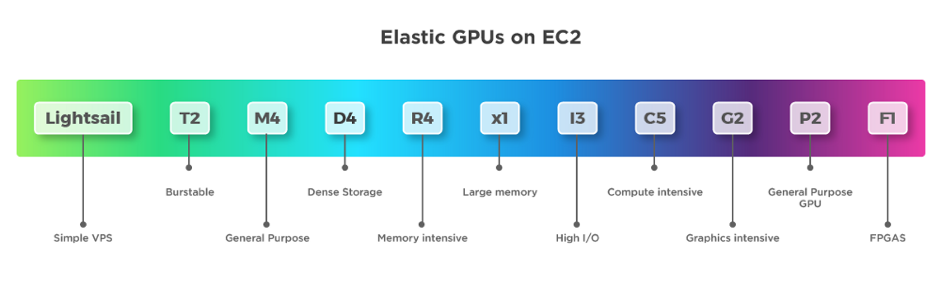
    Instance Types

    On AWS we have different instance types that we can use depending on the workload we have. It’s important to choose the right instance type.

    AWS instance types


    If you don’t know which to use, read this blog.

    Definitely using the correct instance type for our WordPress will help, as well as selecting the number of resources for it to run.

    And there you have it —you now know how your site can support millions of page views with a distributed system.

    Backup and Disaster Recovery

    It is essential to have a backup strategy as well as a disaster recovery solution in case something happens to our WordPress installation or our environment. Luckily, AWS offers a lot of redundancy between all its services.

    There are different ways in which we can protect our application and users’ data:

    1. WordPress plugins to back up the site (S3).
    2. Disaster recovery for infrastructure (physical).
    3. Backup for user data (DB — RDS).
    4. Backup for application code.

    Amazon Web Services already provides different backup solutions for all its services, so we can create backups for the RDS with one click and perform the configurations for backups with EC2.

    Pro Tips

    1. To increase the performance use a database, query and page caching plugin.
    2. Increase the RDS performance with a dedicated Aurora RDS.
    3. Use S3 and CloudFront to deliver the content faster.
    4. Enable alarms on AWS Cloudwatch.
    5. Enable the billing alarm to avoid unwanted charges for usage.
    6. Use Reserved Instances—if you are going to stay in AWS for a long time reserve, it can save you up to 30 percent.
    7. Use a version control system to track your changes and deploy to the instances.

    Conclusion

    This article outlines what I consider an ideal architecture for a high-performance/high-traffic WordPress site. As you can see, Amazon provides us with all the tools and technologies to do it, but sometimes it can be challenging.

    As always, if you think I missed anything, please post it in the comments!

    If you would like to get more techie blogs, subscribe to our newsletter.

    — Guillermo Vélez

  • Survey Finds DevOps Playing Key Role in Cloud Migration

    Survey Finds DevOps Playing Key Role in Cloud Migration

    A survey of 450 C-level and VP/director-level technology leaders in the United States, UK and Canada conducted by 451 Research on behalf of Skytap, a cloud service provider, found that lifting and shifting existing applications into the cloud is giving way to either refactoring and rewriting those applications to take advantage of cloud-native technologies.

    According to the survey results, 67 percent of respondents plan to migrate or modernize at least half of their on-premises applications in the next 12 to 24 months. The survey found 28 percent of respondents plan to refactor applications using a mix of cloud-native and traditional technologies, while another 20 percent plan to adopt some form of a platform-as-a-service (PaaS) environment. That compares to 20 percent who plan to lift and shift existing applications into the cloud with no changes to the underlying code. Another 20 percent said they will replace existing applications with software-as-a-service (SaaS) applications.

    Jay Lyman, an industry analyst for 451 Research, said the survey makes it clear that, when it comes to lifting and shifting applications into the public cloud, too many organizations are still engaged in “wishful thinking.” Most applications migrating to the cloud will need to reworked to one degree or another, Lyman said.

    The survey found that only 20 percent of respondents plan to move 75 percent or more of their applications to a cloud platform in the next 12 to 24 months. Just less than half (47 percent) said they would migrate somewhere between 50 percent to 75 percent of their applications.

    In terms of methodologies that will be employed to achieve that goal, 54 percent of respondents said they were already relying on DevOps processes, while 46 percent said they are relying on agile methodologies. In terms of talent, 55 percent said they are looking to acquire or retain IT professionals with cloud migration expertise, followed by 52 percent who cited application modernization using cloud services. DevOps skills and multi-cloud operations expertise tied for third at 50 percent.

    Just over a third (37 percent) also noted that decisions concerning where best to place a workload were being driven primarily by where an application would run best, while 26 percent said decisions were driven by identifying the best-of-breed cloud-native service. Only 19 percent said their organizations would be employing multiple public cloud service providers. In fact, Lyman noted that while hybrid cloud computing remains the dream state most IT organizations want to achieve, the reality is that most of them will be managing multiple clouds in isolation for many years to come.

    More than 80 percent of survey respondents reported managing more than 100 applications, with 74 percent stating at least half of these applications are on-premises. A full 71 percent of respondents said more than half of their on-premises applications are mission-critical. A little over half of the respondents said core business applications including customer relationship management (CRM), enterprise resource planning (ERP), and data analytics were least-suited for hyperscale clouds. According to the survey, the biggest challenge associated with deploying applications in the cloud today remains security (56 percent).

    The Skytap survey makes it clear IT organizations are still severely challenged when it comes to migrating applications to the cloud for want of skills. Most applications are not easily migrated, which makes reworking them for deployment in a cloud environment a high priority. In the absence of those skills, however, it’s also apparent that any migration of applications to the cloud is going to occur over an extended amount of time.

    — Mike Vizard

  • DevOps’ Role in Developing a Robust and Secure IoT Framework

    DevOps’ Role in Developing a Robust and Secure IoT Framework

    Creating a secure IoT infrastructure is a challenge for developers, requiring a holistic approach. It requires a dynamic framework that is capable of collecting data from a cloud back end as well as directly from the embedded hardware.

    Supporting this secure environment is another challenge, requiring the development of complex systems capable of deployment in a timely and cost-effective manner. This is where the relationship between DevOps and IoT proves invaluable.

    In this article, we will take a close look at how DevOps adds value to the development of a robust IoT framework. We also will examine ways in which DevOps can help in creating a secure and efficient framework for IoT app development.

    DevOps and IoT Framework

    DevOps, with its focus on reducing delivery cycle times, can increase the speed at which IoT systems can be integrated and function in a seamless and secure manner. Seamless integration can be achieved through a combination of secure app development and operational quality assurance checks.

    The DevOps methodology is rooted in the agile philosophy, which attempts to bridge the gap between different technical roles that traditionally worked in silos within the same department in IoT app development.

    Using the right tools and practices, DevOps can help in creating a framework for IoT that can overcome challenges relating to the large-scale app deployment. It can help in infrastructure positioning and monitoring. Companies that have adopted DevOps methodology have reported a 38 percent increase in growth due to additional revenue sources.

    Let’s take a look at some of the ways the DevOps framework can create a secure and robust environment for IoT app development resulting in increased productivity and revenues.

    Application Reliability and Efficiency

    One of the main functions for DevOps is to improve application reliability and efficiency—there is less need for coding and increased focus on rule-based automated configuration of key connected components. With DevOps, the app development team can identify red flags and improve operational excellence. With monitoring tools such as Log-entries, Nagios and Icinga, the team can use DevOps processes to remove latency and develop an efficient and robust IoT infrastructure.

    DevOps comes with source code control of the software applications that execute in the data center. This means developers have access to the source code, which makes their job easier. The source code reduces the complexity caused by cloud connectivity, automation and virtualization.

    Applications deployed through DevOps recover 96 times faster from failures and reported to have 440 times faster lead time for changes. Deeper collaboration between operations, quality assurance and development teams result in an ongoing feedback that helps increase IoT application reliability.

    Security by Design

    An important component of DevOps is security by design, which helps improve the security of connected systems in a DevOps environment. In security by design, the system allows continuous security testing in real time, which helps improve the security of devices connected in a network.

    The security-by design approach also formalizes security controls and implements them at each stage of the IT operations. As a result, software developers can spend time efficiently developing security controls in a consistent way instead of manually building and patching individual scripts.

    The DevOps approach to IoT application development can also help in gaining insights into the usage and performance, which can help in further refinement of the design delivery pipelines. This will lead to improved security and quality architecture of IoT environment.

    Faster Release Cycles

    Around 21 percent of respondents in a survey of 300 senior managers had stated that DevOps integration increasingly lead to meeting application delivery deadlines. The DevOps metrics lead time is used to measure how quickly the app is deployed after starting work.

    DevOps integration with IoT will result in the following benefits:

    • Developers can work on different components of an application simultaneously, which allows faster completion of activities.
    • Quick release cycles allow IoT apps to be pushed live without much delay.
    • Fast release cycles enable the app development team to build IoT applications using separately deployable services that lead to quality app deployment.

    Continuous Integration and Continuous Delivery (CI/CD)

    DevOps framework helps overcome interoperability problem related to IoT app deployment and operations. Most systems required for IoT app integration are already running in the framework that helps in quick deployment. Businesses can choose the process to automate from staging to production using tools such as Jenkins, GitLab and TeamCity. CI/CD allows developers to respond more quickly to market demands by proactively monitoring the processes.

    The approach results in faster resolution time and release of quality IoT application. Research by CA Technologies found that organizations that adopt DevOps find 21 percent increase in software delivery and 18 percent reduction in time to market due to an efficient CI/CD pipeline.

    Infrastructure Automation

    Infrastructure automation save systems administrators and IT resources time on manual tasks and remove the possibilities for human error during IT configuration, patch management and performance tracking. By scripting almost every command, developers can significantly reduce input requirement of administrators. Increased automation also provides stability as the system is no longer prone to human error on input. Repetitive tasks are a prime candidate for automation, as these are the most likely areas where people make mistakes.

    DevOps methodology makes it possible to automate the infrastructure in multiple cloud platforms. For this purpose, developers can use tools such as Spinnaker and Terraform. Terraform is useful for defining and managing the DevOps infrastructure, while Spinnaker is more useful for managing the infrastructure after code release and deployment workflows.

    DevOps framework also helps automates allocation, de-allocation and monitoring of both cellular and cloud resources, which ensures quality of service (QoS) for applications that control connected devices.

    Effective Validation

    Using endpoint validation can help in evaluating how data flows between different components. Testing of the components in the DevOps environment is done using scripts written in Python, Go or Groovy. The infrastructure testing involves stimulating the environment to test security and other components of the IoT app.

    The app development team also can make use of infrastructure as code to test configuration and environment automation. The configuration is tested using tools such as Chef, Ansible and Puppet. In addition, virtualization tools such as Vagrant or container technology can be used to test the environment automation.

    A Comparison of IoT with and without DevOps

    IoT with DevOps

    IoT without DevOps

    1. Implementing DevOps framework to IoT app development results in 21 % reduced security risk.

    2. DevOps can lead to faster deployment of IoT apps. The updates to IoT apps can be deployed every few days, and even many times in a day.

    3. IoT apps with DevOps practices can result in shorter lead time due to the reduced complexity of the development systems.

    4. With DevOps, the IoT application development team has reported a 51% increase in productivity.

    1. 71 % of respondents have said that security breach is a large challenge for IoT development outside of DevOps framework.

    2. Lack of DevOps can prevent fast feedback mechanism.

    3. Without DevOps, lead times can be longer. This will result in time and cost inefficiencies.

    4. IoT app development without DevOps presents productivity issues. There are few standards for app development and deployment that results in decreased productivity of the team.

    Conclusion

    DevOps tools and practices help businesses achieve efficiency when it comes to IoT app development. DevOps improve the validation of automated processes across multiple cloud vendors in a secure environment.

    Looking forward, DevOps integration with IoT will become increasingly popular as it can reduce costs and improve revenues significantly for app developers.

    — Subramonian