Category: DevOps in the Cloud

  • Why Serverless Needs DevOps

    Why Serverless Needs DevOps

    EDITOR’S NOTE: This article was updated July 2, 2018

    Serverless, like Kubernetes and microservices, is a new technology. Yet, despite the amount of blog, forum and news-related posts published about serverless, it represents only a fraction of all IT deployments.

    Aside from the new factor, serverless shares few similarities with Kubernetes and microservices. Organizations turn to Kubernetes and microservices platforms to add more agility and, in many cases, computing power to their IT operations. Serverless deployments, meanwhile, are seen mainly as a way to save resources by relegating server management to third parties.

    Ultimately, cost savings is the main benefit. A successful migration largely hinges on DevOps, especially at the early adoption stage.

    “There are ways to use serverless while delivering a very rich customer experience,” said Sanjay Challa, senior product marketing manager at Datical. “It is about putting the pieces together in a very right way to do that.”

    More specifically, Challa said DevOps is relevant to serverless deployments because:

    • DevOps promotes collaboration between development and operations — a core mantra is “you build it, you run it,” Challa said. “Serverless deployments essentially embody this central tenant: it’s frankly difficult to separate development from operations because any edit to a serverless function needs to be in the context of its operation in the cloud (the cost of the resources the function will incur and the net user experience),” Challa said.
    • With serverless architecture, there is no longer a line between cloud operations engineers and developers. This is because “the roles are collapsed into one, thus embodying the fundamental core of DevOps, to collapse and harmonize the development and operations functions.” Challa said.

    For data and database management, Challa said it’s also important for teams not to forget about the underlying database and data architecture, when moving to the cloud and to new serverless architectures. “If teams only focus on the application code and forget about the database, they are setup to fail as changes to the data/persistence layer simply will not be able to keep up and scale with application changes,” Challa said. “This potentially leads to quality issues, outages or even data loss in the event of a hastily made or erroneous database change.”

    Serverless Not 

    The definition of serverless can vary, but among the many offerings available, it usually refers to functions-as-a-service (FaaS) and backend-as-a-service (BaaS) services. Despite its name, serverless has a lot to do with servers—but organizations delegate the management of those servers and the associated infrastructure to third-party cloud providers. In this way, organizations upload code or applications and the third party maintains and runs the servers. Amazon Web Services’ (AWS) Lambda, Google’s Cloud Functions, IBM’s OpenWhisk and Docker’s Serverless Docker are among the leading offerings.

    When an organization decides to migrate some or all of its data to a serverless platform, it’s important to note the technology’s drawbacks, especially as they relate to DevOps. Common downsides include slower computing performance and less capacity to run code compared to what is available when using servers on-premises or on the cloud. In the case of AWS Lambda, for example, the maximum total of concurrent executions per account is set to 1,000 by default per region and memory capacity for applications is limited to just over 3GB.

    Also, by shifting server management to a third party, organizations also are delegating those management functions, including many associated server-related security and monitoring capabilities.

    Ultimately, it will be up to the DevOps group to weigh the advantages versus the disadvantages when deciding whether to migrate to serverless platforms. While serverless technologies could potentially frustrate some developers because of the performance constraints on computing, memory, etc.; the key issue is to choose the right tool to solve the right problem, Challa said.

    “Each tool has its place,” Challa said. “Serverless is not a cure-all – but is just another tool for enterprises to consider.”

    Job Description

    Migrating to serverless also means job responsibilities will be affected, which will require DevOps to manage. “When you move to serverless, a lot of roles are disrupted. You need your network and infrastructure guys less than you did before, for example,” Challa said. “So, your team will look very different, since serverless teams in general looks very different compared to traditional IT operations.”

    It is also necessary to solve any existing DevOps challenges you have first before you make the switch to serverless, Challa said. “Otherwise, you are setting yourself up to fail,” Challa said. “Without transparency and strong coordination, moving to the cloud and to a serverless architecture will only slow things down—or, worse, lead to outages and quality issues.”

    However, once a serverless platform has been successfully set up and is running, DevOps’ workloads should decrease, since there will be less server maintenance work to do, said Holger Mueller, an analyst for Constellation Research.

    “With FaaS, DevOps is less relevant as deployments take place within the FaaS framework,” Mueller said. “There is no need for DevOps to write scripts or manually do anything. Normally, everything should just run itself.”

    However, Challa disagreed that serverless deployments completely run on their own once deployed. “Someone had to set up and configure a pipeline to enable developers to validate, build and ultimately deploy their serverless code. That someone must also play a DevOps function in enabling a path from a developer’s workstation to the cloud that supports the serverless capabilities—not to mention the work that needs to be done to connect the serverless application code running in the cloud to meaningful data,” he said.

    — B. Cameron Gain

  • Evaluating a Multi-Cloud Strategy: The Pros and Cons

    Evaluating a Multi-Cloud Strategy: The Pros and Cons

    First off, let’s define multi-cloud. Clearly, we’re talking about using one or more clouds, but clouds come in different flavors. For example, multi-cloud incorporates the idea of hybrid cloud—a mix of public and private clouds. But multi-cloud can also mean two or more public clouds or two or more private clouds.

    So, why is this important? Over the past year or so, I’ve seen a major increase in the amount of companies who use multiple public clouds. In fact, more than 20 percent of ParkMyCloud’s customers use multiple public clouds. With this trend in mind, I think it is time to take a look at the positives of a multi-cloud strategy. But I also want to mention the negatives—because, of course, there’s no “easy button.”

    According to the “RightScale 2018 State of the Cloud Report,” more than 80% percent of enterprises have a multi-cloud strategy:

    What are the Advantages of Multi-Cloud?

    So, why are businesses heading in this direction with their infrastructure? Simple reasons include the following:

    • Risk mitigation—create resilient architectures.
    • Managing vendor lock-in—get price protection.
    • Optimization—place your workloads to optimize for cost and performance.
    • Cloud providers’ unique capabilities—take advantage of offerings in AI, IOT, machine learning and more.

    When I asked our CTO what he sees as the advantages of a multi-cloud strategy, he highlighted risk management. Our own platform was born in the cloud, so we run on AWS. We also have a multi-region architecture with redundancy (let’s call this “multi-cloud light”) and if we went multi-cloud, we would leverage another public cloud for risk mitigation.

    Specifically, he mentioned risk management from the perspective of one vendor having an infrastructure meltdown or attack. AWS had an issue about 15 months ago year when S3 was offline in US-East-1 region for more than five hours, affecting many companies large and small. Software from web apps to smartphones apps were affected (including ours). Certain AWS regions also have been the target of DDoS attacks that have affected service availability.

    Having a backup to another cloud service provider (CSP) or private cloud in these cases could have ensured 100 percent uptime. In the case of Alibaba and other cloud vendors, they may have a much stronger presence in certain geographic regions due to a long-term presence. When any vendor gets a toe-hold in a region, its environment has minimal redundancy and safeguards in place that provide the desired high availability; in this case, another provider in the same region may be safer from an availability perspective.

    What are the Disadvantages of Multi-Cloud?

    Now let’s say you want to go multi-cloud: What does this mean to you? From our own experience integrating with AWS, Azure and Google Cloud, we’ve seen that each cloud has its own set of interfaces and own challenges. It is not a “write once, run everywhere” situation between the vendors, and any cloud or network management utility system must do the work to provide deep integration with each CSP.

    Further, the nuances of configuring and managing each CSP require both broad and deep knowledge, and it is rare to find employees with the essential expertise for multiple clouds, so more staff is needed to manage multi-cloud with confidence that it is being done in a way that is both secure and highly available. With everyone trying to play catch-up with AWS—and with AWS itself evolving at a breakneck pace—it is very difficult for an individual or organization to best utilize one CSP, let alone multiple clouds.

    A common container environment, for example, can help mitigate these issues somewhat by isolating engineers from the nuances of virtual machine management; however, the issues of network, infrastructure, cost optimization, security and availability remain very CSP-specific.

    On paper, there are advantages of having a multi-cloud strategy. In practice—like many things—it’s not as easy as it may seem.

    — Jay Chapel

  • Serverless Computing: Moving from DevOps to NoOps

    Serverless Computing: Moving from DevOps to NoOps

    Developers rejoice as serverless computing ushers in a new era of ‘NoOps’ to replace the ill-fitted DevOps model.

    While some organizations do better than others when it comes to implementing DevOps, almost everyone agrees it’s a concept easier penned to paper than pinned to reality. The idea of integrating development and operations is smart, but the implementation proves troublesome. A replacement option is thus largely welcomed by developers everywhere.

    Enter the new concept of NoOps, which means dropping operations from any consideration during the development cycle. It’s not that operations are being ignored; that would be a foolhardy step backward. Rather, NoOps means never having to worry about where the code runs and, thus, developers are freed from giving operations another thought.

    “Serverless computing allows users to run code without provisioning or managing any underlying system or application infrastructure, and they automatically scale to support increasing or decreasing loads,” explained Gartner serverless analyst, Arun Chandrasekaran, in a blog post.

    Amazon sparked interest in serverless computing when it announced AWS Lambda at its re:Invent conference in 2014.

    “I’d argue that the precursor to serverless computing is cloud IaaS, where the complexity of underlying resources—servers, storage and network—was hidden from the users, and with IaaS providing flexibility to provision unlimited compute, storage and network resources on-demand, Chandrasekaran said.

    Serverless: To Use a Server or Not? ‘Tis Not the Question

    Serverless computing is a developer’s dream not only because there is no longer a need to worry about where the code is going to run, but also because there is no need for direct access to the operating system to manage that code. The result: Developers can focus solely on coding—the very thing they do best!

    That statement would be easier for some to understand if it were not for the utterly confounding term “serverless.” Obviously, anything requiring computing involves servers, so saying this process is serverless is simply nonsensical. While the term is unfortunate and bordering on meaningless, the concept is solidly real and more than a little familiar.

    For all practical purposes, serverless is just another word for cloud but with a bit of a twist—pricing is based on the actual amount of resources consumed by an application, rather than on pre-purchased units of capacity.

    Deploying Code with NoOps in a Serverless Environment

    Additionally, the term “serverless code” can be used either in conjunction with code deployed in traditional styles such as microservices, e.g. loosely coupled/SOA. Or, code can be deployed in the form of full applications that can be written to require no provisioned servers.

    In serverless environments, jobs are scheduled on-demand, meaning as data comes in and is available. It can be automated so that a job runs once data is received. This means that jobs run only when data exists and otherwise sit idle, where they can’t burn resources.

    Economies of scale also completely change in serverless computing. That’s because serverless delivers the ability to put some intelligence behind when and where jobs run, so that they can be spun up and spun down as quickly and economically as possible.

    Bottom Line

    Opting for NoOps, meaning working in a serverless environment, is really a choice to be more intelligent about how resources—hardware, software and people—are being utilized. It is about cutting resource waste and associated costs, while enabling talent to focus on writing innovative code.

    No job will sit there burning resources and waiting for the data to come in. Rather, the job runs on demand, as you need it, in milliseconds and without distracting you from other tasks.

    “NoOps still requires connectivity so beef up your connectivity to your cloud providers, if you haven’t already. And you’ll eventually have to troubleshoot slow serverless functions as a ‘network problem,’” said Andrew Lerner, an analyst at Gartner in his post.

    To gain even more advantages in serverless computing, and perhaps to make up for time lost in network troubleshooting, no matter how small, look for and use reusable code everywhere you can. Drag-and-drop interfaces that enable fast use of reusable code frees developers further, so they can shorten both the development and testing cycles. Time economy is important in modern day continuous release cycles. A NoOps and reusable code strategy can dramatically improve your time and resource economies of scale.

    — Laurent Bride

  • What Can the Cloud Do for DevOps?

    What Can the Cloud Do for DevOps?

    The cloud has enabled DevOps to grow and expand well beyond traditional boundaries set forth by on-premises production environments. With Amazon Web Services (AWS) and other cloud services providers, DevOps devices are intended to speed advancement by empowering engineers to change, test and push code in a computerized design. This enables organizations to create and send administrations and applications significantly faster than in traditional development environments.

    Organizations following DevOps and continuous delivery (CD) practices follow various approaches such as Agile, scrum or even hybrid models to define what is to be built. Whatever your approach, having clarity, context and communication around requirements is critical.

    Modern Requirements4TFS, along with TFS/VSTS, make a great platform for requirements management, DevOps and CD.

    AWS characterizes DevOps as “the combination of cultural philosophies, practices, and tools that increases an organization’s ability to deliver applications and services at high velocity.” Especially for SaaS programming organizations, DevOps is one of the essential drivers for moving to the cloud in any case. Quickening item advancement can give programming organizations a focused edge with quicker time to showcase for items and highlights.

    Integration is the most important part here. DevOps integration is known to target testing, development, maintenance and product delivery for improving security and reliability. Using continuous integration (CI), the developers should acknowledge the business needs and get new productions and applications.

    AWS underpins DevOps by giving administrations to manufacture store and send applications and design administration devices. Chef, for example, utilizes Ruby to compose framework design “formulas,” which computerizes the procedure for arranging and working nearby and cloud-based administrations, including AWS.

    While DevOps isn’t one of a kind to AWS, AWS has different devices and best practices to make DevOps less demanding and more successful, particularly with regards to mechanization of use advancement and conveyance.

    The center best practice is a way to deal with DevOps of “ceaseless incorporation and persistent conveyance” (CI/CD). A CI/CD approach enables you to ceaselessly refresh applications and administrations to present new highlights, settle bugs and react to client needs.

    AWS Features

    Major AWS features are as follows:

    CodeBuild: This tool helps in running the tests and producing software packages which are ready to deploy. It can handle multiple application processes at a time.

    CodeDeploy: AWS CodeDeploy can be utilized to computerize code sending to AWS instances to one occurrence or to a large number of examples, and even to nearby servers. This incomprehensibly streamlines application refreshes all through your AWS, eliminating the requirement for a careful manual arrangement.

    CodeStar: CodeStar helps in creating new projects with the templates which have selected programming languages that provides AWS services. This also provides identity and access management (IAM) access policies for the secured application environment. For projects using AWS CodeBuild, AWS CodeDeploy, AWS CodePipeline or AWS CodeCommit, this helps in automating the configuration of a continuous delivery pipeline.

    The confirmation of-idea process additionally shows you something about your current association, including the current ability and the capacity for the advancement and operational workforce to adjust to new procedures and innovation.

    DevOps is by all accounts important to creative associations, as it is a perceived way to convey an incentive to the business quicker, and it’s a situation that can oblige change.

    DevOps process requires a solid coordinated effort between developers, operations and managerial staff. That is the reason increasingly DevOps experts are swinging to effectively available cloud-based stages; for example, AWS instead of customary, privately based servers. With AWS, everybody included can access pertinent, institutionalized creation environments, regardless of their specialty or physical location.

    What’s more, AWS’ cloud-based framework can be much more financially attractive to organizations than an on-premises infrastructure, as AWS enables clients to rapidly scale processing limit up or down as the necessities dictate. Also, with AWS EC2 depictions, clients can rapidly scale up EC2 occurrences and copy generation situations as required.

    It is likewise conceivable to plan EC2 and RDS cases to begin and stop at foreordained circumstances, which guarantee clients aren’t wasting money on unused resources—for example, evenings and weekends. This adaptable, pay-as-you-go approach means AWS clients pay for the servers and capacity they really utilize, which can bring down expenses by as much as 70 percent.

    DevOps and AWS have helped IT in various factors to improve in various aspects:

    Quality output: Infrastructure as a code has changed the skill set of the team to improve the processes. Code reviews, testing and agility has increased output quality by collaborating and experiencing with the development team.

    Process improvement: It’s obvious that combining the two teams can result in an increase in performance. The adaptability and “codification” of the foundation that cloud suppliers such as AWS empowered along with this cross-group joint effort has spurred the desire to do more. Including operations groups in the development procedure and the other way around empowers sharing of understanding and skills.

    Bringing out improvements: To provide agile development a quality process, development and delivery tools helps without involving integration in development and delivery. To bring improvements and for bug fixes, teams should work repeatedly, rapidly and reliably at low risk.

    Coordinating data management: Data management is combined in the process. Schema management tools actually help with tough tasks such as handling changes in the database schemas code for the requirement of code repositories. This process decreases the risk by rolling the database front and back and being controlled and repeatable.

    Security: Security is an important area that needs to have a more pronounced role in DevOps. Every code is stored in AWS CodeCommit, so any change in the code can be known and the security can be built.

    Conclusion

    The flexibility provided by the cloud and AWS provides the platform for a cultural shift that has brought benefits to both operations and development teams.

    — K Maneesha

  • Transforming with the Cloud: If Not Now, When?

    Transforming with the Cloud: If Not Now, When?

    The question of whether to move to the cloud is no longer relevant for most organizations. Migrating workloads to the cloud has already become an inevitable requirement for a vast majority of companies regardless of their sizes, and if your organization isn’t doing that already, then it is simply the question of when and how you’ll consider doing so.

    The agility, redundancy and elasticity with regards to scaling compute resources present a compelling need to move to the cloud sooner than later, let alone other factors such as reduced overall capital expenses associated with managing a robust on-premises infrastructure. The finance sector is usually a little behind in embracing major changes in IT operations because of their strict regulatory compliance requirements and the complexity in their application portfolio as a result of several mergers and acquisitions. These restrictions are quite common, especially with insurance companies, but surprisingly there are several major insurance companies that have made significant investments to modernize their traditional applications and migrate them to the cloud for efficiency, agility and cost reasons.

    To effectively support the business that constantly strives to be highly competitive and to reduce the time-to-market, most applications development efforts are planned in an Agile fashion with short sprints that produce usable deliverables within a few weeks. When development teams go Agile, it is important that all other associated services operate in a similar manner.  Without agility in infrastructure provisioning and other support services, it is simply impossible for the development teams to be successful in producing deliverables at high velocity. A commonly heard complaint from most of the application development teams is about the delays from infrastructure teams on provisioning servers. Provisioning a virtual machine (VM) takes more than three weeks in many companies, even today. This is due to a variety of factors such as work backlog, complexity in approval processes, compliance requirements, lack of automation and several others that are organization-specific. IaaS and PaaS offerings from cloud leaders such as Microsoft Azure and AWS address these issues to a great extent. Even if companies are not ready to migrate their existing applications to the cloud, they should seriously consider IaaS and PaaS from well-established cloud providers for new applications being developed.

    There are several factors that could influence IT leaders’ decisions on their strategy regarding cloud and some of the areas that certainly cannot be overlooked are discussed here. The purpose of this article is to provide a general high-level overview, especially for companies that have been hesitating to migrate their workloads to the cloud. It should be noted that we are barely scratching the tip of the iceberg in this discussion.

    Complexities in the Application Stack and Infrastructure

    It is not uncommon for organizations to be overwhelmed by complexities and issues with their current infrastructure setup and get bogged down dealing with their day-to-day operational challenges. Due to these ongoing issues, one might develop a false notion on the actual effort involved in migrating to the cloud and may even wonder whether it is an achievable target state. It is important to map out the current infrastructure that supports the business applications and have a clear view of the complexities, dependencies and licenses that are in play. The application servers, database servers, storage arrays, enterprise messaging bus, document management systems and several other key components that work together to power your key business applications need to be taken into consideration. This will not only help decide the right applications that are suitable for the cloud, but will also help pick the right cloud provider to suit your needs. You can notice the convergence of IaaS and PaaS as it is becoming difficult to separate one from the other. Most leading providers are offering these services as a package.

    It is better to categorize your applications based on their level of complexity and shape up your cloud strategy accordingly. Standalone applications that simply require a web server, application server and database server are ideal candidates for your first phase of migration efforts. You can ensure that with the right architecture on the cloud, there will be better availability, load balancing and performance and less maintenance overhead for your standalone applications.

    Amazon Elastic Compute Cloud (EC2) provides availability of 99.99 percent and its auto-scaling feature allows automatic scaling of the fleet up or down depending on the needs to maximize performance and minimize cost. Similarly, Microsoft Azure offers VM Scale Sets that can be configured for your applications to scale automatically. If the requirement is to develop brand new applications for the cloud, the options are endless. As an example, .net based web applications to be hosted on Azure can be developed to be run as Docker containers.

    Containers and the management of a cluster of container nodes have come a long way since their inception. Docker Swarm and Kubernetes have drastically simplified the management, load balancing and scaling of containerized applications. Containers are not only for your new applications; they also come in as a great solution for modernizing your legacy/traditional applications and migrating them to the cloud.

    Storage

    Identity and access control used to be prevalent challenges in the past, but cloud providers have greatly simplified identity management services such as application authentication, user management and single sign-on by providing rich features to support the information security and compliance requirements of organizations. Microsoft Azure offers Azure Active Directory and provides a few different protocols such as WS-Federation, SAML-P and OpenID Connect to authenticate the user. It also supports multi-factor authentication. For brand new applications that are developed using Visual Studio 2017, it is extremely simple to integrate the application for authentication and authorization workflows on Azure AD using the above protocols.

    Databases play a vital role in the decision-making process when it comes to migrating to the cloud. Senior IT managers are usually highly concerned about the security of data while technical personnel are worried about ensuring storage, performance, recoverability and availability. Application developers and DBAs end up spending a great deal of time fixing code or other application configuration parameters even when databases are simply migrated from one server to another within the same data center. Cloud solutions address such concerns. Microsoft Azure, for instance lets you migrate your native on-premises SQL databases to Azure SQL Database Managed Instance by providing the native virtual network (VNET) support. You don’t have to change your applications as a result of this migration. The Managed Instance offered by Azure is quite promising and it is certainly a great solution for migrating large numbers of on-premises SQL Server databases to Azure. Similarly, managed database services are offered by AWS for both relational (RDS) and NoSQL (DynamoDB) databases. Amazon EC2 service is integrated with Amazon RDS and Amazon VPC to provide a complete, secure solution for computing, query processing and cloud storage including, but not limited to, a wide range high-performance web applications, DB servers and batch processing needs.

    Disaster Recovery

    Cloud providers offer data centers in several regions around the world. It requires a major investment for any organization, both financially and operationally, to match the redundancy and recoverability provided by major cloud providers. Even organizations that have a highly virtualized infrastructure setup have physical infrastructure for some of their mission-critical applications. The reasons for having such a setup could be argued, but the costs associated with setting up a disaster recovery environment for such infrastructure would be significant. To ensure comparable performance and capacity, the disaster recovery environment is typically a replica of the production environment that is underutilized most of the time, consuming significant investment.

    Planning for setting up a disaster recovery site involves considering several factors such as, ensuring compute capacity and scalability (servers and storage), networking (bandwidth, load balancers, switches, routers), identity management (directory services, authentication, authorization), facility to host the DR site (location, floor space, power, air conditioning) and operational aspects (personnel, monitoring, alerting, break-fixing, hot-hands support). Cloud providers give you the option to choose the location of your DR site anywhere in the world. Depending on the contract you have with your cloud provider, you could either quickly deploy compute resources on your DR site on the cloud or utilize the necessary automated processes to switch over to an already running replica of your application environment on the cloud DR site.

    There are numerous features that AWS offers to address each of the above-mentioned aspects that need to be considered for setting up a disaster recovery site. Amazon Machine Images (AMIs), for example, lets you preconfigure images with the operating system and your application stacks. It is also possible to configure your own AMIs to allow the recovery process to launch these images automatically in the event of a disaster, saving a significant amount of time.

    Microsoft also provides highly dependable DR alternatives on Azure. You can use Azure as your secondary site for DR purposes or completely eliminate the need for data centers by picking different Azure regions as primary and secondary sites. Azure offers the Active-Passive and Active-Active topologies. In case of the active-passive topology, all user traffic flows to the primary region while preparing the secondary region to take over at any point since the database runs in both regions with a synchronization mechanism implemented between the regions. Active-active topology ensures running of cloud services and databases on both the primary and secondary regions and user traffic goes to both the regions. In the event of a failure at primary, all the user traffic will be directed to the secondary by simply disabling the DNS at the primary region. Auto-scaling features of Azure will allow the scaling up of compute resources in the secondary region as needed.

    DevOps Maturity

    Any discussion on migrating to the cloud would be incomplete without highlighting the significance of a solid DevOps practice to complement the cloud strategy. From a technical standpoint, companies that settled on Linux environments used to have a slight edge over those that went the Microsoft route, especially with regards to implementing open source solutions and technologies that support DevOps and cloud initiatives. This is highly arguable now as Microsoft has not only opened its gates wide for several major open source tools but also allowed for better integration of several leading open source products such as Docker, Jenkins and Puppet with ALM tools such as Microsoft TFS 2017.

    Depending on the goals of an organization with regards to its cloud strategy, the level of maturity required from a DevOps perspective needs to be analyzed. DevOps can be looked at from infrastructure as well as applications development perspectives. If your goal is to use cloud services only for IaaS, it will be extremely valuable to develop strong, infrastructure-focused DevOps capability, practices, processes, tools and automation. Through proper scripting and integration with IT services management (ITSM) tools such as Service Now, the entire process—from requesting infrastructure through having them provisioned with all the patches, hardening, etc.—can be fully automated by leveraging tools such as Chef or scripting via PowerShell. Features such as metered billing and quotas that are already offered by cloud providers can be leveraged and integrated with organization units’ budgets, approvals and other processes to establish a well-managed, fully automated infrastructure provisioning process.

    Organizations considering leveraging the cloud for applications development are definitely at an advantage compared to those considering development on-premise. Microsoft, for example, offers IaaS at a highly competitive price and provides Visual Studio Team Services (VSTS), a cloud version of Team Foundation Services (TFS), on Azure. The PaaS services offered by Azure are also quite extensive, along with integration with a variety of open source tools. With this combination, developers have a complete, end-to-end solution to address all their requirements without losing time in waiting for environments to be set up. DevOps can play a significant role here. With a fully integrated continuous integration (CI) framework, the developers could commit code to a managed Git repository on the cloud, and automated continuous integration can be kicked off via VSTS, which handles the build, automated testing, code quality control, building container images, automated spinning up of infrastructure needed for an environment and deploying code or containers on the environment following a fully integrated change control process and quality gates. Developers can focus fully on developing code and enjoy the freedom of being able to deploy code on a transient environment on the fly to test their code before it goes through other phases of testing. In highly competitive business environments, this provides the ability to perform multiple production deployments in a single day if need be.

    Organizations with a high level of maturity in DevOps are the ones most likely to leverage cloud to its fullest potential. Similarly, those that are striving to attain this level of maturity are likely to get there sooner by moving to the cloud. Developing the expertise, building the process framework, and implementing the right DevOps tools will make it easier to solidify your cloud strategy.

    Compliance & Security

    Several organizations have refrained from migrating to the cloud mainly due to the strict compliance and security requirements that are mandated by the industry. Companies that are still hesitating to embrace the cloud are those that are skeptical about the security of their data on the cloud. Irrespective of the cloud provider or the strict SLAs and contractual terms that you may have with them, you are still accountable for the data that you own. So, it is extremely important to understand more about the security setup and the features offered by your cloud provider to secure your valuable data on the cloud.

    As the owner of your organization’s data, you have to know where your data is going to physically reside, what kind of encryption will be applied to your data at rest and in transit, who will physically have access to your data, how your data will be segregated from other tenants’ in a multi-tenanted environment, what recovery processes exist, what the regulatory compliance certifications that the provider has obtained are and answers to many more questions. Security experts highly recommend classifying your data based on risk levels and devising a strategy accordingly. You may decide to host your most critical data on-premises and use the cloud for other types of data.

    Microsoft offers a very comprehensive checklist and reports to help you assess the risk to your organization in moving to the cloud. Both AWS and Microsoft are certified by almost all major regulatory bodies with regards to data security and compliance. However, as outlined earlier, while your provider can take the responsibility to host your data in the most secure manner, you as the owner of the data will still be accountable for its integrity and security. So, this is an area that requires thorough analysis before you decide on your workloads that need to migrate to the cloud.

    To Make the Long Story Short …

    While savings on capital expenses is a given, this is not the prime motivator for most organizations to migrate to the cloud. As stated in the Gartner report, “Cloud Computing Primer for 2018,” the role played by cloud in this decade is way beyond simply setting expectations and providing a platform for better economic models. Digital initiatives such as artificial intelligence (AI), internet of things (IoT) and several other technological innovations and disruptions are fueled by digital platforms that cloud offers. Agility, scalability and flexibility, on the other hand, are certainly some of the key drivers that would encourage companies to migrate to the cloud. Furthermore, reducing your time to market can be better accomplished by moving your development workloads to the cloud. The combination of IaaS, PaaS and a solid DevOps practice to automate deployment of infrastructure and application stack makes cloud far more superior to running applications development on-premises. Companies that haven’t invested much in DevOps should seriously consider doing so before it is too late.

    Containers, the tools and practices to orchestrate, load balance and scale microservices add a completely different dimension to how cloud services could be further leveraged. They help ensure seamless, defect-free, repeatable deployments, and with the necessary automation to spin up transient environments, it is difficult to match the benefits of using containers on a fully automated IaaS in an on-premises setup.

    The auto-scaling features offered by cloud providers make cloud a far more superior alternative compared to hosting internally. The elasticity provided by cloud helps with scaling compute power, storage, load balancing and several other infrastructure services as needed, without having to make massive hardware investments.

    Cloud providers offer solid disaster recovery options and support. Implementing an active-passive or active-active primary and secondary sites is a lot more straightforward and easier to set up on AWS or Azure than doing it on-premises.

    Compliance and security are also important factors that could drive the cloud strategy. It is important for decision makers to evaluate the risk factors and then decide on the type of data that could reside on the cloud as opposed to staying internally.

    NetworkComputing provides interesting statistics on public, private, and hybrid IaaS adoption in their article, “IaaS Cloud Adoption Trends.” The article further refers to research from Interop ITX and InformationWeek on how organizations are moving and managing workloads to the cloud. Per their findings, several companies are expected to deliver over half (67 percent) of their IT and business services through the cloud in the next year. Of all the companies they surveyed, 31 percent plan to allocate over 50 percent of their budget to cloud initiatives.

    With a clear strategy, budgets, categorization of applications, prioritization and staff with the right expertise, you can be sure that your journey in moving your workloads to the cloud will be a pleasant one.

    — Sridhar Asvathanarayanan
  • DevOps and Digital Transformation: Q&A with Cloud Foundry Foundation’s Chip Childers

    DevOps and Digital Transformation: Q&A with Cloud Foundry Foundation’s Chip Childers

    I had the chance recently to sit down with Chip Childers, CTO of the Cloud Foundry Foundation. One of Chip’s roles is working with companies digitally transforming their business, from legacy to a more DevOps-centric technology and culture. Here’s what he had to say.

    Swapnil Bhartiya: What are the greatest challenges facing those deploying DevOps? Where do companies usually go wrong?

    Chip Childers: In transitioning to a more modern, DevOps-driven approach, companies with a legacy infrastructure may encounter a number of challenges, both technological and cultural. There are risks both in inertia and in impatience—attempting to modernize too quickly can lead to technical disruption or even outages, and can also create cultural friction within an organization. However, a failure to modernize at a steady rate can lead to an organization being left behind as competitors choose DevOps and digitize more rapidly.

    Chip Childers, CTO, Cloud Foundry Foundation

    Ultimately, you can’t buy DevOps. It’s not something that is a tool or a product, even with plenty of companies trying to sell it to you. It is about a cultural shift, and it requires implementing the technologies, tools and products that are actually a fit, in the context of that culture, between new processes and existing systems.

    Bhartiya: Why is DevOps a good fit for automation? What are the specific challenges in such deployment?

    Childers: DevOps is fundamentally about the culture, process and tools working together to achieve a better “flow” through the business. Getting changes deployed quickly, with high quality and with as little effort as possible naturally leads to automation. That said, there are risks in automating too much too quickly, or attempting to automate more nuanced tasks. Certain tasks require more adaptable approaches or are more error-prone, so attempting to automate those can create challenges rather than generating benefits.

    Bhartiya: How should companies approach DevOps deployment to avoid the pitfalls and leverage the benefits?

    Childers: Start with people and culture. Get everyone talking and understanding each other. Ensure that everyone involved really knows what the business is about and how they fit into it. Establishing shared understanding and trust among traditionally siloed roles is the hardest and most important step to take. Beyond that, it would be impossible to provide a blanket approach for all companies, since every business is in a different chapter of its journey. For example, a small startup with brand new applications and infrastructure can be a lot more ambitious in its approach to DevOps than an enterprise with an existing, older infrastructure. One thing that is important for all companies to understand about DevOps is that no matter where they fall on that spectrum, they have to have a realistic approach based on their own resources, teams and technology stack.

    Bhartiya: Rather than being in opposition, DevOps and Agile are often touted as being complementary. How do companies use these two together for the best results?

    Childers: Both are fundamentally about achieving a better, more incremental and responsive approach to technology changes. Agile is about the development process of getting ideas manufactured into software, and DevOps is about being nimble with both deployment and changes to IT environments. Specifically for software, DevOps essentially extends agile software development methodologies into the realms of operations and infrastructure.

    — Swapnil Bhartiya

  • Oracle Advances AI Effort to Automate DevOps

    Oracle Advances AI Effort to Automate DevOps

    Oracle today announced the general availability of an expanded Oracle Cloud Platform service that promises to automate most back-end DevOps processes by relying on a combination of machine learning algorithms and other forms of artificial intelligence (AI).

    The Oracle platform-as-a-service (PaaS) environment has also been expanded to include Oracle Mobile Cloud Enterprise, Oracle Data Integration Platform Cloud and Oracle API Platform Cloud alongside existing continuous integration and continuous deployment (CI/CD) cloud service. Oracle also revealed today that later this year it will also add blockchain, security and management and support for additional database workloads, including OLTP and NoSQL, that expand on existing Oracle Database, Oracle Autonomous Data Warehouse Cloud, Oracle Analytics Cloud, Oracle Integration Cloud and Oracle Visual Builder services.

    Siddhartha Agarwal, vice president of product management and strategy at Oracle, said via the cloud service, Oracle plans to automate DevOps processes to the point where organizations will be able to allocate most of their time and effort to building applications. Today, developers are spending as much as 50 percent to 60 percent of their time on DevOps processes rather than writing application code, he said, and the Oracle Cloud platform automates a broad range of operational functions including tuning, patching, backups and upgrades.

    Oracle Cloud Platform is designed to be an infinitely elastic autonomous cloud service that can both anticipate application requirements and dynamically adjust to changing workload conditions. Over time, the platform also will be able to increasingly provide recommendations based on the characteristics of the application workloads being built and deployed, Agarwal said.

    The Oracle API Platform Cloud service, for example, already continuously learns about usage patterns to recommend allocation limits, configurations and policies using predictive algorithms, he said.

    Meanwhile, the Oracle Cloud Mobile Enterprise service provides access to machine learning algorithms that make it much easier to incorporate chatbots into mobile applications, Agarwal said. Machine learning algorithms are now also relied on to create Big Data lakes and the data pipelines needed to make that data available to application developers.

    Those services are all extensions of an Oracle Developer Cloud service for building applications that supports build frameworks such as Maven, Ant, Gradle, npm, Grunt, Gulp and Bower, as well as command line interfaces for Docker, Kubernetes and Terraform. Frameworks such as JUnit and Selenium for both logic and UI testing are also included.

    Agarwal said one of the primary reasons DevOps process have not been as widely adopted across the enterprise is that it’s simply too complicated for most IT organizations to set up and then continuously manage all the underlying infrastructure required. By moving more of the responsibility for the operations side of the DevOps equation on to an autonomous cloud service managed by Oracle, he said, it becomes simpler for enterprise IT organizations to focus their energy on application development processes.

    It may take some time for enterprise IT organizations to get comfortable with ceding that level of control to a cloud service provider. But whatever DevOps path they choose, it’s apparent that machine learning algorithms coupled with other AI advances are about to automate broad swaths of the DevOps universe.

    — Mike Vizard

  • Why You Need Chaos Engineered into Your Hybrid Cloud Infrastructure

    Why You Need Chaos Engineered into Your Hybrid Cloud Infrastructure

    Nearly a decade ago, I began working at Amazon as an engineer. Cloud technology was just starting to revolutionize how companies launch applications, and early adopters were seeing the benefits of not having to purchase, provision and manage their own hardware. On the flip side, larger companies (especially those that store sensitive information) were still hesitant to fully embrace the black box that was “the cloud,” holding onto the belief that for critical applications, the cloud was neither reliable nor secure.

    Fast forward to today, and all of that has changed. We are seeing government institutions, banks, and hospitals all moving their infrastructure over to the cloud. The benefits of being agile, innovative, and highly efficient have mostly overshadowed the concerns around the cloud’s reliability. According to Cloud Technology Partners, cloud adopters see an average reduction of total cost of ownership (TCO) of around 40 percent. And top-performing banks are 88 percent more likely to implement a hybrid cloud solution than their underperforming peers, cites a recent report from IBM Institute for Business Value.

    Long story short, the question is no longer “if” but “which”—and there are three major options: AWS, GCP and Azure. Today, many companies are doing their best to avoid vendor lock-in, opting instead for a distributed strategy, where teams are empowered to choose the best option for what they are working on. While having a hybrid approach helps avoid vendor lock-in, it also can save teams from disaster if one of the cloud providers has a major outage like the great S3 outage of 2017.

    But just because you have a hybrid strategy—running active-passive across different cloud providers—doesn’t mean you’re home-free. Unless you’ve actually tested that your passive stack will jump in to save the day in the event of a crisis, you’re more or less closing your eyes and crossing your fingers in the hopes that your active stack never goes down. Think of it like running a fire drill: How can you be sure everything runs smoothly during a time of disaster if you never actually run the drill?

    We need to shift how we think about operations to place more of the burden of Ops work upfront. While it’s important to reduce MTTR (mean time to resolution), that still means there has been an incident that has affected customers and potentially your bottom line. As someone who has been a call-leader for Amazon and Salesforce, I know firsthand that we could save ourselves a lot of headaches by being more proactive about running experiments in a controlled environment and focusing on reducing the MTBF (mean time between failures).

    This is why it is important to have a chaos engineering solution that can run experiments across all of your environments regardless of their build, technology or provider in one simple to use, unified experience. By consistently testing that your “failsafe” actually behaves the way you want it to, you can be much more confident that the operations work you’ve put in to make your architecture more resilient isn’t all for naught when a real-world outage comes calling—and it will.

    — Matthew Fornaciari

  • Machine Learning: Essential in Cloud Service Management

    Machine Learning: Essential in Cloud Service Management

    As businesses today compete more and more on digital experience, you need to ensure that what’s delivered performs optimally and provides an outstanding customer experience. With increasing complexities, growth and change in your IT infrastructure, you need complete visibility into the performance and availability of IT infrastructure, and also the applications that ride on it.  To succeed in this modern domain, your IT operations team needs to be more proactive than reactive.

    Proactive operations management have long been a goal of client-centric operations: the ability to avoid issues rather than simply reacting to issues more effectively or more efficiently. It is time traditional IT service management transforms to remain relevant. The good news is that machine learning has advanced to a stage where this is achievable at scale.

    Machine learning may have been a distant dream, but not anymore. Almost every system or gadget, whether complex or simple, is getting smarter using basic pattern recognition and computational learning, which is the basis of any machine learning technology. Today, public cloud service providers offer machine learning services that make this technology affordable. So, you are not too far away from making your IT operations management more client-centric.

    Machine Learning Meets IT Service Management

    Applying cognitive and machine learning capabilities to service management will help accelerate diagnosis of events and patterns, extract deep insights from IT systems and provide early warnings of anomalies that could cause service impact or poor performance.

    Machine learning will enable your IT service management to:

    Continuously learn: Cognitive service management uses machine learning to learn the behavior of applications and resources and get a true understanding of how it should function normally. With machine learning, you can continuously learn application and infrastructure behavior and then use those insights to set and dynamically manage thresholds for all monitoring data. You can understand the relationships across applications and resources to anticipate service impacts. With these deeper insights, you can quickly and efficiently resolve issues, improve overall operational efficiency and significantly reducing operational costs.

    Anticipate and adjust: With every outage is a potential service degradation. This is exactly where machine learning capabilities help proactively detect and avoid, which traditional service management capabilities lack. Insights from recurring anomalies help forecast potential service degradations. This information is used to proactively alert on potential problems so that organizations can adjust to the rapidly changing environments and intelligently prioritize their resolution.

    Recommend action: Efficiency is critical when it comes to finding and fixing application and systems problems. A skilled service organization backed with machine learning capabilities helps provide expert advice for taking corrective action and can offer greater service assurance. Applying cognitive capabilities turn terabytes of data captured from their IT infrastructure, into relevant and actionable insights for quicker problem solving and better service.

    Because machine learning uses algorithms that can learn by observing data, identifies important patterns in your data and by clustering them, you get to focus on the most urgent issues. It enables you to automatically detect problems and separate real issues from the noise. You gain faster time to resolution for troubleshooting problems that impact service to clients.

    To learn more, join us as we present “Cloud Service Management: Why Machine Learning is Now Essential.” During this informative webinar, you’ll learn why IBM believes adaptive automation, delivered through innovative machine learning, is now essential to achieving cloud service management at scale.

    — Eric Minick

  • Wavefront by VMware Extends Monitoring Reach

    Wavefront by VMware Extends Monitoring Reach

    The gap that exists between the DevOps tools typically made available to traditional enterprise IT sites that have standardized on VMware and what’s typically employed by web-scale companies continues to close.

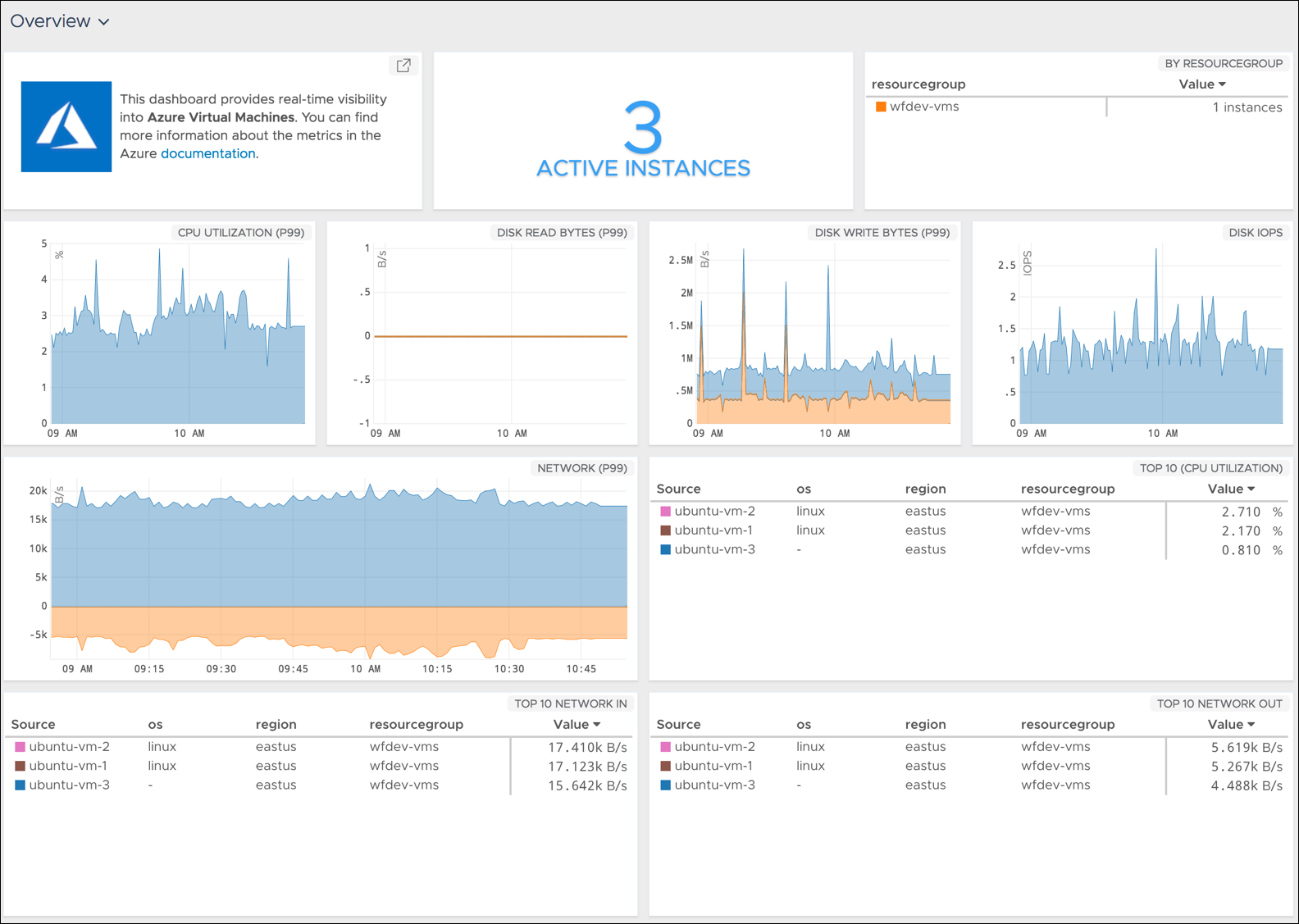
    The latest edition of the Wavefront analytics and monitoring tools from VMware now comes with pre-packaged support for a range of services running on the Microsoft Azure public cloud in addition to a significant expansion of support for a range of services provided by Amazon Web Services (AWS) and Google.

    Rob Markovich, senior director of marketing for the VMware business unit, said Wavefront has added 35 “out of the box” integrations for third-party applications and services to the software-as-a-service (SaaS) application.

    Wavefront has also added pre-packaged dashboards for Kong, Micrometer, Github and Bitbucket, VMware vRealize Operations, Hadoop MapReduce, Yarn, HDFS, Ceph, FluentD, Couchbase, Lighttpd, CoreOS, PHP-FRM, Papertrail, Rollbar, Suse Linux, Fedora Linux, FreeBSD, NetBSD, OpenBSD and Oracle Linux. Any Wavefront dashboard can be customized using more than 100 analytics functions, including correlation and predictive functions on any metric data source, he said.

    Those additions come on the heels of a wave of investments VMware has made over the last few months spanning everything from cloud extensions to VMware vSphere to embedding analytics within the VMware vRealize IT automation framework.

    Markovich said Wavefront is adding integrations at the rate of 10 to 20 a month—the total number he said should increase to more than 200 by the end of 2018. As organizations embrace various types and classes of cloud-native applications such as microservices, there is a much greater need for monitoring and analytics, especially as organizations begin to better understand the level of dependencies that exist between thousands of microservices, he said.

    In addition, Markovich noted the number of companies encountering that challenge is also starting to increase as almost every company begins to realize it is a software company that happens to sell something else. That doesn’t necessarily mean every organization will be updating applications at the same rate as a web-scale company, but it does means existing IT processes will need to be modernized, he said—for example, more enterprise IT organizations are starting to create site reliability engineering (SRE) teams.

    That shift may not result in every enterprise application being monitored, but it will most definitely increase the number of application workloads within those enterprise IT environments that are continuously monitored.

    There is, of course, no single definition of what officially constitutes DevOps. Every organization will tailor DevOps best practices to fit within the confines of their existing IT culture. In some organizations that shift will be driven from the bottom up, while others will be transformed by an initiative led from the top. At this point, the single biggest inhibitor to DevOps adoption has more to do with IT culture than any given set of technologies. But regardless of an organization’s level of DevOps maturity, VMware is betting there will soon be many more traditional enterprise IT organizations employing monitoring and analytics a lot more broadly than ever.

    — Mike Vizard