Category: DevOps in the Cloud

  • DevOps Chat: disrupt:Ops Brings Security Closer to DevOps

    DevOps Chat: disrupt:Ops Brings Security Closer to DevOps

    Shifting security left during the software development process can be tough for companies because of the sheer number of operational things that go along with implementing security that must occur somehow in the realm of DevOps. It can be easy to lose control over their security processes without some sort of guardrails in place to help.

    A brand new company is helping do just that. I’m excited to introduce disrupt:Ops, which bills itself as a guardrails platform to help companies include and enforce best practices across security and operations, bringing security into the DevOps process at the beginning. My friend Mike Rothman, disrupt:Ops co-founder and president, joins me in this DevOps Chat to discuss the vision of his company and how it hopes to help make security truly a part of DevOps.

    You can read more about disrupt:Ops and their guardrail approach to cloud security and devsecops from another co-founder of the company, my friend Rich Mogull at https://devopsy.kinsta.cloud/building-great-cloud-security-guardrails

    As usual, the streaming audio is immediately below, followed by the transcript of our conversation.

    Audio

    Transcript

    Alan Shimel: Hey everyone, it’s Alan Shimel, devopsy.kinsta.cloud, and you’re listening to another DevOps Chat. Breaking some big news today on DevOps Chat, the launch of a labor of love of some friends of mine. I’m happy to be joined by Mike Rothman, cofounder and president of disrupt:Ops. Mike, welcome.

    Mike Rothman: Alan, it’s great to be here, thanks. It’s always fun to catch up with old friends.

    Shimel: Yep, and old friends it is, Mike. We should let our audience know – maybe we shouldn’t let them know. But we are old friends. We go back a long time now, back to the beginning of blogging and security –

    Rothman: That’s right.

    Shimel: It’s got to be 2004, 2003 or something like that.

    Rothman: Yeah, that’s right, that’s right. When I had dark hair. Actually I didn’t have dark hair back then, but you know, it’s –

    Shimel: I had hair.

    Rothman: You had hair. That’s right.

    Shimel: I had hair. But you know what, Mike? I said it was a labor of love and everything else. Just in the way of background, why don’t you share with our audience your personal sort of journey in tech and, you know, work history.

    Rothman: Well sure. I started out, God, in what feels like 100 years ago, as a mainframe programmer. Ended up doing some local area networking stuff. Kind of found my way to network security. Went into research for quite a while. Did a couple of companies and then went back to research and for the last 10 or 11 years at this point I’ve been partnered up with Rich Mogull and Adrian Lane at Securosis, doing a bunch of kind of information, security-centric research. And actually about a year and a half ago we spun out some technology that we had prototyped within Securosis in cloud management and cloud automation into our new company disrupt:Ops, and have been just making a lot of progress over the last year with that. And that’s what we’re announcing this week.

    Shimel: Yep. So Mike, you’re being humble. When you say you did research, you were an analyst at Giga, were you not?

    Rothman: META Group, yes. META Group, exactly.

    Shimel: META Group. And then you were also – you had executive positions in several cyber – we didn’t call it cyber – infosec companies back then. 

    Rothman: It was. Yeah, you bet. So companies like TrueSecure and CypherTrust, you know, back early in the e-mail security days. I did a network monitoring company called EIQ. So yeah, I’ve been there, done that. Have the road rash and kind of the screw-ups under my belt to prove it. But you know, it’s interesting in terms of just how long and how small an industry security is for being actually a really big thing nowadays. 

    Shimel: Being so big, yeah. It really is. And Mike, again, for many people in our audience who come from DevOps or even from security – but they’re worldwide and they not be familiar with Securosis. You know, Rich Mogull comes over from Gartner. Adrian’s been CTO at major companies. You know, you guys are probably the leading, let’s call it independent security analyst research firm – you said 10 years-plus. Certainly in my time you guys laid the fundamental kind of – a lot of the fundamental backbone of what Cloud Security Alliance teaches and so forth. 

    Rothman: Yeah, that’s exactly right. So it was interesting. So I guess it was probably eight and a half years ago we partnered up with the Cloud Security Alliance and helped them build their curriculum for their CCSK certification. And that got us to be much deeper than your typical analyst in terms of having to play around with cloud, having to understand automation, having to build a number of the kind of scripts and – I’ll call it the inherent messiness of building out a stack in the cloud and really making it operational, because we were eating our own dog food. Our website, a lot of the stuff that we had prototyped was really demonstrative of the challenges that organizations face as they move a bunch of their stuff into the cloud, and really as they embrace a DevOps mindset of trying to be agile, trying to be innovative, trying to move towards more of a continuous type of deployment model. We really came across a number of the challenges these organizations have in terms of just really maintaining control, right? Once you have multiple DevOps teams doing things in multiple kind of accounts, you start to run into challenges relative to how you enforce best practices.

    And that’s really one of the challenges that security people have with this whole DevOps revolution, which is, “Hey, this sounds great, but we’ve got a playbook, a set of practices and policies that we really require all of our environments to adhere to in order to protect that data.” And obviously the faster you move, the more agile and continuous you try to operate, the harder it is to enforce those best practices.

    Shimel: More about that in a second. You touched on two things there that we’re going to dig into. Let me just finish laying my groundwork. Mike, besides you, Rich and Adrian, the Securosis gang, there are at least two other key people on the founding team of disrupt:Ops who also happen to be friends of ours for years –

    Rothman: Yeah, that’s right.

    Shimel: Give them their due. Why don’t you give them a shout out?

    Rothman: You bet. So back when we spun the technology out of Securosis, we brought on two guys, very experienced guys in the security space. Our CEO is Jody Brazil. So Jody was a cofounder and long-time CEO of a company called FireMon, which I know you’ve done work with for a long time –

    Shimel: Sure.

    Rothman: So Jody kind of is really the driving force behind a lot of what we’re doing at disrupt:Ops. And our CTO is a guy named Brandy Peterson, another longtime security professional. He was actually the CTO of FishNet Security for 15 or 16 years.

    Shimel: As was Jody before Brandy, right?

    Rothman: Yeah. I met both of them around the same time.

    Shimel: Yes, when I first met Jody, he was CTO and FishNet, and he said, “Who is this Jewish guy with the New York accent?” I went out to visit him in Kansas City to tell him why you shouldn’t use Qualys, and he should use StillSecure, and he made fun of my accent. [Laughs]. Good times. Anyway. But Mike, let’s turn back to a couple of things you were saying about kind of the genesis driving disrupt:Ops. You touched on one thing; you said, “multiple DevOps teams.” So this is something we see, and I call it almost second-generation DevOps. You know, when a company or an organization is first embarking on their DevOps journey and they do sort of a trail balloon, and they pick a project and they have a DevOps team – you know, and they may not call it DevOps. They  have a team that’s practicing DevOps sort of principles on this one particular project. And oftentimes, wow, great success, because you are – you know, it’s an isolated environment, right? In some ways you’re not in the quote/unquote real world.

    And then you say, “This is great. Let’s take it out. Let’s expand that beachhead. Let’s expand the bubble.” And all of a sudden – you know, larger organizations; small teams or smaller organizations not so much, but larger organizations – now you start having two, three, four, six different projects that are being run with a DevOps mindset and you have multiple instances of Jenkins and you have three different – this team’s using Puppet; that one’s using Chef. And serverless. And all of the complexities that we see in today’s modern software factory. And it’s chaos, right? And then at some point the CIO or VP or director of IT says, “Oh my God, this DevOps thing isn’t working so good. It’s all over the place.” Let alone the security guy’s screaming, you know, right out of the Phoenix Project, “No, no, no!”

    Rothman: That’s right.

    Shimel: And that’s a problem that we see with a lot of second-gen, if you will, DevOps installs, where it goes beyond the initial team to several teams.

    Rothman: That’s right.

    Shimel: That’s what you guys see.

    Rothman: We do. And it’s interesting, because what you have are really kind of two paths at that point, in terms of how these teams start to behave when starting to be put under scrutiny in terms of, kind of again, their ability to enforce operational and security best practices. You know, one group kind of buries their head in the sand and continues to move forward and really don’t do much, right? They’re like, “Oh, it’s okay,” and you know, they’ll maybe run a vulnerability scan to kind of prove that they’re sort of within policy, but they really don’t have an operational environment that is built to work in concert with the rest of their factory. I love that term, right? That really does encompass a lot of how software is being built today. And then the other part ends up being folks starting to build their own scripts, right? They take maybe an open source-looking thing, they start to build a bunch of their own scripts and code around it, and then what they find is they’ve got a suitcase full of these scripts that they end up having to maintain, upgrade. They don’t have any means of reporting or any scheduling for how they enforce and run a lot of these scripts.

    It’s really – you know, we call it automation, but it’s manual automation, which I get is a total oxymoron. But that’s really how it is. You know, you have a bunch of folks, they’re building these scripts out, they’re executing them manually or through very simple triggers, without any means of maintaining, upgrading or scheduling or reporting on what these really key aspects of their operational environment are doing. And it becomes, again, a big problem, where you have – it’s unwieldy because of just the sheer number of things that are happening in a modern DevOps environment with multiple teams. Then you compound it with a number of very tactical scripts that are built to surround the environment, if you’re doing anything. And then at some point somebody says, “Hold on a sec, folks. This is just not where we want to be. We really need to think about it more from an operational excellence perspective and make sure we’ve got an environment that we can enforce our best practices for security and operations.”

    And that’s kind of when they get the sense that, “Well, I’m either going to have to make a significant investment in this and become like” – Rich calls them the unicorns of cloud land, right? You know, the Netflix and the Capital One and, you know, the folks who have whole teams of environments that are building tools to do this. Or they have to start looking for some kind of commercial option, because there really is no option, but you’ve got to do something. You can build it yourself or you can look to buy it. And candidly, until the last handful of months, there really wasn’t a realistic commercial offering to start implementing some of these capabilities.

    Shimel: No, no. I think the bigger – you know, a lot of what you’re saying certainly obviously rings true. The other fundamental piece of this is, even if you are using one of these homegrown, cockamamie, you know Rube Goldberg kind of things –

    Rothman: Yeah.

    Shimel: – is it the security guys who are? You know what? Shame on me. It’s not the guys. Is it the security team who’s doing this, people? Is it the DevOps cross-functional team? Is it a little bit of both?

    Rothman: Yeah, yeah.

    Shimel: You know, how many of – look, here’s my basic, fundamental belief. You are not going to find a developer who raises his hand who says, “I want to write shitty code. I can’t wait to put something insecure out there.” No one says that. No one says that, right? They’ll tell you they’ve got time pressure, there’s pressure to release, pressure to release, they wish they could do more on security. And some of them, the enlightened ones, as you said, they’ll even try. They’ll run a vulnerability scan, because there are certainly open source kind of tools out there for them to mess with.

    The problem is, they go to a lot of the security guys, and as you alluded to before, security guys say, “Well we have our rules and procedures here. This is a no.” Right? And they don’t want to hear no. They’ve got to go.

    Rothman: You know, what’s interesting, Alan – I want to hit on a couple things that you alluded to there, because they’re important, right? The first is kind of where you start to see the agitation for better operational and security practices. And it’s not that it’s not the security folks. Obviously they’re always going to push for that. But it really is – you mentioned it, right? The DevOps teams that we’ve worked with, they’re very cognizant, they’re very serious stewards of kind of the corporate data, and they want to do the right thing. But in a lot of cases they don’t know what to do, right? So you have a whole bunch of folks who don’t know what they don’t know and they don’t want to go to the internal security team because of a lot of those things you were just alluding to. They’d say, “No, we can’t do that. We have all of these rules.” And in a lot of cases the security team has not updated their set of conditions, their set of policies – 

    Shimel: Exactly.

    Rothman: – to work in a DevOps type of environment, so these folks really struggle. They talk to – again, on the consulting side of our house at disrupt:Ops, we do a lot of work with those teams in terms of helping them understand what cloud native architecture looks like and how to integrate cloud security into their environment, and really just to help them build a program in order to do that. So then you do that with one DevOps team, then you end up talking to another DevOps team and maybe the third DevOps team, and finally IT, at some point, they’re like, “Um, what are you telling our folks? They seem to like what you’re doing and they seem to be doing things in a more secure way. So can you help us?” And then IT starts to get religion. The security team starts to get a little bit of religion about what they have to evolve to. And it really is kind of that interesting transition where it has started kind of out in the DevOps community with, again, those enlightened ones going, “I don’t know what I don’t know. Let me get some help,” and then it kind of back-ending into security. That’s not always the case, but probably three quarters of the time, that tends to be the transition that we see.

    And the other thing I want to hit is just about velocity, right? JA very forward-thinking DevOps leader that we’re working with, he said it the best. And he’s just like, “I’ve got 20 DevOps teams. I cannot slow these people down. They are doing stuff; they are making progress. The last thing I can do is put a bunch of onerous security requirements on what it is that they’re doing. They’ll ignore me, they’ll go around me and that’s counterproductive. I can’t do that. What I really need is to be able to build and enforce a set of guardrails around their environment.” Right? That term, “guardrails?” It just really kind of opened up and was a light bulb in our head when we were having this conversation. It’s not about stopping them from doing things. If anything, it’s about allowing them to go faster, yet making sure they don’t drive the car off the road, right?

    And that’s really the metaphor that resonates relative to what we’re doing at D:Ops, and really just kind of where the environment is going, in that we have to be able to move faster. Slowing things down is not an option, yet you want to make sure that you are not putting corporate data at risk. You are not opening up significant new attack services just – because people are moving so quickly. Sometimes they make mistakes. Sometimes automation isn’t done in the perfect way. Sometimes humans get involved and certainly are fallible from that standpoint. But with a lot of the inherent, underlying automation orchestration that’s possible within the cloud and DevOps and continuous, you have options to enforce these best practices in a way that we couldn’t do in our traditional data center with our traditional waterfall types of development and operational motions.

    Shimel: Absolutely. And you know, Mike – I mean, I’ve spoken about this a lot at various conferences and stuff. A lot of that has to do – you know, we use this term “shift left” in security and all that. A lot of it does have to do with getting to security earlier, faster. Yeah, we’re going to have to automate it. Yes, we can’t be the roadblock. But we can be the appendix after – when I say, “we,” I mean security. We can be the appendix after the delivery or after the deployment.

    Rothman: I’ll raise you. I see your point and I’ll raise you one, right? I’m of the opinion that security isn’t a thing. Right? Security should be within everything.

    Shimel: Yeah.

    Rothman: And that’s really the mentality that we’ve been trying to push on the industry for a long time.

    Shimel: Amen.

    Rothman: And it’s one of these things where we really can’t afford to wait and be in a position where we’re trying to retrofit poorly architected systems that are moving faster than we’ve ever seen before and then say, “Oh hey, we’ve got to change it because of security,” or because of any other operational gap that we see there. Right? What we have to do is be building in a way that allows us to use architecture as security control, right? Isolation, segregation, multi-factor authentical, identity management – all of these things that are fundamental building-blocks of what we do in the cloud and DevOps can be utilized to build in a much more secure fashion. And it’s really about those kinds of practices that are going to make the biggest difference relative to what it is that we see and what it is that we deploy over the next couple of years.

    Again, like I said, I don’t think security is a thing five to seven years from now. Because if it’s not embedded within everything that we deploy, we screwed up.

    Shimel: Yep. You know, I heard – because I never come up with original ideas. I just listen. But I heard something awhile back – “Security needs to become synonymous with quality.” And we’ve had QA as a concept in software technology forever or for a long time. Security needs to be just built in, like as part of the quality control. Right? The same way shit or stuff gets tested, whether it be hardware or software or whatever. Security needs to be part of that quality. 

    Rothman: You bet. To use a software term? Right? Why is a functionality defect different than a security defect?

    Shimel: Exactly.

    Rothman: Right? And they should all be within the same thing. And again, that’s a lot of when you start talking about immutable, when you start talking about kind of building security testing into your pipeline, which again, is stuff I know that you guys at devopsy.kinsta.cloud write about quite a bit. Again, it’s really not any different than you managing and making sure that you hit your functionality kind of specs from the standpoint of just building code, right? Part of that factory. So yeah, the code has to work, but it also can and should be secure, and there really aren’t different operational motions to make that happen. And that’s what’s so exciting. For a guy who spent 25 years trying to retrofit and get people to think about security as part of their core structure and to treat it as really a business function, it’s really enlightening to be in a situation where you actually can implement a lot of those functions within the core processes that you use to develop the technology.

    And again, are we there yet? Of course not. Is there a lot of education to be done? Without a doubt. But we at least have the option now, right? That’s the aspirational goal to what it is that we all do every day, which is to make sure that we’re pushing for the right types of decisions to be made as early in the process as we can, because we all know how much it costs to fix it later.

    Shimel: Absolutely. Mike, I’ve got to tell you, listening to this conversation, I’m thrown back to, “NAC: is it a feature or stand-alone?”

    Rothman: You’re dating both of us, man. Stop that out. Cut that out.

    Shimel: It’s such a pleasure to talk a little theory here with you. But let’s turn for a second to real stuff. Not that what we’re talking about isn’t real. But I wanted to give our audience a little bit of a taste – so disrupt:Ops – great people, great big problem to tackle out there. Give us some specifics. What are you guys doing?

    Rothman: Yeah, so what we’re doing is we’re basically building a cloud management platform to implement a lot of these ideas that we’ve been talking about for the last couple of minutes, Alan. Initially it’s a guardrails platform. So what we have is the ability to, in an AWS environment, enforce a set of best practices across security, operational and also cost management. So one of those things we don’t talk about too much is that developers don’t really like to shut their stuff down because, “No, it’s going to mess with something. I don’t have to. The CFO bitches but we don’t really care.” What we can do is also implement best practices in order for folks to clean up their room, right? We try to do that with our kids all of the time, too. You know, so we try to do that with our developers as well.

    So really implementing a platform for security, operational and cost management guardrails, to again, immediately not just find the issues – there are a lot of tools, as you said. A lot of vulnerability scanners can kind of look at your cloud environment and tell you you have problems. The issue with that is that most operations people are overwhelmed with the number of other things they have to fix every day. Adding more stuff to their list doesn’t really help them. So disrupt:Ops is really focused not just on finding the issues, but also fixing them and enforcing those best practices. Let me give you an example of that. So let’s just say some person decides they want to open up a server to the internet because it’s just easier for them to do that. Well obviously that would be a pretty significant security problem. So as opposed to just taking that server offline, what you can do is you can basically change the security group to make sure that it’s only accessible via a known, good IP address range within your corporation. That’s a good example of a guardrail. Or making sure that you’ve got MFA turned on for every account that gets spun up by your magical Terraform environment that may not build that out as a core security requirement.

    So again, there are 50 to 60 of these guardrails, in effect, that you can implement in your environment, to again, make sure that you are not just alerting when you get out of policy, but actually fixing the issues, in a lot of cases before you even know they’re issues, so that you’re not sitting there trying to pick up the pieces after half of your data is in Chechnya.

    Shimel: Exactly. Or Romania.

    Rothman: Or Romania. It’s somewhere.

    Shimel: Mike, how is the offering packaged? Is it a SaaS kind of offering? 

    Rothman: Yeah, it is. What we found is since – you know, remember the days where people were like, “Oh, I don’t know about this cloud thing or SaaS. I’m not sure I’m comfortable with that”? Now it’s like, “Wait, you want me to install software in my environment? What? What’s wrong with you?”

    Shimel: That would be kind of oxymoronic for a DevOps tool, but –

    Rothman: That’s right. That’s right. So we deliver as a SaaS service. It’s actually a very cool kind of one-click provisioning process where, when you’re logged into your AWS account, you run basically a cloud formation script that really kind of gives us cross-account privileges to your environment. And again, we’re security guys, right? So at the end of the day, we are basically not even just assuming but enforcing least privilege. So we only have read-only access. When we need to make changes, we grant the privilege as we need it, then we revoke it. Because again, what we’re trying to do is make sure we enforce operational best practices; not add more attack service. So again, we’ve built the environment to be secure by design. We use all of our own dog food, to make sure that we are adhering to kind of common best practices. And again, we’re all 25-plus years security folks, so we do take that pretty seriously.

    Shimel: Excellent. Mike, for people who maybe want to download – not download, excuse me – sign up for it or check it out more, where can they get more information?

    Rothman: Yeah, disruptops.com. So by the time you hear this little interview, the site will be live. There’s a place you can sign up. You know, first we start with a demo and show you what it’s about and then you can sign up for early access. And again, we’re kind of expanding towards the end of this month, in October. We’re going to add a bunch more folks to the system with the goal of kind of being ready to actually sell the product by the end of the year.

    Shimel: Fantastic, man. Well, I don’t have to tell you, Mike. I wish you, Rich, Adrian, Jody, Brandy and the rest of the team nothing but success. We’ll be checking in, I have a feeling, pretty often here, whether it be through Security Boulevard, devopsy.kinsta.cloud, Container Journal or what have you. And you know, fantastic. It’s good to have you back in the game.

    Rothman: Yeah, no, I’m excited. Again, really it’s not just a big promise and not just a huge opportunity. You know, and what Rich, Adrian and I, and now Jody and Brandy have always done is – you know, we’re trying to do the right thing to evolve the practice. Right? And that’s what it’s about. It’s a big world and there’s a lot of opportunity. There’ll be a lot of folks talking about guardrails over the next year. And that’s great, right? Because what we want to do is get to a position where we can move faster but move more securely, and I a lot of cases, in the world that we grew up in, those were counter indicators. Right? You couldn’t move fast and be secure. You couldn’t do operational excellence and make sure that you’ve got a lot of these things enforced. And now you can, and that’s what’s really exciting to us. Again, we’re just excited to partner with you, as always, and again, just go out and solve some bring problems for a lot of organizations.

    Shimel: Fantastic. All right. Mike Rothman, president and co-founder of disrupt:Ops, a hot new entrant in the DevSecOps space, with a great pedigree and a real reason for being our guest today on DevOps Chat. I hope you’ve enjoyed this. This is Alan Shimel for devopsy.kinsta.cloud. Until next time, everyone, have a great day. Bye-bye.

    — Alan Shimel

  • Adobe Looks to Drive DevOps Adoption via the Cloud

    Adobe Looks to Drive DevOps Adoption via the Cloud

    Adobe has been building out a managed service that includes continuous integration/continuous development capabilities on the Adobe cloud service. Now Adobe is extending the DevOps processes enabled by its CI/CD platform to make them more customizable in addition to expanding the scope of the application development tools it provides to include support for single page application (SPA) JavaScript frameworks.

    Haresh Kumar, director of strategy and product marketing for mobile and connected experiences at Adobe, said DevOps processes are now an integral part of how Adobe enables customers to build a custom application experience using low-code tools it provides in Adobe Cloud. In the case of Adobe, that DevOps framework is made available via Cloud Manager, a feature of Experience Manager Managed Services that enables the streamlining of code development across staging and production environments in addition to providing code inspection, security validation and performance testing capabilities. Developers can now customize their CI/CD pipeline within Cloud Manager against specific key performance indicators (KPIs) they define.

    Meanwhile, Kumar said the SPA Editor that Adobe provides is unique because front-end developers can preview a SPA to view JavaScript code and edit content including images, video and text. With this new capability, SPA content can be more easily edited and managed within the context of a business process, he said. The SPA Editor provided within Adobe Experience Manager currently supports the React and Angular frameworks, with plans to extend its reach to other frameworks underway.

    While most IT professionals tend to think of DevOps processes only applying to large-scale applications, Kumar said it turns out that as organizations rely more on cloud services, vendors such as Adobe are exposing customers who want to create applications to a variety of best practices related to DevOps embedded within the cloud service. Many of the developers creating those applications may not recognize they are participating in a DevOps process, but Kumar noted that as more custom applications get developed on the Adobe platform, the number of web developers and content authors being exposed to DevOps process is starting to increase exponentially. It’s even probable many of those developers will be first exposed to DevOps processes within the context of a cloud service long before they encounter them within the context of their internal IT environments.

    Kumar said a DevOps process managed by Adobe is enabling many organizations to smooth out what otherwise often can be a choppy digital business transformation. Building a new generation of customer experience applications requires access to modern tools that can transcend organizational silos spanning data that resides in sales, marketing and financial applications. Last month, Adobe announced it is acquiring Marketo, a marketing automation platform to facilitate that transition. Once that deal is closed, the DevOps framework Adobe has developed in the cloud will be extended to include the Marketo platform.

    It’s hard to say to what degree Adobe will be able to drive adoption of DevOps processes across the Adobe Cloud platform. What might be even more interesting to see is how many of the organizations that rely on Adobe Cloud to develop applications will even realize they made the transition to DevOps.

    — Mike Vizard

  • Are Legacy Apps the Antithesis to DevOps?

    Are Legacy Apps the Antithesis to DevOps?

    Do you have an application marked with cryptic warning signs and a wealth of cobwebs that is running on legacy hardware hidden away in the back corner of your data center? If you’re in enterprise IT, chances are high that you do. These old platforms are often considered a bane to IT. More importantly, legacy applications can present a real headache when attempting to uplift the people, processes and tooling needed to embrace a hybrid cloud model.

    Providing self-service, orchestrated workflows and delivery pipelines are just a few signature attributes to constructing a hybrid cloud. Imaging trying to apply these ideas to legacy technology, where the interface requires using an archaic console and software that looks like it was written for Windows 3.1. It’s not fun and often derails any efforts to deliver services living in an on-premises software-defined data center (SDDC) or public cloud environment. It also splits up a team focused on working within the realm of a DevOps cultural model, because concepts such as infrastructure as code, stateless configuration and collaborative code check-ins crumble. For most folks I speak with, legacy applications remain with a small skeleton crew that keeps the lights running and the old hardware humming.

    Hybridity is a reality for most infrastructures rather than being purely in the public cloud or purely on-premises. This is where the importance of DevOps and embracing an API-first mentality is multiplied. Having an API-first approach isn’t necessarily about having a single code repository or a single application that does “all the things.” It is about leveraging APIs across multiple repositories and multiple applications to weave together a single, programmatic software fabric in which everything can communicate and integrate regardless of whether legacy or cloud-native.

    The way to end chaos induced by the complexity with hybridity is a progressive, policy-driven state with proper implementation.

    Here are four tips on how to integrate your legacy crew with your DevOps team to create a high-functioning hybrid cloud model:

    • Find tools that play well with others: Legacy applications do not have to be the anchor holding you back from adopting a DevOps strategy. Find solutions that treat legacy applications, modern applications and cloud-native applications as if they were all first-class citizens. Legacy applications tend to run on old OSes, including some that are no longer supported. Eventually this configuration becomes increasingly fragile, requiring manual care and feeding. Adopting an automation strategy can reduce risk associated with build, testing, deployment, remediation and monitoring.
    • Strive for simplicity; don’t create silos: Make sure the workflows that deliver services are applicable to the vast majority of use cases. Historically there has been little to no incentive to building mechanisms that are shared across the enterprise. Systems thinking advises that there are dependencies, but if you only improve one application in the cluster, there will be no benefit. The entire cluster must be addressed for successful progress. The use of RESTful APIs is turning tables, allowing for a single set of tooling across many applications, platforms and services. Share data across the organization; leverage APIs to streamline how the team interacts with legacy workloads by extracting data from the legacy architecture.
    • Embrace a one-team mentality: Don’t form multiple teams or tiers of teams. If the decision is made to adopt DevOps, then it must be embraced by the entire organization. As the old adage goes: “There are no legacy systems, just legacy thinking.” DevOps isn’t about developers and operations folks collaborating; rather, it’s about two separate silos becoming one team. Focus on improving communication and set aside time for learning.
    • Avoid infrastructure-specific solutions: Abstract storage and compute; work instead on the application layer and how to deliver services for those applications. Legacy applications often are coupled tightly to the underlying hardware, making it challenging and risky to manage any application component individually. This means maintenance and upgrades are incredibly time-consuming, difficult and even expensive. The adoption of infrastructure-as-code, whether on-premises or in the cloud, gives teams the permissions and tooling provision infrastructure on-demand. As you can imagine, not every legacy application can be easily migrated to this type of infrastructure, but many can.

    Using automation increases the organization’s agility by reducing human interaction and orchestrating dependencies across the organization. Self-service consumption of infrastructure further eliminates silos. DevOps is not incompatible with legacy applications, but it requires an organization to evaluate what this implementation actually means and how to embark upon this transformation. Never fear: You can still depend on a legacy application and embrace DevOps. It requires additional design considerations, elbow grease and a little bit of creativity. The fundamental element is to apply these principles in a consistent and efficient manner in the context of all applications, both legacy and modern.

    — Rebecca Fitzhugh

  • Is NoOps the Future of Cloud Networking?

    Is NoOps the Future of Cloud Networking?

    As enterprises move more of their applications, data and operations to the cloud, competitive success becomes increasingly about speed. If the answer to a request to spin up and connect a new virtual cloud or deploy a new application across your hybrid cloud is “no,” or, “It will take us three months,” that’s a problem.

    Organizations operating in the cloud need to deploy in days, hours or even minutes, not months. They first sought greater infrastructure efficiencies and speed through ITOps, then DevOps, then DevSecOps and, most recently, CloudOps. Each of these nuances is a slightly better version of the old model, but all still revolve around humans. And the hard truth is that speed and humans don’t always mix.

    The painful implications of the impedance mismatch between humans and automation comes into sharp focus, but with a slight twist, when it comes to cloud networking. Now that networking infrastructure, meaning the actual routing of data, is moving out of the data center and into the cloud, it’s time to consider what a NoOps approach to cloud networking might look like.

    Bringing Networking Into the Cloud Era

    Way back in 2011, Forrester Vice President and Principal Analyst Mike Gualtieri famously wrote a blog post titled, “I Don’t Want DevOps. I Want NoOps.” In it, he said: “NoOps means that application developers will never have to speak with an operations professional again.” In this sense, NoOps is another term for automation.

    In the world of public cloud technology, the tension Gualtieri was pointing to—i.e., between dev and ops—lived almost exclusively in the realms of compute and storage. It didn’t apply to networking in the cloud, because networking is different. It’s more heterogeneous and distributed than compute or storage. It’s all about moving data, which has gravity and heft. Especially with big data, moving the data securely is an increasingly strategic priority for enterprises.

    Until recently, networking technologies used in public cloud environments have been either very limited-feature tools offered by the cloud provider, or virtualized versions of on-premises data center-era technologies. These virtualized technologies, such as vRouters, are complex (often by design) and difficult to master. They have kept CloudOps and DevOps teams dependent upon highly trained and certified networking experts to make and maintain cloud connections.

    This traditional networking paradigm slows things down and kills innovation. But it also puts developers and cloud operations people on the same side of the “I want NoOps” equation. That’s because unlike with cloud computing or cloud storage functions—where developers must wait for ITOps and DevOps teams to establish the computing or storage infrastructure their applications require—cloud networking has shifted the “operations” function to the hands of traditional IT networking experts.

    What NoOps Looks Like in Cloud Networking

    Recent technology advancements in cloud networking point the way toward a NoOps approach to cloud networking, meaning the automation of processes that now depend on direct control by human networking experts.

    One advancement is that the as-a-service revolution is finally reaching cloud networking infrastructure. What began with virtualized networking hardware has more recently progressed to software-defined (SD) cloud routing, enabling distributed, heterogeneous networking infrastructure to traverse public cloud, on-premises, hybrid cloud and multicloud environments.

    SD cloud routing centralizes and automates networking functions that previously required hands-on, time-consuming attention by highly certified human experts. As a result, SD cloud routing shifts networking infrastructure control directly to CloudOps and DevOps engineers, who are no longer dependent on networking professionals to establish or maintain their cloud networking infrastructure.

    Software-defined cloud routing alters the fundamental dynamics of cloud operations. It makes routing in the cloud point-and-click simple for CloudOps and DevOps experts.

    In a real sense, SD cloud routing achieves a NoOps approach to cloud networking—not by eliminating DevOps functions and roles, but by automating cloud networking and making it accessible to those who need to establish and maintain cloud connections. SD cloud routing empowers DevOps and CloudOps professionals to manage the networking connections required to move applications and data within, between, and to and from public cloud environments.

    — Steve Mullaney

  • Pivotal Software Extends Development Platform Reach

    Pivotal Software Extends Development Platform Reach

    Pivotal Software announced an expansion of its implementation of the Cloud Foundry platform-as-a-service (PaaS) environment in addition to extending its support for Kubernetes to the Amazon Web Services (AWS) public cloud.

    At its SpringOne Platform 2018 conference, Pivotal revealed that Pivotal Cloud Foundry (PCF) can now extend a single instance of its distribution of the open source PaaS across multiple data centers. In addition, Pivotal is making it possible to automatically update the operating systems on which its PaaS is hosted, and added a more extensible user interface to its PCF Healthwatch monitoring tool.

    What’s more, Pivotal announced that Pivotal Container Service (PKS), its implementation of Kubernetes, now can be deployed on EC2 instances of the Amazon Web Services (AWS) public cloud. PKS is currently based on version 1.11 of Kubernetes that has been packaged with a software-defined runtime for spinning up clusters known as Kubo, developed under the auspices of the Cloud Computing Foundation (CFF), which also oversees Cloud Foundry. PKS was developed in collaboration with VMware, which is a sister company of Pivotal operating under the same Dell Technologies umbrella, and the latest version adds the ability to configure a namespace or cluster to emit logs to a specific destination, such as VMware vRealize Log Insight, without operator intervention.

    Richard Seroter, senior director of product for Pivotal, said Pivotal and VMware are collaborating to make Kubernetes clusters more accessible to enterprise IT organizations that typically don’t have engineers available to manage IT operations. By combining automation frameworks from VMware and Pivotal, the expectation is that PKS will gain more traction as IT organizations evaluate which flavor of Kubernetes to deploy in a production environment, he added. A recent research report published by the Cloud Native Computing Foundation (CNCF) would suggest that strategy is starting to gain traction.

    Pivotal apparently is pursuing a dual application development strategy. The first is based on a PCF framework that is highly prescriptive in terms of how applications should be built and deployed. The second is a more flexible container-as-a-service (CaaS) platform based on Kubernetes.

    In general, organizations that have invested in Cloud Foundry to deploy a PaaS are not likely abandon it in favor of a container platform overnight. But Pivotal and the CFF are under some pressure to be more aggressive in unifying Cloud Foundry and Kubernetes: There already are several instances of Cloud Foundry that run on top of Kubernetes, and Pivotal Software revealed earlier this month that it missed Wall Street’s expectations for billing revenue in its most recent quarter by 25 percent.

    It may take a while for the relationship between Cloud Foundry and Kubernetes to become more firmly established in the minds of IT professionals. But there are certainly no shortage of options when it comes to developing modern applications—there will be more than a few organizations employing multiple frameworks for building these applications for many years to come. The real issue may lie in deriving value from those investments.

    Survey findings published this week by Pivotal revealed that only 39 percent of global organizations are deploying code on a continuous, hourly or daily basis and only 40 percent deploy code on a monthly, quarterly or annual basis. The survey also found that only 35 percent of developers’ time is spent writing code for new products or features to deliver value, as opposed to maintenance or fixing old code. Also, one-third of U.S. respondents (33 percent) reported delaying application releases more than 11 times due to security concerns, compared to 21 percent globally. Clearly, there is much more DevOps work to be done.

    — Mike Vizard

  • The Hybrid Cloud and Why DevOps Teams Need Unified Stack Observability

    The Hybrid Cloud and Why DevOps Teams Need Unified Stack Observability

    The modern data center is constantly evolving to keep up with the demands of always-on, anywhere computing. Long gone are the days of monolithic, on-premises data centers. Today, the computing modus operandi is that of the hybrid cloud, which, according to Statista, will be worth close to $50 billion in 2018—just about double what it was in 2014—and will grow to almost $92 billion by 2021.

    As more and more DevOps and security teams are integrating hybrid cloud environments and serverless architectures, they need to gain visibility and insight into the increasingly distributed workloads provisioning and supporting their applications. Without a single pane of glass across their hybrid clouds, Dev, Sec and Ops teams cannot quickly discover vulnerabilities or identify and respond to attacks.

    The emerging best practice to the cross-cloud visibility conundrum is unified stack observability. Unified observability is the ability for Dev, Sec and Ops to share the same application-aware monitoring environment for vulnerabilities, threats or attacks across all workloads supporting their applications. The idea behind unified observability is that each team can look at the different stack layers as one—with an app-aware, single-pane, top-down view. For Dev teams, unified observability means that they can see and define all the third-party services connected to their applications; for Ops, it means they can see and monitor all workloads. And for Sec teams, it means the ability to set security policies for detecting and blocking attacks at each layer of the app stack by enforcing policies uniformly. There are a few recent trends accelerating the need for unified stack observability.

    The Accelerated Need for Unified Stack Observability

    Recent computing and application development trends are changing the way Dev, Sec and Ops teams develop and manage their distributed applications across hybrid cloud infrastructures. These changes include the increased use of third-party services, an overabundance of purpose-built security tools and the increasing need to address the shared cloud responsibility model, among others.

    An Uptick in Third-Party Code Use

    Third-party code increasingly is being used in apps and is one of the critical attack vectors exploited by hackers. SafeCode research notes that 78 percent of companies are running part or all of its operations on open source software, while 66 percent create software for customers built with open source. These stats have nearly doubled since 2010. The very practice of code-lifting, or pulling open source code from different repositories, which has enabled developers to share innovation and collaborate across architectures and levels, is turning to be one of the biggest attack vectors for hackers to exploit. Running on many different functions, open source applications and code borrowed from third-party services increasingly are becoming more vulnerable and therefore require a need for constant observability and monitoring.

    Even though such code is usually vigorously tested for vulnerabilities during the build and deploy stages, it can—and in some cases is—compromised in production. The global Magecart credit card skimming incident is an indicator of this: The hackers were able to infiltrate the third-party components and exploited them to gain credit card information, resulting in 800 e-commerce sites being compromised. To avoid such distributed vulnerabilities, Dev, Sec and Ops teams need to constantly index third-party functions and services, and scan for possible vulnerabilities or attacks. Such monitoring requires unified observability at the app code level.

    The Growing Overabundance of Purpose-Built Security Tools

    Increasingly enterprises are leveraging multiple cloud providers while still running their own data centers, either on-premises or as private clouds. A 2017 report from Forrester Research points to 89 percent of enterprises using at least two clouds, while 74 percent use three or more public clouds. Despite a wide industry effort lead by global leaders such as VMware to provide seamless cross-cloud orchestration and management, most clouds remain in their own environments with a set of purpose-built management and security tools.

    Then there is the traditional security approach, which can get in the way. According to Cybersecurity Insider’s “2018 Cloud Security Report,” only 16 percent of organizations believe the capabilities of traditional security tools are sufficient to manage security across the cloud. Eighty-four percent said traditional security solutions either don’t work at all in cloud environments or have only limited functionality, meaning that more tools with specific functionality must be integrated within the cloud. On-premises, private and public clouds remain siloed for most team, stressing an overtaxed security resources across organizations.

    Shared Responsibility Can Be a Shared Burden

    Even though the shared responsibility model has been well-documented, securing public cloud environments can be a burden to security and IT teams as their responsibilities continue to grow, while available talent is short to find. The traditional shared responsibility model assumes that the cloud vendor secures the hardware and software of the cloud itself, while the customer is responsible for the security of their assets within the cloud.

    With the shared responsibility model, most security teams are unsure about how to do their part. Gartner reports that through 2022, at least 95 percent of cloud security failures will be the customer’s fault. This can include anything from a failure to monitor to a failure to adequately secure the correct elements. This can also include customer misconfiguration, mismanaged credentials or insider theft. Additionally,  The “2017 IBM X-Force Report” noted a 424 percent jump in breaches related to misconfigured cloud infrastructure, largely due to human error. These gaps in security leave security teams with their organization, data and apps vulnerable.

    App-Aware Stack Observability: The New Modern Security Mandate

    The biggest distributed security blind spot facing modern Dev, Sec and Ops teams today is for them to monitor for vulnerabilities or attacks at each layer of the stack—at the application/third-party code-use level, their distributed workloads and the network each in isolation. Unified application-aware stack visibility and observability is becoming the only way to fully see and understand potential risks in today’s increasingly distributed environments, effectively addressing some of the biggest security challenges faced by modern Dev, Sec and Ops teams.

    — Gadi Naor

  • Microsoft Revamps Approach to DevOps on Azure

    Microsoft Revamps Approach to DevOps on Azure

    Microsoft this week unfurled a broad range of DevOps services for the Azure cloud that are intended to make it easier for organizations to embrace modern application development and deployment processes.

    Jaimie Cool, director of product management for Azure DevOps, said it’s fundamentally simpler for organizations to embrace DevOps processes using tooling hosted in the cloud because they don’t have to spend time setting up the underlying infrastructure themselves. Once they master those processes in the cloud, organizations can take the tooling provided by Microsoft and extend it out to either instances of Azure running in a local data center or Windows Server platforms.

    The Azure DevOps portfolio spans Azure Pipelines, a continuous integration/continuous development (CI/CD) platform that supports any language; Azure Repos, a private repository based on Git; and Azure Test Plans, a wide range of testing tools. Azure DevOps also includes Azure Artifacts, which provides Maven, npm and NuGet package feeds from public and private sources, and Azure Boards, a suite of collaboration dashboards and reporting tools.

    Microsoft is positioning Azure DevOps as an evolution of Visual Studio Team Services (VSTS). VSTS users will be upgraded into Azure DevOps projects automatically. Organizations that are using the on-premises Team Foundation Server (TFS) component of VSTS will continue to receive updates based on features made available in Azure DevOps. TFS will be rebranded Azure DevOps Server starting with next release.

    As part of this launch Microsoft is also making Azure Pipelines available for free with unlimited minutes for 10 parallel jobs for every open source project. Major open source projects already using Azure Pipelines for CI/CD include Atom, CPython, Pipenv, Tox, Visual Studio Code and TypeScript.

    Cool said that when it comes to application development, too many organizations overlook the critical role of DevOps processes in making a project a success. There’s a tendency to focus too much on features rather than the tools that enable an organization to deliver those features consistently. DevOps processes are crucial when it comes to improving the quality of software and the velocity at which upgrades are delivered, he said.

    But the ultimate DevOps goal is to not to increase the number of releases put into production over a specific amount of time such as a week, month or quarter, he added. Rather, organizations should be able to updates to applications whenever they are ready or required.

    Cool noted there’s a high correlation between adoption of Docker containers and an appreciation of the value of DevOps. As organizations embrace microservices-based architectures based on containers, the complexity of the IT environment overall increases. That issue soon may be coming to a head for more organizations, as Microsoft is now seeing containers all over the place, he said.

    Longer term, Microsoft expects to see machine learning incorporated into DevOps processes as well, Coole said, noting that it’s still early days as far as machine learning and DevOps are concerned.

    Clearly, Microsoft is trying to provide a more sophisticated DevOps experience as part of an ongoing battle with Amazon Web Services (AWS) and other cloud service providers to attract developers to its platform. As those efforts continue to expand, the number of organizations Microsoft schools on the DevOps processes should increase correspondingly.

    — Mike Vizard

  • Bridging the Gaps in SaaS to Meet Business Needs

    Bridging the Gaps in SaaS to Meet Business Needs

     Today, software as a service (SaaS) is a mainstream model for application consumption, with industry-specific and business process-focused offerings increasingly available. Flexibility, reduced time to market and cost benefits are the top advantages and selling points of SaaS offerings.

    SaaS-powered business processes allow businesses to provide feedback in real time, thus enabling a smooth change management process. The agility of such applications also generates higher user-community satisfaction and engagement. As a result, Gartner’s recent forecast predicts the SaaS market size will grow at a compound annual growth rate (CAGR) of 18 percent in the next four years, reaching $127.6 billion USD in 2021.

    Despite the apparent benefits, SaaS models carry their own set of disadvantages, especially when the application impacts key underlying business processes. These processes are typically unique to an organization and are seldom available out-of-the-box (OOB). The specific changes an organization needs often proves a solution inadequate and in need of major customization and permissible extensions.

    If the design of the solution is stretched too far from the originally intended logic of the software, it can cause major disruptions to future upgrades of the SaaS solution. An alternative to customization is simplifying business processes so they fit into OOB features. However, business users resist adopting a new simplified process, particularly when the process in question is a perceived differentiator. At the same time, it is not in the best interest of vendors to modify their design, catering to the requirements of just a few organizations.

    The Crucial Role of Architecture

    Business process architecture must be harmonized with solution architecture. That is why architecture plays an essential role in SaaS implementation. Business process architects need to quantify the criticality of business processes and leverage the insights to build consensus among stakeholders, which include business users, SaaS providers and IT departments. The solution architects, on the other hand, should ensure alignment between business process requirements, downstream enhancements to an offering’s capabilities and future readiness of IT to handle upgrades.

    Architects now empowered with business process and solution architecture should identify business KPIs that drive SaaS adoption and measure the impact on process performance. Gap and impact analyses tools can be used by architects to identify gaps between business requirements and OOB features of SaaS products. These analyses tools will result in a list of customizations, which need to be further evaluated.

    SaaS Evaluation Framework

    Each customization made to the SaaS application should be assessed on two dimensions:

    1. Potential business impact/criticality: When evaluating the potential business impact, architects should start by identifying sources of differentiation. Differentiation may arise from enhancement in customer-facing capabilities or improvement in operational efficiency—or both. Mapping measurable quantitative outcomes such as CSAT ratings, turnaround time, etc. can help define potential differentiation.
    2. Ease and cost of customization: Overall cost of ownership should serve as the primary way to evaluate the ease of customization, and right-size the trade-off between ease of implementing customizations with the ease of maintaining the solution. While the parameters to measure ease and cost of customization need to be defined, considerations include design types, the time and effort required for development, maintenance and upgrading activities (e.g. plug-in/script development).

    The above proposed assessment must also identify the following:

    1. Impact of not having requested features.
    2. Technical challenges in configuring/customizing the solution to meet each requirement.
    3. Ability to upgrade SaaS application without having to reapply customizations.
    4. List of actions to bridge identified gaps between proposed SaaS solution and existing process requirements.

    As displayed in the graphic above, customization needs to be treated differently based on which quadrant it gets mapped to.

    Appropriately Prioritizing Customizations

    Customizations that are easy to implement but don’t yield any measurable benefit to the business should be avoided as much as possible to eliminate risk, save effort and allow investments elsewhere.

    Similarly, customizations that are difficult to implement and carry no clear benefit or impact on outcomes, must be avoided. Instead, IT will have to convince the business to adopt OOB processes.

    On the other hand, critical customizations that are easy to implement and maintain should be shortlisted for further steps. Since there is a clear business case warranting customization, architects should ensure that the design approaches are recommended and supported by the vendor.

    Must-have business functions requiring difficult customization must be carefully examined. Consider the following questions: Will it still provide perceived time-to-market advantage? Will it increase overall cost of development and ownership? Will it impact scalability, upgradability and integration capability?

    In some cases, the SaaS provider may have feature enhancements in its pipeline that would help implement these must-have requirements. If so, the IT team should collaborate with the provider, influencing and defining upcoming product features.

    If that’s not an option, an alternative is to implement critical functions outside the SaaS solution and then connecting through well-designed back- and front-end integrations. For example, some SaaS providers allow customers to build composite apps on their platform as a service (PaaS). These apps can provide differentiated features without having to change the core SaaS solution. However, keep in mind that PaaS apps will need real-time integration with SaaS apps to achieve this.

    As explained above, not all business processes deem a customization of the SaaS solution. A structured framework should be used to classify which customizations will play a crucial role in any organization’s SaaS adoption journey.

    All customizations should be reviewed and approved by the program steering committee consisting of stakeholders from IT, business leadership and the SaaS provider. All parties involved need to have a clear understanding of why the customization is critical—that means business stakeholders need to provide justification for why a workaround or process change is not viable. Similarly, IT and the SaaS vendor need to articulate a plan of action and a road map for upgrades. In doing so, businesses will reap the full benefits of moving toward SaaS.

    — Monoj Baruah

  • How to Use APM to Hold Cloud Providers Accountable

    How to Use APM to Hold Cloud Providers Accountable

    Here’s the challenge: Cloud providers’ service level agreements (SLAs) typically stop at the edge of their cloud, while your internal service level expectations run end to end. Measuring performance from the end user to the application and back, including device details, user productivity and page load times, is essential for customer satisfaction and continuous performance tuning. How long does it take to launch an online app, open a work order or complete a claim form? What are execution and completion rates in different locations? The metrics and associated metadata provided by application performance monitoring (APM) tools can help your DevOps teams rapidly identify actual performance issues, troubleshoot them quickly and efficiently and optimize cloud spend and service level agreements.

    Automate Data Collection

    Collecting performance details for multiple web browsers, operating systems and devices is impossible if you have to manually tag and instrument the code. Modern APM solutions automatically deploy JavaScript snippets, page tags or agents to your web pages, Java and .NET applications and mobile apps. Small binary agents and efficient compression algorithms ensure minimal performance impact to the end user device or the network as they send telemetry information to the APM back end. Your DevOps team can then work with the actual attributes of every device, including manufacturer, model, operating system type and version and resource consumption to monitor the end user experience across IaaS, PaaS, SaaS and hybrid environments.

    Early Warnings with APM

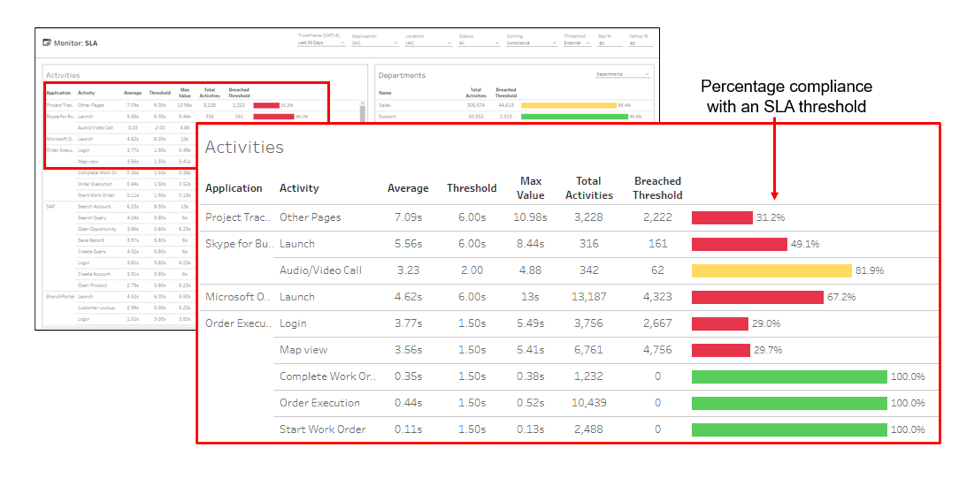
    To trigger early warnings, APM systems automatically determine an application baseline, or you can manually set specific thresholds. Typically, internal thresholds are set up to provide early warnings of possible issues before users are negatively impacted, while external thresholds can be linked to your actual SLA terms.

    These SLA reports are more than colorful views. By using dashboards that color-code SLA status based on the end user experience, you can better enforce service levels with your cloud providers. For triage purposes, you can break out details by department, geography, operating system, device type, target server, carrier and other characteristics as needed. You can also see at a glance your compliance measurements, which show the percentage of response times that are meeting the agreed-upon targets with your cloud providers to hold them accountable for performance.

    Streamlining Remediation

    Automation is key to accelerating mean time to repair (MTTR). When an alert is triggered, APM tools integrate with your service desk systems to automatically open trouble tickets, identify probable causes and analyze the business impact for prioritization. This level of detail and integration significantly reduces delays that are historically associated with performance troubleshooting, as it provides the necessary context for troubleshooting. Another option with advanced APM solutions is the ability to automate remediation of common end user experience issues, without involvement of the service desk staff.

    Comparing Before and After

    Another useful outcome of these detailed metrics is the ability to compare parameters before and after a change. By baselining performance, APM tools help you document and validate the actual end user experience impact of code releases, device changes or service provider upgrades. It’s not uncommon for users to complain after a new release, but using APM reports you can take a data-driven approach to quickly investigate user complaints by comparing different time intervals. You can start by exploring various characteristics and isolate the affected group based on device health, network subnet, geography, server or cloud provider. Once you have determined whether the problem is within your control (code, architecture, etc.) or within your service providers’, you then can have more productive discussions with service providers to demonstrate exactly where and when an SLA violation occurred.

    Keeping Track of SaaS Applications

    As you expand use of SaaS applications such as Office 365, end user experience monitoring and SLA management can be used to hold these providers accountable. Slow application launches, logins, page loads and other performance issues can impact user productivity, adoption rates and deployment schedules, costing the organization support resources and unused license fees. That’s why SaaS-based APM tools give you immediate usage measurements, enabling you to quickly adjust license quantities and optimize costs. Real-time monitoring of user wait times, crashes, device health and other experience metrics gives your team comprehensive awareness of how performance, device type or operating system versions are affecting employee productivity. This information can be used to quickly identify problem areas, validate migration plans and prioritize future investments.

    Monitoring for Accountability

    Getting what you pay for from your cloud providers is much easier if you incorporate detailed user experience measurements into your SLAs. A best practice is to monitor everything that happens on every device across the organization such as how long it takes to boot up, login, open specified apps and perform business-critical tasks. If any of these are off target, your APM solution can open and prioritize a trouble ticket with a list of probable causes, before the affected users can call support. Automated end user experience monitoring, reporting, and policy management, backed by self-instrumenting devices and apps, are essential links between a service provider’s commitment and your actual results.

    — Gayle Levin

  • Best Practices for Your SaaS Laravel Application on AWS

    Best Practices for Your SaaS Laravel Application on AWS

    It is not easy to subsist in a modern cloud ecosystem. However, there are solid principles that will help you to build a perfect AWS architecture for your Laravel application, including the 12-factor methodology, design applications with a stateless approach and decoupling service components.

    I’m sure you are adopting many of these principles already. However, I will cover merely the relevant to the AWS Laravel architecture and AWS Auto Scaling to maximize infrastructure robustness.

    12-Factor App Methodology Key Principles

    Application config files: These should be outside of the codebase, and these config files are replaced with environment variables, i.e., Db connections, secrets, environment, hosts, IP, etc.

    Application dependencies: These shouldn’t be in your codebase; instead, use a dependency management tool to declare your large dependencies and libraries required from the server. i.e., Gemfile, site-packages, pom.xml, manifests, etc.

    Use a control versioning system (CVS): It is necessary to integrate the Git workflow. i.e., Github, bitbucket or AWS CodeCommit.

    Stateless applications and processes: It’s crucial that your application doesn’t store any data in the local file system or is dependable from a persistent state in the application or server. In other words, the application/server can be turned off and re-created without losing any data. Only persistent data is stored in databases or backend services.

    In case of application failure, splitting components as much as possible and make them independable to others will result in an easy analysis and isolated issue.

    Immutable infrastructure: Instances shouldn’t be modified after provisioned, and there should be a standard base image (AWS AMI) that is regularly updated and patched. As a result, you’ll get an AWS auto-scaling that works smoothly, with fewer deployment failures and consistent infrastructure.

    Dev, test and production parity:  It’s crucial that these environments should be as similar as possible, regarding software, libraries, database data and code. Furthermore, it’s possible to close the gap across all environments using a CVS, repeatable infrastructure and continuous integration/delivery (CI CD).

    CI/CD: As the application and traffic grow, you need to implement a mechanism to release code to your different instances and enterprise environments. It is essential to design a continuous delivery workflow to improve development productivity with scalability, multiple environments and a distributed architecture.

    Evidently, these architecture design principles are part of the DevOps culture, which is in the plans of many CTOs, engineering directors and VPs.

    10 Best Practices to Scale and Architect Your SaaS Laravel Application on AWS

    Here are what we consider to be the 10 best practices to design, architect and build your PHP Laravel application to help you resolve issues around how to architect and scale a Laravel application, and which technologies are relevant for your product to align them with your PHP Laravel codebase.

    Practice No. 1:  Amazon S3

    In my perspective, Amazon S3 is the second component that boosted the evolution of the cloud, just behind the pay-as-you-go model with cloud scalability. Amazon S3 is an unlimited cloud storage with superb capabilities, including 99.99 percent of durability and high availability, object-based storage acting as an API and with the ability to host static websites based on HTML, Angular and React! Amazon S3 Cloud storage can be a serverless application without much effort.

    Amazon S3 is reliable, scalable and secure with no real configuration needed.

    The first step to scale and architect your Laravel application is to separate all static content (media, images, video, docs, etc.) to Amazon S3. This split allows distributing the application’s requests in parallel, dynamic content served by the EC2 instance (web server) and the rest with Amazon S3. This is a DevOps and development effort, where all static content on your Laravel project is pointed to the Amazon S3 endpoint.

    Technically, you need to move your actual content into Amazon S3 buckets, set the correct IAM roles/permissions to allow read access, and configure your Laravel driver to point to Amazon S3. (Here are more details about how to integrate Amazon S3 with Laravel.)

    Amazon S3 can host static websites and front-end applications (HTML, Angular, React and more) in a manner that is fully scalable, redundant and serverless. From my experience, I recommend to host your static websites on Amazon S3. The presented practice can be performed with a few steps and no servers needed (Serverless).

    Practice No. 2:  Horizontal Scaling with AWS Auto Scaling (Load Balancer)

    The next AWS component in the pipe is AWS Auto Scaling. This fantastic feature revolutionized the scalability paradigm. Before AWS Auto Scaling, there was merely manual scaling, and reacting to different traffic events was difficult to converge and caused several failures.

    It’s vital to consider that AWS Auto Scaling is not the same as a load balancer; it’s common to confuse these two terms.

    AWS Auto Scaling scales dynamically behind a load balancer (AWS Application Load Balancing), which is defined by a set of scaling policies (thresholds/limits) that must occur to scale up and down. The instances can scale up and down based on predefined criteria for CPU, RAM or any other instance metric, allowing you to save money and unneeded AWS resources.

    Primarily, to deploy AWS Auto Scaling you need to:

    • Set up AWS Application Load Balancer
    • Define a threshold for triggering the autoscaling event on AWS CloudWatch
    • Determine a min/max servers amount
    • Set an AWS Auto Scaling group, AWS Auto Scaling launch configuration pre-configure O.S. with an Amazon Machine Image (AMI).

    Practice No. 3: AWS RDS Aurora with Replication

    Amazon RDS, it’s a database managed service, which requires minimal maintenance and is compatible with MySQL, PostgreSQL, Oracle and more. The RDS is a self-maintained database with a pre-configured database, software updates, patches and automated backups. To scale and cluster an Amazon RDS, first you need to enable RDS replication feature, which grants your RDS the capacity to create replicas and establish master-slave relationships with those replicas, similar to MySQL/PostgreSQL replication; this can be achieved with just a few clicks. You can enable RDS Aurora with a replica (slave database), which this replica can be allocated in other availability zones to ensure more availability.

    Aurora RDS Replication

    Similarly, Amazon Aurora is the high-performance database from AWS, which combines high speed, high availability and performance. According to AWS, Aurora is 5X faster than a standard MySQL or 3X faster than PostgreSQL.

    Amazon Aurora is the high-performance database from AWS, if you are planning to improve your database throughput. You should definitely consider Aurora.

    Hint: AWS Aurora with replication and/or Multi-AZ availability can be expensive, take precautions with your cloud hosting budget. You can review our “AWS Cost optimization checklist” to reduce your AWS billing.

    Practice No. 4: Application Load Balancing (Laravel Load Balancer)

    Some years ago, Amazon introduced the Application Load Balancing (ALB), which is a layer 7 LB. It has multiple benefits including the capacity to balance requests by domain/URL and not just by port/protocol. It also supports the inclusion of multiple SSL certificates. It is significantly cheaper than the ordinary Load Balancer service, and it’s billed by request. One relevant fact about ALB is that you don’t need multiple load balancers for integrating different APIs/domains.

    That being said, I recommend to architect your Laravel application based on an ALB Auto Scaling integration. It’s a must to have a load balancer enabled to scale and grow your SaaS Laravel application. You can balance your HTTP/https services, APIs and any web socket. Lastly, It’s evident that the ALB was natively built for microservice environments with Docker, AWS ECS and Kubernetes, but it can also be used with a monolithic approach, as presented on this architecture.

    Practice No. 5: CloudFront CDN

    Now that you have Amazon S3 running in your application, we need to introduce CloudFront CDN in front of Amazon S3 and save bandwidth!

    Amazon CloudFront CDN is an amazing component with numerous features to highlight and collaborates commonly along with Amazon S3. Amazon CloudFront, it’s a content delivery network aimed to cache content, distribute requests, serve video content and much more features.

    Some CloudFront capabilities:

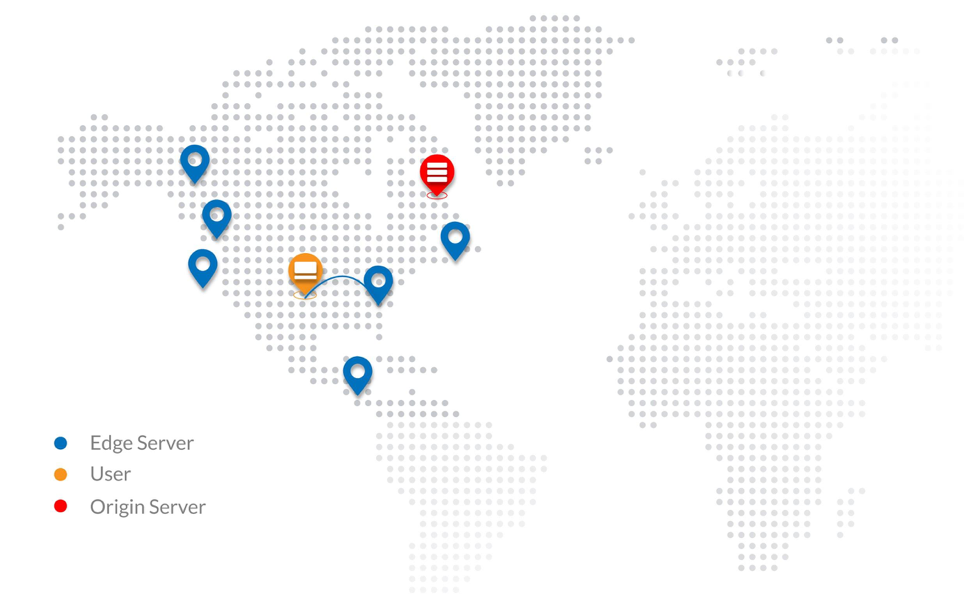
    • This CDN is globally distributed, consequently, traffic is routed to the nearest edge location helping to improve the user experience and speed.
    • It helps improve application speed by caching static/dynamic content coming from the Amazon S3 or EC2 (origins).
    • It helps reduce AWS bandwidth costs coming from the amazon s3 due to its caching magic.
    • Similarly, It’s used as a video hosting solution for media/video streaming.
    • It’s built to improve application performance and scalability by granting low latency.
    • CloudFront can help to secure your backend instances and filter common botnets/DDoS attacks. This is achieved with the help of an AWS WAF.
    • It decreases the load on web instances, enabling you to use less AWS resources.
    • It has support for security certificates (SSL/TLS).

    So, what do you need to know to integrate your Laravel application with CloudFront CDN? Mainly, it’s recommended to have an additional subdomain (C-Name Record) for this CloudFront edge location, i.e., cdn.company.com. Also, as discussed, static content should be placed on an Amazon S3 bucket and Cloudfront will pull the data from the origin (S3 bucket).

    Next, you need to create a CloudFront distribution where all content will be distributed across the edge locations; thus, end-user content will start getting cached. And that’s it—it should take you a few hours to set it up, considering you have your Laravel code-base pointing to Amazon S3.

    Practice No. 6: Amazon VP

    Amazon Virtual Private Cloud (VPC) is a logical network on the AWS Cloud; it lets you build multiple isolated logical networks inside your infrastructure. Creating a VPC network as well as robust subnets is essential to growing architect and structure applications in multiple groups/departments. AWS Networking (Amazon VPC) has various features including subnet creation, route tables, own IP ranges, network ACLs, AWS security groups (network firewall), network gateways, hardware virtual private network (VPN) creation and more.

    When deploying a VPC for your SaaS Laravel application, you must ensure that web instances, databases and backend services are all included on a private subnet, and that the ALB is added on a public subnet. With this network topology, consider deploying a VPN to access your private network.

    Your SaaS Laravel application can be transformed into a superbly secure logical network, complying with one of the multiple PCI/HIPAA/FedRamp requirements.

    Practice No. 7: AWS ElastiCache (Redis and Memcached)

    Introduce AWS Elasticache to your Laravel application to provide higher throughput and lower latency retrieved from your database.

    AWS ElastiCache is a caching and data storage system that is fully scalable, available and managed, aimed to improve application performance of distributed cache data and in-memory data structure stores. It’s an in-memory key/value store for Memcached and Redis engines. With a few clicks you can run this AWS component entirely self-managed.

    A few benefits of AWS Elasticache:

    • It reduces workload on the backend (database and processing)
    • It improves application speed by caching data.
    • It helps to scale and architect modern applications.
    • It manages and stores your application session.
    • It reduces low latency.
    • It can scale from one to many nodes.

     AWS ElastiCache use cases:

    • Real-time transactions.
    • Real-time chats.
    • Analytics and BI.
    • Session store (session management).
    • Data caching.
    • As a queuing system.

    The difficulty here is knowing how to use AWS ElastiCache with your application functionality and what application modules can be handled by your caching system. The integration from your PHP Laravel framework to the AWS component is a three-step process:

    1. Deploy AWS ElastiCache and identify your Redis endpoint and port.
    2. Deploy predis/Redis package via Composer
    3. Connect your config/database.php file with your Redis endpoint

    Thus, the dev team must figure out what pieces of your application can be used with AWS ElastiCache to improve high performance and throughput.

    Practice No. 8: Route 53

    Switch from Godaddy DNS to AWS Route 53.

    Your DNS might be managed by GoDaddy, but it is a vital practice that the entire DNS domain is controlled by Route 53. This AWS component can act as a DNS load balancer to route traffic according to latency, and helps to scale modern cloud-native applications.

    Amazon Route53 is a modern DNS manager service designed to scale and improve high availability from the DNS perspective. Similarly, it has the ability to act as an API and can interoperate with your API Laravel application. It also introduces the agility necessary to deploy scalable applications and useful to integrate to Amazon EC2 instances, Elastic Load Balancing (ELB) and Amazon S3 buckets. I highly recommend that modern Laravel SaaS applications be migrated to Amazon Route 53—not just the application, also the DNS records and domain name. Here’s more on how to migrate your Godaddy DNS to Amazon Route 53.

    Need more redundancy and improve response? Create a new environment in different AWS region and deploy AWS Route53 with routing policies.

    Some Amazon Route53 features:

    • Health checks. Route53 can monitor your applications for outages or downtimes. Also, it can be used as a monitoring system. (just a basic one; it won’t replace a monitoring system.)
    • DNS failover routing policy. As the name states, you can obtain a failover solution on the DNS level, separating your SaaS PHP application on two environments, primary and backup waiting to jump in case the primary fails. This brings us more resiliency and high availability.
    • DNS latency routing policy. This policy directs traffic requests to the lowest latency between the end user and the application environment. As a result, application speed and UX improvements.
    • Geographic routing policy. This routing policy lets your requests be routed to the same physical region where you are located. Similar outcomes from the previous point, degrade latency.

    A common misunderstanding is that DNS Failover (Amazon Route53 Failover) is not the same as load balancer failover, Haproxy failover or Heartbeat.

    Practice No. 9: Why Not AWS EFS?

    At Clickit, we used to architect SaaS Laravel applications with AWS EFS, but using EFS for sharing code across multiple instances behind an AWS autoscaling slows the application performance and introduces another network layer to the scalability equation. AWS EFS was a promising NAS replacing NFS, but evidently, when working with remote storage shared within a cluster of instances, there is no way to avoid the network latency. However, AWS EFS can be used for multiple activities, including disaster recovery, improved NFS solution and elastic file storage.

    It’s not recommended to include AWS EFS in your AWS architecture’s equation, due to the network latency that can cause serving your code base or static content.

    Practice No. 10: Scaling with Lambda

    AWS Lambda

    Over the past 10 years, AWS has revolutionized the cloud, with its pay-as-you-go model, auto scaling, DevOps, microservices and now serverless (Lambda). In 2014, AWS Lambda was released with the premise to run code without servers, introducing the paradigm of serverless applications with minimal IT operations (NoOps) and jumping all *aaS ecosystems up to executing code per events only when needed—again, fully scalable, redundant and with the pay-per-use pricing model. With Lambda you are charged for the milliseconds consumed, number of requests and compute. More info on the Lambda AWS official resource is here.

    Lambda is 100 perent no Operations (NoOps).

    Some Lambda use cases:

    • Serverless web applications. Lambda can be handled to process the application logic of any front-end application (Angular, react and HTML)—for instance, sending emails or processing forms requiring a Laravel backend process/job.
    • Disaster recovery and backups. Planning to script your backups inside an EC2 instance? Why don’t you move your bash scripts to a python Lambda function?
    • Lambda and API gateway. Lambda is commonly combined with AWS API gateway. Any logic that is required by your API gateway is handled by lambda—for instance, to process persistent data to RDS or JSON calls coming from the AWS API gateway.
    • Process hot data. Lambda can transition data from Amazon S3 to Kinesis, DynamoDB or RDS. Another good use is for recording, processing and converting video files composed of AWS Elastic Transcoder, S3 and Lambda.
    • Scheduled events, workers and jobs. Lambda can replace your cronjobs, workers and long-processing jobs that are hosted on a single EC2 instance as a cronjobs/workers.
    • Build IoT and mobile backend. Develop your entire digital product (IoT and Mobile) with serverless and NoOps, composed of AWS Lambda, AWS API Gateway and the mobile hub.

    How to integrate your Laravel PHP application with Lambda is up to your imagination. But you can initiate with the presented Lambda scenarios.

    Why Did I Not Include AWS Beanstalk?

    There’s one component that we did not outline about. AWS Beanstalk is a platform-as-a-service (PaaS) platform that lets us build, deploy and scale cloud-native applications with minimal maintenance. AWS Beanstalk is comparable to Heroku, but for the AWS platform. It has his pros and cons, and in this article, we established a different approach without AWS Beanstalk due to various indicators including slow deployments, custom configurations that are challenging to achieve and difficult to maintain (stack upgrades) and complicated troubleshooting due to lack of flexibility in the AWS infrastructure.

    What Have We Learned?

    We explored how AWS can be the key to the application success and how AWS can help serve a million users by an eloquent architecture with the 10 AWS practices, 12-factor methodology and DevOps Automation. We have learned crucial AWS components to scale and architect Laravel SaaS applications, which are also applicable to the enterprise. Additionally, we described the essence of each AWS component, uses cases and an overview of how to tackle each principle. By applying these measures to your web application, you are systematically converting a cloud-native application. Finally, once on board  the AWS cloud, you have joined the journey to the continuous digital transformation that the AWS cloud is pulling us by inertia.

    — Alfonso Valdés