
It is not easy to subsist in a modern cloud ecosystem. However, there are solid principles that will help you to build a perfect AWS architecture for your Laravel application, including the 12-factor methodology, design applications with a stateless approach and decoupling service components.
I’m sure you are adopting many of these principles already. However, I will cover merely the relevant to the AWS Laravel architecture and AWS Auto Scaling to maximize infrastructure robustness.
12-Factor App Methodology Key Principles
Application config files: These should be outside of the codebase, and these config files are replaced with environment variables, i.e., Db connections, secrets, environment, hosts, IP, etc.
Application dependencies: These shouldn’t be in your codebase; instead, use a dependency management tool to declare your large dependencies and libraries required from the server. i.e., Gemfile, site-packages, pom.xml, manifests, etc.
Use a control versioning system (CVS): It is necessary to integrate the Git workflow. i.e., Github, bitbucket or AWS CodeCommit.
Stateless applications and processes: It’s crucial that your application doesn’t store any data in the local file system or is dependable from a persistent state in the application or server. In other words, the application/server can be turned off and re-created without losing any data. Only persistent data is stored in databases or backend services.
In case of application failure, splitting components as much as possible and make them independable to others will result in an easy analysis and isolated issue.
Immutable infrastructure: Instances shouldn’t be modified after provisioned, and there should be a standard base image (AWS AMI) that is regularly updated and patched. As a result, you’ll get an AWS auto-scaling that works smoothly, with fewer deployment failures and consistent infrastructure.
Dev, test and production parity: It’s crucial that these environments should be as similar as possible, regarding software, libraries, database data and code. Furthermore, it’s possible to close the gap across all environments using a CVS, repeatable infrastructure and continuous integration/delivery (CI CD).
CI/CD: As the application and traffic grow, you need to implement a mechanism to release code to your different instances and enterprise environments. It is essential to design a continuous delivery workflow to improve development productivity with scalability, multiple environments and a distributed architecture.
Evidently, these architecture design principles are part of the DevOps culture, which is in the plans of many CTOs, engineering directors and VPs.
10 Best Practices to Scale and Architect Your SaaS Laravel Application on AWS
Here are what we consider to be the 10 best practices to design, architect and build your PHP Laravel application to help you resolve issues around how to architect and scale a Laravel application, and which technologies are relevant for your product to align them with your PHP Laravel codebase.
Practice No. 1: Amazon S3
In my perspective, Amazon S3 is the second component that boosted the evolution of the cloud, just behind the pay-as-you-go model with cloud scalability. Amazon S3 is an unlimited cloud storage with superb capabilities, including 99.99 percent of durability and high availability, object-based storage acting as an API and with the ability to host static websites based on HTML, Angular and React! Amazon S3 Cloud storage can be a serverless application without much effort.
Amazon S3 is reliable, scalable and secure with no real configuration needed.
The first step to scale and architect your Laravel application is to separate all static content (media, images, video, docs, etc.) to Amazon S3. This split allows distributing the application’s requests in parallel, dynamic content served by the EC2 instance (web server) and the rest with Amazon S3. This is a DevOps and development effort, where all static content on your Laravel project is pointed to the Amazon S3 endpoint.
Technically, you need to move your actual content into Amazon S3 buckets, set the correct IAM roles/permissions to allow read access, and configure your Laravel driver to point to Amazon S3. (Here are more details about how to integrate Amazon S3 with Laravel.)
Amazon S3 can host static websites and front-end applications (HTML, Angular, React and more) in a manner that is fully scalable, redundant and serverless. From my experience, I recommend to host your static websites on Amazon S3. The presented practice can be performed with a few steps and no servers needed (Serverless).
Practice No. 2: Horizontal Scaling with AWS Auto Scaling (Load Balancer)
The next AWS component in the pipe is AWS Auto Scaling. This fantastic feature revolutionized the scalability paradigm. Before AWS Auto Scaling, there was merely manual scaling, and reacting to different traffic events was difficult to converge and caused several failures.
It’s vital to consider that AWS Auto Scaling is not the same as a load balancer; it’s common to confuse these two terms.
AWS Auto Scaling scales dynamically behind a load balancer (AWS Application Load Balancing), which is defined by a set of scaling policies (thresholds/limits) that must occur to scale up and down. The instances can scale up and down based on predefined criteria for CPU, RAM or any other instance metric, allowing you to save money and unneeded AWS resources.
Primarily, to deploy AWS Auto Scaling you need to:
- Set up AWS Application Load Balancer
- Define a threshold for triggering the autoscaling event on AWS CloudWatch
- Determine a min/max servers amount
- Set an AWS Auto Scaling group, AWS Auto Scaling launch configuration pre-configure O.S. with an Amazon Machine Image (AMI).
Practice No. 3: AWS RDS Aurora with Replication
Amazon RDS, it’s a database managed service, which requires minimal maintenance and is compatible with MySQL, PostgreSQL, Oracle and more. The RDS is a self-maintained database with a pre-configured database, software updates, patches and automated backups. To scale and cluster an Amazon RDS, first you need to enable RDS replication feature, which grants your RDS the capacity to create replicas and establish master-slave relationships with those replicas, similar to MySQL/PostgreSQL replication; this can be achieved with just a few clicks. You can enable RDS Aurora with a replica (slave database), which this replica can be allocated in other availability zones to ensure more availability.
 Aurora RDS Replication
Similarly, Amazon Aurora is the high-performance database from AWS, which combines high speed, high availability and performance. According to AWS, Aurora is 5X faster than a standard MySQL or 3X faster than PostgreSQL.
Amazon Aurora is the high-performance database from AWS, if you are planning to improve your database throughput. You should definitely consider Aurora.
Hint: AWS Aurora with replication and/or Multi-AZ availability can be expensive, take precautions with your cloud hosting budget. You can review our “AWS Cost optimization checklist” to reduce your AWS billing.
Practice No. 4: Application Load Balancing (Laravel Load Balancer)
Some years ago, Amazon introduced the Application Load Balancing (ALB), which is a layer 7 LB. It has multiple benefits including the capacity to balance requests by domain/URL and not just by port/protocol. It also supports the inclusion of multiple SSL certificates. It is significantly cheaper than the ordinary Load Balancer service, and it’s billed by request. One relevant fact about ALB is that you don’t need multiple load balancers for integrating different APIs/domains.
That being said, I recommend to architect your Laravel application based on an ALB Auto Scaling integration. It’s a must to have a load balancer enabled to scale and grow your SaaS Laravel application. You can balance your HTTP/https services, APIs and any web socket. Lastly, It’s evident that the ALB was natively built for microservice environments with Docker, AWS ECS and Kubernetes, but it can also be used with a monolithic approach, as presented on this architecture.
Practice No. 5: CloudFront CDN
Now that you have Amazon S3 running in your application, we need to introduce CloudFront CDN in front of Amazon S3 and save bandwidth!
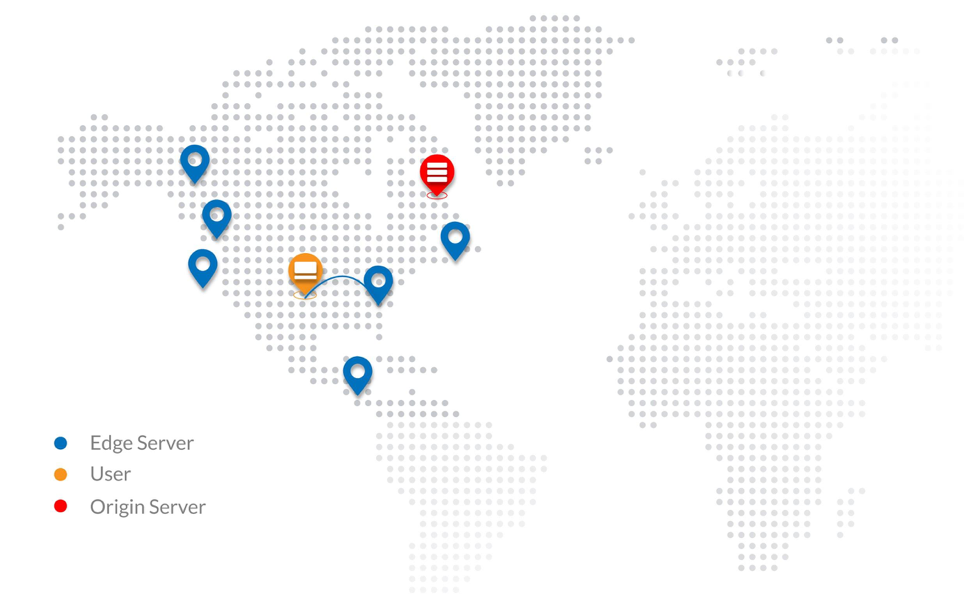 Amazon CloudFront CDN is an amazing component with numerous features to highlight and collaborates commonly along with Amazon S3. Amazon CloudFront, it’s a content delivery network aimed to cache content, distribute requests, serve video content and much more features.
Some CloudFront capabilities:
- This CDN is globally distributed, consequently, traffic is routed to the nearest edge location helping to improve the user experience and speed.
- It helps improve application speed by caching static/dynamic content coming from the Amazon S3 or EC2 (origins).
- It helps reduce AWS bandwidth costs coming from the amazon s3 due to its caching magic.
- Similarly, It’s used as a video hosting solution for media/video streaming.
- It’s built to improve application performance and scalability by granting low latency.
- CloudFront can help to secure your backend instances and filter common botnets/DDoS attacks. This is achieved with the help of an AWS WAF.
- It decreases the load on web instances, enabling you to use less AWS resources.
- It has support for security certificates (SSL/TLS).
So, what do you need to know to integrate your Laravel application with CloudFront CDN? Mainly, it’s recommended to have an additional subdomain (C-Name Record) for this CloudFront edge location, i.e., cdn.company.com. Also, as discussed, static content should be placed on an Amazon S3 bucket and Cloudfront will pull the data from the origin (S3 bucket).
Next, you need to create a CloudFront distribution where all content will be distributed across the edge locations; thus, end-user content will start getting cached. And that’s it—it should take you a few hours to set it up, considering you have your Laravel code-base pointing to Amazon S3.
Practice No. 6: Amazon VP
Amazon Virtual Private Cloud (VPC) is a logical network on the AWS Cloud; it lets you build multiple isolated logical networks inside your infrastructure. Creating a VPC network as well as robust subnets is essential to growing architect and structure applications in multiple groups/departments. AWS Networking (Amazon VPC) has various features including subnet creation, route tables, own IP ranges, network ACLs, AWS security groups (network firewall), network gateways, hardware virtual private network (VPN) creation and more.
When deploying a VPC for your SaaS Laravel application, you must ensure that web instances, databases and backend services are all included on a private subnet, and that the ALB is added on a public subnet. With this network topology, consider deploying a VPN to access your private network.
Your SaaS Laravel application can be transformed into a superbly secure logical network, complying with one of the multiple PCI/HIPAA/FedRamp requirements.
Practice No. 7: AWS ElastiCache (Redis and Memcached)
Introduce AWS Elasticache to your Laravel application to provide higher throughput and lower latency retrieved from your database.
AWS ElastiCache is a caching and data storage system that is fully scalable, available and managed, aimed to improve application performance of distributed cache data and in-memory data structure stores. It’s an in-memory key/value store for Memcached and Redis engines. With a few clicks you can run this AWS component entirely self-managed.
A few benefits of AWS Elasticache:
- It reduces workload on the backend (database and processing)
- It improves application speed by caching data.
- It helps to scale and architect modern applications.
- It manages and stores your application session.
- It reduces low latency.
- It can scale from one to many nodes.
AWS ElastiCache use cases:
- Real-time transactions.
- Real-time chats.
- Analytics and BI.
- Session store (session management).
- Data caching.
- As a queuing system.
The difficulty here is knowing how to use AWS ElastiCache with your application functionality and what application modules can be handled by your caching system. The integration from your PHP Laravel framework to the AWS component is a three-step process:
- Deploy AWS ElastiCache and identify your Redis endpoint and port.
- Deploy predis/Redis package via Composer
- Connect your config/database.php file with your Redis endpoint
Thus, the dev team must figure out what pieces of your application can be used with AWS ElastiCache to improve high performance and throughput.
Practice No. 8: Route 53
Switch from Godaddy DNS to AWS Route 53.
Your DNS might be managed by GoDaddy, but it is a vital practice that the entire DNS domain is controlled by Route 53. This AWS component can act as a DNS load balancer to route traffic according to latency, and helps to scale modern cloud-native applications.
Amazon Route53 is a modern DNS manager service designed to scale and improve high availability from the DNS perspective. Similarly, it has the ability to act as an API and can interoperate with your API Laravel application. It also introduces the agility necessary to deploy scalable applications and useful to integrate to Amazon EC2 instances, Elastic Load Balancing (ELB) and Amazon S3 buckets. I highly recommend that modern Laravel SaaS applications be migrated to Amazon Route 53—not just the application, also the DNS records and domain name. Here’s more on how to migrate your Godaddy DNS to Amazon Route 53.
Need more redundancy and improve response? Create a new environment in different AWS region and deploy AWS Route53 with routing policies.
Some Amazon Route53 features:
- Health checks. Route53 can monitor your applications for outages or downtimes. Also, it can be used as a monitoring system. (just a basic one; it won’t replace a monitoring system.)
- DNS failover routing policy. As the name states, you can obtain a failover solution on the DNS level, separating your SaaS PHP application on two environments, primary and backup waiting to jump in case the primary fails. This brings us more resiliency and high availability.
- DNS latency routing policy. This policy directs traffic requests to the lowest latency between the end user and the application environment. As a result, application speed and UX improvements.
- Geographic routing policy. This routing policy lets your requests be routed to the same physical region where you are located. Similar outcomes from the previous point, degrade latency.
A common misunderstanding is that DNS Failover (Amazon Route53 Failover) is not the same as load balancer failover, Haproxy failover or Heartbeat.
Practice No. 9: Why Not AWS EFS?
At Clickit, we used to architect SaaS Laravel applications with AWS EFS, but using EFS for sharing code across multiple instances behind an AWS autoscaling slows the application performance and introduces another network layer to the scalability equation. AWS EFS was a promising NAS replacing NFS, but evidently, when working with remote storage shared within a cluster of instances, there is no way to avoid the network latency. However, AWS EFS can be used for multiple activities, including disaster recovery, improved NFS solution and elastic file storage.
It’s not recommended to include AWS EFS in your AWS architecture’s equation, due to the network latency that can cause serving your code base or static content.
Practice No. 10: Scaling with Lambda

Over the past 10 years, AWS has revolutionized the cloud, with its pay-as-you-go model, auto scaling, DevOps, microservices and now serverless (Lambda). In 2014, AWS Lambda was released with the premise to run code without servers, introducing the paradigm of serverless applications with minimal IT operations (NoOps) and jumping all *aaS ecosystems up to executing code per events only when needed—again, fully scalable, redundant and with the pay-per-use pricing model. With Lambda you are charged for the milliseconds consumed, number of requests and compute. More info on the Lambda AWS official resource is here.
Lambda is 100 perent no Operations (NoOps).
Some Lambda use cases:
- Serverless web applications. Lambda can be handled to process the application logic of any front-end application (Angular, react and HTML)—for instance, sending emails or processing forms requiring a Laravel backend process/job.
- Disaster recovery and backups. Planning to script your backups inside an EC2 instance? Why don’t you move your bash scripts to a python Lambda function?
- Lambda and API gateway. Lambda is commonly combined with AWS API gateway. Any logic that is required by your API gateway is handled by lambda—for instance, to process persistent data to RDS or JSON calls coming from the AWS API gateway.
- Process hot data. Lambda can transition data from Amazon S3 to Kinesis, DynamoDB or RDS. Another good use is for recording, processing and converting video files composed of AWS Elastic Transcoder, S3 and Lambda.
- Scheduled events, workers and jobs. Lambda can replace your cronjobs, workers and long-processing jobs that are hosted on a single EC2 instance as a cronjobs/workers.
- Build IoT and mobile backend. Develop your entire digital product (IoT and Mobile) with serverless and NoOps, composed of AWS Lambda, AWS API Gateway and the mobile hub.
How to integrate your Laravel PHP application with Lambda is up to your imagination. But you can initiate with the presented Lambda scenarios.
Why Did I Not Include AWS Beanstalk?
There’s one component that we did not outline about. AWS Beanstalk is a platform-as-a-service (PaaS) platform that lets us build, deploy and scale cloud-native applications with minimal maintenance. AWS Beanstalk is comparable to Heroku, but for the AWS platform. It has his pros and cons, and in this article, we established a different approach without AWS Beanstalk due to various indicators including slow deployments, custom configurations that are challenging to achieve and difficult to maintain (stack upgrades) and complicated troubleshooting due to lack of flexibility in the AWS infrastructure.
What Have We Learned?
We explored how AWS can be the key to the application success and how AWS can help serve a million users by an eloquent architecture with the 10 AWS practices, 12-factor methodology and DevOps Automation. We have learned crucial AWS components to scale and architect Laravel SaaS applications, which are also applicable to the enterprise. Additionally, we described the essence of each AWS component, uses cases and an overview of how to tackle each principle. By applying these measures to your web application, you are systematically converting a cloud-native application. Finally, once on board the AWS cloud, you have joined the journey to the continuous digital transformation that the AWS cloud is pulling us by inertia.

