Category: Application Performance Management/Monitoring

  • JumpCloud Brings Zero-Touch Provisioning to the Mac

    JumpCloud Brings Zero-Touch Provisioning to the Mac

    JumpCloud today announced it is adding a zero-touch enrollment for Macs capability to its cloud directory platform that will also be extended over time to applications.

    Greg Keller, JumpCloud CTO, said this new capability extends Apple Business Manager, formerly known as Apple Device Enrollment Program (DEP), all the way down to specific users by leveraging data that resides in the JumpCloud platform.

    Whenever a user logs into a new Mac, it can automatically be synchronized with the JumpCloud Directory, which then uses the identity of that end user to configure the device in addition to providing the appropriate access to all corporate resources via their JumpCloud credentials.

    Keller said the need for zero-touch approaches to IT administration has become more acute in the wake of the COVID-19 pandemic. With employees working from home more frequently even after the pandemic eventually subsides, Keller noted the days when IT teams could physically provision a Mac are on the wane.

    While Apple Macs still represent less than 10% of all the PCs shipped in a year, Keller noted small-to-medium (SMB) businesses are adopting Macs at a faster rate than large enterprises. As the endpoints become more diverse, Keller said the JumpCloud platform provides an alternative to Microsoft Active Directory for managing both Windows and Mac devices. Apple, of course, last year acquired Fleetsmith to gain access to provisioning tools. However, those tools are not yet integrated with any type of directory.

    Most recently, JumpCloud has added a tool that enables IT teams to remotely install software onto end user Windows devices, as well as integrations with Slack, Salesforce, Atlassian, GitHub and Amazon Web Services (AWS).

    Fresh from raising an additional $100 million in funding, JumpCloud is making a case for a zero-trust approach to managing endpoints using a directory that verifies the identity of each end user. JumpCloud, which makes a free edition of its platform available for individuals and small teams, is already being used by more than 100,000 organizations spanning more than a hundred countries. More than 3,700 of those organizations, including Cars.com, GoFundMe, Nimbus Therapeutics, Grab, Pulselive, SlimPay, Foursquare, Beyond Finance and Funding Societies, are paying customers.

    In the longer term, there may come a day when verbal commands are employed to provision endpoints for specific end users. In the meantime, the process of configuring and provisioning those endpoints is becoming more automated. IT teams are now able to remotely manage fleets of endpoint devices without having to physically touch them. In fact, there may be no need for IT managers to return to an office, as tasks become increasingly automated and able to be performed remotely.

    While there are a lot of options available to achieve that goal, Keller said the number of them that are tightly integrated with a directory to ensure the right system winds up in the right end user’s hands is few and far between. The challenge now is getting organizations to rethink their directory requirements at a time when IT teams are increasingly expected to deliver personalized, white-glove services regardless of where an end user is located.

  • Sonatype Acquires MuseDev to Add Code Analysis

    Sonatype Acquires MuseDev to Add Code Analysis

    Sonatype today revealed it has acquired MuseDev, a provider of a code analysis tool, in addition to updating its Nexus platform for discovering vulnerabilities in software supply chains.

    Muse analyzes code each time a pull request is made, which makes it easier for developers to discover and address issues long before they commit code. Muse is integrated with 24 pre-configured code analyzers for GitHub, GitLab and Bitbucket repositories. It then analyzes each pull request to surface bugs, as part of automated code review, and includes analysis of interprocedural information flow and thread safety issue analysis, along with guidance to fix any bugs discovered.

    In addition to adding support for Muse, the latest edition of the Nexus platform integrates a container firewall from NueVector along with a set of tools for identifying and providing guidance on how to address misconfiguration issues that frequently arise when developers employ open source Terraform software to programmatically manage infrastructure as code.

    Finally, Sonatype added tools to provide better guidance on the implications of open source licensing terms attached to various projects, while at the same time starting its own community for organizations migrating from Bintray and JCenter, now that those tools have been sunsetted.

    Brian Fox, Sonatype CTO, said the expectation is Muse will create an opportunity to introduce the complete DevSecOps portfolio to developers as they analyze code. Most developers are keenly interested in both optimizing and securing their code. They would just prefer to achieve that goal on their own versus being informed of an issue after code has been committed to a repository managed by a larger DevOps team, noted Fox.

    An advanced development pack was added to the Nexus platform last year to make it easier to surface dependencies in code that are vulnerable to threats. It applies machine and deep learning algorithms to automatically identify and block software supply chain attacks based on typosquatting and malicious code injections. Collectively, these tools give developers control over third-party open source code, first-party source code, infrastructure as code and containerized code, Fox said.

    Sonatype claims it now counts 70% of the Fortune 100 as customers, and supports more than 2,000 commercial engineering teams. In 2020, it claimed it saw a 35% annual growth in Nexus repository installs, which now stands at more than 250,000 instances employed by nearly 15 million developers.

    Overall, it’s not clear how much progress is being made toward embracing DevSecOps best practices. Sonatype, however. is making a case for putting DevSecOps tools directly into the hands of developers to address software supply chain security. In the wake of some recent high-profile breaches involving software supply chains, that approach may soon gain additional traction. After all, for all the encouragement being provided by application development team leaders these days, there’s nothing quite as effective as providing developers with a set of tools that enables them to achieve that goal on their own terms versus requiring them to follow a set of procedures dictated by a DevOps management team.

  • VMware Enhances Management Portfolio

    VMware Enhances Management Portfolio

    VMware today rolled out a series of updates to its automation and monitoring portfolio as part of an ongoing effort to simplify management of highly distributed IT environments.

    Updates to the VMware vRealize Cloud automation portfolio include VMware vRealize Automation 8.4’s tighter integration with the open source Salt automation framework the company gained by acquiring SaltStack last year, in addition to a range of tools for provisioning and governing instances of VMware software running on Google Cloud, Microsoft Azure and VMware Cloud on Amazon Web Services (AWS).

    There is also a set of tools to enable organizations running NSX network virtualization software for vSphere to migrate to NSX-T, an instance of network virtualization software that can be deployed anywhere.

    VMware vRealize Operations, meanwhile, is being updated to support a total of 57 AWS services along with the ability to predict the cost of deploying VMware Cloud on AWS. The latter capability includes tracking potential savings generated by powering off idle or unused virtual machines as well as snapshots, orphaned disks and oversized virtual machines. There are also now ten additional dashboards for tracking various costs, including return on investment, total cost of ownership and potential cost savings. IT teams can also more easily track capacity utilization trends on AWS.

    VMware is adding support for the open source Telegraf Agent to enable IT teams to collect metrics from any platform, in addition to providing an update to VMware vRealize Log Insight 8.4 and vRealize Log Insight Cloud that enables these monitoring tools to store data collected from multiple cloud services more efficiently. IT teams will also be able to collect logs from both Microsoft Azure and AWS.

    Finally, VMware is expanding its network monitoring tools to provide greater visibility across multiple clouds.

    Fidelma Russo, senior vice president and general manager for cloud services at VMware, said the rate at which IT teams are consuming the software-as-a-service (SaaS) editions of VMware management and observability tools or full-blown managed services has increased sharply since the start of the COVID-19 pandemic, as IT teams managed on-premises and cloud instances of VMware software from home.

    It’s not clear what percentage of VMware’s installed base are now consuming the company’s automation and monitoring tools, but as the number of VMware instances deployed on public clouds increases alongside on-premises IT environments, so, too, do the management challenges. The choice IT teams generally have to make is deciding between automation and observability tools that are optimized for a specific platform versus adopting frameworks that work more broadly. With the acquisition of Salt and support for Telgraf, it is apparent VMware is moving to expand the reach of its management portfolio beyond its own software.

    In the meantime, IT teams are not only being asked to manage more complex IT environments, but the expectation that, through automation, they will be able to more effectively implement cost controls. This is happening at a time when many organizations have not been quite so sensitive to the total cost of IT. The challenge, of course, is those organizations are being asked to spend money on automation today in the hopes of spending less because of it tomorrow.

  • ServiceNow Adds Low-Code Tool to Platform

    ServiceNow Adds Low-Code Tool to Platform

    ServiceNow today made available an update, dubbed Quebec, to its Now platform that adds a set of low-code application development tools.

    Marcus Torres, general manager for IntegrationHub and vice president of platform product management at ServiceNow, said the Creator Workflows tool leverages existing App Engine and IntegrationHub capabilities in the platform to make it possible for both end users and professional developers to build custom applications faster using a visual development tool dubbed App Engine Studio. A set of templates that provide a set of pre-built workflows is also included.

    The goal is to make it easier to develop applications that would otherwise not be built because professional developers, using existing tools, would simply not have the time, Torres said.

    The Quebec release of the software-as-a-service (SaaS) platform is also used for IT operations management (ITOM), adding artificial intelligence (AI) capabilities in the form of ITOM Predictive AIOps that surfaces potential issues before they become a major issue. It is now also easier to set up the virtual agents that ServiceNow makes available to enable conversational AI, and there is now an AI search capability built into the ServiceNow portal. ServiceNow gained these capabilities via its recent acquisitions of Loom Systems and Attivio.

    Finally, ServiceNow has added process optimization and workforce optimization modules, along with an engagement messenger module that extends the self-service capabilities it provides to third-party portals, and a universal request tool that enables agents to collaborate and transfer tickets across departments while keeping employees informed of the status of their ticket.

    Thanks to the general enthusiasm for digital business transformation initiatives being accelerated in the wake of the COVID-19 pandemic, reliance on low-code tools to build applications has significantly increased. The challenge organizations encounter, however, is that a low-code tool can build a relatively simple application. However, development means may need to drop down to a lower level of abstraction to address more complex issues as an application continues to evolve. The Creator Workflows tool from ServiceNow is designed to provide development teams with that option.

    In general, ServiceNow is making a case for building applications on the same platform that many IT organizations already employ to manage IT. Many organizations already take advantage of workflows that ServiceNow has built to extend its core platform to address a wide range of uses cases involving, for example, human resources applications. The addition of the low-code tool will make it easier for IT teams to create applications that address use cases unique to their organization.

    Of course, there is no shortage of options when it comes to low-code and no-code tools these days. IT teams will need to decide to what degree platform-specific low-code tools make sense versus adopting low-code tools that enable them to build applications that can be deployed anywhere. Regardless of the path forward, however, it’s clear the number of applications that need to be deployed is dramatically increasing with each passing day.

  • How to Eliminate Incident Inefficiencies

    How to Eliminate Incident Inefficiencies

    In today’s complex, dynamic IT environments, the proliferation of disparate IT Ops, NOC, DevOps and SRE teams and tools is a given – and usually considered a necessity. This leads to the inevitable truth that when an incident happens, often the biggest challenge is collaborating between these teams to understand what happened and resolve the issue. Inefficiencies suffered during this critical stage can have huge impacts on how much each incident costs the business.

    I recently sat down (virtually) with Sid Roy, VP of client services at Scicom, to get a deeper understanding of how IT leaders can more effectively size up these inefficiencies and eliminate them.

    The Costs of IT Incidents

    When asked what a minute of downtime costs, analysts and vendors may provide different answers – but they are more or less aligned around the same order of magnitude – several thousands of dollars per minute. And with an average of five major incidents a month and an average time of six hours for resolution, this easily amounts to millions of dollars a year.

    The three key drivers of these costs are:

    Staffing and team member costs: This includes full-time employees (FTEs), consultants, and overhead when other teams are pulled in to deal with the incident. For many organizations, this can include offshore incident response teams.

    The direct and indirect costs of an IT incident: This includes your infrastructure or capital expenditures like software licenses for monitoring, log and event management, notification, ticketing, collaboration, etc.

    The business impact of an IT incident: This is one of the most challenging and unpredictable variable costs to calculate or manage, and is often the highest of all three drivers. It includes revenue loss/delay or reduction due to a major incident, and the profit or loss due to brand or goodwill impact. It also includes inefficiencies suffered by other parts of the business when critical services they depend on are degraded or unavailable.

    Fragmented Teams Magnify the Challenge

    The incident volume, complexity and throughput obviously affect the number of people and amount of time needed to deal with them and often drive more indirect costs as needed resources pile up. To save on these millions of dollars of costs, you need to be able to collaborate and lower MTTR. As mentioned above, this becomes a challenge in agile IT environments. To help streamline operations, teams need to start asking and answering several key questions:

    • Do you have an up-to-date map of your critical services?
    • Are they prioritized by business criticality (revenue, number of customers, other supported services in the supply chain)?
    • What are the upstream and downstream dependencies of these applications?
    • Have you identified the major infrastructure and application elements in your environment?
    • Are you aligned with the owners of these systems?
    • Do you have real-time knowledge of changes being done to the infrastructure and applications?
    • Do you have monitoring gaps?
    • Which monitoring tools provide you with the best value?

    Answering these questions involves overcoming fragmentation across teams of people, processes and tools – essentially integrating ITSM and ITOM to enjoy the benefits of contextual full-stack visibility and streamlined processes within the organization.

    The Right Combination for Incident Response

    What is the right combination of people, processes and tools we just discussed? Here are the two main guidelines:

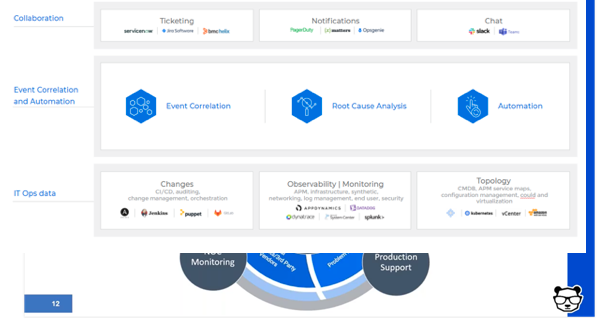
    • Set up a major incident management team – ideally, from your existing staff. This team includes three vital roles:
      • The incident manager/incident response commander. This is a designated role in charge of declaring a major incident and taking ownership of it. Their job is to, essentially, stop the bleeding of revenue and costs.
      • The NOC/monitoring team. This is your front line defense. When things go bump in the night or boom in the day, they’re the ones picking it up with their “eyes on the glass” – 24/7. And, they’re in charge of reporting and creating full situational awareness for the incident command through bidirectional communications.
      • The production support team. This team actually effects the required changes and executes the remediating action.
    • Deploy event correlation and automation tools to enable the incident management team. These tools are key, allowing your team to perform the required actions.
      • First, correlate the alerts created by your monitoring and observability tools into a drastically reduced number of high-level, insight-rich incidents by using machine learning and artificial intelligence (ML/AI). Add context to these incidents by ingesting and understanding topology sources, as well. This creates the necessary full-stack visibility and situational awareness.
      • Then, use ML and AI to determine the root cause of these incidents, including correlating them with data streams from your change tools: CI/CD, orchestration, change management and auditing to identify whether any changes in your environment caused these incidents.
      • Finally, automate as many processes as you can to free your IT Ops team from manual, time-consuming tasks. By integrating with collaboration tools, you can also enable the above-mentioned bidirectional communications.


  • LinearB Raises $16M for Software Delivery Intelligence

    LinearB Raises $16M for Software Delivery Intelligence

    LinearB announced today it has raised an additional $16 million in funding to advance adoption of a software delivery intelligence platform.

    Ori Keren, LinearB CEO, said rather than relying on antiquated processes that require software development teams to track progress by reentering data into a project management application, it’s now possible to automatically collect all the relevant data required from the tools and platforms being employed to build software.

    The LinearB platform correlates DevOps pipeline data gathered from code, Git, projects and releases to provide visibility and context to every member of the development team. LinearB employs machine learning algorithms to construct and correlate that data, in real-time, to provide accurate insights into project status. That’s critical, because it empowers every individual on that team to make informed decisions about which tasks to prioritize without waiting for an explicit directive, Keren said.

    LinearB will, in part, use the funding to build integrations with a wider range of DevOps platforms and tools, Keren added.

    Software delivery intelligence differs from value stream management (VSM) platforms; though they provide similar insights, those surfaced by LinearB are aimed at developers rather than C-level executives trying to optimize deployment of limited resources across multiple teams, said Keren. In many ways, the data collected by LinearB could be employed to better inform a VSM platform, Keren added.

    LinearB, in contrast, makes it easier to identify which teams and projects need additional help in near-real-time using metrics surfaced in a dashboard that track, for example, cycle times. The goal is to provide insights that make it easier to predict and eliminate project delays, remediate high-risk code before it is included in a production environment, eliminate bottlenecks and make certain the focus of the DevOps team remains on tasks of the highest priority.

    More than 1,500 software development teams are already using LinearB as an alternative to traditional project management applications. Most of those customers are building commercial applications, so the goal now is to extend the reach of LinearB into the enterprise, said Keren.

    LinearB, of course, doesn’t eliminate the need for project managers. However, it does eliminate the need for project managers to nag developers to update a project management application. Given the rate at which application development projects are now updated, much of the data in a project management application is outdated shortly after it is entered.

    There’s a lot of pressure on application development teams these days. Many projects have been accelerated as part of an effort to more rapidly embrace digital business transformation in the wake of the economic downturn brought on by the COVID-19 pandemic. The challenge for many developers is they, too, are working from home to help combat the spread of the virus. That often results in interactions with managers over video conferencing calls that lack context. Having access to a software development intelligence platform should enable everyone with a vested interest in application deployment speed to make more informed decisions faster.

  • Kong Integrates Service Mesh with OPA

    Kong Integrates Service Mesh with OPA

    Kong, Inc. today announced an update to Kong Mesh, built on top of open source Kuma service mesh, that adds support for Open Policy Agent (OPA) software that enables DevOps teams to manage compliance as code.

    Kuma and OPA are both being developed under the auspices of the Cloud Native Computing Foundation (CNCF). Kuma, unlike other service mesh offerings, provides connectivity across both microservices-based applications running on Kubernetes platform and monolithic applications deployed on virtual machines.

    In addition to adding support for OPA, the 1.2 release of Kong Mesh adds authentication mechanisms between the global and remote control planes operating across multiple zones. That functionality extends the Kuma Discovery Service (KDS) to support multiple authentication mechanisms.

    Finally, Kong has added support for the federal information processing standard (FIPS).

    Like the Istio service mesh, advanced by Google and IBM for Kubernetes environments, Kuma is based on open source Envoy proxy software. In contrast, however, Kuma is both lighter-weight and designed to span both cloud-native and legacy application environments.

    Marco Palladino, CTO at Kong, said OPA support will be a significant advance for both classes of workloads as organizations start to employ Kuma within the context of zero-trust computing environments. As DevSecOps processes are extended to include managing compliance as code, OPA will provide a programmable mechanism for ensuring that policies are not only properly implemented, but can also be easily audited, Palladino said.

    In general, an effort led by Kong, VMware and others to elevate the service mesh conversations to more broadly address application connectivity is underway. A service mesh, at its core, provides the means for integrating hundreds of application programming interfaces (APIs) at scale. It also provides a level of abstraction above the network layer that makes it easier to connect applications across a heterogeneous networking environment.

    Kong is making a case for a lighter-weight approach that spans multiple platforms and is highly extensible. As such, third-party vendors and IT teams can add extensions to Kuma as they see fit.

    Ultimately, Palladino said, the time has come to take cloud computing to the next level. If all organizations wind up doing is lifting and shifting monolithic applications to public clouds, an opportunity to advance the state of IT will have been lost.

    Of course, it’s still early days as far as adoption of service meshes are concerned. Most organizations today are relying on API gateways, proxy software or ingress controllers to manage APIs. It’s not clear to what degree a service mesh may remove the need for some of that existing application connectivity middleware.

    Regardless of which approach is ultimately favored, it’s apparent that, as microservices-based applications become more widely deployed, a different approach to application connectivity will be required. Monolithic applications, however, are not going away. In some cases, a monolithic application might be carved up into a smaller set of microservices, but it’s unlikely that every existing monolithic application will lend itself to that architecture any time soon.

  • Cloud Migration Monitoring: A Practical Guide

    Cloud Migration Monitoring: A Practical Guide

    Almost every organization has transitioned some operational systems to the cloud. DevOps professionals are an essential part of migration projects, facilitating the migration itself, and making sure applications work as expected and provide satisfactory performance after the migration.

    To make your next cloud migration a success, you must get monitoring right. Applications must be monitored at every stage of the migration—when the application is still running on-premises, during migration and once the new workload is running in the cloud.

    In this article, we will explain key metrics to track during your migration, monitoring considerations at every stage of the migration cycle, and free tools offered by the major cloud providers that can help you monitor your migration.

    What to Monitor During a Cloud Migration

    There are many components involved in a cloud migration process. There are several approaches to cloud migration—each migration is unique, and might necessitate setting up different metrics. However, there are several aspects that can be considered mandatory when monitoring your cloud migration process:

    • Tracking application traffic. Tracking application traffic can help you validate that application configurations are properly defined and validate the availability of the entire application. You should ensure that all requests arrive to the new server, and keep an eye on the error rate. Additionally, watch for response times to ensure your application is not exceeding the planned thresholds.
    • Tracking your costs. Tracking costs can help you ensure that you are not incurring unexpected losses. The majority of organizations migrate to the cloud to reduce their costs. However, incorrect implementation of cloud resources may lead to losses. You can gain visibility into your costs by leveraging first-party cloud tools, like AWS Billing, which natively integrate into the pipeline, monitor costs, and show visualized data in customized dashboards. You can also use these tools to set up alerts.
    • Monitoring application security. Application security monitoring can help you identify security vulnerabilities and incidents during and after the migration process. You should monitor infrastructure configurations, such as internal traffic, host open ports and instance processes that are actively accessing different services. Additionally, keep watch for API hits per second, which might indicate a distributed denial of service (DDoS) attack.

    Monitoring Aspects of the Migration Life Cycle

    Cloud service providers typically identify three main phases of the migration process, which are referred to as the plan, migrate and run phases.

    Plan Phase

    The plan phase helps you assess the performance levels of your applications before migrating. The goal is to achieve an in-depth understanding of how workloads are functioning pre-migration, as well as the current state of user experience. This data can then be used to establish performance benchmarks and baselines.

    Performance baselines, like error rates, page load times and slow transactions, can help you set up configuration alerts that keep track of outages across the cloud migration process. You can then quickly diagnose the situation and apply fixes that ensure application health during and after the migration.

    Here are several questions that can help you during the plan phase:

    1. What is the application baseline?
    2. How will the migration process affect user experience?
    3. What are the potential technical challenges expected during the migration process?
    4. Can the corporate network support additional bandwidth needs?
    5. What are the steps needed to start the migration process?

    Migrate Phase

    The migrate phase involves all processes required to securely move components from one location to another. During this process, you should continuously monitor performance to ensure user experience remains within the pre-established baseline. However, migrating to the cloud means you no longer have control over all configurations.

    To ensure application performance and stability during the migration process, you need to identify potential roadblocks and issues, and continuously monitor and validate the process. You should test critical aspects like application response time and call counts, and troubleshoot issues quickly.

    Run Phase

    The run phase starts right after the migration process is complete. During the post-migration phase, you need to establish proactive monitoring processes. The goal is to ensure your application performs well in the cloud; using the expected resources and without incurring overhead.

    When monitoring your application, keep track of service level agreements (SLAs) to ensure the cloud vendor meets the requirements agreed upon. You should also monitor for changes and review individual variables that might cause issues.

    Additionally, you should make sure all connections between applications are maintained after the migration.

    Free Cloud Migration Monitoring Tools

    The three major cloud providers—Amazon, Microsoft Azure and Google Cloud—provide tools that help automate migration to their clouds, and also assist with the crucial aspects of monitoring. These tools are offered free, because it is in the best interest of the cloud providers to allow easy, frictionless migration.

    The following table summarizes migration monitoring capabilities available from each cloud provider.

    Cloud Provider Tool

    What it Helps Monitor

    AWS Migration Services

    Helps automate migration of applications that rely on databases.

    • Continually monitors source and target databases
    • Able to restart failed migrations
    • Oversees continuous data replication
    • Integrates with first-party AWS monitoring tools

    Azure Migration Tools

    Provides a migration hub that lets organizations manage large migration projects.

    • Tracks migration process and current status for server and database migrations
    • Allows external tools to integrate and track migrations
    • Reports on compliance aspects of migrations

    Migrate for Google Compute Engine

    Formerly known as Velostrata, this tool automates migration of on-premises systems, with automated roll back in case of errors.

    • Validation of workloads for migration compatibility
    • Ongoing oversight of streaming data transfers
    • Ability to roll back migration to on-premises systems in case of error

    Monitoring is critical for a successful cloud migration, and it’s important to use monitoring at every stage of a cloud migration:

    • During the plan phase, establish a baseline of application performance before it is migrated to the cloud.
    • During the migration phase, carefully monitor application behavior and troubleshoot issues.
    • During the run phase, validate that the application performs as expected and is meeting SLAs.

    I hope this will be useful as you plan and execute your next cloud migration project.

  • Introduction to Materialized Views

    Introduction to Materialized Views

    More often than not, the types of queries that use materialized views are both faster, and use fewer resources than those that are still processing queries directly to base tables. But the key to understanding the potential that materialized views bring with them involves first understanding as much about them as possible.

    What is a Materialized View?

    In the world of computing, a materialized view is a database object made up of any results that were obtained from a query. Note that this could be a local copy of data that is also stored in a separate remote location, or it could have been derived from a join result. Sometimes, a materialized view could even be created after a user performed an aggregate function, thus allowing it to act as a summary of that database information.

    Oracle Database first made materialized views available in version 8i of their software, and it has been a part of every release since. Just a few of the environments that support materialized views include, but are not limited to, others like SQL Server, BigQuery, PostgreSQL and Sybase SQL Anywhere.

    View vs. Materialized View

    What’s the difference between a regular view versus a materialized view? There are a number of important things you’ll need to keep in mind.

    Chief among them, the fact that a view itself is a precise type of virtual table created via the “Create View” command. As the name suggests, it collects all data obtained from any relevant query that you’ve executed. A view will always be compiled every time it is either used or accessed in any way. This is how a view is able to make sure that you’re always getting the most updated data, no matter what – it’s literally designed to do that.

    If you make any changes to the data contained inside that view, it will get pushed out to the table in which it originated. Along the same lines, any changes made to that base table are automatically pushed to the view so that the same information is in both places at once.

    Because of this extra step, a view will always be a bit slower than a materialized view when it comes to performance. The upside is that this really doesn’t require much in the way of storage space. But it does mean that you’ll be sacrificing a bit in terms of performance.

    With a materialized view, you’re talking about a physical copy of the information contained in that original table. This means that it isn’t updated every time you interact with it – you have to go out of your way to update it manually. Or, if you’d prefer, you can have it update using pre-defined triggers.

    Because of this, a materialized view is always going to respond much faster than its traditional counterpart. However, if you don’t make an effort to confirm that it has been updated, you also run the risk of retrieving stale data.

    Why Use a Materialized View?

    So at this point, you’re likely asking yourself, “Why use a materialized view in the first place? What can this do for me that a simple view cannot?” The key thing to understand has to do with the costs that you accrue whenever a database is queried.

    Even a simple query still needs to be parsed, validated, planned, optimized and executed. In an operational sense, this equates to CPU time. This means memory usage. This even directly impacts your opportunity costs as time goes on. All of this adds up – especially as the application you’re working with continues to evolve and become more resource-intensive.

    Savvy developers are always looking for a way to cut costs, and materialized views are a big part of how they’re able to do it. Remember that the results obtained are always kept in memory – meaning that they are only updated when absolutely needed. This is the opposite of what happens when you query tables or use logical views; those results are updated constantly. Therefore, using materialized views is a great way to significantly reduce your costs without impacting performance in a way that will also affect your end users.

    Materialized Views Best Practices

    For best results, you should always make sure that your materialized view reflects query patterns against the original table you’re working with. Don’t just create a materialized view for every iteration of a query. Instead, create one to help focus on a broader set of queries.

    Likewise, if the base table you’re working with is partitioned, your materialized view may grow to a size larger than you’re comfortable with. Therefore, it should be partitioned, as well, to preserve the performance benefits it is supposed to bring with it.

  • The Promise of AI for DevOps in 2021

    The Promise of AI for DevOps in 2021

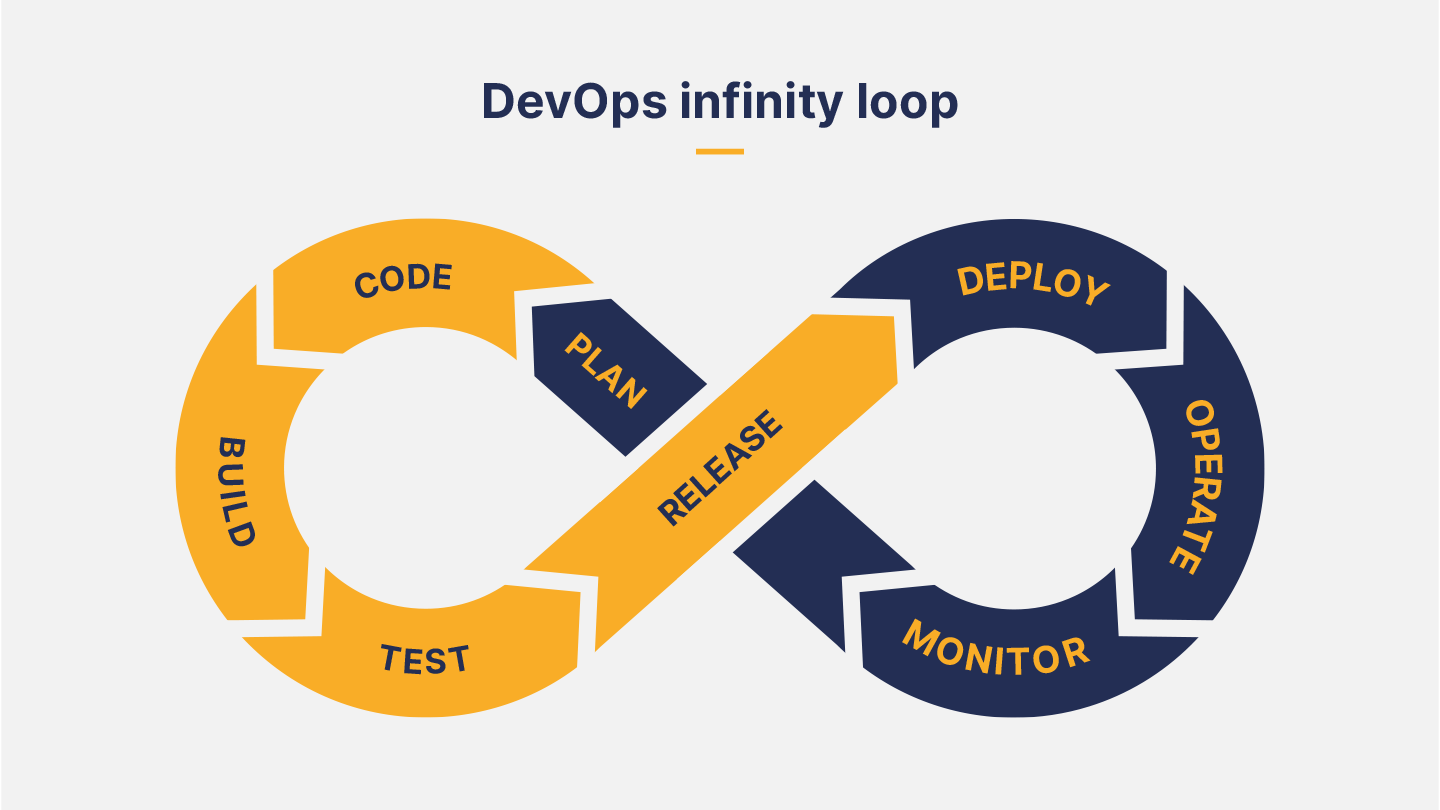
    DevOps is a natural target for AI-driven efficiencies, as it involves frequently repeated processes that generate mountains of data. It seems reasonable to expect that, like other domains that require decisions to be made based on large volumes of data, AI will play an important role in DevOps, too.

    Definitions of AI vary considerably, so you can’t be blamed if you’ve sat through a discussion of AI and DevOps and still don’t understand exactly how the two intersect. But the bottom line is that AI will prove most useful in situations where there’s lots of data generated by, or passing through, a repeatable process. Humans are pretty good at identifying heuristics to help them make reasonable decisions based on patterns in data. But machine learning (ML) techniques bring with them the promise of teasing out inherent characteristics that underpin the data, and that are often impossible for humans to observe.

    There are two main points in the DevOps process where large amounts of data are generated, and where machine learning would be most useful when applied: testing and release and monitoring.

    1. Testing and Releasing

      Deployment packages: AI can analyze trends in what is actually being deployed. My company, Gearset, is a DevOps solution for development on the Salesforce platform. In that context, AI could track the items of Salesforce metadata a team usually deploys, and optimize requests for retrieving that metadata from its org based on those items, speeding up comparisons and deployments, and, ultimately, release cadence.
      Deployment errors: At Gearset, increasing deployment success rates is a constant focus. To that end, we aggregate and analyze data from deployment errors to identify the most common deployment-blocking errors. We then build problem analyzers that suggest automatic fixes to users. With machine learning running on telemetry data, we could more rapidly identify other patterns of use that trigger common deployment errors, and suggest new problem analyzers we should build, boosting deployment success rates still higher.
      Static code analysis: Static code analysis generates data about the quality and security of new code, judged against a ruleset. Within Gearset, Salesforce developers can choose and customize the PMD rules they want in their ruleset, so they’re warned about the code quality issues they care about. But richer insights would be possible with AI, such as high-priority areas for improvement and refactoring based on trends in code quality and security.

    2. Monitoring

      Infrastructure monitoring. Huge amounts of data can be generated from DevOps monitoring. It’s easier to know what to focus on with AI-driven insights into performance log monitoring. Pattern recognition can also predict usage growth and help with capacity planning.
      Security. This has been a key area for innovation in recent years, with the development of products that use machine learning to enhance threat detection, intrusion detection and vulnerability database compilation.
      Unit testing. Gearset provides tools for monitoring code in Salesforce, such as automated unit testing, which reveals when code is no longer executing as intended. AI could identify patterns in the logs and suggest areas of the codebase that appear to require attention.
      Change monitoring. Changes in the codebase, whether expected or unexpected, are tracked by change monitoring and backup jobs. Gearset currently has smart alerts on backup jobs that users can manually set up to be warned of changes or deletions that are unusual, both in terms of the kinds of records being deleted and how many. But AI could automatically spot anomalous and unusual patterns of churn that should be investigated.

    In summary, AI promises to accelerate innovation in the areas where we currently use data-driven insights to improve the performance of DevOps tools and processes. The result will be even higher deployment success rates leading to increased agility, better code quality and performance, and enhanced security.