Category: Application Performance Management/Monitoring

  • Trend Micro Allies With Snyk to Advance DevSecOps

    Trend Micro Allies With Snyk to Advance DevSecOps

    Trend Micro and Snyk unveiled today a software-as-a-service (SaaS) platform the two companies have jointly developed to identify vulnerabilities in open source code.

    The Trend Micro Cloud One – Open Source Security by Snyk platform enables DevOps teams to both identify vulnerabilities and licensing issues to better monitor, prioritize and share information about risk and exposure rates within application development projects.

    Trend Micro COO Kevin Simzer said the SaaS platform provides a unified approach that combines six services within a single subscription to enable organizations to better protect a software supply chain.

    Snyk CTO Geva Solomonovich said that while the relationship between the two companies is not exclusive an alliance with Trend Micro will enable organizations to employ Snyk tools and the open source vulnerability database to implement a set of best DevSecOps practices within their organization.

    Simzer said Trend Micro is also including automation tools that make it easier for cybersecurity teams, along with the rest of the IT organization, to discover what application development projects are underway with their organization. The goal is to provide cybersecurity teams and DevOps teams with a set of tools that provides them with a common language through which they can collaboratively address vulnerabilities.

    Trend Micro claims approximately eight hours can be saved per vulnerability through automation and early discovery of the versions of open source code being employed. Roughly 80% of all application code in use today is derived from open source software, noted Trend Micro. That translates to saving more than 650 hours of development time per application, according to the company.

    Snyk, meanwhile, claimed to have observed a 2.5x increase in the number of open source vulnerabilities it has discovered over the past three years. In the wake of some recent high-profile breaches the security of software supply chains has become a greater area of focus, with many organizations now implementing a more rigorous review of all the code they employ and any associated dependencies.

    It’s still early days as far as adoption of DevSecOps best practices are concerned within most organizations. Responsibility for application security is clearly shifting further left toward developers. As part of that effort, cybersecurity teams are trying to adjust their processes in a way that enables them to vet the efforts of developers without slowing down the rate at which applications are developed. That’s becoming more challenging as the rate at which applications are being developed continues to increase.

    The conundrum organizations are trying to navigate is that every minute a developer spends on security is, theoretically, one less minute they have to write applications or business logic. At the same time, however, if vulnerabilities are not addressed early in the development cycle, they may take longer and cost more to fix, especially if they are discovered after an application is deployed in a production environment.

    Of course, there may come a day a when application security is just another set of steps to be performed within a quality assurance process. In the meantime, however, a lot more attention is being paid to application security today, in part, to make up for the many sins of the past.

  • How IT Ops Can Exceed Service Level Objectives in Digital Transformations

    How IT Ops Can Exceed Service Level Objectives in Digital Transformations

    The pace of change can be managed successfully by defining service level objectives and more in dev environments

    Mobile applications, data lakes, microservices, data visualizations, SaaS integrations, automations, IoT data streams, machine learning models—in proof of concepts, pilots and scaling production environments, for customer-facing capabilities and employee workflows—all of these technical capabilities are developed, deployed and enhanced faster today more than ever before.

    I spoke to Jason Walker, field CTO at AIOps platform BigPanda, about how the speed of deployment, the breadth of technology services transforming businesses are developing, the greater security threats, and the increase in reliability and performance requirements impact IT Ops.

    Walker believes that of all the things we’re trying to do in IT—more, faster, smarter, safer, innovative, secure, reliable—it’s the speed that’s the driving force. “The most significant impact is velocity; the dev-test-deploy cycle time is drastically reduced,” he said. “Without the right guardrails, that breeds unnecessary complexity and a gradual loss of operational awareness.”

    He explained that much of the barriers that once slowed down development teams are addressable today when developing service-based architectures on the cloud. “Developers realize that the traditional constraints, either technical dependencies or organizational capability, are much reduced,” Walker noted. “Developing in the cloud for a cloud-based service, leveraging an ecosystem of microservices for inputs, an agile team can move very quickly.”

    Why IT Ops Can’t Slow Down Transformations

    IT Ops can’t easily say “no” or “slow down” to business stakeholders investing in digital transformation to improve customer experiences and gain competitive advantages with data, analytics and machine learning. Some IT leaders attempted that command-and-control approach during the early days of public clouds, but today, DevOps practices, SRE responsibilities and AIOps capabilities are integral to mainstream IT Ops teams in keeping up with transformational velocities.

    So instead of saying “no,” progressive IT Ops teams say “yes, but” by defining service level objectives, (SLOs), capturing service level indicators (SLIs) and managing to error budgets.

    Walker agreed. “SLIs, SLOs and error budgets are a very useful way to manage the critical inputs and outputs at the interfaces between microservices and at a high level across the business service, allowing developers to keep changing the ‘interior’ pieces.“

    These tools change the operating model and mindset across the entire IT organization by exposing trade-offs to business stakeholders. For example, if a web application has a 99.9% SLO, the whole IT team has a 0.1% error budget. If the SLO is missed, a service level policy identifies areas of investment to improve performance, reliability, security and automation or to address technical debt.

    What IT Teams Should Do to Implement Service Level Objectives

    Defining service level objectives helps bring business stakeholders, development teams, SREs and IT Ops together and align on reliability objectives and trade-offs. It’s an important step, but not sufficient for teams that want to exceed service levels during digital transformation.

    Walker offered several technical recommendations for IT Ops groups transitioning to service level objectives:

    1. Where there are dependencies between microservices and interfaces, frequent check-ins between adjacent teams are required.
    2. APIs, inputs and outputs, need to remain consistent over time and changes communicated and receipt confirmed.
    3. Knowledge management processes delivering accurate, up-to-date documentation have to be baked into the SDLC to prevent the generally small, modular teams from sprawling away from each other and developing incompatibilities.
    4. Consolidated change awareness for operations is also a must-have. Whether changes are human or automated, they have to be tracked and relatable to service events and alerts.
    5. The later phases of the SDLC, when cloud-native, containerized microservices are running and supporting customers, have to be monitored. A monitoring strategy is necessary to ensure effectiveness and minimize the work and noise involved.
    6. Synthetics and client telemetry can be very useful macro-indicators of overall service performance. As with all monitoring efforts, actionability is key. Signal-to-noise in monitoring has to be measured.

    These are balanced recommendations, with the first two focused on how development teams engineer microservices and the last two on how IT Ops teams use monitoring and AIOps to implement actionable SLIs. The middle two recommendations on knowledge and change management processes help the entire organization stay in sync through a fast-paced operating environment.

    “The velocity, flexibility and variability of this type of development means leaders at all levels need to understand and align the strategic and tactical goals, and to prevent their teams from drifting away from business goals,” Walker said.

    Why AIOps is a Force Multiplier for IT Transformation

    So, the business leaders align on service level objectives, development teams engineer observable containerized microservices, IT Ops executes a monitoring strategy and the CIO ensures communication, collaboration and knowledge sharing. Is that all that’s required?

    The issue is that most IT Ops teams are understaffed and get overwhelmed supporting the new cloud-native microservices, legacy systems and everything in between. To address the gap, IT leaders are investing in AIOps, and even hundred-year-old enterprises are successful at adopting machine learning and automation to accelerate IT Ops.

    Automation and machine learning event correlation applied to monitors, alerts and observable artifacts are the force multipliers. Open-box machine learning enables IT Ops to triage incidents and improve their mean time to resolution, while automation reduces manual efforts and keeps teams in sync. Organizations that are modernizing applications and supporting hybrid clouds require these capabilities to manage the complexities, run at business speed and manage databases, microservices and applications to higher service level objectives.

    As Walker noted, increasing velocity is important for responding to customer opportunities and changing conditions. Driving faster digital transformations is more achievable today when IT Ops leverages automation and AIOps to stabilize speed with reliability and performance.

  • Splunk Unveils Unified Observability Platform

    Splunk Unveils Unified Observability Platform

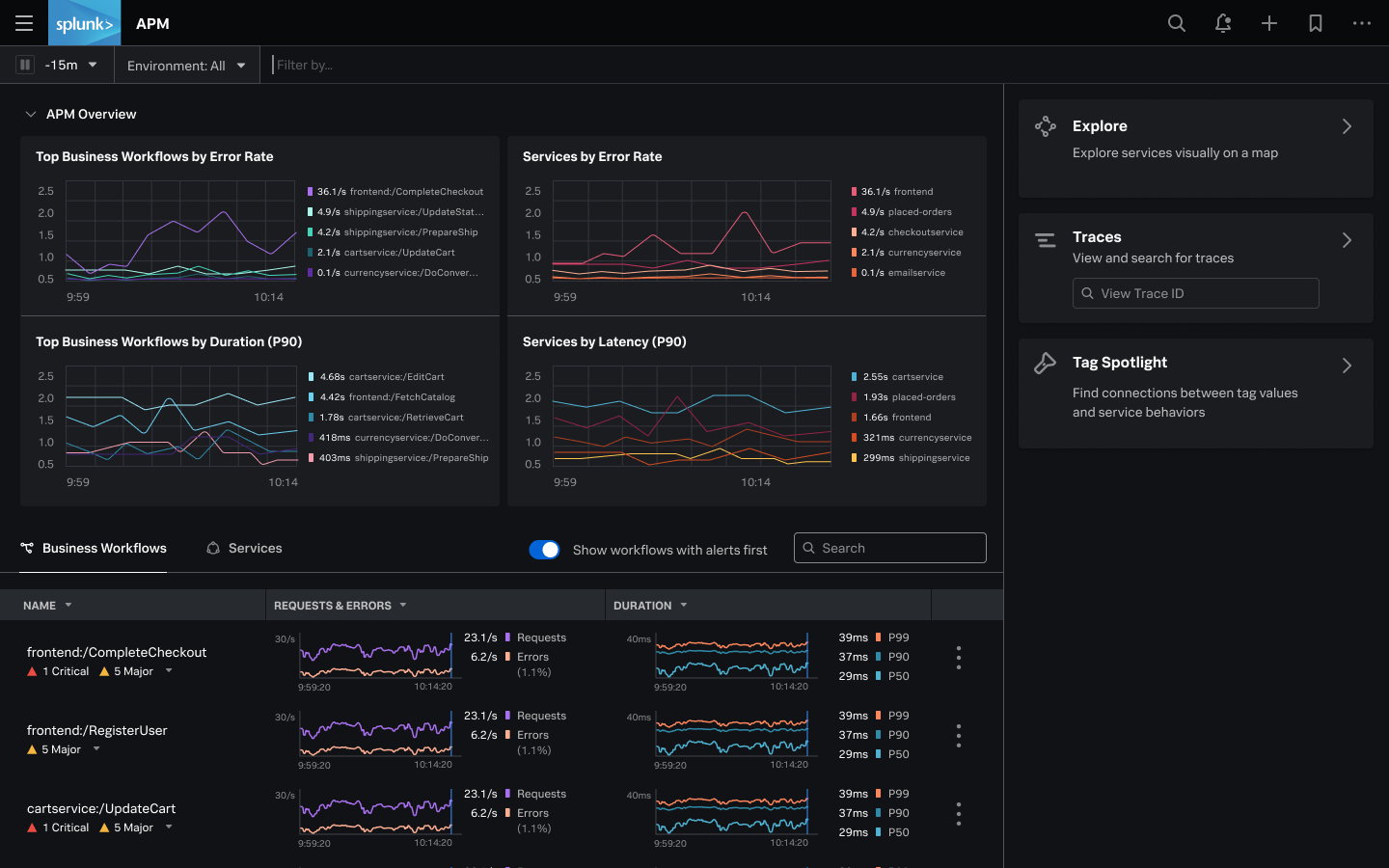
    Splunk today unveiled an observability platform delivered as a cloud service that captures all metrics, traces and logs in real-time without relying on sampling.

    Spiros Xanthos, vice president of product management for observability and IT Ops at Splunk, said Splunk Observability Cloud collects all that data via a single agent based on open source OpenTelemetry software to instrument an application.

    Historically, application performance management platforms (APMs) have only analyzed samples of data to identify a potential anomaly. Splunk Observability Cloud analyzes all the streaming data captured by its agent software to enable IT teams to pinpoint the root cause of an issue faster, said Xanthos.

    As a result, Xanthos said the signal-to-noise ratio dramatically improves compared to legacy monitoring platforms. It will then be up to each IT team to decide how much of that data they want to store after it’s been analyzed, added Xanthos. Pricing for Splunk Observability Cloud is based on the number of hosts employed rather than the amount of data collected.

    The Splunk Observability Cloud unifies a Splunk analytics portfolio by including capabilities provided via Splunk Log Observer, Splunk Real User Monitoring (RUM), Splunk Synthetic Monitoring, Splunk Infrastructure Monitoring, Splunk APM and Splunk On-Call. Splunk Synthetics Monitoring is based on technology Splunk gained with the acquisition of Rigor last year.

    Splunk

    The Splunk Observability Cloud is one of the first such platforms to rely solely on OpenTelemetry agent software being developed under the auspices of the Cloud Native Computing Foundation (CNCF) to collect data. That project not only reduces the cost of instrumenting applications, it also reduces the number of agents an IT team might have to deploy to collect metrics, traces and log data.

    Many rival observability platforms can collect data from OpenTelemetry agent software, but also tend to encourage DevOps teams to deploy proprietary agent software that they claim is easier to install and collects data at a more granular level. Splunk has decided OpenTelemetry has matured to the point where those proprietary agents are no longer required, said Xanthos.

    The rise of observability platforms presents an opportunity for IT teams to rationalize a raft of monitoring tools that often surface conflicting analyses. IT teams today spend an inordinate amount of time convening so-called “war room” meetings to determine the actual source of an issue. Those meetings can go on for hours, only to eventually discover an issue that only takes a few minutes to fix.

    While observability has always been a core DevOps principle, the level of visibility most IT teams have into their application environments is limited. There is no shortage of monitoring tools, but because there is no unified approach to observing an IT environment, there simply isn’t enough context being provided. As IT environments become more complex – thanks primarily to the rise of microservices-based applications that have lots of dependencies – that lack of context is rapidly becoming a major issue. A microservices-based application is designed to degrade gracefully if one microservice suddenly become unavailable. The issue is that it can take a very long time to discover the root cause of performance degradation.

    It may be a while before most IT teams achieve true observability, but once they do, many will wonder how they previously managed IT without it.

  • Debugging is Broken – Here’s How To Fix It

    Debugging is Broken – Here’s How To Fix It

    Let’s face it, debugging is broken.

    Whether you wholeheartedly agree or vehemently disagree with that statement, I think we can all agree that debugging, at the very least, has room for improvement. In fact, the way software developers debug their code hasn’t changed much. Of course, there are now a wide array of observability and monitoring tools available to make a developer’s life easier, but when we look at the process developers typically follow when debugging code, it’s stayed relatively unchanged over the years.

    Having the right tools available definitely improved the overall debugging experience, but they’re not the only factor. Internal organizational processes are equally as important, and should be adapted to make developers’ lives as smooth and stress-free as possible while still maintaining the proper levels of organizational security and compliance. Inefficient or highly restrictive processes, while great for the compliance team, can adversely affect the velocity of getting to the bottom of issues quickly. The right solution is typically a combination of adapting those processes to fit the company culture, along with a combination of tools that allow for compliance with industry standards and best practices.

    How Developers Debug Code

    When you talk to developers today about how they debug their applications, the process is typically not all that different than it was many years ago. The standard approach to debugging is still through the use of logging frameworks. Of course, teams are taking advantage of things like application performance management (APM) tools and other tools in the monitoring and observability space, but when you look at the primary method of debugging issues that require developers to dive into the code, logging is typically the main approach.

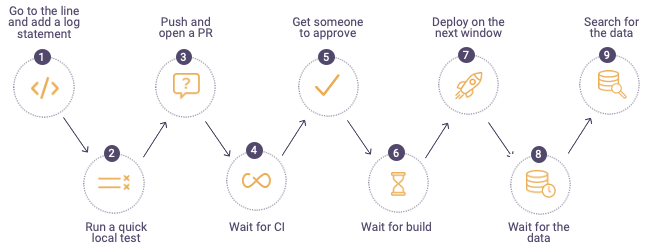
    The process typically looks something like this:


    debugging process

    When a defect is found, developers will first go to the log files on the production or pre-production servers in the environment where they are debugging. If they can’t find information in the logs to help them get to the root cause of the issue, they go back to their code and add additional log lines, finally sending their code through the process shown above. For highly advanced organizations, the process can take minutes or hours, but more often than not, this process drags on for days – or even weeks. It becomes especially time-consuming when the defect developers are trying to find and remediate is in production. In these cases, the cost to the business can be staggering; there’s got to be a better and more efficient approach to debugging.

    Where Tools Can Help

    While new and shiny tools don’t always solve all debugging problems, they can often ease some of the pain developers face and, in the process, make their lives a little bit easier. Debugging, observability and monitoring tools can get developers the data they need to solve problems faster than the more traditional method of digging through logs and using trial and error.

    The place many organizations start when considering diagnostic tools is with APM. These types of tools focus specifically on monitoring and management of the application availability, and can help to collect metrics and other relevant application information that can aid in pinpointing infrastructure issues. Most often, these tools are not actually used by developers themselves, but rather operations or production support teams to ensure availability and performance thresholds of applications.

    Another critical category of telemetry are tracing tools, which can help developers better understand how requests flow through multiple tiers of applications and even help identify error rates and latency. There are many vendors selling this category of tools, but there are also open source options which allow developers to integrate tracing into their applications via a vendor-neutral approach.

    After diagnosing an issue with an APM solution, there is often a handoff to development to remediate the issue. When developers need to debug, they often use their local IDEs or, even better, a remote debugging solution. Remote debuggers are used directly by developers to simplify debugging of applications in remote environments. These tools helps developers get to the bottom of customer issues faster by giving them direct access to the underlying application data in a safe and secure way while the application is running without stopping it or having to redeploy it. A major benefit of remote debuggers is that they can give developers the data they need from production environments without compromising security or requiring developers to have direct access to sensitive environments. While remote debuggers and other debugging tools are not a silver bullet, they can be a critical component that empowers developers to better address critical issues.

    Fixing Organizational Problems

    If solving customer issues is taking longer than expected or is potentially hurting your brand, it’s critical to sit down with your development team and use a data-driven approach to identify where the problems lie. Do a deep dive into your issue tracking or ITSM system to identify trends or recurring issues within particular application components. Development teams can often become so overwhelmed tackling issues and building out new features that valuable information in these internal systems can go untapped. Customer issues and defects should be reviewed periodically to assess things like business impact, cost to fix and alignment with the product roadmap. There is valuable information that can help focus the team’s effort on time-saving activities as well as improving the product, making for happier customers.

    Another area to look at is your software delivery process. Are there bottlenecks in your delivery pipeline that could be made easier or more efficient but have been overlooked? The speed and efficiency of your software delivery pipeline has a direct impact on developers’ ability to debug effectively and can contribute to a broken or slow debugging process. Developers should have the ability to push code into new environments as quickly as possible to remove slowdowns from too much context switching. This means automating as much of the delivery pipeline as possible, removing unnecessary manual deployment approvals and shifting left as many activities as possible.

    When it comes to empowering developers and fixing broken debugging processes, organizations should focus on fixing organizational bottlenecks as well as equipping developers with tools that can save them time and improve their daily workflows. Focusing on these areas can increase development team velocity and eliminate costly day-to-day slowdowns which add up over time and negatively impact productivity. With a few key changes, debugging can be a much more manageable and predictable process.

  • More and More Enterprises Go Headless

    More and More Enterprises Go Headless

    IT faces high expectations for building and supporting omnichannel digital experiences. Simultaneously, web developers hold an evolving toolkit of architectural approaches to deliver content. One such framework gaining mindshare is headless, a style that decouples front end user experiences from back end application logic.

    Legacy options for content delivery can be somewhat cumbersome in that they don’t apply well to scenarios beyond websites. On the other hand, a headless framework uses web APIs to communicate with clients, making it a more adaptive model to support new devices and use cases.

    WPEngine recently released global research on the state of headless. Below, we’ll review the top findings from The State of Headless: A Global Research Report. I also met with Matt Landers, developer relations manager, and Jason Bahl, principal software engineer at WPEngine to discuss the evolution of headless and its future implications for developers.

    What is Headless?

    First off, what is headless? Headless decouples the front end from the back end, thus separating the user interface (UI) from the data and code that powers it. The headless movement represents a shift from traditional content management systems (CMSs) such as WordPress, Squarespace and Wix.com. These platforms are less extensible, as they intrinsically unite the back end with user-facing representations. Traditional CMS is “typically not that easy to scale,” noted Landers.

    Headless challenges the status quo by offering more flexibility. As headless adopts API-based content negotiation, it could essentially deliver highly personalized experiences to any connected device. This could help support emerging platforms, like mobile, voice assistants or augmented reality (AR).

    Simply put, headless is “a CMS that is not responsible for rendering the site,” Landers explained. “What attracts people to headless is component-based architecture and the ability to build isolated components,” he added. For example, a headless framework could include an author bio component that is reused in any custom style across devices. By deploying to a CDN, headless could enable high-speed performance, as well.

    Headless Adoption Surges

    Interest in headless is increasing across the board. Currently, 64% of enterprises surveyed adopt a headless approach, representing about a 25% increase from 2019. Furthermore, headless use is expected to grow: over 90% of organizations not currently using a headless setup plan to evaluate a headless option in the coming year.

    The strong interest in headless likely represents a growing necessity for large enterprises to support various digital channels in a consistent manner. In fact, 92% of organizations credit headless with delivering a more consistent content experience, the report found.

    Benefits of Headless

    A key benefit to introducing headless is the decoupled nature of the approach. This makes it possible to support multiple platforms, such as websites, mobile apps, IoT devices, connected kiosks, smartwatches, voice assistants, AR and virtual reality (VR) from the same source.

    Respondents also cited additional benefits to adopting headless such as increased performance, quicker time to market and rapid innovation. These positive attributes make sense because, with headless, applications only request the data they need. Therefore, headless could certainly facilitate more dynamic applications and custom-tailored user experiences. If used effectively, headless setups reduce bloat to create fast-loading digital experiences that further the SRE agenda.

    Tech Choices and Use Cases

    An average organization is spending $2.6 million on their headless implementation, found the report. So, what are they spending it on? Well, some common headless frameworks and SaaS platforms include Contentful, GraphCMS, Atlas, DatoCMS, Cosmic, Netlify, Sanity.io and Prismic, among others.

    While the report didn’t query respondents on their exact headless stack, it revealed a general satisfaction with headless solutions, with relatively high net promoter scores (NPS). When selecting a headless provider, respondents tend to consider performance (41%), e-commerce (35%), scalability (33%) and APIs and extensibility (30%).

    Though headless spans many use cases, e-commerce is clearly a primary use case for the headless stack, with 51% of respondents adopting headless to support e-commerce. Other top use cases for a headless approach include a website (52%), IoT (47%) and progressive web apps (40%).

    Drawbacks of Headless

    Though headless provides impressive malleability, it does require a shift in thinking, and implementors must inevitably overcome certain drawbacks. API security, for example, is at stake as API attacks and threats increase.

    Headless could also require additional administrative burden in terms of data integration and upkeep. With headless, instead of using plugins, IT must enlist front-end developers to integrate data and build front-end behaviors. Debugging a decoupled front end and back end can also be an added development burden. “There is an opportunity in the headless ecosystem in general to mature the experience for the content publisher,” describes Bahl.

    Future of Headless

    Within today’s remote economy, most acknowledge that digital experiences are now crucial to supporting business at large. In fact, 92% of organizations believe digital experiences are vital to their organization’s success, found the report.

    Headless architecture promises to retain a stable back end to support these escalating digital demands — especially useful considering the ever-changing nature of front end clients. On that note, the report found that 32% and 31% of respondents adopt headless for VR and AR experiences, respectively. Therefore, the headless approach appears to be a valuable technique to future-proof current investment against emerging digital trends.

    The State of Headless: A Global Research Report, conducted by Vanson Bourne between January and February 2021, surveyed 400 IT/technical employees with knowledge of headless. For more insights, you can read it in full here.

  • Blips and Downtime: Incident Management 101

    Blips and Downtime: Incident Management 101

    Nothing gets the blood pumping like seeing an IT incident alert flash across the screen. Is the network traffic anomaly a potential intrusion? Are we about to have an outage? Is it just a random blip on the radar? The implications of these different potential incidents vary wildly, and each requires a different set of response tactics.

    Responding to incidents both large and small is essential for every team. Especially in a remote-first world, it is more important than ever to ensure that all developers are in the same war room to tackle the problem as efficiently and effectively as possible. It’s also critical to have a single view that aggregates data from all of the systems and services used to monitor and respond to incidents. But not every team has invested in a fully fledged incident management strategy.

    In fact, it’s not uncommon for incident management to be completely ad hoc. Teams wait for something to happen and then take a “dive and catch” approach to incidents. Some teams have some processes in place, but those plans may be missing key components. In both cases, teams struggle with slower time to resolution and often waste resources in the process of responding to incidents. Critical stakeholders often suffer from a lack of clarity in communication around an incident.

    Depending on the type of incident, the consequences can be challenging to overcome. Running afoul of a compliance law, like GDPR, can result in business-ending financial penalties. Incidents that impact uptime can keep an organization from meeting SLA terms and potentially losing customers and revenue. Regardless of the size of your company or customer base, formulating an effective incident response begins with people.

    People are the Cornerstone of Incident Response

    Companies should assess their business needs and the risk profile of their applications and services. With those barometers in place, leaders can then determine the appropriate staff levels to ensure 24/7/365 incident management coverage. The size and breadth of the team will depend on the size of the company and the structure of response plans, but the team should attempt to cover a few areas.

    Ideally, a team has at least three responders.

    1. Incident owner. This is the team’s quarterback. They coordinate everything, make sure the team follows runbooks, involves the correct people and removes roadblocks.
    2. Incident investigator. The investigator has their hands on the keyboard. They run the investigation, pull and analyze logs, review metrics and generally try to determine how to best mitigate the issue.
    3. Incident communicator. Smaller teams may not have the personnel to have a designated communicator in every incident. On those teams, the incident owner will often assume this role, as well. Communicators focus almost exclusively on two tasks: documenting the incident via an “incident timeline” and communicating with stakeholders when appropriate. It’s critical that a complete timeline is built during the incident. It’s nearly impossible to put together a properly documented incident timeline after the fact. Critical details will get lost or forgotten, and your retrospectives and RCAs will be low quality.

    Runbooks offer Muscle Memory During Incident Management

    The incident response team, no matter how experienced, will need a set of runbooks—a compilation of processes and steps to take when incidents arise. Runbooks will help guide teams as they perform everything from analyzing and mitigating common problems, to post-action investigations. They represent the process portion of incident responses, and act as a guidebook for the team when the pressure is high.

    Typically, an alert system will ping the on-call engineer about a metric that doesn’t look right. The runbook will help that on-call person determine if the alert should be categorized as an incident or not. When that person determines the alert indeed represents an incident, they must estimate the severity of the incident. Different teams may use different definitions for severity, but here is an example:

    Severity one – Production down or highly degraded.
    Severity two – Serious bug impacting customers or system stability.
    Severity three – Important bug. Requires tracking until mitigation, but likely not a 24/7 workstream.

    Runbooks can also guide teams through analysis of the situation. After a root cause is determined, the book will remind teams to perform an immediate post-action investigation to see if specific processes worked well, if gaps exist, and if communications were sent out to customers or other stakeholders.

    Tools are Important; Tying Them all Together is Crucial

    People and processes are important for responsive incident management. Without the right tools, even seasoned incident-management veterans may struggle with the complexity and pressure of an incident. Tooling can prevent a lot of mistakes and omissions when the heat is on.

    There are numerous platforms that address different components of incident management response. Depending on the size of the organization, teams will need some or all of the following:

    • On-call rotation management
    • Observability and alerting
    • Ticketing system
    • Communication system

    One of the biggest challenges in incident management is having the ability to tie together the data and actions defined by this broad toolset. If you’re working a severity level one incident, teams will likely rotate people into and out of the incident based on their geographic location and timezone. How does the next person in the rotation come up to speed on what’s been done so far? How do we document a detailed timeline that can be used for an RCA investigation later? How can we provide an up-to-the-minute view of the status of an incident for key stakeholders? Ideally, teams will have a single place where all of this data is collected and managed and where the data can be filtered and exported at the end of the incident.

    Effective Incident Management: People, Processes and Tools

    Is that traffic spike a sign of impending doom, or just another meaningless bump? Without the proper people, processes and tooling, answering that question becomes very difficult. Unfortunately, the wrong answer can lead to disastrous consequences. Only with the right set of tools and processes can companies develop an incident response system that provides maximum stability and keeps customers happy.

  • Why Real-Time Asset Intelligence is a Must

    Why Real-Time Asset Intelligence is a Must

    Complexity breaks correlation. Intelligence brings cohesion. This simple principle is what makes real-time asset intelligence a must-have for AIOps that is meant to diffuse complexity. To further create a context for the user, it is critical to understand service dependencies and correlate alerts across the stack to resolve incidents.

    Why not just CMDB?

    CMDB systems have been useful to break down configuration items into logical layers. But that is not enough, because they can become outdated very soon.

    That is when connectivity among assets and their dependencies matter to remain relevant in real-time. This opens new possibilities for an enterprise to tap into. IT monitoring, change management, asset management and dependency mapping for troubleshooting are some areas that have a direct positive impact when enterprises have access to real-time asset intelligence linked to CMDB.

    If your CMDB is not accurate with data management systems, it is time you start exploring asset intelligence and asset discovery tools.

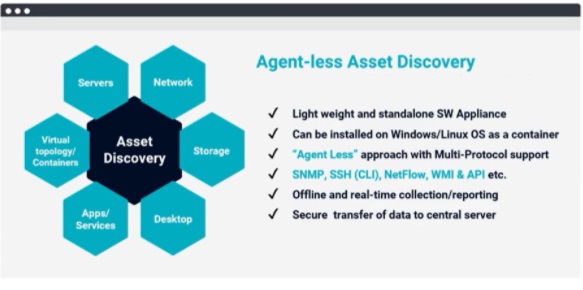
    AIOps asset discovery

    Why is Asset Intelligence Critical to AIOps?

    Asset intelligence is a critical part of AIOps. Unless you have a log and know about the assets that you have and how they are connected to each other, you cannot correlate to each other very easily. And that’s why real-time asset intelligence is required.

    Third-party asset and dependency intelligence is an obvious next step, but those come with more challenges and complexities. Depending on a third party for asset and dependency intelligence would require a continuous feed of data on a regular basis. This process gets expensive and obsolete quickly.

    Real-Time Asset Intelligence opens other Possibilities

    With automation and discovery tools, CMDB can be kept up to date, in real-time. Real-time asset intelligence with automation enabled by AIOps opens many possibilities, and it contributes many benefits to an enterprise. These include:

    IT Monitoring

    For alerts and notifications, just a monitoring tool is not enough. The information sent by such a monitoring tool is not up to date. People rely on manual feeds, which are expensive and are not synchronized. Asset intelligence brings forth deep information that builds context which would otherwise be missing. Asset intelligence can point to issues corresponding to servers, topologies, networks, storage, apps or services.

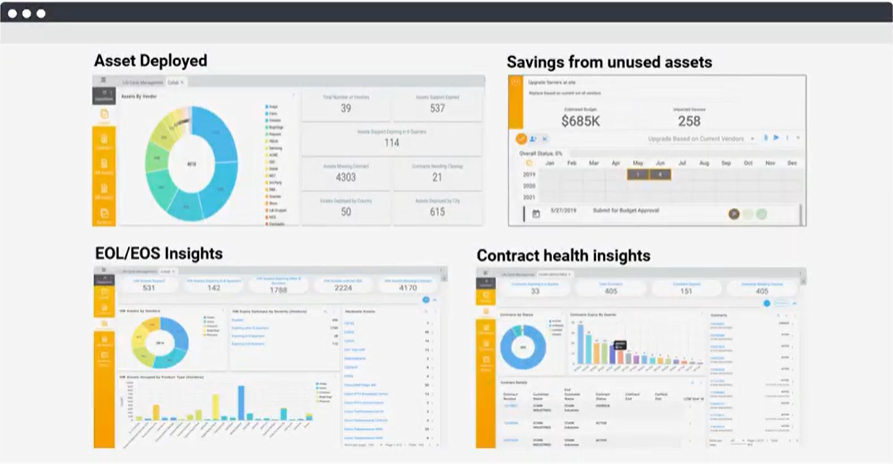
    AIOps dashboard

    Risk & Compliance Management

    An organization must audit IT assets periodically to eliminate risks from the end of life/end of support cycle, vulnerabilities and ensure compliance with regulations and local governing laws. IT asset information is also maintained in many different places and in various forms, in spreadsheets, databases, ERP or CRM, or other systems, which makes it difficult to gather this information. All these challenges can easily increase compliance and vulnerability risks for any organization. AIOps tools automate the process of data collection, analysis and reporting, significantly reducing the operations costs while improving the accuracy and timeliness of the insights.

    Change Management

    No one has a clue if anything changed in the IT infrastructure. And, even if something does change, no one will know unless updates are alerted and stakeholders notified. With asset intelligence, you will not only know about the change, but before making the change, the solution will also tell you if a change is – or needs to be – made to a business service, as well as that change’s impact on other dependent business services. This helps you evaluate the impact and take measures to contain the blast radius before making any changes.

    Asset Management

    Asset intelligence provides a 360-degree view of asset inventory, dependencies, life cycle, performance, utilization and compliance. It provides thorough insight into, ‘What do we have versus what is out of date?’ You get to compare those states and inform compliance.

    Dependency Mapping

    AIOps-enabled asset intelligence also allows for dependency mapping, which is especially useful for troubleshooting work. With machine learning and artificial intelligence, complex environments can be quickly and more easily deciphered, and troubleshooters would know where issues lie. Asset intelligence tells the troubleshooter the most complex part of the problem and what should be addressed or what needs more attention. It maps dependencies that are affected by alert correlation, triaging, planning, and ticket resolution.

  • Make Metrics Matter: Measure What’s Important

    Make Metrics Matter: Measure What’s Important

    In a data-driven society, organizations rely heavily on sets of metrics to evaluate how they’re doing on a particular task, initiative or resource allocation. Metrics are particularly important to DevOps teams, whose very function is tied to concepts like collaboration and continuous improvement.

    But, while metrics can help drive efficiencies, they can also drive DevOps teams down the wrong path. Just because you’re measuring specific things doesn’t mean you’re measuring the right things. And if you add more metrics, it doesn’t necessarily mean you’re creating more value; you may just be spinning your wheels faster and getting nowhere.

    The key is choosing the right metrics that drive the right outcomes for your organization. But how do you choose the right metrics? And how do you measure the true value you’re creating? Organizations that successfully navigate this challenge will not only build successful DevOps cultures but also improve their overall competitiveness in an increasingly demanding business climate.

    Be Measurable – and Be Actionable

    First, choose metrics that are objectively measurable. Eliminate individual subjectivity from your metrics palette. Rather than ask “How beautiful is my UI?” focus on measurable data such as, “Is the UI accessible to people with disabilities?” or “Did it drive more clicks?”

    It is important to choose metrics that are actionable, not just “vanity metrics.” Back in the 1970s, McDonald’s used to update the signs outside its restaurants with actual numbers: “3 Billion Served;” “4 Billion Served.” Now the signs read, “Billions and Billions Served.” That is the ultimate vanity metric – it’s not easily auditable and not actionable. How many billions? Should McDonald’s be aiming for trillions? A good example of a DevOps vanity metric is server uptime. In fact, it’s actually a contraindicative metric: with cloud instances playing such an important role, you could make the case that low server uptimes are actually preferable.

    Metrics should focus on inter-team and intra-team performance and outcomes. DevOps is all about cross-functional teams — development, test, operations and information security, among others — working together to deliver business value. So, rather than focus on individual metrics like “lines of code,” focus on outcomes like “cost of customer acquisition,” “new customer signups” or “overall revenue.” It may not always be obvious how to move the needle, but that is where experimentation comes in.

    Avoid the Noise

    Focus on as few metrics as possible and maintain a high signal-to-noise ratio. When everything is a priority, nothing is. If you’re presenting your metrics to the board of directors and you have 50 different graphs on the screen, you’re focusing more on how the presentation looks than on showing real, tactical information. Choose metrics that align with your current goals and be ruthless about ensuring those metrics are accurate, timely and focused on a strategic goal.

    Expect goals – and the metrics you track – to evolve over time. You may want to shorten feature delivery time, but to do that, you may start with measuring things like build time, regression testing time, deployment time, etc. You will be impacting the feature delivery metric but doing it in a roundabout way. The key strategy is to pick an outcome you want to achieve. Once you knock down that problem, you can keep that metric around, but you’ll want to push it down. You can put an alert on it so if it ever crosses a threshold where you don’t want it to be, you can act on it.

    Engineering organizations should focus on four to five metrics that they actively are attempting to improve at that time, so they can achieve those outcomes. As they achieve those outcomes, they can retire them or put those metrics in the background. Then, they can pick the next one, identify the next outcome to achieve and assign some new metrics around that.

    Align Metrics With Your Priorities

    Metrics can be situational. If you work in the network ops center, there are going to be some things you want to have up all the time. You’ll want to know the second a denial-of-service hits or the second error rates start going up. But for a software delivery pipeline, you can’t just throw out a bunch of metrics and hope the right ones will find their way to the forefront. You want to focus on metrics that align with your priorities today, next week, next month, this quarter or this year.

    So, which metrics are most important for a DevOps organization to pursue? A series of metrics identified by the Google DevOps Research and Assessments (DORA) team has emerged as the industry standard to determine how successful a company is at DevOps. These measurements include deployment frequency (DF); mean lead time for changes (MLT); mean time to recover (MTTR) and change failure rate (CFR).  These metrics show how well development teams deliver better software, faster, to their customers.

    I would add a fifth metric: mean time to discover. From the time a problem is injected into a project, how long does it take for us to discover it? Did our organization discover it or did the customer? From there, we can strategize about the cheapest possible way we could’ve caught a particular bug ourselves. Could we have written a five-line unit test that takes 100 milliseconds to run that would have caught that? Or was it more complicated? Was the UI misaligned so that it was impossible to catch that automatically?

    Different segments of the software delivery process will be concerned with different sets of metrics. While the Dev/CI practice focuses on development lead time, cycle time and work in progress/technical debt, the QA team pays closer attention to idle time, defects discovered and escaped, and the aforementioned mean time to discover. While the deployment group aims to improve deployment frequency and change success rate, operations gets jazzed from studying the cost and frequency of outages.

    Metrics are useful tools for DevOps organizations. They can push teams to be more efficient and more accountable. But to truly optimize the value they’re getting out of people and particular initiatives, it’s important to choose metrics carefully. Recognize that metrics aren’t a one-size-fits-all mechanism, and that more metrics doesn’t always equate to better performance. Choosing the right metrics – and reevaluating them on a consistent basis – is the best path to long-term improvement.

  • Oracle Extends Capabilities of Enterprise Manager Platform

    Oracle Extends Capabilities of Enterprise Manager Platform

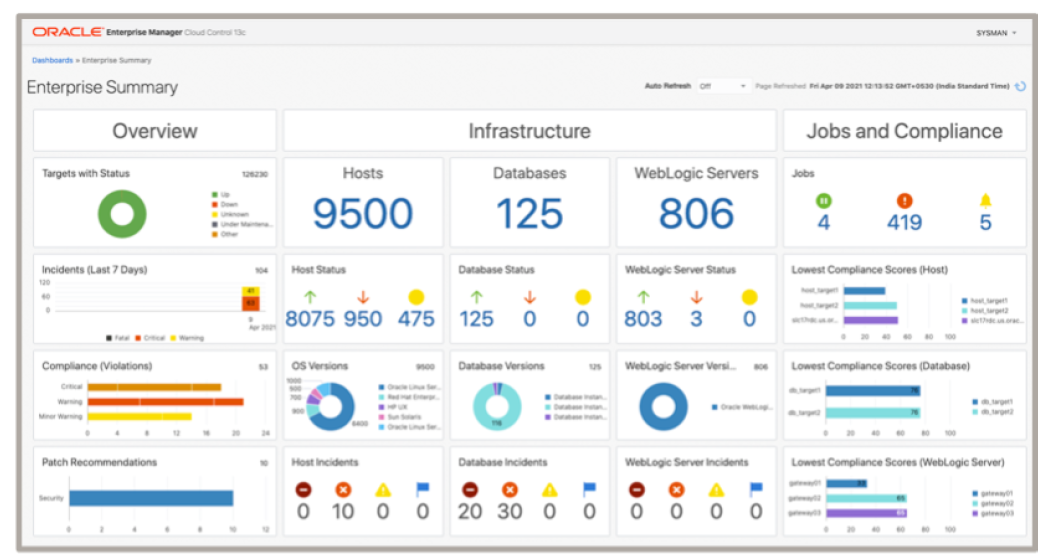
    Oracle today announced it has updated its core management platform to provide capabilities that make it easier to manage a hybrid cloud computing environment spanning millions of endpoints.

    The latest release of Oracle Enterprise Manager (EM) 13c, in addition to greater scalability, also provides support for dynamic groups, dynamic runbooks, automated workload analysis, monitoring templates, event compression and other capabilities that make it easier to manage IT operations at scale.

    Oracle Enterprise Manager (EM) 13c Release 5 also extends the reach of the management platform further into the realm of packaged Oracle applications and integrated hardware and software platforms such as Oracle Exadata, Oracle Database Appliance (ODA), Zero Data Loss Recovery Appliance (ZDLRA) and Private Cloud Appliance (PCA).

    Oracle has also updated the compliance framework it includes with Oracle Enterprise EM to support additional regulatory requirements and refreshed the user interface for the fleet management tool provided.

    Finally, the company is adding a tool that makes it easier to copy data stored within Oracle EM 13c to the Oracle Cloud Infrastructure (OCI) service. Dubbed OCI bridge, this tool copies data to an OCI object store where it is accessed by OCI services such as logging analytics and operations insights.

    Mughees Minhas, vice president of product management for enterprise and cloud manageability at Oracle, said as hybrid cloud computing continues to evolve, the need for a single management platform that spans infrastructure, databases and applications is becoming more apparent.

    Minhas said Oracle EM 13c is part of larger observability initiative that Oracle has embraced to provide more context across disparate services in a way that reduces the total number of tools an IT team needs to deploy and master. That effort complements a series of autonomous computing initiatives Oracle has previously launched that eliminates the need for database administrators (DBAs) to manage lower level systems administration tasks such as performance tuning. In general, Oracle is making a case for an IT world where platforms are co-managed by Oracle and internal IT teams that are focused on higher-level tasks.

    As IT environments become more distributed it’s clear IT is becoming more complex to manage. The issue that IT teams need to come to terms with is to what degree can they automate management tasks that today conspire to limit the size of the IT environment any given IT team can effectively manage. DevOps teams, of course, have been ruthlessly automating application development and deployment tasks for years. That philosophy is now being extended to include a broader range of IT operations tasks being automated by vendors themselves.

    Each IT team will ultimately need to decide just how many automation platforms it requires. In many cases, IT teams are now struggling to unite various islands of automation that have now emerged within their organization. Regardless of approach, however, rote tasks that once consumed hours, sometimes days to complete, are now no longer required which, theoretically at least, should leave more time to focus on more complex challenges that are getting thornier by the day.

  • Red Hat Extends Reach and Scope of Insights Analytics Service

    Red Hat Extends Reach and Scope of Insights Analytics Service

    During its online Red Hat Summit event, Red Hat today announced it has extended the Red Hat Insights predictive analytics cloud platform for managing IT to now include support for editions of Red Hat OpenShift based on Kubernetes and the Red Hat Ansible Automation Platform.

    In addition, Red Hat has extended Red Hat Insights for Red Hat Enterprise Linux (RHEL) to include the ability to prioritize security alerts, streamline notifications and track Red Hat subscription consumption.

    In total, since launching Red Hat Insights in 2019, Red Hat claims there are now more than 600,000 RHEL hosts analyzed per day.

    Joe Fitzgerald, vice president and general manager for the management business unit at Red Hat, said Red Hat Insights provides IT teams with the equivalent of a co-pilot for managing IT environments. In general, advances in automation and artificial intelligence (AI) are making it easier to manage complex IT environments at scale, noted Fitzgerald. However, it’s not likely IT environments will be automated to the point where lights-out management without human intervention is likely to be achieved any time soon, added Fitzgerald.

    However, it’s also becoming apparent that it’s not possible for IT teams to manage complex IT environments without help in the form of advanced analytics tools. In fact, while many IT professionals are leery of automation tools because of the perceived threat to their jobs, it’s also becoming apparent that IT teams will not be able to manage modern IT environments without these tools. Organizations can’t afford to hire small armies of IT personnel. In addition, finding and retaining IT professionals that have, for example, Red Hat OpenShift skills remains a significant challenge.

    Red Hat Insights provides IT teams with additional levels of context required to manage these environments that goes beyond simple monitoring, noted Fitzgerald. That’s critical, as the IT environment becomes more extended in the age of hybrid cloud and the rate at which platforms are updated steadily increases, added Fitzgerald. Platforms such as Red Hat OpenShift, for example, are now typically updated every three to four months.

    DevOps, of course, has always been about ruthlessly applying automation whenever possible. As analytics applications become more robust, IT teams gain the visibility required to automate a wider range of complex tasks, noted Fitzgerald. In fact, in the absence of that visibility, automation can be a dangerous thing when mistakes caused by a lack of visibility and insight are made, added Fitzgerald.

    In the longer term, Red Hat expects to see continued convergence of job functions and roles as IT teams become more cross-functional, said Fitzgerald. Platforms such as Red Hat Insights will provide a single console around which these teams can collaborate, added Fitzgerald.

    Going forward, there won’t be a handful of administrators with augmented capabilities. Rather, IT specialists that have a particular set of skills will be able to collaborate more easily in a way that both creates a better outcome and ultimately keeps a lid on the total cost of IT.