Category: Application Performance Management/Monitoring

  • How IT Can Use AI To Prepare For Uncertainty

    How IT Can Use AI To Prepare For Uncertainty

    The past year has been unpredictable for businesses – from migrating to remote work to planning for a return to offices to keeping pace with shifting government guidelines. With so much in flux, it was and is a good reminder that organizations must be prepared for the unexpected and have contingency plans in place.

    From an IT standpoint, this means ensuring that employees are well equipped to work efficiently and safely, no matter what work may look like in the year ahead. Fortunately, artificial intelligence (AI) technologies are evolving quickly, enabling enterprises to better manage an ever-changing hybrid workforce.

    The following are three AI-enabled strategies that organizations should implement to help prepare for times of uncertainty:

    Invest in Self-Driving Networks

    When companies quickly and unexpectedly moved their employees to remote work last year, networks experienced increased pressure on multiple fronts: usage, quality and issue remediation. These factors compounded on top of the fact that networks have continued to become more complex in the past few years as workloads become more distributed across public and private clouds. Even under the best circumstances, building and maintaining a traditional network requires a team of dedicated experts and can be time consuming. Due to their complexity and the increasing amount of data, networks are becoming more difficult to manage via command-line interface (CLI) and are required to adapt to changing workloads and employee connectivity – this is where AI comes into play.

    A self-driving network eases complexity by using AI and automation to run the network’s end-to-end user experience with minimal human intervention. This includes monitoring for issues such as bad cables and capacity hotspots within the network and solving them before they impact the end user. By ensuring networks are running smoothly on the foundational level, self-driving networks allow IT teams to spend their valuable time tackling more complex problems and driving innovation.

    Empower IT With AI Assistants

    Another way to free up the IT team’s time is to make a new hire – not a traditional employee, but rather an AI assistant. More specifically, an AI assistant that can answer questions and manage networks on par with a network domain expert – one that learns and improves as you work with it. As AI truly delivers on completing functions on par with humans, this is where AI and machine learning are disrupting industries.

    Today’s AI assistants, through conversational interfaces, are delivering more than simple “yes” and “no” answers to IT questions – they are able to answer complex open-ended questions such as, “Why is Bob having a poor Zoom experience?” They’re even learning to solve more complex problems, helping IT teams minimize the number of support tickets issued by frustrated remote workers. As businesses recognize the value AI assistants bring to their team, they now see them as members of the IT team that help them simplify the ever-growing complexity of IT networks.

    Educate Employees on the Benefits of AI

    In 2021, we expect the adoption of AI in networking to accelerate. Ensuring the right AI technologies are property executed starts with trust. Therefore, getting teams to perceive AI assistants as more of a teammate and less as a job-threatening technology is an important step toward successful AI implementation. The end-user experience is more important than ever, and AI is becoming more crucial for enterprises to manage this experience.

    To many employees, the concept of AI can be scary. A common misunderstanding is that AI will take over humans’ jobs. However, people are starting to understand the importance of AI by seeing it solve real problems. As companies implement AI technologies into their solutions, they should first prioritize open conversations about the business benefits of AI. By ensuring everyone is on the same page, teams can work toward building a better process together. After all, the goal is for AI to ultimately make their jobs easier.

    The last year has been difficult to navigate, but it serves as a reminder of the importance of planning for the unexpected – this is necessary to continue running a business efficiently and supporting employees remotely. Though there are sure to be more uncertain times ahead, we have the tools to prepare the best we can today.

    By taking steps toward building a self-driving network, investing in AI assistants and educating employees on AI, organizations can have peace of mind that they’re on the path to building themselves, their employees and their stakeholders a stable future that’s prepared for whatever uncertainties come their way.
  • Turbocharge Enterprise Apps With Contextual Analytics

    Turbocharge Enterprise Apps With Contextual Analytics

    Software product managers and developers typically treat analytics as a standalone capability—something to be integrated into their application’s dashboard or reporting module. As a product feature, analytics is undoubtedly a valuable tool. But offering it merely as a tacked-on function is an approach that lags behind where your users are today.

    When data analytics is limited to dashboards, users must switch away from their transactional environment whenever they need to interrogate data or derive insight. This disrupts workflows and interrupts trains of thought, creating friction for the user. Moreover, a standalone analytics capability doesn’t provide context or guided analysis. Users must look for anomalies or trends manually. As a result they’re less likely to dive into analytics to support good business decision making.

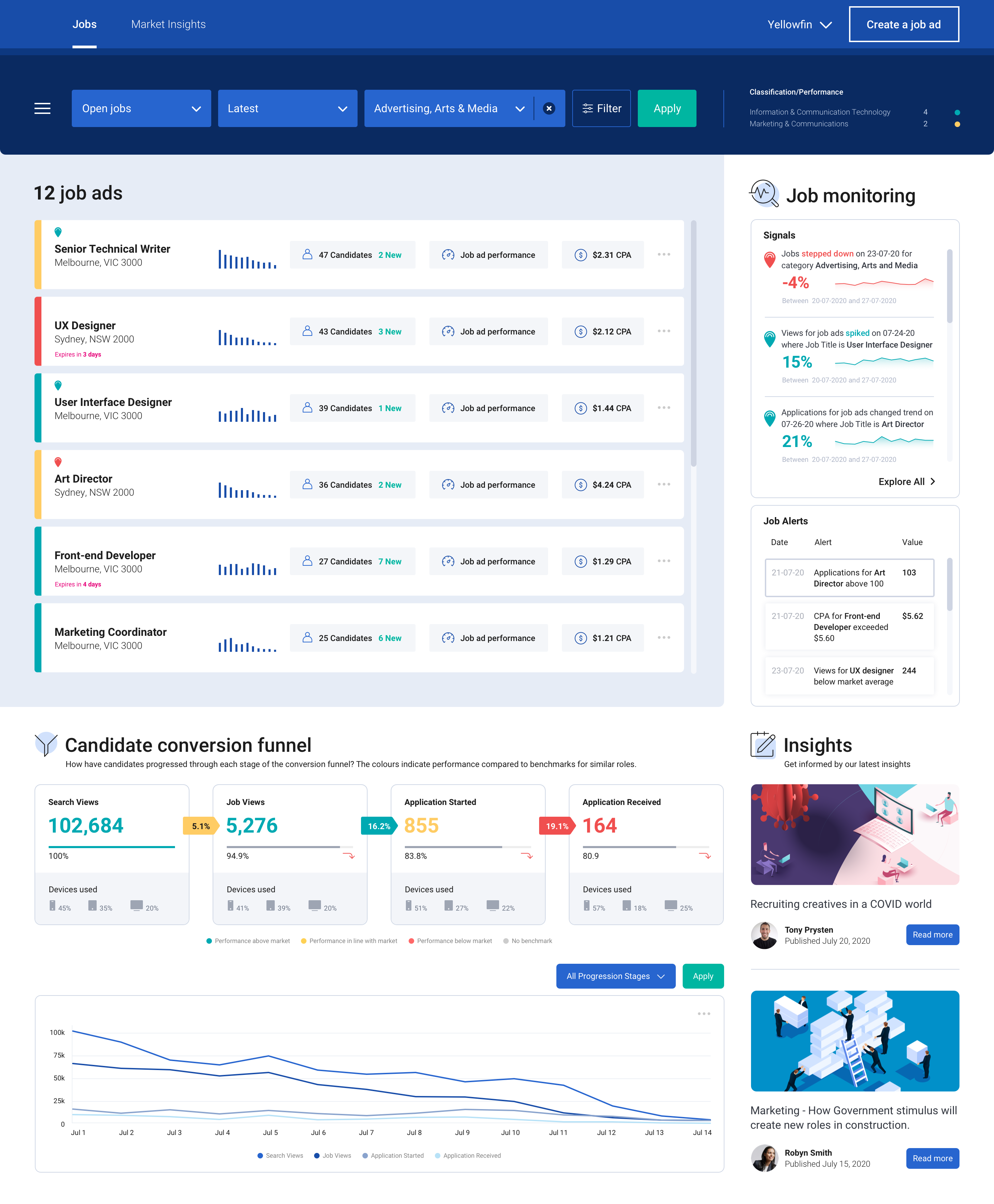
    Contextual analytics, on the other hand, gives users a powerful tool right at the point of their daily work. Contextual analytics is defined as any analytics solution that is integrated directly into an application’s core workflows. This approach delivers the benefits of analytics in the situational framework where decisions must be made.

    Embedding analytics in this fashion creates significant value for the user. Charts, tables and metrics sit side-by-side on the screen, alongside the application’s central functions. With one click, the user gains instant, guided and dynamic insight.

    Such an improvement is helpful for all kinds of business activity. Retail store managers can instantly access demand forecasts while creating weekly work schedules. Inventory managers can view trends and analyze stock without leaving their ordering screen. Supply chain, finance, logistics, sales and marketing, manufacturing—any process involving routine data processing can profit from contextual analytics.

    A Rich Workflow Asset

    When embedded into transactional workflows, contextual analytics can deliver two forms of understanding. The first comes from predefined visualizations, ranging from simple KPI numbers to line and bar charts and even contextual dashboards. These visualizations are presented based on user action; a customer’s purchase history, for example, can pop up in chart format while viewing the account record, enabling the user to make decisions about sales incentives or priorities for service.

    Second are dynamic analyses and alerts. These indicate that either thresholds have been crossed or anomalies in a record have been discovered, prompting the user to explore and take further action. Pop-up alerts can be invaluable in sales, production, finance or many other disciplines.

    For both predefined and dynamic contextual analytics, outcomes can be based on simple aggregations of transactional data or as the result of sophisticated data science modeling (e.g., propensity to purchase). Specific outcomes can be set by either the product manager or the user to maximize utility.

    Contextual analysis is ideal for supporting or triggering actions according to any business need. The capability enhances transactional workflows by providing metrics pertaining to a particular transaction; it will also trigger a new workflow via an alert or suggestion for action, based on the output of a data science model.

    contextual analytics

    Of course, none of this means that dashboard-based analytics aren’t still important. Users will always need to conduct broad data analysis. Dashboards and/or report analytics allow users to monitor overall business performance, drilling down when necessary into the details behind the numbers.

    With the secondary addition of contextual analytics, however, users can be continually guided in their decision making as they work. They receive a constant flow of deeper insight, supporting management tasks intuitively at a granular level.

    Deployment Framework for Developers

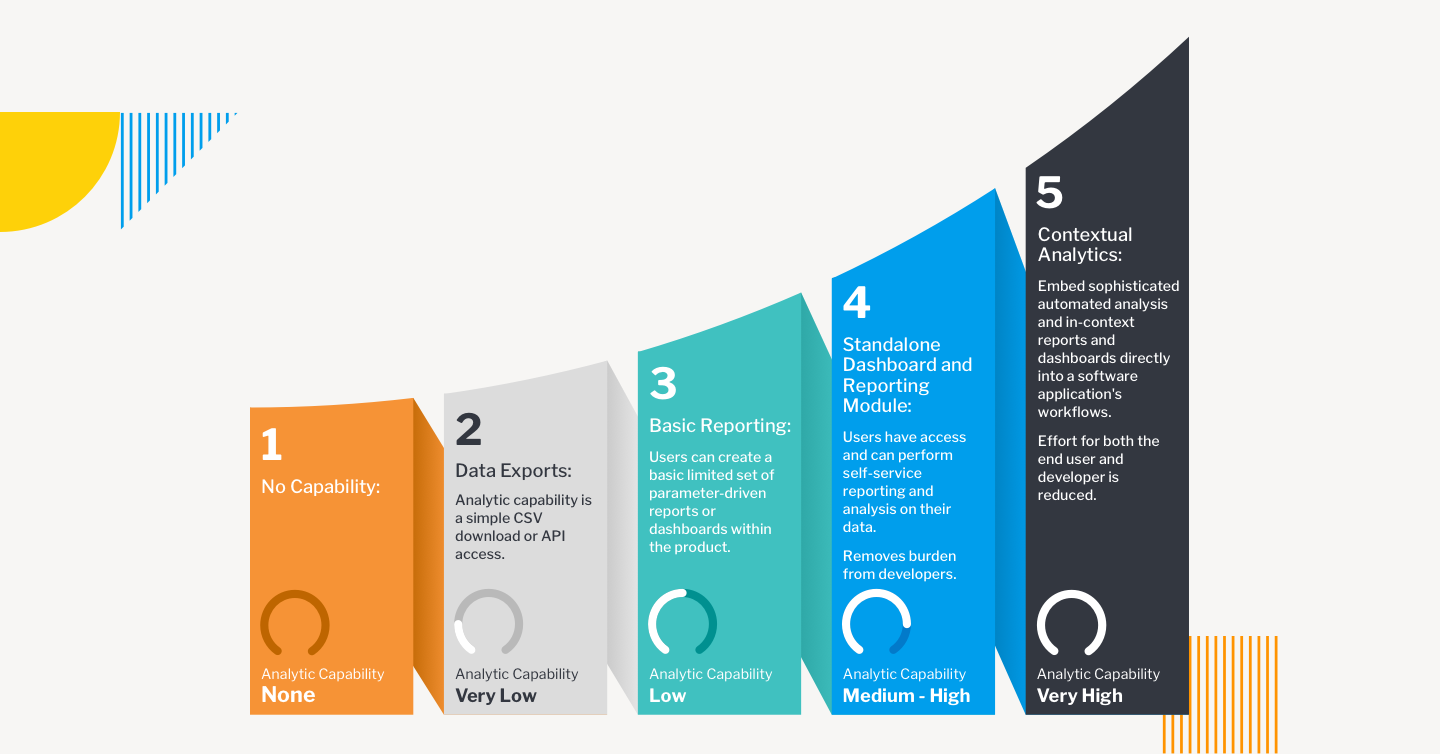
    Embedding transactional analytics into enterprise applications can be directed according to a maturity model. There are five possible stages of product development:

    • Stage One: No Capability. The main engineering focus is on bringing a new application to market. Minimal Viable Product (MVP) attributes lead development, and reporting capabilities are rarely included.
    • Stage Two: Data Exports. Analytics are provided based on customer feedback, but only through a CSV download or API access that allows the end user to analyze data in their preferred tool. The burden of building analyses rests with the customer.
    • Stage Three: Basic Reporting. A limited set of reports are supported by analytics, and in-house developers are tasked with creating the capability, often to the detriment of new features for the core product.
    • Stage Four: Standalone Dashboard and Reporting Module. This is often the end journey for most enterprise applications. Self-service reporting and analysis are available via out-of-the-box dashboards and reports.
    • Stage Five: Contextual Analytics. Sophisticated, automated analysis is available as part of the application’s core workflows, as well as at the dashboard. Users are guided to optimal decision-making at both the transactional and reporting level.

    These stages are not mutually exclusive. Especially for stages four and five they can be additive, so that end users will have a variety of mechanisms to access the data they need, at the time they need it.

    contextual analytics

    Accelerating Implementation

    Elevating the end user analytics experience is easier to achieve than it once was, thanks to BI vendors that specialize in embedded and contextual analytics built on an open platform. The best vendors are able to adapt quickly and easily to product development roadmaps, aligning features to meet specific needs and following up with administrative tools and automation processed to support the lowest possible cost of ownership.

    Working with an analytics vendor means development teams will have maximum support from prototype and design to integration, deployment and subsequent iteration. Options for Windows and Linux, on-premises or cloud will ensure the versatility, security and scalability required for highly marketable offerings.

    How Customers View Analytics

    As a product feature, analytics can often be dismissed as an afterthought—but your users don’t see it that way. BI analytics is increasingly seen as critical to business governance. Users want to glean as much insight as possible from the data they’re collecting—and on multiple levels. This means your users want to get more from your product, even in ways they haven’t yet imagined. Contextual analytics can provide that enhanced appeal for your application, putting your product out in front at a time when enterprise applications are more essential—and more competitive—than ever before.

  • Atlassian Delivers on Forge App Dev Platform Promise

    Atlassian Delivers on Forge App Dev Platform Promise

    Atlassian this week made available a Forge platform for building applications that complements its existing portfolio.

    Mike Tria, head of platform engineering for Atlassian, said Forge is intended to provide an application development environment to both IT organizations and third-party partners. It provides developers with access to an integrated Atlassian DevOps toolchain to accelerate testing, deployment, debugging and to capture log data, added Tria. Forge also presents developers with a command line interface through which they can be onboarded to the Atlassian cloud where Forge runs to access documentation and application samples. It uses OAuth 2.0 to ensure applications deployed on the Atlassian cloud only access data they have permission to access.

    The overall goal is to provide developers with a more modern application development environment as an alternative to the application development platform the company previously made available.

    Once an application is built, developers can then publish their applications on the Atlassian Marketplace as free or commercial offerings. There are already more than 3,500 Forge apps that were created during a beta process that began late last year. Forge will soon be extended to the rest of the Atlassian portfolio, noted Tria.

    Forge is intended to complement an Open DevOps initiative launched earlier this month that tightens integration between the Jira project tracking and management tools provided by Atlassian and a wide range of other tools commonly employed by DevOps teams. The goal is to not only make it easier to correlate issues that are listed in Jira with artifacts found in various software platforms, but also to collect data from DevOps tools to automatically update Jira.

    That data will then be employed to inform key performance indicators (KPIs), based on graphs that Atlassian provides within Jira, to keep track of value streams. Rather than having to acquire a separate value stream management (VSM) platform to track software development progress, the insights needed to understand the impact of, for example, a delay to one project becomes a dividend of using Jira.

    Like most providers of software-as-a-service (SaaS) applications, Atlassian has been making available a platform for building applications on top of the same platform it employs to build its own applications. Atlassian claims there are more than 1,200 partners building applications in addition to internal IT that teams that have built custom extensions to its applications. Atlassian has already shown a proclivity for acquiring independent software vendors (ISVs) that build applications on its platform. As part of the overall Forge initiative, Tria said Atlassian will be working more closely to identify the white space that won’t be addressed by the Atlassian product roadmap at some future date.

    In the meantime, independent software vendors and internal IT teams will need to determine to what degree they will prefer to stand up their own application development environment versus opting to be dependent on Atlassian. In theory at least, applications built on Forge should be more tightly integrated with the rest of the Atlassian portfolio. The only potential downside is, of course, any potential conflict that might emerge with a provider of an application development platform that also happens to sell application software.

  • Serverless Computing Brings New Security Risks

    Serverless Computing Brings New Security Risks

    Attracted by lower costs and less operational overhead, serverless computing is an unmistakable undercurrent in the world of DevOps. Developers are drawn to the innovation because it requires no architecture to manage while offering continuous scaling for anything from a few requests per day to hundreds of thousands of requests per second.

    More than 50% of the developers using serverless functions today started using the computing model in the last three years. By some estimates, serverless computing is the fastest-growing segment in the cloud services market.

    While businesses are drawn by the opportunity to extend and integrate cloud applications at greater scale, there’s a dark underbelly to this DevOps phenomenon: security. In fact, organizations cite security concerns as the leading reason why they haven’t yet adopted serverless computing. For good reason!

    Serverless functions are introducing a new breed of threats – misconfigurations, code-level risks, injections and weaknesses – many of which are the underlying risk factors for a software supply chain attack. With adoption of this technology accelerating, organizations need security that delivers more than just visibility into these dynamic environments. They also need the ability to detect and block code-level vulnerabilities and misconfigurations that occur during development and through to production. Most importantly, this needs to happen seamlessly and with little to no impact on DevOps.

    Dynamic Environments Create Complex Security Risks

    The nature of applications has evolved, creating a new paradigm of security risk. In serverless environments, code sprawl makes it harder to identify vulnerabilities and patch them before they become business-level risks.

    In a monolithic application environment, an identified vulnerability could be efficiently patched by the developer through upgrading a single package, pushing a deployment and then testing and deploying the app.

    In a serverless computing model, patching and resolving vulnerabilities becomes a lot more complicated, given that there may be several hundred (or more) environments across different providers and regions. So, instead of having to patch a single application, developers will need to patch, deploy and test hundreds of individual functions that rely on that library.

    With 39% of developers saying they’re now fully responsible for security, it means they’ll carry the burden of having to patch an identified vulnerability – often taking them away from development work.

    With Serverless, You Need to Rethink Your Approach to Security

    Given the distributed nature of serverless functions – essentially, the reason for its flexibility and scalability – many existing security tools will provide little to no visibility, nor the control capabilities, for these computing environments. Many of the security attacks that will occur in serverless functions will be a result of misconfigurations and mistakes that happen outside the purview of the security team and due to legacy solutions which don’t translate to serverless architectures. Further, because abstracted workloads create blind spots, attackers will have more room to maneuver undetected.

    Serverless functions will even render some traditional DevSecOps tools less useful. Scanning tools must monitor hundreds of individual repositories instead of a single monolithic repository, while application performance monitoring (APM) tools lack security proficiency and cannot protect from the OWASP Serverless Top 10 risks.

    The challenge for security teams will be implementing solutions in a way that does not modify workloads or require changing business logic — both of which slow development. When applying security to serverless functions, it’ll be critical that the solution can do the following:

    • Go beyond monitoring and actually detect and block vulnerabilities without elaborate or manual steps involved. The scale of serverless functions will make it nearly impossible for security analysts to manage and keep up with every alert they receive. Instead, they need a tool that delivers actual security and can help them block malicious activity without stopping development altogether.
    • Enable a positive security model that provides protection against malicious changes, like zero-day exploits, within the function. This approach gives security teams more control by automatically detecting and blocking anything that isn’t explicitly allowed in a given function.
    • Provide forensic detail from log-level information so security analysts can fully understand the context of every attack with virtually no impact on latency. Further, with the risk of supply chain attacks soaring, security teams need the ability to identify and map third-party dependencies used during runtime.

    For many organizations, serverless architecture is a very different and unique computing environment – unlike anything they’ve experienced or had to protect before now. That reality means that organizations need a fresh approach to securing these environments and will need to look beyond the traditional tools they have in their tech stack today.

    Above all, developers and security teams will need to work together to ensure security is built-in from the start. Otherwise, serverless functions will quickly become a playground for cybercriminals.

  • Digital.ai Deepens Value Stream Management Integration

    Digital.ai Deepens Value Stream Management Integration

    Digital.ai announced today it has expanded usage of machine learning algorithms within its namesake value stream management (VSM) platform to include modules to optimize flow and improve application quality in addition to enhancing its risk prediction and process optimization modules.

    In addition, Digital.ai has expanded the number of pre-built integrations it now provides for hundreds of DevOps tools and platforms.

    Derek Holt, general manager of agile and DevOps for Digital.ai, said the goal is to expand the bi-directional flow of data between the core Digital.ai platform and modules and tools provided by the company and its third-party DevOps partners.

    Digital.ai was formed from the merger of XebiaLabs and CollabNet VersionOne. The combined company has rolled up Numerify, a provider of analytics tools infused with artificial intelligence (AI), Experitest, a set of testing tools and Arxan, a provider of an application security platform. With the latest release, these capabilities have been integrated into the core Digital.ai platform in a way that goes well beyond merely providing access via a common user interface, said Holt.

    The goal is to provide organizations with a VSM platform through which better decisions can be made to optimize software development and delivery by first collecting data from all the DevOps tools employed and then using machine learning algorithms to surface optimization recommendations, noted Holt. As application development environments become more complex to manage, it’s already apparent that most IT teams will require AI capabilities embedded in a VSM platform to manage interdependent projects, noted Holt.

    Armed with those recommendations, it becomes simpler to reallocate resources in the event a critical project is going to be completed later than planned or shift resources to make sure that project is completed on time. A VSM platform also enables IT organizations to assess the impact those decisions will have on the rest of the business at a time when organizations have never been more financially dependent on the timely delivery of software. The late delivery of a single application module can wind up having a profound impact on revenue projections for organizations that increasingly rely on digital processes to engage customers.

    A recent survey conducted by Digital.ai found that many digital transformation initiatives are struggling, to some degree. Nearly half of respondents (49%) said they are not seeing the results they expected from their digital transformation efforts, and 54% admitted they were worried about their ability to compete. Over 90% need to see a better return on their digital transformation investments.

    Digital.ai claims it currently has more than 1,200 customers, including Allianz, Commerzbank, eBay, Janus Henderson and Levi’s that are using elements of the Digital.ai platform to better manage software development projects. Many of the users of those tools now include business executives and other application stakeholders that are employing a VSM platform to track the progress of application development projects. Digital.ai Analytics Lenses that are domain-specific make it simpler for different classes of end users to access pre-built dashboards and metrics, noted Holt.

    The market research firm Gartner has predicted that 70% of organizations will employ a value stream management platform by 2023 to improve flows across their DevOps pipelines. However, as DevOps platforms and project management applications continue to evolve, many are also adding many of the analytics capabilities found in a VSM platform. Each IT organization will need to decide which approach makes the most sense for them, but Digital.ai is clearly betting that as application development becomes more challenging, the need for an integrated VSM platform will become much more apparent.

  • How to Build a Team That Embraces Metrics

    How to Build a Team That Embraces Metrics

    When we talk about metrics in software delivery, a lot of developers think of execution metrics — things like throughput, delivery and number of deploys. But in reality, those metrics don’t motivate anyone — at least not without connecting them to a bigger picture.

    I’ve worked in software for 23 years. I’m a three-time founder and four-time CTO, responsible for leading a 200+ member distributed engineering organization. I’m passionate about metrics because they can tell me a lot about where things are working and where they are not. On the other hand, there’s a risk that operating metrics become the focus, taking attention away from measures of business value.

    Getting your developers to embrace metrics isn’t about hand-selecting specific metrics to track. It’s about disseminating the bigger picture and sharing measures of business impact that allow your team to see progress against those larger, shared goals.

    When developers understand how their day-to-day work directly impacts the company’s goals and vision, they’re able to understand their impact, too, and will want to do better. When they want to do better, they want execution metrics to get them there.

    Clarify Your Goals

    If you want your developers to not only track their metrics but be excited to use them, there are a few things you need to do first:

    • Get clarity on the goals you’re trying to accomplish as a team and as an organization
    • Figure out how you’re executing against those goals
    • Find out what’s getting in the way

    Developers shouldn’t be obsessing over execution metrics. Rather, you need them to understand what the company is trying to achieve. What is the outcome you’re aiming to deliver to customers and for the business overall?

    If your developers have clarity on the company’s mission and vision, they understand how their work directly impacts the customer and the success of the organization, which is highly motivating.

    Individual contributors will start asking for access to more information so they can diagnose their own problems and improve their work.

    Are we spending too much time on technical investment? Does it feel like we have too many incidents, issues and escalations from customers? Are we far off on our estimates? By answering these questions, your team can determine which metrics to track.

    Don’t Make These Mistakes

    Using one metric to rule them all. A lot of engineering organizations try to rally entire departments around the same execution metrics. Velocity, or throughput, for example, is a great tool to expose other issues, but consistent velocity is not a guarantee of delivering business value. In fact, targeting consistent velocity is likely to result in tradeoffs you didn’t anticipate, like taking shortcuts to get things out the door.

    Treating the metric as the goal. Meeting a metric shouldn’t be the goal; rather, metrics should be viewed as a way to ensure your team is meeting their goals. Organizing around business value is what really helps your team understand the purpose of their work. If you’re just rallying around how many times you can deploy per day, then sure, you can be an amazing software-deploying machine — but you might be deploying changes all day that have nothing to do with the actual goals of the business.

    Being a blocker. Developers need autonomy and flexibility to do their jobs well. Give teams a high-level objective and let them determine which metrics they need to push, instead of giving everybody the same metrics and telling them to get better.

    If engineers don’t have the autonomy to make their own decisions, then they’re going to feel like they’re just part of the machine. As engineers, and as humans, problem solving is what motivates us, along with the knowledge that our skills are contributing to a larger, shared goal.

    A Team That Embraces Metrics: Putting it Into Practice

    There are three channels that are essential to communicating business-value metrics to teams. At the company level, executives will introduce their high-level goals at all-hands meetings — where the company is trying to go this year, how you differentiate in the market — the things that really matter to a business.

    One level down, during organizational or department meetings, is where to communicate how teams should think about the goals from a product and engineering perspective, while still thinking about them within that overall business context.

    It’s also important that this is understood down through the management chain. An engineering manager should be able to explain to their team the overall business goals with local-level reinforcement and how it all ties together.

    When you have that knowledge as a team, you know what you’re capable of executing because you understand what you’re trying to achieve for the company and the customer. That’s when developers start asking for more metrics because they want to understand how to get there faster.

    If You’re Not Hitting Your Goals, You Should be Asking for the Data

    The only real failure is not learning from failure. It should be okay to not hit your numbers. Set a bold target and push yourself, then learn something from your misses. Figure out what you didn’t understand, what got in your way and why.

    Estimation is hard. Trying to plan work is hard. But if you know how much you were able to deliver last quarter, you can focus on getting something similar done this quarter instead of assuming this will be the one quarter where there are no interruptions, your initiatives will all be perfectly defined and nobody will get sick.

    If you’re not hitting your business goals and you’re not looking at your historical data, then you’re missing your opportunity to improve.

    Your Team Embraces Metrics. Now, How Do You Get Them Excited?

    The first time I started using continuous deployment (CD), I was truly amazed at how quickly it allowed my team to put new functionality into the hands of our customers. We could instantly find out if they liked it, and if they didn’t, we would build another version tomorrow.

    As an engineer, CD is a great way to feel more connected to your customers because you get to put something you built in front of them the same day you complete it. You also become interested in a different form of metrics: usage and adoption.

    The connection between your work and the ultimate value to the user is much clearer when the feedback cycle is shorter. CD allows you to get that feedback from customers directly and really see the impact you have on them. That gets people excited.

    There’s no Shortcut

    You can try to drive an entire organization by execution metrics, but it simply won’t be fulfilling for anyone. If your team is aligned around what they’re trying to achieve, they will recognize the value of execution metrics and they will come looking for them.

    There’s no shortcut.

    If you start with the reason and you end with the numbers, you know you’re on the right track. You’ll know you’re getting there because you’ll see the numbers moving, your team will be excited by that, and they’ll be motivated to do even better.

  • Automation is Needed for Reliable Cloud Platforms

    Automation is Needed for Reliable Cloud Platforms

    From six to 1,400 microservices in less than five years? At first glance, that sounds like overwhelming complexity. Can you actually see the entire system across all of the microservices? This is the key to highly available and reliable SaaS cloud platforms. But what does this mean, and how can SaaS providers achieve it?

    Over the past decade, the cloud has become the virtual space where the majority of companies’ business processes and communications take place. Considering the accelerated digitization processes of the last year alone, cloud computing plays an increasingly crucial role when it comes to making distributed teams more productive. As a result of these developments, the number of applications, microservices and interfaces is increasing, creating a more complex IT infrastructure.

    The reliability and availability of cloud services must, therefore, be a high priority for providers. Weak services and downtime not only cause frustration among customers, but can also lead to considerable financial losses on the customer side. Accordingly, SaaS providers must establish processes and methods that help them provide secure and highly reliable cloud infrastructures, or risk losing their customers.

    Microservices as the Foundation for Reliability

    Complexity is implied with every SaaS cloud platform. This can be managed in two different ways. On one hand, management can be done via a centralized monolith. Through this, complexity arises from a single system with only one interface to external systems. On the other hand, complexity can be distributed via smaller system units in the form of microservices. This means that the various functions of an application or service are broken up and assigned to several individual instances that communicate with each other. The advantage of this is that if a microservice fails, the entire application is not necessarily affected.

    Microservices in cloud environments have been enjoying steadily growing popularity for some time now. In fact, 76% of the companies surveyed as part of a 2019 Forrester study stated that microservices will be high on the business agenda for many companies in the future. Only 4% disagreed with this statement at the time. In 2020, a TechRepublic survey found that the majority of experts surveyed (73%) have already integrated microservices into their application processes, and 66% of respondents use them in the form of cloud services. Microservices are everywhere!

    Service Level Objectives and Automation

    Due to the numerous interfaces that arise with microservices and the need to be monitored, this architecture appears, at first glance, to be more error-prone than traditional monolithic systems. Some companies already rely on service level objectives (SLOs) – i.e., targets and measurable KPIs to ensure service quality – for a higher level of security. However, these are often limited to the outer layer of the entire system.

    Formulating appropriate SLOs for each microservice with additional alerts can counteract this. In combination, these provide profound protection of the system against creeping errors.

    In order to maintain an accurate overview with regard to security and security-related incidents, and thus ensure the reliability of the system, the microservices and their respective SLOs must be closely monitored and continuously tested. When we surveyed software and IT professionals back in 2019, we found that 71% of respondents reported that microservices-based architectures are much easier to test than monoliths. And with the help of automation, operational teams can ensure that the overall reliability level is close to 100% in every single instance of the systems, no matter how complex. A separate, centralized automation tool monitors all microservices in use and is able to alert appropriate teams about any abnormal activity with respect to individual breached SLOs. In addition, this tool should be linked to an incident management platform so that any breach can be remediated directly. By following this framework, software developers will enjoy the benefits of a more manageable and scalable microservices system.

    We live in a time when consumers expect technology to be updated regularly and run reliably. If this is not the case, they will simply opt for better alternatives. To prevent this, companies need to invest in more effective service structures. Microservices, combined with a central platform that automates testing and management, is the foundation for achieving reliability and scalability.

  • Unqork Extends Automated No-Code SDLC Platform

    Unqork Extends Automated No-Code SDLC Platform

    Unqork today announced it has extended a no-code platform for managing the software development life cycle (SDLC) to include the ability to automatically document changes to application programming interfaces (APIs) and data models in addition to adding a point-in-time rollback capability.

    Ken Gavranovic, head of strategy and engineering for Unqork, said Unqork 2021.5 also adds a range of dashboards for monitoring application dependencies, service logs, revisions, logs and metrics.

    Finally, Unqork is adding tools to analyze, test and debug configurations along with enabling workflows to subscribe to events and adding a search capability for release candidates.

    Unqork is designed to present IT teams with a set of visual tools through which they can manage SDLC processes without having to build and maintain a platform made up of disparate offerings that they need to then integrate, said Gavranovic. The goal is to reduce the overall size of the team required to maintain an application development environment to enable organizations to allocate more time and resources to building applications, he added.

    The auto documentation for APIs is being added at a time when IT organizations are starting to employ a larger number of APIs as they transition toward building and deploying microservices-based applications. In addition to making it easier to reuse APIs, Unqork also now makes sure documentation for those APIs is always current, said Gavranovic.

    At the same time, Unqork is now providing a means to automatically document changes to data models based on a data store that is integrated in the platform, noted Gavranovic. That capability enables organizations to implicitly add governance capabilities to workflows with a minimal amount of friction.

    As organizations look to accelerate the rate at which applications are being developed to enable multiple digital business transformation initiatives, Gavranovic said more of them are starting to realize their existing processes are too complex and cumbersome to achieve that goal. Unqork is based on a data store that is shared by all the modules that make up the platform, which, in addition to enabling reusability, makes Unqork easier to deploy and manage, added Gavranovic.

    In addition, Gavranovic also noted that, over time, complex processes only increase the overall burnout rate of the development team. It’s hard enough to hire and retain developers today without requiring them to navigate a complex application development environment, he added. Eventually, the best talent will migrate to organizations that make it as easy for them to write code as possible, said Gavranovic.

    It’s not clear to what degree IT organizations will be revisiting the way they build software in the months ahead but as more of them realize how dependent the business now is on the timely delivery of software it’s only a matter of time before pressure to automate as much of the software development process as possible starts to mount. The cost of replacing an application development environment is, of course, not insubstantial. However, continuing to do the same thing with the expectation of producing a different result is, by definition, insanity.

  • Implementing an On-Demand Feature Environment

    Implementing an On-Demand Feature Environment

    Not long ago, developers at LeanTaas implemented an on-demand feature environment. It came about as the result of a collaborative effort to support a faster go-to-market strategy. Moving to an on-demand feature environment resulted in greater agility, effectiveness, quality and a better bottom line for the organization. With careful implementation, any development team can benefit from this exercise.

    With an on-demand feature environment, you can easily test specific features without disrupting development activities that already are in process. Setting up the environment can offer several benefits and enhance the overall outcomes of your product release. Here, we’ll walk through the steps we took to get this implemented.

    feature implementation

    First, we decided to come up with some standards and changes in our development practices:

    Naming Conventions

    Every Git branch name should start with the associated Jira ticket and include details about what that branch is for. We updated the Jira ticket with environment URLs, automated QA test results and comments from product manager reviews.

    Syntax:

    <JIRA_TICKET>-<SHORT_TITLE>-<PRODUCT_NAME>.<DOMAIN_NAME>.com

    For example, LT-123-demo-product1.xxxx.com

    In this case, LT-123 is the Jira ticket, demo is the short title, product1 is the product name and xxxx is the domain name. So, our feature branch URL would be accessible at https://lt-123-demo.product1.xxxx.com, and the internal name would be dev-product1-lt-123-demo, which developers can use to ssh and debug issues (if any) and refer to when they check logs (if necessary).

    Also, following a set naming pattern helps us write a regular expression in a front-facing server environment (we use NginX) that helps proxy/route the requests to the respective feature-specific runtime environments deployed in an AWS EC2 instance.

    If you are using NginX, you can use following regex to achieve this:

    server_name ~^(?<featurebranch>.+)\-product1\.xxxx\.com$;

    set $featurebranch dev-product1-$featurebranch

    proxy_pass https://$featurebranch;

    Data and Microservice Dependencies

    For the environment to work in its own isolated state, it needs a data set stored in its own database. So our teams came up with an automation script for generating an anonymized sample dataset that’s required for this feature instance. We packaged this data, along with other required artifacts, into a golden Amazon Machine Image (AMI) for the specific product. For easy reference, we stored this custom AMI ID in the AWS systems manager (SSM) parameter store so that our Terraform scripts can use this reference while spawning an EC2 instance.

    Once the feature-specific instance came up, we realized it couldn’t play well with our other microservices such as authentication, authorization or notification. They couldn’t differentiate between a real product instance versus a short-lived, feature-specific instance. So, we had to add an additional header in our internal requests, and enhanced these other microservices to be aware of this additional header so that they could exactly respond back to a feature specific instance. When it comes to usage of message services, every feature branch has its own SQS queue, which followed the same naming conventions of the internal hostname. Platform services relied on this same standard to ensure these feature branches worked seamlessly.

    Automation/Manual Quality Checks and PM Reviews

    Now that the feature-specific instance is up and running in its own isolated environment and with its own dataset, it enables a fully functional playground for the QA team and PM team to extensively test new features in an isolated fashion. Having this playground is a game changer for our productivity. It helped parallelize the iteration cycles. Each feature started getting its own feedback and progressing towards the finish line; essentially swimming in their own lane.

    Cost Considerations

    So far, so good. Feature-specific application instances are up and running and development iterations are progressing. But what is the lifetime of these instances? We don’t want to let them run forever; we also want to consider the fact that not every new feature will end up getting released. So, how do we handle such cases? We want to hook up these instance termination actions seamlessly into the developer’s work stream. Here’s how we solved for this:

    • Delete the feature branches-related infrastructure as soon as the feature branch itself is deleted.
    • Stop the EC2 instances every night and start them every morning by using a combination of AWS Cloud Watch Events and Lambda.
    • Automatically delete the feature branches that are active for more than seven days. We later ended up providing an additional feature; skip flag, for some feature branches because sometimes we’d end up making changes that were complicated or revamping things which needed more time.

    Notifications

    We use Slack, so we decided to send Slack notifications every time a feature environment was created and attach test results, as a thread, to the same Slack message.

    feature

    We also decided to use AWS tags and maintain branch_owner (developer name), branch_status (synced with Jira to indicate In-Dev, In-QA, PM Review, Code Review etc.) and tag EC2 instances. We also sent a daily report with the number of active branches, which helped in our daily standup and also provided a quick, at-a-glance overview of features that were ready for release.

    For implementation of CI/CD pipelines, we created a new Jenkins pipeline that had the ability to perform some prereq checks, code quality checks, build applications into Docker containers, spin up infrastructure using Terraform and deploy the Docker container into newly created infrastructure using Ansible, run automation tests against the feature environment and send notifications in Slack as well as update Jira tickets with the build URL and test results.

    feature

    Sample screenshot of our pipeline

    feature

    Once our feature environment was certified, then a pull request is submitted to merge in Master, before merging code review is performed by other developers and engineering leads, and then, finally, merged into Master. Once the feature branch is merged into Master, it gets deleted via a webhook.

    feature

    Now, code is built against the master branch and deployed into the master environment to ensure integrity. We perform one more round of QA using automated and manual checks, regression testing, internal penetration testing and performance testing. Once these are passed, the Docker image is finally promoted to production.

    Following these steps to a seamless implementation of an on-demand environment will help any organization take the same steps towards a more efficient process. If you can apply these steps to your workflows, your metrics could improve exponentially.

  • Netlify Acquires FeaturePeek to Streamline App Feedback Process

    Netlify Acquires FeaturePeek to Streamline App Feedback Process

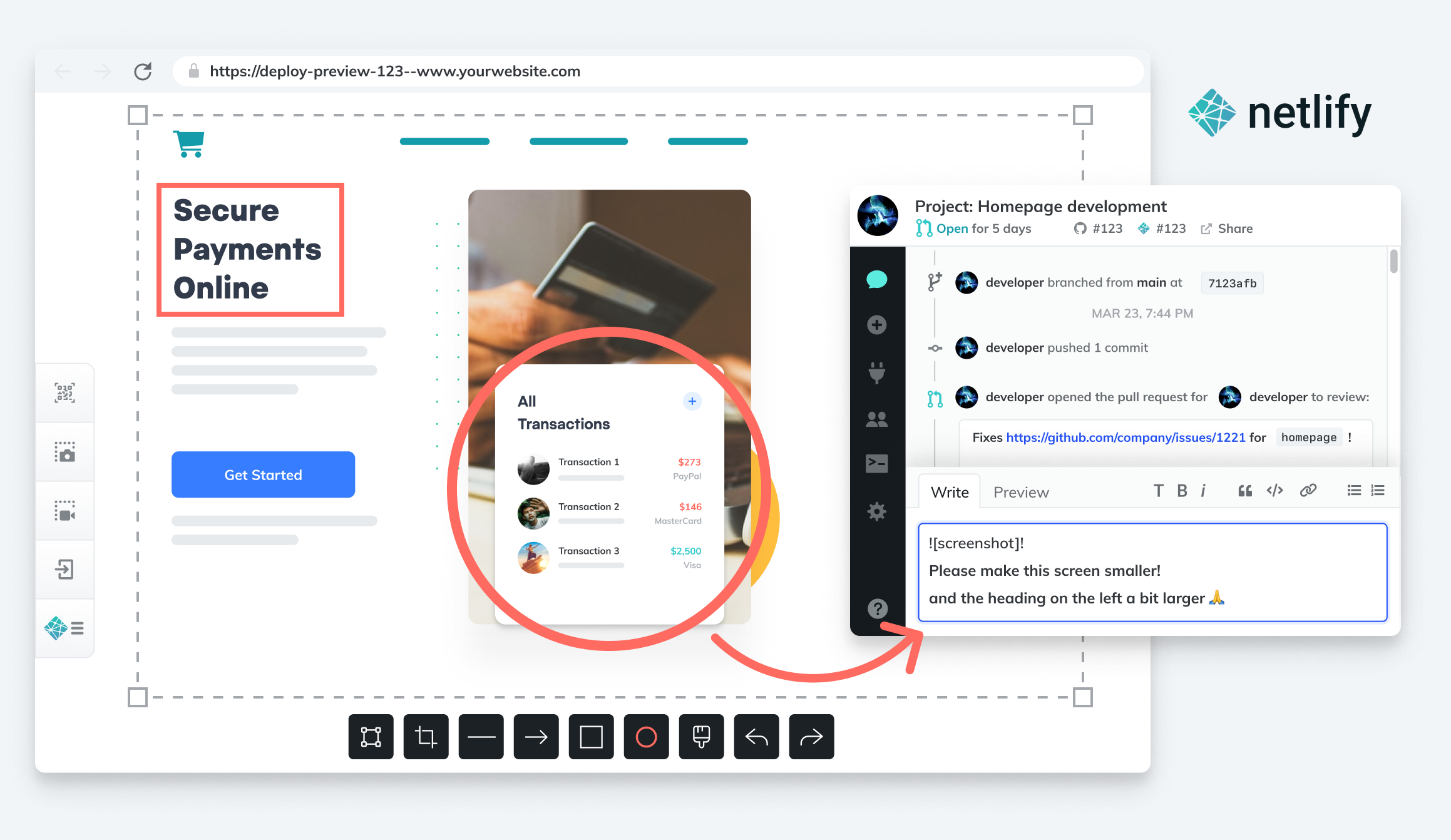
    Netlify announced today it has acquired FeaturePeek as part of an effort to make it simpler for DevOps teams to create a portal through which application stakeholders can both inspect a web application developed using JavaScript and leave comments for developers.

    Matt Biilmann, CEO of Netlify, said Netlify will embed that collaboration capability in the next iteration of its Netlify Deploy Previews. That tool makes it currently possible for a front end pull request from a Git repository to automatically generate a live preview of the site with a unique shareable URL.

    The current version simply shares URLs with application stakeholders, versus enabling DevOps teams to create a portal through which the review process can be centrally managed to make feedback more consistent, said Biilmann. Each piece of feedback from an application owner or stakeholder made via the portal will become a comment on the Git pull request, or can be shared via any collaboration tool a development team employs alongside a Netlify workflow, noted Biilmann.

    In the meantime, Netlify is also making available a free user role license for reviewers that want to make use of Netlify Deploy Previews to view recent updates to applications.

    Netlify has been driving adoption of a serverless computing framework based on a JAMstack architecture for building JavaScript applications faster. An application based on a JAMstack architecture isolates the front end and back end end of an application to make it possible to prebuild front ends that are highly optimized around static pages to make web applications faster. The name JAMstack is a mashup of JavaScript, application programming interface (API) and markup language.

    The need for more collaboration between developers and stakeholders has become more pronounced, in part, because organizations have significantly accelerated the rate at which they are investing in digital business transformation initiatives, noted Biilmann. With organization more dependent on software than ever, it’s critical for them to streamline the feedback cycle as the number of application stakeholders within organizations steadily increases, added Biilmann.

    As the relationship between DevOps teams and the rest of organization continues to evolve, the amount of feedback any team is likely to receive will continue to increase. Everyone from sales teams to the board of directors now realizes how dependent the business is on software. DevOps teams will need to way to organize and prioritize that feedback. They should also expect application owners and stakeholders to follow the progress of software development projects more closely than ever because, in many cases, financial projections are now based on assumptions being made about software delivery timetables.

    Many DevOps teams have been making the case to have a more central role in business planning for years. Now that many of them are getting a seat at the proverbial business planning table, however, they may soon realize they don’t really have the processes in place to absorb the overabundance of enthusiasm and anxiety that application stakeholders are likely to generate in equal measure.