Category: Application Performance Management/Monitoring

  • Plutora Dives Deeper into Value Stream Analytics Data

    Plutora Dives Deeper into Value Stream Analytics Data

    Plutora announced today it has extended the capabilities of its value stream management (VSM) platform to include a common object data model that more efficiently normalizes data collected from multiple DevOps tools and platforms.

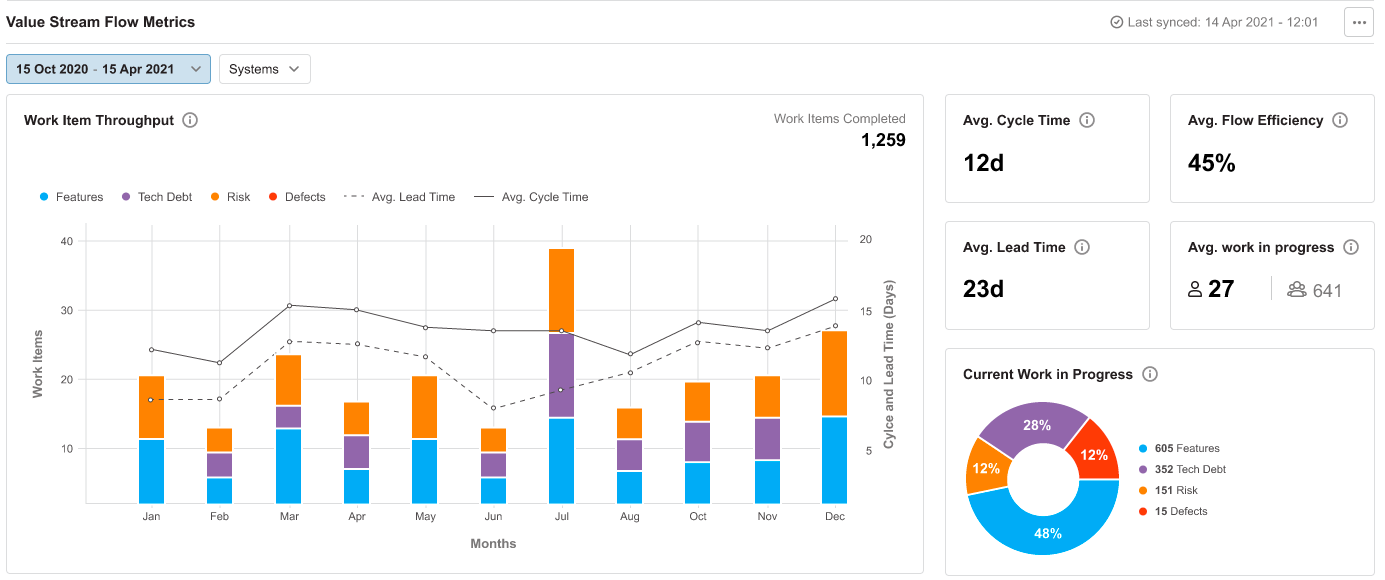
    Jeff Keyes, vice president of product marketing and strategy for Plutora, said the goal is to expand the level of scale and depth at which the Plutora analytics engine embedded within the Plutora Platform can analyze flow metrics.

    VSM has emerged as a distinct DevOps discipline that provides a framework for enabling organizations to optimize workflow across DevOps environments in a way that allows them to accelerate application development. The core concept traces its lineage to lean manufacturing methods that continuously measure each step of a process to improve production.

    As organizations develop a deeper appreciation for their dependency on software, the level of interest in understanding how software is constructed has increased. Organizations, for example, want to better understand the impact of missed software development deadlines on revenue, which a business might not be able to generate as quickly as anticipated.

    Plutora is making a case for a dedicated analytics platform that pulls data from multiple platforms. Alternatively, more value stream analytics capabilities are now being embedded in everything from project management software to continuous integration. Plutora contends, however, that navigating multiple value stream dashboards surfaced by different tools that make up a DevOps workflow is not as simple or effective as relying on a single platform that collects data from every tool employed.

    Metrics that track lead and cycle times for projects as well as overall throughput become much easier to surface and comprehend, noted Keyes.

    One way or another, more transparency is coming to DevOps workflows. Historically, collecting this data has been challenging because it required DevOps teams to manually collect data from each tool being used. In effect, DevOps teams were wasting time copying and pasting data from one tool into an analytics application.

    As it becomes simpler to aggregate all that data, the data model provided by Plutora makes it simpler for multiple analytics tools to analyze the same data. A business user, for example, may prefer to analyze data using the Tableau analytics platform that is now owned by Salesforce.

    In general, analytics is being applied more widely across software development processes because organizations need to increase productivity while simultaneously reducing costs. It will be up to each organization to decide to what degree they may want to use that data to better train DevOps teams versus simply using it to remind those teams to stay focused on a specific set of key performance indicators (KPIs).

    In the meantime, the number of requests for reports being made to DevOps teams should decline as the process of collecting metrics becomes more automated. The challenge now will be making sure everyone reading those reports has the same firm understanding of what’s actually possible to achieve using not only the resources at hand, but also how any additional DevOps expertise might positively impact that equation.

  • Google Proposes SLSA Framework to Secure Software Supply Chains

    Google Proposes SLSA Framework to Secure Software Supply Chains

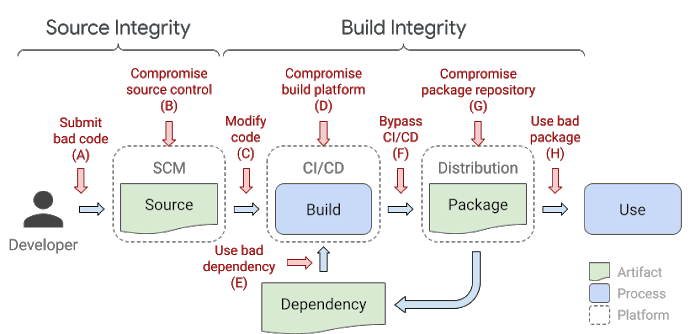
    Google is proposing organizations adopt a framework for securing the integrity of software artifacts across a software supply chain.

    Kim Lewandowski, a product manager for open source software security at Google, said the Supply Chain Levels for Software Artifacts (SLSA) is based on an internal framework, known as binary authorization for Borg, that the company has been employing now for more than eight years to secure its software. Borg is the name Google attached to the platform for building and deploying applications upon which Kubernetes is based.

    In its current form, SLSA is a set of guidelines that identifies how to attain four different levels of application security. The goal, however, is to create a framework that will automatically generate auditable metadata that can be fed into policy engines to create a SLSA certification.

    The lowest level of SLSA requires that the build process be fully scripted or automated and generates metadata that enables provenance to be created. At the highest level, SLSA requires a two-person review of all changes made during a hermetic, reproducible build process. At the highest SLSA security level, organizations should be able to assure others that their software supply chain has not been compromised, said Lewandowski.

    Google

    In the wake of a recent series of high-profile breaches of software supply chains, the level of scrutiny being applied to how software is constructed has increased significantly. In theory, at least, developers have assumed more responsibility for application security as part of an overall shift left that provided them with more programmatic control over IT environments. As a result, cybercriminals are now focused on compromising either the credentials of developers as part of an effort to insert malware into application as it is developed, or they are trying to exploit vulnerabilities that developers have inadvertently created by programmatically misconfiguring infrastructure.

    DevSecOps best practices are, of course, being adopted to teach developers how to better secure their application environments. The issue is that not enough developers are learning how to secure applications fast enough. The volume of attacks against the software supply chain continues to grow at a rate that is now much faster than organizations can thwart simply by educating developers. In some cases, organizations are once again empowering cybersecurity teams to make sure software supply chains are secure regardless of the potential impact on the rate at which applications are being developed.

    Google is trying to promote adoption of SLSA as a framework for securing both open source and proprietary application code, said Lewandowski. There’s no silver bullet for securing software, but a framework that ultimately automates as many of the security processes as possible within the context of a DevOps workflow would go a long way toward hardening the software supply chain, noted Lewandowski.

    SLSA is being put forward as a response to a cybersecurity executive order issued by President Biden that, among other things, tasks the National Institute for Standards and Technology (NIST), an arm of the U.S. Department of Commerce, to consult with federal agencies, the private sector, academia and other stakeholders in identifying standards, tools, best practices and other guidelines to enhance software supply chain security. Given the level of dependencies that exist across those software supply chains, that executive order, to varying degrees, now applies to almost any entity that builds software for an organization that, on some level, interacts with the Federal government.

  • Code Ownership Is Key to Accelerate Debugging

    Code Ownership Is Key to Accelerate Debugging

    App stability is a fundamental part of every app experience. Broadly speaking, app stability is a measurement of the number of total app sessions that are crash-free or the percentage of daily active users who do not experience an error. End users have little patience for apps that crash or fail. Every application, whether it’s B2B- or B2C-oriented, suffers some level of instability and fails occasionally. Ideally, organizations should aim for app stability scores close to 99.999%. To achieve that quality of performance, software engineers must be fast and efficient in fixing coding errors that are frequently the cause of app crashes.

    But that’s a major challenge using the traditional approach to debugging. Most major applications have a wide variety of engineers, including completely separate engineering teams, all working from a single code base. Each team typically uses their own unique issue tracker to monitor errors, such as Jira or Asana. In addition, teams typically use their own channel in a collaboration platform to communicate internally, like Slack or Microsoft Teams. This causes silos between the various engineering teams, limiting communication and visibility between each team.

    When an error occurs, all the engineering teams are alerted about the bug through their own issue trackers. From there, they figure out where the error occurred in the code and who is specifically responsible for fixing it. This requires each team to manually review code as they try to locate the bug, which wastes precious time as engineers duplicate one another’s efforts. Because teams are using different communication channels, there’s little to no collaboration or alignment between the various engineering teams during this process. Overall, this approach to debugging is a cumbersome and inefficient undertaking that slows the process of repairing apps, ultimately hurting the end user experience.

    Consider a real-world example. Suppose your team is one of a dozen engineering teams, all working together on an application that creates a mobile game. Perhaps your team works on maintaining the in-app purchases feature set, while another works on the account setup flow and yet another team works on character customization features. If a bug suddenly crashes the app for a significant portion of users (resulting in a clear drop in the app stability score), every team will receive an error alert through their issue tracker notifying them that a coding issue has caused the application to fail. No one will know if their team’s code was responsible. As a result, each team is forced to go through the laborious process outlined above. If it turns out that the bug was in the character customization code, then the teams responsible for in-app purchases and account setup have wasted valuable time and resources searching for the error.

    The only team that should be notified of a bug is the one responsible for the part of the code a bug originates from. The emerging concept of code ownership makes this possible, providing a faster and easier approach to debugging. With this method, organizations create code owner files to determine which engineers or teams are responsible for each section of code, feature flags or experiments. If section X within the code fails, then team X will be responsible for addressing it. In the example above, only the team responsible for the code associated with character customization would need to find and fix the bug.

    This makes it much easier to respond to application issues and allocate the correct resources to remedy those issues. For end users, code ownership means that malfunctioning apps will be fixed faster, improving the customer experience and boosting business metrics. From an internal POV, engineering teams become far more cost- and time-efficient, freeing developers to take on new projects they actually enjoy working on.

    A culture of code ownership also helps engineering teams adopt other best practices for debugging. One major example is error prioritization. Not all bugs cause significant app instability and need to be fixed right away. When a team can ignore errors unrelated to their code, they have more time to fully hone in on and evaluate the errors they are responsible for. With this focused approach, they can establish metrics determining if they need to fix a bug immediately or if it can wait.

    Simply put, code ownership eliminates the confusion and guesswork associated with the process of debugging, allowing engineering teams to easily identify, own, prioritize and remedy bugs. Embracing code ownership is critical for companies to improve app stability, which is the most fundamental measure of an app’s health. This ties directly into business outcomes, because app stability is closely associated with customer retention, customer growth, sales and revenue. By speeding up debugging efforts, code ownership has a pronounced, positive impact on stability, boosting each of those metrics.

  • PagerDuty Allies with JFrog to Modernize IT Incident Management

    PagerDuty Allies with JFrog to Modernize IT Incident Management

    PagerDuty has integrated its IT incident management platform with the continuous integration/continuous delivery (CI/CD) platform from JFrog as part of an effort to streamline troubleshooting of application environments.

    Steve Gross, senior director of strategic business development at PagerDuty, said the overall goal is to make it easier for IT operations teams and developers to collaboratively discover the root cause of issues by, for example, being able to identify builds within a JFrog pipeline that might be having a negative impact on a production environment.

    At the same time, IT teams employing PagerDuty can now also receive notification from JFrog Xray, a tool that discovers both vulnerabilities in open source software and license compliance issues.

    Organizations of all sizes are attempting to minimize the impact of an IT incident by providing deeper insights into how applications were constructed. The goal is to reduce the amount of time IT teams currently spend looking for the root cause of a problem.

    PagerDuty JFrog

    Ideally, IT teams would discover those issue before they impact end users. The challenge they face is it can take weeks to discover the root cause of an issue that takes a developer a few hours, at most, to fix. Armed with insights from the CI/CD platform, Gross said it becomes easier for IT operations teams to proactively pinpoint the source of an issue in a way that provides the developer with enough insight to act.

    That is critical because, more often than not, it’s the last build of application that was deployed in a production environment that is usually the source of an issue, especially when that IT environment was operating normally before that build was promoted into a production environment.

    The data collected by PagerDuty from various DevOps platforms is fed into the PagerDuty tools via a Change Events application programming interface (API). Over time PagerDuty will also be able to apply machine learning algorithms and other forms of artificial intelligence (AI) to identify issues long before they reach a meaningful level of disruption, noted Gross.

    In general, there’s a movement to modernize IT incident management in a way that aligns with DevOps best practices as part of an effort to identify issues before an application is actually deployed. The hope is that those efforts will reduce the number of “war room” meetings that need to be convened to determine the root cause of a performance or security issue after an application has been deployed.

    It may be a while before IT incident management processes are modernized to that level. However, as IT environments become more complex—in part because of the number of microservices-based applications with multiple dependencies that are now being deployed—it’s apparent existing approaches to IT incident management don’t allow IT teams to respond fast enough to an issue. In fact, that’s more challenging than ever now that many of the members of an IT team are working from home more often.

    The pressure to modernize IT incident management increases in almost direct proportion to IT teams’ stress levels. The challenge now is to modernize those processes before the members of an IT team are too burned out to appreciate the effort.

  • How Real-Time Debugging Improves Reliability

    How Real-Time Debugging Improves Reliability

    When designing and building software, service reliability is always at the top of the list of critical focus areas for development teams. Every team that builds software typically has, either directly or indirectly, service level agreements with their customers. These are, essentially, agreed-upon metrics or performance criteria that teams use to measure and ensure the reliability of a software system.

    Organizations may measure reliability in different ways, looking at metrics like service availability, mean time to failure or mean time to repair. Regardless of how an organization chooses to measure reliability, you can often assess the health of an organization based on how reliable their applications are. Since we know that reliability issues happen regardless of how well we prepare for them, having tools to solve those issues quickly and efficiently becomes critical to maintaining smooth operations.

    The Health of Your Organization

    Most software development organizations today have key performance indicators (KPIs) which they measure to understand how well they’re doing and to be able to quickly and easily measure the health of their application development processes. If teams are finding that they are not meeting KPI’s, it’s often a sign that something fundamental needs to change or that new and improved processes need to be put in place. Teams that are constantly measuring what they’re doing well and where they are falling short with a data-driven approach are typically the teams that come out ahead.

    In short, a team’s ability to measure and hit KPI’s and service level agreements with their customers directly influences the overall success and health of that team. If an organization isn’t producing applications that are reliable and available when their customers need them, it’s unlikely that company will have customers for very long. When reliability issues do occur, it’s critical that developers can immediately go to the source of the issue in their code to ensure that they can solve those customer issues as quickly and efficiently as possible. One such approach is to give developers the ability to do real-time debugging directly in the environment where those issues occur, without needing to create costly reproduction environments or having to figure out how to reproduce issues locally that are, many times, data dependent.

    Reliability is Shifting Left

    Historically, software reliability has fallen on the shoulders of operations or production support teams who manage the deployments and runtime of software after it’s been deployed to production (and after developers have thrown the code over the metaphorical wall). Things have changed in the recent years, in that many of today’s development teams are responsible for their applications from development all the way through to running and supporting those applications in production. Because of this, developers have more incentive than ever to ensure that their software has reliability built in, or at least the ability to quickly debug reliability issues when things go wrong.

    Real-time debuggers are one such category of tools that development teams are choosing to package with their applications in order to solve those hard-to-address customer issues faster. Real-time debuggers are solutions which allow development teams to gather code-level debugging information such as snapshots of local variables, stack traces, tracing information and profiling data. All of this data (which traditionally relies on developers having the right logs in their code and, if not, deploying new debug builds) becomes instantly available, on-demand whenever an issue arises. This faster approach to identification of issues can drastically improve the reliability of applications by allowing developers to solve issues in a fraction of the time it would normally take.

    Teams Focusing on Reliability Move Faster

    Many development teams have shifted to an agile approach to delivering software; the goal being to respond quickly to business needs and to get new, valuable features to their customers as quickly as possible. Even though this is a helpful step, unplanned events can and will happen, which need to be planned for as much as possible ahead of time. In a recent Forbes article by Rookout CEO Shahar Fogel, he discusses how businesses should consider these software bugs as mini outages. Any time teams are dealing with software bugs or other unplanned issues, it costs the business revenue and can potentially leave customers frustrated. Focusing on metrics like mean time to repair (and giving developers the tools they need to reduce the mean time to repair) can give teams the ability to better predict how long unplanned issues will take to remediate once they occur.

    In the book Accelerate by Nicole Forsgren, Jez Humble and Gene Kim, the authors discuss the notion that, by giving developers tools to fix problems when they occur, teams create an environment where developers accept responsibility for global outcomes such as quality, stability and reliability. Investments in technology are also an investment in people. So, it’s no wonder that by investing in technologies that can help improve reliability, teams will be able to move faster. This means happier customers, happier employees and a thriving business.

    By focusing on service reliability, development teams are not only able to move more quickly, but are also directly contributing to the overall health and success of their organization. We’re seeing the onus of reliability shifted from operations teams to development teams, which adds newfound importance on ensuring development teams are building reliability into their product. Real-time debugging tools are one potential solution to ensuring that developers have the ability to quickly address unplanned customer issues which can directly impact the perceived reliability of an application.

  • Harness Employs ML to Streamline DevOps Workflows

    Harness Employs ML to Streamline DevOps Workflows

    At the online {Unscripted} 2021 conference, Harness today announced an update to its namesake DevOps platform that includes support for feature flags that expose new capabilities to a select number of users for testing purposes along with the ability to prioritize the running of those tests based on the likelihood an application is likely to fail them.

    In addition, Harness is adding a unified pipeline capability that enables DevOps teams to streamline the management of multiple tools that make up a workflow and has updated its cloud cost management module to enable DevOps teams to automatically stop idle workloads. That capability is based on technology the company gained with its recent acquisition of Lightwing.

    Steve Burton, chief marketing officer for Harness, said Harness is now employing machine learning algorithms to identify which tests an application is most likely to fail. That test intelligence module enables DevOps teams to run those tests first versus testing an application only to discover close to the end of that effort that an application will need to be updated and then retested. The amount of time spent on testing is then sharply reduced, noted Burton.

    Overall, Harness is reducing the amount of time and effort spent maintaining DevOps pipeline and workflows, said Burton.

    The cost of maintaining a DevOps platform will naturally vary as the overall environment becomes more complex. It may not be clear how much time a DevOps team is spending on testing, but the faster that process becomes the more likely an application will be thoroughly tested before it is deployed in a production environment. Fixing applications after they are deployed in a production environment is, of course, considerably more expensive.

    At the same time, as the number of applications being built simultaneously increases, the amount of cloud resources being consumed also increases. Developers, however, don’t typically pay close attention to what workloads are consuming which cloud resources, which can result in an unpleasant surprise when the monthly bill from the cloud service provider comes due.

    In general, Burton says machine learning algorithms and other forms of artificial intelligence (AI) will soon become table stakes for any provider of a DevOps platform. The expectation is the platform will routinely employ AI to streamline processes and reduce total costs, noted Burton.

    Many of the manual tasks that DevOps teams regularly perform to maintain a DevOps platform will increasingly become automated as usage of machine learning algorithms becomes more pervasive. It’s not clear to what degree organizations may abandon a legacy DevOps platform to take advantage of those capabilities. However, over time it will become apparent that some organizations are spending a lot more time building and deploying applications than others as the next generation of DevOps platforms, infused with machine learning algorithms, are installed.

    In the meantime, DevOps teams might want to make a list of the manual tasks they perform today as part of an effort to determine how much time they are wasting that might otherwise be spent on tasks that are more valuable to the organization.

  • Akamai Adds Service to Optimize API Traffic

    Akamai Adds Service to Optimize API Traffic

    Akamai today launched an API Acceleration service specifically designed to accelerate application programming interface (API) calls using special purpose hardware, reserved capacity and prioritized routing.

    At the same time, the company is also making available a globally distributed key-value store dubbed EdgeKV that enables stateful applications to be deployed on its EdgeWorker nodes.

    Finally, Akamai is also making available free tiers of services that provide access to a combined 60 million serverless EdgeWorker events per month with a limit of up to 30 million EdgeWorker events per tier. The two tiers are made up of a basic compute service for applications requiring lower CPU and memory consumption and a dynamic compute service for those applications demanding additional resources.

    Josh Johnson, an enterprise architect for Akamai, said Akamai is expanding its offering at a time when many organizations are starting to deploy microservices-based applications across an extended enterprise using serverless EdgeWorker nodes deployed at the network edge. EdgeKV provides access to a low latency data store that also enables those edge computing applications to process data closer to the point where it is being created and consumed.

    In general, Akamai reported that, in 2020, its platforms processed more than 300 trillion API requests, a 53% year-over-year increase. Much of the increased activity is being driven by distributed applications that are deployed directly on the Akamai CDN, rather than being deployed in a local data center to take advantage of a global network of data centers that allow IT organizations to take advantage of caching. In effect, the CDN becomes the target platform when an application developed using DevOps best practices is being deployed. The rise of edge computing has increased the number of use cases where DevOps teams are relying on CDNs to deploy applications.

    Naturally, competition among providers of CDNs has increased considerably as the number of applications deployed at the edge continues to increase. There may even come a day when there are more applications deployed at the network edge than there are in the cloud as more organization deploy applications that need to process and analyze data in near-real time as part of a larger digital business transformation initiative.

    Akamai, of course, as the provider of the largest global CDN, is betting it will be able to leverage the size of its CDN to convince developers to deploy applications on its platforms rather than smaller rivals.

    Regardless of the approach to edge computing, the applications being deployed will be more latency sensitive than ever. Each IT organization will need to decide to what degree they want to count on infrastructure to optimize API calls those applications make before they time out or need to be redirected to another microservice. One way or another, the laws of physics still apply. No edge computing application is an island. It depends on a complex web of infrastructure ranging from routers and switches to servers running back end services in the cloud. The challenge is finding a way to optimize all those interactions in a way that developers never have to be concerned about.

  • Broadcom Adds VSM Platform to DevOps Portfolio

    Broadcom Adds VSM Platform to DevOps Portfolio

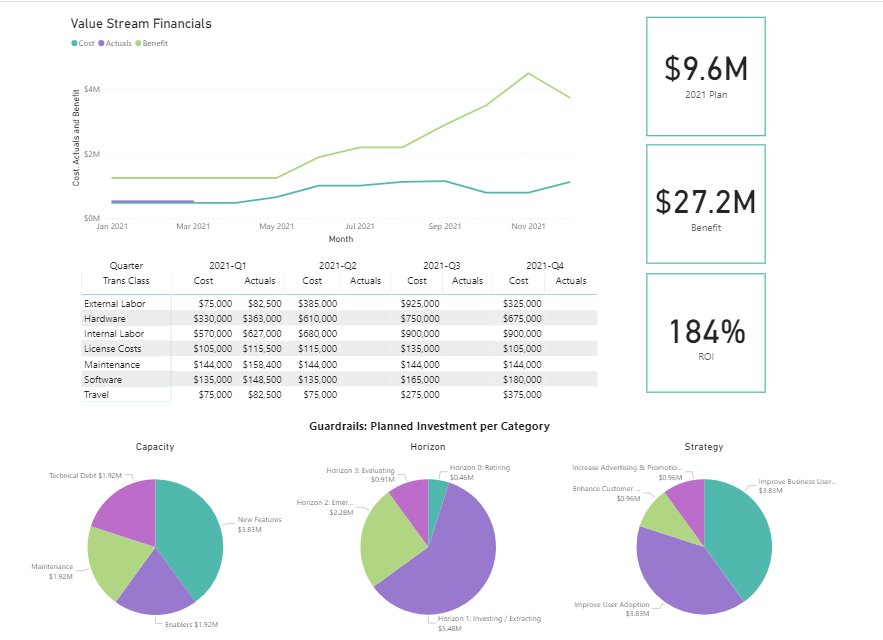
    Broadcom Inc. today added a dedicated value stream management (VSM) application to its portfolio of DevOps offerings as part of an effort to make it simpler to prioritize software development initiatives.

    Serge Lucio, vice president and general manager for the enterprise software division of Broadcom, said that while the company has previously provided VSM capabilities within its tools this addition to its ValueOps portfolio marks the first time Broadcom is making available a complete VSM application.

    The offering is unique because it combines the IT investment capabilities found in the Clarity project management software provided by Broadcom with the Rally platform for managing agile software development processes, added Lucio.

    In comparison, other VSM offerings don’t provide the same level of depth in terms of connecting software development projects to actual financial costs, noted Lucio. The Broadcom platform, for example, in addition to surfacing dependencies between software projects and potential developer capacity issues, also enables IT organizations to forecast the impact changes to funding will have on software development projects, said Lucio.

    In fact, Lucio noted that tracking code as it is developed is relatively easy. Surfacing the financial implications of software development projects requires an additional level of analytics not found in rival VSM offerings, he said.

    VSM, as a concept, traces its roots to lean manufacturing methods, which called for each step of a manufacturing process to be continuously measured. As software development has evolved from being a craft to a process that is automated as much as possible using DevOps best practices, an appreciation for the value of monitoring the impact of missed software development deadlines on the business is growing as organizations realize how dependent they now are on software to achieve business goals. A VSM platform aggregates technical metrics gathered from DevOps workflows and then maps them to key performance indicators (KPIs) defined by business leaders. Once those KPIs are defined it then become possible to apply advanced analytics to assess the financial impact changes to software development schedule will have on the business.

    In general, Lucio said organizations are evolving their approach to software development as they embrace digital business transformation. Rather than managing individual software development projects in isolation, organizations are now managing software development in much the same way they manage product development. As a result, a collection of related software development projects are now being managed in a way that better aligns to the strategic business initiatives, he said.

    It’s not clear at what rate organizations are adopting VSM platforms, but as the number of stakeholders in an organization that have a vested interest in software development increase there is a need for tools that enables those individuals to more easily track processes in a way that doesn’t depend on them mastering the project management application employed by the software development team.

    Regardless of approach, the appreciation of software development in organizations has never been greater. That same increased appreciation, naturally, is creating a level of anxiety among business leaders that need to make decisions that impact the entire organization based on processes that today they often have limited visibility into much less actual understanding.

  • Designing Cost-Efficient Cloud Environments

    Designing Cost-Efficient Cloud Environments

    Today, the days of on-premises data centers are mostly behind us, and the cloud has largely taken over with the promise of scalability, flexibility and cost-efficiency. Despite these promises, the cloud often falls short of these ideals. Why?

    Because managing the cloud is hard—especially when it comes to managing its costs. There are no automatic savings the moment you sign up with AWS or any other cloud provider. Instead, realizing cloud savings requires lots of capacity planning, careful analysis, consistent monitoring, accurate forecasting and endless adjustments—it’s enough work to make anyone’s head spin.

    But the rewards make it worth the effort. If you manage your cloud correctly, it offers tremendous savings compared to on-premises environments. However, moving to the cloud without first putting a cost strategy in place can cost your organization millions as you scale in the long term.

    So, what guidelines should you follow to ensure you’re maximizing your potential cloud savings? Here are some common do’s and don’ts you can start implementing—or stop doing—now.

    Moving to the Cloud

    Migrating to the cloud is the first, and the most complex step. So before you get started, bear in mind the following:

    Do: Analyze Your Environment Prior to Migration

    Let’s face it—if you have a disorganized and over-provisioned on-premises environment, you’ll have a disorganized and over-provisioned cloud environment. Unless, of course, you clean it up prior to the big move.

    On the bright side, cleaning up your current, familiar environment is less daunting than doing the clean-up once you move to the new and unfamiliar cloud environment. Therefore, it’s critical to analyze your current environment prior to your cloud migration.

    Start by decommissioning all assets that are not currently being used. For example, you may have a virtual machine (VM) that was provisioned for a particular project and not turned off once that project was finished. As a result, you’d have an application running that is no longer needed. Identifying and removing these resources now will lower your future cloud costs while relieving engineers of future headaches.

    Do: Create a Blueprint for Your Cloud Architecture

    Next, you need to re-architect your application stack. Don’t worry, this task isn’t as scary as it sounds. You’ll need to create a list of the infrastructure you’re using now and find its corresponding infrastructure in the cloud. Say, for example, you’re using multiple dedicated servers for message queuing. If you’re moving to AWS, you’ll need to identify similar instance types in AWS prior to your cloud migration.

    Don’t: Follow the “Lift and Shift” Approach

    It may be tempting, but whatever you do, avoid the “lift and shift” approach. There are certainly ways to optimize your current environment, so simply moving exactly what you have into the cloud is a missed opportunity to reorganize, restructure and optimize performance and costs.

    For example, you may be running VMs that are not being used, backing up unused development servers, or storing data that can be allocated to a low-cost archival storage class. Make sure to readjust your architecture to fit the cloud, not the other way around.

    Governance

    The bottom line is, somebody needs to be responsible for managing cloud costs. Depending on your company size, it can be a team or an individual, but it must get done sooner rather than later.

    Do: Ensure Cloud Spend is Managed by a Specific Individual or Team

    Sticking to a cloud budget is easier said than done, but if you delegate this task to a team or specific individual, it will be their top priority to ensure your company stays on target. They will be responsible for handling cloud budgets, establishing who can and cannot provision resources and monitoring use.

    If you fail to establish governance, you run the risk of having many individuals provisioning resources without any liability or accountability, which results in significant overspend and lots of chaos.

    Don’t: Presume Governance Is Only for Large Organizations

    Think your company’s too small for governance? Think again.

    At least one individual should always be responsible for monitoring your cloud spend and ensuring it stays in line with the allocated budget. This person will work hand-in-hand with finance to create budgets, monitor use, create billing alerts and more.

    Cloud Security

    If you’re migrating to the cloud without thinking about security, you’re making a huge mistake. It is estimated that cybercrime will cost the world over $10.5 trillion by 2025. Even worse, according to Verizon’s recent study, cloud security breaches have surpassed their on-premises counterparts for the first time ever.

    So, needless to say, security should be prioritized when moving to the cloud. Here are some tips to get started.

    Do: Develop a Layered, Multi-Tiered Cloud Security Plan

    Your cloud security strategy should safeguard both your data and IT assets in the event of a cyberattack, while being compliant with the standards and regulations specific to your industry.

    Some cloud security strategies include:

    • Building your solution with a well-architected framework
    • Using solutions like threat detection, automated patching or security auditing
    • Connecting your on-premises network to the cloud using a transit gateway or similar technologies
    • Creating enough firewall rules for traditional systems and web applications

    Don’t: Rely Exclusively on Your Cloud Provider’s Security Controls

    While many cloud providers offer great security solutions, relying on them exclusively will not help you cover your bases. AWS regularly refers to the shared responsibility model, which states that AWS covers infrastructure, but the user must secure their own applications.

    Scheduling Your instances

    The longer you run your servers, the larger your bill will be. And, unfortunately for us, creating a new VM in the cloud has become so easy that many forget to turn them off when they are no longer in use. This results in cloud costs that are up to 66% higher than they need to be.

    So, if you’re looking to cut cloud costs, keep the following in mind when scheduling your instances:

    Do: Automatically Schedule Instances

    Let’s face it, it’s easy to forget about shutting down instances after hours. In fact, it’s so easy, it can happen to even the best of us. Automatically scheduling instances, on the other hand, avoids human error while simplifying the shutdown process.

    AWS’s Amazon Instance Scheduler or Azure’s Start/Stop feature makes it easy to shut down instances from non-production environments during “off hours” and spin them back up once they’re needed. In addition to these tools, you should consider implementing alerting so you can be notified if anything goes wrong in the scheduling process.

    Do: Take Advantage of AWS Auto-Scaling

    AWS auto scaling enables you to take full advantage of the cloud’s elasticity. The technology continuously monitors your application’s capacity needs and automatically adjusts resources to fit its current use. As a result, you don’t have to spin out a large VM for your workload. Instead, you can begin with a low-spec server and add it to an auto scaling group. When demand increases, more nodes will be added to your fleet to accommodate scale. Likewise, when the demand decreases, the extra nodes will be spun down.

    This helps optimize both performance and costs so you’re never paying for resources you’re not using and you always have the right number of instances to run your applications.

    Don’t: Allow Your VMs to Run Continuously

    This may seem obvious, but as we mentioned earlier, many forget to shut down VMs when they are not needed. For example, 9 AM to 5 PM on weekdays may be your peak hours. This means you probably won’t need certain VMs to run on Saturdays or at 3 AM—so why pay for them? Instead, shut down VMs during “off hours” to ensure your savings are maximized.

    Tagging Your Assets

    There’s no getting around it—tagging assets is an essential part of understanding your usage patterns and optimizing cloud costs. Asset tags are metadata labels which can be attributed to individual resources in your cloud fleet to track which application it belongs to. Usually, you can assign up to 50 tags per resource, and they can be organized and named according to your needs.

    When tagging assets, make sure to keep in mind the following:

    Do: Implement a Tagging Strategy Early in your Cloud Journey

    It’s never too early to start tagging assets. In fact, the longer you postpone it, the harder it will become. Once your spend and usage increases, which it inevitably will, you will need to have a tagging system in place in order to determine which team is responsible for each asset (so you can have them evaluate resources and costs), deactivate unneeded resources and more.

    Tags are extremely useful in many real-world scenarios. For example, if you’re not using a specific application, you can search for the tag “application” with a value of the application’s name. You will then see all resources related to that application, so you can easily delete them.

    Additionally, tags can be used to enforce budgets and prevent overspending. Simply set a budget threshold on your tag and set up alerts to notify you when you’re getting close to that threshold.

    Don’t: Embark on Cloud Migration Before Tagging Assets

    Tagging is simple if you do it in the beginning when your environment isn’t so complex. But it’s excruciatingly difficult once your environment is more mature. So, if you’re moving to the cloud, make sure to start tagging beforehand so you don’t have any regrets.

    Do: Use Reserved Instances and Savings Plans

    If you’re on AWS, using reserved instances (RIs) and savings plans can save you up to 72% over the cloud giant’s on-demand pricing. The catch is you have to commit to purchasing RIs one to three years in advance, which means you’ll need to predict your usage needs ahead of time. Despite this challenge, RIs offer tremendous savings for those that use them wisely.

    Don’t: Purchase Reserved Instances or Savings Plans Without Building a Strategy

    When using RIs, it’s crucial to develop a strategy to ensure your savings are maximized. Often, people make the mistake of purchasing many RIs, which are not used. This results in upfront savings, but no return. Make sure to come up with a plan for how you handle reserved capacity. Selling them on the AWS marketplace is a good place to start.

    We move to the cloud for the promise of more flexibility and lower costs. But to actualize that promise, we can’t expect the cloud or our cloud provider to do all of the work for us. Unfortunately, cloud savings are not automatic.

    That’s why creating a strategy that covers costs, security, and other critical aspects of cloud migration should be your No. 1 priority. Even if you’ve been using the cloud for years, you should continue to reassess your cloud cost strategy to ensure it is optimized fully. Start by pinpointing practices that result in cloud waste and creating a game plan to prevent it from happening.

    Keep in mind that new technologies are always emerging, so make sure you are aware of any industry changes which could impact your cloud cost strategy.

  • Majority of Orgs Lack Visibility Into Container Vulnerabilities

    Majority of Orgs Lack Visibility Into Container Vulnerabilities

    Today’s blend of third-party application dependencies and polyglot software development often makes assessing risk difficult. With many new cloud-native deployment models, it can be tricky to discover potential vulnerabilities. These threats take the form of insecure default settings in Kubernetes, over-permissive states, CVEs that threaten container integrity, and other vulnerable conditions.

    Plugging gaps throughout the cloud-native strata is now crucial to avoid exposing data and breaking privacy regulations. Yet, gaining visibility into these holdings is challenging, and traditional application security practices may not cut it within a cloud-native context.

    A new 2021 CISO Report released by Dynatrace, “Precise, automatic risk and impact assessment is key for DevSecOps,” demonstrates increased false positives and a general lack of real-time container runtime vulnerability scanning among enterprise IT departments worldwide. Of the 700 CISOs surveyed, most report that microservices, containers and Kubernetes have caused security blind spots across their organizations.

    Below, we’ll cover the major takeaways from the study to see why new cloud-native development models are leaving security gaps. We’ll consider how CISOs can increase security throughout the cloud-native IT stack while still reaping the rewards of container-based delivery models.

    Cloud-Native Security Blindspots

    Adopting new container-based technologies may introduce multiple nuanced security implications. Of the tech leaders surveyed, 89% report that microservices, containers and Kubernetes have created new vulnerabilities within their organizations.

    Engineers are shipping code to maintain release velocity and to meet the demand for digital innovation. In the process, 28% of CISOs say application teams sometimes bypass vulnerability scans to speed up software delivery. Due to these realities, it’s no surprise that 71% of CISOs admit they are not fully confident code is free of vulnerabilities before going live in production.

    As some teams bypass security pre-production, it follows that more aren’t applying holistic security scanning during production. As a result, nearly all organizations (97%) lack real-time visibility into runtime vulnerabilities, found the report.

    Adding to the number of cloud-native blindspots is information overload. The report calculated that, on average, an organization receives a staggering 2,169 new alerts of potential application security vulnerabilities each month. Out of this high volume of alerts, 77% of CISOs say they are mostly false positives and not actual exposures.

    Due to minimal testing and a high number of false positives, organizations are likely to leave many vulnerabilities unpatched. To make matters worse, developers, pressed for time, may lack the bandwidth to resolve known issues.

    Faster Delivery, Harder Detection

    Much of the setbacks in vulnerability detection may lie in a general shift toward new ways of working and faster delivery cycles. For example, 63% of CISOs reported that DevOps and agile methodologies are making it harder to detect and manage vulnerabilities.

    In addition, 74% of CISOs say traditional security controls such as vulnerability scanners no longer fit today’s cloud-native world, and 77% of CISOs agree that automation could help. This could involve replacing manual deployment, configuration and management with more automated approaches. Others agree that security-as-code is required to ensure high container security best practices.

    Another result of more frequent delivery is increased over-reporting. Of the total security vulnerability alerts received per month, CISOs report that only 42% of these alerts require action. More rapid release cycles could thus exacerbate already crowded vulnerability detection systems.

    Who Owns Vulnerability Management?

    Only 3% of organizations have real-time visibility into runtime vulnerabilities in containerized production environments, the study found. In reality, vulnerability scanning in production is only happening once a month or less within 68% of organizations.

    To compensate for this gap, most CISOs believe the onus is not on the security team but the application and DevOps teams to manage and respond to vulnerabilities—85% of CISOs believe these groups should hold responsibility for vulnerability management. These findings come to light as other stakeholders advocate for increased full-cycle developer control and encourage the DevOps mindset across roles.

    Handing more control to developers sounds good, yet, 64% of respondents say developers don’t always have time to resolve vulnerabilities before code goes into production. As a result, over one-quarter of application teams bypass vulnerability scanning entirely. Often, engineering teams may not frequently sync with security groups, and DevSecOps principles are not yet pervasive throughout all organizations.

    The report also highlighted the fact that existing security tools are often ineffective; 69% of CISOs say security tools slow down DevOps because they only focus on one state of the software delivery cycle.

    Cloud Use Requires Security Repositioning

    As cloud architectures rise in prominence, organizations are adopting cloud-native tools like microservices, containers and Kubernetes. There is also the chance of multi-tool conditions further complicating the vulnerability scanning process. With more systems to protect than ever before, teams may have to reposition their approach to vulnerability detection.

    “The increased use of cloud-native architectures has fundamentally broken traditional approaches to application security,” said Bernd Greifeneder, founder and chief technology officer at Dynatrace. “This research confirms what we’ve long anticipated: manual vulnerability scans and impact assessments are no longer able to keep up with the pace of change in today’s dynamic cloud environments and rapid innovation cycles.”

    The Global CISO report, “Precise, automatic risk and impact assessment is key for DevSecOps,” from Dynatrace, queried 700 chief information security officers (CISOs) on their monitoring practices concerning vulnerabilities. To review the report’s full findings, you can download it here.