Category: Application Performance Management/Monitoring

  • Could Full-Stack Observability Help Lessen IT’s Burden?

    Could Full-Stack Observability Help Lessen IT’s Burden?

    The year 2020 was a landmark year for many reasons, other than the obvious. The IT world saw the first time that cloud service revenues dwarfed spending on data centers. Across the board, budgets have been increasing around cloud adoption. And in this ‘new normal,’ digital experiences are slated to remain just as crucial of a touchpoint as ever. In fact, new findings show that for 85% of users, digital applications are absolutely essential to their daily lives.

    Rising digital demands mean reliance on the cloud is here to stay. But if organizations don’t right-size their cloud workloads, expenses could get out of control. Plus, maintaining world-class user experiences requires a keen insight into the overall performance of apps, systems and solutions. If teams aren’t continually monitoring application performance and business KPIs, the bottom line could suffer.

    I recently met with Joe Byrne, AppDynamics Regional CTO, to discover what full-stack observability (FSO) means for today’s cloud-heavy applications. According to Byrne, DevOps and SRE teams should be maintaining a holistic view of the entire pulse of the application—including non-functional metrics (NFM) alongside traditional security and functional monitoring. Doing so could reduce time spent on root cause analysis and help ensure code is continually meeting business objectives.

    What is Full-Stack Observability (FSO)?

    In the classic definition, observability focuses on measuring the internal status of a system based on external outputs. Application performance monitoring (APM) typically tracks telemetry around logs, metrics and dependencies. IBM, for example, calls the observability trend “a natural evolution of APM data collection methods.”

    Full-stack observability (FSO), said Byrne, takes this one step further to track business-related key performance indicators (KPIs) alongside additional, more traditional software metrics. “FSO helps understand that software is performing optimally and that it is meeting business objectives,” said Byrne. In this way, FSO takes a holistic view to determine not only if an application is functionally sound but if it’s meeting its end goals.

    FSO would consider critical performance actions, such as user experience telemetry. For example, Byrne explains, an e-commerce website could find value in tracking performance levels such as login time, check out time and payment initiation. Tracking such metrics is necessary to pinpoint roadblocks and create actionable steps to remediate holes in the user journey, said Byrne. Increased visibility here could also help engineers quickly respond to issues to better optimize the user experience. In addition, aggregating information at a higher level—to view total products sold per day or total revenue per day, for instance—could inform overall progress.

    How FSO Could Reduce IT Stress

    “We’ve reached a point where people have moved away from brick and mortar and are going online,” said Byrne. These online spaces are more omnipresent — and valuable — than ever. The AppDynamics 2021 App Attention Index found that the average digital consumer uses 42 applications daily. Furthermore, 85% of people now say digital services are a critical part of how they get by in life.

    Mounting digital reliance has resulted in rising digital complexity. Therefore, said Byrne, companies have been moving to the cloud for the ease of scalability, elasticity and the capability of cloud functions. Cloud-native abilities like serverless, Kubernetes, identity and access management (IAM) and other add-on services are helpful perks to avoid reinventing the wheel.

    But of course, lifting and shifting all your current architecture to the cloud is costly; plus, it won’t necessarily eliminate application bugs. The user journey is increasingly vast, and broken touchpoints along the way could hinder performance. This is complicated by increasing third-party dependencies. Yet, more often than not, it is the application’s custom code that is having the issue, explained Byrne.

    Perhaps the most significant benefit of full-stack observability is a reduction of remediation time. “If you don’t have perspective, it can take a long time to run down an issue,” said Byrne. “The cost of finding a root cause can be so expensive.” Having a quick window into network, application and infrastructure hiccups is necessary to quickly address issues and save potentially lost revenue.

    Shifting Performance Monitoring Left

    An Amazon study found that every 100ms of latency costs companies a 1% loss in sales. Knowing the reality of high user expectations, software companies must be especially proactive in how they scale to meet the needs of consumers. As 72% of users believe application problems are the brand’s responsibility, the onus is on companies to avoid negative brand reputation.

    To spot performance hangups early on, Byrne encourages a shift-left attitude toward observability around business outcomes. To date, the shift-left mantra has focused more on code validation and security—necessary elements to rapidly deploy software updates. Now, adding performance testing could be the next iteration to further correlate each software push with end business outcomes.

    “You want to see and validate as much as possible before production,” said Byrne. “Performance testing is a key piece in the overall success of an application.”

    This could involve testing the load time for a specific endpoint—if a key action doesn’t meet a certain threshold, then it would not be promoted. Incorporating performance monitoring within a CI/CD process is a burgeoning practice also referred to as BizDevSecOps.

    There’s No Going Back

    The new normal is upon us, and it’s hard to imagine going back to any semblance of a world where there’s a decreased reliance on technology. From airline bookings to banking and grocery orders—software applications are now intrinsic to nearly every facet of modern life. To compete in such an economy, finely-tuned modular customer experiences that continually optimize business outcomes will truly set companies apart from the rest.

    In short, to maintain high software standards, it’s essential to break down operational silos and work together as a team—the DevOps creed. End-to-end ecosystem visibility could help enable that, ensuring, in Byrne’s words, that “applications perform in a way that meets the needs of the business.”

  • Why You Should Embrace Incidents and Ditch MTTR

    Why You Should Embrace Incidents and Ditch MTTR

    The cliché is that everyone in IT hates incidents, and the natural reaction when assembling incident response metrics is to look for numbers that you can lower over time. Fewer incidents and shorter incident response times must be better, we think. You might already be familiar with the common metrics associated with these goals, including mean time-to-resolution (MTTR) and total incident count.

    As it turns out, however, these metrics actually work against your company’s resilience goals. To understand why, let’s look at the industry that birthed most of our modern incident management practices and has learned the most about how to properly apply them: the airline industry.

    What the Airlines Can Teach Us

    From the 1950s to the 1990s, the airline industry built and refined best practices for incident management that we have since simplified and that have been widely adopted across the tech industry. What’s often termed “modern incident management” simply means the predictable and repeatable approach to handling unexpected disasters and the learnings-driven remediation steps that are prized when building a DevOps or SRE practice.

    One of the most important findings to come out of this research is the somewhat surprising fact that incidents weren’t being declared often enough. Instead, incident reports were created and the carefully assembled response and cataloging process was only followed after catastrophic events, which meant earlier opportunities to catch the underlying problem during a less severe incident were being missed.

    So why did an industry with such incredibly high stakes take so long to realize that more incidents were actually a good thing? You guessed it: a misguided desire to decrease the incident count. In chasing this goal of “lowering the number,” pilots and mechanics were often reluctant to file incident reports for anything less than the most critical situations, which meant the powerful, learnings-focused response and remediation process was only triggered in response to relatively rare and critical situations.

    This is a textbook example of Goodhart’s Law in action. To paraphrase, Charles Goodhart posited that any metric created will ultimately become the goal. In other words, if the incentives are aligned to reduce incidents, no matter how good your response and learning process is, it will only be executed in the most dire and unavoidable circumstances. After discovering this, the industry rapidly moved their focus towards expanding the use of the incident process by working to expand the spectrum of situations that could be classified as incidents with the goal of triggering the formal incident response process more often, distributing learnings for more incidents of lower relative severity and, yes, ultimately resetting the goal to increase the number of incidents.

    This approach effectively turned Goodhart’s Law to the airlines’ advantage—any effort to game the metric(s) meant more learning, not less. Filing incidents became directly and heavily incentivized and these metrics were never used as a justification for punitive action. This resulted in the safest decade of commercial aviation on record, with over 12 billion passengers traveling and no fatal accidents.

    What IT Can Learn About Successful Incident Response

    As technology companies, there is much for us to learn from this exercise in achieving resilience versus chasing “lower numbers.” The primary learning is this: increasing your incident count by incentivizing the use of your incident management process for more non-critical incidents—likely your SEV2s and below—and focusing your metrics and incentives on that goal, is likely the best way to reduce your overall count of catastrophic failures.

    For most companies, this means putting MTTR on the back burner and instead focusing on making the incident process itself more accessible throughout your company and across your organizations. It means leaders should talk about impactful and recent postmortems publicly and that postmortem distribution should be a priority; it should also be something that’s measured. Most importantly, it means opening up the incident management process more widely. Ideally, everyone at your company should have access to systems that allow them to file incidents, read incidents in progress and review postmortems from previous incidents.

    I like to reference the “big red button” philosophy of factory floors, where the decision-making power to declare an incident is in the hands of every employee. An unsafe situation shouldn’t be up for discussion, debate or approval before being acted on, even if the situation is later determined to be less severe than originally thought. The context of why that incident was filed—why that big red button was pressed—may prevent larger, more catastrophic failures in the future.

    So if you’re just getting started building out an incident management practice at your company, or you’ve been chasing MTTR metrics and focusing on pushing your incident count down as a primary goal, consider taking these learnings to heart and creating a positive incident culture with positive metrics meant to encourage and reward incident responders and reporters. Your company’s future depends on it.

  • Visualize Logs to Get More Value from Data

    Visualize Logs to Get More Value from Data

    Why do you keep logs? Regardless of the type of logs we’re talking about, you keep them because you expect them to provide some value for the organization. Maybe the logs will help you improve profitability; perhaps they will help you recover from downtime or perhaps they are expected to alert you to a security incident in progress. If you’re a system administrator or someone tasked with infrastructure reliability and maintenance, you’d agree that logs are critical. They represent the source of truth you go to for information about your server status and activity, website traffic, application performance and much more.

    No matter the intended purpose of logs or how you use them, the information in these logs should be easy to access and interpret. Today’s complex systems generate enormous amounts of log data, making it almost impossible to dig through tons of data in raw text files to find important information. Finding valuable information is immensely difficult in text logs but not in the visual world. This is precisely where log visualization comes into play. What if the data in your logs could transform into graphic shapes and patterns? Wouldn’t it be much easier and faster to decipher information from log data and understand it better?

    What are Logs, and What are They Used For?

    Before going any further, let’s make sure everyone is on the same page about the meaning of logs. A log is a textual, timestamped record that tells us what happened and when. DevOps engineers have to rely on a combination of logs from various system components and data sources to understand why an event occurred, and perhaps even predict future events.

    logs value unknown


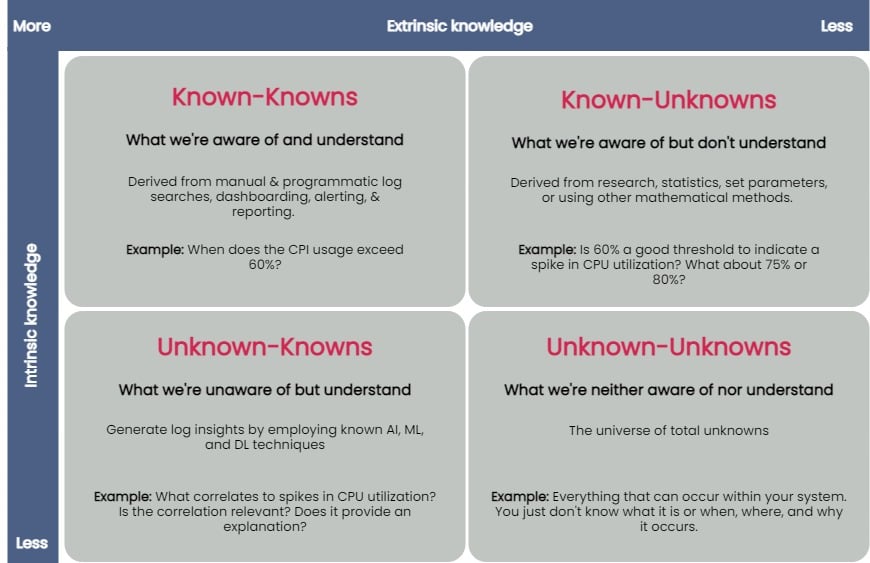
    You can taxonomize knowledge extracted from log data into four key groups: known-knowns, known-unknowns, unknown-knowns and unknown-unknowns. Manual and programmatic log searches, dashboarding, alerting and reporting manually extracted log fields are common ways to extract and analyze known-knowns. These methods assume that the engineer is already familiar with the data and knows where to look for answers. You can use statistics or other mathematical means to algorithmically resolve the known-unknowns, such as search terms and thresholds. The unknown-knowns are taken care of using AI/ML/DL techniques that generate log insights such as event correlations, log pattern clustering and known anomaly detection. But what about the unknown-unknowns?

    Uncovering Unknown-Unknowns

    With raw text logs, it’s relatively simple for engineers to conduct machine searches or set alerts upon encountering certain specific errors or specific types of behavior. However, to search through logs or even set up alerting parameters requires you to know what you’re looking for. If you have no idea what kind of errors or threshold limits for which you need to be alerted, it’s impossible to set these up.

    Modern applications are incredibly complicated, and one can not honestly understand everything about how they work or even always ask the right questions when things go wrong. But if an engineer reviewing logs doesn’t even know what to search for, it becomes impossible to figure out without an assistance tool like a purpose-built log visualization solution.

    For the most part, none of the techniques used to uncover the known-knowns, known-unknowns, and unknown-knowns of log data can help reveal the unknown-unknowns. An effective way of unraveling them is to rely on human intelligence to explore the unknown-unknowns space. Supplementing human intellect with a purpose-built log visualization tool can significantly help analyze the unknown-unknowns. Once you’ve recognized the unknown-unknowns, you can quickly feed this knowledge back into the appropriate, less esoteric groups (known-knowns, known-unknowns and unknown-knowns) and get more value from your log data.

    A good log visualization tool can aid in gathering knowledge from unknown-unknowns and can inform proactive log analysis or fast reactive log analysis use cases. Current log analysis practices center around reactiveness; the focus is to minimize and resolve issues after a problem has occurred. Using a log visualization tool, you can quickly isolate subtle and anomalous changes within a system by visualizing patterns generated from log data and exploring unknown-unknowns before an incident occurs.

    Current log visualizations are limited in display log count distribution and its variations. They do not visualize other log attributes or log combination attributes.

    All the UIs shown have similar function usage and displays. Drilling into an example of UI windows gives one the feeling of a typical log analytics practice. The figure below annotates different log analysis functions in the labeled, boxed area. None-visual log analytics functions such as search, tag, and log display are all required time-range input.

    log metrics annotate UI

    An ideal log visualization tool should not rely on just one information type. Log data is multifaceted. A log visualization tool can only begin to be valuable when it lets you focus on as many facets of log data as you can derive.

    Log Visual Pattern Discrimination

    The power of log visualizations comes from humans’ ability to recognize visual patterns. It’s hard to spot a pattern among raw log data, but it becomes easier once you can visualize that data.

    When an experienced DevOps operator looks at a log visualization, they can easily see where the anomaly is, even with no previous understanding of how the system works or where the anomaly might be coming from.

    Visualizations allow engineers to identify visual patterns and quickly understand what is going on in the system—whether it’s a hack in progress or an error causing a poor user experience. Visualizations are compelling, as they help shed light on important events, even if the engineer has no idea where to look or had no idea there was a hack going on in the first place.

    For instance, consider a scenario where a complex system generates millions of logs daily. Suppose we were to establish a baseline of the number of logs the system would generate when functioning normally. In that case, we’d have to take a daily count over a couple of weeks, or at least a month, to deduce a good-enough baseline.

    Even if we derive an acceptable baseline, we’d have to keep recording daily counts and compare it with this baseline to detect an anomaly. Doing this can be time-consuming and counterproductive as you might end up discovering an anomaly when it’s already too late to take any action.

    Once we plot logs daily on a graph, we can immediately figure out the baseline by observing it visually. Once we’ve visually established a baseline, we can instantly identify anomalies when we see values plotted above or below that established baseline. The following image visualizes logs ingested over ten days, illustrating how simple it is to establish baselines and identify when a system is doing something outside its usual behavior. This graph can deduce the baseline to be around 38,000 log records, with anything above denoting abnormal behavior within the system.

    log visualization

    Better Log Visualizations

    There are a few essential criteria for creating good log visualization analytics. They are:

    Use original log data. Data strategy is important. Most log data is unstructured by default, and many organizations tend to convert it to structured data before doing anything else with it. Doing so is a mistake, as you can lose vital pieces of information in the process. Good visualizations should be based directly on the logs exactly as the system produces them.

    Log data consistency. The format for the visualization should be consistent because if there are constantly changing variables, it becomes harder for humans involved to spot patterns.

    Choose robust log attributes and use them wisely. Instead of using just one log attribute for visualization (such as time distributed log density), you should look at visualizing more facets. Doing so gives analysts a better grasp of—and an intuitive understanding of—the log data set. For example, multiple pictures of an elephant taken from different angles help people understand elephants better than showing them only a single photo of an elephant taken from one angle. Similarly, if we break down logs by each of their attributes and then plot their frequency, we can better visualize how a system is performing. However, the attributes you pick are critical to providing valuable visualizations.

    With modern systems becoming even more complex, deciphering logs and uncovering unknown-unknowns will never be easy. The time is right to introduce new log visualization techniques to handle these unknown-unknowns. With log visualization becoming more user-friendly, you no longer need to count on people to be familiar with log interpretation or be aware of statistical, mathematical or AI techniques to analyze log data. Visualizing log data is not just a decision-making aid to human intelligence, discriminating between what is and isn’t acceptable and quickly identifying and remediating issues—the knowledge gained from unraveling the unknown-unknowns also helps advance AI/ML and automation techniques used to ascertain the knowns of your log data.

  • Using ML/AI to Support Infrastructure Monitoring

    Using ML/AI to Support Infrastructure Monitoring

    Successful infrastructure monitoring enables IT teams to ensure constant uptime and performance of their company’s systems. Technologies like machine learning (ML) and artificial intelligence (AI) benefit infrastructure monitoring by more quickly collecting and analyzing data from all of the hardware and software components that comprise the IT stack. Infrastructure changes are occurring faster than ever before, but complex systems, the unique nature of applications and lack of IT skillsets can cause challenges when integrating with these newer technologies. However, it’s more important than ever that sysadmins and DevOps teams understand how ML and AI can mitigate these roadblocks, support them in staying on top of infrastructure performance and rapidly address issues that arise.

    Intelligent Monitoring Support for Complex Systems

    The most tangible result of intelligent infrastructure monitoring tools and processes is near-immediate alerting of performance and uptime issues, which can then be addressed in an efficient and effective manner so no business interruptions occur. However, complex systems can stunt these benefits if ML and AI are not being used and manual monitoring protocols are still in place.

    Tools that use ML or AI lessen the work of IT staff immensely, freeing up critical business resources and aiding in overall productivity. Both technologies can automatically identify and update all IT stacks that comprise an enterprise’s infrastructure to keep systems up-to-date and aligned with established key performance indicators (KPIs). In addition, intelligent offerings can detect and factor those metrics against set standards so that early alerts to an “unhealthy” section of infrastructure can be identified, even as the IT stack is constantly changing. This drastically speeds up troubleshooting efforts.

    Differentiation in Applications

    The different applications supported by the various IT stacks will most often have unique service-level agreements (SLAs) for their performance and uptime, as well as remedies or penalties should those service levels not be achieved. Plus, system loads that stress the underlying infrastructure are frequently changed. For these reasons, it is important to identify what constitutes a “healthy” IT stack so that these minute parts of the infrastructure are not overlooked due to the variation involved.

    ML and AI can be programmed to track system baselines that support a “healthy” IT stack. These technologies are particularly great at finding novel and unusual patterns in data. As the monitoring and observability landscape becomes more complex over time, driven by real changes in how developers build applications and systems, the ability to spot and detect such patterns in data can be crucial in helping make sense of it, further cutting down efforts on manual searching, detective work and “death by dashboards,” which we’ve all experienced at one time or another.

    Supporting IT Team Skills with Intelligence Technology

    The role of sysadmins—and to a greater extent, developers—has shifted over the past few years to become nearly as complex as the infrastructure they oversee. Nowadays, it seems as though developers are required to have expertise in all aspects of infrastructure, from monitoring to Kubernetes to machine learning. This can take quite the toll on developers who possess such skills, but in a more realistic sense, developers that can do all these things are very hard to come by. The lack of these skillsets is pervasive in the industry, which is why ML and AI can be seen as supporting technologies—they can fill in these gaps, to an extent.

    With built-in intelligence and automation, ML/AI can enable even the most inexperienced sysadmin or DevOps professional to monitor complicated infrastructure like a pro, taking on most of the time-intensive work around collecting and analyzing the data and identifying where to troubleshoot. The main goal is to put humans in the driver’s seat, utilizing ML and AI for granular discovery of system issues, providing the metrics or charts that might be most relevant to IT staff as they troubleshoot their system and reducing the cognitive load of developers.

    With the vast benefits that intelligent technologies possess, integrating them into your IT stack can help mitigate challenges experienced with complex systems, application differentiation and the skills deficit experienced in the IT team. The important ingredient in making ML and AI effective in infrastructure monitoring is using tools that incorporate the right formulas, algorithms and automation that can best help determine success when it comes to your desired outcome.

  • Bringing Continuous Testing Into the Software Delivery Pipeline

    Bringing Continuous Testing Into the Software Delivery Pipeline

    For any highly competitive industry that relies on a smooth and stable user experience, it is vital that their development teams accelerate release cycles, lower operating costs and ultimately reduce risks. Continuous testing is one way companies can achieve these objectives.

    As a subset of software testing, continuous testing (CT) is valuable because it uncovers and addresses different problems at various stages of the development journey that other methods don’t. Most other testing methodologies require a large staff; CT doesn’t. CT leverages in-sprint automation, including end-to-end tests across the front and back end of the technology to cut costs and facilitate rapid delivery without adding more pressure on internal teams. Moreover, as part of a larger software delivery pipeline, CT is positioned closer to the beginning to execute tests early, often and comprehensively to realize cohesive release goals.

    CT introduces quality assurance with constant iterations of testing and actionable feedback at each stage of development to evaluate business risk coverage and ensure the best user experience and customer satisfaction. As the name implies, CT helps developers and product managers detect and fix critical bugs not only in the early stages of development, but continuously throughout the software development life cycle (SDLC), ensuring that errors in the code do not get unintentionally released into the wild.

    As software companies accelerate their release frequency, continuous testing sets a precedent for digital tools development and the quality assurance process.

    Benefits of Continuous Testing

    Continuous testing plays an integral role in the CI/CD pipeline, is part of the overall set of DevOps best practices and the information it provides is invaluable to development teams. The benefits of CT are also far-reaching, with positive impacts on the entire organization, including:

    Better Company-Wide Feedback

    Continuous testing facilitates feedback to all involved teams and stakeholders. For example, when a bug gets detected in code, ideally, the only team notified should be the team responsible for the part of the code with the bug. Without CT to automatically detect bugs and notify those responsible for fixing errors, triaging bugs could be a full team effort or, worse, a dedicated team’s main function. This approach is very inefficient and wastes the time of the engineers whose code is bug-free. The feedback provided from CT cuts down on these unproductive scenarios and allows stakeholders to make immediate and informed decisions.

    Higher Quality Code and User Experience

    A company that effectively uses CT should expect higher quality code and a more stable user experience. Stability measures application health and user experience; it is negatively affected by session-ending events like crashes. With CT, businesses will give their development teams better awareness of product quality and performance while also significantly improving overall business metrics by fixing broken apps faster.

    CT Breaks Down Siloed Teams

    Not only will CT enhance quality assurance, it similarly works to improve the development of digital tools through the breakdown of siloed teams. When teams become siloed, they inadvertently keep processes and knowledge to themselves, resist cross-functional collaboration and work in isolation toward their own goals. Predictably, separate groups fail to share insights or ideas, leading to stagnation and decreasing innovation. However, by leveraging CT, siloed teams can become more collaborative in development, testing and operations, increasing overall business efficiency.

    CT Enables Objective Evaluation

    Finally, CT enables an organization to pause and objectively assess if it is aligning efforts with its specific business goals. As mentioned before, CT uses automation to provide timely feedback on business risks, reducing the chances of a digital application or tool failing at launch. Likewise, dev teams and managers can more easily meet their business goals and optimize the value of a release. Additionally, objective assessments are helpful for critical decisions – as CT gives actionable data for decision-makers to support their choices.

    Today, consumers have come to expect error-free experiences within their software applications, with the most stable of these applications driving conversion, engagement and retention. Applying a continuous testing model to a software development pipeline will ultimately result in applications being delivered faster and at higher levels of quality than ever before, with an enhanced end-user experience. As companies combine agile development with continuous testing, they will optimize each aspect of the development life cycle and their larger business goals.

  • Best Practices for AWS Tagging With Yor

    Best Practices for AWS Tagging With Yor

    On the surface, AWS resource tags are simple, informational key:value metadata that you can assign to most AWS resources. They also have many hidden benefits, as outlined in this AWS Tagging Best Practices guide for improving cloud operations. There are six use cases author Brian Yost calls out in particular:

    1. AWS console organization and resource groups
    2. Operations support
    3. Cost allocation
    4. Access control
    5. Automation
    6. Security risk management

    In summary, tags can simplify operational processes, improve security posture, speed up mean time to resolution (MTTR) and even save money if implemented consistently and persistently. But, unfortunately, in large organizations, that’s a tedious and often faulty process.

    To help teams overcome that challenge and make the most of cloud resource tags, Bridgecrew (recently acquired by Palo Alto Networks) recently launched a new open source tool, Yor. Yor is designed to automatically add consistent, helpful tags to infrastructure-as-code (IaC) templates starting with Terraform, CloudFormation and Serverless Framework. If run locally or added to a continuous integration (CI) pipeline, Yor will add tags like git organization and repository, unique trace ID and commit modifier details to IaC resources that carry through to cloud resources. For example, with Yor, you can tag your aws_instance code block in Terraform, and those tags will show up in your running EC2 instances.

    This post will explore how to leverage Yor to achieve the six tagging use cases outlined in the AWS Tagging Best Practices guide.

    AWS Console Organization and Resource Groups

    Using tags to organize and filter resources is the simplest and most common use case for tags. If you add tags to resources, such as EC2 instances or database resources, you can filter based on those tags. 

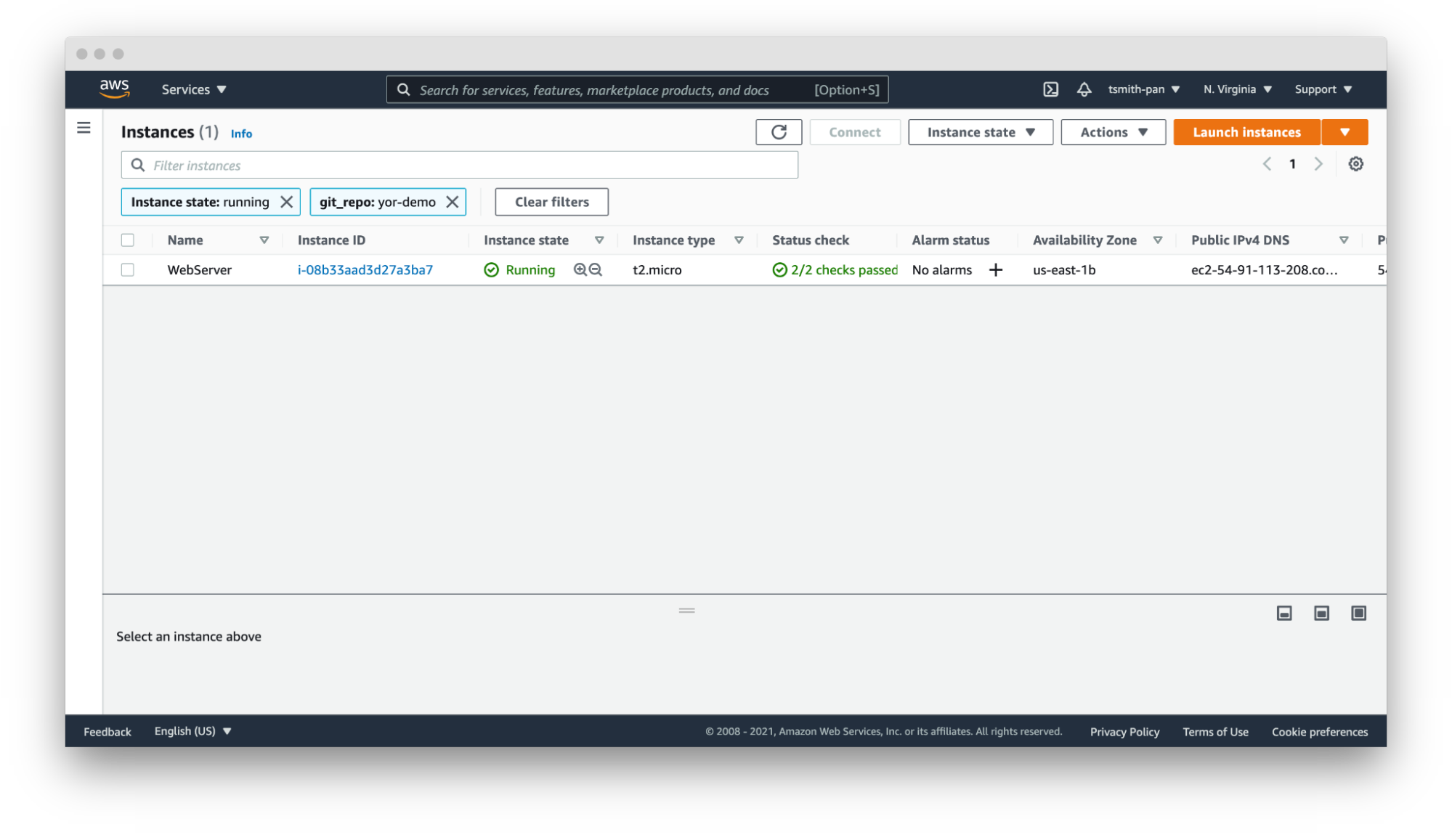
    If your AWS account has thousands or tens of thousands of resources in a region, filtering is necessary to manage those resources. For example, if you have hundreds of web servers, filter by the git_repo tag Yor added to quickly filter down to the web server(s) for your application.

    Yor

    In that same vein, you can set up resource groups to organize multiple resources across AWS services based on tags. For example, if you want to hunt down the VPC, EC2, internet gateway or database created by your Terraform repository, use Yor’s git_repo tag to group together multiple resources into a single resource group.


    Yor 

    Operations Support

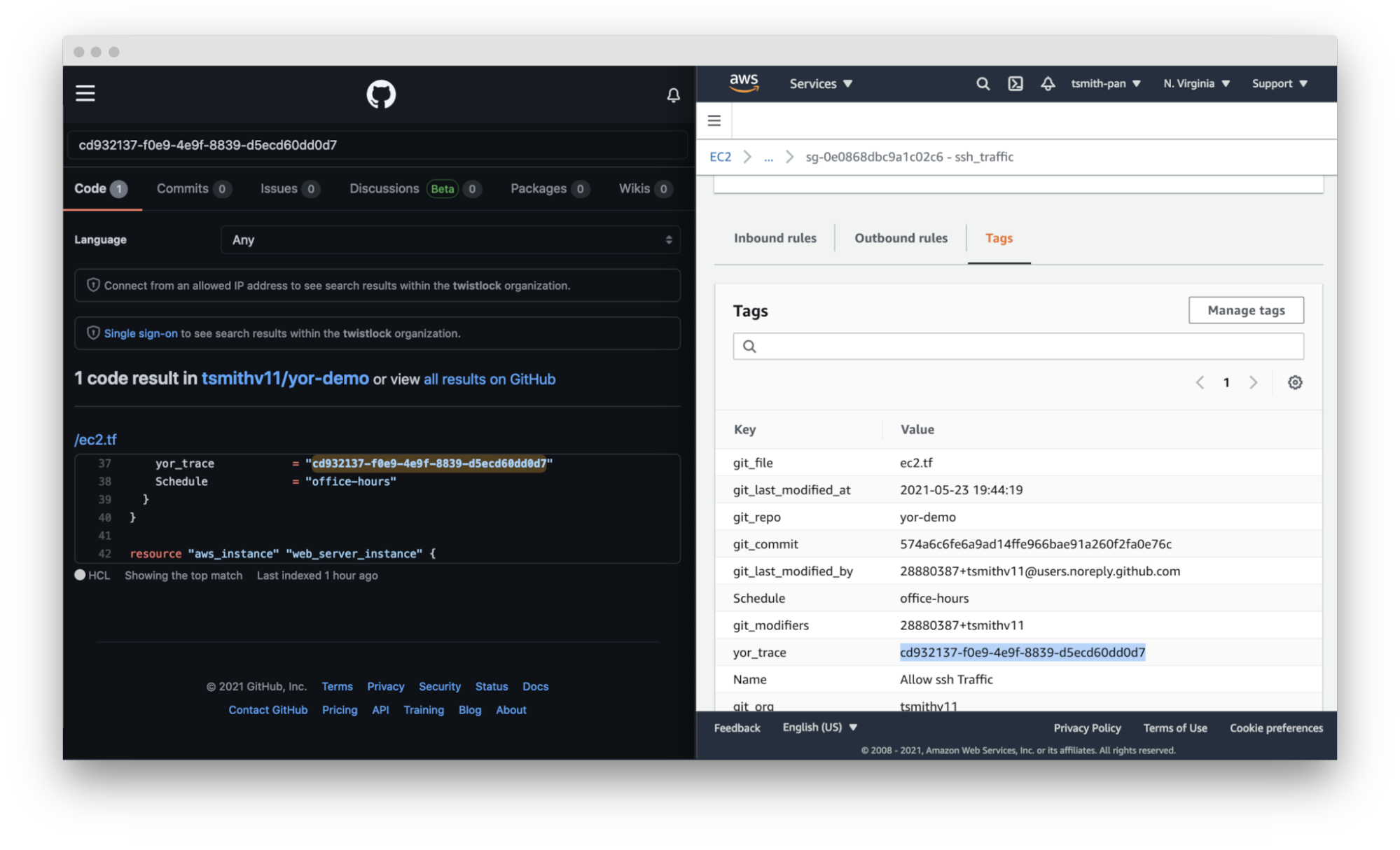
    Yor excels at simplifying and speeding up operations support. In the words of Brian Yost, “For example, Level 1 support teams could use tags to direct workflow and perform business service mapping as part of the triage process when a monitoring system triggers an alarm.” Yor automatically tags resources with the git organization and modifiers of the cloud resource. This makes it easier to identify the right team and user to patch issues. 

    If you work in a GitOps organization, this is even more critical. Following GitOps best practices means all changes should be performed in the IaC template, not directly on the cloud resource. So if your security team identifies an open port 22 in runtime using policy-as-code or CSPM tools, such as Bridgecrew, Yor’s tags will make finding the owner of the IaC template easier and faster, lowering MTTR.

    Yor takes this a step further. By adding the repository, file and trace tags, Yor helps teams identify not only the code owner but also the exact file and resource block that created that resource misconfiguration.

    Yor

    Cost Allocation

    Large companies often have different profit and loss (P&L) statements for each of their business units. At the end of a reporting period, such as a fiscal quarter, finance teams allocate the expenditures made across the company to the various cost centers.

    For traditional IT teams, this usually involves very broad, general estimates. For example, if two organizations share a server rack, you could allocate costs based on virtual CPU time or disk space. Once that scales into dozens of organizations and ephemeral workloads, that allocation is much more difficult. Cloud costs can be just as difficult to allocate. If you have thousands of resources across types (virtual machines, serverless, managed Kubernetes workloads, managed databases, streams, CDNs, etc.) with differing life cycles and life spans, tying those resource costs back to a cost center is difficult.

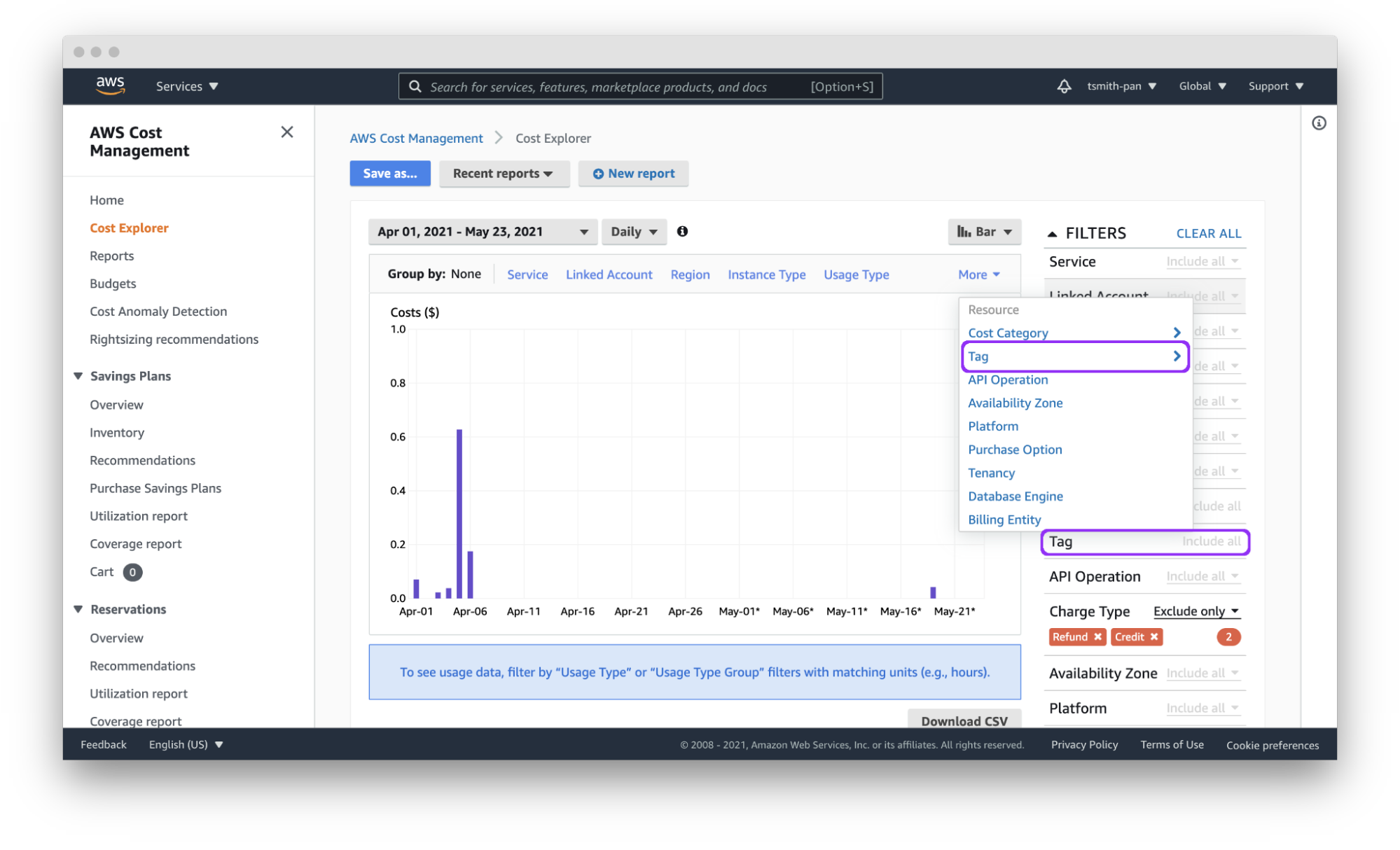
    Cloud tagging simplifies that process. Assuming each team has a git organization, Yor will automatically tag resources with the git_org or custom tags can group git_modifiers into cost center tags, and AWS Cost Explorer will let you filter by those tags to easily allocate costs. You can also export those costs by tag(s) to a CSV file for import into other tools for analysis.

    Yor applies those tags reliably and consistently so that finance teams don’t need to dig through different organization name versions, such as combining dev_team_one and devTeam1, or manually categorizing untagged resources.

    Yor

     Access Control

    AWS identity and access management (IAM) policies support the ability to limit control of resources using tags. This simplifies dividing up resources by teams using complex IAM rules.

    For example, if you want developers to access only the EC2 instances they provisioned, you can use the git_modifiers tag added by Yor. Yor will automatically tag resources with the git users who edited the IaC code. Then, Yor will add an AWS IAM policy to limit access based on that tag.  You’ll also want to add a policy to deny actions such as ec2:CreateTags and ec2:DeleteTags so users can’t just add themselves to other resources.

    This is where Checkov, an open source policy-as-code tool, can be leveraged for additional control. Yor can enrich the context for Checkov’s checks, enabling finer-grained policy control. For example, Yor will populate the user identification of whoever modified an IaC template, and Checkov can make sure that only approved team members modified the code. The following is an example of a custom check to determine that only security personnel modified CloudTrail settings.

    If the git_modifier tag added by Yor is anything other than “Nimrod,” “Rotem,” or “Naor,” Checkov will show a failed policy check for that custom check for that resource.

    Automation

    By leveraging tags in combination with other tools, such as Lambda functions and backup plans, you can apply automation to specific resources, such as targeting resources for archive, update or deletion.

    The AWS Tagging Best Practices guide uses as an example a situation where development resources are turned off during non-business hours. AWS recently released a tool called Instance Scheduler for just such a use case. It is a CloudFormation stack with a Lambda function and DynamoDB instance that automatically starts and stops EC2 and RDS instances based on a pre-defined schedule. 

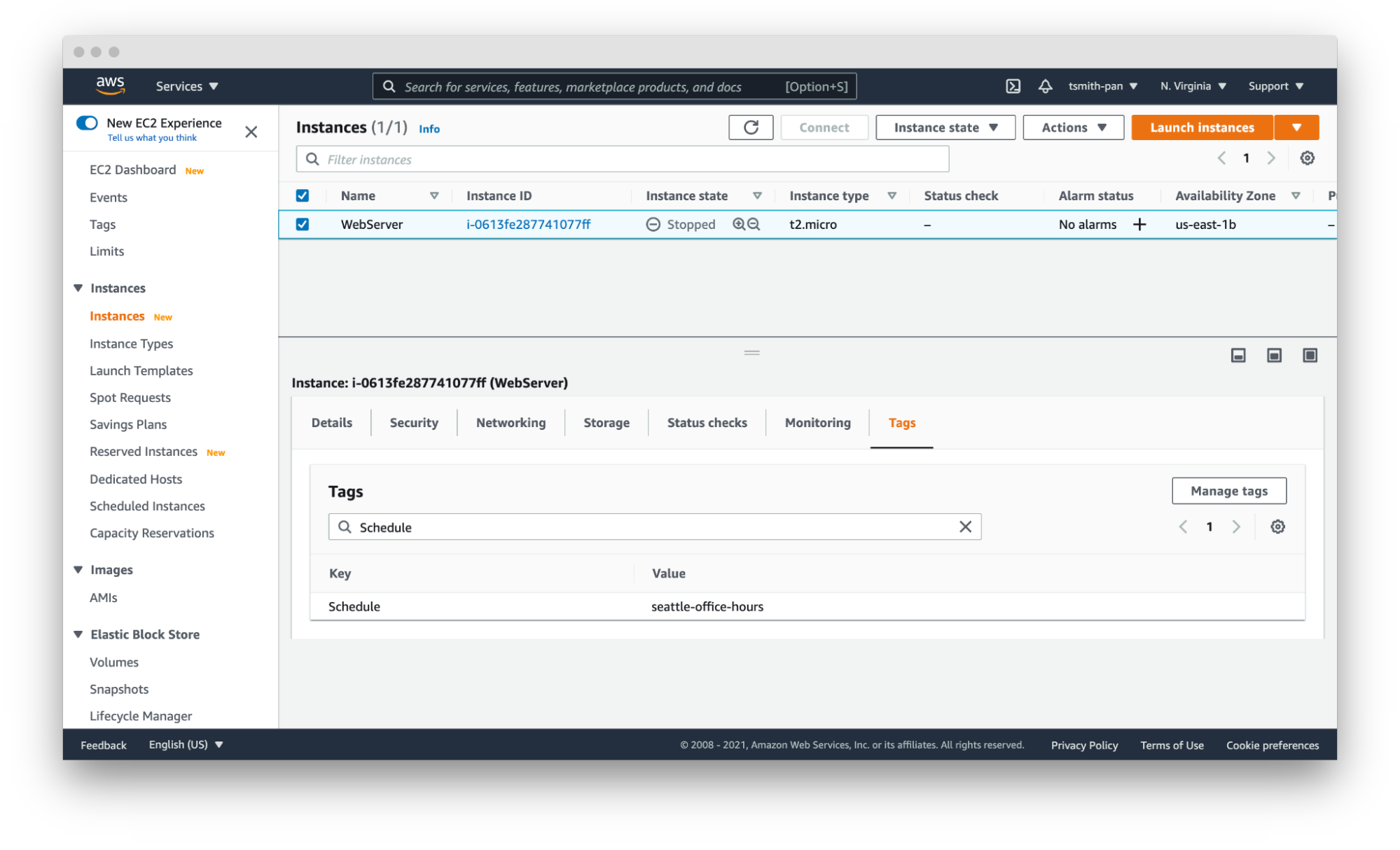
    Instance Scheduler takes a tag with a key:value pair; for example, “Schedule” (or a custom key) as the key and the schedule as the value. The schedules can be either one of the preconfigured schedules in the DynamoDB table, like office-hours, or a custom one.

    Using simple custom tags in Yor, you can tag every resource in a repository with a schedule by using environment variables such as adding the following to the Yor GitHub Action YAML file:

    This results in tags being added to every resource in that IaC directory. With the seattle-office-hours tag, Instance Scheduler will turn off EC2 instances at 5:00 pm Pacific Time and on again at 9:00 am Pacific Time Monday through Friday. This saves money by stopping instances automatically during downtime.

    Yor

    Another popular automation use case is for backups and archival plans. AWS can automatically apply different backup plans based on the tags applied to resources, such as storage and database resources. For example, if certain organizations, such as those that process financial data, need things archived forever, but others only need one year of backup, applying backup plans can move the short-term storage to cheaper options, such as Glacier, and eventually delete them on a schedule.

    Security Risk Management

    The final use case is risk management. The risk level of cloud resources differs based on whether they are in test or production environments and the sensitivity of the data those resources process and hold. This is another area where you can use simple tags like git_repo to filter down to repositories for applications that deal with sensitive data. You can also leverage complex custom tags. For example, EC2 instances attached to databases with “customer” in the name will get a data_level:sensitive tag.

    IT service management tools can apply higher priority to patching and updating resources with tags denoting sensitive data. This is another area where you can leverage Checkov’s graph-based checks in combination with Yor tags to assign higher severity levels to policy violations for resources with sensitive data tags or production environment tags. Assigning priority helps to focus developer attention and mitigate risk faster.

    These six tagging use cases are just a few examples of how you can leverage tags to be more efficient and improve your cloud security posture in AWS. The power of Yor’s tracing capabilities enables development and operations teams to work together without requiring complex triage to find the right person and IaC templates. With Yor’s extensibility and custom tagging capabilities, we can’t wait to see what other use cases the community comes up with!

  • JFrog Acquires Vdoo to Advance DevSecOps

    JFrog Acquires Vdoo to Advance DevSecOps

    JFrog today announced it has agreed to acquire Vdoo for $300 million in cash to gain a set of analytics tools that discover vulnerabilities in application binaries.

    Vdoo’s scanning tools, infused with machine learning algorithms, will be fully integrated with the JFrog Xray vulnerability detection tools along with the rest of the JFrog continuous integration/continuous delivery (CI/CD) platform in 2022. In the meantime, the Vdoo scanning tool will continue to be made available via a software-as-a-service (SaaS) platform that Vdoo built.

    The Vdoo platform is already integrated with the JFrog Artifactory repository and JFrog Pipelines. Vdoo’s platform also is integrated with DockerHub, Jenkins, GitHub, GitLab and Azure Pipelines via REST application programming interfaces (APIs) that make the Vdoo scanning tools accessible via a command line interface (CLI).

    JFrog CTO Yoav Landman said acquiring Vdoo is critical because when it comes to implementing DevSecOps best practices, the only meaningful place to discover and remediate vulnerabilities is in the binaries deployed in production environments. As such, the Vdoo platform provides a superior alternative to both static application security testing (SAST) and dynamic application security testing (DAST) tools that scan for vulnerabilities in source code, added Landman.

    Developers require accurate intelligence that can be quickly acted upon to secure applications running in production. They can quickly take action once they know how a specific vulnerability impacts a binary, versus being told to update source code that could take days or weeks to complete, noted Landman. The Vdoo platform also makes it possible to leverage machine learning algorithms to detect zero-day vulnerabilities, malware, exploits, backdoors, supply chain risks and other threats before they become commonly known. Those vulnerabilities can be detected in everything from application binaries to firmware running on embedded devices. Vdoo is also recognized by the Mitre Corp. that oversees the Common Vulnerabilities and Exposures (CVE) database as a CVE Numbering Authority (CNA) for discovering vulnerabilities.

    JFrog Vdoo

    As responsibility for application security continues to shift left toward developers, many organizations are finding the tools that cybersecurity teams employed to discover threats don’t lend themselves to the workflows that developers have created to build applications. As a result, many of these tools are being replaced by developer-friendly alternatives that developers can invoke via a CLI as part of DevOps workflow. The goal, now, needs to be reducing the level of noise created by security tools to enable developers to focus on the vulnerabilities that specifically impact their code, noted Landman. Otherwise, developers are simply overwhelmed by a massive number of alerts generated by security tools that often don’t appear to be especially relevant, Landman added.

    It’s not clear how quickly responsibility for application security is shifting left. However, in the wake of a series of high-profile software supply chain breaches, the urgency surrounding adoption of DevSecOps best practices has increased considerably. The challenge, as always, is getting the right tools into the hands of developers at the right time.

  • Dynatrace Applies AI to Surface App Vulnerabilities

    Dynatrace Applies AI to Surface App Vulnerabilities

    Dynatrace has enhanced the security module to its observability platform that leverages its Davis artificial intelligence (AI) engine to automatically identify the software libraries and open source packages that represent the greatest security risk.

    Ajay Gandhi, vice president of product marketing for Dynatrace, said the Davis Security Advisor, being added to the Dynatrace Application Security Module, makes it easier for IT teams to understand which vulnerabilities need to be remediated first.

    Davis Security Advisor aggregates vulnerability data in real-time and prioritizes remediation based on the number of vulnerabilities, severity, impact to sensitive data, public exposure, how widely known the vulnerability is, and whether the code impacted is facing the internet. That approach enables Davis Security Advisor to monitor all software libraries used in preproduction and production environments in a way that sharply reduces the number of false positives that would otherwise be generated, noted Gandhi.

    Dynatrace

    As application environments become more complex—in part due to increased adoption of microservices that have lots of dependencies—it’s become impossible for IT teams to implement DevSecOps best practices in workflows without some form of AI augmentation, added Gandhi.

    In fact, a recent Dynatrace survey found 89% of chief information security officers (CISOs) noted cloud-native architectures and container runtime environments, used primarily to construct microservices, have made it more difficult to detect and manage software vulnerabilities.

    In theory, application developers are taking more responsibility for remediating security vulnerabilities within their applications. The challenge is they often inadvertently use an older version of a library that has known vulnerabilities. Hopefully, that issue gets addressed before an application gets deployed. There are, however, plenty of cases where, for one reason or another, a library with known vulnerabilities gets deployed anyway.

    Making matters more challenging, many vulnerabilities are discovered after an application has been deployed. Developers don’t always have access to a software bill of materials that would make it easier to determine what libraries have been employed in what application or, for that matter, which libraries are dependent upon one another.

    Gandhi said the Davis Security Advisor resolves that issue via continuous topology mapping of dependencies to identify those potential security issues. Once identified, the updates that need to be made can then be slipstreamed into a DevOps workflow.

    Analyzing code for vulnerabilities is, of course, not a new idea. Training an AI model to perform that task on behalf of DevOps teams does promise to greatly accelerate the process at a time when organizations are under more pressure than ever to secure their software supply chains in the wake of a series of high-profile breaches.

    It’s just not clear yet who inside organizations might drive adoption for AI platforms capable of identifying vulnerabilities in a way that helps prioritize remediation efforts. In some cases, cybersecurity teams have a vested interest in reducing the number of potential security incidents.

    The one thing that is apparent is shipping insecure code faster only leads to more negative outcomes. There may not be such a thing as a ‘great’ application that happens to be insecure. Instead, the assumption will be that any applications with known vulnerabilities, no matter how great, are too flawed to be deployed given all the security risks most businesses currently face.

  • What Chaos Engineering Is (and Isn’t)

    What Chaos Engineering Is (and Isn’t)

    The birth of chaos engineering happened somewhat accidentally in 2008 when Netflix moved from the data center to the cloud. The move didn’t go as planned.

    The thinking at the time was that the data center locked Netflix into an architecture of single points of failure, like large databases and vertically scaled components. Moving to the cloud would necessitate horizontally scaled components, which would decrease the single points of failure. But the move to horizontally scaled cloud deployment practices did not produce the boost to uptime of the streaming service that they expected.

    The specific methods for making a system robust enough to handle instances disappearing was not important. It might even be different depending on the context of the system. The important thing was that it had to be done, because the streaming service was facing availability deficits due to the high frequency of instance instability events. In a way, Netflix had simply multiplied the single-point-of-failure effect.

    Enter Chaos Monkey. Chaos Monkey gave the company a way to proactively test everyone’s resilience to a failure, and do it during business hours so that people could respond to any potential fallout when they had the resources to do so, rather than at 3 a.m. when pagers typically go off.

    Then, Dec. 24, 2012, happened. Amazon Web Services (AWS) suffered a rolling outage of elastic load balancers (ELBs). These components connect requests and route traffic to the compute instances where services are deployed. As the ELBs went down, additional requests couldn’t be served. Since Netflix’s control plane ran on AWS, customers were not able to choose videos and start streaming them.

    To ensure that all of these teams had their services up to the task, an activity was created to take a region offline. Well, AWS wouldn’t allow Netflix to take a region offline (something about having other customers in the region) so, instead, Netflix simulated the activity; labeled “Chaos Kong.”

    Fast-forward to about 2015. Netflix had Chaos Kong working on large-scale vanishing regions and had introduced Chaos Monkey, which worked on small-scale vanishing instances.

    In these early days of chaos engineering at Netflix, it was not obvious what the discipline actually was. There were some catch phrases tossed around about “pulling out wires,” or “breaking things,” or “testing in production,” paired with many misconceptions about how to make services reliable, and very few examples of actual tools to help support that work.

    To formalize the discipline, I was given the task of developing a charter and roadmap for a chaos engineering team at Netflix in early 2015. I built and managed that team for three years. My co-author of “Chaos Engineering: System Resiliency in Practice,” Nora Jones, joined the chaos engineering team early on as an engineer and technical leader. She was responsible for significant architectural decisions about the tools we built as well as overseeing implementation.

    To start, I sat down with my teams to formally define chaos engineering. We specifically wanted clarity on:

    • What is the definition of Chaos Engineering?
    • What is the point of it?
    • How do I know when I’m doing it?
    • How can I improve my practice of it?

    We researched resilience engineering and other disciplines in order to come up with a definition and a blueprint for how others could also participate in chaos engineering. After about a month of working on a manifesto of sorts, we produced the Principles of Chaos Engineering. The discipline was officially formalized:

    “Chaos Engineering is the discipline of experimenting on a distributed system in order to build confidence in the system’s capability to withstand turbulent conditions in production.”

    This definition established that it is a form of experimentation, which sits apart from testing. It also mentions “turbulent conditions in production” to highlight that this isn’t about creating chaos. Chaos engineering is about making the chaos inherent in the system visible. The point of doing chaos engineering is to build confidence.

    The principles go on to describe a basic template for experimentation, which borrows heavily from Karl Popper’s principle of falsifiability. In this regard, chaos engineering is modeled very much as a science rather than a technique.

    What Chaos Engineering Is

    The principles define the discipline so that we know when we are doing chaos engineering, how to do it and how to do it well. The more common definition for chaos engineering today is, “The facilitation of experiments to uncover systemic weaknesses.”

    The steps of Chaos Engineering experimentation are as follows:

    1. Start by defining “steady state” as some measurable output of a system that indicates normal behavior.
    2. Hypothesize that this steady state will continue in both the control group and the experimental group.
    3. Introduce variables that reflect real-world events like servers that crash, hard drives that malfunction, network connections that are severed, etc.
    4. Try to disprove the hypothesis by looking for a difference in steady state between the control group and the experimental group.

    By design, there is great latitude in how to implement these experiments.

    Experimentation Versus Testing

    Testing, strictly speaking, does not create new knowledge. Testing requires that the engineer writing the test knows specific properties about the system that they are looking for in advance. Complex systems are opaque to that type of analysis—humans are simply not capable of understanding all of the potential side effects from all of the potential interactions of parts in a complex system. This leads us to one of the key properties of a test.

    Tests make an assertion, based on existing knowledge, and then running the test collapses the valence of that assertion, usually into either true or false. Tests are statements about known properties of the system.

    Experimentation, on the other hand, creates new knowledge. Experiments propose a hypothesis, and as long as the hypothesis is not disproven, confidence grows in that hypothesis. If it is disproven, then we learn something new. This kicks off an inquiry to figure out why our hypothesis is wrong. In a complex system, the reason why something happens is often not obvious. Experimentation either builds confidence, or it teaches us new properties about our own system. It is an exploration of the unknown.

    No amount of testing in practice can equal the insight gained from experimentation, because testing requires a human to come up with the assertions ahead of time. Experimentation formally introduces a way to discover new properties. It is entirely possible to translate newly discovered properties of a system into tests after they are discovered. It also helps to encode new assumptions about a system into new hypotheses, which creates something like a “regression experiment” that explores system changes over time. Because chaos engineering was born from complex system problems, it is essential that the discipline favors experimentation over testing.

    Verification Versus Validation

    Using definitions of verification and validation inspired by operations management and logistical planning, we can say that chaos engineering is strongly biased toward the former.

    Verification

    Verification of a complex system is a process of analyzing output at a system boundary. A homeowner can verify the quality of the water (output) coming from a sink’s faucet (system boundary) by testing it for contaminants without knowing anything about how plumbing or municipal water service (system parts) functions.

    Validation

    Validation of a complex system is a process of analyzing the parts of the system and building mental models that reflect the interaction of those parts. A homeowner can validate the quality of water by inspecting all of the pipes and infrastructure (system parts) involved in capturing, cleaning, and delivering water (mental model of functional parts) to a residential area and, eventually, to the house in question.

    Both of these practices are potentially useful, and both build confidence in the output of the system. As software engineers, we often feel a compulsion to dive into code and validate that it reflects our mental model of how it should be working. Contrary to this predilection, chaos engineering strongly prefers verification over validation. chaos engineering cares whether something works, not how.

    Note that in the plumbing metaphor we could validate all of the components that go into supplying clean drinking water, and yet still end up with contaminated water for some reason we did not expect. In a complex system, there are always unpredictable interactions. But if we verify that the water is clean at the tap, then we do not necessarily have to care about how it got that way. In most business cases, the output of the system is much more important than whether or not the implementation matches our mental model. Chaos engineering cares more about the business case and output than about the implementation or mental model of interacting parts.

    What Chaos Engineering Is Not

    There are two concepts that are often confused with chaos engineering, namely breaking stuff in production and anti-fragility.

    Breaking Stuff

    Occasionally, in blog posts or conference presentations, we hear chaos engineering described as “breaking stuff in production.” While this might sound cool, it doesn’t appeal to enterprises running at scale and other complex system operators who can most benefit from the practice.

    A better characterization would be “fixing stuff in production.” Breaking stuff is easy; the difficulty lies in mitigating blast radius, thinking critically about safety, determining if something is worth fixing, deciding whether you should invest in experimenting on it—the list goes on.

    Breaking stuff could be done in countless ways, with little time invested. The larger question here is, how do we reason about things that are already broken when we don’t even know they are broken?

    “Fixing stuff in production” does a much better job of capturing the value of chaos engineering, since the point of the whole practice is to proactively improve availability and security of a complex system. Chaos engineering is the only major discipline in software that focuses solely on proactively improving safety in complex systems.

    Anti-Fragility

    People familiar with the concept of anti-fragility, introduced by Nassim Taleb, often assume that chaos engineering is essentially the software version of the same thing. Taleb argues that words like “hormesis” are insufficient to capture the ability of complex systems to adapt, and so he invented the word “anti-fragile” as a way to refer to systems that get stronger when exposed to random stress.

    An important, critical distinction between chaos engineering and anti-fragility is that chaos engineering educates human operators about the chaos already inherent in the system so that they can be a more resilient team. Anti-fragility, by contrast, adds chaos to a system in hopes that it will grow stronger in response rather than succumbing to it.

    As a framework, anti-fragility puts forth guidance at odds with the scholarship of resilience engineering, human factors and safety systems research. For example, anti-fragility proposes that the first step in improving a system’s robustness is to hunt for weaknesses and remove them. This proposal seems intuitive, but resilience engineering tells us that hunting for what goes right in safety is much more informative than investigating what goes wrong.

    The next step in anti-fragility is to add redundancy. This also seems intuitive, but adding redundancy can cause failure just as easily as it can mitigate against it, and the literature in resilience engineering is rife with examples where redundancy actually contributes to safety failures. Perhaps the most famous example is the 1986 Challenger disaster. The redundancy of O-rings was one of three reasons that NASA approved the continuation of launches, even though damage to the primary O-ring was well known internally for over fifty of the prior launch missions over the span of five years.

    There are numerous other examples of divergence between these two schools of thought. Resilience engineering is an ongoing area of research with decades of support, whereas anti-fragility is a theory that exists largely outside of academia and peer review. It is easy to imagine how the two concepts become conflated, since both deal with chaos and complex systems, but the spirit of anti-fragility does not share the empiricism and fundamental grounding of chaos engineering. For these reasons, we should consider them to be different pursuits.

    A combination of real-world experience applying the original four principled steps to experimenting on systems at scale, paired with additional thoughtful introspection, led the chaos engineering team at Netflix to push the practice further than experimentation. These insights became the “Advanced Principles,” which guide teams through the maturity of their chaos engineering programs and help set a gold standard toward which we can aspire—we’ll cover these in a follow-up post.

  • SREs Say AIOps Doesn’t Live Up to the Hype

    SREs Say AIOps Doesn’t Live Up to the Hype

    What can you expect when investing in artificial intelligence for IT operations (AIOps)? Real-time visibility across huge volumes of information. Lightning-fast event correlation and anomaly detection. Automated remediation and self-healing, without Ops personnel having to lift a finger.

    It all sounds amazing—at least, if you believe the marketing hype. But do those kinds of AIOps benefits actually translate to the real world? According to a recent survey of nearly 300 site reliability engineers (SREs), not so much.

    Among SREs surveyed—including engineers for some of the world’s largest, most innovative digital companies—just 12% use AIOps as a day-to-day part of their monitoring toolkit. Nearly 40% never use it at all.

    Why aren’t current AIOps solutions living up to the hype? And what can this gap tell us about the state of IT monitoring in general? Let’s take a closer look.

    Sprawling Complexity

    In theory, AIOps should be a perfect fit for SREs. These are, after all, the people with one foot in the world of operations, one in development, whose job is to make distributed software systems ultra-scalable and reliable. A solution that can turn mountains of data about those systems into actionable insights should be exactly what SREs need. And, in fact, 53% of SREs cite lack of unified visibility across the stack as their biggest cloud application monitoring challenge.

    And yet, if we gauge by utilization, today’s AIOps tools don’t seem to be delivering on that promise. Asked about the value of AIOps, just 7.5% of SREs, on average, view AIOps as “high-value”—even less than those SREs (9%) who perceive its value as low.

    Why is AIOps so slow to catch on? Ultimately, the barriers facing these tools are the same as those facing human engineers: massive and growing complexity in IT environments. As digital products become more dependent on third-party cloud services, as the number of things businesses want to track grows (from infrastructure to application to experience), the sheer volume, velocity and variety of monitoring data has exploded.

    Diverse Data Sources

    Compounding the problem, enterprises increasingly rely on multiple “same-service” providers for IT services. That is, they use multiple cloud providers, multiple DNS providers, multiple API providers, etc. There are sound business reasons for doing so, such as adding resiliency and drawing on different vendors’ strengths in different areas. But even when two providers are doing basically the same thing, they use different interfaces and instrumentation, and their data sources often employ different metrics, data structures, and taxonomies.

    Whether you’re asking a human being or an AI-driven tool to solve this problem, this heterogeneity makes it extremely difficult to visualize the complete picture across the infrastructure. It also creates gray areas around how best to take advantage of each vendor’s different rules and toolsets. All of which makes automating anything beyond the most superficial operations tasks hugely challenging, if it’s possible at all.

    Optimizing AIOps

    AIOps really is the solution to this problem—or at least, an important part of the solution. Machine learning is, after all, tailor-made to analyze large volumes of observational and engagement data and react in real-time, as well as to continually identify opportunities for improvement. But before we can get there, we need to change the way we think about AIOps.

    Don’t try to do everything at once.

    It would be great if we could deploy AIOps, let it learn about our environment and watch it magically start remediating issues on its own. But we’re not there yet. (And if a vendor tries to convince you we are, you should definitely be skeptical.) If we break down our expectations into smaller, more manageable chunks, however, AIOps can accomplish quite a lot.

    Event correlation, topology analytics and smart alerting, for example, are all areas where AIOps can provide significant value right now. For these more limited objectives, AIOps can absolutely reduce tedious manual effort for human operators, reduce mean time to repair, improve visibility and more, and digital businesses should be leaning on AIOps to do that.

    Invest in AI and ML training.

    Part of the reason adoption of AIOps tools remains sluggish stems from the fact that many teams still just don’t fully understand how they can use them. The more SREs are exposed to AI/ML training, the more opportunities they will identify for concrete, meaningful applications of AIOps. For example, only 27% of SREs said, “Experimenting or receiving training to expand knowledge or skills” was a major activity as part of their job.

    Embrace “Platform Ops.”

    The biggest step we can take is to rethink how we use AIOps within an organization. Today, AIOps tools—like SRE resources themselves—are often dedicated to a specific digital product or service. As a result, enterprises end up trying to apply their AIOps tools, and the SREs using them, to support everything associated with that product (DNS, API, CDN, cloud monitoring, etc). As IT environments continue to get even more complex, though, businesses will likely find that shifting to shared platform tools and teams yields better results.

    Instead of trying to apply AIOps across every part of a digital service, imagine applying it to one part of that service (for instance, focusing on just DNS, or just APIs). In this way, the AIOps tools, as well as the teams using them, gain in-depth expertise across all the different interfaces and instruments used for that function and get continually better at normalizing multi-provider data sources across them. At that point, this platform-specific AIOps capability can then be scaled and reused across the company—providing more advanced DNS AIOps (or API, or CDN, etc.) for multiple digital products and teams.

    Now, you’ve got an advanced, highly specialized toolset for optimizing an important platform function, regardless of which digital product happens to be using it. You’ve narrowed the scope of how you’re using a given AIOps implementation while going much deeper into that function than a more generic, broad-based implementation could achieve. All of a sudden, even more advanced automation and self-healing becomes possible. And the loftiest marketing claims of AIOps start to look less like hype and more like viable real-world outcomes for your business.