Tag: continuous deployment

  • Semaphore 2.0 Brings Continuous Delivery to Teams of All Sizes

    Semaphore 2.0 Brings Continuous Delivery to Teams of All Sizes

    Since its inception in 2012, Semaphore has been focused on making code testing and deployment a quick and easy process. The cloud-based CI/CD platform from Rendered Text enables users to get up and running within a matter of minutes—which the company claims is at least twice as fast as other offerings.

    The company is releasing Semaphore 2.0 Nov. 6, which will expand the platform to enable continuous delivery, for a product that allows teams of any size to automate any continuous integration or continuous delivery workflow with custom pipelines so users can model their CI/CD however they prefer. The latest version also better supports CI/CD for containers, giving users the ability to use Docker or Kubernetes tools in building within container environments. Other features of Semaphore 2.0 include support for YAML files and command line interfaces, so teams can manage a large number projects more easily.

    Marko Anastasov, founding partner at Rendered Text, spoke with me about the latest version of Semaphore and his thoughts on the continuous integration and continuous delivery space at large. Read on for his insights:

    Can we start with some background about Semaphore? What was the catalyst for creating it?

    Our company was an early adopter of agile software development practices, including test-driven development and continuous deployment. We relied on cloud-based products like GitHub, which were simple to use and made software development easier.

    However, when it came to implementing continuous integration, we were out of luck. I remember spending days setting up Jenkins for just one of our projects. We saw how expensive and time-consuming it would be to make it fast and scalable. It felt as if by continuously verifying our code, we were doing something wrong. Developers need to set up a fast and functional CI process in minutes, and not worry about how it works.

    What’s new in Version 2.0 that’s worth mentioning?

    Semaphore 2.0 is made to enable continuous delivery in organizations of any size. Previously, like other hosted CI/CD services, Semaphore focused on solving the integration process: building code and running tests. Delivery features were limited and tailored for classic web development.

    This time we asked ourselves, What would a continuous delivery product focused on speed and simplicity look like in the age of cloud-native computing? I’d highlight three things that stood out.

    First, for DevOps transformation to succeed, we need to automate, visualize and accelerate all software development processes in our organizations. So at the heart of Semaphore 2.0 are infinitely customizable code pipelines, configured as code, run as a service.

    Second, infrastructure should be ephemeral and scale in real time. When CI/CD capacity is limited, developers are blocked in busy times of the day. Semaphore adopts the “pay only what you use” cloud model, in which CI/CD resources scale automatically to support the team’s actual needs.

    And third, we can’t manage what we don’t measure. It doesn’t make sense to prescribe the same metrics for every project and organization. So Semaphore lets users choose their own metrics and define their own dashboards.

    What feature or features do you believe will have the most impact with users?

    In building Semaphore 2.0 we were very careful not to add any unnecessary features. All parts are designed to support each other and provide a harmonious user experience.

    For example, Kubernetes wasn’t the first solution to run software in the cloud, but it made vendor-neutral cloud computing as easy as describing what you need to run. Similarly, developers can now describe any CI/CD process they need, and Semaphore will run it immediately at any scale.

    In day-to-day use, I expect users to like how much control they have via command line and autoscaling resources. It’s the overall boost in productivity that will make the most impact.

    How important is Semaphore’s increased support for container environments?

    Containers are the biggest change in the development stack in recent history. In the transition to container-based software delivery, many teams needed to maintain their own CI/CD infrastructure, since none of the existing solutions were flexible or easy enough to use. This takes valuable time away from delivering value to customers. Semaphore 2.0 is built to support the next-generation of cloud architectures based on containers.

    What are some of your thoughts on the current state of the CI/CD market, and where do you see it heading?

    For the continuous integration part of the equation, there are many options to choose from. There’s a wide spectrum from managed to DIY solutions, and from specialized vendors to those who provide basic tools for every aspect of software development. I think the shift that’s going to happen is from basic automation to optimization. For example, Semaphore provides bare-metal performance at convenience of cloud. When a customer tells us that they’ve combined that with our test optimization features to reduce build time from hours to minutes, that makes us so happy because we know what tremendous difference that makes in their workplace.

    On the continuous delivery front, I think there’s less maturity and that the market is still developing. So far, developers have needed to build their own solutions based on complex open source tools and self-managed infrastructure. Cloud vendors have entered the space, not with complete products but low-level tools that leave a lot of complexity for the end user to manage. The next phase will be about making the entire CI/CD process easier and more accessible. At Semaphore, we’re committed to making that happen.

    — Charlene O’Hanlon

  • Continuous Delivery is Not Continuous Deployment

    Continuous Delivery is Not Continuous Deployment

    Every once in a while, it is worth revisiting a topic that flies under most people’s radar. The differences between continuous delivery and continuous deployment is one of those topics. While those steeped in DevOps are well-aware that software can be delivered daily (or even more frequently), deployment is less frequent, and more dependent upon both development and marketing cycles.

    Most CI/CD tools can and do crank out “deployable” apps on a daily basis, or even each time that code is checked in. In theory, each of these builds is a candidate for deployment, and each has had at least some level of testing.

    But setting up the environment to host these apps is a separate step. Quite often today, it is a step that is handled by scripts that configure/move everything to build the app environment into a comprehensive system with knowledge of network, data sources, storage, etc.

    I’m revisiting this topic because new people often hear “CD” and assume that is the end state. Of course, it is not; the application has to be deployed—to Test and Production at least, and in many enterprises to Staging, also.

    While these environments are almost invariably different (Test does not share IP space with Prod, for example), the deployments must mirror each other as much as possible to make Test representative of what Prod will look like.

    As with any step in the DevOps toolchain, scripts to achieve continuous deployment are not a great solution. They are certainly a good first step—automating what previously was done by hand—but tools that make the experience easier and more dynamic are available, and should be considered.

    Whether an explicit continuous deployment tool or an application release automation (ARA) tool (or an ARA that calls a continuous deployment tool, as we’ve seen some used), something to remove dependence on hand-edited scripts is useful for many reasons, starting with the fact that separate scripts are maintained for Test and Prod and changes must be made in two places when a change is made to an application (such as changing where the DB is located or switching to a dedicated AAA server). This makes scripting fragile. Tools can offer shared deployment and custom deployment sections so that multiple changes can be restricted to those things that truly need to be handled separately.

    Deployment is very much a target exercise. The code has been built; deployment is simply giving it a home. Historically, this required agents be strewn about the data center to help target deployments. Increasingly, agentless tools are available that allow the adaptability of continuous deployment while not requiring agents to be installed on every machine that might participate in the deployment activity.

    The other major benefit of moving beyond scripts and into a continuous deployment tool is huge: Everything else is version-controlled, which provides built-in rollback. A developer made a mess of fixing that bug, and things are worse? Roll back the update until the issue can be addressed. Tools such as Git make that particularly easy to do. On the deployment side, the same functionality is required. “Release 7.2 has been deemed to violate GDPR” might require moving back to the previous release. But script-based deployments are always forward-looking. It is enough to modify scripts to reflect the current environment, and it is a rare organization that requires parallel development of backout scripts. However, this functionality comes for free with a continuous deployment tool—that which it has built it can undo, because it is versioned automatically.

    And the benefit of versioning goes beyond rollbacks: It allows multiple version deployments for AB testing and allows for skipping forward and back as far as necessary to meet current goals.

    Is it a panacea? Of course not. Each technology brings new challenges. But continuous deployment solves more problems than it creates. And most of the problems it creates—a desire for greater integration with networking and storage services in non-cloud environments, for example—will be solved in a consistent and repeatable manner by these tools long before any scripting does. Because the tools are designed to create consistent and repeatable results.

    While you are out there kicking it, consider implementing continuous deployment tools to tackle the DevOps last mile. They’ll make your life easier, and your environment less fragile.

    — Don Macvittie

  • How to Get More Visibility Into Your Continuous Deployment Process

    How to Get More Visibility Into Your Continuous Deployment Process

    I know far too many developers who cringe at the thought of continuous deployment. Thoughts of broken code and an endless stream of customer support requests puts continuous deployment into the “nice to have, but not right now” pile.

    But, it might just be a case of clearing the fog on process so you get visibility into the deployment pipeline. If your team can get more visibility into releases, you will have more confidence your shipped code is quality. With more visibility, you’ll be deploying faster and earlier before you know it.

    What are the Results of an Effective Continuous Deployment Process?

    Shipping a big release is taxing on your QA and testing teams and the pressure to get every part of the build correct is huge. Continuous deployment allows you to deploy smaller chunks of code more frequently so you have more control over the release.

    Think “shipping responsibly.”

    With that in mind, it’s easy to see why a lack of visibility can hinder continuous deployment’s goal of shipping more code to a tight schedule.

    Why is Lack of Visibility a Problem?

    Best practices for your software development lifecycle (SDLC) demand that you know what’s going on in your code. And if you are responsible for your release process, you are probably held accountable for what customers receive.

    Production demands visibility into code quality; otherwise, you risk economic damage to your business in the form of bugs and crashes. With this in mind, understandably, many teams hesitate to continuously deploy thorough lack of confidence in the quality of shippable code through the build process. If more visibility means more confidence, let’s take a look at the stages in a build process and how to increase visibility at each stage.

    How to Get More Visibility Into Your Continuous Deployment Process

    Invest in modern architecture

    Continuous deployment will require resources and modern tooling initiated by your best people. Although budget often can be one of the biggest roadblocks to continuous deployment’s success, don’t withhold funds. Invest in the tools and people first, and the process will come. Modern tooling that is updated regularly will give you the best of what’s available, allowing you to effectively see what’s happening in each stage from source control to deployment and beyond.

    Allow for manual intervention

    You may not want your continuous deployment to be fully automatic. There are risks associated with continuous deployment, and to mitigate those risks you need a human to push the “deploy” button. It’s more about making your team feel accountable for their actions. The developer sees the change go live and is the first to test them.

    A viewable stage environment

    Do you have key stakeholders waiting for updates on feature releases? Rush boxes might be the answer. A rush box is a server used for work that is not ready for the QA process. This will give anyone to give feedback and authorize changes.

    Report

    Continuous deployment is certainly not without its risks. But, if you incorporate a culture of visibility into your processes, you can quickly identify where the gaps are so you can start to scale. Your toolkit will generate a huge amount of transactional data that will help to steer your company in the right direction.

    Monitor

    It amazes me how many companies still push out changes and rely on the end user to tell them whether the deployment was successful. Defects in production code have economic impacts on your company, and undiscovered bugs and errors can rack up into technical debt. But, you can’t change what you can’t see. Small changes are always going into production, so time for QA and regression tests naturally lessens. Therefore, you need to know what happened, and when, which is where a monitoring tool such as crash reporting can help. I’ve written before about the benefits of monitoring in continuous deployment, and it’s an integral step that is often missing. Monitoring can also help you make informed decisions about when to rollback a deployment.

    Rollbacks have an economic impact to your business, much in the way errors do. However, if a decision to roll back is data-driven, it’s an easy call for a senior developer to make.

    In Conclusion

    Don’t let the lack of visibility into your deployment pipeline affect your decision to implement a continuous deployment process. Invest in people and tooling first, and the process and scale will come.

    — Freyja Spaven

  • CloudBees Applies Analytics to DevOps

    CloudBees Applies Analytics to DevOps

    At the heart of many DevOps initiatives is an automation server based on open-source Jenkins software developed by CloudBees. At the recent Jenkins World 2017 conference, CloudBees showed that Jenkins is now becoming the foundational element through which DevOps teams can now manage a continuous integration/continuous deployment (CI/CD) process end to end.

    New additions to the portfolio include CloudBees DevOptics, an analytics application to aggregate data from software development pipelines as it moves through a Jenkins server. CloudBees CTO Kohsuke Kawaguchi says once organizations are armed with those insights they will be able to, for example, identify potential bottlenecks in their software development processes. CloudBees DevOptics creates a single point of reference on the status of any application delivery project, all the way down to individual commits, says Kawaguchi.

    CloudBees also launched CloudBees Jenkins Advisor, a free plug-in for a Jenkins environment that Kawaguchi says provides another watchful eye capable of continuously analyzing a Jenkins environment using algorithms the company developed. Cloudbess Jenkins Advisor comprises a knowledge base and diagnostic tools that can be employed to detect and resolve issues ranging from simple configuration issues to security and other forms of best practices.

    Finally, the company revamped the user interface provided with CloudBees Jenkins Enterprise, an implementation of Jenkins that comes pre-configured with built-in security and integrations with more than 1,400 DevOps tools. It also announced that a few select managed services providers are now building a practice around Cloudbees Jenkins Enterprise.

    CloudBees reports there are now more than 150,000 active installations of Jenkins worldwide that span a user community of more than a million. Those numbers represent a 50 percent growth rate from January of 2015.

    Most organizations employ DevOps processes to accelerate development of software. But along the way it’s not uncommon for many organizations to lose control over those processes as the amount of software being developed begins to overwhelm their management teams. CloudBees clearly sees providing tools to optimize DevOps processes based on Jenkins as its next big opportunity.

    In general, DevOps is much more of a journey than an event. But rather than being a simple article of faith, analytics can be used to show all the participants in a process that progress is in fact being made. Otherwise, resistance to increasing the number of application development projects being undertaken at the same time starts to mount. Whatever the reason for gathering those metrics, however, that old “Things Measured Are Things Done” maxim continues to apply. Those metrics also help IT organizations justify the return on investment in DevOps to senior managers.

    Of course, managing DevOps processes at scale is as much a cultural challenge as it is a technical issue. When many organizations first embrace DevOps there’s a lot of initial enthusiasm. But the further down the DevOps maturity curve an organization gets, the more they encounter various hurdles. Metrics collected and analyzed by the tools provided by CloudBees help organizations determine to what degree those hurdles are related to simple technical glitches versus organizational issues that are almost always a lot harder to resolve.

    — Mike Vizard

  • Differentiating Between CI Pipelines and DevOps Assembly Lines

    Differentiating Between CI Pipelines and DevOps Assembly Lines

    “What’s in a name?” wrote the greatest Bard who ever lived.

    All I can say is, he lived in simpler times, when DevOps and the confusing world of continuous integration (CI), continuous deployment (CD), CI/CD, the other CD, application release automation (ARA), pipelines, assembly lines, etc., didn’t exist.

    The biggest challenge today is that vendors use overloaded terms to describe completely different use cases. CI vendors claim to support CI/CD, even though the “D” here is just a deployment to a development environment and not staging or production. ARA vendors claim to enable continuous delivery, even though they do not include critical steps such as infrastructure provisioning, security patches or configuration management.

    The terms “pipelines” and “assembly lines” are relatively new. Multiple vendors have recently announced pipelines and assembly lines, and the differences aren’t obvious at first glance. So let’s do a deep dive.

    What are CI Pipelines?

    Continuous integration has evolved tremendously over the last few years. What started as a simple process of automating build and unit tests for each code change has evolved into a pretty complex workflow.

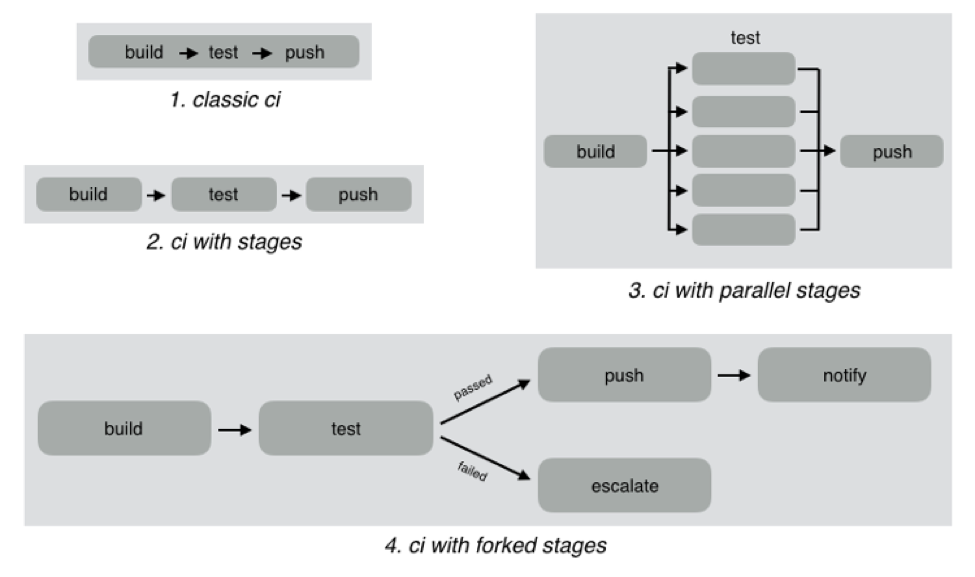
    As an example, look at the different CI workflows shown below:

    In classic CI, all build and test instructions were included in a single blob and instructions were executed serially. If all instructions executed successfully, CI was successful, and if anything failed, then it was marked failed. Almost all CI providers, until recently, offered just classic CI.

    However, as CI became mainstream, developers wanted to define more complex workflows with decision trees and parallelism. CI pipelines support this complexity, such as:

    • Defining the CI workflow in stages, so you can get results from a stage faster without having to wait for the entire workflow to finish. This also enables scenarios such as running a basic test group and only running the extended test suite if the basic tests pass.
    • Running stages in parallel, so you can split tests or test your code against different environments or language versions, and get faster feedback.
    • Forking your CI logic based on the results of a stage.

    While CI pipelines are a huge improvement over classic CI, they are still limited to developer-focused workflows. Jenkins, Teamcity, Shippable, Gitlab and CircleCI all support some form of CI pipelines.

    What are DevOps Assembly Lines?

    DevOps assembly lines are focused on automating and connecting activities performed by several teams, such as CI for devs, infrastructure provisioning and configuration management for ops, test automation for test, security patching for SecOps, semantic versioning and approval gates for release managers, deployments for multiple environments, and so on.

    Today, most organizations use various tools for automating specific DevOps activities. However, the DevOps toolchain is fragmented and gluing it together to achieve continuous delivery is a challenging task.

    Most teams adopt one of the following approaches:

    • Using cultural collaboration as the glue between silos. As an example, when a new application version is available, the test team creates a JIRA ticket and assigns to ops. Ops then copies the application version information into their deployment scripts and run them.
    • Writing ad-hoc scripts to trigger one activity from another, including passing state information through intermediate storage such as S3. In this case, the DevOps engineer would likely write a Jenkins job that runs automated tests, and then pushes application version information to S3. Another Jenkins job polls the S3 bucket, and when a change is detected, runs the deployment scripts.

    The first approach introduces inefficiency and unnecessary human-dependent steps. The second approach is better, but only works well for small teams working on a single application. It creates a Frankenstein of spaghetti automation when you have many applications or even a single application with microservices.

    DevOps assembly lines address this problem by focusing on gluing together these various DevOps activities into streamlined, event-driven workflows with the ability to easily share state and other information across activities.

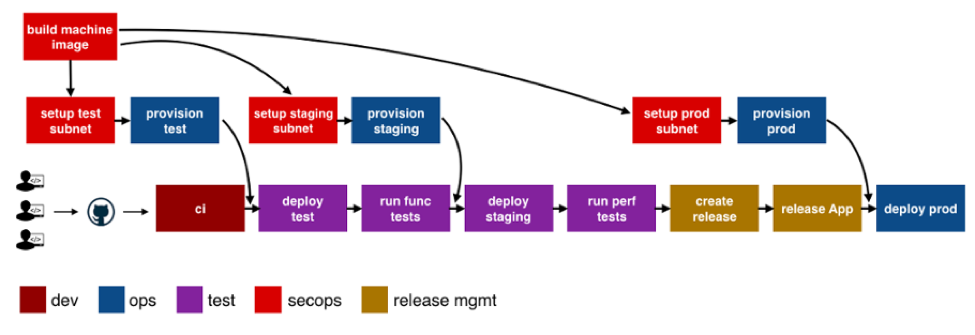
    The following image shows a typical assembly line for a single application or service:

    See the difference? The CI pipeline is just ONE activity in the assembly line. Each of the boxes in the picture above is a pipeline, just for different activities! Each has specific needs with respect to tools integration, runtime, configuration, notifications, etc. In addition, each pipeline is owned by a different team, yet needs to interact with other pipelines and exchange information. For example, if the ops team changes provisioning scripts for staging environment, the test team needs to redeploy the application and run performance tests.

    A DevOps assembly line is, therefore, a “pipeline of pipelines.”

    DevOps assembly lines need to support the following:

    • Ability to easily define workflows across multiple pipelines.
    • Versioned and reusable workflows, enabling rapid changes and scaling for multiple applications and/or microservices.
    • Integrations with all popular source control systems, clouds, artifact repositories, DevOps tools, languages, services, etc.
    • Runtime to execute every pipeline, including pre-installed tools and CLIs, and the ability to use the right runtime, depending on pipeline type.
    • Accelerators/playbooks for common pipelines and tools.
    • Ability to pass state and other information while triggering dependent pipelines.
    • Automatic triggers or manual approval gates between each pipeline.
    • Configurable notifications for each stage of every pipeline.
    • Release automation features such as semantic versioning of packages.
    • Audit trails for each pipeline, with the ability to go back or forward to a specific state.
    • Abstraction of all sensitive information like passwords, tokens, keys, etc. for security reasons.
    • Roles and permissions restricting assembly line and pipeline actions.
    • Manage DevOps infrastructure, including spinning VMs and containers up and down as required.
    • Visibility into each pipeline and stage, including logs, status and versioned data.
    • Metrics and Analytics across pipelines to help identify bottlenecks.

    In short, DevOps assembly lines help automate and scale end-to-end workflows across all teams and tools, enabling continuous delivery.

    About the Author / Manisha Sahasrabudh

    Manisha Sahasrabudhe is co-founder and vice president of product management at Shippable. Prior to Shippable, Sahasrabudhe was senior program manager at Microsoft. She can be found online at Linkedin.

     

  • XebiaLabs Shows Off ARA, More at Jenkins World

    XebiaLabs Shows Off ARA, More at Jenkins World

    In this third spotlight on companies attending Jenkns World, another worth checking out came to mind, so I am taking a look at what XebiaLabs intends to do while there. XebiaLabs is one of the leading application release automation (ARA) vendors, and has a long history of working with Jenkins, so it’s a little more mainstream than the other companies I’ve written about.

    But the thing is that Jenkins’ and XebiaLabs’ tools do work well together, offering an end-to-end build/deploy process that is repeatable and can be repurposed for different targets or different applications.

    While Jenkins handles CI/CD, XebiaLabs ties in the deployment pieces to complete the picture and make a streamlined system. When I experimented with XL Release and XL Deploy, I used them to call Jenkins as part of the release process. Interestingly, you can also call them from within Jenkins, which dovetails well with what another vendor I looked at—CloudCoreo—is doing. The ability to control the process from Jenkins is nice and has uses in the early development phases, but XebiaLabs raises the level of release management—something Jenkins is not doing (yet). The bit that ties CI/CD to automated deployment should be running the show, IMO. But I can imagine environments where kicking off all the build/release cycle from within a Jenkins job would be the preference.

    Anyway, on to what XebiaLabs is doing at Jenkins World!

    Key for XebiaLabs this year will be showcasing its DevOps platform, which is both XL products and talking about how the company is advancing integration between these products and Jenkins. Its recent Templates as Code (the link is to an earlier version, from January, but talks about its goals with Templates as Code, so it’s a good start if this is new to you) implementation that made it easier for developers to work with its products is being enhanced, and I’d love it if someone took a look at it and told me what they think. I can probably get someone at XebiaLabs on the phone to talk about it, but real users often have a better take on suitability in the wild.

    The important bit for many of you will be XebiaLabs’ Periodic Table of DevOps Tools, which I know several people would love to have as a poster in their office. For cool factor, it’s hard to beat. The company will have tubes with the periodic table available, so drop by to snag one. Last year it ran out of them relatively quickly, so be early. Bonus points to anyone who snags an extra and sends it to me for my office (ha ha).

    Aside from the Periodic Table of DevOps, XebiaLabs also will have copies of “The DevOps Handbook,” which I recommend. For those who haven’t read it, the format is different than “The Phoenix Project,” but it is the next logical step in that progression. Finally, the company will have its own book, “The IT Manager’s Guide to Continuous Delivery,” which I haven’t read, but having read XebiaLabs’ corporate blog for a while now, I predict will have some good ideas in it.

    I admit an interest in how recent changes to XebiaLabs’ DevOps platform improve the experience across the org (or don’t improve it). I haven’t used its tools since the new “pipeline as code” changes were introduced in January, so I honestly have no idea. If you go and stick around for a demo, let me know what you think.

    — Don Macvittie

  • NetOps: Thorn in the Side of Continuous Deployment?

    NetOps: Thorn in the Side of Continuous Deployment?

    Over the last few years, we have definitely gotten continuous integration and continuous deployment (CI/CD) down. We now can maintain a relatively constant flow of deployable code sitting and waiting for the actual deployment step to take them to production.

    Moving to production has been the point at which caution is introduced into the system, though, and that’s certainly not always a bad thing. Deployment to production seems to be following the motto our parents taught us: “Just because you can, doesn’t mean you should.” In many environments, multiple deployments a day would be a ridiculous goal; in some, even multiple deployments a month are unreasonable.

    Let’s face it, in an enterprise that had 18-month waterfalls for even mid-level projects, the ability to deploy at any time (and, thus, near-continuous test) is an improvement of nearly unimaginable proportions. And deploying three times in a day makes little sense if you need user input to adjust the project.

    Other Reasons Exist

    But there are other reasons that continuous deployment is not as pervasive as the other portions of a continuous pipeline. We’ve talked a bit about security, but let’s cover another bit today: the network.

    There are several reasons why networking slows deployment efforts, and all of them are real reasons that an organization that  aims to increase deployments over time should consider.

    First, the network is the corporate lifeblood. Operations is naturally very careful about changing settings and loads rapidly, which can result in problems for the corporate network. This concern is lighter for products deployed to the cloud, because things such as virtual private clouds (VPCs) can isolate the impact network changes have on the overall production architecture. But there are still security concerns around making rapid, automated changes to the network environment, even in the cloud. The network (and the apps it exposes) is the point of entry for a large number of security compromises, and we’ve seen some whoppers in the cloud of late.

    Second, and only barely behind standard ops network concerns is integration of networking into standard CI/CD tools. It’s coming, but we’re not there yet. On the Ops side, things have moved along better: Puppet, for example, can plug commands in to networking devices from stalwarts including Cisco Systems and F5 Networks. But the support is still somewhat limited, partially by the level of APIs the vendors offer, partially by the maturity of those APIs and partially by the implementation on the DevOps tool side.

    And That’s a Good Thing

    Even if automation came along full-bore, it is likely that networking concerns would still slow the CD pipeline, as admins want to make certain changes are not going to leave them spending the night trying to put things right.

    And I think that’s a good check on DevOps. I love DevOps and the increased delivery timelines it enables. In the end, the entire business becomes more agile because IT is able to deliver at a faster rate. But sometimes it—the pace at which things go out—feels reckless. In certain areas—security and networking primarily, but also load distribution on servers—there should be sanity-checking before rolling out. Anything that can impact the entire application, or even the entire infrastructure, is worthy of a last double-check.

    I know I’m not in the majority on this one. DevOps fever can have people saying nothing should slow the pipeline, but I know from experience. Long weekends fixing what could have been caught on the way to production have taught me to be cautious. Save rush deployments for a time when there’s a reason to rush. Sometimes it’s necessary to get it out the door today, but talking about slower deployment in a continuous environment as if it’s a fault ignores the strengths it offers as the last stop to public-land.

    Do What’s Best for Your Org

    Networking vendors will continue to improve the programmability of their devices, and what software-defined networking (SDN) has grown/is growing into will offer a different place to flip the levers for continuous deployment. So if you need to deploy many times a day, and make changes to networking, focus on security and let networking support grow on its own. If you don’t need multiple deployments per day, then relax and don’t get all pressured about how long deployment might take. You’re faster than you were, and if you need more speed, take advantage of the growing support of automation tools.

    — Don Macvittie

  • CircleCI Injects Workflow Flexibility into CI/CD Platform

    CircleCI Injects Workflow Flexibility into CI/CD Platform

    Nobody likes to be told how to get a specific task or job done. In fact, it’s arguably that very sentiment that holds backs adoption of DevOps processes inside many IT organizations. Aiming to provide IT organizations with a more flexible approach to DevOps, CircleCI has updated its continuous integration and continuous deployment (CI/CD) software to give IT organizations more granular control over workflows within a DevOps environment.

    CircleCI CEO Jim Rose says the issue with most CI/CD frameworks is that they are too monolithic. Rather than allowing IT organizations to apply different types of workflows against various types of scenarios, Rose says most CI/CD platforms are too prescriptive in how they define workflows.

    To provide some additional flexibility, version 2.0 of the company’s namesake CI/CD platform provides IT organizations with the ability to employ different types of workflows whenever appropriate, including:

    Sequential job execution: Provided in the first release of CirceCI, this class of workflow is optimal for approaching jobs in a lockstep build-deploy-test model.

    Parallel job execution: Allows IT organizations to run multiple jobs simultaneously in a way the resolves dependencies before deployment.

    Fan-in/fan-out in a repo: Ideal for a more complex build orchestrations involving different test suites against commits to get faster feedback.

    Branch-level filtering for job execution: Allows deployment of code off specific branches.

    Job execution from failed and job execution from start: Allows IT operations teams to choose where and how build reruns are implemented to save repeating unnecessary jobs. IT allows IT operations teams to start jobs from the last failed job, instead of rerunning every job or stage.

    Rose says the rise of microservices has begun to stress CI/CD platforms that were not designed to scale to support environments where Docker containers in any given microservice often are replaced. Any change to an element of microservice is likely to have a significant impact upstream and downstream. Rather than having to continually rerun every job, Rose says CircleCI now enables IT organizations that have embraced microservices to respond more adroitly to changes in the overall environment.

    In an ideal world, DevOps processes lead to faster rollout of new applications and updates. In reality, however, there are more dependencies than ever. Rose contends that CI/CD platforms need to evolve to the point where they can allow IT operations teams to cope with accelerated rates of change instead of becoming a bottleneck. The irony of that, of course, is that CI/CD platforms were adopted to eliminate bottlenecks. But as microservices architectures continue to evolve, in many cases the CI/CD platform has become a new bottleneck.

    It’s too early to say what impact microservices will have on DevOps. There’s no doubt that adoption of microservices will finally force the DevOps issue inside many organizations. But at the same many organizations that have already gone down the CI/CD path may soon find that some of their initial assumptions about what the word “continuous” meant were considerably misguided.

    — Mike Vizard

  • Continuous Delivery vs. Continuous Deployment

    Continuous Delivery vs. Continuous Deployment

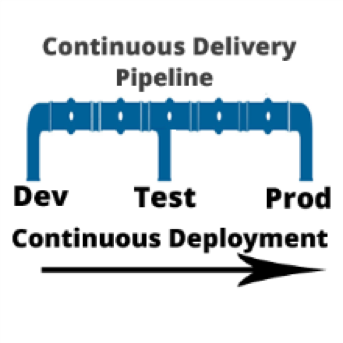
    I am often asked, “if we are using a continuous integration (CI) server and adopting a continuous delivery pipeline, where does continuous deployment fit in?” Good question. In a nutshell, continuous delivery engines such as CloudBees or Blue Ocean are designed to trigger the execution of CI workflows across the dev, test and prod environments. Continuous deployment is called as part of the CI workflow to do the actual release of code out to endpoints. Continuous deployment can be managed by application release automation tools or supported by one-off scripts. Regardless of how sophisticated the deployment step of your CI workflow is, it is still continuous deployment.

    To understand both continuous delivery and continuous deployment, one must go back to their roots, continuous integration. CI is a key component of Agile practice.  Agile developers understand the importance of adopting a methodology that can manage smaller incremental software changes to release software, and therefore business value, to end users quicker and cheaper.  The activities of deploying to testing and production historically have been in the hands of testing and data center teams, separate from Development. But in the Agile practice, these activities cannot be separated from development. The concept of separate development, testing and production teams is a waterfall concept, not an Agile concept. In Agile, everyone is on the same team. This means that testing and production teams must become part of the Agile process.
    Mastering Agile’s last Mile

    Ultimately, the goal of continuous delivery is to accelerate release cycles and get new code out to production fast. However, for most companies this is not happening. Developers and testers may have embraced continuous delivery, but when it comes to production, the code is moved to a staging area where it languishes until production is ready to perform the update. The last mile of Agile is not achieved. And we are back to where we started: waterfall.

    There are many reasons for the production roadblock. Lets’ review the top four.

    • Agents: Both open-source and commercial CI servers are agent-based. An agent based system works fine for developers and can be tolerated by testing. However, production teams are not that excited about installing yet another agent on to the production end points. For this reason, production team use their own method of deploying code. Therefore, the deployment scripts used for releasing code to dev and test are not used by production. The way they see it: Production does not want a deployment process that requires them to re-configure their data center environments with agent from a development tool.
    • Scripts: Production teams want input and visibility. One-off scripts obfuscate the deployment process. For this reason, production teams will write their own scripts. Scripts simply do not have the intelligence needed to meet the audit, rollback and transparency requirements needed by production teams. Production teams perform many steps manually. This takes time and cannot be done in an agile cadence. The result: Great code languishes in staging areas. Production stays several releases behind what continuous test has approved.
    • Cost, cost, cost: Most of what developers create in a continuous delivery workflow comes from open-source or consumption-based licensing models (think Jenkins and Jira). Tools that can achieve continuous deployment such as application release automation solutions are far to expensive for one development team to acquire and incorporate into the CI workflow. These types of tools are sold at the CIO level and cost upwards of $250,000. Production teams are often hesitant to purchases these tools, as the high cost equals high risk. And ‘one ring to rule them all’ does not work. This type of operational tool acquisition is waterfall-based and does not fit into the leaner Agile DevOps tooling. The result: One-off scripts continue to be used and dev and test. Production does not adopt agile.
    • Sustainability: During waterfall, a production release was performed as infrequent as two times per year, or at most once per quarter (considered aggressive). In other words, production is staffed to support a production release on an infrequent basis. With agile, the demand for production releases increases 10-fold. Instead of doing at most four releases a year, they may be required to do four releases a month. Production cannot keep up the agile pace. They are staffed for waterfall.

    Automating Continuous Deployment: Key to Maturing Continuous Delivery

    Continuous delivery cannot be successful without continuous deployment. If you want to roll code out to end users faster, the deployment process itself must be modernized. Using the same one-off scripts that were used in the waterfall approach will not achieve your CD goals.

    Continuous deployment automation is performed by a new set of agile DevOps tools called application release automation, or ARA. ARA solutions are designed to support a model-driven software deployment that allows development, test and production teams to use the same process without the need for one-off deploy scripts. ARA adds all of the features and functions needed to support continuous delivery and data center deployment requirements. ARA is designed to fully perform the heavy lifting of software releases including application packaging, release versioning, database updates, server configuration management, calendaring, roll-forward, rollback, security access and auditing.

    ARA solutions are called by a templated CI workflow that is defined by the development team. The workflow is moved up the pipeline and adapts to the changes at the various pipeline stages (System Test, Integration Test, Pre-Production, Production, etc.)  Because the process is driven by the ARA tool and not a script, the changes are automatically addressed across the pipeline reducing the workload for all teams and supporting frequent changes that can be easily traced and audited down to the server inventory level, including the production environment.

    Developers, Get Your Hands on Deployment Automation Tool       

    To achieve a repeatable CD pipeline that supports production, developers must embrace the automation of continuous deployment at development. The dysfunction however is the outrageously high cost of ARA tools. Developers don’t buy expensive operational solutions. More ARA solutions must be offered on a consumption-based model or offered as open source with the ‘out of the box’ integrations into CI/CD. When considering the purchase of an ARA solution, look for agentless models that can be implemented one project team at a time. Embracing this level of corporate process change must be done project by project. The operational big bang approach does not work well in an agile practice. Not everyone can use the same solution. However,  if done correctly, there are big benefits.

    ARA is a process that strengthens the foundation of the continuous delivery pipeline and is core to the agile DevOps initiative.   It facilitates agile practices by allowing the testing teams and data center teams the tools needed to become more agile and accept the frequency of changes being pushed across the pipeline by Development. Ultimately, the goal is repeatability across the pipeline, pulling together Dev and Ops.

    About the Author / Tracy Ragan

    Tracy Ragan is CEO and Co-Founder of DeployHub. Tracy has extensive experience in the development and implementation of business applications. It was during her consulting experiences that she recognized the lack of build and release management procedures for the distributed platform that had long been considered standard on the mainframe and UNIX.  Tracy has worked with hundreds of development teams in implementing a team-centric standardized build to release process. Connect with her on LinkedIn.

  • Using DevOps to Be an Innovation Champion

    Using DevOps to Be an Innovation Champion

    Innovation, which increasingly is cited as the competitive advantage businesses need to meet their digital challenges, is widely misunderstood; it’s mistakenly reduced to the sophisticated features of a technology or a service.

    As a competitive matter, innovation is more than that; it’s primarily the process of translating ideas or inventions into high-value technology features or added-value services. In other words, to be called innovation, a technology or a service must satisfy a specific need and create value for customers.

    DevOps is very often seen as the perfect means to make an IT organization an innovation champion, it’s true. Yet, many CIOs and their solution vendors and consultants have failed to achieve that goal because they’ve oversimplified the process. DevOps is part of the process, not the process itself. DevOps isn’t the end but the means.

    In this article, I share two fantastic concepts—Innovation Virtuous Circle (IVC) and Value Stream—we leverage at ITaaSNow to enable DevOps and transform in a record time IT organizations into innovation champions.

    Define Your Strategy with the Innovation Virtuous Circle

    Making innovation your organization’s main competitive advantage isn’t as simplistic as investing in the most sophisticated technologies; it starts with defining your strategy, continues with implementing it throughout your IT organization’s value stream, and ends up with getting it adopted across your business.

    Improvisation and organizational transformation aren’t good friends. Rely on proven frameworks that safely guide the effort step by step; it’s the purpose of the IVC—it facilitates and accelerates the innovation strategy definition effort:

    The Innovation Virtuous Circle (IVC)

    The principle underneath the IVC is the notion that keeping customers loyal through innovation guarantees continuous revenue. The idea is, the more innovation, the more loyal customers and the more revenue.

    Put together your business and IT stakeholders to discuss the means by which customers will be kept loyal to ensure continuous revenue. Follow the steps suggested by the IVC:

    1. Clarify the agile processes and practices, the tools, skills and partners by which customer data will be captured and tracked for analytics purposes.
    2. Identify the agile analytics processes and practices, the tools, people, skills and partners that’ll help to spot innovative ideas, solutions and technologies.
    3. Clarify the agile processes and practices, the tools, skills and partners needed to ensure high frequency, high quality and speedy innovation delivery.
    4. Identify the agile processes and practices, the tools, people, skills and partners that’ll help to monitor customer satisfaction and improve customer experience.

    What you get out of this step is a comprehensive strategy including the targeted customers to keep loyal, the estimated expected revenue along with the organizational capability to achieve them.

    Reconfigure Your IT Value Stream with DevOps

    Once your innovation strategy is defined, the next step is to use the value stream framework to deploy it throughout your IT organization.

    The value stream represents the added-value interactions, people and skills, processes and practices and tools mobilized throughout your IT organization to deliver innovation:

    The Agile IT Value Stream

    It conceptually structures the IT organization’s value stream into a four-stage agile process. Each stage is associated with a specific goal and mobilizes specific elements of your innovation strategy.

    Again, put together your business and IT stakeholders to address the following:

    1. For Plan & Measure, discuss your future governance’s structure, members and roles, agenda along with the tools and infrastructure supporting your analytics-based innovations screening and prioritization and portfolio management processes.
    2. About Develop & Test, get a consensus on the staff to assign, the agile methodology along with the continuous testing and integration infrastructure that will support your innovation development processes.
    3. Regarding Release & Deploy, discuss the staff to assign, your release management and launching processes along with the continuous deployment infrastructure needed to support them.
    4. As for Monitor & Improve, discuss the staff to assign, your service continuous improvement processes, along with the analytics technologies intended to support them.

    What you get is a comprehensive and documented blueprint of your IT organization’s value stream transformed to DevOps. Use it as a baseline to hire the solution vendor and consulting firm that’ll concretely reconfigure your IT operational model to innovation.

     Wrapping up

    Using the concepts of IVC, Value Stream, and DevOps to establish IT operational models that boost innovation is a transformation approach we’ve been using to make businesses innovation champions.

    All of the companies that replicated the organizational transformation approach described in this article are:

    • Rolling out per year more than 20 services and products qualified as innovations
    • Either doubling or tripling their revenue
    • Keeping loyal 98 percent of their customers

    That’s the kind of contributions and impacts your business unit leaders expect from you as the CIO and your IT department.

    — Philippe Abdoulaye