Tag: continuous deployment

  • DevOps and Databases: The Key to Faster Deployment

    DevOps and Databases: The Key to Faster Deployment

    With DevOps, we learned that the biggest factor in streamlining deployments is to make things automated and minimize communication. However, we didn’t apply that principle to other areas. While security gets some traction with DevSecOps and machine learning has MLOps, we lack a solution for database management. In this article, we propose a new approach that unlocks the power of DevOps engineers to own their databases and lets them self-serve deployments, maintenance and troubleshooting.

    Why Database Deployment and Maintenance is Slow

    In the last few years, we moved from deployment being a big and challenging event to deploying many times daily. We moved from manual deployments to automated CI/CD pipelines. We built tools for deploying infrastructure and configuration changes. This led to a tremendous increase in the complexity of our systems. We somewhat learned how to handle that in deployments, infrastructure, configuration, security or even machine learning.

    However, database complexity increased significantly as well. We now use many database engines with each application. We use SQL and NoSQL databases as well as databases tuned for specific scenarios like machine learning or vector search. Since we deploy changes often and asynchronously, modifications to database schema or background tasks may happen at any time and affect the performance. When this happens, the business is directly impacted as the database issues quickly spread throughout the ecosystem. However, developers and DevOps engineers can’t fix the issues on their own and need help from other teams, specifically operations and database administrators. This makes the process slow and error-prone as things are not automated but require manual human intervention. Recommended reading: Why DevOps should own their databases and how to do it.

    The problem with database maintenance is the lack of solutions that would present the full and actionable story. We have many tools that can alert us about spiking CPU or increased latency, but we don’t know what’s the reason behind these issues. To find out, developers need to ask database administrators to check the logs and metrics to identify slow queries and whether the CPU spikes are caused by changes in the environment (like updating the operating system), slow background tasks that can be postponed (like vacuuming or index rebuilding) or due to inefficient application code that doesn’t use an index and performs a full table scan.

    Since we don’t know the reason, we need to involve multiple teams to investigate. We need to first identify the points of contact in each team, assign tickets or work items, sometimes page people at night, and coordinate the troubleshooting process. To make things faster, we need to fix two aspects: reduce the amount of manual work and reduce the number of people involved in the investigation. Let’s see how.

    Reducing the Manual Work with Observability

    Many things can go wrong when dealing with databases. Let’s see some of the areas that can break and are not automatically fixed today.

    Observability for the Code Changes

    Every time developers change their codebase, there is a risk of breaking the correctness and performance. We can verify the correctness with automated tests (unit tests, integration tests, end-to-end tests, etc.) and do it regularly in our CI/CD pipelines. However, we can’t verify the performance impact. Our tests focus on what we extract from the database and not how we do it. We may use N+1 queries, we may scan tables instead of using indexes, and we may have slow queries with CTEs or not use searchable arguments (a query that is not sargable). All these things may result in CPU spikes or latency degradation and we can’t automatically explain what happens. We need to have observability that gives the story like “the query execution within a given REST endpoint doesn’t use an index and leads to slow performance.”

    Performance of Schema Changes

    When we modify a schema, we risk that tables will be locked for rewriting. This may take minutes or hours and effectively make our systems unavailable. However, our CI/CD pipelines do not test the performance of schema migrations. Tests run against the latest schema and migrations are fast because databases in pre-production environments are small. We don’t check how long these migrations will take in production and if they’ll lock tables. We need to have tools that can warn us if a slow migration is being deployed and will indicate how to make it faster.

    Understanding of Execution Plans

    Databases grow over time. Queries change their execution plans because statistics get outdated or because indexes are modified. However, automated tests won’t capture these issues as they focus on the correctness of the data and they don’t run on the production database. We don’t see how things evolve and that the query degrades gradually over time. We need to have observability systems that provide an understanding of all the moving pieces around. They need to give us a story explaining that “the query we deployed six months ago stopped using an index because the statistics are out of date as we injected a big batch of data last night”.

    We need a story explaining what happened, like SQL stopped using an index or SQL query is not sargable. Other reasons can be schema changes, mismatched query fields, index fragmentation or significant changes in data volume affecting the query optimizer’s decision-making.

    How to Reduce the Work

    Taking all we saw above, we need to have systems that can understand how our environment evolves and how these changes affect performance. They need to alert us when some slow changes are being deployed to production, understand how the deployments affect the performance and automatically explain the issues. Troubleshooting should be as simple as just getting the notification with links to the places that we need to fix (like configuration, a particular line of code in our application, or the cloud console) with an explanation of how to do it. Fixing should be merely approving a pull request or confirming the configuration change.

    Reducing the Number of People Involved With Self-Servicing

    Having database observability is the first step. The second step is the ownership. Developers and DevOps engineers need to own their databases the same way they own their code and deployments. They need to be able to self-serve the issues and do that without any help from operations or database administrators. This will reduce communication and make things much smoother. There are three things that we need to introduce to let developers and DevOps engineers build their ownership.

    First, we need the tools. Just like we explained in the previous section, we need tools that can explain the story. We can’t just put more responsibilities on developers and DevOps engineers without making the work simple and automated.

    Second, we need new processes. We need to have playbooks and operational procedures explaining how to use the tools, how to self-serve the maintenance, and when to escalate. Developers must be familiarized with the procedures and must know how to follow them even outside of working hours. This way we can replace some work (communication, coordination of teams, manual investigation) with some other work (self-servicing) that we can do much faster.

    Finally, we need to change the mindset. Developers and DevOps engineers need to take on new responsibilities and become true owners of their databases. Even though this sounds like more work, we can make it much less time-consuming by building good observability tools and replacing slow human communication with automated and well-defined self-servicing. It’s not about shifting the work from one place to another. It’s about making the work much smaller and much more automated so the developers and DevOps teams can do it without involving other teams. Since we reduce the cross-team collaboration, the increase in the scope of work of developers and DevOps engineers will lead to doing the work faster.

    Summary

    There are three aspects that we need to work on now. First, tools like Metis must be created. Second, Platform Engineers must use these tools to define processes. Third, developers and DevOps engineers need to take ownership. While it may seem challenging at first, we already saw with the DevOps movement that minimizing communication and owning the full scope of the system is beneficial for the business and for the engineers. We need to restructure our teams and reassign responsibilities to unlock the potential and make organizations work faster.

  • OpsMX Adds Deployment Firewall to Ensure Compliance

    OpsMX Adds Deployment Firewall to Ensure Compliance

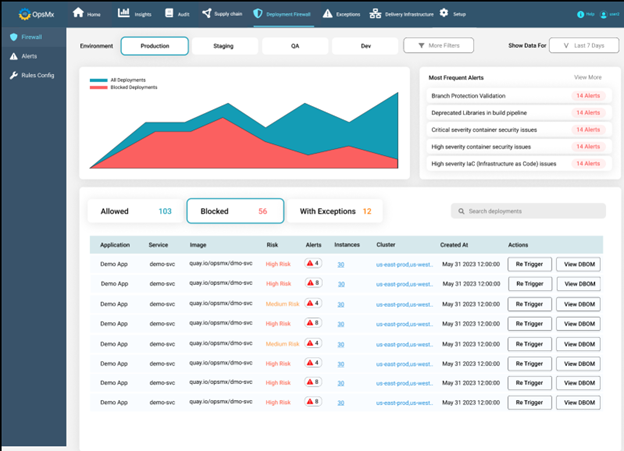
    OpsMx today added a deployment firewall to its Deploy Shield portfolio for securing continuous integration/continuous delivery (CI/CD) platforms.

    The deployment firewall automatically applies rules to ensure DevOps teams comply with mandates such as the payment card industry data security standard (PCI DSS) or the Health Insurance Portability and Accountability Act (HIPAA). It then evaluates a release against a checklist of policies and blocks any deployments into a production environment unless a specific exception has been defined. In those instances, DevOps teams can also set an alert to address that issue at a later date.

    In addition, DevOps teams can extend those rules defined by OpsMX to address specific compliance requirements.

    The checklist includes making sure vulnerability scams have been run, tracking when the manifest was last updated, confirming that operational controls are being followed, checking whether images have been modified and evaluating the infrastructure being employed and performing an analysis of the performance impact.

    A simulation feature also allows developers to check their release for compliance before it is time to deploy.

    OpsMx CEO Gopal Dommety said the goal is to streamline the effort that is required to meet multiple compliance mandates as the pace at which applications are being developed and deployed continues to increase.

    Today there are simply too many data silos for DevOps teams to manage, with each one presenting yet another opportunity to run afoul of a compliance mandate, he added. The overall goal is to reduce the cognitive load being placed on developers as more responsibility for compliance is shifted left, noted Dommety.

    The deployment firewall currently supports DevOps platforms such as Jenkins, Argo and Spinnaker, with support for GitHub Actions and GitLab to follow.

    OpsMX claims its overall customer base has increased by more than 60% in the first half of this year, with customers including Google, Cisco and Western Union. In addition to Deploy Shield, the company provides a Delivery Bill of Materials (DeliveryBOM) tool to capture a consolidated record of every step in the application software delivery and deployment process. Security checks, approvals, policy enforcement and audits are tracked via one tool. In addition, the company provides tools for managing the deployments of software via either the Argo or Spinnaker CD platforms.

    It’s now only a matter of time before various regulations that apply to the building and deploying applications become more stringent. Tolerance for sloppy application development processes is dropping as legislative bodies increasingly determine that software development practices are a big cybersecurity problem that threatens national security and the global economy.

    Organizations that fail to comply with those regulations will be subject to even heftier fines than the ones that already exist. In many cases, that may slow down the rate at which applications are deployed unless DevOps teams find ways to manage compliance-as-code more effectively as part of a larger DevSecOps workflow.

    When it comes to DevSecOps, progress tends to be slow in most organizations, but as more tools become available to automate various tasks, it’s now only a matter of time before software supply chains are more tightly secured. Hopefully, the pace at which those advances are being made will occur faster than cybercriminals can exploit the vulnerabilities that today are too numerous to manually track.

  • Monitor Toolchain Health, Too

    Monitor Toolchain Health, Too

    A funny thing happened on the way to being agile. We adopted a ton of tools to make us more responsive. They really do help us deliver software quickly and efficiently, and they have improved IT processes along with our specific process improvements.

    They also created a toolchain that resembles areas of responsibility of old. That makes perfect sense; we still need to store source code, build applications, deploy somewhere, worry about security, etc. And we need to do all of that faster, which is where automation and the toolchain really shine.

    But you need to keep in mind the overall impact of the toolchain upon the development process. Now the organization is dependent upon those tools. We went from slow and steady to fast and with a large series of steps along the toolchain. Things are better, we’re delivering quality software at a faster pace, but in some ways, the process risks becoming more fragile. If a tool in the chain shows signs of trouble, you need to be aware of it and on top of the issue almost immediately. The price of ignoring issues in the process can be catastrophic disruptions in software delivery. Losing a CI tool is akin to shutting down customs at an international airport: The source of the problem is big, and the downstream problems are show-stopping.

    So while you are tooling your applications, make certain you are tooling the build chain, also. Know when a build that always takes ten minutes suddenly spikes to triple that. Know when a test suite delivers non-breaking errors at an increased rate. Know when space is low on a shared drive that the build tools use. Tool everything, because the software delivery toolchain is now the core of application development and deployment.

    Tooling these systems can also offer a warning of problems in a given application. It is possible that the increase in build time is because there are a lot of previously unused libraries being included … and that those libraries have not been properly vetted by security. It is possible that the disk space on that shared drive has PII test data that needs to be cleansed. There is a lot of good that can come from over-tooling the build chain, and unless you have a bit of tooling that slows the process, there is no downside. It won’t take too long to build a list of what to watch, and modern DevOps tools have enough reporting and APIs that it won’t take long to begin watching those items, either.

    That is where the people part comes in. Don’t ignore the tooling once it is in place. Build a process to regularly review results and take action when necessary. No tooling is useful if the results are ignored; sadly, we have a long history of spectacular failures that started with, “We saw indications, but didn’t think it was important at the time …” So act on results, even if that just means flagging them for review in the next reporting cycle—just don’t ignore them.

    And keep rocking it. The organization thrives on the software you build, deploy and support. It is a massively complex system that has IT staff at its heart, so keep it thriving and watch for indicators of illness in the core toolchain.

  • Harnessing AI in Continuous Delivery and Deployment

    Harnessing AI in Continuous Delivery and Deployment

    In my recent article Revolutionizing the Nine Pillars of DevOps with AI-Engineered Tools, I explained that the continuous delivery pillar is an approach where code changes are automatically built, tested and prepared for release to production; this may be followed by continuous deployment where an approved release is automatically deployed to the production environment. The practices of the CD pillar aim to make releases and deployments less disruptive and more frequent, increasing speed and efficiency.

    In this article I explain how AI can help continuous delivery and deployment processes.

    Continuous Delivery Use Cases

    Orchestration of Test Environments: Teams need a reliable way to prepare and manage various test environments. This includes setting up and tearing down environments, managing versioning and configuration and handling data and resources. AI tools that can help include Harness, and IBM’s UrbanCode, which can automatically spin up and down environments for testing purposes and handle configuration as code.

    Execution of Various Tests: This includes system acceptance tests, regression tests, performance tests, user acceptance tests and security tests. The AI tool that could help here is Parasoft’s SOAtest. Its AI can generate test scenarios, ensure full coverage and automatically adapt to changes in the code base.

    Performance Monitoring of Release-Candidate-Artifact: Tools need to assess the performance of release candidates, identify bottlenecks and compare performance against previous versions. Dynatrace is an AI-powered tool that provides automatic and dynamic baselining of application performance, helping teams to recognize when performance is lagging.

    Automation of Policies for Artifact Acceptance: Rules and policies need to be defined and enforced regarding when an artifact is ready for release. Tools like Harness use machine learning to analyze past deployments and test results to predict the success of future deployments and automate the approval process.

    Continuous Deployment Use Cases

    Orchestration of Deployment Environments: Teams need to manage deployment environments, including setup, versioning, configuration and data management. Spinnaker is an open source tool that uses AI to manage multi-cloud deployment strategies.

    Execution of Deployment Strategies: This includes executing strategies such as Blue-Green, Canary and Feature Flag gradual rollouts. A tool like LaunchDarkly can utilize AI to manage feature flags, analyze usage data and roll out features gradually.

    Testing in Production: Testing the new release in the live production environment is crucial. A tool like Sentry can use AI to monitor application use in real-time and identify and alert teams to issues faster.

    Restoring Production to a Prior Version: When a problem is detected with a new release, teams may need to revert to a previous stable version quickly. StackStorm is an event-driven automation platform that uses AI to define workflows, allowing you to quickly roll back to a previous version in case of failure.

    Updating Documentation and Configuration Management Databases: It’s crucial to keep records up-to-date. A tool like Guru uses AI to automatically update and keep track of documentation, ensuring that it’s always accurate and up-to-date.

    Challenges When Transforming CD to use AI

    Here are some challenges organizations might face when transitioning their existing CI/CD pipelines to incorporate continuous delivery, continuous deployment and AI tools, along with possible solutions:

    Lack of understanding of AI capabilities and uses: One of the first challenges that organizations might face is the lack of understanding of what AI can and cannot do. Some team members may have unrealistic expectations or fear that AI will replace their jobs. Regular training and workshops can help teams understand how AI can enhance their roles rather than replace them. Clear communication about the goals and benefits of incorporating AI can also help allay fears.

    Data privacy and security concerns: Using AI tools often involves handling a large amount of data, some of which may be sensitive or private. There are also concerns about the security of AI tools themselves. Establish a robust data governance policy that includes procedures for handling sensitive data. Also, when selecting AI tools, prioritize those that are known for their robust security measures.

    Complexity in integrating AI tools with existing systems: Not all AI tools will seamlessly integrate with existing systems and infrastructure. This could lead to technical debt and instability in the pipeline. Prioritize AI tools that have wide integration capabilities. Engage the tool’s support team or hire consultants if needed to ensure the integration is smooth and stable.

    Resistance to change: The transition to a new way of working can be met with resistance, especially if team members are comfortable with the existing systems and processes. Change management strategies can help ease the transition. This can involve regular communication about the benefits of the change, training and providing support during the transition.

    Cost of AI tools and training: AI tools can be expensive, and there’s also the cost of training team members to use these tools. Start with a cost-benefit analysis to understand if the transition is worth the investment. Look for AI tools that offer a good balance between cost and features. Consider phased implementation to spread the costs over time.

    Dependence on vendor support: Given the complexity of AI, there may be a high dependence on the AI tool vendor for support. This could become a problem if the vendor is unresponsive or ceases to support the tool. Choose vendors who have a good track record of providing strong customer support. Also, consider tools that have a strong community around them, which can provide additional sources of help and support.

    Summary

    Navigating the landscape of continuous integration, continuous delivery and continuous deployment (CI/CD) pipelines can be complex, but it’s a vital process that’s being revolutionized by the introduction of AI tools. From orchestrating test and deployment environments, managing testing and deployment strategies, to automating delivery tasks and quality checks, AI is playing an increasingly critical role in streamlining and enhancing these processes.

    However, as with any significant change, transitioning to AI-enhanced CI/CD pipelines is not without its challenges. This includes understanding AI’s capabilities, data privacy and security concerns, technical integration difficulties, resistance to change, cost considerations and vendor support dependencies. By identifying and addressing these challenges head-on, organizations can effectively leverage AI’s capabilities, bringing increased efficiency, reliability and value to their software delivery pipelines.

    With proper planning, continuous learning and strategic use of AI tools, organizations can not only overcome these challenges but also thrive, gaining competitive advantages in their software delivery processes. The future of CI/CD is undeniably entwined with AI, and embracing this evolution is an exciting journey that holds the promise of transformative benefits.