Tag: continuous deployment

  • Continuous Deployment is king of the DevOps hill

    Continuous Deployment is king of the DevOps hill

    One of the promises of DevOps is continuous deployment. DevOps is, first and foremost, a matter of shifting the traditional business culture more than the tools and technologies that enable it. Once that culture exists, though, one of the defining aspects of DevOps is automation and continuity.

    Earlier this year I wrote about the seeming ubiquity of “continuous” solutions throughout DevOps:

    If DevOps is the buzzword du jour for tech, then continuous is the buzzword du jour of DevOps. Everything is continuous. Continuous development and continuous testing lead to continuous deployment and continuous delivery, which requires continuous support. Continuous monitoring produces continuous integration and continuous change. Continuous security results in continuous incident response…or vice versa. To top it off, all of the continuous activities continuously feed each other to drive more continuousness in some sort of DevOps Mobius strip of continuity.

    Taking a closer look at all of that continuous continuousness, however, continuous deployment stands out as one of the prevailing goals of effective DevOps. Continuous integration, continuous delivery and the other continuous tools and processes are all in some way related to facilitating the flow of continuous deployment or monitoring and managing it after the fact—which ultimately feeds back to the beginning of the loop and back to continuous deployment.

    Chris Riley tried to muddle through the confusion of continuous integration, continuous delivery and continuous deployment. In his explanation of continuous deployment, he stressed the impact of this symbiotic loop that surrounds it: “Continuous deployment has additional costs, as it relies on instrumentation, to ensure that new functionality does not result in bugs and also on infrastructure that allows effortlessly backing out new features when a defect has not been caught by automated tests.”

    I defer to Riley on most things, but I don’t agree with his summation that everyone should do continuous integration, some should do continuous delivery, but only the rare few should strive for continuous deployment.

    I guess it depends on what perspective you’re considering it from. From the standpoint of ease or simplicity and the likelihood that an organization can execute it effectively I can see where Riley is coming from. From the point of view of the goal of embracing DevOps, though, I would reverse his order and say that everyone should do continuous deployment, most should implement continuous delivery to facilitate it, and some (or maybe most as well) should adopt continuous integration to drive continuous delivery.

    The primary objective of DevOps, though, is to deploy apps. Everything else plays a supporting role.

    That said, there is a difference between embracing DevOps with the goal of developing and deploying apps more efficiently and effectively, and adopting continuous deployment tools that automatically pass all changes that pass automated testing and are verified as deployable by continuous delivery tools into production.

    A blog post from Puppet Labs explains, “There are business cases in which IT must wait for a feature to go live, making continuous deployment impractical. While application feature toggles solve many of those cases, they don’t work in every case. The point is to decide whether continuous deployment is right for your company based on business needs — not on IT limitations.”

    There are many acronyms and various interpretations out there for DevOps, so my opinion certainly isn’t gospel on the subject. What do you think? Should continuous deployment be the primary goal and centerpiece of DevOps automation? If not, which of the many “continuous” solutions would you suggest as the central focus?
  • Essential Ingredients for Continuous Deployment

    Essential Ingredients for Continuous Deployment

    To build the system to automate the build and deployment (continuous deployment) process there are few main areas which need to be covered. Following are our prerequisites.

    – Source code
    – Builds System
    – Deployments
    – QA Automation

    To describe above here are the main ingredients
    – Configuration Management
    – continuous integration/ Automated Build
    – Automated Deployment
    –  Automated testing

    Configuration management
    Very fist step to align your development practice is to select the right source control tool. Once you have the tool then you need to think of branching policy to make sure the starting point of the workflow is well defined and accepted by developers during their development phase.
    There could be lot of process around merging, branching code review etc which needs to be address and policy driven. Some key points could be
    – Developments and release branch should be separate.
    – Each change goes qualifies for next stage only if reviewed.
    – Code quality should not go down.

    Following are a few options
     Source control tool
    – SVN (Free)
    – CVS (Free)
    – Git (Free)
    -Perforce (Paid)
    -Clearcase (Paid)

    Build system
    Team needs to have robust and automated build system which can take care of all our needs (build, analysis, deployment etc).
    – Need to have automated build system which can keep building the source code from various branches to make sure we catch the broken piece fast.
    – Build can run the unit test and provide report
    – Build can check the health of the code by running findbugs and checkstyle (if any).

    Above checks can verify the heath and quality of the code (static analysis).
    Nothing should go beyond this point if any of the above is not matching with our criteria.

    Till this point we have reached to qualify the minimum criteria for continuous Integration.
    Here are few tools which comes under Build system
    Build Tools
    – Ant
    – Maven
    – Gradle
    – Make
    CI tool
    – Jenkins
    – Cruise control
    – Luntbuild
    -Bamboo
    Repository management
    – Nexus
    – Artifactory
    (Above are not open source but they are free to use with limited features).
    Code quality check
    – Findbugs
    – jacoco
    – cobertura

    **Deployments **

    Deployments are the next big bottleneck for continuous deployment.
    We need to have a deployment tool to move ahead,
    – configuration management tool like puppet or chef
    – Private cloud management (Openstack)
    – Third party tool like xl deploy, Udeploy, Opsworks etc..

    Deployment strategy can be chosen on the basis of our need and the tool we are using, most of the plugins are available in jenkins (or bamboo) to make tight integration of build and deployment.

    (At this stage I am not considering the dynamic provisioning of hardware in this section).

    Automated testing

    Once deployment phase is over QA regression suite can be triggered via jenkins (or any other tool) and entire reports can be published to central QA metrics board.
    This this point we can even use jacoco/cobertura to provide functional code coverage(for Java code) to demonstrate how much % of code QA regression/automation is covering and what is the level of automation.
    Similar way job can be setup to raise jira/bug ticket to file issues found during any of the above step.

    Finally we can have last step which can perform the final release build and push to staging /production in similar fashion.

     Resource Provisioning

    Developers/QA can just get the hardware either from infra team or if auto provisioning is enabled they can setup the environment and use the jenkins to perform build+deployment+QA
    If we talk about automatic scaling of environment, we can use AWS for same.
    Jenkins has AWS plugin to launch instance, This can be setup to launch instance dynamically and run the application and perform the QA Automation. Once need is over aws instance can be terminated automatically.

    Reference-1

    Reference-2

  • The DevOps-Price of Segregation of Duties.

    The DevOps-Price of Segregation of Duties.

    Segregation of duties will change because it must change. It has a tremendous impact on our motivation, time to market and IT Security. It influences many parts of an organization. Most organizations have started with DevOps, Continuous Delivery and Continuous Deployment and it is only natural to think about segregation of duties at one point and how we deal with it today. Today, it costs us a fortune that we’re not willing to pay in the near future. And why should we?

    (more…)

  • The continuous continuousness of DevOps

    The continuous continuousness of DevOps

    Defining DevOps is getting easier, but it’s still an elusive goal. Part of the challenge is that DevOps is more of a culture than a specific “thing” and how that culture exists is subjective and varies from one organization to the next. DevOps is what you want or need DevOps to be to some extent, but one thing seems to be consistent no matter how you define DevOps—it’s continuous.

    If DevOps is the buzzword du jour for tech, then continuous is the buzzword du jour of DevOps. Everything is continuous. Continuous development and continuous testing lead to continuous deployment and continuous delivery, which requires continuous support. Continuous monitoring produces continuous integration and continuous change. Continuous security results in continuous incident response…or vice versa. To top it off, all of the continuous activities continuously feed each other to drive more continuousness in some sort of DevOps Mobius strip of continuity.

    What does it all mean? I mean, aside from being a catchy buzzword and making that new DevOps tool or service sound sexy and impressive?

    In a nutshell it means there’s no end. You don’t really reach a point where everyone can shut down their PCs and grab a beer to celebrate the completion of the project. The project—whatever it is—is more of a living, evolving thing than a deliverable.

    There’s also no beginning—or at least no new beginning. All of the continuous activities cycle back over each other like a Spirograph drawing. Have you ever tried to find the beginning or end of a Spirograph drawing? Good luck.

    DevOps is the Alpha and the Omega, the beginning and the end, the first and the last.

    When you strip out the buzzwords what it really means is working in a more effective and efficient way. I’ve worked on software development projects the old-fashioned way. No, not Agile—Waterfall. The cascading tasks feed each other in what appears to be a logical progression. It makes sense to define requirements, design the software, implement it, test or verify it, and then kick back and go into maintenance mode…on paper at least.

    In the real world new requirements are discovered when you’re ready to implement, and testing results in new design elements. Those new requirements need to be designed and the new design element needs to be implemented and it all needs to be tested and maintained which inevitably creates new requirements, design elements, and so on.

    Waterfall was already DevOps—it was just dysfunctional because each “continuous” loop was treated as a unique and separate project. Items that were identified after the design phase were just accumulated on a list to be incorporated into the next phase or iteration. The net result was producing a somewhat stable product that you already knew was flawed, but that you’d get to fixing eventually.

    Agile development accelerated some of the feedback loops of Waterfall and resulted in faster refinements to projects, but it still had issues. The primary issue is that developers can’t go faster by themselves. Developers are just one cog in the machine and producing software faster just creates a bottleneck if operations isn’t prepared and the infrastructure isn’t ready to handle it.

    Chris Riley explained the challenge of Agile. “However, the Ops department was inherently left behind with deployments piling up faster than they could be released and customers never actually received the value they demanded. This trend ultimately gave rise to DevOps, a new-age version of Agile methodology encompassing the Dev and Ops segment to enable service delivery agility and quality.”

    Another way of looking at it is that DevOps is an evolution of Agile. I wrote recently, “DevOps is just a natural extension of Agile. It takes the guiding principles and best practices that Agile brought to developers and applies them on a much broader scale across the organization.”

    So now everything is continuous. There is no top of the waterfall that cascades through multiple layers until you reach the bottom of the waterfall. Now there’s a continuous culture of continuity. It may sound confusing when viewed through all of the various buzzwords, but when you step back it makes sense. It makes sense because that’s really the way it worked—or should have worked—all along.

    DevOps gets processes and policies out of the way to enable people to get things done more efficiently. For some reason we’ve decided that every element should be labeled continuous—which actually makes it sound a little frenetic or overwhelming. Maybe we should use “efficient” instead. That can be our new buzzword.

  • Overcoming Siebel Complexity to Achieve Agile and Continuous Deployments

    Overcoming Siebel Complexity to Achieve Agile and Continuous Deployments

    Siebel releases are complex. Executing one well is difficult. Extracting databases, migrating SRF repositories, deploying non-repository items and managing all the planned and unplanned outages is no small feat. Oh yeah, and there’s still that little thing called production. These deployments can easily take days and are updated infrequently, because the business can’t afford any downtime.

    Now there is a solution to meet the business needs – Automating your deployments with Application Release Automation.

    Join us on April 14 to learn from Anne Kootstra, Siebel CRM Consultant at Accenture, how they used Application Release Automation to shorten downtime of Siebel and increase quality and stability at a huge telecom provider in the Netherlands.

    Attend this complimentary webinar to learn how to:

    • Enable agile releases and deploy Siebel updates in just minutes
    • Reduce planned and unplanned downtime
    • Deploy the right artifacts and configuration settings for even the most complex environments
    • Prevent unauthorized access to production environments
    • Free up Siebel administrators and developers from release and deployment tasks


    Recording


    Your Host:

    alan_new_head_shotAlan Shimel, Editor-in-Chief of devopsy.kinsta.cloud.  An often-cited personality in the security and technology community and a sought-after speaker at industry and government events.  Alan has helped build several successful technology companies by combining a strong business background with a deep knowledge of technology.


    Panelists:

    Ralf_Pashen_Headshot_LargeRalf Paschen is currently running the solutions marketing department at Automic Software. Over the past years he has held a various number of positions in the software industry. Coming from a technical datacenter job role he moved into presales, sales to product management and product marketing in several software companies. He was responsible for the complete SAP portfolio for Automic and is now building the solutions marketing department to give customers and partners a clear understanding about the innovation value of the unique One Automation Platform.  You can connect with Ralf on LinkedIn: Ralf Paschen or Twitter: @RalfPaschen.


    Anne_Kootstra_HeadshotAnne Kootstra is with Accenture since 9.5 years and as Senior Siebel consultant responsible for huge customer implementations of Siebel CRM. He is part of the Accenture Netherlands delivery center and specialized in Siebel development and delivery.
  • “I want to do Continuous Deployment”

    “I want to do Continuous Deployment”

    “We want to do continuous deployment” – i’ve heard this many times, but have yet to find a scenario where it actually fit. Why? Because you are confused. And rightly so. How many two letter acronyms can be thrown at you in one movement. DevOps takes the confusion further and has two of the acronyms identical, but meaning very different things. The CDs, which are not the round shiny discs in this case. This straight forward post hopefully helps clear up some of the confusion.

    (more…)

  • Continuous Delivery and Continuous Deployment

    Continuous Delivery and Continuous Deployment

    A question comes to mind in what exactly do we need to do to move forward with Continuous Delivery and Continuous deployment, How should we start or rather where we should start from. Many times teams may not have achieved the continuous integration properly, maybe due to lack of proper tools, workflow or historical process.

    What we need to do before even thinking of CI/CD, what are our prerequisites:

    • Source code
    • Builds System
    • Deployments
    • QA Automation

    We need to understand release != deployment

    Lets assume with the help of right source control tool, build system and QA, automation team has achieved the continuous integration which means developers integrate code into a shared repository several times a day and each check-in can be verified by an automated build, allowing teams to detect problems early.

    The next step: From CI to Continuous Delivery deployment

    What exactly is Continuous Delivery, Its attitude to make software safe and to go fast
    Lets begin with basics, How much time does it take to deploy one line change or a small bug fix in to the production? Exactly, our goal should be to achieve this as fast as we can.

    Why We Need Continuous Delivery?

    • Yes, its Speed which is needed in current fast paced software industry.
    • Stop waiting around on each other to provide go ahead and open the gate.
    • Quality – It raises the overall quality of your application – No surprises.
    • Capacity and Clarity – Get every team on one tool – Eliminate manual error

    How are we going to do this…..

    Key Areas:-

    • Speed is essential because there is an opportunity and cost associated with not delivering Software
    • Frequent Releases, How frequent is frequent? Why do developers need to wait after writing code?
    • Every build can be potential release candidate.

    Bottom Line

    Remove Manual Work/Steps.
    Move towards complete automation

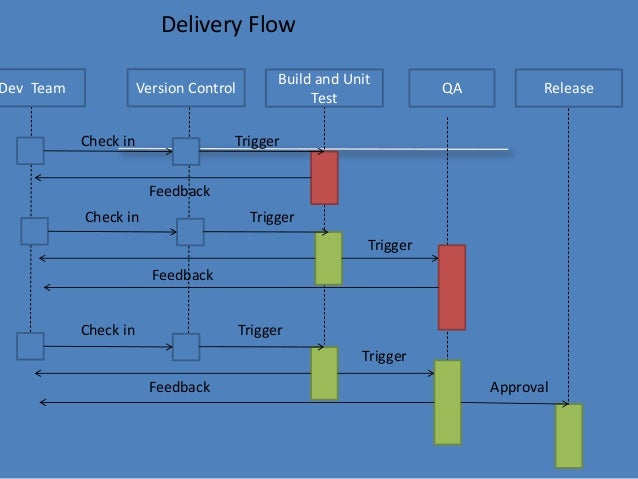
    Delivery Flow

    Here is the Delivery Flow.

    Ingredients:-

    Configuration Management
    continuous integration/ Automated Build
    Automated Deployment
    Automated Testing

    Obviously no single team in a company alone can achieve CD without the help of other teams. It needs collaboration and team work to implement it, Lets take a look at what do we need from various teams

    Dev Team

    • Collaboration – Integration is no longer an event
    • Check in regularly
    • Make small frequent releases because Big Change -> Big risk –> Big effort and Small Change –> Small risk –> Small effort

    QA team

    • Should have complete automation or whatever max is possible. More manual testing leads to more delay.
    • Keep the Build and Test Process Short
    • Break the QA automation into small pieces so that they can run simultaneously and do the QA frequently.
    • Publish the report

    Environment

    • Should have complete Environment to test everything.
    • Flexible and scalable so that multiple env can be spawn any time and can be extended.
    • Managed as prod or at least similar to prod

    This increases Confidence in build’s production readiness reducing release risk.

    Main blocker to achieve CD

    1. manual work
    2. Lengthy Process
    3. ticket system
    4. approval

    Now, How do we deal with blockers

    Do not add gates, add only checks. Adding gates to prevent issues from creeping into prod is not so smart. There are many more issues hiding, you just don’t know them

    Approval!!! Why do we need CAB?

    Dev Sign off
    QA sign off
    Ops and Dependency sign off
    Infra sign off

    Dev Sign off -> Use proper project mgmt tool to track everything that goes in to software with adequate workflow. Get everyone together at the beginning so that these will not be surprises at the last moment. Keep meeting across the team during entire development. This way you don’t need any approval since you have already taken care of all necessary elements during the entire development process.

    QA Sign off -> Publish consolidated QA report with each and every build which should be visible to everyone. You should have proper definition of “Go Ahead” instead of just random checks, Nobody has to ask QA for a thumbs up for the go. • Minimum criteria for Q has to be set.

    Ops, Dependency and Infra Sign off -> Include them at the beginning of the project. Have capacity and change planning during requirement gathering, This gives enough time for ops and infra to get ready for the release.

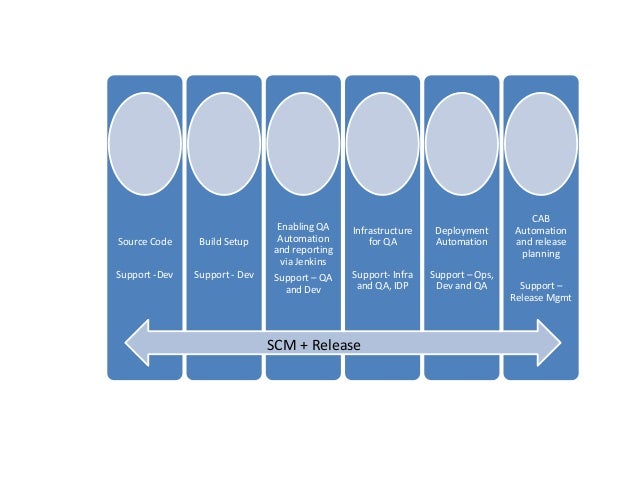
    Role of SCM/ Release Mgmt

    SCM/ Release Mgmt provide the workflow, tools and necessary filler to enable all teams to interact and automate their part.
    The picture below shows How SCM and Release Management help each team.

    Source code support for Dev by defining branching policy, Build Setup Support for Dev team to provide continuous build with predefined configuration and in managed environment which includes static code analysis like unit test, code coverage, checkstyle etc..

    Enabling QA Automation and reporting via build tools (Like Jenkins) to support QA and Dev to run their automation and aggregate report on central location. which include QA automation/regression, functional code coverage etc..
    Infrastructure for QA Support like managing integrating environment, Deployment Automation etc.

    Ops, Dev and QA CAB Automation and release planning support.

    It’s clearly visible that CI and CD is not a one man show. Planning, collaboration and teamwork are essential parts of the execution.

    Tools can be chosen by the org/team whichever are suitable for them, but the main part is automation and integration of the tool with each other to make flow smooth and free.

  • Choose Digital Chooses Jenkins For Continuous Deployment

    Choose Digital Chooses Jenkins For Continuous Deployment

    Challenge: Shrink Time To Innovate

    Choose Digital  offers a white label media store solution (think iTunes) for enterprises that want to reward brand loyalty with opportunities to use miles, points, or cash to buy digital products. As a competitive media company, Choose Digital was eager to test and adopt innovations to its software platform as fast as its developers could produce them. The media firm was ready for a model that lifts the burden of maintaining tools in-house.

    “We were looking for a way to move from a straight compute environment to a DevOps approach that would enable us to push lots of code and new builds out daily while quickly iterating a lot of new ideas for improvements to our digital marketplace,” says Mario Cruz, Co-Founder & CTO, Choose Digital. A managed service could also relieve the headaches of supporting all the development applications internally. Choose Digital chose CloudBees’ Jenkins , a Java-based pipeline and orchestration tool for continuous deployment, which was also available as a hosted service, to meet those needs.

    Solution: Simplification

    Once Choose Digital made its decision, CloudBees made it simple to get up and running. “We opened our account with CloudBees and were productive with our Dev and Stage environments in two days using a fully functional Jenkins trial implementation,” says Cruz. Choose Digital moved production into the cloud 30-days later.

    Jenkins enabled Choose Digital to find and fix bugs and try new things fairly quickly, without waiting for monolithic releases. “Jenkins is how we innovate, test our code, and enable the coder to immediately fix what he breaks,” says Cruz. Jenkins provides continuous integration services for software development and enables Cruz’s team to run build tests and functional tests.

    “Jenkins gives us a quick snapshot so we can find broken code right away, not five weeks from now,” says Cruz. Enterprises that are still using older approaches don’t typically have time to fix small bugs, and certainly can’t fix them right away.

    Choose Digital uses Jenkins in the cloud (DEV@cloud), which CloudBees fully manages and hosts on AWS EC2 http://aws.amazon.com/ec2/. Cruz doesn’t worry about maintaining the environment or whether his media platform has enough space or capacity. “CloudBees manages all the updates and issues with Jenkins CI. They support all the plugins for Jenkins, even if it is not their own plugin,” says Cruz.

    As a managed service, Jenkins simply works from machine to machine. “My developers can focus on the product. They don’t have to worry about whether they have the right software build, the right apps on their machines, or the right versions of those apps,” says Cruz.

    “As a result, development is up to 5 times faster in our continuous deployment environment than it would be if we had set up our own hardware or used an IaaS solution. Things that could take months or years we can now do in days,” says Cruz.

    A Bump In The Road

    As Cruz and his team moved to Jenkins, the biggest challenge was communication. “The toolset is not the challenge, it’s having everyone thinking with and getting used to the new DevOps mindset,” says Cruz; “while we were fully functional in two days, it took two weeks to get used to the new mindset.”

    Today, Cruz’s software team communicates across stakeholders and team members in a DevOps approach that leverages Slack https://slack.com/ (IRC) and HipChat https://www.hipchat.com/ plugins for Jenkins. “DevOps is more a culture than it is tools; DevOps is all about communication. We communicate to our team, to the QA department, and to product managers,” says Cruz.

    Current State: Everyone Knows, So We Can Fix Everything

    Jenkins brings transparency so that what only some could see—such as what a developer has broken—becomes everyone’s knowledge. “Things get flushed out pretty quickly. By using Jenkins CI, you see the hidden things that no one knows about quickly,” says Cruz.

    Cruz has some realistic advice for his peers: The sooner you get to an environment and mindset like Choose Digital uses, says Cruz, the sooner you will see the benefits and flush out bigger problems. “It’s not perfect the first time around but it gets better and better on every build. You get rid of the technical debt you didn’t know you had,” says Cruz.