Tag: continuous deployment

  • DevOps Chats: Demystifying Spinnaker VM Baking, with Salesforce

    DevOps Chats: Demystifying Spinnaker VM Baking, with Salesforce

    Spinnaker Summit 2019 Preview: As you use an open source tool like Spinnaker, the more you develop best practices and learnings. These are useful to share with others internal to the enterprise and other open source users.

    Jing Vergara, principal software engineer at Salesforce, joins DevOps Chats to share a preview of her upcoming talk “Demystifying Spinnaker VM Image Baking and Deployment.” Jing shares with us what to include, and not to include, when baking a VM image, how to avoid configuration drift and how to deploy to multiple cloud providers using Cloud-init files. Jing also shares how to use open source Packer templates with Ansible, Chef and Docker, and how to build your own Packer templates.

    Jing Vergara’s talk is on Sunday, Nov. 17th at 10:45 AM PT. Spinnaker Summit 2019 is San Diego on Nov. 15-17.

    Transcript

    Mitch Ashley: Hi, everyone. This is Mitch Ashley with devopsy.kinsta.cloud and you’re listening to another DevOps Chat podcast. Today, I’m joined by Jing Vergara, who is principal software engineer at Salesforce. Now, Jing is going to be talking at the Spinnaker Summit in San Diego in November, and she’s gonna be talking about a really interesting topic, “Demystifying Spinnaker VM Image Baking and Deployment.” Now, don’t think we’ve changed into a baking show. We’re baking VM images, and that’s what Jing’s gonna tell us a little bit about, that whole process—pipelining and creating VMs and baking them. [Laughter] So, her talk is on Sunday, November 17th, at 10:45 a.m.

    Jing, welcome to DevOps Chat.

    Jing Vergara: Thanks, Mitch.

    Ashley: Great to have you.

    Vergara: Thank you for the opportunity to have me talk here.

    Ashley: Well, I’m honored you’re on. Thank you for being here. Tell us about yourself. Tell us a little bit about what you do and maybe what parts of Salesforce product or code that you work on.

    Vergara: Sure. So, I’m part of the continuous deployment team at the company. We offer Spinnaker as a Service for all of the organizations within the company. And I help teams onboard their delivery pipelines into Spinnaker.

    Ashley: Oh, interesting.

    Vergara: Yep, and as part of my job, I also build custom extensions to Spinnaker to support their internal business needs.

    Ashley: So, you’re kind of the Spinnaker service center expert person or group that everybody goes to for help implementing Spinnaker. Is that close?

    Vergara: Yeah—very, very close, yes. So, my role within the team has been changing, but yeah, it has transformed into that one. Another thing that I do for Salesforce is that I represent Salesforce at a couple of the Spinnaker special interest groups for stakes insured so that I could learn more about upcoming features of Spinnaker, so we can leverage those in our roadmap as well so that we know we can offer it to the business.

    Ashley: Mm-hmm.

    Vergara: And then we also contribute back to the ________ and let them know what would and would not work for us as users of Spinnaker.

    Ashley: Well, and I noticed in your bio on the Spinnaker site, you have a Master’s in Computer Science from the University of Illinois at Urbana-Champaign. I used to live not too far, from there, though I didn’t go to that school. [Laughter]

    Vergara: [Laughter]

    Ashley: That’s a very strong C.S. degree, and it sounds like you’re putting it to good use with Spinnaker and DevOps style deployment with these kinda pipeline creation.

    Vergara: Yes, right.

    Ashley: Excellent. Well, tell us a little bit about what—so, we’re talking about your talk. So, describe for us a little bit about what are some of the things that are maybe a little mystical that need demystifying about Spinnaker VM image baking and deployment. What are some of the things people don’t know that you usually have to help them understand with, “Here’s how it works and here’s how we do it”?

    Vergara: Sure. So, for companies that are traditionally in a bare metal world where you don’t use VM images, it’s kind of a definite shift in the mindset, right?

    Ashley: Mm-hmm.

    Vergara: So, the way I usually explain it to them is using the baking metaphor, right? So, when you talk about baking, you think of putting the ingredients together like flour, salt, what have you, right? You form a dough, shape the dough, then you cook it. You start with a base ingredient—like, again, the flour—and you mix it up.

    So, in the VM world, when you bake an image, you start with that base OS image. You add your other ingredients, which means installing your applications or your agents to run on that VM. And then you have your standard or common configurations and possibly some data, right?

    Ashley: Mm-hmm.

    Vergara: You add them all up in the VM, you create a snapshot. So, that snapshot, you can now call it the VM image. So you can save this image into a store, and once you have that image, you can use it for deployment. So, deployment, it’s basically building or provisioning one or multiple VMs out of that same image.

    Ashley: Okay. Now, leading into this, the thing that kinda kicks it off is that, I’m not sure how it works at Salesforce, but is it something like a Jenkins process that then kicks off this creating of the image? How does that work?

    Vergara: Right. So, we have our continuous integration system. So, we have a few and we’re standardizing that at Salesforce as well, right? So, we have those artifacts built by those CI systems. We have our Docker images so they get stored, we put them into the cloud, and then we have triggers. So, we listen for those changes. So, Spinnaker supports a Pub/Sub subscription that triggers the pipeline. So, then, once we have those architects, we can start the baking process.

    Ashley: Great. Excellent. Well, that makes a lot of sense. Think of it as all of the pieces of software, OS on up, that are ingredients, right? Just elements of what’s gonna go into that image.

    Now, I imagine this is something that’s happening frequently if you’re doing a lot of deploys, right? Is this happening every time that you do a deploy or just as part of the integration process, and then it may go through a deployment process, too, or how frequently would you see this running?

    Vergara: Yeah, so it’s for every code change that gets checked in, right? Ideally, you would want that change to go all the way, so for continuous—again, for continuous delivery and deployment, that’s the ideal process. Check in, generate the artifacts, and deploy that artifact, create a baked image out of it, and then go and deploy it.

    Ashley: Okay, great. So, this is—

    Vergara: Right, so, but—yeah, yeah, right. But like, when we say delivery and deployment, of course, you know, there’s release management and change management policies at every company that says, “Okay, this is actually good for production deployment,” right? So, some of them are continuous deployment up to development or test environments, but for production, we still want to have that gate system in there.

    Ashley: Mm-hmm, yeah.

    Vergara: And Spinnaker actually supports it really well, you know? It’s got those manual judgment stages that you can add into the pipelines to get those kinds of approvals.

    Ashley: Yeah. Well, we’ve had some other folks talking about some of those stages like Run Job and Webhook and some of the capabilities that are built in.

    Vergara: Yes.

    Ashley: Easy to extend as well in Spinnaker. So, I think one of the things that you’re planning on talking about in your talk at Spinnaker Summit is maybe some lessons learned or best practices that you’ve figured out from doing this a lot at Salesforce. Any thoughts on that you want to share with us about the kind of best practices you’re gonna get into in your talk?

    Vergara: Sure, yeah. So, some of the best practices that I’d like to share with you is more around the baking and deployment. So, for example, when you do baking and never, ever bake secrets during bake time. [Laughter]

    Ashley: Yeah. No tokens, no keys, no certificates, no—

    Vergara: Exactly. Yes, yes. So, that’s very, very important. So, those kinds of sensitive data, you can actually perform that during the deployment stage. There is a trap stage there during deployment where you can go and, you know, connect to a secret store, like, Vault, HashiCorp’s Vault, right? So, you can pull down those secrets and install it on the resources or the VMs, right? So, that’s the safer way to go about it rather than baking it during bake time.

    And then another thing as well, you know, as much as possible to avoid configuration drift, right? So, if you have any common or standard configuration, be it your application configuration or your OS configuration, right, do it during the baking step, right? So, as much as possible, limit those VM configurations towards them. Again, you can do it during deployment.

    Ashley: Mm-hmm.

    Vergara: And then, for companies that support multiple cloud providers—so, for example, you need to go and deploy to, say, Amazon Cloud or Google Cloud or other clouds that are available and supported by Spinnaker, you can use Cloud-init files so that it’s not tied to one particular provider and you don’t have to repeat your bootstrap steps during that same time. So, you write your script once, your Cloud-init file, and then you can use it in those different cloud providers, so that’s, I think, that’s very, very helpful.

    Ashley: Now, is that capability something that’s built into Spinnaker if you write your script corrects, and I think you said init file for each—

    Vergara: Cloud-init.

    Ashley:—each cloud, Cloud-init.

    Vergara: Yes.

    Ashley: Is that something that, it’s a feature if you know about, you can use it up front and design that into how you’re writing your scripts?

    Vergara: Yeah, so, there’s—there are fields within the Spinnaker deploy stage where you can put that in. So, in, I think in GCEVMs, you can use the user data field in the deploy stage, and then in AWS, there’s the metadata field.

    So, the field kind of differs by provider, but it’s the same concept, right?

    Ashley: Mm-hmm.

    Vergara: So, you put it in there, you plug it in. And then, during the bootstrap process of those VMs, I think the OS has the support Cloud-init, though, so when they choose an OS, make sure it’s got the Cloud-init, and then Cloud-init will pick up those files and then launch the steps or commands from what you have in those Cloud-init scripts.

    Ashley: Mm-hmm, great. What are some of the things that people that are maybe new to Spinnaker or new to creating VM images and doing baking, what are some of the typical struggles someone might have that would be helpful to come to your talk for?

    Vergara: Right, so I experienced the same thing when I started out with Spinnaker. I’m like, “Oh, this is all new to me! How do I go about this?” [Laughter] So, one of the things that I’m gonna share in the Summit is, like, “Hey, you know what? Spinnaker actually uses Packer, it’s a HashiCorp tool that actually performs the baking behind the scenes.

    Now, Spinnaker offers a set of Packer templates, right? So, those are the very basic ones. And it actually varies per provider. So, you can only use one at a time. So, if you’re building for, say, GCP, then use the GCP Packer template. And if you’re using AWS, you have to use a different AWS Packer template.

    Ashley: Mm-hmm.

    Vergara: So, and then, if you have a more advanced use case, you can actually customize and build your own Packer template, so that’s one of the powerful teachers of Spinnaker as well, right? So, if you end up—like, you know, so for in-house, you use Chef or Ansible or Puppet. There are Packer templates that can use those kinds of provisioners, but you have to go and deploy those into Spinnaker.

    So, at the talk, I’m gonna share how you can deploy those custom Packer templates. So, there are a couple of ways on how to do it. So, one is the simpler way, but it’s kind of limited. Those Packer templates are stored like Kubernetes secrets in Spinnaker, so it’s got a limitation in size. So, if you have complex scripts or Packer templates, then you have to deploy it as a sidecar container.

    Again, I’m gonna share those tips at the Summit and give more details around it.

    Ashley: Mm-hmm. Yeah, folks may be familiar with Packer, too, it’s an open source project in and of itself for creating images, machine images.

    Vergara: Yes.

    Ashley: Great. Are there some other struggles that you find folks typically have, or may have when they’re new to this?

    Vergara: What else? So, Spinnaker by itself mostly focuses on releasing software changes, but it has a very flexible pipeline management system. Like, at Salesforce, we actually use it for building resources such as load balancers, DNS records, topics, queues. You can actually create custom job stages to perform those.

    Ashley: Mm-hmm.

    Vergara: So, we found it really awesome, because we can rebuild a full environment carrying down all of those existing resources, running the same set of pipelines that we can deploy together with those infrastructure resource setup. So, we can build it up right away, right, and then it also answers our scaling requirements. Because, you know, large scale enterprises such as Salesforce, you know, we have to build all of these resources and deployments. We’re talking about thousands of servers across different regions and geographical locations.

    Ashley: Mm-hmm. You know, sometimes tools, open source, or even commercial tools that are highly flexible and very powerful, sometimes with that comes complexity, so it helps to have some guidance, some experience mentoring from someone like yourself that’s gone through that process and can help you kinda get through it and understand how to use it, how to get things done, right?

    Vergara: Right. So, Spinnaker has a Slack channel. So, you know, when people like me or others who are new to Spinnaker have any questions, we go and ask in that channel. There’s a few channels there that are specific to certain features. So, for example, if you’re struggling with templatizing pipelines, then you go into the Pipelines as Code channel, right? Or if you have questions about how to use Kubernetes in Spinnaker, then you use the Kubernetes Slack channel.

    That was very, very helpful for us, especially in the beginning when we were trying to figure out how things are working.

    Ashley: Mm-hmm, I’ll bet, I’ll bet. How long have you been using Spinnaker, then, at Salesforce?

    Vergara: We started our journey last year.

    Ashley: Okay. [Cross talk]

    Vergara: Late last year, so almost one year now. [Laughter]

    Ashley: Wow, okay.

    Vergara: Yeah.

    Ashley: Wow. I bet a lot has happened in that one year. I know one of the things that you’re planning on also talking about is some contribution ideas for those that might want to help make Spinnaker better. And those are things that you—ideas you had or lessons you’ve learned implementing Spinnaker there, I assume?

    Vergara: Right. So, some of the contribution ideas that we have is with regards to a new effort called Kill. I’m not sure if you have interviewed the speakers.

    Ashley: I haven’t yet, but I may. [Laughter]

    Vergara: Okay. Yeah, so I’ll let them—you know, I won’t steal their thunder.

    Ashley: Don’t steal their thunder—okay, great. [Laughter]

    Vergara: [Laughter] Right, so, it’s one of those, they’re focused more around the managed delivery, so that’s when. Another contribution idea is centered more around each of the providers. So, again, if you’re building for one provider, it’s a different, totally different stage. So, for example, like GCEVM, right? So, they have their own deploy stage for that. And then AWS, they would have their own deploy stage for that. They’re kind of not, like, at par right now. Like, you know, they focus on certain things.

    I think another contribution there is trying to add more options or features into that, so it can fully support that provider. And so, for example, for GCE, I think one of the features lacking there, if I remember correctly—or they might have fixed it. But it was, say, so if you have a persistent disk and you want this particular persistent disk, then it’s not supported. It always creates a new one. So, it doesn’t give you an option to actually reuse an existing one that you’ve built earlier. So, things like those. I think that would be important.

    Same thing with AWS, right? So, there’s some features for EC2 VMs during deployment that could be added in there as well.

    Ashley: Great. I’m wondering, too, thinking about your talking that’s coming up, who are the kinds of folks that would be, get the most out of it, coming to your—obviously, people that wanna perform this function, but is that usually, is it developers, is it DevOps engineers, is it CI/CD automation specialists? Who are folks that would get the most out of your talk?

    Vergara: It would be around the Spinnaker administrators within their companies. So, if they want to learn how to configure Spinnaker to enable features for baking and deployment, then they would be the ones who would learn the most out of it. But I would say, like, all the DevOps engineers who want to figure out how they actually use Spinnaker for baking and deployment as well. Like, how do they set up their pipelines?

    I’m gonna give a demo on how it actually works from start to finish so that they can have a visual. Sometimes, you need that visual to say, “Oh, yeah! Oh, that’s how it works!” Right?

    Ashley: [Laughter] Mm-hmm. Well, that guidance is very helpful. And I can see, too, what you’re saying about the folks that are obviously administering Spinnaker in that deploy process are ideal to attend, and of course, other DevOps engineers automating and wanna know how this part of it works certainly would be good to go as well.

    Well, I wish you the best of luck. I know you’ll do real well. You obviously know, have learned a lot and know a lot from your experience at Salesforce. So, I wish you the best.

    Vergara: Well, thank you. Thank you, Mitch, again, for the opportunity for having me talk here.

    Ashley: Well, absolutely. Thank you for being on. I wanna thank my guest today, Jing Vergara, who’s princ—I can’t say it [Laughter]—principal software engineer at Salesforce. There, I got it out. Now, Spinnaker Summit 2019 is November 15th through the 19th in San Diego, and Jing’s talk is on Sunday, November 17th, at 10:45. It’s titled, “Demystifying Spinnaker VM Imaging Baking and Deployment.”

    So, thank you for joining us today for this DevOps Chat podcast. This is Mitch Ashley with devopsy.kinsta.cloud. Have a great day, and be careful out there.

    — Mitchell Ashley

  • Extending Automation to Your First Code Commit

    Extending Automation to Your First Code Commit

    I am a big advocate for software reuse, and an even bigger advocate if that reuse comes in the form of software automation. My team and I rely on reusable software processes that accept simple inputs to produce predictable results. We have tight deadlines with requirements that often seem impossible. Automation makes us more efficient and our work more predictable.

    Once upon a time, we used glue and bubble gum to cobble together means by which to build, then test and then eventually deploy application versions. It worked until it didn’t, and industry opportunities arose for mechanization. Enter continuous integration (CI), continuous deployment (CD) and DevOps, in part.

    You likely know this and have already taken advantage of CI/CD platforms such as Jenkins, CircleCI and others. The simplicity of the as-code model allows us to turn easy-to-create declarations into the otherwise complex provisioning of servers, databases, caches and file systems, along with the execution of code to leverage what was provisioned.

    Life as a developer has been made better using these as-code tools in the tool chain. Spinning up a Kubernetes cluster on Google to (re-)deploy an image built, tested and pushed to DockerHub from a CloudBees/CodeShip pipeline is something I rely upon each time I commit to my Git host.

    In this article, I am going to talk about Project-as-Code to extend automation to the first code commit with a working app running through a functional CI/CD pipeline and deployed to a production-like environment.

    Barriers Keeping Enterprise IT Departments from Coming Along for the DevOps Ride

    Unfortunately, basic usage of all these great tools comes with the added complexity and cognitive load cost. Understanding Docker image creation, HashiCorp Terraform syntax for infrastructure-as-code, Kubernetes cluster deployment and more are just a few of the competencies developers and operators need to have.

    Learning a new set of tools every few years comes with the territory, but there’s no reason to ignore new potential avenues for automation. I’ve wondered if there is a better way to abstract and automate the setup of these common pieces in the modern software production pipeline.

    Another common issue I’ve noticed—these pipeline components often get set up sequentially, with the first meaningful code commit being the blocker to setting up all the other pieces of the CI/CD pipeline. Without this commit, these tools sit relatively idle while waiting to provide value.

    For those of us who work on new projects regularly, getting things started has always had its issues, especially for consulting scenarios where requirements and team dynamics differ between clients. We are disciplined enough to first reach in our toolbox to reuse as much as possible. Still, DevOps has yet to be adopted wholesale in a standard way by many enterprises.

    For these situations, I find the benefits of DevOps are easy to explain and understand. Developers like to reuse and fewer barriers, the business likes savings and an enterprise likes productivity and innovation. However, to inject those benefits is still a very manual, time consuming process, making the overall sell of DevOps harder.

    The purpose of DevOps automation is to simplify tedious error prone manual processes. I see another opportunity for automation: entire DevOps projects using the same as-code model we have become accustomed to.

    Generating Your First Meaningful Commit “As-Code”

    Why not use a straightforward declarative model-driven means of not only generating tech-stack specific application source code, but all the config files that lead to DevOps being automated. With this, the toolchain learning curve is minimized, and idle tools now are immediately called to action. The result is a self-sufficient operational DevOps environment working through an application code base that comprises a fully deployable executable first code commit. Developers then get their reusable assets and environment(s), the business sees cost and time savings, and the enterprise gets the productivity and innovation necessary to stay competitive.

    In an article written by Pete Hodge titled “Hello production,” he goes into great detail about the value of quickly standing up a flowing CI/CD pipeline leading to a functioning app deployed to production. He contends deploying even a useless application into production, as soon as you can, is the right way to start a new project because it pulls unknown risk forward, opens up parallel streams of work and establishes good habits. Project-as-Code standardizes this thinking with model-driven automation.

    The next generation of DevOps is unfolding with automation remaining a key component to expand scale, velocity and productivity. As automation has worked its way up the toolchain, automating the automation behind DevOps will shift the paradigm to improve how projects are created, how DevOps is implemented and the quality and features of the first commit into a Git repository. What now takes weeks to months could instead take hours to days, falling in line with our expectations now met by other successfully mechanized aspects of DevOps.

    Hopefully this article will serve as a starting point for your next DevOps project and how Project-as-Code automation can be a part of getting you started easier and faster.

    — Steven Randolph

  • How to Implement an Effective CI/CD Pipeline

    How to Implement an Effective CI/CD Pipeline

    DevOps bridges the gap between development, operations and IT services teams efficiently. To foster a DevOps culture, implementing the right DevOps tools with the right DevOps process is essential. Continuous integration/continuous delivery/continuous deployment (CI/CD/CD) help developers and testers ship the software faster and safer in a structured environment.

    Unlike the traditional software life cycle, the CI/CD implementation process gives a weekly or daily update instead of monthly or quarterly. The fun part is customers won’t even realize the update is in their applications, as they happen on the fly.

    A Brief Insight About CI/CD/CD Terminology

    • Continuous Integration: CI is a process in which developers integrate new codes into a shared repository several times a day. This is a better approach than the traditional one, where the developer will build new codes in isolation and then integrate into the main repository at the end of the project lifecycle. The primary goal is to detect any integration bugs at the initial stage so it can be rectified quickly. It triggers a new build whenever a new code merges with the existing main repository. Test runs are performed against these new builds to check for any breakage.
    • Continuous Delivery: At the end of the CI, CD comes in. CD ensures to automate the software delivery process and commits to deliver the integrated code into the production stage without any bugs or delay. CD in the DevOps implementation process, helps developers merge the new code with the main branch consistently so they can build an instant software-ready product. It is responsible for checking the quality of the code and performs tests to check whether it can release the functional build to the production environment.
    • Continuous Deployment: The most critical part of the automation occurs at this stage of the delivery pipeline. Whenever there is an important change in the code, the corresponding build and deployment occur simultaneously. It is achieved through continuous deployment process where it allows to perform live deployment changes for every code modification that passes through the CI stage. During this stage, there is no manual intervention right from the initial code until the code is in the production stage.

    Benefits for Implementing CI/CD

    The ultimate aim for any software application is to reach its potential customers faster than ever before. This is exactly what the CI/CD pipeline offers to any business model that leverages a software process which reduces the risks in each build and helps the end product to reach the customer quicker.

    • Achieve Faster Feedback Through CI Tools: For every committed code, the corresponding tests are run simultaneously to avoid any link breakage at later stages. Faster feedback helps to check the quality and impact of the code.
    • Greater Visibility: With CI/CD pipeline setup, the whole process of new builds, test results and any issues with new builds can be analyzed. This transparency allows the developers to know which changes in the build led to the brokerage and to avoid them in the future.
    • Early Bug detects: Conducting various types of automated testing allows to identify any bug issues at an early stage without any last minute surprises. These automated tests along with few manual test runs, help to fix any issues that may arise.

    The Different Stages of CI/CD Pipeline Implementation

    To get the full benefits of the modern DevOps environment, embarking on a scalable CI/CD DevOps implementation is important. It lays a strong foundation for building an agile DevOps for your business.

    Tools for the CI/CD Process

    Tools are the magic wand that help automate a successful CI/CD pipeline and ensure a faster software delivery.

    • Open-Source Tools or Proprietary: Depending upon the budget and the client’s requirement, business can opt for open-source tools such as Jenkins for automating the CI/CD process.
    • Cloud or Self-Hosting Services: To self-host your CI/CD application, tools such as Jenkins and Cruise Control help to setup, configure and monitor the application effectively. Otherwise, you can get SaaS providers to host on cloud services.
    • Build Status: Choose a tool which embraces the transparency and visibility of the entire process through appropriate notifications, through email or other type of communication.

    Possible Challenges of CI

    • You might need a discipline strategy to address an issue by the CI/CD pipeline, otherwise the whole fast feedback is in vain. 
    • Slower builds eventually take place as newer builds keep adding to the product.
    • Failure to train the resources to adapt to new tools and patterns.

    Wrapping Up

    In this era of faster software shipping and building quick releases on the fly, adopting a more robust project cycle that accelerates the delivery pipeline is crucial. Implementing DevOps services is the optimal way to get the effective collaboration between cross-functional teams through the CI/CD process.

    — Jay Elango

  • Weighing the Cost of Improper DevSecOps

    Weighing the Cost of Improper DevSecOps

    Simply put, data breaches are terrible news for companies. And, the costs associated with such attacks continue to escalate. A recent IBM-sponsored report found an average price of 3.92 million per breach.

    Not adapting security automation and vulnerability scanning into development pipelines could have a drastic effect not only on cost but workload efficiency and team morale. With these sorts of headaches, it’s vital to consider the repercussions for not adopting secure (and lean) armaments and auditing procedures.

    Can organizations adopt DevSecOps beyond the buzzword it has become? In this article, we’ll uncover some startling evidence on the state of Kubernetes vulnerabilities and discuss what companies can do to rectify.

    Trends in Kubernetes and Istio Vulnerabilities

    It’s astounding how much in DevOps is left exploitable. Secrets are routinely unknowingly left in the open due to human error. These are the most common gateways for attackers. Plugging these gaps is the first, albeit obvious, step.

    There’s proof of an epidemic, too. A recent study conducted by Alcide ran a live production analysis of over 500 cloud-native environments across the globe. According to their findings, “89% of deployment scans show companies are not using Kubernetes’ secrets resources, with secrets wired in the open.”

    This means the majority of Kubernetes environments share susceptible to data breaches in some form. Among the 5,000 scans run, the Alcide report found secrets are commonly left open in a few areas, including:

    • Workloads that had to connect to cloud resources that exist outside the cluster
    • AWS access keys to connect to those resources
    • Tokens for workloads that require API access to external databases
    • Credentials for S3 buckets

    Gaps in Best Practices for Kubernetes and Istio

    Kubernetes brings many nuances to the table. It’s a sophisticated system, with a wide range of use cases and cloud-native experiences. These require extensive auditing and compliance checks to safeguard deployment.

    According to Gadi Naor, CTO and co-founder of Alcide, Kubernetes requires a good level of expertise. However, “there is a knowledge gap that DevOps doesn’t have,“ said Naor.

    Much of this gap lies in Kubernetes secrets handling and network policies. On top of Kubernetes, service meshes are a next evolutionary leap. Istio, an architecture layer for creating network policies is ten-fold more complex, according to Naor.

    On network policy creation, “75% of the scanned deployments use workloads, which mount high vulnerability host file systems; while none of the surveyed environments show segmentation implementation using Kubernetes’ network policies,” stated the Alcide study.

    These are compelling platforms, but best practices must meet the growing number of potential attack vectors.

    Why You Should Approach CI and CD Security Separately

    Many pundits now link continuous integration (CI) and continuous deployment (CD) together as if they’re synonymous. However, they are separate concepts. Securing them, in the same manner, could decrease overall efficiency.

    Scanning all resources created in the CI phase against security auditing could waste time and resources. For example, if you’re standing images for CVEs and only deploy 20% of those images, that is a lot of wasted exercises.

    Rather than scanning all environments in the CI phase, Naor believes you should focus on scanning 100% of images for CD. Therefore, security tooling is leaner, and anything deployed will be assuredly safe.

    Takeaways on the Cost of Poor DevSecOps

    Infrastructure components such as Kubernetes and Istio are powerful allies to the DevOps minded teams. These environments do come with their nuanced security concerns, which must be addressed. Otherwise, the data breach price tag is high.

    To intercept system frailties before the black hats do, you must consider the following:

    • Scan for the Obvious: Utilize automation to discover secrets, keys, tokens, left in public repositories.
    • Scan in a Lean Way: Maintain a lean security environment that retains your engineer’s attention.
    • CI vs CD: Recognize the security nuances between integration versus deployment.
    • Add Auditing Tooling Strategically: Adopt compliance and auditing tooling that doesn’t create friction with existing developer workflows.

    As Naor said, “Don’t ignore the obvious stuff.”

    — Bill Doerrfeld

  • Measuring Success in DevOps: Top Four DevOps KPIs

    Measuring Success in DevOps: Top Four DevOps KPIs

    There is no news in DevOps concept. Many companies have integrated DevOps to improve and accelerate software development and help drive their digital transformation, and that number continues to grow exponentially. There are now entire tool ecosystems, methodologies and transformation models—as well as endless resources—available to guide companies along the DevOps journey.

    But DevOps success can be difficult to measure. DevOps isn’t a formal framework; it’s more of a culture and a set of practices, and there is limited guidance available to ensure you’re doing it properly or accurately measuring your successes and failures. DevOps also looks different in every organization—no two DevOps shops will be the same.

    However, despite the nebulous definition of what a DevOps organization looks like, there are some core key performance indicators (KPIs) that should be common to all DevOps environments: asset management, monitoring, continuous integration/continuous deployment and continuous security.

    Asset Management

    In this context, asset management means measuring what is automated and how effectively it is controlled. It doesn’t matter if you are using tools such as Puppet, Chef, Ansible or Terraform; what matters is how effectively you use them. These tools allow you to automatically provision bare-metal or cloud assets, as well as join a load balancer and receive traffic. However, you can achieve similar results from Kubernetes or chaining lambda functions. Automation is really about controlling assets to achieve your business goals.

    Whether you’re using on-premises virtualization or cloud workloads, taking the time to streamline your processing cycles down to the minimum hardware required can significantly reduce monthly costs. The higher the percent of your servers, containers, services, etc. are automated, the less time you’ll spend fixing and maintaining your infrastructure. Some of your applications may be uniquely configured to your particular organization, and therefore cannot be automated. However, if applications cannot be automated, it might be time to retire them and build next-generation applications.

    Monitoring

    Should you be monitoring all of your resources? Yes. Should you also filter out the noise? Absolutely. Monitoring agents should be deployed to all of your servers, and if your PaaS tools and other providers have integrations, you should be using them and parsing out unneeded data. The only thing worse than not monitoring anything is monitoring everything without proper filtering.

    Good monitoring should always be coupled with utilizing the information acquired. Capturing logs, parsing them and using tools such as ELK, Datadog or Sumo Logic, for example, give you a large kit that can not only capture and glean useful information from a tremendous amount of data, but can also make decisions and perform predictive analyses. You might learn your stack is operating inefficiently, or not scaling fast enough during peak utilization periods.

    Disparate systems should be aggregated into a common tool, lest you spend valuable time combining information across systems or pulling information from data warehouses to get your insight. Let the tools do that work for you. You should also be using tools such as Logstash to pull and understand application, database and other logs in your stack for meaningful data. If not, you’re limiting your insight into the service’s health.

    Continuous Integration/Continuous Deployment

    Continuous integration and continuous deployment (CI/CD) is the difference between releasing software once a quarter (or year) and performing dozens of releases to production within a day.

    But it’s one of the most difficult indicators to measure, since every environment is different. It is important to understand how many code commits don’t make it past your integration environment. These blockages could be the result of poor programming practices, poor code quality or poor testing. However, if features stay in dev or integration for too long, there is surely an underlying issue. In most cases, it centers around automated testing.

    So, how do you measure good testing? This is one of the most difficult questions enterprises face, especially when automated testing is added after monolithic applications are already written. Essentially, good testing is about creating good business logic and integrating testing that meets most use cases, while covering each function and class. Immediate feedback on failed or successful tests expedites the automation process. The less automated testing is built, the more QA has to test by hand. Failing to integrate good business and integration testing slows down the entire CD part of the pipeline significantly. Also remember shooting for 100% test coverage is unrealistic—over 80% should be sufficient.

    It’s also important to remember applications that are not in a pipeline and must be manually tested will never keep up with the pace of cloud-born innovation. If you are dealing with a giant, monolithic legacy app, it’s time to design its replacement (starting with testing). Pipelines should also have notifications built into them, with chaining logic to react to failures. Tools such as Jenkins, CircleCI, TravisCI and most code repository solutions, such as GitLab, offer rich feature sets to aid in pipeline creation and management.

    Continuous Security

    The easiest way to ensure security compliance is to shift left and resolve security issues in the development stage. Too often, security is applied at production, which means it’s not part of the environment’s end-to-end process. Securing applications and networks at the development level will give you more confidence that applications will interoperate properly at the production level.

    After shifting left, make sure you continuously deploy and monitor your clusters, nodes and pods in a secure manner. Ideally, you have a tool that provides a real-time summary of your cluster’s compliance and security status by looking at workload security and governance checks, cluster worker node CIS Kubernetes Benchmark checks, cluster Ingress controller security best practices and istio security checks.

    DevOps Success Never Ends

    Success in measuring your core DevOps KPIs is not about getting to full automation immediately—it’s about understanding your biggest issues, continuously securing them and improving them over time. DevOps has no end; success requires continuously measuring your progress and improving your environment with the most effective and up-to-date tools. Take control, implement thorough and meaningful monitoring, deliver with confidence and do it securely.

    — Gadi Naor

  • 5 DevOps Terms That We All Use, Yet No One Can Define

    5 DevOps Terms That We All Use, Yet No One Can Define

    I’m all for DevOps. Sometimes, however, I have a hard time talking about DevOps. The reason is because many of the key terms related to DevOps lack clear and precise definitions.

    Let me explain …

    DevOps is such a big deal that it has bred its very own lexicon. Search Google for “DevOps terms,” and you’ll find a slew of “dictionaries” and “glossaries” dedicated to defining the various terms that go hand in hand with DevOps.

    Yet despite these resources, some deep ambiguities remain regarding the actual meaning of various terms that you hear frequently in DevOps-centric conversations. Let me walk through some of the biggest.

    Continuous

    DevOps is all about continuous this and continuous that. Continuous integration. Continuous delivery. Continuous deployment.

    To me, the problem with the word “continuous” in this context is that it lacks an exact meaning. No one is integrating, delivering or deploying software in a literally continuous fashion. That would mean having zero delays between different releases, which is not the case. Even organizations that do CI/CD really well manage deliveries and deployments of only once per day or so.

    Maybe instead of “continuous,” we should just say something like “fast.” Because that’s what “continuous” really means in most cases.

    CI/CD

    Speaking of CI/CD, that’s another term that is ripe with ambiguity. It’s clear enough what “CI” stands for (continuous integration). But does the “CD” stand for “continuous delivery,” “continuous deployment” or both? Or does it not matter?

    Moreover, does a your application delivery process qualify as a CI/CD pipeline simply by including a continuous integration server (to do the CI) and some kind of automated deployment tool (to cover the CD side of things)? Or does a CI/CD pipeline also necessarily include build and test automation? I think most people would say the latter, but the term itself does not imply that.

    Microservices

    Microservices are all the rage in the era of DevOps. Depending on how you define a microservice, however, they have been all the rage for decades, long before anyone was talking about DevOps.

    The idea of distributing applications into multiple services is not new. That’s what SOA was all about in the 2000s. Going back further, there were microkernels, a concept popular in the 1980s. In microkernel architectures, the operating system kernel runs as a set of distinct services, rather than as a monolith.

    The question, then, is what makes a microservice, or a microservices architecture, different from other types of distributed, service-based architectures. Maybe it’s the size of the service, but there’s no official definition of what distinguishes a microservice from a non-microservice.

    Agile

    It is often said that DevOps builds upon the principles of agile software development. Those principles were defined, at a high level, in the early 2000s and spelled out in the “Manifesto for Agile Software Development.”

    It’s clear enough what agile means, but I’ve long struggled to piece together the exact relationship between agile and DevOps. Is DevOps “agile applied beyond the software team,” as one DevOps company puts it? Or are agile and DevOps distinct practices that just happen to have similar goals?

    It’s hard to say, because there is little consensus about what exactly “agile” means in the context of DevOps.

    DevOps

    Last but not least is “DevOps” itself. Different people have defined DevOps in very different ways. AWS says it is “the combination of cultural philosophies, practices, and tools.” Other definitions focus on philosophy, and leave tools and specific practices mostly out of the picture.

    Blurring the definition of DevOps further is the fact that virtually every tech company in the world calls itself a DevOps company today, with little concern for how, specifically, its products or services meet that nomenclature.

    What does DevOps really mean? I don’t think we’ll ever have a singular answer to that question.

    Conclusion

    In fact, I don’t think there will ever be clear definitions for any of the terms I’ve listed above. I’m not suggesting there should be.

    But I do think it would be helpful to the DevOps community as a whole to recognize the ambiguity in many of these terms. We use these words as if everyone knows what they mean, but the reality is that that is often not the case. If you want to use terms like “continuous” or “agile,” do so, but remember to clarify what those terms mean to you, because you can’t assume that they mean the same thing to others.

    — Chris Tozzi

  • Get Testing Bottlenecks Out of Your Pipelines

    Get Testing Bottlenecks Out of Your Pipelines

    I first learned the term “deployment pipeline” when I read “Continuous Delivery: Reliable Software Releases through Build, Test and Deployment Automation,” by Jez Humble and David Farley back in 2009. End-to-end automation of the build, deploy, test and release processes kick in each time a team member commits a change to the source code repository.

    Chapter 5 of the book notes that the forms of testing common to all projects include manual test stages which “… assert that the system is usable and fulfills its requirements, detect any defects not caught by automated tests, and verify that it provides value to its users. These stages might typically include exploratory testing environments, integration environments, and UAT (user acceptance testing).”

    Humble and Farley include these manual stages in the deployment pipeline, also known as a continuous integration (CI) pipeline, build pipeline or delivery pipeline. However, from what I observe, I think a lot of times people forget about these important manual stages.

    Though we can do more and more with test automation, thanks to improving technology, manual testing activities are here to stay in most business domains. My own previous team realized this as we started to move toward continuous delivery (CD) a couple of years back, with twice-weekly deploys to production. Smaller changes and more frequent deploys means lower risk of regression failures. Yet, we still struggled with how to fit in important manual testing activities.

    Whenever my cross-functional delivery team has a problem, I look for a way to make it visible, to help us talk about it and brainstorm ideas to solve it. My “aha” moment around manual stages came when I learned techniques to visualize our pipeline from Abby Bangser and Ashley Hunsberger. My team knew we had these manual testing activities and that we wouldn’t feel confident about releasing changes without them, but we weren’t really thinking about them as stages in the pipeline.

    Visualizing Your Pipeline – Including the Manual Stages

    Continuous Delivery Pipeline
    Figure 1: A Continuous Delivery Pipeline (my diagrams are inspired by Katrina Clokie’s pipeline diagrams in “A Practical Guide to Testing in DevOps”)

    Getting your team together to visualize your pipeline is a great method to find ways to improve it. Gather around a table with cards or sticky notes, or draw on a whiteboard—what are all the steps in your pipeline, including the manual ones? In Figure 1, the manual stages in a team’s CD pipeline are shown in yellow. All the automated and manual things need to happen before the business decides to push the button and deploy to production. It’s easy to see that these manual stages can become a bottleneck. Manual exploratory testing is likely to take longer than the automated test suites. If user acceptance testing needs to be done by certain business stakeholders and they aren’t available at the right time, that holds up the release. If the team is looking to move to continuous deployment, where every change to the product goes out to production as soon as all stages complete successfully, these manual stages will be in the way.

    When you get your whole team including developers, database experts, operations specialists and product owners involved in solving these problems, you may discover innovative ways to approach them. In my team’s case, we decided everyone on the team needed to help with exploratory testing so we could do it in a timely manner. Testers helped the developers learn exploratory testing skills with hands-on workshops and by pairing with them. Then, each developer pair working on a story was tasked with doing the exploratory testing at the story level before declaring the story finished. We wrote exploratory testing charters at the epic or feature level as stories in our backlog. When enough stories were complete, anyone on the team, including testers and product owners, could pick up those charters.

    If we couldn’t complete all the necessary exploratory testing before the next production deploy, we used feature flags to hide the changes from customers until we could complete the testing. We could go ahead and deploy the changes and wait to release them once we felt confident they would not cause any customer pain.

    Asynchronous Testing Stages

    Using feature flags or toggles is a good way to allow the team to approach some manual testing activities asynchronously, so they don’t hold up the deployment pipeline. If some required manual accessibility, testing takes an extra day to complete or the UAT has to be postponed for a week, the deploy still happens. A change could be toggled on for a small percentage of users and observed in production to see if any unexpected behavior occurs. Whatever activities are needed to safely release a particular change don’t have to hold up other changes that are ready for customer use.

    Asynchronous stages in a deployment pipeline
    Figure 2: Asynchronous stages in a deployment pipeline

    Figure 2 is an example of a continuous deployment pipeline, but this asynchronous approach to the manual stages works for continuous delivery as well. Each time a team member commits a change, if all the automated stages in the pipeline pass, the release candidate build will be deployed to production. The manual testing activities are not inline with the other steps and don’t hold back the deployment.

    If we’re ready to deploy a feature but need to finish those manual testing stages before we release it, developers can put in a feature flag set to “off” to prevent it from being exposed to customers. When the asynchronous manual stages are all complete and successful, the feature flag can be flipped on in production. This is the actual release, customers can now use the feature. The feature flag should be removed as soon as possible, as too many feature flags at once has serious risks.

    Using feature flags or toggles to permit deploying changes to production before all testing stages are finished is one way to avoid bottlenecks and succeed with continuous delivery or deployment. Continuous delivery and deployment success depend on doing frequent small changes, not big-bang releases. A lean approach to feature flags, keeping the inventory low, is advisable.

    Visualize It With Your Team

    We’ve looked at one way to keep manual pipeline stages from holding up deploys, but there may be other solutions for your team. And there are lots of other key success factors for CD, such as keeping changes small and frequent. There’s lots to discuss and brainstorm about as your team, or a representational cross-section of it, gets together and experiments with a visual model of your pipeline. Talk about what you need to learn from each pipeline stage, who needs to know it and whether the pipeline is providing actionable feedback.

    As a tester, I’ve sometimes questioned aspects of the pipeline that nobody else had thought about. Having team members with development, operations, database and other skills present means more potential for creative solutions. Our pipeline provides a major feedback loop and we want that feedback as fast as we can get it. Writing each stage on a card and arranging them on a table or wall often triggers ideas for parallelizing more stages or realizing a particular stage isn’t necessary or can be done locally by developers.

    Automate all the things where it’s feasible. Use the time you save to optimize the way you accomplish manual testing activities and possibly automate more of them. Master techniques such as feature flagging so that you can take the time needed to feel confident about every new feature you release.

    References

    “Continuous Delivery: Reliable Software Releases through Build, Test and Deployment Automation,” Jez Humble and David Farley, https://continuousdelivery.com

    “A Practical Guide to Testing in DevOps,” Katrina Clokie, https://leanpub.com/testingindevops

    “Feature Toggles, AKA Feature Flags,” Pete Hodsgon, https://martinfowler.com/articles/feature-toggles.html

    — Lisa Crispin

  • How DevOps Can Help Speed Go to Market

    How DevOps Can Help Speed Go to Market

    With continuous evolution of IT systems, speed and flexibility have become of paramount importance for businesses. This requirement has caused a massive shift in the IT delivery system. Now, building and releasing a better product in the market is not enough for businesses to stay ahead of the competition. Organizations need an agile approach to understand and adapt to information, trends and new developments, and to meet the demands of time-to-market features.

    DevOps is one such cultural shift in the IT field that shows how software development and IT operations can work together to reduce time to market. It has attained such a great profile in the market that people have started measuring the outcomes for businesses that adopt it.

    If you’re just beginning with DevOps, here are some tips that will help you understand how you can accelerate time to market for your product and services.

    How Can DevOps Accelerate Time to Market?

    There are many ways in which DevOps helps organizations accelerate time to market for their product. Some of the most effective ways are:

    Faster Delivery of Features and Modifications

    When development teams build software, they connect with IT operations to send the software for testing. If the product is completely new, operations need to create a testing environment. If the software is an updated version of the current product and there is already a testing environment for it, operations still need to configure and add interfaces and side applications. So, a developer can only deploy code to the software when the operations team tests the product, which is a very time-consuming process.

    However, DevOps eliminates such time-consuming tasks from the software development process. For example, with automated testing of web apps developers get quick feedback and automated integration allows them to make changes in the code base more quickly. Therefore, organizations can release small or incremental updates of the software while delivering new features to market faster.

    Enhance Efficiency

    DevOps encourages development teams to give more time to value-creating work. When businesses use automated testing and integration, developers don’t have to waste their time waiting for machine configuration or code integration. Both tasks can be achieved by clicking a button on the self-service portal.

    For example, many European banks have implemented DevOps in their software process, which resulted in 25% efficiency improvements in providing updates for their online banking applications. It also reduces the workload for the IT operations team so that they can work on more challenging tasks to add more value to the company.

    Improved Quality Code and Quick Recovery from Failures

    When software is released to the market, developers often start working on their next project. So, they usually don’t have any motive to predict or prevent future problems related to software; it’s all up to the operations team. But DevOps keeps developers involved during the entire life cycle of a software product for updating any feature or application, which results in improved quality code. Also, it requires only a few fixes as developers can track and eliminate potential problems while writing code.

    As developers work with smaller chunks of code, when a failure occurs in any product, bugs can be tracked easily to their resources. Also, human errors are reduced thanks to the automation that DevOps provides to the software life cycle, while allowing companies to deliver fixes faster.

    Best Practices for Using DevOps

    Just like agile approaches, DevOps doesn’t have any pre-planned implementation model. But, most companies that use DevOps follow these best practices:

    Set a Business Standard

    The improvements in an organization can never be measured without having a business standard. If you want to reduce time to market for your software development process, then have a look at the current development process and find out which areas need improvement. For example, you can review the steps involved in making a project live and identify any defects, inefficiencies and constraints in the project.

    After reviewing these processes, you can set a business standard that shows the current software development process and the improvements that are required to reduce the time to market. With DevOps, you can set a business standard more quickly and improve your software deployment process.

    Optimize and Eliminate Unnecessary Inputs

    While reviewing your software deployment process, you might encounter some inputs that don’t add value to the process and reduce its speed. Eliminating such inputs from the development process is crucial, but make sure there is open communication between you and your team so efforts are not wasted.

    What you can do is set up the right team structure and use tools that provide transparent and fast communication between the teams. For example, you can structure a team that includes marketing managers, right analysts and, most importantly, DevOps resources.

    Allow Continuous Deployment in Software Process

    Continuous deployment is one of the essential key factors of DevOps that helps in reducing time to market. It is the continuous delivery pipeline that doesn’t involve any manual intervention in-between. In continuous deployment, automation stimulates and simplifies communication and validates the software process to ensure timely releases.

    However, not every company implements continuous deployment in its software development process. Usually, the organizations that need to move faster to provide new features, applications or security channels for their product use continuous deployment. For example, media companies and online retailers use continuous deployment in their software development process.

    Improve the Quality of Automated Tests

    One straightway to reduce time to market with DevOps is improving the quality of automated tests. In any organization, testers test the application for its functionality and other factors. But this testing process can be enhanced by engaging with clients and a targeted audience in the development process. Taking input on the overall functionality and user interface will not only improve the testing process, but also help you find bugs and defects earlier.

    It is proven that if bugs are not tracked and eliminated in the early stages, it can greatly impact the time to market for your software product. For example, if you want to test your web application browser compatibility, then consider cross-browser compatibility testing. With end-to-end automated testing, the overall testing process can be improved, which will result in reducing time to market. Some other benefits of automated testing that can improve your DevOps are:

    • Track and eliminate bugs and errors in the early stages to improve the system’s capacity.
    • Improve the security of your software product.
    • Enhance custom engagement and satisfaction with a high QoE score.
    • Less cost of ownership.
    • Meet the industry standards and compliance regulations in a better way.

    An improved automation strategy helps move your product to market faster and allows your resources to do more high-value tasks. Also, the development teams will be more encouraged and confident to add new features to the application, as it will be tested more thoroughly.

    Conclusion

    Today’s businesses heavily rely on applications to collaborate, communicate, complete sales and operate more proficiently. Therefore, they strive to bring these applications to market more quickly so they don’t miss any opportunities and easily adjust to the market standards. To achieve these objectives, organizations must adopt the right DevOps practices in their software development processes to reduce time to market.

    — Junaid Ahmed

  • Why Unikernels Are Great for DevOps

    Why Unikernels Are Great for DevOps

    DevOps tooling seems to be in a never-ending state of self-transformation. The continuing evolution of infrastructure and the tools that go with it are forever creating new ecosystems. On the infrastructure side, we saw VMWare, Citrix and other companies bring to market massive virtualization in the late ’90s and early ’00s. This, of course, prompted a little bookstore in Seattle to unleash something known as “the cloud,” forever changing the way developers push code to production.

    The cloud, of course, is just an API around virtualization. A lot of the infrastructure changes prompted configuration management software, including Chef and Puppet, to emerge. Puppet is now 15 years old and Chef is around 10; even Ansible is now 7 years old.

    In the past years, we’ve seen tools such as Terraform emerge and other higher-layer infrastructure, such as Docker, which led into Kubernetes. There’s a lot of tooling out there to make applications run on servers. Just as the containers/Kubernetes ecosystems have tried to implement change on top of virtualization infrastructure, we are starting to see developers dig back down into the operating system layer to improve infrastructure there. This leads us to our topic today: unikernels.

    Unikernels are single-purpose virtual machines (VM). They only run one application—which is interesting when you think about it, because that’s precisely how a lot of DevOps practitioners provision their applications today. There is way too much software to provision nowadays—pools of app servers, clusters of databases, etc. Unikernels are fast to boot, fast to run, small in size, way more secure than Linux or containers and, if you have access to your own bare metal—either in your data center or through a provider—you can run thousands of them per box.

    Some stats? Some can boot in less than five milliseconds—that’s slightly slower than calling fork (three milliseconds) but orders of magnitude faster than Linux. Some can run databases including Cassandra and MySQL, 20 percent faster. Some people (yours truly included) have provisioned thousands of them on a single box with no performance degradation. Some are reporting them running as a VM faster than a comparable bare-metal Linux installation of that application. Clearly, this is worth investigating.

    There are many different methods that a given organization can take to provision software, but it’s pretty clear that popping into a server over SSH and sudo apt-get install something is very much of a downtrend. Phrases such as “immutable infrastructure” and “continuous deployment” fly right in the face of this sort of practice. You are either rebuilding your containers, rebuilding your instance or both. Unikernels really embrace this model as there is no apt-get-like functionality in them and you can’t log in to them remotely. They don’t even have the concept of users, mainly because at the end of the day, why do you even need them?

    At scale, it’s getting more difficult by the day to make the argument for this construct. If the app is misbehaving, shoot it in the head and take it down. Debug the reason locally. It’s extremely rare for an end user to reason that there is something wrong with the host operating system.

    In a unikernel, the only reason you’ll see a reference to a user is that most apps will demand to be run as a particular user or do things such as check for root privileges. In our case, if you look at underlying calls such as getuid, they are just stubs because we don’t need or use them. Keep in mind that this isn’t the mid-’90s anymore. We don’t have boxes laying around, where there are half-dozen users all running their code on the same box anymore. That model has long been gone. Unikernels don’t have shells and don’t have the notion of running other programs besides the one that is running.

    If it’s easier to think about, consider that unikernels are much more like processes than they are like operating systems, although they share characteristics of both. While many link, the application in others will load. Unikernels are a concept that are largely misunderstood because everyone assumes it’s somehow like Linux. Just as unikernels are not just “containers 2.0,” unikernels are very different from Linux as well. Linux is a general-purpose operating system, while unikernels only run one application. Linux was made to run on bare metal, while unikernels are made to run as VMs. Keep in mind Linux predates VMWare by a solid eight or nine years and the cloud by many more. Operating system researchers wanted to go this route in the ’90s, but we just weren’t ready yet.

    Another way to think about them is that they implement a sandbox for server-side applications. Much in the same way that the Chrome browser isolates each tab from each other to prevent one evil site from messing with another browser tab, unikernels prevent one application from messing with another application. Although under the hood, the technical implementation is quite different. More importantly, the unikernel single-process model eliminates the capability of running other ad-hoc programs inside the same VM. This is a huge blow to attackers who wish to run other programs on the same machine. It doesn’t prevent things such as remote file inclusion (RFI) attacks for various scripting languages, but for compiled and VM runtimes, it’s a striking blow because it deals with the fundamental problem of attackers using exploits only as a key to enter the server. Once they are on the server, they want to run their programs such as mysqldump or a cryptominer. They could care less about your software. Those organizations practicing shift-left security, or zero-trust infrastructure, should be keeping the development of unikernels on their radar.

    However, unikernels are not without their problems. These are computers we are talking about here. One of the larger problems for unikernel adoption was that to build them, you had to be a lower-level systems engineer doing things such as twiddling CFLAGS in makefiles or patching foreign codebases you’d never patch yourself. This was problematic and something we wanted to fix with a new open source tool. So, we opened up OPS—which can take any existing Linux application and run it as a unikernel, making their use a lot easier.

    If you’ve made it this far, I’m going to reward you: Let’s build and run a unikernel right now. Then, at least, the next time someone asks you if you’ve used them before, you can say yes.

    First thing is, you’ll want to grab OPS. You can paste this into a Linux or Mac shell, and it will download and install itself:


    curl https://ops.city/get.sh -sSfL | sh

    If you’d like to examine the source and build it yourself go to https://github.com/nanovms/ops.

    Next, let’s create a project directory:


    mkdir nodejs && cd nodejs

    Put this into a hi.js file:


    var http = require('http'); http.createServer(function (req, res) { res.writeHead(200, {'Content-Type': 'text/plain'}); res.end('Hello Worldn'); }).listen(8083, "0.0.0.0"); console.log('Server running at http://127.0.0.1:8083/');

    This is simply a small little web server that listens on port 8083.

    At this point you might be asking yourself, Do I need to install node on my system? The answer is no—not unless you plan on using external packages.

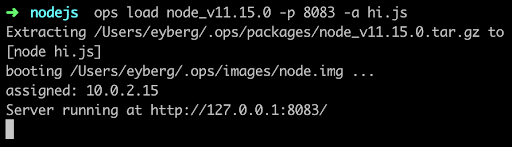
    Now we can run it:

    If it’s the first time you run ops, it will first download a node “package,” which is the interpreter and anything else it needs to run. For some languages, such as Python and Ruby, this can be substantial.

    Then it builds a small disk-bootable disk image that contains your application code and, as you can see, boot straight into it. There is no init manager like Linux and there aren’t 30 different services that get fired off. Keep in mind this is a single process running.

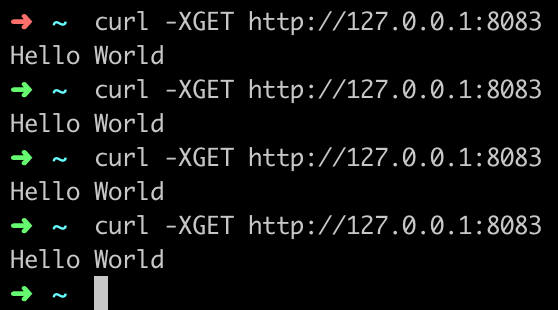
    Now you should be able to hit it up with curl and see it run:

    You’ve just built and run your first unikernel. How cool is that?

    As certain trends such as “serverless,” “functions as a service,” and “no ops” gain steam, these concepts go hand in hand with unikernels. DevOps practitioners at organizations that use microservices and containers will also want to take notice as the amount of work to deploy artifacts such as these decrease considerably. Why is that? One of the many problems that containers had to struggle with was that all the existing underlying infrastructure layers that live at the virtualization layer, such as file systems and networking, had to be shifted up a few layers. Not only did this introduce performance and security challenges, but it also threw out the 20 years of virtualization software and ecosystem development that already existed. What’s interesting about unikernels is that they are always deployed as VMs, so they get to re-use a lot of the underlying ecosystem that has been existent, with very little or no change required.

    From an adoption standpoint, unikernels are flying at ultra-sonic speeds under the radar. A lot of people are not aware of how many projects or organizations are working on unikernels today. Unikernels are starting to attract major attention from many various groups and institutions. Even famous, old stalwart Linux contributors such as Ulrich Drepper, the maintainer of libc, are working on unikernel projects today. Now there are even foundations and consortiums for unikernels. One recently announced was the UNICORE project. IBM even listed its No. 1 cloud patent recently as a hypervisor built for unikernels.

    If you’re are a self-described DevOps person, it’d behoove you to learn more about unikernels and start playing around with them to understand them better. They aren’t going to kill Linux and they’re not going to kill containers, but do expect to see massive adoption in the coming years—not just because of their security and performance benefits, but because of the new forms of compute they unlock.

    — Ian Eyberg

  • SauceCon 2019 Speaker Profile: Melissa Benua

    SauceCon 2019 Speaker Profile: Melissa Benua

    This is the second in a series of articles highlighting speakers at SauceCon 2019. SauceCon brings together the global community of Sauce Labs users and continuous testing experts to learn from each other and level up their automated testing and continuous delivery skills. This year’s event will be held April 23-25 in Austin, Texas.

    SauceCon speaker Melissa Benua loves horses and riding dressage. Derived from a French word that means “training,” dressage is all about creating strength, discipline and precision. It’s fitting, because she is also passionate about training and mentoring junior-level engineers and increasing developer efficiency—which she’ll be talking about in her presentation.

    At SauceCon 2019, Melissa will present “Continuous Deployment for ‘Mature’ Codebases.” I asked her why this topic was important to her. “When starting a new project, it’s easy to take advantage of modern agile development practices, because you’re starting from scratch,” she said. “However, the reality is that isn’t the case for most projects. Our challenge then is how we can take code that may be many years old and transform it into a lean, mean, continuously-deploying machine.”

    In her presentation, Melissa plans to deliver just that: a road map for getting to a release cycle that deploys on-demand from a one that may take weeks or months. She will leverage her personal experience in significantly re-architecting the deployment structure and offer practical advice to anyone managing a more mature codebase.

    Melissa has worked in nearly every software development role there is—dev, test, DevOps and program management—at companies big and small and somewhere in-between. She has created and run high-availability, high-quality services for PlayFab, Bing, Cortana and Xbox One, and now at mParticle as a senior technical lead.

    When she’s not poring over code or training newer engineers, Melissa enjoys spending time with her two small children—and of course, riding her horse. She travels extensively and presents at industry conferences worldwide.

    You can hear from Melissa and more than 30 other expert speakers at SauceCon 2019, the third-annual Sauce Labs user conference. To see a full list of presentations or to register, visit the SauceCon website.

    — Rebecca Cramer