Tag: continuous delivery

  • Continuous Testing: Solving the Biggest DevOps Bottleneck

    Continuous Testing: Solving the Biggest DevOps Bottleneck

    It’s time to start implementing the practices of Continuous Testing

    Earlier this year, Computing Magazine conducted a fascinating study around the adoption and benefits of DevOps in its DevOps Review 2017 publication. The findings that stood out most fascinating to me where around quality assurance and testing.

    In this survey, the question was asked, “Where are the main holdups in the software production process?” Of all the self-proclaimed DevOps practitioners, a whopping 63 percent said the biggest delays occurring in the QA/Test phase. In fact, this cited bottleneck was more than 2 times greater than the next proclaimed bottleneck, which they felt was in planning (29 percent).  In this same survey, another question asked, “What tends to lose out more in DevOps environments?” While 43 percent said, “Nothing,” nearly 30 percent of these DevOps practitioners said that quality was being sacrificed. When asked which area they wanted to focus on improving in the next year, over 40 percent opted for quality.

    Why is it that quality has taken such a hit?  The study cited two issues: 1) Testing and QA is often siloed from the other parts of the organization, and 2) Testing tools haven’t matured much in the past five years.

    Testing must become a cross-functional operation across the software development lifecycle (SDLC) spectrum, one that involves all teams. Agile developers and testing teams don’t have weeks to test, but hours. Testing hasn’t kept up because it hasn’t applied the methods and concepts of agile development have not been applied to testing and QA processes. By removing the constraints that force testing to the end of a development cycle, developers and QA teams can achieve accurate, automated testing from day one. They can create an integrated pipeline, capable of taking an idea from design to deployment, at speed, without compromising quality.

    Open-source, cloud-based solutions can be the catalyst that brings the speed of agile to testing.  Here are a few examples.

    Better In-Sprint API Testing: Since APIs have become the major component of applications, organizations are shifting their approach from starting testing when the user interface is complete to shifting the focus of testing at the API level.  But the hard thing is finding enough time in a development sprint to test them sufficiently.

    Today’s applications are a collection of microservices and API calls. UI testing alone just won’t cut it. UI testing is very brittle, and whenever it changes, testing breaks. Testing needs to shift left into the development cycle—into sprints. But if you shift testing left to be a focus of the sprints, what kind of API testing can you really do? How comprehensive can they really be?  Creating those API tests has to be quick, and simple.

    Dev and Test teams must utilize automated tools that not only generate API tests, but create an exhaustive set of test cases from the API, then execute those tests. These tools also need to support the most popular open-source testing frameworks allowing developers to run functional API tests as performance tests without any proprietary conversion issues. And, vice versa, developers must be able to take open-source performance tests and be able to run them as functional API tests.

    Orchestrating Testing: A Continuous Delivery Pipeline Manager: “Faster” is becoming table stakes with automation.  The facts show that companies who have widespread agile adoption and are deploying more frequently with significantly reduced lead times. But, this too often leads to release failures, quality issues and disorder with multiple—if not hundreds—of applications rolling through the SDLC. Plus, things slow down significantly with time-consuming handoffs and rework in the release process. DevOps teams, who release features and fixes frequently while significantly reducing errors and manual processes, need toolchain-agnostic pipeline planning, orchestration and optimization solutions that enable them to eliminate spreadsheets, automate test processes and feedback, and continually improve the delivery of revenue-generating features to end-customers. New CD SaaS tools help make this orchestration process easy.

    Performance and Functional Testing Using Open Source Frameworks: More and more organizations are trying to move from legacy testing tools. It’s not so much that these don’t adequately test, but they were never designed to meet the needs of agile development approaches. Rather, they were designed for releases that occurred two to three times per year. But that won’t cut it anymore.

    And as developers begin to incorporate testing activities in the coding process, they need simple-to-use, open-source tools. Luckily, there are such tools like JMeter, Selenium, Gatling, Locust and others. There are even tools that help you convert from legacy platforms to open source technology with ease, and guides to transform existing functional tests created with other tools over to load tests.

    These are just a few examples of how continuous testing eliminates the testing hurdle. With continuous testing, organizations can:

    • Automatically convert user stories from requirements management tools like CA Agile Central or Atlassian JIRA into the minimum number of test cases required for complete code coverage, and being able to adapt automatically to changing business requirements.
    • Reduce test cycle prep time by requesting test data from within requirements.
    • Request, reserve, and create test data at any time, even from requirements phase.
    • Virtualize APIs for better testing, while managing API access to developers.
    • Institute easy API testing that can generate comprehensive test cases (positive, negative, edge case, and SQL injection) and execute those tests automatically.
    • Democratize testing with SaaS-based testing tools so that developers can test early and test often.
    • Speed testing by feeding test data directly and securely to virtual services.
    • Use open-source testing tools such as JMeter, Selenium, Jenkins, Jenkins, Appium, Taurus, Gatling, Locust and more.
    • Orchestrate the application delivery pipeline to promote releases from one environment to the next as soon as all the tests pass and enable faster feedback loops.
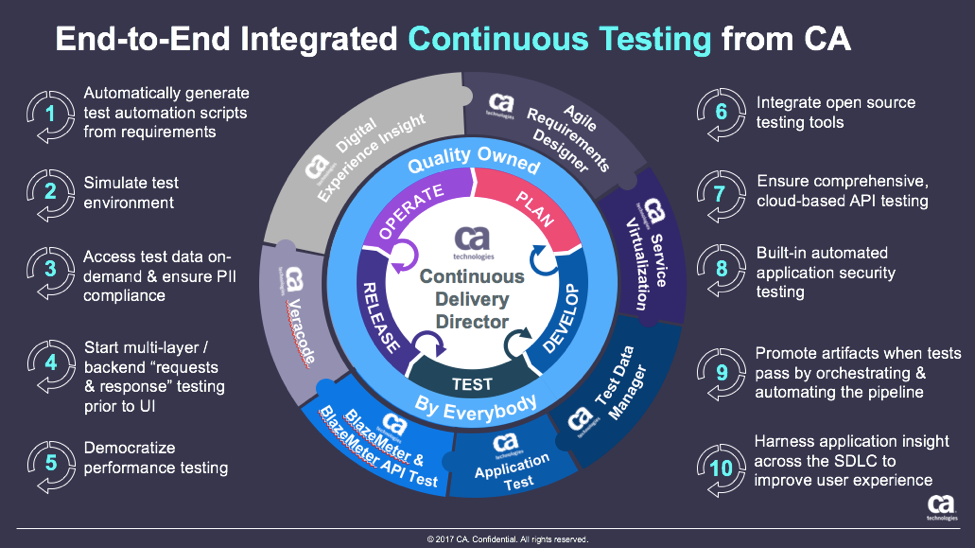
    This is testing unleashed, going hand in hand with agile development to accelerate quality into production.

    By adopting next-generation testing practices, DevOps teams have the ability to test early, often, automatically and continuously. To learn more about continuous testing and why it is critical to DevOps and Continuous Delivery initiatives, visit this Continuous Testing informational page.


    — Aruna Ravichandran

  • Moving That Big Project to CI/CD

    Moving That Big Project to CI/CD

    Any organization that has been around for more than a few years (and many who haven’t) have a massive system that would cost a fortune to replace. Most midsized enterprises have several of them. Those systems are one of the reasons that enterprises don’t adopt CI/CD at the same rate as startups. Sure, any new project or small things go there, but the elephant in the room just hangs out.

    So what happens when you get called upon to move one of these systems into CI/CD?

    Lets’ start with the easy case: the rewrite. In that case, you’re almost greenfield from the start and can build CI/CD into your development and test processes as you would for any brand new project.

    The harder case is when the org has seen the benefits of CI/CD and decides it wants to apply them to the monster that slows every project it touches to a crawl. These big systems are generally mission-critical, so there’s an added layer there. But this is doable.

    Yes, It’s Daunting, But…

    First, get a copy of the app building in a separate environment. Containers are good for this, since it’s just a development environment anyway. Replicate the entirety of the system (except unscrubbed real data, whether you use that in testing or not is a per-org question) to this new environment, make sure it builds and passes the existing test environment.

    Next, configure Dev/CI/CD tools (for a project of the size we’re talking, I recommend configuring application release automation [ARA] also to help track dependencies), and get the system building and testing under them. This will take time—time to configure the CI/CD tools, time to get the build environment to work reliably under them and time to figure out how to integrate existing test structures into the CI tool. That’s okay, the point is investing now to save later. Note that this is also the time to upgrade your dev tools. If you’re on J2EE 5, for example, it is time to upgrade. It’s been a decade, and you’re working on a copy of the project.

    Once that reliably builds and passes tests, the next step is to move those pieces into a more CI/CD-friendly format. Traditional test scripts can be called out in CI, but consciously building the tests within the CI environment is more resilient. A close look at tests, what’s missing, what could be better, what needs to stay as it is and just report back are the biggest parts of this test.

    Note that change requests will have to be copied to the new environment’s change request system, too. Some projects are lucky enough to lock out changes to the source application while the new one is brought up to speed, but for most, changes made in the original will need to be replicated. Once you start modifying code, they can no longer be just pulled from the source tree.

    Then start fragmenting the app. Apps of that size inevitably have massive functions/methods that do a lot of things. Not a terrible plan in single-processing days, but if you’re moving to CI/CD and upgrading dev tools, you may as well optimize code, too. Breaking a 5,000-line subroutine into a master and four child subroutines, each of 1,000 lines (yeah, it’s never that easy, but you get the idea) might offer room for parallelization, and definitely reduces your change footprint when you have to go in there and modify code.

    Fear Pundits Bearing Advice

    It is relatively common in DevOps for someone to offer the advice, “Get the newest of X every time.” Don’t follow that advice. Pick a version and hardcode it. It is anathema to hardcode versions of tools/OS/libraries in DevOps, but the point of DevOps is to control change, and anyone offering that advice missed the havoc that their advice would have created with the release of Python 3 or RHOS/CentOS 7.0, both cases where backward compatibility was left in favor of progress. Plan updates; don’t come in to, “The entire build failed last night,” and have to fix it then.

    By this point, you’ll have a better understanding of the app, and will know (or at least suspect) where monitoring points will be best placed. Add them in to do active monitoring instead of logging. Your first set of points won’t be perfect, and you’ll want to review them to see what improvements you can make, but the weak points of the system should be monitored at a minimum, and alerting or corrective action automatically take place.

    Test, Test and More Test

    As soon as things are stable in the new CI/CD environment, bring in beta testers from the user community to help you find issues where it doesn’t behave like the original. The point here is to copy the original first, most likely to enable faster changes in the future, so just ask users to do what they would normally do when interacting with the app, and see what happens. Anywhere there are issues is a good place to add testing (I don’t know any monolithic app that has 100 percent code coverage, and honestly have only heard rumors of new apps that do, so there’s always room for more testing at known weak points).

    Before you know it, the system will be moved into CI/CD, and you’ll have a list of things you want to improve under the new environment. At that point, you’re covered, and can move the process to replace your old build process.

    Voilá!

    It is work to move a large app into CI/CD, and more work to keep from letting it get out of hand. In the new environment, it is easy to want to change everything at once. But don’t make that part of the move; build change requests for after the move to CI/CD is done, to keep project lines clean and evaluate those desired improvements in the light of all the other change requests building up.

    — Don Macvittie

  • Why Your Company Needs An Automated Infrastructure

    Why Your Company Needs An Automated Infrastructure

     IT teams and software have started to embrace automation across all levels of the development life cycle, from planning and testing to deployment and maintenance. With the advent of DevOps, and the cloud, it’s now entirely possible for technical teams to spin up new environments in a matter of minutes instead of days.

    The process of applying continual automation to the software development life cycle is known as continuous delivery. With continuous delivery, businesses can continually perform integration tests, unit tests and code analysis. They can provision and configure servers and deploy software into their cloud environments. Each step in the continuous delivery process can be repeated several times a day depending on how much new software needs to be released.

    The Benefits of Infrastructure Automation

    There are several benefits to implementing infrastructure automation and a continuous delivery model in your organization. This blog post will explore five of the most considerable advantages you’ll experience when you transition from manual software development to an entirely automated process.

    Efficient Workflows

    The biggest benefit of continuous delivery is that it allows organizations to automate a variety of tasks with greater efficiency and accuracy. Each task within a workflow also can have separate dependencies to ensure that they are executed only when certain conditions are met. For example, you could set a condition to provision server only after certain tests are done.

    Lower Costs

    Because automation doesn’t require team members to perform a lot of manual steps, companies can save up on staffing costs. For companies that have larger teams and more complex infrastructures, the savings could be substantial. The best part about it all is that reducing staffing costs won’t have an effect on the end-product quality. In some cases, the product quality will be better than if the company used a manual process.

    Better Reliability

    Continuous delivery is typically more efficient and consistent than other software development models. It significantly improves business agility and stability and ensures that companies remain compliant at all stages of the software development life cycle. With an automated infrastructure, companies can also implement sophisticated monitoring and analytics to track the performance of their environment at any given time. By doing so, they’ll be able to identify issues before they pose any serious risks.

    Improved Collaboration

    One of the main reasons why DevOps and the idea of automation have gained popularity in recent years is because they enable collaboration between different teams in an organization. Automation gives software developers and IT teams the ability to communicate, which leads to better efficiency and more releases. This cross-team collaboration becomes especially crucial when working on large-scale projects and releases.

    Faster Updates

    Customers continually demand better and newer products, which why it’s important for software development and IT teams to use automation. Automation not only streamlines the process of releasing new software, it also significantly reduces the amount of time it takes to fix bugs and other issues that may affect the customer’s user experience.

    Summary

    Although the benefits of automation are clear, there are few downsides that you should also be aware of before going all-in and implementing a fully automated continuous delivery model. The biggest downside is that transitioning to an automated process typically has significant costs, which could have a temporary adverse effect on your bottom line. Furthermore, if your business has been using traditional software development models for years, it will take some time before the entire team gets on board with an entirely new system.

    How do you use automation in your organization? Let us know in the comments below.

    About the Author / JT Giri

    JT Giri is CEO of nClouds. He a seasoned DevOps professional with a decade of experience in building large-scale and distributed infrastructures. He co-founded nClouds, a leading DevOps solution provider, which helps companies with cloud migration and DevOps solutions. He is passionate about transforming organizations by implementing DevOps methodologies.

  • Top 6 Challenges of API Testing

    Top 6 Challenges of API Testing

    Testing teams face several unique challenges when testing application programming interface (API) implementations. API testing is part of the integration testing process and concerns the communication between two systems—one of which your staff likely has no control over.

    Below you’ll find the following six common challenges when testing APIs and our recommended solutions.

    Initial Setup of API Testing

    Manual testing helps confirm whether something works. Automated testing is necessary with APIs to gauge how well they perform under pressure. Getting the testing infrastructure up and running is often one of the most challenging parts of the process, not because it is particularly difficult, but because it can be a substantial motivation-killer. Once you manage to motivate your team to get through the process, however, it pays off over the long-term.

    Solution: API testing should start in the design phase—how is the API going to be tested? Ensure interval checking of your APIs for 100 percent uptime.

    Updating the Schema of API Testing

    The schema—in other words, the data formatting that handles requests and responses for the API—needs to be maintained throughout the testing process. Any updates to the program that create additional parameters for the API calls need to be reflected in the schema configuration.

    Solution: In today’s API economy, having an ever-changing API helps facilitate the demand. However, there can be downtime caused by those changes. One way to avoid that is to thoroughly test the API in beta and alpha environments. The chances of issues decrease to 90 percent when testing in these environments.

    Testing Parameter Combinations

    APIs handle communication between systems by assigning data values to parameters and passing those parameters through data requests. It’s necessary to test all possible parameter request combinations in the API to test for problems pertaining to specific configurations. A larger project could end up assigning two different values to the same parameter, or create instances where numerical values appear when text values should be. Adding an additional parameter exponentially increases the number of possible combinations.

    Solution: We’ve learned from our customers that having release candidates are important. For example, picking one or two applications to utilize the API on and release it to just those applications. Pick applications that aren’t critical to daily operations. This way you’re able to see how the API is being utilized and if there are any configurational changes that need to be made to have a general availability (GA) release.

    Sequencing the API Calls

    In many cases, API calls need to appear in a specific order to work correctly. This creates a sequencing challenge for the testing team. For example, if a call to return a user’s profile information goes through before the profile is created, the request will return an error. Alternatively, a call to create a map needs to run prior to placing location pins on the map to work correctly. This process can get increasingly difficult when working with multiple-threaded applications.

    Solution: This relates to the point above of having a release candidate to help in managing and seeing what the sequencing of the API calls are. We recommend making a flowchart to visualize the API calls. This will help developers build API calls and integrate them faster without causing issues.

    Validating Parameters

    Testing teams may find validating the parameters sent through API requests challenging as well. The sheer number of parameters and use cases for those parameters can make it a daunting task. The team needs to make sure all parameter data uses the correct string or numerical data type, fits within length restrictions, fits within a designated value range and passes other validation criteria. For example, U.S. phone numbers should appear in a 10-digit format, and returning a 5-digit zip code should trigger an invalidation error.

    Solution: This can be avoided by having continuous synthetic API monitoring to catch the problem early on. Moreover, it should be combined with an APM solution to get an overall 360-degree view. Validating parameters is one of the most important things. It should show you how fast you’re serving those parameters. If making those calls has significant impacts on your system, implementing synthetic and APM solutions will ensure you catch the problem early on.

    Tracking System Integration

    The final challenge is making sure the API testing system is working correctly with the data tracking system. This is necessary to bring back correct responses on whether a call is working correctly. It’s also used to passively monitor API performance. Since this step can come late in the process, the team may be too fatigued to give it the attention it needs.

    Solution: Think about your application in the design phase and how it will integrate with other systems. Different applications have different requirements that need to be met. Make sure you aren’t causing applications to fail by testing in parallel with critical integration systems. This can be accomplished by implementing and including load testing in your continuous delivery.

    API testing is an essential part of application development in the modern business environment.

    About the Author / Sven Hammar

    Sven Hammar is co-founder and Chief Strategy Officer of Apica, a provider of technology for testing, monitoring, and optimizing the performance of cloud and mobile applications. Mr. Hammar has more than a decade of experience and expertise in web performance and web optimization, e-commerce, cloud services, IT entrepreneurship and the Internet. He is also a serial entrepreneur who has founded several successful IT companies over the years. Connect with him on LinkedIn.
  • 7 Highly Effective Continuous Delivery Principles

    7 Highly Effective Continuous Delivery Principles

    If you’re in the IT space and you weren’t born yesterday, then you understand the need for speed. Development and release cycles are now faster than ever as companies implement continuous integration and continuous delivery (CD). Browsers and social media sites, for example, are doing multiple releases a day, and organizations that want to keep up in the information age are implementing continuous delivery. But to ensure successful continuous delivery, there are continuous delivery principles every organization should know.

    Here are seven continuous delivery principles that make highly effective and efficient development and release cycles:

    1. Automate, Automate, Automate. While more and more organizations are recognizing the need to automate their end-to-end release processes and delivery, it can still be a burden if not done correctly. For example, some still refrain from automating unit tests, but this actually slows them down in the long run, especially when human error inevitably comes into play.
    2. Always Be Testing. Obviously, if you want faster and better release cycles, then you need to test constantly. As mentioned, automated testing is a key to continuous delivery, and you don’t want a bottleneck between QA and development clogging up your process.
    3. Small Releases. One of the core continuous delivery principles is that smaller and multiple releases are usually better than one large one. It’s more efficient—and even safe—to keep releasing a few changes then waiting to add a large batch of features and bug fixes before you deliver. Then, if any revisions need to made, it will be easier to make them without affecting the other features.
    4. Use Benchmarks. Adding an automated benchmark suite to your builds will help you optimize your performance by preventing any regressions, which is important if you want a successful continuous delivery.
    5. Use Source Control. Integral to continuous delivery is making sure you can keep adding versions without affecting existing components and features. This not only backs up your SQL code, but also allows for continuous integration and, thus, continuous delivery.
    6. Code Reviews. Many organizations use a hierarchal system for their reviews, which means more and more senior developers have to review the code before it’s approved. A peer-based system in which developers review each other leads to a faster and more efficient process.
    7. Pull Requests. Using a pull request can speed the process significantly. When others can review the author’s code simultaneously as well as suggest modifications before it’s integrated into the master, there will be better communication and fewer bottlenecks.

    Continuous delivery is a not just a great idea, but quickly becoming a must-have, as anyone who uses the agile method will tell you. It’s important, however, that whether you’re introducing this into your organization or looking to optimize your continuous delivery methods, you use the right continuous delivery principles to keep your organization fast and efficient.

    About the Author / Yaniv Yehuda

    Yaniv Yehuda is the co-founder and CTO of DBmaestro, an enterprise software development company focusing on database development and deployment technologies. Yaniv is a DevOps expert who spent the last couple of years raising awareness about the challenges surrounding database development and deployment, and how to support database continuous delivery.

  • ShiftLeft & DevOps: A Narrative Within a Narrative?

    ShiftLeft & DevOps: A Narrative Within a Narrative?

    I procrastinated watching the season finale of “Westworld” just because I ended up reading a day later how Dolores ended the episode! I don’t know who to blame: my inquisitiveness or that guy who couldn’t hold himself. It kind of feels stale when you know the ending.

    Finally, I finished weeding through the multiple narratives across the episodes, and the flashback narrative merged seamlessly with the current one. That got me thinking about using that as an analogy and maybe understand whether the concept of ShiftLeft is really actually a “narrative within a narrative” of #DevOps.

    Ok, so what is ShiftLeft?

    I came across the term at my fav go-to source, @devopsy.kinsta.cloud, where Alan wrote on how much to Shift Left and its diminishing returns, and another very old article on the continuous testing approach, which primarily seeks to test early and often, to catch defects, yeah, early!

    Then it was thrown at me in the context of identifying repeatable activities, often manual with consistent results, performed by the Support & Operations team, and moving that work left from Level-3 all the way to L-0. Empowering the help desk, I would say!

    In both the scenarios, the underlying objective was to catch defects and or reduce life support activities early in the cycle (below) which costs more and more as we move up the food chain, which in turn makes a release and subsequent maintenance cheaper.


    As Alan also referred in the same article to the IBM Study, it’s almost 100 times more expensive to fix an eventual production defect which cost about six times more if caught at Implementation stage or about 15 times more if found during testing. Thus, “Early identification and prevention can improve reliable software delivery” would be the mantra.

    Now, to the crux of this article, Is ShiftLeft not what we aim to achieve via DevOps?

    DevOps basically creates a collaborative, non-siloed cultural change to bring both Development and Operations together early in the game.

    Throw in a bunch of tools to facilitate CI/CD, pull in the security guys early, expand automated testing coverage, include change and release—who are the catalysts, as I call these functions in my earlier article here—squeeze in a few monitoring tools and dashboards and voila! You have a complete and mostly successful DevOps team to dish out the most appetizing feast of quality software repeatedly.

    A table for two (Dev & Ops) has become a party of six! Yaaay!!

    So, from DevOps standpoint, ain’t we doing the same as ShiftLefting (If I may coin the word) with the resulting cost effectiveness, more efficiently?

    We do when we as a team make shorter and frequent sprints; gain insight, not just on how to code better or leaner but also by learning from the masters in Operations who run that software on the infrastructure they monitor and support daily. Or perform the VA scan early, or push a scenario as unit test instead of regression, and/or raise flags on potential capacity challenges.

    So again, isn’t DevOps team already doing that ShiftLefting as part of its charter?

    There is a limit to moving things left, but then, if your organization is still doing wireframes under a waterfall or is in the process of setting up a DevOps team, then this approach could be a stop-gap arrangement, an eventual merging of a narrative within a new narrative.

    But then my argument would be, Why stop-gap and why not a full frontal? Why not embrace the DevOps model, which comes preinstalled with all the ShiftLeft possibilities?

    Even if we are aware how an episode ends, procrastinating raises the risk of being left behind in the race to deliver quality, cost-effective product quickly.

    Technology is redefining businesses: Transportation is an app and soon probably will be driverless; banks are rebranding as tech companies in FinServ business; a fridge can reorder milk; trash cans can be Wi-Fi-enabled! Ah, the internet of things. Is Alexa listening?

    My other relevant posts are here and here.

    Thank you for the time.

    — Abdul Salaam Khurram

  • Avoid Crashes: 5 Best Practices for Load Testing

    Avoid Crashes: 5 Best Practices for Load Testing

    Demanding customer expectations and the rapid distribution of information across social media have made website and applications crashes an off-limits path for today’s companies and organizations.

    Crashes resulting from traffic spikes cause immediate and long-term loss of sales, as well as tarnishing the brand name. When servers or websites go down during highly anticipated events such as Black Friday, the Big Game or before a major concert, the repercussions can be permanent.

    Yet, avoiding the “website temporarily unavailable” screen is also easier than ever before. By performance testing your website continuously and proactively you can easily detect errors, bottlenecks and bugs, and then fix them to ensure your website handles any amount of traffic.

    Here are five best practices for load testing your website or app:

    Define Your Load Goals

    Before starting your tests, you need to figure out what it is that you need to test.

    This includes the number of concurrent users, traffic patterns and areas that users can visit on your site. For example, if your site has 10,000 users concurrent at its peak, but  3,000 arrive in the morning and that total slowly climbs up to 10,000 in the afternoon—and these visitors mostly just browse your homepage—you’ll need to run a different test than if you have 10,000 concurrent users on your website all day long, constantly browsing multiple pages.

    To determine your load goals, you need to engage directly with your business colleagues. For instance, get your product manager to set the system’s expected abilities, ask the marketing team to inform you about any special campaigns that might increase website traffic, and then look at server logs and tools such as Google Analytics to determine previous customer patterns.

    Choose Your Load Testing Tools

    There are multiple open-source load-testing tools that you can use to run your tests.

    JMeter is the most popular tool, but you can also use Gatling, Locust, Tsung, The Grinder or Selenium. See here to learn more about the differences between these toolsets.

    Does this seem complicated? Taurus is an open-source automation test framework that simplifies running these tools, by using a simple YAML script. If you need to run your tests from the cloud, utilizing rich analytics or requiring user collaboration, you might consider using BlazeMeter.

    Take Your System to the Limit

    To make sure you stand up to your load goals, you need a buffer; specifically, you need to make sure that your system can handle heavier loads.

    This ensures that the CPU stays low and you don’t experience memory leaks. However, we also recommend you take your system to the limit and see when and how it fails. This ensures that you know exactly what your system’s weaknesses are, giving you a better ability to fix any errors that might occur.

    This is especially important if you come across an unexpected traffic spike—say, if your competitor’s website crashes and all their customers come running to you. Wouldn’t you rather be prepared for that?

    Monitor Test Results

    Set aside resources for looking at test results.

    Examine KPIs including Response Time and Hits/s, as well as the correlations between them, to learn what your system’s abilities and bottlenecks are. This information will help you see what needs fixing.

    As you continue testing over time, you will be able to identify KPI trends, which will help you monitor system health. We also recommend you monitor backend KPIs like DB Queries, with APM tools.

    Test Again

    So, you’ve tested, you’ve analyzed, and you’ve fixed.

    Now you have one last thing to do: Run your tests again to make sure everything is working smoothly after the committed changes. That ensures nothing gets overlooked. It would be a shame if all your hard work went down the drain due to a minor oversight.

    Now, let’s get testing!

    To get more load testing tips, check out this free whitepaper, “How to Ensure Your Website or App Won’t Fail at Peak Times.” To learn more about BlazeMeter, request a demo.

    — Noga Cohen

  • Using DevOps to Be an Innovation Champion

    Using DevOps to Be an Innovation Champion

    Innovation, which increasingly is cited as the competitive advantage businesses need to meet their digital challenges, is widely misunderstood; it’s mistakenly reduced to the sophisticated features of a technology or a service.

    As a competitive matter, innovation is more than that; it’s primarily the process of translating ideas or inventions into high-value technology features or added-value services. In other words, to be called innovation, a technology or a service must satisfy a specific need and create value for customers.

    DevOps is very often seen as the perfect means to make an IT organization an innovation champion, it’s true. Yet, many CIOs and their solution vendors and consultants have failed to achieve that goal because they’ve oversimplified the process. DevOps is part of the process, not the process itself. DevOps isn’t the end but the means.

    In this article, I share two fantastic concepts—Innovation Virtuous Circle (IVC) and Value Stream—we leverage at ITaaSNow to enable DevOps and transform in a record time IT organizations into innovation champions.

    Define Your Strategy with the Innovation Virtuous Circle

    Making innovation your organization’s main competitive advantage isn’t as simplistic as investing in the most sophisticated technologies; it starts with defining your strategy, continues with implementing it throughout your IT organization’s value stream, and ends up with getting it adopted across your business.

    Improvisation and organizational transformation aren’t good friends. Rely on proven frameworks that safely guide the effort step by step; it’s the purpose of the IVC—it facilitates and accelerates the innovation strategy definition effort:

    The Innovation Virtuous Circle (IVC)

    The principle underneath the IVC is the notion that keeping customers loyal through innovation guarantees continuous revenue. The idea is, the more innovation, the more loyal customers and the more revenue.

    Put together your business and IT stakeholders to discuss the means by which customers will be kept loyal to ensure continuous revenue. Follow the steps suggested by the IVC:

    1. Clarify the agile processes and practices, the tools, skills and partners by which customer data will be captured and tracked for analytics purposes.
    2. Identify the agile analytics processes and practices, the tools, people, skills and partners that’ll help to spot innovative ideas, solutions and technologies.
    3. Clarify the agile processes and practices, the tools, skills and partners needed to ensure high frequency, high quality and speedy innovation delivery.
    4. Identify the agile processes and practices, the tools, people, skills and partners that’ll help to monitor customer satisfaction and improve customer experience.

    What you get out of this step is a comprehensive strategy including the targeted customers to keep loyal, the estimated expected revenue along with the organizational capability to achieve them.

    Reconfigure Your IT Value Stream with DevOps

    Once your innovation strategy is defined, the next step is to use the value stream framework to deploy it throughout your IT organization.

    The value stream represents the added-value interactions, people and skills, processes and practices and tools mobilized throughout your IT organization to deliver innovation:

    The Agile IT Value Stream

    It conceptually structures the IT organization’s value stream into a four-stage agile process. Each stage is associated with a specific goal and mobilizes specific elements of your innovation strategy.

    Again, put together your business and IT stakeholders to address the following:

    1. For Plan & Measure, discuss your future governance’s structure, members and roles, agenda along with the tools and infrastructure supporting your analytics-based innovations screening and prioritization and portfolio management processes.
    2. About Develop & Test, get a consensus on the staff to assign, the agile methodology along with the continuous testing and integration infrastructure that will support your innovation development processes.
    3. Regarding Release & Deploy, discuss the staff to assign, your release management and launching processes along with the continuous deployment infrastructure needed to support them.
    4. As for Monitor & Improve, discuss the staff to assign, your service continuous improvement processes, along with the analytics technologies intended to support them.

    What you get is a comprehensive and documented blueprint of your IT organization’s value stream transformed to DevOps. Use it as a baseline to hire the solution vendor and consulting firm that’ll concretely reconfigure your IT operational model to innovation.

     Wrapping up

    Using the concepts of IVC, Value Stream, and DevOps to establish IT operational models that boost innovation is a transformation approach we’ve been using to make businesses innovation champions.

    All of the companies that replicated the organizational transformation approach described in this article are:

    • Rolling out per year more than 20 services and products qualified as innovations
    • Either doubling or tripling their revenue
    • Keeping loyal 98 percent of their customers

    That’s the kind of contributions and impacts your business unit leaders expect from you as the CIO and your IT department.

    — Philippe Abdoulaye

  • I Can’t Go to That DevOps Conference

    I Can’t Go to That DevOps Conference

    Last year, I was able to attend 18 DevOps conferences. I saw some awesome presentations, met incredible people and expanded my knowledge of the latest practices at each conference. While my role as the DevOps Advocate for Sonatype enables me to get out to all of these conferences, not everyone has the time, the budget, or the approval to get to even one event a year.

    DevOps for the Masses

    This is what led me and my colleague, Mark Miller, to found the All Day DevOps conference last year. Our dream was to build a DevOps conference for the masses. We decided to offer 57 online sessions over 15 hours and 15 times zones, and registration would be free. Our initial goal was to see if we could find 1,000 people to attend (because that sounded like a big number at the time), but the idea of a free online event caught a viral wind and we ended up having over 13,500 people register to attend.

    Every session delivered during the conference was shared by a DevOps practitioner. We had a simple rule for the conference and that was: no vendor pitches.

    Team Time

    People also told us that they valued having the chance to talk to other attendees they met at DevOps conferences, so we set up a free Slack channel for All Day DevOps. By the time conference was over, we recorded more than 10,000 conversations between the speakers, attendees and organizers.One of the things that fascinated us most about the conference was that organizations such as Accenture, Capital One, Ericsson, Oracle, Target, Telstra and many others had more than 20 employees attending the event. A few of these had hundreds. None of them needed to approve expenses for travel, hotels or conference fees. They just watched and joined in the conversations from their homes or offices.

    Here are some of the folks who spoke at last year’s event across our CI/CD, Modern Infrastructure and Automated Security tracks. This year, we have also added a DevOps in Government track to the agenda.

    The event was so successful, we set it on the schedule again. All Day DevOps 2017 will take place Oct. 24. It’s online, it’s free and this year’s event will run for 24 hours. Therefore, no matter where you live, if you have an internet connection, you will be able to tune in to join us.

    A Few Things to Know

    1. You can register for free at www.AllDaydevopsy.kinsta.cloud. Invite your entire DevOps team to join. Everyone registering will have free access to all 57 recorded sessions from 2016.

    2. The CFP is open through May 31. If you have a story to share, we want to hear from you. Remember, no vendor pitches are permitted.

    3. All Day DevOps is a community event. Last year more than 40 DevOps meetups and software companies helped us spread the word. For those that helped, we added their logo to the site. Same applies to this year. Apply to be a supporter here.

    Please join us for this year’s event!

    Finally, a big thank you goes out to devopsy.kinsta.cloud, which helped us promote last year’s event to all of their readers. We are excited to have them helping us to promote the 2017 conference as well!

    — Derek E. Weeks

  • Get Ready to Become a Full-Spectrum Engineer

    Get Ready to Become a Full-Spectrum Engineer

    The more things change, the more they stay the same. In software development, change has been a constant. I’ve been a software engineer for more than 25 years and have had to morph, pivot and learn new things to remain current and in demand. Plus, the industry swings like a pendulum between the need for specialists and generalists and that cannot be ignored: The advent of new architectures, methodologies and disciplines drives the need for specialists. Once assimilated, the market drifts back toward generalists.

    Back in the day, it was not uncommon to have 50+-person teams building applications using the Waterfall methodology. From a technology perspective, development was kept in silos for each specialty. It was uncommon for a developer to straddle specialties such as GUI, business logic, database and quality assurance.

    The swing back to generalists was driven by the shift to Agile. When the Agile methodology became prevalent, we saw the teams of 50 reduced to teams of six to 12. The reduced team size also reduced the number of specialist you could have on a team. Developers needed to know more and do more. Today, most companies are looking for generalists who can do it all—otherwise known as the full-stack engineer. These developers work on web applications and can operate in any vertical tier of the application. They write HTML, CSS and JavaScript for high-performing and functional UI for the front end. They can also work from the server side to develop the business logic to support the UI. Behind that are the database schema and queries they write to move data in and out of the application.

    Enter the Full-Spectrum Engineer

    DevOps has ushered in a new trend. Teams are moving from batched releases of functionality to single-piece flow. In other words, we no longer think about collecting the work of multiple engineers over multiple sprints into a release. Our ability to bring value to the customer as soon as possible and out-innovate the competition will be driven by releasing the work of a single engineer as soon as it is ready. This typically is accomplished through a continuous integration/continuous delivery (CI/CD) pipeline directly from the source repository through automated testing and finally deployment into production, preferably without any human intervention.

    What does this mean for developers? Plenty. Here’s a look at the major capabilities needed by software engineers who want to thrive as full-spectrum engineers (FSEs.)

    1. Be a good software engineer. That means keeping up with the latest trends in design and implementation. You need to assimilate new frameworks and open-source libraries into your first party code to build software quickly. Furthermore, you must understand scale and performance of the system under load. Creating services that scale out and back based on demand will enhance the user experience.
    2. Have an eye toward quality. This means testing both the functional and non-functional aspects of the application. Well-written unit tests are just the beginning. An FSE must think about how to create automated regression tests that can run in a staging environment to assure that the entire system will not be negatively impacted by their deployment. Testing for non-functional aspects such as performance are a must as well.
    3. Understand the complexities of deployment. Whether that be containers, cloud or infrastructure as code, you need to know where and how the software runs and be able to create those environments from scratch. Using stable, version controlled configurations for the running environment will ensure that Dev, QA, Staging and Production all look and behave the same. That makes testing repeatable and operations more straightforward.
    4. Don’t forget about operating the software. As part of a DevOps team, you will be expected to take part in pager duty. When writing new functionality, consider how to debug it remotely and whether your teammates will be able to do the same. That means logging and other telemetry are critical but insufficient. Turn that data into information that can be consumed by both people and machines. Can the software detect that it is not running properly? Can it heal itself? Can it call for help?
    5. Make security a priority. The fast pace of software development means that there is no longer time to wait for a security analysis or pen test when your release candidate is ready to deploy. Security standards should be part of the acceptance criteria and security scanning must be added to your definition of done. Use tools that can provide quick feedback and diagnosis of security vulnerabilities while writing code as well as identify vulnerabilities in your open-source components. This preventative scanning will not only train you to write secure code, but it will also allow the software to run successfully through the assurance scans that are part of any good CI/CD pipeline.

    DevOps is turning the concept of a full-stack engineer on its side. Now the vertical tiers of technology and architecture are secondary to the horizontal disciplines that must be mastered to create software at the speed of DevOps. While I am eager to tell you that the future of software development is generalist, it does not mean that we should get rid of our specialists. What it does mean is that we will need fewer of them—the skills and capabilities of a full-spectrum engineer are the future of software development. DevOps has smashed the velocity barrier but to reach the full potential will require a new breed of multi-disciplined generalists—Full-Spectrum Engineers.

    About the Author / Peter Chestna

    As Director of Developer Engagement at Veracode, Pete provides customers with practical advice on how to successfully roll out developer-centric application security programs. Relying on more than 10 years of direct AppSec experience as both a developer and development leader, Pete provides information on best practices amassed from working with Veracode’s 1,000+ customers. Pete joined Veracode in 2006 as a platform developer and was instrumental in delivering the first version of Veracode’s service to customers. Later, as Director of Platform Engineering, Pete managed the Agile teams responsible for delivering Veracode’s SaaS platform and built the first DevOps team. Follow him on Twitter @PeteChestna.