Tag: continuous delivery

  • The Right DevOps Tools for Value Stream Velocity

    The Right DevOps Tools for Value Stream Velocity

    Think of DevOps tools as stepping stones to releasing new functionality into the hands of your customers faster and more frequently. Working together, tools automate processes and help companies become modern software factories. But isolated tools, like a lone rock in the middle of a river, are much less useful.

    Disparate tools may help an individual or a team do their job, but they impede the progress of the larger organization. To achieve desired efficiency across the application life cycle, companies may waste time and amass technical debt by integrating tools with scripts.

    The other answer is that organizations get restrictive. They may establish a “center of excellence” for DevOps that prescribes a toolchain that works together, but are those tools going to be the best fit for all individuals and teams, supporting an agile mindset?

    The ideal scenario is for a DevOps toolchain to become an integrated, dynamic continuous delivery powerhouse where “best fit” tools work in concert to enable better performing teams and better customer experiences.

    Start with the Right Tools for the Job

    DevOps teams are focusing on automating and streamlining all aspects of the application life cycle. It makes sense to choose the tool that’s best for the job. And teams should feel free to experiment and take advantage of new tools emerging every day that solve new problems or do a better job solving existing problems.

    Typical areas of DevOps tool investment include:

    • Planning and managing development work
    • Managing, tracking and documenting all code changes
    • Building, managing and deploying containers
    • Automating iterative builds/continuous integration
    • Developing and deploying to cloud platforms
    • Automating the deployment of applications into environments at all stages
    • Provisioning, configuring and monitoring environments
    • Managing all types of testing with the right requirements and data
    • Validating security before vulnerabilities become a problem
    • Promoting better agile team collaboration
    • Monitoring and managing an application in production

    These tool categories each serve a vital role in the application life cycle. However, there remains a significant lack of coordination and shared knowledge across the DevOps toolchain to generate the value stream velocity that can keep businesses competitive and customers engaged. For example, if a testing function is isolated, it becomes a black hole of activity and often a bottleneck to delivery.

    Build the Smarter DevOps Toolchain

    When teams can visualize, orchestrate and track the continuous delivery value stream from development through production, the pipeline becomes an intelligent entity of its own. How is the pipeline performing? How is it adding value to the organization? How do you improve the pipeline?

    For example, by integrating the planning and management solutions as part of the value stream, you can keep track of the user stories—including where they are deployed, what tests have been done and the results. Bi-directional integration enables automatic updates in the planning/management tool. Layer in collaboration tool integrations, and dev teams can get instant feedback and respond more quickly, shifting quality left.

    The result: real-time information and the ability to plan and prioritize more effectively. Release and development teams now have a shared view and understanding of release status and business implications.

    The testing function is another area where tools can work better together. Instead of sequential and separate functional, integrated, performance, API or security testing, you can build a testing workflow that runs in parallel, automatically promotes tasks, monitors progress and sends feedback of testing status. This can include orchestrating the generation of the right test cases, test data and virtual services for the app under test. With all the testing knowledge gathered in one place, it’s easy to see testing gaps and determine the risk of a release.

    Launch DevOps Mission Control

    A control center that manages the continuous delivery value stream can help teams not only manage the health and schedule of an active release more effectively, but it can also provide the visibility and analytics to help teams iteratively improve.

    There are a number of tools on the market that look beyond the silos of the application life cycle to connect and extract value from an end-to-end toolchain. As you assess tools that can enable a dynamic value stream, ensure they have capability in these five areas:

    1. Plug and play integrations: Does the tool support common DevOps plug-ins? How easy is it to integrate tools, whether they are open source, commercial or home grown?
    2. Full pipeline visibility: Does it enable orchestration and tracking of all releases at all stages—planning, development, test and production—including feedback loops and planning for the next release?
    3. Continuous quality: Does it support a shift-left testing model to ensure testing happens continuously and rigorously? Does it help you prioritize your testing and automate risk assessment for your releases?
    4. Business value alignment: Does it provide intelligence about the app content in the pipeline? Can you see what code is deployed where in the pipeline and its status? Can you map how the content of a release aligns to business priorities?
    5. Actionable analytics: Does it extract meaningful data points from pipeline operation to provide analytics that support real-time decisions, as well as inform improvements over time? Can you get insights into release and pipeline performance, testing coverage and speed, release readiness, team productivity, and so on?

    With intelligent integration of your DevOps toolchain you can increase your value stream velocity and deliver the best quality apps—every single time.


    — Patricia Johnson

  • DevOps, Continuous Delivery – It’s All About Automation

    DevOps, Continuous Delivery – It’s All About Automation

    I spent a large portion of my career in the networking industry, marketing routers, switches and other gear that makes the internet work. Networking—like many industries—is currently undergoing a revolution that is in large part driven by software. Functions that used to be delivered as a standalone device can now run in software (not unlike the apps on your smartphone); and software is also being relied on more to make decisions about how traffic is routed through the network.

    I still read up on the networking industry occasionally, and if you’re looking for an expert opinion or just good journalism in this space, you’d be hard-pressed to find a better source than Craig Matsumoto. Craig wrote an interesting opinion piece called “NFV, SDN, Big Data – It’s All About Automation.” You don’t have to know what those acronyms mean to understand the premise.

    What’s interesting is that the same premise can be applied to many of the things that promise to make software development easier, faster and cheaper. DevOps, continuous delivery, continuous testing—all rely on automation to be successful.

    DevOps, of course, requires more than just automation—as it’s also a cultural shift—but automation plays a huge role. The three main components of successful DevOps are commonly cited as tools (or technology), process and people (or culture). Automation is the primary goal of the first two: tools that enable you to automate previously manual tasks, and then establishing the processes that allow you to take advantage of this automation.

    The same can be said of continuous delivery or continuous testing. Continuous testing relies on being able to automatically generate test cases, automatically create virtualized testing environments and create automated calls for testing.

    The premise of a modern software factory also relies on automation. Any modern factory, whether it’s producing cars or toothbrushes, strives to improve efficiencies by eliminating as many manual tasks as possible.

    The fact that software development and operations are lagging behind other industries in terms of automating the production of its goods (i.e., software) is maybe a bit ironic, given that software development is typically seen as more technologically advanced.

    However, it’s also a result of the maturity of the industry and that fact that coding, by its nature, cannot be automated. But the tasks that surround the actual writing of code certainly can be automated, and that’s what the modern software factory promises. The more you can automate, the more successful you will be in delivering quality software faster, with reduced risk and costs.

    Automation seems to bring with it concerns about employment—that is, there is a not-unfounded fear that it’s possible to automate oneself out of a job. However, there was an interesting study that came out, focusing on the automobile industry—one of the most well-known examples of factory automation. The study concluded that:

    In the last six years, (2010–2015), according to the IFR (International Federation of Robotics), US industry has installed around 135,000 new industrial robots. The principal driver is automation in the car industry. During this same period, (2010–2015), the number of employees in the automotive sector increased by 230,000.

    Essentially, automation not only improved production velocity and quality, it also resulted in a net increase in employment.

    The message is clear: Automate what you can and only rely on manual tasks for what you must. If you focus on automating your software development life cycle, not only will you be able to deliver software faster, cheaper and with better quality, but you also will be well on your way to achieving continuous delivery and DevOps.

    — Brendan Hayes

  • XebiaLabs Shows Off ARA, More at Jenkins World

    XebiaLabs Shows Off ARA, More at Jenkins World

    In this third spotlight on companies attending Jenkns World, another worth checking out came to mind, so I am taking a look at what XebiaLabs intends to do while there. XebiaLabs is one of the leading application release automation (ARA) vendors, and has a long history of working with Jenkins, so it’s a little more mainstream than the other companies I’ve written about.

    But the thing is that Jenkins’ and XebiaLabs’ tools do work well together, offering an end-to-end build/deploy process that is repeatable and can be repurposed for different targets or different applications.

    While Jenkins handles CI/CD, XebiaLabs ties in the deployment pieces to complete the picture and make a streamlined system. When I experimented with XL Release and XL Deploy, I used them to call Jenkins as part of the release process. Interestingly, you can also call them from within Jenkins, which dovetails well with what another vendor I looked at—CloudCoreo—is doing. The ability to control the process from Jenkins is nice and has uses in the early development phases, but XebiaLabs raises the level of release management—something Jenkins is not doing (yet). The bit that ties CI/CD to automated deployment should be running the show, IMO. But I can imagine environments where kicking off all the build/release cycle from within a Jenkins job would be the preference.

    Anyway, on to what XebiaLabs is doing at Jenkins World!

    Key for XebiaLabs this year will be showcasing its DevOps platform, which is both XL products and talking about how the company is advancing integration between these products and Jenkins. Its recent Templates as Code (the link is to an earlier version, from January, but talks about its goals with Templates as Code, so it’s a good start if this is new to you) implementation that made it easier for developers to work with its products is being enhanced, and I’d love it if someone took a look at it and told me what they think. I can probably get someone at XebiaLabs on the phone to talk about it, but real users often have a better take on suitability in the wild.

    The important bit for many of you will be XebiaLabs’ Periodic Table of DevOps Tools, which I know several people would love to have as a poster in their office. For cool factor, it’s hard to beat. The company will have tubes with the periodic table available, so drop by to snag one. Last year it ran out of them relatively quickly, so be early. Bonus points to anyone who snags an extra and sends it to me for my office (ha ha).

    Aside from the Periodic Table of DevOps, XebiaLabs also will have copies of “The DevOps Handbook,” which I recommend. For those who haven’t read it, the format is different than “The Phoenix Project,” but it is the next logical step in that progression. Finally, the company will have its own book, “The IT Manager’s Guide to Continuous Delivery,” which I haven’t read, but having read XebiaLabs’ corporate blog for a while now, I predict will have some good ideas in it.

    I admit an interest in how recent changes to XebiaLabs’ DevOps platform improve the experience across the org (or don’t improve it). I haven’t used its tools since the new “pipeline as code” changes were introduced in January, so I honestly have no idea. If you go and stick around for a demo, let me know what you think.

    — Don Macvittie

  • Securing Immutable Servers in a Serverless World

    Securing Immutable Servers in a Serverless World

    Snowflakes are beautiful, unique creations. But, let’s keep them in nature. They don’t belong in our server infrastructure. Snowflake servers, where every configuration is just a little different, can introduce unnecessary security vulnerabilities and complications. While common in IT infrastructure, in the DevOps realm they are gradually becoming ancient history.

    At All Day DevOps 2016, Erlend Oftedal (@webtonull), with Blank and head of the OWASP Norway chapter, discussed the benefits of immutable infrastructure practices within serverless architectures. Erlend walked us through the positive effects on security as well as offered insight on potential problems.

    Erlend outlined the progress from physical servers to immutable servers, discussing the benefits of each step and the concerns that lead to the next phase, ending with immutable servers—that is, they can’t be changed. Once set up, they are set. Automated processes coupled with immutability principles can eliminate snowflake servers.

    blog pic 1.png

    Immutability isn’t a new concept. Some classic examples include live Linux CDs, internet cafes, schools, libraries and hotel business centers. To set up immutable servers, Erlend outlines these steps:

    1. Find a suitable base image
    2. Build a specific image for the application
      1. Dependencies
      2. Application
      3. Secrets
    3. Deploy image to the server(s)
    4. Repeat steps 2-3 for new versions

    blog pic 2.png

    Of course, this immediately raises questions:

    • What about data?  He notes that because data inherently changes, data has to be stored externally.
    • How do you deploy changes?  Well, you don’t change the server. You take one out and put a new one in. What if that one fails? Roll back to the previous one.
    • How do you manage secrets?  You can build secrets in, leverage cloud key management, or use third-party services.
    • How do we apply security patches?  If truly immutable, you deploy a new server with the patch. However, you can have a semi-immutable server that allows for automatically installing patches but still doesn’t allow for logins or manual changes.
    • Speaking of security, what are the security advantages? For starters, if an attacker is in your server, it will be thrown out when you change servers, although it may come back if the vulnerability isn’t patched. It also allows for very specialized images by removing all unnecessary packages. With these specialized images, you can more easily audit and monitor the system for unexpected file changes, logins and connections.

    blog pic 3.png

    Erlend discussed containers because they are a step closer to a serverless world. Containers isolate processes and all run on the same OS. Of course, you can make them immutable, but regardless of whether they are, there are some key security best practices you’ll want to consider:

    • Don’t run as root inside container
    • Implement user namespaces so the root account within the container is separated from the root account outside the container
    • Utilize the least privileges necessary for capabilities and resources
    • Keep them up-to-date
    • Automate scanning using tools such as Sonatype Nexus, Twistlock, Clair, or Aqua
    • Separate untrusted and trusted containers

    Erlend also dove into serverless architecture. While there is debate over what exactly qualifies as serverless, there are five principles that Erlend highlighted:

    • Use a compute service to execute code on demand
    • Write single-purpose, stateless functions
    • Design push-based, event-driven pipelines
    • Create thicker, more powerful front ends
    • Embrace third-party services

    Migrating to immutable, serverless infrastructure is a topic to be discussed well beyond this blog post and even Erlend’s session. Whatever you do in the future, though, take his parting words to heart: “The cloud can solve many of your problems, but in the end you cannot transfer your responsibility for security.”

    Erlend’s session was packed with information. If this piqued your interest, you should watch his complete session from All Day DevOps 2016 (just 30 minutes). The other 56 presentations from the conference are also available online, free-of-charge here.

    Also, this year’s All Day DevOps is Oct. 24. It’s online and free, so be sure to check out www.alldaydevopsy.kinsta.cloud to learn more and register.

    — Derek E. Weeks

  • Using Application Deltas in Deployments

    Using Application Deltas in Deployments

    Developers have been versioning their source files since the early days of Unix. Anyone else remember SCCS? Back in those days, storage was at a premium: Disks were small and very expensive and it was too inefficient to store a complete copy of each version of the source file. So version control tools would simply store deltas—the changes made from one version of the file to another. This was more efficient; if you only changed one line in a 3,000-line file, the system would simply store the new line and some metadata about where it fit in the file and who made the change.

    Some tools would save the latest version of the file and use reverse deltas to record the changes if you wanted to revert to an earlier version. This was usually more efficient, since generally developers want the latest version of a file. As such, it was more efficient to apply deltas to get earlier versions than it was to start with a 3-year-old file and roll forward through 472 changes to get the file you wanted.

    These days, disk storage is literally 3 million percent cheaper than it was in 1981. (The storage in my phone would have cost $38 million in 1981!) Because of this, storing deltas is not the panacea it used to be. In addition, CPUs now can crunch numbers faster than they used to, so it’s possible now to use math to compress and store a complete copy of the new version of the file. That’s what modern revision control tools such as Git do.

    Now that’s all very interesting, but the title of this post is, “Using Application Deltas in Deployments.” So why am I rattling on about source code versioning?

    Well, here’s the rub: While deltas may no longer have much of a part to play in tracking changes to source files, they most certainly do when it comes to deploying applications, and for similar reasons that plagued us (or our parents!) 30 years ago.

    Applications are Made of Components

    Let’s be frank: An application that consists of a single binary on a single server is not going to need deltas. That would be akin to a change to a single-line source file. All you need to do is to replace the old binary with the new and you’ve deployed. But applications are getting more complex:

    • The application may be split across multiple servers. An n-Tier application may have different tiers running on different servers (and even different operating systems).
    • The application could be wholly or partially containerized. You can have multiple containers each running different microservices.
    • There could be database changes associated with an application change. Indeed, the application change could consist solely of a database change. Database updates are pretty much always deployed as deltas; alter scripts are used to add and remove columns, tables and indexes.

    In the same way a single binary can be built from lots of different source files (each of which is under its own version control), an application can be made up of lots of different binary components. Clearly, if the application consists of lots of different components and those components are resident on different servers or containers, then deploying every component every time a new application version is deployed would be wasteful, time-consuming and error-prone.

    An application version “delta,” therefore, would track which components have changed between the version of the application being deployed and the versions of the components on the target environment. This allows the deployment tool to only deploy the components that have changed. So what do we need to track to make this work?

    • Component Versions. Obviously, we need to version each individual component so we know which version of which component is included in any particular application version.
    • Which component version is present on any particular endpoint within a target environment. That way, if the application we’re about to deploy has version 5 of a component (a DLL or a WAR file, say) and version 5 is already present in the target environment, then we don’t deploy that particular component.

    This approach has a number of advantages. You can deploy to an existing environment and only deploy the components that have changed, minimizing the downtime and reducing the risk of failure. You can deploy to a newly provisioned environment and deploy all the components within the application. Then, if you need to fire up a new virtual machine (or a container), the deployment pushes everything. But the next time you deploy to that environment, only the components that have changed are deployed.

    Database Deltas

    We may need to consider special cases when it comes to database components. Remember we mentioned that database changes are nearly always delivered as deltas, SQL “alter” scripts that make changes to the previous version of the database schema? Well, if all you’re doing is deploying the next version of the application, then that works fine. However, what if you’re deploying a version that’s several releases ahead of what’s in the environment? This can easily happen if the test and production environments are “pulling” deployments into their environment (as opposed to having them “pushed” via a continuous delivery process). Now, just applying the alter script that is associated with this application version won’t work in any environment that doesn’t contain the previous version of the application.

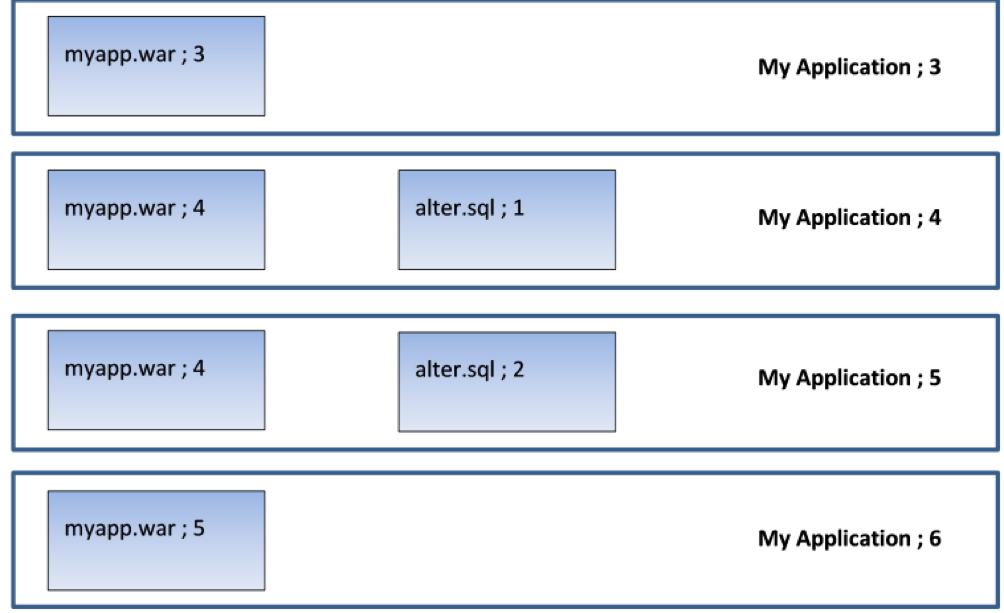
    Picture an application (“My Application”) that is up to version 6. It has two components: a WAR file and a database component that contains alter scripts that roll the database schema forward. Here is what the last four versions look like:

    So version 3 has a new version of the WAR file; version 4 has a new version of the WAR file and a database alter script that adds a column to a table. Version 5 only changes the database (it amends a stored procedure which uses this new column). Version 6 applies a new change to the WAR file.

    Now, in a continuous delivery process, the test rig being targeted will receive each new version. So when version 4 is deployed, the rig will receive version 4 of the WAR file and the alter script will be executed to add the column to the table. Then, when version 5 is deployed, only the DB alter script will run (alter.sql;2) to amend the stored procedure. The WAR file is not deployed, since the server already contains version 4 of the WAR file. When version 6 is deployed, only version 5 of the WAR file is deployed. This is exactly what we want.

    But now what happens when we move to user acceptance testing (UAT)? By this stage, we’ve done as much automated testing as we can get away with; in UAT, real users need to log on to our test system to make sure they’re happy with everything. So we’re not going to do a “push.” In UAT, the test lead does a “pull” when they’re ready to accept the new version of the application for testing. So they pull “My Application Version 6” into their test environment and get their testers lined up with coffee and pizza.

    But what happens if the test environment is currently on version 3? Well, for the WAR file, there’s no problem—there’s a difference in the component version for the WAR file so the new version is deployed. But what happens to the database? There are no alter scripts associated with version 6 of the application, but without applying alter.sql;1 and alter.sql;2, the database schema is not going to be valid for use with myapp.war;5. The testing will fail, not so much “falling at the first hurdle” as “falling in the paddock.”

    Deltas allow us to cure this issue. What we need to do is identify the components that represent the database changes and get them to be applied in sequence for each interim version. In that way, successive database “deltas” are applied to roll the database forward to the correct schema version before the required version of the application is deployed.

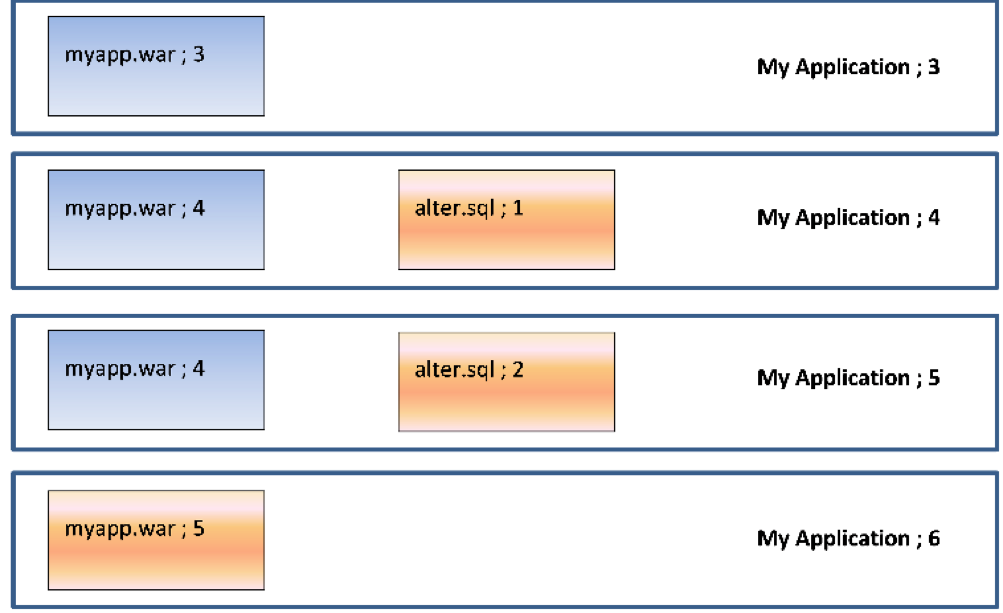
    So, in our case, going from version 3 to version 6 would deploy the following components:

    So we will deploy (and run) alter.sql;1 to add the new column, then alter.sql;2 to amend the stored procedure and, finally, deploy myapp.war;5. Deltas mean we do the minimum required to get the application version to the desired state.

    Conclusion

    Versioning the components that make up an application means it is easy to determine the deltas (changes) between one application version and another. Recording what version(s) of the components are on the endpoints in a target environment makes it easy to only deploy the components that have changed, minimizing downtime and making the deployment quicker and less error-prone. Identifying the deltas for a database gives us the ability to roll databases forward and jump between releases, which is invaluable when transitioning from an agile “push” to a waterfall-centric “pull” deployment model.

    — Phil Gibbs

  • Go Big or Go Home: Total DevOps Guarantees Results

    Go Big or Go Home: Total DevOps Guarantees Results

    As revealed by a recent survey, only enterprises that implement an “all-in” approach to DevOps achieve the results of best-in-class enterprises seen in the “2017 State of DevOps Report.” Total DevOps approaches DevOps transformations holistically, integrating the full breadth of your DevOps value chain as well as the many stakeholders across your organization that must be engaged to ensure broad, enduring success.

    Trace3’s Total DevOps transformation approach uses the following steps:

      1. Identify the DevOps Leadership & Core Team. Your Leadership and Core Team members should be open to change, early adopters and innovator-types.
      2. Together as a team, set your true north and determine your big picture business goals for your DevOps journey. End-to-end pipeline lead time, release throughput, release quality, security, satisfaction and productivity are some examples of DevOps goal areas.
      3. Map the end-to-end (E2E) value streams specific to your chosen DevOps goals. Focusing on the goals your organization has for DevOps will ensure your team and organization are aligned and focused on outcomes.
      4. Identify bottlenecks for each value stream that will most affect each goal. During this step, gaps between current state and desired state are made clear.
      5. Dig deeper into the processes and further explore bottlenecks and gaps. Concentrate on deeply understanding how the relevant bottlenecks and gaps affect lead time to define specific improvement opportunities.
      6. Define solution strategies and tactics that align with goals and address improvement opportunities identified during analysis of current state. Total DevOps takes a comprehensive perspective of people, process and technology to define strategies and tactics.
      7. Develop an overall DevOps road map, which includes considerations for people readiness, process improvement and technology-specific implementation plans. Each of these implementation plans should incorporate change management or adoption enablement techniques.
      8. Determine how the existing technical debt will be addressed. Give highest priority to the backlog of technical debt that will most support the goals.
      9. Design metrics including key performance indicators (KPI) and service level agreements (SLA). The use of KPIs and SLAs will enable the ability to tune, track and validate the success of the solution.
      10. Implement! Agile iterations may include detailed design, proof of concept trials, implementation for one viable application environment and team and then deployment to all target application environments and teams using a well thought-out sequence and strategy for onboarding.
      11. Employ continuous feedback. Monitoring the performance of all application environments utilizing the established KPIs and SLAs will provide unbiased measurement of the system performance.
      12. Employ continuous improvement. Feedback is critical for learning and improvement which will fuel each step in your ongoing DevOps journey.

    Summary

    What do you think? Do you agree the Total DevOps steps listed above are important to achieving big picture DevOps goals? Are there others you recommend? For more information about Trace3’s Total DevOps transformation approach, refer to our perspective paper, “Navigating Your Total DevOps Journey.”

    While DevOps implemented using the Total DevOps approach provides a strong foundation for long-term enterprise business improvements, it is important to understand DevOps is not an island. Enterprises implementing DevOps should be aware that DevOps interoperates with other IT systems and practices. Enterprises are well-advised to choose tool-agnostic IT partners that can provide solutions that best suit the needs of each unique enterprise and can integrate and evolve DevOps together with all their IT systems.

    — Marc Hornbeek

  • All Day DevOps: Taking Lambda to the Max

    All Day DevOps: Taking Lambda to the Max

    Lambda is the 11th letter of the Greek alphabet, and it is also the name of the Amazon Web Services (AWS) service that lets you run code without actually configuring a server. Amazon chose the name Lambda because—well, okay, I have no idea. Comment here if you know.

    Thankfully, you don’t need to know that to understand how to utilize Lambda. Matt Williams, DevOps Evangelist at Datadog (@technovangelist), outlined how to set up AWS Lambda at the 2016 All Day DevOps conference in his talk titled, “Hold the Infrastructure: Getting the Most Out of Lambda.”

    First, to understand what Lambda is, we must look at the evolution of servers.

    williams1.png

    We started with physical boxes—we had to buy and maintain these boxes, and no matter how much we used, we had to pay for all of it. We then evolved to multiple virtual machines on a physical server so that we could maximize the resources of physical boxes. Now, AWS and similar cloud services are common. We create a virtual machine that we need, and the service provider maintains the physical servers. We also have containers to keep environments identical across machines and, finally, we arrive at Lambda, which is service that runs code but doesn’t require you to set up the server. It takes care of all of that automatically, and you only pay for the time that the function is actually running. So, if your function takes 500ms to run, you pay for 500ms to run it once.

    Lambda is trigger-based. When it receives a trigger, it executes a specified function. The trigger can be a variety of actions with AWS services, such as when a file shows up on S3 or an Alexa skill is requested.

    Lambda is serverless, as far as you are concerned.

    Lambda is stateless. This means you can’t rely on local states, so, if you need to retain information between function calls, you have to save that data somewhere else.

    Lambda executes functions. Each function:

    • Is code in a container on LXC on AMZN Linux
    • Does not have restrictions on what it can do
    • Is priced based on exec time, quantity and memory

    Lambda links to various AWS services, such as:

    • Files (S3)
    • Database Updates (DynamoDB)
    • Streams (Kinesis)
    • Messages (SNS, SES)
    • IoT (Echo, API Gateway)

    Matt mentioned several good use cases, such as bootstrapping (the first 1M requests per month are free), cron jobs, file manipulation, API translation, social media stream processing, scaling infrastructure, mobile/IoT backends and Alexa skills, to name a few.

    He also mentioned three specific examples to explore:

    Matt then outlined how you can get started and noted that setup is simple as long as you think of application development as simple (write the code, set up on AWS, and debug). He walked through a specific example of automatically resizing images on S3 when they are added. You can watch his full presentation with screenshots here.

    Matt also provided a list of some AWS Lambda Tools:

    Matt rounded out his 30-minute presentation with a discussion regarding the need for monitoring and how to use Lambda for monitoring.

    You can watch Matt’s entire talk online here, where you can dig deeper into this subject. If you missed any of the other 30-minute presentations from All Day DevOps, they are easy to find and available free-of-charge here.  Finally, be sure to register you and the rest of your team for the 2017 All Day DevOps conference here.  This year’s event will offer 96 practitioner-led sessions (no vendor pitches allowed). It’s all free and online Oct. 24.

    — Derek E. Weeks

  • Don’t Underestimate the Work

    Don’t Underestimate the Work

    It is relatively common in human endeavor to attempt to figure out how much work will be involved in a project, and be wrong. The more complex the work being done and the organizational system doing it, the further off estimates can be. This was one of the drivers for both Agile and DevOps: to take smaller steps with less dependencies and complexity.

    The complexity problem is true in the path to application release automation (ARA) as well. ARA merges continuous test/continuous delivery with deployment automation, but both of these toolsets are complex and continuing to evolve. When you think about it, it is somewhat amazing that ARA can handle the breadth of functionality it is covering, while both sides are shifting and growing as well as it does.

    Construction Crane
    Construction Crane, compliments of Pixabay

    When you approach ARA, you should make certain you have a handle on the amount of work that it will take to get the system up and running. It’s not simple, even if you’re already using a full CI/CD environment. But it’s worth the work, so here are some of the things to watch out for.

    Multiple Targets

    First on the hit list is on the deployment side. One of the strengths of ARA is the ability to deploy to any environment. The ARA system has to know about each environment in enough detail to enable deployment on it. It must know how to deploy servers, where to get OS, what needs to be added on to the OS, and how to get the application onto these systems. Increasingly, programmable network elements and security configuration fall into this category also. While tools such as Chef and Terraform can help in this regard, if you’re not already using them, they’ll have to be configured if not already, and then linked into your ARA tool. Understanding the path from here to there is critical to early success with ARA.

    Databases

    This is one of the more vexing problems. While most ARA tools offer the ability to configure databases and database connections, your datasets generally don’t hop around so easily. So if you’re testing and deploying on separate networks, you’ll need to make sure that the relevant tables are on those networks. This struggle impacts moves to the cloud, changes from a fully test network to production or any other change that requires the database server be accessible when it hasn’t been in the past. The work to solve these problems is pretty wide. In some cases, such as purely internal or purely cloud, merely routing from the relevant app instances to the database server will do it; but, in the case of across-the-internet changes, it will take a lot more work. Make certain you understand what challenges you will face before moving.

    Tooling Sets

    Much of the external needs of an application are baked into the app build process through tools such as NPM or Git. But those tools don’t cover everything necessary for the entire app ecosystem. Agents, per-tool databases, small tools used occasionally—make certain you have a list of what makes the app work, and make certain they’re configured to be built in by the ARA tool. This sounds obvious, but watching a team learn by trying to deploy and fix broken parts only to do it again is not only painful, it also leaves a “Did we get everything?” impression. I saw one app break on deploy because the team didn’t include curl. Yes, curl in the deployment. Test had it in the environment, production did not.

    Get an inventory of both application development dependencies (libraries, etc.) and deployment dependencies (databases, reporting tools, agents for monitoring, etc.), and save yourself some pain.

    Decrease Your Work by Asking Questions

    ARA gives you a repeatable build/deploy process that can be used to target the environments you need while reducing manual scripting and steps. But before you throw in, sit with your vendor’s tech people and ask them to walk you through stumbling points, they likely know far more gotchas than I do, because it’s their job, and unless you got the new guy for an SE, have probably seen more. And getting ARA up and fully functional quickly allows you to focus on other DevOps needs, such as improving automated testing.

    — Don Macvittie

  • Continuous Everyone: Engaging People Across the Deployment Pipeline

    Continuous Everyone: Engaging People Across the Deployment Pipeline

    We have continuous integration and we have continuous deployment, but what’s continuous across all of what we do is people. Even when tasks are automated, someone wrote the automation. So, Jayne Groll evangelizes about “continuous everyone.”

    Jayne is the CEO of the DevOps Institute and the author of “Agile Service Management Guide.” She talked about continuous everyone at the 2016 All Day DevOps conference. She describes it as “about people, culture and collaboration mapped into your value streams.”

    Picture1.png

    We all hear about the importance of people, culture and collaboration, but how well are they integrated into our organizations and processes? Is it in everything we do? Is it inherently continuous?

    It all starts with culture. The Business Dictionary defines culture as, “The values and behaviors that contribute to the unique social and psychological environment of an organization.” As Jayne points out, culture influences how people think, feel, interact and behave at work.

    Picture2.png

    We all have a vision of a euphoric culture. For most, that doesn’t reflect the reality of the current culture, which is generally Games of Thrones. Everyone wants to sit on the Iron Throne: ITIL/ITSM, DevOps, Security, Lean, Agile, Automation, and CI/CD. Traditionally, each of these functions has operated in isolation, convinced they are the most important cog in the machine. Now, DevOps has forced us to talk for the first time in 40 years.

    Picture3.png

    Once we acknowledge a problem, there are only 11 more steps. So, next, improving culture begins with addressing the root cause of cultural fails:

    • Language barriers (industry language)
    • Tribal knowledge
    • Poor communication
    • Thick silos
    • Disparate processes
    • Incompatible automation
    • Inadequate collaboration

    These cultural fails—both the cause and a symptom of thick organizational silos—must be broken down because they cage people’s creativity, and creativity is something you can’t automate.

    Now, people typically participate in the Continuous People Pipeline like this: Develop → Commit → Build → Test → Deploy and APIs built in between. Jayne advocates that we need to focus on Application People Interfaces between engineers and testers and ops teams. We need to let computers do the boring, repetitive tasks and let people solve problems and focus on high-value activities.

    Since not everything can be automated, continuous engagement is critical. While some advocated for “NoOps” (everything is automated), we should focus on “NewOps” to capture the talent and expertise in operations we need to leverage for tasks only people can do, such as:

    • Provide input and feedback
    • Design pipelines
    • Configure automation and APIs
    • Review test and other output
    • Design metrics
    • Facilitate feedback loops
    • Interface with the customer
    • Solve problems
    • Exchange ideas
    • Be innovative

    The bottom line is that this could be the beginning of a beautiful friendship. We need to reinvigorate the lost art of the dialogue. Actually talk to each other.

    Picture4.png

    This begins with trust. Every aspect of the Continuous People Pipeline is filled with expertise, integrity and people whot want to learn. There is a trust. You have to trust each other’s strengths and take the opportunity to engage on a continuous basis.

    It is only together that we can continuously improve.

    You can watch Jayne’s entire talk online here. If you missed any of the other 30-minute long presentations from All Day DevOps, they are easy to find and available free-of-charge here.

    Finally, be sure to register you and the rest of your team for the 2017 All Day DevOps conference here.  This year’s event will offer 96 practitioner-led sessions (no vendor pitches allowed).  It’s all free and online Oct. 24.

    — Derek E. Weeks

  • Continuous Delivery vs. Continuous Deployment

    Continuous Delivery vs. Continuous Deployment

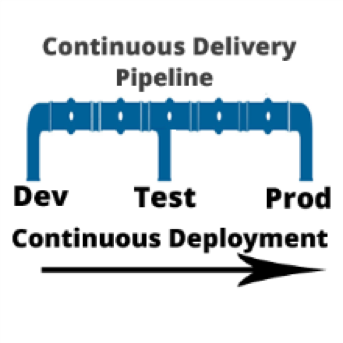
    I am often asked, “if we are using a continuous integration (CI) server and adopting a continuous delivery pipeline, where does continuous deployment fit in?” Good question. In a nutshell, continuous delivery engines such as CloudBees or Blue Ocean are designed to trigger the execution of CI workflows across the dev, test and prod environments. Continuous deployment is called as part of the CI workflow to do the actual release of code out to endpoints. Continuous deployment can be managed by application release automation tools or supported by one-off scripts. Regardless of how sophisticated the deployment step of your CI workflow is, it is still continuous deployment.

    To understand both continuous delivery and continuous deployment, one must go back to their roots, continuous integration. CI is a key component of Agile practice.  Agile developers understand the importance of adopting a methodology that can manage smaller incremental software changes to release software, and therefore business value, to end users quicker and cheaper.  The activities of deploying to testing and production historically have been in the hands of testing and data center teams, separate from Development. But in the Agile practice, these activities cannot be separated from development. The concept of separate development, testing and production teams is a waterfall concept, not an Agile concept. In Agile, everyone is on the same team. This means that testing and production teams must become part of the Agile process.
    Mastering Agile’s last Mile

    Ultimately, the goal of continuous delivery is to accelerate release cycles and get new code out to production fast. However, for most companies this is not happening. Developers and testers may have embraced continuous delivery, but when it comes to production, the code is moved to a staging area where it languishes until production is ready to perform the update. The last mile of Agile is not achieved. And we are back to where we started: waterfall.

    There are many reasons for the production roadblock. Lets’ review the top four.

    • Agents: Both open-source and commercial CI servers are agent-based. An agent based system works fine for developers and can be tolerated by testing. However, production teams are not that excited about installing yet another agent on to the production end points. For this reason, production team use their own method of deploying code. Therefore, the deployment scripts used for releasing code to dev and test are not used by production. The way they see it: Production does not want a deployment process that requires them to re-configure their data center environments with agent from a development tool.
    • Scripts: Production teams want input and visibility. One-off scripts obfuscate the deployment process. For this reason, production teams will write their own scripts. Scripts simply do not have the intelligence needed to meet the audit, rollback and transparency requirements needed by production teams. Production teams perform many steps manually. This takes time and cannot be done in an agile cadence. The result: Great code languishes in staging areas. Production stays several releases behind what continuous test has approved.
    • Cost, cost, cost: Most of what developers create in a continuous delivery workflow comes from open-source or consumption-based licensing models (think Jenkins and Jira). Tools that can achieve continuous deployment such as application release automation solutions are far to expensive for one development team to acquire and incorporate into the CI workflow. These types of tools are sold at the CIO level and cost upwards of $250,000. Production teams are often hesitant to purchases these tools, as the high cost equals high risk. And ‘one ring to rule them all’ does not work. This type of operational tool acquisition is waterfall-based and does not fit into the leaner Agile DevOps tooling. The result: One-off scripts continue to be used and dev and test. Production does not adopt agile.
    • Sustainability: During waterfall, a production release was performed as infrequent as two times per year, or at most once per quarter (considered aggressive). In other words, production is staffed to support a production release on an infrequent basis. With agile, the demand for production releases increases 10-fold. Instead of doing at most four releases a year, they may be required to do four releases a month. Production cannot keep up the agile pace. They are staffed for waterfall.

    Automating Continuous Deployment: Key to Maturing Continuous Delivery

    Continuous delivery cannot be successful without continuous deployment. If you want to roll code out to end users faster, the deployment process itself must be modernized. Using the same one-off scripts that were used in the waterfall approach will not achieve your CD goals.

    Continuous deployment automation is performed by a new set of agile DevOps tools called application release automation, or ARA. ARA solutions are designed to support a model-driven software deployment that allows development, test and production teams to use the same process without the need for one-off deploy scripts. ARA adds all of the features and functions needed to support continuous delivery and data center deployment requirements. ARA is designed to fully perform the heavy lifting of software releases including application packaging, release versioning, database updates, server configuration management, calendaring, roll-forward, rollback, security access and auditing.

    ARA solutions are called by a templated CI workflow that is defined by the development team. The workflow is moved up the pipeline and adapts to the changes at the various pipeline stages (System Test, Integration Test, Pre-Production, Production, etc.)  Because the process is driven by the ARA tool and not a script, the changes are automatically addressed across the pipeline reducing the workload for all teams and supporting frequent changes that can be easily traced and audited down to the server inventory level, including the production environment.

    Developers, Get Your Hands on Deployment Automation Tool       

    To achieve a repeatable CD pipeline that supports production, developers must embrace the automation of continuous deployment at development. The dysfunction however is the outrageously high cost of ARA tools. Developers don’t buy expensive operational solutions. More ARA solutions must be offered on a consumption-based model or offered as open source with the ‘out of the box’ integrations into CI/CD. When considering the purchase of an ARA solution, look for agentless models that can be implemented one project team at a time. Embracing this level of corporate process change must be done project by project. The operational big bang approach does not work well in an agile practice. Not everyone can use the same solution. However,  if done correctly, there are big benefits.

    ARA is a process that strengthens the foundation of the continuous delivery pipeline and is core to the agile DevOps initiative.   It facilitates agile practices by allowing the testing teams and data center teams the tools needed to become more agile and accept the frequency of changes being pushed across the pipeline by Development. Ultimately, the goal is repeatability across the pipeline, pulling together Dev and Ops.

    About the Author / Tracy Ragan

    Tracy Ragan is CEO and Co-Founder of DeployHub. Tracy has extensive experience in the development and implementation of business applications. It was during her consulting experiences that she recognized the lack of build and release management procedures for the distributed platform that had long been considered standard on the mainframe and UNIX.  Tracy has worked with hundreds of development teams in implementing a team-centric standardized build to release process. Connect with her on LinkedIn.