Tag: continuous delivery

  • 7 Signs You’re Mastering Continuous Integration

    7 Signs You’re Mastering Continuous Integration

    A majority of organizations think they are doing continuous integration (CI), yet when asked if they are following key practices of CI such as running tests to validate every build, many of them aren’t. Ask yourself the following: “Are we building our application with every change, or at least multiple times a day? Do we avoid long running feature branches? Do we prioritize fixing broken builds over committing new changes?” If your answer to any of these questions is “No,” then guess what? You are not truly doing CI—and you’re not alone.

    Continuous delivery (CD), a foundation of DevOps, is built on the practices of continuous integration. Accordingly, you have to implement CI properly before you can truly achieve success with CD and DevOps. In other words, you have to crawl before you walk.

    Steps to Mastering Continuous Integration

    To reach business goals, here are the seven practices organizations must do to master CI:

    Automate the Build—the Entire Build—on a Central Server

    This seems like an obvious one—and it is. Sure, prior to implementing continuous integration, organizations either build locally on a developer’s desktop, have a build engineer manually integrate code or have to work through a series of fragile, manual steps that are prone to error. But, surprisingly, many organizations that claim to practice CI still get this one wrong.

    Simply put, your continuous integration build should run a central shared server, be able to run completely unattended and be automated such that the same input will produce the same, same output every time.

    Build as Frequently as Possible

    Teams practicing CI build multiple times per day, ideally triggering the build per change on a pull request, merge or commit. Building per commit enables errors to be found as soon as they are introduced and are more easily fixed.

    The word “continuous” in continuous integration should be taken as literally as possible. Often times when I ask organizations how frequently they build, the answer is one of the following:

    1. We do “push-button” builds, X times per-week
    2. We build both every night, and once per week
    3. We build once per-day at X time

    As you have likely deduced, these are not “continuous” builds. They may be central builds, automated builds or scheduled builds. But those don’t provide the benefit of continuous integration. If a build breaks and you have two days of 30 commits by 10 different developers, you may have to sort through all of that work to figure out and correct the cause of the build. Productivity killed.

    Commit or Merge to Mainline Frequently

    Teams doing CI are likely committing/merging to trunk or main with every change or at least once a day.  If you are maintaining long-running feature branches, for instance, you are not getting the benefit of validating integrated changes frequently. If you branch for a long period, when it is merged, the integration has been delayed and you may be left with conflicts or bugs to fix.

    Build Quickly

    If you are practicing continuous integration, your build likely completes within 5-10 minutes.  If builds take longer (some organizations have five-hour-plus CI builds), not only are you delaying integration and, therefore, valuable feedback, but developers are less likely to commit changes because of the cost to their productivity—or, even worse, they continue to commit against broken code.

    Take time to optimize your build and validation time. This may require you to decompose your CI build process to align with components or teams and then validate the entire integrated application as a separate step in the overall development process.

    Validate the Build

    CI includes validating the changes and resulting built. This kind of testing should be a part of the overall build process. If your only validation is based solely on confirming the software compiles and links, then you are not truly practicing CI. Most teams practicing CI include code scans and unit tests in the CI build.

    Validate in a Production-like Environment

    Mature CI practitioners ensure consistency between the dev, test and pre-production environments. The most mature are using VMs or containers, service virtualization and other techniques to ensure they are performing validation in a production-like environment and reducing the risk of discovering errors downstream in pre-production or production, well after changes were integrated.

    Fix Broken Builds Immediately

    As mentioned, it’s critical that teams find and fix issues quickly so that they don’t move downstream. With CI, processes are set up where builds are validated and committed continuously, so if something is problematic, it’s easier to fix. If broken builds are ignored, the issue will be more difficult to find and fix, but worse is the culture it encourages. CI is based on a quality-first approach. If the build breaks,“Stop the line” and fix the build. Everybody will be better for it in the long run.

    Don’t Forget About Culture

    If an organization can look at these seven signs and say it does all of these things, then it is really doing CI. These may seem simple, but when these principles are combined, the outcome is remarkable.

    Organizations that can’t say they follow each of these principles likely will have problems delivering functional builds regularly. The initiative will fail and team members will become frustrated and revert back to their old ways. Not only will there be a process issue, but also a cultural issue—and this is where many organizations get stuck.

    Teams must change how they work together and they must also make sure they are aligned in their mindset. CI has many benefits for organizations, but don’t forget that it’s actually designed to embrace failure, not eliminate it. Continuous integration creates a system where developers can fail fast, so they can find and fix errors early and quickly.

    Continuous integration is one of the foundational elements to a real DevOps transformation, which everyone knows is a top priority for many businesses today. Getting it right—truly getting it right—is essential to keeping up with modern business needs.

    — Brian Dawson

  • Why You Need Chaos Engineered into Your Hybrid Cloud Infrastructure

    Why You Need Chaos Engineered into Your Hybrid Cloud Infrastructure

    Nearly a decade ago, I began working at Amazon as an engineer. Cloud technology was just starting to revolutionize how companies launch applications, and early adopters were seeing the benefits of not having to purchase, provision and manage their own hardware. On the flip side, larger companies (especially those that store sensitive information) were still hesitant to fully embrace the black box that was “the cloud,” holding onto the belief that for critical applications, the cloud was neither reliable nor secure.

    Fast forward to today, and all of that has changed. We are seeing government institutions, banks, and hospitals all moving their infrastructure over to the cloud. The benefits of being agile, innovative, and highly efficient have mostly overshadowed the concerns around the cloud’s reliability. According to Cloud Technology Partners, cloud adopters see an average reduction of total cost of ownership (TCO) of around 40 percent. And top-performing banks are 88 percent more likely to implement a hybrid cloud solution than their underperforming peers, cites a recent report from IBM Institute for Business Value.

    Long story short, the question is no longer “if” but “which”—and there are three major options: AWS, GCP and Azure. Today, many companies are doing their best to avoid vendor lock-in, opting instead for a distributed strategy, where teams are empowered to choose the best option for what they are working on. While having a hybrid approach helps avoid vendor lock-in, it also can save teams from disaster if one of the cloud providers has a major outage like the great S3 outage of 2017.

    But just because you have a hybrid strategy—running active-passive across different cloud providers—doesn’t mean you’re home-free. Unless you’ve actually tested that your passive stack will jump in to save the day in the event of a crisis, you’re more or less closing your eyes and crossing your fingers in the hopes that your active stack never goes down. Think of it like running a fire drill: How can you be sure everything runs smoothly during a time of disaster if you never actually run the drill?

    We need to shift how we think about operations to place more of the burden of Ops work upfront. While it’s important to reduce MTTR (mean time to resolution), that still means there has been an incident that has affected customers and potentially your bottom line. As someone who has been a call-leader for Amazon and Salesforce, I know firsthand that we could save ourselves a lot of headaches by being more proactive about running experiments in a controlled environment and focusing on reducing the MTBF (mean time between failures).

    This is why it is important to have a chaos engineering solution that can run experiments across all of your environments regardless of their build, technology or provider in one simple to use, unified experience. By consistently testing that your “failsafe” actually behaves the way you want it to, you can be much more confident that the operations work you’ve put in to make your architecture more resilient isn’t all for naught when a real-world outage comes calling—and it will.

    — Matthew Fornaciari

  • Continuous Delivery is Not Continuous Deployment

    Continuous Delivery is Not Continuous Deployment

    Every once in a while, it is worth revisiting a topic that flies under most people’s radar. The differences between continuous delivery and continuous deployment is one of those topics. While those steeped in DevOps are well-aware that software can be delivered daily (or even more frequently), deployment is less frequent, and more dependent upon both development and marketing cycles.

    Most CI/CD tools can and do crank out “deployable” apps on a daily basis, or even each time that code is checked in. In theory, each of these builds is a candidate for deployment, and each has had at least some level of testing.

    But setting up the environment to host these apps is a separate step. Quite often today, it is a step that is handled by scripts that configure/move everything to build the app environment into a comprehensive system with knowledge of network, data sources, storage, etc.

    I’m revisiting this topic because new people often hear “CD” and assume that is the end state. Of course, it is not; the application has to be deployed—to Test and Production at least, and in many enterprises to Staging, also.

    While these environments are almost invariably different (Test does not share IP space with Prod, for example), the deployments must mirror each other as much as possible to make Test representative of what Prod will look like.

    As with any step in the DevOps toolchain, scripts to achieve continuous deployment are not a great solution. They are certainly a good first step—automating what previously was done by hand—but tools that make the experience easier and more dynamic are available, and should be considered.

    Whether an explicit continuous deployment tool or an application release automation (ARA) tool (or an ARA that calls a continuous deployment tool, as we’ve seen some used), something to remove dependence on hand-edited scripts is useful for many reasons, starting with the fact that separate scripts are maintained for Test and Prod and changes must be made in two places when a change is made to an application (such as changing where the DB is located or switching to a dedicated AAA server). This makes scripting fragile. Tools can offer shared deployment and custom deployment sections so that multiple changes can be restricted to those things that truly need to be handled separately.

    Deployment is very much a target exercise. The code has been built; deployment is simply giving it a home. Historically, this required agents be strewn about the data center to help target deployments. Increasingly, agentless tools are available that allow the adaptability of continuous deployment while not requiring agents to be installed on every machine that might participate in the deployment activity.

    The other major benefit of moving beyond scripts and into a continuous deployment tool is huge: Everything else is version-controlled, which provides built-in rollback. A developer made a mess of fixing that bug, and things are worse? Roll back the update until the issue can be addressed. Tools such as Git make that particularly easy to do. On the deployment side, the same functionality is required. “Release 7.2 has been deemed to violate GDPR” might require moving back to the previous release. But script-based deployments are always forward-looking. It is enough to modify scripts to reflect the current environment, and it is a rare organization that requires parallel development of backout scripts. However, this functionality comes for free with a continuous deployment tool—that which it has built it can undo, because it is versioned automatically.

    And the benefit of versioning goes beyond rollbacks: It allows multiple version deployments for AB testing and allows for skipping forward and back as far as necessary to meet current goals.

    Is it a panacea? Of course not. Each technology brings new challenges. But continuous deployment solves more problems than it creates. And most of the problems it creates—a desire for greater integration with networking and storage services in non-cloud environments, for example—will be solved in a consistent and repeatable manner by these tools long before any scripting does. Because the tools are designed to create consistent and repeatable results.

    While you are out there kicking it, consider implementing continuous deployment tools to tackle the DevOps last mile. They’ll make your life easier, and your environment less fragile.

    — Don Macvittie

  • Continuous Integration Principles You Can’t Afford to Ignore

    Continuous Integration Principles You Can’t Afford to Ignore

    After recognizing the potential benefits from both continuous delivery (CD) and continuous integration (CI), many organizations have started implementing DevOps in their business operations. However, even today, many organizations don’t completely understand the core principles of continuous integration. Many people think that they are performing continuous integration as part of the DevOps implementation, but they actually aren’t.

    DevOps and continuous delivery are the market disruptors today and are providing businesses with a massive competitive advantage. Continuous delivery is developed on the tried-and-true practices of continuous integration. The companies that seek to recognize the advantages of continuous delivery have many times failed to completely understand CI concepts.

    The companies that perfectly carry out the continuous integration are following some basic rules. The working copies of developers are synchronized with the shared mainline once in a day or, most often, several times a day. An automated build verifies each integration to locate errors as quickly as possible.

    The CI process has been designed for embracing failure where developers can fail fast and fail very often, so they can locate and resolve errors quickly and early. The companies that don’t follow the above mentioned steps are termed as non-followers of continuous integration.

    Implementing Continuous Integration

    Continuous integration is a practice the development team follows and it provides real benefits for the whole organization. The engineers who are responsible for executing the practices of continuous integration want to attain those benefits and follow the most advanced practices their peers follow.

    Most often, companies understand how the teams implement the practices of continuous integration and then make decisions depending on this. The companies that do not follow CI principles are likely to face problems delivering functioning, crisp builds regularly. The members of the team will become disenchanted overtime and the initiative will lose momentum.

    People who don’t want change will get back to the traditional practices if they don’t observe any evidence of the advantages of change. You will have various problems, such as your team losing faith in implementation, unnecessarily wasted time, error-laden builds and projects that must be restarted.

    The organizations that lack the proper implementation of CI practices often face the cultural barrier problem. Engineers possess expertise in resolving the technical problems, but continuous integration requires a shift in culture and this is hard to achieve.

    You can get a CI tool and check almost all the boxes that apply to what continuous integration represents, but if you want to succeed with continuous integration, a transformation in how you work is needed.

    Instead of depending on tools for detecting problems such as a continuous integration error, the information can be automatically and independently verified through smart contracts on the blockchain, which is the technology behind cryptocurrencies such as the bitcoin wallet. The team will have a tough time implementing CI if its culture doesn’t change.

    Continuous Integration Principles

    Continuous integration depends on several major principles. Let’s deep dive into each one of them.

    Prior to checking in to source control, code must be built and tested: This can be done by compiling the build locally by yourself and then verifying that the stats pass. You can also depend on a VC/CI system that can carry out pre-commit builds. You can also utilize pre-commit hooks in svn to achieve something similar.

    Everyone should work toward the output of the CI system: The project managers and testers are also included in that. They must work in a way that they are confident on the working of build at some point and thereafter, every commit is an improvement. They should feel proud to showcase every build’s results to the entire project team and must react quickly for any reason.

    Functional automated tests must be carried out as part of the CI process: If you have the automated regression tests suite, chances are it is not difficult to hook them up to the CI system—and in the long run, it’s definitely worth it.

    Unless you are fixing the breakage, never check in on a build that’s broken: Post the original breaking commit. If you have numerous commits to a codebase, this leaves some issue in your CI system. If your commits aren’t coming fast and thick, this implies you are not reacting to the failures of your build and this is considered a serious issue. Also, the reason for the occurence of original breakage can be much more difficult to determine if other check-ins were done since the original one which broke the build.

    Make the check-ins exactly fit your needs: You may hate waiting for a long time for the compiling of a simple check-in build when you want to know whether you violated some major rule or have broken the unit tests. Make the check-in builds lightweight and run your code coverage and unit tests only. Chances are, you need not run all your analysis tools, code inspections and the automated functional tests every time there is a check-in. So, it’s better you keep the check-in builds light.

    Respond to the feedback: The CI system is a tool used to help steer quality and improvement as much as anything else. So, it should never be ignored. Nevertheless, it is easy to not pay attention to your CI system if the feedback is irrelevant. Working closely with the build team and the other members of the project is the solution, ensuring the build feedback is relevant and targeted.

    Other considerations: Never leave a broken build as it is; fix build failures as soon as possible. Also, every check-in must possess some value. Otherwise, what’s the need for doing it? Every check-in must be an enhancement of the last one. Here, the enhancement can be stated as an increase in code coverage, a bug fix or a new piece of functionality. Ensure you put it in your commit log if the improvement can’t be measured easily.

    Conclusion

    Continuous integration can be considered as a development practice that needs developers to embed code into a shared repository many times a day. The automated build validates each check-in, thus enabling teams to detect problems very easily. Continuous integration helps you build a solid foundation and enhances visibility enabling greater communication.

    — savaramravindra

  • Code Delivery: Pipeline Automation for the Speed to Innovate

    Code Delivery: Pipeline Automation for the Speed to Innovate

    Many developers steeped in the world of agile startups view continuous delivery pipelines as an accepted standard requirement for software development. Yet many companies, particularly large enterprises with traditional infrastructure, still struggle to make this approach a standard part of their development process.

    Whether your company is an enterprise looking to make continuous delivery pipelines a standard project element to increase agility and speed time to market, or your firm is looking to simply implement code delivery pipeline best practices, optimizing code delivery pipelines through DevOps-based automation will increase developer output and strategic contributions and deliver substantial business value.

    Efficient code delivery pipelines that balance security and agility can be achieved by using automation coupled with cloud infrastructure. Together, these technologies and processes can deliver big dividends in the form of lower development costs, higher-quality results and faster times to launch. By focusing on optimizing a delivery mechanism for value versus just delivering more code, code delivery pipelines can meaningfully and measurably impact business objectives.

    Continuous Delivery in Modern Development Environments

    Continuous delivery is a design practice wherein developers use automation to accelerate the software delivery process. It is a high-value process because it enables programmers to cut the overall cost of software development. Faster delivery of high-quality code makes it easier for companies to improve customer satisfaction, capture new markets and gain a competitive advantage.

    To optimize this development model, companies need to automate their build, integration and testing processes as well as provisioning and retiring infrastructure components.

    Let’s look at a typical scenario. Code delivery starts from a feature or bug request filed with a developer. The developer takes existing code, modifies it, does local testing and commits it to the code repository. The code in the repository is then tested by QA and tagged for production, where IT or operations professionals deploy the code to production servers.

    This creates loops at the local testing, QA, and production stages of the process. Each of these loops has a cost, which is directly affected by developer productivity and how long it takes to execute each loop.

    The local testing loop executes most frequently, so it’s critical to make this part of the testing process fast. Production bugs are the least frequent but most expensive for businesses when they exist. Consider the cost of a significant disruption to the workflow, or the negative customer experience, or the inability to deliver a service, or security vulnerabilities. Imagine if you could keep delivery time and costs under control while minimizing total effort at every stage.

    Ideally, code should be pushed in smaller batches. The downside to this approach is it creates overhead and room for error as more and more things move through the process. To reduce the overhead of too many pushes, automation can play an important and meaningful role. Indeed, automation makes it cheaper, faster and more reliable to do things in smaller batches and helps streamline delivery.

    Stories from the Front Line: Automated Code Delivery Pipelines

    DevOps automation such as automated code delivery pipelines can be more easily achieved when coupled with cloud technology. For example, Flux7 recently worked with a Fortune 500 enterprise to set up an automated code delivery pipeline using AWS CloudFormation, AWS CodeCommit, AWS CodePipeline and Jenkins. Developers would use a Git flow methodology, and once they merged code to the master branch in CodeCommit, polling would alert to a new commit. CodePipeline would create a CloudFormation change set and queue it up for review by the Ops team. Once the Ops team approved the change set by manually pressing a button, CodePipeline would trigger a CloudFormation stack update. This allowed for very high full-stack agility while not losing central governance.

    Many leaders in technology organizations are moving to Agile and DevOps as methods of improving the speed of delivery, of which an automated code delivery pipeline is foundational. Optimized development pipelines deliver significant value by minimizing the time and costs of local test, QA and production processes and by promoting code from one development stage to the next.

    When you engage in this process, you reduce the time it takes to identify problems and their causes. And when you automate development steps, you dramatically reduce the cumbersome and time-consuming tasks that slow down the release of software code.

    Impact to Your Business

    Efficient developer workflows in a cloud-based environment are the foundation of pipeline optimization. Their importance relates to the need to:

    • Control ever-increasing developer labor costs. Your monthly developer labor cost is almost guaranteed to exceed the monthly cost of your cloud server setup. Keeping your developers working efficiently means you get the most out of that labor and can focus that on what projects are bringing the most value to the business.
    • Get a clear understanding of developer activities. When we interview developers and IT team members, what emerges from these discussions is astonishing. Companies learn that they really don’t know as much as they thought they did about their employees’ day-to-day activities and workflow.
    • Find developers with the required skill sets. Hiring the right talent is costly and time-consuming. If you can help your developers work more efficiently, you can avoid the search costs. And, building a reputation as a company that supports developers helps attract new talent.
    • Accelerate time to market. It’s possible to improve the performance of less-productive developers by accelerating their work process with optimized code delivery pipelines and by building best practices in through automation.
    • Avoid rework-related slowdowns. Rework comes at a cost of time and effort. Automating development processes can avoid many of the human errors that cause rework.

    An effective code delivery process is highly valuable as it reduces risk from each release, ensures that rogue code is not introduced and helps organizations effectively manage global deployments. Most importantly, optimized code delivery pipelines can significantly impact business objectives and business outcomes, making DevOps a strategic contributor to achieving business imperatives.

    — Aater Suleman

  • Puppet Expands Scope of Pervasive Automation Initiative

    Puppet Expands Scope of Pervasive Automation Initiative

    Puppet today unveiled a series of initiatives as part of a continuing campaign to make IT automation available pervasively across the enterprise.

    Omri Gazitt, chief product officer for Puppet, said the first step in that effort is making it easier for IT organizations to discover what assets they need to manage. Puppet Discovery is an agentless tool through which organizations can monitor their IT environments continuously. Any changes or additions are captured immediately in a database.

    Scheduled to be available in May, Puppet Discovery replaces a traditional configuration management database (CMDB) with a platform that more accurately reflects the state of the IT environment because it’s always up to date, Gazitt said.

    Puppet is also extending the reach of its IT automation framework to include modules spanning platforms from Barracuda Networks, Cisco Systems and Nutanix, as well as the Azure cloud service from Microsoft.

    Modules for Cisco ACI software-defined networks (SDNs) and Cisco Meraki wireless networks are now available, along with a private beta of a module for the Cisco IOS operating system widely employed on the Cisco network infrastructure.

    Similarly, Puppet modules are now available for security and data protection offerings from Barracuda Networks and the hyperconverged infrastructure (HCI) platform developed by Nutanix.

    Puppet, in the context of the cloud, is now adding a module for Azure Resource Manager, as well as adding support for Windows PowerShell Desired State Configuration (DSC) and the Microsoft Task Scheduler 2.0 application programming interface (API) used in Windows.

    In related news, Microsoft, Barracuda Networks and Puppet also announced they are combining their respective capabilities to create an Azure Accelerator program to automate and secure mission-critical workloads. Organizations that participate in the program can get started at no cost, with free software from Puppet and Barracuda and no Microsoft Azure infrastructure charges while migrating workloads to Azure Cloud.

    Other new members of the Puppet Technology Alliance Partner program include Lenovo and xMatters.

    Finally, Puppet announced scheduled June availability of Continuous Delivery for Puppet Enterprise (PE), an update to Puppet Enterprise that includes role-based access control for Tasks, which can define node groups corresponding to business functions or units to limit who can run tasks within a specific node group. Puppet also has added Puppet Bolt Task Plans, which enable customers to orchestrate a set of tasks across thousands of Puppet Enterprise nodes using Puppet Orchestrator. Continuous Delivery for PE is based on a continuous delivery platform developed by Distelli that Puppet acquired last year.

    Puppet Enterprise has also been enhanced with easier backup and recovery capabilities to automate disaster recovery and support for a Puppet Development Kit (PDK), which includes a new resource application programming interface (API) that Gazitt said can be used to create custom Puppet modules to automate the management of any platform.

    In general, Gazitt noted that IT automation and DevOps increasingly are becoming synonymous. The biggest issue now, he said, is unifying all the independent silos of DevOps implementations that now span many enterprise organizations.

    Of course, IT organizations can apply IT automation without necessarily embracing DevOps. But once an organizations begins to adopt DevOps, it’s pretty clear IT automation quickly becomes indispensable.

    — Mike Vizard

  • Agile Development: The 3 Methods You Need to Master

    Agile Development: The 3 Methods You Need to Master

    As organizations embrace the age of Agile and digital transformation strategies, every brand is looking for a competitive advantage. To succeed, organizations need to focus on the user, offering services to users on their terms, on their devices and at their convenience. Even more, users expect these offerings to be visually appealing and fast. That’s a lot to keep track of!

    When selecting a digital transformation strategy, there are two key trade-offs organizations need to understand. First, getting features to market faster and increasing presence on users’ devices, and second, maintaining high application quality.  Acceleration can come in the form of adopting an agile process, i.e. highly independent dev teams who are responsible for one feature in the code, delivering incremental functionality from design to production. A proper quality methodology is as equally effective, ensuring a high-quality application at the end of each sprint. This can actually help the team accelerate.

    Continuous integration (CI), continuous delivery (CD) and continuous testing (CT) are the top three methods by which many development teams adopt an agile strategy. While each serves a slightly different objective, when combined, they can significantly help the team achieve velocity and quality, two of the most important goals of any development team. Let’s dive deeper into these three different components to understand the critical role they each play.

    Method 1: Continuous Integration

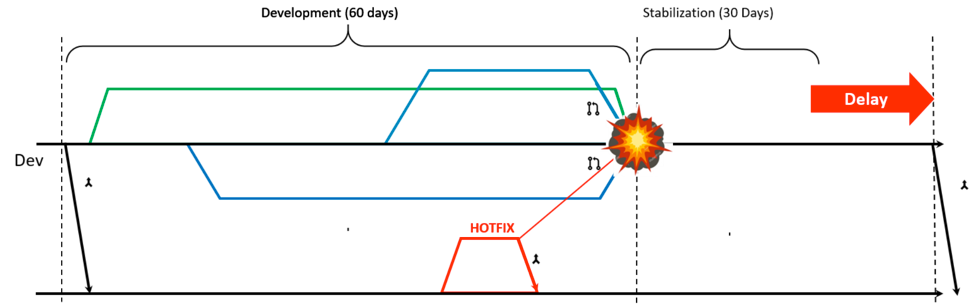
    CI is the most critical component to making an effectively agile development team. To help understand the important role CI plays, the image below depicts a team that has not installed a CI process. As you’ll notice, this team does not share their code with the rest of the development team until after the 60-day development period is over. As a result, by waiting to share key performance components, such as code, this team has unnecessarily extended the post-sprint stabilization phase, where developers test and redo integration points. With speed being such a sensitive KPI in situations such as app development, prolonging this phase can make a significant difference in the success of a project. What’s more, it can cause frustration among developers and testers across the software development life cycle (SDLC).

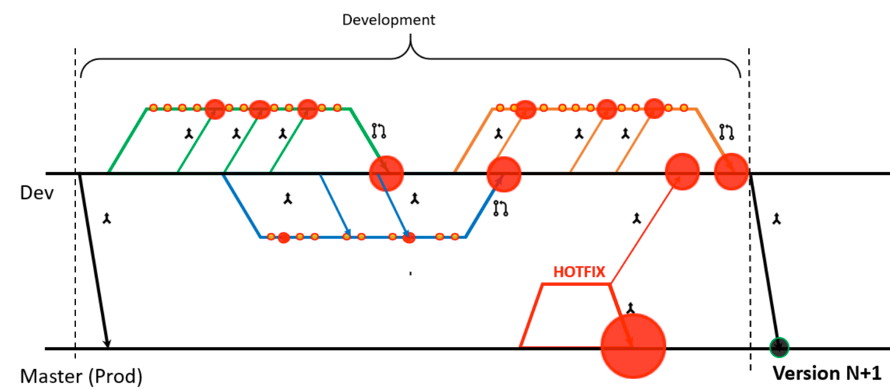
    For comparison, the image below depicts a team that has implemented a CI process. Using CI, the team integrated increments from the main tree continuously. In addition, by using test automation, they are able to ensure the integration actually works. By implementing a CI approach, the conclusion of each sprint is on time and within the defined quality expectation, resulting in a reduced stabilization phase. In some situations, it might be possible to get rid of this phase altogether. The ideal CI process yields a working product at the end of each sprint and each day.

    Method 2: Continuous Delivery

    CD is the practice is the practice of streamlining and automating all the processes leading up to deployment. There are a number of steps in CD, such as validating the quality of the build in the previous environment. When done manually, these steps can take significant effort and time; however, they can be automated using cloud technologies and proper orchestration.

    Teams should ensure they have a monitoring dashboard for their production environment in place to eliminate performance bottlenecks and respond fast to issues. This will complete an efficient CD process.

    Method 3: Continuous Testing

    CT, which can also be referred to as continuous quality, is the practice of embedding and automating test activities into every “commit.” CT helps developers use their time more efficiently when trying to fix a bug for code that was written years ago. To fix the bug, developers should first remind themselves of which code it was, undo any code that was written on top of the original code, and then retest the new code—not a short process. Testing that takes place every commit, every few hours, nightly and weekly not only increases confidence in the application quality, but it also drives team efficiency.

    Outlined below are various steps teams should take to achieve CT:

    • Confirm a stable test lab 24×7.
    • Arm the testing team with a suite of test and development tools that enable high productivity.
    • Leverage automation for only the high value and stable tests.
    • Properly size the platform and test coverage for all projects.
    • Enable fast feedback via frequent reporting and analytics.

    Summary

    One of the most popular misconceptions about adapting to today’s digital transformation and implementing an agile development process is that it hinders speed and quality. Incorporating the CI/CD/CT trifecta, in addition to an agile development methodology enables the velocity and quality needed for success in today’s rapidly transforming industry.

    — Amir Rozenberg

  • Continuous Delivery: No Excuses

    Continuous Delivery: No Excuses

    Jez Humble’s (@jezhumble) career has spanned roles through coding, infrastructure, and product development across three continents and organizations of varying sizes. To say he knows a lot about continuous delivery is a total understatement. In 2010, he and Dave Farley literally wrote the book on continuous delivery—and if you have not yet read it, I would suggest you pick up a copy. It’s a fascinating read.

    I’ve heard Jez speak over the years at a number of DevOps conferences, and I was excited when he accepted our invitation to speak at All Day DevOps. At the conference, Jez presented “Continuous Delivery Sounds Great But It Won’t Work Here,” during which he addressed the four reasons he consistently hears from organizations on why continuous delivery won’t work in their organization:

    • We’re regulated
    • We’re not building websites
    • Too much legacy
    • Our people are too stupid

    Jez also outlined the real reasons behind the stated reasons: Their culture sucks and/or their architecture sucks.

    Jez spent his talk addressing each objection.

    We’re Regulated

    Jez noted it took Amazon four years to go from monolithic to service-oriented architecture (2001-2005) but the company did it. Do you think Amazon is the pillar of free enterprise, free of regulation? Not so. Being a publicly traded company, Amazon is heavily regulated; it is subject to Sarbanes-Oxley regulations; it handles personal and corporate financial and proprietary data; and it provides private cloud services to the U.S. government, including highly sensitive data for the Department of Defense.


    null


    Amazon Web Services’ GovCloud, in fact, provides the cloud platform for cloud.gov, the 18F project Jez worked on to address the authority to operate process within the government.

    The old process had screened every software application before it was allowed on a federal IT system. It stifled innovation because it duplicated efforts multiple times over. There was no cross-agency assumption that if one agency approved a software package, it was okay at another agency. Cloud.gov moved controls from operations into infrastructure as a service. Now, agencies can receive software through cloud.gov to integrate into their applications.

    null

    The bottom line is continuous delivery is excellent for heavily regulated environments because it gives assurance to regulators by removing opportunities for human error.

    We Aren’t Building Websites

    Jez’s favorite example is HP LaserJet firmware. HP had a 400-person team spanning three continents. Obviously, the firmware was critical for new printers, but the team was moving slowly. Only 5 percent of their time was spent on innovation. HP tried hiring, firing, insourcing and outsourcing. With business school tried-and-true solutions exhausted, and knowing it had to eliminate non-value adding work to increase innovation, the company looked to continuous delivery with two business goals in mind: 1) Get firmware off the critical path; 2) Achieve 10X increase in development productivity, measured by percent spent on innovation.

    HP had other goals:

    • Reduce hardware variation
    • Create a single package
    • Implement continuous integration
    • Implement comprehensive test automation
    • Create a simulator


    null

    Note: the chart above doesn’t show the 23 percent of time spent managing the automation tests. Time well-spent.

    In the end, between 2008 and 2011:

    • Overall development costs were reduced by ~40 percent
    • Programs under development increased by ~140 percent
    • Development costs per program decreased 78 percent
    • Resources now driving innovation increased by 8X

    Too Much Legacy

    Jez’s example here is Suncorp, one of Australia’s largest insurers (note: Also falls under the “We’re heavily regulated” excuse). Suncorp was burdened with loads of mainframes and legacy systems, but it built a set of test suites with open source tools to move into continuous delivery.

    Our People Are Too Stupid

    Jez looked outside of the software development industry into an old-line manufacturer: automotives. GM’s worst performing plant had been closed down. GM fired every one of the workers from the plant. The workers were notorious for problems ranging from sabotaging cars to drinking to gambling on the job.

    Remarkably, GM’s union leaders convinced Toyota to hire the old GM employees to learn the Toyota processes, and Toyota hired the GM employees to run their new NUMMI plant. Toyota and the old GM employees showed it wasn’t the people that was the problem; it was the leadership, the management system and the use of obstacles. At the GM plant, an employee had a job and a certain amount of time to do it. If it didn’t get done, the assembly line kept running. At the Toyota NUMMI plant, employees were empowered to ask managers for help—without retribution. The car had to be in a good state before proceeded to the next stage of the production line.

    In software development, this is continuous integration. Toyota’s NUMMI is the inspiration for Lean in the United States.


    null

    Jez’s take-home point for any organization is that results aren’t achieved when you adopt practices but don’t implement the culture. You need to:

    • Agree and communicate measurable business goals
    • Give teams support and resources to experiment
    • Talk to other teams
    • Achieve quick wins and share learning
    • Keep going

    Jez dives into more details in his talk, which you can watch here. If you missed any of the other 30-minute long presentations from All Day DevOps, they are easy to find and available free of charge here.

    — Derek E. Weeks

  • Understanding the Mobile DevOps Process

    Understanding the Mobile DevOps Process

    In today’s current technology scenario, mobile app developers are always on the lookout for the latest IT innovations to stay on the competitive edge. To make the process of developing mobile apps more efficient, mobile service providers have adopted mobile DevOps.

    Mobile app development adopts the latest trends, technologies and tools for developing intuitive mobile application across different platforms as well as industry verticals. There are many mobile developers who are experts in the development of hybrid and native mobile applications across the platforms for end-to-end mobility, such as iOS, Android and Windows. Service providers aspire to achieve the business objective of the clients through leveraging people, processes and the latest technology.

    Why Mobile DevOps

    There are so many discussion and articles on mobile app development and how mobile DevOps practices could be integrated, adopted with existing processes and even how to use efficient resources that are beneficial for organizations. However, little has been said about why mobile DevOps could make a difference to companies that strive to enable their IT, development and operations to integrate with business goals.

    DevOps is vital for modern app development and delivery. However, leaders in the mobile application development and IT operations should address the unique collaboration, testing the release and analytics needs of mobile DevOps environments.

    Mobile DevOps for a Mobile Apps Developer

    The mobile DevOps discipline needs important business and technical decisions to be usable and to provide value for organizations. To get all critical pieces together and allow continuous mobile DevOps workflow, potential problems and bottlenecks should be identified. Nevertheless, mobile DevOps has its pros, as well.

    For a mobile developer to win the loyalty of mobile users, it must ship the right applications to the right customer at the right time. One has to continuously ship high-quality software and continuously listen and learn from users, providing them features before they know that they want them. Agile development methods are not enough; to win in mobile application, a developer needs mobile DevOps. It combines great automated tooling with a “continuous everything” culture.

    The Pros of Mobile DevOps

    Mobile DevOps has a number of advantage, including:

    • Shortens release time. DevOps, it’s been said, is about collaboration across teams, something that was not managed properly with the old waterfall practices. Actually, mobile DevOps is more than that. The simplified processes, when operations and development come together, could enable organizations share information between the teams and others and considerably shorten the time from the design-development phase to the actual release. Iterative cycle during development enable more frequent deployment of code, get new regressions tested, verified and released faster than regular phase-by-phase process. Mobile DevOps offer a faster path of fixing occurring problems with the product. Once enhancements and features implemented for each build are done, continuous integration with the right test setup provide a faster solution to problems.
    • Enables creation of better applications. More time spent on making new features, advantages and benefits for users simply are enabling the creation of better user experiences. User experience is the true differentiator today in the competition of the mobile apps popularity. Only those that enable delivery of experiences that users expect could remain in the competition. One of the most important things in doing DevOps is enabling instant feedback and reporting, transparent visibility to development and regression testing is paramount. This provides the mobile team an easy way of troubleshooting issues faster and fix, refactor and optimize user experience.
    • Saves time and make use of efficient resources. Faster features delivery, new build and updates are achieved when operation environments such as development, staging and production are stable and the operating environments work easily for development. This itself makes the whole mobile app development process more productive and helps maximize business advantages. One enabler of mobile DevOps is automation. Automation is available from source code management to testing and development tools and further to actual mobile app monitoring in production.
    • Provides multiple tools options. There are hundreds of thousands of tools that mobile applications are developed with daily. For any kind of feature, there should be a tool that could help build, test and deploy a certain part or feature of the app. Nonetheless, for good reason, some tools are used commonly by the mainstream. Most of the tools used and mobile DevOps processes that establish mobile DevOps core facilitate continuous integration, continuous release as well as continuous deployment. Part of the process is app release automation tools, which help up packaging and deploying app from development to production using automation. These tools help mobile DevOps flow to produce capabilities for implementing continuous delivery for even huge number of releases. Release management tools enable organizations to plan and to execute releases, offer a single collaboration portal for all stakeholders and provide traceability for a release and its components across all the build and delivery pipeline stages.
    • Could dodge inefficiencies and bottlenecks. The major idea behind Mobile DevOps is to make things transparent and efficient, boost internal communication and help in building better products or applications. When mobile DevOps practices, processes and tools are in line, several bottlenecks and inefficiencies could be avoided, such as:
      • Inconsistent development environments
      • Stability and maturity of workflow
      • Manual interventions
      • Lack of operational practices
      • ‘Old way’ and ‘new way’ integration
      • Competing/misaligned procedures and lack of ownership
      • Old-fashioned or manual testing process.

    Mobile DevOps is capable of transforming how an organization handles the development process for the better. It is no wonder  it has become the way of the future for mobile organizations. The DevOps approach principle puts emphasis on people and culture above tools and processes; thus, bringing business owners intimately to the design process can boost the success of the process. Organizations have to embrace a combination of collaboration and integration tools from both parties. Seamless interaction unlocks full benefits of the method and could ultimately contribute to overall business and operational success.

    About the Author / Drumit Shukla

    Dhrumit Shukla has been working as Business Development Manager in a software development company named TatvaSoft since 5 years. He is profoundly skilled and well experienced in providing software development services on various technologies ranging from Microsoft .NET to JAVA, Salesforce, BizTalk, SharePoint, PHP, Open Source, iOS, Android, Pentaho and more. Connect with him on LinkedIn.

  • Top 5 Best Practices for DevOps Monitoring

    Top 5 Best Practices for DevOps Monitoring

    Today organizations are required to deliver on higher levels of customer satisfaction for their online services. Many, however, are forced to support these initiatives with an interrupt-driven approach as they react to fix things after they break. However, for a more proactive approach and to manage expected high levels of SLAs, organizations can opt to reduce their amount of unscheduled downtime by implementing a continuous delivery (CD) model to their development efforts.

    What is critical in the CD model is the ability to monitor and manage systems in a structured way, getting early detection of problems so organizations can make changes before the system is impacted. While unexpected failures make interrupt-driven work unavoidable at times, organizations can become more proactive by examining their current approach and toolset against business needs to help create a path to continuous service delivery optimization.

    Effective CD Models Need Effective Monitoring

    As a starting point, organizations need control and visibility into their DevOps environment by collecting and instrumenting everything. Considering the amounts of data, this can be an insurmountable challenge for most organizations. To get started, follow these five best practices to perform DevOps monitoring efficiently and quickly in a measurable and scalable way.

    Step 1: Collect the Data. You can’t manage what you don’t measure! It is important to take inventory of what is being collected today and align with business and executive teams to collaborate on the aim of the services delivered. Analyze the inventory collection of metrics with questions such as: “Why aren’t we collecting this? How does this fit into our goals? Have you ever seen a failure in X? How often should we be measuring this? How long should we keep it for? Is that important?” Teams also should evaluate how they are collecting the information and consider the best architectural approach for collecting their metrics, including whether pull, push or pull collection methods are better. Once goals are understood and the inventory of data is collected, look at what else your organization should consider collecting.

    Step 2: Correlate and Triage. Correlation of data is needed to understand it, but data comes in at different frequencies, in different time frames and from different sources. Work to normalize the data to understand it, perform comparisons against the different incoming metrics and establish baselines for basic service availability. Since organizations aim to go beyond basic service level agreements (SLAs) and offer a high-performing solution, constantly ask what the organization is missing from a data perspective and how it relates to business initiatives. Asking that question from the collection, correlation and triage perspective is critical.

    Step 3: Identify Trends. Organizations need to examine historical data to identify trends and take action before issues arise and customers complain. Establish alerting thresholds by outlining what a normal day looks like from a monitoring performance and customer perspective, and then identifying examples of what makes an abnormal day. This ties in with managing infrastructure inventory and understanding safety thresholds for each of the components that potentially could impact the service offering. It’s critical to communicate these findings with teams and business-line managers to prevent service delivery problems from happening and optimize offerings based on identified trends.

    Step 4: Notify and Act (Automation). In manual mode, a notification is delivered and then the team reacts. But teams are continually pushed to do things faster, and automation can help. To get to that point, organizations must understand where best to add more automation. How do you gather the right telemetry that delivers consistent answers that the machine can operate rules against, and do you leverage an automated process or notify a person? The desire to improve to a faster process requires a shift from manual to automated practices.

    Step 5: Predict (What-if Analysis). If you don’t take the time to go through the first four steps in a methodical way, it’s very difficult to reach this final step without always remaining in a manual mode. To balance costs and availability, it’s critical to discuss with the executive team how to predict customer service consumption (revenue) against the amount your services are going to cost the business.

    For example, developing a service that can alert customers of a potential service disruption due to disk space can be accomplished only by clearly setting business goals, then using the right metrics and events platform leveraging a time series database. In this case, the business goal is to ensure no service disruption due to failures such as low disk space; the metric monitoring is for disk space for each customer instance with the appropriate threshold alert set off by an automated trigger; and the action is an email to the customer letting them know of the situation and what action they can take (reduce load or upgrade for more disk space). In this example, it is important to marry business logic with the monitoring practice to make service a successful experience for customers. Furthermore, this approach will help teams to not only predict user experience but also help to predict OpEx and CapEx better into the future.

    That’s the benefit of the ability to predict with the right monitoring approach—to make informed business decisions based on results. Customers appreciate that, and proactive support is much better than being reactive.

    Emerging trends such as microservices, containerization, elastic storage, software defined networking and hybrid clouds are pushing the boundaries of DevOps monitoring. The right monitoring plan can identify and resolve problems before they affect critical business processes and enables customers to plan for upgrades before outdated systems begin to cause failures and outages for users.

    About the Author / Mark Herring

    Mark Herring is CMO at InfluxData. He is a well-rounded silicon-valley executive with proven experience in taking complex technology and making it understandable to the broader audience. His deep developer roots are never far from his mind as he looks at trends and asks the tough questions on whether the technology is here to stay or just another fad. Currently Mark is Chief Marketing Officer at InfluxData. Follow him on Twitter and connect with him on LinkedIn.