Tag: continuous delivery

  • Why Financial Companies Love Continuous Delivery

    Why Financial Companies Love Continuous Delivery

    The other day I was on the American Express website paying bills and browsing around the benefits and services afforded me when I ran across a “who we are” section. It read:

    “We’re a global services company that provides customers with access to products, insights and experiences that enrich lives and build business success.”

    Surprisingly, the term “financial” was missing from the description. This led me to wonder if other financial institutions are evolving how they think about themselves. Here are some other examples:

    • Bank of America: “Here to help connect you to what matters most.”
    • ING: “Empowering people to stay a step ahead in life and in business.”
    • MasterCard: “As a technology company, we connect individuals, businesses and organizations around the world, creating greater opportunities for all.”

    Financial Companies Love Their Customers

    My unscientific assessment of various financial services companies suggests that they are centered on delighting their customers. They are transforming who they are by altering their customer engagement models and essentially becoming better software companies. MasterCard has even reclassified itself as a “technology” company. These companies are transcending the role of transaction engine to offer seamless, intuitive digital experiences for their customers.

    And the proof is in the performance. According to Forrester’s Customer Experience (CX) Index, financial services firms, including retail banks, credit card companies, investment firms and auto and home insurers, are some of the top brands worldwide when it comes to CX.

    You might think that large financial institutions would be digital laggards because of legacy infrastructure, regulatory compliance pressures and overall risk-avoidance. But you’d be wrong.

    In another study, 81 percent of financial services firms said they are embracing digital to redefine their businesses, and 87 percent are on the DevOps bandwagon. Sixty-one percent even said they are disrupting their industry with advanced digital initiatives.

    To stay competitive and improve their customer experience aptitude, financial services firms are undergoing significant digital transformation.

    Getting the Pulse of Fintech Continuous Delivery Adoption

    But how progressive are these firms in terms of their application delivery practices? Working with CA, Gatepoint Research recently surveyed more than 100 IT executives from financial services companies to take the pulse of where they are in continuous delivery adoption. Results can be found in this report and infographic.

    First off, to see if these companies might be considered unicorns or stragglers, they were asked the total volume of monthly deployments in all environments. Forty percent fell at the low end with fewer than 50 deployments per month. Now, lower deployment numbers could mean that these are less agile organizations or that they have fewer applications in general. Somewhat correlative to lower deployment numbers, the survey found that 48 percent currently are not using an application release automation (ARA) solution. Without automation, it’s tough to scale release processes—particularly to keep up with agile development.

    Moving up the spectrum, 41 percent are moderately prolific at 50-500 deployments per month, and then 15 percent are what I would consider rock stars with more than 500 (7 percent of those over 1,000). Those doing hundreds of deployments a month often have agile development teams and more modular applications. They likely have continuous delivery practices in place that push more frequent, iterative deployments left, helping higher-quality applications to move through the pipeline to production.

    The primary application delivery goals for financial services firms for the next 12 months are to get better control of release processes, tools and environments; to reduce risk and failures; and to release applications more frequently. All of these needs typically stem from companies undergoing digital transformation—it feels more chaotic and disconnected, manual processes are breaking under the weight and there’s intense pressure to move faster.

    Compliance was not a top goal, and the majority (83 percent) claim that their current release process is adequate to meet regulatory requirements. However, they did acknowledge that they could improve in terms of knowledge safekeeping and auditability of the release process.

    The data certainly shows that financial services companies are adopting continuous delivery practices in some form and exploring solutions, including many open-source tools, to help them get the job done. They currently are focusing continuous delivery practices on tracking and reporting releases, planning and scheduling releases and automating test deployments. These practices ultimately help financial services companies to release high-quality applications anywhere at any time.

    How Continuous Delivery Helps Fintech Win

    Continuous delivery sits at the heart of many digital initiatives because of what it enables these companies to achieve for their customers:

    • Delivering features and updates that customers need when they need them
    • Delivering applications that meet performance and quality expectations of customers
    • Delivering secure, compliant applications (for external and internal customers)

    Continuous delivery enables continuous devotion to the customer experience.

    Continuous Release: Fast Customer Response

    With continuous delivery, you establish an application release workflow that automatically connects a developer’s update to parallel testing to staging and ultimately to production release. Because of the underlying end-to-end automation technology, these steps can happen quickly, seamlessly and with little to no manual intervention. Some might call it “push button release” or “zero-touch release.”

    It’s a controlled, tracked, governed, collaborative process. Application stakeholders stay aligned as application changes traverse the pipeline. Your customers can have access to fixes, updates and new innovations in days instead of weeks or months.

    Continuous Testing: Building in Quality

    In contrast to the significant time penalties and shortfalls that can happen with manual testing, in the continuous delivery pipeline, testing is shifting left and happening in parallel. Hand-offs and feedback loops are automated and efficient.

    Testing can happen earlier and without delay with the help of test environment simulation. Testing is on target through automatic test case creation, even from requirements. Testing is real-world with on-demand test data generation. And testing is rigorous with developers able to performance test apps at their end. The continuous testing that occurs as part of the process helps to build in quality and ensure top performance before reaching the customer.

    Continuous Compliance: Audit-Ready Processes

    Ensuring applications are compliant and secure is critical for your customers. It’s making sure customer information is safe and that application changes are tracked sufficiently for SOX or other reporting. It’s also about helping out those internal “customers” like auditors to prove compliancy and easily build reports.

    An automated continuous delivery pipeline can track releases, apply role-based governance, orchestrate proper data masking, deploy security policy updates and provide an audit trail for application releases—who did what, when and why. All this data can be collected and reported easily, which saves time and effort for auditors. You essentially stay compliant and secure all the time.

    Customer Satisfaction Through Automation

    Financial services companies are laser focused on using technology to delight and retain customers. And continuous delivery is the application delivery practice that’s underpinning these efforts. The companies that are exceptional at this, with thousands of deployments per month, are using automation tools such as Application Release Automation (ARA). These tools are the backbone of continuous delivery, providing the automated orchestration, governance, tracking and reporting for your pipeline—development through production.

    That’s why I’m not surprised that leading financial services companies make up a large portion of CA’s release automation customers, including Euroclear, GM Financial, ING, Jewelers Mutual and Western Union. Our customers put high value on delivering excellent customer experiences and are implementing modern software delivery methodologies, practices and associated tools to support their efforts. GM Financial recently said it is “the software company that does auto finance.”

    If you are serious about customer satisfaction and staying ahead of nimble competitive threats in the market, you must get serious about end-to-end automation. It’s time to truly embrace the practice of continuous delivery to be able to consistently release applications that are progressive, always compliant and completely customer-satisfying.

    — Patricia Johnson

  • The Right Automation Tool for the Job

    The Right Automation Tool for the Job

    My father was an antique dealer, and we did a lot of furniture repair in the workshop. All of us kids took turns working for the business as we grew up, and we learned some solid lessons in the process.

    One day, when I was still pretty young and very new at working on things, he pointed out a set of screws someone had set into an otherwise beautiful oak chair and told me to remove them while he worked on another piece for the same customer. I grabbed a screwdriver from the workbench and went to work, but it was tough going: The screwdriver kept slipping, and I was new at it, but I knew enough that gouging the wood was certainly not on the list of things one wants to do with antique furniture. I took my time, got all four out, but the screw heads were pretty mangled—close to stripped—and the end of my screwdriver was also showing marks. Being new at it, I thought nothing of it, and was proud of how few scratches I’d put into the wood.

    My father was a patient man for the most part, and I was proud of having done my part. So it was a complete surprise to me when he could barely contain rage as I showed off my handiwork.

    After he pulled himself back under control, he took the time to teach me that there was a difference between a screwdriver and a wood chisel, and that I should have seen it didn’t look like a screwdriver. It turns out I had ruined his best chisel, and the “few marks” I had left in the chair were gouges that we would have to carefully repair.

    Are You Using a Chisel?

    I learned an important lesson from that day. Always be certain, despite what you think you know, that you have the right tool for the job.

    I’ve certainly said that enough in my career—in development, in ops and in my blog. It is easy to see the tool in your hand as good enough to get the job done, but it is worth stepping back for a second and making certain it is.

    Not too long ago, I worked with an automation company whose largest competitor was not any competitor; it was, “We can do that by hand.” Evidence over time showed that the company could get partway there, and then would find itself with issues that kept it from getting the features/reporting it wanted and a metric ton of code to maintain. Unsurprisingly, some called to have the tool brought in three to six months after embarking on a build project.

    Using bash scripts, Maven/Gradle/Cmake and a dose of Python to do release automation is a good example of that syndrome in action. So is cobbling an application provisioning tool into a release automation system. Like a chisel, these are all astounding tools that rock in their given area of expertise, but are far from optimal—and can even cause problems—when used to automate software releases.

    Familiar Questions

    There is almost always someone willing to say that building is better than buying. These people thrive on the creation aspects of IT and are valuable assets. But the equation has to make sense. In software development, we’ve come to the point of “core business function” as the differentiator in the build/buy equation, and it has cut down the number of systems for which we have to maintain source. But DevOps is new, and a lot of DevOps is scripting, be it command line (bash scripts/batch files/ps) or Python/Ruby/php, straight commands built in-house or scripts for use through tools such as Jenkins. We’re generating a lot of artifacts, and those artifacts will require maintenance. It’s the technical debt of the near future, because environments are not static things, and those scripts will need to change over time.

    So the questions to ask will be familiar if you went through previous build/buy cycles and include:

    • We can build it here, but should we? What long-term costs and risks are we taking on by doing so?
    • If we build it here, what are the tradeoffs? What functionality could we have today that will go missing? What functionality will we likely never have in a home-brew solution?
    • If we build it here, what flexibility will we have, and how does that compare to available tools?
    • What are the timelines? Generally speaking, CI/CD tools can be up and building in a week or less, be truly productive in six weeks or less, and be a standard part of the build/deploy process within six months, even at cautious companies. What would building it have for a timeline, and are the resources required to complete the implementation constrained?
    • DevOps is growing and changing. A dedicated product will incorporate those changes through the upgrade process. Will time be available to staff to do the same on a home-built system?

    There is a Right Tool

    My experience is that IT shops who allow someone who claims, “We can do CI/CD/ARA with the tools we have today, it’ll just take a little work” to run with that sentiment end up feeling more like my father than happy that they made the choices they did. The complexity of the process, combined with the growing functionality and integration of toolsets from different vendors (via plugins or APIs), have made the purpose-built toolsets more effective than cobbled together is likely to be. And when the home-built tools fall short or needs change, the cost in IT staff resources is not something to be dismissed lightly. While blocking off a chunk of time to make IT more effective is important, it is also important to make the most efficient use of that time possible. Having a toolset dedicated to CI/CD and even release automation means less time maintaining source that just manages builds and application deployment. Save that time for things that improve efficiency even more, not keeping the status quo. There will certainly be scripts for your server and application provisioning tools to maintain, because that’s how those tools are designed. And if you are using a tool such as Jenkins as part of your toolchain, it generally has scripts as part of the process too. Increasing beyond that just to avoid implementing the rest of the CI/CD/ARA ecosystem would be a poor investment of time.

    As I told a friend recently: Yes you can implement a full-blown end-to-end ARA system in an application provisioning tool. By the same token, you can implement a fully functional responsive web app in assembler, too.

    — Don Macvittie

  • Dispelling the Myths Around Continuous Testing

    Dispelling the Myths Around Continuous Testing

    You may have seen the term “continuous testing” and thought it was just the DevOps flavor of the month. Some might even think it isn’t part of DevOps or isn’t for cloud or hybrid cloud applications. Well, think again.

    As it turns out, there are a few more fallacies around the idea of continuous testing floating around the application development community. Ready to find out?

    Chapter five in the new, free eBook “Continuous Testing for Dummies, IBM Limited Edition,” lists 10 myths. Here are a few to ponder:

    Continuous testing is only about executing test scripts

    Limiting the term “testing” to only the execution of test scripts is a misnomer. As my co-author, @Al_Wagner and I point out, testing and checking application functionality are not equal. There’s a long list of testing items to check off one’s list, the least of which is collaborating.

    Continuous testing is merely a buzzword

    Guess what? It’s a core part of that essential DevOps practice, continuous delivery. And, with customers demanding higher quality software faster, it isn’t going anywhere soon. In short, invest in continuous testing.

    Only agile teams do continuous testing

    False! Some or all parts of continuous testing are critical for any type of team as well as all players. This includes test automation, production-like test environments and realistic test data. A related myth—only testers contribute to testing—is also not true at all. The idea of continuous testing includes all team members. The book describes the roles everybody has to play. For example, did you know that designers can improve testing? They can work with testers to help them understand where the fragile parts of the application are.

    Automating tests means we need fewer tests

    No, the machines are not taking over. Automating tests does not mean cutting back on testing jobs. To the contrary, automation is reducing testers’ needs to act like cyborgs and spend more time doing what they do best: learn and experiment.

    Continuous testing isn’t for large, complex systems

    Au contraire! The best thing you can do for large or complex systems is leverage continuous testing practices and tools such as service virtualization to conduct end-to-end testing earlier and more frequently, rather than having each subsystem do all its own testing in isolation until just before deployment to production.

    To read more myths about continuous testing, check out “Continuous Testing for Dummies, IBM Limited Edition,” here.

    About the Author / Marianne Hollier

    MarianneMarianne Hollier is an IBM and Open Group Master Certified IT Specialist in application development. She has strong, practical expertise in measurably improving the software development life cycle and driving the necessary cultural changes to make it work. She is instrumental in architecting, tailoring and deploying the IBM DevOps best practices as well as appropriate software development tools on many types of projects, from large to small, long to fast-track, agile to traditional. Marianne is especially passionate about all things testing—process, tools, culture and automation. Her experience is broad-based, spanning both custom projects as well as standard software packages that apply to many industries, including refining, pharmaceutical, telecommunications, health care, financial, automotive, government and retail. Connect with Marianne on LinkedIn or Twitter.
  • CD 101 Podcast Episode 2: The Agile Enterprise

    CD 101 Podcast Episode 2: The Agile Enterprise

    And we’re back with another episode of the “Continuous Delivery 101 Podcast.”

    In Episode 1, we covered the three waves of IT disruption—and how these disruptions, combined with the move toward digital transformation, are drastically changing every industry.

    This, of course, underlined how accelerating speed-to-market is clearly more important than ever before.

    In this second episode, we talk about Agile methodologies with expert Dan Rice, who addresses how these practices can enable business strategies to be implemented at greater speed.

    Listen closely and you’ll learn more about what Agile actually means across various teams, roles, product owners and scrum masters, along with related points on DevOps and CD tooling.

    All of these topics are great food for thought as you think about how you can move to build software faster and with increased quality. Yet, if enterprises only focus on these issues, they aren’t tackling or talking about the real problem in their organization that Agile can solve.

    It’s time to take the conversation beyond the team level and talk about how work flows to every involved team, enterprise-wide—specifically, about how initiatives can expand across multiple teams, how to manage shared resources and how to pull in other dependent teams.

    For Agile to work, it has to expand universally and be ingrained further at program level, to understand precisely how work is coordinated and flows across every domain.

    You can listen to Episode 2 of the “Continuous Delivery 101 Podcast” via:

    • YouTube
    • iTunes store
    • Or by searching for it in the iTunes Podcast App under “Continuous Delivery 101 Podcast”

    Thanks for tuning in to the “Continuous Delivery 101 Podcast.” We hope you’ll continue the conversation by posting your comments below or in the comments section on YouTube or iTunes.

    Meanwhile, keep tuning in: We’ll be back soon with another episode!

    — Scott Edwards

  • All Day DevOps: Exploring the New Ordinary

    All Day DevOps: Exploring the New Ordinary

    There you were. You heard about Docker, become mesmerized, floated into its new, special world … and then all chaos broke out. Things were not that easy and you scrambled for knowledge. Some folks saw the light and stepped forward, while others are still trying to figure the out the happy path home where containers will become part of their new ordinary.

    This is the true story of Daniël van Gils (@foldingbeauty), a developer at Cloud 66, and the 12 steps he laid out in his Docker journey. He shared this journey during his presentation at the recent All Day DevOps conference, and I’ll share a summary of his steps here. His journey will take you full-circle, from your “ordinary IT world” to the “very special container world” and back, to where the container world is the new ordinary.

    Containerization continues to be a hot topic in the software world, and one that is only going to grow and mature. As it matures, questions still abound:

    • How can you implement containerization into your organization?
    • Have you already started but run into roadblocks?
    • How can you be the hero of your organization’s journey?

    Daniël addressed this journey in his talk, “Docker Inside/Out,” at the recent All Day DevOps Conference.

    Daniël’s journey started in the Ordinary World (#1), the world you might be in now. You are at a conference, you read a book, you talk to some colleagues and you want to jump into containers. You receive the Call to Adventure (#2) … but you are human, you like the safe, you fear the unknown, so you want to Refuse the Call (#3).

    Thankfully, others—including Daniël—have taken the journey. They can take you under their wings, coddle you and then push you out of the nest. You Meet a Mentor (#4) and follow your heart. The heart is the good stuff—it is the core. Like most people probably would have, Daniël chose an artichoke to illustrate his point.

    The heart of the artichoke is the good stuff, but the outer leaves protect the heart and make up the whole artichoke. Each aspect of an organization has something that drives them—their heart:

    • Development – building elegantly performing code
    • Operations – stable, performing code
    • Business – delivering the right services to customers
    • Customers – consuming the service they want

    Your drive to satisfy the heart’s desire gives you the courage to Cross the Threshold (#5). You have a containerization machine, such as Docker. You put code in, creating nice little containers.


    Now that your infrastructure is set up, you test and know where your allies and enemies are (#6). The most important lesson here is that shortcuts are your enemy. Shortcuts are evil, promising a life of ease but delivering a life of pain.

    Daniël offers his Approach (#7) through the Docker journey to ensure you’re successful. You must KISSSSS:

    Keep It…

    • Slim – remove what you don’t need
    • Secure – ensure you have the latest updates; remove all secrets
    • Speedy – Follow best deployment practices and run performance tests
    • Stable – Use version numbers for your Docker files
    • Set – Immutable. Don’t put databases or complicated volumes into your containers. You can, but the the technology is still too new.

    The next steps in his journey cover Ordeals, Death and Rebirth (#8). Once you pass this point in the journey, you’ll understand what it takes to run Docker in production and have shown the proof of concepts. You’ll then reap the Rewards (#9) and have clear visibility to your Road Back (#10) to the new ordinary.

    For the successful heroes on this journey, now is your moment to shine.  The next steps: your Resurrection (#11) and to Return with Elixir (#12) where containers are now the new ordinary.

    If you want to learn more about Daniël’s Docker journey, be sure to watch his full All Day DevOps conference session (only 30 minutes). The other 56 presentations from the All Day DevOps Conference are available online, free-of-charge here.

    This blog series is reviewing sessions from the All Day DevOps conference from November, which hosted more than 13,500 registered attendees. Last week I discussed, “One Team, 5,000 Jobs: Life in the DevOps Jungle.” Next week, look for “Launching Products at Massive Scale: The DevOps Way” presented by Kishore Jalleda and Gopal Moore.

    — Derek E. Weeks

  • Reality Check: Bringing Continuous Delivery Dreams to Life

    Reality Check: Bringing Continuous Delivery Dreams to Life

    Every developer shares the same dream: to write a piece of code or app that changes everything.

    Whether it makes your company do things more efficiently, attracts hordes of new customers, simply makes existing clients happier or maybe even changes the world a little bit, that code is what we strive for. Some of us don’t merely harbor that dream; many of us actually achieve that moment of brilliance. For those who have, it’s remembered as a moment of pure joy.

    So, where does this magical process begin? First, you talk to your manager and, if you’re lucky, she or he agrees that it is a fantastic idea and starts to sell it internally. Sometimes the idea is so good that you get the go-ahead on the same day and even get a small team to work on it!

    Then, soon thereafter, reality kicks in.

    You need data, inevitably from applications running somewhere in the cloud and/or some other data from on-premises data stores. You need to interface with APIs, some well-documented, some not. You need some user experience work done, and the standards your company has adopted don’t really match your vision.

    You also need to interface with many of the standard services your company has already implemented because, after all, your app doesn’t run in isolation—you work with existing billing systems, a CRM system, a fulfillment system … and all of them run on servers that can be anywhere. Soon you find yourself fighting for test data, systems to test with and applications and APIs to interface with. Before you know it, you’re banging your head against the wall.

    Fortunately, your teammates are flexible, creative people. And because your internal systems seem to work against you, you go around them. You download a trial version of some testing software; you install a copy of some internal systems on a virtualized test server (if you can find one) and start working with these.

    Since your app needs to be snazzy and snappy, you download some open-source software to help you test the performance on mobile devices. After three sprints, you’re now ready to move your app to an environment where you can start performing real tests!

    Most times this is the moment when the hardest reality kicks in. The copies of the systems you tested with were not up to date. Data has changed. APIs have changed. The real system responds three times slower than the copy that sat on the server right next to you. The data in the cloud has changed. The performance testing tool you used is not available in the official testing environment. … The list goes on.

    This doesn’t even include the difficulties of moving all the components of your new app to different environments. Trust me, this is not a fictional nightmare scenario; it is reality and I see it happen all the time.

    Now, what if you had the test-data generators necessary to create the data you need and a server that ran virtualized services, mimicking all the (up-to-date) external systems you need including the APIs to talk to them—services that would allow you to say, “What if this application responds three times slower when I request data?” or, “What happens if this system suddenly goes down?” What if, when you’re done building, you could simply migrate the app and all the components that go with it to another (test/QA) system with one click?

    Everybody wants to support people with good ideas and turn these ideas into working software without the frustration that very often distracts and demotivates people. To do so, you need to create the infrastructure that supports this. Is it difficult? Not really, the tools to automate services, create test data (and test scenarios) and migrate complete applications from A to Z are available.

    However, just like a great app, this too starts with a dream—the dream of allowing people with great ideas to work on these ideas without the overhead of an infrastructure that allows them to focus on the coding and not on the infrastructural issues; the dream to create a software factory where the creation of the app takes 90 percent of the time and the infrastructural burden only 10 percent, not the other way around.

    If you’re serious about developing software and want to create an environment where the infrastructure allows people to develop and release software faster instead of working against them, find the tools that support it and jump in, because they exist today.

    Enacting this change now and maybe the next time someone comes to you with a great idea you can be confident that they will have all the support needed to get there efficiently.

    — Marcel den Hartog

  • One Team, 5,000 Jobs: Life in the DevOps Jungle

    One Team, 5,000 Jobs: Life in the DevOps Jungle

    Damien has 5,000 jobs. While you might gasp at that workload, Damien is not stressing out. All 5,000 jobs are automated within his team’s Jenkins pipelines. How does he do it? Damien follows four key principles to keep his cool in the job jungle: self-service, security, simplicity and extensibility. But you might be surprised that one of his most important survival techniques is treating his pipeline as “not code.”

    At the recent All Day DevOps Conference, Damien Coraboeuf (@DamienCoraboeuf, nemerosa.com) discussed how his organization got out of the job jungle. Even with 5,000 jobs in Jenkins, Damien has a tiny team of six running it while supporting a large band of developers around the world.

    During his session, Damien laid out how a pipeline, the backbone of a Jenkins job, is constructed. Spoiler alert: It is pretty simple; hence, the magic of Jenkins. However, it gets complicated quickly, so Damien shared four principles his team strives toward:

    • Self-service. They don’t want the Jenkins team to be a bottleneck, and they don’t want to have to deploy an army just to run Jenkins.
    • Security. With teams of developers—many of whom they have never met—security and control is critical.
    • Simplicity. Developers can focus on developing rather than Jenkins.
    • Extensibility. As they grow and capabilities are dreamed up or implemented, their system needs to be able to adapt.

    Core to their implementation and their goals of self-service, simplicity and extensibility is the Job DSL Plugin. While Jenkins has a robust user experience, as jobs are added, it can get cumbersome and clumsy. The Job DSL Plugin brings order, automation and consistency to the jobs. Damien walks through the basics of the plugin and its benefits, noting that it treats the pipeline as code.

    Treating the pipeline as code allows the team to reuse code through versioned libraries and easily manage thousands of jobs. Requiring developers to manage more work as code does offer benefits, but giving that many people access to the code also produces security risks. So, Damien’s team actually treats the pipeline as “not code” by describing the pipeline using properties files. It also allows them to use the pipeline as metadata, so queries and reports are almost enjoyable.


    Damien’s team also utilizes the Seed plugin, which they maintain, to “help automate the generation and management of pipelines,” tighten security by keeping projects locked to teams and increase automation through hooks.

    The Seed plugin shares some functionality with the popular Pipeline plugin, which is maintained by a large community. However, the Pipeline plugin does not allow for treating the pipeline as “not code.” Damien’s vision is that one day Seed will be an extension of Pipeline.


    Damien’s team has done a tremendous job of running Jenkins across the enterprise. In fact, he just wrote me with an update that since November, his company has scaled to 7,000 jobs while still following the same principles.  If you want to learn more about how his team does it, be sure to watch his full All Day DevOps conference session (only 30 minutes). The other 56 presentations from the All Day DevOps Conference are available online, free of charge, here.

    — Derek E. Weeks

  • 4 Top Tips for Developing a New Feature

    4 Top Tips for Developing a New Feature

    As a backend developer at CA BlazeMeter, I recently had the chance to work on a big feature for our web app. The feature required a massive change on our backend code, a big change on our frontend and multiple migrations. You know what I’m talking about—it was one of those projects that developers fear.

    But, I gained a lot of valuable experience from the project. Not only did we deliver a kick-ass feature, I also learned the importance of teamwork and patience when developing something new. Armed with those two values, and the right tools and technologies, you can deliver a new feature quickly and efficiently.

    Here are a few more things that I learned that should prove helpful whether you’re developing a major feature or one that only requires a minor code change.

    Tip 1: Plan to understand the development requirements

    The process of development starts way before you start coding, with planning. After the product manager decides what needs to be developed, R&D needs to understand the cost: how many days (or weeks) of development the feature will take, how many people will be needed and which APIs are required.

    To do that, the product manager needs to conduct at least three “grooming” sessions with backend, frontend and QA leaders. The grooming sessions start with the product manager presenting the product flow and requirements.

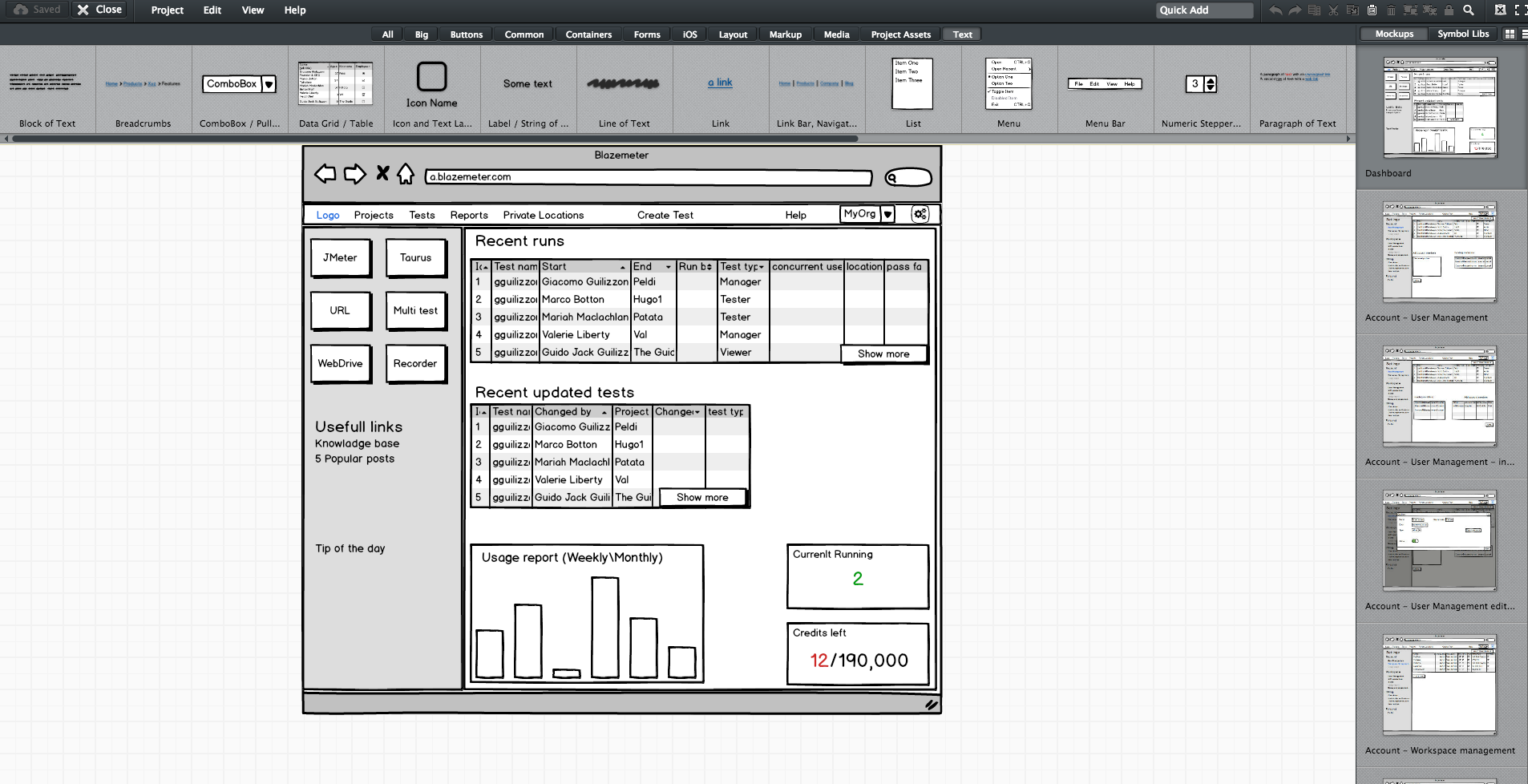
    Since no one wants to read a lot of text (except perhaps the awesome readers of this article), the product manager should prepare mockups. They don’t have to be designed or colorful, but they do need to show the team what the feature looks like in his or her vision. During our grooming sessions, we used Balsamiq, which lets you create screen sketches for how the product is supposed to look, feel and work.

    Editing screen sketches using Balsamiq

    After the initial presentation, the sessions should include a lot of open discussion—asking questions, checking for answers and examining compliance, etc. —until everyone is satisfied and understands what the feature requires from them and from others.

    This is the time and place for frontend, backend and QA to give their opinion about the schedule and to alert and flag any potential problems in development or extreme use cases. It’s the role of the product team to answer questions and change the flow and requirements until there are no R&D rejections.

    Afterward, the frontend and backend leaders need to create a feature development plan, sitting down to determine what data they need to transform the product vision into a real thing. Or in other words, which APIs are required for each flow or button, how long each step is supposed to take, including buffers, and the order of development. APIs are the agreed “contract” between the development teams. After determining the contract terms, each team can proceed individually.

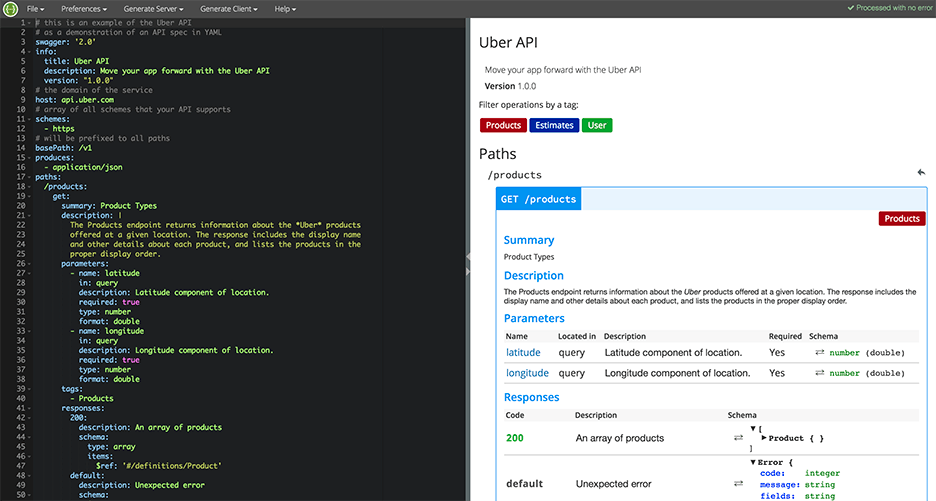
    I recommend you write your APIs in Swagger, which turns YAML files into detailed HTML pages with all the APIs.

    Swagger Editor

    This plan needs to be transparent to everyone working on the project. In fact, it’s even better if each project participant can add and describe scenarios. Tools such as TestLink and Atlassian do just that. Then, when the code is ready, developers can go over the list and see everything is covered.

    We will need to stick to this schedule later on, especially when new demands unrelated to the feature come in, such as fixing bugs. Sticking to this plan is the best way to distinguish the wheat from the chaff of the development process.

    Start writing automation ASAP

    After planning, we want everyone to start working, and not only the backend. To do that, the backend can prepare mocks, either through outsourcing services such as JSON servers, which show inputs and outputs, or by writing dummy code.

    I mentioned earlier that we used Swagger to write APIs. We also used it to generate a server in NodeJS/Python, like this:

    Generating a JSON Server through Swagger

    From this moment on, frontend can begin writing and building screens and QA can start writing API automated testing, by using tools suh as JMeter. At this point, frontend and QA have the response codes and response bodies; they know which features to put where; and which APIs they need and how to use them.

    QA also know which data they’re missing, such as field names and field data. Sure, the backend code isn’t ready yet and all of the automated exams will return “red” instead of “green,” but the main issue is making sure everyone is as prepared as possible.

    This includes load and performance testing. You can use open-source tools such as JMeter, which is enhanced by CA BlazeMeter. By uploading our test script into, configuring the number of virtual users and ramp-up time, determining geo-locations to test from and analyzing KPIs to determine trends and the health of our system, we can ensure our product is delivered to our customers without crashing.

    This is also true about sending code to QA: Developers should test their code themselves and ensure that when they commit their code, it works 99.9 percent of the time.

    By starting automation as soon as possible, you can minimize future bottlenecks in the development process.

    Ensure the team communicates and works together

    Like I said before, teamwork is the most basic requirement when creating a new feature. This is because new questions arise during development and because requirements change. Therefore, everyone in the team needs to be in sync all the time, from the product manager and the designer to the developers and QA.

    Open communication lines are crucial because everyone is working on the same product at the same time, but each developer or QA should be working on a different part of the product and on different functionalities. Communication ensures each person’s work is compatible with the rest of the team’s work. This saves time, prevents frustration and redundancy and ensures maximum professionalism.

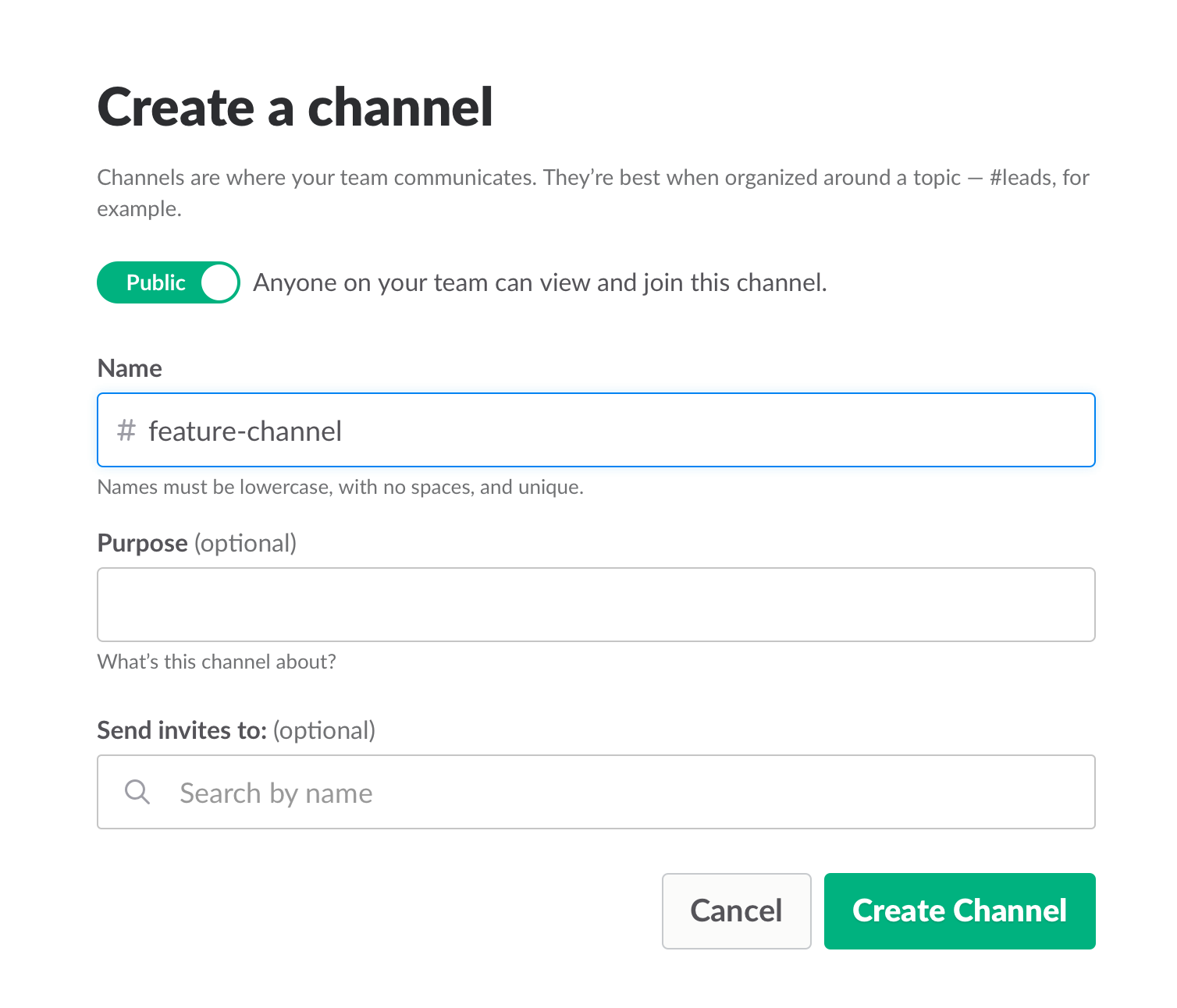
    To make sure everyone knew what was happening, we used Slack and opened a dedicated channel for the creation of this feature. We also had daily (short!) standups where we discussed what we have and what is missing.

    Opening a Slack channel

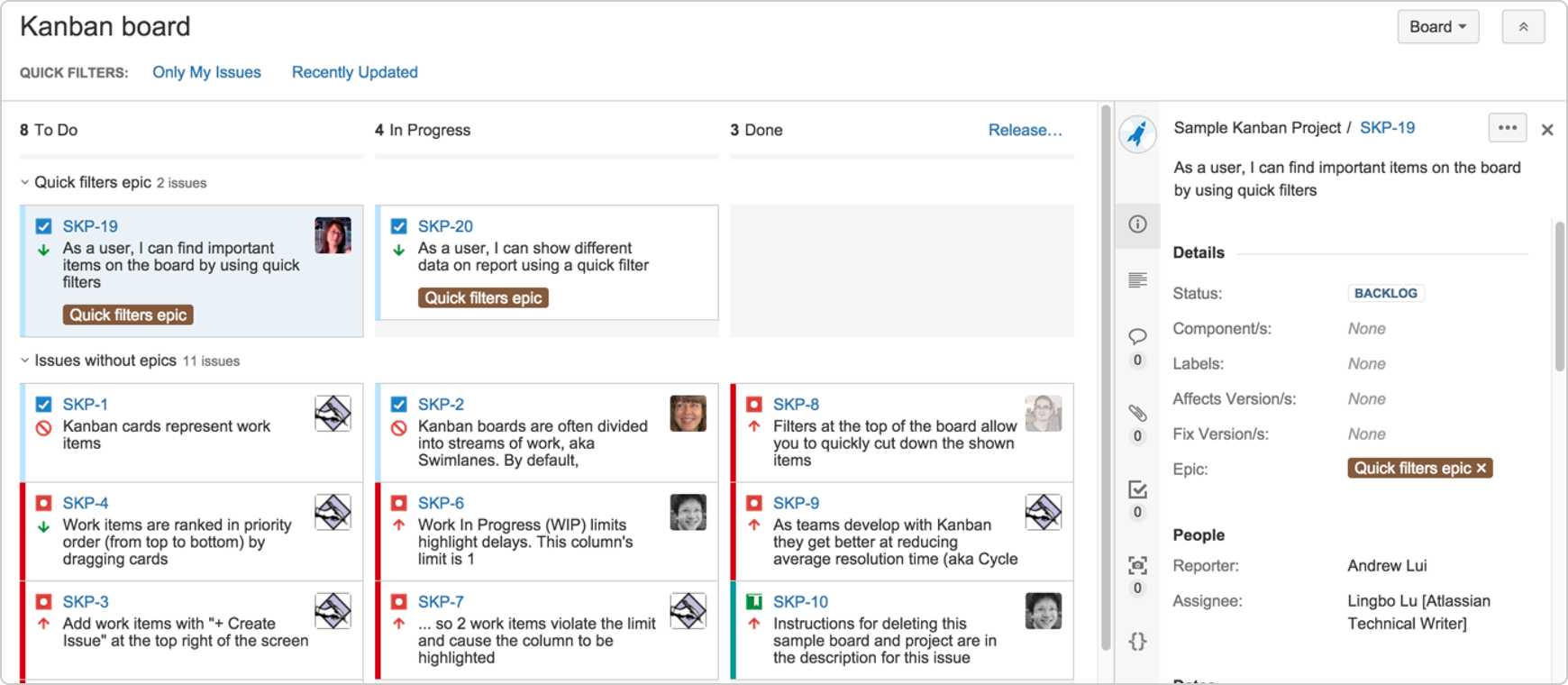
    Communication also includes team and assignment management. JIRA, our primary issue tracking tool, offers Kanban-style, Scrum and fully customizable boards, which show the progress of each development task, including the developer assigned to it, and his or her exact status or phase.

    This helps you understand what other people are working on, and just as importantly, where people are stuck. If you can, get everyone to work in an open space and put a large screen in the middle of it. This lets you stay in sync at all times.

    We used JIRA to open and manage bugs as well. This was helpful when multiple QAs found the same bug. It’s important to carefully choose which tickets are opened and put them under one epic, so everyone stays focused.


    JIRA Dashboard

    Another important aspect of communication is ensuring everyone uses the same terminology, as sometimes people might use the same term to describe different things or different terms to describe the same things. To prevent mixups that could waste your time, make sure everyone is on the same page. For example, do you say “system admin” or “<name (ex. BlazeMeter)> admin”?

    Work on the same development environments

    It’s important that everyone works on identical development environments and even on the same version of the tools and libraries. Otherwise, it could cause an (in)compatibility mess, including a lot of unnecessary back and forth and even might cause bugs to pop up. This environment needs to be as similar as possible to production, but only on a smaller scale.

    Conclusion

    Now look at the feature that came out of all that work here. I’m so grateful that I had the opportunity to work on it with an awesome team.

    I hope these best practices help you the next time you develop a new feature. Don’t forget to keep going agile after development and delivery by running tests in a continuous environment such as Jenkins for every commit.

    CA BlazeMeter works with Jenkins, ensuring you can load test in the cloud and analyze your data while shifting left. You can also use different APM tools, such as New Relic, AppDynamics and CA APM to alert you about errors before QA, which saves time.

    — Dor Atias

  • Culture Comes First in Bringing DevOps to the Mainframe

    Culture Comes First in Bringing DevOps to the Mainframe

    One of the most difficult challenges in engineering, oddly enough, isn’t technical: the challenge is culture transition management. In my 20-plus years of managing engineering teams worldwide, I’ve led teams through countless organizational adjustments and process improvements toward high-performance and quality, beginning with QA segregation to CMMI to ITIL, AGILE and SAFe.

    Today, mainframe organizations have emerged as the focal point for enabling DevOps capabilities and practices. Why the mainframe? Well for starters, business critical applications rely on mainframe data and business components. These applications are mission-essential and that sustained innovation requires solution sets that deliver continuous testing, continuous delivery and continuous feedback on the mainframe platform.

    But culture comes first.

    Understanding Your Key Players

    In conversations with our customers we’ve observed an interesting dynamic emerging within mainframe application development teams. Within these teams are experienced developers who were instrumental in creating the applications that helped make their companies so successful. Over time, many have become set in their ways, adopting a motto of, “If it’s not broken, why fix it?” Such developers are not interested in trying out new things, including programming languages and tools used by the modern-day programmer.

    New to the scene are the millennials who have also taken up the mantle of enterprise software engineer. They are a bit more open-minded and bring a different programming language profile, including Java, .NET and C. These developers might be learning how to code APIs with the support of management, and have likely dabbled the basics of how to code iOS apps. Millennial developers are typically much more active online and, as a result, prefer to leverage Twitter and other social channels to stay informed with the development community.

    United We Stand

    Who, then, should be involved in the journey to realizing DevOps? The answer, of course, is both. Because we’ve heard it reinforced among our users we talk with in the CA Communities every day, at user groups and at prominent mainframe community events such as CA World and SHARE.

    You know it, because you probably see it in your organization as well. There are experienced developers: people who have deep knowledge of the applications in place, business intelligence, database tables, cross-application dependencies, batch execution windows and the general experience of how things work on the z/OS platform.

    Most importantly, they also know how to avoid breaking what’s working.

    And there are the millennial developers: people who are curious to learn about new programming languages, platforms, people who, with the advent of Agile development, and open source have played with things, tested them and are using it to enhance their skill sets.

    These people prefer to use modern user interfaces and tools to increase their productivity. Sometimes they might be tentative about making mainframe changes, not willing to risk their careers by breaking poorly documented code.

    Culture – Have it Both Ways

    While the interests of millennial and experienced developers may at times seem conflicting, both have pivotal roles to play in application development and will benefit greatly from the common sense practices of DevOps and agility that are coming to the mainframe platform. To survive and thrive, teams must unify to facilitate the change process. Most importantly:

    • Code must be accessed and modernized at the speed of business. Enterprise developers, testers and architects cannot be afraid to go talk to the “black box” that is the mainframe team.
    • Project managers can’t worry that a six-week turnaround for small changes will kill their hopes of meeting their delivery windows.
    • The delivery team—QA, release management and operations—can’t afford to sit around waiting for simple deployment steps to happen: when we can automate and integrate to increase deployment frequency.

    The promise of DevOps and agility on the mainframe is to fix this, and that’s why our engineering teams are actively building out solution sets that extend DevOps practices to the mainframe, including continuous testing, continuous delivery and continuous feedback.

    Curious about what it will take to bring DevOps to the mainframe? Catch some tips and best practices from Forrester Research principal analyst Rob Stroud, or hear from the leaders driving change in their organization in our CA World 2016 Mainframe DevOps panel.

    — Aline Gerew

  • Automation Killed QA – It’s Time to Deal With It

    Automation Killed QA – It’s Time to Deal With It

    Quality assurance (QA) had a good run.

    From the time it was considered an afterthought by organizations and software vendors alike to the era of massive outsourcing contracts, followed by significant vendor investments in related tooling, and, finally, its recognition as a critical success factor among high-performing organizations, quality has evolved to become even more important than functionality to end users.

    Customer experience, today, is defined by speed and quality above all else. Namely, can I access the information and products that I want in the blink of an eye and get expected feedback based on input? As a result, customer experience has also shifted: It’s all about application experience, not the friendliness of a checkout cashier or sales/service rep.

    With this massive shift toward customer experience platforms (think omni-channel) and increasingly lofty expectations, the operative question becomes, How are we enabling velocity in our testing practices to ensure the highest quality while keeping up?

    We’ve tried everything from outsourcing to insourcing, investing in tooling, investing in people and even building testing architecture teams to oversee the automation, quality and consistency of testing results. Roughly seven years ago, my top priority for testing teams was to automate 30 percent of our tests. Today, if you are not 100 percent automated, or close to it, you are severely lagging in output.

    But what’s next? What if I’ve automated all of my tests and my manual testers have been replaced with automation engineers, but I’m still having quality issues and being perceived as a bottleneck?

    The answer is simple. Automate everything.

    Makes sense, right? Isn’t everyone telling you that? But what are we defining as “everything” from a testing perspective? Therein lies the problem; we are thinking about testing as its own factory within the larger software development life cycle.

    While we believe we are changing this perception by going agile and moving most QA functions into scrum teams, the reality is we still look at testing as a standalone function. Centralized or decentralized, this is the case, and we need to think differently.

    Automating for quality begins with defining requirements. How am I ensuring that I’m covering all cases? How do I ensure I’m translating the business requirements properly? These questions, the time it takes to answer them and the risk of human miscalculation all impact quality and velocity.

    We must start our automation for quality at the beginning, during establishment of business requirements.

    Let me introduce you to next-generation QA. Intelligent “continuous testing” platforms are replacing humans for testing, automating tests, creating data and building test cases. These platforms are able to translate model-based business requirements into complete automation—test cases, test data and test script automation.

    Orchestration across your software development life cycle creates your environments, lays down your test data, deploys your software, runs your test scripts and reports results. No more human error, no costly resources and guaranteed test coverage that ensures quality.

    Integrating your existing automation around continuous integration, portfolio management reporting, and execution reporting to this framework now gives you the ability to report and automate your ideas all the way through to outcomes.

    Early adopters are already doing this. QA as a functional organization is gone. If you aren’t already automating to this end, you are severely behind.

    Questions?  Comments?  Perspective?  Have at it in the comments below.

    — Ron DeCanio