Tag: cloud services

  • Nutanix Brings HCI Platform to AWS

    Nutanix Brings HCI Platform to AWS

    Nutanix today announced that Nutanix Clusters are now available on bare-metal instances of the Amazon Elastic Compute Cloud (Amazon EC2) provided by Amazon Web Services (AWS).

    Manoj Agarwal, senior vice president of engineering for Nutanix, said Nutanix Clusters on AWS will provide IT organizations with access to hyperconverged infrastructure (HCI) capabilities based on Nutanix virtual machine that AWS doesn’t provide today on a public cloud.

    IT organizations that already have Nutanix clusters deployed in on-premises IT environment will not have to refactor them to lift and shift them into a public cloud, he said, noting IT teams will also be able to provision Nutanix Clusters on AWS using the same Nutanix Prism management tools they currently employ in on-premises IT environments.

    IT teams will also be able to employ on AWS add-on tools from Nutanix such as Files to manage unstructured data, Calm to orchestrate applications and Era to manage databases.

    Agarwal declined to reveal whether Nutanix plans to support other public clouds. However, deploying HCI software on multiple clouds will provide IT organizations with the opportunity to deploy workloads without having to be concerned about being locked into a specific cloud service, he said.

    In the wake of the economic downturn brought on by the COVID-19 pandemic, IT teams are under even greater pressure to reduce total costs. Many IT teams prior to the pandemic managed cloud and on-premises IT environments in isolation. As part of the effort to reduce the total cost of IT, more organizations are now looking to embrace a heterogeneous hybrid cloud strategy that would enable them to manage multiple platforms via a common management plane. IT teams may not dynamically move workloads between clouds, but they will eventually move toward a common management framework that enables workloads to be more easily managed independent of the underlying IT infrastructure.

    Nutanix, of course, is not the only provider of an IT platform aiming to become the provider of that management plane. Rather than rely on separate compute and storage services, Nutanix is making the case for an HCI platform that converges the management of compute, storage and networking.

    Of course, providers of cloud service are simultaneously making available on-premises instances of cloud platforms they will manage on behalf of customers. The Nutanix approach enables IT teams to automate the building and managing of their own hybrid cloud computing environments without having to cede control to a cloud service provider, noted Agarwal.

    It’s still early days as far as hybrid cloud computing is concerned, but it’s clear that the pace at which IT teams are moving toward them will accelerate in the wake of the downturn. The issue now is determining how best to achieve that hybrid cloud goal given the relative maturity of the management frameworks that would be used to manage multiple platforms. Regardless of the path selected, however, there will eventually be one IT team to rule them all.

  • How to Achieve AWS Security in 10 Steps

    How to Achieve AWS Security in 10 Steps

    Looking to lock down your AWS cloud service? Here are the 10 steps to take for AWS security

    As more companies embrace the cloud, security is becoming a more significant challenge. Irrespective of size, organizations are increasingly realizing the importance of having proper cloud security practices in place. More and more companies are creating a culture where digital engineering teams are making cloud security a priority and checking whether their service providers can provide the correct security levels for their cloud workload. It is up to organizations, in partnership with their cloud service providers, to understand the different security roles, responsibilities, tools and best practices.

    It turns out that getting the balance right security-wise is becoming easier. For example, AWS has published its cloud security best practices to help customers implement cloud services in a highly secure manner. These best practices provide guidance to organizations unsure of the tools or services they require. The AWS cloud platform allows customers to scale and innovate while maintaining a secure environment; customers only pay for the cloud security services they are using without any upfront expenses, unlike the on-premises environments.

    When it comes to cloud security SNAFUs, misconfigurations that accidentally and unnecessarily expose services are the biggest culprits. Any misconfigurations during implementation can potentially lead to big problems down the road. In the cloud, resource provisioning, management and monitoring happen via APIs, consoles and command-line interfaces (CLIs). So, it’s essential to secure all these connections during the early stage of cloud adoption.

    Learning From Experience

    Teams also must ensure that virtualization, identity and access management (IAM), workload protection and network security and encryption are a part of this architecture blueprint. We are all familiar with catastrophic data breaches that make the news, but there are many others that do not, and the vast majority of these are avoidable. Let’s examine the following three scenarios, all derived from real experiences, and then look at how the vulnerability could have been avoided.

    Case 1: Passwords Matter

    An AWS account was compromised due to a weak root user password, combined with MFA not being configured. An attacker removed EBS, EC2 instances, S3 data backup and asked for a ransom to provide the database backup file.

    This could have been prevented by utilizing an IAM user with a specific policy instead of using the root account. 

    Case 2: Visible Access Keys

    The developer posted the development account credentials for the AWS access and secret access key in the script, which was on the public Git repository. Using those keys enabled the attackers to deploy multiple resources in all regions and created multiple dummy resources. For the six to eight hours that the account was hijacked, the attackers racked up a bill of $4,000 to $5,000.

    This could have been prevented by using an IAM role instead of hard-coding the access keys into code. Access keys should be rotated periodically.

    Case 3: Misconfigurations

    The security group was not properly configured. In particular, port 22 was allowed globally, ports 80 and 443 were also open from all. The application which was hosted on EC2 instance was front-ended by the application load balancer. The attackers found a basic cross-site scripting vulnerability and SQL injection, tried injecting malicious scripts and removed all the data from the server.

    This could have been prevented by following a trusted advisory, putting WAF on top of the application load balancer and utilizing the AWS inspector for security assessments.

    AWS Security in 10 Steps

    These three cautionary tales are all examples of where a small security vulnerability caused big losses, and they all demonstrate how easy it would have been to deploy the secure cloud option. Hindsight is a wonderful thing, but it is even better to avoid making the error in the first place. Here is a 10-step guide to understanding security best practice structures and how users should implement the AWS platform and its services in the best way.

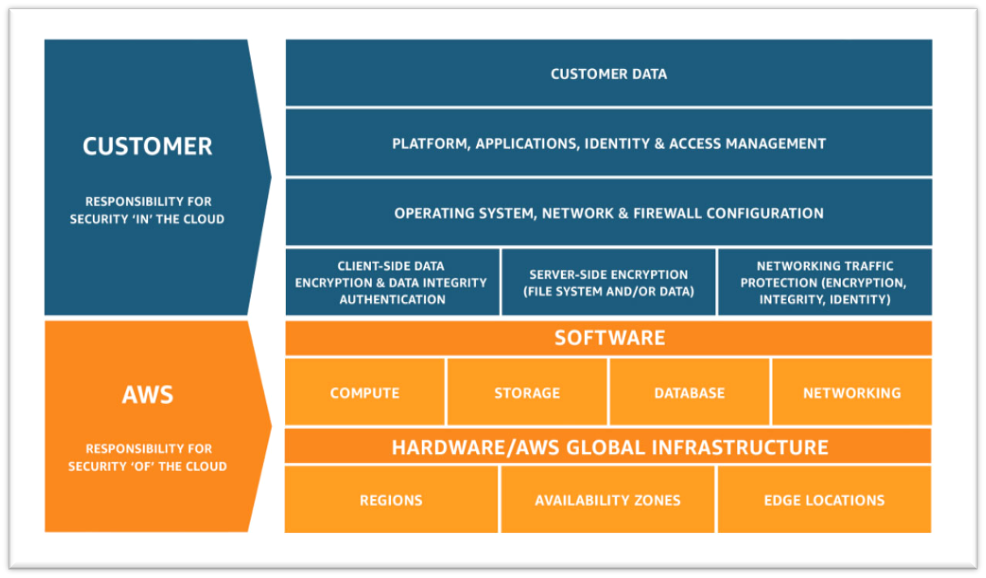
    1. Understand the Shared Responsibility Model

    • Amazon’s responsibility: AWS is focused on infrastructure security, including computing, storage, database and intrusion prevention networking services. AWS is also responsible for the security of the software, hardware and the physical facilities that host AWS services.
    • Customer’s responsibility: AWS customers are responsible for the secure usage of AWS services that are considered unmanaged. The customer is responsible for managing user base access-authentication methods, encryption of data stored inside AWS.

    2. Follow IAM Best Practices

    • The AWS Identity and Access Management Service enables users to manage access to AWS services and resources securely.
    • The AWS account can be administrated by creating groups and users and applying granular permission policies to users to provide limited access to APIs and resources. This video takes a deep dive into IAM policy management.
    • When granting IAM roles, follow the “least privileges” approach to security.
    • Rotate access keys and passwords.

    3. Manage OS-level Access and Keep Ec2 Instances Secure

    • Run an inspector assessment to generate an OS-level vulnerability report.
    • Use System Patch Manager to keep OS packages updated.
    • Patch the EC2 instance periodically to protect your infrastructure from newly discovered bugs and vulnerabilities.
    • Follow the security advice provided by OS vendors RedHat, Suse, Microsoft, etc. This helps to keep all OS-specific packages updated from a security perspective.

    4. Encryption

    • There are two methods for encryption in AWS: in transit and at rest.
    • Use AWS KMS for storing at rest encryption keys, which can be AWS-generated or customer-generated.
    • Use Cloud HSM to provide hardware-encrypted devices for storing keys.
    • Most AWS services provide in-transit encryption by providing https endpoints that provide encryption end to end.
    • AWS Certificate Manager allows you to create an SSL certificate for the public domain.

    5. Follow Security Best Practices for AWS Database and Storage Services

    • RDS storage should be encrypted at rest.
    • Restrict access to RDS instances to decrease the risk of malicious activities such as brute force attacks, SQL injections or DoS attacks.
    • S3 storage should be encrypted at rest.
    • S3 policy should be used to restrict access to S3 content. Keep your S3 bucket private if you don’t have any requirement to expose objects.
    • Use AWS Macie to detect and secure sensitive data within AWS-S3.
    • Use the AWS Parameter Store to store environment-specific credentials and secrets, which you can easily achieve using secrets management for your cloud-native application.

    6. Network Security

    • Intrusion detection systems (IDS) or Intrusion prevention systems (IPS) allow the detection and prevention of attacks on critical infrastructures such as payment gateway of banking-related transaction applications.
    • VPC flow logs should be enabled to monitor network traffic.
    • Restrict access by security group (EC2, RDS, Elastic Cache, etc.)
    • Use Guard Duty to monitor AWS accounts and infrastructures continuously.

    7. Web Application Security

    • Web application firewalls (WAF) provide deep packet inspection for web traffic.
    • WAF can also help to prevent platform and application-specific attacks, protocol sanity attacks and unauthorized user access.
    • Amazon Inspector is an automated security assessment service that improves security and compliance of applications deployed on AWS.
    • Use AWS Cognito to authenticate application user pools securely. It also supports federated access from Google, Amazon and Facebook.

    8. Enable Configuration Management

    • AWS Config helps to audit, assess and evaluate the configuration changes within AWS.
    • Customers can also rely on third-party configuration management tools, which can provide more granular visibility.

    9. Monitoring and Alerting

    • CloudTrail enables auditing and monitoring of authorized and unauthorized activities within the AWS account.
    • CloudWatch alerts can be set up for malicious activities within the AWS account and infrastructure deployed inside AWS and application logs.
    • Set billing alarms to keep your team aware of the cost utilization of specific accounts or infrastructure.

    10. Compliance, Training and Certification

    • AWS Artifact helps customers to get a no-cost, self-service portal for on-demand access to AWS compliance reports.
    • Train and educate teams using the AWS cloud platform for deploying or are responsible for the infrastructure.

    Implementing these cloud security best practices guidelines provided by AWS helps organizations implement the proper security measures, irrespective of where they are in their digital transformation journey or how large their organization is.

  • Revisiting 2020 Cloud Predictions in Light of COVID-19

    Revisiting 2020 Cloud Predictions in Light of COVID-19

    Back when the technology industry made its cloud predictions for 2020, no one forecasted the impending impact of COVID-19. Across the board, the pandemic has changed the way consumers have digital experiences, and made businesses realize their legacy IT infrastructure may not be up to keeping pace with new demands.

    So how does that change some of the cloud predictions put forward at the end of 2019?

    Increased Importance of Hybrid Cloud

    Hybrid cloud is a critical focus area as IT organizations prepare to work and operate with clouds but many applications continue to run on-premises. While I predicted that hybrid would be a crucial area, I did not expect the actual pace, which has become much higher.

    With cloud technologies becoming part of every IT environment from operations to orchestration and beyond, its adoption, including the move to hybrid, will accelerate due to this new normal. More organizations will adopt a hybrid cloud approach sooner than expected, as they’ll have no other choice to keep up with technology’s aggressive evolution. They must run legacy workloads or local cloud on-premises while also deploying on public clouds and manage workloads there; this is from both a VM and Kubernetes perspective. Red Hat and VMware are going head-to-head here.

    As COVID-19 severely impacts IT teams’ time and budget, those that provide solutions that are easier to run and integrate will win this space. Simplicity, known skill sets and familiar products with shorter time to integrate will be critical.

    Containers Will Still Become the De Facto Software Packaging Model

    Container platforms have become an essential factor in the hybrid cloud landscape, accelerating multi-cloud adoption in enterprises. Gartner predicts that by 2023, 70% of organizations will be using at least three containerized applications in production. Even with the prioritization of other tasks due to COVID-19 disruption, container adoption is continuing at full speed, along with the wider implementation of Kubernetes.

    COVID-19 should not impact the adoption of containers for those already on a Kubernetes platform. Anyone who has started with Kubernetes uses containers already, and organizations understand the value of Docker-based DevOps, local PC development and CI/CD pipelines based on containers.

    2020 No Longer the Year of Serverless Computing

    I expected a move toward maturing best practices, security solutions and tooling around serverless computing as more IT organizations looked to implement the technology. I saw AWS Outposts as the likely chief disruptor here, as it blurs the lines between on-cloud and on-premises workloads and services, with Google Anthos and Microsoft Azure as its main competitors.

    However, we can now assume that COVID-19 will have impacted the adoption of new technologies. This is because many organizations are unable to deal with new technology due to the other tasks that have taken precedence for now. I also expect organizations that were experimenting with the likes of AWS Lambda or kNative may take a step back for at least three to six months.

    Service Mesh Not Yet Standard for Cloud-Native Apps, Microservices

    I expected the industry to start uniting behind a single strategy to service mesh in 2020. But as of now, the list of open source service mesh options continues to grow. This makes it one of the most interesting domains today, full of emotions, fights and changes, unaffected by COVID-19.

    As a standard continues to elude the industry, things can become highly problematic. This is because once you adopt service mesh, it becomes a critical path in your deployment and application dependency.

    A few weeks ago, I spoke with Dell’s CTO, John Roese, who said he firmly believes the industry will eventually converge. Although IBM, VMware, Red Hat, Pivotal and Google commit to Istio as their service mesh, the industry is still waiting patiently for this convergence to happen.

    While all of this infighting is happening, a new body, the Service Mesh Initiative, was set up to ensure none of the hyper-scalers could impose a lock-in on service mesh. This could begin to change things, as IT organizations can define applications that use service mesh without tightly binding to any specific implementation. Watch this space.

    While COVID-19’s impact may have thrown a few things off base at the start of 2020, it’s likely a temporary slowdown. As new demands require a more flexible IT environment to keep pace, there is no question that things will speed back up. And when it does, IT organizations must be ready to implement the latest innovations or risk being left behind.

  • Google Taps AMD for Confidential Computing Service

    Google Taps AMD for Confidential Computing Service

    Google Cloud, at a Google Cloud Next 2020 Online event, announced it is making available in beta Confidential VMs, a new service that represents the cloud service provider’s first foray into the realm of confidential computing.

    Based on second-generation EPYC processors from AMD that provide access to an embedded Secure Encrypted Virtualization (SEV) capability, Confidential VMs encrypt data while it is being processed.

    At the same time. Google unfurled Assured Workloads for Government, a service also in beta through which the company will ensure workloads are run in a specific location to meet government requirements.

    Sunil Potti, general manager and vice president of cloud security for Google Cloud, said Confidential VMs will complement existing secure cloud computing services that already isolate workloads and encrypt data at rest. Google has also invested in creating a zero-trust security model dubbed BeyondCorp that ensures access controls are strictly enforced, he noted.

    Google Cloud is following Microsoft Azure into the realm of confidential computing, which is being enabled by new classes of processors from AMD and Intel. Both Microsoft and Google Cloud are founding members of the Confidential Computing Consortium, an arm of The Linux Foundation which also includes Alibaba, ARM, Baidu, IBM, Intel, Red Hat, Swisscom and Tencent.

    Amazon Web Services (AWS) has yet to join the consortium or outline its approach to confidential computing. It already offers Nitro Enclaves through which it isolates compute environments to securely process sensitive data within their Amazon EC2 instances. Nitro Enclaves is based on the Nitro Hypervisor technology that AWS developed to provide CPU and memory isolation for EC2 instances. AWS for several years now has been making a case for “encrypt everything,” which has yet to become the default setting in most IT environments.

    It’s not clear to what degree IT organizations will embrace confidential computing services. There’s a clear need to secure data. However, many organizations may decide that paying extra to encrypt data while it’s processing may be one extra layer of security too many. There will always be financial services firms and government agencies that will prefer to encrypt data on an end-to-end basis. However, many organizations will be weighing the security benefit of those services against the cost and potential impact processing encrypted data in memory might have on applications.

    It’s also now only a matter of time before servers configured with processors that support the processing of data become available in on-premises IT environments. Many IT teams may decide that because of compliance requirements sensitive data still needs to processed within an on-premises data center.

    Of course, cloud security concerns go well beyond merely how data is encrypted. Most often, the biggest issues when it comes to cloud security is misconfigurations. Encrypting data might render any data inadvertently exposed useless. However, IT teams are just now coming to terms with best DevSecOps processes. Confidential computing services may have a role to play in enabling IT teams to achieve that goal, but it may be a while before the processors on which confidential computing depends are employed widely across an extended enterprise.

  • Oracle Extends Managed Cloud to On-Premises

    Oracle Extends Managed Cloud to On-Premises

    Oracle today announced it will make available as a managed service in on-premises IT environments all of the software it currently provides access to on Oracle Cloud.

    In addition, Oracle is making available Oracle Autonomous Database on Exadata Cloud@Customer, which brings a managed database service to the Exadata servers optimized to run Oracle databases. Oracle also announced it has certified Siebel, PeopleSoft and JD Edwards applications for Oracle Autonomous Database along with the availability of Oracle Autonomous Data Guard, a managed high-availability and disaster recovery service that ensures near-zero data loss (RPO) and instant recovery times.

    Vinay Kumar, senior vice president for cloud engineering in North America at Oracle, said while cloud service provider rivals have made some services available in on-premises IT environments, Oracle will be the first to deploy a full range of software-as-a-service (SaaS) applications via an Oracle Dedicated Region Cloud@Customer service.

    Priced starting at $500,000 per month, Kumar said the Oracle Dedicated Region Cloud@Customer service is intended to appeal to organizations that because of compliance requirements need to deploy applications in an on-premises IT environment but still want to be able to treat IT as an operational expense.

    Kumar also noted in the wake of the COVID-19 pandemic there are more organizations that would prefer to rely on a service to remotely manage Oracle applications rather than having to set up and manage the networking infrastructure necessary to let IT staffs manage those applications from home.

    Like existing Oracle Cloud services, Kumar said Oracle applications can be deployed on virtual machines, bare-metal servers or Kubernetes clusters. In some cases, Oracle expects IT teams will opt to deploy some applications on-premises while also taking advantage of the existing Oracle cloud services.

    It’s not clear to what degree organizations will shift to relying on vendors to provide managed services versus ether deploying and managing applications themselves or relying on managed services provided by third-party IT services firms. Historically, less than 20% of all IT is consumed as a managed service. However, in the wake of the economic downturn brought on by the pandemic, it’s expected more organizations will prefer to treat IT as an operational expense. Oracle is now making it possible to make that decision regardless of where its applications are physically deployed.

    As applications become consumable as a service anywhere the distinction between what constitutes a cloud service running locally versus in data center owned by some other entity will start to dissipate. Many workloads that make the same application are likely to be running in different locations based on the sensitivity of the data being processed. Regardless of the path forward, the days when “the cloud” applied to only some external service are finally coming to an end.

  • Cloud Is Red Hot in the COVID-19 Era

    Cloud Is Red Hot in the COVID-19 Era

    As digital transformation accelerates, cloud services are helping organizations thrive in a COVID-19 world

    As the days tick by and the gloomy ramifications of COVID-19 become more apparent, one harsh truth has become crystal clear: Industries that have invested in digital transformation stand a better chance of recovery and survival than others.

    The banking industry is a lighthouse example of this principle. Even though the brick-and-mortar branches have had to pull down shutters because of lockdowns and social distancing requirements, many banks have still operated their businesses as usual. They have kept the lights on and handled the pressure of increased online and mobile transactions thanks to cloud-based services.

    While the internet has been a key enabler for digital banking, cloud has become the backbone. Cloud is making IT infrastructure vanish. Cloud is where businesses render servers, churn and analyze data, and keep applications humming so they can collaborate with partners and customers.

    Many businesses are quickly turning around, moving at speed to adapt and transform their operations. YMCA, Planet Fitness and Nike are offering online fitness classes. Schools and colleges are providing online learning. The demand for Netflix and Amazon Prime has gone up dramatically, and both organizations are now easing telecom network congestion by lowering their bit rates. Online grocery retailers are attempting to keep pace with demand spikes. And working from home has gained momentum, sending the demand for routers, modems and data cards through the roof.

    We will see a slew of innovations like these in the coming months, from businesses big and small, that will bring cloud services into sharp focus with their need for scale in a COVID-19 world. Everyone is looking to the cloud to reimagine businesses and make collaboration happen on an unprecedented scale, and the cloud has proven its ability to respond with speed while remaining robust.

    While enterprise IT, governments, entrepreneurs and other organizations work on their plans to respond to crises, the focus should be on providing great user experience in the post-COVID-19 era. In regard to the cloud, enterprises should focus on the following key tactics to prepare accordingly:

    1. Scaling existing services: Applications currently hosted on-premises will move to the cloud. Extending the data center via software-defined data center solutions into hyperscalers will help achieve scale and business flexibility.
    2. Giving businesses ample wiggle room: By adopting a multi-cloud strategy, businesses can de-risk themselves against failure, capacity challenges and operational barriers.
    3. Extending and expanding geographical reach: This can be done by deploying applications to geo-specific cloud platforms.
    4. Going cloud-native: Design and develop new applications on PaaS using a DevOps approach for rapid rollouts.
    5. Strengthening the core strategy: The strategy should be to support rapid and unexpected changes in work and service consumption needs through optimal network bandwidth, VPN connectivity, bandwidth throttling, consumption-based adoption model, remote VDI as a service and SD-WAN based solutions.
    6. Investing in a heightened security posture: Cloud solutions should be based on data classification (privacy, availability) without sacrificing application, infrastructure, access or data security.
    7. Developing new working models: Address medium and long-term requirements with a hybrid support model and local onsite versus remote versus offshore support.

    Having achieved the above, enterprises would be wise to reduce their operations costs and channel the savings into new cloud initiatives. Enterprises should attempt to extend the life cycle of their existing assets before considering a refresh, while simultaneously moving to a subscription-based, pay-as-you-go model rather than footing steep licensing bills.

    But the cloud journey doesn’t end there. Goal-oriented and highly motivated businesses will use their cloud credits to support proofs-of-concept and other essential services. One way of doing this is to containerize applications and remediate end-of-life issues around OS, improving computing density and rationalizing OS licenses for cost savings. The other established route to achieve savings is to outsource value streams to trusted partners.

    COVID-19 is going to accelerate the cloud journey for scores of enterprises, and investments in the technology will quickly show their upsides—improved business resilience, cost control, and above all, the ability to keep the lights on.

  • How to Overcome Challenges With AWS Lambda Logging

    How to Overcome Challenges With AWS Lambda Logging

    Monitoring AWS Lambda can be a complex and potentially costly endeavor. Here’s what you need to know to stay on track and on budget

    Organizations are already experiencing a shift toward serverless cloud computing. According to the O’Reilly “Serverless Survey 2019,” around 40% of respondents said they had implemented serverless architecture. Forrester “Global Business Technographics” Developer 2019 found that 49% of companies are using it or planning to use it in the next 12 months.

    AWS leads the way in this space. According to Serverless.com, 96% of respondents choose AWS Lambda over Azure Functions and Google Cloud Functions. AWS Lambda helps us to design a lightweight and robust application architecture that can be built and deployed without any hassle. However, nothing comes for free. There are several, potentially costly, complexities when monitoring AWS Lambda. Fortunately, there is an array of solutions.

    Logging

    By default, AWS Lambda’s stdout and stderr messages are sent to CloudWatch Logs, where every function has its log group. A log group is a collection of log streams (sequence of log events) that can be stored as long as you want. Storage of logs costs USD 0.03/GB and data ingestion costs around USD 0.50/GB.

    It is common practice to break up your Lambdas into single responsibility functions. This means, for example, if you need one Lambda to read a certain object and another to write it, you’re setting up two separate functions. However, this also means two log groups.

    This creates a challenge when you want to analyze your application’s output log. There is no direct way to log queries across multiple log groups. In response to this, AWS enabled CloudWatch Log Insights to conduct cross-log querying. While this brought many of the improvements users wanted and needed, analyzing multiple log groups together meant a higher cost for queries. This prohibitive cost model encouraged many to look to external services.

    Tracing

    AWS X-Ray enables you to trace the underlying components of your application and helps you to dig out the fundamental reason behind distributed issues. It has quickly become an essential troubleshooting and optimization tool for engineers.

    For example, cold start latency can be problematic for AWS Lambda functions with slow startup times. Although you can counter this by enabling Provisioned Concurrency, you will need to pay extra.

    If you have budget constraints and still want to resolve the issue, X-Ray might help you eliminate or at least optimize your application by removing the bottleneck. It lets you know, among other things, if your application is consuming more time during initialization or invocation. You can find X-Ray SDK on AWS Lambda for Go, Java, Node.js, Python and .NET.

    Debugging

    Traditional architecture and serverless architectures are as different as day and night. Serverless requires changes across the software engineering spectrum, including debugging.

    A serverless application is a combination of various services or resources within infrastructure, which can include tools such as AWS API Gateway, CloudWatch and SNS. Such distribution of web services helps avoid a single point of failure (SPOF), but this design creates a problem. Debugging or replicating an issue on a local machine is not always feasible, and debugging a production application is always a dangerous proposition.

    Moreover, the abstraction of AWS Lambda makes debugging complicated, as you don’t have direct access to the underlying OS. Hunting down dispersed logs adds to this overhead. As your serverless infrastructure scales, it becomes difficult to identify the root cause.

    To combat this, developers can use AWS native tools such as CloudWatch, X-Ray or Serverless Application Model (also known as SAM). Any of these tools on their own can be difficult to use; together, however, they form a powerful debugging suite.

    Outside of the AWS-native toolset, some tools provide further assistance with debugging. For example, the Serverless framework, which is an open source tool to develop and deploy serverless applications over AWS, lets you see your live application’s function log, for example:

    Monitoring

    Robust monitoring ensures the smooth operation of an application and helps to detect issues quickly. In traditional infrastructure, metrics only appear from a handful of sources, so collecting them together is less of a challenge. In a serverless architecture, this problem is much more complex.

    AWS gives you the freedom of converting CloudWatch Logs to metrics. These metrics can be filtered, measured and, when a threshold is crossed, alerted on. You can define a metric filter by choosing a log group created by your serverless function and target the log stream. This enables you to create a visual reference for your log events. Every custom metric you create will cost $0.30/10000 metrics per month.

    Metric filters can be a powerful tool, but it can also be a bit overwhelming to set up everything, and there are certain bottlenecks as well. For instance, you can’t parameterize metric names, which forces you to create a filter for every custom metric you want to track. There is also a hard limit of 100 metric filters per log group, which restricts you as your application evolves.

    Other than this, AWS resources are tightly coupled with each other, which makes AWS-native monitoring tools a fine choice when you need to monitor individual AWS resources or Lambda functions. To get an infrastructure-wide view and to monitor other third-party tools, a centralized logging approach is necessary to take full advantage of the log data.

    Conclusion

    There is no denying that serverless tooling quickly unlocks high availability, scalability and cost optimization. To make the most of this new paradigm, engineers need to build a robust and reliable monitoring system. The ability to manage log data streaming from many components, detect and trace issues on the fly, and deliver accurate insights to keep on improving the application is crucial to remain online and competitive.

    While serverless solutions give access to many of the technical features we need, the dangers of vendor lock-in and the power of third-party providers must be considered if you want to scale your organization and its infrastructure smoothly.

  • ServiceNow Acquires Sweagle to Advance DevOps Agenda

    ServiceNow Acquires Sweagle to Advance DevOps Agenda

    ServiceNow has acquired Sweagle, a provider of a repository for collecting configuration data that makes it easier to manage IT environments at scale.

    RJ Jainendra, vice president and general manager of DevOps and IT business management at ServiceNow, said Sweagle advances the DevOps initiative his company launched last year by providing a way for IT teams to more easily share configurations created by a variety of tools within a single repository. Those configurations can then be vetted to make sure DevOps teams are not reusing configuration that might be propagating a cybersecurity vulnerability, he said.

    Sweagle is essentially a modern implementation of a configuration management database (CMDB). It will be revamped to have the same look and feel of a ServiceNow application once the deal formally closes in the early part of the third quarter, Jainendra added.

    ServiceNow also plans to integrate Sweagle with its Service Graph, which enables teams to visually track metrics across a service spanning multiple platforms.

    Jainendra said as IT teams deploy applications it’s not uncommon for them to track more than 50,000 data configurations. Sweagle provides an opportunity to bring some order to what historically is a set of IT processes that are becoming more complex as organizations embrace microservices based on containers and serverless computing frameworks.

    Sweagle complements a DevOps initiative ServiceNow launched late last year through which the company is providing increased visibility into DevOps processes to IT service desk staff. ServiceNow DevOps collects metrics from various DevOps platforms that can be analyzed alongside the metrics ServiceNow surfaces using an ITIL-based framework accessed via a software-as-a-service (SaaS) platform.

    Ultimately, ServiceNow doesn’t anticipate DevOps replacing ITIL as much as it sees both approaches creating a need for IT teams to strike a balance across disparate styles of managing IT, each of which places different levels of emphasis on agility and stability, Jainendra noted.

    Naturally, each IT organization will need to determine how best to balance those conflicting goals. In many cases, organizations will decide to manage applications very differently from the underlying IT infrastructure on which they are deployed.

    Regardless of approach, IT organizations have never been under more pressure. In the wake of the COVID-19 pandemic more applications are moving into the cloud to achieve flexibility and resiliency. At the same time, more application code is being pushed out to the network edge. As IT becomes complicated, many organizations are mixing and matching best ITIL and DevOps practices as they best see fit.

    As is the case with any philosophy, there are proponents of DevOps and ITIL frameworks that are not given to compromise. However, most IT organizations tend to gravitate to the middle ground. In the wake of the current economic downturn, it’s probable there will be an even larger inclination toward compromise. After all, the rate at which applications are moving into the cloud is accelerating. However, most of those applications are now being accessed by devices that are more distributed than ever now that more people are working from home.

  • HashiCorp Unfurls Cloud Platform for Managed Services

    HashiCorp today at its online HashiConf Digital event launched HashiCorp Cloud Platform (HCP), through which it intends to make all of its software available as a fully managed service.

    At the same time, HashiCorp announced a public beta of an update to HashiCorp Terraform, a curated instance of an open source tool for configuring IT infrastructure that adds additional workflow capabilities.

    Finally, an update to Nomad, a cluster manager and scheduler for containerized application environments, adds support for multiple clusters as well as the Container Network Interface (CNI) specification defined by the Cloud Native Computing Foundation (CNCF).

    Rob Genova, director of product marketing for cloud services at HashiCorp, said although the company previously made some of its offering available as a managed service, HCP will serve as a foundation on which HashiCorp will manage updates to its software on behalf of end customers.

    The first managed service on HCP, now available in private beta, is an instance of the Consul service mesh deployed on Amazon Web Services (AWS), which will be followed by an instance of Vault, secrets management software developed HashiCorp, that will also be deployed on AWS.

    At the core of HCP is a HashiCorp Virtual Network (HVN), which offers a common abstraction across cloud providers around an isolated single-tenant network. Each HVN can have multiple services deployed within it. In the future, HashiCorp is promising HVN will enable peering across cloud providers and cross-provider clustering of its software. Support for additional cloud services will be added based on customer demand, added Genova.

    HCP will be offered on a pay-as-you-go pricing model to minimize upfront costs, which Genova said should make Consul and other HCP services more accessible to smaller teams and organizations. Costs will increase only when workloads scale. Both development and production pricing options will be made available, he said.

    HashiCorp already provides access to hosted instances of Consul and Terraform, which it will continue to offer alongside HCP, Genova added.

    Genova said it’s become apparent more organizations would prefer to have HashiCorp manage Consul, Vault, Terraform and Nomad on their behalf. At a time when many organizations have limited IT resources, Genova said many organizations want to devote the bulk of their limited internal resources to building and deploying applications rather than the infrastructure required to maintain them.

    It’s not clear how many organizations will opt to rely more on managed services in the wake of the economic downturn brought on by the COVID-19 pandemic. At a time when many organizations are either reducing or freezing headcount, all options are being considered. Many internal IT teams may occasionally employ a managed service to extend their own capabilities. In other cases, developers may bypass an IT operations team altogether.

    In the wake of the pandemic, Genova noted more organizations simply want to deploy resources in the cloud to ensure availability while gaining increased flexibility.

    Regardless of the path chosen, the days when IT teams felt more compelled to do everything themselves are, for better or worse, changing utterly.

  • Survey Shows Accelerated Shift to Cloud, With Caveats

    Survey Shows Accelerated Shift to Cloud, With Caveats

    A survey of 250 IT leaders published by Snow Software, a provider of software asset management software, finds 91% are changing their cloud strategy in the wake of the economic downturn brought on by the COVID-19 pandemic.

    The survey also finds twice as many respondents report they are accelerating cloud migration (45%) and digital transformation (41%) projects versus those putting cloud migration (22%) or digital transformation (21%) initiatives on hold.

    At the same time, however, nearly a third of respondents (32%) said they are asking their cloud vendors for extended payment terms, while 31% are renegotiating their cloud contracts. Around 10% of respondents indicated that they would not be able to pay their cloud bills last month.

    More than three-quarters of respondents (76%) said they have increased their use of cloud platforms such as Amazon Web Services (AWS), Microsoft Azure and even private clouds.

    In addition, more than half of respondents (55%) noted an increase in the use of collaboration tools such as Slack, Teams or Google Chat, while 52% said they have seen an increase in the use of cloud-based videoconferencing software such as Zoom, Cisco WebEx or GoToMeeting.

    Overall, 60% of IT leaders said they are continuing to increase cloud use.

    Jesse Stockall, chief architect for cloud management for Snow Software, said the results show the cloud has played a critical role in enabling employees to work from home. In many cases, the first thing to be shifted to the cloud was application testing environments. With development teams working from home the only way to effectively set up a testing environment is in the cloud.

    At the same time, Stockall said entire applications have been lifted and shifted to the cloud using containers. Rather than refactoring these applications, IT teams decided to encapsulate entire applications in a container that could be deployed on any virtual machine. IT teams then will spend the next few months converting those monolithic applications into a series of microservices that can run natively on cloud computing platforms, he noted.

    Stockall expects that approach to lifting and shifting applications first and modernizing them second to accelerate as more organizations conclude working remotely is now part of the new normal. Employees may soon head back into the office, but many more of them increasingly will access applications from home. Business and IT leaders are also unsure whether a second wave of the pandemic might make local offices and data center once again inaccessible, he added.

    Many IT organizations will also be replacing legacy virtual private networks (VPNs) with software-defined wide area networks (SD-WANs) to make cloud applications more accessible, Stockall, noted.

    The COVID-19 pandemic may prove to be a seminal moment in the history of cloud computing; while cloud computing has been around more than a decade, the bulk of applications still run on-premises. However, once many local data centers became inaccessible overnight, strategies that called for either replacing or modernizing those applications are being accelerated.

    It’s not clear how many of those on-premises applications might be retired altogether. Whatever the outcome, there’s never been more focus on where application code is being built and deployed.