Tag: automation

  • Red Hat Automates More Operating System Tasks

    Red Hat Automates More Operating System Tasks

    Red Hat today announced an update to Red Hat Enterprise Linux (RHEL) that automates a wide range of manual tasks.

    Scott McBrien, a principal product manager for Red Hat, said RHEL 8.3, available in a few weeks, expands the Red Hat System Roles capability that provides a prescriptive and automated means of managing operating system configurations. Red Hat System Role now addresses kernel and log settings, identity management, certificate management and Network-Bound Disk Encryption (NBDE), as well as deployments of SAP HANA databases and SAP NetWeaver middleware. Red Hat has also updated Tuned, a set of pre-configured performance profiles it makes available.

    In addition, RHEL 8.3 provides an update to Application Streams, a set of developer frameworks, databases, container tools and other resources that now adds support for Node.js 14, Ruby 2.7 and other current versions of tools and languages. Red Hat is now committed to streaming support for updates to the frameworks include in Application Streams versus only making updates available each time the entire platform is updated, said McBrien. That approach is intended to make it possible for developers to embrace new capabilities faster while maintaining support for previous versions of frameworks, said McBrien.

    Red Hat is also furthering its effort to encourage organizations that have standardized on RHEL to embrace its tools for building and managing container applications. Updated container images for Buildah, a tool for building container images and Skopeo, a tool for moving container images across storage platform, have been added along with version 2.0 of Podman, a tool for managing containers and images that adds a REST application programming interface (API) that is compatible with Docker Container Engine.

    Red Hat is making the cases for a more modular approach to deploying tools for building and maintaining containers as an alternative to a more monolithic approach pursued by Docker Inc., said McBrien.

    Finally, Red Hat has added Secure Content Automation Protocol (SCAP) profiles for the Center for Internet Security (CIS) Benchmark and the Health Insurance Portability and Accountability Act (HIPAA).

    RHEL and the Red Hat OpenShift application development and deployment platform are at the core of the hybrid cloud computing strategy being advanced by Red Hat and its parent company, IBM. According to a Red Hat Enterprise Open Source Report, 63% of organizations surveyed have a hybrid cloud architecture today, with more than half of those who do not have one in place planning to implement one in the next two years.

    Beyond bundling developer tools with RHEL to reduce the number of IT vendors, an organization needs to engage, McBrien said Red Hat is committed to automating as many low-level IT tasks as possible. IT teams should be able to deploy operating systems in the cloud just as easily as they might in an on-premises IT environment, he noted.

    It may be a little while yet before every manual IT task becomes automated, but with each new update to the operating system the number of those rote tasks that IT administrators need to devote time to continues to diminish.

  • Progress Reorganizes Chef Portfolio

    Progress Reorganizes Chef Portfolio

    Progress today announced updates to the portfolio of DevOps offerings it gained with the acquisition of Chef earlier this month.

    A Chef Infrastructure Management offering now combines Chef Infra and Chef Automate into a single offering, while Chef App Delivery combines Chef Habitat, Chef Infra and Chef Automate into a single offering that creates an artifact that can run anywhere.

    Sundar Subramanian, senior vice president and general manager for core products at Progress, said the goal is to organize the Chef portfolio around a set of distinct offerings for automating the management of infrastructure and continuous delivery (CD). Instead of simply offering a set of tools for power uses, Subramanian said Progress is moving toward creating a set of platforms.

    At the same time, Progress announced a dedicated content delivery service that provides access to a library of curated Chef Premium Content for compliance scanning and remediation that complies with the best practices defined by the Center for Internet Security (CIS).

    Finally, Chef has added a Learn Chef Skills Validation Program based on the online Learn Chef platform and the OpenBadges Standard, a specification designed to promote certifications that teach skills in a way that are both verifiable and portable.

    CD and infrastructure management are typically handled by different members of the same DevOps team. By segmenting its offering around federated responsibilities, the Chef software portfolio will become easier for DevOps teams to consume based on specific tasks, Subramanian said.

    Progress expects its offerings in the months ahead to have greater appeal among midmarket IT organizations that are accelerating multiple digital business transformation initiatives in the wake of the COVID-19 pandemic, he noted. The company has been focused on providing application development tools to these organizations for decades, and as their IT operations mature, many are beginning to embrace best DevOps practices as they seek to reduce the total cost of IT operations.

    The challenge those organizations face today is they depend heavily on ITIL-based frameworks for managing IT. Beyond acquiring DevOps tools and platforms, most of those organizations are at the beginning a what has been shown to be a transformation to DevOps processes that requires major changes to the culture of an IT organization. The cultural transition often involves years of effort as organizations try to balance different approaches to managing IT based on ITIL and DevOps processes.

    It’s too early to say what path to automation of IT those organizations will take. The Chef tools still require a level of programming expertise to employ that is often lacking among traditional IT operations staff. Not to mention the fact that Progress is not the only DevOps platform provider looking to expand its reach into the midmarket.

    Regardless of the path chosen, the number of organizations that embrace DevOps principles is about to expand significantly.

  • Code Security: SAST, Shift-Left, DevSecOps and Beyond

    Code Security: SAST, Shift-Left, DevSecOps and Beyond

    Automation is the key to pushing code security beyond DevSecOps

    In virtually every industry, developers are dealing with ensuring the safety of their code. Regardless of whether it’s enterprise or applications for automotive, aviation or industrial controls, small systems or large systems, every organization struggles with security. In response, the industry continues to evolve to improve automation, speed of delivery and code reliability. Let’s consider the key building blocks of today’s application development ecosystem.

    Static analysis or static application security testing (SAST) helps enforce coding guidelines and detect undefined behavior, and is commonly used across the development ecosystem. One advantage of SAST is automation. Since it doesn’t require input, SAST is easy to introduce into an existing software development process where it will inspect source code builds and generate warnings. Coding guidelines such as MISRA, CERT C and others help avoid common programming mistakes. However, a second category, undefined behavior, is a bigger issue. That’s because undefined behavior introduces risk. For example, a null pointer dereference, buffer overrun or uninitialized variable are exploitable vulnerabilities. Depending on their severity, they typically will require issuing a patch for customers.

    Next, let’s consider DevSecOps, which spans development, security and operations. Although it is becoming widely adopted in enterprise markets such as financial services, markets such as automotive and industrial are lagging. Nevertheless, the emphasis on security is driving the DevSecOps push to make life easier for software developers and to bring them more in line with security and operations functions.

    For example, quick feedback cycles are extremely important in every industry. Consider a use case in which it can take up to an hour to deploy a newly developed feature or a fix once it is written. That’s unthinkable in today’s day and age when new source code must run almost instantaneously.

    One of the most important elements in DevSecOps revolves around a project’s branching strategy. In addition to the main branch, every developer uses their own separate branch. They develop their code and then merge it back into that main branch. A key requirement for the main branch is to maintain zero unresolved warnings so that it passes all functional testing.

    Therefore, before a developer on an individual branch can submit their work, it also needs to pass all functional tests. And all static analysis tests need to pass. When a pull request or merge request has unresolved warnings, it is rejected, must be fixed and resubmitted. These include functional test case failures and static analysis warnings.

    Functional test failures must be fixed. However, the root cause of the failure may be hard to find. A functional test error might say, “Input A should generate output B,” but C comes out instead, but there is no indication as to which piece of code to change. Static analysis, on the other hand, will reveal exactly where there is a memory leak and will provide detailed explanations for each warning. This is one way in which static analysis can help DevSecOps deliver the best and most secure code.

    Finally, let’s review Lean and shift-left, and see how they are connected.

    Lean development is focused on delivering value to the business. If we fix this defect, is the business going to get value? If we fix this warning, is the business going to get value? In other words, eliminate waste, make the right decisions, at the right point in time.

    Zero defects is actually one of the big underlying philosophies behind Lean. And of course, zero defects never means zero defects. It really means near-zero defects. For example, when there’s no value in fixing a particular defect, it can be classified as don’t fix. Meanwhile, if a defect exists such that an application will behave badly when a user inputs a negative value in the add function, there are two options: Fix it or don’t fix it, if the expectation is users will never input negative values.

    The objective is to achieve a zero-defect baseline and continuously improve. In this scenario, zero defects refers to source code problems as well as warnings from static analysis.

    Last is the concept of shift-left, which is a movement to bring certain processes closer to the developer—testing, in this case. By providing faster feedback cycles on new code, developers can avoid slowdowns. When working on source code projects, if regression tests run several days after a block is submitted and reveal defects, it can be difficult for developers to recall what they worked on at the time. Faster feedback that occurs in minutes, not days, improves quality and security. In this way, shift-left is a central component of DevSecOps and Lean. And static analysis is part of that shift-left.

    So what’s next? In a word, more automation. Making sure developers have as little cognitive overhead as possible will allow them to build code faster and more securely. This can be achieved by combining the concepts described above as well as analyzing code as soon as new functionality is developed using behavior-based testing or test-driven development. The ultimate goal is faster feedback cycles that accelerate development cycles.

  • Opsera Simplifies Building of DevOps Pipelines

    Opsera Simplifies Building of DevOps Pipelines

    Fresh off raising $4.3 million in funding, Opsera today launched a namesake platform that enables IT teams to orchestrate both the tools employed by developers as well as the pipelines that make up a DevOps process.

    Company co-founder Chandra Ranganathan said the Opsera platform automates setup of DevOps pipelines using a declarative approach that doesn’t require DevOps teams to standardize on a specific set of tools.

    Ranganathan said the Opsera platform also acts as a repository for pipelines that can be reused by DevOps teams. To facilitate that effort, Opsera also includes a set of pipelines that DevOps teams can employ immediately, he said.

    Opsera is designed to be a layer of abstraction that can be deployed across multiple continuous integration/continuous delivery (CI/CD) platforms, he said, noting that capability makes it possible for IT teams to reuse pipelines without having to standardize on a specific CI/CD platform.

    Developers, meanwhile, can still choose among any number of third-party tools that have been integrated into the Opsera platform. The goal is to automate what currently is a manual process for setting up DevOps environments, which often can take months, in a few hours using a declarative process, said Ranganathan.

    Once deployed, the Opsera platform also provides access to analytics tools that enable DevOps teams to optimize those workflows, he added.

    While much progress has been made in terms of accelerating application development thanks to the rise of DevOps, the setting up and maintaining of a DevOps platform often requires a dedicated IT operations team in part because each development team wants to continue to use the tools they prefer. However, platforms that automate the DevOps process have thus far required IT organizations to standardize on specific development tools. The Opsera platform reduces the size of the IT staff needed to support DevOps workflows without forcing developers to employ a specific set of tools, Ranganathan said.

    Each development team is also automatically given its own virtual data center environment to ensure isolation between projects, he noted.

    In the wake of the economic downturn brought on by the COVID-10 pandemic, the need to automate IT processes has increased sharply as organizations look to reduce the total cost of IT. DevOps processes are no exception. In fact, DevOps processes by design should lend themselves more to automation than legacy waterfall-based approaches to application development. As DevOps processes become more automated, it also should free additional resources to develop applications faster.

    Regardless of the motivation, automation of DevOps processes will need to become more automated to keep pace with increasingly complex IT environments. Development teams are increasingly being required to build and then regularly update hundreds—sometimes thousands—of microservices. As the tools for building those microservices become more diverse, the DevOps team needs to find a way to embrace tool innovations without requiring a DevOps platform to be entirely reconstructed. Striking that balance requires a level of abstraction that minimizes the impact any change in tooling preferences can have on the underlying CI/CD platforms.

  • Gitpod Allies with GitLab to Automate Setting Up Dev Environments

    Gitpod Allies with GitLab to Automate Setting Up Dev Environments

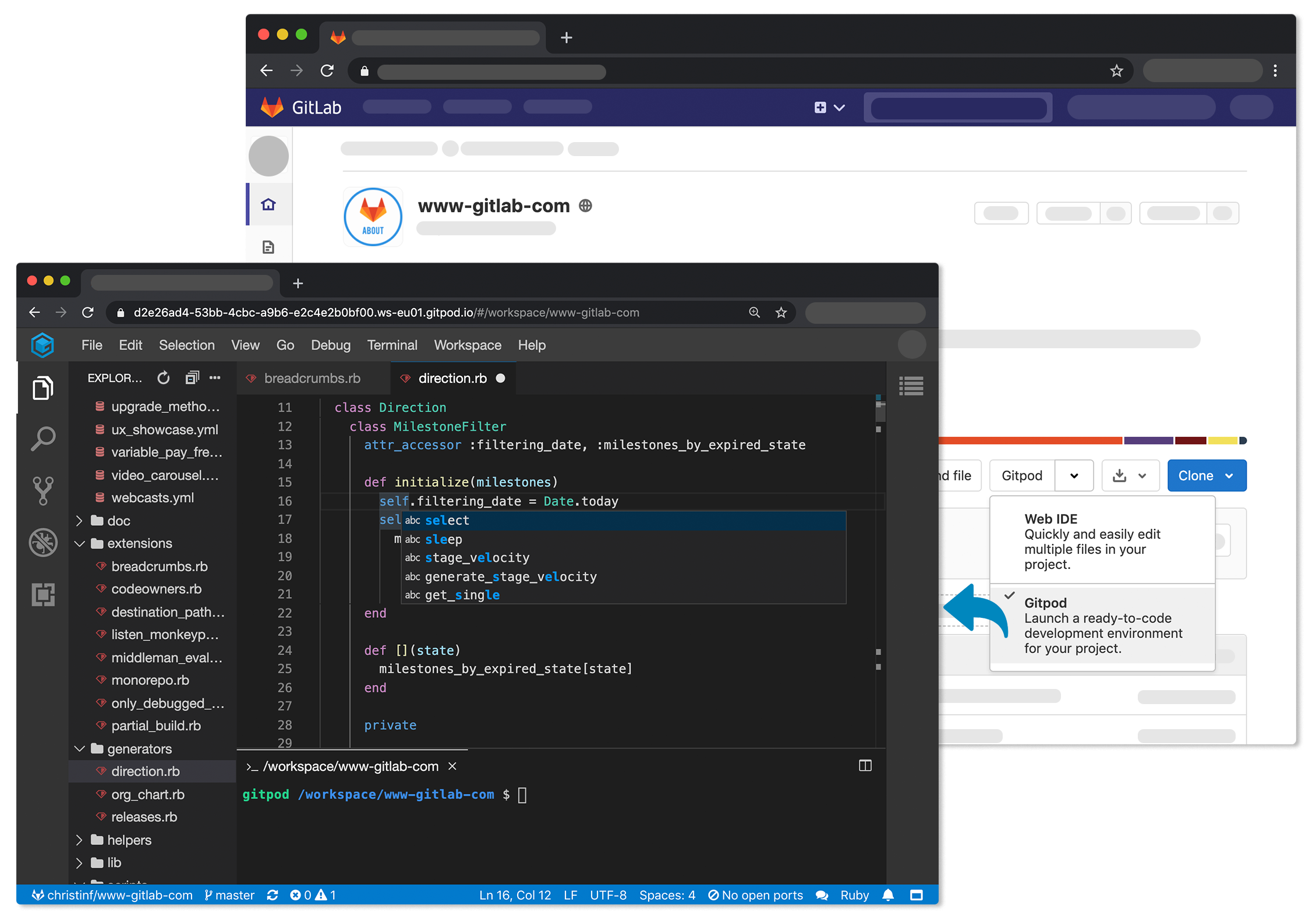
    Gitpod announced today that its open source tool for automating the setup of development environments is now integrated to the GitLab continuous integration/continuous delivery (CI/CD) platform.

    The Gitpod platform treats a version control system as the canonical source of truth from which it then automates everything a developer needs to start coding, including the integrated development environment (IDE), plugins, compilers, build tools, code generators, databases and application servers.

    Fresh off raising an additional $3 million in funding, Gitpod CEO Sven Efftinge said instead of wasting a half an hour or more waiting for a bunch of libraries and tools to get installed, a developer can click a button that allows them to begin coding within a few minutes.

    With the next release of GitLab, developers will also be able to connect their self-managed installation of GitLab to gitpod.io, which is a capability through which multiple git repositories can be registered. In addition, it’s possible to self-host Gitpod on a Kubernetes cluster in a way that integrates with GitLab or install the GitLab VS Code Extension in Gitpod to interact with GitLab.

    Efftinge said Gitpod provides DevOps teams with a tool to automate the setting up of development environments across any Git repository that is equivalent to the Codespaces tool that GitHub recently made available. Rather than having that capability for only one repository, Efftinge noted most developers work on projects spanning multiple types of repositories.

    By automating that process of setting up development environments it also become easier to align them with production environments. One of the reasons why code doesn’t work in a production environment when it is first deployed is because the local development environment has been manually configured in a way that doesn’t accurately reflect the production environment. That issue becomes even more problematic when developers are working on multiple projects involving, for example, separate microservices constructed using different repositories that might not even run in the same production environment. Collaboration also becomes easier when the members of the teams have standardized on the same instance of a local desktop environment.

    Gitpod, formerly TypeFox, collaborated with Google, Ericsson, Arm and Red Hat to develop the open source Eclipse Theia project, which provides a foundation for building IDEs in the cloud using TypeScript, CSS and HTML. Theia, now being advanced under the auspices of the Eclipse Foundation, consists of a front end running in a browser or in the local desktop application and a back end running on any host. Both communicate through JSON RPC over WebSockets. Gitpod leveraged that project to build its own cloud-based service in addition to the core open source project.

    In the wake of the COVID-19 pandemic, there’s naturally a lot more focus on automation and developer productivity. Most developers will be working from home for the foreseeable future to help combat the spread of the virus. Of course, most developers have been writing code outside the office for years. The challenge now is enabling teams of developers to develop applications as efficiently as possible regardless of where they are located. Eliminating inefficient manual tasks such as maintaining development environments is emerging as a significant step in that direction.

  • MLOps: More Than Automation

    MLOps: More Than Automation

    Recently, there has been a lot of talk about MLOps from the DevOps and software engineering perspective. The message often comes across as, “Hurry, DevOps community, let’s set some standards before MLOps reinvents the wheel,” or “The purpose of MLOps is to allow anyone who knows how to code to get ML into production.” Let me tell you, as a data scientist this disappoints and sometimes scares me. Why? Because neither of these points of view captures the pain of the data scientists or the people that are subject to ML algorithms.

    A good example of this attitude toward MLOps is Google’s recent announcement. If you have read Google’s blog, you’ll see that some of the pain points they have identified are needs for data scientists: We do need continuous evaluation, continuous monitoring, metadata management and lineage and a feature store for collaboration. But where I find the announcement falls down for me is in the company’s goal “to make machine learning act more like computer science.”

    Here’s the reality. DevOps wasn’t created to make software development behave more like a different field. It was created as a set of principles to enable software engineers to quickly and easily apply incremental improvements based on the needs of their customers, with a focus on quality. MLOps is more than automation. Centering on the needs of the users and the customers is what made developing products, ideas and a set of principles successful as DevOps.

    For MLOps to learn from DevOps, we must center the needs of data scientists and the people that are impacted by their models first. It isn’t enough to say that practicing MLOps means advocating for automation and monitoring at all steps to do things faster. Without this focus, we will see an increase in the deployment of models that have uninspected and unintended consequences that often disproportionately impact marginalized communities.

    So, as a data scientist, what is it that I need? Keeping up with the latest and greatest event streaming services, distributed systems or methods of continuous deployment of integration isn’t where my mind lights up. I would like to spend most of my time understanding the domain space of the model I’m about to build, the nuanced impact of that model and whether it’s going to meet the needs of my customers and the people they serve.

    There are a few ways to notice if you’re applying MLOps basically as a Band-Aid, a way to just go faster, that will ultimately break down. When looking for a solution to automate, consider if you’re only reducing the work required for manual processes or if you’re also enabling data scientists to focus on the hard problems they’re trained to tackle. Another way to look at your MLOps practice and tools end-to-end is to see if they allow your data scientists to know the impact of their models across more dimensions than just the outcome. Let’s take a few examples.

    Automation of Data Pipelines Can Slow You Down

    Today, data engineers have been reluctant to allow data scientists to have access to all of the data that exists in all of its forms. There are many reasons I’ve been given in my years of experience, some of which are good, such as not all of the tools that data scientists have available for experimentation support all of these data sources. Other reasons, however, might include grumbling about creating additional work for data engineers. It’s a continuous challenge to get data such as event streams into a format that can be explored by data scientists. Each new feature I hope to create comes at a cost to other teams.

    With our shiny new culture of MLOps, someone proposes a solution: Automate! But, remember, MLOps is more than just automation. This is a great place to stop and look at the data scientist’s workflow and find a way to automate a solution that fits their needs and gives them new capabilities while reducing the work on the data engineering team.

    A simple automation instinct might look like this: Ask data scientists to list out all the data they’ll ever need, and create batch jobs to serve up those needs. A better solution would be to find a way to connect multiple types of data sources to a single environment, allowing data scientists to explore data as it becomes available. Then create features and make them available for production without having to change development environments or languages or to be proficient in reading crystal balls to know what data they’ll need into the future.

    Continuously Monitoring the Wrong Things

    Another common pitfall of applying MLOps without focusing on the people your ML models will ultimately impact is using continuous monitoring only to measure performance, without tracking the impact of your features across various demographics. It’s not enough to check—one time—that your models aren’t systematically disadvantaging marginalized groups. We need to do this continuously.

    People change, so do our biases and patterns. It’s easiest to conceptualize this for me in our use of language over time: The words are the same but their impact changes. We often don’t know that the underlying data has changed because society itself has evolved. But we can commit to measuring the impact across dimensions to react quickly, ultimately reducing harm.

    Ultimately, MLOps isn’t just about automation. It is also a set of principles to guide how we build tools for sharing outcomes. At my company, we are thinking about ways to help identify and flag data and features that could introduce bias in our feature store product.

    The gains from efficient ML development are significant. Data scientists and data engineers are sharing new tools to speed development and foster collaboration at higher velocity. And with better tools and processes, we are able to share responsibility for productionizing ML. MLOps, at its best, incorporates these components and more into your organization.

    If we’re not careful, however, teams will focus on making data scientists more like software engineers, vendors will create tools that fail to address the entire problem, and companies will spend millions of dollars on quickly releasing models that fail to serve their customers—ultimately at the cost of humanity.

  • Shift Left … With In-Sprint UI Test Automation (?!?)

    Shift Left … With In-Sprint UI Test Automation (?!?)

    UI testing is really the most intuitive testing approach imaginable: Just find someone who can represent the target user and let them poke around in the interface they use for their daily work—the UI. It’s natural. It’s intuitive. And it’s still the predominant method used for testing most software releases today.

    This human-driven testing can never stop. Having smart testers creatively explore the UI using their creative, analytical minds to uncover issues that disrupt the user experience is absolutely essential. But it’s also essential to perform a level of regimented, routine checking with each change to ensure the modifications don’t introduce strange side effects. Performing such tedious checking at the required frequency and speed would be torture for human testers. Hence, the push toward test automation.

    You would think, then, that the natural place to start with test automation would be to automate the most natural of all testing: humans interacting with the UI. Not so: UI test automation is actually one of the most dreadfully difficult test automation approaches.

    Tests automated at the UI level historically have a fair share of issues. They’re slow to run. They’re fast to break. They’re somewhat technical and tedious to create even for common modern technologies such as web and mobile. They’re much more difficult to create when you have to deal with custom desktop applications, packaged applications, extremely old technologies, extremely new technologies or Citrix/remote applications. And creating automated UI tests typically requires a fully implemented—and stable—UI.

    If you’re aiming for in-sprint test automation, this means that tests need to be implemented in that tiny sliver of time between when developers complete the final UI code (with a successful build) and when the sprint is supposed to be completed. Guess what? That rarely happens. Within the sprint, teams can certainly tackle human UI testing (a.k.a. exploratory testing). But automated UI testing? That’s often delayed until a later sprint … and/or scrapped altogether.

    Clearly, there are a lot of issues with UI test automation. But if you really think about these issues, it all boils down to one thing: The test automation doesn’t think like a human:

    • A human can interact with an application’s UI quite rapidly (the human eye can process 24 images per second).
    • A human is not derailed by interface changes. Something such as a reimplemented drop-down menu or a new way to display results won’t phase a human tester at all.
    • A human brain can interact with extremely old technologies (such as mainframes and COBOL-based apps) along with whatever new technology happens to be released tomorrow. And if your application is migrated from a monolith to a microservices architecture, the same tester’s brain can still test its UI in exactly the same manner.
    • A human tester might not recognize whether the application is installed on their machine or is accessed via desktop-virtualization. They can test its UI just the same.
    • A human doesn’t really need to wait for a fully implemented (and stable) UI implementation. They can start working on their tests the moment a rough prototype is available. And they can start performing tests as soon as the UI is at least kinda—If the underlying technical implementation is still shifting a bit, it’s not necessarily a showstopper.

    So, if the key problems with UI test automation stem from the fact that human intelligence is greater than test automation, why not try to address those problems with the next best thing: artificial intelligence. By tapping the power of AI, we can achieve UI test automation that’s as smart and resilient as a human, but as efficient and scalable as a machine.

    For this to work, the technology must learn how to understand user interfaces in the same way that a human can. For example, it needs to know that a drop-down is a drop-down just by “looking” at it. With that accomplished, you—well, any human, really—can define test automation by simply providing a natural language explanation of what business process should be tested (e.g., “Enter 10,000 in the list price input, click the confirm button, then … “).  AI-driven test automation can take it from there. There’s no need to deal with shadow DOMs, web assemblies and the like. Emulated tables on SAP can be automated without any special customization. It’s not going to fail the next time there’s a minor UI tweak, and you won’t have to rebuild your tests if the application is reimplemented in a new technology.

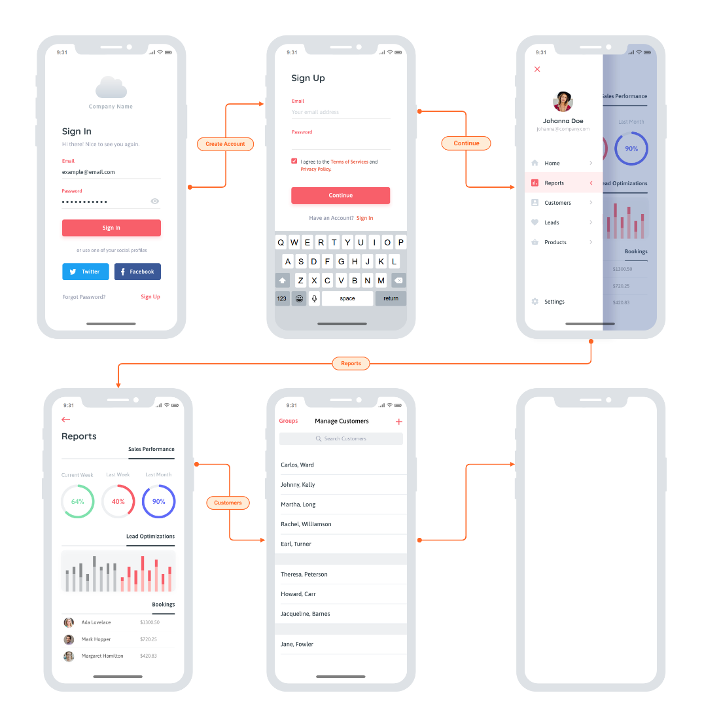
    In terms of shift left, you can start implementing your UI tests as soon as the team sketches out a rough prototype or mockup. Advanced UX designs like this are a great starting point:

    You really could start anywhere though. Even more rudimentary whiteboard sketches would enable you to start on UI test automation without waiting on the actual implementation. This means less crunch time each release and ultimately eliminates the ripple effect of testing delays, unfinished stories and “hardening sprints.” And it enables an interesting flavor of TDD: Start running these automated UI tests before implementation begins, then have developers write code that makes them pass.

    The catch? It’s not so easy to make UI test automation so easy. Two things to watch out for: accuracy and speed. For this to work, the technology must be able to accurately recognize and interact with UI controls that it’s never seen before. This requires visual object detection as well as optical character recognition (OCR). And that’s the easy part; the difficult part is doing this at speed. For a while now, AI-driven automation solutions have been struggling to come close to the speed of human processing. On average, you’re looking at tools processing 1.8 images per second, while humans can handle 25. You don’t need automation that mimics human speed, though—you need to beat it. If you want this UI testing to run as part of your continuous testing as a core part of your CI/CD process it needs to vastly surpass the speed of the human eye and the human brain.

    Once you overcome that little challenge, AI-driven UI testing will remove a lot of not-so-artificial conflict on Agile dev teams:

    • Testers waiting on developers to finish the UI so they can start implementing tests—and avoid the dreaded crunch time at the end of sprints.
    • Developers waiting on testers to finish tests so that the user story is deemed “done done” within the current sprint.
    • All the retro finger-pointing you get when delayed or unfinished testing results in unfinished user stories.

    I admit: when you first tell the team that UI test automation will help you complete testing sooner, it could be a hard sell. But after a few rounds of having UI test automation ready before developers write a line of code, I’m confident that you’ll find some real support for this artificial intelligence-driven testing approach.

  • Granulate Applies AI to Linux Server Optimization

    Granulate Applies AI to Linux Server Optimization

    Granulate today announced that a platform that leverages machine learning algorithms to optimize Linux server environments running on-premises or in the cloud is now generally available.

    The Granulate platform employs agents, dubbed gAgents, that install machine learning algorithms to continuously optimize deployments across a server environment, said company CEO Asaf Ezra. The company also launched gCenter, a portal through which IT teams can manage the deployments of those agents.

    The Granulate agents automatically learn the specific resource usage patterns and data flow of any applications. By analyzing CPU scheduling order, oversubscribed locks, memory, network and disk access patterns, the agent also identifies over-subscribed resources, bottlenecks and prioritization opportunities. It then tailors scheduling and prioritization decisions regarding CPU, locks, caches and network access at the operating system level to improve the application performance.

    Ezra said the agents created by Granulate will then automatically optimize the server environment based on parameters defined by IT teams using gCenter. That capability not only enables IT teams to reduce costs by 60% but it also results in a 40% improvement in response times and a 5X improvement in overall throughput without any changes to application code being required, he said.

    According to the company, more than 40,000 instances of gAgent have already been deployed by IT teams at PicsArt, Perion, AppsFlyer and Coralogix.

    The gAgents are designed to install easily using a single command line on any Linux server. Once installed, Ezra said, it’s not long before IT teams discover they can significantly reduce their cluster size and downsize their machines.

    In the wake of the economic downturn brought on by the COVID-19 pandemic, IT teams are under more pressure than ever to reduce costs. IT environments, however, have often become too complex to optimize without relying on some form of artificial intelligence to automate IT operations (AIOps).

    While many IT teams may have initially been dubious of the effectiveness of AI, it’s become increasingly apparent that optimizing IT environments without relying on machine learning algorithms to some degree isn’t feasible.

    The challenge, of course, is making sure that whatever form of AI employed is making the right optimization decisions. As such, most IT teams tend to launch small AIOps projects initially until they can verify that the decisions being made are valid. Once a level of trust is established, many of the tedious tasks that IT teams that once were performed manually are either eliminated or, at the very least, reduced sharply.

    It’s not clear exactly what impact AIOps in all its forms will have on IT jobs. In theory, smaller IT teams should be able to manage larger IT environments. However, rather than eliminating positions, most organizations appear to be increasing the volume of applications they can deploy as the overall IT environment becomes more automated.

    Like it or not, IT is becoming more automated. The issue now is determining precisely where the interface between IT administrators and machines that can manage themselves now lies.

  • Synopsys Report Shows DevSecOps Progress

    Synopsys Report Shows DevSecOps Progress

    A report based on analysis of the software security initiatives of 130 organizations conducted by Synopsys, a provider of static application security testing (SAST) and software composition analysis tools, suggests progress in terms of DevSecOps adoption is being made but there is still a long journey ahead.

    According to the survey results, 121 organizations now ensure host and network security basics are in place, with 73 organizations also monitoring application input.

    However, only 39 organizations said they define secure deployment parameters and configurations, followed by 36 that said they were ensuring cloud security basics and 33 that said they were protecting code integrity. Only 32 had embraced application containers, while 22 employ orchestration for containers and virtualized environments, according to the Synopsys report.

    Using code protection (13), attaching bills of material to application inventory (12) and using application behavior monitoring and diagnostics (7) were even farther down the list.

    Michael Ware, senior director of technology at Synopsys, said the results of the report are an encouraging sign as more software security teams increasingly report into a technology group or CTO rather than an IT security team or chief information security officer (CISO). As the responsibility for application security continues to shift left, IT teams are being reorganized accordingly, he noted.

    More IT organizations are also embedding security reviews within their continuous integration/continuous delivery (CI/CD) platforms as they replace high-friction, out-of-band security tasks with ones that are automatically triggered by events in the CI/CD pipeline, added Ware. That approach also enables organizations to overcome a chronic shortage of cybersecurity personnel that has now become a longstanding issue for most organizations, he noted.

    Longer-term, security will become deeper ingrained in the entire mindset of not just IT teams but also entire organizations, noted Ware. As part of an effort to make the entire organization more resilient to change, organizations are making a more concerted effort to address security issues at all levels of the organization.

    Less clear at the moment is to what degree DevSecOps will be achieved by automating tasks rather than melding workflows. DevOps and cybersecurity teams have distinctly different cultures. As cybersecurity tasks shift left, many DevOps teams will seek to ruthlessly automate those tasks in much the same way they have automated other IT management tasks. In fact, there may come a day when security issues are addressed as a subset of the overall quality assurance process, Ware noted.

    In the meantime, it’s clear much more needs to be done before applications can be considered fundamentally secure. Security issues that stemming from relying on tools to automate the configuration of cloud infrastructure are rampant. DevOps teams clearly need to take more responsibility for security, but cybersecurity teams still need to be able to verify the right policies are being employed. As long as humans write code, there will always be plenty of opportunity for error. The DevSecOps challenge now is to eliminate as many opportunities for that human error to occur as possible.