Tag: automation

  • Data and Tools Don’t Solve Problems, People Do

    Data and Tools Don’t Solve Problems, People Do

    When developing software, many managers believe that data and tools will solve all their problems. If they just have enough data or the right data analysis tools, development and delivery become automated and decisions are made without human input. But in reality, humans are a necessary part of the process. There are a few pieces of data you may want to start gathering, but you often don’t need a lot of data to make the right decisions. And sometimes, you don’t need data at all. You can use the data and tools you already have in place, but your most valuable asset is your brain. To illustrate this point, I’ll provide a few examples.

    If it takes too long for your team to fix a bug, you can dig into data from your bug tracker or ALM tool, but reasoning about the process is also a necessary step. It’s not sufficient to simply look at some reports from your tooling. In fact, reasoning about your process may be all you need. You may already know where your bottlenecks are and where the waste is. Nevertheless, when you need to dig into the data, the point solution tooling you use could be the best place to do so.

    If your epics are moving too slowly, you can use a report provided by whatever tool you are using to understand lead time, as well as the cycle time between states. You can drill down from there to look at stories as they flow from inception to completion and use whatever tool you are using to look for bottlenecks and wait states. Likewise, for build through deployment to production, you can look at data out of your tooling to understand how long it takes to go through each phase.

    To illustrate this further, relatively few companies today are deploying more than once per sprint, and many, less often. Until you get your lead time down to two weeks, measuring how much undeployed code inventory has built up is useful only for its shock value. And then, you don’t need to update it every month. Measuring lead time is sufficient, and easier.

    Whatever tool you are using, however, can only model what you have in the underlying systems. If the underlying systems don’t model the wait states, your analytics aren’t going to give you any insight into your delays. Include wait state columns in your scrum board or kanban.

    A great approach to continuous improvement is the Toyota kata, and there is a great book by that name. You should read it and then implement it in your organization. But know that this can’t be tooled-up or made automatic. You do need to be able to measure for the intended improvements, but it still takes humans to do the thinking. Toyota was successful because its approach ingrained in every employee the notion of improving their processes. Toyota never minded people seeing what it was currently doing because Toyota knew that its reason for success was its ability to change and to improve faster than the competition. This requires humans. Brains.

    Example: Maybe you are looking at metrics about builds from a tool. You might look and see that you have multiple builds per hour. But if you don’t really understand the metric or what it is you’re looking at, you might not realize that some individual builds may only be built once per day, or worse. Or you might not realize that your dev team’s builds only go to QA every other week, slowing down your overall flow of value.

    Gary Gruver, in his book, “Engineering the Digital Transformation,” says, “Most organizations don’t really think closely about how value flows through their organization,” (page 99). I agree. Moreover, they too easily buy into the promise of not having to think closely about how value flows.

    Gruver continues: “The biggest change for the industry is to create a culture of continuous improvement.” He doesn’t say “tooling for VSM” or tooling for metrics. He says culture change. The stuff of people and brains.

    Gruver also says, “Software flow is very hard to measure. … That is hard with software because the size of each feature is different, which makes it very difficult to have a quantifiable measure of flow.” Another way to say this is that you shouldn’t have unrealistic expectations that your tooling will make the decisions for you. You should expect to have to think. And then maybe dig into the data already provided by various tools in your IT or software dev value stream, and even modify some of those to capture additional data. You should expect to have to analyze each component value stream, each type of work, the mix of work types and the variability of each.

  • How to Calculate ROI on Infrastructure Automation 

    How to Calculate ROI on Infrastructure Automation 

    Infrastructure and cloud automation. You know you want it. Infrastructure as code and programmable infrastructure are hot topics these days. The possibilities opened by applying software development practices to infrastructure make the vision of transparent infrastructure closer than ever.

    But before you start automating, you may want to look at the value you get from your investment and make sure your plan makes sense. After working in automation for over a decade, I’ve seen the importance of having a clear understanding of the value of automation time and again. It’s about time I write about calculating the return on investment (ROI) on infrastructure automation. But before getting to the specifics of infrastructure and cloud automation, it may be wise to start with the value of automation in general.

    The Value of Automation

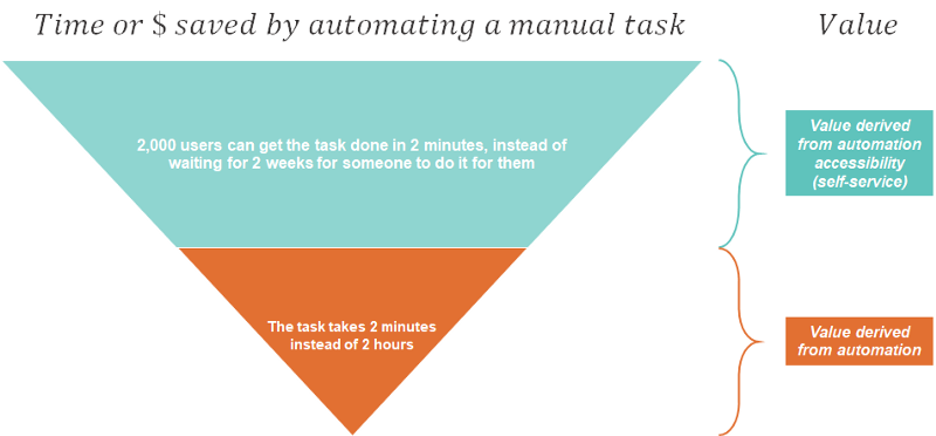
    The equation is simple. You have a long, manual process. You figure out a way to automate it. Ta-da! What once took two hours now takes two minutes. And you save sweet 118 minutes. If you run this lovely piece of automation very frequently, the value is multiplied. Saving 118 minutes 10 times a day is very significant. Like magic.

    The Value Formula

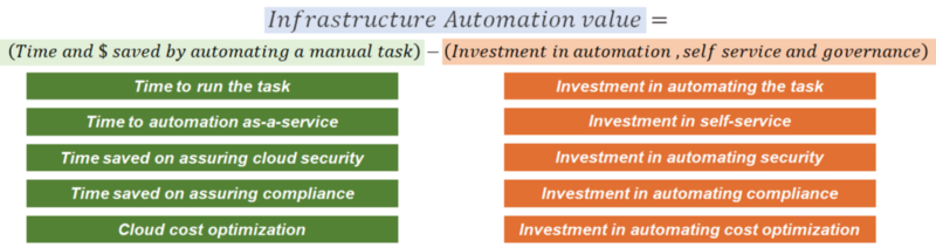
    The formula for the value from automation can be very simple:

    Time or Money Saved by Automating a Manual Task

    Time or money saved by automating a manual task should include any benefit you can attribute to the automation. Here are some examples:

    1. The time saved by automation to accomplish a complex task (this process took eight hours. Automation does it in eight minutes. Now we can do it more often).
    2. The time saved for the person who used to do it manually (the person who used to do it manually now has eight free hours, while automation does the work).
    3. The time saved for a person who was waiting for the task to be completed (the person who used to wait eight hours for the task to be done, now waits eight minutes; they can do more).
    4. The time saved by not making human errors (the person who used to spend 10 hours troubleshooting after the eight-hour person finished saves 10 hours).
    5. The time saved by not having to document a manual process (the two people who spend five hours a month teaching other people how to do the eight-hour thing …).

    Investment in Automation

    Investment in automation is often naively calculated as the investment in building automation, but the real investment in automation also includes maintaining and supporting what you have built. So, if someone tells you it took five minutes to whip up this little Bash script, ask yourself what it would look like to update it and support it forever (and when there are 300 more of these scripts). Your calculation of the investment in automation must include building, maintaining and supporting your automation.

    What Should I Automate?

    The formula makes it easy to decide what your automation targets should be—or, in other words, where you would find the most value in automation.

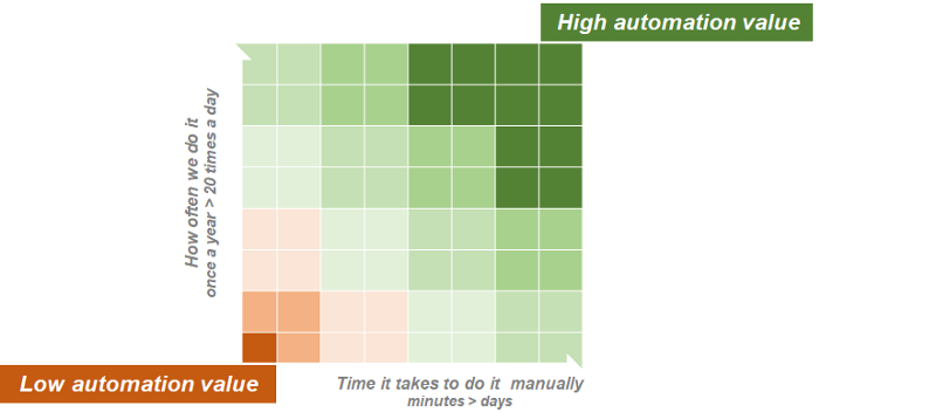
    A good start would be to look for tasks that take a long time to do manually or tasks that are done very often, as automating them will save more time and money. But you need to make sure the investment in automating them would justify the gain.
    I wish I had a dollar for every time I talked to someone who wanted to automate the “most difficult task” to prove the value of automation. This follows the logic, “If you can do the hardest thing, you can also do the simplest thing.”—a bit like making it in New York City. But this is not how automation works. Why? Because automation is very much like software development.

    In the software development world, one of the most common answers product teams gets from developers when they ask, “Is it possible to implement feature X?” is: “Everything is possible. It’s just a matter of effort.”

    Well, automation works the same (and that’s not the only similarity to software product development).

    Pretty much everything can be automated. The question is whether it’s worth it.

    If you automate something that takes a whole day to do manually, but you only need to do it once a year ,  it may not be worth automating.

    You could be automating the stupidest thing, and only save 20 minutes, but this thing happens 2,000 times every day, so that may very well be worth it. And the more stupid it is to automate, the better.

    Real Life Infrastructure Automation

    Back to the value formula. In real life, there are more facets to this formula. One of the factors that affect the value you get from automation is how many people have access to it.

    You can automate something that can potentially run 2,000 times a day, every day; this could be a game-changer in terms of value. But if this is something that 2,000 different people need to do, there is also the question of how accessible your automation is.

    Getting your automation to run smoothly by other people is not always a piece of cake (“What’s your problem?! It’s in git! Yes, you just get it from there. I’ll send you the link. You don’t have a user? Get a user! You can’t run it? Of course, you can’t, you need a runtime. Just get the runtime. It’s all in the readme! Oh, wait, the version is not in the readme. Get 3.0, it only works with 3.0. Oh, and you edited the config file, right?”).

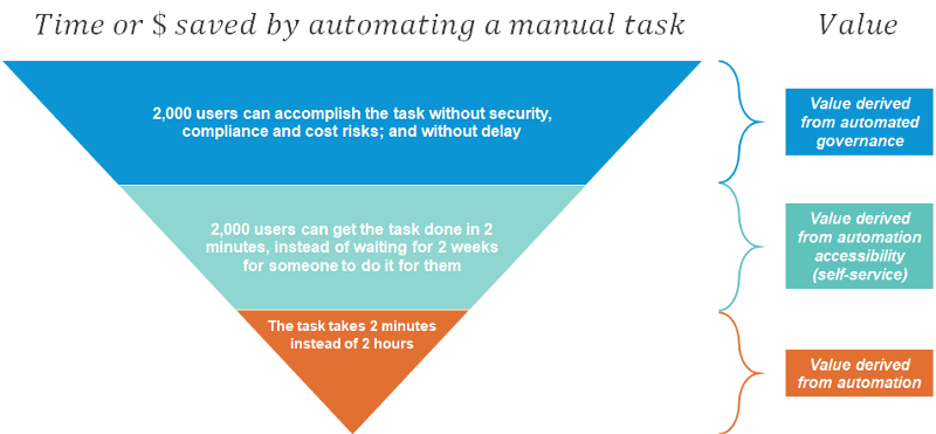
    Your calculation of the time or money saved by automating a manual task needs to consider the value derived from automation accessibility:
    The more people involved, and the more distributed they are, the more difficult it is to achieve accessibility. Your calculation of the investment in automation should therefore also include the investment in self-service:

    Adding Self-Service

    The self-service part of the equation is often neglected when looking at the value of automation, especially when the focus is very technical. It’s very easy to show a promise of value if you can automate a task, and by the time the question of self-service surfaces, it may be too late.

    This is very common with grassroots automation. In my field, I see this time after time, with teams that adopt free infrastructure automation tools (Ansible, Terraform, Cloudformation, ARM, you name it). In 2020, most people understand that there are no free lunches and that it takes precious time to develop and maintain this automation. Most already get that supporting it over time results in an automation team that is often too swamped to do much else.

    But I dare say that few properly estimate how difficult it is to provide this automation as a service to other teams. I don’t blame them. For an engineer, the thought “This is too slow! I will automate it” comes very naturally. It’s much more difficult to imagine as a developer a user who doesn’t understand the beautiful capabilities of Terraform; someone who freezes when they hear, “It’s in GitHub”; someone who isn’t as fascinated by the elegance of the code and has no #$$%$@ idea what to do with code.

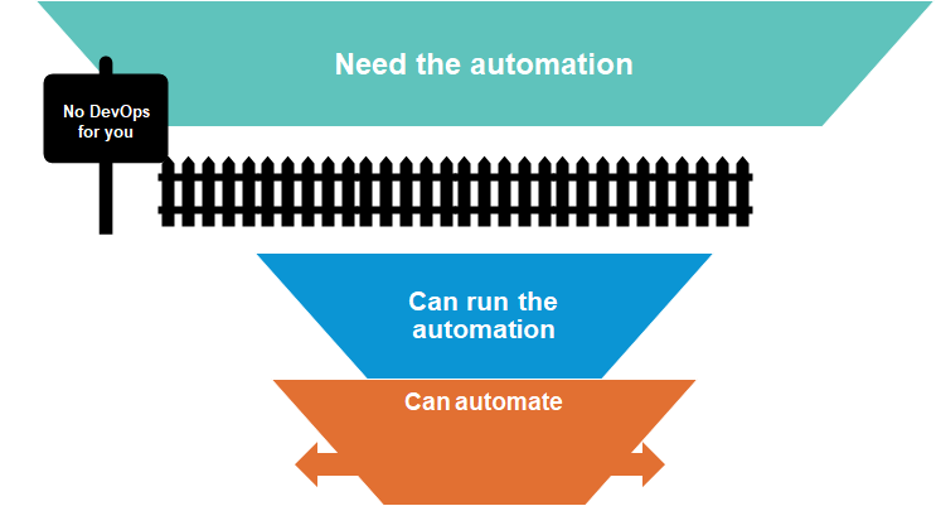
    In a company with multiple teams, the gap between the people who can automate to the people who need the automation can be huge. And if you ignore it, your automation value formula can be very skewed.
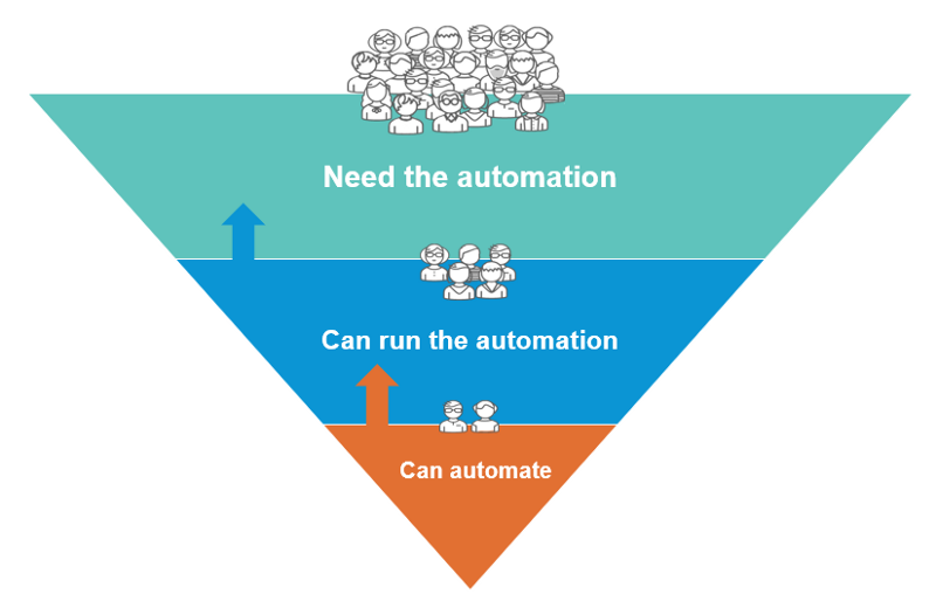
    Can Everyone Run This Automation?

    When you consider automation, the technical question, “Can it be automated?” is not enough. How efficient the code will be, or how much time it would take to build the automation, is also not enough.

    The question, “Can all relevant users run it as a seamless part of their workflow?” has to be asked and weighed in. You may be surprised, but highly accessible yet technically mediocre automation can actually win in some cases.

    How the Value Equation Works in RPA

    Robotic process automation (RPA) is a great example. RPA systems typically provide users with lists of automated actions by recording tasks that the user performs on a graphical user interface.

    For many coders and automation professionals, this approach is almost sacrilegious. You can automate fast, but scaling the technology is extremely limited. It gives a wide audience access to automating tasks without enforcing coding best practices (we already know the masses can’t be automation experts). But RPA can offer high ROI in some cases. If we return to the value formula, this quick-and-dirty type of automation is highly accessible, and therefore the investment in self-service is low. If using RPA means x100 or x1000 people can benefit from automation, compared to high-code tools that only a few can use, we may be able to get impressive ROI.

    Does this mean we should use RPA for DevOps automation? Not really. RPA is not always the right tool for the job, and it won’t always provide the best value in automation. RPA works well when you want to eliminate toil in small tasks (e.g. it is very popular for accounting tasks that a person triggers manually), but the value is lower when you have strict scale, efficiency and reliability requirements, which is typical in DevOps.

    In the case of DevOps, with machine-to-machine heavy interfaces, the investment you will have to make in scaling and maintaining RPA can be very high and the ROI would eventually be very low. RPA may therefore not provide the greatest value in this field, and it makes sense to opt for more scalable options. But this doesn’t mean you should focus solely on good engineering and the question of accessibility and self-service must be addressed in your ROI calculation.

    Infrastructure Automation in DevOps

    In the past years, there has been a growing awareness of self-service in traditional infrastructure automation. Often led by IT and Ops, some of it started with simple means, such as connecting ticketing systems (JIRA, Service Now) to automation tools.

    However, in DevOps infrastructure automation, accessibility of automation is often an afterthought. DevOps automation initiatives usually start with developers. The natural tendency is to invest in high-code automation and to focus on value derived by the time saved on the execution of a task rather than the multiplication of the value through the enablement of a broader user base. Existing self-service mechanisms are thrown aside,  and for good reasons: they are too slow and they don’t seamlessly fit into the DevOps process.

    Ignoring self-service is one of the reasons why DevOps initiatives show great value-promise in small-scale and fail in larger scales.

    Moreover, since DevOps spans so many areas of subject matter expertise, the chances of leaving critical expertise outside the coders’ silo is very high—especially expertise in operations, security and finance. Ignoring these experts’ accessibility to automation leaves them outside the DevOps loop.
    I was very happy to see Gartner’s “Market Guide for Infrastructure Automation Tools,” published in April. If you don’t have access to the gated content, I recommend taking a look at Manju Bhat’s post on the topic. Gartner finally highlights self-service as a critical capability for infrastructure automation:

    “Infrastructure automation tools provide DevOps teams with on-demand, self-service access to standardized environments. Adopting these tools enhances their ability to deliver customer-focused agility and velocity improvements while consuming new technology platforms with limited disruption.”

    I see this acknowledgment in the importance of customer-facing accessibility as a crucial milestone on the way to realizing value in larger-scale DevOps initiatives.

    Additional Value Factors in Infrastructure Automation

    Unlike general automation, infrastructure automation is a field in which there are additional factors in the value formula, which fall under the Infrastructure Governance category:

    1. Cloud security.
    2. Cloud cost.
    3. Compliance with industry standards.

    These elements need to be taken into consideration when addressing the value derived from automation. Infrastructure automation, especially in public cloud, involves sensitive assets: compute, network, storage, data and security elements. These elements can be expensive, and they could be very vulnerable to attacks.

    If ignored,  these three factors can diminish value. But handling them properly in automation can also generate value.

    The “time/money saved by automating a manual task” could, therefore, include an additional value segment:
    And the investment calculation should also include embedded governance:

    Build Your Value Formula

    If you are working on an automation initiative, don’t forget your value formula. It will help you build a business case, get management buy-in and achieve a better understanding of value factors you should focus on.

    The TLDR version:
  • Puppet Launches Relay to Simplify Automating DevOps Workflows

    Puppet Launches Relay to Simplify Automating DevOps Workflows

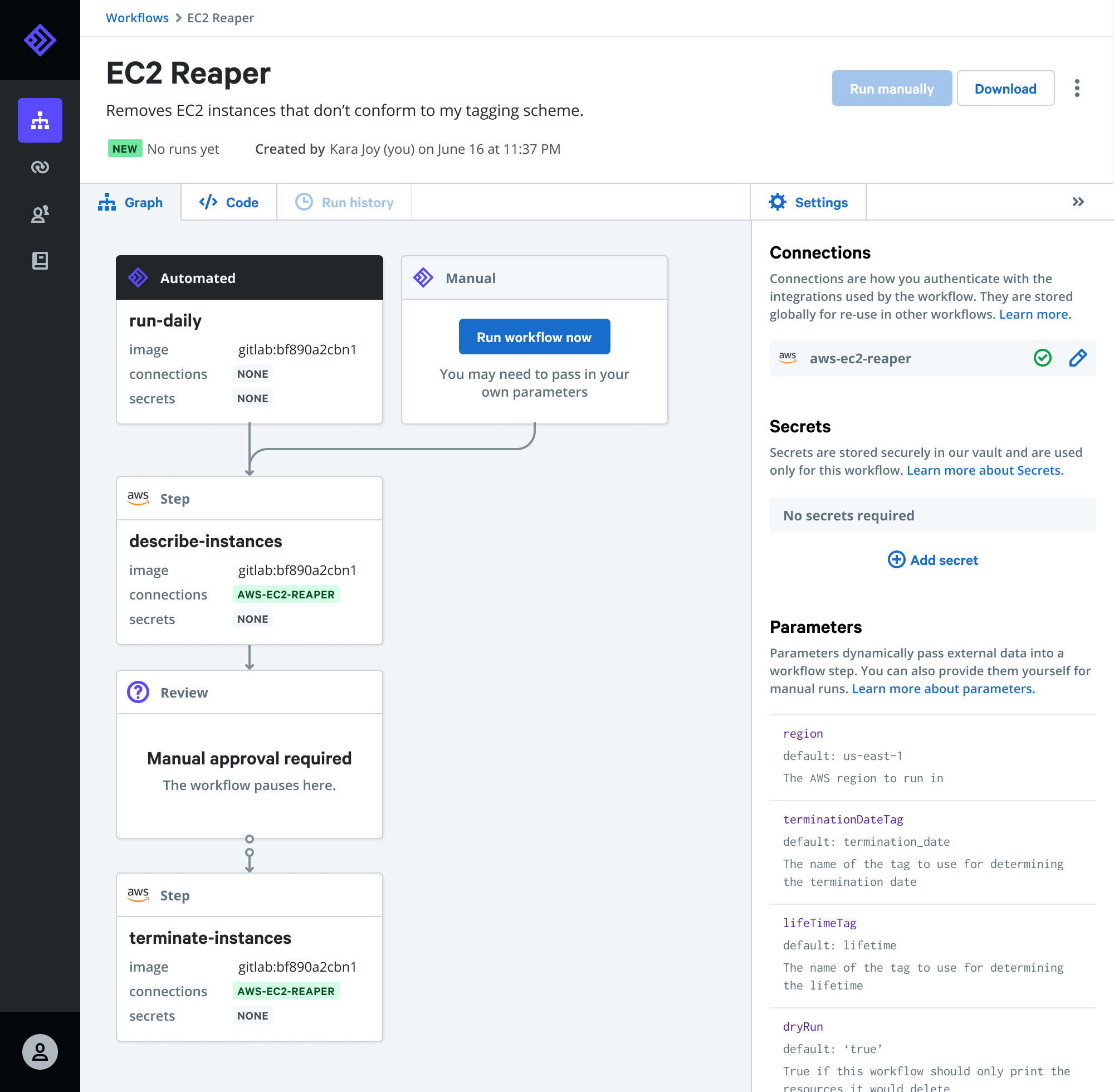
    Puppet today made available a public beta of Relay, an event-driven platform through which DevOps teams can automatically invoke pre-configured workflows.

    Company CTO Deepak Giridharagopal said Relay listens for DevOps events that can then trigger an automated workflow such as automatically deleting underutilized cloud resources, enforcing cybersecurity controls or remediating known issues.

    Relay connects to dozens of DevOps tools, cloud services and application programming interfaces (APIs) to automate workflows across a wide range of platforms, including PagerDuty, GitHub, Datadog, Jira, Terraform, Slack and others.

    Giridharagopal said Relay will also enable IT organizations to reuse workflows versus continually cobbling together one-off workflows for processes that address routine use cases that can be tackled using existing content.

    At the root of that issue is tool sprawl within DevOps environments. Each DevOps team tends to create their own workflows using their preferred tools, even though they may be replicating a workflow process that has already been addressed using other tools. Relay provides a means to reuse workflow across disparate DevOps tools, which Giridharagopal said should significantly increase overall DevOps productivity.

    The Relay platform is also designed to be extensible in that it also allows DevOps teams to create custom workflows that can then be reused by other members of DevOps teams, he added.

    Giridharagopal said with the rise of microservices it’s apparent workflow automation within DevOps environments is about to become a more pressing issue. As the number of individual services that need to be managed increases, the need to automate workflows across more complex IT environments becomes more critical. DevOps teams can’t effectively manage modern cloud-native applications relying on manual workflow processes, he said.

    Relay is part of a broader shift toward event-driven architectures, which are gaining increased traction within IT environments. While event-driven architectures have been around as a concept for decades, the emergence of platforms based on, for example, serverless computing frameworks are changing how IT resources are invoked. Via any number of APIs, it’s feasible to automate a wide range of IT functions using these types of platforms.

    Of course, the biggest challenge for many organizations has been building automated workflows that work consistently across multiple platforms. The level of process expertise required to build those workflows is not inconsequential. Puppet, via Relay, is providing pre-configured workflows to address some of the more common use cases in a DevOps environment. DevOps teams will still need to build their own custom workflows to address more complex use cases. However, platforms such as Relay promise to sharply reduce the time spent creating scripts and associated workflows to address routine tasks.

    In the meantime, interest in all forms of IT automation is on the rise in the wake of the economic downturn brought on by the COVID-19 pandemic. IT organizations are moving quickly to reduce the total cost of IT by automating as many processes as possible. In many cases, it’s not clear when some IT organizations might be able to add additional headcount anytime soon. Automation, as such, is now as much about survival as it is simply trying to increase productivity.

  • SaltStack Looks to Automate DevSecOps Processes

    SaltStack Looks to Automate DevSecOps Processes

    SaltStack announced today it has integrated its automation framework with a variety of third-party security platforms to further the adoption of best DevSecOps processes.

    Mehul Revankar, director of product management for SaltStack, said version 6.3 of SaltStack Enterprise provides integration with offerings from Splunk, Tenable, Qualys, Rapid7 and Kenna Security. Data generated from vulnerability scans conducted using tools from Tenable, Qualys and Rapid7 can be directly imported into SaltStack Enterprise to inform automated DevSecOps processes, while integration with Kenna Security makes it easier to automate and prioritize vulnerability remediation based on the level of risk.

    Revankar said that latter capability is crucial because remediation efforts should not be prioritized based on the severity of a vulnerability alone. For example, a vulnerability may be discovered in an application that sits behind a firewall, but if that application doesn’t provide access to the web an organization may decide to not patch that vulnerability immediately regardless of its severity because the risk of a breach is still relatively low, he said.

    These capabilities will enable SaltStack Enterprise to serve as a foundation for providing security orchestration, automation and response (SOAR) capabilities within the context of a DevSecOps process by making it easier to incorporate cybersecurity within the context of a larger playbook for automating the management of IT, he added.

    Most of those playbooks will be developed by DevOps teams in collaboration with cybersecurity professionals, noted Revankar.

    In addition to improving DevSecOps processes, SaltStack hopes to make it easier for external applications such as Splunk and Datadog to consume data generated by its framework by providing compatibility with Prometheus, an open source IT monitoring tool developed under the auspices of the Cloud Native Computing Foundation (CNCF). A SaltStack Enterprise Splunk add-on tool has been added to the Splunkbase repository.

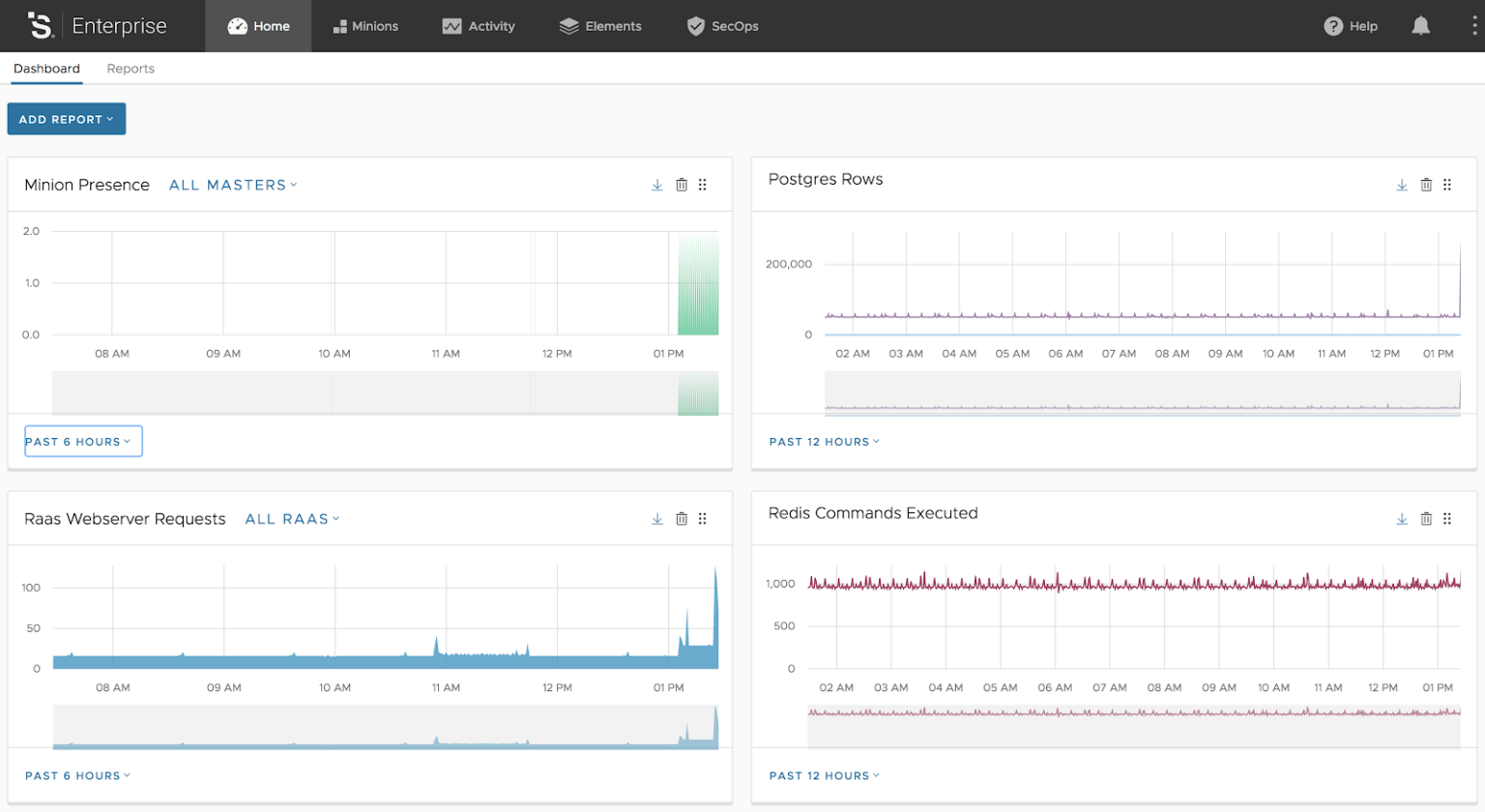
    SaltStack is also making available a performance and health dashboard to enable DevOps teams to track 25 SaltStack Enterprise metrics that are surfaced using the Prometheus data format.

    The open source Salt framework on which SaltStack Enterprise is based has emerged as a popular option for automating IT processes. Because it is based on Python, the barrier to adoption for Salt in terms of programming expertise is comparatively low to other programming languages. As such, more IT operations teams have been inclined to learn Python to leverage Salt to automate processes.

    Like most vendors that have adopted open source business model, SaltStack extends the capabilities of Salt via an enterprise edition that it both extends and provides commercial support.

    Interest in IT automation is on the rise as organizations of all sizes look to maximize what limited cybersecurity resources they have and cut costs. IT automation in the form of SOAR presents an opportunity to consistently apply cybersecurity policies more broadly without having to increase the size of the IT organization.

    The challenge, of course, is having the expertise required to build a playbook. In the case of open source frameworks, many of those playbooks are shared among the members of a community such as Salt. Regardless of how those playbooks are acquired, it’s clear that as IT becomes increasingly more complex most IT organizations are not going to be to do without them.

  • The Secret to Winning at DevOps: Are You Up for the Challenge?

    The Secret to Winning at DevOps: Are You Up for the Challenge?

    The main idea behind DevOps is to enable companies to keep up with the increased software velocity and advancements in agile culture for a smoother end-to-end software delivery cycle.

    The main goal of DevOps is to accomplish integration and automation, which is why implementing this philosophy can be challenging. Not only do you need to replace older methods and practices, but you’ll also have to change the mindset of the developers and the operations team to ensure they work in sync.

    Several IT operations teams and software teams have adopted DevOps practices into their work culture for faster evolvement and improved innovations. The pipeline comprises continuous integration, testing, deployment, as well as monitoring application and system performance.

    Introducing new DevOps tools and changing the mindset to prepare teams for the fast-paced world remains crucial for a successful implementation.

    Despite the revolution that this philosophy brings to software development, several enterprises find themselves taking DevOps to an unproductive extreme. To remain productive, one of the aspects that teams need to work on is reducing rework, and the best way to ensure this is automation.

    Understand How DevOps Works

    Under a DevOps model, the development and operations teams are integrated into one to prevent them from getting siloed. This also improves collaboration and productivity.

    You see, it brings alive the possibility of both the teams thinking more alike, working together and sharing responsibilities. This is done by automating code testing and workflows, automating infrastructure and continuously measuring application performance.

    In some models, even the QA and security teams merge with the dev and ops. In cases where security becomes the primary focus, the name gets modified to DevSecOps.

    In essence, the focus of DevOps is on automating processes that were otherwise manual and slow. Teams use a technology stack and tooling that can operate and evolve applications more reliably and swiftly. As engineers will be able to accomplish tasks such as deploying code and provisioning infrastructure faster with reduced issues, teams can reach testing and maintenance stages quicker.

    Balance Between Standardization and Adaptability

    Software products are mostly developed from the customers’ perspective, and if not, from end-user experience. Often, developers work backward to identify customer needs and wants for ascertaining successful innovation.

    One of the biggest challenges when developing a software development life cycle (SDLC) strategy for organizations is to consider dynamic customer needs, strict compliance policies, unpredictable market trends and company goals. To ensure a consistent workflow, DevOps teams need to adopt standardization. In fact, workflows, technologies, processes, protocols and metrics need to be standardized before they can be automated.

    This is also the main reason why organizations adopting DevOps need to strike a balance between standardization and adaptability. One industry that has excelled at this has been the financial industry, which has been leading the charge when it comes to adopting the latest software delivery practices and technologies, including DevOps. Financial executives view DevOps as being a way to improve security and risk and governance strategies. 

    The result is that cloud-based financial services are now automating virtually all of their processes through their software delivering pipelines, which makes tasks such as scanning receipts, sending invoices, tracking expenses or making payments seamless as they sync to your account. This simpler process is beneficial for boosting developer productivity and resource utilization, and for enabling enterprise scale management. If anything automating processes is becoming necessary for achieving higher product quality, compliance and scalability. 

    As mentioned above, new DevOps tools need to be introduced to team members to keep up with the constantly evolving strategies and implementation. But to prevent the creation of silos between teams, mechanisms need to be developed to make the adoption of new technologies easier. 

    Achieving the delicate balance between standardization and automation will help eliminate communication gaps, performance bottlenecks and silos between the different teams.

    Benefits of Automation in the DevOps Landscape

    The following are the advantages of adopting a DevOps philosophy:

    • Code Development. Source control will keep everyone in the loop by managing, tracking and documenting any changes in code. This can be time-saving, and reduce the complexity of software projects.
    • Smoother Testing. Testing is a continuous process in DevOps frameworks that includes system communication, several test integrations, predicting and tracking issues, and integrating approved automated builds. In the absence of automation, executing and managing continuous testing could be a rather tedious job that might cause problems between developers and the operations team.
    • Better Visibility. The main job of the ops teams is to be aware of the code changes, ongoing problems and the impact of a specific code on the end goals. Plus, when they operate in a DevOps environment, they need to keep the developers in the loop as well.
      For example, if a system administrator from the ops team identifies code issues weeks after submission, it puts more pressure on developers. Now, the developers have two jobs: solve the problem in the previous code, and simultaneously work on making progress with the new code. This is what gets time-consuming, which can harm the company’s market standing. To remain ahead in the competition, innovation needs to be frequent and accurate.
      When there is a constant feedback loop between the dev, ops and QA, bottlenecks, and silos are eliminated, productivity is improved and customers are happier due to quicker innovation.
    • Continuous Integration and Delivery. Automation can help deliver appropriate software built, data, code changes and tests to target environments. An example is how web hosts for e-commerce businesses need to be updated frequently for robust deployments. Automated testing will help ensure that code is delivered properly and doesn’t introduce new bugs, thus creating a platform with a superior user experience.
      This, in turn, helps DevOps teams to introduce frequent software changes by deploying error-free codes and continuous testing.
    • Data Processing and Monitoring. The teams also need to measure and monitor the performance of their environment, which can be done by reading and analyzing system logs. But the existence of hundreds or thousands of servers in the environment can make it complicated.
      Automation will allow the teams to make sense of all the data and let them know how an application is performing and whether there are any bottlenecks.

    Getting the Balance Right

    Organizations need to realize that automation involves placing technologies around once-manual processes. The catch here is as the processes will become inherently repeatable, they need to be correct. Otherwise, organizations will only have flawed processes running faster, which will ultimately defeat the purpose of adopting DevOps in the first place.

    Companies need to understand adaptability as well. This can be done by mixing both the old as well as new systems. For this purpose, an inventory of all applications, data stores and development processes for promoting meta development processes that include design, development, testing, deployment, configuration management and so on can be made.

    In the end, the secret to winning DevOps is aligning DevOps tools with your organization’s goals – not following the footsteps of other organizations.

  • DataStax Brings AIOps to Cassandra Database Management

    DataStax Brings AIOps to Cassandra Database Management

    DataStax today unveiled a private beta release of artificial intelligence tool dubbed Vector that provides advice on how to optimize clusters running the open source Cassandra wide column store database.

    Vector analyzes individual nodes and then compares behavior to other nodes in the cluster to identify opportunities to improve deployments.

    Ed Anuff, chief product officer for DataStax, said the goal is to enable IT teams to take advantage of AIOps for things such as improving performance and query techniques.

    Available for both instances of Cassandra downloaded by IT teams as well as the curated instance of Cassandra that DataStax makes available as DataStax Enterprise, Vector is intended to augment rather than replace IT teams managing Cassandra databases, said Anuff.

    Anuff said by employing algorithms and heuristics, Vector provides IT teams with predictive guidance, which they can determine whether to implement or not.

    As IT becomes more complex the need to rely on AIOps tools such as Vector is becoming more pronounced. The number of variables that could adversely impact the performance of applications deployed on Cassandra or any other database exceeds the ability of most IT teams to monitor manually. AIOps tools such as Vector essentially provide IT teams with a digital assistant to help optimize database deployments.

    Anuff said there will always be a need for a human to be in the loop, but each IT organization will determine the degree it trusts the recommendations being surfaced by AIOps tools such as Vector. In some cases, IT teams will use those recommendations to inform frameworks to automate the management of databases.

    Given the commitment to ruthless automation by IT organizations that have embraced DevOps, Anuff said DataStax expects DevOps teams to be at the forefront of embracing AIOps. In many cases, those DevOps teams have already assumed management responsibilities for both applications and the underlying databases on which they depend.

    Of course, AIOps is still in its infancy. However, in the wake of the economic downturn brought on by the COVID-19 pandemic interest in AIOps as a means to reduce the total cost of IT is rising. Many IT teams are becoming smaller as organizations downsize, while others are limiting headcount. AIOps provides a way to manage IT at scale without necessarily having to expand the size of the current IT staff.

    Regardless of the motivation, AIOps is here to stay. Many of the rote tasks that conspire to turn IT into drudgery should soon be eliminated. That may reduce the number of entry-level jobs that historically have been available. However, as schools adjust to this new reality, it may also mean that new entrants into the field may be able to take on more complex challenges sooner than later.

    In the meantime, IT professionals might want to consider what part of their job might be better handled by a machine and plan the next step in their careers accordingly.

  • How DevOps Tools Are Contributing to Automation Initiatives Across the IT Landscape

    How DevOps Tools Are Contributing to Automation Initiatives Across the IT Landscape

    Prolific advancements in IT, specifically in agile methods and culture over the years, has led to burgeoning needs for a more holistic end-to-end software delivery approach. Agile development is an umbrella term that encompasses numerous incremental and iterative software development practices — including Kanban, SAFe (Scaled Agile Framework), Scrum, Extreme Programming (XP), Lean Development, among others.

    Each methodology works on its own unique approach. However, the core commonalities they share lie mainly in their values and vision. The methodologies integrate continuous feedback from iteration to refine and deliver a successful software system. They include various forms of continuous evolution, such as continuous integration, planning and testing, of both software and project. Furthermore, one of the most significant aspects of agile methodologies is their keen focus on empowering workforces to work together and collaborate more efficiently, thus simplifying and speeding up decision-making processes.

    Advancement in agile development is what has birthed the DevOps culture. The technology is born from the rising need to adapt to increasing software velocity and throughputs generated through agile methods.

    Understanding DevOps

    The DevOps market consists of a set of practices, designed to integrate and automate processes between IT and software development teams, enabling them to create, test and deploy software in a quicker and more efficient manner.

    The term DevOps, which was coined in 2009 by Andrew Clay Shafer and Patrick Debois, is a combination of the words “development” and “operations.” It is also indicative of a cultural shift in the IT sphere, which bridges the gap between historically siloed teams, such as operations and development.

    The DevOps framework essentially adopts a culture where the critical focus is on facilitating collaboration between the business, operations and development teams. Although tools are considered as pillars of the technology, DevOps is designed to deliver continuous value for customers, empower organizations to provide solutions of the highest quality at swift rates, and bring about the automation of the entire business process spectrum, from building to deployment of a product or application.

    Shifting Trends Toward Automation in Software Development Processes and the Subsequent Impact on DevOps Adoption in the IT Space

    The software development process consists of several integral parts, among which testing is a crucial task. It allows developers to monitor the functionality of the software, monitor and register performance, and detect any aspects that require remediation. However, with software projects becoming increasingly more complex as the years progress, and with project development life cycles accelerating, conventional methods of manual QA (quality assurance) testing fall short in meeting testing objectives within the desired time frames.

    Consequently, software developers are shifting their focus toward automated workflows and testing tools, in order to expedite testing routines without compromising on consistency and completeness in QA processes.

    DevOps practices are significantly dependent on automation to ensure frequent and timely deliveries across platforms. Studies have shown that nearly 85% of IT leaders claim that automation is a critical aspect of their DevOps strategies. This is attributed largely to the fact that automation empowers infrastructures to successfully field constant changes in codes that are associated with DevOps tools. 

    Furthermore, automation allows the effortless scaling of environments and unburdens skilled workforces from mundane and repetitive tasks, enabling them to focus on more integral aspects.

    Considering a process perspective, automation in testing involves the addition of test automation actions and tools to regular software development regimens. For instance, new builds delivered to a repository can be automatically subjected to automated testing procedures using a number of prescribed tools, with little to no need of developer intervention. The results are recorded with care, then compared to previous test runs and eventually submitted for review to developers. 

    Depending on the outcome, the software can then be cycled back to the developers for further remediation or approved for deployment. This is especially relevant in terms of the DevOps framework, which relies on continuous integration/continuous delivery (CI/CD) pipelines.

    CI/CD pipelines are a prominent outcome of developer operations, allowing developers to validate the quality of the software with minimal intervention, and deploy apps and software to customers in a quicker manner.

    CI/CD platform CircleCI, for example, has recently raised over $100 million in Series E funding, in an effort to boost the development of their DevOps product suite. This move is indicative of CircleCI’s proficiency in delivering an automated approach to DevOps practices, including tools for companies to create, test and deliver software.

    How Is the Current Pandemic Impacting Digital Development?

    The COVID-19 pandemic has asserted a massive influence on the industrial landscape, driving workforces across the globe into remote-only work set-ups. With millions of people working from home for a seemingly indefinite period, enterprises across the globe are rallying to accelerate automation efforts in order to more efficiently deliver digital business applications to engage their employees from remote workspaces.

    According to various studies, nearly 73% of IT operations and DevOps teams are working toward maintaining and expediting initiatives for digital transformation throughout the current crisis, holding the belief that the value of digital offerings is set to witness a positive growth trajectory in the social distancing era.

    DevOps industry players such as JFrog are working toward providing enterprises and teams with access to cloud-based DevOps technologies, free of cost, particularly those which are undertaking active research and response efforts to combat the COVID-19 pandemic. These DevOps technologies include Pipelines, Xray and Artifactory, among others.

    While the exact impact of the global crisis on the DevOps environment in particular and the IT space in general is yet unclear, it is becoming more prominent that the strong focus on the prevention of such crises in the future — both in and out of the IT realm — is likely to set a great precedent for the growth of the DevOps industry in the years ahead.

  • Aruba Injects AIOps Into Network Management

    Aruba Injects AIOps Into Network Management

    Aruba, a Hewlett Packard Enterprise (HPE) company, this week launched a platform that leverages artificial intelligence (AI) to identify and remediate networking issues before they have an impact on end users.

    Patrick LaPorte, senior director of cloud and software solutions marketing, said the Aruba Edge Services Platform (ESP) applies algorithms to data collected for customer networks and aggregated by Aruba in the cloud. That approach enables the company to apply AIOps to automate the management of both software-defined wide area networks (SD-WANs) and Wi-Fi access points.

    Aruba has been making a case for converging the management of SD-WANs and Wi-Fi access points in remote offices for a couple of years now. With the downturn in the economy brought on by the COVID-19 pandemic, the need to reduce the total cost of networking is even more pressing, LaPorte said.

    The Aruba ESP platform further reduces the total cost of networking by augmenting network administrators with AIOps capabilities that will enable a smaller team to centrally manage via the cloud a much larger number of network services being delivered to remote offices, he said.

    At the same time, Aruba enables IT organizations to implement zero-trust network security by providing built-in support for role-based access, dynamic segmentation of network services and identity-based intrusion detection to authenticate, authorize and control every user and device connected to the network, said LaPorte.

    The Aruba approach to AIOps revolves around Aruba Central, a cloud service based on Kubernetes the company relies on to manage networking equipment that runs ArubaOS services. Aruba claims to have more than 65,000 customers using Aruba Central to manage network services.

    Aruba Central has been enhanced to include AI Search, a data discovery service based on a natural language processing (NLP) engine that enables IT teams to employ English-language queries to extract user and device information from the data lake created by Aruba ESP. The company has also added user-centric analytics to better identify client, application and network performance issues.

    Aruba has also added a faster Aruba CX 6200 Switch Series that includes built-in analytics and automation capabilities.

    Finally, Aruba has launched Developer Hub, which provides access to its application programming interfaces (APIs) and documentation to applications that leverage the Aruba ESP platform.

    The way network services are being managed and delivered to remote offices is dramatically changing as applications become more distributed. At the same time, the entire definition of what constitutes a remote office in the age of COVID-19 is being transformed as more employees work from home. Aruba is addressing that challenge by making it easier to set up network tunnels between home offices and remote offices managed by Aruba Central, said LaPorte.

    As networking continues to evolve there is no doubt IT organizations will be relying more on automation and AI to deliver network services as scale. Less clear is the degree to which IT organizations will be willing to standardize on networking equipment from a single vendor to achieve that goal. In theory, IT organizations can reduce their total cost by standardizing on a single vendor. In practice, however, many IT environments are comprised of a dizzying array of networking equipment from multiple vendors.

    Regardless of what path forward is chosen, it’s already apparent the current networking status quo will not hold for much longer.

  • Using this Time to Optimize Your Dev Team’s Workflow

    Using this Time to Optimize Your Dev Team’s Workflow

    As Andy Warhol once said, “They always say time changes things, but you actually have to change them yourself.” This more than ever resonates with the change that companies have found themselves experiencing of late. The more the world embraces digital methods of work, the more that change becomes paramount to a successful workflow. It is crucial to adapt, whether that means throwing out the old or bringing in the new — or a mix of both. 

    The current global pandemic has forced companies to reconsider how they operate, and it’s no different for their development teams who now find themselves distributed. So the question becomes: How do you go about using this time as an opportunity to optimize your team’s workflow?

    By making the necessary changes, you can not only increase productivity, but also make your team happier. As the saying goes, “Happy devs, happy life.” Let’s look at automation, independence and understandability as key components of your digital transformation. 

    What’s Killing Your Team’s Productivity 

    The Problem: Too Much Bureaucracy

    Being too dependent on management or your colleagues is often a bottleneck at many companies, especially larger traditional ones. When we were all in offices, this problem could be mitigated more easily — but today, things are shifting toward more ownership, and having everyone distributed means you need to be able to get the job done yourself.

    The Solution: Shift-Left

    Bureaucracy shouldn’t be in place just for bureaucracy’s sake. While the goal of those processes are typically risk mitigation and governance, DevOps advocates have been arguing that modern tools and techniques allow shifting-left much of that burden directly onto developers. Use this time to empower developers to build in alternative safeguards relying on automation, self-service and measurement instead of change boards and forms.

    The Problem: Status Meetings

    Status meetings are the bane of all developers’s lives. Nobody will argue that they’re not important, but who wants to sit through meetings when you can be spending time elsewhere? — for instance, at your desk, sipping a nice cup of coffee while working on your code and finding that elusive bug.

    The Solution: Asynchronous Communications

    What used to be done with lots of in-person status meetings doesn’t always translate well to a video conference — water cooler talk just isn’t the same via teleconference. While it’s important to try and maintain that personal touch, it’s even more important to enable asynchronous communication methods as much as possible — both free-form (such as email) as well as structured (such as ticket management). Moving to this new mode of operation requires developers to be more independent. This is another place where automation can play a huge role, formalizing tribal knowledge into scripts and tools, making them easily accessible for all.

    The Problem: Lack of Data

    How many hours have you spent staring into the great abyss of code, hoping and praying that you’ll be able to deploy soon? You’re not alone, we’ve all been there, done that. Waiting for deployments is par for the course of living life as a dev. The source of this long wait? A small, missing piece of data. And this need for data creates what I like to call the engineer’s dilemma: Is it better to fly slow but have the data I need, or fly fast but perhaps be making worse decisions due to a lack of data?

    The Solution: Understandability

    Understandability tools allow quick access to data in real time. This results in shorter, more efficient workflows, which in turn improves team velocity and code quality substantially. Understandability is not the same thing as observability. Think of it like this: Observability helps teams quickly identify where a problem is, but you still need a tool that can quickly fetch the data in order to solve the problem. In other words, if data is the new oil, go find the understandability tool that you think is the best drill.

    Conclusion

    Change is not a concept most like. But now that it’s happening anyway, it creates an opportunity to introduce a healthier, more productive workflow. Grab that cup of coffee and ask yourself: What change would benefit us most? Find it, implement it and watch as your distributed teams become a smooth-sailing ship in no time.