Tag: automation

  • 1Password Extends Encryption to Automate Secrets Management

    1Password Extends Encryption to Automate Secrets Management

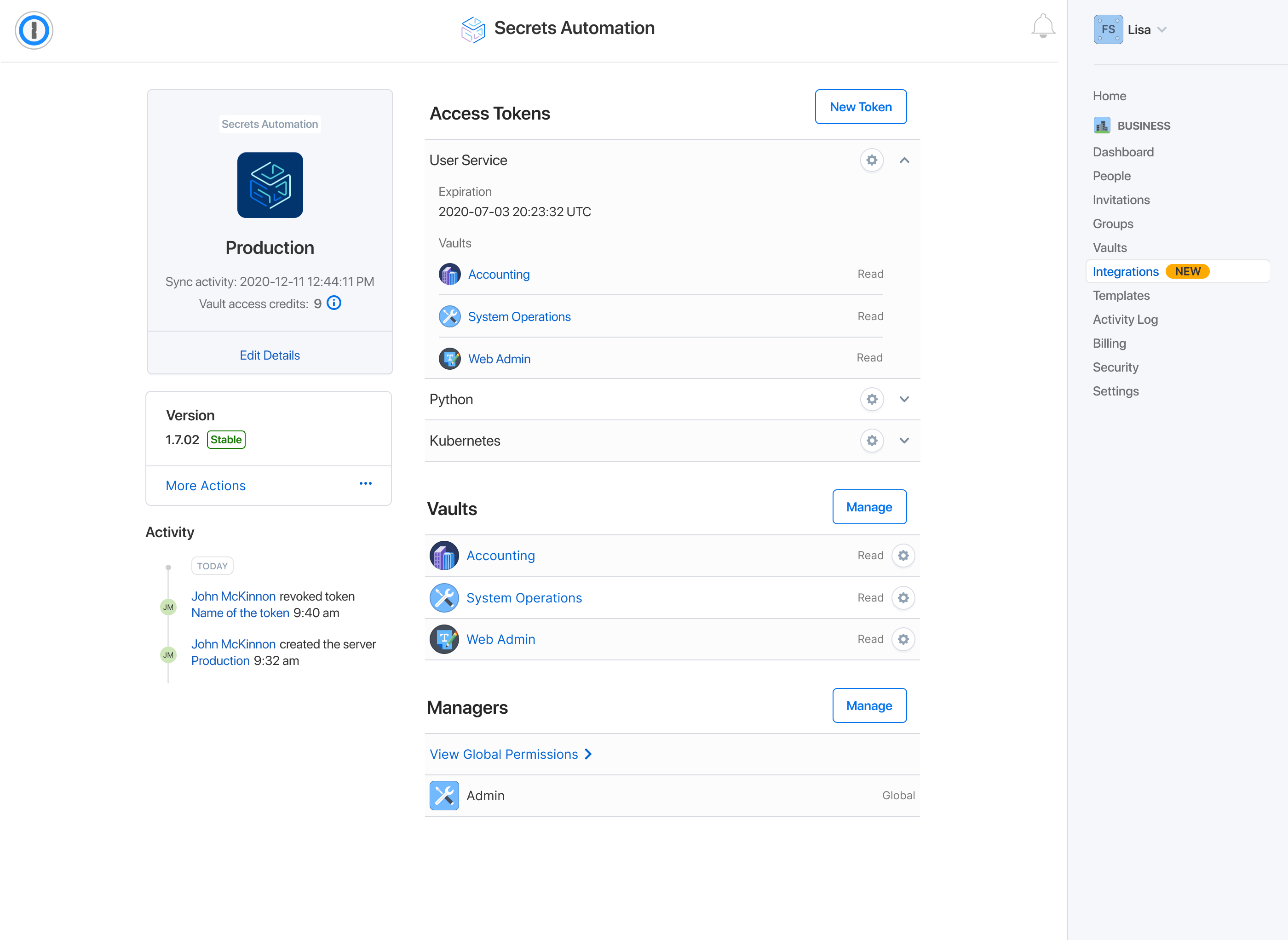
    1Password this week added a Secrets Automation platform to its offerings that enables IT organizations to more easily encrypt, manage and orchestrate credentials, application programming interface (API) tokens, keys and certificates.

    In addition, the company revealed it has acquired SecretHub, a provider of a separate secrets management tool. Terms of the acquisition were not disclosed.

    Carson Brown, senior product manager for 1Password, said the SecretHub team will now focus on the development of the 1Password Secrets Automation platform based on encryption technology previously created by 1Password.

    Finally, 1Password this week also announced an alliance with GitHub under which it will, at some future date, enable DevOps teams to employ SecretsHub to encrypt secrets used to access the source code repository. 1Password already provides integrations with HashiCorp Vault, Terraform, Kubernetes and Ansible, in addition to client libraries written in Go, Node and Python.

    The 1Password platform for managing and securing passwords is already in use by more than 80,000 businesses worldwide. The Secrets Automation platform now extends the reach of the company’s core encryption technology into the realm of DevSecOps best practices, said Brown.

    It’s still early in the cycle of DevSecOps best practices adoption, but it’s clear an initial focus will be secrets management. In the wake of recent high-profile breaches involving software supply chains, there’s now increased scrutiny of secrets management. Cybercriminals have become more adept at scanning for secrets left exposed as plain text. The challenge organizations face is that developers, while building applications, tend to copy secrets for the sake of convenience, which they often forget to delete after an application is deployed in a production environment.

    In response, many IT teams vacillate between overly restrictive and overly permissive access controls that are rarely implemented consistently.

    Of course, it’s now also only a matter of time before auditors start citing all those unencrypted secrets as compliance violations, Brown noted. A set of DevSecOps best practices based on automatic encryption of secrets eliminates those compliance concerns in a way that is transparent to application developers, noted Brown.

    It’s not immediately clear whether it will be DevOps teams that lead the charge to automate the encryption of secrets, or whether cybersecurity teams will take the lead. Regardless of which team assumes responsibility, the number of secrets that need to be tracked keeps expanding as the number of platforms employed increases. Manually keeping track of all those secrets is no longer feasible. Centralizing secrets management is the first step toward regaining control over an IT environment, said Brown.

    Secrets management may not always be the first thing that comes to mind when organizations begin their DevSecOps journey. As it turns out, however, securing secrets may very well turn out to be the first order of business as senior business and IT leaders review their entire software supply chain. After all, once it becomes apparent just how dependent organizations are on software, they quickly realize how much of their intellectual property is one compromised credential away from being stolen.

  • Report: The State of DevOps Automation

    Report: The State of DevOps Automation

    In the race to accelerate digital transformation initiatives, organizations are encountering more incidents, more downtime, and longer resolution times. In fact, 90.4% of organizations saw an increase in incidents since the pandemic began, according to a recent Transposit report.

    In a completely digital economy, service downtime takes a higher toll. For ITOps teams, working remotely also requires new strategies to organize a team’s response to issues. Amid rising incidents, 94.1% of organizations have increased their focus on service reliability engineering (SRE) practices.

    Transposit just released their 2021 State of DevOps Automation report, which surveyed over 500 IT, DevOps, and SRE professionals across the U.S. The report sheds light on the state of remote work as it relates to incident response processes, reveals increased demand for SREs and highlights the automation they’re using to narrow the resolution time gap. Below, we’ll explore the report’s key takeaways and discover what sort of DevOps automation is trending.

    Remote Work Slows Incident Response

    Try as they might, videoconferencing and group chat solutions like Zoom and Slack just can’t compete with in-person collaboration. According to the survey, 93.6% of ITOps and software teams reported it takes longer to resolve incidents while working remotely.

    Since the pandemic began, 97% of teams have adopted remote work, and 90.4% have experienced increased service incidents. It doesn’t bode well that incidents are increasing as incident response time lags.

    The report findings frame remote work as a top hurdle to resolving issues — 46.1% reported that not being physically in the same room to collaborate on fixing issues was a top concern. But remote work is only one element; others cite changing processes and a lack of visibility into who’s responsible for maintaining code as another challenge.

    Incident Response Hangups

    To make up for these concerns, organizations are investing in incident response strategies. The report found that 56.4% of companies are adopting communication and collaboration tools, with automation tools at 52.3% and integration tools at 43.9%.

    Though the report showed greater investment in those tools, it also identified a persistent communication gap. When conducting postmortems, it can be challenging to correlate human action to incident responses. More than half (57.4%) of respondents felt it’s hard to piece together human actions and team communication during incidents. This context is essential to make sense of mean-time-to-response (MTTR) metrics.

    Interestingly, the report found 96.4% of respondents believe mining insights from human data, like Slack channels or group emails, could help improve incident responses. It appears that having a clearer way to harvest and query incident-related data throughout the entire response process is a universal concern.

    SRE Goes Mainstream

    As I previously reported, the SRE role continues to evolve and gain favor. The report similarly hypothesizes that, based on the survey results, the SRE title is going mainstream. Out of 295 respondents surveyed, 98% said they increased SRE practices in the last 12 months, and 62.4% said they would be expanding SRE efforts in 2021.

    In 2021, SREs will likely remain a hot commodity in hiring. However, these individuals will face mounting complexity in addressing real-time incidents for complex distributed systems. They will also likely be tasked with automating manual processes, as 51.7% of respondents reported that a lack of automation is the top cause of slow incident resolution.

    Automation Goals and Barriers

    40% of companies surveyed now have at least one dedicated full-time staff member working to create in-house tools or bots to automate incident responses. So, what sort of automation is common in the SRE field? The report shows SREs constructing custom scripts to automate things like:

    • Customer communication
    • Recording MTTR metrics
    • Automating infrastructure
    • Corporate communication
    • Auto-generating runbooks
    • Creating or updating tickets

    But, automating these processes is not all that easy. As a top barrier to automation, DevOps professionals collectively cite a lack of documentation. It seems by replacing tribal knowledge with up-to-date, shared documentation, teams could quickly unlock some gains. So, make documentation accessible, and provide copy-and-paste abilities for sample scripts.

    SRE and Automation to the Rescue

    The study demonstrates how the remote economy has increased both the number of incidents and the mean response times to address them. To fill this gap, organizations increasingly turn to site reliability engineering practices to automate incident responses. By leveling up DevOps with SRE, teams could reduce errors and improve overall availability as development teams progressively deliver new features.

  • Enterprise ML Investments on the Rise

    Enterprise ML Investments on the Rise

    The second wave of enterprise artificial intelligence and machine learning (AI/ML) adoption is building, and is expected to crest in 2021, as many organizations increased and accelerated their investments in tools and people.

    That was one of the unmistakable conclusions of our 2021 enterprise trends in machine learning report: 83% of the companies we surveyed said their AI/ML budgets had increased year-over-year, and we found that the average number of data scientists they employ has increased by 76% year-over-year. These changes came even as many organizations tightened their overall spending and refocused their strategic priorities amidst all of 2020’s disruption and uncertainty related to the COVID-19 pandemic. These companies aren’t simply moving forward with their AI/ML initiatives in spite of the pandemic; they’re doubling down on their investments because of it.

    Many organizations have begun to understand just how critical ML is to remaining competitive in uncertain and rapidly evolving conditions. When we ran a separate survey during the summer of 2020 to find out how businesses adapted to the pandemic’s impacts, it revealed a renewed sense of urgency around AI/ML investments: 43% of respondents said that AI/ML mattered “way more” to their business than they’d previously realized.

    Our independently conducted 2021 report included input from more than 400 leaders and practitioners across a diverse mix of technical and business functions, all of whom have a stake in their organization’s AI/ML strategy. They’re not just increasing their spending and staffing, either – they’re accelerating their pursuit of a growing number of enterprise ML use cases, with customer experience and automation leading the way.

    You need to be doing this, too. The second major wave of enterprise AI/ML adoption is underway, and you can still capitalize on the immense opportunities ahead. But the time to act is now. Organizations that take a “wait-and-see” approach are at risk of being left behind, particularly as so many other companies are scaling up their investments. Not only are your competitors increasing their AI/ML budgets (evident in the 83% YoY increase mentioned above), but they are moving their initiatives to the top of their strategic priority lists. Approximately three out of every four respondents (76%) in our 2021 report said they are prioritizing AI/ML over other IT initiatives, with 28% reporting that it is their top priority overall. These companies have realized that their success is directly tied to their ability to adapt to rapidly changing business conditions — and that AI/ML is the key to doing so.

    This is no longer the sole purview of elite technology companies. Companies of all sizes, across just about every industry, can get up and running with AI/ML, thanks in large part to the spread of easy-to-use tooling. The opportunities are more accessible than ever. You don’t need a ton of time or resources to get started — and it’s absolutely crucial that you do so soon.

    Your competitors are actively pursuing AI/ML initiatives today, regardless of your specific industry. We’re seeing many longstanding enterprises begin to drive huge transformations of their businesses and industries with AI/ML. More and more use cases are being pursued in legacy industries, from insurance to agriculture, healthcare to financial services and more. The bellwether financial firm JPMorgan Chase, for example, has even built an entire AI research program and data platform. There are virtually no industries where this is irrelevant. So, you need to act with urgency, as this second wave of enterprise adoption intensifies.

    You also need to build for operational efficiency and scale. We think of this as industrializing your machine learning operations (MLOps). While easy-to-use tools reduce the barrier to entry, they only get you partway to your destination. Invest in repeatable, automated processes or you’ll hit a wall of technical debt and other potential issues. MLOps paves the road to tightly integrated, well-aligned technology stacks, processes and teams that make it easier, not harder, to deploy more models in the future. This isn’t something you can wait on; if you’ve manually bootstrapped the deployment of even a handful of models to production, you need MLOps. Without it, you’ll quickly accrue unnecessary technical debt that will inevitably hinder your organization’s ability to scale and deliver meaningful business value.

    This is already a significant issue. Our 2021 report found that, while many organizations are increasing budgets and prioritization, it’s taking them longer to get models into production. Data scientists are still spending too much of their time on operational tasks, a problem that worsens as the number of models in production increases. This tells us that even as many organizations increase their spending and hiring, they’re actually allocating more of their growing resources toward manually scaling their AI/ML initiatives instead of investing in the operational efficiency that will maximize results.

    There’s a better way. Organizations no longer need to take a DIY approach to MLOps. There are robust solutions that can simplify many of the complex issues involved in scaling your AI/ML initiatives in production. Our report found that companies that use third-party MLOps solutions see improved outcomes compared with companies that go it alone and build and maintain everything themselves. They spend less on infrastructure, deploy models to production faster and tie up less of their data scientists’ time on model deployment.

    The pattern here is clear. Regardless of your particular industry, more and more businesses are identifying a growing list of use cases for AI/ML that can help transform their businesses and boost their competitiveness. They’re industrializing their AI/ML initiatives with MLOps to ensure their technology stacks, processes, and people are well-aligned. And, by doing so, they’re positioning themselves to rapidly adapt to and act on changing signals in their businesses.

    Don’t make the mistake of thinking AI/ML doesn’t apply to you or your industry. Doing so would mean missing out on potentially massive strategic opportunities, from new or growing revenue streams to increased efficiencies throughout your business operations. Your competitors are doing it; it’s easier than ever to get started and third-party MLOps solutions can help minimize technical debt and other operational complexity that will otherwise limit the positive business impacts of your initiatives.

    You can absolutely get in on the second wave of enterprise adoption, but the time to act is now. You can’t afford to wait.

  • How to Make Self-Service IT More Intelligent

    How to Make Self-Service IT More Intelligent

    It’s an old story: DevOps’ need for speed and agility clashes with IT’s need for security and control. Striking the right balance between control and agility is key to fostering a smooth relationship between DevOps and IT.

    Many enterprises have achieved this balance by implementing a self-service IT model. In a self-service environment, IT creates a pre-approved catalog of resources that developers and engineers can access themselves, regardless of where they are, through a single portal. These resources might include storage, compute, networking or multi-tier app stacks. Thus, DevOps can get the things they need on their own, when they need them, avoiding the IT bottleneck while IT still maintains control.

    This gives DevOps the speed and agility they want while allowing IT to maintain control. IT can place guardrails on resources, such as role-based access controls and permissions, usage quotas, cost controls, security and compliance measures. IT can also set up approval workflows to ensure visibility and management. DevOps increases efficiency and expedites time-to-market. They will also be much less likely to go around IT and procure the resources they want on their own, such as spinning up public cloud resources with a credit card. This kind of activity leads to unauthorized apps and resources running in the background without IT’s knowledge – otherwise known as shadow IT – which can create significant security vulnerabilities and cost overruns.

    So, the balance between DevOps and IT, the yin and yang of speed and control, is attained. All is well in the kingdom, right? Not exactly. While self-service IT is essential, it needs to grow more intelligent to remain effective.

    Hybrid cloud environments are changing rapidly. As helpful as most current self-service IT systems may be, a multi-cloud strategy will continue adding more layers of complexity to IT infrastructure management. While a prudent enterprise will automate as many cloud management processes as possible and have stringent guardrails in place to enforce cost and security policies, there is still plenty of room for things to go wrong when you have multiple engineering and development teams consuming cloud resources in a rapidly-changing environment.

    When various combinations of resources are provisioned in ways that IT didn’t foresee, or new tools are added that didn’t exist when existing policies were drafted, you have an environment that’s susceptible to misconfigurations and inadvertent security risks. Furthermore, tools and resources available to DevOps via the self-service portal may become outdated or not be as effective or useful as they once were. If IT hasn’t replaced or upgraded them yet, DevOps might still be tempted to go outside the system to get what they need.

    Staying on top of the evolving challenges in hybrid cloud management will require a new, more intelligent approach to self-service IT. This approach will further empower DevOps and assist IT by embedding greater awareness into decision-making processes across the organization.

    Say, for example, a developer writes a piece of code. Unbeknownst to the developer, something they just wrote in the code could potentially create a security vulnerability. The old way of preventing cybersecurity breaches resulting from flawed code entails top-down, more centralized security scans or reactive audits.

    The new, more proactive approach would leverage an advanced automated alert and visualization system that informs people about the impact of the decisions they’re making, as they’re making them. In the example above, the developer would automatically receive an alert about the security issue in the code so it can be rectified right then and there, before resource deployment.

    Similarly, this shift-left-and-rectify approach can be applied to cost control and compliance issues, as well. If resources are being provisioned sub-optimally and would incur unnecessary expenses, DevOps would be automatically alerted to the oversight and presented with a cheaper option. IT can make the solution even more cost-effective by allowing developers to take direct actions from the platform, instead of going to various portals. (According to the FinOps Foundation’s State of FinOps 2021 report, 39% of engineers do not currently have the necessary tools to take these actions). This type of intelligent automation can also ensure regulations and standards such as PCI-DSS, CIS and the AWS Well-Architected Framework are always adhered to.

    While traditional self-service IT systems still serve a vital purpose, these types of proactive cloud management and optimization initiatives will keep self-service IT agile and able to adapt to rapidly changing conditions. By embedding greater awareness into decision-making across the enterprise, DevOps functions even faster and more efficiently, and IT maintains even greater control. Hybrid cloud environments can be managed more intuitively and with greater confidence that misconfigurations and oversights that lead to security issues, cost overruns, and compliance risks will be intelligently and continuously remediated. The yin and yang endures.

  • Without These 3 Things, You Don’t Have DevSecOps

    Without These 3 Things, You Don’t Have DevSecOps

    DevSecOps adds security to the DevOps software development and releasing paradigm. Everyone thinks this is a great idea, except actual Dev and Ops practitioners, for whom security can be a thankless, stressful time sink. Without the right approach and tools, an organization can run a DevSecOps process that actually contributes little to security. Security simply tags along after development and operations, ignored at every turn. The result is rapidly released, insecure code.

    Industry vendors will tell you they have a DevSecOps solution. You, in turn, may believe you have DevSecOps up and running. However, there can be a big difference between acquiring a DevSecOps solution and fielding a viable, effective DevSecOps program.

    What DevSecOps Isn’t

    1. Every task is manual, and done mostly by consultants.
    2. You send out myriad PDFs or spreadsheets and waste time in meetings.
    3. Your solution or program escalates a lot of security alerts, but never delivers a fix.

    DevSecOps, a Brief Overview

    DevOps, the merging of previously separate software development (Dev) and IT operations (Ops) workflows, has been a boon to businesses. When developers work directly with Ops, which releases and manages the code in production, the entire development-to-release cycle speeds up. This is great news, except when it comes to security.

    Rushing new code into continuous integration/continuous deployment (CI/CD) platforms invites risk exposure. DevOps can easily, but inadvertently, put vulnerable code straight into production on a daily basis. To mitigate this risk, the DevSecOps approach inserts a security function into the workflow.

    This is good, in theory. However, if this is all you have, you do not have a DevSecOps program; you have missed the bigger picture. Without automation, tool integration and results validation, simply injecting security processes into the DevOps workflow might actually make everything worse. Your code will be less secure. The security team will not move quickly enough for the DevOps team, which aims to rapidly release code, and will not always address the security issues raised.

    DevSecOps Requires True Automation

    DevSecOps has to include true automation in the security process. The practice of security pros copying code for security testing and then returning with a spreadsheet of remediation requests simply does not work. Good intentions aside, the Dev team does not want to deal with a long list of security problems, many of which are perceived to be low-risk or could generate false positives. Security is perceived as slowing everything down. There can even be organizational issues that keep the two groups in opposition to one another.

    Instead, code vulnerability assessments should be automated within the DevOps workflow. As code gets checked into Github and then compiled via the build pipeline CI tools, it needs to undergo automatic static, dynamic and interactive analysis. It should undergo a full stack assessment, too. The automated assessment must examine code for vulnerabilities at the mobile or web client layer, the API data transport application network layer and the back end cloud building block app services layer. Automated security testing can analyze microservices, serverless architectures, storage and databases. With this approach, the “sec” part of DevSecOps comprises a “build, set and forget” function. There will be security people involved, of course, but the majority of work is automated.

    This automated vulnerability assessment must then generate alerts and establish a priority hierarchy for their handling. Again, automation plays a pivotal role here, and needs to automatically, and in a meaningful way, triage the long list of findings based on issue severity, privacy concerns and app store blockers. If the assessment produces an overly long list of risks to fix, the DevOps teams commonly tune them out as noise that delays release schedules. However, if the automated process identifies the five or ten “must address” problems, developers are more likely to respond to a realistic, practical set of tasks that create an effective process and resolve issues at the roots.

    DevSecOps Must Integrate With Development and Security Tools

    Security processes are most effective if they integrate with the toolsets used by the DevOps team. These include development tools, cloud platforms and monitoring tools such as security incident and event management (SIEM) systems, as well as ticketing and remediation solutions. That way, security connects directly into the DevOps pipeline; it is neither a digression nor a bottleneck.

    For example, if issues get distributed via ticketing systems, they go directly into developer workflows. Developers might be accustomed to working on issues described in JIRA tickets, for example. If the alerts are suitably prioritized, the developers will likely not perceive the ticket as an imposition on their other work. As security issues appear in JIRA tickets, developers can work on them at a familiar, practical cadence. This improves security and DevOps team collaboration by providing details about issues, occurrences, recommendations and remediation. The results can help remediation of security vulnerabilities be more effective.

    DevSecOps Provides Validation of Results

    A viable DevSecOps program will also provide stakeholders with data about how the program is performing. Reporting and data visualization that documents the results of its vulnerability assessments, and the subsequent remediations, are critical to a successful program. While no application is always perfect on any given release, knowing the risks and having a measurable, clear course of action is critical to a solid DevSecOps program. Successful programs will feature reporting on metrics such as critical issues fixed before production, “business blockers” fixed before rejection, legal costs and regulatory fines avoided and security time and costs saved. Without such reporting and validation of results, there can be no actual DevSecOps. It will be DevOps with some ambiguous security activity surrounding it.

    Application security tools are essential to realizing these three tenets of true DevSecOps and an effective appsec program. The preferred tool should be, as these parameters suggest, highly automated and easy to integrate. It also has to have in-depth reporting capabilities. Armed with the right tools, a DevSecOps group can embrace an approach to the work that is fully automated and intuitively part of the DevSecOps workflow.

  • Could No-Code Enable Everything Ops?

    Could No-Code Enable Everything Ops?

    It feels like DevOps principles are permeating every discipline, creating new buzzwords by the minute. DevSecOps. DatabaseOps. SalesOps. FinOps. MarketingOps. This “JargonOps” is clearly encouraged by marketing campaigns (and bloggers, wink, wink). Yet, the phrases do depict a real trend: all industries are getting an efficiency overhaul in the wake of increased automation.

    As I’ve covered before, low-code and no-code tools lower the barrier to entry to application development, enabling field experts to construct workflows as they see fit. For tech-savvy non-engineers, this could be a huge boon to transform copy-and-paste stopgaps into efficient workflow automations.

    I recently chatted with self-proclaimed “productivity geek” Sean Chou, CEO of Catalytic, to get his take on where this new era of automation is heading. From healthcare to logistics, advertising to supply chain management, every industry is likely to get an efficiency boost — and a lot of this digitization will be constructed using codeless environments.

    But first, how did we get here?

    From RPA to No-Code

    “The story of B2B software is largely about automation,” said Chou. If we consider classic examples of corporate applications, we see one common thread — B2B software has always sought to automate traditional office work.

    And so, it came to pass that computing and software devoured all these office tasks, from accounting to time-tracking, communications and many other areas. Though computer-based office work delivered huge efficiency boosts, these interfaces often introduced new hurdles; bad UI design, difficult navigation and a hundred open tabs, just to name a few.

    From there, robotic process automation (RPA) aimed to operationalize a growing number of tedious digital workflows across Excel spreadsheets, web apps and desktop apps. In Chou’s words, “RPA took the concepts of test automation software, and then pointed it toward production systems.”

    Though RPA’s process of recording screen interactions gathered much interest and attention (and funding), screen scraping is ultimately too fragile to be effective. It adds technical debt over legacy systems. It can be expensive to implement. Lastly, it’s not processes-centric and doesn’t implement reusable software-defined APIs.

    At that point, though, “Pandora’s box was open,” Chou said. Folks started to consider other ways to optimize, and reimagine how end users could automate workflows and stitch together interactions between disparate apps.

    Out of the ashes of RPA rose a new paradigm — low-code and no-code.

    No-Code Addresses Everything Ops

    With developer resources stretched thin and limited engineering talent available, it can be challenging to loop expert programmers into codifying traditionally non-IT processes.

    There’s not often enough developers to help with SalesOps, FinOps or any other Ops areas, explained Chou. “The only thing that can change the narrative is no-code technology that is effective.”

    Similar to how higher-level programming languages made low-level programming more accessible, Chou sees low-code and no-code unlocking accessibility for automation design by orders of magnitude.

    Four Examples of Everything Ops

    So, what are some examples of no-code use cases for automating operations? Chou outlined four specific categories that he believes will see much more citizen developer attention and action in the years to come:

    Customer Ops: “It’s really important to run customer operations as efficiently as possible,” Chou said. Especially in B2B interactions, people need to adopt various systems dictated by the customer. This can result in many ad-hoc implementations that beg for efficiency improvements.

    Financial Ops: Imagine the number of Excel spreadsheets that make up an account’s financial foundation. Consider the tedium of inputting data, generating reports or migrating calculations into other tools. There’s a ton to automate here. Providing no-code platforms to financial minds could have a “really transforming effect,” said Chou.

    People Ops: “The number of mini apps being developed for HR use cases is astounding,” Chou said. Think of all the digital tools HR must use: vacation requests, employee performance reviews, personnel databases – the list goes on. There’s a significant opportunity to clean up legacy applications within many HR departments to build a more coherent platform.

    SupplyChain Ops: Procurement and supply chain operations is another area where no-code could have an impact. Streamlining inter-company communications or engaging with potential customers are areas worthy of automation.

    No-Code? No Problem

    Across all these verticals, Chou notices three common patterns emerging.

    First, groups are using no-code to create standard operating procedures (SOP). SOPs could be used for onboarding or offboarding customers or ensuring compliance with a set of policies.

    Another everyday use is data pipelining — pulling information from many resources for analysis. A common use case is processing financial or customer data to generate a particular output. This is an area where embedded machine learning models could enrich the data.

    Lastly, a third common use case is creating workflow-powered surveys. These online forms could be used to measure employee engagement or to collect customer input. No-code workflows enable not only the collection of that data, but could allow for additional actions to be taken upon input.

    Implications and Governance

    Of course, giving non-developers the keys to the castle could have some downsides. Let’s face it — computer science is, well, a science. There’s a reason engineers are taught strict practices around version control, data governance and peer reviews. All of which must still be upheld when establishing a citizen development culture — especially at scale.

    When it comes to low-code and no-code, “governance is a huge thing,” said Chou. “Any company coming at this with no governance in mind can’t work beyond small teams.” Move beyond 10 or so citizen developers, and you’ll really need to establish some sort of shared framework or center of excellence.

    Making citizen development work in a large company requires IT visibility, data governance and a review process for new workflows, said Chou. IT will likely also want to verify that a new workflow doesn’t make permanent state changes. Otherwise, static apps that don’t touch core systems or affect persistent data stores are probably fine. “Having built-in governance is really key to making this successful,” Chou said.

    A Technology Leap

    No-code is giving more people the ability to produce unique workflows to increase their efficiency and do more with less. But with this movement comes worry. “With every technology leap, there’s always a wave of people concerned,” said Chou. Many naysayers are worried that automation will leave people out of work – “They’re coming for our office jobs!”

    Instead, Chou recommended we curb our expectations. Citizen developers are not going to build sophisticated iPhone apps any time soon. “If you think no-code is a panacea for all software, you’re coming at it all wrong,” he said. Instead, what they can actually can accomplish is far more practical.

    In reality, things are not as dire as some may make it seem. The new age of automation will likely open room for more jobs than it diminishes. “The net is always a plus,” said Chou.

  • Applause Automates App Testing via SaaS Platform

    Applause Automates App Testing via SaaS Platform

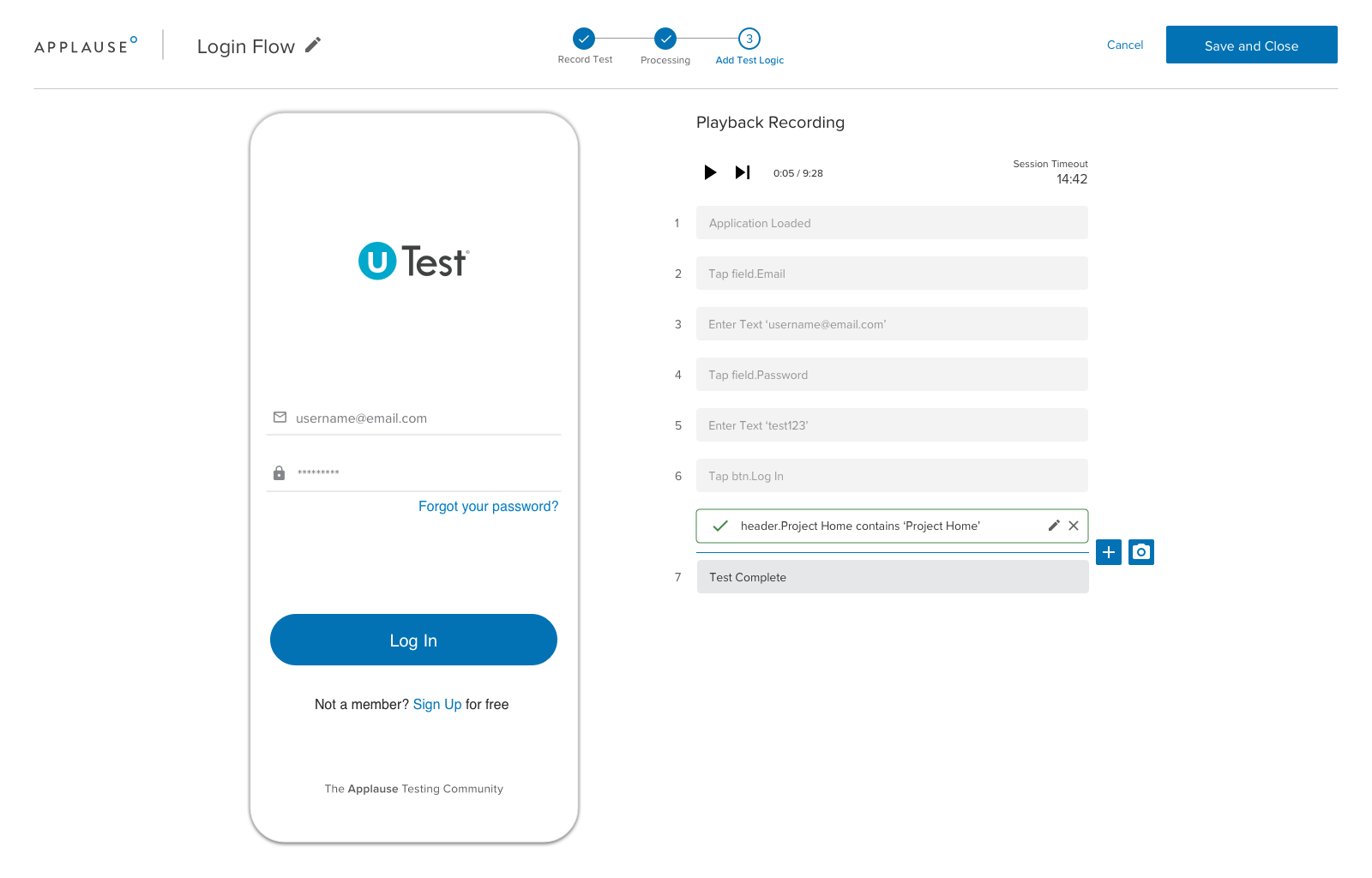
    Applause today unfurled a software-as-a-service (SaaS) platform that makes it easier to automatically create test automation scripts without having to write code.

    At the same time, the company is adding support for an application programming interface (API) through which DevOps teams can send new features to be tested by the Applause platform.

    Both offerings are now being included with a rebranded Product Excellence Platform (PEP) offering, a suite of tools and platform through which Applause is making its portfolio of offerings more accessible.

    Rob Mason, Applause CTO, said the Applause Codeless Automation (ACA) platform makes it possible for testers to record a series of test case scenarios using a SaaS platform that translates those sessions into an automation script without anyone having to write any code. The current offering supports Android and Apple iOS applications with support for web applications planned, Mason said.

    An Applause In-Sprint Testing capability, meanwhile, makes the testing process more iterative using a bi-directional API that can be plugged into any software development life cycle (SDLC) process, Mason said. That bi-directional capability makes it possible to embed the feedback from the testing process into any bug tracking system implemented by an application development team, said Mason.

    Mason said that capability is critical, because it enables DevOps teams to identify issues earlier, thereby avoiding late-stage bug fixes that are more costly to fix. It also provides the added benefit of making it easier for developers to address issues in the moment applications are being written, versus days or weeks later when the context around that issue has long since been lost, Mason added. The SaaS platform provide developers with a just-in-time testing capability, Mason said.

    Ultimately, Mason said the goal is to make it simpler for a wider range of individuals to participate in application testing by making it easier to reuse tests. In addition, he said, it will allow subject matter experts to record tests that can be turned into test scripts on their behalf. That approach will enable organizations to push testing further left, beyond the developers that originally created an application, to include the owners of that application, Mason added.

    The rate at which applications are being built to drive digital business transformation initiatives is increasing, and makes testing more problematic. Automation is the only way to close the gap between the number of application testers an organization can dedicate and all the applications being developed. The automated approach not only reduces the time and effort required to create a test, it also makes it easier to reuse tests across different application use cases.

    Ultimately, it’s only a matter of time before machine learning (ML) algorithms and other AI capabilities play a larger role in application testing. The challenge will be finding exactly where the interface between humans and machines should lie in the context of application testing.

    In the meantime, the more automated testing becomes, the more widely it will be conducted. The results of those tests may not always be welcome news, but the issues they raise are always better addressed sooner than later.

  • DevSecOps Implementation: Patch Management

    DevSecOps Implementation: Patch Management

    Patch management has been a thorn in IT’s side for decades. While it is undeniably necessary for security and stability purposes, the staggering array of patches that are available make managing them effectively nearly a full-time job – or a job better left to users. Few IT professionals want to be the “patch person,” and yet, nearly all IT professionals want their systems protected by the latest patches. No one wants to find out an intrusion was easily preventable via patching. It goes without saying that the SolarWinds attack has left quite a few IT departments scrambling for an alternate solution.

    The world of patch management has gone through several evolutions that we won’t cover in much detail here. Instead, we’ll focus on what’s available, what you should look for and where the market is headed. Suffice it to say that patch management as a practice has grown from an individual applying patches to servers and server apps while employees were encouraged to patch their equipment, to complex systems that manage the patching themselves, with IT oversight. Currently, patch management is often bundled with endpoint management, simply because many of the patches are going to end points (user machines and devices).

    Out of this growth have come several market differentiators that you should be aware of when looking into a way to manage the avalanche of updates the average organization is seeing.

    • Centralized or de-centralized? Increasingly, patch management is run on servers/cloud and pushes changes out to those machines/devices that need them, or agents on each machine manage updating themselves. Which is best for a given organization really varies. If a lot of machines are running at the edge of their capability, an agent running updates in the background might be too much to ask. In that scenario, a server-managed install environment is probably better. Conversely, if a centralized location to run updates from is considered an architectural weakness (because it requires access to the update pushing engine), agents might be the better plan.
    • OS support. We’re way past the days when single-OS solutions were considered useful. List the operating systems used in your environment, and choose a product accordingly. Most products on the market support Windows/Mac/Linux, but there are variances. First off, make certain your chosen product supports all three. Then ask, “Which flavors of Linux?” Make certain the flavors running in-house are supported by the software.
    • App support. There are a lot of applications out there. Which are supported by the tool? How much leeway does the customer have for adding applications by pointing the tool at update locations? Does it support FOSS updates? There are a lot of those too, and which ones matter. Make certain the tools the organization uses are supported or can be added.
    • Many tools will scan machines for update issues. Understand what your chosen tools scan for, and how the scans impact performance on the target machines.
    • Updates are not 100% perfect. There will inevitably be problems. Make certain the tool can roll back changes. Updating 50 core infrastructure machines, only to find, hours or days later, that the update breaks something demands roll-back capability.
    • Inter-relationships. Updating a piece of software can require that another piece of software or a driver be updated, which can demand that UEFI/BIOS be updated. Or the CMOS on a RAID controller. Understand how cascading updates are handled by the tool, and if the cascading updates can be packaged, so that a failure automatically rolls back the updates applied thus far.
    • Approvals. Speaking of driver and BIOS updates, what tools are available to allow a human to approve changes? No one wants willy-nilly updates to the drivers on core systems – or even to drivers on user systems.
    • Security of the tool itself. We’re in perilous times where IT security is concerned, and frankly, an update command-and-control server is an attacker’s dream machine – take it over, put your back-door update into the mix, and tell it to update every machine it manages. It cannot be understated: an update management tool must be as protected as possible – both by the customer locking down the installation and by the developer making sure the code is solid.

    Once the system is chosen and worked into your DevSecOps environment, updates will be more responsive, which leaves one more thing to consider – does it feed into your agile tools? If the update management tool notifies a project management tool like JIRA when it updates a server, then if code on the server breaks, the developers aren’t in the dark about changes, and will have breadcrumbs to help them track down the source of the problem.

    Imagine if manual updates became a rarity instead of the norm. There is a cost associated with this process, but most of the products on the market can be had for a reasonable price – if you waste a couple hours a month (or for some products, a year) on updating, they’re paying for themselves. Of course, your time is a sunk cost, and the cost of these is an operational cost, so there is an evaluation your organization will have to undertake. Given how busy everyone in DevOps and DevSecOps is, it is likely worth the investment for all but over-staffed organizations. What? There are a few!

    Find what suits your organization, and put it to use. Faster updates, less time investment. The idea is sound, you just need to figure out what suits your needs. And keep rocking it. You are managing updates already, this is just a way to make your life easier. And we could all use a bit of easier in a busy, complex IT environment.

  • Using Automation to go All-Digital, Fast

    Using Automation to go All-Digital, Fast

    Before the pandemic, digital transformation was a five-year plan for many companies — or in some cases, a distant vision that kept getting kicked down the road. Now, companies in every industry face an urgent imperative to adapt to an increasingly online-first world: If you don’t go digital, fast, you’re simply out of the game.

    Increasing productivity has been critical for companies as they make this shift. But too often, speed is hindered by time-consuming and repetitive processes that companies can and should easily automate. By automating mundane tasks, employees and businesses can focus on what really matters — increasing scale in today’s work-from-anywhere world, and improving experiences for both employees and customers.

    The Benefits of Automation

    Fundamentally, automation is about digitizing existing business processes to streamline results, and it will be a key element in helping businesses survive and get back to growth. Until now, many companies have focused on applying these tools to the front office: sales, marketing, commerce and supply chains. With most employees now working remotely, it’s harder than ever for team members to do their jobs efficiently. Automating the back office and improving the employee experience is key for businesses to achieve the speed they need to thrive right now.

    Here are three key advantages of bringing automation to the back office:

    1. It improves productivity.In virtually every industry and role, employees are still spending hours every week on mundane and labor-intensive tasks, such as data entry. Automation can speed up these repetitive tasks and streamline lengthy processes, freeing employees up to focus on the “human” aspects of their jobs, like interacting with customers, planning ahead, making decisions or learning new skills. By taking over routine tasks and allowing employees to concentrate on what matters most, automation makes workers more efficient and productive.
    2. It increases scale.There’s only so much an employee can do manually. The time-consuming processes that worked yesterday can’t scale to meet the demands of an all-digital environment.  Automating repetitive tasks means that employees can achieve more in the same amount of time, allowing them to scale their workloads. With time-consuming tasks being taken care of in the background, workers can spend their time on more meaningful work and customer relationships.
    3. It enhances employee experience.Nobody enjoys entering numbers into a spreadsheet. An often overlooked aspect of automation is that it leaves employees more satisfied and engaged with their companies and their jobs. Having fewer tedious tasks on their plates gives employees the chance to tap the skills that machines aren’t as good at, like creativity, communication and decision-making. This is especially beneficial at a time when most employees are juggling more responsibilities at work and at home. Making a more valuable contribution and more meaningful connections is not only rewarding for employees, but also translates to higher satisfaction among the customers they interact with.

    Real-World Examples

    Not everything can be automated, but there’s a lot of room to take the drudgery out of most roles. Take onboarding, for example. Traditionally, when a new hire started, everything happened in person: They attended an orientation, picked up their laptops at the tech bar, met with benefit providers — all of which required orchestration on the part of human resources. With automation, all of this manual coordination can be replicated with an intelligent workflow capable of guiding employees through an onboarding process customized to their specific role and location.

    In another example, HR departments are facing an unprecedented volume of queries about policies around caring for children and other dependents. Using low-code development, companies can easily set up automated, online bots to handle frequently asked questions and guide employees through processes needed to enroll in new services. Automating these queries with bots not only makes the employees themselves more productive, but it also delivers better experiences for both the HR team and the employees seeking answers.

    Automation is Here to Stay

    In today’s world, there is no alternative to a digital business model. Automation is the recipe that will help companies achieve the speed they need to survive now and the edge they need to thrive in the future.

    And there is no turning back — automation is here to stay, regardless of the trajectory of the pandemic. The process of change is never easy, but done right, automation not only leads to a more agile workforce, but also to a happier one.