Category: Blogs

  • Adding Accountability with ‘You Build It, You Run It’

    Adding Accountability with ‘You Build It, You Run It’

    Let’s see if this scenario resonates with anyone: Your department, organization, company, etc. is beginning to embrace DevOps practices, which is, of course, an amazing step in the right direction! One of those key practices is the “You Build It, You Run It” (YBI/YRI) mantra that helps facilitate a higher level of quality and accountability. This common practice also solves the mentality of throwing your solution/code over the fence for some other team to fix.

    I’m a huge proponent of YBI/YRI. However, in the case of existing brownfield solutions, there are several things you need to consider when transforming into the YBI/YRI model, including:

    • What if you have an existing solution where the collective “Y(ou)” in ‘You Build It’ does not include any or many of the original team that built it? This would be anyone who was part of the end-to-end creation of the solution and was empowered to make decisions impacting the design, development and delivery of a solution. In this case, it becomes, “Someone else built this mess, now you run it,” [SEBTM/NURI] which not only makes for a horrible acronym but is also a very realistic scenario that requires special consideration we’ll discuss below.
    • What if you are still heavily siloed and have a squad spread across multiple organizations, each with different goals and objectives? If you are still running outside of a true squad model, it can be difficult to ensure everyone’s priorities and goals are aligned to produce quality solutions with the right functions customers want.
    • What if you have varying definitions of “You” within your organization? Often in the YBI/YRI model, the interpretation makes some roles or key decision makers exempt from the glory of pager duty or answering to an angry customer. This can be especially true when you’re still trying to get to a point of having fully cross-functional, empowered squads.

    I think it’s fair to say that most DevOps transformations don’t necessarily happen on greenfield solutions, which means, especially at the enterprise level, the reality can end up being a beast of a monolithic solution(s) built by others who may or may not still be around.

    How do you fix it? My suggestion is that every person who was empowered to make a decision that contributed to the “B” (Build), becomes a “Y”(You). Of course, this doesn’t work if “Y” is no longer with the group or company, in which case I think it becomes a different issue of ensuring the new “Y” is 100 percent empowered with the ability to make decisions that enables that team to successfully run it.

    One more complication that adds to the mix of a YBI/YRI strategy is putting that strategy in place without a solid foundation of agile practices. Ideally when you are adopting DevOps practices, you already have a solid agile foundation with empowered cross-functional squads; however, in practice we often see the agile foundation still being built and/or refined at the same time as incorporating DevOps practices. As a result, there still exists a lot of hand-offs while two transformations are trying to run in parallel. If you have hand-offs combined with team’s with separate business objectives, those blurry lines of accountability will become an issue sooner than later.

    During transformations, if you find yourself in that in-between state of not having fully empowered accountable teams and are working with solutions your team may not have actually built, below are a few suggestions to get through those initial challenges:

    1. Ensure you allow for enough time to address technical debt during your sprint planning. Continuing to add features and functions on a poorly designed and/or broken solution will only cause further issues and likely increase the level of frustration on the team.
    2. Ensure that EVERY person who contributes to key decisions on a solution is included in the pager rotation in some way. Until you are in a state of fully empowered cross-functional squads, it’s important to drive the importance of accountability. As an example, if you have an architect in one organization who is working with a development team in another organization, that architect needs to be included on the pager as well to be aware of any problems resulting from a key architecture decision.
    3. Get in the habit of operational retrospectives. Begin (or continue) the habit of operational retrospectives that bring together the end-to-end squad into a cross-functional review of the operational incidents, root cause assessment and stories/tasks that need to get added to the backlog and prioritized.

    Although the transition into YBI/YRI for brownfield solutions can be muddy, empathizing with the mountains of technical debt and fully empowering solution teams can go a long way in truly helping your team’s succeed through the beginning phases of your DevOps transformation.

    About the Author / Shelbee Smith-Eigenbrode

    Shelbee

    Shelbee Smith-Eigenbrode is a senior software engineer/IT architect at IBM and has been in IT for 19 years.  She has worked across varying roles spanning the software development life cycle. Her experience across functional roles as well as performing that work deeply inside traditional silos has contributed to her passion for embracing the DevOps culture and transforming the way teams are delivering technologies by adopting DevOps practices. She is a member of the IBM Academy of Technology committed to driving innovation and technical advancement.

  • Splunk and the ELK Stack: A Side-by-Side Comparison

    Splunk and the ELK Stack: A Side-by-Side Comparison

    This article’s purpose is to compare the “big two” in the log analytics world—Splunk and the ELK Stack. But before we go into details, a short introduction to the competitors is required.

    Splunk is the “Google for log files” heavyset enterprise tool that was the first log analysis software and has been the market leader ever since. The open-source ELK Stack of Elasticsearch, Logstash and Kibana is an up-and-coming rival that is a consolidated data analytics platform. The two compete in terms of features, usability and cost.

    Overview

    Splunk and the ELK Stack use two different approaches to solve the same problem. People typically choose one or the other based on how their organizations are structured and how much time they want to devote to log analytics. Splunk takes a pile of data and allows people to search through the information to extract what they need. ELK requires more work and planning in the beginning, but the value extraction is easier at the end.

    The three key components of Splunk are its forwarder, which pushes data to remote indexers; indexer, which has roles for storing and indexing data and responding to search requests; and search head, which is the front end of the web interface where these three components can be combined or distributed over servers. Splunk also supports the integration of its functionalities in applications via SDKs. Common use cases include operational monitoring, security and user behavior analytics. Splunk is a paid service wherein billing is generated by indexing volume.

    The ELK Stack is a set of three open-source products—Elasticsearch, Logstash and Kibana—all developed and maintained by Elastic. Elasticsearch is NoSQL database that uses the Lucene search engine. Logstash is a data processing and transportation pipeline used to populate Elasticsearch with the data (though also it supports other destinations including Graphite, Kafka, Nagios and RabbitMQ). Kibana is a dashboard that works on top of Elasticsearch and facilitates data analysis using visualizations and dashboards.

    Both Splunk and the ELK Stack can be used to monitor and analyze infrastructure in IT operations as well as for application monitoring, security and business intelligence.

    ELK vs. Splunk

    Loading Data

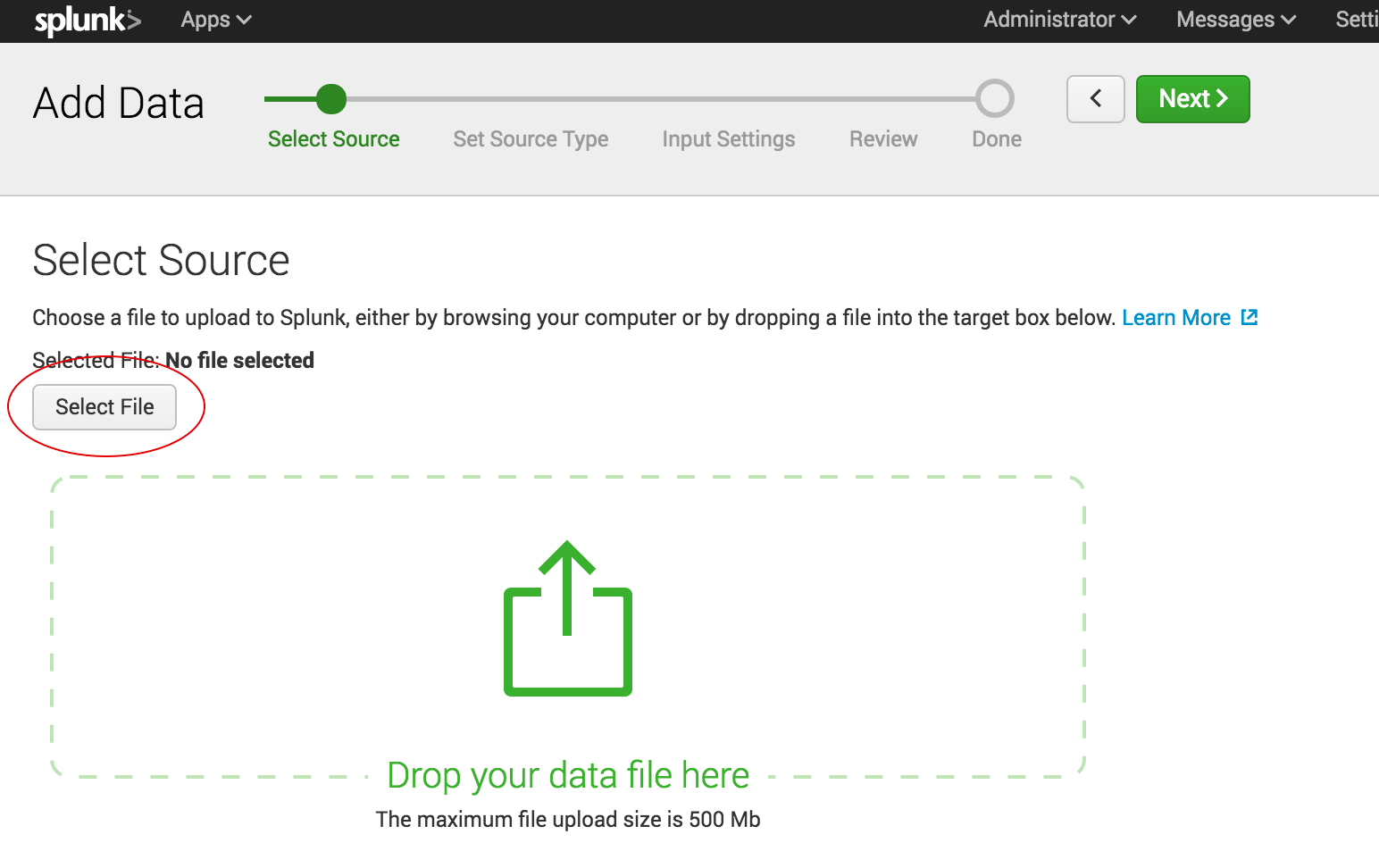
    Shipping data to Splunk is fairly easy. After installation, the forwarders come pre-configured for a wide selection of data sources such as files and directories, network events, windows sources and application logs, and they are used to import data into Splunk as shown:

    import data into splunk

    In the ELK Stack, Logstash is used to ship data from the source to the destination. However, Logstash needs to be configured so that each field is identified before the data is shipped to Elasticsearch. This kind of configuration can be tricky for those who do not work with scripting languages (such as Bash, Python or Ruby), but there is good support online that can be found quite easily.

    Visualizations

    The Splunk web UI includes flexible controls that allow you to edit and add new components to your dashboard. Management and user controls can be configured differently for multiple users, with each having a customized dashboard. Splunk also supports visualizations on mobile devices with application and visualization components that are easy to customize using XML.

    splunk xml customization

    Kibana is the visualization tool in the ELK Stack, and like Splunk, the platform supports the creation of visualizations such as line charts, area arts and tables and the presentation of them in a dashboard. The search filter is always shown above the different views: If a query is used, it is automatically applied on elements of the dashboard. Splunk also has a similar option, but it involves configuration in XML. Still, Kibana does not support user management, but hosted ELK solutions provide it out of the box.

    kibana

    Search Capabilities

    The search function is a key capability of any log management platform. Both the Splunk and ELK Stack’s web UIs support searching using a dedicated search field. The query syntax on Kibana is based on the Lucene query syntax while Splunk uses its own Splunk Search Processing Language (SPL). Those familiar with scripting languages may already be familiar with Lucene while SPL is proprietary and must be learned.

    One other difference is that Splunk offers dynamic data exploration to help users to find and extract everything as a searchable field when formatted in a manner that allows searching for non-configured fields. Elasticsearch fields, on the other hand, need to be defined in advance to use aggregation over the log properties.

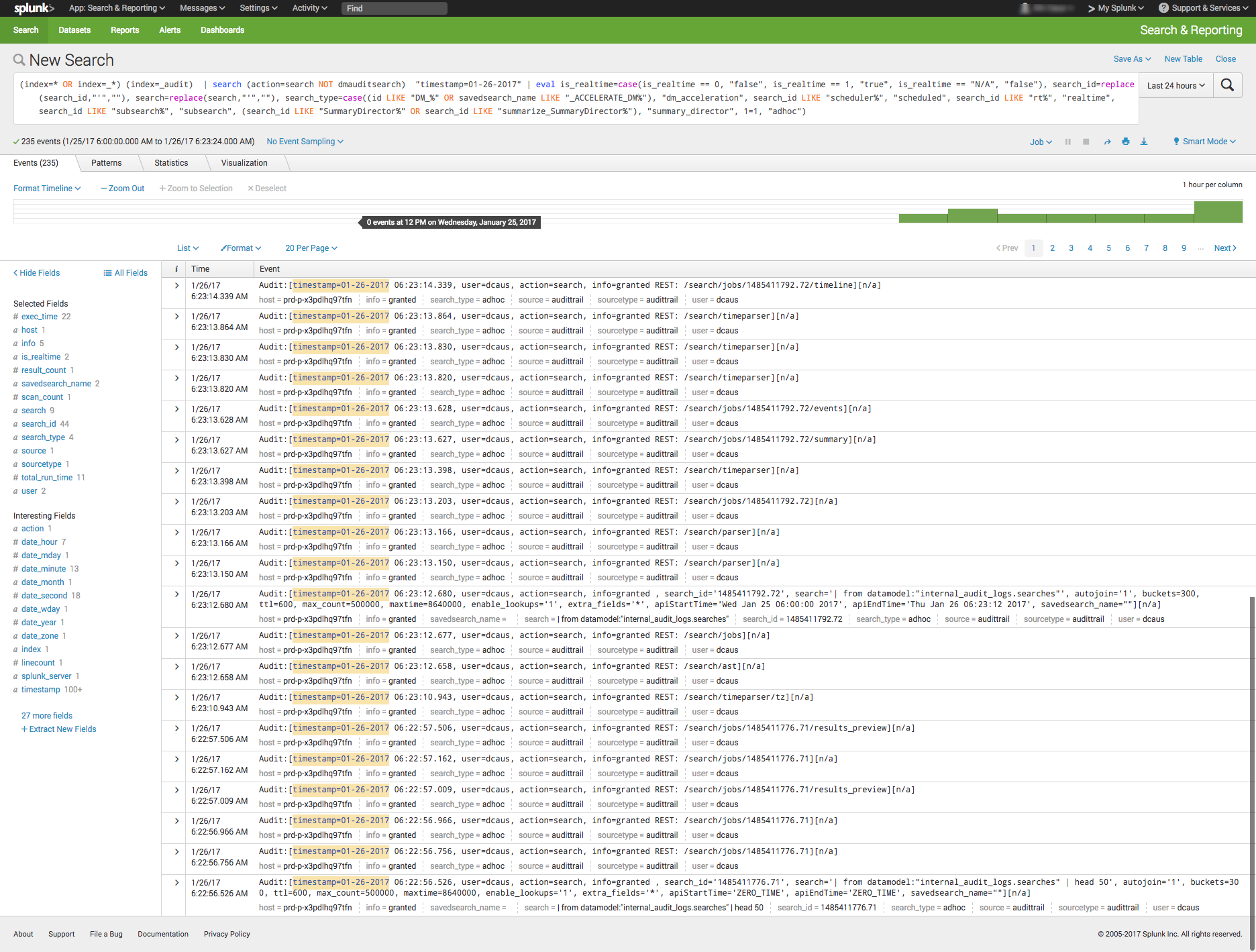
    Here is one example of a query for each platform.

    Kibana:

    (beat.hostname: ES1 AND metricset.name: process) AND (system.process.username: root OR system.process.username: admin)

    Splunk:

    (index=* OR index=_*) (index=_audit)   | search ( action=search NOT dmauditsearch )  "06:54"

    The difference between SPL syntax and Lucene queries is that SPL supports the search pipeline (as in the example above) in which consecutive commands are chained together using a pipe character that allows the output of one command to be used as the input of the next one. Lucene query syntax is more straightforward and can work to generate the output from the query without additional transforming.

    Traction and Community Support

    Both Splunk and ELK Stack have large communities of users and supporters. ELK also has its own clear and extensive documentation for each separate tool, making it easy to get started. In addition, Elastic itself offers educational sessions worldwide.

    In addition to having good documentation and a forum, Splunk, too, has customer and support platforms that offer various professional services. Splunk’s education program and instructors are available virtually or on site.

    The Learning Curve

    The ELK Stack’s learning curve is flat for what it’s meant to do. Elastic offers paid courses, but there is a lot of free material online due to the popularity of the open-source platform.

    For Splunk, the learning curve is moderate in size, especially when carrying out more specialized analyzes. The company offers a trial period with extensive documentation, but the advanced Splunk educational courses are fairly expensive.

    User Management

    The ELK Stack provides role-based security as a separate paid tool. Splunk and managed-ELK services offer user management out of the box with user auditing included.

    Pricing Levels

    As already mentioned, Splunk is proprietary software with a price tag. After one integrates several data sources with the platform, the cost will increase greatly as data is continuously generated.

    The open-source ELK Stack is free, but the true picture is not so black and white. The cost of the platform’s hardware and maintenance also adds up. To lower the cost of using ELK, features, plugins and tools must be developed.

    Vendor Lock-In

    Splunk’s high price tag comes with the benefit of offering an overall, well-rounded product. Users might be locked into a vendor, but that one vendor is all that is needed to do nearly anything. The open-source ELK Stack is seemingly free, but it does not provide many functionalities such as alerting out of the box—and it costs money to develop and maintain them.

    Spunk is Splunk. There are many varieties of ELK:

    One way to look at the Splunk-versus-ELK discussion is to frame it as the old Microsoft-versus-Linux debate. If you like Microsoft, you will probably prefer Splunk. If you like Linux, you will likely want to use the ELK Stack.

    Final Thoughts

    When one decides between these solutions, the ultimate choice should reflect not only on the platform but also on the customer’s specific needs.

    Both Splunk and the ELK Stack are currently popular. But what might the future hold?

    splunk vs elk
    Splunk (Blue) vs. Elasticsearch (Red) on Google Trends

    According to Google Trends, the ELK Stack has now overtaken Splunk in terms of the proportion of Google searches. But ELK’s traction does not stop there. As mentioned earlier, Splunk self-reports 12,000 total users. Elasticsearch is reportedly downloaded 500,000 times every single month. In IT departments, then, it is far more likely to meet people who are familiar with ELK than with Splunk, meaning that the adoption rate of the ELK Stack could “snowball” and increase even more in the future whenever ELK users join new companies or teams. People tend to use whatever software they already know or is already being used.

    It’s clear that many functionalities are being added to the open-source ELK Stack. This, in turn, is shrinking the gap between it and Splunk. hose features currently found only in Splunk are likely to be added to ELK at some point in time.

    So, if a more mature product is what you need, go with Splunk. But if you like a product that is more flexible, ELK is the way. Either way, it’ll be interesting to see how these two continue to compete.

    — Asaf Yigal

  • Continuous Testing: Solving the Biggest DevOps Bottleneck

    Continuous Testing: Solving the Biggest DevOps Bottleneck

    It’s time to start implementing the practices of Continuous Testing

    Earlier this year, Computing Magazine conducted a fascinating study around the adoption and benefits of DevOps in its DevOps Review 2017 publication. The findings that stood out most fascinating to me where around quality assurance and testing.

    In this survey, the question was asked, “Where are the main holdups in the software production process?” Of all the self-proclaimed DevOps practitioners, a whopping 63 percent said the biggest delays occurring in the QA/Test phase. In fact, this cited bottleneck was more than 2 times greater than the next proclaimed bottleneck, which they felt was in planning (29 percent).  In this same survey, another question asked, “What tends to lose out more in DevOps environments?” While 43 percent said, “Nothing,” nearly 30 percent of these DevOps practitioners said that quality was being sacrificed. When asked which area they wanted to focus on improving in the next year, over 40 percent opted for quality.

    Why is it that quality has taken such a hit?  The study cited two issues: 1) Testing and QA is often siloed from the other parts of the organization, and 2) Testing tools haven’t matured much in the past five years.

    Testing must become a cross-functional operation across the software development lifecycle (SDLC) spectrum, one that involves all teams. Agile developers and testing teams don’t have weeks to test, but hours. Testing hasn’t kept up because it hasn’t applied the methods and concepts of agile development have not been applied to testing and QA processes. By removing the constraints that force testing to the end of a development cycle, developers and QA teams can achieve accurate, automated testing from day one. They can create an integrated pipeline, capable of taking an idea from design to deployment, at speed, without compromising quality.

    Open-source, cloud-based solutions can be the catalyst that brings the speed of agile to testing.  Here are a few examples.

    Better In-Sprint API Testing: Since APIs have become the major component of applications, organizations are shifting their approach from starting testing when the user interface is complete to shifting the focus of testing at the API level.  But the hard thing is finding enough time in a development sprint to test them sufficiently.

    Today’s applications are a collection of microservices and API calls. UI testing alone just won’t cut it. UI testing is very brittle, and whenever it changes, testing breaks. Testing needs to shift left into the development cycle—into sprints. But if you shift testing left to be a focus of the sprints, what kind of API testing can you really do? How comprehensive can they really be?  Creating those API tests has to be quick, and simple.

    Dev and Test teams must utilize automated tools that not only generate API tests, but create an exhaustive set of test cases from the API, then execute those tests. These tools also need to support the most popular open-source testing frameworks allowing developers to run functional API tests as performance tests without any proprietary conversion issues. And, vice versa, developers must be able to take open-source performance tests and be able to run them as functional API tests.

    Orchestrating Testing: A Continuous Delivery Pipeline Manager: “Faster” is becoming table stakes with automation.  The facts show that companies who have widespread agile adoption and are deploying more frequently with significantly reduced lead times. But, this too often leads to release failures, quality issues and disorder with multiple—if not hundreds—of applications rolling through the SDLC. Plus, things slow down significantly with time-consuming handoffs and rework in the release process. DevOps teams, who release features and fixes frequently while significantly reducing errors and manual processes, need toolchain-agnostic pipeline planning, orchestration and optimization solutions that enable them to eliminate spreadsheets, automate test processes and feedback, and continually improve the delivery of revenue-generating features to end-customers. New CD SaaS tools help make this orchestration process easy.

    Performance and Functional Testing Using Open Source Frameworks: More and more organizations are trying to move from legacy testing tools. It’s not so much that these don’t adequately test, but they were never designed to meet the needs of agile development approaches. Rather, they were designed for releases that occurred two to three times per year. But that won’t cut it anymore.

    And as developers begin to incorporate testing activities in the coding process, they need simple-to-use, open-source tools. Luckily, there are such tools like JMeter, Selenium, Gatling, Locust and others. There are even tools that help you convert from legacy platforms to open source technology with ease, and guides to transform existing functional tests created with other tools over to load tests.

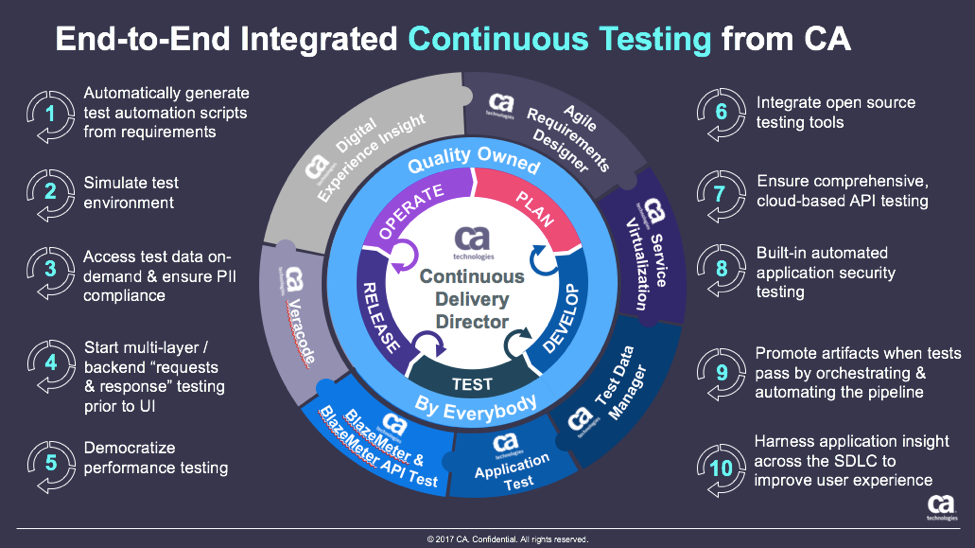
    These are just a few examples of how continuous testing eliminates the testing hurdle. With continuous testing, organizations can:

    • Automatically convert user stories from requirements management tools like CA Agile Central or Atlassian JIRA into the minimum number of test cases required for complete code coverage, and being able to adapt automatically to changing business requirements.
    • Reduce test cycle prep time by requesting test data from within requirements.
    • Request, reserve, and create test data at any time, even from requirements phase.
    • Virtualize APIs for better testing, while managing API access to developers.
    • Institute easy API testing that can generate comprehensive test cases (positive, negative, edge case, and SQL injection) and execute those tests automatically.
    • Democratize testing with SaaS-based testing tools so that developers can test early and test often.
    • Speed testing by feeding test data directly and securely to virtual services.
    • Use open-source testing tools such as JMeter, Selenium, Jenkins, Jenkins, Appium, Taurus, Gatling, Locust and more.
    • Orchestrate the application delivery pipeline to promote releases from one environment to the next as soon as all the tests pass and enable faster feedback loops.

    This is testing unleashed, going hand in hand with agile development to accelerate quality into production.

    By adopting next-generation testing practices, DevOps teams have the ability to test early, often, automatically and continuously. To learn more about continuous testing and why it is critical to DevOps and Continuous Delivery initiatives, visit this Continuous Testing informational page.

    — Aruna Ravichandran

  • 7 Steps to DevOps Hiring Success

    7 Steps to DevOps Hiring Success

    As many of us in the DevOps scene know, most companies are hiring, or, at least, trying to do so. The required skills and job descriptions can change entirely from company to company. As a broad overview, most teams are looking for a candidate from either an operations and infrastructure background or someone from a software engineering and development background, then combined with key skills relating to continuous integration, configuration management, continuous delivery/deployment and cloud infrastructure. Currently in high-demand is knowledge of container orchestration.

    In the ideal world, the two backgrounds will meet somewhere in the middle to form Dev and Ops, but in most cases, there is a lean toward one side or the other while maintaining sufficient skills to understand the needs and demands of their counterparts to work collaboratively and achieve the end goal of continuous delivery/deployment. Every company is different and there isn’t necessarily a right or wrong here. It all depends on your infrastructure, tech stack, other team members’ skills and the individual goals you hope to achieve by hiring this individual.

    Focus Your Hiring

    Now, given the various routes to becoming a DevOps practitioner, how do hiring managers focus their search and selection process to ensure that they’re hitting the mark?

    Decide on the Background

    Assess the strengths of your existing team. Do you already have some amazing software engineers but you’re lacking the infrastructure knowledge? Aim to close these gaps in skills. You may have been given the budget to hire for DevOps, but you don’t have to spend weeks/months searching for the best software engineer who happens to use Docker and Kubernetes because they are the current hot trends in this space. Find the person who will provide the most value in your environment and go from there.

    Contractor or Permanent Employee? 

    Many hiring managers will automatically start searching for a full-time permanent employee when their needs may suggest that they have other options. Sometimes a contractor is your best bet or maybe contract-hire. If you’re aiming to design, implement and build a new DevOps environment, why not find a senior person who has done this a number of times already? Try hiring a senior contractor and bring on a junior full-time hire in parallel; this way, you’ll be able to retain the external contractor knowledge by having them work alongside the junior hire. Contractors can be expensive, but the knowledge they bring can be invaluable, especially if the work can be completed over a shorter time frame. Again, this is just another point of view and you might be best off with a full-time hire to grow the team.

    CTRL F is not the Solution

    Focus on their understanding of DevOps and CI/CD-related processes over specific tools. I believe the best approach is to focus on finding someone who understands the methodologies over the tools. Does your candidate understand the concept of continuous integration or the concept of continuous delivery? That’s more important than asking whether your candidate uses Jenkins versus Bamboo versus TeamCity and so on. Try not to get caught up in the exact tool chain. The focus should be on the candidates’ ability to solve problems. Are they obsessed with increasing efficiency, saving time, automating manual processes and constantly searching for flaws in the system? They might be the person you were looking for, but you missed them because you didn’t see the word “Puppet” on the resume.

    Work Closely with your Internal Talent Acquisition Team and/or an External Recruiter

    Be clear and precise with what you’re looking for and have an ongoing, open communication with recruiters. They can and will help you if used effectively. The job of these recruiters is to save you time by sourcing candidates while you’re focusing on your day-to-day role. Work closely with them and deliver in the same way that you would expect them to deliver for you. If you say you will review a candidate by X time, do it. If they say they’ll have a candidate in your inbox by Y time, make sure they do it, too. Start by setting up an initial call to talk through your requirement, lay out a timeline in which you expect candidates by a specific time and explain your process in terms of when you will interview, how many interview rounds and how soon after you will be able to make a final decision on whether to offer or reject the candidates. If you can get this relationship working well, you’ll save lots of time. And make sure your internal teams are focused on supporting your process, not blocking it.

    $$$

    Decide how much you want to pay. It’s not all about the money, but you can waste a lot of your and other people’s time if you don’t lock down the ballpark salary or hourly rate that you can afford. If your budget doesn’t stretch as far as your competitors’, you need to consider what else can help sell the opportunity. Flexible working hours and remote working options are some great ways to do this. Most companies have snacks, beer and cool offices nowadays, so focus on the real value such as the innovative work your team is doing and how awesome your game-changing product might be.

    Drop the Ego

    You may have an amazing company and/or product, but you also have some hot competition. Everyone is hiring in this space and candidates have a lot of the buying power. It is no longer as simple as saying, “We are hiring” and the awesome candidates come flowing in. You need to sell your opportunities. Maintaining a reputation as a great place to work is also important. A poor hiring process, such as interviewing without giving feedback, can contribute to bad rumors being spread across the industry. It only takes a few minutes to leave a sour review on Glassdoor.

    A Smooth Process is a Successful One

    “Let’s get every single person within the company to do a one-hour interview with the new DevOps person we are hiring!” No, let’s not do that. Two or three stages should be sufficient. You have managers and directors for a reason. Trust your instinct and use your experience to make decisions on who will fit into your organization. Some of the most successful companies can do one phone screen followed by an in-person meeting. During the in-person interview, spend a morning or afternoon allowing the candidate to meet the relevant leaders and senior members of their direct team, then take them for lunch, dinner or drinks where you can see how they are on a social level. If you can’t have a simple conversation with them, then you probably won’t enjoy working with them. If the thumbs are up, make the hire and don’t wait around. A good candidate will usually have numerous offers on the table at the same time.

    If all goes well, you should be inviting your shiny new employee or contractor into the office in the next few weeks and hopefully many more throughout the year.

    About the Author / Conor Delanbanque

    conordelanbanque

    Conor Delanbanque has been recruiting and leading recruitment teams in the DevOps space for the past few years. As well as being exclusively responsible for growing some of the most innovative DevOps & SRE teams in the US and Europe as an external consultant and recruiting partner, Conor also founded the Future of DevOps Thought Leaders Debate, sponsors DockerNYC Meetup on a regular basis and co-hosts ServerlessNYC. You can tweet him at @ConorDevOps, find him on LinkedIn or at events, expos and writing articles on DevOps.com.


  • Continuous Testing vs. Test Automation: 3 Key Differences

    Continuous Testing vs. Test Automation: 3 Key Differences

    Testers have been wrestling with test automation for years, yet most teams are not satisfied with their current level of test automation or the overhead required to maintain it. Additionally, the past few years have brought a sea change in the way that applications are architected, developed and consumed—increasing both the complexity of testing and the business impact of software failures.

    How can software testing professionals help the business control risk in light of the increased complexity and pace of modern application delivery? Enter continuous testing.

    What is Continuous Testing?

    Continuous testing is the process of executing automated tests as part of the software delivery pipeline to obtain feedback on the business risks associated with a software release candidate as rapidly as possible.

    Test automation is designed to produce a set of pass/fail data points correlated to user stories or application requirements. Continuous testing, on the other hand, focuses on business risk and provides insight on whether the software can be released. To achieve this shift, we need to stop asking, “Are we done testing?” and instead concentrate on, “Does the release candidate have an acceptable level of business risk?”

    Why Do We Need Continuous Testing?

    Today, changes across the industry are demanding more from testing while making test automation more difficult to achieve (with traditional tools and methods, at least):

    • Application architectures are increasingly more distributed and complex, embracing cloud, APIs, microservices, etc., and creating virtually endless combinations of different protocols and technologies within a single business transaction.
    • Thanks to Agile, DevOps and continuous delivery, many applications are now released anywhere from every two weeks to thousands of time a day. As a result, the time available for test design, maintenance and especially execution decreases dramatically.
    • Now that software is the primary interface to the business, an application failure is a business failure—and even a seemingly minor glitch can have severe repercussions if it impacts the user experience. As a result, application-related risks have become a primary concern for even non-technical business leaders.

    How Is Continuous Testing Different From Test Automation?

    The main differences between continuous testing and test automation can be grouped into three broad categories: risk, breadth and time.

    Risk

    Businesses today have not only exposed many of their internal applications to the end user, they also have developed vast amounts of additional software that extends and complements those applications. For example, airlines have gone far beyond exposing their once-internal booking systems. They now let customers plan and book complete vacations, including hotels, rental cars and activities. Exposing more and more innovative functionality to the user is now a competitive differentiator—but it also increases the number, variety and complexity of potential failure points.

    Large-scale “software fails” have such severe business repercussions that application-related risks are now prominent components of a business’ public financial filing. Given that notable software failures resulted in an average -4.06 percent decline in stock price (which equates to an average of negative $2.55 billion loss of market capitalization), it’s not surprising that business leaders are taking note—and expecting IT leaders to take action.

    If your test cases weren’t built with business risk in mind, your test results won’t provide the insight needed to assess risks. Most tests are designed to provide low-level details on whether user stories are correctly implementing the requirements—not high-level assessments of whether a release candidate is too risky to release. Would you instantly stop a release based on test results? If not, your tests aren’t properly aligned with business risks.

    To be clear: We’re not suggesting that low-granularity tests aren’t valuable; we’re stating that more is needed to stop high-risk candidates from going out into the wild.

    Breadth

    Even if a business manages to steer clear of large-scale software fails that make the headlines, even seemingly minor glitches can still cause trouble these days. If any part of the user’s experience fails to meet his expectations, you not only risk losing that customer to a competitor—you also risk brand damage if that user decides to take his issues to social media.

    Just knowing that a unit test failed or a UI test passed doesn’t tell you whether the overall user experience is impacted by recent application changes. To protect the end user experience, you need tests that are broad enough to detect when an application change inadvertently impacts functionality which users have come to rely on.

    Time

    Now that the speed at which organizations ship software has become a competitive differentiator, the vast majority of organizations are turning to Agile and DevOps to accelerate their delivery processes.

    When automated testing emerged, it focused on testing internal systems that were built and updated according to waterfall development processes. Systems were all under the organization’s control, and everything was completed and ready for testing by the time the testing phase was ready to start.  Now that Agile processes are becoming the norm, testing must begin in parallel with development; otherwise, the user story is unlikely to be tested and deemed “done done” within the extremely compressed iteration time frame (often two weeks).

    If your organization has adopted DevOps and is performing continuous delivery, software may be released hourly—or even more frequently. In this case, feedback at each stage of the process can’t just be “fast”; it must be nearly instantaneous. If quality is not a top concern for your application (e.g., if there are minimal repercussions to doing a rollback when defects are discovered in production), running some quick unit tests and smoke tests on each release might suffice. However, if the business wants to minimize the risk of faulty software reaching an end user, you need some way to achieve the necessary level of risk coverage and testing breadth—fast.

    For testing, there are several significant impacts:

    • Testing must become integral to the development process (rather than a “hygiene” task tacked on when development is complete)
    • Tests must be ready to run almost as soon as the related functionality is implemented
    • The organization must have a way to determine the right tests to execute at different stages of the delivery pipeline (smoke testing upon check-in, API/message layer testing after integration, end-to-end testing at the system level, …)
    • Each set of tests must execute fast enough that it does not create a bottleneck at the associated stage of the software delivery pipeline
    • A way to stabilize the test environment is needed to prevent frequent changes from causing an overwhelming number of false positives

    Continuous Testing> Test Automation

    If you only take one idea away from this article, we hope that it’s this:

    Test automation ≠ continuous testing

    Continuous testing > test automation

    Even the teams that have achieved fair levels of success with traditional test automation tools hit critical roadblocks when their organizations adopt modern architectures and delivery methods:

    • They can’t create and execute realistic tests fast enough or frequently enough
    • The constant application change results in overwhelming amounts of false positives and requires a seemingly never-ending amount of test maintenance
    • They can’t provide instant insight on whether the release candidate is too risky to proceed through the delivery pipeline

    It’s important to recognize that no tool or technology can instantly “give” you continuous testing. Like Agile and DevOps, continuous testing requires changes throughout people, processes and technology. However, trying to initiate the associated change in people and processes when your technology is not up to the task will be an uphill battle from the start … and ultimately a losing one.

    If your organization is starting or scaling your continuous testing automation efforts, we encourage you to review two new pieces of research by Forrester and Gartner. Both reports provide insight into continuous testing and test automation trends as well as how the top continuous testing tools compare.

    About the Author/Wayne Ariola

    Wayne Ariola (1)Wayne Ariola, CMO of Tricentis, is a recognized thought leader on software testing topics such as continuous testing, risk-based testing, service virtualization, and API testing. Wayne has created and marketed products that support the dynamic software development, test, and delivery landscape. He has driven the design of many innovative technologies and received several patents for his inventions. He has been a contributor to the software testing space for fifteen years and in the software industry for more than 20 years. Connect with him on LinkedIn.

  • Spurring the DevOps Adoption Journey

    Spurring the DevOps Adoption Journey

    Every few years, the IT canvas is splashed with a new initiative that sparks enthusiasm among businesses and technologists alike. DevOps is one such philosophy gaining significant momentum in today’s digital transformation landscape. At the same time, the concept remains misunderstood and adoption is slow.

    DevOps embodies Development plus Operations within software development. Traditionally, these two parts of an organization have operated siloed from one another with marked differences in both ethos and approach. The result: delays in launching products and releases to the market. The fundamental principles of DevOps are to reduce barriers between Development and Operations; increase Development autonomy; and to automate Development and Operations activities to reduce wait time (and waste from a customer’s perspective), thus enabling faster time to market—all while keeping the end customer at the center.

    Planning the Adoption Journey

    Here are four different aspects an organization should consider before starting the DevOps adoption journey:

    Conduct an as-is continuous delivery assessment on product development practices and processes within the organization

    This will best determine an organization’s current maturity level across several different parameters, including:

    • Culture and organization
    • Build management and continuous integration
    • Environments and deployments
    • Release management
    • Testing and verification
    • Data management
    • Design and architecture
    • Information and reporting

    This process also includes identifying current automation levels and opportunities to automate, inclusiveness of tools and environments supporting continuous delivery, and an assessment of existing product design to determine if it lends itself to frequent and fast deployments.

    Map the journey of a piece of code from a developer’s desk all the way to when the consumers use it

    Utilizing a development pipeline assessment to study the life cycle of a piece of code through its journey from a developer’s desk to production will best identify “waste” during the life cycle. This assessment should bring out critical information, including the number of environment hops, test pyramid maturity and level of continuous testing, level of provisioning and deployment autonomy and its automation.

    Establish a culture of inclusiveness, autonomy and a sense of a ‘common goal’ within the organization

    Product management, development and operations teams should have a common mission and goal for the product, sprint or release they are working on. The definition here should be the value delivered to the customer as opposed to the value of code, test results, or individual deployment steps. Including operations roles within a close-working scrum team benefits this cause by:

    • Bringing in common views on what a product, release or sprint is intended to deliver.
    • Creating an opportunity to bring forward and address operations needs during the development cycle.
    • Creating a better understanding of mutual expectations and empathy for delivering outcomes that meet customer expectations.

    Measure and track

    Finally, determine parameters the organization would like to establish to track progress towards a successful adoption. The key here is to have a few, simple metrics that truly reflect “value to the end customer.” Here are a few commonly considered metrics:

    • Production deployment frequency: The number of product releases within a specified time.
    • Average lead time for a production change: The typical amount of time it takes for a piece of code to traverse from a developer’s desk through production.
    • Average production recover time: The time taken to bring back production systems after an incident involving a release, release rollback or system outage.
    • Change failure rate in production: The number of releases that did not stick in the live environment and needed either a rollback or an immediate emergency fix.

    The goal and a true measure of successful adoption would be an improvement of all these parameters over time. Internally, they would require strong engineering rigor and cultural realignment to be able to improve these customer-facing metrics.

    Navigating DevOps adoption successfully is neither easy nor fast for a number of reasons. DevOps encompasses different parts of the organization, which historically may have operated in silos and with different ethos. DevOps also questions the status quo regarding engineering roles and practices, and focuses on automation and reskilling, all of which need both upfront time and effort investment. Finally, DevOps believes in and propagates continuous learning and improvement, whereas many organizations may have more stepwise-based programs in place.

    For a midsized IT organization, it could take anywhere from 18 to 24 months or more to be able to reach a reasonable steady state. That’s why it is important to carefully craft a charter that encompasses the above parameters before embarking on this DevOps adoption journey.

    About the Author / Amit Gupta

    Amit Gupta is leader of Ness Digital Engineering’s DevOps practice. He has several years of software delivery background. He has keen interest and has developed deep expertise in establishing practical software development processes especially for globally distributed teams. Amit currently leads Ness Digital Engineering’s DevOps practice, and engages with several customers on such areas as improving engineering effectiveness, engineering tools and process transformation. Connect with him on LinkedIn.

  • Improving DevOps Success with Well-Defined Metrics

    Improving DevOps Success with Well-Defined Metrics

    Collaboration within diverse project teams is often more difficult to achieve when there is no clearly visible aim, the planning is haphazard and the information shared is inadequate. However, these are crucial hurdles to overcome in any organization—and more so in product companies with globally distributed teams working on different parts of the product pipeline.

    Successful product development requires effective and constant communication between various teams through well-defined metrics, not only to reduce the engineering operations overhead but also to improve on the overall engineering deliverables.  These metrics, including  ROI or profitability, mean time to recover and deployment frequency provide a clearer picture to an engineering or business owner on how the Dev and Ops teams are working, their adherence to processes and guidelines and the technology they’re using.

    Every engineering owner likes to know if the technology investment they make is going to yield a significant ROI. It is no different with DevOps. It is important to identify the exact metrics by which the positive impact of DevOps can be measured.  The most effective way to illustrate these metrics in a way that would make sense to senior management is revenue impact.  Here are a few of them which have had proven success on internet of things (IoT) projects.

    Business metrics such as cycle time impacts incremental sales and customer satisfaction. Whereas other business metrics such as product investment and running costs impact profitability, DevOps implementation effectiveness can be measured by both. Cycle time is, in turn, derived from a number of product features delivered, sprint velocity and release planning metrics. The lower the cycle time, the more features get pushed and impacts the go-to-market. It also results in potential incremental revenue in terms of the value brought by reducing the cycle time.

    Another dimension to measure DevOps impact is engineering metrics. Companies today are worried about the cost of downtime in the operational phase as much as they worry about time it takes to bring the product to market. DevOps metrics are valid throughout the end-to-end implementation of a project.

    Build automation and code quality analysis, for example, can provide significant savings in build cycle time and build rollout time. Automating deployment process improves time to deploy and sprint velocity. Continuous testing improves mean time to resolve, and CloudOps monitoring tools can help reduce mean time to recover and uptime of any application. Further collaboration in automation through ChatOps tools can help improve mean time to respond. Once set in motion, all these matrices start improving the product quality, which leads to less rework. Intelligent automation also incurs direct productivity benefits.

    Organizations now measure these codes to release the metrics at the end of the day to get maximum ROI. A lot of these metrics also depend on the DevOps capability maturity. Organizations at the higher end of the maturity spectrum would tend to measure all of these metrics and try to optimize them. Also, the emphasis of these metrics vary with the domain and stage of the product life cycle being worked on. Home automation companies developing their IoT platform, for example, would emphasize build and deployment metrics, whereas companies in industrial automation with large infrastructure deployment would look at CloudOps monitoring metrics more closely. For telematics companies, test automation metrics become important when there is limited time and bandwidth to capture the data.

    DevOps is a cultural transformation and most of the time businesses measure the effectiveness in a very obvious way. However, a change in the way the organization operates should be looked in such a way that the metrics can generate long-term value. Thus, continuous measurement of the DevOps practice should also become one of the major focus areas of DevOps teams.

    About the Author / Urvashi Babaria

    Urvashi Babaria is a Product manager at eInfochips working in new age areas like IoT, DevOps and CloudOps. She is a techno commercial marketer with nine years of experience in product and project management, business analysis and transformation. She has keen interest in areas of data science including visualization, analytics and modeling. You can start a conversation with her at urvashi.babaria@einfochips.com

  • Feature Branching vs. Feature Flags: What’s the Right Tool for the Job?

    Feature Branching vs. Feature Flags: What’s the Right Tool for the Job?

    A dev team’s branch management strategy can have a significant impact on the rate at which it can release high-quality software. In this article we’ll explore the pros and cons of several different approaches for enabling multiple concurrent streams of dev work in the same codebase. We’ll see that two major factors—the cost of merge conflicts and the ability to release streams of work independently—are often in tension, but that Feature Flags provide a way to resolve that tension.

    Merge Conflicts

    New products start off as a small codebase, usually only being worked on by a handful of developers. This situation doesn’t call for much formal process. However, even when a team consists of just two devs, it’s still preferable to avoid working on the same files at the same time to avoid merge conflicts.

    Unfortunately, even when we’re trying to avoid stepping on each other’s toes, it’s still pretty common for work streams that seem unrelated to end up touching the same files. Sometimes it’s these unexpected merge conflicts that can cause the most pain—any iOS developer who’s been around the block a few times probably has acquired some scar tissue from an epic three-way XIB merge in their past. In this article we’ll explore some different ways to deal with the challenge of merge conflicts when multiple developers are working on the same codebase.

    Some people might argue that merge conflicts aren’t that big a deal these days and mostly are solved if you just use modern tools such as Git. This is unfortunately not true. Git certainly makes creating branches trivial, but it does not always make merging parallel changes within those branches trivial. It has some powerful features to automatically merge changes when possible. These automatic merge heuristics can feel almost magical at times, but they are not actually magical. If you make parallel changes that affect a large XML file—for example, a XIB or an IDE project file—Git likely will not be able to merge those without human assistance.

    Most importantly, Git cannot automatically resolve semantic conflicts. For example, imagine that in one branch Alice renames a method and in another branch Bob adds a new usage of that method. When those two branches are merged, Git will do nothing to help resolve the fact that Bob’s branch is calling a method using the old name. Bob’s code is calling a method that no longer exists. In fact, Git will not give Alice or Bob any clue that there is a conflict, since these semantic conflicts aren’t detectable by our current set of tools.

    We’ll only find semantic conflicts when we try to compile our merged codebase, and even then only a subset of them. If the codebase is in a dynamically typed language such as javascript, we might not find out until our users start reporting app crashes in production.

    Beyond the productivity hit of having to manually resolve these inevitable merge conflicts, the spectre of introducing a conflict can have a more pernicious, long-term effect on a codebase. A developer who sees an opportunity to incrementally improve the quality of the codebase is slightly disincentivized to do so if they sense that it could lead to a merge conflict.

    The calculus for whether the effort of making a small improvement is worth the investment gets shifted as the cost of that change becomes higher. This introduces a subtle drag working against the internal quality of a codebase over time. What’s more, the type of small but broad refactorings that can gradually improve a codebase—or stop it gradually degrading—are exactly the type of changes that often lead to a merge conflict. In my opinion, this is the true hidden cost of branch-based development—it disincentivizes the sort of “boy scout rule” improvements that can prevent areas of a codebase from gradually degrading into no-go zones.

    So, having established that merge conflicts are a Bad Thing, let’s look at how we might avoid them.

    Working Directly on Master

    A small team starting out on a new app might initially try to mitigate the risk of a big unexpected merge conflict by having all devs push frequently to a shared master branch—one of the central tenets of continuous integration. When everyone is frequently synchronizing their changes in a shared master branch, an unexpected merge conflict is revealed earlier and is easier to deal with.
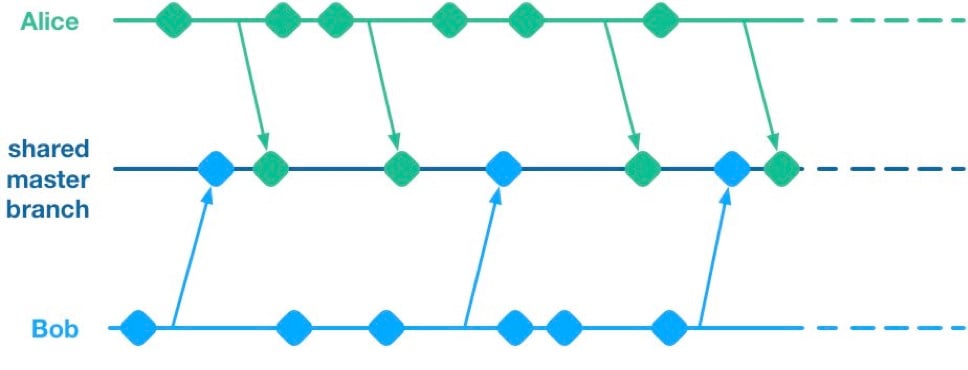
    Unfortunately, having multiple streams of work landing on a shared master branch comes with a big drawback: If any of the streams of work are not ready for release, then nothing on the shared branch can be released. Let’s see why using a hypothetical example.

    Alice and Bob are a two-dev team working on a mobile app. They have two streams of work in progress. Bob is working on a big overhaul of how user preferences work, while Alice is finishing off a critical new feature for the app which the big bosses have decreed must be pushed to the app store by the end of the week. This team is trying to avoid big merge conflicts by frequently pushing their code changes to a shared master branch as they go.

    On Thursday, Alice is wrapping up her changes and doing some testing. While giving the app a general run-through she notices that the user preferences section is crashing. She asks Bob if he knows why. Bob explains that he’s in the middle of overhauling that area of the code. It’s taken a little longer than he expected and it might be buggy for a while. Alice gives Bob a look. She explains to him that her feature has to get to the app store this week. Bob gulps. Over the course of two long days Bob and Alice are able to roll back Bob’s changes, some of which had gotten tangled up with changes that Alice had been making as part of her new feature. They manage to ship to the app store by Saturday, and a crisis is averted.

    We see here that because Alice and Bob were both committing to a shared branch, their independent streams of work became entangled. Alice could not release her changes without Bob’s and vice versa. This is the huge drawback of working on a shared branch—although we will discover later on that there are ways to mitigate this.

    Feature Branches

    To avoid this issue of coupled work streams, dev teams very often will move away from pushing in-progress code onto a shared branch. Some teams will opt to continue working on master on their local machines but only push to the team’s shared repo once the work is complete. Other teams will opt to use Feature Branches, maintaining separate streams of work on isolated branches and only merging them into master once they’re complete.

    As an aside, it’s interesting to note that when using a distributed source control system like Git, these two approaches are essentially equivalent; the only difference is whether the unmerged in-progress changes are visible in a remote feature branch or hidden on a dev’s local master. As such, I’ll talk about both variants as Feature Branching.
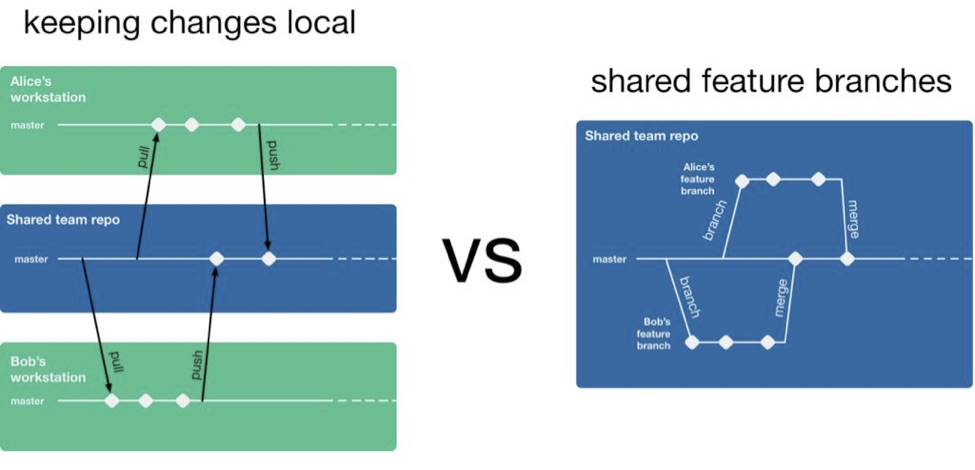
    So, if a team is using feature branching, then all their problems are solved, right? Unfortunately not. We’ve now re-introduced the risk of painful merges. Work that is being done on a feature branch is not integrated with other changes until it is merged to a shared master branch. Whenever two streams of work both touch the same files, either inadvertently or intentionally, there is a latent merge conflict which continues to grow in size until one of those stream’s branch lands on master. Some teams will try to mitigate this issue by frequently merging changes from master back into in-flight feature branches.
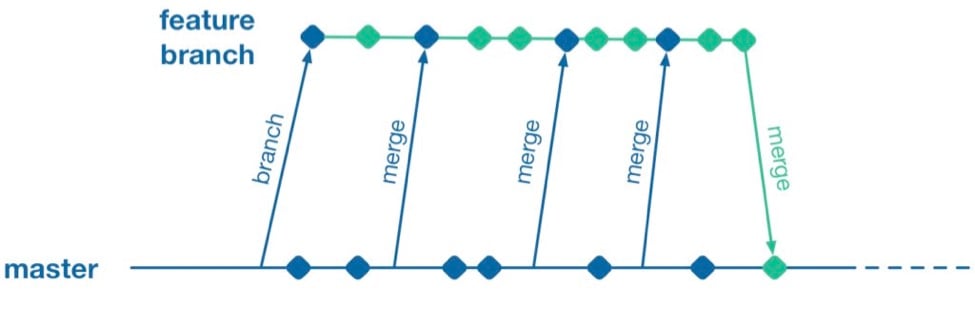
    However, this does not help when parallel changes are occurring on isolated branches. Alice’s branch will only see Bob’s changes when his feature branch lands on master. The latent merge conflict between these parallel changes is now waiting for Alice the next time she merges from master.
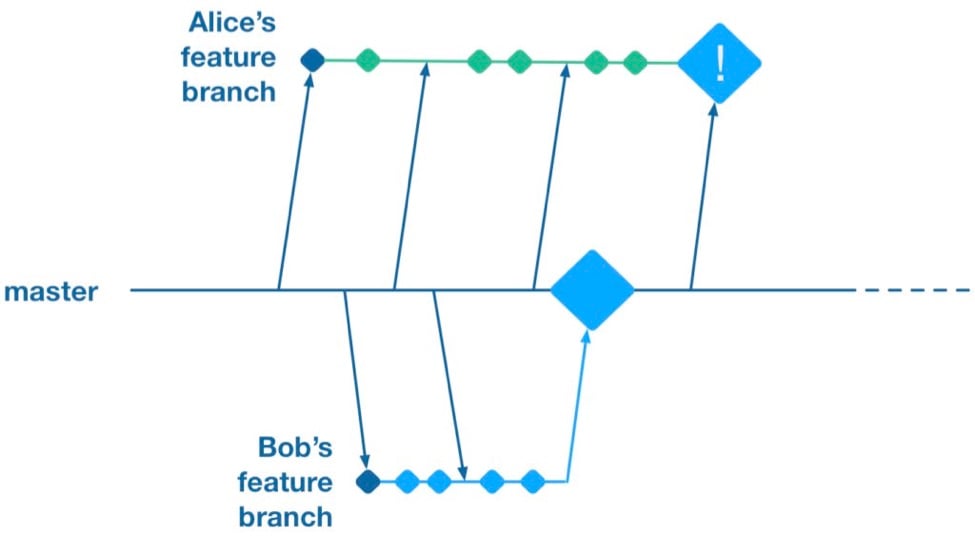
    (Thanks to Martin Fowler’s feature branch writeup for inspiring the above illustration)

    Some teams attempt to solve this problem by “cross-merging”—pulling work on one feature branch across into another feature branch to break down the size of latent merge conflicts between those branches.
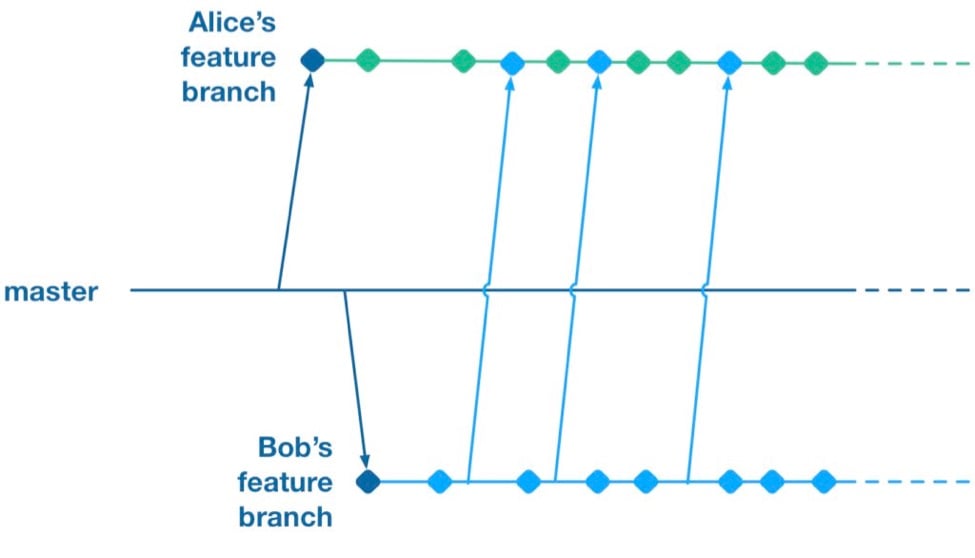
    However, as soon as you merge two feature branches together you’ve essentially created a shared branch of in-progress work, and are back to the same problem as teams who are pushing in-progress changes to a shared master: Code changes from both work streams are now intermingled. Your features are now coupled together and cannot be released independently.

    To summarize, feature branches allow teams to decouple streams of work such that they can be released independently. However, they introduce a risk of large merge conflicts when parallel feature branches contain large sets of changes. Remerging from master into feature branches only helps once parallel work has already landed, and cross-merging between branches couples features together in the same way as working on a shared master.

    Feature Flags

    What alternative does a team have if they want to avoid the merge conflict risks Feature Branches introduce? They could go back to frequently integrating changes on trunk, but we established that this has the major drawback that formerly independent streams of work are now coupled together and cannot be released independently. This is where a technique called feature flags (aka feature toggle, bits or flippers) can help.

    A feature flag is a way to isolate work-in-progress code by placing it behind a “flag” or “toggle.” The work-in-progress code will only be exercised if the flag is flipped on. Otherwise, it will sit within the codebase as “latent code.” Here’s a sketch of how a basic feature flag might be used:

    if( featureFlags.isOn(“my-new-feature”) ){
    showNewFeatureInUI();
    }

    Unless the my-new-feature flag has been configured as “on,” the new feature will not be exposed within the app’s UI. This means the app can be released even if the code implementing new feature is totally bug-ridden, as long as that feature’s flag is flipped off.

    By using feature flags, in-progress changes can be pushed into a shared branch without blocking release from that branch. If Bob is halfway through his feature and Alice wants to push a release of her feature, the team can do that by creating a release where Alice’s completed feature is flipped on while Bob’s half-finished feature is flipped off. We get the benefit of continuous integration of developer work streams (reduced risk from merge conflicts) while still keeping release of those work streams decoupled.

    This technique is not particularly new. It is part of a family of techniques sometimes referred to as trunk-based development (you can tell the technique is not new because the name uses trunk rather than the mastermoniker, which is more common today due to git’s predominance). Flickr, Etsy, Github and Facebook are some better-known proponents of the technique. Facebook’s use of feature flags is one of the key enablers for its famous ability to deploy facebook.com from a shared branch twice daily.

    Drawbacks of Feature Flags

    As with the other approaches discussed so far, feature flags have their share of drawbacks. They introduce a fair amount of noise into a codebase as we now need to explicitly implement some sort of branching logic for any incomplete feature. This noise can lead to some messy code over time unless care is taken to retire old feature flags once they are no longer necessary. Testers can take a while to get comfortable with feature-flagged apps—the idea of shipping unfinished, untested code to the app store takes a while to get used to. If the flags can be controlled remotely at run time, then teams need to understand that the new configuration of flags must be tested before being applied to apps deployed to end users.

    Finally, certain types of changes are particularly hard to protect via feature flags—broad but shallow changes that touch a lot of files can be a challenge. Happily, feature flagging is not an all-or-nothing approach; feature branches can still be used for a change that would be particularly fiddly to implement behind a flag.

    Succeeding with Feature Flags

    When a team starts to adopt feature flagging they will usually run afoul of some of the challenges discussed above, and eventually figure out ways to mitigate them. Here are some of those techniques for working successfully in a feature-flagged codebase.

    Expire Your Flags

    A lot of teams get a bit flag-happy when they first start using the approach. They tend to introduce a lot of flags, but not take the time to retire the flags once they not longer need to control whether a feature is on or off. Make sure to take the time to retire old flags—they introduce design drag in your codebase and confusion when managing flags. Some teams take quite aggressive approaches ensure old flags are expired, such as setting “timebombs” when they create a flag, or having it throw an exception if it’s still in use after a certain period of time. Other techniques include adding a flag removal task to the team’s backlog at the time the flag is created as a reminder.

    Flags Aren’t a Silver Bullet

    It doesn’t always make sense to use a feature flag for a new stream of work. Flags lend themselves best to a new feature or alternative feature where access to the feature can be controlled from a single point in the code—often by showing or hiding a button or changing what happens when you tap some part of the UI. Other types of work, such as internal refactoring, is hard to protect behind a flag. For that type of work, consider using a feature branch, ideally breaking the work down into smaller chunks that can be implemented incrementally in a series of branches rather than one long-lived branch. This will reduce the risk of a large merge conflict growing over time.

    Summary

    Feature flagging and feature branches are both ways to decouple parallel code changes and allow teams to release changes with less coordination overhead. Feature branches are easy to get started with, but can lead to painful merge conflicts. This risk of merge conflicts tends to disincentivize making incremental improvements to a codebase, and can lead to areas of the codebase becoming “no go” zones. Feature flags allow teams to practice true continuous integration and totally decouple code changes from feature release, at the cost of some complexity in implementing each flag.

    Feature flags are not a silver bullet and aren’t always the right choice, but it’s easy for a team to experiment with the approach. You can get started simply with a single hard-coded if/else statement, see how it goes and take it from there.

    About the Author / Pete Hodgson

    Pete Hodgson is a consultant to Rollout.io, a software engineer and an architect. His clients range from early-stage San Francisco startups to Fortune 50 enterprises, focused on enabling continuous delivery of software at a sustainable pace via practices like test automation, feature flags, trunk-based development and DevOps. Pete is a frequent podcast panelist, regular conference speaker in the US and Europe, and a contributing author.

  • SRE vs. DevOps — a False Distinction?

    SRE vs. DevOps — a False Distinction?

    Just a few days before he died at the beginning of the 1990s, a wise man taught us that “the show must go on.” Freddie Mercury’s parting words have long provided the guiding light for many, if not all, ops teams. In their eyes, the production environment should be exposed to minimum risk, even at the expense of new features and problem resolution.

    About 10 years ago, Google decided to change its approach to production management. It took the company only a few years to realize that while R&D focused on creating new features and pushing them to production, the Operations group was trying to keep production as stable as possible—the two teams were pulling in opposite directions. This tension arose due to the groups’ different backgrounds, skill sets, incentives and metrics by which they were measured.

    Trying to bridge this gap between the two groups, one of Google’s ops leaders, Ben Treynor, thought of an innovative solution. Instead of having an Ops team built solely from system administrators, software engineers—with an R&D background and mentality—could enrich the way the team worked with the development group, change its goals and help with automating solutions.

    Site Reliability Engineering, or SRE

    And so, the Site Reliability Engineering position was created. According to Google, SRE engineers are responsible for the stability of the production environment, but at the same time are committed to new features and operational improvement. Google decided its SRE teams should be composed of 50 percent software engineers and 50 percent system administrators. The engineers were driven to use software as a way of solving problems and perfecting what had historically been solved by hand. They integrated easily with the development team, and encouraged code quality improvements and automation testing.

    Understanding the value of SRE, several organizations of various sizes decided to embrace its principles. Some, such as Dropbox, Netflix and Github, are well-known for being at the forefront of technology leadership.

    Wait, Isn’t That DevOps?

    DevOps is a more recent movement, designed to help organizations’ IT department move in agile and performant ways. It builds a healthy working relationship between the Operations staff and Dev team, allowing each to see how their work influences and affects the other. By combining knowledge and effort, DevOps should produce a more robust, reliable, agile product.

    Both SRE and DevOps are methodologies addressing organizations’ needs for production operation management. But the differences between the two doctrines are quite significant: While DevOps raise problems and dispatch them to Dev to solve, the SRE approach is to find problems and solve some of them themselves. While DevOps teams would usually choose the more conservative approach, leaving the production environment untouched unless absolutely necessary, SREs are more confident in their ability to maintain a stable production environment and push for rapid changes and software updates. Not unlike the DevOps team, SREs also thrive on a stable production environment, but one of the SRE team’s goals is to improve performance and operational efficiency.

    Google tried a few approaches to implementing the SRE process before finding the one that suited them best. One of these approaches attempted to tie the number of permitted releases to the product’s stability. The principle underlying this process is that new releases are green-lighted based on current product performance.

    For each service, the SRE team sets a service-level agreement (SLA) that defines how reliable the system needs to be to end users. If the team agrees on a 99.9 percent SLA, that gives them an error budget of 0.1 percent. An error budget is exactly what the name suggests: the maximum allowable threshold for errors and outages. Here’s the interesting thing: the development team can “spend” this error budget in any way they like. If the product is currently running flawlessly, with few or no errors, they can launch whatever they want, whenever they want. Conversely, if they have met or exceeded the error budget, and are operating at or below the defined SLA, all new releases are frozen until they reduce the number of errors to a level that allows the launch to proceed. This process ensures that both the SREs and developers have a strong incentive to minimize the number of errors in production.

    Another interesting approach recommended by Treynor, which is more related to SRE professionalism and efficiency, is allowing SREs to move between projects. Moreover, he suggests allowing SRE engineers to move to development, and even the other way around. As the work done by both teams is similar, these transitions help the Ops team gain better and deeper knowledge of the product and code, and bring the Dev teams into the production space to help them understand its challenges. This strongly promotes a team atmosphere, rather than one in which an individual feels that “I’m on the SRE team for this product.” As part of this approach, Treynor had Dev teams handle 5 percent of the operations workload. This, according to many organizations, adds to the SRE team’s motivation and effectiveness.

    Riddles in the Dark

    Well, SRE seems perfect. As already stated, several large-scale organizations have chosen to move some of their production operations from old Ops to SRE. However, there are still a few questions that need to be asked:

    Is the position of SysAdmin (production/ops) no longer relevant for SysAdmins?

    Historically, almost all system administrators have come into their roles through tech support and similar work, or even just running Linux on their desktops and then transitioning into server work. It should be pretty clear that the same path is not available into SRE. To retain their positions, SysAdmins should now be more code-oriented, have better technological knowledge and be receptive to new methods of conducting the work they already do.

    Can an SRE team prevent production incidents?

    One of the strengths of a professional site reliability engineer is the ability to handle the growth of production load and traffic in-house. Monitoring and analyzing processes and logs with platforms such as the ELK Stack is part of the day-to-day workload, and the team should be able to identify problems as they occur, and even foresee risks to software stability. The power of this position—based on the skill set it requires—lies in developing solutions for these problems and risks. As Ciara, a software engineer in Google’s cloud storage SRE team, described it in a “Life in Google” post, “We solve cooler problems in cooler ways.”

    Are we doing DevOps or are we doing SRE?

    This question is usually asked by people trying to position themselves in the Operations world. According to many companies that implemented SRE in a slightly different way than Google, you don’t have to decide. At Reddit, ops engineers work on reducing toil, improving deployment and scaling processes, but they are referred to as “DevOps.”

    At Logz.io, we bridge the gap between developers and production through the use of automated monitoring and performance stress-testing. And we personally refer to it as “DevOps” rather than “SRE.”

    So, is it Just a Question of Context?

    In her blog, Charity Majors talks about SRE and DevOps being two different operational approaches that any organization can choose to work by, but insists on emphasizing that there is no “correct” approach. Although Google and Dropbox have decided on SRE, this does not mean the rest of the world should do so as well. What fits Google’s needs and organizational philosophy does not necessarily work for other orgs—at any scale. Moreover, Charity believes that DevOps, having grown and evolved within a broader variety of software organizations, is the more flexible, collaborative and adaptable approach, and will work better for most software organizations at all stages of development.

    On the other hand, SoundCloud senior engineer, Matthias Rampke issued a series of tweets on how SRE and DevOps were basically the same, with only one difference—high management support. Though in contradiction to her blog, Charity lent weight to this opinion during an AskMeAnything event that revolved around DevOps and SRE. She shared a story about a friend who was hiring for a startup, which, as an experiment, posted the exact same job description twice, the only difference being that one listing was titled “DevOps engineer,” and the other “SRE.” At the time of relating the story, DevOps was winning by 10 percent or 20 percent. However, all this means is that the job title is irrelevant, and naming an SRE team does not magically bestow qualities upon it. Rather than focusing on the title, organizations must focus on the work being done.

    To summarize, we can quote Matt Simmons, a technologist with many insights into this topic, who says, “Not every infrastructure needs an SRE, but every infrastructure could use an administrator who acted more like one.”

    — Asaf Yigal

  • Understanding the App Development Life Cycle

    Understanding the App Development Life Cycle

    More and more businesses nowadays are shifting to mobile. And that’s absolutely reasonable choice:

    • More than 50 percent of digital media consumption accounts for mobile apps;
    • Ninety percent of the time smartphone users spend on their mobiles goes to mobile apps;
    • A typical user has about 30 apps installed on his mobile and spends more than 35 hours a month using them;
    • Forty-two percent of the mobile purchases were completed from mobile apps;
    • Eighty-five percent of consumers prefer native mobile apps over a mobile website.

    When deciding on developing a mobile app, it’s important to picture the entire range of stages and procedures to go through.

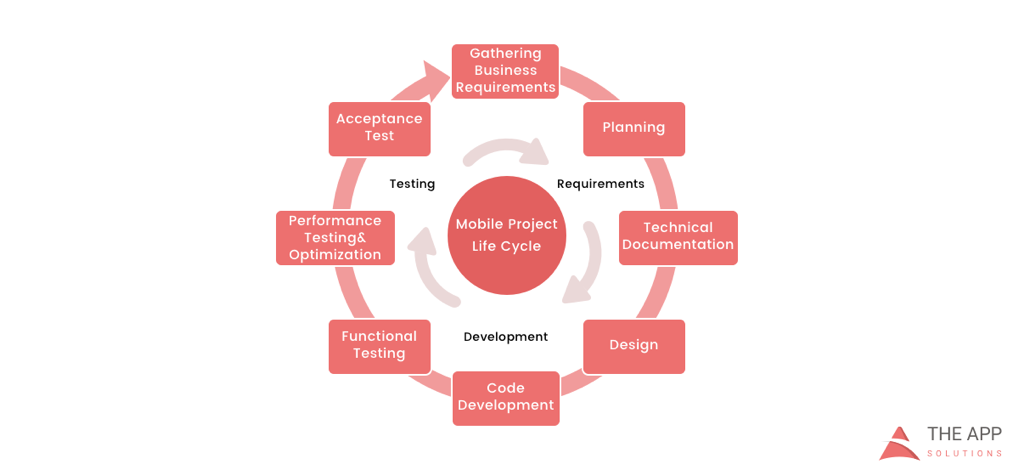
    According to the mobile app projects approach by The App Solutions, here is the life cycle of a typical development project, no matter the complexity:

    1. Planning stage (project manager, marketer, and business analyst are involved) – carrying out the business analysis and crafting mobile strategy.
    2. Technical documentation (covered by the technical writer) – describing all tech requirements and details.
    3. Prototyping (usually made by a UX/UI designer) – creating the sketch, wireframes, prototype and final app skins upon approval.
    4. Development (performed by the developers) – front-end and back-end segments of coding.
    5. Quality Assurance (usually performed continuously after each agile sprint is completed; followed by bug fixing) – testing tech requirements, device compatibility, interface, security aspects, etc.
    6. Publishing & Maintenance (covered by DevOps) – publishing to the app store, updates releases, infrastructure, and entire app maintenance.

    Planning stage

    When creating a mobile app, it is crucial to take time to go through the necessary research and planning steps.

    Business analysis:

    • Idea evaluation – a preliminary stage, when experts investigate the idea, correct it, give their advice and create a rough logics for it.
    • Competition analysis – study of activities of other players in the market.
    • SWOT-analysis – evaluation of strengths and weaknesses of the product, insights into opportunities and other aspects.
    • ROI calculation – assessment of the future app market performance help realize the real value and adjust budget accordingly.
    • Requirements scope – summing up requirements for the future product at all levels.

    Mobile strategy:

    • Market research – this study shows the overall situation on the market to help adjust the concept of the product to current demand.
    • Defining user personas – understanding who is your target audience is crucial in crafting advertising approach.
    • Technologies & tools assessment – study of specific tools required for the industry and select a set of technologies to meet the objectives of the project.
    • Complex promotion strategy – a step-by-step action plan for acquisition and retaining users.

    Technical documentation:

    Also known as a technical specification or a software documentation, this paper is a complex manual of your product, outlining requirements, business logic and leading your specialists through all stages of the project:

    • Makes your software universally understandable.
    • Provides flexibility for future changes.
    • Adds value to your app by providing a clear manual.
    • Helps to keep control of your own product.
    • Allows reusing existing parts of the developed application.

    Prototyping:

    Prototyping is a process of defining a concept in visual terms and evaluating how the app might develop to correct a misconception.

    • Creating a sketch – the draft version of your app on paper that sets up the main logic, number of screens and the way they interact with each other.
    • Creating wireframes – provides the visualization of the draft structure.
    • Creating a clickable prototype – helps to find out and analyze all possible use cases, discover logical breaks and technical inconsistencies in the original idea.
    • Designing app skins – collecting all wireframes and put them together to get the final design.

    Code Development:

    This segment usually consists of two main parts:

    • Front-end development – client-side development, creating a presentation layer of the software for a direct user interaction with it.
    • Back-end development – a server/database part of development, connecting a front-end part of the mobile app with the data access layer.

    Quality Assurance:

    In the agile development, it’s usually a continuous process following every sprint of development:

    • Compatibility testing – running the app on different devices and screen sizes.
    • Interface testing – checking the navigation, menu and buttons performance.
    • Device compatibility testing – checking how the app looks and performs on various screen sizes.
    • Low-level resources testing – examination of the app in conditions of low battery, slow internet connection, etc.
    • Security testing – provides quality assurance of users data safety.
    • Beta testing – giving users access to the app to get feedback.

    Publishing & Maintenance:

    • Publishing of the app and following updated versions to a chosen app store.
    • Infrastructure support – either you have admin panel to post on or cloud service attached, you’ll need to make sure it functions fully.
    • App store optimization – helping your app move onto the tops of search lists and this way gain more users.

    Making the Most of Your App Development Project

    Here are a few tips for getting the most out of your own app development project:

    • Mind what’s trendy + study the market and your target audience. It is a crucial preliminary stage that will impact literally every side of the project and every decision to make.
    • Specify as particularly as possible the product you expect to see at the end of the project. Defining the smallest features and functions of the software at the planning and prototyping points of the project will help find areas to save money on the actual development.
    • Negotiate your idea with various development teams (study the profile of the app development company and find evidence for their credibility, debate the best price). Make sure they hear you and understand what you mean—simply put, that you’re on the same page.

    About the Author / Charlie Shabe

    Charlie Shabe is a professional Digital Marketing Strategist. He has over 20 years Digital Marketing experience in helping global organizations use the Internet to drive their online visibility and generate leads. In addition to his PR and online marketing experience, Charlie is an expert in writing. Connect with him on Facebook and Twitter.