Category: Blogs

  • Scaling DevOps at Pearson

    Scaling DevOps at Pearson

    Pearson might be one of the more influential companies you have never heard of. Its footprint in the educational publishing marketplace is expansive, and its scope was just one challenge when it made the move to DevOps.

    Sean D. Mack (@SeanDMackNYC) is formerly the VP of Operations and Application for Pearson. To give you an idea of the scale of the company’s operations when it began implementing DevOps, Sean oversaw 110 development teams and 3,000 different products across the globe. To further complicate things, Pearson is a mature company with both legacy and new products. This is a case study of how the company approached implementing DevOps with the goal of helping you learn how to do it. Sean presented it at the 2016 All Day DevOps conference.

    As they say, you often learn your biggest lessons with your failures. Sean noted that, ultimately, DevOps was a failure at Pearson due to organizational change. But, he presented the case study with the hope you will learn from what Pearson did and take it forward. He continues to be a passionate evangelist for DevOps.

    Pearson had its challenges. It was a siloed organization operating at a large scale, and had a toss-it-over-the-wall mentality in dealing with problems. Out of sight, out of mind.

    seanmack1.png

    In addition, all of Pearson’s teams were at different levels of maturity, from legacy teams running .Net on Windows 2000 servers while others doing CI/CD to AWS. Obviously, this creates challenges when implementing DevOps, but we will see later how the company tried to tackle that, specifically.

    At the high level, the solution involved several aspects:

    • A DevOps practice area
    • A DevOps steering committee
    • Measuring progress based on global KPIs focused on measuring business impact
    • Measuring teams based on a DevOps scorecard
    • Push from the bottom – plenty of developers and operations who embraced and were eager for the change
    • Push from the top – support from key executives

    Pearson’s DevOps Steering Committee set up several workstreams:

    • Tracking tools
    • Metrics
    • Deployments automation and monitoring practices
    • Test automation
    • App engineering resource contention
    • Operationalization
    • Communications

    While these are specific to Pearson, many may be applicable to your organization. In any case, it is important to step back, look at your organization, and decide what your organization needs.

    Pearson also looked at four core competencies to track and measure: automation; independence (how independent is the feature); operationalization (how easy it is to maintain); and continuous improvement. The below chart outlines each area in more detail.

    Automation

    Continuous Improvement

    Independence

    Operationalization

    • Unit tests
    • Critical Scenarios
    • Dependent Systems
    • Continuous Build
    • Continuous Deployment
    • Test Automation
    • KPI
    • SLA
    • Metric Tracking
    • Metric Reporting
    • Remediation
    • Isolated Configuration
    • Code Dependencies
    • Isolated Infrastructure
    • Monitoring and Alerting
    • Tier 1 Service Desk System Knowledge
    • Tier 2 Service Desk System Knowledge
    • Documentation

    To help each team measure their competencies and improvement, Pearson built a self-reporting tool to empower teams but encourage visibility, and developed business metrics and then a competency model to measure teams against to see how they were progressing. As Sean noted, “We were not trying to get everyone to a 5. Some teams, yes, but we also had legacy products that were running for years, successfully, with little or no maintenance. The investment to bring the teams up wasn’t worth the effort. There had to be a business reason.“

    seanmack2.png

    In the end, Pearson raised DevOps maturity for all of the teams. As noted earlier, though, this was eventually phased out, but Sean presented this case study with the hope you found something to drive DevOps in your company.

    In the end, if you have just a couple takeaways, they are this:

    1. Begin by determining what your desirable outcomes are.
    2. Don’t just do DevOps to be cool. Do it to drive business results.

    You can watch Sean’s entire talk online here. If you missed any of the other 30-minute long presentations from All Day DevOps, they are easy to find and available free-of-charge here.  Finally, be sure to register you and the rest of your team for the 2017 All Day DevOps conference here.  This year’s event will offer 96 practitioner-led sessions (no vendor pitches allowed). It’s all free and online on Oct. 24.

    — Derek E. Weeks

  • DevSecOps and DevNetOps: New Heroes in the DevOps Saga

    DevSecOps and DevNetOps: New Heroes in the DevOps Saga

    The evolution of DevOps is by no means done, but it’s safe to say that there is enough agreement and acceptance to declare it a hero. DevOps has helped glorify IT to the point where it’s no longer preventing business, nor a provider nor a partner of the business.

    Often IT is the business, or its vanguard for competitive disruption and differentiation.

    Splintering the success of this portmanteau hero, we now hear more and more of two trusty sidekicks: DevSecOps and DevNetOps. Lesser known in their adolescence, these tots are still frequently misunderstood, are still forming their identities, and still need a lot of development if they’re to enter the IT hall of fame like their forerunner.

    Just as the terms look, DevSecOps and DevNetOps are often assumed to be about wrapping DevOps principles around security and networking: operators hope to assuage technical debt and drudgery by automating in proficiency and resiliency. For networking, I’ve covered how there is a lot more to that than coding, but to be sure, these sidekicks certainly espouse operators learning how to do develop while DevOps was equally, if not more, about developers learning to operate.

    The Shift Left: SecDevOps and NetDevOps

    As if it wasn’t hard enough to tell what DevSecOps and DevNetOps want to be when they grow up, we’ve gone and given them alter egos: SecDevOps (aka “rugged” DevOps) and NetDevOps. Think about them exactly as the words look—it’s about the shift to the left. Left of what?

    Traditional DevOps practices focus on business-specific applications development. The development timeline is known as a concept to cash, and with all the superpowers of DevOps we try to reduce our enemy—the lead time and repeatable processes between code and cash.

    Security and building infrastructure, like networks, were considered supporting tasks, not revenue-generating nor competitive advantages. Thus, security and networking were far to the right on the timeline with concerns that deal with operational scale, performance and protection.

    Today’s shift left propels security and infrastructure considerations earlier down the timeline, into coding, architecture and pre-production systems. It’s a palpable penny-drop amid daily news of security breaches and infrastructure outages causing technology-defined establishments to bleed money and brand equity.

    Fill the bucket with cash, but don’t forget to forestall the leaks!

    DevOps and Infrastructure: Challenge and Opportunity

    Automation sparks have flown over the proverbial wall into the camp of I&O pros. Operators trading physical for virtual, macro for micro, converged for composed, and configuration for code is proof that the fire has caught security and networking. Controlling the burn now, is key, so that healthier skills and structures arise in place of the I&O dogma and duff. Fortunately, this is precisely the destiny for our newfound heroes, DevSecOps and DevNetOps.

    However, doing DevSecOps and DevNetOps, embracing security and networks as code, we mustn’t be so credulous as to forget the formidable DevOps practices and patterns that need transforming along the ultimate automation journey. Testability, immutability, upgradability, traceability, auditability, reliability and other you-name-it-abilities are not straightforward to achieve.

    Discounting “aaS” technology consumed as a service, a fundamental challenge to innovating SecOps and NetOps, compared to application ops, is that applications are crafted and built; security and networking solutions are mostly still bought and assembled.

    Security and network infrastructure as code is something that needs to be co-created with the vendors. Other than in the cloud, it will take a while before security and networking systems are driven API-first, and redesigned to offer simulation, finer disaggregation into microservices, and orchestration with scale and resilience.

    While this will land first in software-defined infrastructure, there is still a way to go to manage most software-defined security and networking systems with continuous practices of artifact integration, testing and deployment. Hardware and embedded software will be even more challenging.

    Finding Strength in Challenge

    So on one hand, DevOps is evolving with security and networking shifting left. On the other hand, traditional security and networking ops are transforming with DevOps principles.

    Is the ultimate innovation to squeeze out those traditional operations altogether? Does NetDevOps + DevNetOps = DevOps?

    There is a parallel train of thought and debate, with success on both sides. Purist teams cut out operations with the “you build it, you run it” attitude. Other companies such as Google have dedicated operations specialist teams of SREs. While the SRE reporting structure is isolated, SRE jobs are very integrated with that of development teams. It’s easy to imagine the purist approach, subsuming security and networking into DevOps practices, but only if we assume the presence of cloud infrastructure and services as a platform. Even then, there is still substantiation for the SRE.

    Layers below, however, somebody still needs to build the foundations of the cloud IaaS and data center hardware. As they say, “Even serverless computing is not actually serverless.”

    Underpinning the clouds are data centers. And then there’s transport, IoT, mobile or other secure networks to and between clouds. In these areas, it’s obvious there is a niche for our two trusty sidekicks, DevSecOps and DevNetOps, to shake up ops culture and principles. These two heroes can rescue software-defined and physical infrastructure from the clutches of so many anti-pattern evils, like maintenance windows and change controls (ahem, it’s called a “commit”).

    We may not require rapid experimentation in our infrastructure, but we would warmly welcome automated deployments and updates, failure and attack testing drills, and intent-driven continuous response. They will boost resiliency and optimization for the business and peace of mind for the builders.

    Teams operating security, networks and especially clouds, need to honor and elevate DevSecOps and DevNetOps, so that on the journey now afoot, our teams and our new heroes may realize their potential.

    About the Author / James Kelly

    James Kelly is a lead expert architect on cloud and software-defined networking at Juniper Networks. He also serves as a private yoga instructor, and previously, he founded a capital management firm in Ottawa, Canada. Connect with him on LinkedIn and Twitter.

  • 10 Rules for Writing Automated Tests

    10 Rules for Writing Automated Tests

    Over the recent months many of our customers asked for our guidance and building their test suites properly. Performance, ease of management and scalability were key priorities for them. We decided to share our suggestions with the broader audience.

    We came up with the list while building our own test suite. Since we strongly believe in dogfooding, Testim is tested using Testim. We also learned a lot working with a variety of companies from small startups to large enterprises.

    Rule 1: Prioritize

    Most apps include thousands of scenarios. Testing the functionality and correctness is merely one step of the way to shipping high-quality software and meeting users expectations. There’s performance testing (speed and responsiveness in a normal state or under load/stress), visual testing (checking that 1+1 = 2 is one thing, but many visual bugs can make it a very bad experience), and so on.

    Start by listing the most important user flows, for example login, add to cart, checkout, etc. Order the list by those more vital for user conversion.

    Try to sort by first adding those that must succeed e.g. create account, checkout and payment. You can use your analytics tools (e.g. Google Analytics, Mixpanel, Kissmetrics, Woopra) to find which are the common scenarios. We also found Segment.io to be useful.

    Rule 2: Reduce, Recycle, Reuse

    The next step is to break the user’s scenarios down to simple, single purpose, almost atomic flows. e.g. “Create user,” “Login,”  “Send email,” etc. Create a test for each of these flows. When completed, compare this to the the user stories.

    Naming convention – Defining a good naming convention is an important part. For example, including the component name in the flow name, which can result in flow structure (e.g  “Account.login“ and “Account.logout”).

    Reuse components. Don’t Copy/paste – for non-experienced developers/testers, a copy/paste seems like a reuse. However, the challenge is to update those steps when the flow changes. Even a single step/line that repeats in hundreds of tests is a huge hassle.

    Rule 3: Create Structured, Single-Purpose Tests

    Single purpose tests verify one thing only!

    Single purpose tests are easier to create and maintain, they will also run faster compared to longer and complex ones. Ideally, they should only fail if the feature they test is broken or one of its dependencies (which we’ll try to minimize). If you test several features and the first one fails, you know nothing about the other features, since you haven’t reached them.

    A test should consist of three parts:

    1. Setup – e.g. login
      Those steps gets the AUT (application under test) to the state required for testing. This could vary by the test: sometimes you only require a login. you require a complex structure to pre-exist.
      Note: Premature optimization is not a good practice. Implementing the login flow (user/pass fields) is an easy way to start, and if you reuse the same login in all your tests, it wouldn’t be difficult to change the implementation later on to a quick implementation (e.g. by using cookies), so there’s no need to start with the speed optimization if you know it’s easily fixed.
    2. Actions – the flow you want to test.
      Continuing with our aforementioned “login” example above, unlike the setup steps, which require the login to be completed successfully (don’t care in which way), testing the “login” itself is a different task, and should not be reused.
    3. Validations – validate UI state, validate DB – the result you expect.
      There are different validations.his depends greatly on whether you’re testing data which is being updated from production on a weekly basis, or whether it’s the same Test Data.
      In UI testing, the basic validations are done on elements in the UI.

      • Validate an element is visible.
      • Validate an element comprises some text.
      • Validate an element is in a specific state.
      • Visual Validation – validate the is comprising the expected text, image and has the correct styling (e.g. font, layout).

    Using a predefined dataset has the advantage of making the validations easier, as when we know the exact setup state, you also know the precise expected state after the stimuli steps were completed.

    If the dataset is updated, you get different scenarios which you didn’t expect (as different user use your application differently), making it harder to debug failures (as the scenario might not be reproducible).

    Example: A test for a login could look like:

    • Set initial state:
      • Open AUT
      • Navigate to the signup page
    • Actions:
      • Choose a random username and it to a variable named username
        g. “user” + Date.now() + “@mailinator.com”.
      • Sign up for new account by using username.
        • Set username to username
        • Set random password
        • Click submit
      • Validations:
        • Open mailinator.com
        • Navigate to “inbox”
        • Look for email to username
        • Check that there is one email with the expected link.
        • Click on the link
        • Login with username and pass
        • Validate login was successful

    Note: One of the biggest differences between unit tests and end-to-end tests is the overhead. Opening a browser and logging-in to the AUT used to be extremely slow, pushing testers to perform many tests after reaching the Setup state, saving valuable time. Today, with docker, it’s much faster to boot a browser up, the speed of the browser help developers to write applications that load quickly, minimizing the  overhead of writing end-to-end tests.

    Rule 4: Tests’ Initial State Should Always be Consistent

    Since automated tests always repeat the same set of steps, they should always start from the same initial state. The most common maintenance issues when running automated tests are ensuring the integrity of the initial state. Since automated tests depend on that state, if it is not consistent test results won’t be, either. The initial state is usually derived from user previous actions.

    For example:

    1. Adding an item to a list that already contains it (from previous test run).
    2. Views that behave differently for new users and returning users.
    3. Application redirect automatically if user already logged in.

    Possible solutions:

    • Create new user for each test run
    • Use a dedicated app environment for test automation, as opposed to using your production one.
    • Seed your application with initial data before each suite run, also known as fixtures.
    • Use conditions on steps/group to handle dual cases in test which are hard to set.
    • Eliminate dependencies between tests. The AUT’s state after “Test_1” shouldn’t affect the flow of “Test_2”.

    Rule 5: Compose Complex Tests from Simple Steps

    Complex tests should emulate real user scenarios, you should prefer composing those test from simple tests parts (shared steps) instead of recording the entire scenario directly. Since you already tested all the simple actions in the simple tests, the complex tests should only fail on integration issues (this is where Rule No. 2 comes in handy).

    Make sure to order your suite to run the simple tests first. It will give you indication when something is wrong in the complex tests when running the whole suite.

    Rule 6: Add Validations in Turnover Points

    Validations are usually used at the end of the test to signal the test is in a passed/failed state. It is also best to add them at points of major changes as a checkpoint to stop the test if an action failed. Since validation will run until its timeout reached, like all steps, it is also a mechanism to wait for a long async operations in your app (e.g. fetching data from server, continuous view rendering, etc.) before running the next steps.

    Examples:

    1. On action completion – navigation, form submission, modal display, etc.
    2. After major DOM changes add validations to ensure you are in the new state before trying to play next steps.
    3. Following a client-server communication which change app state – e.g. data submitted successfully message, etc.

    Rule 7: No Sleep to Improve Stability

    Sleep with random duration (what I call magic numbers) is one of the main sources of flaky tests. Although all apps are asynchronous in nature, there are rare cases where a human doesn’t know when the page is ready and perform the next action. The same should be true for automated tests.

    The reason to avoid static sleep is you rarely know the load of machine upon you run the test on. Only in performance testing do you have the machine to yourself (knowing for sure all CPU and memory are for you). Since you probably use virtual machines or Docker you will get timeouts if you set the sleep too slow, or slow tests if you set it too high.

    In most cases you add a wait-for-condition step, which waits just like a human would, or sometimes waits for some internal state (e.g. javascript value).

    At Testim we provide all kinds of built-in wait-fors, ranging from wait for element to be visible to wait for a specific text (you use also variables and regex), wait for some visual change (e.g. color change) or code-based changes.

    Rule 8: Use a Minimum Two Levels of Abstractions

    If your test is composed mostly of user interactions, such as clicks and set-text actions, then you’re probably doing something wrong. If you used low-level frameworks (e.g. Selenium), you might have heard of the PageObject Design Pattern, which recommends to separate the business logic (e.g. login) from the low-level implementation (e.g. set username, set password and click login button). This is true for Testim as well. Having layers contribute to reuse reduces the maintenance and allows other members of the organization to quickly understand what happen, as sometimes the testers write the tests but the developers run them (before merging new code). The developers in this case need to understand quickly what the test does, and what is the bug.

    Rule 9: Reduce the Occurrences of Conditions

    A test should have as few as possible conditions (if-statements). Those that have many are usually unpredictable (don’t know the exact state you’re in) or complex (you might even see loops, too). Try to simplify your tests by:

    • Start your test at a predefined state;
    • Disable random popups; and
    • Disable random A/B testing, and choose a specific flow.

    Rule 10: Write Independent and Isolated Tests

    An important methodology of test authoring is creating self contained, independent flows. This allows to run tests in high parallelism, which is crucial for scaling the test suites. If, for example, you have 1,000 tests that run for a minute each, running them one by one will take more than 16 hours. Minutes, at full concurrency, can cut this testing time to 1 minute.

    Having a fast build reduces the feedback time between the moment that developers commit their code and the moment they knows their feature is production ready and can lead to true agile development cycle.

    In Summary

    Proper planning of your tests can make a big difference in your development process. The ability to get fast feedback, adapt tests to new user flows quickly and quickly analyze the results, identify bugs and get enough information to quickly fix them. Proper planning can also save a lot of time and expenses. Suites that are not properly planned require high maintenance and keep the R&D team away from building new functionality and increasing coverage. Finally proper planning can help expand the responsibility for quality beyond the Q&A organization and let others contribute.

    About the Author / Oren Rubin

    Oren RubinOren Rubin is CEO of testim.io. He has over 20 years of experience in the software industry, building mostly test-related products for developers at IBM, Wix, Cadence, Applitools, and Testim.io. In addition to being a busy entrepreneur, Oren is a community activist and and the co-organizer of the Selenium-Israel meetup and the Israeli Google Developer Group meetup. He has taught at Technion University, and mentored at the Google Launchpad Accelerator. Connect with him on LinkedIn and Twitter.

  • Differentiating Between CI Pipelines and DevOps Assembly Lines

    Differentiating Between CI Pipelines and DevOps Assembly Lines

    “What’s in a name?” wrote the greatest Bard who ever lived.

    All I can say is, he lived in simpler times, when DevOps and the confusing world of continuous integration (CI), continuous deployment (CD), CI/CD, the other CD, application release automation (ARA), pipelines, assembly lines, etc., didn’t exist.

    The biggest challenge today is that vendors use overloaded terms to describe completely different use cases. CI vendors claim to support CI/CD, even though the “D” here is just a deployment to a development environment and not staging or production. ARA vendors claim to enable continuous delivery, even though they do not include critical steps such as infrastructure provisioning, security patches or configuration management.

    The terms “pipelines” and “assembly lines” are relatively new. Multiple vendors have recently announced pipelines and assembly lines, and the differences aren’t obvious at first glance. So let’s do a deep dive.

    What are CI Pipelines?

    Continuous integration has evolved tremendously over the last few years. What started as a simple process of automating build and unit tests for each code change has evolved into a pretty complex workflow.

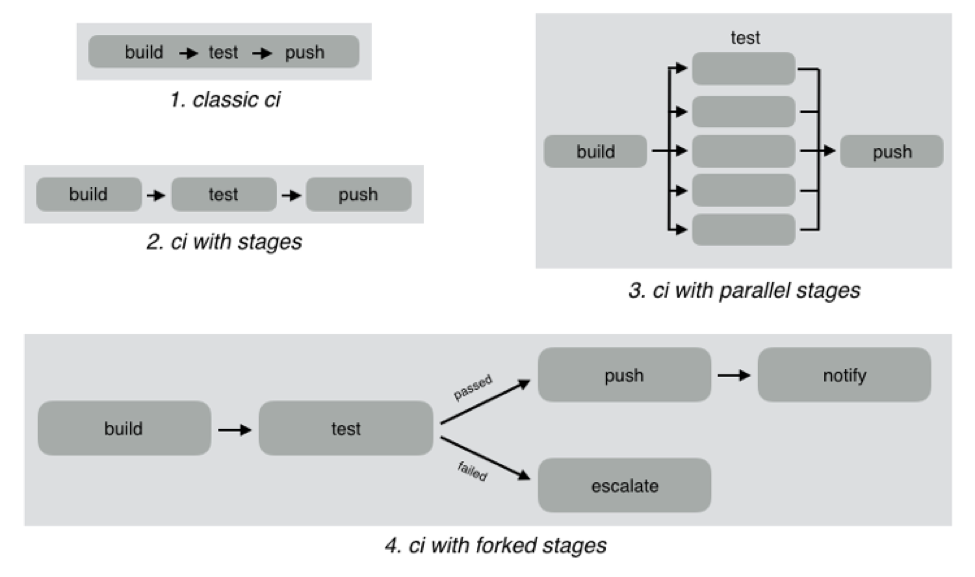
    As an example, look at the different CI workflows shown below:

    In classic CI, all build and test instructions were included in a single blob and instructions were executed serially. If all instructions executed successfully, CI was successful, and if anything failed, then it was marked failed. Almost all CI providers, until recently, offered just classic CI.

    However, as CI became mainstream, developers wanted to define more complex workflows with decision trees and parallelism. CI pipelines support this complexity, such as:

    • Defining the CI workflow in stages, so you can get results from a stage faster without having to wait for the entire workflow to finish. This also enables scenarios such as running a basic test group and only running the extended test suite if the basic tests pass.
    • Running stages in parallel, so you can split tests or test your code against different environments or language versions, and get faster feedback.
    • Forking your CI logic based on the results of a stage.

    While CI pipelines are a huge improvement over classic CI, they are still limited to developer-focused workflows. Jenkins, Teamcity, Shippable, Gitlab and CircleCI all support some form of CI pipelines.

    What are DevOps Assembly Lines?

    DevOps assembly lines are focused on automating and connecting activities performed by several teams, such as CI for devs, infrastructure provisioning and configuration management for ops, test automation for test, security patching for SecOps, semantic versioning and approval gates for release managers, deployments for multiple environments, and so on.

    Today, most organizations use various tools for automating specific DevOps activities. However, the DevOps toolchain is fragmented and gluing it together to achieve continuous delivery is a challenging task.

    Most teams adopt one of the following approaches:

    • Using cultural collaboration as the glue between silos. As an example, when a new application version is available, the test team creates a JIRA ticket and assigns to ops. Ops then copies the application version information into their deployment scripts and run them.
    • Writing ad-hoc scripts to trigger one activity from another, including passing state information through intermediate storage such as S3. In this case, the DevOps engineer would likely write a Jenkins job that runs automated tests, and then pushes application version information to S3. Another Jenkins job polls the S3 bucket, and when a change is detected, runs the deployment scripts.

    The first approach introduces inefficiency and unnecessary human-dependent steps. The second approach is better, but only works well for small teams working on a single application. It creates a Frankenstein of spaghetti automation when you have many applications or even a single application with microservices.

    DevOps assembly lines address this problem by focusing on gluing together these various DevOps activities into streamlined, event-driven workflows with the ability to easily share state and other information across activities.

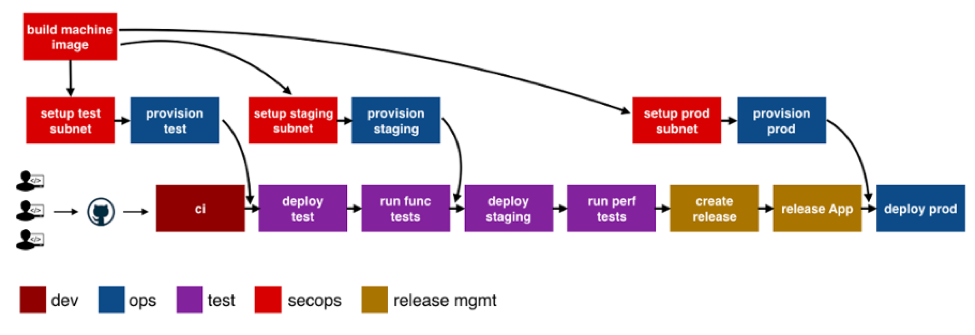
    The following image shows a typical assembly line for a single application or service:

    See the difference? The CI pipeline is just ONE activity in the assembly line. Each of the boxes in the picture above is a pipeline, just for different activities! Each has specific needs with respect to tools integration, runtime, configuration, notifications, etc. In addition, each pipeline is owned by a different team, yet needs to interact with other pipelines and exchange information. For example, if the ops team changes provisioning scripts for staging environment, the test team needs to redeploy the application and run performance tests.

    A DevOps assembly line is, therefore, a “pipeline of pipelines.”

    DevOps assembly lines need to support the following:

    • Ability to easily define workflows across multiple pipelines.
    • Versioned and reusable workflows, enabling rapid changes and scaling for multiple applications and/or microservices.
    • Integrations with all popular source control systems, clouds, artifact repositories, DevOps tools, languages, services, etc.
    • Runtime to execute every pipeline, including pre-installed tools and CLIs, and the ability to use the right runtime, depending on pipeline type.
    • Accelerators/playbooks for common pipelines and tools.
    • Ability to pass state and other information while triggering dependent pipelines.
    • Automatic triggers or manual approval gates between each pipeline.
    • Configurable notifications for each stage of every pipeline.
    • Release automation features such as semantic versioning of packages.
    • Audit trails for each pipeline, with the ability to go back or forward to a specific state.
    • Abstraction of all sensitive information like passwords, tokens, keys, etc. for security reasons.
    • Roles and permissions restricting assembly line and pipeline actions.
    • Manage DevOps infrastructure, including spinning VMs and containers up and down as required.
    • Visibility into each pipeline and stage, including logs, status and versioned data.
    • Metrics and Analytics across pipelines to help identify bottlenecks.

    In short, DevOps assembly lines help automate and scale end-to-end workflows across all teams and tools, enabling continuous delivery.

    About the Author / Manisha Sahasrabudh

    Manisha Sahasrabudhe is co-founder and vice president of product management at Shippable. Prior to Shippable, Sahasrabudhe was senior program manager at Microsoft. She can be found online at Linkedin.

     

  • VMware Cloud on AWS Will Bring DevOps Issues to a Head

    VMware Cloud on AWS Will Bring DevOps Issues to a Head

    Now that instances of VMware are starting to become available on Amazon Web Services (AWS), a DevOps ecosystem is starting to emerge around the management of applications workloads moving into and out of AWS.

    Among the more than 4,500 applications that VMware claims already support VMware Cloud on AWS are those from Blue Medora, CA Technologies, Chef, Cloudbees, Dynatrace, Jfrog, Puppet, SaltStack and the Ansible arm of Red Hat.

    VMware CEO Pat Gelsinger told attendees at the recent VMworld 2017 conference that VMware and AWS are just now scratching the surface of what they plan to accomplish together. AWS CEO Andy Jassy added that, unlike other alliances, which consisted mainly of marketing, engineers at both companies are working closely together to deliver VMware globally across all AWS availability zones. At present, VMware Cloud on AWS is available in the AWS availability zone hosted in Portland, Oregon. The service soon will be extended to the east coast of the United States, followed by rest of the world over the course of 2018.

    The availability of VMware Cloud on AWS should force several DevOps issues within enterprise IT organizations that have deployed the VMware stack of software mainly on-premises. Many of those organizations have also been employing public clouds such as AWS. But because those environments are based on different hypervisors, it was never easy to migrate workloads between the two platforms. There are plenty of options for running VMware software in the cloud, but because AWS is the largest provider of public cloud services, there are many customers who want to seamlessly move workloads between their on-premises IT environments and AWS via a common stack of VMware software.

    In many organizations the desire to shift applications workloads into AWS will bring many DevOps issues to a head, as VMware and AWS use has occurred in independently of each other. There could be many workloads running on each platform, but for all intents and purposes, IT organizations have managed both platforms in isolation. Now that VMware is becoming available on AWS, all the challenges associated with moving workloads between a public and private cloud come to the fore.

    Most of those DevOps issues will be focused first on moving some classes of workloads running on VMware into AWS. Application workloads that don’t need to run constantly will be among the primary candidates followed by a slew of data protection applications that will enable IT organizations to back up and archive massive amounts of data inexpensively. Next up will be applications that need to be distributed globally to increase availability.

    At the same time, a lot of VMware shops will be moving application development into the cloud. But just because an application is developed in the cloud doesn’t mean it will stay there. Many IT organizations have already discovered that when it comes to long-running applications, the total cost of deploying them on-premises is less than deploying them on a public cloud. The DevOps tasks ahead, of course, will start with figuring out which VMware-based applications make the best candidates from a financial and availability perspective to be deployed on AWS.

    — Mike Vizard

  • Creatures of Habit, Snowflakes and Integration Tax

    Creatures of Habit, Snowflakes and Integration Tax

    Donovan Brown of Microsoft, in conversation with Matt Hilbert of Redgate Software, discusses database DevOps’ biggest challenges

    When DevOps was first talked about in Flickr’s seminal “10 deploys per day” Velocity presentation in 2009, it was regarded by some as strange and alien to corporate culture. It was the antithesis to the accepted way of doing things, a threat to established and proven processes—it was downright dangerous.

    Times have changed. Unicorns such as Uber, Airbnb, Spotify and GitHub couldn’t live without it. Microsoft has embraced it and actively promotes it. It’s become the key to gaining competitive advantage in a technology marketplace that is moving faster and changing quicker than it ever has before.

    But what about the database? Why are practices such as version control, continuous integration and automated deployment being introduced to application development but left on the shelf when it comes to the database? The 2017 “State of Database DevOps survey,” for example, found that continuous integration was in place for 39 percent of applications, but fell to 20 percent for databases. What’s going on?

    In search of some answers, we spoke to Donovan Brown, Principal DevOps Manager at Microsoft and DevOps advocate. Also known as The Man in the Black Shirt, his unofficial tagline is #RubDevOpsOnIt. He lives DevOps. In fact, you can’t stop him talking about it and enthusing about its advantages.

    He describes DevOps as “the union of people, process, and products to enable continuous delivery of value to our end users.” The most important of those three, according to Donovan, is people. It’s also, conversely, the most difficult to fix.

    ‘People are Creatures of Habit.’

    “If you’ve been doing something the same way for 30 years,” he said, “why would you fix it? We all resist change, even if change is for the better, and DevOps requires a lot of change.”

    A large part of that needs to come from the Ops side of the equation because, while processes including version control and continuous integration have become second nature to developers, Ops teams traditionally don’t do them on a daily basis. In fact, Ops are often seen as the opponents of change.

    Donovan does, however, hold his hand up as being partly responsible for the division. “Historically,” he said, “they’ve had to become the gatekeeper because developers like me 20 years ago were wreaking havoc on production servers, running on there with admin credentials. Their job in my opinion has never been to deploy software for us. Their job is to protect and manage the infrastructure, to make sure it runs as efficiently as it can. That history, though, stays with us because there is so much regulation and red tape to get code from the fingers of developers to the hands of users.”

    He sees DevOps as the solution to the problem. “What I’m hoping is that DevOps will help automate what we’re forcing them to do, which was never their job, and rebuild the trust between Dev and Ops. We really need to help Ops people realize that we’re not trying to replace them, we’re trying to empower and enable them to allow us to continuously deliver value.”

    It’s not down to Ops teams on their own, however. C-level executives also have a part to play because they often favor a traditional approach to software development, with targets and long term strategies standing in the way of DevOps.

    “What I’ve noticed in a lot of companies that are struggling to adopt DevOps is that they’re not getting the backing from the executive level,” Donovan saids. “You have this waterfall mentality from the top that still wants GANT charts and milestones, and things that just do not line up with agile thinking at all. I’ve had the best success implementing DevOps in organizations where the C-level executive got it. When you have a grassroots team who get it, but no one else does, they usually get snuffed out by tradition.”

    The database is not separate from Donovan’s goal of people, process and products coming together. Prior to joining Microsoft, he was a Process Consultant and Scrum Master, helping a range of companies introduce DevOps to their development practices. He made sure the database was part of that.

    Then, as now, including the database was a challenge, but Donovan worked around it, using the technologies available to allow customers to treat the database just like every other element in their DevOps solution.

    He does, however, admit it was hard work. “It’s actually the most difficult part of the pipeline to automate because of the risk of failure,” he said. “You can easily roll back a front end; you can’t do the same for your database because any transactions that have occurred during the deployment could potentially be lost. So, it’s a crucial, integral part of your DevOps pipeline and I challenge any company that claims to be doing DevOps that only does it for the front-end but their back-end is still done manually. To me, they’re faking it.”

    ‘Infrastructure as code should not be a special snowflake. It’s just part of your solution.’

    The key is to remember that the code written to make changes to a database is just that: code. Traditionally, it has been managed outside of and separate to application code, with database changes often managed on-the-fly, at the last minute. Consequently, deployments have become worrying at best, with teams on hand for the expected firefight against downtime.

    Include it in version control, however—and continuous integration and automated deployments—and the database can be developed in parallel with applications. Problems are then picked up earlier, deployments become predictable and reliable, downtime and rollbacks are a thing of the past.

    What has made this even more appealing is the tooling now available—software that in Donovan’s days as a consultant was only just emerging. As he admitted: “The tooling had to mature to allow us to get over a lot of the hurdles that are unique to database deployments so that we can have everyone incorporated into the DevOps pipeline, not just the unicorns. Everyone should have the power available to them to be able to take their databases and incorporate them as part of their DevOps pipeline. Until you do, you still have that being the bottleneck.”

    There is a price to pay, however, if by introducing tools to bring DevOps to the database, companies get bogged down by what Donovan calls “the vendor explosion.”

    ‘Every vendor you add to your pipeline also adds integration tax.’

    Integration tax is the cost to companies, in terms of training and introducing unfamiliar ways of working, to use a new piece of software that resolves a piece of the DevOps puzzle. If that cost is too high by, for example, moving people out of the development environment they’re comfortable with, it betrays the ideals of DevOps. One onerous way of working is simply replaced by another.

    Donovan is keen to remove that tax by encouraging companies to work with as few vendors as possible—and preferably those vendors who have already paid the integration tax in advance. By, for example, introducing tools that work inside or alongside existing software, thereby reducing the time it takes to become familiar with them, and making the most of the current infrastructure rather than adding to it.

    Otherwise, Donovan concluded, “You’re paying tax for that integration. When we at Microsoft have partners who create extensions for our products, it’s the vendor and Microsoft who pay the tax in advance.”

    Finally, I asked Donovan what the biggest challenge was for companies who adopt DevOps for the database. His answer was the most telling.

    “If you’re doing DevOps differently for your database and the rest of your system, to me there’s something wrong there. When I think of DevOps, the database is part of that. I don’t need a separate conversation about it.”

    About the Author/Matt Hilbert

    Matt Hilbert is a technology writer at Redgate Software with 20 years’ experience working for lots of the world’s biggest tech companies – and many of the smallest. He has a particular fascination for emerging technologies and is on a continuing mission to decompile, untangle, and explain techspeak to a wider audience, and excite people about the endless possibilities technology offers.
     

  • Cybersecurity Improvement Act of 2017:  The Ghost of Congress Past

    Cybersecurity Improvement Act of 2017: The Ghost of Congress Past

    It seems like yesterday when when Representative Ed Royce proposed legislation titled the “Cyber Supply Chain Management and Transparency Act.” Almost three years have passed since Congressman Royce introduced his bill in November 2014 and helped educate the world about serious security vulnerabilities (such as Apache Struts and Heartbleed) lurking inside open-source components that are commonly used by anyone and everyone building modern software applications.

    Broadly speaking, Royce’s bill would have required technology vendors selling software to the U.S. government to do the following:

    1. Provide customers with a bill of materials documenting all open-source components utilized in the software application;
    2. Demonstrate that the component versions utilized in the application have no known vulnerabilities (CVEs from NVD) for which less-vulnerable alternatives are available;
    3. Provide a mechanism to promptly remediate new vulnerabilities when they are discovered.

    Despite dying a quiet death, the Royce bill helped to pioneer an important conversation between government and industry leaders with respect to the age-old question of software liability.

    This conversation continues to evolve—and just recently Sen. Mark Warner, a Democrat in Virginia, and Sen. Cory Gardner, a Republican from Colorado, introduced the “Internet of Things Cybersecurity Improvement Act of 2017“—an attempt to force companies selling IoT devices to federal agencies to adhere to new security standards.

    Just like the Royce bill before it, the newly proposed legislation from Sen. Warner would require vendors selling IoT-connected devices to government customers to do three simple things:

    1. Provide written certification that IoT devices do not contain hardware, software or firmware components with any known security vulnerabilities or defects listed in the NVD or similar databases.
    2. Notify government customers of any new security vulnerabilities or defects subsequently discovered.
    3. Provide a mechanism that allows for any future security vulnerability or defect in any part of the software or firmware to be patched or fixed in a timely and secure manner.

    As Bruce Schneier observed more than a decade ago, there are no real consequences for having bad security or having low-quality software of any kind. Even worse, the market often rewards low quality. More precisely, it rewards additional features and timely release dates, even if they come at the expense of quality.

    Although the Royce bill failed and the future of the Warner bill is yet to be determined, there is an increasingly steady breeze blowing from Washington, D.C., that is gently nudging the entire software industry toward a future in which vendors will no longer be immune to liability for damages due to known security vulnerabilities or defects.

    About the Author / Matt Howard

    A proven executive and entrepreneur with over 20 years experience developing high-growth software companies, Mr. Howard leads Sonatype‘s corporate marketing, strategic partnering, and demand-generation initiatives. Prior to Sonatype, he co-founded, developed and successfully sold two software companies. Earlier in his career, Howard led sales and marketing at USinternetworking (acquired by AT&T) and Groove Networks (acquired by Microsoft), where his teams distributed workgroup collaboration products to enterprise customers. Howard holds a Bachelor of Arts degree from The George Washington University and a Master of Arts from George Mason University.

  • SecOps: The Next Stride for DevOps

    SecOps: The Next Stride for DevOps

    Global IT spending is now touching a figure of $4 trillion. In today’s technology-intensive environment, data is the biggest commodity, more valuable and powerful than ever. And like Peter Parker’s uncle Ben noted, “With great power comes great responsibility.”

    Security has always been a big concern for valuable things and IT is no exception. IT as a whole is trying to push security left in the development cycle—trying to involve it in every step of the development cycle. And just when development and operations teams are getting used to the “esprit de corps” we call DevOps, I think it’s time we add the third musketeer: security.

    What is SecOps?

    SecOps is a collaboration between security and operations teams, just like development and operations teams collaborate on DevOps front. SecOps is a set of practices organizations need to follow, processes they need to execute and tools they need to use to ensure the security of their application environment. SecOps is making sure organizations do not sacrifice security to attain set performance and uptime indexes.

    In a typical development cycle—requirements gathering, design, development, testing, implementation or deployment and maintenance—security normally is introduced in the later stages, somewhere between testing and deployment or even later. But SecOps is all about making sure to introduce aspects around security much earlier or at each stage of the software development life cycle (SDLC).

    I know what you are thinking: This is going to complicate things and increase the time to delivery. This is where operations and development teams need to join forces to uncomplicate the things and make it time efficient practice. Next thing you must be thinking of is, Why so much hassle? Think of it the other way. Wouldn’t it save more time when you address the security concerns at much earlier stages than at the time of delivery or implementation? All it takes is an amalgamation of the security group, development team and operations team; a little bit of planning; and a whole lot of execution.

    SecOps + Containers

    Containerization is slowly but steadily moving from an alternative to full virtualization to a serious platform for running your applications. Containers have some obvious advantages including scalability and flexibility, and this solves most of the problems related to resources in case of application development. Reduced size; reduced time to provision application environment and testing; platforms including Docker, Solaris Zones, BSD Jails; and orchestration platforms including Kubernetes, CoreOS Fleet, Amazon ECS and OpenShift make containers a more preferred option for application development environments.

    This increased traction toward containerization points to the increased need to concentrate on security aspects. Here are some best SecOps practices for container environment you and your organizational teams can follow:

    • Authentic sources and images: Always check for authenticity of container images. There are various tools such as Docker’s security scan. With Docker Cloud and Docker Hub you can scan images to check for potential security vulnerabilities. Most images are built from some base image and not built from scratch, so there is always a threat with the used images.
    • Vulnerability management tool: There are tools available in the market to analyze container image formats and libraries for threats before you actually start using them.
    • Follow benchmarks and hardening guidelines: Always make sure you do the checks and follow hardening guidelines for containers, images, hosts and platforms before you start with production. There are few standards and benchmark checks for containers such as CIS’s Docker security benchmark, PCI compliance checklist, etc.
    • Periodic auditing: Regular auditing of your application environment can help you save yourself from the future troubles. Moreover, automation of auditing process can help in detection of unused images and containers.
    • Use of management frameworks: Use frameworks that can automate behavior profiling and control all the users, authorize the access to the containers, images and hosts.
    • Security built in to container engine systems and third-party security solutions: Third-party vendors have a number of applications for container security in addition to security systems of container management platforms.

    Dev + Sec + Ops

    With the continuously increasing business demands for new applications and software, and new practices and development trends such as DevOps, Agile, cloud, automation, CI/CD and others, traditional security needs to upgraded in the new paradigm. Thankfully, some of these practices facilitate the security. Consider CI/CD as an example: Continuous integration requires continuous integration tools, or what we call build servers. Some popular examples are Jenkins, TeamCity, GitLab CI, Travis CI, Bamboo, Go CD, CircleCI and Codeship. The best SecOps practice is to check and fix vulnerabilities at early stages as a part of CI/CD workflow. Integration between authentication, scanning, management tools and CI/CD pipeline tools could be the best possible solution to your security-related problems. Some easy-to-implement solutions can include automated security testing, static code analysis, authentication checks and login tracking.

    SecOps enable organizations in lifecycle management, analysis of security threats, incident management, optimizing and measuring the effectiveness of security controls, reduced breach response time, reduced security risks and increased business security. The basic principle on which SecOps works is Avoid, Analyze, Respond, Review, Repeat. By analyzing the security events and data, you can build incident response plans to avoid future unwanted events.

    Frameworks and Tools

    Now that you have a clear understanding of why you need your security, development and operations teams to work together, let’s see what tools and frameworks you can use.

    • Docker-native tools: If you are using Docker as a platform then you can use few security tools provided by Docker itself for the security of production environment: Docker Bench and Docker Notary. Docker Bench is a script that checks common best practices around deploying Docker containers in production. Docker Notary enables you to check whether content is from a trusted publisher.
    • Chef: Chef provides different tools including Inspec to automate security testing.
    • Puppet: Puppet provides security compliance and policy defining frameworks.
    • Ansible: Ansible provides system tracking, setting up firewall rules, user lockdown and compliance automation solutions.
    • CoreOS Clair: CoreOS Clair is an open-source project for vulnerability analysis in applications and Docker containers.
    • SaltStack: SaltStack can help in orchestration and automation of security practices solutions for containers.

    This is just a look at some of the most popular ones. If you want, there are a number of others that can look after the security of your application environment.

    The main motive behind implying SecOps practices in any organization is involving security team at all possible stages to remove any ambiguity in any stage of development rather than security team providing analysis reports to the operations team and then sitting back and enjoying the show. When these teams perform in a synergistic manner, the business focus can be shifted to other important things.

    About the Author / Chaitanya Jawale

    Chaitanya Jawale is founder and CEO of Opcito Technologies, a leader in microservice-based product engineering and automation. Chaitanya comes with strong background in product engineering, data center automation, DevOps and multi-cloud orchestration and management.
  • Move the Needle in DevOps with Continuous Testing

    Move the Needle in DevOps with Continuous Testing

    Shift-left testing, risk based testing, early testing and technical debt reduction are all predicted to be some of the most sought-after trends in product development life cycle. All of these can be achieved with continuous testing through DevOps, as it emphasizes quicker transitioning of quality products to production environment at a reduced business risk.

    Software Engineer in Test (SEiT) or Software Developer in Test (SDiT) was long-spoken earlier and now implemented as part of DevOps culture. As the software side of the organization moves to continuous testing practices, so, too must the product side of the organization. External market forces including competition, innovation quotient, faster time to market, scalability and lean process initiatives definitely play a role in driving the continuous testing trend.

    From a technical standpoint, test environment creation, full test coverage, regression testing and integration testing of multiple endpoints are key parameters to ensure a faultless production environment when a new feature is added.

    Adopting Testing Tools for DevOps Implementation

    Continuous testing implementation not only includes adoption of right tools and test automation, but also a cultural change to incorporate testing at each stage of the agile development life cycle. It will involve changes right from test planning, test scenarios creation, automation feasibility analysis to test execution.

    Teams need to be restructured in an agile setup to align testers closer to developers and operations teams, and have common goals for product/software delivery. This involves changing the culture and organization structure, which generally takes a longer gestation time. Test management tools such as JIRA and TestNG can help expedite this structuring, as both parties would be aware of the product features that need to be delivered and can view the progress at all times. There also are various open-source tools, including Selenium, Appium, Python robot framework/pytest and JMeter, that aptly meet the needs of agile testing.

    Regression testing generally takes up the bulk of the time, as new features need to be tested every time they are added to avoid critical failures. Hence, automating regression tests have become an imperative as part of continuous testing. JUnit, which is a unit testing framework, promotes test-driven development and early code quality improvement. Bamboo can run tests in parallel batches and support hundreds of build agents providing an early feedback to developers. Automation scripts for test data cleanup, load and execution saves the testing effort of the operations team. Selenium test automation framework for web applications is one of the most famous tools for continuous testing, as it works with a host of programming languages including Java, C#, Groovy, Perl, PHP, Python and Ruby. Appium is another tool used frequently for cross platform mobile application testing.

    Ensuring an Effective Product Release

    Testing UI components and functionality of a product through API-based test automation is another important phase in continuous testing. API test scenario creation also generally needs involvement from the ops team. Considering virtualization of devices, along with applications or services, will accelerate test setup environments. Device virtualization using Raspberry pi helps in testing end–to-end use cases in IoT scenarios. Network virtualization for performance testing ultimately helps improve uptime and reduce outages.

    The orientation of continuous testing with continuous integration and continuous delivery pipeline within an enterprise will determine the long-term success and standing of the final product in the market, from a quality perspective.

    About the Author / Urvashi Babaria

    Urvashi Babaria is a Product manager at eInfochips working in new age areas like IoT, DevOps and CloudOps. She is a techno commercial marketer with nine years of experience in product and project management, business analysis and transformation. She has keen interest in areas of data science including visualization, analytics and modeling. Connect with her on LinkedIn.


  • Overcoming the People, Culture Barriers to DevOps Adoption

    Overcoming the People, Culture Barriers to DevOps Adoption

    The fact you’re reading this article on DevOps.com suggests you’re already a DevOps fan. Or maybe you’re visiting this site because you’re considering moving to DevOps in your organization, or you’ve been told you must move to DevOps and are figuring out how on earth to do it.

    Whatever your view on DevOps, let’s get my position clear from the outset: I am a big believer in the power of DevOps to deliver continual innovation to an organization. I advocate DevOps in every project I do because I believe those organizations that innovate and change the fastest become the leaders in their sector, and since almost every business innovation relies on a technology innovation first (“every company is becoming a technology company,” after all), DevOps is the best way for an organization to adapt to, and benefit from, new technologies and gain a lead in the market.

    However, as anyone who has managed the transition from waterfall to DevOps will know—or, in fact, anyone who has overseen any change management project will know—the transition is rarely a smooth one. So, what is behind this reluctance to innovate and work in new ways?

    First, the Technical Arguments

    At some point, most organizations have been burned due to a lack of quality control in technology, whether a security breach, bugs or implementations/changes that went horribly wrong. We all know stories like these. They can have an immediate and catastrophic effect on the organization’s ability to do business. Therefore, there has been a tendency to inhibit change in favor of “stability” and known entities, and to adopt a “Better the devil you know,” strategy.

    DevOps has rocked this view of the world, and teams are reticent to move away from tried and tested approaches and processes because they are held responsible for operational stability. In addition, those people in a quality-control role believe their very purpose and job is under threat. There is also a view that DevOps is system- or application-centric, and can introduce risk to an interconnected IT estate.

    While these are all valid concerns, it is worth bearing in mind they are all technical arguments against DevOps, and they have all been countered before. Implemented correctly, DevOps does not jeopardize stability or undermine quality (in fact, many would argue it does the exact opposite), and it does not undermine a person’s role in development or operations, but rather liberates them from their silos.

    Culture is the Real Reason

    From my experience, innovation of any kind cannot be held back by technicalities alone. While the technical arguments are certainly valid, in most instances, the reluctance to adopt DevOps comes from something much more basic: the organizational culture borne from natural human behavior. Most people are simply risk-averse and resistant to change, so the resistance to DevOps is just a manifestation of human nature.

    The only way for DevOps to succeed is to change the organizational culture to be more open to change and to adopt an “innovation mindset.” The change must also encompass the whole organization. If you only bring half of the business with you, the innovators will become frustrated and find ways to circumvent processes and policy, resulting in additional operational risk and shadow IT.

    The influence that senior managers can have in facilitating—or undermining—the move to an innovation mindset must also be factored in. It is common for senior management to inadvertently foster a hero culture, where those individuals who get things back on track after a catastrophic event are rewarded, yet the well-structured and “stable” DevOps deployments are not given the same weight or focus. Again, it is human nature to be drawn to the dramatic event than the non-event. But you must ask yourself: As exciting as firefighting is, is it a sustainable way to run a business?

    Instilling a new mindset into a business is the same as any other transformation project. It requires you to tackle the four elements of process, organization, technology and information to bring about meaningful and sustainable change. To bring DevOps into your organization you must:

    • Align operational teams with development teams, embedding where possible for early involvement of Ops.
    • Ensure that operational/non-functional requirements have the same weight and priority as functional requirements—no user story is complete without a stable and secure operational environment.
    • Automate where possible to reduce human error and increase the speed of delivery.
    • Improve knowledge management to reduce “hero culture” or bottlenecks where knowledge is concentrated across a few people or one team. Never make exceptions for “heroes”; you need their support more than anyone else because they hold the biggest sway over the rest of the team.
    • Have accurate and comprehensive configuration information. Having a good understanding of the IT estate (including interconnectivity) can help move an organization from a one-size-fits-all governance model to a tailored risk assessment approach through better understanding of the impact of changes.

    DevOps often fails when people can revert to their default behavior. Only by actively identifying and supporting a project in a DevOps manner (considering process, organization, technology and information as previously explained) will you be able to change to a new “business-as-usual” innovation mindset and behavior. But this needs strong sponsorship, guidance and patience.

    DevOps must become the culture of the organization, driven from the top as well as the engineering teams, and people need to understand the implications for their role and responsibilities. CEOs and leaders need to actively support and drive the change, while providing the necessary working environments (tools and training) for those people who will be held accountable for operational stability. It is no good investing in technology and training for engineering to innovate if your ITSM functions are not brought along with the change, for example. But if you bring everyone with you, and address all concerns along the way, you will soon be reaping the rewards of the DevOps approach.

    About the Author / Romy Hughes

    Romy Hughes is director at Brightman. Romy is a business change specialist with expertise in service integration and management (SIAM) for managed services, business transformation and IT service management (ITSM and ITIL). Connect with her on LinkedIn.