Category: Blogs

  • The 2016 DevOps Dozen Winners Announced

    The 2016 DevOps Dozen Winners Announced

    In what turned out to be a much bigger job than we anticipated, we have gone through the numbers and checked them twice (actually more like 20 times). All of us here at DevOps.com are happy and proud to announce the winners of the 2016 DevOps Dozen!

    With thousands of votes cast in just the finals alone, it was a daunting task to verify votes and select the winners in each of the 12 categories for awards this year. Also several of the categories had incredibly close races with just a few votes separating the winners from the other finalists. But there can be only one, winner in each category that is.

    So without further adieu, here are the winners of the 2016 DevOps Dozen awards:

    Best DevOps Open Source Project: Jenkins

    The DevOps world is chock full of great open source projects. Many of them have huge communities who are  very passionate and involved. The Jenkins community holds its own with any of them. More importantly, Jenkins seems to be at the center of the DevOps/CD  world.

    Also congrats are in order for CloudBees who while not managing the Jenkins project do a great job of shepherding and nurturing it.


    Best DevOps Commercial Solution: Automic

    Another extremely competitive category with so many great finalists. Automic was the choice of the voters here and I guess to CA Technologies as well, who just closed on the acquisition of Automic last week.

    We can’t move on without acknowledging and congratulating the other finalists in this category as well as the bevy of DevOps tools and tool vendors in the market though.

    Best DevOps Company Executive: Barry Crist, CEO, Chef

    Well deserved recognition for one of the leaders of our industry. I still remember when Barry was first announced as the CEO of Chef, as they embarked on a major rebranding effort, shedding OpsCode and firmly moving to an enterprise solution path.

    Along with CTO Adam Jacob, Chef continues to lead with innovation in both product and go to market. In many ways Chef represents the best of the DevOps community and Barry has a lot to do with that.

    Most Innovative DevOps Solution Provider: Ranger4

    OK I have to admit it, I was pulling for Ranger4 in this category. Helen Beal and Steve Green are great people who were out there evangelizing and leading in DevOps consulting way before the current Cambrian explosion of DevOps consultants we see today. Their DevOps Liftoff Workshop and their latest, DevOps for CEOs, are both high water marks in the industry. Congrats to the entire Ranger4 team.

    Make no mistake though that DevOps consulting is a rapidly growing market with many different solution providers out there. Ranger4 on top of their a first mover advantage continues to blaze a path that others follow.

    Most Innovative DevOps Solution: IBM Bluemix Garage Method
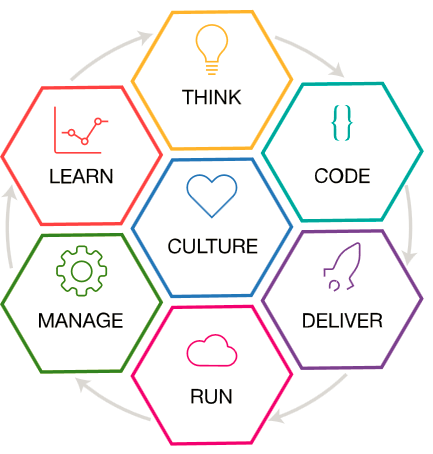
    There is no shortage of innovation in the DevOps space, but what IBM has done with the Bluemix Garage Method is really ingenious. It is not software or hardware, it is not SaaS, it is truly a methodology.

    The method takes IBM’s lessons learned during their own DevOps transformation, combined with tools and processes, to form a complete blueprint that allows organizations to “innovate like a startup, while scaling to the enterprise.”

    Top DevOps Evangelist: Jason Hand, VictorOps

    Again a very close margin of victory here, but a well deserved accolade for evangelist/author Jason Hand of VictorOps.  Luckily, for VictorOps they don’t pay Jason by the mile as it seems he is constantly on the road. I don’t remember the DevOps Days or other DevOps event where I didn’t see Jason there. Somehow in between all of this travel, Jason also found time to write a book, ChatOps.

    We are blessed in the DevOps field to have many worthy recipients for this award, but kudos for Jason for being the people’s choice here.

    Successful DevOps Transformation: Nationwide

    Many of our stories here on DevOps.com, as well as just about every presentation at Gene Kim’s DevOps Enterprise Summits are about successful DevOps transformations. Name the vertical and there is probably a DevOps transformation story you have heard from one or more organizations in that vertical.

    Nationwide is a DevOps transformation story that we here at DevOps.com are very familiar with. Primarily through the efforts of Carmen DeArdo who is one of the leaders of that transformation. We have interviewed Carmen a number of times and for me the way Nationwide has rolled out DevOps in a deliberate manner across the organization and still does so today is truly a model to be emulated. Congrats to the Nationwide DevOps team. When it comes to DevOps, “Nationwide is on your side (sorry couldn’t resist).”

    Best New DevOps Solution Company: DBMaestro

    Winning the “rookie of the year” in an industry that is itself still immature is no easy task. There seems to be a new DevOps company coming out of the woodwork everyday. But DBMaestro has managed to stand out from the crowd. Pioneering in the “DevOps for the database” market, DBMaestro has gained attention not just with a great product/service, but also by producing high quality content to help evangelize and educate the DBA market about DevOps.

    Of course the thing about winning best new company is now the pressure is on. We expect big things from DBMaestro going forward. Can’t wait to see what they do for an encore.

    DevOps Transformation Executive of the Year: Angel Diaz, IBM

    Dr. Angel Diaz is a charismatic, dynamic leader at IBM. He is VP of Cloud Architecture and Technology. In that role Angel’s team pioneered IBM’s BlueMix platform. Hearing the story how Bluemix came to be is a great story of innovation and entrepreneurial inspiration.

    Angel and his colleagues were able to move “Big Blue” and teach the elephant to dance by adopting Bluemix. Not just the Bluemix platform, but also such innovations as the Bluemix Garage and the Bluemix Garage Method. Dr. Diaz is not afraid to take chances and innovate to keep IBM at the forefront of technology. This award is well deserved for leading a massive DevOps transformation that has not only made IBM a leader in offering DevOps solutions to market, but also having IBM eat its own DevOps dogfood.

    Best DevOps Presentation of the Year: Better, Faster, and Cheaper. How? by Damon Edwards & John Willis

    Again, how blessed are we in the DevOps space to have such a wealth of great presentations to pick from? Whether they be slides from webinars or video from the many, many conferences around the world, there are some really great presentations that inform and educate us all.

    One presentation stood out among them this year. It happens to be one that I was lucky enough to catch while in London for the 2016 DevOps Enterprise Summit. Damon Edwards and John Willis (who literally had just stepped off a redeye from the US and rushed over from the airport) delivered what I have come to call “2 out of 3 ain’t bad, but why settle”. To me it is the best way to show what the advantages of DevOps. Why you can have both better, faster and cheaper (and might I add more secure).

    Of course Damon and John have been delivering killer DevOps presentations for years now and this is just the latest in the line. Both John and Damon are very deserving of this award and congratulations to them.

    Best DevOps Book/eBook of the Year: The DevOps Handbook, Gene Kim, John Willis, Jez Humble and Patrick Debois

    While there are several great DevOps books that came out last year, one really was in a league of its own. The highly and long anticipated companion/sequel to the Phoenix Project, The DevOps Handbook has lived up to the expectations of the industry. Gene Kim assembled a DevOps superband of rockstars to help him as co-authors and they delivered a great book.

    The DevOps Handbook is a collection of over 40 case studies broken into several categories. It claims to show, “How To Create World-Class Agility, Reliability, & Security in Technology Organizations” and it succeeds on every level. The DevOps Handbook will be a required component of DevOps collections for years to come.


    Best DevOps.com Article of the Year:  5 Things DevOps is NOT by Shelbee Smith-Eigenbrode

    While not the story with the most views, 5 Things DevOps is NOT struck a chord with our readers. It was one of the most widely commented articles of the hundreds of articles we published in 2016. Additionally, it has a long tail in social media with comments on Linked In, Facebook and Twitter as well.

    Shelbee Smith-Eigenbrode hasn’t written a lot of articles for us here at DevOps.com (hint, hint), but she brings a real life view of DevOps in the field that she has learned in her role at IBM. It is this hands on view that I think allowed her to capture the sentiments in this article that so many identified with.

    Congrats to Shelbee and hope this encourages her and you to consider contributing your own thoughts on DevOps to us here on DevOps.com. We are always looking for quality content. You can write us at editor@devops.com with your thoughts on contributing your own article of the year.

    Well there you have it. A dozen winners in the 2016 DevOps Dozen awards. Congrats to all of our winners and also congrats to all of our finalists. This was such a strong class of finalists.

    The trophies are already on their way to the winners and we hope to see pics of them on the desks of the winners soon!

    The DevOps Dozen for 2017 nominations will start in August so stay tuned for details if you are interested in throwing your hat in the ring for next year.

    — Alan Shimel

  • Elasticsearch Ransomware Attacks Highlight Need for Better Security

    Elasticsearch Ransomware Attacks Highlight Need for Better Security

    Recently, reports surfaced that a large number of Elasticsearch servers fell victim to potential ransomware attacks. Ransomware is the type of malware a company doesn’t want on its systems or network. It takes systems hostage, most commonly by encrypting or stealing data, and exposes the owners to blackmail attempts. According to a report by the Herjavec Group, the cost of damages from ransomware was projected to reach $1 billion by the end of 2016.

    A new wave of ransom attacks observed over the last several weeks targets unsecured MongoDB databases. Security researchers Victor Gevers and Niall Merrigan call these attacks a “ransack,” and Merrigan estimates that more than 40,000 databases were impacted in the first two weeks alone.

    Now research shows that Elasticsearch servers, which are configured to be insecure so they can be accessed over the public internet, are being subjected to similar ransom attacks. Victor Gevers tweeted that within the first three days, 2,515 Elasticsearch servers were eradicated and ransomed and 34,298 vulnerable Elasticsearch instances are still open. In the following days, the number of affected servers has risen to more than 5,000. John Matherly, founder of Shodan, tweeted that the vast majority of vulnerable Elasticsearch servers are open on Amazon Web Services (AWS).

    If an Elasticsearch server is hacked, users will find data indices gone and a message that reads: “SEND 0.2 BTC TO THIS WALLET: 1DAsGY4Kt1a4LCTPMH5vm5PqX32eZmot4r IF YOU WANT RECOVER YOUR DATABASE! SEND TO THIS EMAIL YOUR SERVER IP AFTER SENDING THE BITCOINS…”

    The FBI stresses that victims should refuse to pay Bitcoin ransoms, so users might or might not get their data back depending on the security processes they had in place in case of an attack. At this point, it is unclear who is behind the attacks.

    Ironically, what makes these attacks possible is not that Elasticsearch in itself is insecure, because it isn’t. Ransom attacks are possible because these instances have been configured in a way that makes them vulnerable. It’s like leaving the front door open.

    Technology journalist Steven Vaughan-Nichols of ZDNet gave an excellent summary, explaining that, when used by amateurs without any security skills, Elasticsearch is simple to crack. The people deploying instances on AWS clouds are under the impression that AWS is protecting them, but that’s not the case. While AWS tells users how to protect their AWS Elasticsearch instances, users still need to do the work themselves.

    He notes: “The worst thing about this? Just like the MongoDB attacks, none of this would have happened if its programmers had protected its instances with basic, well-known security measures.”

    Elasticsearch is often used in log management, typically as part of the Elastic Stack or ELK, which stands for its main open-source ingredients of Elasticsearch, Lucene and Kibana. Since it’s free, open-source software, ELK is an easy first choice for many. It’s a great, powerful piece of software. These open-source projects are highly active, with thousands of code contributions every month and a growing combined code base of about 2.5 million lines of code.

    Users need expertise to deploy and run it efficiently and safely, though, and that means needing people in an organization with the skills and time to maintain ELK clusters. If these people leave, companies need to have a backup. If they aren’t willing or able to invest in these resources, they are likely to get into trouble, like this latest ransom attack situation illustrates.

    ELK is free software, but keep in mind what Richard Stallman, founder of the Free Software Foundation and the GNU Project, has to say about free: “’Free software’ is a matter of liberty, not price. To understand the concept, you should think of ‘free’ as in ‘free speech,’ not as in ‘free beer.’”

    Whether a company pays for a log management service or runs ELK, one approach isn’t necessarily better than the other. For some companies, it makes a lot of sense to run an in-house-built log management solution based on ELK, or even one built from scratch. For others, a delivered solution may be best.

    Regardless, companies and teams need to carefully evaluate if open source makes business sense and if they are realistically able to properly support the deployment without imposing risks. If these factors aren’t weighed or completed correctly, the number of Elasticsearch ransomware attacks will continue to grow and be a profitable endeavor for hackers.

    About the Author / Sven Dummer

    Sven Dummer is the senior director of product marketing at Loggly. Previously, Sven worked with Yahoo, Wind River (acquired by Intel), SUSE, and Microsoft in product development and management. At Intel, Sven also helped launch (and named) the collaborative Yocto Project, an open-source initiative that enables users to create custom Linux-based systems for embedded products regardless of the hardware architecture. Connect with him on LinkedIn and Twitter.
  • Relevant Continuous Testing: The Primary Key to DevOps

    Relevant Continuous Testing: The Primary Key to DevOps

    My recent blog, “7 Pillars of DevOps,” identified seven essential best practices areas that make up successful DevOps and explained that the pillars are not silos, but rather foundations that need to be kept in balance. One of the pillars is continuous testing (CT).

    For well-balanced DevOps, CT performs tests that are fast enough to just fit within the time budget, yet thorough enough to cover the quality needed for deployment to production. Despite the need for balance, CT can be considered the true backbone of DevOps because testing is the one pillar that proves the validity of changes needed to operate and validate the correct operation of the other pillars from end to end across the pipeline.

    Compared to older testing strategies in which large software changes were tested as a complete product after “release to QA,” DevOps CT strategically tests changes incrementally over a series of DevOps stages. CT begins the moment a change is made in development and continues through all DevOps pipeline stages. Release readiness is judged on analysis of test results accumulated prior to deployment. With Blue-Green, A/B and Canary test strategies, some tests may continue into the live environment after deployment, and the results may influence future CT activities.

    Like continuous integration (CI), frequent, small, incremental testing has many merits. Quick feedback on problems enables a release consisting of many individual changes to be tested incrementally with confidence. The root cause of problems can be isolated much faster when the changes are tested incrementally. The problem is determining which tests are most relevant to run at each stage of a DevOps pipeline with content, with the risk of changes varying widely from one change to the next.

    Given that testing is a stochastic sampling process, there is no such thing as 100 percent testing in any absolute sense. Left unchecked, the content of tests will grow exponentially beyond the content of the product that is being tested. No number of test resources, even if elastic on-demand cloud infrastructures are used, will keep up with the growing demands to satisfy test requirements. The key is to create and choose tests that are most relevant to the changes that are being processed in the pipeline rather than attempting to run all tests with no regard to actual matter what the changes you wish to inspect. A strategy that chooses the most relevant tests at each stage in the pipeline is optimal.

    Several strategies for creating and selecting relevant tests are described below. These relevant test strategies may be used standalone for specific DevOps stages or a plurality of these relevant test strategies may be used end to end across the pipeline.

    1. Choose tests that focus on source code deficiencies. Metrics based on static analysis scans can determine which areas of source code have the highest number of defects. Test creation and selection algorithms can provide higher weight to tests written for those areas. This seems like a good idea; however, there are several limitations. Scan tools are limited to specific languages, may miss critical defects and do not have intelligence regarding the systemwide relevance of a specific defect.
    2. Create and choose tests for areas of the code with low test coverage. This also sounds like a good idea, but it is not. The most obvious reason is that tests probably are not available to select or the coverage would have been higher in the first place. Also, code coverage algorithms, especially at the system level, are limited to simple metrics such statement coverage, which is not a good indicator of system-level performance.
    3. Create and choose tests that match the artifacts of build changes including build dependencies. In this approach, tests are mapped to build changes and tests are selected that match the changes. This sounds logical, but unfortunately, a static mapping between test and build artifacts may not reflect system impacts of changes, as critical failures may occur due to interactions with modules outside the build dependency chain.
    4. Create and choose tests per risk analysis. This approach keeps a running record of code changes correlated to test results. Tests that tend to fail the most when a code module is changed are selected. This approach has several advantages over the other approaches. Test selection is not limited to implementation language or build dependency maps. Empirical experience correlates to risk better than code structures in the stochastic context of testing. The same algorithms can be applied to every stage in the pipeline. And the pipeline metrics can be adjusted dynamically for each pipeline stage run.

    The above CT practices indicate that relevant testing strategies reduces the time for CT execution and reduces the infrastructure cost for CT, without sacrificing quality delivered to production.

    Summary

    What do you think? Do you agree with the above relevant continuous testing practices? Are there others you recommend?

    While DevOps implemented with all seven pillars provides a strong foundation for long-term enterprise business improvements, it is important to understand DevOps is not an island. Enterprises implementing DevOps should be aware that DevOps interoperates with other IT systems and practices. Enterprises are well-advised to put in place governance policies that encourage the selection of tool-agnostic IT partners with solutions that best suit the needs of each unique enterprise and can integrate and evolve DevOps together with all their IT systems.

    — Marc Hornbeek

  • Automation: Achieving Faster Rollouts with Better Accuracy

    Automation: Achieving Faster Rollouts with Better Accuracy

    A changing landscape requires new processes

    At the recent Symposium/ITxpo, Gartner shared a list of technologies and trends that will be important for organizations to embrace and prepare for in 2017. These trends, which are listed in the report, “Top Strategic Predictions for 2017 and Beyond: Surviving the Storm Winds of Digital Disruption,” reinforce the breadth of technology that IT must support, roll out and engage with. This includes everything from the 100 million consumers who will shop using augmented reality to dealing with the roughly 21 billion endpoints expected to be in use in 2020.

    The report also demonstrates how fast technology changes directions. For example, Gartner predicts that in 2019, 20 percent of brands are expected to abandon their mobile apps. “Many brands are finding that the level of adoption, customer engagement and return on investment (ROI) delivered by their mobile applications are significantly less than the expectations that underpinned their app investment,” the report notes. However, this doesn’t mean less work. IT departments continuously have shift gears to support new processes, news apps and new technologies, such as the Internet of Things (IoT) and the massive amount of data that it produces.

    The dynamic needs of today’s businesses are driving organizations to increasingly adopt new technologies and applications that oftentimes don’t play nice with the existing set of infrastructure and legacy systems in place. So, while it’s clear that the technology landscape is changing, what isn’t so obvious is how IT and business decision makers should be adapting to an industry that is in constant motion.

    In-Steps DevOps

    To keep up, IT must implement agile methodologies that can adapt quickly to market changes. The DevOps mentality is making its way into many organizations and involves the development team creating, building and evolving products to ensure the organization is up to date, while the operations team confirms everything is running smoothly prior to a launch going live. This level of checks and balances isn’t just a nice to have, it’s a necessity—one mistake and the entire system can be brought down. Fostering a greater level of collaboration between development and operations makes it possible to efficiently and effectively build, test and correct new features and new products.

    While the shift to a more collaborative environment between the Dev and Ops teams can take time, using modern IT automation solutions can make this transition easier. Such solutions automate many of the routine—and even not so routine—elements of the application release process within DevOps. Many of the actions necessary to move from code to production—not to mention maintenance, testing and cleanup tasks—can be taken off the backs of developers and operations, saving them time so they can focus on higher-level projects and reduce manual errors.

    Finding the Balance Between Speed and Accuracy

    In 2012, Facebook announced it was increasing the speed at which it released code to twice a day, every day. As Chuck Rossi, director of Release Engineering at Facebook said, his team follows the advice “ship early and ship often.” Facebook continues to follow this model, and while the company certainly didn’t invent it, the model has caught on and is spreading among companies developing virtually every type of technology. The catch? It’s an incredibly time-intensive process and not every company has the resources necessary for a dedicated release team. Plus, a true shift to DevOps doesn’t happen overnight, especially since there is a ramp-up time for folks to get on board. For example, Phil Dibowitz, systems engineer at Facebook, told TechTarget that it “led its Chef team through a three-year process to rethink configuration management to scale on par with the web-scale company’s data centers.”  This took three years, he said, “not because of the technological change, but because of the structural change.”

    A slow transition to a new technology or new way of operating is a common occurrence because historically the production systems are cordoned off from development groups. While the Ops team has to ensure the rollout will meet certain standards, the Dev team wants to speed the process to begin the final rollout process as soon as possible. A happy medium exists, but if it isn’t found, things can go very wrong. Unfortunately, 2015 gave us two major examples of what can go wrong if products can’t speak to each other and rollouts are completed too early: Remember the New York Stock Exchange and United debacles?

    Breaking Constraints Through Automation

    This is where modern workload automation comes into play. Automation and solid change management allows IT to flexibly add on new technologies with automated processes for building, testing, upgrading and configuring IT—all while reducing the slack time between various steps. For instance, a workload automation solution should be able to trigger a build, deploy the build to the test environment, run the test suite and, assuming testing meets acceptable criteria, promote the build to production. If something does go wrong, necessary remediation can occur, and through monitoring and alerting capabilities, the required parties can be notified proactively.

    Additionally, automation solutions with pre-built integrations make it easier for disparate applications to communicate, creating an end-to-end approach to workflow creation and maintenance. As a result, IT organizations can minimize the risk of business disruptions and achieve a more fluid technology delivery to the business.

    Although it’s not a silver bullet that will solve all DevOps transition issues, automation does reduce manual intervention, which leads to fewer delays and errors and improves speed at which tasks are completed. However, beyond the technological aspects, there must be a clear understanding by both sides (the Dev and Ops group) on what their counterparts need—and this requires a high level of trust and coordination.

    While the specifics around the DevOps methodology certainly will change, automation will remain a critical piece of the process. With IT automaton, DevOps teams are able to refocus on critical IT business and operational processes, thereby reducing delays, decreasing errors and improving the speed at which tasks are completed. Ultimately, automation makes it possible to increase the speed of product releases and enable companies to stay ahead in the age of unpredictable customer preferences and ever-changing technological developments.

    About the Author / Mehul Amin

    Mehul Amin, a 21-year veteran of Advanced Systems Concepts Inc. (ASCI), previously held roles as product engineer and technical support manager and played an integral part in building the company’s workload automation solution, ActiveBatch. In his current role as director of Engineering, Mehul drives high-profile initiatives and leads both the Product Engineering and Release Engineering teams. Mehul received a master’s in computer science from the Stevens Institute of Technology.

  • DevOps in 2017: From Building to Executing

    DevOps in 2017: From Building to Executing

    In 2016, DevOps grew in popularity and use, new tools were introduced and enterprises across industries realized the influence and benefits derived from agile development. But there are even more developments to look forward to as enterprises engage DevOps teams further.

    Scaling-out solutions, providing a baseline for a new cultural approach to problems and continuous improvement will continue to be priorities. But there are a few items that we’ll likely see come to the forefront in the new year. In fact, 2017 should be an even more exciting year for DevOps.

    Here are my top four predictions for what we can expect this year:

    The next phase of DevOps will focus on security

    Security was a perennial news event throughout 2016, and we can expect the same in 2017. However, DevOps teams likely will be challenged to build good security practices into code as a part of application development, rather than refining security post-facto. This will lead to DevOps, QA and operations bringing security teams deeper into the DevOps environment, if not outright incorporating them as a part of the team.

    The foundations for this development were put in place in early 2016 as the DevSecOps model gained traction in cybersecurity circles throughout the year. In 2017, we’ll see DevSecOps teams build on these foundations. After all, every company is at risk for a data breach.

    Containerization will go mainstream

    The convenience of containerization makes it one of the most desirable technologies for DevOps teams, and next year we’ll see it gain even greater use. It’s easy to understand why: Containerization solutions, such as Docker, grant teams the ability to provide a consistent environment from development to production. We may even see containerization move to non-production environments over the course of 2017 due to its portability across multicloud platforms. And that portability is critical not just for production purposes but for security as well.

    DevOps will extend into pay-as-you-go

    DevOps will, almost by necessity, develop an on-demand model in 2017. Companies are realizing the stark demand for DevOps skills and they will be meted out according to internal needs and external demands.

    In particular, we’ll likely see a lot of opportunity for DevOps in cloud implementation, since enterprises leverage solutions across cloud providers. With cloud provider “lock-in” still a real concern for many enterprises, any provider capable of operating cross-cloud development—thereby allowing customers to switch to a low-cost cloud provider—will be in high demand. This is good news for customers, as it allows them to finally benefit from the elastic nature of cloud pricing models.

    DevOps will become pervasive across the enterprise

    Finally, enterprises will use DevOps across the enterprise. Thus far, large enterprises have been experimenting with DevOps in discreet projects, but they have started to plan for employing DevOps principles at enterprise-level, and we will see this roll out next year.

    Watching the Shift

    Thus far, DevOps has been focused on adopting and orchestrating technology and tools to build automation pipelines. But moving ahead, we’ll witness DevOps change its focus from building to executing. With this industry development and the shift within DevOps to security and containerization at an enterprise level, we’ll begin the true potential of DevOps.

    About the Author / Tan Moorthy

    Tan Moorthy is Head of Global Services for Application Development and Management at Infosys, a next-generation IT services provider. Connect with him on LinkedIn.


  • Closing the Gap on Continuous Delivery Metrics that Matter

    Closing the Gap on Continuous Delivery Metrics that Matter

    Management guru Peter Drucker once said, “If you can’t measure it, you can’t improve it.” I would take a step back and say, If you can’t measure it, you can’t get it off the ground. Many companies that I work with are amid digital transformation initiatives, such as the adoption of DevOps and continuous delivery. For these initiatives to gain momentum and acceptance within their organizations, they must be able to demonstrate quick time to value or risk being sidelined. And then, these organizations must be able to actualize their transformations and improve their processes—both enabled by the right metrics.

    Indeed, one of the core pillars of DevOps culture—going all the way back to the first DevOpsDays event in 2010—is measurement. It is the M in the CAMS (Culture, Automation, Measurement, Sharing) acronym coined by Damon Edwards and John Willis.

    Glaring Gap in Continuous Delivery Metric Definitions

    Despite the prominent placement of measurement in the DevOps world, there is not really a lot of guidance about metrics in the common literature. For example, the original “Continuous Delivery” book by Jez Humble and David Farley devotes maybe a dozen pages out of 500 to it. And the recent “DevOps Handbook” by Gene Kim, et al is thin on the topic as well.

    The coverage gap around measurement and metrics is driven primarily by the fact that the DevOps space is new and there are few standards around which to build an easily documented metrics structure. That leaves practitioners with the challenge of creating something they can use pragmatically within their own organizations. Anyone building a system of measurement for their organization must have a reasonable understanding of metrics as a discipline and a good understanding of the processes they intend to measure.

    Back to Basics on Measurement

    There are two types of metrics that I discussed in a recent session at CA World ’16 that are important when measuring a complex enterprise process.

    • Result metrics are concerned with the cumulative outcome of a set of activities. For example, a company’s revenue or net income would be common, classic result metrics.
    • Performance metrics measure how well individual activities are working. These often are more difficult to define, as they can vary by businesses and teams and be obscured by silos.

    Performance and result metrics are very closely linked: Performance metrics measure the effectiveness of the activities that drive the result metrics. For example, measuring the average number of deals closed per salesperson per period would be one measure of the effectiveness of a sales organization (a performance metric) which, in turn, would be a factor in driving revenue (a result metric).

    While DevOps literature generally does not provide a lot of detail about metrics, it does provide advice on key result metrics. The primary one is lead time. Lead time is a powerful measurement that originated in Lean manufacturing. It originally dealt with how long it took a company to deliver a product to a customer after receiving an order. In DevOps terms, lead time summarizes the amount of time it takes to deliver one single change or feature from business idea through to running software in Production.

    Lead time is calculated by aggregating the work time (referred to as cycle time) on a change plus the time when the change is in progress, but not being worked on (referred to as wait time). The formula that LEAD TIME = CYCLE TIME + WAIT TIME is a powerful tool for understanding the result metric level; however, the challenge in most enterprises is figuring out a workable system of supporting performance metrics.

    Value Stream Mapping to Uncover Performance Metrics

    You’ll find that the result metrics part of the effort—calculating the lead time for an application change—is relatively straightforward even when corporate structures can obscure exactly when work (cycle time) is happening versus when things are waiting (wait time). The Lean manufacturing world provides techniques for analyzing a flow.

    A common technique is called value stream mapping (VSM). VSM provides guidance for breaking down a complex process into identifiable “steps” to provide measurement points throughout the process for cycle time and wait time. The measurement points then provide milestones for tracking the progress of the single change or feature from business idea through to production use.

    For example, in an enterprise application development situation, typical application delivery pipelines provide several logical points that can be used as steps for VSM. Using those points, it is simple to measure linear time through the process. The common logical measurement points are:

    • Assembly (aka Development): the time required to assemble a configuration package (code, database, infrastructure, and network) that the team declares as an instance of the application including the change
    • Time Spent at Each Pipeline Phase: the time spent in various QA environments, such as Integration, Functional, Performance, UAT, etc., and to finally put the configuration package into the Production environment.
    • Time Spent on Promotion Decisions: the time spent waiting for a decision to promote a given version of the configuration package to a higher environment or to reject it at the end of that validation phase.

    The performance metrics that determine how efficiently cycle time and wait time are utilized, however, are significantly less obvious. Software development is iterative by nature. That means that individual steps in the value stream will be repeated many times and the cycle and wait time metrics ultimately will obscure the quality of what is happening at the measurement points due to natural tendencies to aggregate and average the values.

    Performance Metrics for Continuous Delivery

    Establishing the performance metrics for a continuous delivery pipeline requires a bit of analysis. The performance metrics must be geared to understanding how to reduce the cycle time per repetition and the overall number of repetitions at each measurement point in the delivery pipeline. Here is a pragmatic, two-part pattern you can follow:

    The first part is to break down the iterative pieces of the pipeline into logical ‘mini’ value streams. For example, each QA environment must be provisioned, configured, have changes deployed, and then validation activities occur. Those steps can provide measurement points and, more interestingly, can be used symmetrically in all environments in the pipeline enabling questions such as, “Does one take a disproportionate amount of time relative to the others?”

    The second part is to look at the qualitative items that drive either long repetitions or increase the number of repetitions. For example, how many environments does a configuration package go through before rejection? More can actually be more expensive, slower and likely to be indicative of requirements problems, while fewer may indicate code quality problems. Another example might be smoke test failure rate in each environment. Variance in one environment could indicate problems in either the configuration management or deployment automation, but would require repetition of the deployment or manual correction. Finding that problem and fixing it ensures better cycle time at that step and stage, and serves to keep lead time down.

    End Game: Demonstrate Business Value

    It may be a very long time before the DevOps movement reaches consensus on a system of metrics. The variability in software environments and industry needs means that it is unlikely for one size to fit all. However, with a pragmatic approach and some lessons from the Lean manufacturing world, it is possible to produce a workable and effective system of metrics for continuous delivery pipelines in the enterprise.

    Vendors, such as my employer, CA Technologies, are helping by building more integrated systems of pipeline management tools to help shift from merely reporting metrics to applying them with modern analytics-driven techniques. The dividend of these approaches and tool improvements is that it is getting easier to gain a clear understanding of your process and to demonstrate to the business that the DevOps initiative is, in fact, worth the effort and investment.

    — Dan Zentgraf

  • 12 Tips for Managing Your Multi-Cloud Environment

    12 Tips for Managing Your Multi-Cloud Environment

    No single cloud vendor has the perfect solution for your unique business situation. The only way to maximize the benefits of cloud services to your business is by dealing with several cloud providers and monitoring all of them simultaneously. That’s the IT equivalent of singing an aria while standing on your head and scrambling eggs. (Not really, but it can seem that way.)

    Here are 12 things to keep in mind when planning your company’s multi-cloud strategy:

    • Map your entire network, and then identify where the cloud fits in it. Get a clear picture of the cloud’s role in your overall system-management strategy to avoid having to backfill gaps in the data needs of business managers and other customers. Different lines of business will be best served by different cloud providers.
    • Work with vendors that respond quickly and positively to the unexpected. There will always be unforeseen situations when you’re stitching together multiple cloud services. Your partners should report regularly on the state of their services, enhancements, and new features.
    • Automate low-level monitoring and maintenance tasks. Two primary reasons for adopting cloud services are cost savings and more efficient operations. One way to achieve both is by reducing the amount of human oversight required to keep your systems humming.

    The potential complexity of multi-cloud management is shown in this flowchart encompassing the many elements that need to be stitched together precisely. Many of these low-level operations must be automated to optimize your strategy. Source: Carl P. Lehrmann, 451 Research

    • Follow your users. Pay close attention to how the “consumers” of your apps and systems are actually putting the tools to use. They are the best indicators of which processes are the biggest productivity boosters. You can also learn about any new services the users discover that help them get their work done faster, more efficiently and/or less expensively. This lets you get a jump on the kinds of tools the users are most likely to need in the future.
    • Double down on cost controls. You can’t control what you can’t see. Dealing with multiple vendors complicates the process for requisitioning new services. To avoid unnecessary impediments to quick implementation of useful new services, devise a purchasing process that is as flexible as the services themselves. However, not long after the service honeymoon period, evaluate whether each new service is proving to be worth the cost and whether there are better and/or less-expensive alternatives.
    • Application life cycle continues to dictate cloud migration. Data centers may be shrinking, but they are definitely not disappearing. For reasons related to security, compliance, insurance, and any number of other factors, some systems are staying in house for the foreseeable future. You certainly want to avoid attempting to lift and shift an in-house app to a cloud service, particularly one that is only a couple years old and thus hasn’t yet paid for itself. Once an older system is ready for a reinvention, it’s easier to make a business case for going cloud-native.
    • Take advantage of the power of pre-emptable virtual machines. Because they persist for no longer than 24 hours, pre-emptable VMs are a good choice for batch processing and fault-tolerant deployments, according to ComputerWeekly’s Matthew Cooter in a November 2016 article. Pre-emptable VMs are as much as 80 percent less expensive than Google’s regular instances, and their fixed price help companies plan and manage their costs.
    • Adopt an integrated data center management system designed for virtual environments. This is the only way to ensure your server, storage, network, security, operations and applications teams are working as a single unit toward common goals, according to Jay Litkey, president and founder of cloud service provider Embotics, in a November 21, 2016, article in Virtual Strategy magazine. Any organization structured around traditional physical infrastructure boundaries is destined to struggle with the shift to hybrid and multi-cloud environments.
    • Identify the apps in your organization that are best suited to cloud-native implementation. Traditional apps are monolithic, run as VMs, use a scale-up architecture and are generally more difficult to develop, deploy and maintain. By contrast, cloud-native apps are more modular and service-oriented, comprised of collections of containers and services, based on a scale-out architecture, and easy to automate, move, and scale.

    Focus on the apps in your organization that will benefit most from a cloud-native approach, and wait on those that are better served by deployment on a traditional data-center platform. Source: TechTarget

    • Match your apps to the services that play to their strengths. Big-name services such as VMware and AWS have bifurcated to meet the diverse needs of their customers. For example, VMware’s vSphere-based Enterprise Hybrid Cloud is intended for traditional apps, and the company’s Native Hybrid Cloud is designed for modular, microservice-based systems. Similarly, AWS’s Elastic Compute Cloud, Elastic Block Store, EFS file system and VPC private networks mimic in-house data centers, while the company also supports higher-level services such as NoSQL databases, BI processing, Hadoop-like clusters, message queues, push notification services, media transcoders and search engines.
    • Automate policy across cloud environments. The only efficient approach to use of multiple cloud services is to have a single standard for policies that are applied automatically to each environment. The policies cover such areas as virtual servers, workloads, data storage, traffic flows, compliance/regulation, reporting and security. It’s also easier to apply updates and changes when you have a single configuration across different infrastructures because the changes propagate seamlessly from environment to environment.
    • Vendor lock-in becomes a thing of the past. When you rely solely on one public cloud service, it can be difficult to migrate virtual machines and other resources to another service. Among the factors to consider are comparable read/write loads, data transfer needs and network latency. By relying instead on your custom combination of cloud services, all of which share policies and configurations, you find yourself managing the change instead of the change managing you.

    — Brian Wheeler

  • Continuous Integration vs. Delivery vs. Deployment: What’s the Difference?

    Continuous Integration vs. Delivery vs. Deployment: What’s the Difference?

    “Continuous” is one of the most popular words in the DevOps lexicon. What does it really mean, and what is the difference between continuous delivery, continuous deployment and continuous integration? Keep reading for some perspective.

    Like many technological concepts, continuous integration, continuous delivery and continuous deployment are terms that DevOps teams tend to use without defining them precisely. For that reason, it’s worth taking a closer look at what each of these terms actually means.

    Continuous Integration

    Continuous integration can really mean one of two things, depending on the context.

    In the narrower sense, continuous integration refers to the work done by a continuous integration server, such as Jenkins or Bamboo. A continuous integration server automatically tests code written by individual developers to make sure it can be merged into the main code base. By automating this process, continuous integration servers help developers to write and test small chunks of code on an ongoing basis, which minimizes the risk that a code change could cause serious problems and force developers to revert their application to an earlier state.

    In a broader sense, continuous integration means the constant integration of changes to an application at all stages of the delivery chain. This includes but is not limited to the automated integration testing and code merging performed by an integration server. In this broader definition, continuous integration can include the integration of new design concepts to the delivery pipeline, for example. It also can involve other types of software testing beyond just automated integration tests.

    Continuous Delivery

    In most definitions, continuous delivery refers to the process of delivering software updates to users on a nearly constant basis. Continuous delivery is made possible by continuous integration and other optimizations at earlier stages of the development process. But the definition of continuous delivery gets a little cloudy when you start comparing it to continuous deployment.

    Continuous Deployment

    What’s the difference between continuous delivery and continuous deployment? For some DevOps teams, nothing. People tend to use these terms interchangeably. In fact, they are usually simply abbreviated as “CD,” leaving it up to the listener to decide what the speaker is actually talking about when he hears the term during a conversation about DevOps.

    Some developers draw a distinction between continuous delivery and continuous deployment, however. For example, Mirco Hering writes that continuous delivery requires that the DevOps team manually release updates to users. In contrast, the continuous deployment pipeline is fully automated; users get updates as soon as they are written and tested, with no manual intervention by developers.

    This distinction is a good way to think about the difference between the closely related concepts of continuous delivery and continuous deployment. It’s a distinction that will become increasingly important as technologies such as Docker make it easier to automate application deployment by allowing DevOps teams to drop new container images into production.

    What Does Continuous Mean, Anyway?

    It’s worth mentioning, too, that the word “continuous” is usually something of an exaggeration when used by DevOps folks. It implies that software changes roll down the pipeline in a totally constant, never-stopping fashion.

    That is an exaggeration. Integration, delivery and deployment are almost never completely continuous. In practice, a “continuously” integrated application is likely to be rebuilt and delivered something like every 24 hours, not every single time a code change reaches the end of the pipe.

    That rhythm is still a lot faster, and closer to continuous, than the “waterfall” delivery pipelines that were common before the introduction of DevOps. But it’s still important to understand that, even with all of the automation tools available today, software development is rarely completely continuous.

    — Chris Tozzi

  • You’re Not Doing DevOps if You Can’t Pull the Cord

    You’re Not Doing DevOps if You Can’t Pull the Cord

    There are many concepts in Lean manufacturing that have applicability with software development “factories.” One example is the Andon Cord.

    The Andon Cord concept involves using signals and alerts to indicate that a station on the assembly line has a problem. Alarms are activated manually by workers pulling a physical cord or automatically by the equipment itself.

    Developed as one element of the Jidoka quality method and pioneered by Toyota and the Toyota Production System, the Andon Cord empowers workers to notify co-workers and management of quality and process problems across the assembly line—and even stop production.

    While pulling the cord to stop production sounds crazy, if a defect is found and can’t immediately be fixed, then pulling the cord means stopping the problem from flowing downstream, where it will be costlier to fix and have a severe impact on the customer experience.

    But the point of Andon Cord pulling isn’t only to fix problems. As part of a continuous improvement program, much of the “pulling power” comes from how it helps teams build quality into products and processes. When production stops, improvement begins.

    Many would argue that the application of Lean management concepts such as the Andon Cord is more challenging in software engineering. With software, there are many more opportunities for defects, and testing for problems only occurs late in the development cycle. So late, in fact, that in some cases customers end up doing most of the testing.

    But as the digital and physical world becomes inseparable, excuses and outdated practices are no longer acceptable. Just as we wouldn’t ask a customer to test air bag deployment in a car, we shouldn’t expect them to test whether a new software-enabled telemetry system is subject to security hijacks.

    So having the power stop software development production line to prevent defects, security problems and safety issues during the actual development process makes perfect sense. But how do you start?

    Automate Andon with Continuous Testing

    In many organizations people are often afraid to speak up about problems. Even if bugs are suspected, teams will cover up problems by coding around them, even fudging tests. Owning up to problems doesn’t come naturally, so defects and crippling technical debt accumulates. DevOps practitioners need their own version of the Andon Cord: fully automated testing.

    With DevOps promising software throughput at dizzying rates, quality must accompany the velocity. Fail here and the continuous delivery glass can only be half-empty. This is why the process must incorporate its own automated testing Andon Cord to prevent problems moving downstream. Automation must be comprehensive, providing maximum coverage at every stage in the software pipeline—from requirements definition to full production and including code quality, performance, security, compliance and test data. Then, when a test fails, the system must be capable of stopping everything until the problem isn’t just fixed but can’t happen again.

    Eliminate Waste at the Source

    If you’re pulling the cord but not making improvements you don’t have an Andon Cord. Consider a factory scenario where machine operators always have to sweep up dust that’s clogging production equipment—obviously, they should be eliminating the source of the dust.

    Unfortunately, many software engineering practices involve lots of dust-sweeping.

    When developers need access to dependent systems for testing, they might mock up test code. If QA needs test data in a hurry, it could copy production data but fail to mask sensitive customer details. In IT operations, staff console watch in the hope of gleaning signals from all the noise—the list goes on. Lots of sweeping without ever eliminating the source of the problem.

    Fortunately, tools with Andon-like capabilities can help. Service virtualization techniques can emulate dependent systems to remove testing constraints, while automatically generating synthetic test data helps eliminate the possibility of costly compliance breaches. Modern performance monitoring systems also play an essential role. By providing performance insights before, during and after every software build, they help cross-functional teams swarm problems when the cord has been pulled by an automated test.

    Build the Ultimate Cord – Customer Experience

    If an organization considers itself in any way customer-centric, it will be able to “pull the cord” when it detects anything that detracts from the customer experience as delivered across multiple channels—web, mobile, call-center. The winners go further, using these events as fuel for continuous improvement programs.

    This all requires some serious smarts, not at the least application analytics to monitor the customer experience in real time. Such advanced systems become the ultimate Andon Cord, since they treat every sub-optimal customer experience (e.g. functional issue, usage behavior, performance problem) as both a defect and opportunity for improvement. Through advanced analytics and integration this improvement could take many forms—such as immediately prescribing code improvements to developers, or support systems notifying customers when a poor experience is about to occur—maybe even (shock-horror) compensating them financially for any inconvenience.

    A strong DevOps culture thrives when individuals call out mistakes and inefficiencies. Fail in this respect and organizations risk paying a heavy price, such as broken customer trust and lost business. Seek out automated methods that help you metaphorically pull the cord and keep on pulling it. Only then can teams truly excel in driving real improvements that will help business gain and retain customers.

    — Peter Waterhouse

  • Continuous Integration vs. Continuous Delivery: There’s an Important Difference

    Continuous Integration vs. Continuous Delivery: There’s an Important Difference

    If you read DevOps blogs today, it can be easy to assume that Continuous Integration (CI) and Continuous Delivery (CD) are synonymous terms. People often use them that way. But that’s a mistake.

    As an example of conflation of the terms CI and CD, take this page, which purports to be a “history of CI/CD tools.” The author does provide a truly excellent history of CI platforms.

    But CI tools are the only subject that the page discusses. It’s not a history of CI and CD. It’s just a history of CI platforms. To work the history of CD into the picture would require discussion of how software testing and delivery practices have changed over time, not just an overview of the history of CI software over the past several years.

    I don’t mean to knock the page. It’s a great read, and the mistake the author makes in treating CI and CD as synonymous is hardly rare. He or she is just repeating a common confusion. You see the same lack of distinction between CI and CD on Docker’s discussion of CI/CD, for instance.

    The Difference between CI and CD

    It’s unclear how this conflation of the two terms originated. But it’s easy enough to clear up.

    Simply put, CI is the process of integrating code into a mainline code base. In almost all scenarios today, CI is done using platforms designed specifically for the purpose. Implementing CI is, therefore, as simple as using the right tools.

    CD is more complicated. CD is about the processes that have to happen after code is integrated for app changes to be delivered to users. Those processes involving testing, staging and deploying code. There is no single type of tool that does all these things. These processes take different forms, depending on the culture of the team and the type of app it is creating.

    In actuality, then, CI and CD share little in common. Besides starting with the same word (“continuous”) and being different stages in modern software delivery pipelines, they don’t have much to do with one another.

    Why the Difference Matters

    Why is it important to steer clear of this confusion? The main reason is because, by conflating CI with CD, organizations can end up doing only the former but thinking they have implemented the latter.

    Setting up a CI server such as Jenkins or Bamboo to integrate code changes continuously does not mean you are doing CD. It just means you are using a CI server.

    To get to CD, you also have to organize your software testing, staging and deployment processes in a way that automates them as much as possible and makes them continuous. Doing so requires more than simply turning on a certain type of tool.

    How you actually do CD is fodder for a separate, much longer article (or you could just read the book about it). But recognizing that CI is not CD, and avoiding confusing formulations including CI/CD, is a start.

    — Chris Tozzi