Category: Blogs

  • A DevOps Checklist for Traditional Service Providers

    A DevOps Checklist for Traditional Service Providers

    As companies such as Amazon and Google rapidly innovate to deliver new services, traditional service providers recognize that change is necessary to keep up with shifting customer expectations. Given the pace at which technology continues to morph, creating better, faster and more innovative solutions is a necessity, and if this isn’t achieved, even longtime customers will eventually look elsewhere.

    For younger businesses, taking a collaborative approach to IT and product development often comes naturally as it’s built into the company’s DNA. However, for more established service providers, adapting to this new way of doing business can prove challenging. Traditional service providers have spent years perfecting their technology and require multiple layers of review prior to rollout. While these checks and balances are in place to ensure a level of quality customers have relied on for years and expect to receive from traditional providers, it also can hinder their ability to react quickly to client demands. However, the adoption of the principles embedded in DevOps can allow traditional service providers to work more like a startup by accessing their technology and human skills in a new way, while also continuing to deliver products which meet the expectations of their established customers.

    Now the question is, how can traditional services providers successfully implement this DevOps approach? While it can (and has been) done successfully, there are five critical steps that need to be taken into account:

    1) Establish a clear goal. The most important step is the first: Management must have a clear understanding of what they are looking to accomplish with the DevOps transition. Service providers have a long legacy of well-defined, reliable services, so all changes must complement their current product offerings and live up to the quality their customer base has come to expect. If an overall goal is not defined, customers will be left confused and disappointed, and ultimately, there will be no impact on the bottom line.

    2) Set a timeline. While creating an unrealistic timeline is never advised, it is critical to set an aggressive, pragmatic and adjustable one. As mentioned above, without aggressively pushing forward, an organization will find itself continuously playing catch up to its competitors. The timeline is meant to push an initiative forward even when there are setbacks or changes that need to be made along the way. The right timing is a balancing act: too fast and you have a poorly crafted product rollout; too slow and you are stuck behind the competition. The key metric to measure progress is the degree of evolution to the DevOps model within key stakeholder organizations. If solutions are delayed due to existing processes, then either the scope of the team needs to be adjusted to encompass those processes or the goal needs to be changed so they are no longer an issue.

    3) Collect necessary resources. Typically, the biggest gap that needs to be filled to move forward is with human resources. For many established companies, having design and architecture skills—core capabilities needed to develop a new product—hasn’t been a priority. Creating the right team that consists of new talent that have these missing skills, along with the addition of current employees who have a more intimate understanding of the company and customer, is a critical aspect in making sure this more collaborative and innovative approach to solution development and delivery works. And it doesn’t stop once the team is created, it is important to continue to foster an environment that encourages the new team to work together and promote their process within the broader organization.

    4) Create benchmarks. To ensure the established timeline is being met and that there is an opportunity to change course if necessary, it is important to set clear deliverables at various stages of the process. These benchmarks must look to what people are doing today, not just the end goal. Initial measures should focus on the pace at which progress is being made, and later, focus on the end products being delivered.

    5) Get the entire company on board. Changing an embedded philosophy isn’t easy, especially one that has worked well for so long. No matter the organization there is almost always resistance on some level when fundamental changes are being made. It is up to leadership and the DevOps team(s) to demonstrate internally and externally that the changes being made are not just for the sake of change, but in the end will benefit the entire company, as well as the customer.

    While taking a deeper look at an organization’s “people, process, technology and information” and moving to a new mindset doesn’t happen overnight or come without its hiccups, the status quo is no longer sufficient to compete. The reality is, a more collaborative and faster delivery model is necessary to be successful in tomorrow’s marketplace.

    About the Author / Tim Pearson

    timpearsonTim Pearson is the director of product line management at Ciena. In his role, Tim leverages DevOps practices to break barriers in network delivery to meet the demands of mobile, VR and video applications.  Driven by challenge and fueled by deep industry knowledge, he has built a reputation for developing innovative business and product strategies to drive growth and open new markets. Tim holds a Bachelor degree in Electrical Engineering from Memorial University, a Masters degree in Management Science from the University of Waterloo and an MBA from the MIT Sloan School of Management. Connect with him on LinkedIn and Twitter.


  • The 3 Secrets to Overcoming the Agility-Stability Paradox

    The 3 Secrets to Overcoming the Agility-Stability Paradox

    Regardless of whether an organization subscribes to a bimodal IT approach, one thing is clear: It’s more important, and more difficult, than ever to fight the agility-stability paradox. Today’s businesses must build on a delicate balance of being compliant, plan-driven and keeping the lights on while also seeking ways to become more fluid and agile with high customer touch. The barriers standing between these two key initiatives are numerous and complex; whether it’s mismatched technology or a lack of mutual understanding, the agility-stability paradox remains.

    In a lot of ways, this paradox comes down to a difference between traditional and new forms of IT. Traditional IT can be described as predictable–it’s compliant and plan-driven, with conventional processes and long-term cycles. But as the next generation of IT starts to take hold, today’s businesses must find ways to also fold in a new IT that’s dynamic, fluid, agile and continuous, with short cycles and high customer touchpoints. In this way, traditional IT and new IT are polar opposites, and many companies struggle to find a balance between the two. Competing attitudes, too much change at once and tooling challenges all stand in the way of harmony between the reliability of the traditional approach and the need for agility in the new way of doing things.

    Balance is Possible

    While there is no magic tool or wand that can solve for the incongruities so many organizations face, balance is possible. Enterprises don’t have to choose reliability, customer experience, uptime and performance over agility, release velocity, new markets and competitive response. The real secret to overcoming the agility/stability paradox lies in establishing who, what and how. What this means is that with the right people, processes and tools in place, any company can achieve the balance between agility and stability needed for success.

    Who? People

    People serve as the “who” of finding balance between reliability and agility. This is the chance to integrate your culture into solving the agility/stability paradox. Start by identifying how each member of the team needs to adapt and shift to accommodate changes. The real trick to getting the people aspect of things right is communication. Define a communication path and be really clear about why your organization needs to transform, how it will be transformed and when everyone can start expecting to see some real adjustments take shape. Orchestrate a response mechanism across your teams and enable social operations collaboration to facilitate execution. Be sure to provide ongoing updates and encourage feedback.

    What? Process

    Now that you’ve established who needs to play a role in overcoming the agility/stability paradox, it’s time to talk about what exactly needs to change. Process is absolutely crucial here. There are a few keys to establishing the right process for balancing traditional and new IT models. The first is to identify, and not dictate. Dictating change from the top down is never going to be effective. Instead, work together to determine areas of weakness and highlight them. Use your observations as a guide, not a mandate.

    From a more tactical perspective, be sure to streamline workflows wherever you can. Define instead of inheriting urgencies and alerts. Don’t be afraid to rely on automation wherever possible, either. By automating processes that help out on the people side of things, you can free up your team to spend less time on tedious, manual tasks and focus more on innovation.

    How? Tools

    Tools are your best friend when it comes down to actually making all this change happen. Considering the vast number of tools in the market, choosing a toolset may appear daunting at first. But if you start with strong integration across the operational modes already in place, then you’re already in good shape. In particular, to bring new, agile IT into the fold, you’ll want to incorporate IT service management (ITSM) solutions and establish a DevOps tool chain.

    Don’t Boil the Ocean

    The most important thing to remember is to start small—you don’t have to boil the ocean. Build a culture where traditional and new IT environments are encouraged to work closely together, where you can build and run software that addresses both agility and reliability to respond to the pressures on the business. Start by defining what is is right for your team and organization and acknowledge the existing culture and people. Don’t be afraid to experiment and create isolated learning environments, either. Just make sure to maintain a clear connection to customer value and use this as your North Star. Finally, don’t forget to celebrate. Celebrate your failures and learn quickly from them.

    About the Author / Manish Kalra

    manishManish Kalra is director of Product Marketing at PagerDuty. He is responsible for driving product marketing strategy, product positioning, launches and collateral development for the PagerDuty incident management platform. Prior to PagerDuty, he served as Director of Product Marketing at companies like Sumo Logic and Splunk.

  • Chef Boards the DevOps Express with CloudBees, Others

    Chef Boards the DevOps Express with CloudBees, Others

    You often may have more questions than answers as you progress along your DevOps journey. Which tools should I choose? Do these tools work well together? What have other people done in my situation? You’re often left Googling to find the right integrations and piece together an architectural solution.

    Today, I’m excited to announce that Chef is joining DevOps Express, a new industry initiative comprised of 14 leading DevOps vendors and service providers. Led by CloudBees and Sonatype, and including everyone from Atlassian to GitHub, this initiative is focused on creating solutions that will help you adopt DevOps practices. Specifically, by defining reference architectures and highlighting best practices, supported integrations and solutions, we believe that DevOps Express will simplify and accelerate DevOps adoption for organizations of all kinds.

    DevOps Express uses popular technologies spanning multiple solution components to provide a framework for building reference architectures that are better integrated and supported. Creating reliable and actionable reference architectures for organizations will ease DevOps adoption and minimize risk for organizations.

    DevOps is collaborative by its very nature—it’s all about bringing teams together. This includes cultural transformation, breaking down silos between disparate teams and working together around the common goal of adding value for customers. These principles are just as true for us, the vendors providing tools to help you on your DevOps journey. We, too, must break down silos and work together to provide more value for you, our common customer. I’m looking forward to what we’ll build.

    About the Author / James Casey

    james_caseyJames Casey is vice president of Partner Integration at Chef. His career spans more than 15 years in companies ranging from mobile and finance startups to CERN, the birthplace of the World Wide Web. He specializes in building tools for operating large computing infrastructures. He previously created monitoring tools at CERN for the Large Hadron Collider.

  • GRC: A Key Ingredient in DevOps’ Secret Sauce

    GRC: A Key Ingredient in DevOps’ Secret Sauce

    By now, surely everyone has seen cooking competition shows such as “Hell’s Kitchen” and “Top Chef,” in which people compete to create and serve the best dishes as quickly as possible. These hit TV programs are like the DevOps world, which also consists of people creating and releasing the best software as fast as they can with whatever they are given. In both instances, the best use of random ingredients brings rewards and failure brings disappointment.

    DevOps is becoming evermore common as companies in all industries work to unify their developers and other IT staff while automating as much of the process as possible, creating nimble, fast-moving teams. Think of it in the same way professional kitchens have cooks dedicated to specific stations, such as vegetables or fish, and are able to react swiftly to whatever orders are placed. By redesigning their in-house teams in this fashion, organizations can add speed, agility and resilience to critical functions.

    But, often what’s forgotten in the high-pressure, rush-rush-rush world is the critical importance of security and regulations. Governance, risk management and compliance (GRC) always must form the base decisions; otherwise; the final products will either not be able to be used or, worse, be dangerous to the company, its customers and its shareholders. It’s really no different than cooks having to abide by health code regulations or risk sickening and possibly even killing their diners. Don’t think GRC is that serious? It wasn’t long ago that Dwolla was fined $100,000 by the Consumer Fraud Protection Bureau (CFPB) for lying to customers about data risks. That was the CFPB’s first fine and you can bet more are sure to follow.

    Of course, a key difference is that in the business world, regulations and compliance standards constantly are being created or changed. That makes DevOps even more challenging, but that challenge cannot mean ignoring GRC. In fact, GRC should be seen as a key DevOps enabler, not an obstacle. An organization’s legal and compliance team can take advantage of highly agile, forward-moving DevOps teams to design and implement changes that satisfy risk and control points (resulting in successful audits and avoiding fines) while, at the same time, staying abreast or even beating the competition.

    The key here is to ground DevOps in GRC requirements so they become second nature and security measures are incorporated effectively into all DevOps processes, even automated ones. It’s crucial these measures are seen as integral to the processes and not simply layered on top as an afterthought, just as you wouldn’t try to get raw chicken juice off of lettuce after you’ve made a salad.

    Tactically speaking, how is this accomplished? DevOps teams need awareness and training. They need to learn the rules and laws specifically governing their particular industry, and how to implement them. And, companies need to have internal audits and other review policies in place to ensure GRC is enforced.

    For all of this to happen, however, a very important role must orchestrate it: management. Just as every kitchen depends upon a head chef to ensure not only that each station is obeying health codes (i.e. the law) but also that overall the meal is being prepared and delivered properly, company management must assume its authoritative role in setting up and defining the organization’s internal communication. This means breaking down silos and coordinating a regular flow of information from Compliance to DevOps team and back again.

    If this is done properly, DevOps can enable an innovational Nirvana, with companies boosting speed while maintaining security, creating the perfect consumer experience.

    About the Author / Robert Hawk

    Robert HawkRobert Hawk serves as Information Security Expert at xMatters, Inc. He has extensive experience in information systems security, computer security, cyber security, information assurance and governance, risk, and compliance (GRC) management. He specializes in frameworks and standards from: ISO/IEC, NIST, IEEE, IETF, ITU-T, Common Criteria, AMI-SEC, NERC, CIS, DoD, ANSI, PCI and ISECOM. Robert is a lifelong researcher, innovator and instructor. Connect with him on LinkedIn.

  • Putting Ops Back in DevOps

    Putting Ops Back in DevOps

    What Agile means to your typical operations staff member is, “More junk coming faster that I will get blamed for when it breaks.” There always is tension between development and operations when something goes south. Developers are sure the code worked on their machine; therefore, if it does not work in some other environment, operations must have changed something that made it break. Operations sees the same code perform differently on the same machine with the same config, which means if something broke, the most recent change must have caused it … i.e. the code did it. The finger-pointing squabbles are epic (no pun intended). So how do we get Ops folks interested in DevOps without promising them only a quantum order of magnitude more problems—and delivered faster?

    The problem is exacerbated when the topic of DevOps comes up, as it is most often a developer doing the talking. And the topics under conversation are things every developer would have substantial interest in and pretty much nothing that would interest the operations part of the equation. Many Ops folks feel as though they have been dragged into this DevOps phenomenon by osmosis, without their consent, and now they are supposed to be reaping huge benefits from it (by magic, as near as anyone can tell). Developers working faster is traditionally not something Ops folks look forward to; rather, it may be their worst nightmare. So, if the advocates of DevOps all tend to be developers, how do we get operations folks to become our evangelists as well?

    QA Impacts on Evangelism

    It begins with quality—not the ethereal concept of quality, but rather the specific responsibility for who owns it. Finger-pointing be gone; developers now own QA. If the software development lifecycle (SDLC) environment is broken, developers own it. Ops can sit back, toast marshmallows and enjoy the show. Developers should be including whatever configuration file changes their application needs as part of the deployable package. So nothing is done manually anymore. This means no one could forget something, as machines do not forget; they do what we tell them. If by chance, some random operations staffer decides to doink with a config variable, the deployment software should simply overwrite the manual change with what is in the deployable package created by the developer. Even malicious changes can be overwritten, so now, all change is included in the development class environment in the one and only deployable package. That is the only package that moves forward.

    If developers own the QA, there is now a shift in the force: The operations team has a new role, one of coach and adviser, instead of doer. The software now is the doer, the developers are the packager and the operations staff are the witnesses of how it works. If it breaks, we all know who must fix it (and who is to blame). But once blame has been permanently affixed, something else changes, namely the culture. Now that the operations team does not take the blame, it remains interested in seeing its operations run without error. This allows operations to take an active “helping” interest in getting things fixed faster. It does not really matter who is to blame, once that argument has been settled; now it only matters if they can make something work. Harmony between factions begins to emerge.

    Scalability Impacts on Evangelism

    It continues with scale. Self-service is the nirvana of your average operations staffer. If the responsibility for provisioning can be moved into a push-button self-serve automation, nirvana will have been achieved. Imagine the offload of repetitious work tasks that consume the life of your average operations staffer. Instead of setting up (and taking down) environment after environment of one class or another for one application or another, requesters can all do it themselves with the push of a button. Even the accounting or financial impact is something the accounting team can guide the user on; operations does not have to worry about the cost of its operations anymore (or, at least, worry less). If too many environments are being provisioned, the accounting team has the power to change the rules and keep it from happening automatically without operations having to be the bad guy.

    At this point, Ops can resume a focus on something it tends to enjoy more: monitoring. Ops staffers enjoy being able to provide real-time reporting on where things stand at any point in time. It is even more rewarding to provide more meaningful information such as who is using this application, what users are doing with it and when are they performing that activity. To monitor that kind of information, operations must partner with developers at the outset of a project to determine what kind of application logs are needed later for monitoring. Without the daily barrage of mundane provisioning tasks, an operations engineer is free to focus on more rewarding (translate: higher skill-level) tasks. The days of changing tapes for the backup may have reached their end (or pick your similar set of mundane tasks which DevOps automation can fully eliminate).

    And Speaking of Monitoring

    It merges into the future. How do you create an operations staffer as a DevOps evangelist? Start by exploring potential that only DevOps can enable. All those nagging alerts that are created when an environment goes down while a deployment is made … all of that could be turned off by the DevOps automation, then turned back on when the deployment is completed. Again, it all would be machine-driven, with no human mistakes anymore, ever. This will begin to cut down “noise” in monitoring/alerting systems into only useful information. However, integrating monitoring systems into the normal DevOps continuum extends beyond just an on- and off-switch.

    Forward-thinking organizations begin to consider testing and monitoring as two parts of the same evaluation discipline. When a test is needed and when a monitoring characteristic is needed now can be determined in total rather than just in a development capacity or operations capacity. A holistic view of what can and what should be evaluated about an application, and how that will be achieved, brings the operations team to the table with the development and testing teams to plot holistic solutions that will live on beyond the development project timelines. Examining monitoring relative to version-controlled artifacts allows for organizational constructs within the monitoring discipline that never were possible before DevOps enabled them.

    The Masters of Hardware Abstraction

    Containers, or similar types of technologies, abstract an application from the hardware details it runs on top of. Technology such as this is a trend in DevOps that greatly simplifies the world of hardware from your average application developer. So who will retain the knowledge about the jungle that lives and breathes underneath? Ops has an extended role in understanding what lives underneath the abstraction layer that lives on top. Over time, only Ops will understand these particulars. They will become the only in-house experts about which cloud provider to use, which sets of physical hardware performs best and under what conditions.

    It is this kind on unique expertise that makes an operations engineer extremely valuable (translate: pricey). It is the kind of knowledge careers are made upon. It is ageism-neutral. Older employees do this today, and they will continue doing this in the future; the only difference will be fewer and fewer people will know how it is done. If the domain of application development is the province of our youth, then the domain of hardware abstraction is easily the province of our more experienced employees. These realities create personal value for our operations teams, and they are only possible in a post-DevOps embrace.

    Impacts to the Bottom Line

    The adoption of DevOps by the Ops portion of the equation is critical to overall success. Passive-aggressive resistance by operations staffers can delay or destroy altogether the value of DevOps. Overcoming this is a first step. But creating operations evangelists goes an order of magnitude further: With active operations staffers becoming internal DevOps evangelists, the entire operations team can begin to look forward at what DevOps will ultimately enable for them. The value they will carry back into development efforts becomes substantial and the entire company benefits. Careers can emerge that were not possible before it—and, just as importantly, so can profits.

    To continue the conversation, feel free to contact me.

  • Cloud Security Tips: How to Prevent Hackers from Breaching Your Cloud

    Cloud Security Tips: How to Prevent Hackers from Breaching Your Cloud

    Recent data system breaches at Oracle and Sage reminds us all that the continuous threat of criminal hacking of cloud security systems is not abating. Rather, it’s becoming routine. Business managers, lawmakers and computing professionals must understand the motivation behind this activity if they want to protect business interests and thwart attacks effectively. Perhaps the biggest challenge is that the hacking community is a diverse and complex universe—a large variety of skilled players and several motivators. Only by understanding the motives of criminal security hackers is it possible to profile computer crimes. With solid profiles and some basic cloud security tips in hand, security professionals can better predict future activity and install the appropriate safeguards.

    Most security professionals are likely to spend much more time analyzing the technical and mechanical aspects of cybercrime than the social and psychological dimensions. Of course, it’s critically important to dissect malware, examine hacker tools and analyze their code. However, if we want to understand the nature of the cyberthreat, security professionals need to act more like criminal investigators. We no longer live in a world of mere glory-seekers and script kiddies. Some very serious thugs are now lurking in virtually every sector. So, it’s critically important to understand their motives and signatures, since these point to their targets and reveal their methods of operation.

    As you consider your business context, it’s important to frequently ask yourself this question: What exactly are the means, motives and opportunities for potential criminal hackers of my business computing systems? Getting a solid answer to this question is the key to identifying your most vulnerable assets and developing a security plan.

    The Sage Breach

    Earlier this month, Sage Inc. announced that hackers, using an internal login, had gained access to sensitive customer information including the names, addresses and bank account information of a few hundred U.K. customers. It’s undetermined at this point whether the hackers gained access to everything needed to cash in on their attack. But the Sage attack is just the latest in a wave of high-profile hackings in recent months, with victims ranging from enterprise IT vendor Oracle to cryptocurrency Bitcoin and even The College Board, creators of the ACT exam.

    According to many IT and computing system analysts, the top three hacker motives are financial, corporate espionage and political activism. In the remainder of this article, we look closely at the financial motive, and then we help you consider the best approaches to securing your cloud computing assets.

    Financial System Hackers

    You’re probably most familiar with this type of hacker, since they cause the most damage and are often featured in the news. The motive here is pretty obvious: make money the easy way, by stealing it. Financial system security hackers range in size from a few lone actors to large cybercrime organizations—often with the backing of conventional criminal organizations. Collectively, these thieves are responsible for extracting billions of dollars from consumers and businesses each year.

    These threats go well beyond the hobbyist community to a very high level of sophistication. All criminal attackers immerse themselves in a complex underground economy: a vast black market in which participants buy and sell toolkits, zero-day exploit code and malware botnet services. Vast quantities of private data and intellectual property are up for sale—highly valuable data that has been stolen from victims. A recent market trend is the sale of web exploit kits such as Blackhole, Nuclear Pack and Phoenix—which they use to automate drive-by download attacks.

    Some financial system hackers are opportunistic and focus on small businesses and consumers. Larger operations go to great lengths to analyze large enterprises and specialize in one or two industry verticals. In a recent attack on the banking and credit card industry, a very organized group was able to pull off a global heist of $45 million in total from an ATM—with an extreme degree of synchronization. These secondary attacks were feasible because of a previously undetected breach of some bank networks and a payment processor company.

    The Next Wake of Hackers

    Malicious hacker attacks are quite common nowadays, and often have tragic and highly disruptive outcomes. And these attacks are also inevitable, as more internet users utilize cloud computing and storage. This raises more concerns about combating the effects of hacking, and it will become increasingly critical in the future. There is ongoing debate as to whether basic cloud security tips are enough to prevent hacking threats. After years of extensive industry debate, it’s been found to be the same problem in a different location. So, if businesses can build reliable security and recovery methods, then cloud computing can be a serious consideration. Most importantly, the freedom, accessibility and collaboration that is available through cloud computing can far outweigh and mitigate the risks to your data security.

    Many cloud computing users assume their data is held safe by the security measures of their cloud vendor. But, hackers use code-cracking algorithms and brute force attacks to acquire passwords, and they can also access data transmissions that lack proper encryption.

    Ask yourself this question: Do you have solid infrastructure, processes and procedures to ensure reliable, high-security backups of your sensitive and business-critical data? If you can’t answer this question with confidence, then we invite you to read on a bit further as we consider various aspects of a top-tier cloud backup service.

    Your cloud backup service should process all data through encryption to ensure that it’s entirely unreadable by unauthorized users. It should only be possible to decrypt your data when you decide to retrieve it. Minimally, this means that data transmission should be done only through the SSL protocol and that strong passwords are necessary for information access and decoding.

    No system is hacker-proof, but the greatest benefit of cloud a backup service is the high-degree of readiness for recovery from a hacking event. Companies that specialize in cloud backup services reduce threats to your data by enabling full recovery of all business-critical data to its original state in just a matter of clicks. These backup companies replicate your cloud data and safeguard it in a separate cloud so that the likelihood of data loss from natural disasters and other threats remains infinitesimally small.

    Modern Cloud Security Tips

    Rock-solid facilities. Today, the best cloud application management solutions have standard built-in backups. Look for a provider that has robust, extreme-security data centers utilizing precise electronic surveillance and multifactor access control systems. The design of its environmental systems is important, also, to minimize the impact of any disruptions to operations. What’s more, multiple geographic locations and extensive redundancy add up to a high degree of resiliency against virtually all failure types, including natural disasters.

    Protection from the bad guys. The best providers not only provide super-strong physical protection for your backup data, but they also lock everything down with extensive network and security monitoring systems. Their systems include essential security measures such as distributed denial of service (DDoS) protection and password brute-force detection on all accounts. Additional security measures can include:

    • Secure access and data transfer – all data access and transfers go through secure HTTP access using SSL.
    • Unique users – identity and access management features to allow you to control the level of access.
    • Encrypted data storage – encrypt your backup data and objects using Advanced Encryption Standard (AES) 256.
    • Security logs – extensive, verbose logs of all activity for all users of an account.
    • Native Support – Native support for multiple platforms and systems including MongoDB, MySQL and Linux/Unix/Windows files.
  • Why Your Organization Needs DevOps

    Why Your Organization Needs DevOps

    The recently released fifth annual “State of DevOps Report” by Puppet has once again brought with it fresh insights into what drives high-performance teams. The report, which comes at a time when DevOps has ceased to be a buzzword, provides proof of why more and more businesses across the world are adopting DevOps to improve their organization’s performance, revenues and profitability. DevOps has truly come of age and this year’s “State of DevOps Report” clears any doubts fence-sitters may have about the effectiveness of the DevOps approach.

    The 2016 report reasserts that unparalleled IT and organizational performance is a result of a team effort spanning development and operations. The report also highlights the importance of improving the entire product life cycle—from initial product planning, to quality and security assurance, to customer feedback—to speed up delivery while improving quality, security and business outcomes. You can read the full report here.

    In today’s competitive business environment, DevOps has emerged as a vital solution that helps organizations meet ever-growing industry demands. The “2016 State of DevOps Report” helps us understand how the practices associated with DevOps affect IT performance and organizational performance. Let us examine the findings of the report to ascertain how DevOps can benefit your organization.

    Why Does Your Organization Need DevOps?

    The “2016 State of DevOps Report” makes it plain and simple that companies that incorporate DevOps practices get more done. According to the report, high-performing IT organizations deploy 200 times more frequently than low performers, with 2,555 times faster lead times. They have 24 times faster recovery times and three times lower change failure rates. High-performing IT teams spend 50 percent less time remediating security issues and they spend 22 percent less time on unplanned work and rework, the report states.

    Performance

    If we boil down the report findings into actual benefits of adopting DevOps, we could say that DevOps enables continuous software delivery with less complex problems to fix and faster resolution of problems. This essentially means that you can deploy faster and more effectively in more stable operating environments and add value rather than just fixing or maintaining.

    DevOps can revolutionize the performance levels of organizations and allow them to deploy at a rate never seen before. It has certainly enabled organizations such as Etsy, Netflix, Facebook, Amazon, Twitter and Google deploy hundreds and thousands of code per day while delivering world-class stability, reliability and security. You can find out how different organizations have implemented DevOps to their benefit in this YouTube video.

    Security

    Higher performance is not the only payoff in the DevOps culture. Organizations that adopt DevOps practices are known to have better information security. The “2016 State of DevOps Report” clearly states that organizations that integrate information security objectives into daily work spend 50 percent less time remediating security issues than low performers. This has a positive impact on IT performance and security outcomes.

    Any organization, irrespective of size, can employ DevOps to achieve high performance levels and meet business goals while cutting down on costs related to fixes and remediation security issues.

    How DevOps Transforms Teams

    Consider this scenario: In an organization that does not apply the DevOps methodology, the development team writes code and develops a product, which is then sent to the testing team that verifies if the code meets the requirements. The operations team steps in to run the product only after this process is complete. The DevOps philosophy was created to break the silos that teams operate in and effect better collaboration and performance.

    The culture shift DevOps brings about in organizations is substantial, and since culture is a key factor responsible for a company’s performance, application of the DevOps philosophy provides measurable and non-measurable results. A few of them are:

    Employee Engagement

    DevOps is neither a method nor a tool, it’s a culture! In organizations that observe the DevOps culture, the development and operations teams work outside silos, releasing products faster, thereby increasing operational efficiency. This is made possible by the operations team giving the developers constant feedback about the code and troubleshooting problems with the user experience in mind. This continuous learning and delivery practice allows cross-functional teams collaborate as one team with one goal, thus facilitating higher performance levels. The improved organizational culture and enhanced employee engagement can help organizations not only in retaining great talent but also in recruitment.

    Organizational Success

    The “2016 State of DevOps Report” effectively explores the relationship between employee engagement and organizational success and goes on to show that there is a strong correlation between these two factors. The report states that employees in high-performing organizations are more than twice as likely to recommend their organization to a friend as a great place to work.

    Organizations can greatly benefit from adopting the DevOps culture. The “2016 State of DevOps Report” shows that high-performing organizations are widening their lead against lower-performing organizations. This can be attributed to the increased productivity and creativity of highly engaged employees that helps them provide better experiences to customers.

    Organizations can achieve great business results by reinvesting the human time, creativity and energy saved by reducing rework and downtime through DevOps. Herein lies the ROI of DevOps—the competitive advantage that organizations get by investing in a philosophy that positively affects bottom-line results!

    About the Author/ Pallavi Poojary

    Pallavi Poojary1Pallavi Poojaryis a writer with Edureka, an online learning company with more than 250,000 learners spread across the globe. She writes on hot technologies and skills that are in demand today, including DevOps, Big Data and Project Management, to name a few. She is a believer in transformation of careers through learning

  • Things to Know When Planning for Cassandra Backup

    Things to Know When Planning for Cassandra Backup

    NoSQL databases such as Apache Cassandra, MongoDB, Amazon DynamoDB, Azure DocumentDB and others are being adopted by enterprises to meet the data requirements of next-generation applications. Specifically, Apache Cassandra database provides linear scalability, a flexible consistency model and shared-nothing architecture that enables enterprises to scale their database footprint according to performance needs.

    As mission-critical applications are being deployed on Cassandra databases, there are enterprise data management requirements also, such as backup and recovery. Today, there are various options available for backup and recovery of Cassandra. These options have pros and cons, which I will elaborate on in this blog post. It is important for a Cassandra database administrator (DBA) to understand the pros and cons of these options before choosing any option and validating products and solutions available to achieve enterprise goals for backup and recovery.

    Let me first point out the important features that DBAs should look for while planning the backup:

    1. Secondary Storage footprint: Efficient storage utilization is key for any backup and recovery design and plan. The backup data set may be much larger than primary setup depending on the retention period of the backup data. Hence, if storage management is not efficient, customer storage capital expenditure could increase multifold, defeating the purpose of data protection.
    2. RPO and RTO: Recovery point objective (RPO) is the maximum targeted period in which data might be lost from an IT service due to a major incident. Recovery time objective (RTO) is the targeted duration of time and a service level within which a business process must be restored after a disaster. Typically, enterprise requirements for these next-generation applications dictate very small RPOs and RTOs.
    3. Backup performance: This is the time spent in backing up the desired data set. Typically, the backup performance should be scalable enough to match the data change rate at the primary cluster. In addition, the time spent in taking the initial full backup of the primary cluster also matters, so periodical backup is not affected.

    Cassandra Backup Options

    Now let’s take a look at four options available for performing Cassandra backup:

    Snapshot-based Backup

    Cassandra provides native node-level snapshot option via the nodetool command. Snapshot creates a hard link to existing Cassandra data files and expects users to delete it after backing up the files. This way, despite changes in Cassandra data, the backup is performed from snapshot files.

    Pros:

    • Simpler to manage: It requires periodical snapshot commands on each of the nodes, triggering backup on snapshot files and removal of snapshot files after backup.

    Cons:

    • Not a true backup: Node-level snapshot doesn’t mean cluster-consistent backup and such a simplistic strategy will result in heavy repairs upon recovery.
    • Potential large RPO: The snapshot operation is not trivial, as it requires flushing of all in-memory data on disk and, hence, frequent invocation of snapshots will impact the production cluster’s performance dearly.
    • Large storage footprint due to data compaction at primary cluster: As part of data compaction, Cassandra merges multiple data files on a node into a new file and, hence, reduces multiple versions of a record to a single and latest version. Compaction not only helps in reduction of data at the primary cluster, it also improves the read performance as it reduces the number of files to look up for a record. As a side effect of compaction, it’s possible that same records will appear in multiple versions, as they are merged into a new compacted file. It isn’t a trivial task to filter out already captured records from a compacted file. Depending on various aspects such as workload type, compaction strategy or versioning interval, compaction may cause multifold more data to be backed up, causing a serious impact on CapEx planning.
    • Snapshot storage management at primary cluster: Cassandra expects users or admins to clean up snapshot files after they are no longer required. It requires a reliable job to clean up the snapshot folders; otherwise, they may affect the primary cluster’s availability due to lack of storage.
    • Siloed solution: Enterprises require multiplatform backup and recovery product and native tools are built specifically for a particular database and don’t scale for multiple databases.

    Incremental Backup

    Cassandra supports incremental backup functionality. If enabled, every time Cassandra flushes memory content as a new file, a hard link for the new file is created in the incremental backup folder. Once the backup of these files is done, the administrator is supposed to delete these hard links. The best part of incremental backup is that the hard link is created only for newly created file due to the flushing of in-memory data contents. Files created due to compaction are not hard-linked.

    Pros:

    • Better storage utilization: There are no duplicate records in the backup, as the compacted files are not backed up.
    • Point-in-time backup: Companies can achieve better RPO, as backing up from the incremental backup folder is a continuous process and, hence, versioning can be done more granularly.

    Cons:

    • Space management at primary cluster: With this option, companies need a reliable space management process on the primary cluster. The incremental backup folder must be emptied after being backed up. Failure to do so may cause serious space issue on the primary cluster.
    • Creates lots of small size file in backup: Since incremental backup facilitates a backup of new files created due to the flush of in-memory data from Cassandra, typically the file size is small. This leads to many small files, making file management and recovery not a trivial task (and fairly expensive compared to the RTO guarantees customers want and expect).

    Incremental Backup in Combination with the Snapshot

    Incremental backup in combination with snapshots is another rudimentary way to take Cassandra point-in-time backups. Periodically, data is backed up from the snapshot, while incremental backup-based files are used for point-in-time needs. This means periodically the incremental backup-based files, which are already covered via snapshot-based backup, must be deleted.

    Pros:

    • Fairly large-size backup files: Only the data between periodical snapshots are from the incremental backup.
    • Point in time: It provides a point-in-time backup and restores.

    Cons:

    • Space management in backup: After every snapshot, the incremental backed-up data needs to be cleaned up. Also, for backed-up files from the snapshot, a large backup storage footprint due to compaction at primary always is a concern.
    • Operationally very heavy: This method requires DBA admins to script solutions; this is not scalable for enterprise scale.

    Commit-Log Backup in Combination with the Snapshot

    This method is similar to incremental backup. Rather than backing up the newly added SSTables, DBA admins archive the commit-log. Periodical snapshot-based backup provides the bulk of backup data, while the archived commit-log is used for the point-in-time backup.

    Pros:

    • Point in time: Snapshot-based backups in the combination of commit-log archival provide a point-in-time backup option.

    Cons:

    • Space management: Again, the commit-log archival space management is admin’s responsibility; this method results in operational heavy solution (OpEx).
    • Restore complexity: The restore is a lot more complex, as part of restore will happen from the commit-log replay.
    • Storage overhead: Snapshot-based backup will have a storage overuse issue because of duplication of data due to compaction. This results in a very large use of secondary storage and, thus, a very high CapEx expenditure.

    Summary

    Overall, Cassandra provides multiple options for backup. Typically, snapshot-based backup in the combination of commit-log archiving/incremental backup is used if the point-in-time restore is a requirement. If point-in-time restore is not a requirement, simple snapshot-based backup is much easier to implement, though it is not a true backup and will result in heavy repairs.

    Most of these options require significant manual effort and are error prone. They work for staging or preproduction and test/dev environments that are smaller in scale and can sustain data loss and high RTO. However, for large enterprise customers and production deployments, there are key requirements such as data reduction via novel compression/de-duplication techniques, various failure handling and faster recovery with desired consistency.

    For mission-critical, always-on applications where minimizing data loss and operational resiliency are important factors,  administrators should consider leveraging next-generation data protection products from companies that specialize in this area.

  • 7 Reasons to Move to Parallel Testing

    7 Reasons to Move to Parallel Testing

    While development operations are more scalable now than ever, there is one area that continues to constrain the ability of organizations to scale: functional testing.

    Most organizations still rely on sequential tests to deliver quality assurance. No matter how rapidly a business can produce great products, its ability to bring them to consumers quickly is limited by its dependency on a slow, tedious testing process that does not adapt well to changing development needs or ever-faster business processes.

    That, at least, is the way things traditionally have been. But today there’s a replacement for sequential testing: parallel testing, which lets you leverage the cloud and virtualization to perform more tests at faster speeds than your physical infrastructure or homegrown testing grid could support on its own.

    What is Parallel Testing?

    First, a definition: Parallel testing is the process of running multiple test cases on multiple combinations of operating systems and browsers at the same time. The process is automated, and it often runs on virtual machines. For the QA professional, no additional effort is required once the appropriate test scripts have been developed. All the testing solution needs is the test suite and a pool of resources.

    Granted, new does not always equal better. But it is hard to make an argument against parallel testing, especially if you leverage a robust testing cloud. Here are seven key advantages of parallel testing to consider over sequential testing:

    You Can Test for Wider Compatibility

    Because parallel testing is faster, it allows you to test for wider compatibility in the same amount of time. If you’re releasing a new app and want to test the user interface (UI) functionality, you don’t have to limit yourself to testing against only the most popular OS and browser combinations or mobile devices—you can test all the combinations that are important to your users.

    You Can Radically Reduce Testing Time

    Good software testing must be thorough and comprehensive. In a sequential testing environment, it can be (and usually is) a very time-consuming process. Parallel testing can divide invested time (roughly) by the number of test machines being used in parallel, so that overall testing time is a fraction of that required for sequential testing.

    For example, if you are running 10 concurrent tests, you can reduce your testing time by a factor of about 10. This can cut days or even weeks from delivery time. This reduction in testing time also allows you to make more efficient use of your engineering team. They are freed from a set of necessary but time-eating and repetitive tasks, allowing them to concentrate on more forward-looking and innovative projects.

    Parallel Testing Optimizes Continuous Integration and Delivery

    Modern development best practices such as continuous integration and delivery require frequent and rapid functional tests. The execution of pre-scripted tests on a web or mobile app saves considerable time, plus having test data accessible in detailed reports is valuable to development teams who can use this information to quickly identify issues. Parallel testing in the cloud allows you to execute test suites continually as developers submit and integrate code changes throughout the day.

    The Cost per Each of Your Tests is Less

    Because parallel testing is automated and and can run at high concurrency in the cloud, the cost per test is considerably less. Leasing test time on a cloud testing service generally will be much less expensive than building and maintaining your own test infrastructure.

    Even the common practice of using development hand-me-down computers as test machines has its costs and practical limits. For example, as used systems age, they require more maintenance and they become less capable of duplicating real-world deployment conditions. Cloud-based testing grids mean environments have high availability, and they are up-to-date, making parallel tests the better option.

    It Supports Testing Science

    Parallel testing enables teams to focus on making tests repeatable, measurable and accurate. By simply testing faster, you can test more, and testing more produces more actionable data to find bugs and also improve test cases. Automated parallel testing delivers strong data on test results with key indicators of where tests can be improved. The net result is a test process that is more scientific.

    You Can Still Perform Sequential Tests, If and When Needed

    Parallel testing simply offers a different framework for testing, which can easily accommodate most or all of your existing test regime. This means that transitioning from sequential to parallel testing does not force you to sacrifice test targets, strategic testing goals or test quality.

    If anything, moving to parallel testing increases the range and depth of your test program, allowing you to better meet your test goals and it improves the quality of your testing. When you make the move to parallel testing, you are not abandoning traditional software testing. You are simply applying modern development practices and technology to it.

    You Do Not Need to Make the Switch to Parallel Testing All at Once

    The great thing about parallel testing is that you can transition to it in steps, starting with the tests that are most easily converted to parallel, then adapting some or all of the remaining tests after your team has had time to adjust to the parallel testing environment. Once you have started to use parallel testing and have integrated it into your development process, it is easy to expand the quantity and scope of parallel tests as the need arises.

    Conclusion: A Faster Test Run is a Penny Earned

    The faster you run a test, and the more tests you run, the more frequent the releases and the more defects you can find. The math is simple. Parallel testing in the cloud decreases the cost of maintaining test infrastructure, the cost of lengthy testing cycles, the cost of delayed releases and, finally, the branding cost of unhappy customers due to poor application quality.
    Even without changing the way you test, a shift to a parallel testing environment will provide an immediate speed enhancement—which means every test that still runs serially is a cost that can be avoided. And every test run in parallel is an opportunity to test your application better and faster at the same time.

    About the Author / Lubos Parobek

    Lubos ParobekAt Sauce Labs, Lubos Parobek leads strategy and development of Sauce Labs’ web and mobile application testing platform as VP of product. His previous experience includes leadership positions at organizations including Dell KACE, Sybase iAnywhere, AvantGo and 3Com. Parobek holds a Masters in Business Administration from the University of California, Berkeley.


  • How DevOps is Killing QA

    How DevOps is Killing QA

    If you work in software quality assurance (QA), it’s time to find a new job.

    The overall software development process has always consisted of the following core activities:

    • Creating a requirements analysis;
    • Producing a specification of the software artifact;
    • Constructing the software;
    • Investigating the quality of the product or service;
    • Finding and fixing defects; then
    • Deploying to production.

    In most organizations, this process generally has occurred within one or more methodologies such as waterfall or agile. In waterfall, the testing process occurs relatively late. The software is produced, bugs are found by the QA team and then the software is fixed. These last two practices repeat in a cycle until management is comfortable that it can be released to the public.

    In agile, individuals and teams—including QA—work closely together to release and then update software on an ongoing basis rather than deploy an entire platform all together and all at once. DevOps, as we have written in our “What is DevOps?” guide, is the next generation of agile development. Agile is a way of thinking in software development; DevOps goes one step further and is a concrete cultural change that implements the philosophy within an organization.

    And that implementation eliminates the need for QA as a separate entity in the organization and disperses the responsibility for quality across different teams, even though many have argued that the discipline is still needed in one form or another.

    Past Interpretations of QA in DevOps

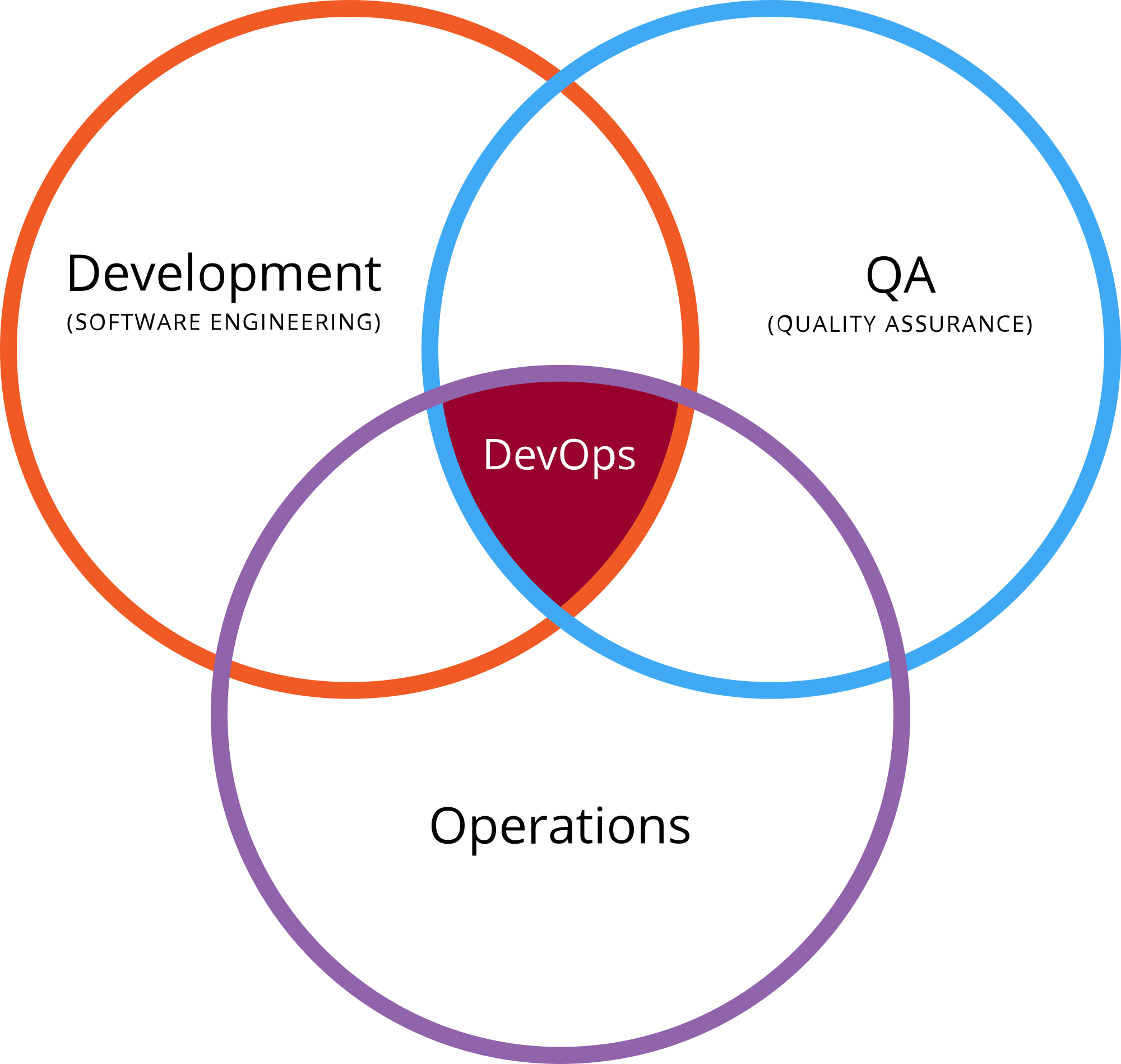
    devops qaOne common argument is that DevOps sits at the center of a Venn diagram of dev, ops, and QA:
    On one side, QA works together with development in trying to push more of their tests into the continuous integration system. Tests must have zero human intervention and generate their own test data.

    On the other side, QA works with operations to collaborate on monitoring tools; perhaps to continuously run smoke tests in production. Chances are that operations is developing scripts for backup and restore of production systems, rollback of deploy, or scripts for disaster recovery.

    Tim Hinds at NeoTYS looks at the issue differently and says that “DevOps QA” is meant to prevent defects rather than find them:

    QA takes a critical role in this organizational structure because they have the visibility and the directive to push code out when it is working, and roll it back when it is not. This is a very different mindset from QA organizations of 10 years ago, whose primary responsibilities involved finding bugs. Today QA groups are charged with preventing defects from reaching the public site.

    With all due respect, both are wrong.

    Why DevOps Does Not Need QA

    DevOps often uses continuous integration (CI) and continuous delivery (CD). In CI, developers use various continuous integration tools to integrate code into a shared repository multiple times each day, and DevOps relies on automation to determine the quality of the version. You cannot have any human interaction if you want to run CD, which ensures that any version of a batch of code in the repository can be released at any given time.

    Essentially, the traditional QA cannot work in a full CI/CD environment. In older structures, the responsibility for software quality was in the hands of QA. Today, it’s part of the DevOps culture and methodology—the developers now own the responsibility rather than a separate entity within the organization.

    Specifically, DevOps entails the use of vendors and tools such as BUGtrack, JIRA and GitHub to aggregate and report software bugs and defects. Test automation tools including Selenium, Cucumber, JUnit, TestNG and JMeter manage, execute and measure functional tests and cycles.

    In the end, if there is a layer of people in the middle between development and operations, then you cannot perform CI and CD seamlessly and, therefore, cannot do DevOps. To run a proper DevOps operation, you cannot have QA at all.

    The Future of QA

    So, what will happen to all of the people who work in QA? One of the happiest jobs in the United States might not be happy for long as more and more organizations move to DevOps and they become more and more redundant.

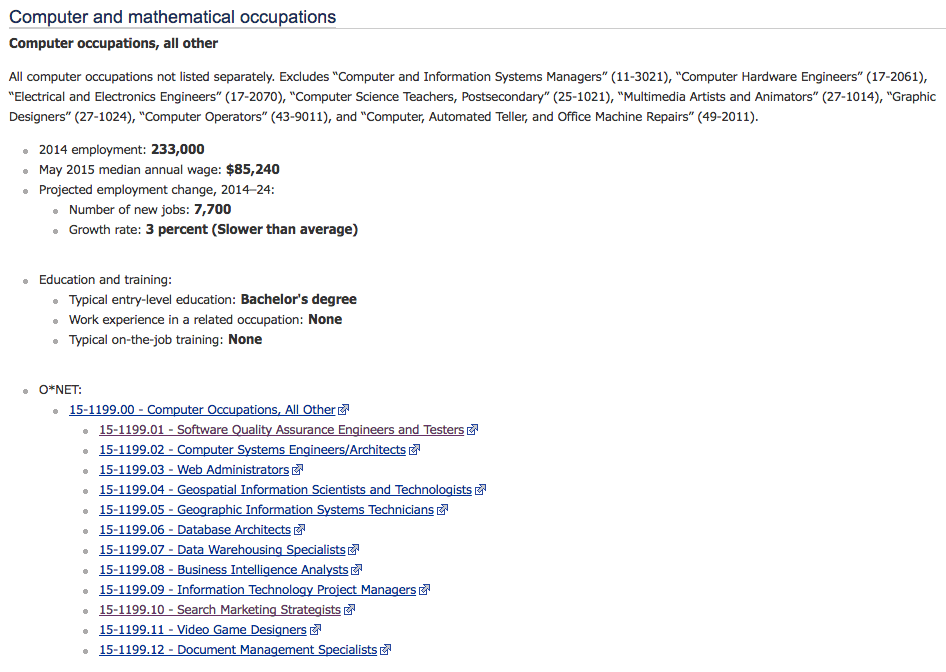
    According to the U.S. Bureau of Labor Statistics (BLS), software quality engineering is one of the high-tech professions whose growth rate is projected to be slower than average:

    qa job outlook

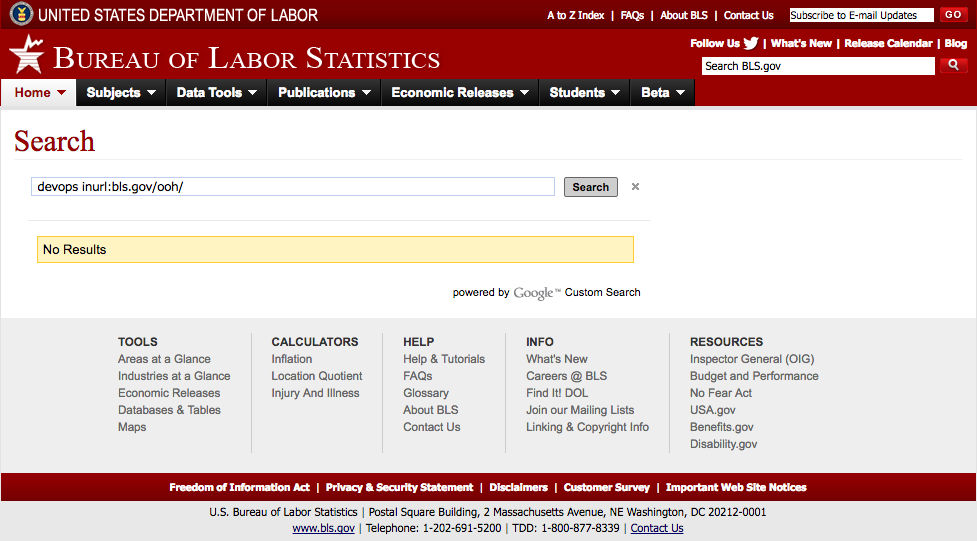
    However, the BLS numbers are likely too generous because the bureau does not yet recognize “DevOps” as a separate profession at all:

    image02

    As evidence, just look at how the relative number of Google searches in Google Trends for “sqa jobs” is slowly declining while the number for “devops jobs” is rapidly increasing:

    qa jobs vs devops jobs

    For QA, the trend definitely does not look good.