Category: Cloud Management

  • Considering Hybrid Cloud? Focus on the Why

    Considering Hybrid Cloud? Focus on the Why

    So much of business—and life in general—comes down to semantics. We articulate goals and measure success using a variety of terms. Some serve to clarify; others confuse. Consider the term “hybrid cloud”—a Google search yields 5.96 million results. So, yes, hybrid cloud is a hot topic, but what exactly do we mean by it?

    The (current) accepted definition of a hybrid cloud is any compute/storage environment using a combination of third-party and private (on-premises) cloud resources. Yet, this definition is somewhat misleading. It is very likely that your company has already been using third-party platforms and services—a hybrid cloud model—for many years.

    Hybrid cloud is less about the “what” than the “why.” The question isn’t, “Should I move to a hybrid cloud?” (You already have.) The better question is, “Am I using that model to my best advantage?”

    On-Premises vs. Public Cloud Capacity—Strategic vs. Non-Strategic Applications

    The number of diverse applications, systems and business requirements IT must support is growing exponentially. In response, more tools are being made available to help. Public cloud, private cloud, edge computing and PaaS/SaaS models all give CIOs and IT managers options for handling new, more complex demands. Each has its advantages and disadvantages. The challenge for IT is developing the best mix of available tools to ensure business goals are being met in the most efficient way possible.

    Source: Veritas Inc., global IT consulting

    The first step in developing a hybrid cloud strategy is understanding which functions, applications and requirements are strategic to the business. More specifically, which operations are core to the organization’s purpose or must remain in-house (i.e., private cloud) due to security, regulatory or other governance issues? These are the high-priority operations for which it makes sense to prepare highly efficient, on-premises resources and staff to support your cloud initiatives.

    In deciding whether an application or function is strategic, it is essential to separate the IT output from the hardware/software producing it. For example, you may have significant dollars invested in a legacy mainframe with the software and analytics to run mission-critical applications. But the real question is: How strategically important is the output? If it is strategic, then, by all means, keep it in-house. If not, it may make more sense to migrate applications to public cloud equivalents and use the vacated space for something more strategic.

    On the other hand, non-strategic functions represent an opportunity to increase operational efficiency and cost-savings. For example, using a SaaS or PaaS provider to host your CRM platform in a public data center provides more space, staff and resources to support the higher-priority business.

    Maximum Productivity and Value, Minimum Space

    While the functional purpose of a hybrid cloud strategy is to determine which applications remain on-site and which can go, the overall goal is improving the value and delivery of strategic and non-strategic functions. Often, the full weight of your decisions is not realized until later, when you must address the need for additional data center space.

    The cost, time and manpower needed to plan, design, build and maintain a new facility represent some of the most substantial investments a company can make. By strategically optimizing your on-premises cloud capacity—and offloading non-strategic functions to the cloud—you increase available white space. This buys you more time to figure out when you need more space and whether your current optimized facility remains competitive with other options. Additionally, your on-premises equipment (because of its strategic importance) becomes far more valuable and productive.

    In some cases, organizations will discover that, once they take their non-strategic operations to the cloud, the cost of running key applications on-site does not warrant maintaining their existing data center. At this point, it may make more sense to sell the data center and lease back the space needed or partner with a multi-tenant data center.

    Potential Pitfalls

    Of course, moving applications and business functions off-premises also has its downside. Select well. Re-locating core capabilities to the cloud compromises control and can erode your competitive edge. And, while public cloud may appear to be an especially good option for smaller organizations, it can quickly become cost-prohibitive as you scale. Should you decide to transition from a public cloud, re-locating your data to a new environment is often complex and costly, restricting future options. This is not to say that public cloud options are intrinsically high-risk; they’re not. It does, however, emphasize the need to view every decision within the context of your long-term strategy while weighing the cost and agility entailed by public cloud options.

    Business First

    The bottom line is that developing a hybrid cloud strategy is first a business decision. When done well, it is based on the vision and trajectory of the company and implemented using the best combination of all available options—XaaS partners, private cloud, public cloud, hosted providers, captive resources and edge computing.

    Before you start trying to figure out details such as architecture and security, you’ve got to nail the strategy. For more common non-strategic applications, cloud-based deployments offer a degree of flexibility and cost-efficiency the data center can’t match. On the flip side, when it comes to supporting mission-critical applications, nothing beats the on-site control and dedicated resources of your data center.

    There are certainly pros and cons when deciding what stays and what goes. Your challenge is figuring out which is which—and why. Choose well.

  • Red Hat Updates Virtualization Platform

    Red Hat Updates Virtualization Platform

    Red Hat today announced an update to its virtual machine platform that now can run on the latest version of Red Hat Enterprise Linux (RHEL).

    Version 4.4 of Red Hat Virtualization can now run on version 8.2 of RHEL. In addition, Red Hat has added Grafana-based dashboards for its Data Warehouse (DWH) service that IT teams can employ to track performance and analyze workloads.

    Finally, Red Hat Virtualization 4.4 simplifies configuring network services using its NetworkManager console.

    Peter Lauterbach, a product manager in the Cloud Platforms group at Red Hat, said support for RHEL 8 is core to the company’s overall strategy to enable IT teams to run microservices-based applications simultaneously with existing monolithic applications.

    Red Hat envisions IT organizations will deploy RHEL on bare-metal servers running Red Hat OpenShift, an application development and deployment platform based on Kubernetes that can run applications built using containers. In addition, Red Hat OpenShift supports kubevirt, open source software that enables kernel-based virtual machines (KVMs) such as Red Hat Virtualization to run on top of a Kubernetes cluster. Made available as Red Hat OpenShift Virtualization, that software makes it possible to run legacy monolithic applications alongside microservices-based applications on the same Kubernetes cluster as needed, said Lauterbach.

    That approach not only is easier to manage from an infrastructure perspective, Lauterbach noted it also can reduce latency between monolithic applications and microservices. Many IT teams in the wake of the COVID-19 pandemic have accelerated the rate at which they are moving applications into the cloud by encapsulating entire monolithic applications into containers that then can be ported to a cloud platform without the need to refactor them. They then can begin to modernize those applications by breaking them up into smaller microservices.

    Lauterbach also noted it has become a lot easier to leverage Kubernetes to move applications between platforms because interoperability between storage and networking services has improved significantly, thanks to the Container Storage Interface (CSI) and Container Network Interface (CNI) that have been made available by the Kubernetes community. In fact, Lauterbach said standards in infrastructure are living up to their interoperability promise.

    Red Hat, of course, has been making the case for open source virtual machines for decades now. However, in the wake of the economic downturn brought on by the COVID-19 pandemic, there will be many more organizations looking to reduce costs by relying on commercial virtual machine software. In addition, Lauterbach noted that now that cloud service providers such as Amazon Web Services (AWS) support KVM, it is a lot easier to create a hybrid cloud computing environment by deploying Red Hat Virtualization in a local data center than it is to replicate a VMware environment in a public cloud.

    It’s too early to say how the battle for hybrid cloud computing will play out in the months and years ahead. The one thing that is certain is the more diverse the IT infrastructure environment is, the more difficult it is to manage.

  • RackN Transforms Bare-Metal Servers Into a Cloud

    RackN Transforms Bare-Metal Servers Into a Cloud

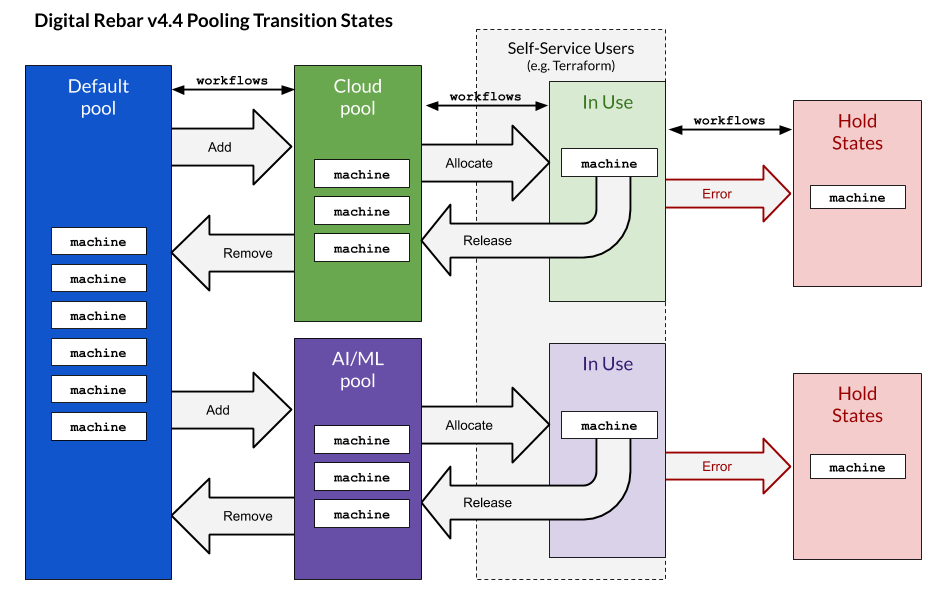
    RackN is making available an update to the RackN Digital Rebar Platform that will make it easier to employ tools such as Terraform to configure bare-metal servers.

    Company CEO Rob Hirschfeld said version 4.4 of the platform adds an application programming interface (API) that enables bare-metal servers to be abstracted into resource groups. IT administrators can request a machine based on an attribute map to provision a collection of bare-metal servers as if they were a cloud platform, he said, noting RackN is also making available workflows to enable IT teams to automate the allocation and reallocation processes more easily.

    At the same time, the latest release of RackN Digital Rebar Platform adds support for Trusted Platform Module (TPM) Secure Boot, an industry standard that ensures only software that is trusted can be loaded onto a machine. Most automation platforms don’t support TPM Secure Boot, which forces IT teams to choose between the benefits of automation and having a secure platform. RackN Digital Rebar Platform is the only automation framework to support (TPM) Secure Boot in VMware environments, Hirschfeld claimed.

    Out-of-band management passwords, TLS certificates and VLANs will also be secure by default with this latest release, he said.

    Hirschfeld said IT teams want to be able to provision bare-metal servers as if they were code in much the same way they provision virtual machines. Just as importantly, they require an automation tool that enables them to just as easily de-provision those machines when it comes time to reallocate them to another workload.

    Achieving that goal, however, should not require IT organizations to hire a site reliability engineer (SRE), he said, noting the RackN Digital Rebar Platform is designed to be employed by the average IT administrator. An SRE could define workflows within the RackN Digital Rebar Platform that are reused by IT administrators; in fact, RackN plans to add support for Git repositories that will make it easier to share workflows, Hirschfeld added.

    While the reasons for deploying workloads in the cloud versus on-premises IT environments are varied, the automation advantage cloud platforms historically have enjoyed over on-premises IT environments is narrowing at a time when interest in deploying Kubernetes clusters on bare-metal servers is rising. It may be a while before most IT teams are able to manage bare-metal servers as if they were just another cloud resource. The main obstacle for achieving that goal now, however, is likely to be a lot more cultural than it is technical.

    In the meantime, IT teams should expect to see bare-metal servers employed more widely in the age of containers. There will, of course, always be a need for virtual machines, at least in the foreseeable future. The challenge is the IT infrastructure environment itself is becoming more diverse as new classes of cloud-native application workloads emerge.

  • 3 Key Issues With Hybrid Cloud Transformation

    3 Key Issues With Hybrid Cloud Transformation

    The cloud has fractured. Nowadays, it is nearly impossible to scale a cloud-agnostic digital transformation initiative. The reality is that most enterprises adopt a hybrid cloud arrangement. Whether designed strategically or throughout years of competing vendors and technology influences, hybrid cloud environments, and the problems therein, seem a mainstay for modern IT.

    Many digital transformation efforts are culminating in hybrid cloud scenarios. 451 Research recently found 72% of enterprises are already using more than one cloud vendor. As one can surmise, competing standards and inconsistencies among cloud tooling can cause headaches for developers, security teams and potentially even end users.

    3 Common Cloud Transformation Problems

    I recently met with Jeff Kukowski, CEO, and Grant Ho, CMO at CloudBolt Software, to identify issues within today’s cloud transformations. According to CloudBolt, custom coding, governance concerns and cybersecurity incompatibilities are among the top problems that hold back cloud transformation (or make it very costly). Below, we’ll see what strategies they recommend to solve these problems.

    1. Custom Coding

    In 2020, a software-defined approach seems the obvious preferred choice for most IT professionals. Yet, custom code is still a significant struggle for hybrid clouds. The Standish Group research shows 19% of projects will be canceled before they ever get completed. Further results indicate 52% of projects will cost 189% of their original estimates. Custom code decreases reusability and creates redundancy.

    2. Lack of Governance

    With many disparate cloud applications, it can be difficult to set standards. There is not much control. This free-for-all can directly impact the business. Lack of visibility into resources, a related concern, could cost a business significant expenses. Citing a recent Gartner study, ParkMyCloud estimates that companies waste $8.8 billion on idle cloud resources each year.

    3. No Role-Based Security Policies

    Gartner found that 33% of enterprise security attacks are happening from people using resources in the cloud and not necessarily putting the proper governance and security parameters in place. Without role-based access control (RBAC) and a standards-based way to apply RBAC across all your resources, hackers can more easily penetrate a hybrid cloud.

    How Hybrid Cloud Affects DevOps

    These above problems are quite broad, but they reflect a culmination of many roadblocks along the development pipeline. In terms of DevOps, juggling the ever-growing variety of hybrid cloud tools could easily stunt deployment velocity.

    Kukowski described how cloud IT faces a plethora of tooling styles. They include on-premises tooling, serverless, infrastructure as code, Terraform, Kubernetes and backup as a service. “Greater than 70% of organizations are not only multi-cloud, but they are multi-tool,” he estimated.

    Naturally, supporting nuances between them becomes tricky. Not only must you recognize governance and security inconsistencies between platforms, but you must maintain them “into Day 2,” he said.

    Solution: Policy-Based Automation

    With hybrid cloud tooling now a reality for most enterprises, managing them becomes the next logical step. Solutions primarily revolve around better automation to increase self-service capabilities. For Kukowski, the answers lie in automated governance, heightened tooling visibility and implementing enterprisewide security policy services to automate security compliance and decrease custom coding.

    One way to achieve these benefits is by utilizing a Cloud Management Platform (CMP). Gartner’s 2020 Magic Quadrant for Cloud Management Platforms includes CMPs from CloudBolt, Embotics, Flexera (formerly RightScale), HyperGrid, Morpheus Data, Scalr, and VMware with vRealize Automation Cloud plus CloudHealth. A CMP layer could help automate self-service IT, assisting engineers to do their work with governance and security capabilities in place.

    Using a CMP, companies could eliminate custom coding for things such as access control. Such increased visibility could, for example, significantly decrease AWS server cost by reducing unused deployments. A CMP can benefit CI/CD too. Home Depot, for example, uses a CMP to greatly improve efficiency, decreasing infrastructure deployment time from weeks to hours.

    “Who is authorized to perform that action, on that K8s container, local VM, or cloud machine? We need visibility into that,” Kukowski said. “What is it doing? When is it running? Who has visibility to shut it down?” He recognizes that deep industry expertise is required to abstract complexity and standardize governance across all these situations.

    Streamlining the Polymorphic Cloud

    Saturated within an overabundance of cloud tooling, it’s easy to lose sight of your enterprise’s IT policies. Without global DevSecOps standards, security for hybrid cloud becomes risky.

    Enterprises with multi-tool environments are also at risk of wasting development time and effort. “We want to make sure the market does not repeat the problems of the past,” Kukowski noted. “Why custom code the fundamentals that operate your business?”

    Instead, companies should seek to reduce redundancy and eliminate custom code for each point to point integration. However, abstracting such complexity involves porting governance standards across all environments—a challenging feat for internal teams.

    The solution could lie in utilizing an external CMP layer. Such a layer could offer a software-defined approach to eliminate custom coding, offering policy-based security controls that consider the organization’s needs.

  • How to Achieve AWS Security in 10 Steps

    How to Achieve AWS Security in 10 Steps

    Looking to lock down your AWS cloud service? Here are the 10 steps to take for AWS security

    As more companies embrace the cloud, security is becoming a more significant challenge. Irrespective of size, organizations are increasingly realizing the importance of having proper cloud security practices in place. More and more companies are creating a culture where digital engineering teams are making cloud security a priority and checking whether their service providers can provide the correct security levels for their cloud workload. It is up to organizations, in partnership with their cloud service providers, to understand the different security roles, responsibilities, tools and best practices.

    It turns out that getting the balance right security-wise is becoming easier. For example, AWS has published its cloud security best practices to help customers implement cloud services in a highly secure manner. These best practices provide guidance to organizations unsure of the tools or services they require. The AWS cloud platform allows customers to scale and innovate while maintaining a secure environment; customers only pay for the cloud security services they are using without any upfront expenses, unlike the on-premises environments.

    When it comes to cloud security SNAFUs, misconfigurations that accidentally and unnecessarily expose services are the biggest culprits. Any misconfigurations during implementation can potentially lead to big problems down the road. In the cloud, resource provisioning, management and monitoring happen via APIs, consoles and command-line interfaces (CLIs). So, it’s essential to secure all these connections during the early stage of cloud adoption.

    Learning From Experience

    Teams also must ensure that virtualization, identity and access management (IAM), workload protection and network security and encryption are a part of this architecture blueprint. We are all familiar with catastrophic data breaches that make the news, but there are many others that do not, and the vast majority of these are avoidable. Let’s examine the following three scenarios, all derived from real experiences, and then look at how the vulnerability could have been avoided.

    Case 1: Passwords Matter

    An AWS account was compromised due to a weak root user password, combined with MFA not being configured. An attacker removed EBS, EC2 instances, S3 data backup and asked for a ransom to provide the database backup file.

    This could have been prevented by utilizing an IAM user with a specific policy instead of using the root account. 

    Case 2: Visible Access Keys

    The developer posted the development account credentials for the AWS access and secret access key in the script, which was on the public Git repository. Using those keys enabled the attackers to deploy multiple resources in all regions and created multiple dummy resources. For the six to eight hours that the account was hijacked, the attackers racked up a bill of $4,000 to $5,000.

    This could have been prevented by using an IAM role instead of hard-coding the access keys into code. Access keys should be rotated periodically.

    Case 3: Misconfigurations

    The security group was not properly configured. In particular, port 22 was allowed globally, ports 80 and 443 were also open from all. The application which was hosted on EC2 instance was front-ended by the application load balancer. The attackers found a basic cross-site scripting vulnerability and SQL injection, tried injecting malicious scripts and removed all the data from the server.

    This could have been prevented by following a trusted advisory, putting WAF on top of the application load balancer and utilizing the AWS inspector for security assessments.

    AWS Security in 10 Steps

    These three cautionary tales are all examples of where a small security vulnerability caused big losses, and they all demonstrate how easy it would have been to deploy the secure cloud option. Hindsight is a wonderful thing, but it is even better to avoid making the error in the first place. Here is a 10-step guide to understanding security best practice structures and how users should implement the AWS platform and its services in the best way.

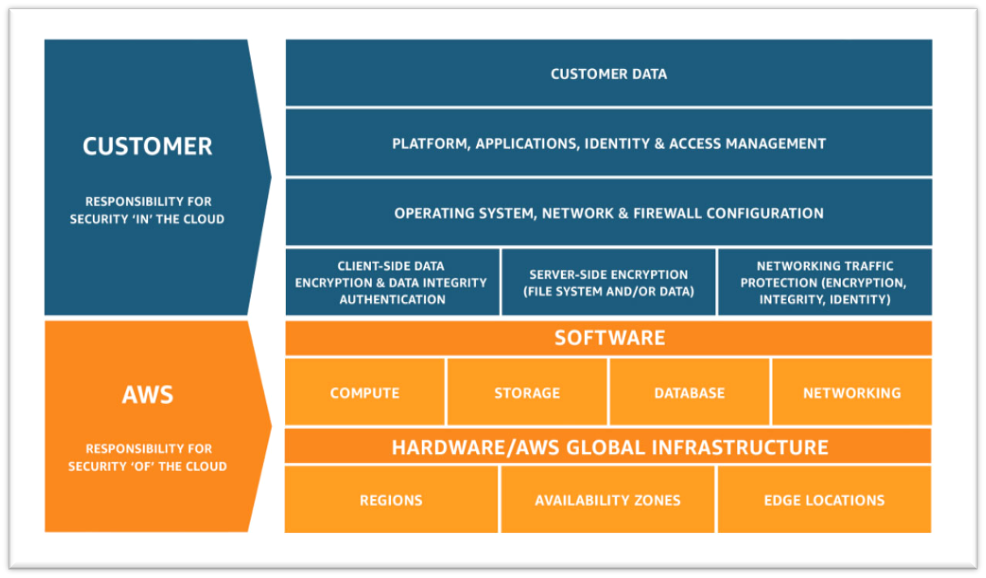
    1. Understand the Shared Responsibility Model

    • Amazon’s responsibility: AWS is focused on infrastructure security, including computing, storage, database and intrusion prevention networking services. AWS is also responsible for the security of the software, hardware and the physical facilities that host AWS services.
    • Customer’s responsibility: AWS customers are responsible for the secure usage of AWS services that are considered unmanaged. The customer is responsible for managing user base access-authentication methods, encryption of data stored inside AWS.

    2. Follow IAM Best Practices

    • The AWS Identity and Access Management Service enables users to manage access to AWS services and resources securely.
    • The AWS account can be administrated by creating groups and users and applying granular permission policies to users to provide limited access to APIs and resources. This video takes a deep dive into IAM policy management.
    • When granting IAM roles, follow the “least privileges” approach to security.
    • Rotate access keys and passwords.

    3. Manage OS-level Access and Keep Ec2 Instances Secure

    • Run an inspector assessment to generate an OS-level vulnerability report.
    • Use System Patch Manager to keep OS packages updated.
    • Patch the EC2 instance periodically to protect your infrastructure from newly discovered bugs and vulnerabilities.
    • Follow the security advice provided by OS vendors RedHat, Suse, Microsoft, etc. This helps to keep all OS-specific packages updated from a security perspective.

    4. Encryption

    • There are two methods for encryption in AWS: in transit and at rest.
    • Use AWS KMS for storing at rest encryption keys, which can be AWS-generated or customer-generated.
    • Use Cloud HSM to provide hardware-encrypted devices for storing keys.
    • Most AWS services provide in-transit encryption by providing https endpoints that provide encryption end to end.
    • AWS Certificate Manager allows you to create an SSL certificate for the public domain.

    5. Follow Security Best Practices for AWS Database and Storage Services

    • RDS storage should be encrypted at rest.
    • Restrict access to RDS instances to decrease the risk of malicious activities such as brute force attacks, SQL injections or DoS attacks.
    • S3 storage should be encrypted at rest.
    • S3 policy should be used to restrict access to S3 content. Keep your S3 bucket private if you don’t have any requirement to expose objects.
    • Use AWS Macie to detect and secure sensitive data within AWS-S3.
    • Use the AWS Parameter Store to store environment-specific credentials and secrets, which you can easily achieve using secrets management for your cloud-native application.

    6. Network Security

    • Intrusion detection systems (IDS) or Intrusion prevention systems (IPS) allow the detection and prevention of attacks on critical infrastructures such as payment gateway of banking-related transaction applications.
    • VPC flow logs should be enabled to monitor network traffic.
    • Restrict access by security group (EC2, RDS, Elastic Cache, etc.)
    • Use Guard Duty to monitor AWS accounts and infrastructures continuously.

    7. Web Application Security

    • Web application firewalls (WAF) provide deep packet inspection for web traffic.
    • WAF can also help to prevent platform and application-specific attacks, protocol sanity attacks and unauthorized user access.
    • Amazon Inspector is an automated security assessment service that improves security and compliance of applications deployed on AWS.
    • Use AWS Cognito to authenticate application user pools securely. It also supports federated access from Google, Amazon and Facebook.

    8. Enable Configuration Management

    • AWS Config helps to audit, assess and evaluate the configuration changes within AWS.
    • Customers can also rely on third-party configuration management tools, which can provide more granular visibility.

    9. Monitoring and Alerting

    • CloudTrail enables auditing and monitoring of authorized and unauthorized activities within the AWS account.
    • CloudWatch alerts can be set up for malicious activities within the AWS account and infrastructure deployed inside AWS and application logs.
    • Set billing alarms to keep your team aware of the cost utilization of specific accounts or infrastructure.

    10. Compliance, Training and Certification

    • AWS Artifact helps customers to get a no-cost, self-service portal for on-demand access to AWS compliance reports.
    • Train and educate teams using the AWS cloud platform for deploying or are responsible for the infrastructure.

    Implementing these cloud security best practices guidelines provided by AWS helps organizations implement the proper security measures, irrespective of where they are in their digital transformation journey or how large their organization is.

  • Oracle Extends Managed Cloud to On-Premises

    Oracle Extends Managed Cloud to On-Premises

    Oracle today announced it will make available as a managed service in on-premises IT environments all of the software it currently provides access to on Oracle Cloud.

    In addition, Oracle is making available Oracle Autonomous Database on Exadata Cloud@Customer, which brings a managed database service to the Exadata servers optimized to run Oracle databases. Oracle also announced it has certified Siebel, PeopleSoft and JD Edwards applications for Oracle Autonomous Database along with the availability of Oracle Autonomous Data Guard, a managed high-availability and disaster recovery service that ensures near-zero data loss (RPO) and instant recovery times.

    Vinay Kumar, senior vice president for cloud engineering in North America at Oracle, said while cloud service provider rivals have made some services available in on-premises IT environments, Oracle will be the first to deploy a full range of software-as-a-service (SaaS) applications via an Oracle Dedicated Region Cloud@Customer service.

    Priced starting at $500,000 per month, Kumar said the Oracle Dedicated Region Cloud@Customer service is intended to appeal to organizations that because of compliance requirements need to deploy applications in an on-premises IT environment but still want to be able to treat IT as an operational expense.

    Kumar also noted in the wake of the COVID-19 pandemic there are more organizations that would prefer to rely on a service to remotely manage Oracle applications rather than having to set up and manage the networking infrastructure necessary to let IT staffs manage those applications from home.

    Like existing Oracle Cloud services, Kumar said Oracle applications can be deployed on virtual machines, bare-metal servers or Kubernetes clusters. In some cases, Oracle expects IT teams will opt to deploy some applications on-premises while also taking advantage of the existing Oracle cloud services.

    It’s not clear to what degree organizations will shift to relying on vendors to provide managed services versus ether deploying and managing applications themselves or relying on managed services provided by third-party IT services firms. Historically, less than 20% of all IT is consumed as a managed service. However, in the wake of the economic downturn brought on by the pandemic, it’s expected more organizations will prefer to treat IT as an operational expense. Oracle is now making it possible to make that decision regardless of where its applications are physically deployed.

    As applications become consumable as a service anywhere the distinction between what constitutes a cloud service running locally versus in data center owned by some other entity will start to dissipate. Many workloads that make the same application are likely to be running in different locations based on the sensitivity of the data being processed. Regardless of the path forward, the days when “the cloud” applied to only some external service are finally coming to an end.

  • Cloud Is Red Hot in the COVID-19 Era

    Cloud Is Red Hot in the COVID-19 Era

    As digital transformation accelerates, cloud services are helping organizations thrive in a COVID-19 world

    As the days tick by and the gloomy ramifications of COVID-19 become more apparent, one harsh truth has become crystal clear: Industries that have invested in digital transformation stand a better chance of recovery and survival than others.

    The banking industry is a lighthouse example of this principle. Even though the brick-and-mortar branches have had to pull down shutters because of lockdowns and social distancing requirements, many banks have still operated their businesses as usual. They have kept the lights on and handled the pressure of increased online and mobile transactions thanks to cloud-based services.

    While the internet has been a key enabler for digital banking, cloud has become the backbone. Cloud is making IT infrastructure vanish. Cloud is where businesses render servers, churn and analyze data, and keep applications humming so they can collaborate with partners and customers.

    Many businesses are quickly turning around, moving at speed to adapt and transform their operations. YMCA, Planet Fitness and Nike are offering online fitness classes. Schools and colleges are providing online learning. The demand for Netflix and Amazon Prime has gone up dramatically, and both organizations are now easing telecom network congestion by lowering their bit rates. Online grocery retailers are attempting to keep pace with demand spikes. And working from home has gained momentum, sending the demand for routers, modems and data cards through the roof.

    We will see a slew of innovations like these in the coming months, from businesses big and small, that will bring cloud services into sharp focus with their need for scale in a COVID-19 world. Everyone is looking to the cloud to reimagine businesses and make collaboration happen on an unprecedented scale, and the cloud has proven its ability to respond with speed while remaining robust.

    While enterprise IT, governments, entrepreneurs and other organizations work on their plans to respond to crises, the focus should be on providing great user experience in the post-COVID-19 era. In regard to the cloud, enterprises should focus on the following key tactics to prepare accordingly:

    1. Scaling existing services: Applications currently hosted on-premises will move to the cloud. Extending the data center via software-defined data center solutions into hyperscalers will help achieve scale and business flexibility.
    2. Giving businesses ample wiggle room: By adopting a multi-cloud strategy, businesses can de-risk themselves against failure, capacity challenges and operational barriers.
    3. Extending and expanding geographical reach: This can be done by deploying applications to geo-specific cloud platforms.
    4. Going cloud-native: Design and develop new applications on PaaS using a DevOps approach for rapid rollouts.
    5. Strengthening the core strategy: The strategy should be to support rapid and unexpected changes in work and service consumption needs through optimal network bandwidth, VPN connectivity, bandwidth throttling, consumption-based adoption model, remote VDI as a service and SD-WAN based solutions.
    6. Investing in a heightened security posture: Cloud solutions should be based on data classification (privacy, availability) without sacrificing application, infrastructure, access or data security.
    7. Developing new working models: Address medium and long-term requirements with a hybrid support model and local onsite versus remote versus offshore support.

    Having achieved the above, enterprises would be wise to reduce their operations costs and channel the savings into new cloud initiatives. Enterprises should attempt to extend the life cycle of their existing assets before considering a refresh, while simultaneously moving to a subscription-based, pay-as-you-go model rather than footing steep licensing bills.

    But the cloud journey doesn’t end there. Goal-oriented and highly motivated businesses will use their cloud credits to support proofs-of-concept and other essential services. One way of doing this is to containerize applications and remediate end-of-life issues around OS, improving computing density and rationalizing OS licenses for cost savings. The other established route to achieve savings is to outsource value streams to trusted partners.

    COVID-19 is going to accelerate the cloud journey for scores of enterprises, and investments in the technology will quickly show their upsides—improved business resilience, cost control, and above all, the ability to keep the lights on.

  • How to Overcome Challenges With AWS Lambda Logging

    How to Overcome Challenges With AWS Lambda Logging

    Monitoring AWS Lambda can be a complex and potentially costly endeavor. Here’s what you need to know to stay on track and on budget

    Organizations are already experiencing a shift toward serverless cloud computing. According to the O’Reilly “Serverless Survey 2019,” around 40% of respondents said they had implemented serverless architecture. Forrester “Global Business Technographics” Developer 2019 found that 49% of companies are using it or planning to use it in the next 12 months.

    AWS leads the way in this space. According to Serverless.com, 96% of respondents choose AWS Lambda over Azure Functions and Google Cloud Functions. AWS Lambda helps us to design a lightweight and robust application architecture that can be built and deployed without any hassle. However, nothing comes for free. There are several, potentially costly, complexities when monitoring AWS Lambda. Fortunately, there is an array of solutions.

    Logging

    By default, AWS Lambda’s stdout and stderr messages are sent to CloudWatch Logs, where every function has its log group. A log group is a collection of log streams (sequence of log events) that can be stored as long as you want. Storage of logs costs USD 0.03/GB and data ingestion costs around USD 0.50/GB.

    It is common practice to break up your Lambdas into single responsibility functions. This means, for example, if you need one Lambda to read a certain object and another to write it, you’re setting up two separate functions. However, this also means two log groups.

    This creates a challenge when you want to analyze your application’s output log. There is no direct way to log queries across multiple log groups. In response to this, AWS enabled CloudWatch Log Insights to conduct cross-log querying. While this brought many of the improvements users wanted and needed, analyzing multiple log groups together meant a higher cost for queries. This prohibitive cost model encouraged many to look to external services.

    Tracing

    AWS X-Ray enables you to trace the underlying components of your application and helps you to dig out the fundamental reason behind distributed issues. It has quickly become an essential troubleshooting and optimization tool for engineers.

    For example, cold start latency can be problematic for AWS Lambda functions with slow startup times. Although you can counter this by enabling Provisioned Concurrency, you will need to pay extra.

    If you have budget constraints and still want to resolve the issue, X-Ray might help you eliminate or at least optimize your application by removing the bottleneck. It lets you know, among other things, if your application is consuming more time during initialization or invocation. You can find X-Ray SDK on AWS Lambda for Go, Java, Node.js, Python and .NET.

    Debugging

    Traditional architecture and serverless architectures are as different as day and night. Serverless requires changes across the software engineering spectrum, including debugging.

    A serverless application is a combination of various services or resources within infrastructure, which can include tools such as AWS API Gateway, CloudWatch and SNS. Such distribution of web services helps avoid a single point of failure (SPOF), but this design creates a problem. Debugging or replicating an issue on a local machine is not always feasible, and debugging a production application is always a dangerous proposition.

    Moreover, the abstraction of AWS Lambda makes debugging complicated, as you don’t have direct access to the underlying OS. Hunting down dispersed logs adds to this overhead. As your serverless infrastructure scales, it becomes difficult to identify the root cause.

    To combat this, developers can use AWS native tools such as CloudWatch, X-Ray or Serverless Application Model (also known as SAM). Any of these tools on their own can be difficult to use; together, however, they form a powerful debugging suite.

    Outside of the AWS-native toolset, some tools provide further assistance with debugging. For example, the Serverless framework, which is an open source tool to develop and deploy serverless applications over AWS, lets you see your live application’s function log, for example:

    Monitoring

    Robust monitoring ensures the smooth operation of an application and helps to detect issues quickly. In traditional infrastructure, metrics only appear from a handful of sources, so collecting them together is less of a challenge. In a serverless architecture, this problem is much more complex.

    AWS gives you the freedom of converting CloudWatch Logs to metrics. These metrics can be filtered, measured and, when a threshold is crossed, alerted on. You can define a metric filter by choosing a log group created by your serverless function and target the log stream. This enables you to create a visual reference for your log events. Every custom metric you create will cost $0.30/10000 metrics per month.

    Metric filters can be a powerful tool, but it can also be a bit overwhelming to set up everything, and there are certain bottlenecks as well. For instance, you can’t parameterize metric names, which forces you to create a filter for every custom metric you want to track. There is also a hard limit of 100 metric filters per log group, which restricts you as your application evolves.

    Other than this, AWS resources are tightly coupled with each other, which makes AWS-native monitoring tools a fine choice when you need to monitor individual AWS resources or Lambda functions. To get an infrastructure-wide view and to monitor other third-party tools, a centralized logging approach is necessary to take full advantage of the log data.

    Conclusion

    There is no denying that serverless tooling quickly unlocks high availability, scalability and cost optimization. To make the most of this new paradigm, engineers need to build a robust and reliable monitoring system. The ability to manage log data streaming from many components, detect and trace issues on the fly, and deliver accurate insights to keep on improving the application is crucial to remain online and competitive.

    While serverless solutions give access to many of the technical features we need, the dangers of vendor lock-in and the power of third-party providers must be considered if you want to scale your organization and its infrastructure smoothly.

  • Nebulon Unveils Hybrid Cloud Computing Platform

    Nebulon Unveils Hybrid Cloud Computing Platform

    Nebulon has emerged from stealth to launch a hybrid cloud computing platform that enables workloads to be processed in the cloud while data continues to be stored on a local application server.

    Company COO Craig Nunes said the Cloud-Defined Storage platform employs PCIe cards embedded with a Nebulon Services Processing Unit (SPU) based on an ASIC to connect local storage systems to a cloud-based control plane dubbed Nebulon ON that can span Amazon Web Services (AWS) and Google Cloud Platform (GCP) services.

    The PCIe card is installed in an application server residing in a local data center, where it connects to solid-state drives (SSDs) installed on the server. The Nebulon SPU offloads compression, encryption, deduplication, erasure coding, snapshots and data mirroring.

    The Nebulon SPU also transmits storage, server and application metrics to Nebulon ON, where machine learning algorithms are applied to surface recommendations to improve performance.

    Nunes said both Hewlett Packard Enterprise (HPE) and Supermicro have already agreed to resell the Cloud-Defined Storage platform.

    At its core, the Cloud-Defined Storage platform takes hyperconverged infrastructure (HCI) to another level. Instead of combining compute and storage in a local data center, however, compute processing is shifted to the cloud, said Nunes. That approach, he noted, makes it possible to take advantage of inexpensive compute resources in the cloud without losing control over data.

    In addition, Nunes noted, the Cloud-Defined Storage platform ensures application service levels are maintained while reducing costs by eliminating the need to transfer massive amounts of data into and out of the public cloud.

    Organizations that work within highly regulated industries can now take advantage of cloud resources while continuing to meet compliance requirements, he added.

    Finally, the Nebulon Cloud-Defined Storage platform can support both monolithic and microservices-based applications regardless of the type of virtual machine or container employed.

    At a time when many organizations are under increased pressure to reduce the total cost of IT, there’s a lot more interest in ways to leverage cloud computing to reduce costs. However, for many organizations, moving data into the cloud is problematic for a host of performance, security and compliance issues.

    A hybrid cloud computing architecture that doesn’t require data to be stored or moved into and out of a cloud could provide a way for organizations to re-evaluate their overall cloud computing strategies. Organizations beyond those in highly regulated industries could conclude they would prefer to retain control over their data.

    Cloud service providers are, of course, banking on massive amounts of data being stored in the cloud. They have long argued that as the amount of data stored in the cloud exponentially increases, the more sense it makes to deploy applications in the cloud as close as possible to that data. Each new application deployed in the cloud then increases the amount of data gravity that cloud exerts on other application deployment decisions.

    It’s not likely hybrid cloud platforms such as the Nebulon Cloud-Defined Storage system will completely reverse that trend. However, it does signal that data gravity in the cloud may not be as inexorable a force as many cloud service providers have long assumed.

  • Should I Stay or Should I Go? A Cloudy Decision

    Should I Stay or Should I Go? A Cloudy Decision

    If you’ve been operating in the cloud for some time now, chances are your business has changed since you first made that move and particularly during the current climate. Has your cloud usage grown considerably — and your OpEx costs? Is that just the cost of doing business in the cloud?

    It doesn’t have to be. Here’s how you can rationalize your infrastructure and determine if there are cloud expenses you can reclaim and even if it makes sense to move some of your cloud deployments into colocation.

    The rush to the public cloud has now slowed as organizations realized that it is not a one-size-fits-all solution. The main issue is the lack of deep visibility into the performance of applications provided by the host. Our own research has recently revealed that 32% of public cloud resources are currently under-utilized, and without proper direction and guidance, this will remain the case. What is needed is real-time data and intelligent recommendations to lower costs and assure performance.

    In order to optimize cloud resources, a third-party AIOps based resource is needed. This will provide an independent and granular view of how applications are using capacity and if it is right-sized. In addition, it will monitor the performance of the applications in real-time and provide metrics and analytics to eliminate bottlenecks. The allocated capacity can also be monitored to ensure an accurate match to workload requirements via real-time performance data.

    Although the major hosts provide cost optimization tools, these are not very accurate. Analysis of billing and how it matches capacity over time — as well as in real-time — is what is needed for the cloud to remain a vital part in IT infrastructure. Armed with this information you can plan capacity purchases and discover wasted spend. By using a single platform for cloud management, you can monitor your infrastructure, plan capacity and eliminate performance risks. Performance bottlenecks can be predicted before they affect clients and SLAs with multi-conditional alerting powered by advanced anomaly detection.

    Cloud solutions are not only publicly provided by the likes of AWS and Azure. Colocation is also a strong option where your applications are managed on your behalf by a system integrator. This is increasingly becoming a stronger option for more business-critical applications. But to determine which is best for you, you need to start with the facts. 

    The cloud promises IT organizations unprecedented value in the form of business agility, faster innovation, superior scalability and, most importantly, cost savings. For many organizations, it is at the core of their IT digital transformation strategy. It is a disruptive force that requires application workload behavior knowledge, careful planning and collaboration from well-informed, trusted advisors.

    As a first step, enterprises frequently target a subset of their less critical on-premises applications for migration to the public cloud. Typically, organizations will take one of two paths to the cloud:

    1. Going Cloud Native. Rewrite your application to use resources offered by a cloud provider.
    2. Lift and Shift. Very minimal or zero code changes to the application. Largely, just replicate the application in the cloud.

    The faster time-to-production choice is to lift and shift the targeted applications to a cloud service provider’s Infrastructure as a Service (IaaS). In the lift and shift option, the advantage is a reduction in the cost incurred in the physical infrastructure such as hardware, floor space, cooling, security, etc., and the management of that infrastructure. Savings will differ depending on your unique computing resource needs, workload refactoring and business models.

    Even in its simplest form, IaaS migrations must be carefully planned requiring answers to some fundamental questions:

    1. Will my application perform as expected in a public cloud? (Application Fitness)
    2. How much will it cost to run my applications in a public cloud? (OpEx)
    3. Which cloud service provider is the best choice for my applications? (Cost and Fit)

    IT managers need answers to these questions before the actual migration is performed. As most internal IT organizations don’t have deep cloud expertise, the question is: Who can you trust to provide you with the answers and help you make better business decisions?

    As technology and the cloud stands to play an ever-increasing role throughout organizations, ensuring that you’re adopting the right type of infrastructure specifically for your business has never been more vital for continued success. Choosing a service that provides the answers to your key questions, before the actual migration takes place and prepares you with vital insights into your applications and workloads targeted for cloud migration, has to be an important part of the decision-making process.

    As organizations continue to battle the COVID-19 storm, understanding the product that will overhaul your IT infrastructure, before you fully buy into it, is going to provide the confidence and assurance you need to make that decision a little less cloudy.