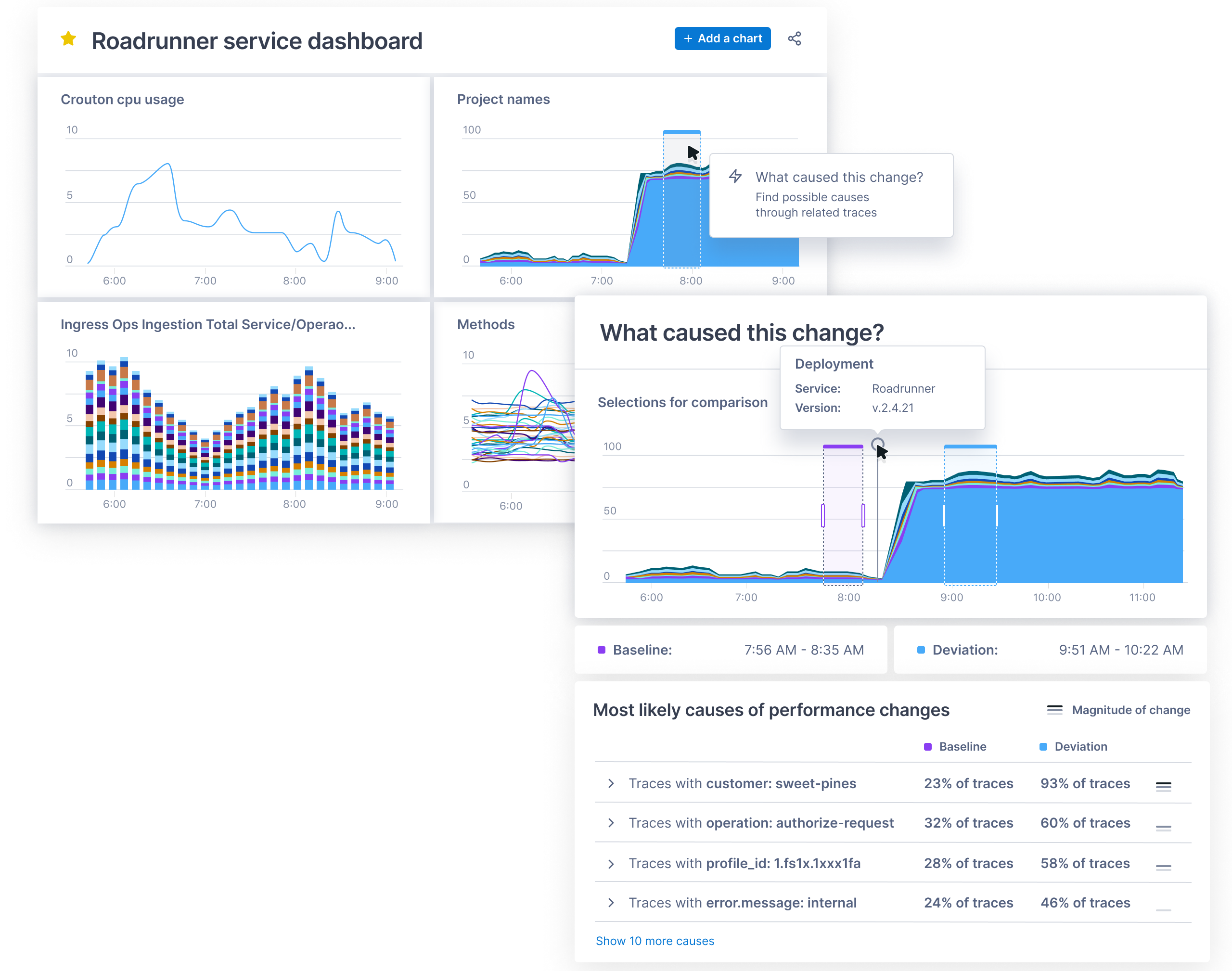
Lightstep this week announced general availability of a Change Intelligence observability platform based on a time-series database that is capable of processing a trillion events each day.
Ben Sigelman, Lightstep’s CEO, said as IT environments become more complex, thanks to the rise of microservices and cloud-native computing platforms, existing monitoring and observability tools will not be able to keep pace with the rate of change in what have become highly dynamic IT environments.
While AIOps promises to address that complexity by employing machine learning algorithms to analyze IT environments and surface recommendations, Sigelman said there will always be the need for observability platforms that enable IT teams to discover the root cause of an issue in a way that surfaces the insights needed to fix the problem in real-time.
The Lightstep database was built by the same team that created Monarch, the globally-distributed in-memory time series database system that Google employs to monitor its applications and systems. Lightstep’s database makes it possible to collect metrics, in the form of distributed traces, at a level of scale that allows IT teams to analyze events across a distributed IT environment made up of both monolithic and microservices-based applications, said Sigelman.
Lightstep is the latest entrant in an already crowded field of observability platforms, all seeking to consolidate the wide range of monitoring tools IT teams have used for decades.
The challenge IT teams face is that each of those monitoring tools is focused on a narrow range of platforms. IT teams often lack context when an issue arises, and wind up trying to correlate reports from multiple monitoring tools in the hopes of discovering the root cause of an issue. Observability platform providers are making the case for a single platform that correlates application and infrastructure events in a way that makes it easier for IT to fix issues faster.
Observability, of course, has been a core tenet of DevOps for years. The tools for achieving that goal, however, have been cumbersome to implement and maintain using legacy application performance management (APM) platforms. Most of those platform providers, have rolled out what are positioned as next-generation observability platforms. Now, IT organizations will need to decide if they want to maintain investments in existing platforms versus moving to one of the raft of upstarts looking to dethrone APM incumbents.
The startups are counting on a massive expansion in demand for observability platforms. IT organizations have tended to limit their usage of APM platforms to mission-critical applications due to cost and the challenges associated with maintaining the agent software needed to collect metrics from each application. Modern observability platforms have automated much of the metrics collection process, while open source software promises to make metrics collection more affordable..
The challenge, of course, is that many organizations are already struggling to manage complex IT environments, and can’t necessarily wait for that open source software to mature.
Twenty years ago, no one in IT could have predicted the monumental role that cloud computing would play in our everyday lives. To play off the words of Back to the Future‘s Doc Brown: “On-premises? Where we’re going, we don’t need on-premises.” As technology continues to evolve, though, security teams face greater challenges.
Infrastructure is no longer server rooms and boxes; it is dynamic, changing constantly to support fluctuations in demand. And moving to the cloud introduces new third parties into the digital mix. Although AWS, Google, and other cloud providers have a lot at stake when it comes to protecting customer data, security responsibility is never completely out of an organization’s hands. Compliance considerations are yet another complicating factor. In many cases, regulations around data access, privacy and residence were created for an on-premises world.
Looking to the future, companies want to maximize their investments in the cloud, while better addressing these security challenges. However, the rapidly changing nature of the cloud makes it difficult for security teams to fully understand the scope of assets they are responsible for at any given point in time, which is an absolute necessity in order for companies to truly be secure. After all, how can a company make sure it has no gaps in its cloud security if it can’t account for all cloud assets – especially when working with multiple cloud providers?
Security teams need to inventory their entire cloud infrastructure, understand what controls are in place and find ways to detect and mitigate any vulnerabilities or misconfigurations in a timely manner.
Understanding Cloud Workloads
When moving assets to the cloud, it can be incredibly difficult to try to inventory devices with dynamic IP addresses, which constantly change, compared with more static devices. The mass adoption of containers and microservices, some of which exist for just seconds before disappearing, make dynamic systems even harder to track.
One of the most important improvements that have come out of cloud growth is that everything has an API, which can be a massive advantage when inventorying assets. Because each cloud provider is self-contained, finding out when a new bucket or instance is created is certainly possible. Organizations that have advanced development capabilities can write and maintain their own applications to identify every new cloud instance for each provider – but doing this for multiple cloud providers and correlating cloud asset inventories with other security control data becomes a major investment of resources. The ability to access all resources in the cloud makes asset management a more achievable goal.
Security Controls
It is essential for organizations to carefully manage their assets and understand the security controls in place to know exactly what they cover. By categorizing their resources, companies not only better understand what they have, but can make informed decisions about exactly what additional security measures need to be taken. For example, vulnerability scanners may not be scanning critical workloads – or perhaps dedicated cloud workload protection platforms need to be deployed for certain cloud assets. It can be incredibly difficult for security systems to keep up; since cloud assets can be created so quickly, they need security systems tailored specifically to keeping them safe.
A security tool can only secure devices that it knows exist. Once an organization understands the assets it has, it can expand the coverage of any existing tools to devices that were previously unknown. When that coverage is fully adopted, asset management can help the organization find gaps in its coverage to identify areas for additional protection and the right tools to secure them.
Addressing Vulnerabilities and Misconfigurations
Once an organization establishes a comprehensive asset inventory and visibility, the next step is to address vulnerabilities, gaps in coverage or misconfigurations that are found. With the ability to spin cloud instances up or down at will, it is inevitable that instances may be forgotten and inadvertantly left unprotected. Since cybercriminals automatically scan public cloud infrastructure to exploit these types of vulnerabilities, public-facing cloud workloads are especially at risk.
Similarly, finding and addressing misconfigurations in cloud workloads becomes more complex. With the highly configurable nature of the cloud, mistakes happen often, and without proper security controls in place to detect these misconfigurations, attackers can easily access and steal data. Organizations must implement a process to continuously detect cloud workload misconfigurations.
A great place to start is the Center for Internet Security (CIS) Benchmarks, which provides objective security guidelines. By comparing data from each cloud provider with the rules in the CIS Benchmarks, security teams will be able to identify assets that don’t adhere to best practices.
The key to maintaining security in a modern cloud environment is to implement continuous discovery and interrogation, which requires automation. This includes the ability to create tailored alerts when certain conditions are met, and automatically deploy and change security controls as needed. Teams should set restrictive access controls by default so that non-approved users don’t have access to sensitive data. Any time a cloud workload deviates from policy, there should be a plan in place to automate the corrective action.
Computing technologies continue to evolve at a staggering pace. The computing environment 20 years from now won’t resemble even the most far-fetched, futuristic ideas today. The evolution of cloud adoption from justified skepticism to ubiquity taught us an important lesson: change is constant. It is incumbent upon technology and security professionals to constantly challenge the expectations of security solution coverage and adherence to controls to keep data and systems protected.
Even in 2021, many companies still run business-critical, legacy applications on-premises, just as they have for the last 20 to 30 years. The midrange server hardware, and their unique architecture, on which many of these applications run is both their biggest drawback and biggest advantage; the benefits of being able to vertically scale a platform were measured against the drawbacks of the necessary custom hardware. Migrating the workloads running on these types of systems to the cloud, which can potentially offer huge benefits, presents some unique challenges – here are four strategies for doing this, with pros and cons for each.
Option 1: Lift and Shift
The “lift and shift” option means you’re simply representing the on-premises network within a cloud service provider. This is the easiest and quickest option.
Until recently, this was not an option for most legacy applications. This was because the main hyperscale clouds did not offer dedicated infrastructure as-a-service (IaaS) implementations for several common data center operating systems. The process required purchasing a vast amount of dedicated hardware to offer as-a-service to customers, and it wasn’t clear if the demand warranted that cash outlay.
Recently, however, it’s clear that the only way for organizations can leave behind the data center is by moving business-critical applications to the cloud. There are now hyperscale cloud providers that offer lift and shift options for even the most demanding workloads.
Despite these benefits, it’s important that a lift and shift approach is carefully planned before executing. Even a couple of seconds of downtime in traditional application workloads can cost businesses thousands of dollars. Finally, organizations should understand that they won’t be using the cloud to its full potential simply by recreating their on-premises environment.
Option 2: Rewriting or Refactoring
Refactoring a traditional application into a cloud native application has been the de facto migration option for many years. It provides greater long-term cost savings than other options, because previously underprovisioned data center resources can now be consumed on-demand in the native FaaS offerings of hyperscale cloud providers. The compute capacity is nearly limitless, and only scales as resources are being used.
However, refactoring to cloud native services does have major risks, such as high short-term costs. Refactoring an existing business-critical application is typically much more complex than a simple lift and shift. Also, an application that has been part of the core business stack will have likely accrued many dependencies and interfaces with other systems and added modules that must be accounted for.
Another consideration is that legacy interfaces must appear identical to other systems post-migration, otherwise you must expand the scope — including other systems in the migration project that originally weren’t planned. Many of the hyperscale cloud providers do not support legacy interfaces in their cloud native services. Scope creep can become a real issue in this scenario, and your organization could lose sight of the migration timeline.
An enterprise service bus (ESB) is one potential solution to the problem of legacy interfaces. An ESB is typically deployed as a “bus” between various business applications, ensuring that all those interfaces use a common interface. The ESB handles the network, transport, routing and delivery of messages and content. However, ESBs add yet another layer of complexity, increasing the risk of failure for the overall refactoring project.
Option 3: Dynamic Lift and Shift (Reshape)
Reshaping an application to the cloud typically lies somewhere between the lift and shift and the refactoring strategies. It’s similar to lift and shift, but usually involves some minor modification to the application to take advantage of native tools within the cloud infrastructure. An example is adding automated launch and tear down of development and test environments.
One of the main advantages of a reshaping is that it is cost-effective. An organization will see significant cost savings over a simple lift and shift, for example, by only having to pay for the hours that the development and testing machines are powered up and running.
It also means that the development teams are free to experiment with refactoring certain applications without a hard deadline (such as a data center exit.) Finally, a dynamic lift and shift strategy allows development teams to leverage cloud native functionality, such as infrastructure as code, to automate traditional workloads without retraining on a whole new development stack.
Option 4: Drop and Replace with COTS
Another option is to replace your custom application for one that is commercial off the shelf (COTS). For example, replacing a custom-built customer relationship management (CRM) system with a vendor’s product.
This is not feasible for some organizations because of their business environment constraints, but it is recommended when possible. COTS products (that are typically SaaS) usually have a repository for various connectors to different legacy applications; however, this is largely dependent on the size and maturity of the COTS product.
It’s important to note that one of the largest risks of considering a COTS application is the skills within the organization. If the current development team’s skillset lies with custom, traditional applications, they will need extra time to retrain and develop the extensions to integrate the COTS product with their existing environment.
Migrating any application to the cloud is a large undertaking. There will always be risks when moving existing on-premises applications to the cloud, but in general, the overall positive impact of moving legacy applications far outweigh any risks, regardless of the approach you decide to take.
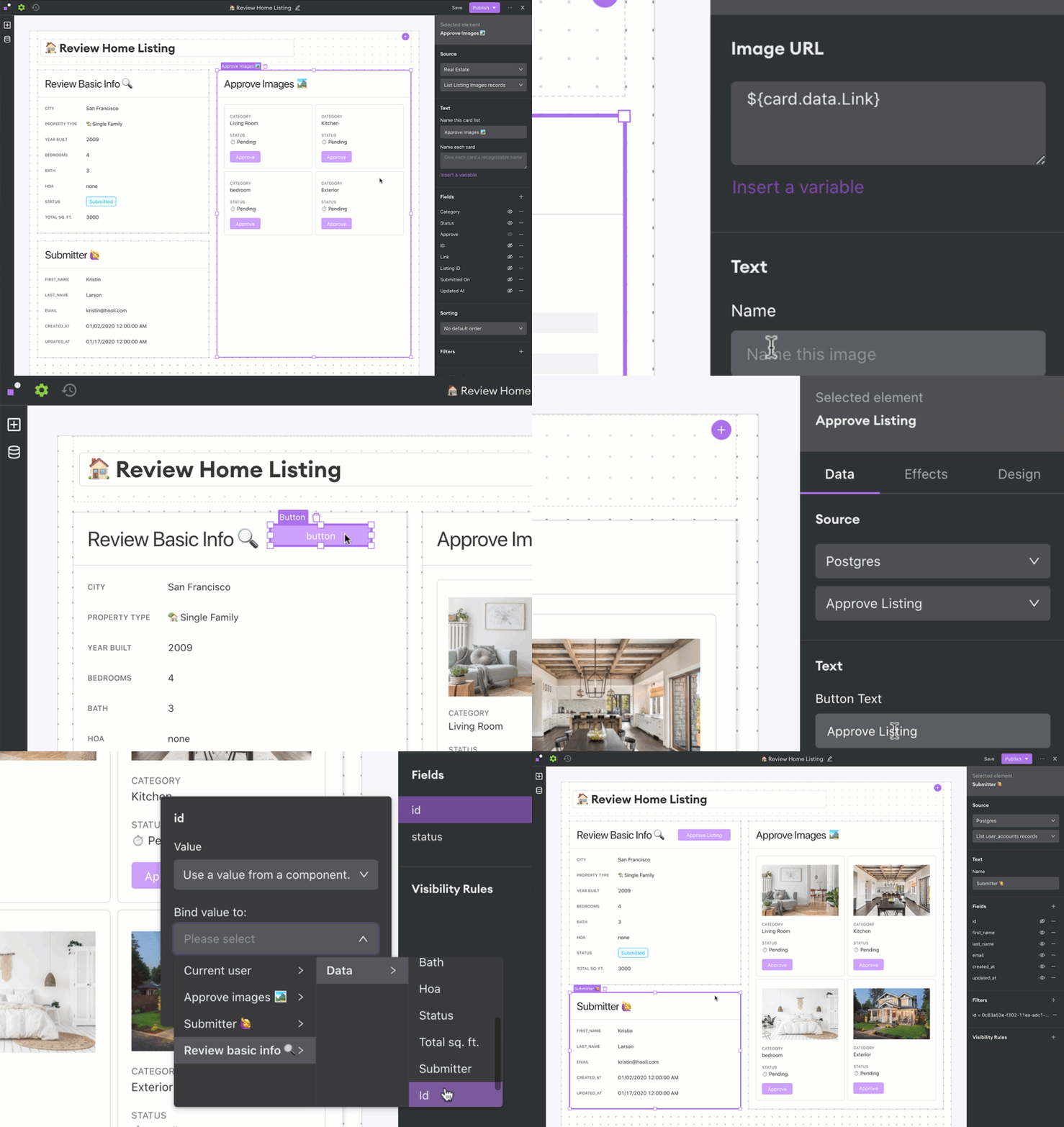
Arisa Amano, CEO of Internal, said many professional developers regularly find themselves building simple applications that, if given access to the right tools, could be built instead by end users. Internal was created to provide that capability either through a cloud service or, now, through an on-premises edition.
The on-premises edition makes it simpler for developers to work with databases, application programming interfaces (APIs) and applications that reside behind a corporate firewall, Amano said.
As organizations accelerate digital business transformation initiatives, professional developers are pressed to build and deploy more complex applications faster. Many lower-priority application development projects are sidelined simply because developers don’t have time to take them on. Internal, and other no-code and low-code application development tool providers, are making a strong case for enabling end users to build their own applications using graphical tools, or encouraging professional developers to use these tools to build less complex applications more quickly.
A survey published by Internal finds 62% of respondents report their developers spend more than 25% of their time fulfilling requests to build internal tools. More than three-quarters of respondents (79%) said engineers use any extra time they can find to develop customer-facing features or other applications.
Most of the projects filling application backlogs tend to involve workflows that span multiple applications running in a data center. The challenge organizations face is low-code and no-code tools that reside in the cloud can’t easily access that data. As such, Amano said there’s a clear need for a no-code tool that can be deployed in an on-premises IT environment.
Of course, regardless of who builds the application, it still must be deployed. Challenges arise as developers build more applications, which must be concurrently deployed in production environments. The addition of no-code and low-code tools, and the applications created with those tools, will require organizations to rethink and refine their DevOps processes.
Historically, professional developers have tended to view no-code and low-code tools as the application development equivalent of a black box preventing them from building reliable, robust applications that can scale. Many low-code and no-code applications that organizations build, however, are meant to used internally by a finite number of end users. At the same time, no-code and low-code tools become more robust with each major update.
Whatever bias may exist, the current application development backlog in most organizations is only going to increase. Professional developers may prefer to write code at a lower level than a no-code or low-code tool allows; however, most business executives are more interested in application performance than in how it was constructed.
Cloud overspend can have a major impact on a company’s bottom line. Here’s what organizations need to know
Cloud technology has reached the stage of mainstream adoption across multiple industries, be it finance, health care, manufacturing or retail. According to a Research and Markets report, the global cloud computing market is expected to grow further to $832.1 billion by 2025, at a compound annual growth rate of 17.5% during the forecast period. However, with the expected increase in cloud usage, cloud waste is bound to increase. According to a report by Gartner, cloud waste is forecasted to reach $21 billion by 2021.
Companies that are not aware of the factors that lead to cloud overspend will end up wasting a lot of money without even realizing it. This article discusses some of the reasons for cloud overspend and potential ways to optimize cloud usage and expenditure.
Understand cloud better: One of the most prevalent reasons organizations overshoot their anticipated cloud usage is a general lack of understanding of cloud technologies. They often fail to make well-informed choices at the beginning of their journey to the cloud. Without truly understanding their business needs and the trends in their industry, they will opt for a one-size-fits-all approach, which frequently does not work. Gartner estimates that 70% of the global cloud overspend can be attributed to companies that do not have a defined plan for cloud cost management. An activity as simple as organizing data before a cloud migration can help organizations optimize cloud usage.
Define a policy around cloud usage and associated expenditure: Organizations that do not have a defined strategy to navigate their cloud journey frequently end up with misaligned priorities that can lead to overspend. This lack of strategy manifests with different people and/or departments managing disconnected cloud initiatives that frequently are not aligned with the overall business goals or bound by governing policies, the result of which is typically out of control cloud sprawl. To avoid overspend due to a lack of governance and oversight, organizations should at the very least define these three controls at the start of their cloud journey:
Financial controls at multiple levels of the organization.
A project lead who coordinates, controls and manages cloud resources across the organization.
Resource quota policies to help prevent unanticipated spikes in usage.
Control overprovisioned resources: According to a report by RightScale, approximately 40% of cloud instances are larger than needed for their workloads. The widespread perception that cloud technology is economical and affordable makes companies worry less about controlling the expansion of cloud instances. This often leads to the creation of unnecessary or oversized instances, resulting in shockingly large bills.
Decommission idle and orphan resources: Continuous and thorough assessments help to identify and eliminate assets that are no longer used or required. The right assessment helps identify unattached volumes and orphaned assets that can be deleted. Investing in cloud cost optimization tools can assist with these assessments and reviews. Without a regular review of cloud resources, companies will continue to pay for resources that are no longer needed.
Track vendor contracts regularly: Keeping a close watch on your vendor contracts governing licensing and subscription services is a complicated but necessary step to reduce cloud overspend. This becomes more critical for companies dealing with multiple vendors for different cloud services. Vendor contracts should be re-negotiated and fine-tuned at regular intervals to reduce subscription costs. These savings could be substantial in the long run.
One of the most important steps on your journey to the cloud is finding the right partner that can assist you at every stage. Choose a technology partner that can help with not just implementation but also the management of your cloud instance. A strategic partner will help you leverage the cloud to drive business growth as well as scale your cloud usage and spend to suit your ever-changing business needs.
Cloud data platforms make businesses more scalable and flexible and more cost-efficient
The need for actionable data is nothing new. Enterprises spend time, money and resources working to get their data into a format that is usable for analytics. But most are still struggling to do just that. More than 90% of enterprises say that making data available for insights is a key challenge in their analytics programs. The journey to modernizing your data infrastructure is challenging, especially if performing data transformation quickly is holding back your business.
To compete effectively with data, you need “analytics-ready” data. This requires scalable data transformation—the ability to join together siloed data, denormalize, enrich and apply business logic. This process is imperative for getting to the insights that will help you solve business challenges at pace. So how much can data transformation benefit your business? It can rapidly improve your data preparation process, consolidate your data sources, save money, make accurate forecasts and predictions and most importantly, provide you with the insights you need for business growth.
Cloud-native Solutions and the Cloud Data Warehouse
A modern data infrastructure works best with cloud technology. Legacy data warehouses hold businesses back from scaling alongside data volumes and bringing data together into a single view. Cloud data warehouses help companies move quickly, and cloud-native solutions use the economics and power of the cloud to handle big and varied data volumes. This is especially helpful with a cloud ELT (extract, load, transform) solution. Traditionally ETL (extract, transform, load) is used to perform data transformations. But the modern ELT approach allows you to move data directly into your cloud data warehouse and then perform the necessary transformation. When enterprises employ a modern data environment and cloud-native tools, it is easier to proactively use data to glean insights—and save on provisioning costs.
Take, for instance, a large cloud security organization that needed a centralized data repository that was modeled to handle diverse data sources and increasing data storage and reporting needs. This company moved off of its legacy system onto a cloud data platform with a cloud data transformation tool, allowing them to reduce application spends by 84%. Now with a single view of data, they can easily run unified reports to analyze data quickly, opening up greater possibilities to extract insights.
Preparing and Transforming Data Quickly for Faster Time to Insights
The act of wrangling data is time-consuming. In a recent survey by IDG, nearly half of data professionals reported that it takes more than a week to prepare data for analytics. ETL, ELT and data preparation workloads are bogging down precious data engineering resources and wasting valuable time that could be better spent innovating with data. Data preparation is a challenge for organizations because the work is code-heavy and manual. Cloud-native ELT solutions can reduce the burden of data wrangling and provide a much faster, low-code process to prep data.
Data transformation tools that take advantage of the power of the cloud, have intuitive and automated data preparation processes that eliminate the need for coding.
This enables businesses to transform data for advanced use cases such as machine learning. For example, a global logistics company that made 100 million deliveries to 37 million unique customers across 72 countries needs to use massive amounts of data, from a variety of sources, to fuel its daily operations. Using data transformation inside their cloud data warehouse helped them to join together disparate data and improve business processes. The company deployed 200 machine learning models in a single year, used to make 500,000 predictions every day. This significantly increased the efficiency of its delivery operations and helped the customer service team reduce inbound call center inquiries by 40%.
High-quality, Accurate, Timely Data Makes the Difference
New data sources are proving beneficial—and challenging—for businesses to integrate into their organization. As the pace of data increases, the need for recent and accurate data rises along with it. An analytics platform built in the cloud can provide a much-needed pipeline of high-quality data that can be used in a timely manner, with insights provided quickly.
As another example, a software company that wants to improve its data-driven culture by relying on fast data integrations using a cloud analytics platform to ingest information. Instead of analyzing data that was days old, the software company used a cloud data transformation tool to load data in real-time from all external sources in the business. By taking advantage of reusable components built in the cloud, the team reduced their data ingestion process from as many as 10 workflows down to just one. This allowed them to reduce their data warehouse and ETL administration, freeing up developer resources to innovate within the business.
Scaling Resources and Saving Costs With a Cloud Data Platform
The results of cloud data transformation speak for themselves, as enterprises from different industries see accelerated time to value, scalability and cost savings that validate their investment in modern solutions.
Data transformation, performed in the cloud, can help you rapidly improve data management and existing processes. Analytics-ready data can help you solve critical business problems and ultimately generate revenue. As external factors contribute to pressure on budgets, resources and road maps, transforming data with an ELT solution will help reduce development time and accelerate innovation with new insights. Cloud ELT and data platforms make businesses more scalable and flexible, cost-efficient and better-prepared to leverage data in advanced use cases involving IoT data, machine learning and artificial intelligence that can predict what comes next and what to do about it.
The flexibility and scale of cloud-native development makes it an obvious choice for IoT initiatives. That’s partly because IoT engineering tends to be more complex, requiring seamless interoperability between software, hardware, a UI, together with connectivity and data handling capabilities. Typical IoT initiatives are compute-intensive too, again making them a good fit with the functionality a cloud-native development platform can provide. The right cloud platform can help accelerate the launch of an IoT project and reduce the risks associated with rollout. Simultaneously, cloud-native development should also increase efficiencies through the development cycle, which both speeds things up and lowers costs.
Considering the significant benefits of cloud-native engineering, what, if any, are the downsides? For those new to engineering in the cloud, there is a learning curve involving a few new variables that need to be taken into consideration to avoid disruptions and vulnerabilities in the software development and operations environment. Furthermore, selecting the right cloud tools can be confusing. The cloud giants (Microsoft, Amazon Google, and IBM) all have comprehensive offerings. In addition, dozens of specialist providers compete alongside them with targeted sector-specific solutions.
An IoT platform should help to minimize risk and ensure quality digital service delivery from end-to-end. It should provide organizations with tangible benefits that amount to a head start in engineering terms: built-in tools and capabilities that cut effort, costs and time required. Many specialist vendors offer attractive packages that address IoT solutions needs without requiring too much customization. However, engineering teams must also take into account how the IoT solution integrates with their organization’s wider digital offering. IoT systems deliver the most value when they are closely aligned with the rest of the business. As a result, data handling and data integration become critical factors in the decision-making process.
More generally, IoT platforms offer some very attractive services to help companies get started in setting up their IoT solutions. There are trade-offs, however, which often come later down the line in the form of pricing, technical constraints, complexity and vendor lock-in. When it comes to evaluating cloud platform providers for IoT, there are a number of factors every organization needs to keep front of mind.
Is there a cloud platform name that keeps cropping up in conversations with your trusted influencers? Enterprises should seek recommendations, then follow up to ensure providers can share examples and evidence to back up success stories.
Pay attention to scalability. Cloud providers will dazzle prospective clients with how many millions of connections they can handle. Can they show consistently high uptime? Can they help you make the job of scaling easier? Can they monitor the performance of devices?
Finding a cloud platform that can meet your IoT solution needs is your primary concern. But longer-term, it is worth asking how well the platform accommodates changing use cases.
How will your IoT system handle regular updates? These come in the form of system integrations from the IoT platform vendor and firmware updates that you will want to push out to your connected devices.
The new IoT environment will need to seamlessly manage data, so businesses need to consider how they will ensure that happens. When approaching the challenge of data management, they will need to evaluate if they have the skills and resources in-house to work alongside their IoT cloud provider to ensure success, or if additional external support may be required.
Congratulations, your role is now to own, manage and secure millions of data points! How will your IoT cloud platform work alongside your existing security practices to bolster security and privacy in the IoT system?
Established all-rounders or small specialists? Proprietary or open source? There are many factors to weigh up, including the trade-off with ease of setup, where enterprises feel the benefits immediately, but potentially at the expense of future constraints such as vendor lock-in.
It’s important to read the small print when it comes to disaster recovery options. A whole host of environmental factors can impair the ability of an IoT system to function. This is an opportunity to examine how DR planning is handled right from the get-go, and to question a provider’s track record when it comes to outages.
The difficulty businesses most often have in budgeting for their IoT platform support is failing to account for how their needs change. A pricing model that seems great upfront can prove costly in the long run. Try to anticipate the changing needs and ask what kind of pricing flexibility the IoT cloud platform can offer.
While there are undoubtedly many factors to consider before undertaking cloud-native IoT development, cloud engineering confers many significant benefits. Nowadays the right IoT cloud platform is much more than hosting and accessing resources in the cloud. Cloud-native computing enables companies to take advantage of the most up-to-date techniques and services. These include PaaS, multi-cloud, microservices, agile methodologies, containers, CI/CD, data engineering, IoT, AI, and machine learning, but the list could go on. With the right IoT cloud partner, companies can harness the latest technical capabilities to progress toward their strategic business goals. Embracing cloud-native engineering helps organizations accelerate digital delivery as well as achieve scale, increase reliability and improve efficiency.
Taking a holistic approach to cloud optimization and application modernization can help keep cloud spend in check
There’s a fine line between cloud spend and cloud sprawl. Most companies today are using cloud technologies to power their most important products and services, communications and collaboration, but it’s easy to cross the line from spending smartly on cloud services to spending unnecessarily.
Gaining control of cloud operations and cloud spend should be a goal for every organization, big or small. The good news is, it’s not as tough as you think. With a few smart moves, every company can become a cloud operations optimizer. Below are a few tips.
3 Tips for Cloud Optimization
Gain Complete Visibility Into Your Data
It’s all about gaining a comprehensive view of all your data, pulling correct metrics, ensuring tagging best practices are followed and analyzing/interpreting what is going on. Many of the cloud optimization tools out there don’t pull the necessary information (actual RAM usage, for example) to accurately make meaningful recommendations.
Compute resource data is only part of it; having a deep financial understanding around when to make RI/Savings Plans purchases and EDP/EA negotiation are just as important. You don’t want to pay for too much coverage or too little, and ideally you don’t want to make those decisions before you know your environment has been optimized.
Know your Applications
Cloud providers offer multiple financial methods of procuring resources such as savings plans, reserved instances, spot resources, EDP/EA plans, etc. Knowing how your users are interacting with your applications is key to understanding which financial option will make the most sense and achieving maximum savings.
For example, a client has an application that is very spikey in utilization and is only accessed at certain hours during the workweek. Purchasing a Compute or EC2 savings plan or reserved instances may not be as cost-effective as applying auto-parking policies or utilizing spot resources (or a combination of both), since the application doesn’t need to be on all of the time.
Non-Traditional Cloud Services
Frequently, clients migrating to the cloud will simply perform a 1-for-1 migration and carry with it the traditional three-tier architecture (web/app/database). Getting out of that mentality can be a struggle for many clients, but having awareness of what is going on in the cloud environment at the application layer can help formulate a strategy for that over time. It can also help transition that mentality away from traditional architecture into more cloud-native services (containers/serverless, for example), which can provide cost savings and improved performance and open the door to more advanced services that can be taken advantage of in the future, such as machine learning and AI.
Mistakes to Avoid
Too often, companies believe that their cloud environment is already optimized. A typical cloud provider rolls out approximately 20 to 30 new features and updates per week. Multiply that by three for the top cloud platform providers (AWS, Azure and Google Cloud), and you have a daunting challenge of keeping up with everything. This takes the client away from doing their most important job: running their business.
Companies also have a tendency to not think about optimization or application modernization when deciding to move to the cloud. A lot of clients will simply look at their compute requirements that are being utilized in their data center and build the exact same thing in the public cloud. While this will get them to the cloud more quickly in most cases, there tends to be a lot of waste when performing this method. The sooner you can start thinking about optimizing, the better.
And, finally, too many companies take a traditional data center operations mentality to the cloud. The cloud continues to offer more and more advanced services that can greatly benefit a business.
Conclusion
Taking a holistic approach to optimization and application modernization leaves no stone unturned, typically generates enough savings to pay for itself, and, once implemented on a regular basis, will ensure that application performance meets demand. This is especially effective for clients with large cloud spend and dynamic environments.
The best way to optimize cloud operations and spend is by engaging a managed services provider (MSP) and realizing that there is no single tool that can provide the type of analysis most companies need. Optimization requires both in-depth technical and cloud financial knowledge. It also requires collaboration between the MSP and all of a company’s business units to gain an understanding of their needs and application usage. Once all the data has been collected and interviews performed, recommendations can be delivered. It’s then up to the client, in collaboration with the MSP, to implement those recommendations to achieve true optimization and ultimately realize cost savings.
Scaling your business needs robust solutions, and a multi-cloud strategy can exactly help you achieve that. There has been a debate on whether organizations should go for multi-cloud or stick to a single vendor. Recently, one of the users of Reddit posted a question, “Do you need a multi-cloud strategy?”
Responses to the question offer some interesting observations, in which large organizations are considering the multi-cloud strategy as failover situations. Most organizations migrate toward multi-cloud strategies to:
Avoid vendor lock-in.
Porting over dependency for computing function toward one cloud service.
Achieve self-containerization and portability.
Multi-cloud is a strategy in which organizations seek services from heterogeneous cloud providers. Such providers can be specialized in platform as a service (PaaS), infrastructure as a service (IaaS) and software as a service (SaaS). Multi-cloud can also include public cloud, private cloud and even hybrid cloud service.
The strategy has been quite popular among organizations across the globe. The global market for multi-cloud management will reach more than $1659.6 million by the end of 2020 and is expected to grow at a CAGR of 16.1% for the forecast period of 2021-2026.
Here, we are going to discover some fantastic architecture designs for multi-cloud deployments. But, before that, let’s answer the question that most organizations should ask.
Why Deploy a Multi-Cloud Strategy?
Suppose you are a big organization like Spotify and all your data is handled by a single vendor—say Google Cloud Platform (GCP). Now, the streaming service has all the chips on a single vendor here. It is not that GCP is inefficient, but the dependency is higher. So, what to do for the worst-case scenario?
Multi-cloud is an architectural decision for an organization. It helps reduce the dependency on a single vendor and creates a fail-safe.
So, let’s discover some interesting multi-cloud migration strategies for your business.
Redeployment Multi-Cloud Migration Pattern
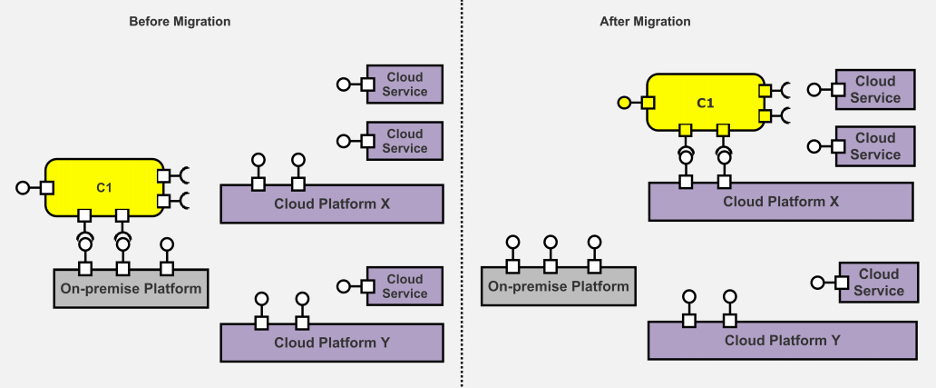
Re-deployment of an application or software needs refactoring of the architecture. It is a great way to revisit the deployment strategy, especially when you are migrating to multi-cloud. This migration pattern can help transform the existing architecture into a multi-cloud design. It includes pre-defined architecture elements including the service, cloud platform, connectors and even onsite storage devices.
Any service component can be atomic or allow a hierarchical redundancy. Here, before the migration, the component uses services from the on-premises platform. These services can be the coordination of different component architecture or IaaS.
Once we migrate the component to multi-cloud architecture design, the on-premises service is replaced by a public cloud platform. So, the application is re-employed on a cloud platform without higher operational expenses, offering greater virtualizations.
Cloudification
Cloudification design architecture explores the integration of public cloud platforms for added capabilities. Before the migration, the component uses on-premises services without any additional capabilities. It reduces the extensibility, increases redundancy and decreases reusability.
The solution here is simple: You can migrate to the cloudification architecture. Here, the on-premises service is integrated with the existing public cloud platform for extended capabilities.
Relocation Design Pattern
Sometimes significant changes in the multi-cloud architecture design can increase the operational expenditures. The solution to such an issue is a relocation strategy that helps maximize the existing architecture with multi-cloud capabilities.
Here, the architecture uses queues, partitions of the database and other tools such as NoSQL or cache to capitalize on cloud services. It helps improve the efficiency of the components rehosted in the cloud.
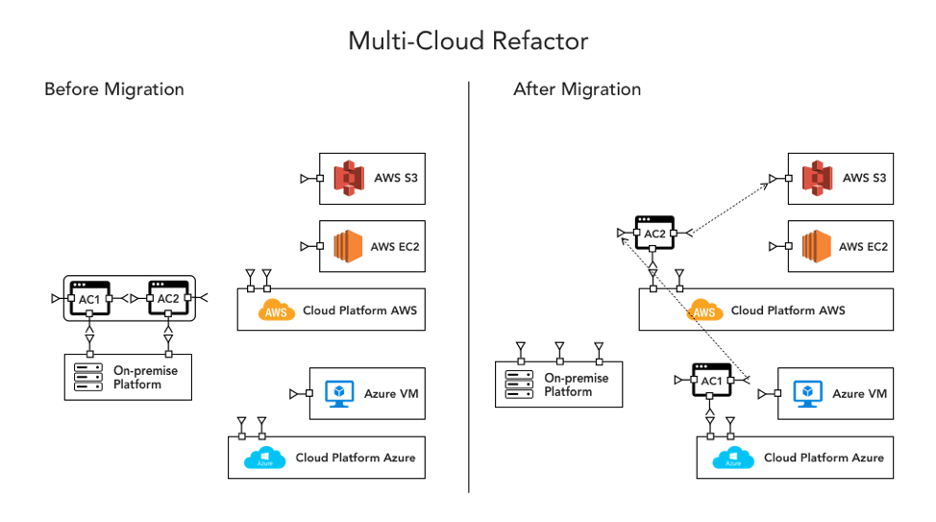
Multi-Cloud Refactoring
Many large organizations opt for multi-cloud architecture designs. The component is often pretty large to capitalize on the advanced optimizations offered by cloud platforms. The bulky components do not respond well to changes and variations in data.
The solution is to refactor the multi-cloud architecture. The application is refactored into small components that are optimized individually for lower usage. A parallel architecture helps with better performance, scalability and flexibility of multi-cloud features through integration.
Multi-Cloud Rebinding
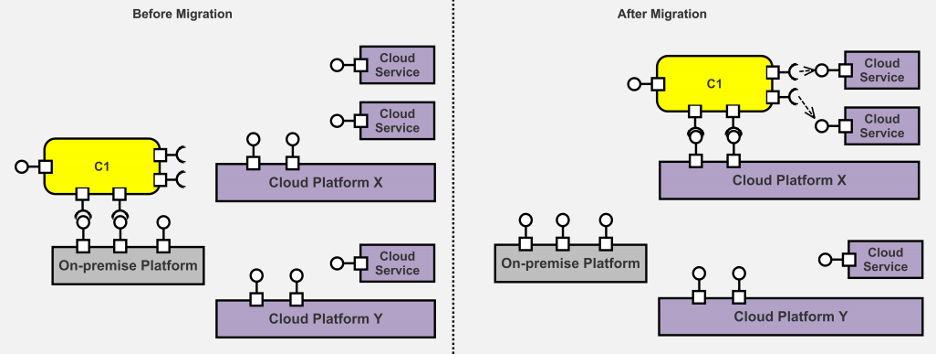
Multi-cloud rebinding is an especially fail-safe architecture. Take an example of Netflix’s streaming service: You are watching a movie on the app, but streaming stops due to a bug in the cloud platform. Netflix simply routes the traffic to the nearest healthy data center or cloud service for an uninterrupted experience.
Rebinding the multi-cloud architecture can help redirect the traffic while your unhealthy instances come back to normal during a failover. So, you can again use the original cloud services and direct the traffic back.
Replacement Architecture Design
Innovation in existing products often needs services with higher capabilities. For example, you want to integrate a machine learning algorithm into an application, but the current architecture does not have that capability due to existing cloud service. So, you can replace the cloud service with the ones that have better performance and handle such integrations.
Replacement architecture saves your re-engineering efforts and operational costs. It helps improve the performance of your products through cloud services with advanced technology.
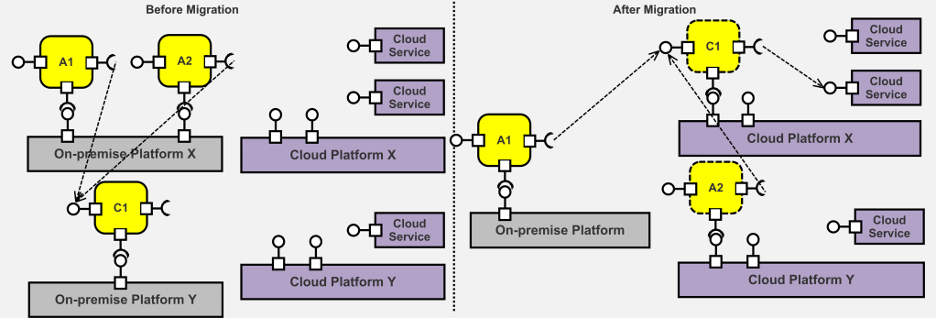
Multi-Application Modernization
Many organizations tend to create a portfolio of on-premises applications for cost reduction and better consistency. What transpires in the real world, however, is often different from the envisioned architecture. These shared components do not have that consistency and cost higher.
Here, you can see that A1/A2, C1 shares the on-premises platform as a portfolio deployed on the cloud environment. Instead of a portfolio, these services are separately deployed in a re-architected multi-cloud design. It helps in identifying the capabilities of different components and finding the solutions shared among them. It will help organizations have constant information on shared solutions and reduce operational costs through optimizations.
Conclusion
The current application market has many organizations leaping through innovations and advancements. It emboldens these firms to use multi-cloud architectures to leverage different microservices and containers. The multi-cloud landscape is growing and a new era of function as a service (FaaS) has emerged.
Breaking the single vendor lock-in to deploy apps with services from multi-cloud is popular these days. The best things about this revolutionary change are better consistency, flexibility and performance, which become evident. Organizations can switch to multiple vendors to share the workloads and create an ecosystem of services.
Organizations need to take a considered and gradual approach to cloud migration to ensure security and compliance
For businesses to succeed in 2021 and beyond, agility and responsiveness are critical. Data is the new currency, and businesses need to be able to access theirs instantly and securely to make the rapid-fire business decisions that will make or break their long-term strategies. One way IT can improve responsiveness and business agility is by moving business applications to the cloud.
When migrating applications to the cloud, the need for network security is often overlooked. When this happens, applications are deployed in the cloud without adequate security and compliance measures in place—or, conversely, the security team steps in and halts the migration process.
This puts the company at risk: Inadequate security makes it easier for hackers to access the network and mount an attack against the company, exposing the company to financial losses and legal repercussions. Moreover, if the business is unable to respond to market demands in a timely fashion, there are clear financial implications.
The Challenge of Security
Cloud migration comes with several benefits, but it also exposes a number of security risks. With every advantage comes a cost, and it is up to businesses to do whatever they can to mitigate that risk to leverage the cloud to its fullest potential.
An AlgoSec survey found that organizations reported a range of problems when migrating to public clouds, with 44% having difficulty managing security policies post-migration and nearly a third struggling to map application traffic flows at the start. Respondents also had concerns about applications in the cloud, with the greatest worry being cyberattacks (58%) and unauthorized access (53%) followed by application outages and misconfigured cloud security controls.
But this shouldn’t stop progress from happening. To demonstrate this, let’s take four of the biggest advantages of cloud migration and outline the security challenges that come with them.
Security and Data Protection
When adopting the public cloud, data itself is much more accessible no matter where it is located, but this does not come without a cost. Data in the cloud is highly regulated and therefore subject to greater regulatory compliance—for example, under GDPR in the EU. Once the data is no longer kept on-premises, security must be tightened and additional security controls must be employed to demonstrate greater control over data storage and usage, in accordance with set guidelines. There are best practices to uphold, as well as financial penalties if organizations do not comply with them.
Agility
Spinning up a server in the cloud takes mere minutes. Cloud computing requires no hardware and no locally installed software; all you need is a credit card and you can be up and running with your very own cloud-based infrastructure almost instantly. Some businesses are powered purely through SaaS and IaaS services, and it makes them incredibly nimble in rapidly changing times. But this agility also comes with risks. For security to be tight, businesses need complete visibility, and that is not always possible when working exclusively in the cloud. Therefore, stronger pre-fail measures and cloud firewalls are needed, as well as established baselines for allowed connectivity for each cloud server used.
Cost-saving
The cloud offers zero maintenance and capital cost along with reduced IT support costs. You also have the added benefit of only paying for what you use, which means you don’t have to purchase expensive hardware that you would only need during peak times. However, there may be hidden costs depending on which provider you use, so you will want to monitor usage and cloud assets more generally, ensuring they’re optimized and working as efficiently as possible.
Time to market
When the cloud is coupled with DevOps practices and tools, organizations can gain a flexible framework in which to build with zero capital investment. PaaS has revolutionized time-to-market for these organizations, but this too comes with risk. With so many teams collaborating on development and so many moving parts in the process, security is often sidelined and even forgotten, meaning it gets tacked on at the end of the process, leaving gaps that can be exploited.
What these organizations need is a security policy automation that supports the DevOps methodology, and more importantly the DevSecOps approach to building a security foundation. This solution needs to be able to automatically copy the firewall rules—and then make the necessary modifications to map rules to the new objects when the rules are applied to each new environment in the DevOps life cycle. With the right automation solution, security can be baked into the entire process.
Cloud migration is absolutely essential for businesses that want to stay market-fit and competitive. But too often security seems to fall down the list of priorities, causing damaging problems in the long run. So how should organizations approach their cloud migration projects to ensure that security and compliance are not compromised during or after the migration?
Visibility Is Key in Cloud Migration
Obtaining an inventory of applications is a key requirement when migrating to the cloud. Most businesses have two types of applications—enterprise and departmental—and it should be relatively easy to obtain the necessary connectivity information needed to migrate them to the cloud. The key here is to know that these applications exist.
Once the list of applications is in place, you can move onto the next stage in the process of closing the security gap as you migrate to the cloud: identifying and sealing any vulnerabilities in the server that could be exploited by a hacker and understanding network connectivity requirements and application attributes such as the number of servers and associated business processes. These elements help determine the complexity involved in migrating applications.
Several attributes can affect the complexity of migrating an application to the cloud, including its specific connectivity requirements and the firewall rules that allow/deny that connectivity. Mapping this connectivity provides a deeper understanding of network traffic, which then provides insight into the flows you will need to migrate and maintain with the application in the cloud. The more applications that utilize a server, the more difficult it is to migrate an application that depends on that server. It may be necessary to migrate the server itself or migrate multiple applications at the same time.
Mapping the firewall rules provides insight into the security measures you will need to put in place once the application has been migrated to the cloud. As a rule of thumb, the more firewall rules are required, the greater the complexity. This mapping allows you to identify and decommission firewall rules that are no longer necessary post-migration.
So how do you generate documentation of application connectivity? The obvious choice is to employ a solution that automatically maps the various network traffic flows, servers and firewall rules for each application. If you do not have access to such an automation solution, manually documenting—however tedious—will provide the necessary information.
Adopting a Migration Strategy
For most businesses, digital transformation is a gradual evolution that requires forethought and strategy to get it right. An organization might choose to only move a few of its applications onto the cloud to begin with and may even choose to use one or more cloud vendors for their needs. Either way, organizations still have a responsibility to manage and maintain security and compliance in the cloud, just as they did on-premises. This will need a deeper understanding of cloud security controls and how they connect to on-premises security devices, made possible by enhanced visibility and automated network management.
No matter which approach they take to cloud migration, organizations need to take a considered and gradual approach, understanding that the responsibility to manage the security and compliance of their services still lies firmly at their door.