Category: Cloud Management

  • 5 Steps to a Seamless Multi-Cloud Migration

    5 Steps to a Seamless Multi-Cloud Migration

    With digitization the topic of discussion in almost every boardroom since the onset of COVID-19, it’s no coincidence that migration to the cloud has skyrocketed in tandem. In fact, at the onset of the pandemic, 87% of IT decision-makers noted that the remote restructuring of the workplace would push their organizations to accelerate cloud migrations.

    That trend shows no signs of slowing down. In fact, Gartner predicts that cloud spending will increase by 23% in 2021 to reach $332B. Driving this historic shift is the adoption of multi-cloud infrastructures. Businesses are increasingly separating and distributing their data flows and critical functions across multiple clouds from different service providers. According to Flexera’s 2021 State of the Cloud Report, an overwhelming 92% of enterprises say they now have a multi-cloud strategy, and 82% say they have a hybrid cloud strategy.

    There are many reasons for this increase in adoption. Developers that use containers, for example, can test their applications across multiple systems in the multi-cloud environment to speed up innovation, due to containers’ agility and portability. This use of multiple clouds also allows businesses to tackle cloud migrations in a more measured and deliberate manner rather than a ‘big bang’ approach.

    What this also means, however, is that it multiplies IT’s stress as they deliberate the benefits, costs and risks of moving their business to a multi-cloud strategy. For example, they must consider whether or not to keep their data on-premises, migrate it to a public cloud or some combination of both. They must also ensure their application’s ironclad security, which has become a mission-critical consideration during the unrelenting cybersecurity emergency that is the pandemic. Meanwhile, they may worry that such a large-scale cloud migration will result in lost revenue and increased downtime.

    With these key considerations and challenges in mind, here are five tips to help enterprises seamlessly migrate their resources to a multi-cloud environment.

    Assess Your Application’s Ripeness

    Before any application is migrated, it’s necessary to do a complete audit of current applications to assess their readiness for the migration. Businesses should look at the application’s dependencies and the ecosystem it lives in. This ecosystem could be its physical and virtual network infrastructure, including configurations, policies, load balancers, security and compliance requirements.

    Plan and Prepare

    This is a particularly challenging phase, as IT teams often linger here; wasting valuable hours and productivity. Therefore, the entire organization must outline what their migration journey will look like, discuss which departments will be affected during the process, and delegate responsibilities to facilitate a smooth transition to the cloud. The IT operations team, the development and quality assurance teams, key stakeholders and leadership should all be involved in these discussions—and should share the goal of ensuring a predictable migration process.

    Carefully Weigh Your Cloud Options

    Choosing the right cloud depends entirely on the unique needs, challenges and opportunities for the organization. While there are a number of different providers available to every enterprise, the best option will be influenced by financial constraints, goals for cloud adoption and even the systems already in place.

    Of course, when a business is taking a multi-cloud approach, these decisions become that much more difficult—especially in light of the fact that the average cloud company uses 2.6 public clouds and 2.7 private clouds, according to the Flexera report. Connectivity between these providers is crucial, with 88% of businesses enabling their multi-cloud strategy with a private connection.

    With this in mind, it’s also absolutely vital that decision-makers consider the security risks associated with each provider, as well. The number of cyberattacks on enterprises’ cloud infrastructures has increased significantly since the onset of COVID-19. With the stakes so high, a migration partner can help businesses assess which cloud providers are the right fit for them; accounting for their cost-effectiveness as well as which options will pose the least friction for the migration.

    Construct Your Migration Checklist

    The migration of an enterprise’s workloads is the most critical step of its cloud journey, and every company’s objective is to make a move swiftly and seamlessly. Creating a checklist can help businesses achieve this goal, as it helps them to prioritize the most critical components of their journey and understand the repercussions of a stagnant or inefficient migration.

    For example, every business should aim to achieve minimum downtime during their migration process and little to no disruption of service. Both the loss of network access and system downtime can cause immediate pain in the form of lost productivity and opportunities and even more harmful damage to a company’s brand. In fact, according to Gartner, the average cost of IT downtime is $5,600 per minute, meaning a well-practiced and efficient migration strategy has a significant impact on a company’s financial health.

    Since each migration is unique to the business and, often, unforeseen challenges arise that are native to the environment, it’s beneficial for organizations to have an expert migration team or partner to help them develop their checklist and ensure their migrations are streamlined and airtight.

    Validate Your Cloud Journey

    As the final step in a business’ migration journey, companies must validate that all their resources from their previous environment are fully migrated and operational in their target cloud environments. This step is crucial, as it marks the completion of a successful multi-cloud migration journey! This is primarily a manual process ensuring that nothing is neglected or forgotten and is often followed by an entire testing lifecycle.

    Post-Migration Pointers

    Cloud migrations can be complex, especially for companies relying on a years-old traditional and highly manual approach. Thankfully, in the age of automation, enterprises today are experiencing substantial time and cost savings and deploying migration strategies that move their workloads across multiple clouds in seconds instead of days.

    But even when an organization’s migration journey is complete, the management of several clouds at once creates its own set of challenges and risks—especially true in today’s landscape of skyrocketing climate and cybersecurity risks. It’s therefore vital that business leaders heighten their focus on organizational resiliency and minimizing downtime through things like tightened security and effective disaster recovery strategies.

    After all, with hybrid work forcing C-suites to scale their digital transformation plans even further, it’s becoming increasingly clear that the future of work is in the cloud. It’s therefore imperative that as cloud spending soars, enterprises allocate substantial resources not only to migration and management but protection, too.

  • What It Will Take To Bring Cloud Gaming to Fruition?

    What It Will Take To Bring Cloud Gaming to Fruition?

    The gaming industry is booming. There are 211 million people gaming in the U.S., and it’s one of the fastest-growing forms of entertainment on the planet. In the age of Twitch streaming, gaming has even upstaged traditional sports viewership. On average, young gamers between the ages of 18 and 25 spend a full hour more watching online gaming than watching traditional sports.

    Gaming has also become a way of connecting with others—65% of players say they play with others online or in person. Some software development teams even encourage gaming in the workplace to increase productivity. For this reason, there has been a massive shift toward online cooperative games, RPGs and sandboxes like Minecraft. Also, games are becoming more cloud-based, with purchases, downloads and game saves occurring in the cloud. Still, many people lack the hardware necessary to run complex games locally. All these factors are harbingers of a coming shift away from PC and console-based processing.

    I recently met with Noam Salinger, product manager, Granulate, to learn about the future of gaming and how software teams in the gaming industry can prepare. To Salinger, “cloud gaming is the next step.” The move away from consoles and toward cloud-based, remote processing will have huge ripple effects. Lowering the barrier to gaming could introduce millions of more players into the ecosystem and further balloon the industry. However, cloud gaming presents significant hurdles. The transition will require a substantial reduction in latency, 5G networking and highly efficient computing optimizations.

    Roadblocks to Cloud Gaming

    “Cloud is an integral part of any gaming company,” says Salinger. More and more functionality associated with gaming is being pushed online. There are already online game marketplaces, cloud-based account management and remote game saves. This is especially prevalent with mobile gaming. But, what about the actual processing for computationally-intensive games—could these workloads also move to the cloud soon?

    This kind of cloud-based gaming could soon come to fruition. Yet, Salinger foresees some major roadblocks to cloud gaming:

    1. The Software Components

    A complete jump to cloud gaming will require having the proper software infrastructure in place and getting vendors on board to support it. This is perhaps the biggest obstacle to cloud gaming in the software industry, said Salinger, “It’s still not mature enough.”

    2. The Business Components

    Furthermore, gaming platform companies might refrain from cloud gaming due to fears of it cannibalizing their existing hardware sales channels. On the other hand, cloud gaming presents a big opportunity to take on more of a subscription-based model, such as allowing a user to play any game they want from an extensive suite of games. Akin to streaming services like Netflix, Hulu or Peacock, we could see similar platform styles emerging in gaming. “They will have no choice but to participate at some point,” said Salinger.

    3. The Network Components

    As most gamers can attest, online games can easily suffer from network issues that negatively affect gameplay. Salinger predicts that the ubiquity of 5G networks will be necessary to propel the cloud gaming market forward. 5G could be a universal method to enable real-time connections for a broader base of end-user gamers.

    Even if software developers optimize game processing speeds, a poor network could add enough latency to data throughput to cancel out those gains. 5G could expedite this process, but it’s taking a lot longer than expected. Some estimates place 5G finally arriving at full throttle sometime in 2023, after more antennas are constructed and pre-existing physical infrastructure is upgraded.

    4. The Latency Components

    Another significant roadblock to cloud gaming is figuring out real-time remote computing on the game vendor side. “This is where the latency aspect of things really comes into play,” said Salinger. Since game clients will be making many remote calls, optimizing cloud CPU utilization will be vital to reducing the response time to requests.

    Cloud gaming will require parallel running processes that anticipate user action. Similar to the way modern web applications simultaneously trigger multiple backend requests for authentication, geolocation, user databases and so on, real-time cloud games will require many different processes running in parallel. Servers could allocate resources before requests come in, using predictive analysis of usage patterns to trigger components in advance of user behaviors.

    To enable intelligent resource allocation, Salinger describes how an OS-agnostic kernel module could be in charge of resource allocation, continuously adapting to changes in the application workload. Low-level resource allocation at the CPU level, the allocation memory, I/O, and the sequence of execution must be optimal for each specific application, he described.

    This sort of process is already being applied in production by some ad tech companies to enable real-time ad bidding. For example, by optimizing cloud CPU utilization, Perion is able to perform faster, process more responses and use fewer machines to perform the same task—thereby reducing the roundtrip time for each request. Similar principles could be used to advance cloud gaming.

    Rendering sophisticated virtual environments is highly resource-intensive, and high-performance graphics cards are expensive. Video games are set to only increase in complexity with new AR/VR modes. Cloud gaming could help respond to rising computational needs and replace the need for local computing hardware. In the process, this move could bring in more gamers, disrupt the console wars, and nullify age-old PC-versus-Mac compatibility issues.

    Moving to a cloud-based approach is also arguably more aligned with today’s fast-paced software release cadences. Pushing more frequent patches can help resolve bugs faster. But it also could aid in retaining engagement by introducing new levels and objectives continually.

    The rise of the gaming ecosystem can’t be ignored. But as it stands now, there are still significant challenges to wider penetration of cloud gaming. Cloud computing optimizations to reduce latency, mainstream adoption of 5G and significant re-platforming of software infrastructure are just some of the many issues that will need to be tackled before truly cloud-based gaming experiences advance to the next level.

  • How to Build an Options-Based Observability Strategy

    How to Build an Options-Based Observability Strategy

    The global pandemic forced companies to accelerate their digital transformations, pushing them toward new technologies and architectures as they struggled to adapt to a changing world. Companies wanted fast development and deployment and were happy to trade off efficiency, reliability and sometimes, security, to pursue their goals. Now that the pandemic is receding in many parts of the world, the priorities are rebalancing as companies grapple with choices they made under fire.

    Observability has emerged as a way for enterprises to better understand sprawling infrastructure and application environments. According to Gartner, “Observability enables organizations to reduce the time it takes to identify the root cause of performance-impacting problems. In particular, and in contrast to traditional monitoring, operators can freely interrogate data post-hoc without the need to pre-program dashboards.”

    This sounds promising and the market responded quickly, but predictably. Large and monolithic monitoring platforms embraced the term and added new features, making them even larger and more monolithic. These monolithic platforms represent a failed choice-based strategy. They assume that all observability data is collected, centralized, integrated and only analyzed by a single tool. Enterprises following a choice-based observability strategy find themselves locked-in to multi-year investments without the flexibility to react to evolving technologies.

    While this has been good for vendors in the incumbent monitoring space, end users haven’t benefited from these enormous platform deployments because the choice-based strategy is built on the faulty assumption that a single pane of glass serves all of your monitoring and observability audiences, from SREs to DevOps and SecOps.

    A choice-based strategy also forces customers into limited options in the future as technology continues to evolve and requirements change. Defaulting to choice-based strategies also leaves little leverage for contract negotiations, data integrations and data access.

    Infrastructure and operations teams need to take a different approach to their observability strategy. Instead of focusing on buying products and making choices, teams need to shift their thinking to creating options. The choices you make today limit your options tomorrow. Tomorrow is unpredictable and uncertain. Taking an options-based approach allows you to be flexible and adaptable today and into the future.

    An options-based observability strategy is built on three pillars:

    • Establishing your observability strategy principles
    • Building composable environments
    • Staging your commitments

    Let’s look at each of these.

    Establish the Principles of Your Observability Strategy

    When asked about their observability strategy, many often leap into detailed plans covering every imaginable use case. They talk about the current state of their infrastructure and how things will be at the end of three or five years, including the skills and functions they’ll need in that time. If you’ve read the above, you’ll recognize this as a choice-based strategy: All the choices they need to make over the next several years are already laid out. This leaves little room for adaptation and options as the world evolves around you.

    Instead, think of your observability strategy as a single principle, or a collection of principles, guiding your observability strategy. Let’s say your core principle is that observability is a key enabler of operational efficiency across SREs and DevOps. We can build on that operational efficiency principle to define what key elements of our strategy has to include:

    • Data sources have utility-like accessibility; always on and available across tools.
    • Metrics are primarily driven by total cost of ownership and optimization.
    • Governance is centralized to the team distributing data to downstream systems.

    These elements are different if your core principle is something like customer intimacy or risk management.

    With principles and strategy in hand, we can focus on the next phase: Composing the observability environment.

    Compose your observability environment

    In an options-based strategy, the key success factor is avoiding large ecosystems that limit flexibility. Many vendors take a “give us everything” approach to observability. These approaches appear to start and end at the destination platform, but they begin even earlier, at data origination. It’s common to see agents only sending data to one destination, limiting the usefulness of the data by locking it into a silo.

    Staying modular means selecting tooling that abstracts the data sources from destinations and puts the power back into your hands. By using an abstraction like an observability pipeline, you can send data from one source to multiple destinations, while managing that data in any way you see fit. For example, this is where your centralized governance can occur.

    When new tools are introduced, upgraded or deprecated, an observability pipeline insulates the rest of your environment and users from those changes. A modular approach also gives you more power in contract negotiations with your other vendors because you’re less reliant on one vendor for all of your observability needs.

    Stage Your Commitments

    A choice-based observability strategy is a large commitment, often taking years. Once you start, stopping becomes impossible. That’s simply unacceptable in today’s environment of uncertainty. Choice-based strategies limit your ability to test, experiment, and learn. At the same time, our infrastructure is critical and it must be reliable.

    An options-preserving approach may involve experimenting with freemium products; only paying once the product’s value has been proven. Cloud-based options are another consideration since they are commonly subscription-based and offer easy try-before-you-buy purchasing styles. Even better, cloud-based options don’t require using your own infrastructure to test new options.

    Every IT team feels the need to react and respond to demands from the business. That urgency to make choices, to solve the immediate problem, can have long-term implications for future flexibility and agility. By structuring your observability strategy around a long-term vision based on preserving options, your team can remain adaptable as technologies and business requirements evolve.

  • Multi-Cloud Is Not About Lift and Shift

    Multi-Cloud Is Not About Lift and Shift

    Multi-cloud is often framed from the perspective of “lift and shift.” In other words, an organization takes a computing environment previously running on one cloud and transfers it over to a different service provider. Cloud migration may make sense for cost savings or performance benefits and such a shift may be necessary when migrating on-premises data centers to a public cloud.

    In theory, lift and shift sounds like it would empower cloud consumers with more choice in the marketplace. However, according to John Gentry, CTO of Virtana, lift and shift is quite rare in practice; it may not be the true driver behind multi-cloud strategies. Moving resources between clouds can result in costly egress fees. Plus, culturally-ingrained cloud preferences become challenging to shake. Unique configurations and add-on software-as-a-service (SaaS) make each cloud more nuanced, requiring new skills and procedures with every migration.

    Instead, Gentry advocates for a “fit-for-purpose cloud” strategy. This attitude is less about moving similar workloads between clouds but, instead, pairing particular types of workloads with the appropriate cloud types. According to Gentry, using multiple clouds simultaneously could still help organizations strategically align their digital resources and reduce dependency on a single cloud service provider (CSP). But, the real value of a hybrid multi-cloud setup lies in matching computing environments to different business layers.

    Fit-For-Purpose Cloud

    At first glance, the ability to move between clouds appears to be driving a new multi-cloud economy where cloud strategists can swiftly migrate resources and optimize intercloud utilization. However, when organizations attempt to shift, they usually experience many hidden costs, Gentry warned. These often pop up around data egress. Or, new data storage costs may take a surprising toll, Gentry added. “A lot of companies look at it from a computing perspective and they don’t account for the storage footprint.”

    DevOps in the cloud also introduces new responsibilities and processes that may differ between clouds, continued Gentry. From unique storage operations to managing the life cycle of a virtual machine, each cloud carries unique configuration methods. This makes it more difficult to abandon established procedures in favor of a different computing arrangement.

    Nevertheless, Gentry recognizes that we’re starting to see a maturing effect of the multi-cloud concept, especially among large enterprises. “Companies have a multi-cloud strategy—it’s less about moving between clouds than about picking a cloud that has specific advantages for a given workload,” he said. In a fit-for-purpose cloud approach, different workloads correspond to different layers of the business. For example, an organization may require a local data center or private cloud for high-security data. Certain applications may benefit from a distributed global public cloud, whereas other workloads could reap performance benefits and cost savings from a cloud-adjacent edge model. “These specific areas may not have anything to do with one another other than supporting the overall business,” explained Gentry.

    Matching Cloud Types to Business Units

    So how do we match the workload at hand to the ideal computing arrangement? Gentry identified three emerging cloud types:

    • Private cloud: A private core for particular functions that can’t be replatformed or rearchitected. Business areas such as financial records or patient care hold sensitive data that must be stored properly to meet regulations and SLAs.
    • Public cloud: End customer-facing, where sensitive data is not an issue. Public distributed cloud is ideal for delivering a highly available front end for customer-facing digital experiences.
    • Cloud adjacent/edge: When an environment is kept in a cloud adjacent facility with relatively local geographies. This may sit alongside the public cloud or connect to a front end in a cloud.

    For example, Gentry described how a large health care company uses a hybrid multi-cloud setup to support various business divisions. The organization is keeping traditional patient care workloads exclusively on-premises; due to regulatory reasons, it will never see the inside of a cloud. Yet, they are simultaneously building the next generation of applications in a public cloud, using Google Cloud to scale a clinical trial division. Simultaneously they began using Microsoft Azure for their back office. This scenario highlights one peculiar advantage of late-stage cloud adoption, noted Gentry: “They had the advantage of being able to take a more thoughtful approach.”

    Gentry described another case of an organization performing genomic sequencing. For data-heavy applications like this, where there is a high dependency on input and output, syncing with a public cloud could be extremely costly and introduce latency. For them, the most cost-effective method was to use a cloud-adjacent or edge model alongside a public cloud.

    How to Leverage Fit-For-Purpose Cloud

    One situation that may warrant cloud migration is a complete replatforming, noted Gentry. He described one early cloud adopter that rushed into AWS, only to find it wasn’t cost-effective for their needs. Architects then had to make tough decisions to determine what would be repatriated back to local data centers and what should remain in the cloud. “Their only motive going from cloud to cloud was, ‘We made a bad choice and we want to move.’”

    Clearly, to match cloud use with business requirements, you must choose the appropriate cloud. AWS is widely adopted for elastic computing and offers a wide product catalog. GCP is offering feature innovation and cost reduction to compete and is going after un- and under-penetrated regions. Azure, on the other hand, will offer licensing advantages if you are a Microsoft shop.

    Secondly, to unite IT around a hybrid multi-cloud strategy, you must remove the adversarial state between traditional ops and cloud ops. Classic ops is typically very safety-oriented, using a slow approach with endless tests in pre-production. Traditional ops may produce yearly updates. This is directly opposed to the new cloud ops approach, which emphasizes agility, speed and constant deployment. “They sit in different silos,” Gentry explained.

    To solve this dilemma, companies must share technical skillsets between the three main cloud types. “DevOps must become a continuum for all types,” Gentry said. In addition to cultural change, DevOps tools must evolve to monitor workloads across a hybrid multi-cloud estate. This will require integration to tie together tools and deeper observability.

  • Best Practices for AWS Tagging With Yor

    Best Practices for AWS Tagging With Yor

    On the surface, AWS resource tags are simple, informational key:value metadata that you can assign to most AWS resources. They also have many hidden benefits, as outlined in this AWS Tagging Best Practices guide for improving cloud operations. There are six use cases author Brian Yost calls out in particular:

    1. AWS console organization and resource groups
    2. Operations support
    3. Cost allocation
    4. Access control
    5. Automation
    6. Security risk management

    In summary, tags can simplify operational processes, improve security posture, speed up mean time to resolution (MTTR) and even save money if implemented consistently and persistently. But, unfortunately, in large organizations, that’s a tedious and often faulty process.

    To help teams overcome that challenge and make the most of cloud resource tags, Bridgecrew (recently acquired by Palo Alto Networks) recently launched a new open source tool, Yor. Yor is designed to automatically add consistent, helpful tags to infrastructure-as-code (IaC) templates starting with Terraform, CloudFormation and Serverless Framework. If run locally or added to a continuous integration (CI) pipeline, Yor will add tags like git organization and repository, unique trace ID and commit modifier details to IaC resources that carry through to cloud resources. For example, with Yor, you can tag your aws_instance code block in Terraform, and those tags will show up in your running EC2 instances.

    This post will explore how to leverage Yor to achieve the six tagging use cases outlined in the AWS Tagging Best Practices guide.

    AWS Console Organization and Resource Groups

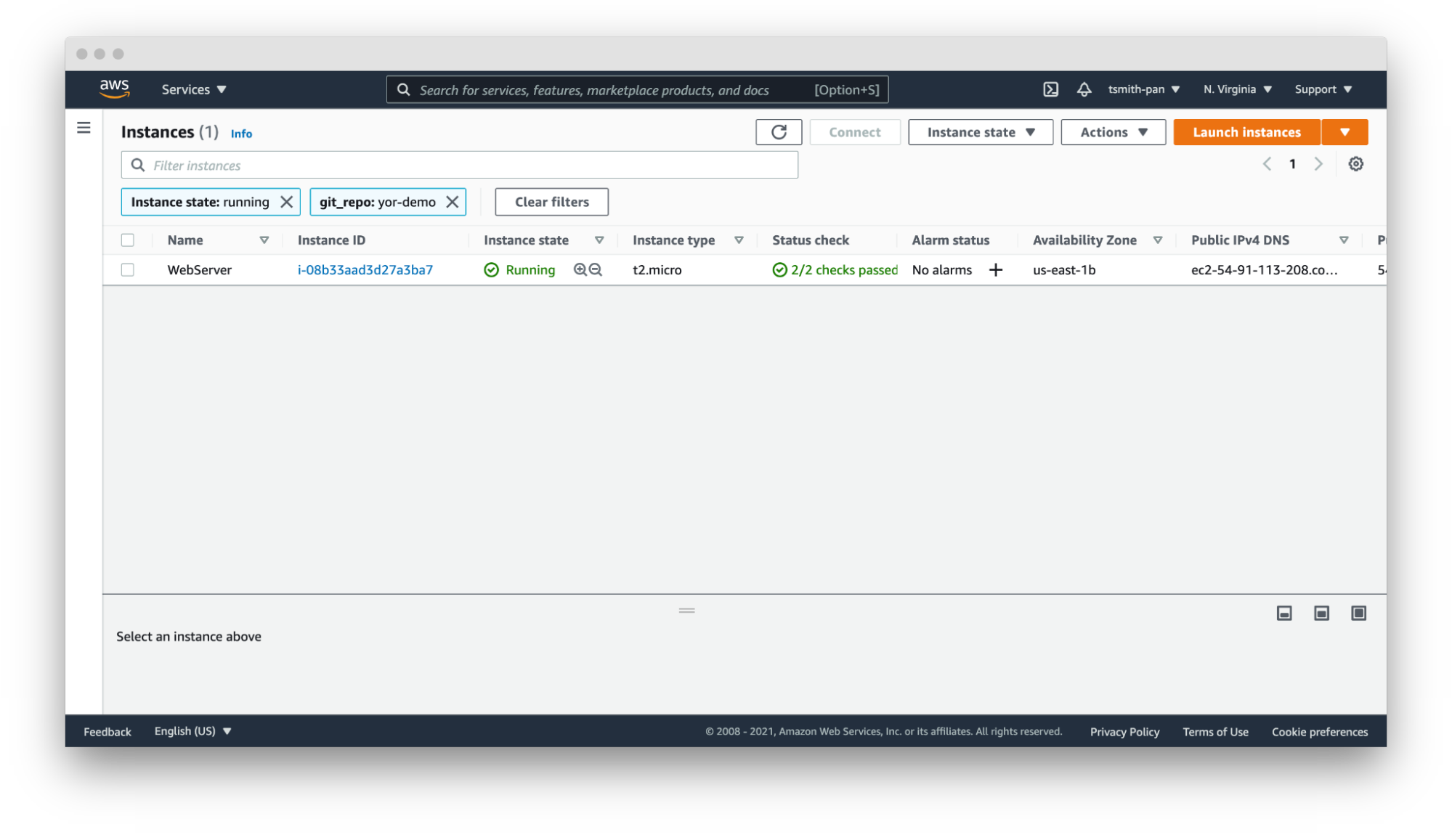
    Using tags to organize and filter resources is the simplest and most common use case for tags. If you add tags to resources, such as EC2 instances or database resources, you can filter based on those tags. 

    If your AWS account has thousands or tens of thousands of resources in a region, filtering is necessary to manage those resources. For example, if you have hundreds of web servers, filter by the git_repo tag Yor added to quickly filter down to the web server(s) for your application.

    Yor

    In that same vein, you can set up resource groups to organize multiple resources across AWS services based on tags. For example, if you want to hunt down the VPC, EC2, internet gateway or database created by your Terraform repository, use Yor’s git_repo tag to group together multiple resources into a single resource group.


    Yor 

    Operations Support

    Yor excels at simplifying and speeding up operations support. In the words of Brian Yost, “For example, Level 1 support teams could use tags to direct workflow and perform business service mapping as part of the triage process when a monitoring system triggers an alarm.” Yor automatically tags resources with the git organization and modifiers of the cloud resource. This makes it easier to identify the right team and user to patch issues. 

    If you work in a GitOps organization, this is even more critical. Following GitOps best practices means all changes should be performed in the IaC template, not directly on the cloud resource. So if your security team identifies an open port 22 in runtime using policy-as-code or CSPM tools, such as Bridgecrew, Yor’s tags will make finding the owner of the IaC template easier and faster, lowering MTTR.

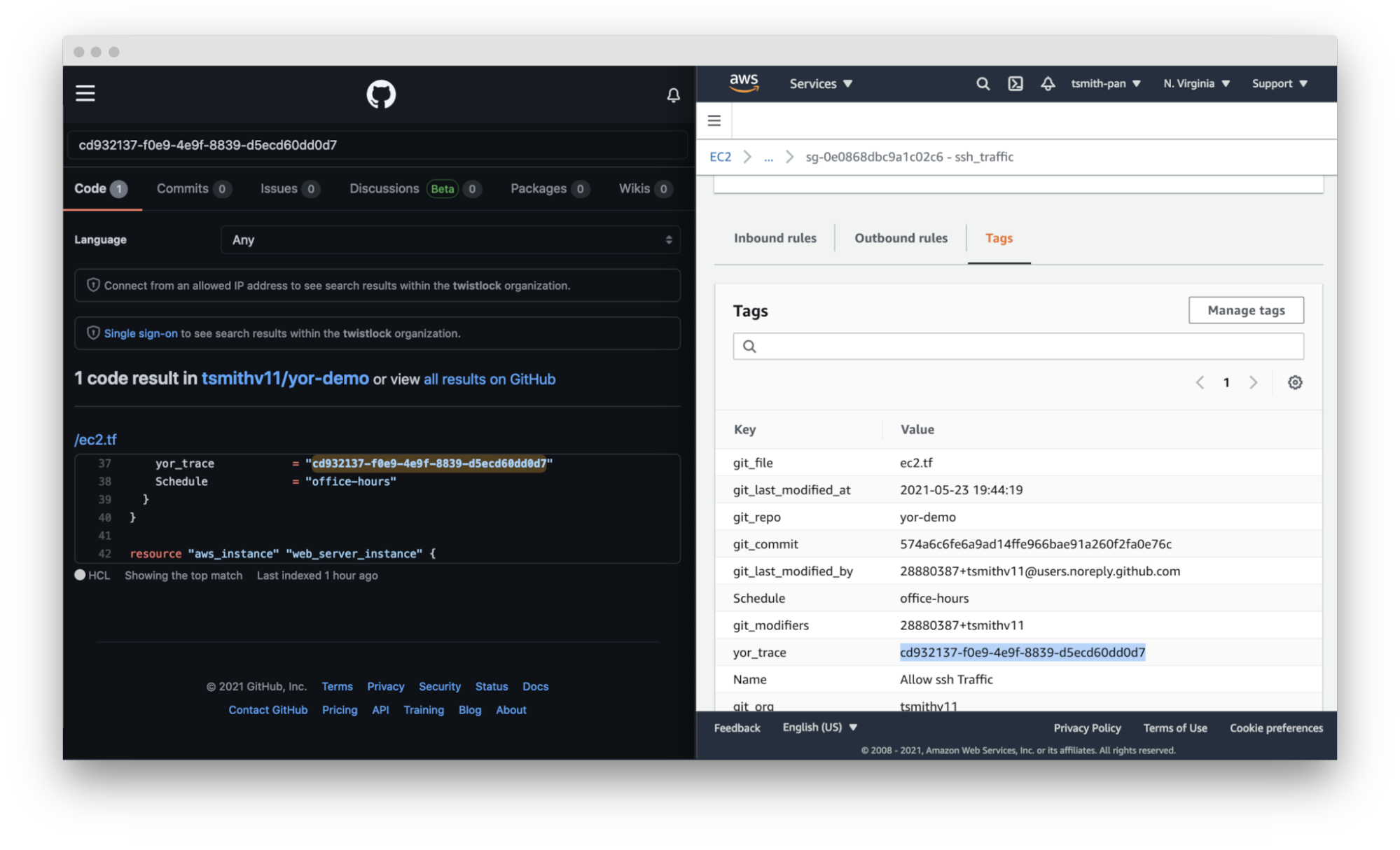
    Yor takes this a step further. By adding the repository, file and trace tags, Yor helps teams identify not only the code owner but also the exact file and resource block that created that resource misconfiguration.

    Yor

    Cost Allocation

    Large companies often have different profit and loss (P&L) statements for each of their business units. At the end of a reporting period, such as a fiscal quarter, finance teams allocate the expenditures made across the company to the various cost centers.

    For traditional IT teams, this usually involves very broad, general estimates. For example, if two organizations share a server rack, you could allocate costs based on virtual CPU time or disk space. Once that scales into dozens of organizations and ephemeral workloads, that allocation is much more difficult. Cloud costs can be just as difficult to allocate. If you have thousands of resources across types (virtual machines, serverless, managed Kubernetes workloads, managed databases, streams, CDNs, etc.) with differing life cycles and life spans, tying those resource costs back to a cost center is difficult.

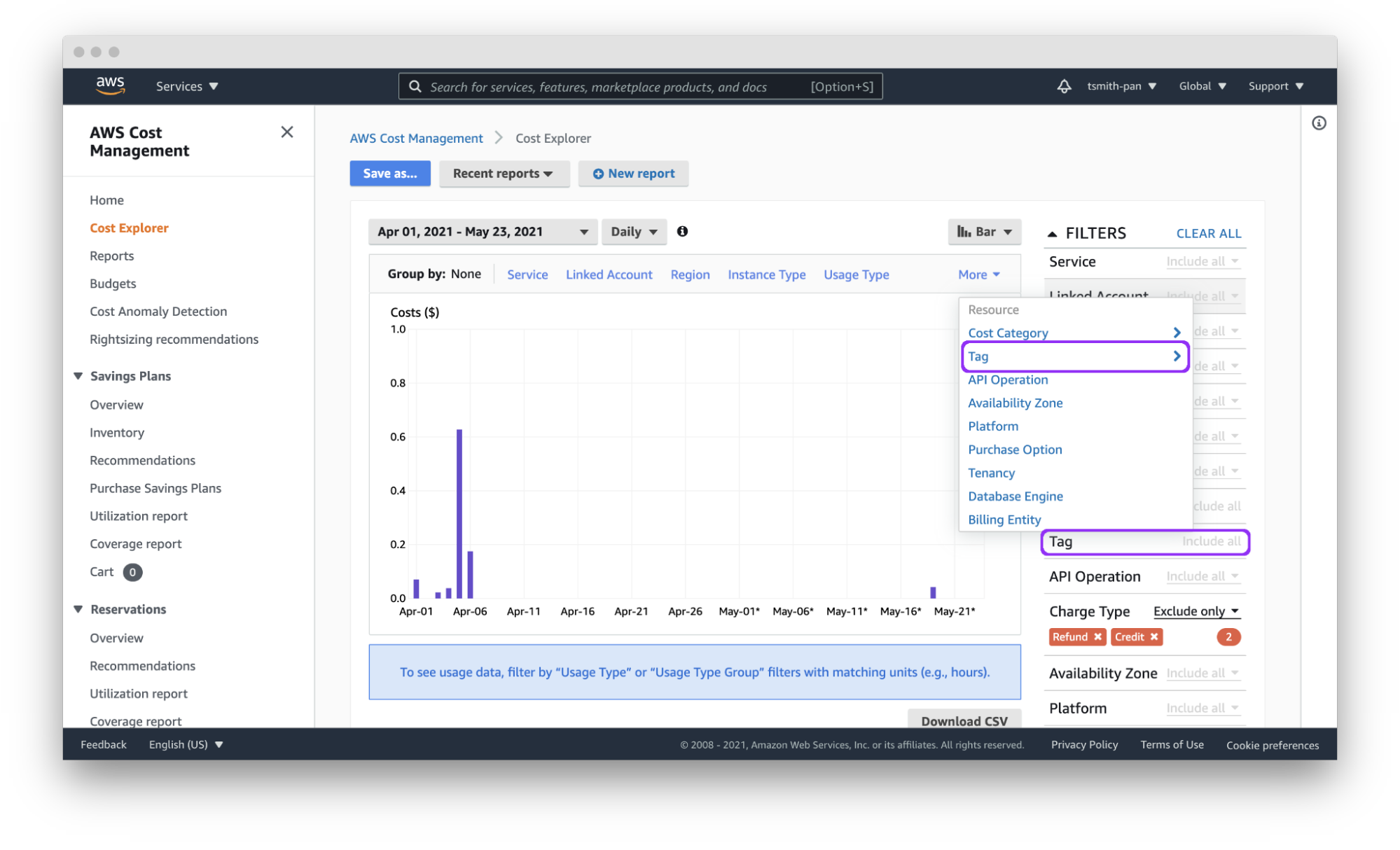
    Cloud tagging simplifies that process. Assuming each team has a git organization, Yor will automatically tag resources with the git_org or custom tags can group git_modifiers into cost center tags, and AWS Cost Explorer will let you filter by those tags to easily allocate costs. You can also export those costs by tag(s) to a CSV file for import into other tools for analysis.

    Yor applies those tags reliably and consistently so that finance teams don’t need to dig through different organization name versions, such as combining dev_team_one and devTeam1, or manually categorizing untagged resources.

    Yor

     Access Control

    AWS identity and access management (IAM) policies support the ability to limit control of resources using tags. This simplifies dividing up resources by teams using complex IAM rules.

    For example, if you want developers to access only the EC2 instances they provisioned, you can use the git_modifiers tag added by Yor. Yor will automatically tag resources with the git users who edited the IaC code. Then, Yor will add an AWS IAM policy to limit access based on that tag.  You’ll also want to add a policy to deny actions such as ec2:CreateTags and ec2:DeleteTags so users can’t just add themselves to other resources.

    This is where Checkov, an open source policy-as-code tool, can be leveraged for additional control. Yor can enrich the context for Checkov’s checks, enabling finer-grained policy control. For example, Yor will populate the user identification of whoever modified an IaC template, and Checkov can make sure that only approved team members modified the code. The following is an example of a custom check to determine that only security personnel modified CloudTrail settings.

    If the git_modifier tag added by Yor is anything other than “Nimrod,” “Rotem,” or “Naor,” Checkov will show a failed policy check for that custom check for that resource.

    Automation

    By leveraging tags in combination with other tools, such as Lambda functions and backup plans, you can apply automation to specific resources, such as targeting resources for archive, update or deletion.

    The AWS Tagging Best Practices guide uses as an example a situation where development resources are turned off during non-business hours. AWS recently released a tool called Instance Scheduler for just such a use case. It is a CloudFormation stack with a Lambda function and DynamoDB instance that automatically starts and stops EC2 and RDS instances based on a pre-defined schedule. 

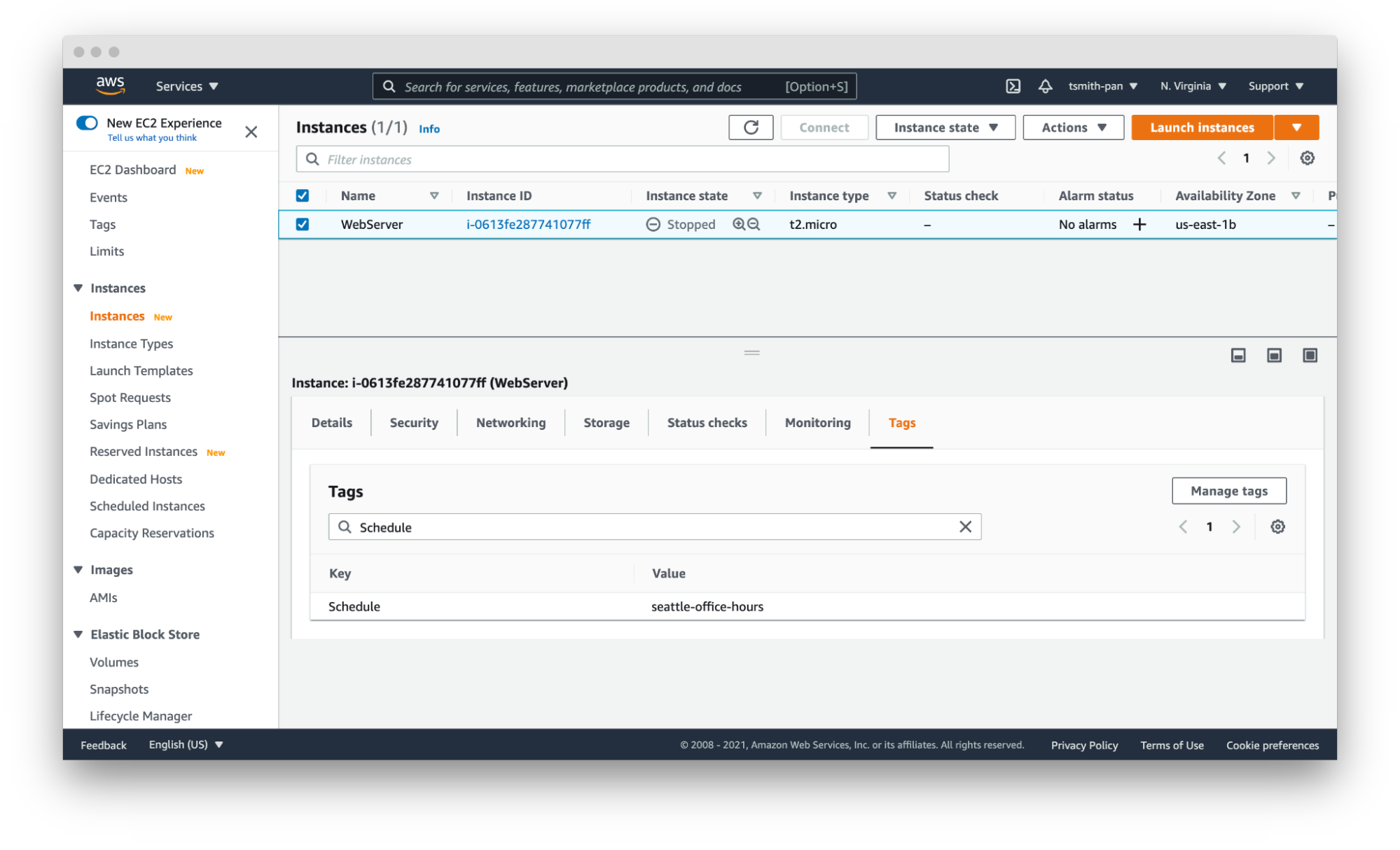
    Instance Scheduler takes a tag with a key:value pair; for example, “Schedule” (or a custom key) as the key and the schedule as the value. The schedules can be either one of the preconfigured schedules in the DynamoDB table, like office-hours, or a custom one.

    Using simple custom tags in Yor, you can tag every resource in a repository with a schedule by using environment variables such as adding the following to the Yor GitHub Action YAML file:

    This results in tags being added to every resource in that IaC directory. With the seattle-office-hours tag, Instance Scheduler will turn off EC2 instances at 5:00 pm Pacific Time and on again at 9:00 am Pacific Time Monday through Friday. This saves money by stopping instances automatically during downtime.

    Yor

    Another popular automation use case is for backups and archival plans. AWS can automatically apply different backup plans based on the tags applied to resources, such as storage and database resources. For example, if certain organizations, such as those that process financial data, need things archived forever, but others only need one year of backup, applying backup plans can move the short-term storage to cheaper options, such as Glacier, and eventually delete them on a schedule.

    Security Risk Management

    The final use case is risk management. The risk level of cloud resources differs based on whether they are in test or production environments and the sensitivity of the data those resources process and hold. This is another area where you can use simple tags like git_repo to filter down to repositories for applications that deal with sensitive data. You can also leverage complex custom tags. For example, EC2 instances attached to databases with “customer” in the name will get a data_level:sensitive tag.

    IT service management tools can apply higher priority to patching and updating resources with tags denoting sensitive data. This is another area where you can leverage Checkov’s graph-based checks in combination with Yor tags to assign higher severity levels to policy violations for resources with sensitive data tags or production environment tags. Assigning priority helps to focus developer attention and mitigate risk faster.

    These six tagging use cases are just a few examples of how you can leverage tags to be more efficient and improve your cloud security posture in AWS. The power of Yor’s tracing capabilities enables development and operations teams to work together without requiring complex triage to find the right person and IaC templates. With Yor’s extensibility and custom tagging capabilities, we can’t wait to see what other use cases the community comes up with!

  • Cloud Governance Can Trim Cloud Costs

    Cloud Governance Can Trim Cloud Costs

    The abrupt need to transition to remote work last year caused many companies to migrate to the cloud or accelerate an in-process migration. Cloud has become an essential part of company operations and budgets. Last year, worldwide end user spending on public cloud services was $257.5 billion, making up 9.1% of total global enterprise IT spending, and it’s forecasted to increase to 14.2% by 2024, according to Gartner.

    Upfront Cloud Costs

    The allure of cloud for organizations is its potential to save money, increase agility and offer easier scalability. However, these promises don’t materialize without proper management. Organizations will likely see an initial rise in costs with cloud adoption. Organizations spend, on average, 12% more running a workload in IaaS (infrastructure-as-a-service) compared to when it happens in their own data center. These cost increases occur when work is lifted and shifted without modification.

    Like any change, there will be upfront costs involved with the process of migrating to the cloud that need to be considered. With careful planning, organizations can avoid surprises. Items that need to be factored in when budgeting include the cost of cloud infrastructure, labor costs associated with migrating applications to the cloud, and the monthly bill from cloud providers. Many cloud providers provide cost calculators to help organizations determine what to expect when migrating to the cloud.

    Managing Cost

    A factor that is key to managing cloud costs is planning for the monthly cloud bill. Without proper monitoring, this is where overspend can occur—57% of IT leaders have exceeded their cloud budgets at some point, according to a 2018 Softchoice survey. One of the issues is the lack of visibility that leaders have into their cloud costs. A lag in your cloud billing data makes it difficult to make accurate decisions, which can be the case with spend reports from cloud providers that are 12 to 24 hours old.

    A lack of timely visibility into current costs and the inability to forecast future costs leads to cost overruns and blown budgets, which is why having a product that provides the most up-to-date information and monitors your budget is important. There is no use in budgeting if it’s not being monitored. Let me repeat: an unmonitored budget is useless.

    Timely visibility and monitoring your budget fall under financial control of your cloud—one of the three pillars of cloud governance. Cloud governance includes the development and implementation of budget controls, as well as controls to manage access and ensure ongoing compliance.. A cloud management product can help with this by not only keeping your budget under control and alerting you before you go over that budget, but also by finding saving opportunities through ongoing optimization.

    Using these tools means you can automatically find out about ways to save your organization money.

    The other two pillars of cloud governance, managing access and ensuring compliance, also impact your overall cost in the cloud. A robust governance and management solution establishes proactive protocols that can automate tasks such as account setup and ensuring compliance with your security standards. Automating controls will save your organization time and money. Monitoring and ensuring that your cloud is secure will help you avoid costly security breaches. When adopting the cloud, a plan for implementing cloud governance should be at the forefront to help you realize the cost savings of cloud.

    Despite the initial costs of scaling to the cloud, in the long term, cloud adoption does result in cost savings. Once organizations move away from managing on-premises data centers and implement cloud governance in their cloud environment, that’s when opportunities for innovation can happen due to time and money being saved. For example, when Riso, a printer and digital copier manufacturer, migrated to AWS, the company cut its total IT operational costs by 55%. Avery Dennison, a manufacturing company that specializes in labeling, saw an annual run rate savings of $5 million due to investing in cloud-first initiatives. These are just some examples of how the cloud has helped companies optimize their costs. It can be possible for your organization to reap similar benefits with proper planning and the implementation of cloud governance.

  • Solving Cloud-Native Challenges in the Rush to the Cloud

    Solving Cloud-Native Challenges in the Rush to the Cloud

    The shift to cloud-native environments away from traditional data center infrastructures continues unabated, but security and complexity challenges remain a struggle for DevOps teams.

    These were two of the main takeaways in a survey and analyst report published by the IT consultancy firm Flexera. 

    The survey, based on the responses of 750 IT professionals, revealed that 92% of the organizations represented in the survey have a multi-cloud strategy, 80% have a hybrid cloud strategy and only a minority (45%) have integrated data between cloud environments.

    The top challenges, according to the survey results, are:

    • security (81%)
    • managing cloud spending (79%)
    • governance, lack of resources/expertise and compliance (75%)
    • comprehending cost implications of software licenses (55%).

    The solution for these challenges largely involves — in addition to implementing the right DevOps culture and practices — adoption of the right tools and platforms, especially for security. However, first-generation cloud-cost management tools “simply are not cutting it” for modern architectures, said Asim Razzaq, CEO of Yotascale, which offers a cloud resource optimization platform.

    “Today’s modern architectures are dynamic, and ownership is transient and not always well-defined. The greatest strength of containers and Kubernetes is the ability to scale on-demand and share cloud resources among multiple applications,” said Razzaq. “Tracking cloud costs in modern architecture requires a strong ability to automate cost attribution — or tag management — for those dynamic resources, and the ability to understand usage at the application level, even for containers that are sharing resource instances.”

    First-generation cloud management tools are, in this way, unable to provide the information DevOps teams require to understand how to automate cost attribution for modern architectures, said Razzaq.

    “[DevOps teams] can’t break down costs into any level of meaningful detail for engineering and finance teams to digest and act upon,” said Razzaq. “Conversely, newer approaches that are focused on Kubernetes cost management lack the ability to understand and break down the costs of non-cloud-native workloads.”

    Indeed, tools are often frustrating to engineering teams because of their static custom reporting, broad and generalized recommendations and no effective workflow for effective collaboration between finance and engineering, Razzaq said.

    “The biggest source of frustration is the inability to drill down and manage costs in a way that matches the way that these teams do business. There may be 10 teams, each with five production applications running in the cloud, for a particular account,” Razzaq said. “Engineers need to see, at the application level, what their resource utilization, costs and cost anomalies are in order to make the best cost/performance decisions for their applications. Without that, they’re flying blind; having to defend their cloud usage without any supporting data.”

    As an example, a misconfigured Kubernetes cluster can “cause a massive spike in costs,” Razzaq explained. “Without detailed cost and utilization reporting at the team and application level, an engineer can spend weeks digging through spreadsheets and logs trying to track down the source of the anomaly. That’s weeks of their time that they aren’t [using to] be productive on new features.”

    cloud-native

    Razzaq said there are a number of solutions DevOps teams can adopt to address these issues, including automated cost attribution and tag management, actionable recommendations and comprehensive observability capabilities.

    Automated cost attribution and tag management “is the foundation of accurate and detailed cloud cost management,” said Razzaq. “Engineers need tools to help them set tag management policies, identify untagged instances and update tags quickly and easily in their cloud environment,” he said. “With this in place, cloud-native workloads can be automatically tagged as they are dynamically created, ensuring that cloud costs are always clearly attributed to the right teams and applications.”

    Actionable recommendations at the cloud-instance level with closed-loop feedback also are an important process “so that engineers can see exactly why the recommendation is being made, and what the cost impact will be of taking that action,” Razzaq said. “The ability to provide feedback on the recommendation and dismiss recommendations that don’t align with business needs ensures that new recommendations are relevant,” Razzaq added.

    Finally, tools that provide a unified view of both cloud-native and traditional workloads that have been shifted to the cloud help to ensure “that engineering and finance have a single source of truth for their cloud costs that enables them to make smarter decisions for their business,” Razzaq said. 


  • Sysdig Adds CSPM Module to DevSecOps Platform

    Sysdig Adds CSPM Module to DevSecOps Platform

    Sysdig today announced it added a cloud security posture management (CSPM) module to its Sysdig Secure DevOps Platform for monitoring application performance and security to enable IT teams to continuously detect threats.

    Pawan Shankar, director of product marketing for Sysdig, said this CSPM capability is based on an open source Cloud Custodian tool that enables IT teams to define rules for accessing cloud infrastructure. In addition, the tool enables IT teams to collect utilization metrics that could be used to turn cloud resources off when they are not being employed. IT teams can now also automatically discover all cloud services being employed, including identifying which ones are misconfigured or might have compliance and regulatory issues that need to be addressed, via a software-as-a-service (SaaS) platform.

    The overall goal is to help reduce the friction that organizations encounter today as they embrace DevSecOps best practices, added Shankar.

    Sysdig is making its CSPM offering available for free, for one account, to encourage DevOps teams to make use of a CSPM capability along with Sysdig’s open source Falco threat detection capabilities. Sysdig today also announced that it extended its implementation of Falco to consume audit logs created on the Google Cloud Platform (GCP). Sysdig donated Falco to the Cloud Native Computing Foundation in 2018. More recently, Sysdig also contributed a sysdig kernel module, along with libraries for the Falco security platform for Kubernetes, that runs in the extended Berkeley Packet Filter (eBPF) microkernel to further improve Linux security.

    The free tier includes a daily check against CIS benchmarks as well as support for inline scanning of up to 250 container images per month running on either the Fargate or Elastic Container Registry (ECR) services provided by Amazon Web Services (AWS).

    Sysdig has been making a case for the convergence of traditional IT monitoring functions and security for several years now. In the wake of some recent high-profile breaches involving software supply chains, the company is betting that more DevOps teams will soon be revisiting how their software supply chains are managed at a time when it’s become easier for malware to move laterally across an entire IT environment. In fact, Sysdig cited research that estimates that malware moving laterally through an organization is involved in 70% of cyberattacks.

    Of course, with the rise of applications based on microservices, the average IT environment is about to become a lot more integrated, which naturally makes it easier for malware to move laterally. IT organizations now require greater visibility across an entire potential attack chain to combat those threats, Shankar noted.

    As DevSecOps continues to evolve, the relationship between developers and cybersecurity teams is also clearly evolving. Now that developers are being held more accountable for cybersecurity, many of them are gravitating toward tools that can be easily integrated within the context of a larger DevOps toolchain.

    It remains to be seen exactly how security tools will be integrated within those tool chains, but for DevOps teams that already rely on Sysdig to monitor their IT environments, the ability to access a raft of additional security services is only a few mouse clicks away.

  • LeanIX Extends Application Management Reach

    LeanIX Extends Application Management Reach

    LeanIX today unveiled a catalog that enables DevOps teams to more easily track the relationships between microservices as they are built and deployed.

    At the same time, the company also revealed it has acquired Cleanshelf, a provider of a platform for managing software-as-a-service (SaaS) applications.

    LeanIX CEO André Christ said the Microservice Intelligence catalog will make it simpler for IT organizations to keep track of their ongoing software development efforts, while Cleanshelf provides the mechanism for centralizing management of SaaS applications that are now widely employed across the enterprise.

    The Microservice Intelligence catalog is the latest addition to the LeanIX Continuous Transformation Platform used to manage enterprise applications. It automatically captures and correlates metadata being generated across disconnected toolchains, pipelines and Kubernetes clusters to create a 360-degree view of microservices and their dependencies, said Christ.

    In addition to being integrated with the LeanIX Enterprise Application Suite, Microservice Intelligence comes with out-of-the-box connectors for Kubernetes, Jenkins, GitHub Actions and Red Hat OpenShift platforms.

    By monitoring deployment frequencies, mean-time-to-recovery (MTTR) and failure rates, Christ noted it will become easier to make software engineering decisions based on data and insights surfaced via the Microservice Intelligence catalog. DevOps teams can also annotate the microservices recorded by the catalog to provide additional information, Christ added.

    The Microservice Intelligence catalog provides the added benefit of making it easier to onboard new developers, said Christ. Each new member of a development team can, on their own, explore the overall application environment without requiring an IT team to dedicate someone to describe it each time a new member of a DevOps team is hired, Christ noted.

    At the same time, other stakeholders, such as cybersecurity teams, can explore the application environment to better understand dependencies as well as the potential impact of a newly discovered vulnerability, Christ added.

    In general, Christ said, as application life cycle management across the extended enterprise becomes more complex it’s clear new platforms will be required to manage legacy monolithic applications, emerging microservices-based applications and SaaS applications that, in the wake of the COVID-19 pandemic, are being used to enable employees to work from home. The Cleanshelf platform, in particular, will be rebranded as LeanIX SaaS Intelligence to address that latter issue. A SaaS discovery and cataloging capability will also be made available as a free component of the LeanIX Application Portfolio Management module in the second quarter.

    IT environments have never been more distributed, and it’s clear most organizations are under pressure to reduce the total cost of IT by centralizing management functions. It’s too costly to dedicate a management platform for each type of application deployed across an extended enterprise. LeanIX is making a case for a platform that enables IT organizations to finally centralize the management of application environments.

    It’s unclear at what rate that centralization may occur, given the level of inertia that exists within most IT organizations today. However, as application lifecycle management continues to evolve, the centralization of the management of application portfolios that continue to grow is all but inevitable.

  • Teleport Adds Database Support to Security Gateway

    Teleport Adds Database Support to Security Gateway

    Teleport announced today it has added support for databases to a security gateway, delivered as a cloud service, that is currently used to secure Linux servers and Kubernetes clusters.

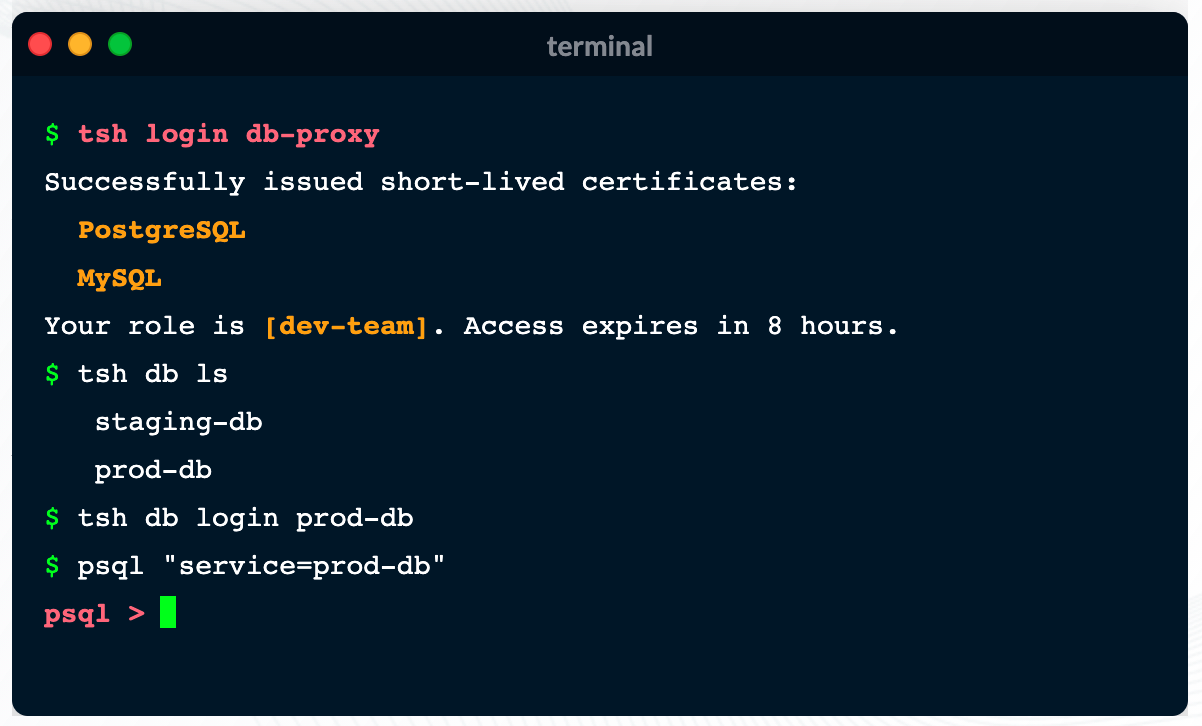
    Ev Kontsevoy, CEO, said Teleport intends to extend the reach of the security gateway up the entire stack of IT infrastructure that developers routinely use to remotely access databases. Initially, Teleport 6.0 adds support for open source PostgreSQL and MySQL databases.

    Teleport has gained traction as an access management tool because it provides a single binary that can be easily deployed by developers to encrypt IT platforms and enforce session controls. It automatically discovers all the resources in an IT environment, along with the protocols needed to access them. Teleport also provides a unified audit log, in a JSON format, that enables IT teams to track what resources are being accessed, when and by whom.

    Other features include the ability to authenticate identities via built-in single sign-on (SSO) and multi-factor capabilities, discover and see all database instances, integrate with command line interfaces (CLIs) and a set of workflows for managing privilege escalation.

    Access control is becoming a bigger issue due to a number of factors. The overall IT environment is becoming more complex as the infrastructure stack required to run applications continues to grow; most IT teams continue to work from home to help combat the COVID-19 pandemic. Teleport provides a fine-grained approach to streamlining access management across servers, clusters and databases in a way that eliminates the need to rely on virtual private networks (VPNs). In effect, Teleport enables IT teams to move toward a more identity-centric approach to unifying the management of access, Kontsevoy said.

    That’s critical at a time when the rise of DevSecOps is pushing responsibility for security further left toward developers, Kontsevoy added. While the rate at which that transition occurs will vary widely, Kontsevoy said it’s clear developers are taking more control over access control as part of a broader effort to roll out secure applications, faster.

    It may be a while before DevOps teams are able to aggregate all the access control protocols they currently employ under a single proxy. However, Kontsevoy said, the massive amount of time and effort spent managing access control today will drive DevOps teams to look for ways to automate what is currently a very manual process.

    Less clear is what role cybersecurity teams might play in supervising access management. The days when a separate overlay was needed to manage access may be coming to a close.

    In the meantime, it’s clear VPNs were not designed to address access management, in an era where the bulk of IT teams – and the employees they support – are working from home. More employees may be soon be heading back to the office more frequently, but it’s likely that remote work will remain prevalent. That means legacy approaches to managing remote access that were never designed to scale will becoming increasingly obsolete.