Category: DevOps Practice

  • The Role JIRA Plays in Complex Value Stream Networks

    The Role JIRA Plays in Complex Value Stream Networks

    No one denies that JIRA has taken over the developer space. The verdict is nearly universal: Most developers want to use JIRA only.  That’s fine, but without understanding the role it plays within the context of your entire value stream network, your organization has likely not crafted the most efficient value stream.

    JIRA plays a critical role within any complex value stream—and using JIRA to its fullest along with the other critical aspects of your value stream is the key to delivering software faster and achieving the software results you sought.

    But developers encompass only one role that is required to build complex software. And, as fabulous as JIRA is for developers, it is often not the tool of choice for the many other roles involved in building software, i.e., product managers, product analysts and test engineers. Even salespeople are part of your value stream.

    Fundamentally, we need to recognize and understand that delivering software requires careful orchestration between a large network of people with different roles who have the need for different tools. But we need the overarching value stream of information passing within that network to work together seamlessly. The information flowing through the network needs to be connected and traceable in an automated way. This really boils down to identifying the “centers of criticality” with the associated artifacts and architecting your value stream network accordingly.

    JIRA, Centers of Criticality and the Value Stream

    What are “centers of criticality” in software delivery value streams? They are the artifacts and associated tools that represent the primary connectors of business value to the manifestation of that business value. To be more specific, when the business asks for some new functionality, it is represented as one or more artifacts, typically either requirements, features or epics (sometimes all three). Those artifacts act as the “glue” for all of the other key information from which to “hang off.” You want the tests that run, the change sets and code reviews, the defects, the builds … all of that information should be tied to the requirements/features/epics. And those “glue” artifacts also need to be tied to the originating business initiative or program.  Thus, tools that operate on those types of artifacts really are your “centers of criticality.”

    And that is where JIRA comes into play quite significantly. It acts as the touchpoint—the center of criticality—between what the developer should build, tied to the actual artifacts that constitute the end working software, as well as tied to the originating business needs.

    Consider the familiar example of when a salesperson hears from customers that they really want a new feature. As a result, she wants to tie this net new ask to the opportunity—and be able to track via Salesforce whether the customers are going to get that new feature request anytime soon.

    And here’s a good value stream for it: The request is entered into Salesforce and naturally tied to the customer account. That request should flow to the product management tool in use, which in some cases might be JIRA, but often, especially at large organizations, is a more purpose-built product management, portfolio management or requirements management tool. At that point, the request that originated in Salesforce is reviewed and determined to be three different features. Once the company decides it wants to build them, those features then flow into JIRA as epics. From the epic in JIRA, the development team begins to create the stories and tasks necessary to build the feature, then connects the change sets and tests and defects to those stories and tasks.

    As a result, without any manual effort, the team has created a dynamic network of artifacts that provide full traceability from the very beginning of a customer requesting something through to its final delivery seamlessly. JIRA plays that critical touchpoint role of “what” should be built to the actual bits and bytes of the resulting software.

    Now consider a different example. You’ve released the next version of your application and all is going smoothly. Support uses ServiceNow, or one of the many IT service management (ITSM) tools that exist. Your support team is the originator of much of the follow-on work that happens regarding applications. Tickets originate with ITSM tools—but they, too, need to be connected to the resulting defect that requires attention. So, you need a seamless flow of tickets and incidents from the ITSM tool to the resulting defects that must reside in JIRA. And those defects need to be associated to the stories and epics that were affected. They also reside in JIRA.

    Both examples exemplify the importance of “centers of criticality,” with JIRA being one of those centers of criticality. In a complex value stream network, JIRA plays that crucial role of being the touchpoint between bits and bytes and business value.  But, without flowing information to and from JIRA from the other tools in the value stream, you are left with a broken value stream without real, accurate, automated knowledge of what and why you are building something. Because knowing if you’ve delivered business value comes from understanding the provenance of what you are building. It might be how many customers (internal or external) had asked for the 20 features that were delivered last release. Or how many customers were not going to renew your software if those features weren’t there. Or even how many new opportunities you can follow up on to say that what they’ve asked for is now in your product.

    Conclusion

    Building complex software that truly meets business needs necessitates that there will be an equally complex underlying value stream network that will only be efficient and effective if it is architected from the ground up with careful consideration of the critical artifacts and tools that need to be connected. JIRA is very clearly one of those tools. So, embrace JIRA being the heartbeat for developers—and know that by crafting your end-to-end value stream network with JIRA as one of the “centers of criticality” you can have an efficient, fully connected and fully traceable value stream. Happy connecting!
    — Nicole Bryan

  • Digital Business Revolution: Why DevOps is the New Enterprise Value Chain

    Digital Business Revolution: Why DevOps is the New Enterprise Value Chain

    Ongoing industry disruptions are forcing businesses to change their operational model; that’s the only way to avoid and survive digital bankruptcies.

    In North America, Sears Canada filed for bankruptcy, while Toys R Us and Weight Watchers were on the verge of it. In Europe, particularly, in France, banks including Societe Generale and leading retailers including Carrefour are anticipating it through ambitious and innovative digital transformation programs.

    The cheap access to innovative technologies enabled by cloud services providers including Amazon Web Services (AWS) has caused a proliferation of innovative tech startups and technology companies, making competition tougher for established businesses.

    The innovative digital products and services they deliver are slowly but surely substituting conventional ones. As an example, Weight Watchers’ weight-loss programs did not resist innovative wearable devices, such as the Fitbit Tracker, that helped millions around the world lose weight. Trackers measure data such as the number of steps walked, heart rate, quality of sleep, steps climbed and many other personal metrics involved in people’s health.

    Digital products and services are becoming customer consumption standards, accelerarated innovation life cycles are now the competitive advantage to have and DevOps in its entirety is the capability companies must equip themselves with to make substantial digital profits.

    In 1985, Harvard’s Strategy professor Michael Porter unveiled to the business world in his best-selling book, “Competitive Advantage,” the concept of value chain. It ‘s been revolutionizing business practices for more than 30 years, and inspired approaches as varied as Michael Hammer’s Process Reengineering, Toyota’s Lean Production, Total Quality Management (TQM) and even Software Capability Maturity Model (CMM).

    The value chain’s principle is the notion that in every single company there’s a subset of interactions, staff and skills, processes and practices and tools and infrastructure that repeatedly generates expected benefits. That subset is what’s meant by the value chain; to succeed, businesses must continuously optimize it.

    Today, software development is the foundation of digital products and services; it’s becoming the fundamental industrial activity. By providing the technological, organizational, and operational framework that will enable digital profits, DevOps is replacing the value chain as Porter designed it. It’s the competitive instrument businesses need to make big gains.

    This article, inspired from my next book, “The DevOps Revolution: The IT Organization of the Digital Age,” explains why DevOps is about to revolutionize the way companies tackle their digital business.

    Michael Porter’s Value Chain: Purpose, Foundations and Principles

    The value chain, through focusing companies on their added-value activities and resources, has been revolutionizing businesses’ ability to compete for 30+ years and made several thousands business leaders successful around the globe.

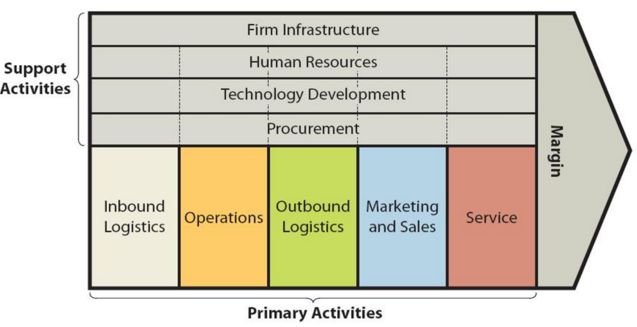
    Figure 1 – The Original Porter’s Value Chain

    What you must know is, the underneath principle is, only a subset of the company’s activities—Primary activities and Support activities—can repeatedly generate expected benefits. That subset is what’s meant by value chain.

    Let’s discuss them!

    Creating Value: The Primary Activities

    The objective of the primary activities is to create value. They include seven activity groups:

    • Inbound Logistics
    • Operations
    • Outbound Logistics
    • Marketing and and Sales
    • Services

    Inbound Logistics performs supply chain functions. It’s a group of key supply chain processes and associated experts, tools and infrastructure. The mission is to make sure the company gets on time the best material to manufacture top products and services.

    Operations refers to manufacturing functions. It puts together the company’s top experts, engineers and product managers to design, develop and test products and services. They take advantage of key processes and industry best practices to make the company’s products and services as innovative and profitable as possible.

    Outbound Logistics performs distributions functions. It’s a subset of the company’s top distribution partner relationships management (PRM) experts mobilized across the company using top distribution processes, practices and tools to make sure the company’s productions and services are properly distributed across its partner networks and make a profit.

    Marketing and Sales, as the names suggest, perform marketing and sales activities. It is a group of the company’s top marketers and salespersons mobilized through top marketing and sales processes and practices to make sure the business make profits.

    Services refers to post sales activities. It’s a group of the company’s best customer relationships management (CRM) experts and associated top processes, practices and tools mobilized to make sure customers have the best experience with the company’s productions and services.

    Making Value Creation Sustainable: Support Activities

    The primary activities do not generate value on their own; they need levers. Their purpose is to be the value chain’s support activities, making sure the company generates sustainable value. They include four activity groups:

    • Firm Infrastructure
    • Human Resources
    • Technology Development
    • Procurement

    Let’s how they enable value creation activities!

    Firm Infrastructure is a group of high-level executive experts appointed to guarantee the company’s infrastructure profitability. Such executive experts include chief information officers (CIOs),  chief technology officers (CTOs) and chief enterprise architects (CEAs), and they rely on top processes, practices and tools such as ITIL, IT Services Capability Maturity Model (CMM) and TOGAF to guarantee the company’s infrastructure profitability.

    Human Resources is a group of the company’s selected recruiting and human resource management experts and the associated top processes, practices and tools. Its mission is to not only make sure the company has the top experts it needs, but also get from them their maximum contribution.

    Technology Development relates to research and development (R & D) activities. It’s an elite of experts dedicated to monitoring markets trends and developing product ad service prototypes likely to create value for the company. They rely on extremely sophisticated product and service engineering processes, practices and infrastructure.

    Procurement relates to a selected group of the company’s investment decision experts. Relying on top financial processes, practices and tools, this group’s mission is to guarantee the maximum return on the company’s investments.

    Why DevOps is the New Value Chain

    Contrary to what many thought leaders, experts and solution vendors pretend, DevOps is unknown; it can’t be narrowed to the complex toolchains IT vendors have been selling to CIOs. Things aren’t that simplistic.

    DevOps According to Chef’s Adam Jacob’s Perspective

    Adam Jacob, co-founder and CTO of Chef, wrote a memorable, article about DevOps: “The Secret of DevOps: It’s Always Been About People, Not Technology.” Relying on his experience working with the inventors of DevOps—Jesse Robins, John Allspaw, Paul Hammond—he provides an unprecedented and accurate perspective of DevOps.

    He reminds this, “Becoming better at building and delivering software is the stake. It’s not an optional piece of their strategy: It’s the future of how their customers want to work with them. Software is table stakes for survival.”

    He adds, “But the real answer lies in looking at what John, Paul, and Jesse were doing in 2009—not in the specific technical choices they made, but the style in which they worked, the essence of what they believed made them high functioning and successful. … Then the challenge begins: how to apply this new style to businesses trying to become better at building and delivering software.”

    He proceeds, “DevOps is about bringing together all the people you need to build and run your business effectively, and empowering them to move as quickly as possible towards their goals. Tools matter. Make no mistake, trying to change the way you work without changing the mechanisms by which you do that work is a futile exercise in excruciating failure.”

    Then concludes, “Fundamentally DevOps is about taking the behaviors and beliefs that draw us together as people, combining them with a deep understanding of our customers’ needs, and using that knowledge to ship better products to our customers.”

    DevOps’ Fundamental Building Blocks

    What’s interesting in Adam’s rhetoric is, two groups of key words and sentences help to bring out two fundamental components of DevOps.

    People, customers, work, work style, beliefs, bringing together people, empowering people are part of the first group. It relates to what experienced and qualified business transformation experts refers to as operational model.

    Technology and tools—and make no mistake, tools matter—don’t the change the way you work without changing the mechanic underneath are all part of the second group. It relates to what experienced and qualified business transformation experts refer to as a technology platform, known by DevOps experts as continuous delivery (CD) platform.

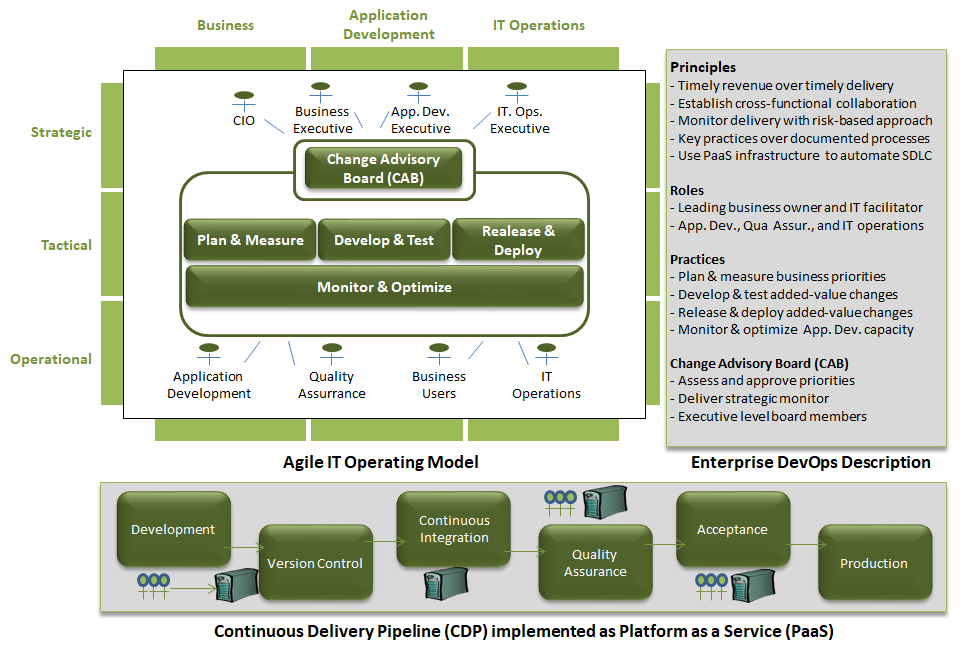
    The following picture is a DevOps model derived from Adam’s perspective. It makes easy its understanding:

    Figure 2 – DevOps as the New Enterprise Value Chain

    As illustrated, DevOps can be modeled as two-components business capability including:

    • The operational model
    • The CD platform referred to in this article as DevOps automation toolchain

    Let’s see how these two components are making DevOps, the powerful business capability CIOs have been expecting!

    The DevOps Automation Toolchain

    The automation toolchain or CD platform is what many either refers to as or confuse with DevOps. It conceptually structures software deployment in four steps:

    • Source
    • Build
    • Test
    • Deploy

    Each stages uses one or more products as illustrated in the following table:

    Figure 3 – Automation Toolchain Features

    The Agile and Lean Operational Model

    The operational model is the poor relation of DevOps; it’s totally either unknown or ignored by 98 percent of business leaders and their CIO. It’s where agility, flexibility, responsiveness and even innovation culture are implemented. It organizes the application development effort in a four-step circular life cycle:

    • Plan & Measure
    • Develop & Test
    • Release & Deploy
    • Monitor & Improve

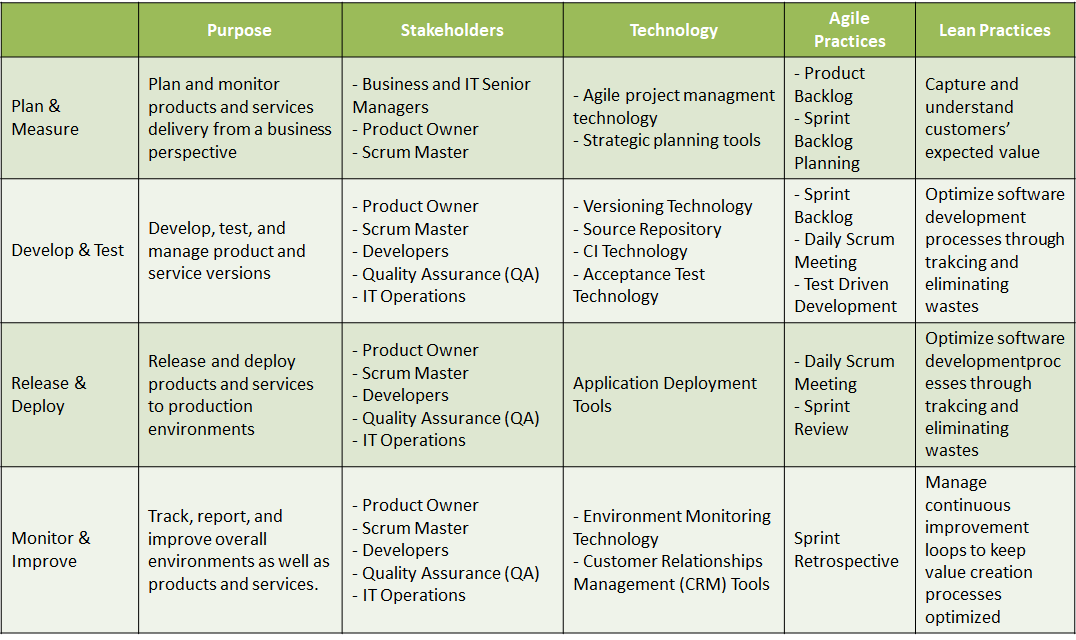
    Each stage mobilizes specific staff and skills, uses specific processes and practices, tools and infrastructure and, more importantly, specific Agile and Lean practices. The following table summarizes each stage:

    Figure 4 – DevOps Agile and Lean Operational Model Features

    Why DevOps is The New Enterprise Value Chain

    One of the problems with the value chain as Michael Porter thought it is, it has a compartmental vision of the business with two categories of activity divided each in several processes and associated staff, skills and tools.

    This perspective nurtures organizational silos and prevent cross-functional collaboration. It slows down problem-solving and decision-making and inhibits innovation culture.

    The value chain as Michael Porter thought it didn’t help Sears Canada to avoid digital bankruptcy, it didn’t prevent Toys R Us and Weight Watchers get on the verge of it.

    Where DevOps brings value and fills the gaps of today’s value chain is, it not only provides a business capability that’s easy to deploy but also an organizational, operational and technological framework embedding the Agile and Lean practices, as well as the automation toolchains companies need to survive their industry disruptions and make substantial digital profits.

    Key Takeaways

    Industry disruptions are a reality and properly transform the business is the only solution. Sears Canada, Weight Watchers and recently Toys R Us learned it the hard way.

    In 2018 make DevOps transformation your priority investment decision, I’m not talking about DevOps’ automation toolchain but DevOps a business capability which includes the Agile and Lean operational model and the automation toolchain.

    — Philippe Abdoulaye

  • How DevOps-Savvy Are You? (Quiz)

    How DevOps-Savvy Are You? (Quiz)

    As DevOps tools become more and more prominent in the IT landscape, it wouldn’t hurt IT professionals to brush up on their knowledge. DevOps has helped IT departments that are grappling with mobility, cloud and other methods which are revolutionizing how companies create and deploy applications. Traditional silos are being demolished and, for many, DevOps holds the key to solving the challenges modern IT departments are facing. Through configuration management and automated testing, DevOps tools provide a consistent and repeatable outcome.

    Regardless of whether it is part of your everyday job or whether you simply want to master the rudiments, as an IT professional you need at least some DevOps knowledge. Luckily, the folks at Squadex have created a quiz to help you see how much you already know and how much you still need to learn.

    Up for the challenge? Then let’s go! Click on the image below to get started:

    — Stas Ivaschenko

  • Applitools Advances AI Testing of User Interfaces

    Applitools Advances AI Testing of User Interfaces

    Given the number of platforms applications now need to be able to run on, it’s little wonder that mistakes and errors that compromise the graphical experience of the end user appear all too regularly in production. Keeping up with all the various nuances of each platform is just too much to ask of the average developer. To even those odds, Applitools has developed Applitools Eyes, the latest release of which extends the reach and scope of user interface testing in addition to providing expanded third-party tool integrations, enhanced analytics and team collaboration tools.

    Version 10 of Applitools Eyes extends the company’s mission to employ artificial intelligence (AI) to enable organizations to consistently deliver a better application experience, said James Lamberti, chief marketing officer for Applitools.

    Testing of graphical user interfaces (GUIs) is becoming more complex because the front-end of each application is increasingly made multiple microservices. Any change to the application requires developers to test each individual microservice and associated content that gets rendered on any number of platform. Applitools Eyes automates that testing process in a way that enables organizations to deliver applications faster without compromising the user (UX) experience, said Lamberti.

    “AI makes it easier to identify where the UX is broken,” he said.

    Much of the AI focus on DevOps these days tends to be on automating back-end testing. But Lamberti said it’s already been proven AI has a significant role to play in automating UI testing as well. To spur awareness of that requirement, Applitools also announced an Application Visual Management initiative, an attempt to create a new category of tools for visually testing graphical user interfaces.

    Lamberti noted that functional tests today are automated, and the visual elements of an application are still conducted manually. That invariably leads to errors that conspire to impede application release cycles no matter how much time and effort may have been invested in continuous integration and continuous delivery (CI/CD) processes.

    Applitools claims to have already executed almost 100 million visual tests using its visual AI engine to analyze billions of individual UX elements. Version 10 of Applitools Eyes adds improvements to the Layout Algorithm for dynamic content use cases as well as dashboards to make it easier to discover the root cause of a UI issue. Development teams, for example, can review visual test execution status and baseline status updates, bugs squashed and coverage levels specific to individual tasks and test assignments.

    Bugs discovered by Applitool Eyes can now also be programmed to automatically generate a ticket with a bug tracking tool such as Jira.

    In addition, integration with collaboration tools from Micro Focus as well as Slack is planned for March.

    Developers are often especially challenged when it comes to application usability. Application Visual Management may provide a much-needed framework for capturing UI best practices that would enable developers to avoid the same issue over and over by, for example, enabling a testing tool to make specific recommendations about where to place specific functions on a screen. There may even come a day when AI builds the application. In the meantime, when it comes to building applications end users will actually embrace regularly, most developers need all the help they can get.

    — Mike Vizard

  • The State of IT Ops

    The State of IT Ops

     In our most recent article, we highlighted some of the results of our recent IT Ops survey. We noted, for example, that 80 percent of IT teams are alerted to critical events via email and 41 percent of teams are experiencing excessive alerts. These stats go a long way to explaining why IT Ops is experiencing so many issues with alert fatigue.

    In this article, we will delve into the second half of our findings and examine our results on how IT teams reported they handle alerts after they come in.

    Off Scheduler

    Efficient IT operations teams realize the need for directed action when critical issues come in. This means that when significant IT issues occur, efficient teams will have alerts sent directly to the on-call engineer, who can manage the incident most effectively. The engineer will be the individual who is best-equipped to manage and quickly resolve the issue at hand.

    Our survey however showed that most teams lack automatic schedulers which could ensure the correct individual is alerted. Rather, alerts are often sent to the team as a whole, or to individuals who are unable to resolve the issue. According to our statistics, teams are frequently alerted (67.3 percent) instead of the on-call individual.

    The impact of this poor workflow is not only that issues are sent to individuals who are unable to resolve them, but time is wasted by this very process. Ideally, team managers should invest in scheduling software that sends alerts directly to the engineer on-call. By sending it to the wrong individual or team, companies are adding fuel to the fire of alert fatigue and burnout.


    Related Articles:

    Site Reliability Engineering: How to Make the Operations Side of DevOps Actually Work

    Slack and Critical Alerting


    Unfortunately, our team also highlighted that most teams lack scheduling technologies to enable this outcome. Our survey highlighted that only 28 percent of teams use an automated scheduler to ensure the correct individual or team is alerted.

    By failing to use a system that ties alerts to on-call schedules, managers receive alerts via email, SMS or phone that they are not necessarily responsible for resolving. Managers then need to track down the on-call engineer who can manage the incident. The pain of this scenario is multiplied if the alert comes after-hours or during the night. Again, this workflow leads to significant delays in resolution time.

    No Time for Downtime

    As IT Ops are often tasked with issues such as maintaining server uptime or site uptime, the prospect of downtime is something engineers work hard to avoid. IT Ops are under significant pressure to maintain five-nines uptime.

    For this outcome to occur, teams need to automate menial tasks and ensure they are quickly alerted to complex downtime issues that demand their attention. The goal needs to be getting the issue as quickly as possible in front of the individual who is best able to resolve the matter.

    However, our survey showed that 45 percent of teams indicated it takes more than 10 minutes before IT teams even begin to resolve critical IT issues. Given that the cost of downtime is more than $5,000 per minute, according to Gartner, downtime can easily balloon to cost companies or their clients more than $50,000 in 10 minutes.

    The significant expense cause by downtime has been seen in many recent scenarios. For example, in mid-May 2017, British Airways had a spectacular downtime event due to the failure of a power system in the company’s data center. British Airways was forced to cancel all its flights leaving from London airports after having a major IT system failure. The result was cancelled flights affecting more than 75,000 passengers. The costs of reimbursement were approximately $68 million and a 2.8 percent drop in the stock price of the parent company.

    Failure to Collaborate

    In the world of DevOps and IT Ops, we are often told of the importance of collaboration and how it leads to great innovation. Indeed, the goal of DevOps is to bring developers and operations into closer proximity, so they can collaborate more effectively. Better collaboration means better innovation and decreased costs.

    However, our survey shows that while IT Ops might have the mindset for collaboration, they lack the necessary tools for ensuring that collaboration happens. Our survey showed that IT Ops teams often collaborate on tickets by email. According to the results of our survey, 86 percent of teams collaborate through email.

    Yet, email is a truly poor way to collaborate when critical incidents come up. Email has few ways to bring critical emails to the top of the stack and keep them center of mind. Instead, email’s default is to let messages get buried under other emails. In attempting to collaborate on key issues, email fails to offer rapid communication methods that highlight critical messages.

    Tools are available that enable better and faster communication among team members. Slack is a tool popular among many IT Ops engineers who are key drivers of effective collaboration. Yet, our survey showed that only 16 percent of ITOps use ChatOps as a form of collaboration during incidents. Slack’s motto is, it’s “where work gets done.” On their own, however, tools such as Slack lack a method for bringing important issues to the top. However, if attached to incident management systems such as OnPage, Slack and other tools like it can enable users to receive alerts that a critical issue needs to be addressed.

    Improving Workflow

    The goal of improving how teams handle alerts is to minimize downtime and improve efficiency. These shouldn’t seem like lofty goals. However, by not developing specific workflows that bring issues to the top and enable them to be resolved quickly, IT Ops teams are adding to the time until resolution and the ensuing cost.

    At its core, the lack of specific workflows and tools to enable improved workflow points to teams that have much room for improvement. IT Ops teams need to find better ways to manage day-to-day operations so that when critical incidents do arise, the path toward resolution is quick and doesn’t require engineers to embark on a guessing game.

    Conclusion

    Unfortunately, the state of IT Ops has not progressed to the level of maturity one would hope. There is still a lot of poor alerting and workflow practices that could be improved if a more robust incident management system were employed.

    There are a number of additional insights that can be garnered from our survey. I encourage you to take a moment and download a copy of the study and see what you can learn that will help your team.

    — Orlee Berlove

  • CI/CD and its Effects on Release Managers

    CI/CD and its Effects on Release Managers

    The role of release management in the development of any software package has drastically changed with the introduction of continuous integration and continuous delivery (CI/CD).

    CI/CD has made the development process more agile, and it has made the role of release management significantly more challenging. To understand and grasp the changes brought into the role of release management, it is imperative to understand release cycles before and after the incorporation of CI/CD.

    Release Cycles before CI/CD

    In the past, most of the software houses had unidirectional release cycle that comprised of five components:

    1. Research
    2. Plan
    3. Development
    4. Test
    5. Release

    These are the usual steps of any release cycle. In general the development and testing phases of the cycle are lengthy as compared to the other phases. However, there is no proper feedback mechanism in the old release cycles.

    Then Comes CI/CD

    The overall framework of release cycle has changed with the introduction of CI/CD practices. Both of these protocols are related to the development phase of the cycle and are practiced to make the process more rapid, responsive and adaptive.

    Continuous Integration

    Continuous integration is the practice by which developers are required to integrate the developed codes into a common software repository. That repository receives multiple entries every day, each of which is verified and checked through an automated build. This routine helps teams with quick and early detection and location of any issue with the coding.

    Several benefits of continuous integration are:

    • Teams spend less time in debugging the coding problems.
    • System integration becomes convenient.
    • Developers don’t have to wait to check the viability of their coding.

    Continuous Delivery

    The practices of continuous integration are extended to continuous delivery, the process through which release managers ensure that every bit of alteration in the system or package are releasable at any point in the cycle. Continuous delivery helps large software organizations streamline their releases with more adaptability per feedback, changed strategy and market trends. In making release cycles more agile and smooth, modern release management plays a decisive role.

    Continuous Deployment

    Continuous deployment follows the continuous delivery methodology, in that every change and patch that goes through agile testing automatically gets deployed to the production. Continuous deployment reduces the lead time which results in quicker ROIs and feedbacks. Organizations not burdened by unnecessary regulations can make the most of continuous deployment.

    Release Managers’ Role in the Era of CI/CD

    As with the incorporation of CI/CD in the development and release of any software package, release cycles have become continual. This has brought about a significant shift in release managers’ responsibilities, including those discussed here.

    Shift from Linear Phase to Operations

    In the past, release managers usually would supervise the linear phases (planning, development and testing) that culminate into a final release. Now, with the advent of CI/CD, release managers are responsible for taking care of the operational side of things. For instance, a modern release manager has to ensure a smooth flow of continuous integration of codes to the production team.

    More Fronts to Deal With

    Modern release managers are no longer limited to development and quality assurance. They have to deal on several fronts. Because of continuous delivery, speed is now associated with releases. Hence, release managers are required to deal with sales and support, management/marketing, and customer feedback to ensure the required changes in the next release.

    Modern Release Manager as a QA Manager

    Before the new paradigm of CI/CD, release managers solely relied upon the reports from the quality assurance (QA) manager to determine and access the release quality. With more automation involved in software development, the tasks of QA managers have shifted to release managers. With the help of layered test automation suites, a release manager now has to assure the quality of release from development to production.

    Release Management Ensures Swift Decision-Making

    In the past, a whole board of decision makers would decide whether to release the software product, or not. But with fast and never-ending cycle of releases, this collective decision-making was lagging in the process of a release. Therefore, release managers are now required to come up with decisive final report, which enables even a single stakeholder to call the shots.

    Complete Understanding of CI/CD Pipelines and Other Related Technical Aspects

    Release managers today must have comprehensive knowledge of CI/CD protocols and DevOps auto deployment tools. They must understand how the CI/CD pipeline, which is central to the quick release cycle, works, and be able to identify defects early. In addition, release managers must understand:

    • Feature Toggles: A unique prevailing tool that enables developers to amend system behavior without altering the code, to help expedite the release cycle.
    • Branch Handling: Used for parallel development of different patches of software.

    CI/CD is still in its nascent phase and therefore faces the issues of lack of management and infrastructure. Due to these shortcomings, Some naysayers also question its viability. It becomes, then, a shared responsibility between all departments—including release management—to address the concerns and meet the challenges in a better way.

    In this backdrop, below are some important points integral to the release management role.

    • Quality of release must not suffer for the sake of agility.
    • An appropriate change notification system must be implemented so every stakeholder can know which patch is about to release and when.
    • With release becoming more of a continuous progress rather than an event, it is important for release management to make sure that the power of decision-making resides with small, independent release teams to have smooth deployment process.

    Apart from the explicit responsibilities of release management discussed above, they must have the requisite interpersonal skill set to implement and steer the changes in the work culture, as well as structure the hierarchy of the team. Furthermore, they should have a thorough grasp of the tools and processes that are necessary in the CI/CD integrated working environment.

    There is no doubt that the job of release manager has become more demanding with the introduction of CI/CD. But on the bright side, release management has become the linchpin of any software release that is developed in the environment of CI/CD.

    — Subramonian

  • Containers as Disposable Servers?

    Containers as Disposable Servers?

    There is a belief in the space where containers meet DevOps that a service hosted in a container crashing is no big deal, and you can just spin up a new one. It’s not a pervasive belief, but it is common enough that we’ve all heard/read it somewhere.

    I think this view of the world is, at best, incomplete. There are easily verifiable cases where it just isn’t reality. A good example is the Cloudbleed bug, where ignoring errors and spinning up a new instance to meet load demands was one of many things that combined to make a sensational (if low-risk) failure.

    Another good example is shopping carts and payment systems. All the small-business owners I know would balk at a shopping cart of payment processing system that could crash mid-transaction, and the provider shrug and say, “We spun up another instance; have the customer try again.”

    Are there scenarios where crashing containers simply being replaced might be acceptable? I would argue no. They’re software errors. The world has not changed; errors are still bad. I can invent “but if you …” scenarios as well as the next person, but the fact is, if your software is crashing—be it container, VM, hardware, firmware or whatever—you did something wrong and you can’t know the extent of the issues the crashing creates without digging into the problem. At which point, you may as well fix it.


    I’ve written my share of bugs, like any developer. And I’ve fixed my share of bugs, like any developer. Ignoring them is a recipe for disaster, when a seemingly benign bug is suddenly exposed to have major issues.

    Schedule time to fix issues. Rushing forward with new features and products is cool, but keeping the customer base happy and safe is far cooler when revenue time comes. If containers and DevOps are saving you the time they’re supposed to be, you have a little extra time to get in there and fix issues, so use it productively.

    — Don Macvittie

  • Is Your Storage Too Slow for DevOps?

    Is Your Storage Too Slow for DevOps?

    To have a successful DevOps transformation, teams on both the development and the operations side need fast storage infrastructure and high-performing tools to maximize its performance and the people that work with it.

    Over the last decade, a major operational problem in on-premises enterprise data centers have emerged, as the fundamental mismatch between the infrastructure and the needs of increasingly virtualized applications has become glaringly apparent. There is a major contrast between what organizations want their staff to focus on—strategic projects, new application deployment, new customer acquisition and releasing new products—and the things they end up spending too much time on. This includes infrastructure “plumbing” and reconfiguring, re-architecting or redeploying across all stacks.

    The widespread adoption of virtualization has introduced increasing complexities to IT infrastructure. It is also spurring businesses to accelerate development efforts and deliver applications and services through a DevOps model. The arrival of cloud infrastructure and cloud-native workloads has made addressing the mismatch an even more pressing issue. As they seek to overcome the shortcomings of outdated traditional infrastructures, organizations are adopting a cloud strategy that includes the public cloud and, in many cases, their own private cloud built from all-flash storage and intelligent software.

    This move to a hybrid cloud platform, a mix of public and private cloud seeks to blend the benefits of public cloud for workloads that need agility and scale, while retaining control of workloads and data that would be better served on-premises because they are too valuable to entrust to other providers.

    An effective storage platform should combine the performance, control and management of an internal data center with the agility and scale of public cloud. This provides organizations with the ability to build and run agile environments for cloud-native and mission-critical applications in their own data centers. It also helps to solve the fundamental mismatch between infrastructure and virtual applications and helps prepare organizations to adopt DevOps practices, which cannot be fully supported by traditional infrastructure.

    Choosing the Right Storage Platform for DevOps

    The growing emphasis on DevOps is placing an extra burden on infrastructure teams, so choosing the right platform to underpin the IT infrastructure is highly significant. This will ensure the DevOps model works for the organization and makes life easier for the IT infrastructure team.

    Traditional storage systems often are unable to match the requirements for a simple, flexible and automated enterprise infrastructure. A number of issues must be taken into consideration for the enterprise cloud infrastructure to work with the DevOps model, including:

    • Copy data management
    • Data protection
    • Disaster recovery (DR)
    • Quality of service (QoS) and performance guarantees
    • Monitoring and troubleshooting
    • Automation

    The problem for copy data management in DevOps is that refreshing and updating testing/development environments is time-consuming, and rapid test cycles require data synchronization with potentially hundreds of servers. A system is required that provides up-to-date virtual copies to the DevOps team, eradicates the need for physical data duplication, lifts the load on production storage and protects the performance of applications. Modern storage systems in conjunction with next-generation software can create data copies using snapshots, cloning and replication—and they can utilize the same technologies to protect and manage the development side of the environment in the event of failure or data corruption.

    When seeking to adopt DevOps, quality of service (QoS) and guaranteed performance is a major factor. QoS is vital to control the performance allocation of a storage system to different workloads. It gives organizations the capability to set a maximum and minimum on the number of input/output operations per second (IOPS) or bandwidth consumed. Using the higher performance of all-flash and QoS, DevOps can be consolidated on the same platform as production, making it easier to access production data sets while reducing the storage footprint.

    Organizations that want to provide data at a speed for DevOps need the ability to monitor the infrastructure and correct problems and misconfigurations rapidly. Continuous monitoring and end-to-end visibility across the IT stack, along with predictive analytics, integration with other monitoring tools and VM-level monitoring, are particularly valuable attributes when seeking to provide the basis for data-driven decisions in a DevOps environment.

    It is also critical that the storage platform provides the capability to provision and manage IT infrastructure programmatically. With the increased use of automation, organizations can create and break down environments as necessary, incorporate snapshots and cloning as part of daily workflows and eliminate the potential for error from manual or interactive configuration.

    The Case for Fast, Virtualization-Aware Storage

    Implementing a storage system that is able to match the requirements of a simple, flexible and automated enterprise infrastructure delivers many benefits to the organization and to the DevOps environment. Virtualization-aware storage eradicates the need for logical unit numbers (LUNs) and volumes and enables enterprises to work at the VM and container level. With clean REST APIs, they can connect all-flash to compute, network and other elements of the cloud and see and share across the entire infrastructure.

    Using virtualization-aware storage, application test and development can be accelerated from a matter of days or weeks to minutes. By retaining custom settings and automating with APIs, rather than having to rebuild the entire environment after every data refresh, enterprises can radically speed up the release cycle and integration testing.

    For example, using this approach, one financial services company was able to reduce development update time from five hours to five minutes and slash latency by 82 percent. With the visibility into files, VMs and vDisks provided by virtualization-aware storage, it is possible to recover these in fewer than five clicks and response times can be reduced dramatically.

    Data at DevOps Speed

    As enterprises move inexorably toward a mixture of virtual and physical, on-premises and cloud-based IT, it is imperative that their storage platform can seamlessly work across physical and virtual environments. This will facilitate DevOps environments to meet its goals while eliminating concerns around performance, scalability, manageability, resilience and flexibility.

    The storage system underpinning their IT infrastructure platform needs to support businesses in their desire to replicate the agility of public cloud within the data center while making it easier to manage enterprise and cloud-native applications. Adopting virtualization-aware storage can ensure their data is ready for the DevOps model. Enterprises wanting to deliver data at DevOps speed can’t afford to keep their storage in the slow lane.

    — Chris Colotti

  • Bamboo, Jenkins or TeamCity: Which CI Server to Choose?

    Bamboo, Jenkins or TeamCity: Which CI Server to Choose?

    The software industry has evolved drastically over the last few years to fulfill business needs. Agile has been popular from development to IT operations, but other cultural movements have occurred at the team level within organizations, such as streamlining the processes (automation) with better feedback loops (effective collaboration).

    Core of Continuous Integration

    As per the current practices, teams make smaller but frequent changes in code as well as build, deploy and test in production environments. Unlike the traditional software development cycle, all development activities and changes are done in smaller chunks and deployed more frequently. This continuous integration makes it easy to identify the problems on time and fix it before it goes live. This practice increases stability of code and avoids unnecessary worry about release date.

    A few important features of a CI server include integration with version control systems and monitoring system, build automation, event triggering such as code commit or schedules, running tests, code analysis/performance analysis, notification, build logs and storing artifacts.

    Which CI Server is Right?

    Below are three CI servers worth considering in your environment.

    Jenkins

    Jenkins is well-established and one of most common names for CI/CD. Jenkins is a Java-based CI server. It has gone beyond the limits of a simple CI server and is popular in market as an open source automation server. Jenkins helps to automate all common tasks of CI including build, test and deploy tasks. Multiple combinations of workflows can be created with the help of limitless configuration scheme.

    Price: Free

    Jenkins provides team members the ability to push the changes for building and further steps with immediate feedback. Configurations may need to the customized according to your team’s requirement.

    Jenkins is really awesome in plugin support. It offers more than 1,000 plugins that allows users to integrate a great range of tools and extend the functionality.

    The biggest reasons of popularity of Jenkins are:

    • Free and open source
    • Community Support and documented properly
    • Promising feature of integrating with a wide variety of tools and technologies
    • Plugin support

    Who should go for it?

    As Jenkins is a free, open source and popular CI solution, those who need all these features, are able to customize the environment according their needs and have full community support should go for it.

    Bamboo

    Bamboo is a continuous integration and continuous deployment server developed by Atlassian. Bamboo Ties automated builds, tests, and releases together in a single workflow by integrating with other Atlassian products such as JIRA, Bitbucket, Stash, Hipchat and Confluence.

    Price: Bamboo pricing is based on the number of agents.

    Bamboo uses the concepts of agents to perform all CI-CD tasks including build, test and deploy. There are two types of agents:

    • Local agents (run as part of the Bamboo server as its process)
    • Remote agents (run on any other servers and computers)

    It has built-in integration with other Atlassian products. Bamboo supports programmed stretching and combining. It naturally branches CI arranges and ensure all dev branches are secured by CI. In Bamboo, deployment is quite easy as it provides the feature of selecting the deployment project and “configure” to accomplish it. Users simply give a few details of configuration for deployments.

    Who should go for it?

    Bamboo is powerful as long as you’re using it with Bitbucket and JIRA, and are willing to pay for your CI solution. Also, Bamboo is simple to use and users can add multiple tasks in less time. People who want to utilize the branches safely done by CI server itself, want easier deployment capability and are willing to use simple UI should give it a try.

    TeamCity

    TeamCity is a CI/CD server made by JetBrains. TeamCity offers CI implemented extraordinarily. It allows users to customize on their own according to their environment and need.

    Price: The professional server license is offered for free, and it includes 20 build configurations, full access to all product features, support via forum and issue tracker and three build agents. The enterprise server licensing is based on number of agents required.

    As a CI/CD tool, TeamCity also aims to improve releases. In addition, the tool offers an option to run parallel builds simultaneously on different platforms and environments. The gated commits option provided by TeamCity prevents developers from making false commits and avoids breaks in VCS.

    A few reasons for TeamCity’s popularity include:

    • It is easy to set up, use and configure.
    • Its Professional Server is free for up to 20 build configurations.
    • It has capability to integration with a wide variety of tools and technologies.

    TeamCity’s dashboard is browser-based and provides project status and reporting information for users. The dashboard contains much useful information, including build progress, history information of projects and configurations.

    Who should go for TeamCity?

    TeamCity has become quite popular in last few years. It has appeared as an alternate to Jenkins in the market. Those wanting better visibility of their builds and tests on time and want a powerful CI solution should consider TeamCity.

    — Shashank Shekhar Singh

  • How APM Benefits DevOps

    How APM Benefits DevOps

    Thanks to the efforts of DevOps teams, rapid application and feature development are increasing the pace of innovation and having an increasing impact on business revenue. Top-performing DevOps teams are key contributors to year-over-year revenue growth of 25 percent or more, according to Enterprise Management Associates (EMA), thus increasing the value of IT. Application performance monitoring (APM), when used throughout the development life cycle, is a significant contributor to the success of these top-performing DevOps organizations.

    APM: Not Just for Production Anymore

    Frequent application changes, virtual environments, complex infrastructures, distributed data and cloud services are making production apps more difficult to support. We all know that it is cheaper to catch and fix bugs and performance problems earlier in the development process. Yet, 70 percent of organizations still use a collection of disconnected, manual troubleshooting processes, and they rank this manual troubleshooting as the single biggest bottleneck in their continuous delivery pipeline. According to EMA research, “APM solutions can substantially mitigate the challenges generated by high rates of production change.”

    Say, for example, a piece of code is running slowly during development or QA. The assumption that it’s the code’s fault triggers a rewriting process that doesn’t ultimately solve the problem, delays feature delivery and may introduce new issues. Details available from APM show that an underlying dependency, such as the Java Virtual Machine, is becoming saturated by a completely different process—details that are very difficult to correlate with silo-based tools and manual processes.

    There is a saying that you can’t manage what you don’t measure. While many organizations use APM to measure the performance of production environments, shifting application performance monitoring left into the development environment enhances application performance and stability. Using APM throughout the development life cycle helps teams track down elusive performance problems, enabling earlier debugging of performance bottlenecks, higher confidence of achieving production SLAs and enhanced insight into feature adoption.

    Earlier Debugging of Bottlenecks

    Using multiple, domain-specific performance monitoring tools ends up trapping critical information in different silos. Consequently, troubleshooting potential issues is very resource-intensive, requiring experts from multiple domains to analyze the outputs and correlate the results into something actionable. Developers are pulled into production troubleshooting more often, slowing the pace of innovation and delivery. Mean times to repair get longer and longer, impacting SLAs and overall user experience.

    Testing application performance during development, using the same tools that monitor the production application, helps identify bugs and bottlenecks when they are cheaper and easier to fix. Analytic features trace transactions from user to back-end, detecting potential load problems. Real-time, code-level diagnostics understand dependencies and watch all components, including containers and microservices, exposing code, SQL, networks, system resources and web services to detailed evaluations. Barriers between silos become transparent, improving communications and reducing time to resolution of issues that cross team or department boundaries.

    Higher Confidence of Achieving SLAs in Production

    Performing QA tests with unintegrated legacy tools is still a common practice in many organizations. These tools are often tied to physical concepts such as servers and networks, not the highly transient and virtualized production environment of clouds, services and VPNs. As a result, teams struggle to get a clear picture of potential issues under real-world conditions. Developers again get pulled into production troubleshooting, working to reconcile development and QA data and results with the production APM system.

    Including application performance monitoring during automated load testing gives DevOps a better prediction of code behavior in production. Performance analytics that cross all infrastructure components quickly validate the desired production SLAs. REST APIs make it faster and easier to collect and analyze APM data, thereby improving collaboration between teams during troubleshooting. Some APM tools can automate the correlation of logs to application activity, removing the need for manual correlation and speeding problem identification and resolution. Overall, instead of guessing at the relationship between testing and production performance, application performance monitoring provides better simulation of real-world conditions, improving confidence and reducing time to deployment.

    Enhanced Insight into Feature Adoption

    Deploying apps more often, with better performance and stability, only leads to enhanced digital experiences if customers like and use the new features. Users do not always behave as expected, even with thoroughly researched enhancements. Focusing on metrics such as availability and response time, while important, means missing out on useful information. Without understanding the details of end user adoption, IT is unable to quantify a new feature’s contribution to revenue, productivity, satisfaction and other valuable business objectives.

    Continuously monitoring user experience is essential to getting timely insights on usage trends, response times and overall user satisfaction. For instance, identifying high- and low-performing features or the most- and least-used capabilities enables better road map planning. For applications with a broad and global user base, segmenting by different groups or geographies can help pinpoint local problems (e.g., within a particular country or a subset of users), which helps DevOps teams fine-tune their apps in even the most distributed and challenging of environments. And by viewing detailed performance graphs of critical transactions, teams can quickly understand financial and productivity impacts, helping them prioritize open support tickets and application optimization efforts. Overall, user experience monitoring helps shift the DevOps team from a reactive to a proactive approach to ensuring performance.

    Managing the Digital Experience

    Customers and employees have high expectations of their digital experiences that must keep pace with their changing needs. DevOps practices help address these evolving customer expectations. But while frequent releases are great for the business, they are often hard on IT.

    To be successful, DevOps must strike a balance between velocity and stability. However, delivering the combination of innovation, performance, and availability is a significant challenge for IT. Puppet’s “2017 State of DevOps” report states that stability (mean time to recovery and change failure rates) varies significantly between top-performing and lower-performing organizations, and it is only getting worse. Increasingly complex environments, containers, microservices and other dynamic components are difficult to monitor with traditional performance monitoring techniques.

    The performance benefits enjoyed by the leading organizations are substantial. According to the Puppet report, these top-performing firms spend 22 percent less time on rework or unplanned work, deployments are 46 times more frequent, and mean times to repair 96 times faster. The inevitable result is faster innovation, better responsiveness to user issues and significantly higher customer satisfaction with the digital experience.

    Integrated application performance monitoring is an essential tool that enables collaboration across IT specialties, reducing or eliminating the finger pointing and other unproductive behaviors that show up all too often in organizations with operational silos. In addition, APM improves visibility across highly dynamic infrastructures, making it possible to quantify financial impact over time and across releases. Lastly, when issues do arise, APM can help rapidly troubleshoot complex issues in production, often before they negatively impact the business or user’s digital experience.

    Application performance monitoring in DevOps is the modern choice of innovative organizations that want to deliver the best digital experiences to their customers, without having to choose between speed and quality.

    — Steve Brar