Category: DevOps Practice

  • When IT Disaster Strikes, Part 3: Conducting a Blameless Post-Mortem

    When IT Disaster Strikes, Part 3: Conducting a Blameless Post-Mortem

    In the first and second parts of this three-part series, we looked at how organizations can effectively resolve incidents and the role of each person involved in the resolution process. In this final piece, we’ll look at what organizations must do post-incident to better understand what went wrong and learn from their response.

    At the time of occurrence, an outage is every IT practitioner’s worst nightmare. However, after the dust settles, each incident presents an opportunity to learn as a team, make an impact on your processes and improve your product. This means that even after you’ve found a resolution, your work isn’t quite done.

    Enter the Incident Post-Mortem

    Once you’ve successfully fixed a major issue and the chaos of the firefight is winding down, it’s time to conduct an incident post-mortem with your team to investigate the problem and figure out what went wrong. Without a post-mortem, you fail to recognize what you’re doing right, where you could improve and, most importantly, how to avoid making the same mistakes in the future.

    Here are my three tried and true steps for a successful post-mortem process:

    Designate a Post-Mortem Owner

    To kick off the post-mortem, the incident commander should assign an owner at the very end of an incident. This owner is responsible for scheduling the post-mortem meeting, which should take place within five business days of an incident. Owners are also responsible for populating the post-mortem document, investigating the incident, pulling in other people to assist and facilitating the post-mortem meeting. In cases where a public blog post is required, the owner will also be responsible for creating the content and putting it through necessary internal review cycles.

    Populate the Post-Mortem Document and Conduct Analysis

    Once an owner has been designated, the team should get to work updating the post-mortem document with available information, including the timeline of status changes and key actions taken by incident responders. Every participant in the incident response should be included in this page, so be sure to go back through all communication and add relevant parties. After you’ve updated the page with the full timeline of actions, you will need to build out details for each event. For each item in the timeline, identify a metric or a third-party page where the data came from. This could be anything from a link to a Datadog graph or Splunk search to a relevant Tweet, as long as it shows the data point you’re trying to illustrate.

    With the timeline in place, you can begin analyzing the incident. Capture all available data about what happened, what caused the issue, how many customers were affected, what impact they experienced, etc., to determine the underlying cause of the incident. This information should be detailed, as it will dictate follow-up action tickets your team will use to prevent recurrence of the incident and improve the incident response process. It also will be examined during the post-mortem meeting, so the more context you can include in your analysis, the better.

    In the case of severe incidents where external communication is required, this is also the time when the post-mortem owner and team should develop customer communications. Pro tip: Avoid using the word “outage” if possible in this communication. Many people see the word outage and assume that your entire system was down, when in reality that was likely not the case. Be precise here, as it is important for both internal learning and sharing within the larger IT community.

    Here is a general template for what to include on the post-mortem page:

    • Overview
    • What Happened
    • Root Cause (or Contributing Factors)
    • Resolution
    • Impact
    • Responders Involved
    • Timeline
    • How’d We Do?
    • Action Items
    • Communication (Internal and External)
    • Hold a Post-Mortem Debrief Meeting

    The final step in the process, the incident post-mortem meeting, should include the incident commander, service owners, key engineers/responders and the customer liaison (for severe incidents). Use your post-mortem document as an agenda to help things run smoothly. The discussion should center around what happened, what the team could have done better and any followup actions that need to be taken. Any disagreements about the facts, analysis or recommended actions should be cleared up during this time, and everyone should walk away from the meeting with a better sense of problems impacting your service’s reliability and having learned more about the service involved.

    The No. 1 rule of running an incident post-mortem is to keep it blameless. The goal of the debriefing process is not to point fingers, but to learn what happened and how you can improve as a team.

    Don’t make the mistake of neglecting the post-mortem process after a major incident. A well-designed, blameless post-mortem empowers your team to continuously learn and offers a way to iteratively improve your infrastructure and incident response process. Not only does this help your team, but it also helps create amazing software and services.

    — Eric Sigler

  • How To Use Metrics To Measure The Success Of Your Agile Projects

    How To Use Metrics To Measure The Success Of Your Agile Projects

    Ah, metrics. A company’s best friend. Without them, a business can’t be certain it’s on track with deadlines. It doesn’t know if it’s operating efficiently, or even if the last organizational change had any impact at all. According to serial Entrepreneur David Skok, “Great companies are almost always run by great management teams. And great management teams know that the only way to improve a process is to start by measuring it.”

    However, choosing great metrics isn’t always easy. When simultaneously managing multiple agile projects and incorporating new agile initiatives, it can become difficult to measure the impact your changes are making, or if your team is actually improving.

    So what’s a company to do? To gain an accurate picture of what is actually happening, it’s imperative businesses use a combination of both business and agile metrics to keep track of projects. Business metrics should help measure the success of your agile initiatives, and agile metrics will allow you to continuously improve upon processes and deliver exceptional results to clients—which should be the entire mission of an agile approach.

    But which metrics are most relevant for agile teams?

    Choosing the Right Agile Metrics

    Deciding which metrics to incorporate into your business takes plenty of thought. Most importantly, it’s key to select metrics you will actually use. If you don’t imagine you’ll have the resources to measure niche data sets, for example, it’s a waste of time to carve up ambitious metric tracking schemes.

    Our experience has lead us to focus on three key areas: quality, performance and budget. We choose these categories because they offer a robust picture of the team, the company and the client side. Additionally, these will help you to determine whether projects are running on time and/or if you have enough resources to fulfill them.

    It can be daunting to start a project with a whole list of in-depth metrics. Generally what we do is begin each project with a light set of metrics that allow us to monitor the project efficiently without taking away time or energy from the actual project itself. Then, we adjust or add metrics based on the particulars of that project and the needs of the client. Usually, this means defining the project road map with the number of sprints to be completed distributed in blocks or releases. This clearly outlines the time to market of the MVP and the testing needs of the client. From this point, we derive other necessary metrics such as initial budget definition based on high-level comparative estimates and the known speed of the teams working on the project.

    After the first sprint has been completed, engineering metrics such as defect injection rate, testing automation coverage and technical debt analysis can be added based on needs. It goes without saying that all metrics are oriented to exceed client expectations and maintain product quality.

    After establishing general categories, you can begin to use more specific metrics to measure and improve agile projects or products. It’s a great idea to turn to the 12 agile principles for inspiration—these speak to the importance of continuous delivery of impactful software, simplicity and changing behaviors to increase efficiency, among other values. Based on this list, companies may want to consider the core metrics of velocity, sprint burndown and release burndown chart. Obviously there are others that might work for your organization; we recommend selecting at least two metrics to accurately gauge agile projects.

    Tracking velocity can help measure a particular team’s output throughout each sprint, and whether management decisions are stimulating or hindering this output. There are no baselines with velocity, because velocity is particular to each team. If you have a team of five people working on a Java project, the velocity for that team is completely different than three people working with .Net.

    After the first sprint is completed by your team, you can understand the amount of features that can be completed by the team for that project. However, don’t get too caught up with only increasing your velocity. There are other important metrics that must also be used to measure the success and continuous improvement of agile initiatives.

    A sprint burndown is another great way to measure output. With this metric, leaders can see the rate at which his/her team finishes the sprint and create a chart to clearly illustrate where they are and if they are on track.

    A release burndown chart is a great measure of the overall project. This entails creating a chart to highlight which features have been completed and which are yet to be completed. The chart is updated at the end of each sprint by the Scrum Master.

    To further breakdown these metrics—data permitting—productivity can be measured member by member. This entails measuring the velocity of each member to give a better picture of the overall working speed, and provide estimates for the project.

    Choosing the Right Business Metrics

    Whilst agile metrics help measure aspects of the development process and the objectives of your partnership with your client, they do not shed much immediate light on whether you are meeting your overall business goals and objectives. This is where business metrics come in. Keep in mind that correct business metrics should depend on company goals, objectives and the input of your team.

    Software veteran Joel Trammell recommends that all metrics have five key characteristics: They are easily measurable, directly correlated to business performance, predictive of future business performance, isolated to factors controlled by the group it is measuring, and comparable to metrics of competitors.

    Some businesses find it important to focus on performance and project management metrics with clients. These can help reveal efficiency and accuracy of planning, showing how many times a business hit the specified target or improved client relations. We have a number of key performance indicators (KPIs) that are maintained by the company overall.

    When managing budgets, project management metrics are useful, too. To calculate the remaining amount of budget, look at the backlog and what you have already created. The first goal is to complete the initial components or objectives with the client. After you have completed your initial minimum viable product, you can start adding more features to the product based on what’s left in your budget and what you know about the efficiency of your team.

    Other Success Indicators to Take into Account

    Although metrics are important, they should not be the only indicators used to measure performance and success. Alongside quantifiable data are intangible elements such as employee satisfaction, company culture and team motivation. Really, these elements can make or break a project; if your staff is not being challenged or feels burnt out, the project is more likely to fail.

    Measuring these factors is another process altogether; no set of numbers can tell you if your company has a healthy culture or if it is rotten to the core. This requires both instinct and communication.

    Based on our own practices, we recommend conducting a retrospective assessment after every project, including the whole team if possible. This allows time to gather suggestions from every team member, as well as concerns, best practices and areas for improvement. Again, this information is not quantifiable, but is extremely valuable in improving and developing business processes, working relationships and company culture.

    From the information obtained in the assessment, an action plan can be drafted up, potentially implementing a new helpful technology or working to solve an existing problem.

    A great way to carry out this assessment is on a “360” basis, whereby all the team members evaluate a person trying to discover his or her improvement areas. As with any agile initiative, this should be a core component of your strategy.

    Also, regular meetings—every two to three months—between the Scrum Master and each team member can facilitate this process. They can review a “Professional Development Plan”—a format particular to the company where the employee records his expectations and needs. Together, the team member and the Scrum Master can then come up with an action plan for growth.

    Conclusion

    Simply put, metrics are essential to keep track of businesses and teams. Make sure to only choose metrics that are highly applicable, and to resist the temptation of measuring too many—after all, biting off more metrics than you can chew will take away the focus from your agile strengths.

    — John A. Jaramillo

  • Standardization, De Facto Style

    Standardization, De Facto Style

    The first decade or so of DevOps had one truth to it: It was about change. Not just change in the way that IT worked, but change in the way DevOps worked—particularly in the tools space, where products and product preferences both are in flux. We’re still seeing a massive change, but increasingly the effect is more like the ripples created when a rock is thrown into a pond than a tsunami, dumping change upon change.

    You could look at this one of two ways (and no doubt those who have more reason to dig into details than I have already done so): Either the slow but steady standardization typified by tools such as Jenkins and Puppet have enabled participation of enterprises in the DevOps life cycle, or the demands of enterprises for some amount of stability in their massively complex systems have driven standardization.

    Either way, the result is the same. We are seeing a lot of change further out, but the core technologies for build/test/deploy are settling into a few products by a few vendors. That is good for adoption, even if you would argue that it is bad for innovation. It means that skill sets are, at least to a certain extent, portable across DevOps teams and organizations, which for a long while was not true. When I was knee-deep in deployment technology, knowing how to use product A did not mean you knew how to use product B. The more people using one or the other, the better for employee mobility and the pool of available resources, as both people and support tools like standardized scripts.

    I recently was going through the offerings of a service provider in a space that doesn’t traditionally have DevOps enablement. The company’s offering included DevOps, so I drilled down. Seeing the company supported Jenkins, Jira and Xebia Labs made me feel better about the program it was putting together. It meant the company was adapting mainstream tools to a specialty market.

    That’s what spurred this blog. It’s been a long time that these things were seen as “new and shiny”; now, for a service provider to include them as proof it is serious about customers’ problems shows just how far we have come.

    There’s still a long way to go. The DevSecOps community is currently in the throes of growth, and lots of outer-edge DevOps tools are incompatible with each other and chosen per shop without a clear market leader. But we’re getting there. And at this point, a person going into DevOps who asks me what they should know will actually get an answer of “Learn X, Y, Z” rather than “You should learn X, but pick up some of X.1, X.2, and A too, then there’s Y …”

    The thing is, though de facto standardization is happening, to many (particularly enterprise) shops, this is all still new. So if you don’t know the recognizable tools yet, don’t worry too much; there will be opportunity to learn as they are rolled out across a given org.

    — Don Macvittie

  • Inclusion, Collaboration and DevOps: Seeing the Bigger Picture

    Inclusion, Collaboration and DevOps: Seeing the Bigger Picture

    The last half of 2017 was pretty amazing. I wrote a brief post about the Inclusive Collaboration Summit I attended in London last July. Sallyann Freudenberg and Katherine Kirk started this campaign to raise awareness around neuro-diversity in tech. With respect toward the silence experiments I kept my original post very short. It was great to participate in the silence experiment in London and to help Sal and Katherine with their workshop in Orlando after I returned to the United States, but that’s not the whole story. I offered to facilitate a Wardley mapping workshop while in London in an effort to help the Inclusive Collaboration Campaign form a strategy.

    Coincidentally, enough I also ended up helping Simon Wardley organize the first Map Camp in London last year. While I didn’t get a talk accepted into Lean Agile Scotland and wasn’t expected to speak at Map Camp either, I decided to make the trip back to the UK in October to attend both events as a volunteer. It’s great to get a chance to speak at conferences but I think it’s important to occasionally show up in another capacity as well. I’ve even gone so far as to buy a ticket and show up at an event as a garden variety attendee.

    Both of these events were the same week in October, with Map Camp right in the middle of Lean Agile Scotland. In what one might consider a lapse of judgment, I decided to spend that week traveling between Edinburgh and London on planes, trains and automobiles. Due to a speaker cancellation at Map Camp, I was able to give a short presentation on the mapping approach I used for the workshop at the Inclusive Collaboration Summit earlier in 2017. I also helped Sal with a workshop on sensory perception in Edinburgh. Simon was running a mapping workshop on the last day of Lean Agile Scotland as well, so we had a bit of a race from England to Scotland. He left on a sleeper train right after Map Camp while I took a plane out the next morning. Simon ended up beating me there and I owe him yet another cup of tea. Still, I somehow managed to make all my flights and appointments while I was in the UK, but I didn’t have much time to take in any of the scenery while I was out of town.

    At some point I accounted for this and booked a seat in the quiet coach on a train back to London from Edinburgh. I knew I’d be exhausted and would need some down time to decompile before heading back home. As the train left the station, I crossed off my last checkpoint for the trip and tried to relax a bit before flying back to the United States. As with any journey, this last checkpoint was an appropriate time to pull out the maps from the ICC workshop in London to see how we were doing and what might be next.


    Diversity and inclusion are a common conversation in tech these days. They remain a priority at Map Camp as well, which is why we had a pool of diversity tickets reserved and did our best to include as many folks from different walks of life at the event as we could. Diversity and inclusion can and should be improved continuously. If you can’t take my word for it, then maybe this compilation of G.I. Joe public service announcements will convince you. Like Gung Ho says, “Don’t judge people until you give them a chance!”

    Simon got right to planning the next Map Camp as soon as he left London for Edinburgh. I wanted to jump right back in to Map Camp, too, but hosting an Inclusive Collaboration conference was a stretch goal that came out of our mapping session in July, and I had devopsdays Atlanta 2018 to think about as well. The least complicated thing I could do was make Inclusive Collaboration the theme for devopsdays 2018, so that’s exactly what I did. I was geeking out about trains at the time, so of course devopsdays Atlanta will have a train theme this year as well.

    The train theme is more relevant than you might think at first glance. Trains, like any technology we have, are part of a larger socio-technical system. If your system doesn’t have any people in it I’d suggest taking a step back and trying to look at the bigger picture. Of course, you can look at just the train from a purely mechanical perspective, but cutting out the societal impact of expanding travel options and connecting people, not to mention the social impact the construction and operation of railroads had on so many communities, really understates the global impact of the technology. I looked for songs about trains to listen to on the way back from Edinburgh and was amazed at not only how many there were, but how many different decades, genres and cultures were represented in the list. I found this list of about 1,000 train songs, but even the article admits the set is incomplete and the total number of songs about locomotives is likely uncountable. The fact that we’re still writing songs about trains today really goes to show the permanence of the impact railroads have had on our human race.

    The DevOps community is adamant that DevOps isn’t about the tools. We’ve also heard time and time again that containers will not fix our broken culture. I had a long chat with Simon while in Edinburgh over his concerns that the community is about to make the same mistake again with serverless technology. No, serverless isn’t going to fix our broken culture, either. Similar to trains, it’s time to zoom out on the technical details so we can bring the social impact of modern computing into our frame of reference.

    This isn’t news, but like the title of the post says, knowing is only half the battle. We have to actually get off of our asses and try to do something about it if we want anything to change. I’m glad to have Sallyann Freudenberg traveling from England to Atlanta this April to deliver a keynote. I’m glad Jamie Knight and his friends, Lion and Mike Southgate, will be in town from London to spend some time with us in Atlanta, too. I’m excited to hear what Atlanta’s own Kim Crayton, a technologist with a background in special education, will bring to this conversation as well.

    I don’t have any silver bullet answers for the social issues we’re facing in tech today and I doubt we’ll get things sorted in Atlanta this April, but I do know we’ve got some very well-qualified individuals showing up and there will be a lot to learn over the course of two days. Cloud computing, CI/CD practices and the typical tech content seem like known, solved problems to me by comparison, but we’ll be sure to have some folks talking about these topics as well. It’s not a question of social or technical, but rather, How do we do a better job of building and operating socio-technical systems?

    In addition to Map Camp 2018 this October, there may be an Inclusive Collaboration Summit in London later this year. The details on both of those events are still getting sorted out. What I do know for sure is you can join us in Atlanta this April and I sincerely hope you can make it. Early bird tickets are still available and our CFP is open until March 1. Please join us.

    — Chris Corriere

  • Remote Organization Model for the Win

    Remote Organization Model for the Win

    As the head of Sonatype’s product development engine, I’ve spent the last six-plus years scaling and hacking on the design and evolution of our fully remote organization. Over this period, we’ve learned a lot about what works, why it works, how to keep things running smoothly and what should be avoided. But none of that would matter at all if it were not for the fact that the fully remote organizational model gives us significant competitive benefits.

    Results

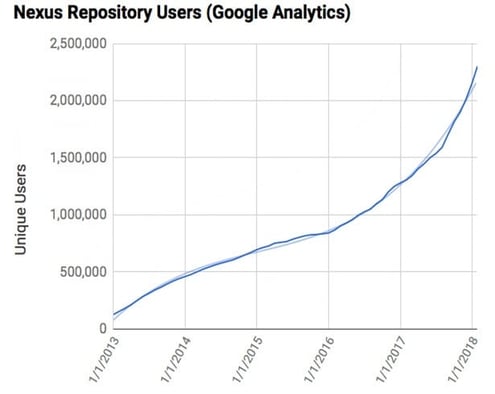
    As a small and growing company, we’ve had—and continue to have—an impact globally on software development, where roughly $2 trillion is spent each year. Our products and services are used by millions of developers every day with users of our open source Nexus Repository Manager, now in the millions, growing 68 percent last year.
    Remote Org - 01.jpg

    It is rare to have the ability to blaze trails that end up materially helping the world do something better. That’s the epitome of meaningful work, and it’s awesome to be part of it. Sonatype has significantly influenced the way software is developed not just once, via contributions to Maven and its numerous progeny including npm and NuGet, but twice, with the Nexus Repository Manager. And a third big innovation is well underway, with competitors working furiously to try and catch up. Nexus Lifecycle lets development teams automate the effective use of open source.

    These innovations with their consistent themes of “Better software, faster” were the work products of our fully remote product team.

    What Does the Team Think?

    There has been a steady stream of innovations and the business is growing, but how do the members of the Sonatype team feel about the company and the environment within which they are working? Can we accelerate progress and continue scaling the organization?

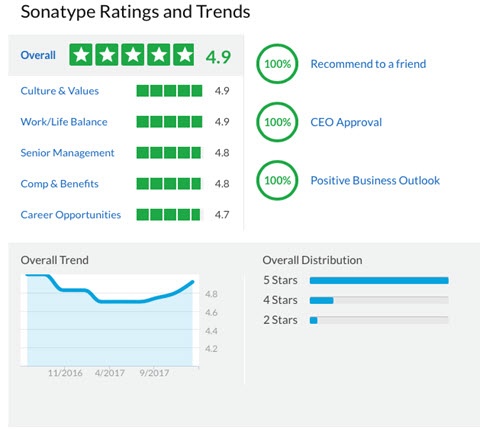
    We are currently rated an A+ (4.9/5.0) and have been trending up over the last year. The high scores here are indicative solid engagement by team members and positive trends are effectively leading indicators of future engagement levels. Additionally, our overall annualized employee retention rates have been >95 percent for the past three years in an industry where the norm is 77.6 percent retention. The remote model certainly doesn’t seem to be hurting us here.
    Remote Org - 02.jpg

    Side note:  The dip in the ratings graph was us breaking through a scale point that required some notable changes in organizational design.  It seems change is still challenging regardless of the remote model.

    The Remote Model

    It is still early days for the remote model. The remote organization design is not a common pattern for venture capitalists to match against. For VCs, unfamiliar patterns equate to unknown risk and I’ve been asked about this during board meetings. “Are we riding a tiger here? When are you going to open a local R&D center?” I will readily admit, I had some healthy skepticism very early on; however, my experiences as we have continued to scale have reinforced my position that this is a material competitive advantage for us.

    While this is by no means a scientific assessment—Sonatype is invariably a single data point—what follows is at least based on a small mountain of empirical data collected as our product team has scaled beyond the 100-person mark. And I can see an appealing path to 500 and beyond.

    Fallacies

    Remote Org - 03.jpg

    “People just work better when they can interact face to face.”

    Right … There is so much wrong with that statement that I just smile when I hear it, and I hear it often. While this judgment might seem intuitively correct on the surface, it is not based on anything but gut sense and is always made by people that have no significant experience with a fully remote model. These folks usually have experience or have heard about experiences with the (fatally flawed) mix of co-located and remote models. These are destined to fail for reasons covered a bit later.

    What does “work better” mean, anyway? (Yes, those are often the exact words used.) This statement is extremely narrow in scope when you consider broader workday activities. In a typical office environment, how often do you absolutely need to interact face to face to be effective in achieving organizational goals?

    Don’t get me wrong. The high-bandwidth exchange of information possible via face-to-face interaction can be extremely beneficial in the more limited cases it is needed and cannot effectively be compensated for through other means. But there is no reason that people cannot get together this way with the remote model. In fact, we do this multiple times per year.

    What is conspicuously ignored here is the material “tax” tied to persistent, often ad hoc, face-to face-interactions, which are often (poorly) compensated for by headphones, closed doors and other distraction-reduction techniques.

    “You have no idea if people are just off screwing around.”

    While I don’t hear this one as much as I used to (is Taylorism finally dying?), do your visual senses really answer this when everyone is on site together? Ever hear of the “boss” key? Regardless of organizational model, you have to be able to trust and verify. There are certainly mechanisms for accountability that don’t require standing over someone’s shoulder. Expectations must be clear and people must have what they need to achieve what is expected. This is standard stuff that has nothing to do with co-located or remote scenarios.

    Upsides

    There are a number of key benefits that collectively lead to significant gains in organizational effectiveness. The communications are balanced and self-optimizing, distractions are reduced, quality of life is higher and the number of amazing people you can recruit is enormous.

    Effective Communications

    The most significant benefits I’ve seen in the remote model stem from the level communications playing field that emerges. Everyone is equally “disadvantaged” in not having ready access to high-bandwidth face-to-face interaction. The people we have hired have been quite adept at compensating for this, and we have not had to specifically select for this ability in our hiring.

    Another subtle but material advantage is that all communications endpoints are equidistant. It is just as easy to communicate with someone on your team as it is someone on another team or someone in a different department or even the CEO. Everyone is a phone call, email, chat message or video chat away.

    It is also largely unappreciated (until you’ve experienced it) how many advantages offset the “limitation” of infrequent face-to-face interaction. First, the communications pathways that form are very often driven by business necessity versus seating location, political motivations, after-work interest or other factors. Second, at least in a product development context with a bunch of technical people that just want to get stuff done, there is more focus on the work and the corresponding results than the political or social aspects of the workplace. Finally, as noted earlier, you can still get together—and should. These engagements are targeted, focused and effective rather than the more ad hoc engagements in the co-located setting. We hold these get-togethers when kicking off significant initiatives and we also get the entire organization together for our annual (open spaces format) meetup.

    We also (judiciously) allow people to shift between teams as resource needs ebb and flow, which strengthens the overall fabric of relationships organizationally. It is hard to quantify the benefits here—and they likely span all organizational models—but this reinforces optimal communications and has been very beneficial as we have scaled. We have a far more ambulatory group of people with an extensive network of personal and professional relationships and diversity of expertise across our technology portfolio.

    Life is Good

    Not having to contend with a soul-sucking, energy-consuming commute on a daily basis is a major quality of life benefit for people. This also comes paired with plenty of options for a more reasonable cost of living for members of the team.

    There is something that you do need to watch out for, though. There can be a tendency for people to burn the midnight oil. While this might sound like a big benefit to members of the C-suite, product development is ultimately an ultra-marathon. You have to watch for signs of burnout and ensure people that are falling victim sufficiently dial things back to their maximum sustainable pace. The cost to replace a talented member of the team is far greater than the short-lived incremental productivity of someone working too much.

    Near Infinite Expertise

    Hiring the right people is a perennial challenge in any discerning organization, especially when you are just starting out. In a co-located model, you are competing in specific geographies, often with better-capitalized companies that have a lot of brand recognition. In the remote model, the number of amazing people you can connect with is effectively infinitely larger. We are able to open a really big door. When you are also able to eliminate the commute and offer challenging work that matters, a lot of exceptional people can be convinced to walk through it.

    One Note of Caution

    Time zone overlap is a key consideration. There must be adequate overlap and we have this around the U.S. Eastern time zone.  We span 10 time zones overall, from Central European Time to U.S. Alaska Time, and that is a stretch in some respects. Team members at the edge compensate by shifting earlier or later into the work day when needed, and this has worked well. Regardless, sufficient overlap is critically important. Spreading out any further than we are today is likely untenable, as the time shifting would likely lead to unsustainable quality-of-life challenges for people that are geographically distant.

    Avoid a Mixed Model at All Costs

    While scorned by many when she abolished remote working at Yahoo, Marissa Mayer was ultimately right to unify the model … she just chose the wrong model! (Actually, she probably didn’t, given the existing scale.) You can’t effectively mix co-located and remote models across an organization. This is because it is impossible to create a level communications playing field, or maybe you could but the effort required to level the field would drive effectiveness to zero. It’s simply human nature at work.

    Co-located members end up forging stronger communications channels and the channels with remote members weaken. Remote members become more isolated as seemingly innocuous interactions among the co-located people occur without them.

    This isn’t to say that people can’t work from home occasionally in the co-located model. This certainly works. However, you cannot achieve optimal organizational communications at scale with a primarily remote group of team members mixed with a co-located group.

    Perhaps you can mix modes, as long as you have a consistent mode across individual autonomously operating teams. We have not tried this, but I also sense this is not without material challenges and I have heard of some failures. I’d argue that many of the challenges tied to offshore development share similar root causes, leading to debilitating communications imbalances.

    At scale, there is still the equivalent of a team (or teams) that ultimately support these autonomous teams, often with some members of these supporting teams being part of the autonomous teams as well. This forces you to contend with a mixed co-located and remote model one level up and likely leading to (again) imbalanced communications. While this perhaps can be made to work, the real question is whether it can work with a sustained, high degree of effectiveness at increasing levels of scale. I remain skeptical.

    Compensating Mechanisms

    While there are significant benefits, the remote model has some challenges. These are the kinds of things you might expect, but thankfully, there are effective ways to respond.

    Product development is a team sport and the remote model affords a lot of opportunity to go off on your own. The lone wolf might flourish for a bit, but to scale, you need people who will reach out to others and solve problems with them, proactively. While this is true in any organization, I’ve found that it requires more vigilance to keep this in check in the remote model. Do not let bad habits develop.

    Similarly, it’s more difficult to stay mad at someone when you see them on a daily basis. I think most humans are probably about 99 percent irrational and 1 percent rational. Unicorns might have a 90/10 split. Regardless, many of us are absolutely amazing at seeing negative things that just are not there. The remote model can exacerbate this, and it can “take a village” to keep everyone grounded in reality (rational thought) rather than assuming the worst and starting a downward spiral. Just being aware of this goes a long way, making it easier to keep the irrational majority in check. Having a “no a-holes policy” is certainly useful, but pretty much anyone can still appear to be acting like an a-hole at times. Don’t console those griping about someone else. Push them toward reconciliation.

    The Lounge

    We created a chat room many years ago called “The Lounge,” a sort of virtual water cooler. Many other remote organizations have done similar things, and for us, this has been enormously beneficial in bringing “humanity” into the remote workday. It also helps connect people in otherwise distant parts of the organization. While it is not the same as getting together with people in person, it goes a long way in giving people a social outlet during work. Abuse has not been a problem, either.

    We’ve more recently started a number of special interest groups and guilds, all of which have their own chat rooms along with more topical banter. And most recently, we created a Google Hangout version of “The Lounge,” which has been a surprisingly effective social exchange. It seems hearing and seeing real laughter goes a lot further than reading “LOL” or observing some emoticon or emoji.

    Get Together, Live

    As noted a few times already, it’s important to get people together, in the same location, at key points. This is common advice in most of the other literature I’ve seen on remote models. These face-to-face meetings strengthen individual relationships that tend to slowly erode over time given exclusively remote interaction. We’ve found that a year is just too long and I’ve picked up on subtle cues from the organization as we have approached the nine-month mark. While there are numerous factors in play, my experience tells me that six months is likely the sweet spot for this. The timing might vary from organization to organization depending on the nature of the work, but reasonably strong social bonds are an important factor in holding everything together.

    Online Interaction

    In addition to getting together, the effective use of video goes a long way for multi-party exchanges. Body language is often useful, especially in the cases where vigorous discourse is needed. For 1:1 interaction where you don’t need to exchange visual information, voice is a personal preference, primarily because with my wireless headset I can walk around, keep my blood flowing and concentrate far better, really listening and picking up on subtle cues voiced by the person on the other end. Random factoid: My FitBit reports that I’ve walked a few half-marathons during some days without ever setting foot outside.

    Wrapping Up

    When contemplating a fully remote model, be prepared to go all-in at the point you do. Do not, under any circumstances, attempt a mixed co-located/remote model. That is a certain path to failure. Beyond a certain organization scale, the fully remote model is likely impractical if not impossible to migrate to effectively. I have no empirical data to support this, but if your organization is fewer than 20 people, the challenges of adapting to the remote model are going to be simpler. Beyond this scale, there is inevitably a lot more organizational complexity, not to mention business risk tied to the short-term productivity drop as everyone adapts and learns how to work in the materially different operating context. I’m not stating outright that you won’t be able to make the move beyond 20, but you should expect the challenges to be far greater and the time to stabilize longer.

    With the experiences I have had and the advantages we’ve realized with Sonatype’s remote organization, I cannot imagine choosing the co-located model if faced with the challenge of scaling an enduring product development organization from early days. I still have fond memories of sitting in a bullpen environment on University Boulevard in Palo Alto years ago. Without a doubt, the bullpen is a great model at the outset, when things are fluid and the requirement for high-bandwidth exchanges is nearly constant. However, the moment you are ready to scale beyond that initial bullpen, remote should be a serious consideration.  If you are growing, the option won’t be available for long.

    — Mike Hansen

  • Continuous Delivery: No Excuses

    Continuous Delivery: No Excuses

    Jez Humble’s (@jezhumble) career has spanned roles through coding, infrastructure, and product development across three continents and organizations of varying sizes. To say he knows a lot about continuous delivery is a total understatement. In 2010, he and Dave Farley literally wrote the book on continuous delivery—and if you have not yet read it, I would suggest you pick up a copy. It’s a fascinating read.

    I’ve heard Jez speak over the years at a number of DevOps conferences, and I was excited when he accepted our invitation to speak at All Day DevOps. At the conference, Jez presented “Continuous Delivery Sounds Great But It Won’t Work Here,” during which he addressed the four reasons he consistently hears from organizations on why continuous delivery won’t work in their organization:

    • We’re regulated
    • We’re not building websites
    • Too much legacy
    • Our people are too stupid

    Jez also outlined the real reasons behind the stated reasons: Their culture sucks and/or their architecture sucks.

    Jez spent his talk addressing each objection.

    We’re Regulated

    Jez noted it took Amazon four years to go from monolithic to service-oriented architecture (2001-2005) but the company did it. Do you think Amazon is the pillar of free enterprise, free of regulation? Not so. Being a publicly traded company, Amazon is heavily regulated; it is subject to Sarbanes-Oxley regulations; it handles personal and corporate financial and proprietary data; and it provides private cloud services to the U.S. government, including highly sensitive data for the Department of Defense.


    null


    Amazon Web Services’ GovCloud, in fact, provides the cloud platform for cloud.gov, the 18F project Jez worked on to address the authority to operate process within the government.

    The old process had screened every software application before it was allowed on a federal IT system. It stifled innovation because it duplicated efforts multiple times over. There was no cross-agency assumption that if one agency approved a software package, it was okay at another agency. Cloud.gov moved controls from operations into infrastructure as a service. Now, agencies can receive software through cloud.gov to integrate into their applications.

    null

    The bottom line is continuous delivery is excellent for heavily regulated environments because it gives assurance to regulators by removing opportunities for human error.

    We Aren’t Building Websites

    Jez’s favorite example is HP LaserJet firmware. HP had a 400-person team spanning three continents. Obviously, the firmware was critical for new printers, but the team was moving slowly. Only 5 percent of their time was spent on innovation. HP tried hiring, firing, insourcing and outsourcing. With business school tried-and-true solutions exhausted, and knowing it had to eliminate non-value adding work to increase innovation, the company looked to continuous delivery with two business goals in mind: 1) Get firmware off the critical path; 2) Achieve 10X increase in development productivity, measured by percent spent on innovation.

    HP had other goals:

    • Reduce hardware variation
    • Create a single package
    • Implement continuous integration
    • Implement comprehensive test automation
    • Create a simulator


    null

    Note: the chart above doesn’t show the 23 percent of time spent managing the automation tests. Time well-spent.

    In the end, between 2008 and 2011:

    • Overall development costs were reduced by ~40 percent
    • Programs under development increased by ~140 percent
    • Development costs per program decreased 78 percent
    • Resources now driving innovation increased by 8X

    Too Much Legacy

    Jez’s example here is Suncorp, one of Australia’s largest insurers (note: Also falls under the “We’re heavily regulated” excuse). Suncorp was burdened with loads of mainframes and legacy systems, but it built a set of test suites with open source tools to move into continuous delivery.

    Our People Are Too Stupid

    Jez looked outside of the software development industry into an old-line manufacturer: automotives. GM’s worst performing plant had been closed down. GM fired every one of the workers from the plant. The workers were notorious for problems ranging from sabotaging cars to drinking to gambling on the job.

    Remarkably, GM’s union leaders convinced Toyota to hire the old GM employees to learn the Toyota processes, and Toyota hired the GM employees to run their new NUMMI plant. Toyota and the old GM employees showed it wasn’t the people that was the problem; it was the leadership, the management system and the use of obstacles. At the GM plant, an employee had a job and a certain amount of time to do it. If it didn’t get done, the assembly line kept running. At the Toyota NUMMI plant, employees were empowered to ask managers for help—without retribution. The car had to be in a good state before proceeded to the next stage of the production line.

    In software development, this is continuous integration. Toyota’s NUMMI is the inspiration for Lean in the United States.


    null

    Jez’s take-home point for any organization is that results aren’t achieved when you adopt practices but don’t implement the culture. You need to:

    • Agree and communicate measurable business goals
    • Give teams support and resources to experiment
    • Talk to other teams
    • Achieve quick wins and share learning
    • Keep going

    Jez dives into more details in his talk, which you can watch here. If you missed any of the other 30-minute long presentations from All Day DevOps, they are easy to find and available free of charge here.

    — Derek E. Weeks

  • Creating a Better Plan with Agile Data

    Creating a Better Plan with Agile Data

    Agile methods help companies respond to change, beat the competition and build high-quality products that customers want by aligning development work to business priorities. But what happens when an organization is unable to align strategy to execution or align its departments or teams due to internal silos? As organizations advance in agile maturity, so do their data analytic needs. Compiling and synchronizing the data of a few agile teams is significantly different than rolling up data across many teams or an entire portfolio.

    Without a clear picture of how teams are delivering their work, organizations may be flying blind when it comes to understanding the delivery of their products or services.

    See People, Time and Work in a Predictable Way

    Every team, department, and organization relies on data to make important decisions that steer the business. What many organizations lack is a way to clearly understand, prioritize and utilize the data they have. From an agile practice perspective, that level of visibility should be established early on in a data reporting structure—project, initiative and work hierarchies—and with the proper agile software solution.

    Setting data reporting standards helps teams understand how they are going to refer to, read out and analyze the data within their company. This type of data structuring promotes the standardization of data across teams, projects and work. But agreeing on a data infrastructure is only one part of data analysis. All of your organization, team and work-task information still needs a centralized system of record for proper utilization. Without a centralized database or agile software solution, data management becomes an extremely manual task. By establishing a data schema for your team-level, day-to-day work within a centralized system of record, all teams can start down a path of easier data accessibility, rollups, comprehension and insight.

    But, this type of reporting is not the end all, be all for most organizations. To truly have a full and comprehensive read-out of agile work, teams need to be able to slice their data any way they want to accurately reflect the work of the organization as a whole.

    How Does Data Discipline Lend Itself to Predictive Insights and Planning?

    Formatting data in an organized fashion has to be the first step in understanding the work that is happening across an organization. Without this first step, agile metrics become a tedious task of manual data rollups and missed opportunities. The hodge-podge of data becomes nearly unusable outside of each individual team, as the organization does not know how to compare health, status, risks, dependencies, cadence or velocity team to team.

    Getting an organization grounded on common data reporting practices has many benefits, such as:

     Everyone is Aligned to the Priorities

    With all teams seeing the work produced across an organization, teams keep focused on the most important tasks, align on dependencies and ensure they meet important delivery timelines. It also prevents unsanctioned “work for the sake of work” from happening, as all eyes can see the work in the system and how it impacts the overall business goals.

    Highly Prioritized Backlog

    Not only are teams able to align on the priorities, but they align on the prioritization of the work needed to meet and deliver on the business goals.

    Better Time Management

    With a common data management structure built into your agile software, time management, velocity and cadence planning become much easier. Leadership can see which teams are successfully delivering all their work during each sprint, as well as how much work they can deliver over time. This sense of time tracking and management gives executives a glimpse at predictive delivery. With predictive delivery comes more predicative revenue.

    Consistent KPIs

    If you ask several individuals what their idea of success is, you will get a different answer from each person. Looking at agile metrics is very much the same. If teams are given free rein to set up their own data structure and reporting, all reports and dashboards will be different. This makes rolling up the progress, status and health of initiatives time consuming and painful. With a governed data structure prebuilt in an agile software solution, all teams and departments within the organization can see the same type of reports and metrics all in one place. These teams then have the ability to analyze their data using standard reporting metrics from standard reports or dashboards.

    Transparency

    While no one wants to think that a project can go awry, it does happen. And it is much better to make course corrections as early as you know there is an issue, as opposed to waiting until it is too late. Giving all parts of an organization a centralized place to review progress in a standardized way promotes overall success.

    The Ultimate Goal: Build a Better Plan

    Standardized agile performance metrics that stem from an ordered data-schema empower organizational productivity, predictability, quality and responsiveness. With the insight that is gained from this level of data consistency—historical, real-time and health details—the pump is primed for deeper insights and advanced data manipulation.

    The Future is Predictive Planning and Big Data

    The old adage, “You only get out what you put in,” also holds true for how an organization uses its data. This is why that critical first step of organizing and housing your agile work in a similar structure in a centralized system is key. Without this simple alignment, advanced metrics and analysis are nearly impossible. And it is those advanced metrics that are the key to truly predictive planning. The future of planning lies in customized data reporting and manipulation with big data analysis. With big data, disparate pieces of information can be analyzed, effectively slicing and dicing the metrics any way an organization needs. Reports can be created to fit the shape of the organization, roles and teams that need them–how they need them. To do this, organizations need to input the data into a centralized system first! Analysis is only as good as the data inputting allows.

    — Brook Appelbaum

  • The Era of Intelligent Testing

    The Era of Intelligent Testing

    The state of the art in software testing has not kept pace with advances in software development over the past 10 years. Modern quality assurance (QA) groups struggle to play their role in a world of continuous delivery, leading to more defects in production, low QA morale and excessive testing overhead. Thankfully, innovations in machine intelligence and test automation have laid the groundwork for a better model—one that will allow QA to keep pace with development, increase productivity, improve product quality, and raise customer satisfaction across the software industry.

    Why We Need a New QA Toolset

    Existing QA solutions were built for a world where software changed infrequently and functionality was highly specified and documented.  This is no longer the case.

    Products Are Evolving Faster Than Ever

    Several forces are converging to accelerate development. Software as a service (SaaS) has removed many of the issues around operating system compatibility, packaging, deployment and versioning that consumed significant development time during the installed software era. Consider that in 2016 Amazon Web Services delivered more than 1,000 new features and services—a pace that would be impossible with packaged software.

    “Development cycles are getting shorter and new features are coming faster than ever…There simply isn’t enough time to test.”

                                                 – QA Leader at Fortune 250 company

    The proliferation of open source and cloud-based features as a service has also reduced the time that developers spend building generic functionality. At mabl, for example, the thought of building our own authentication engine never crossed our minds; we use Auth0. Instead of building our own data processing pipeline, we use Apache Beam and Google Cloud Dataflow. Rather than building our own ML framework, we use Tensorflow. And the list continues; reusable components and cloud-based services save us years of engineering effort, allowing our developers to deliver product features rapidly.

    Continued adoption of agile methodologies has further increased the efficiency of development teams. A recent McKinsey study of 1500 software projects demonstrated that agile teams are 27 percent more productive than those that follow methodologies such as waterfall.

    Finally, continuous integration and continuous delivery are accelerating the pace of change in software. A recent survey by Atlassian suggests that more than 50 percent of software teams are already using continuous integration and/or delivery, and more than 32 percent have plans to move to CI/CD. The same survey indicates that more than 50 percent of organizations are able to push changes to production daily.

    In the end, improved developer productivity means that software products are evolving faster than ever. Unfortunately, this places increased pressure on the QA function. As one QA leader from a Fortune 250 company said in a recent interview with mabl, “Development cycles are getting shorter and new features are coming faster than ever. And we have five productive developers for every QA engineer. There simply isn’t enough time to test.”

    Existing Automation Frameworks Impose Too Much Overhead

    QA rightfully relies on automation frameworks to improve productivity; tools such as Selenium, Appium and JUnit now enjoy widespread adoption. More than 80 percent of the respondents to a recent mabl survey use Selenium today, and QA managers are under constant pressure to increase automation. Unfortunately, while Selenium and other frameworks have helped many companies increase their QA velocity as compared to manual testing, these frameworks have significant flaws:

    • They all require specialized scripting expertise, and given the lack of available talent, teams have very limited capacity for QA automation.
    • They provide limited context in test results, which leaves teams with very little information to help them triage and address issues.
    • At scale, they require their own infrastructure, which takes time to provision, operate and scale.
    • They are tightly coupled to attributes of the product under test that change frequently (xPath, CSS, etc.), resulting in constant maintenance and false positives.

    These flaws only become more painful as the pace of development and change accelerates, compelling many teams to limit their use or discard them altogether, resulting in lower product quality.

    mabl survey – satisfaction with existing testing tools and processes (n = 104)

    “Please indicate the extent to which you agree with the following statements”

    Time Pressures Lead to Unhealthy Team Dynamics

    People in testing roles are increasingly at odds with their peers in development. Unable to keep up with the continuous pace of development, QA becomes a bottleneck to product velocity, leading to tension with their peers in development. This constant pressure also starves QA of its ability to make the very investments in automation and process improvements that are needed to improve throughput. The feeling of always being behind with little hope for improvement often leads to low morale within the team.

    Gaining consensus on the standard of quality has also become difficult for teams, since agile teams often steer clear of detailed functional specifications for each release, preferring instead to focus on user goals and requirements (see: Agile Manifesto). Because user goals and requirements are open to more interpretation, QA and development can disagree on not only the severity of defects but also the validity of the tests themselves.

    Modern software teams are also more open to evolving requirements during a given release cycle (see: “Responding to change” in the Agile Manifesto). Evolving requirements should drive updated test cases, but this requires deep engagement and coordination for already stretched personnel. Rather than testing for quality versus specified behavior, we rely much more on ad hoc and manually intensive exploratory testing to look for defects.

    There is Hope for QA

    While faster feature development, shorter release cycles, evolving requirements and unclear accountability for end-to-end quality all present real challenges for QA, a new generation of QA tools are emerging to confront these challenges head on.

    It Will Be Easy to Create and Maintain Tests

    Unlike existing test automation frameworks, next-generation QA tools will not require specialized scripting expertise. Instead, they will offer intuitive interfaces that allow anyone to quickly create and manage tests. This will help teams expand their test coverage and evolve their tests quickly as their products evolve.

    Tests Will Adapt Seamlessly to Change

    Because they use much more sophisticated, durable methods of simulating user behavior in automated tests, next-generation QA tools will not suffer from the brittleness associated with existing automation frameworks. Tests will not be tightly bound to individual elements within the front-end codebase that change frequently. Rather, they will use machine intelligence to create and maintain sophisticated models of tests, enabling tests to adapt the tests rather than fail when xPaths and other locators change.

    QA Will Run in the Cloud

    Today, teams struggle with the performance, cost and operational overhead of on-premises testing systems. Next-generation QA tools will take advantage of on-demand cloud computing resources to execute tests faster and more efficiently. They will tap into powerful data processing and analytics services to analyze test results and deliver insights. They will be delivered completely as a service, offloading the management and operational burden to tool vendors.

    QA Will Be Part of the Delivery Pipeline

    Next-generation QA tools will be tightly integrated into automated CI/CD pipelines orchestrated by Jenkins, Spinnaker, CircleCI and CodeShip. Tests will trigger automatically whenever teams make changes to the product under test and on-demand. The tools will notify team members when there are potential issues so that they can address them before they affect users. It will be simple to run tests and compare results across builds and environments. Decisions around releases, deployments, promotions and rollbacks will be largely automated.

    The Definition of Quality Will Evolve

    Beyond validating specific assertions in tests, the next generation of QA tools will use machine intelligence to automatically detect and highlight potential regressions in applications. As a result, we’ll think less about tests “Passing” and “Failing” and more about the extent to which changes improve or degrade the user experience. We will focus less on code coverage and more on product coverage. We’ll look beyond basic counts of passing and failing tests in favor of a more on holistic approach to assess the risk associated with a given build or deployment.

    Tools Will Be Deeply Embedded Within Our Teams

    Next-generation QA tools will effectively serve as extensions to development teams. They will share test results and insights through Slack, Jira email and other common communications channels. They will take feedback and training from the entire team—including product, development, QA and customer success—and incorporate what they learn into their tests. Most importantly, next-generation tools will describe tests and results in plain language, and they will provide useful context to help developers reproduce and fix issues, just as an effective QA teammate would.

    The Era of Intelligent Testing

    Software quality assurance has never been easy, and the accelerating pace of software development in recent years has made it even more challenging. Thankfully, a new generation of tools are emerging to address this challenge. Incorporating cutting-edge machine intelligence, delivered from the cloud and embedded into the modern development workflow, these tools will dramatically improve the effectiveness of QA, ushering in a new era of efficiency and innovation across the software industry.


    mabl survey – user sentiment (n = 104.  For simplicity, combined “Agree” and “Strongly Agree” into “Agree” category,  combined “Disagree”, “Strongly Disagree” into “Disagree” category.)

    “How satisfied are you with the following aspects of the testing process at your company?”

    — Dan Belcher

  • DevOps Future: Have a Break Plan

    DevOps Future: Have a Break Plan

    A big tenet of DevOps is, “Automate all of the things.” It’s generally a good policy, and definitely allows us to meet the delivery goals of DevOps. Taking the full-on, all-new technology case, an org could run full automation on the dev side and deploying with an application release automation tool to a fully automated container management system—fast, efficient, programmable, even portable. This level of automation absolutely enables DevOps.

    Until things break.

    Ignore the well-known and easily overcome cases such as, “That container is no longer responding,” and focus on the larger infrastructure environment. Do you have a plan for getting builds out if DevOps has taken you to many builds a day and your entire Jenkins environment just crashed? The easy answer is, “Switch to another Jenkins server,” but if you are big enough to have more than one, workload may be an issue, as might be the Jenkins environment itself. The usual example of Jenkins for client builds and separate Jenkins environment for server builds is a good example. If the client environment drops, you can’t just move it to the server build environment. Test tools and other tools for clients will have to be moved over, and almost certainly the build environment will have to be modified.

    Along those same lines: What if, instead of a few containers dropping, your container management system fails? (It’s software, it will happen.) What’s the plan then? Depending on the type of failure, it could take your entire application or application portfolio down with it. In most organizations, downtime is not something taken lightly, so what is the plan to return to normal function? Waiting until you’re in the middle of a disaster caused by a single bad disk, failed memory chip or an attack exploiting the infrastructure is a bad plan. We’ve been doing this for decades, yet we know software fails, and sometimes it fails spectacularly.

    Once the first rush of DevOps is through, processes are streamlined and automation is basically in place, it’s fair to take a deep breath and plan for how to overcome the break and total failure of each tool in your toolchain. Yes, those tools will change and you’ll have to do a little work each time you add/change one, but what is your preference: a slightly slower adoption of DevOps after the low-hanging fruit is gathered or confront a failure of infrastructure proportions without a plan?

    Long before computers, Benjamin Franklin is credited with having said, “By failing to prepare, you are preparing to fail.” That credo has been repeated often since. There is truth in that statement with any form of automation. That which is automated eventually goes awry. You can plan for it, or suffer the stress of trying to figure out what to do while it’s an emergency. I suggest having a break plan.

    — Don Macvittie

  • Survey: Not Much Compliance Progress in DevOps World

    Survey: Not Much Compliance Progress in DevOps World

    A survey of 1,500 customers conducted by Chef illustrates the lacking state of DevSecOps in the enterprise today, finding that nearly three-quarters of IT organizations still manually assess whether applications comply with various regulations before being deployed to production. Worse yet, half the respondents also manually remediate any issue once it arrives, which takes days or sometimes weeks to accomplish.

    In fact, according to the survey, more than half the respondents (52 percent) have applied automation to fewer than 25 percent of the servers they manage.

    Manual processes conspire to make IT organizations less agile at a time when the pressure from the business to deploy applications and associated updates faster has never been higher.

    Julian Dunn, director of product marketing for Chef, said compliance—much like security—needs to move much further left into the DevOps process as a subset of DevSecOps. After all, most compliance regulations are trying to set a bare minimum standard for IT security.

    The first line of IT security defense is detecting vulnerabilities before they go into a production environment. Whenever a vulnerability gets exploited, most organizations incur the initial injury. But after the cybercriminals have come and gone the regulators show up, demanding explanations. Those explanations usually don’t do much to mitigate the fines and penalties that are assessed, especially in highly regulated industries.

    Chef has been making the case for applying the same constructs it developed to automate configurations to compliance for some time. Most compliance issues typically stem from one setting or another that wasn’t configured properly, noted Dunn.

    The issue is that most compliance officers inside organizations are unaware that many of these issues could be automatically resolved, and DevOps teams are too focused on daily operational issues to make anyone aware of what’s now possible. But now that DevSecOps is becoming more mainstream, many of the individuals involved are starting to realize they are dealing with the same issues time and again, said Dunn.

    Dunn added that, much like IT security professionals, compliance professionals who typically reside in a risk-management function need to be brought into the application development process earlier, but without slowing down the pace of application development. However, given the current level of manual remediation occurring, earlier participation mostly likely will reduce the level of manual work occurring right before the application is supposed to be going into production.

    When it comes to compliance, most IT organizations are their own worst enemy. Compliance requirements typically are spelled out in arcane language in documents that not many read, much less comprehend. Asking developers to make sense of those requirements is not the best use of their time. Besides, few of them would interpret the requirements correctly. An automated approach to compliance is not only going to create a better application, but it also should reduce a lot of unnecessary aggravation for all concerned.

    — Mike Vizard