Category: Continuous Delivery

Continuous delivery is a software engineering discipline that allows organizations to consistently develop and release quality software at a rapid pace. It is achieved by automating the software development lifecycle, enabling tasks such as development, testing and release to occur concurrently and continuously.

  • DevOps Chat: The Continuous Delivery Map w/ Scott Wilson, Automic

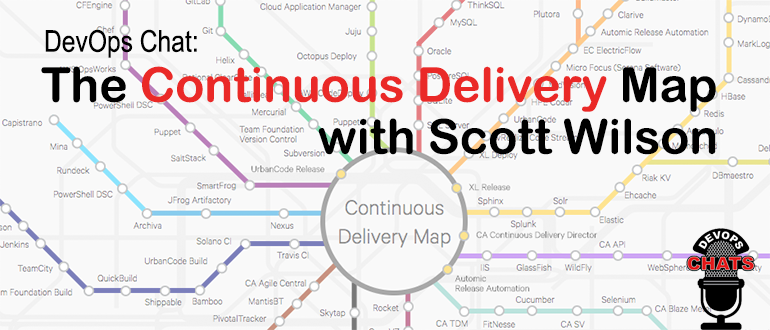
    DevOps Chat: The Continuous Delivery Map w/ Scott Wilson, Automic

    Wouldn’t it be nice to have the entire continuous delivery topography laid out in a nice map that shows how they are all interconnected? Sort of like a subway or metro map? Well now you have it and it is interactive! The good folks at Automic, a CA Technologies company just released their Continuous Delivery Map. It is really cool and they are adding to it all the time.

    I caught up with Scott Wilson of Automic and had a chat about the Continuous Delivery Map. As usual the streaming audio of our conversation is immediately below, followed by a transcript of our chat.

    Audio

    Transcript

    Alan Shimel:                Hey, everyone, Alan Shimel, devopsy.kinsta.cloud here for another DevOps Chat. Welcome and welcome to our guest, Scott Wilson, Automic, a CA Technologies company. Scott, welcome back to DevOps Chat

    Scott Wilson:               Thank you, Alan. I’m glad to be here.

    Alan Shimel:                Glad you’re here with me. So, Scott, you know, lot going on with Automic, obviously – always is – but I wanted to focus in today on some pretty cool interactive graphic – well, it’s more than just a graphic. It’s really a whole project that you guys have launched and it’s called the “continuous delivery map.” For those following along at home, if you wanted to check it out, you can get to it at automic.com/continuous-delivery-tools and – dash or a hyphen. Scott, you know, assuming people are listening to us but not able to get to the site this second, can you describe for us what the continuous delivery map is?

    Scott Wilson:               Yeah, so the continuous delivery map is really just a way to visualize a topography, if you will, of all the different tools that are in the continuous delivery value chain, and there are lots of tools. And we found, in talking with a lot of prospects and just other companies in the industry, that amongst IT professionals there’s a bit of confusion on what kind of the best use case is for many of the tools, mostly, Alan, due to so many of these tools having a great deal of crossover functionality, right? It’s kind of muddied, blurred the lines a bit.

    And so, in thinking about a good way to help people out and kind of visualize the tool chain used to get an application into production environments, we took inspiration from metro rail systems, like the London tube or the New York subway, and so we built out a map that looks similar to that.

    Alan Shimel:                Yeah. I mean, for those of you, as I say, who maybe can’t get to a computer right this second, as you’re listening to this, it really is. It’s based on a subway map or a tube or it could be the Washington metro or the Boston or Tokyo or anyplace else, in that you have a central hub and then there’re different lines that are color-coded. And each of these color-coded lines represent a lineage or a line of a particular functionality in the continuous delivery world. So, for instance, there’s a line for cloud, IaaS and PaaS. Another line for middleware, another one for CI tools. Another one for artifact repositories. And, along that line, the stops are all of the different companies that kind of play within that are or are on that, and it’s not just companies – it’s actually the products of these companies that play on that particular branch, if you will.

    So it’s actually pretty cool, Scott, and what I like about it too is, though, look, plainly and clearly, Automic is a vendor. I mean, there’s no favorites here. You’ve done a pretty exhaustive mapping or the whole topography of the continuous delivery world, it looks like, to me anyway.

    Scott Wilson:               Absolutely. We really wanted this to be agnostic for the tools. We’re really just trying to help the community understand, you know, the landscape for continuous delivery, and, as you mentioned, the central hub is really the way you would bind all those many plethora of tools into a coherent pipeline, right, to safely and reliably deliver apps to production environments. And, yeah, this definitely respects that. Ultimately, we’re gonna be opening this up to the community so that people can comment or keep this updated ’cause there’re always new tools coming on board and other tools or open-source projects that kind of fall out of vogue, so we’re looking to really make this more interactive and far – we’ll keep it up to date.

    Alan Shimel:                Yep. And, you know, again, trying to visualize or paint a picture for people who don’t have it in front of them, at every stop on every branch, if you will, it’s a link, and if you click on that link, it gives you a little pop-up with a little information about that particular company or product but also links through to their full websites or what have you. So it really is – I could see this being a really useful tool for anyone interested in the CD kind of world. There have been – I mean, clearly, Scott, right? Full disclosure: there’ve been other companies that have tried to organize, if we will, the CD world, but, really, using this paradigm of the subway map and the branches and lines, if you will – maybe it’s just ’cause I’m from New York and I’m used to subway maps –

    [Laughter]

    – makes a lot of sense to me.

    Scott Wilson:               Right. Well, we’ve heard that feedback as well that that’s just – well, you know, continuous delivery’s about movement, right? You’re moving things along and it just seems to help visualize it. You know, a lot of the data from what other folks have done is similar, right – a big list of tools – but just being able to put it in a format like this, we’re finding a lot of people go, “Ah, this makes sense. I would use these set of tools. Source code management fits here and deployment automation fits there.”

    And it’s helpful because I think, without presenting it this way, you’re just left to a hodgepodge of tools and you’re like, “Yep, I got ten of these and two of those and I’m good.” When you look at it in this format, you realize, “Oh, well, I could actually go further. I could do more or I could better organize things,” or maybe even take some of the burden off a tool that you keep having it be more than it was designed for and actually use a best-of in another category, or, as we represent it as, a color-coded rail line.

    Alan Shimel:                Yeah. Yeah. And, of course, you know, the thing about projects like this, Scott, is they’re, in some ways, a never-ending story. They’re constantly morphing, changing, growing. And, I mean, the good news is you’ve got a great start right here; the bad news is you guys need now to keep this up, week in, week out, month after month. What are the plans, going forward, to keep it current and fresh?

    Scott Wilson:               Excellent observation and point. We are looking to ultimately open this up to the community, so this page will not only be as it is now; it’ll be far more interactive, where visitors can come in and recommend tools that aren’t on here, maybe further defining particular lines or branches that we have, upvoting, downvoting various tools, and, yeah, so we’re looking to have that community help us keep it up to date. In just doing the research for this and playing with many of these tools and looking at their viability to be on the map, as you said, it was a ton of work. And so it’d be impossible, with the growing market, to do that on our own, and we’re definitely looking forward to collaborate with the DevOps community at large in keeping this current, the information current and fresh and, of course, far more interactive and useful, as we go forward.

    Alan Shimel:                Yeah. I mean, you know what? I mean, this is great and I don’t know how you would visualize it, but it would be great to show sort of connected dots, in terms of how companies or products actually integrate or work together. But that –

    Scott Wilson:               So, yeah, not to give away – [chuckles] – so much what we’re planning, but, yes, you’re absolutely correct. That is something that is on our roadmap, what we’re planning. Indeed, what we think would be useful for this is to allow us to kind of rank or order the tools and use a kind of a most popular or what the market, the community says, “Now this is the best practice set of tools.” A simple example would be SQL Server and Oracle. Right? If you’re going down the RDBMS line, the database line, then, well, those two are kind of the giants. And so by ordering them such a way, you would be able to come in, list the tools that you have, and be able to visually see, “Are you kind of following what everyone, what the consensus best practice is? Or are you have a lot of outliers?” And I suspect a few outliers here and there are okay, but, you know, if you’re going two four outlines, you might be putting yourself at risk.

    And sometimes I think it’s just to help you answer that big question, is “I don’t know. Should we go with this tool or this tool?” Well, you could come here and, in future releases, be able to see what the community is saying the best of or the next best of, right, and have it ordered and you’d be able to see that in a nice map, visual way, to understand and help you to, hopefully, make decisions on what tooling you should consider or not.

    Alan Shimel:                You can also see if you’re taking the express or going on the locals. There’s a lot that a clever marketing person and someone with a good knowledge of the market here in the CD space can really make some hay with this, Scott. And, you know, beyond cute, it’s actually pretty – a really useful tool here.

    Scott Wilson:               Yeah. Appreciate that. Like I said, we’re looking to make it far more useful and what you hinted to and what I’ve just discussed is really make it really interactive and help you measure yourself against what the market or the community is doing, what the norms are, best practices and so forth.


    Alan Shimel:                So I’ll include a link to this, Scott, in our show notes when we publish, but, for those who may be listening on iTunes or SoundCloud or audio only, again, the URL for this CD map is automic.com/continuous – dash or hyphen – delivery – dash or hyphen – tools. And you could check it out there. Scott, you know, in real DevOps fashion, upgrades here will be continuous, right? There’s not a Linux version planned or anything like that, I would assume

    Scott Wilson:               Correct. Yes. So we have continuous sprints planned. New vendors are actually in our current sprint, that are coming out, and, yeah, so you’re absolutely right. If we’re gonna do something on continuous delivery, then we ourselves are looking to be agile and looking to keep it fresh and then, ultimately, have one of the inputs to those sprints be the community, community feedback and input.

    Alan Shimel:                Got it. So, Scott, this is really great. Congratulations to the whole team at Automic who worked on it. It’s a piece of work here that I think is highly useful. What else is new at Automic, Scott? Anything noteworthy you wanna report on

    Scott Wilson:               Well, what we’re shipping here lately, in the next few weeks, is a incremental release of our application release automation product, version 12.1. There are several enhancements that are coming out, going GA here, in the coming weeks. We’re pretty excited about that and some of the additional enhancements. There’ll be a lot of information coming out in a few weeks about all of that and the functionality and things that we’re doing with that. And then, you know, just additionally, the growth and recognition within the CA company, as an automation business unit, and, yeah, we’re keeping pretty busy with automating not just things within the continuous delivery value stream or DevOps tool chain, but also within the CA ecosystem itself. There’s a lot of growth. And so, really, what’s happening with Automic is we’re really able to help show how we can automate, really, the modern software factory.

    Alan Shimel:                Yep.

    Scott Wilson:               That’s kind of one of the – falls in line with what CA is trying to do, one of the core tenets. They’re trying to reach out to the community and the marketplace.

    Alan Shimel:                Absolutely. All about software development life cycle and software supply chains.

    Scott Wilson:               Yeah.

    Alan Shimel:                Well, Scott, thanks for giving us a peek behind the scenes at the continuous delivery map. We’ll try to feature this on devopsy.kinsta.cloud and we’ll be watching as it continues to develop, adding even more features or functionality, but it’s pretty cool stuff.

    Scott Wilson:               Well, thank you very much and, as always, I love being here and grateful you had me.

    Alan Shimel:                Well, we’ll have you back on again then. You know, Scott, flattery will get you everywhere.

    Scott Wilson:               [Laughs]

    Alan Shimel:                Thanks

    Scott Wilson:               That’s so true, isn’t it?

    Alan Shimel:                Yep. We’ll have you on again. Scott Wilson, Automic, a CA Technology company, talking about their new continuous delivery map here on DevOps Chat. Scott, thanks for coming. Hey, everyone, thanks for listening. Hope to see you soon on another DevOps Chat. Until then, I’m Alan Shimel for devopsy.kinsta.cloud and we’re out of here. Thank you.

    — Alan Shimel

  • XebiaLabs Shows Off ARA, More at Jenkins World

    XebiaLabs Shows Off ARA, More at Jenkins World

    In this third spotlight on companies attending Jenkns World, another worth checking out came to mind, so I am taking a look at what XebiaLabs intends to do while there. XebiaLabs is one of the leading application release automation (ARA) vendors, and has a long history of working with Jenkins, so it’s a little more mainstream than the other companies I’ve written about.

    But the thing is that Jenkins’ and XebiaLabs’ tools do work well together, offering an end-to-end build/deploy process that is repeatable and can be repurposed for different targets or different applications.

    While Jenkins handles CI/CD, XebiaLabs ties in the deployment pieces to complete the picture and make a streamlined system. When I experimented with XL Release and XL Deploy, I used them to call Jenkins as part of the release process. Interestingly, you can also call them from within Jenkins, which dovetails well with what another vendor I looked at—CloudCoreo—is doing. The ability to control the process from Jenkins is nice and has uses in the early development phases, but XebiaLabs raises the level of release management—something Jenkins is not doing (yet). The bit that ties CI/CD to automated deployment should be running the show, IMO. But I can imagine environments where kicking off all the build/release cycle from within a Jenkins job would be the preference.

    Anyway, on to what XebiaLabs is doing at Jenkins World!

    Key for XebiaLabs this year will be showcasing its DevOps platform, which is both XL products and talking about how the company is advancing integration between these products and Jenkins. Its recent Templates as Code (the link is to an earlier version, from January, but talks about its goals with Templates as Code, so it’s a good start if this is new to you) implementation that made it easier for developers to work with its products is being enhanced, and I’d love it if someone took a look at it and told me what they think. I can probably get someone at XebiaLabs on the phone to talk about it, but real users often have a better take on suitability in the wild.

    The important bit for many of you will be XebiaLabs’ Periodic Table of DevOps Tools, which I know several people would love to have as a poster in their office. For cool factor, it’s hard to beat. The company will have tubes with the periodic table available, so drop by to snag one. Last year it ran out of them relatively quickly, so be early. Bonus points to anyone who snags an extra and sends it to me for my office (ha ha).

    Aside from the Periodic Table of DevOps, XebiaLabs also will have copies of “The DevOps Handbook,” which I recommend. For those who haven’t read it, the format is different than “The Phoenix Project,” but it is the next logical step in that progression. Finally, the company will have its own book, “The IT Manager’s Guide to Continuous Delivery,” which I haven’t read, but having read XebiaLabs’ corporate blog for a while now, I predict will have some good ideas in it.

    I admit an interest in how recent changes to XebiaLabs’ DevOps platform improve the experience across the org (or don’t improve it). I haven’t used its tools since the new “pipeline as code” changes were introduced in January, so I honestly have no idea. If you go and stick around for a demo, let me know what you think.

    — Don Macvittie

  • Don’t Underestimate the Work

    Don’t Underestimate the Work

    It is relatively common in human endeavor to attempt to figure out how much work will be involved in a project, and be wrong. The more complex the work being done and the organizational system doing it, the further off estimates can be. This was one of the drivers for both Agile and DevOps: to take smaller steps with less dependencies and complexity.

    The complexity problem is true in the path to application release automation (ARA) as well. ARA merges continuous test/continuous delivery with deployment automation, but both of these toolsets are complex and continuing to evolve. When you think about it, it is somewhat amazing that ARA can handle the breadth of functionality it is covering, while both sides are shifting and growing as well as it does.

    Construction Crane
    Construction Crane, compliments of Pixabay

    When you approach ARA, you should make certain you have a handle on the amount of work that it will take to get the system up and running. It’s not simple, even if you’re already using a full CI/CD environment. But it’s worth the work, so here are some of the things to watch out for.

    Multiple Targets

    First on the hit list is on the deployment side. One of the strengths of ARA is the ability to deploy to any environment. The ARA system has to know about each environment in enough detail to enable deployment on it. It must know how to deploy servers, where to get OS, what needs to be added on to the OS, and how to get the application onto these systems. Increasingly, programmable network elements and security configuration fall into this category also. While tools such as Chef and Terraform can help in this regard, if you’re not already using them, they’ll have to be configured if not already, and then linked into your ARA tool. Understanding the path from here to there is critical to early success with ARA.

    Databases

    This is one of the more vexing problems. While most ARA tools offer the ability to configure databases and database connections, your datasets generally don’t hop around so easily. So if you’re testing and deploying on separate networks, you’ll need to make sure that the relevant tables are on those networks. This struggle impacts moves to the cloud, changes from a fully test network to production or any other change that requires the database server be accessible when it hasn’t been in the past. The work to solve these problems is pretty wide. In some cases, such as purely internal or purely cloud, merely routing from the relevant app instances to the database server will do it; but, in the case of across-the-internet changes, it will take a lot more work. Make certain you understand what challenges you will face before moving.

    Tooling Sets

    Much of the external needs of an application are baked into the app build process through tools such as NPM or Git. But those tools don’t cover everything necessary for the entire app ecosystem. Agents, per-tool databases, small tools used occasionally—make certain you have a list of what makes the app work, and make certain they’re configured to be built in by the ARA tool. This sounds obvious, but watching a team learn by trying to deploy and fix broken parts only to do it again is not only painful, it also leaves a “Did we get everything?” impression. I saw one app break on deploy because the team didn’t include curl. Yes, curl in the deployment. Test had it in the environment, production did not.

    Get an inventory of both application development dependencies (libraries, etc.) and deployment dependencies (databases, reporting tools, agents for monitoring, etc.), and save yourself some pain.

    Decrease Your Work by Asking Questions

    ARA gives you a repeatable build/deploy process that can be used to target the environments you need while reducing manual scripting and steps. But before you throw in, sit with your vendor’s tech people and ask them to walk you through stumbling points, they likely know far more gotchas than I do, because it’s their job, and unless you got the new guy for an SE, have probably seen more. And getting ARA up and fully functional quickly allows you to focus on other DevOps needs, such as improving automated testing.

    — Don Macvittie

  • Automation: Critical Missing Pieces in the CD Puzzle

    Automation: Critical Missing Pieces in the CD Puzzle

    As enterprises accelerate the frequency with which they develop and release new code into production to meet the ever-mounting demands of their consumers, there’s growing pressure on networking and security operations teams to keep pace with their DevOps counterparts. And it’s not hard to see why. According to Forrester, nearly four out of five business leaders believe it is IT’s responsibility to ensure the network can support the company’s digital transformation plans.

    And yet, 67 percent of businesses believe the network is the bottleneck—and with good reason. The current networks that NetOps and SecOps teams manage are highly complex, distributed entities that have historically been configured and provisioned manually—and often, in silos. Yet, as DevOps accelerates ahead at lightning pace, underpinned by the continuous integration, delivery and deployment (CI-CD) approach, NetOps and SecOps teams are scrambling for new ways to gain speed to more quickly launch, scale and secure applications and code updates in production.

    The Need for Speed 

    Enterprises are increasingly leveraging DevOps principles to execute daily deployments into their multicloud test and production environments. For example, Etsy deploys 80 times per day, while Netflix and Amazon deploy up to thousands of times a day. In this new world order, collaboration, communication and synchronization across development, operations, network and security teams is essential.

    This also means that testing of the network and application services infrastructure must happen concurrently with the application development and testing processes—not afterward, which can dramatically slow down the agile CI-CD process. Similarly, security cannot be retrofitted after the development and test phases are complete. A recent study by Puppet Labs found that high-performing teams spend 50 percent less time remediating security issues when security is addressed at every stage of the software development and delivery cycle.

    New CI-CD Tools Deliver on the Promise of DevOps  

    New innovations in virtualization and programmability of network and application service infrastructure are making it possible to test policies and configurations prior to production—even in highly complex environments. Powered by validated templates and APIs, these network orchestration and application services tools help automate task execution for scale, preserve provisioning and configuration policies for consistency and bolster security, while dramatically reducing management time cycles and the risk of human error. They empower NetOps and SecOps teams to leverage DevOps principles and apply them to network and security during the development, deployment and delivery of multi-cloud apps and code updates.

    Similarly to how software-defined components such as servers and storage are provisioned, network orchestration tools leverage a software-defined infrastructure (SDI) approach to rapidly provision network services across multiple network devices. These tools support flexible application provisioning across physical and virtual environments, help identify and address issues quickly and improve overall network performance. In the CI-CD model, network orchestration helps NetOps and SecOps teams ensure that all production-critical application and network elements—such as availability, core network services, security services and performance—are accounted for and are rolled out in proper sequence and at scale.

    Application services automation focuses on application availability, performance, and security. While automation used to focus solely on simple load balancing, it now also includes a range of solutions that help network teams configure and automate application services during the test phase. These include web app and network firewalling, DDOS protection, application acceleration, WAN optimization, DNS services and TCP optimization, among others. In the dev and test phases of the CI-CD process, automation allows for faster configuration and deployment of network settings and policies. Similarly, in the production phase, automation significantly speeds up and simplifies areas such as policy adjustment and other time-intensive processes by eliminating the need to reconfigure underlying infrastructure. This means that ticket resolution and necessary changes can be completed in a matter of minutes versus weeks. At the time of rollout, application services automation toolsets also help to ensure the infrastructure is ready to perform at peak levels.

    Network and application services automation innovations—the critical missing pieces in the continuous deployment puzzle—work together to ensure the entire DevOps team—including network and security—can deliver and deploy applications with the speed, reliability and security necessary to meet today’s business challenges.

    About the Co-Author / Ranga Rao

    Ranga Rao is Director of Product Management & Solutions Engineering at Cisco Systems, where he leads a team of product managers, architects/TMEs and software engineers to collaborate with partners to define use cases and build software integrations for leading Cisco solutions including Cisco ACI, Nexus 9000 and Tetration Analytics. Ranga earned an M.S. in Computer Science at Stanford after receiving his B.E. from the National Institute of Technology Karnataka. Ranga is also an author of a popular book, Programmability and Automation with Cisco Open NX-OS, published by Cisco.

    — Lori MacVittie

  • Yahoo7 Uses DevOps to Speed Website Redevelopment

    Yahoo7 Uses DevOps to Speed Website Redevelopment

    Yahoo7 is a joint venture between Yahoo and Australian entertainment and TV company Seven West Media. Seven is one of Australia’s three major TV networks.

    The company has completely replaced its technology stack and is in the process of revamping its seven consumer sites to take advantage of the new platform. The first cab off the rank is the Be entertainment and lifestyle site, but “the rest will come pretty quickly,” according to CTO Paul Russell.

    “We had an aging website based on a proprietary framework,” he said, which has been replaced with a platform based on node.js and other open-source frameworks, including the Yahoo-backed Screwdriver continuous delivery platform.

    There is also a focus on adopting reusable components across all the sites. It is more efficient to select, for example, an image gallery that gives the best user experience and deploy it across all the sites. That doesn’t mean all the new sites will have the same look; it is still possible to have distinctive layouts for each of them, Russell said.

    A move to cross-functional teams and Scrum “was a pretty big change for us” that took approximately two years, he said. There are three teams, each with four or five developers, a product owner, a tech lead, a Scrum master and a tester. A user experience specialist is added when required.

    The reorganization required “a mindset change,” but having people doing different types of work side by side did help. But the adoption of common KPIs “really has made a big difference,” as it keeps people focused on the things that really matter.

    “We’ve got a fairly mature DevOps model” and the current project is the company’s latest step, said Russell.

    Augmenting Screwdriver with automated performance testing on a range of metrics including latency and the number of requests per second that can be handled captures any problems at the early stages. This was “a really big step for us,” he said, especially as Yahoo7’s news content leads to significant spikes in demand, and also because the entire stack was being replaced.

    The scope of the project meant it was important to have experienced staff (top engineers were needed to pull everything together under Screwdriver, he noted), although some PHP developers were cross-trained for the technical skills required for the new platform. Russell said he is prepared to train people who come with the right attitude, but even though Yahoo7 is regarded as an attractive employer, “it’s definitely a challenge” to get the right people.

    Functional testing is being automated for some of the more complicated parts of the site, such as the video player, to improve confidence in each release.

    Russell believes organizations need to be clear about what they expect to accomplish by adopting DevOps practices, and warns that it requires a change of mindset which is unlikely to be achieved unless the people involved buy into the concept and are all on the same page.

    In particular, the idea of allowing the development team to run releases can be challenging to those used to traditional operations practices, but “it’s absolutely worth it,” he said. For example, the increased release pace means the company can respond more quickly when opportunities arise; Yahoo7 now can deploy two releases per day when necessary.

    There are also benefits from the way the teams take greater day-to-day ownership of the systems they build and run. This—combined, we suspect, with the shared KPIs—brings about a situation where rules imposed from above are largely replaced by good working practices created within the teams.

    A final tip from Russell to anyone considering the adoption of DevOps: You need the right tools and practices in place if it is to be successful.

    — Stephen Withers

  • Moving from ‘Tester’ to ‘Quality Enabler’

    Moving from ‘Tester’ to ‘Quality Enabler’

    Speed versus quality. Can you really have one while the other exists?

    When Agile came on to the scene, it pushed to get development teams to create code as quickly as possible. Then DevOps came on as a practice that helped these Dev teams and the Ops side of the house to interact and collaborate more on best practices, tools to use and pinpointing issues in operations.

    But the testing practices and QA teams have had challenges keeping up with all this code that is getting thrown their way at an avalanche pace. That is probably why nearly two-thirds of self-proclaimed DevOps practitioners report that their biggest bottleneck occurred in the QA/Test phase. In fact, this cited bottleneck was more than 2 times greater than the No. 2 proclaimed bottleneck, planning (29 percent).

    It’s been said that “the consumer appetite to engage via digital channels is matched only by intolerance for any defects that might have an impact on their user experience and business outcomes.” If organizations are going to speed their delivery pipeline, they need to remember that the success of continuous delivery hinges on the effective employment of continuous testing.

    Part of the problem remains with manual testing practices. You can’t manually test millions of lines of code, then try to figure out the customer experience during integration testing with other internal or third-party systems and API, with hundreds of microservices or varying mobile devices.  The complexities of today’s composite apps make it impossible.

    And traditional, legacy testing tools don’t help, either. Gone are the days of waiting for the UI to be complete before QA teams begin their testing. And gone are the days of developers throwing code over the wall to the testing team and washing their hands of it.

    A few other facts:

    1. Ninety-one percent of QA professionals agree that the role of testing must change to meet the demands of today’s agile development needs.
    2. Only 1 in 3 organizations involve QA in planning requirements.
    3. Fewer than 1 in 5 organizations write new tests each time new code is checked in.

    The idea of continuous testing helps to solve that. Continuous testing is the practice of testing across every activity in the software development life cycle (SDLC) to uncover and fix unexpected behaviors as soon as they are injected. That can’t happen in the above environments.

    A new ebook from CA Technologies and devopsy.kinsta.cloud notes that to continuously deliver software, organizations need to make sure tests, procedures and processes around quality are designed to fit in line with the flow of development, integration and deployment. While continuous testing is dependent upon strategic automation, it is not synonymous with automated testing—a continuous testing process encompasses other important QA activities that impact overall product quality.

    As such, continuous testing depends on four major pillars:

    1. Code Quality – Did developers create the application code correctly?
    2. Pipeline Automation – Can the application code work across environments without manual intervention?
    3. Application Quality – Did developers create the correct features?
    4. Customer Experience – Are users perceiving value in the application delivered?

    These four pillars are discussed in more detail in this continuous testing ebook. You’ll learn the evolutionary journey you can take to shift testing practices left, and really make testing and quality everyone’s responsibility. You’ll even read how GM Financial was able to transform its load practices by implementing some of these practices. See how you can start using these pillars in your QA efforts.

    Now is the time to elevate QA’s new role from that of tester to quality enabler.

    — Scott Edwards

  • Lack of Continuous Testing Mastery Slows DevOps Progress

    Lack of Continuous Testing Mastery Slows DevOps Progress

    Progress in achieving the maximum benefits to be gained from investing DevOps processes appears to be held in check by a failure to master the art of continuous testing. A new survey of 923 IT and testing professionals published this week by CA Technologies suggests that only 20 percent of the respondents could be classified as “leaders” when it comes to implementing continuous testing.

    A full 93 percent of respondents identified testing automation as important, but only 1 in 5 respondents said they achieved a high level (80 percent or more) of test automation coverage. Seventy-five percent said continuous testing is important as well. Unfortunately, most of the respondents continue to rely on manual processes. In fact, respondents attributed continuous testing challenges to the lack of automation in almost every aspect of the testing process, including generation of test cases through test execution to critical activities such as fast, safe and efficient test data management.

    Scott Edwards, senior director of product marketing for CA Technologies, says failure to automate continuous testing will only lead to an increased DevOps divide. Organizations that have automated DevOps processes not only release more code faster, the report find they enjoy advantages such as:

    • 2.3 times more likely to have succeeded in left-shifting testing activity to developers;
    • 2.6 times more likely to reduce defects by more than 50 percent;
    • 2.4 times more confident in quality of output;
    • 1.9 times more confident in speed of delivery; and
    • 3.9 times more likely to be working in an organization exhibiting rapid revenue growth.

    Edwards says those results indicate that organizations that are further down the DevOps process will enjoy a substantial competitive advantage at a time when organizations of all sizes are realizing how dependent they are on software to differentiate themselves. Organizations may be operating in a variety of vertical industries, but increasingly they are becoming software companies that happen to specialize in a specific area, says Edwards.

    Making that shift requires IT organizations to move away from thinking about developing applications as an art to building what amounts to a software factory, he says. The factory approach not only eliminates silos in the DevOps process, it also should ideally allow developers to continuously test their own applications. Of course, the biggest issue with testing may very well be the simple fact that most developers build applications today using notebooks and workstations that don’t accurately reflect the complexity of the data center environments those applications will ultimately be deployed in. However, thanks to the rise of technologies such as service virtualization and cloud-based development environments, it has become easier to more closely mimic production environments.

    The degree to which an absence of continuous testing impedes both the rate at which applications are deployed in a production environment will naturally vary by organization. But the one thing that is almost certain is that organizations that have mastered continuous testing are much more likely to deliver a quality application experience than those that don’t.

    — Mike Vizard

  • Manual Intervention or Release Automation? That is the Question

    Manual Intervention or Release Automation? That is the Question

    When it comes to launching nuclear weapons, there are a variety of steps and a variety of fail-safe mechanisms, all designed to ensure that those pushing the button really want to do what the nuclear launch system is designed to do.

    I fear it is some sort of mini-Godwin argument to equate nuclear warfare with releasing code, but bear with me, since we do say, “That nuked the system!” when things go horribly wrong, so I am willing to make the argument.

    There are those in the DevOps community—and more in the ARA community specifically—who want you to automate every step between development and release. While I fully understand the mentality, there are definitely applications for which you don’t want to go live without someone saying, “Yes, this is truly ready,” just as you don’t want to launch nukes without the president (in the United States) saying, “Yes, we really intend to do this.”

    It’s a Tiny Bit

    An associate of mine pointed out the obvious fallacy of “eliminate manual intervention”: both infrastructure as code and the code itself is manual. The biggest bottleneck to release is still actually creating something. So telling people not to insert the occasional sanity check at a critical juncture in the process is kind of … silly.

    Manual Intervention is Warranted at Times

    Take the easy example. Do you want nuclear plants to release new code to their controls without final review and approval? No? Well, if your application is your breadbasket, or even has a significant impact on the business, why would you want code released without a manual approval step? You shouldn’t. The belief in DevOps circles that anything is recoverable, and speed is everything has a built-in self-destruct. Pendulums swing on the type of chaos that can be created if you release and your customers lose the ability to use your app.

    Just prioritize the approval process, and make the process push-button—a “Yes, we are ready to do this,” that authorized individuals can push and finish the deploy. We’re talking about minutes in the most well-run environments, and days (pessimistic estimate, weeks) in more complex, less-thorough environments. It’s not a huge investment, and it’s a step outside of CI/CD that really only impacts release automation. Most enterprise grade companies aren’t deploying a zillion times a day, so it won’t have to be a bottleneck.

    In short, relaxing what we tolerated, reducing short-term goals and automating large portions of the develop/test/deploy environment are all great steps forward. But take a look at your business and determine what possible impacts a given app can have on your business, and the state of the automation, before deciding whether releasing to the wild without approvals is a good idea. Quite often it is not, no matter what the pundits say. But also quite often it is. I don’t want to leave the impression I’m against full process automation; I’m just in favor of getting approvals when the organization’s livelihood is on the line and the solution is a complex one.

    Seek Balance

    As always, you have to ask yourself, Who knows your business and your business’ systems better, the pundit or you? There is a balance here; the pundits have some great ideas, but the business has balancing needs.

    As automation continues to grow, the number of apps requiring approvals before release no doubt will continue to decrease, but don’t let the fad impact your bottom line. DevOps is not about itself, but rather the business and its needs.

    — Don Macvittie

  • NetOps: Thorn in the Side of Continuous Deployment?

    NetOps: Thorn in the Side of Continuous Deployment?

    Over the last few years, we have definitely gotten continuous integration and continuous deployment (CI/CD) down. We now can maintain a relatively constant flow of deployable code sitting and waiting for the actual deployment step to take them to production.

    Moving to production has been the point at which caution is introduced into the system, though, and that’s certainly not always a bad thing. Deployment to production seems to be following the motto our parents taught us: “Just because you can, doesn’t mean you should.” In many environments, multiple deployments a day would be a ridiculous goal; in some, even multiple deployments a month are unreasonable.

    Let’s face it, in an enterprise that had 18-month waterfalls for even mid-level projects, the ability to deploy at any time (and, thus, near-continuous test) is an improvement of nearly unimaginable proportions. And deploying three times in a day makes little sense if you need user input to adjust the project.

    Other Reasons Exist

    But there are other reasons that continuous deployment is not as pervasive as the other portions of a continuous pipeline. We’ve talked a bit about security, but let’s cover another bit today: the network.

    There are several reasons why networking slows deployment efforts, and all of them are real reasons that an organization that  aims to increase deployments over time should consider.

    First, the network is the corporate lifeblood. Operations is naturally very careful about changing settings and loads rapidly, which can result in problems for the corporate network. This concern is lighter for products deployed to the cloud, because things such as virtual private clouds (VPCs) can isolate the impact network changes have on the overall production architecture. But there are still security concerns around making rapid, automated changes to the network environment, even in the cloud. The network (and the apps it exposes) is the point of entry for a large number of security compromises, and we’ve seen some whoppers in the cloud of late.

    Second, and only barely behind standard ops network concerns is integration of networking into standard CI/CD tools. It’s coming, but we’re not there yet. On the Ops side, things have moved along better: Puppet, for example, can plug commands in to networking devices from stalwarts including Cisco Systems and F5 Networks. But the support is still somewhat limited, partially by the level of APIs the vendors offer, partially by the maturity of those APIs and partially by the implementation on the DevOps tool side.

    And That’s a Good Thing

    Even if automation came along full-bore, it is likely that networking concerns would still slow the CD pipeline, as admins want to make certain changes are not going to leave them spending the night trying to put things right.

    And I think that’s a good check on DevOps. I love DevOps and the increased delivery timelines it enables. In the end, the entire business becomes more agile because IT is able to deliver at a faster rate. But sometimes it—the pace at which things go out—feels reckless. In certain areas—security and networking primarily, but also load distribution on servers—there should be sanity-checking before rolling out. Anything that can impact the entire application, or even the entire infrastructure, is worthy of a last double-check.

    I know I’m not in the majority on this one. DevOps fever can have people saying nothing should slow the pipeline, but I know from experience. Long weekends fixing what could have been caught on the way to production have taught me to be cautious. Save rush deployments for a time when there’s a reason to rush. Sometimes it’s necessary to get it out the door today, but talking about slower deployment in a continuous environment as if it’s a fault ignores the strengths it offers as the last stop to public-land.

    Do What’s Best for Your Org

    Networking vendors will continue to improve the programmability of their devices, and what software-defined networking (SDN) has grown/is growing into will offer a different place to flip the levers for continuous deployment. So if you need to deploy many times a day, and make changes to networking, focus on security and let networking support grow on its own. If you don’t need multiple deployments per day, then relax and don’t get all pressured about how long deployment might take. You’re faster than you were, and if you need more speed, take advantage of the growing support of automation tools.

    — Don Macvittie

  • CircleCI Injects Workflow Flexibility into CI/CD Platform

    CircleCI Injects Workflow Flexibility into CI/CD Platform

    Nobody likes to be told how to get a specific task or job done. In fact, it’s arguably that very sentiment that holds backs adoption of DevOps processes inside many IT organizations. Aiming to provide IT organizations with a more flexible approach to DevOps, CircleCI has updated its continuous integration and continuous deployment (CI/CD) software to give IT organizations more granular control over workflows within a DevOps environment.

    CircleCI CEO Jim Rose says the issue with most CI/CD frameworks is that they are too monolithic. Rather than allowing IT organizations to apply different types of workflows against various types of scenarios, Rose says most CI/CD platforms are too prescriptive in how they define workflows.

    To provide some additional flexibility, version 2.0 of the company’s namesake CI/CD platform provides IT organizations with the ability to employ different types of workflows whenever appropriate, including:

    Sequential job execution: Provided in the first release of CirceCI, this class of workflow is optimal for approaching jobs in a lockstep build-deploy-test model.

    Parallel job execution: Allows IT organizations to run multiple jobs simultaneously in a way the resolves dependencies before deployment.

    Fan-in/fan-out in a repo: Ideal for a more complex build orchestrations involving different test suites against commits to get faster feedback.

    Branch-level filtering for job execution: Allows deployment of code off specific branches.

    Job execution from failed and job execution from start: Allows IT operations teams to choose where and how build reruns are implemented to save repeating unnecessary jobs. IT allows IT operations teams to start jobs from the last failed job, instead of rerunning every job or stage.

    Rose says the rise of microservices has begun to stress CI/CD platforms that were not designed to scale to support environments where Docker containers in any given microservice often are replaced. Any change to an element of microservice is likely to have a significant impact upstream and downstream. Rather than having to continually rerun every job, Rose says CircleCI now enables IT organizations that have embraced microservices to respond more adroitly to changes in the overall environment.

    In an ideal world, DevOps processes lead to faster rollout of new applications and updates. In reality, however, there are more dependencies than ever. Rose contends that CI/CD platforms need to evolve to the point where they can allow IT operations teams to cope with accelerated rates of change instead of becoming a bottleneck. The irony of that, of course, is that CI/CD platforms were adopted to eliminate bottlenecks. But as microservices architectures continue to evolve, in many cases the CI/CD platform has become a new bottleneck.

    It’s too early to say what impact microservices will have on DevOps. There’s no doubt that adoption of microservices will finally force the DevOps issue inside many organizations. But at the same many organizations that have already gone down the CI/CD path may soon find that some of their initial assumptions about what the word “continuous” meant were considerably misguided.

    — Mike Vizard