Category: Continuous Delivery

Continuous delivery is a software engineering discipline that allows organizations to consistently develop and release quality software at a rapid pace. It is achieved by automating the software development lifecycle, enabling tasks such as development, testing and release to occur concurrently and continuously.

  • Continuous Delivery vs. Continuous Deployment

    Continuous Delivery vs. Continuous Deployment

    I am often asked, “if we are using a continuous integration (CI) server and adopting a continuous delivery pipeline, where does continuous deployment fit in?” Good question. In a nutshell, continuous delivery engines such as CloudBees or Blue Ocean are designed to trigger the execution of CI workflows across the dev, test and prod environments. Continuous deployment is called as part of the CI workflow to do the actual release of code out to endpoints. Continuous deployment can be managed by application release automation tools or supported by one-off scripts. Regardless of how sophisticated the deployment step of your CI workflow is, it is still continuous deployment.

    To understand both continuous delivery and continuous deployment, one must go back to their roots, continuous integration. CI is a key component of Agile practice.  Agile developers understand the importance of adopting a methodology that can manage smaller incremental software changes to release software, and therefore business value, to end users quicker and cheaper.  The activities of deploying to testing and production historically have been in the hands of testing and data center teams, separate from Development. But in the Agile practice, these activities cannot be separated from development. The concept of separate development, testing and production teams is a waterfall concept, not an Agile concept. In Agile, everyone is on the same team. This means that testing and production teams must become part of the Agile process.

    Mastering Agile’s last Mile

    Ultimately, the goal of continuous delivery is to accelerate release cycles and get new code out to production fast. However, for most companies this is not happening. Developers and testers may have embraced continuous delivery, but when it comes to production, the code is moved to a staging area where it languishes until production is ready to perform the update. The last mile of Agile is not achieved. And we are back to where we started: waterfall.

    There are many reasons for the production roadblock. Lets’ review the top four.

    • Agents: Both open-source and commercial CI servers are agent-based. An agent based system works fine for developers and can be tolerated by testing. However, production teams are not that excited about installing yet another agent on to the production end points. For this reason, production team use their own method of deploying code. Therefore, the deployment scripts used for releasing code to dev and test are not used by production. The way they see it: Production does not want a deployment process that requires them to re-configure their data center environments with agent from a development tool.
    • Scripts: Production teams want input and visibility. One-off scripts obfuscate the deployment process. For this reason, production teams will write their own scripts. Scripts simply do not have the intelligence needed to meet the audit, rollback and transparency requirements needed by production teams. Production teams perform many steps manually. This takes time and cannot be done in an agile cadence. The result: Great code languishes in staging areas. Production stays several releases behind what continuous test has approved.
    • Cost, cost, cost: Most of what developers create in a continuous delivery workflow comes from open-source or consumption-based licensing models (think Jenkins and Jira). Tools that can achieve continuous deployment such as application release automation solutions are far to expensive for one development team to acquire and incorporate into the CI workflow. These types of tools are sold at the CIO level and cost upwards of $250,000. Production teams are often hesitant to purchases these tools, as the high cost equals high risk. And ‘one ring to rule them all’ does not work. This type of operational tool acquisition is waterfall-based and does not fit into the leaner Agile DevOps tooling. The result: One-off scripts continue to be used and dev and test. Production does not adopt agile.
    • Sustainability: During waterfall, a production release was performed as infrequent as two times per year, or at most once per quarter (considered aggressive). In other words, production is staffed to support a production release on an infrequent basis. With agile, the demand for production releases increases 10-fold. Instead of doing at most four releases a year, they may be required to do four releases a month. Production cannot keep up the agile pace. They are staffed for waterfall.

    Automating Continuous Deployment: Key to Maturing Continuous Delivery

    Continuous delivery cannot be successful without continuous deployment. If you want to roll code out to end users faster, the deployment process itself must be modernized. Using the same one-off scripts that were used in the waterfall approach will not achieve your CD goals.
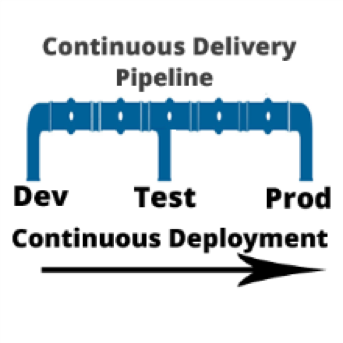
    Continuous deployment automation is performed by a new set of agile DevOps tools called application release automation, or ARA. ARA solutions are designed to support a model-driven software deployment that allows development, test and production teams to use the same process without the need for one-off deploy scripts. ARA adds all of the features and functions needed to support continuous delivery and data center deployment requirements. ARA is designed to fully perform the heavy lifting of software releases including application packaging, release versioning, database updates, server configuration management, calendaring, roll-forward, rollback, security access and auditing.

    ARA solutions are called by a templated CI workflow that is defined by the development team. The workflow is moved up the pipeline and adapts to the changes at the various pipeline stages (System Test, Integration Test, Pre-Production, Production, etc.)  Because the process is driven by the ARA tool and not a script, the changes are automatically addressed across the pipeline reducing the workload for all teams and supporting frequent changes that can be easily traced and audited down to the server inventory level, including the production environment.

    Developers, Get Your Hands on Deployment Automation Tool       

    To achieve a repeatable CD pipeline that supports production, developers must embrace the automation of continuous deployment at development. The dysfunction however is the outrageously high cost of ARA tools. Developers don’t buy expensive operational solutions. More ARA solutions must be offered on a consumption-based model or offered as open source with the ‘out of the box’ integrations into CI/CD. When considering the purchase of an ARA solution, look for agentless models that can be implemented one project team at a time. Embracing this level of corporate process change must be done project by project. The operational big bang approach does not work well in an agile practice. Not everyone can use the same solution. However,  if done correctly, there are big benefits.

    ARA is a process that strengthens the foundation of the continuous delivery pipeline and is core to the agile DevOps initiative.   It facilitates agile practices by allowing the testing teams and data center teams the tools needed to become more agile and accept the frequency of changes being pushed across the pipeline by Development. Ultimately, the goal is repeatability across the pipeline, pulling together Dev and Ops.

    About the Author / Tracy Ragan

    Tracy Ragan is CEO and Co-Founder of DeployHub. Tracy has extensive experience in the development and implementation of business applications. It was during her consulting experiences that she recognized the lack of build and release management procedures for the distributed platform that had long been considered standard on the mainframe and UNIX.  Tracy has worked with hundreds of development teams in implementing a team-centric standardized build to release process. Connect with her on LinkedIn.

  • Continuous Testing: Solving the Biggest DevOps Bottleneck

    Continuous Testing: Solving the Biggest DevOps Bottleneck

    It’s time to start implementing the practices of Continuous Testing

    Earlier this year, Computing Magazine conducted a fascinating study around the adoption and benefits of DevOps in its DevOps Review 2017 publication. The findings that stood out most fascinating to me where around quality assurance and testing.

    In this survey, the question was asked, “Where are the main holdups in the software production process?” Of all the self-proclaimed DevOps practitioners, a whopping 63 percent said the biggest delays occurring in the QA/Test phase. In fact, this cited bottleneck was more than 2 times greater than the next proclaimed bottleneck, which they felt was in planning (29 percent).  In this same survey, another question asked, “What tends to lose out more in DevOps environments?” While 43 percent said, “Nothing,” nearly 30 percent of these DevOps practitioners said that quality was being sacrificed. When asked which area they wanted to focus on improving in the next year, over 40 percent opted for quality.

    Why is it that quality has taken such a hit?  The study cited two issues: 1) Testing and QA is often siloed from the other parts of the organization, and 2) Testing tools haven’t matured much in the past five years.

    Testing must become a cross-functional operation across the software development lifecycle (SDLC) spectrum, one that involves all teams. Agile developers and testing teams don’t have weeks to test, but hours. Testing hasn’t kept up because it hasn’t applied the methods and concepts of agile development have not been applied to testing and QA processes. By removing the constraints that force testing to the end of a development cycle, developers and QA teams can achieve accurate, automated testing from day one. They can create an integrated pipeline, capable of taking an idea from design to deployment, at speed, without compromising quality.

    Open-source, cloud-based solutions can be the catalyst that brings the speed of agile to testing.  Here are a few examples.

    Better In-Sprint API Testing: Since APIs have become the major component of applications, organizations are shifting their approach from starting testing when the user interface is complete to shifting the focus of testing at the API level.  But the hard thing is finding enough time in a development sprint to test them sufficiently.

    Today’s applications are a collection of microservices and API calls. UI testing alone just won’t cut it. UI testing is very brittle, and whenever it changes, testing breaks. Testing needs to shift left into the development cycle—into sprints. But if you shift testing left to be a focus of the sprints, what kind of API testing can you really do? How comprehensive can they really be?  Creating those API tests has to be quick, and simple.

    Dev and Test teams must utilize automated tools that not only generate API tests, but create an exhaustive set of test cases from the API, then execute those tests. These tools also need to support the most popular open-source testing frameworks allowing developers to run functional API tests as performance tests without any proprietary conversion issues. And, vice versa, developers must be able to take open-source performance tests and be able to run them as functional API tests.

    Orchestrating Testing: A Continuous Delivery Pipeline Manager: “Faster” is becoming table stakes with automation.  The facts show that companies who have widespread agile adoption and are deploying more frequently with significantly reduced lead times. But, this too often leads to release failures, quality issues and disorder with multiple—if not hundreds—of applications rolling through the SDLC. Plus, things slow down significantly with time-consuming handoffs and rework in the release process. DevOps teams, who release features and fixes frequently while significantly reducing errors and manual processes, need toolchain-agnostic pipeline planning, orchestration and optimization solutions that enable them to eliminate spreadsheets, automate test processes and feedback, and continually improve the delivery of revenue-generating features to end-customers. New CD SaaS tools help make this orchestration process easy.

    Performance and Functional Testing Using Open Source Frameworks: More and more organizations are trying to move from legacy testing tools. It’s not so much that these don’t adequately test, but they were never designed to meet the needs of agile development approaches. Rather, they were designed for releases that occurred two to three times per year. But that won’t cut it anymore.

    And as developers begin to incorporate testing activities in the coding process, they need simple-to-use, open-source tools. Luckily, there are such tools like JMeter, Selenium, Gatling, Locust and others. There are even tools that help you convert from legacy platforms to open source technology with ease, and guides to transform existing functional tests created with other tools over to load tests.

    These are just a few examples of how continuous testing eliminates the testing hurdle. With continuous testing, organizations can:

    • Automatically convert user stories from requirements management tools like CA Agile Central or Atlassian JIRA into the minimum number of test cases required for complete code coverage, and being able to adapt automatically to changing business requirements.
    • Reduce test cycle prep time by requesting test data from within requirements.
    • Request, reserve, and create test data at any time, even from requirements phase.
    • Virtualize APIs for better testing, while managing API access to developers.
    • Institute easy API testing that can generate comprehensive test cases (positive, negative, edge case, and SQL injection) and execute those tests automatically.
    • Democratize testing with SaaS-based testing tools so that developers can test early and test often.
    • Speed testing by feeding test data directly and securely to virtual services.
    • Use open-source testing tools such as JMeter, Selenium, Jenkins, Jenkins, Appium, Taurus, Gatling, Locust and more.
    • Orchestrate the application delivery pipeline to promote releases from one environment to the next as soon as all the tests pass and enable faster feedback loops.

    This is testing unleashed, going hand in hand with agile development to accelerate quality into production.


    By adopting next-generation testing practices, DevOps teams have the ability to test early, often, automatically and continuously. To learn more about continuous testing and why it is critical to DevOps and Continuous Delivery initiatives, visit this Continuous Testing informational page.

    — Aruna Ravichandran

  • Automated Testing: Remember Security

    Automated Testing: Remember Security

    Run down doors
    Insufficient Security.

    Between continuous integration (CI) and release automation (RA), we’ve come a long way in making testing both integral and automated. This testing has allowed QA staff and developers to spend more time adding value by looking at problem areas instead of running tests by hand. Shops that have CI well-integrated into their application processes and are using test driven development (TDD) claim they have improved both time to deployment and code quality.

    But we’re still struggling to get security adequately integrated into the overall system. Part of this is that some testing—such as application-level penetration testing—is very custom to the application being developed. There are tools to help, and they do offer some amount of automation, but they’re not yet to the point of being the only route to test. The other reason is that even today security and compliance are seen as road bumps that slow deployment. It is sad but true that the V-Tech data breach was a simple SQL injection attack. No doubt security was not involved in the deployment of that dozen or so websites/databases, or if they were, their ability to influence the product was limited.

    But automated testing can help in many of the standard attack vectors that SQL injection is just one example of. And for some reason, an automated tool informing DevOps teams that they have to fix a whole slew of vulnerabilities is taken much better than the security team doing the same thing.

    The breadth of security concerns mean that security must be involved at some level in every phase of DevOps. But tools can lighten the load, and the tools are getting better all the time.

    And the idea that a breach is a risk that should have a certain level of acceptance is no longer en vogue. Doing what you can to avoid them, and paying the price to do so, is increasingly the norm. Automation tools help to cover not just the employee time gap, but also the skills gap. If a tool can validate the entire deploy environment for your chosen cloud environment at the time of deployment, that relieves any shortage in knowledge about the security features of your given cloud environment. Of course, eventually security staff will need to know more, but just like a deployment tool can throw up an entire big data infrastructure in hours instead of weeks, leaving operations time to learn about configuration details as they need to, security automation can do the same for security teams.

    I highly recommend looking at building standardized controls into both the test environment and the deployment environment. While you won’t get perfect automation yet, you will get automation. The overall result of that automation will be increased security posture for the business, and since compromises are a business risk, that is in line with the overall point of DevOps: better serving the business. There will likely still be more work than there are hands/eyes/brains at this point (which says a whole lot about our pre-automation security posture), but you’ll be better off.

    As I and others have mentioned, a small security staff will likely have to be trainers/consultants to Dev/Test/Ops functions to properly support all of the needs of locking down an application. This is still true with a high degree of automation, simply because there is a large surface area, and we’ve traditionally gone with the “most urgent” issues first. But just as automating (with human controls/approval) updates where possible to get the newest protections has reduced workload, so can automation of other security goals. I chose the word “goals” on purpose. It’s not about today’s processes, it’s about achieving goals, so just as Dev was taken apart and re-assembled for agile, and Dev and Ops changed how they do things for DevOps, look for the best, most efficient way to achieve the goal. And like everyone else in IT, iterate on it.

    We all know we must increase the security posture of our organizations. We all know security doesn’t have the staff it needs. This is the type of conundrum that DevOps was designed to solve. Start looking into how your DevOps efforts can include security. At a minimum, look into more and newer automation (I’m currently enjoying playing with newer code scanning tools, to see how far we’ve come since last I looked close). Will it take an upfront investment? Yes. But if it saves security time every single week for several years before you have to move to new tech? It’s probably worth a learning curve or even an investment (be it CapEx or OpEx).

    — Don Macvittie

  • Clean Up Those Ever-Fail Tests

    Clean Up Those Ever-Fail Tests

    One of the points of DevOps is to streamline development and focus on what is important. Things that don’t raise to a high enough level of importance end up in the category of backlog, and their tests are normally disabled or marked as “ignore results” in CI/CD tools.

    With CI/CD, this is a good step in moving forward, because you have a list of the things that you haven’t gotten to yet, even if that list is not currently part of validation. The problem is that it can create the very kind of cruft that we adopted CI/CD to get rid of. Many organizations keep these tests in the queue for an indefinite amount of time on the assumption that they will come in handy when priority allows for time to address the issues at hand.

    It Isn’t Simple

    The problem is, of course, that some of those tests will never—and I do mean never—be resolved. Those are cruft, sitting in the way of productivity and cluttering up the build system. It can be a corporate decision that a given bug fix/feature request will never be implemented, but more often than not it is simply that the priority will never be addressed because there are always new features, more important bugs, etc.

    Purists will already have started sweating while reading this, because the goal is supposed to be to address every single test in the system, resolve every single bug in the system, and implement every change request that made it far enough to have tests written for it. But we don’t live in a purist world. We never have. I’ve argued with purists of every possible stripe in my time in high-tech, because reality isn’t pure. It’s interruptive and ugly and prioritized.

    So we have backlogs. And we have items in the backlog that won’t ever be addressed.

    Why Old Tests Matter

    Image of binThe real problem with tests that are backlogged for more than a few sprints is, of course, the changing code base. As an abstract example, you have a dialog that asks the user for some input. The tests assume the input values that are designed in at the time the test was written. Six months later, a higher-priority test comes through that changes what fields are available on the dialog, and what data is collected. The original test is marked as ignored, so when it fails that doesn’t impact things. But now the test is invalid. And still in your system. Multiply these two requests by hundreds or even thousands, and you have the same type of flotsam that DevOps was designed to resolve, except now it is part and parcel of the CI/CD system.


    Clean Up, Acknowledge and Move On

    So what is a productive team to do? Have a frank discussion about your backlog and what will/won’t ever be implemented. Business leaders can agree that some items just never will raise to the correct level of priority, and you can identify tests that have aged out of usefulness while sitting in the backlog.

    Set up a process to review them occasionally, to run parallel to the process that updates tests when assumptions change—just not as frequently.

    Then document the tests that won’t ever succeed, and delete them. They don’t belong in version control, even as documentation, because eventually and inevitably, they will be inaccurate representations of the system. And that can create confusion.

    Of Course It’s DevOps

    This is an extension of all that DevOps did to begin with: eliminate wasteful activity and non-productive items on the list of to-dos. You prioritized once and cut with a knife, this is the same process, operationalized for CI/CD. And it’s necessary.

    A slight change, another set of choices that are no harder than the others you’ve faced, and the code base (in particular the test base) is cleaner.

    Leaving you more time to keep rocking it.

    — Don Macvittie

  • Testing What’s Important: Keep Growing Your Test Base

    Testing What’s Important: Keep Growing Your Test Base

    This project has gone on soooo long…

    In most human endeavors that take a stretch of time to complete, the idea is latched onto and people become excited about being involved. It doesn’t matter if it is building a skyscraper, inventorying a massive warehouse or even going to war. People are intrigued by the possibilities and want to get started doing the thing. After a time, though, this enthusiasm wanes, and most often is replaced by a weary determination to get the thing done. The nature of the endeavor doesn’t have to change; the reality of its implementation just becomes the dominant factor.

    IT projects in general—and continuous integration (CI) projects in particular—are no different. Whether a new project or implementing comprehensive CI on an existing project, the beginning is the most exciting part. Soon the excitement wanes and achieving the desired level of test coverage and a consistent build success rate becomes the goal that is trudged toward. It is a rare team that reaches for 100 percent code coverage with testing on initial implementation. The key becomes “testing what’s important.” And that varies by team and project.

    But testing at all levels—unit, integration, smoke, system, regression—could be better on almost every project. That improvement can be done incrementally while running through sprints. While some of the testing is managed by QA, some is managed by the developers—and in a CI/CD environment, arguably more is managed by developers. They are more involved in the testing process in CI/CD, so are more likely to be more involved in test development/management.

    The point is, good enough coverage is just that. And there is a hidden cost in getting too carried away with testing every line of code for every possible input, but improving tests is more than simply cranking out more permutations. Improving existing tests, or writing tests for functionality currently poorly tested, is increasing testing.

    So, as you strive to make your code get better, strive to make your testing get better, too. Testing after the baseline is established is one of the first things to get minimum attention, even in automated test environments. But improving it reduces the risk of releases, and that’s a benefit to the team and to the company. So it’s worth staying up on.

    Unless you have my friend, who we will only call Pete, on your staff. Then, no matter the quality of your testing, no matter the number of tools and layers of testing, he’ll find a way to break your product within 5 minutes. That made him a good tester, made him a better developer and, now, a better architect. But most of us don’t have Pete, so work on those tests.

    — Don Macvittie

  • Moving That Big Project to CI/CD

    Moving That Big Project to CI/CD

    Any organization that has been around for more than a few years (and many who haven’t) have a massive system that would cost a fortune to replace. Most midsized enterprises have several of them. Those systems are one of the reasons that enterprises don’t adopt CI/CD at the same rate as startups. Sure, any new project or small things go there, but the elephant in the room just hangs out.

    So what happens when you get called upon to move one of these systems into CI/CD?

    Lets’ start with the easy case: the rewrite. In that case, you’re almost greenfield from the start and can build CI/CD into your development and test processes as you would for any brand new project.

    The harder case is when the org has seen the benefits of CI/CD and decides it wants to apply them to the monster that slows every project it touches to a crawl. These big systems are generally mission-critical, so there’s an added layer there. But this is doable.

    Yes, It’s Daunting, But…

    First, get a copy of the app building in a separate environment. Containers are good for this, since it’s just a development environment anyway. Replicate the entirety of the system (except unscrubbed real data, whether you use that in testing or not is a per-org question) to this new environment, make sure it builds and passes the existing test environment.

    Next, configure Dev/CI/CD tools (for a project of the size we’re talking, I recommend configuring application release automation [ARA] also to help track dependencies), and get the system building and testing under them. This will take time—time to configure the CI/CD tools, time to get the build environment to work reliably under them and time to figure out how to integrate existing test structures into the CI tool. That’s okay, the point is investing now to save later. Note that this is also the time to upgrade your dev tools. If you’re on J2EE 5, for example, it is time to upgrade. It’s been a decade, and you’re working on a copy of the project.

    Once that reliably builds and passes tests, the next step is to move those pieces into a more CI/CD-friendly format. Traditional test scripts can be called out in CI, but consciously building the tests within the CI environment is more resilient. A close look at tests, what’s missing, what could be better, what needs to stay as it is and just report back are the biggest parts of this test.

    Note that change requests will have to be copied to the new environment’s change request system, too. Some projects are lucky enough to lock out changes to the source application while the new one is brought up to speed, but for most, changes made in the original will need to be replicated. Once you start modifying code, they can no longer be just pulled from the source tree.

    Then start fragmenting the app. Apps of that size inevitably have massive functions/methods that do a lot of things. Not a terrible plan in single-processing days, but if you’re moving to CI/CD and upgrading dev tools, you may as well optimize code, too. Breaking a 5,000-line subroutine into a master and four child subroutines, each of 1,000 lines (yeah, it’s never that easy, but you get the idea) might offer room for parallelization, and definitely reduces your change footprint when you have to go in there and modify code.

    Fear Pundits Bearing Advice

    It is relatively common in DevOps for someone to offer the advice, “Get the newest of X every time.” Don’t follow that advice. Pick a version and hardcode it. It is anathema to hardcode versions of tools/OS/libraries in DevOps, but the point of DevOps is to control change, and anyone offering that advice missed the havoc that their advice would have created with the release of Python 3 or RHOS/CentOS 7.0, both cases where backward compatibility was left in favor of progress. Plan updates; don’t come in to, “The entire build failed last night,” and have to fix it then.

    By this point, you’ll have a better understanding of the app, and will know (or at least suspect) where monitoring points will be best placed. Add them in to do active monitoring instead of logging. Your first set of points won’t be perfect, and you’ll want to review them to see what improvements you can make, but the weak points of the system should be monitored at a minimum, and alerting or corrective action automatically take place.

    Test, Test and More Test

    As soon as things are stable in the new CI/CD environment, bring in beta testers from the user community to help you find issues where it doesn’t behave like the original. The point here is to copy the original first, most likely to enable faster changes in the future, so just ask users to do what they would normally do when interacting with the app, and see what happens. Anywhere there are issues is a good place to add testing (I don’t know any monolithic app that has 100 percent code coverage, and honestly have only heard rumors of new apps that do, so there’s always room for more testing at known weak points).

    Before you know it, the system will be moved into CI/CD, and you’ll have a list of things you want to improve under the new environment. At that point, you’re covered, and can move the process to replace your old build process.

    Voilá!

    It is work to move a large app into CI/CD, and more work to keep from letting it get out of hand. In the new environment, it is easy to want to change everything at once. But don’t make that part of the move; build change requests for after the move to CI/CD is done, to keep project lines clean and evaluate those desired improvements in the light of all the other change requests building up.

    — Don Macvittie

  • Why Your Company Needs An Automated Infrastructure

    Why Your Company Needs An Automated Infrastructure

     IT teams and software have started to embrace automation across all levels of the development life cycle, from planning and testing to deployment and maintenance. With the advent of DevOps, and the cloud, it’s now entirely possible for technical teams to spin up new environments in a matter of minutes instead of days.

    The process of applying continual automation to the software development life cycle is known as continuous delivery. With continuous delivery, businesses can continually perform integration tests, unit tests and code analysis. They can provision and configure servers and deploy software into their cloud environments. Each step in the continuous delivery process can be repeated several times a day depending on how much new software needs to be released.

    The Benefits of Infrastructure Automation

    There are several benefits to implementing infrastructure automation and a continuous delivery model in your organization. This blog post will explore five of the most considerable advantages you’ll experience when you transition from manual software development to an entirely automated process.

    Efficient Workflows

    The biggest benefit of continuous delivery is that it allows organizations to automate a variety of tasks with greater efficiency and accuracy. Each task within a workflow also can have separate dependencies to ensure that they are executed only when certain conditions are met. For example, you could set a condition to provision server only after certain tests are done.

    Lower Costs

    Because automation doesn’t require team members to perform a lot of manual steps, companies can save up on staffing costs. For companies that have larger teams and more complex infrastructures, the savings could be substantial. The best part about it all is that reducing staffing costs won’t have an effect on the end-product quality. In some cases, the product quality will be better than if the company used a manual process.

    Better Reliability

    Continuous delivery is typically more efficient and consistent than other software development models. It significantly improves business agility and stability and ensures that companies remain compliant at all stages of the software development life cycle. With an automated infrastructure, companies can also implement sophisticated monitoring and analytics to track the performance of their environment at any given time. By doing so, they’ll be able to identify issues before they pose any serious risks.

    Improved Collaboration

    One of the main reasons why DevOps and the idea of automation have gained popularity in recent years is because they enable collaboration between different teams in an organization. Automation gives software developers and IT teams the ability to communicate, which leads to better efficiency and more releases. This cross-team collaboration becomes especially crucial when working on large-scale projects and releases.

    Faster Updates

    Customers continually demand better and newer products, which why it’s important for software development and IT teams to use automation. Automation not only streamlines the process of releasing new software, it also significantly reduces the amount of time it takes to fix bugs and other issues that may affect the customer’s user experience.

    Summary

    Although the benefits of automation are clear, there are few downsides that you should also be aware of before going all-in and implementing a fully automated continuous delivery model. The biggest downside is that transitioning to an automated process typically has significant costs, which could have a temporary adverse effect on your bottom line. Furthermore, if your business has been using traditional software development models for years, it will take some time before the entire team gets on board with an entirely new system.

    How do you use automation in your organization? Let us know in the comments below.

    About the Author / JT Giri

    JT Giri is CEO of nClouds. He a seasoned DevOps professional with a decade of experience in building large-scale and distributed infrastructures. He co-founded nClouds, a leading DevOps solution provider, which helps companies with cloud migration and DevOps solutions. He is passionate about transforming organizations by implementing DevOps methodologies.

  • Why DevOps Success Depends on the Right Infrastructure

    Why DevOps Success Depends on the Right Infrastructure

    Do you remember building with LEGOs? You could follow the directions that come in the box down to the letter, or you could go off-script to create something totally your own and evolve and refine it over time. Regardless of your level of creativity, if you had one of those classic green base plates to build from, then LEGO cities were in your grasp.

    In many ways, a DevOps methodology aligns with the block-building process. While the tools and processes can change, a solid foundation is the backbone for fast and repeatable success. Developers and IT operations are beginning to reap the benefits: According to RightScale’s “2016 State of the Cloud report,” DevOps adoption increased to 74 percent in 2016 from 66 percent in 2015.

    But even though adoption is on the rise, some DevOps teams still struggle to extract the full range of benefits from a DevOps model. Why? Because they’re more concerned about the LEGOs without first having considered the base plate. DevOps requires a flexible and modular foundation, a software-defined infrastructure (SDI) built with open-source technologies to be successful. Here’s why.

    Infrastructure: The Path to Agile Business

    The goal of a DevOps approach is to speed the entire application delivery life cycle (initial development, testing, delivery to market), enabling the business to quickly respond to consumer demands (deliver new services, fix bugs, add new features, etc). However, for the DevOps teams to successfully execute this, they need a flexible and modular cloud infrastructure that easily adapts and extends to meet their needs.

    SDI provides easier access to resources via a self-service interface so developers can quickly get the resources they need.  It also gives the DevOps team the capability to standardize services so that applications built in the development environment will easily deploy and run in the test and production environments, speeding their delivery to market. SDI also offers a flexible and modular approach that provides timely and easy access to the latest technologies, such as containers, where innovation is occurring at a rapid pace and easy integration is available via standard open protocols.

    SDI provides the best LEGO base plate to support your DevOps processes that improve application lifecycle management.

    Automation to Support Strategic Collaboration

    Routine deployment and management tasks are the Achilles heel of every IT organization. The best way to improve efficiency, reduce costs and quickly respond to infrastructure demands is with automation.

    As a key component of an SDI, automation and orchestration of the application life cycle including deployment of hardened VM or container templates ensures faster, consistent and repeatable provisioning and configuration. Additionally, the SDI automation and monitoring tools can intelligently sense and respond to infrastructure demands, automatically optimizing and adapting the infrastructure in real time. This frees time for the team to focus on strategic initiatives versus backend tasks.

    The DevOps movement is all about collaboration and constant innovation, which is made possible by having your infrastructure automate the mundane tasks and automatically respond to infrastructure demands.

    Visibility Down to the Base Level

    One challenge facing successful DevOps adoption today is lack of visibility into application delivery. As developers rely on constant innovation through a loosely coupled chain of events, understanding how each link operates is crucial to keeping the chain moving in the right direction.

    In the case of open source, there is no infrastructure more transparent or collaborative. The infrastructure itself is built on openness and exchange of code, leading to a natural transition to its use in a developer environment. As DevOps uses CI/CD to stay refined, so do the open-source projects that contribute to its infrastructure. Constant innovation is what keeps the infrastructure and development tools up to date, supporting the entire DevOps team.

    The Solution to Cultural Challenges

    Successful DevOps adoption doesn’t solely involve changes to existing technology. It also requires a cultural shift within an organization. A software-defined infrastructure that utilizes open-source technologies is built on the same concept: growth through collaboration. Businesses aren’t committed to using a single vendor or propriety solution, giving them an expanded network of resources and tools to optimize their IT needs and business operations. DevOps is a marriage of technology and people, and an SDI environment allows that union to succeed.

    The world has seen many great LEGO projects over the years, both the small-scale private home projects and large-scale public exhibitions. But the common thread for their success is the base plate, allowing innovators everywhere to build LEGO masterpieces more rapidly and effectively. For DevOps professionals, a software-defined infrastructure built using open-source solutions is the base plate for success. SDI environments improve efficiency with automation, refine visibility into application performance, enable innovative and agile business models, and create stronger cultural alignment.

    About the Author / Terri Schlosser

    Terri Schlosser, head of SUSE product and solution marketing, has 20 years of experience in the IT software industry.  She has held roles in marketing, software development, product management and strategy in many different IT software areas including cloud, networking, storage, management and operating systems.  Most recently her focus has been on open-source software defined infrastructure solutions. Follow her on Twitter.
  • 7 Highly Effective Continuous Delivery Principles

    7 Highly Effective Continuous Delivery Principles

    If you’re in the IT space and you weren’t born yesterday, then you understand the need for speed. Development and release cycles are now faster than ever as companies implement continuous integration and continuous delivery (CD). Browsers and social media sites, for example, are doing multiple releases a day, and organizations that want to keep up in the information age are implementing continuous delivery. But to ensure successful continuous delivery, there are continuous delivery principles every organization should know.

    Here are seven continuous delivery principles that make highly effective and efficient development and release cycles:

    1. Automate, Automate, Automate. While more and more organizations are recognizing the need to automate their end-to-end release processes and delivery, it can still be a burden if not done correctly. For example, some still refrain from automating unit tests, but this actually slows them down in the long run, especially when human error inevitably comes into play.
    2. Always Be Testing. Obviously, if you want faster and better release cycles, then you need to test constantly. As mentioned, automated testing is a key to continuous delivery, and you don’t want a bottleneck between QA and development clogging up your process.
    3. Small Releases. One of the core continuous delivery principles is that smaller and multiple releases are usually better than one large one. It’s more efficient—and even safe—to keep releasing a few changes then waiting to add a large batch of features and bug fixes before you deliver. Then, if any revisions need to made, it will be easier to make them without affecting the other features.
    4. Use Benchmarks. Adding an automated benchmark suite to your builds will help you optimize your performance by preventing any regressions, which is important if you want a successful continuous delivery.
    5. Use Source Control. Integral to continuous delivery is making sure you can keep adding versions without affecting existing components and features. This not only backs up your SQL code, but also allows for continuous integration and, thus, continuous delivery.
    6. Code Reviews. Many organizations use a hierarchal system for their reviews, which means more and more senior developers have to review the code before it’s approved. A peer-based system in which developers review each other leads to a faster and more efficient process.
    7. Pull Requests. Using a pull request can speed the process significantly. When others can review the author’s code simultaneously as well as suggest modifications before it’s integrated into the master, there will be better communication and fewer bottlenecks.

    Continuous delivery is a not just a great idea, but quickly becoming a must-have, as anyone who uses the agile method will tell you. It’s important, however, that whether you’re introducing this into your organization or looking to optimize your continuous delivery methods, you use the right continuous delivery principles to keep your organization fast and efficient.

    About the Author / Yaniv Yehuda

    Yaniv Yehuda is the co-founder and CTO of DBmaestro, an enterprise software development company focusing on database development and deployment technologies. Yaniv is a DevOps expert who spent the last couple of years raising awareness about the challenges surrounding database development and deployment, and how to support database continuous delivery.

  • Stop Talking About the Number of Times You’ll Deploy

    Stop Talking About the Number of Times You’ll Deploy

    40s Chrysler
    Chrysler Windsor – By Lars-Göran Lindgren Sweden – Own work, CC BY-SA 3.0 https://commons.wikimedia.org/w/index.php?curid=1385155

    It’s the late 1940s and the automobile industry is just taking off. You run one of the product marketing teams at Chrysler. Wanting to make the best of an exploding market, your marketing team says, “You’ll drive 1,200 times as much with the new Chrysler Windsor!”

    Of course, that advertising never makes it to the public, because it says nothing. So you’ll drive more, so what? It tells the customer nothing about the benefits of driving more. And some customers may make a connection between driving more and “because you want to,” but likely most won’t without context. So into the trash bin the entire ad campaign goes.

    Yet, that is what happens in CI/CD every day. Every time you read a blog, pick up a book, listen to a speaker, it’s all about how many bazillion times more you’ll deploy with CI/CD in place. And I ask the same question: So you’ll deploy more. So what?

    Most of those making these statements never get around to talking about how that can help with stability and user acceptance, a few get around to it roughly halfway through whatever they’re presenting, when the whole “You’ll deploy 70 billion times more!” statement is long gone. Very few drive the connected point home and make these statements show value.

    Particularly if your target audience is people without a strong knowledge of the topic, talk about the benefits, not the act. I can create a script that builds my source tree just as many times as I like a day, but that adds value for no one, absent any other change.

    While I’m going on about terminology, the whole “Delivery is not Deployment” topic needs to be made explicit in each and every talk/article/book. Marketing people have actually gotten better on this topic, but influencers have not. It’s time to step up the game, clarify, speak in meaningful terms.

    In Short, Pique Their Interest

    In the end, if you’re talking to people about CI/CD, you are doing so because you like to educate. So seek clarity. Many an enterprise IT person interested in what CI/CD tools and DevOps in general can offer their organization will be turned off by “You’ll deploy all the freaking time!” with no statement of benefit to them. And they’ll hear deploy and assume “to production.” Don’t do that. Education happens in clear and understandable terms; use them. Help those interested parties understand benefits; don’t confuse and disconcert them.

    Oh, sorry, I’ve accidentally found someone’s soapbox. I’ll return it now.

    — Don Macvittie