Category: Continuous Delivery

Continuous delivery is a software engineering discipline that allows organizations to consistently develop and release quality software at a rapid pace. It is achieved by automating the software development lifecycle, enabling tasks such as development, testing and release to occur concurrently and continuously.

  • Transition to DevOps Increasing Across IT Firms

    Transition to DevOps Increasing Across IT Firms

    Demand for faster product development and quick market release created a need for increased collaboration between Development (Dev) and Operations (Ops) teams, which eventually led to “DevOps.” With this, transition to DevOps has become one of the key points of discussion across many IT firms. This article gives you an overview of the demand and trend for organizations to transition to DevOps.

    Rise in IT innovation and burgeoning digital revolution have led to the demand for faster development and quicker releases to stand out in the IT competitive scenario. This transition eventually led to a new culture that saw collaboration between two key IT teams, development and operations teams, which the industry calls DevOps.

    DevOps established a new style of IT functioning, easing different phases of software process from product development to testing and final market release, all in a rapid and reliable way.

    Why DevOps Transition?

    Rapid delivery of independent software components and continuous integration of the same with production systems forms the key principle behind DevOps functioning.

    DevOps is often confused with Agile methodology. Though they share similarities in providing improved IT performance through rapid development, DevOps stands apart from Agile because of its efficacy in the software deployment phase, ensuring a constant communication between the two teams. Thus, DevOps is often termed as a successor to Agile.

    A collaborative approach, key for information exchange across the line, is one of the major factors driving firms to undergo DevOps implementation.

    Though DevOps is well-known as a merger of development and operations teams, an effective DevOps model extends beyond that to other key functional areas of organizations.

    Breaking the old trend of limiting individual teams to their respective work domains, DevOps brought in a scope for knowledge-sharing among them, wherein developers can extend themselves to testing and deployment and operations team members can upgrade their skill set, learning new languages, architectures and tools.

    Increased Demand for DevOps Resource

    Transition to DevOps holds a key demand in the fast-growing IT market, wherein managing with the existing infrastructure or resource plays an almost equal role as coming up with something new.

    Greenfield projects aside, DevOps deployment is most often seen in brownfield projects that encourage building on the existing resources.

    With this situation in place, there is also a lot of demand for DevOps resources across firms. The “2017 Open Source Jobs Report” from the Linux Foundation shows 60 percent demand for DevOps human resources among more than 2,000 IT open source professionals and IT hiring managers.

    This clearly shows the level of demand that transition to DevOps is holding in the IT industry.

    “If there isn’t an existing DevOps role within your company, software developers should spend time sitting with the operations team or vice versa to understand how their processes work and how they can be improved through collaboration,” said Mike Durney, CEO of the job-hunting site Dice.

    The report found:

    • Nearly 50 percent of hiring managers are keen about those DevOps resources with professional credentials such as relevant certifications
    • More than 47 percent of the companies are ready to fund certification programs for their existing personnel
    • 42 percent of companies are keen on adding DevOps skills to their hiring portfolio
    • “DevOps Engineer” profile ranks second in Glassdoor’s Best 50 jobs in America

    Despite its advantages, however, DevOps has a few challenges to overcome related to application integration, test automation, budget and skill set, among others.

    — Veritis

  • Continuous Delivery: No Excuses

    Continuous Delivery: No Excuses

    Jez Humble’s (@jezhumble) career has spanned roles through coding, infrastructure, and product development across three continents and organizations of varying sizes. To say he knows a lot about continuous delivery is a total understatement. In 2010, he and Dave Farley literally wrote the book on continuous delivery—and if you have not yet read it, I would suggest you pick up a copy. It’s a fascinating read.

    I’ve heard Jez speak over the years at a number of DevOps conferences, and I was excited when he accepted our invitation to speak at All Day DevOps. At the conference, Jez presented “Continuous Delivery Sounds Great But It Won’t Work Here,” during which he addressed the four reasons he consistently hears from organizations on why continuous delivery won’t work in their organization:

    • We’re regulated
    • We’re not building websites
    • Too much legacy
    • Our people are too stupid

    Jez also outlined the real reasons behind the stated reasons: Their culture sucks and/or their architecture sucks.

    Jez spent his talk addressing each objection.

    We’re Regulated

    Jez noted it took Amazon four years to go from monolithic to service-oriented architecture (2001-2005) but the company did it. Do you think Amazon is the pillar of free enterprise, free of regulation? Not so. Being a publicly traded company, Amazon is heavily regulated; it is subject to Sarbanes-Oxley regulations; it handles personal and corporate financial and proprietary data; and it provides private cloud services to the U.S. government, including highly sensitive data for the Department of Defense.


    null


    Amazon Web Services’ GovCloud, in fact, provides the cloud platform for cloud.gov, the 18F project Jez worked on to address the authority to operate process within the government.

    The old process had screened every software application before it was allowed on a federal IT system. It stifled innovation because it duplicated efforts multiple times over. There was no cross-agency assumption that if one agency approved a software package, it was okay at another agency. Cloud.gov moved controls from operations into infrastructure as a service. Now, agencies can receive software through cloud.gov to integrate into their applications.

    null

    The bottom line is continuous delivery is excellent for heavily regulated environments because it gives assurance to regulators by removing opportunities for human error.

    We Aren’t Building Websites

    Jez’s favorite example is HP LaserJet firmware. HP had a 400-person team spanning three continents. Obviously, the firmware was critical for new printers, but the team was moving slowly. Only 5 percent of their time was spent on innovation. HP tried hiring, firing, insourcing and outsourcing. With business school tried-and-true solutions exhausted, and knowing it had to eliminate non-value adding work to increase innovation, the company looked to continuous delivery with two business goals in mind: 1) Get firmware off the critical path; 2) Achieve 10X increase in development productivity, measured by percent spent on innovation.

    HP had other goals:

    • Reduce hardware variation
    • Create a single package
    • Implement continuous integration
    • Implement comprehensive test automation
    • Create a simulator


    null

    Note: the chart above doesn’t show the 23 percent of time spent managing the automation tests. Time well-spent.

    In the end, between 2008 and 2011:

    • Overall development costs were reduced by ~40 percent
    • Programs under development increased by ~140 percent
    • Development costs per program decreased 78 percent
    • Resources now driving innovation increased by 8X

    Too Much Legacy

    Jez’s example here is Suncorp, one of Australia’s largest insurers (note: Also falls under the “We’re heavily regulated” excuse). Suncorp was burdened with loads of mainframes and legacy systems, but it built a set of test suites with open source tools to move into continuous delivery.

    Our People Are Too Stupid

    Jez looked outside of the software development industry into an old-line manufacturer: automotives. GM’s worst performing plant had been closed down. GM fired every one of the workers from the plant. The workers were notorious for problems ranging from sabotaging cars to drinking to gambling on the job.

    Remarkably, GM’s union leaders convinced Toyota to hire the old GM employees to learn the Toyota processes, and Toyota hired the GM employees to run their new NUMMI plant. Toyota and the old GM employees showed it wasn’t the people that was the problem; it was the leadership, the management system and the use of obstacles. At the GM plant, an employee had a job and a certain amount of time to do it. If it didn’t get done, the assembly line kept running. At the Toyota NUMMI plant, employees were empowered to ask managers for help—without retribution. The car had to be in a good state before proceeded to the next stage of the production line.

    In software development, this is continuous integration. Toyota’s NUMMI is the inspiration for Lean in the United States.


    null

    Jez’s take-home point for any organization is that results aren’t achieved when you adopt practices but don’t implement the culture. You need to:

    • Agree and communicate measurable business goals
    • Give teams support and resources to experiment
    • Talk to other teams
    • Achieve quick wins and share learning
    • Keep going

    Jez dives into more details in his talk, which you can watch here. If you missed any of the other 30-minute long presentations from All Day DevOps, they are easy to find and available free of charge here.

    — Derek E. Weeks

  • Understanding the Mobile DevOps Process

    Understanding the Mobile DevOps Process

    In today’s current technology scenario, mobile app developers are always on the lookout for the latest IT innovations to stay on the competitive edge. To make the process of developing mobile apps more efficient, mobile service providers have adopted mobile DevOps.

    Mobile app development adopts the latest trends, technologies and tools for developing intuitive mobile application across different platforms as well as industry verticals. There are many mobile developers who are experts in the development of hybrid and native mobile applications across the platforms for end-to-end mobility, such as iOS, Android and Windows. Service providers aspire to achieve the business objective of the clients through leveraging people, processes and the latest technology.

    Why Mobile DevOps

    There are so many discussion and articles on mobile app development and how mobile DevOps practices could be integrated, adopted with existing processes and even how to use efficient resources that are beneficial for organizations. However, little has been said about why mobile DevOps could make a difference to companies that strive to enable their IT, development and operations to integrate with business goals.

    DevOps is vital for modern app development and delivery. However, leaders in the mobile application development and IT operations should address the unique collaboration, testing the release and analytics needs of mobile DevOps environments.

    Mobile DevOps for a Mobile Apps Developer

    The mobile DevOps discipline needs important business and technical decisions to be usable and to provide value for organizations. To get all critical pieces together and allow continuous mobile DevOps workflow, potential problems and bottlenecks should be identified. Nevertheless, mobile DevOps has its pros, as well.

    For a mobile developer to win the loyalty of mobile users, it must ship the right applications to the right customer at the right time. One has to continuously ship high-quality software and continuously listen and learn from users, providing them features before they know that they want them. Agile development methods are not enough; to win in mobile application, a developer needs mobile DevOps. It combines great automated tooling with a “continuous everything” culture.

    The Pros of Mobile DevOps

    Mobile DevOps has a number of advantage, including:

    • Shortens release time. DevOps, it’s been said, is about collaboration across teams, something that was not managed properly with the old waterfall practices. Actually, mobile DevOps is more than that. The simplified processes, when operations and development come together, could enable organizations share information between the teams and others and considerably shorten the time from the design-development phase to the actual release. Iterative cycle during development enable more frequent deployment of code, get new regressions tested, verified and released faster than regular phase-by-phase process. Mobile DevOps offer a faster path of fixing occurring problems with the product. Once enhancements and features implemented for each build are done, continuous integration with the right test setup provide a faster solution to problems.
    • Enables creation of better applications. More time spent on making new features, advantages and benefits for users simply are enabling the creation of better user experiences. User experience is the true differentiator today in the competition of the mobile apps popularity. Only those that enable delivery of experiences that users expect could remain in the competition. One of the most important things in doing DevOps is enabling instant feedback and reporting, transparent visibility to development and regression testing is paramount. This provides the mobile team an easy way of troubleshooting issues faster and fix, refactor and optimize user experience.
    • Saves time and make use of efficient resources. Faster features delivery, new build and updates are achieved when operation environments such as development, staging and production are stable and the operating environments work easily for development. This itself makes the whole mobile app development process more productive and helps maximize business advantages. One enabler of mobile DevOps is automation. Automation is available from source code management to testing and development tools and further to actual mobile app monitoring in production.
    • Provides multiple tools options. There are hundreds of thousands of tools that mobile applications are developed with daily. For any kind of feature, there should be a tool that could help build, test and deploy a certain part or feature of the app. Nonetheless, for good reason, some tools are used commonly by the mainstream. Most of the tools used and mobile DevOps processes that establish mobile DevOps core facilitate continuous integration, continuous release as well as continuous deployment. Part of the process is app release automation tools, which help up packaging and deploying app from development to production using automation. These tools help mobile DevOps flow to produce capabilities for implementing continuous delivery for even huge number of releases. Release management tools enable organizations to plan and to execute releases, offer a single collaboration portal for all stakeholders and provide traceability for a release and its components across all the build and delivery pipeline stages.
    • Could dodge inefficiencies and bottlenecks. The major idea behind Mobile DevOps is to make things transparent and efficient, boost internal communication and help in building better products or applications. When mobile DevOps practices, processes and tools are in line, several bottlenecks and inefficiencies could be avoided, such as:
      • Inconsistent development environments
      • Stability and maturity of workflow
      • Manual interventions
      • Lack of operational practices
      • ‘Old way’ and ‘new way’ integration
      • Competing/misaligned procedures and lack of ownership
      • Old-fashioned or manual testing process.

    Mobile DevOps is capable of transforming how an organization handles the development process for the better. It is no wonder  it has become the way of the future for mobile organizations. The DevOps approach principle puts emphasis on people and culture above tools and processes; thus, bringing business owners intimately to the design process can boost the success of the process. Organizations have to embrace a combination of collaboration and integration tools from both parties. Seamless interaction unlocks full benefits of the method and could ultimately contribute to overall business and operational success.

    About the Author / Drumit Shukla

    Dhrumit Shukla has been working as Business Development Manager in a software development company named TatvaSoft since 5 years. He is profoundly skilled and well experienced in providing software development services on various technologies ranging from Microsoft .NET to JAVA, Salesforce, BizTalk, SharePoint, PHP, Open Source, iOS, Android, Pentaho and more. Connect with him on LinkedIn.

  • CA World 2017: DevOps As Far As the Eye Can See

    CA World 2017: DevOps As Far As the Eye Can See

    The show floor for CA World 2017 had one inescapable, very obvious feature: There was DevOps as far as the eye can see. No kidding. It was a stunning reminder that this multibillion-dollar-revenue company has gone all-in on DevOps and related technologies. While we know CA has spent almost a billion and a half dollars acquiring DevOps-related companies in the last year, the effect on this year’s CA world was dramatic.

    CA World 2017

    What Was All That DevOps?

    CA World is organized so that most of the sessions except the keynotes are all conducted right on the expo floor. The floor is broken into distinct areas. Each area has its own theater, where sessions on the subject of that area are conducted. It is actually a great way to organize a conference like this and saves you from going to room to room, floor to floor.

    DevOps everywhereCA World 2017’s main floor segments were:

    • Automation – Basically CA Automic and all of its related partners, integrations and offerings. Primarily a DevOps area.
    • DevOps: APIs and microservices – This has been a staple of CA World now for several years. APIs again are related to DevOps, automation and microservices.
    • Mainframe -This area focused on enabling customers to extend DevOps practices to legacy applications, which most critically included a modern mainframe experience for enterprise developers
    • DevSecOps – There was a whole area dedicated to DevSecOps. Primarily the Veracode team—they had their own theater and lots of space and attention in the middle of the floor. The DevSecOps section did bleed into a smaller security section with the legacy CA security tools.
    • Agile Management – All things agile, based primarily on the Rally business CA bought a few years ago.
    • DevOps Agile Operations – APM and things of that nature.
    • DevOps CD – This area also included continuous testing and the new CD Director.
    • Advanced analytics
    • MSP Zone
    • CA Agility Zone
    • CA Acceleration Zone

    As you can see, a lot of DevOps right there.

    All Your DevOps Are Belong To Us

    But more than the real estate of the show floor, even the messaging coming from CA was “all DevOps, all the time.” The keynotes from the executive team were heavy on DevOps and related topics. The sessions at each theater featured household-name customers mixed with partners and CA people discussing DevOps-related topics.

    One presentation I found interesting was from the GM of the DevOps continuous delivery business, Jeff Schaeffer. It was a demo of a new product CA rolled called DevOps Continuous Delivery Director, a SaaS product that is a UI wrapped around a lot of the CD-related solutions from CA and leading partners. All kinds of testing, including testing from Sauce Labs and security testing from Veracode was possible from within the interface.

    I moderated a good panel on Continuous Testing: Shifting Left, which was well-attended. I was joined by customer reps from Cigna, a large financial institution, Groupon and others. This was also in the DevOps CD area.

    The mainframe theater stage featured a DevOps panel session to showcase a cross-BU perspective. Panelists included Aline Gerew from Automation, Steve Feloney from Continuous Delivery, Scott Morrison from APIs and Microservices, and Jean Louis Vignaud from Mainframe. The video recording is not yet available, but I was able to catch one snippet in a promotional tweet – APIs enabling IAM on Mainframe

    What’s Still Needed?

    As impressive as the DevOps show by CA was, what is missing is a tighter integration between the DevOps solutions. While some rudimentary integration is in the works, really making a 1 + 1 = 3 equation will provide the enhanced value to customers that such a broad set of DevOps solutions promises. I spoke to executives from just about every DevOps-related business unit and to a person they mentioned that this was in the works. But what was pleasantly surprising was the mandate not to force tighter integration that would stunt the innovation that each of the DevOps companies brought with them when they were acquired by CA.

    Of course, we will see if this remains the case. However, I did speak with employees at each of the units and they were all happy with how CA has handled the acquisitions to this point.

    Conclusion

    It is hard to argue when a software company the size of CA Technologies makes such a bold statement regarding DevOps. The company is clearly betting its future on DevOps being the backbone of the modern software factory.

    — Alan Shimel

  • Continuous Testing: Crushing the Testing Bottleneck

    Continuous Testing: Crushing the Testing Bottleneck

    The practice of continuous delivery has been with us for many years, but it has started to see real adoption in the last couple of years. Continuous delivery is about automating and simplifying the process of delivering new features to the market at any given time, accelerating delivery and helping bring Dev and Ops together to make them jointly accountable for the release process.

    As continuous delivery is helping to break down barriers, culture and bottlenecks in the delivery pipeline, a new practice has evolved to help teams solve this most daunting challenge of the delivery pipeline: Quality.

    The practice is called continuous testing, which can be defined as:

    • Testing your change in an efficient way (so your tests are completing faster),
    • In an optimized way (so that you find issues as early as possible in the cycle),
    • Based on risk and priority (so you test what is important to your users and the business).

    Some may think of this as equivalent to test automation, but that premise would be wrong.

    Automated testing tools can execute tests repeatedly, provide reports on testing outcomes and show comparisons with previous test runs. This is a critical foundation for a continuous testing practice, but just a starting point.

    In a continuous testing practice, testing is not done just in the “testing” phase and not only by test teams. Testing is performed at the level of the build (for example, Unit Test and Security Test) and does not stop after the change has been deployed into the production, where testing can ensure great customer experiences. Here are some other key aspects of continuous testing.

    Continuous Testing Automates Test Environments

    Let me clarify what I mean by environment. Basically, you want to replicate the real-world situation much as possible for testing. A test environment contains the test cases to be run, the right test data and services available, and the right application version deployed in the right environment. The juxtaposition of these elements of an environment must come together automatically to ensure a continuous testing practice.

    Continuous Testing Amps Up Throughput

    A key premise of continuous testing is that you are continually maximizing efficiency. This is a must to keep up with the velocity and frequency of today’s modern software factory.

    You are doing testing earlier in the testing cycle (shift left) where problems are easier to fix and less expensive. You are doing more testing in parallel. You are automating the promotion and feedback during testing stages. And you are ideally able to prioritize the testing order based on the risk profile of the code so that you are testing higher risk areas first. All of this enables you to find issues quickly and roll forward if possible or roll back seamlessly.

    Continuous Testing Applies Intelligence

    Finally, continuous testing means you have the knowledge at your fingertips about the risk profile of a release so you can make more informed decisions. You should be able to see what was changed in the code and the implications. For example, was there a small change in the UI or a complex backend change that affected integrations and could break the APIs for the interface?

    You also need a detailed view of the quality level of the release, including which tests have failed, which tests have not been executed, whether you have tested the new or the risky areas. All this intelligence will help you to understand the quality profile of a release and make faster decisions about whether additional tests are needed or if a release is ready to go to production.

    Steps Toward Continuous Testing

    There is no perfectly prescribed way to put a continuous testing practice in place for your organization. For example, you may find that your biggest bottleneck of the moment is managing test data, so you should tackle that first. But here are five steps critical in your adoption of continuous testing:

    Step 1: Implement best-of-breed test automation tools—Functional, GUI, Performance, Security, etc.

    Step 2: Automate test environments with the right test data and virtual services to ensure real-world, always available testing.

    Step 3: Automate test requirements (you’ll find manual methods can no longer keep up).

    Step 4: Automate the automation—Connect your testing toolchain and stages. Automate promotion from one stage to the next. Automate feedback loops end to end.

    Step 5: Get smarter—Automatically align the right tests to the right app version. Automate testing sequence by risk profile of the code. Build release health profiles.

    About the Author / Uri Scheiner

    Uri Scheiner is a senior director of product management in the Continuous Delivery Business Unit of CA Technologies. He was previously a key architect and responsible for the product road map and vision at a leading release automation company Nolio, which was acquired by CA in 2012. Uri started his career as a software engineer at Mercury Interactive (acquired by HP in 2006) where he was responsible for developing several products for the DevOps and APM markets.

  • Finishing the Pipeline: Monitoring, Tools, Automation and …

    Finishing the Pipeline: Monitoring, Tools, Automation and …

    It is true that DevOps has grown to be the beast in the room. I’ll co-opt the “cloudwashing” term to call it “DevOps-washing” because it seems every tool you’ve ever used to develop and deploy applications now has a DevOps angle to it. For example, the Jenkins update center is kind of overwhelming. While I can’t be certain, there’s a chance that our new coffee maker has a plugin for Jenkins.

    But it’s also true that DevOps really is coming of age. The success of Jenkins is largely based on CI/CD, and the tools built both up and downstream from it are folding in more and more of the DevOps process, making life easier—if not exactly easy—for IT.

    Even with platforms, the choices are growing and the automation is, too. Whether one of the major cloud vendors, where deployment can be fully automated or hyperconverged infrastructure and where deployment can be fully automated, we’re moving toward a future of not caring about physical infrastructure but rather, “Can I get a connection to it?” Of course, it’s not that simple, but running Docker or Kubernetes on hyperconverged infrastructure means we have on-demand deployment, and the cloud does much the same.

    Tooling for monitoring is also getting better, whether you are monitoring user experience or a particular API’s CPU usage. For the most part, we are not yet to the point where automation can deal with the majority of alerts from monitoring, but that boundary is being pushed daily. We certainly can tool our systems—both the infrastructure and the app sides—to offer us more data about application health than we’ve been able to get in the past. From physical hardware all the way up through containers we have a wealth of options for monitoring, and application monitoring is getting even more attention than infrastructure monitoring.

    Heading Down the Trail: Monitoring and More

    Which leaves one wondering where this is bound. Let’s assume that the areas that are a bit behind—like over-arching network configuration from ARA tools—catch up. They will, and that’s pretty obvious, so I’m trying to remove the short-term roadblocks to talk about what we might be planning for and facing moving forward.

    If we can assume a place to deploy that has reasonably unlimited capacity—such as the cloud, where cost is the limit, or hyper-converged, where capacity is a limit but expandable in chunks—and we can assume that ARA is running the Dev/Test side, then pairing it to a preferred server configuration (be that VM or container, depending on app, group, company, etc), and pushing out the deploy, then we’re left with the monitoring piece, and automating the responses to monitoring issues. That is growing, too.

    Right now, the standard in the DevOps world for a server that is malfunctioning in some way is to kill it and start a new instance. This often masks real-world problems, and if it appears to “fix” the problem, reduces the priority of resolving what went wrong. This is, in a nutshell, the real error for Cloudbleed. They were seeing servers spew errors, when one appeared to core, they simply started another. It allowed a simple programming error to persist over months and become a security issue.

    So the next great leap will be to find a quick way for monitoring to determine exactly where problems are occurring, and force a developer to fix it. There are tools that can auto-generate bug reports, but they’re rudimentary at this point in time, and we need them to be more advanced. There will also always be the trade-off of how much in resources you use for monitoring when the point of the app has nothing to do with monitoring. And like so many things, the hidden cost of keeping that monitoring up to date will be a technical debt—one of many that the DevOps community seems slow to acknowledge.

    There Always Seems to be More

    On the “time we waste” side, the fight over internal/external needs to end. The fact is that internal cloud isn’t going anywhere anytime soon, and if you’re running in containers, you don’t have to care. My company is currently looking at a tool that can run hundreds of containers in a very (physically) small space. We can deploy to the cloud or deploy there, as long as we have container templates. It doesn’t matter what the business need forces us to use; containers really will run pretty much everywhere. It does no one any good, harping about internal/external. A deployed app is a deployed app.

    Now, talking about the differences in networking between internal/cloud, external/cloud, and container manager (regardless of where it sits): That is a discussion worth having.

    — Don Macvittie

  • Get the Full DevOps Picture with our Continuous Delivery Map

    Get the Full DevOps Picture with our Continuous Delivery Map

    Automation and continuous delivery are shifting from being industry trends to becoming industry standards for fast and effective app deployment. To compete in today’s market, organizations must adopt technologies and applications for more rapid deployment. But with so many tools available, this is incredibly challenging without knowing which specific tools and methodologies are most effective.

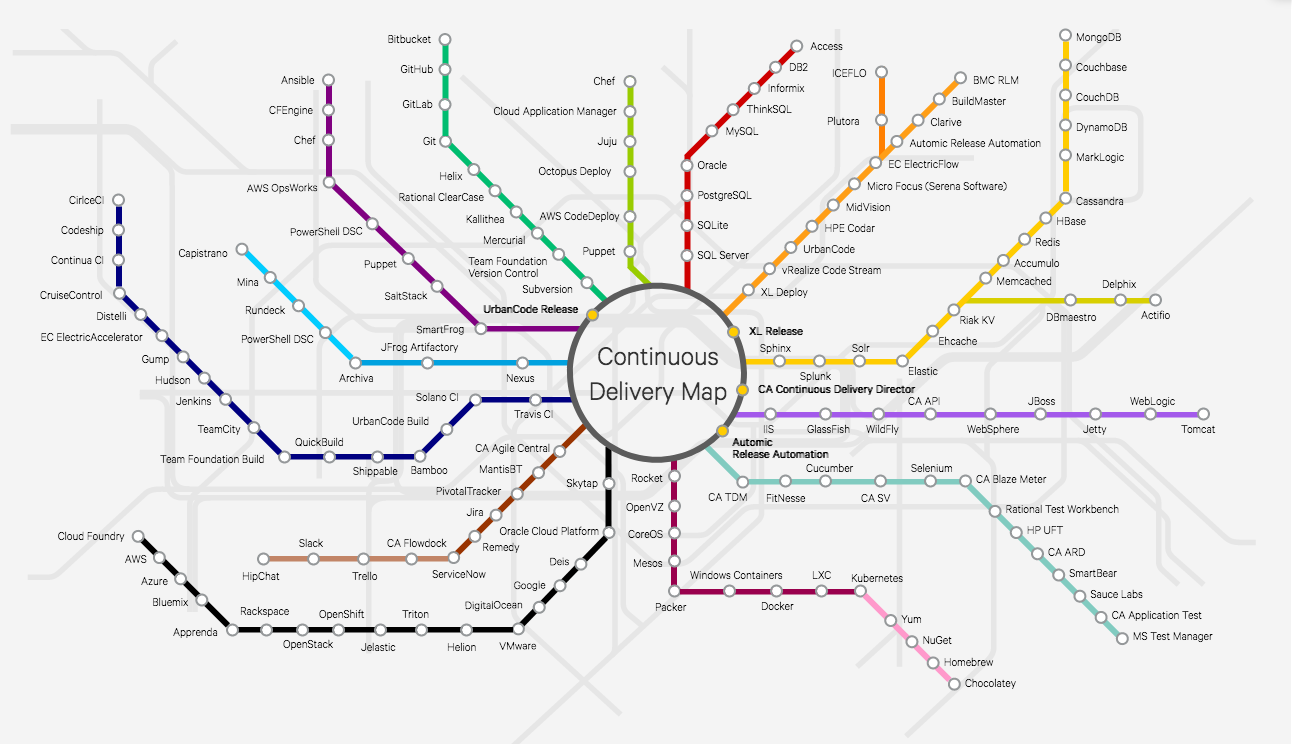
    Automic, now part of CA Technologies BU, has been a leader in this space and just launched the “Continuous Delivery Map,” inspired by the London Tube. Designed to be interactive and instructive, this subway-like map helps customers easily visualize and assess the best use cases for continuous delivery tools for their own digital transformation and reduce the confusion for IT professionals.

    Before I get into the specifics though, I wanted to share a few trends I’ve been following that have ultimately led to development of this map. In recent years, we’ve seen an expansion of freeware and open-source offerings for automated tasks within IT. But organizations must consider and address the long-term sustainability of these software products since the cost of adoption could be risky. It may only be useful for two to three years, until community developers move onto the next new thing—leaving orgs with the costly task of rewriting delivery pipelines or automation mechanics every three to five years. This is compounded by the fact that the term “DevOps’ itself has even become a trend”—it’s catchy and grabs attention, so everyone is branding themselves as a DevOps tool, even if it’s not a core use case of a tool. Now, there is increased confusion on what tools are available, what aspect of DevOps they’re most valuable for, how sustainable they are, and what the market thinks about them.

    Over the past few years, I’ve also seen some organizational shifts as well. Starting at the top, I have noticed that CEOs have recognized the competitive advantages of applying DevOps practices, including faster software production, greater revenue gains and better responses to market conditions. Leadership teams are now responding with mandates for DevOps implementations in their own orgs, and C-level hiring and firing decisions are being influenced by their awareness of DevOps. Separately but related, development and operations teams have continued to fundamentally work and solve problems differently, with developers working in a linear fashion, solving problems sequentially and operations working in a circular fashion with frequent interruptions. Automation is the key to making operations agile because it will reduce interrupt-driven processes and practices. An agile operations team will empower true DevOps because Ops members will have time to collaborate and contribute to DevOps practices. Without it DevOps really means DevNoOps.

    Enter the Continuous Delivery Map

    We developed the Continuous Delivery Map to help our customers and the industry at large understand the hundreds of available DevOps tools across several “lines.” We sought to create a centralized, unbiased way for IT professionals’ research and visualize how DevOps fits into customers’ continuous delivery pipelines. After thinking more about patterns that fit a delivery pipeline, we settled on a metro rail system similar to the London Tube or New York Subway. Now, with this map, customers can easily visualize the ‘tooling’ in their continuous delivery process with an understanding of the tools best use cases. You’ll see we have several “lines” from middleware to continuous integration to toolchain orchestration—all with more information on each product in each line.

    As the tool evolves, we hope the map will become a platform that uses data and feedback to rank the tools, capturing a market consensus on best-in-class DevOps tools. Customers will then be able to truly see and choose the best tools in various categories that meet specific continuous delivery needs and strategies.

    — Scott Willson

  • Electric Cloud and the Deployment Dashboard

    Electric Cloud and the Deployment Dashboard

    As my regular readers know, I started a series on companies that I found intriguing who were going to Jenkins World both late (a couple weeks before the event started), and ad hoc. That meant that companies I talked to on a regular basis came to mind, simply because I knew what they were up to, and whether or not they were going to Jenkins’ World.

    It turned out to be a popular few blog posts, both with readers and customers, but I was only able to fit three in before it was late enough in the event that publishing more would not achieve the goal of the series: telling you all about interesting bits to check out.

    But as these things go, the more I paid attention, the more interesting stuff I found. So I’m going to do a few “What you might not have seen at Jenkins’ World” posts to kind of get a chance to talk about other ideas that hold interest.

    Today, I’ll focus on a vendor I’ve followed but never actually used. That’s rare for me; generally speaking, if I’m writing about the product, I’ve used it. And no doubt I’ll snag a free license and put it through the paces, or have one of my coworkers do so. But for now, I’m covering them because I find what they’re doing to be of interest.

    The vendor is Electric Cloud. For those unaware, its ElectricFlow tool is in the same application release automation/continuous delivery (ARA/CD) market space that XebiaLabs (which I also wrote about at Jenkins World) XL Deploy is in. But the point of this blog is not to compare; since I have used both of XebiaLabs’ mainstream products and not Electric Cloud’s, a comparison would be unfair. I only mention XebiaLabs to help those just starting to research understand where Electric Cloud fits.

    dashboard
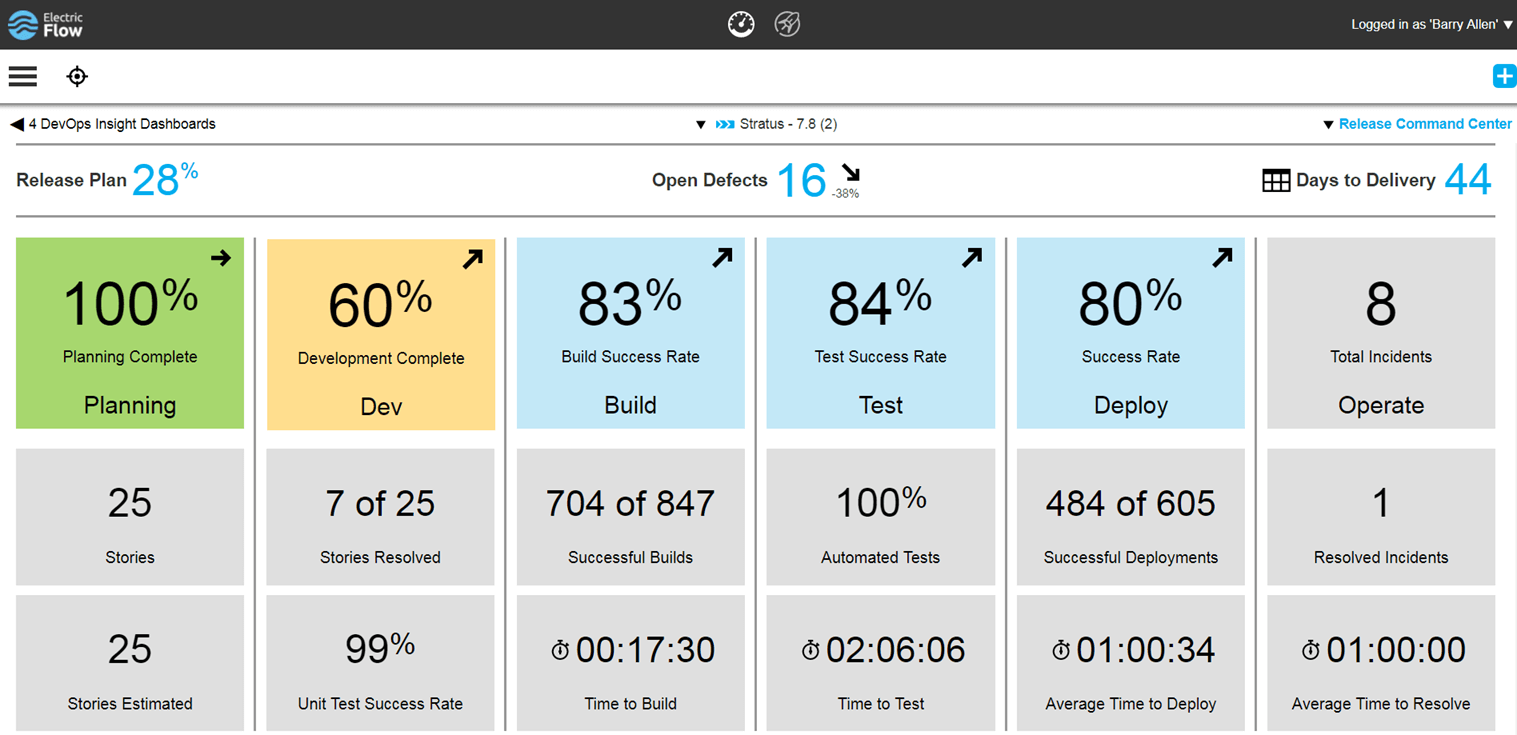
    Electric Cloud’s new dashboard

    Electric Cloud’s big bit at Jenkins’ World that intrigued me was its updates to ElectricFlow to allow better reporting. We all know when a build breaks, we have great systems on the AppDev side to notify the source of the breaks and project management of the issue. But as has traditionally been the case within IT, getting that information out to business leaders who have an interest in the application is spotty, at best. Combine that with the fact that what and how it is reported can vary project to project, and there always is a bit of confusion among the business about status of projects. This confusion translates to asking IT management about status and then, when IT management is wrong and a deadline is either missed or features are dropped from release at the last minute to meet the deadline, bad blood is created between AppDev/IT and the business. Since everyone at an org should be one team pulling toward success of the business, this bad blood is not good for anyone.

    It appears, from its release (I really wish I’d been at Jenkins’ World to poke the corners of this), that Electric Cloud has begun the process of bridging that gap. The growing number and complexity of toolchains means inputs are coming in from several vectors that can give indication of the status of a project. Instead of having IT management (or business management, at some orgs) run around and try to collect these disparate datasets and determine tracking for a project, Electric Cloud has begun the process of automating status collection/aggregation.

    The dashboard pictured above is a critical piece of this solution. Imagine giving business leaders access to a dashboard that doesn’t just cover the current step of a project, but tries to aggregate status from all of the steps in the DevOps life cycle. Basing this information upon release means that, over time, a library will build up that business leaders can reference to gauge this projects’ status against that of other projects, and make their business decisions based upon standardized inputs.

    This data already exists across IT, but this is the first solid attempt I have seen of a vendor tying it all together and presenting it in a manner that IT and the business can discuss with an eye to delivering. The more involved business leaders are in the process, the less friction will result, and this effort seems to be getting them more involved. While there is still much to do—note that unit test success rate is shown in the above screen capture, but unit test coverage isn’t, for example—this is a good solid start to setting up an easy-to-reference dashboard to show the business side what is going on with the project.

    There is also an API that can be used to set inputs to the dashboard that are not yet directly supported. While DevOps teams have plenty to do—and don’t really need to be developing plugins for tools that are supposed to improve quality while reducing workload—the ability to plug in whatever you need is useful for those shops where it is a priority.

    If you’re looking for a toolset that can give more information about what’s happening in your toolchain, it’s worth checking out the changes Electric Cloud has implemented, and I’ll be trying to make time in the next few weeks to give the tool a run and see how it works out. Though I see it as inevitable that the other ARA vendors will continue to increase their offerings also, sometimes it is worth checking into the early bird.

    — Don Macvittie

  • Automic Chart Maps Out Its DevOps Ecosystem

    Automic Chart Maps Out Its DevOps Ecosystem

    Everyone who follows me knows that I’m a fan of XebiaLabs’ Periodic Table of DevOps Tools. It was the first attempt I am aware of to arrange things in a way that helped DevOps teams navigate the increasingly bewildering world of DevOps toolsets. In fact, my friend Colin Walker over at ExtraHop and I have been planning to pick some up for our offices for a year or so.

    (Add on note: It sounds like I’ll be getting a copy of the XebiaLabs poster. Woo hoo!)

    Visit the interactive version.

    So this week when I found out about Automic’s chart—let’s call it “The Spider” because of the way it branches out—I thought I’d let you all know that it is also out there. The cool part about The Spider, in my opinion, is the interactivity (which means I still want the XebiaLabs poster for my office). You can click on a node, get information about the tool and be presented with a link to the tools’ website—and, if they’re integrated with Automic, a link to the integration in their marketplace.

    For quick research, this is a nice chart. I wouldn’t want to have to maintain it, at the rate the market is changing, but it’s a useful starting point for “I need a tool that does X” and exploring short one or two paragraph descriptions of each of the options. It’s not complete, but it would be a full-time job to make such a chart complete and keep it up to date, and it’s pretty far along. You won’t miss any major vendors in a space by starting with The Spider.

    I clicked around and looked at the writeups for several products, and they read well. Considering that Automic is a vendor (they’re owned by CA, so kind of an über-vendor) in the space, it would not have surprised me to find they were limited or slanted in their writeups, but they weren’t. So I asked Scott Wilson, product marketing director for release automation, about that, and he told me they actually wanted to couch the details in the framing that each vendor used. Considering that Automic has a plug-in architecture that interfaces to many of these products, I suppose that makes sense. And making sense or not, it’s good for us, because we don’t have to pry apart two layers of vendor-speak to figure out how a product can help.

    If you’re trying to figure out the CD market, or a subset of that market, this is another good tool to have access to, so thought you all would be interested. The plan is to keep it up to date, so hopefully it is useful for a while moving forward.

    — Don Macvittie

  • DevOps Chat: The Continuous Delivery Map w/ Scott Wilson, Automic

    DevOps Chat: The Continuous Delivery Map w/ Scott Wilson, Automic

    Wouldn’t it be nice to have the entire continuous delivery topography laid out in a nice map that shows how they are all interconnected? Sort of like a subway or metro map? Well now you have it and it is interactive! The good folks at Automic, a CA Technologies company just released their Continuous Delivery Map. It is really cool and they are adding to it all the time.

    I caught up with Scott Wilson of Automic and had a chat about the Continuous Delivery Map. As usual the streaming audio of our conversation is immediately below, followed by a transcript of our chat.

    Audio

    Transcript

    Alan Shimel:                Hey, everyone, Alan Shimel, devopsy.kinsta.cloud here for another DevOps Chat. Welcome and welcome to our guest, Scott Wilson, Automic, a CA Technologies company. Scott, welcome back to DevOps Chat

    Scott Wilson:               Thank you, Alan. I’m glad to be here.

    Alan Shimel:                Glad you’re here with me. So, Scott, you know, lot going on with Automic, obviously – always is – but I wanted to focus in today on some pretty cool interactive graphic – well, it’s more than just a graphic. It’s really a whole project that you guys have launched and it’s called the “continuous delivery map.” For those following along at home, if you wanted to check it out, you can get to it at automic.com/continuous-delivery-tools and – dash or a hyphen. Scott, you know, assuming people are listening to us but not able to get to the site this second, can you describe for us what the continuous delivery map is?

    Scott Wilson:               Yeah, so the continuous delivery map is really just a way to visualize a topography, if you will, of all the different tools that are in the continuous delivery value chain, and there are lots of tools. And we found, in talking with a lot of prospects and just other companies in the industry, that amongst IT professionals there’s a bit of confusion on what kind of the best use case is for many of the tools, mostly, Alan, due to so many of these tools having a great deal of crossover functionality, right? It’s kind of muddied, blurred the lines a bit.

    And so, in thinking about a good way to help people out and kind of visualize the tool chain used to get an application into production environments, we took inspiration from metro rail systems, like the London tube or the New York subway, and so we built out a map that looks similar to that.

    Alan Shimel:                Yeah. I mean, for those of you, as I say, who maybe can’t get to a computer right this second, as you’re listening to this, it really is. It’s based on a subway map or a tube or it could be the Washington metro or the Boston or Tokyo or anyplace else, in that you have a central hub and then there’re different lines that are color-coded. And each of these color-coded lines represent a lineage or a line of a particular functionality in the continuous delivery world. So, for instance, there’s a line for cloud, IaaS and PaaS. Another line for middleware, another one for CI tools. Another one for artifact repositories. And, along that line, the stops are all of the different companies that kind of play within that are or are on that, and it’s not just companies – it’s actually the products of these companies that play on that particular branch, if you will.

    So it’s actually pretty cool, Scott, and what I like about it too is, though, look, plainly and clearly, Automic is a vendor. I mean, there’s no favorites here. You’ve done a pretty exhaustive mapping or the whole topography of the continuous delivery world, it looks like, to me anyway.

    Scott Wilson:               Absolutely. We really wanted this to be agnostic for the tools. We’re really just trying to help the community understand, you know, the landscape for continuous delivery, and, as you mentioned, the central hub is really the way you would bind all those many plethora of tools into a coherent pipeline, right, to safely and reliably deliver apps to production environments. And, yeah, this definitely respects that. Ultimately, we’re gonna be opening this up to the community so that people can comment or keep this updated ’cause there’re always new tools coming on board and other tools or open-source projects that kind of fall out of vogue, so we’re looking to really make this more interactive and far – we’ll keep it up to date.

    Alan Shimel:                Yep. And, you know, again, trying to visualize or paint a picture for people who don’t have it in front of them, at every stop on every branch, if you will, it’s a link, and if you click on that link, it gives you a little pop-up with a little information about that particular company or product but also links through to their full websites or what have you. So it really is – I could see this being a really useful tool for anyone interested in the CD kind of world. There have been – I mean, clearly, Scott, right? Full disclosure: there’ve been other companies that have tried to organize, if we will, the CD world, but, really, using this paradigm of the subway map and the branches and lines, if you will – maybe it’s just ’cause I’m from New York and I’m used to subway maps –

    [Laughter]

    – makes a lot of sense to me.

    Scott Wilson:               Right. Well, we’ve heard that feedback as well that that’s just – well, you know, continuous delivery’s about movement, right? You’re moving things along and it just seems to help visualize it. You know, a lot of the data from what other folks have done is similar, right – a big list of tools – but just being able to put it in a format like this, we’re finding a lot of people go, “Ah, this makes sense. I would use these set of tools. Source code management fits here and deployment automation fits there.”

    And it’s helpful because I think, without presenting it this way, you’re just left to a hodgepodge of tools and you’re like, “Yep, I got ten of these and two of those and I’m good.” When you look at it in this format, you realize, “Oh, well, I could actually go further. I could do more or I could better organize things,” or maybe even take some of the burden off a tool that you keep having it be more than it was designed for and actually use a best-of in another category, or, as we represent it as, a color-coded rail line.

    Alan Shimel:                Yeah. Yeah. And, of course, you know, the thing about projects like this, Scott, is they’re, in some ways, a never-ending story. They’re constantly morphing, changing, growing. And, I mean, the good news is you’ve got a great start right here; the bad news is you guys need now to keep this up, week in, week out, month after month. What are the plans, going forward, to keep it current and fresh?

    Scott Wilson:               Excellent observation and point. We are looking to ultimately open this up to the community, so this page will not only be as it is now; it’ll be far more interactive, where visitors can come in and recommend tools that aren’t on here, maybe further defining particular lines or branches that we have, upvoting, downvoting various tools, and, yeah, so we’re looking to have that community help us keep it up to date. In just doing the research for this and playing with many of these tools and looking at their viability to be on the map, as you said, it was a ton of work. And so it’d be impossible, with the growing market, to do that on our own, and we’re definitely looking forward to collaborate with the DevOps community at large in keeping this current, the information current and fresh and, of course, far more interactive and useful, as we go forward.

    Alan Shimel:                Yeah. I mean, you know what? I mean, this is great and I don’t know how you would visualize it, but it would be great to show sort of connected dots, in terms of how companies or products actually integrate or work together. But that –

    Scott Wilson:               So, yeah, not to give away – [chuckles] – so much what we’re planning, but, yes, you’re absolutely correct. That is something that is on our roadmap, what we’re planning. Indeed, what we think would be useful for this is to allow us to kind of rank or order the tools and use a kind of a most popular or what the market, the community says, “Now this is the best practice set of tools.” A simple example would be SQL Server and Oracle. Right? If you’re going down the RDBMS line, the database line, then, well, those two are kind of the giants. And so by ordering them such a way, you would be able to come in, list the tools that you have, and be able to visually see, “Are you kind of following what everyone, what the consensus best practice is? Or are you have a lot of outliers?” And I suspect a few outliers here and there are okay, but, you know, if you’re going two four outlines, you might be putting yourself at risk.

    And sometimes I think it’s just to help you answer that big question, is “I don’t know. Should we go with this tool or this tool?” Well, you could come here and, in future releases, be able to see what the community is saying the best of or the next best of, right, and have it ordered and you’d be able to see that in a nice map, visual way, to understand and help you to, hopefully, make decisions on what tooling you should consider or not.

    Alan Shimel:                You can also see if you’re taking the express or going on the locals. There’s a lot that a clever marketing person and someone with a good knowledge of the market here in the CD space can really make some hay with this, Scott. And, you know, beyond cute, it’s actually pretty – a really useful tool here.

    Scott Wilson:               Yeah. Appreciate that. Like I said, we’re looking to make it far more useful and what you hinted to and what I’ve just discussed is really make it really interactive and help you measure yourself against what the market or the community is doing, what the norms are, best practices and so forth.


    Alan Shimel:                So I’ll include a link to this, Scott, in our show notes when we publish, but, for those who may be listening on iTunes or SoundCloud or audio only, again, the URL for this CD map is automic.com/continuous – dash or hyphen – delivery – dash or hyphen – tools. And you could check it out there. Scott, you know, in real DevOps fashion, upgrades here will be continuous, right? There’s not a Linux version planned or anything like that, I would assume

    Scott Wilson:               Correct. Yes. So we have continuous sprints planned. New vendors are actually in our current sprint, that are coming out, and, yeah, so you’re absolutely right. If we’re gonna do something on continuous delivery, then we ourselves are looking to be agile and looking to keep it fresh and then, ultimately, have one of the inputs to those sprints be the community, community feedback and input.

    Alan Shimel:                Got it. So, Scott, this is really great. Congratulations to the whole team at Automic who worked on it. It’s a piece of work here that I think is highly useful. What else is new at Automic, Scott? Anything noteworthy you wanna report on

    Scott Wilson:               Well, what we’re shipping here lately, in the next few weeks, is a incremental release of our application release automation product, version 12.1. There are several enhancements that are coming out, going GA here, in the coming weeks. We’re pretty excited about that and some of the additional enhancements. There’ll be a lot of information coming out in a few weeks about all of that and the functionality and things that we’re doing with that. And then, you know, just additionally, the growth and recognition within the CA company, as an automation business unit, and, yeah, we’re keeping pretty busy with automating not just things within the continuous delivery value stream or DevOps tool chain, but also within the CA ecosystem itself. There’s a lot of growth. And so, really, what’s happening with Automic is we’re really able to help show how we can automate, really, the modern software factory.

    Alan Shimel:                Yep.

    Scott Wilson:               That’s kind of one of the – falls in line with what CA is trying to do, one of the core tenets. They’re trying to reach out to the community and the marketplace.

    Alan Shimel:                Absolutely. All about software development life cycle and software supply chains.

    Scott Wilson:               Yeah.

    Alan Shimel:                Well, Scott, thanks for giving us a peek behind the scenes at the continuous delivery map. We’ll try to feature this on devopsy.kinsta.cloud and we’ll be watching as it continues to develop, adding even more features or functionality, but it’s pretty cool stuff.

    Scott Wilson:               Well, thank you very much and, as always, I love being here and grateful you had me.

    Alan Shimel:                Well, we’ll have you back on again then. You know, Scott, flattery will get you everywhere.

    Scott Wilson:               [Laughs]

    Alan Shimel:                Thanks

    Scott Wilson:               That’s so true, isn’t it?

    Alan Shimel:                Yep. We’ll have you on again. Scott Wilson, Automic, a CA Technology company, talking about their new continuous delivery map here on DevOps Chat. Scott, thanks for coming. Hey, everyone, thanks for listening. Hope to see you soon on another DevOps Chat. Until then, I’m Alan Shimel for devopsy.kinsta.cloud and we’re out of here. Thank you.

    — Alan Shimel