Category: Continuous Delivery

Continuous delivery is a software engineering discipline that allows organizations to consistently develop and release quality software at a rapid pace. It is achieved by automating the software development lifecycle, enabling tasks such as development, testing and release to occur concurrently and continuously.

  • A Right DevOps Approach: Assess Organizational Readiness

    A Right DevOps Approach: Assess Organizational Readiness

    Driving business in this fast-paced world is maddening as owners have to remember customer preferences, beat market competition and similarly cater to different things within the organization’s radius.

    How a business owner manages all this defines the business success, which is gauged through outcomes in the form of smart products, point-on services and almost-immediate feedback. Bank applications, the best smartphones and interactive technology are all proof of this.

    But what is it that stands at the heart of it all?

    The Right DevOps Approach

    When enough is done and businesses still find that there’s a missing piece that will complete “the successful business picture,” they go back to figuring out what and how they can fix the problem. They never come to realize that they will have to consider revamping their organizational structure to meet the growing demands of their influential business.

    How, then, do you assess your approach to DevOps?

    While most believe that it’s a technological approach that they should incorporate in their business, it’s more of a cultural approach. To implement DevOps into your existing organizational structure, you first must look at its current state of readiness.

    Doing this is important, as it helps decision-makers understand how they can embed the smart collaboration after a thorough consideration of the challenges that stand in the way of DevOps implementation. Once the initial assessment is done, business owners need to ask themselves three questions before assessing DevOps readiness:

    1. Is there a Management-Employee Agreement? A successful DevOps process not only relies on collaboration between Development and Operations, but also needs a top-down (management-employee) agreement. Once that’s in place, the company is already halfway through the success road.
    2. Is there a Plan in Place? Many firms just barge into technology like it’s all they need to reach their finish line. Stop! Wait! Think! Owners need to have a detailed strategy, equipped with process tools and goals clearly outlined and best practices chalked out. Once this is done, the culturally different teams need to collaborate and work ways to learn and equip themselves with the technologies and practices of each other’s processes. With all this in place, organizations will be ready to take the DevOps jump.
    3. Is the Organization Ready to Tread the Ocean? Now that the plan is in place, what’s next? Organizations, as mentioned earlier, are in hot pursuit to experiment with what they’ve learnt new. Anything new is fancy, but humbleness is the key! Starting small will set the new cultural shift to completely settle in its new mold. To run the boat in big waters, you first need to test it in small water. Similarly, to test the success of DevOps for a big business project, you first want to test its adaptability to a smaller one. Once you’ve cut off from the harbor, you are all set to wade the ocean.

    Conclusion

    Most business players underestimate the ability of DevOps with whatever industry rumors they hear and some of their own pre-conceived notions. Some other think that they know it all, but what matters is having a strategic approach to first considering DevOps and its tools, and then adapting it accordingly.

    Once the DevOps automation is in place, organizations will be busy reaping the benefits of its successful implementation.

    — Veritis

  • Kubernetes Jenkins Master-Slave: Scaling the Scalability Issue

    Kubernetes Jenkins Master-Slave: Scaling the Scalability Issue

    LinkedIn, Sony, Dell and many other companies use Jenkins as a CI/CD tool and builds happen with substantial code bases that run 365 days in parallel. Generally, you may not have as much code to build, but the slave that’s created during the build process is in an upstate even after the build is completed. That can result in higher cost, higher unnecessary resource utilization and a more complex delivery pipeline.

    Is there the process to overcome this situation? Yes. The solution is scalability.

    Jenkins Scalability

    One of the strongest features that Jenkins has is scaling—pushing beyond its normal limits of productivity. In this article we’re taking a look at the Jenkins master/slave model with one central Jenkins instance, referred to as master, and couple of slave executables called slaves, with the master responsible for scheduling the jobs across the slaves. Some features of slaves are:

    • Running multiple build tasks in parallel.
    • Replacing falsify Jenkins instances automatically.
    • Spinning up and terminating the slaves based on the requirement and need, which leads to cost reduction.

    There are a few ways to implement Jenkins scaling; perhaps the easiest one is to implement is Jenkins scaling on Kubernetes.

    This article will answer certain questions regarding the scaling process on Kuberenetes, including:

    • How is a slave pod created when a master generates a build?
    • How is the build assigned to the newly created slave?
    • How does the slave communication happens with the master during and after build?

    Jenkins Master Installation

    Prerequisites:

    • Jenkins Docker file
    • Kubernetes-Jenkins-deployment.yaml file
    • Kubernetes-Jenkins-service.yaml file
    • Kubernetes persistent volume
    • Kubernetes persistent volume claim ref:blazer.com

    The preferred way to install Jenkins on Kubernetes is to create a custom Docker image based on the Jenkins base image. For now, you need to generate a Docker file that has the base image taken from Docker public repo, on which you can fine-tune your Jenkins application by adding plugins and installing Maven (RUN command) and alternative dependencies of your build along with Jenkins deployment.

    The Docker file will prepare the image such that you don’t need to install any plugins after Jenkins deployment—it’s all done when the Jenkins Docker image is created.

    Create a Jenkins-deployment.yaml file with deployment name, Docker custom Jenkins image, persistent volumes and other inputs, then deploy the application.

    Since each deployment creates a pod, let’s check the status of the pod and how the Jenkins was deployed on the Kubernetes cluster.

    Now, let’s create the service file for the Jenkins deployment to access the dashboard.

    From the above image we can access the Jenkins dashboard with node ip and port number generated by the service file (32683).

    Slave Configuration on Jenkins

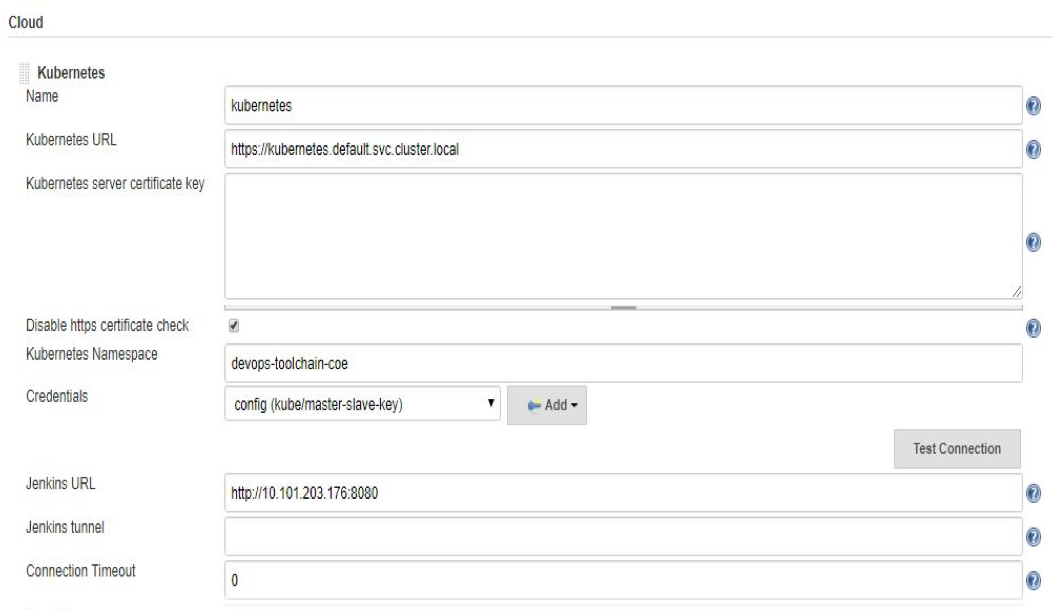
    The moment the Jenkins dashboard is up, checking to make sure the Kubernetes plugin is installed. If plugin installation is done, it will provide the options to configure slave details in  Manage Jenkins–>Configure System–>Kubernetes–>Add Cloud

    Follow the below steps:

    Then go to  Manage Jenkins–>Configure global security–>agents–>check the protocols JNLP agents fixed:50000 and (Java Web Start Agent Protocol/1) as mentioned in the below image.

    Now, create a freestyle job and in the general tab check “Restrict where this project can be run” and give the slave-name that we have configured in the settings:

    Workflow

    • When the job is triggered from master it will look for the slave configuration details.
    • Based on the configuration given in master using the JNLP Jenkins slave image, a slave pod is created and assigned to the build generated from the master until the build gets completed.
    • On a successful build, the slave will check for other build schedulers for a certain period of time. If there is no response from the master, the slave will post existing build results to the master and terminates.

    — Lucky Kumar Sappa

  • 7 Signs You’re Mastering Continuous Integration

    7 Signs You’re Mastering Continuous Integration

    A majority of organizations think they are doing continuous integration (CI), yet when asked if they are following key practices of CI such as running tests to validate every build, many of them aren’t. Ask yourself the following: “Are we building our application with every change, or at least multiple times a day? Do we avoid long running feature branches? Do we prioritize fixing broken builds over committing new changes?” If your answer to any of these questions is “No,” then guess what? You are not truly doing CI—and you’re not alone.

    Continuous delivery (CD), a foundation of DevOps, is built on the practices of continuous integration. Accordingly, you have to implement CI properly before you can truly achieve success with CD and DevOps. In other words, you have to crawl before you walk.

    Steps to Mastering Continuous Integration

    To reach business goals, here are the seven practices organizations must do to master CI:

    Automate the Build—the Entire Build—on a Central Server

    This seems like an obvious one—and it is. Sure, prior to implementing continuous integration, organizations either build locally on a developer’s desktop, have a build engineer manually integrate code or have to work through a series of fragile, manual steps that are prone to error. But, surprisingly, many organizations that claim to practice CI still get this one wrong.

    Simply put, your continuous integration build should run a central shared server, be able to run completely unattended and be automated such that the same input will produce the same, same output every time.

    Build as Frequently as Possible

    Teams practicing CI build multiple times per day, ideally triggering the build per change on a pull request, merge or commit. Building per commit enables errors to be found as soon as they are introduced and are more easily fixed.

    The word “continuous” in continuous integration should be taken as literally as possible. Often times when I ask organizations how frequently they build, the answer is one of the following:

    1. We do “push-button” builds, X times per-week
    2. We build both every night, and once per week
    3. We build once per-day at X time

    As you have likely deduced, these are not “continuous” builds. They may be central builds, automated builds or scheduled builds. But those don’t provide the benefit of continuous integration. If a build breaks and you have two days of 30 commits by 10 different developers, you may have to sort through all of that work to figure out and correct the cause of the build. Productivity killed.

    Commit or Merge to Mainline Frequently

    Teams doing CI are likely committing/merging to trunk or main with every change or at least once a day.  If you are maintaining long-running feature branches, for instance, you are not getting the benefit of validating integrated changes frequently. If you branch for a long period, when it is merged, the integration has been delayed and you may be left with conflicts or bugs to fix.

    Build Quickly

    If you are practicing continuous integration, your build likely completes within 5-10 minutes.  If builds take longer (some organizations have five-hour-plus CI builds), not only are you delaying integration and, therefore, valuable feedback, but developers are less likely to commit changes because of the cost to their productivity—or, even worse, they continue to commit against broken code.

    Take time to optimize your build and validation time. This may require you to decompose your CI build process to align with components or teams and then validate the entire integrated application as a separate step in the overall development process.

    Validate the Build

    CI includes validating the changes and resulting built. This kind of testing should be a part of the overall build process. If your only validation is based solely on confirming the software compiles and links, then you are not truly practicing CI. Most teams practicing CI include code scans and unit tests in the CI build.

    Validate in a Production-like Environment

    Mature CI practitioners ensure consistency between the dev, test and pre-production environments. The most mature are using VMs or containers, service virtualization and other techniques to ensure they are performing validation in a production-like environment and reducing the risk of discovering errors downstream in pre-production or production, well after changes were integrated.

    Fix Broken Builds Immediately

    As mentioned, it’s critical that teams find and fix issues quickly so that they don’t move downstream. With CI, processes are set up where builds are validated and committed continuously, so if something is problematic, it’s easier to fix. If broken builds are ignored, the issue will be more difficult to find and fix, but worse is the culture it encourages. CI is based on a quality-first approach. If the build breaks,“Stop the line” and fix the build. Everybody will be better for it in the long run.

    Don’t Forget About Culture

    If an organization can look at these seven signs and say it does all of these things, then it is really doing CI. These may seem simple, but when these principles are combined, the outcome is remarkable.

    Organizations that can’t say they follow each of these principles likely will have problems delivering functional builds regularly. The initiative will fail and team members will become frustrated and revert back to their old ways. Not only will there be a process issue, but also a cultural issue—and this is where many organizations get stuck.

    Teams must change how they work together and they must also make sure they are aligned in their mindset. CI has many benefits for organizations, but don’t forget that it’s actually designed to embrace failure, not eliminate it. Continuous integration creates a system where developers can fail fast, so they can find and fix errors early and quickly.

    Continuous integration is one of the foundational elements to a real DevOps transformation, which everyone knows is a top priority for many businesses today. Getting it right—truly getting it right—is essential to keeping up with modern business needs.

    — Brian Dawson

  • Electric Cloud Applies Machine Learning to DevOps

    Electric Cloud Applies Machine Learning to DevOps

    Machine learning algorithms are being applied to advance DevOps via analytics software that Electric Cloud is making available.

    Electric Cloud CTO Anders Wallgren said ElectricFlow DevOps Foresight is made possible because of the massive amounts of data that Electric Cloud is able to acquire providing an application release and continuous delivery platform-as-a-cloud service.

    Electric Cloud applies predictive analytics against all the data it collects to identify and contrast patterns, which it then uses to generate recommendations to specific DevOps teams based on what’s occurring in their local environment, said Wallgren.

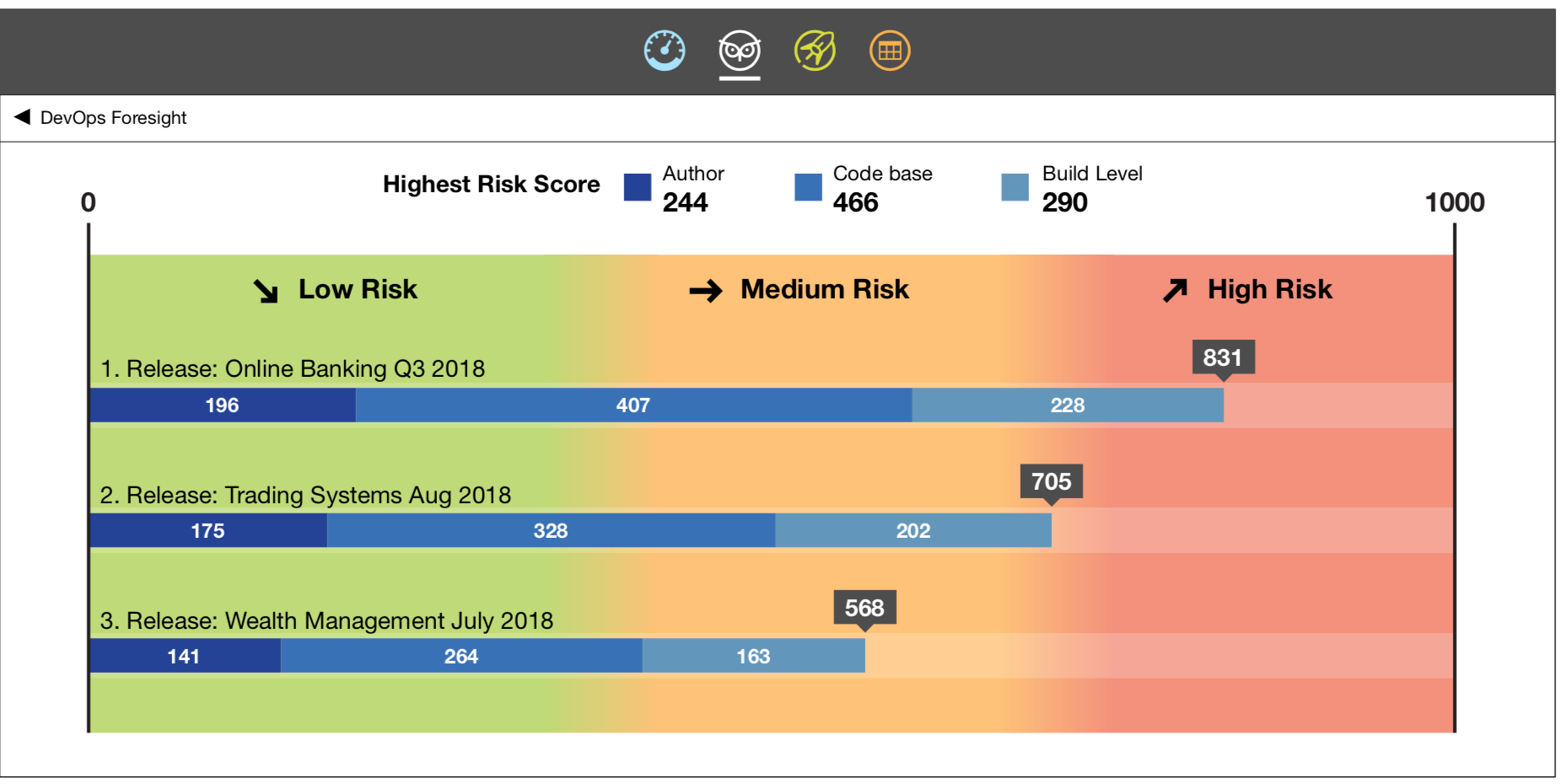
    ElectricFlow DevOps Foresight is able to generate a risk score metric that predicts the probable outcome of a release before being deployed in a production environment. Based on that score, he said, a DevOps team can decide to go ahead and deploy that code or hold it back for further testing.

    The application also will make recommendations on how to improve pipelines based on, for example, the complexity of the code being deployed, Wallgren added.

    As part of this effort, Wallgren noted that Electric Cloud has been extending the level of integration it provides with application performance monitoring (APM) tools that serve as a source of data for a predictive analytics application.

    The goal is not so much to provide a “big brother” application that will determine who should be fired, , for example, but rather reduce as much friction in the DevOps process as possible, he said.

    Being able to apply machine learning algorithms to large amounts of data is becoming a compelling reason to shift DevOps processes into the cloud, he said, adding most organizations aren’t going to be able to collect the critical mass of data required to train machine learning algorithms running in an on-premises environment. ElectricFlow DevOps Foresight enables DevOps teams to leverage a turnkey application where support for those algorithms is already embedded into the cloud service, he said.

    Wallgren noted the result should be a significant reduction in the amount of anxiety surrounding any release of an application.
    Ultimately, the question many organizations will have to come to terms with is the degree to which they want to rely on machine learning algorithms and other forms of artificial intelligence (AI) to automate the DevOps processes. For now, Wallgren said Electric Cloud is focused on predictive applications that make recommendations versus taking independent action.

    It remains to be seen just how comfortable DevOps teams will become with various forms of AI. On the one hand, DevOps teams are clearly interested in accelerating application deployments at a time when the number of applications being  developed simultaneously is increasing exponentially. On the other hand, automating DevOps processes using AI could result in flaws being propagated at a level of unprecedented speed and scale. Long term, however, those organizations that fail to embrace AI to advance DevOps are more likely to find themselves at a competitive disadvantage.

    — Mike Vizard

  • CA Technologies Looks to Shift Automation Left

    CA Technologies Looks to Shift Automation Left

    CA Technologies, at its recent CA Automation Summit, advanced its case for leveraging automation to create a software development factory via an update to the CA Automic One automation platform that adds automation-as-code functionality.

    Gwyn Clay, vice president of product management for the Automation Business Unit at CA Technologies, said the latest release of CA Automic One make is simpler to “left shift” automation artifacts by making it possible for developers to embed those artifacts within application code versus having to wait for a DevOps teams to run them out of band.

    The latest version of CA Automic One also now includes version control and lifecycle management for automation artifacts that enables automation objects such as jobs, workflows and scripts to be promoted from development to production as part of an integrated DevOps process, said Clay.

    CA Technologies also revealed it is embedding intelligence into workflows enabled by CA Automic One, which enables dynamic runtime estimations that can predict potential issues within certain paths in the workflow execution.

    Other new capabilities added to the automation platform include support for PostgreSQL databases, as well as new integrations with CA Workload Automation, CA Continuous Delivery Director and CA Jarvis analytics software delivered as a cloud service.

    CA Technologies has been on a multi-year campaign to embed automation across the entire DevOps processes. With this latest release, that campaign effort is being extended to developers themselves. Clay said the rise of digital business transformation—much of which is being driven by cloud-native applications built with technologies such as Docker containers, Kubernetes orchestration software and serverless computing frameworks—is finally forcing the automation issue in the enterprise. Not only are applications being built faster than ever, but the complexity of those applications has increased exponentially. And yet, the size of the overall IT staff has remained stagnant. Without some form of automation being embedded within the applications itself modern software development practices becomes difficult to sustain, she said.

    Clay noted that most organizations are not yet at the point where they are deconstructing monolithic applications into a set of microservices. But it’s already clear most new applications will be built on a microservices architecture. CA Automic One represents an opportunity to apply automation across both legacy monolithic applications in addition to embedding artifacts directly within new applications, she noted.

    It’s not clear the impact the ability to embed automation artifacts will have on how enterprise IT is managed going forward. IT operations teams still will need to be able to set policies and constraints concerning the level of automation a developer might be able to invoke. Most developers don’t have much regard for the need to share limited infrastructure resources with other applications. But as the ability to infuse automaton into almost every application becomes pervasive, the locus of power within enterprise IT organizations will continue to shift to the left. The challenge now is determining the best way to strike a balance between all the competing factions looking to control who gets to automate what exactly when.

    — Mike Vizard

  • Picking a Git for the Enterprise

    Picking a Git for the Enterprise

    Some of my Agile and DevOps transformation work, not surprisingly, involves helping clients with tooling adoption—to set up, scale and operate across the organization. This blog piece is about a recent experience of setting up Git across a client organization.

    Git, as most of you are aware, is a fundamental building block for many of the modern engineering practices associated with Agile and DevOps. Software configuration management tools such as Git, in simple words, allow you to track and manage your software code and configuration changes in the most-effective, efficient and distributed way. Git, as the choice of source control, has remained steadfast over the years, while other tools across various categories of DevOps tools have seen their fortunes go up and down with the ever-changing technology landscape of DevOps tools. In fact, one new buzzword is GitOps—some even calling it the next stage of evolution for DevOps.

    Origins of Git

    More than a decade ago , the Linux community faced a challenge  because none of the existing revision control tools met their need for a distributed version control tool. And from that need Git was born. In the words of the creator of Git, Linus Torvalds, “The main issues with SCMs is the politics around who can make changes.” Ever since its creation, Git has radically changed the notion of software configuration management (SCM), by enabling engineers to work remotely and autonomously. (If you are new to Git and interested in exploring more about Git and its features, Atlassian has a tutorial and GitHub has a list of resources.)

    Git and More

    While Git as the core product is fundamentally the same whichever flavor your prefer—GitHub, GitLab or Bitbucket—the wrapper around it determines the important non-functional characteristics such as operatability, security, usability and maintainability. Our quest for an enterprise-scale Git focused on the wrapper and not the core product itself, as much has been written, debated and documented on the core product of Git itself already. The value and relevance to enterprises is in the wrapper that these productsplatforms provide.

    We looked at the core product and related offerings; as you can imagine, the three tooling vendors have different positioning and taking different directions with the future road map for their respective tools. Bitbucket’s strength lies in the fact that Atlassian is bundling the product with the omnipresent Jira Software and Confluence. GitLab’s road map seems to be taking the product beyond Git and into the idea of a single product for your entire pipeline automation, from concept to cash. GitHub, which is being acquired by Microsoft, is increasingly relying on the strength of integrations with other tools and the workflow capability the company is bundling with it.

    (I avoid an overemphasis on the commercial aspect in this blog; however, I’m not ignoring it completely. Part of the reason is due to the fact that enterprise pricing is not entirely transparent and may vary wildly depending on organization’s negotiating capability, the scale of usage, future potential and marketable track records as perceived by the tooling vendors. This blog is also not meant to be a feature by feature comparison, as this is something you can Google and find out yourself very easily.)


    The Verdict

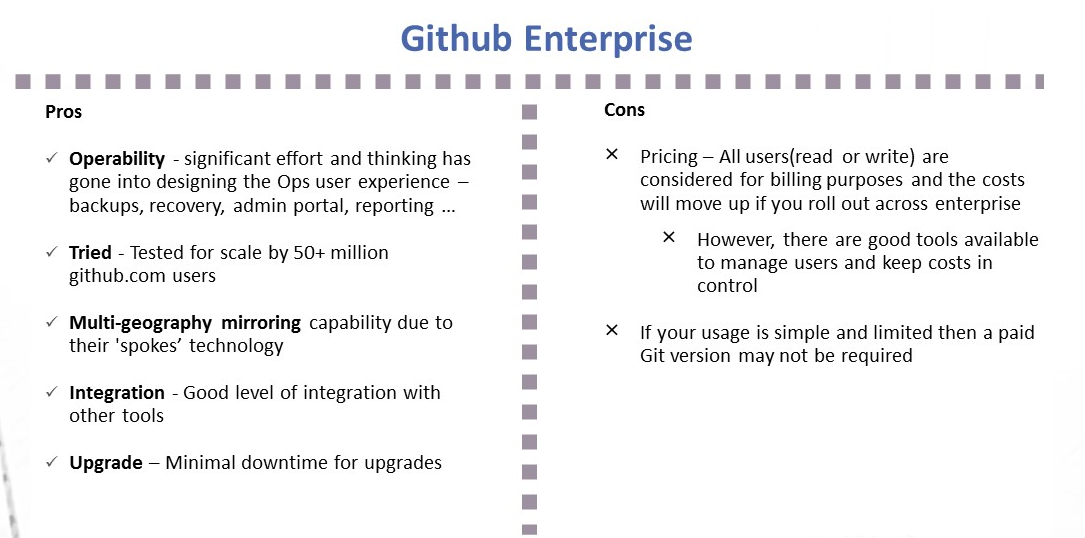
    Github Enterprise pros and cons
    Image1; Github Enterprise – Pros and Cons
    Gitlab Ultimate and features
    Image 2:  Gitlab Ultimate – Pros and Cons

    My Recommendation: It Depends

    1. I liked the vision of GitLab as a single-stop tooling platform for continuous integration/continuous delivery (CI/CD), which goes beyond source control. I think the tool is simple and intuitive to use and great for small to midsized setups or even large enterprises that are focused on having smaller and autonomous teams.
    2. GitHub seems to be well-suited for large and complex enterprises with significant outsourced and offshore-based technology teams.

    I would love to hear your views on what has been your thinking with regards to choosing a Git-based product for your enterprise or teams. Meanwhile, here are some links you might find useful in your decision-making:

    1. Why and how GitLab abandoned Microsoft Azure for Google Cloud – https://venturebeat.com/2018/04/06/why-and-how-gitlab-abandoned-microsoft-azure-for-google-cloud/
    2. Tooling integrations of GitLab – https://docs.gitlab.com/ee/integration/README.html#doc-nav%20for%20list%20of%20integrations
    3. GitHub add-ons are listed at Addons are listed at https://github.com/marketplace
    4. Security and scalability info of GitHub is at https://github.com/jonico/github_security_and_scalability_overview
    5. Products that integrate with GitHub platform – https://github.com/works-with
    6. Pricing of GitLab – https://about.gitlab.com/pricing/

    — Aditya Vadaganadam

  • Continuous Delivery is Not Continuous Deployment

    Continuous Delivery is Not Continuous Deployment

    Every once in a while, it is worth revisiting a topic that flies under most people’s radar. The differences between continuous delivery and continuous deployment is one of those topics. While those steeped in DevOps are well-aware that software can be delivered daily (or even more frequently), deployment is less frequent, and more dependent upon both development and marketing cycles.

    Most CI/CD tools can and do crank out “deployable” apps on a daily basis, or even each time that code is checked in. In theory, each of these builds is a candidate for deployment, and each has had at least some level of testing.

    But setting up the environment to host these apps is a separate step. Quite often today, it is a step that is handled by scripts that configure/move everything to build the app environment into a comprehensive system with knowledge of network, data sources, storage, etc.

    I’m revisiting this topic because new people often hear “CD” and assume that is the end state. Of course, it is not; the application has to be deployed—to Test and Production at least, and in many enterprises to Staging, also.

    While these environments are almost invariably different (Test does not share IP space with Prod, for example), the deployments must mirror each other as much as possible to make Test representative of what Prod will look like.

    As with any step in the DevOps toolchain, scripts to achieve continuous deployment are not a great solution. They are certainly a good first step—automating what previously was done by hand—but tools that make the experience easier and more dynamic are available, and should be considered.

    Whether an explicit continuous deployment tool or an application release automation (ARA) tool (or an ARA that calls a continuous deployment tool, as we’ve seen some used), something to remove dependence on hand-edited scripts is useful for many reasons, starting with the fact that separate scripts are maintained for Test and Prod and changes must be made in two places when a change is made to an application (such as changing where the DB is located or switching to a dedicated AAA server). This makes scripting fragile. Tools can offer shared deployment and custom deployment sections so that multiple changes can be restricted to those things that truly need to be handled separately.

    Deployment is very much a target exercise. The code has been built; deployment is simply giving it a home. Historically, this required agents be strewn about the data center to help target deployments. Increasingly, agentless tools are available that allow the adaptability of continuous deployment while not requiring agents to be installed on every machine that might participate in the deployment activity.

    The other major benefit of moving beyond scripts and into a continuous deployment tool is huge: Everything else is version-controlled, which provides built-in rollback. A developer made a mess of fixing that bug, and things are worse? Roll back the update until the issue can be addressed. Tools such as Git make that particularly easy to do. On the deployment side, the same functionality is required. “Release 7.2 has been deemed to violate GDPR” might require moving back to the previous release. But script-based deployments are always forward-looking. It is enough to modify scripts to reflect the current environment, and it is a rare organization that requires parallel development of backout scripts. However, this functionality comes for free with a continuous deployment tool—that which it has built it can undo, because it is versioned automatically.

    And the benefit of versioning goes beyond rollbacks: It allows multiple version deployments for AB testing and allows for skipping forward and back as far as necessary to meet current goals.

    Is it a panacea? Of course not. Each technology brings new challenges. But continuous deployment solves more problems than it creates. And most of the problems it creates—a desire for greater integration with networking and storage services in non-cloud environments, for example—will be solved in a consistent and repeatable manner by these tools long before any scripting does. Because the tools are designed to create consistent and repeatable results.

    While you are out there kicking it, consider implementing continuous deployment tools to tackle the DevOps last mile. They’ll make your life easier, and your environment less fragile.

    — Don Macvittie

  • Continuous Integration Principles You Can’t Afford to Ignore

    Continuous Integration Principles You Can’t Afford to Ignore

    After recognizing the potential benefits from both continuous delivery (CD) and continuous integration (CI), many organizations have started implementing DevOps in their business operations. However, even today, many organizations don’t completely understand the core principles of continuous integration. Many people think that they are performing continuous integration as part of the DevOps implementation, but they actually aren’t.

    DevOps and continuous delivery are the market disruptors today and are providing businesses with a massive competitive advantage. Continuous delivery is developed on the tried-and-true practices of continuous integration. The companies that seek to recognize the advantages of continuous delivery have many times failed to completely understand CI concepts.

    The companies that perfectly carry out the continuous integration are following some basic rules. The working copies of developers are synchronized with the shared mainline once in a day or, most often, several times a day. An automated build verifies each integration to locate errors as quickly as possible.

    The CI process has been designed for embracing failure where developers can fail fast and fail very often, so they can locate and resolve errors quickly and early. The companies that don’t follow the above mentioned steps are termed as non-followers of continuous integration.

    Implementing Continuous Integration

    Continuous integration is a practice the development team follows and it provides real benefits for the whole organization. The engineers who are responsible for executing the practices of continuous integration want to attain those benefits and follow the most advanced practices their peers follow.

    Most often, companies understand how the teams implement the practices of continuous integration and then make decisions depending on this. The companies that do not follow CI principles are likely to face problems delivering functioning, crisp builds regularly. The members of the team will become disenchanted overtime and the initiative will lose momentum.

    People who don’t want change will get back to the traditional practices if they don’t observe any evidence of the advantages of change. You will have various problems, such as your team losing faith in implementation, unnecessarily wasted time, error-laden builds and projects that must be restarted.

    The organizations that lack the proper implementation of CI practices often face the cultural barrier problem. Engineers possess expertise in resolving the technical problems, but continuous integration requires a shift in culture and this is hard to achieve.

    You can get a CI tool and check almost all the boxes that apply to what continuous integration represents, but if you want to succeed with continuous integration, a transformation in how you work is needed.

    Instead of depending on tools for detecting problems such as a continuous integration error, the information can be automatically and independently verified through smart contracts on the blockchain, which is the technology behind cryptocurrencies such as the bitcoin wallet. The team will have a tough time implementing CI if its culture doesn’t change.

    Continuous Integration Principles

    Continuous integration depends on several major principles. Let’s deep dive into each one of them.

    Prior to checking in to source control, code must be built and tested: This can be done by compiling the build locally by yourself and then verifying that the stats pass. You can also depend on a VC/CI system that can carry out pre-commit builds. You can also utilize pre-commit hooks in svn to achieve something similar.

    Everyone should work toward the output of the CI system: The project managers and testers are also included in that. They must work in a way that they are confident on the working of build at some point and thereafter, every commit is an improvement. They should feel proud to showcase every build’s results to the entire project team and must react quickly for any reason.

    Functional automated tests must be carried out as part of the CI process: If you have the automated regression tests suite, chances are it is not difficult to hook them up to the CI system—and in the long run, it’s definitely worth it.

    Unless you are fixing the breakage, never check in on a build that’s broken: Post the original breaking commit. If you have numerous commits to a codebase, this leaves some issue in your CI system. If your commits aren’t coming fast and thick, this implies you are not reacting to the failures of your build and this is considered a serious issue. Also, the reason for the occurence of original breakage can be much more difficult to determine if other check-ins were done since the original one which broke the build.

    Make the check-ins exactly fit your needs: You may hate waiting for a long time for the compiling of a simple check-in build when you want to know whether you violated some major rule or have broken the unit tests. Make the check-in builds lightweight and run your code coverage and unit tests only. Chances are, you need not run all your analysis tools, code inspections and the automated functional tests every time there is a check-in. So, it’s better you keep the check-in builds light.

    Respond to the feedback: The CI system is a tool used to help steer quality and improvement as much as anything else. So, it should never be ignored. Nevertheless, it is easy to not pay attention to your CI system if the feedback is irrelevant. Working closely with the build team and the other members of the project is the solution, ensuring the build feedback is relevant and targeted.

    Other considerations: Never leave a broken build as it is; fix build failures as soon as possible. Also, every check-in must possess some value. Otherwise, what’s the need for doing it? Every check-in must be an enhancement of the last one. Here, the enhancement can be stated as an increase in code coverage, a bug fix or a new piece of functionality. Ensure you put it in your commit log if the improvement can’t be measured easily.

    Conclusion

    Continuous integration can be considered as a development practice that needs developers to embed code into a shared repository many times a day. The automated build validates each check-in, thus enabling teams to detect problems very easily. Continuous integration helps you build a solid foundation and enhances visibility enabling greater communication.

    — savaramravindra

  • DevOps Chat: The Modern Software Factory and CD Pipelines w/ Scott Willson, CA Automic

    DevOps Chat: The Modern Software Factory and CD Pipelines w/ Scott Willson, CA Automic

    This DevOps Chat features Scott Willson of CA Automic talking about CD pipelines and the modern software factory. The concept of a software factory may be new to some, while others may have heard the term but not really thought about what it means and still others may be very familiar with the term and practice it at their own job. But the idea of a software factory utilizing a pipeline for continuous delivery is at the heart of DevOps.

    This is a really great chat that I enjoyed participating in with Scott. I hope you find it as such too.

    As usual, the streaming audio of our conversation is below, followed by the transcript of our conversation.

    Audio

    Transcript

    Alan Shimel: Hey, everyone, it’s Alan Shimel, devopsy.kinsta.cloud, and you’re listening to another episode of DevOps Chat. Today’s chat features my friend, Scott Willson, of CA Automic. Scott has been a frequent guest on DevOps Chat and the reason is he actually has real, usually, good stuff to say and he’s an interesting fellow to speak with. Scott, welcome again to DevOps Chats.

    Scott Willson: Thank you, Alan. As always, glad to be here.

    Shimel: Pleasure to have you here, my friend. So, Scott, we are going to delve into something today that maybe a lot of people in our audience are really familiar with and will like the drill-down, but there may be people who hear the terms but they’re not quite sure what it means. And so what I wanna talk about today are pipelines and especially when in terms of continuous delivery pipelines and how this fits into a concept – really, CA has coined it and led with it, but it’s the modern software factory, right, for enterprises. It’s a factory methodology, almost like an assembly line, if you will, of developing and deploying software and all that that entails.

    So why don’t we start with basics, Scott, if it’s okay. What is – when we talk about the CI/CD pipeline, how would you explain that to someone?

    Willson: Excellent. So the CI/CD pipeline is basically just the concept or the metaphor of taking any change, right, and this is any change that a developer has coded – a configuration change, a change to the data, and, currently, any change to an environment configuration – needs to go back to a starting point and then kind of run the gauntlet, as it were, where it is vetted, it’s tested, warranted, and then made available in production environments. And there’s a whole sequence of things that need to occur, and that sequence is referred to as the “pipeline.” And pipelines are often broken up into stages, from a logical perspective, but in those stages are specific tasks that have to occur in sequence, to have your software, ultimately, be ready to be safely deployed and delivered to production environments.

    Shimel: Yep. It sounds great. Now, Scott, one of the things we’ve seen is, for instance, with Jenkins 2.0, the concept of pipelines and CD pipelines has really, I think, taken on a new gravitas, if you will, within the market. People are now getting serious about it. What about at Automic? And, beyond Automic, the rest of CA even? Where does this whole pipeline thing fit in?

    Willson: Excellent. So, you know, Jenkins really is a continuous integration tool. It’s meant to run a sequential set of all-or-nothing tasks – I mean, “all-or-nothing,” that if step three of five were to fail, then the idea is the whole build would be marked as having failed. And they realized that, “Well, you know, maybe we ought to extend this to a continuous delivery thing, ie. move ourselves out of just building software and trying to push it to other environments. Now, of course, there are some challenges with this, so lots of vendors, including CA Automic’s ONE automation platform – and there’re several other vendors – have jumped in the space to help orchestrate the continuous delivery pipeline, continuous delivery kinda picking up where CI ends.

    And that’s really where the CA Automic release automation comes in, where it is set to orchestrate and automate that pipeline from where CI stops, where the build basically ends and deposits thing in a secure repository, and then it helps move it all the way through to production. And the thing that CA, as well as other vendors who have entered this space and provide tooling for release automation, is that you’re trying to focus on having the same automation mechanics run in every environment, from dev all the way to production.

    And, indeed, that is one of the formal tenets of continuous delivery – to use the same automation mechanics. If you don’t do that, you’re still throwing things over the wall, right? And you’re missing an opportunity to test and QA and vet the automation mechanics themselves so that you can have high level of confidence that they will work in production because they themselves have been tested out dozens of times prior to that new release or that new change that’s being published.

    Shimel: Fair enough. Fair enough. Now, Scott, I guess this sort of begs the question, in order to understand, right, how powerful this concept is, can you give us kind of a little historical perspective? You know, what happens before pipelines? Before this concept of a software factory?

    Willson: Well, right. Things were kind of done manually. You would use Jenkins to run your builds, not just to compile your little change, but to recompile all the other pieces that it integrates with. You know, integration. The integration part of continuous integration. And make sure that changes that have been made aren’t going to break the aggregate app. And so, once that was done, it was really handed off to QA, and QA would do their thing. There were all these manual handoffs. Spreadsheets were being used to track the progress or charts. Microsoft Project and other PM tools were used to help migrate and manage, rather, the path to production, with a lot of manual instruction sets.

    I, previously, worked in a previous life, where production environments or staging environments would be handed a set of instructions that operations team had to follow. As you can imagine, there were always problems. There was always some little step, some little configuration thing, that was missed in those instructions. And so there would inevitably be errors. And so it was just very error-prone and failure-prone, actually, I would say, so CD is the evolution of this, of trying to move things in an automated, repeatable, predictable way, and a safe and secure way as well. And that’s kind of what brings us into this market.

    And I would say, you know, I was going through some of my old notes. A lot of people don’t know this, but, prior to Automic being acquired by CA, Automic was the one who really started this ARA market. And we had approached Gartner and Forrester, trying to explain to ’em that there was actually a need for this market, and I won’t reveal which analyst, but, you know, a conversation like, “Well, what is this thing you’re talking about? This need to automate?” And we said, “Well, we like to call it ‘application release automation,’ ” and the term stuck with the analysts. So what the analyst call “application release automation,” funny enough, actually came from us, as we were starting down this journey. And, in fact, when I started, I had – with Automic, and I was part of the group that helped build this whole thing out, is that – it was funny – you’d go to do meetings and I heard, again and again, all over the world, literally globally, Alan, I’d hear this comment – “Wow, we didn’t know anything like that existed.” So this is kinda where we started.

    Now, within two years, that changed. Within two years, there were several competitors, Nolio, UrbanCode, which both, like Automic, were acquired. And the world just kind of understands this whole concept nowadays, of continuous delivery automation. But, when we started out, this was new. And, you know, Automic actually was at the forefront and named this market, so I thought that was – that’s kind of cool to know.

    Shimel: Absolutely. Absolutely. You know, Scott, I was just sitting here, thinking, you know, we’re both around in this business a long time, and so, in the late ’90s, dot-com days, I helped start a company called “Interliant,” and we were one of the early ASPs. Right? And we did Lotus Notes hosting and PeopleSoft hosting, Oracle apps, some other defunct software that’s not around anymore, but this was before cloud. And we had to customize every installation, every – you know, ’cause the apps needed to be customized. And I’m just thinking back to how we were developing and deploying back then. And, you know, it seems like 100 years ago, not 20 years ago, first of all, but it’s amazing when you think about the changes we’ve seen in such a short time.

    Willson: Yeah, but you know what? It’s funny, Alan. So I remember those days as well, the pain of working weekends and doing massive deployments, but what’s funny now – we see all the things that have changed, but a lot of things are still remaining the same. In a lot of the large enterprises I visit, Alan, they’re doing this DevOps thing, the continuous delivery thing, with their new cloud-native-based apps or even they’re taking a big app, like their online banking app for a bank I won’t name, and they’re rewriting it in Node.js. Okay? Great. They do this since it’s in the cloud. They’re able to do all these new things – Agile, DevOps, continuous delivery – but they still have all this infrastructure in apps in the background, what I call “classically architected,” right? Your IIS, JBoss, WebSphere, WebLogic, so forth, client servers. You then also have your legacy – your mainframes and maybe large, packaged systems, like Sable and so forth.

    So, even though they’re doing a lot of things – we’re hearing a lot of messaging towards the new ways to do stuff – a lot of enterprises I visit still haven’t gone on that journey ’cause they haven’t quite moved so many things in the cloud and they’re still doing the way things, Alan, you and I saw done in the ’90s.

    Shimel: Mm-hmm.

    Willson: In some ways, a lot of it’s kind of this panic. This fear of like, “Well, you just never know, man. If this thing goes down, there’s so much money at risk and at stake,” that they’re slow to change. And I would tell you that, in the years since I first started my journey during all the stuff, some eight or so years ago, that it’s – even just last year, it was kind of – I don’t wanna say refreshing, I don’t wanna say surprising, but it was certainly eye-opening to see how many large enterprises fundamentally still do things the same way they did in the late ’90s.

    Shimel: Yep.

    Willson: And they’re asking, “How do we go forward? How do we do this?”

    Shimel: Agreed.

    Willson: So it’s not a given, all this new stuff, Alan, is what, I guess, what I’m trying to say.

    Shimel: No, it’s not a given. It’s not a given. But you also have to ask yourselves, Scott, right, fundamentally, is it a survival threat or threat to the survival of these companies who don’t kinda get with it, right? And what you see with that, Scott, is, look, there may be some industries and some companies and some businesses who, frankly, it’s just not that important. Right? Important. And they could do what they want and if they don’t get with it, they don’t get with it – that’s okay. And you need to – you know, and they may never adopt these ways of doing things and it may not really be a huge effect, but I think, for the overwhelming majority of these organizations, I mean, they really start falling behind the eight ball here, if they don’t get with it, and I think that’s what we’re seeing play itself out in the market today.

    Willson: Absolutely. It’s a danger if you don’t adapt. If they don’t improve their customer experiences, they could absolutely find themselves going out of business. I remember reading a lot about Bill Gates in the mid-90s and how he was just really maniacally focused and concerned with the concept that he could be out of business within just a couple to three years. And, when I was much younger and reading this, I thought, “Wow, that’s a good lesson to learn, one, but, two, I think he’s a bit over-exaggerating things.” Well, he wasn’t. Turns out, big companies, as we’ve seen since the year 2000, have vanished, and it’s very important that organizations who haven’t begun this move begin to modernize their way of delivering software. They just have to.

    Shimel: Got it. Got it. And I think we’re seeing that play out, right? Where it’s kind of “DevOps or die” or whatever you wanna call it. Anyway, Scott, we’re just about out of time. Before we close up, anything news coming out of Automic you can share with us?

    Willson: Well, obviously, we’ve got new stuff coming out, but I really think the new thing – it’s not that new, but one of the things I’m very excited about in joining CA is just this whole concept of a modern software factory, where – and joining CA, the Automic team is an integral part of this strategy and what they’re trying to help these large enterprises do, right? ‘Cause the enterprises, as I said, it’s just not the cloud-native stuff. They have all the classical and legacy stuff that they want to onboard for continuous delivery too and they’re struggling.

    And this whole thing about this modern software factory, I think it’s a bit more of a focus on the tooling, right? It’s another layer to DevOps and to continuous delivery, is looking at assembling and organizing the tooling to get all of your platforms moving at continuous delivery speeds. And it’s definitely possible, but I’m very excited and passionate about this modern software factory and where we can help CA take it. And I think that’s really a good mindset to have, is, yeah, this whole idea of you just plug in your inputs in one end, where your destination’s on the other end, and have things just happen and get you to the promise land.

    Shimel: Yep. I hear ya. All right. Well, Scott Willson, thanks for being this episode’s guest on DevOps Chat. Hope to have you back soon. I know you’re working on some stuff, Scott, and, at the right time, we’ll have you on here to brief the world on it, but, until then, it’s always great catching up with you. Lots of success over at CA and Automic and we’ll talk to you soon.

    Willson: Sounds good, Alan, and, at this time of the year, I will just say, good luck on your bracket. [Laughs]

    Shimel: Yes to everyone out there. Okay. Hey, Scott Willson, CA Automic Software, your guest today on DevOps Chat. This is Alan Shimel and you’ve just listened to DevOps Chat. Have a great day, everyone. We’ll see you soon.

    — Alan Shimel

  • Study Traces Cybersecurity Issues to Lack of App Supervision

    Study Traces Cybersecurity Issues to Lack of App Supervision

    A global survey of 400 application developers conducted by Vanson Bourne on behalf of Veracode, a unit of CA Technologies that provides software development lifecycle tools, shines a light on how big an issue cybersecurity has become because of organizations failing to update components. The survey finds only 52 percent of developers using commercial or open source components in their applications update those components when a new security vulnerability is announced.

    Pete Chestna, director of developer engagement for the Veracode, says the root cause of the many cybersecurity issues is that developers routinely incorporate libraries into their applications. But, after completing that task, there is no bill of materials that enables development teams or cybersecurity professionals to keep track of when those libraries need to be updated and for what reason. Without that bill of materials, it’s easy to miss a critical update addressing a newly discovered cybersecurity vulnerability, Chestna says.

    The survey finds 83 percent of developers are using commercial and/or open source components, with an average of 73 components being used per application. But only 23 percent test for vulnerabilities in components as they are updated, even though there are an average of 71 vulnerabilities per application built using third-party components. Furthermore, the survey finds only 53 percent of organizations keep an inventory of all components in their applications.

    The reasons organizations rely so much on open source and commercial software versus writing their own code span everything from best practices (53 percent) and an ability to work faster (51 percent) to being able to access advanced capabilities (47 percent) and company policy (47 percent). Whatever the reason, it’s apparent that more applications are being assembled rather than being developed completely from the ground up.

    The top factors considered when selecting modules to be included in an application include functionality (62 percent), performance (48 percent) cost (44 percent), known security vulnerabilities (42 percent) and reliability (40 percent).

    Unfortunately, there’s not much in the way of DevSecOps processes spanning the development process. This report shows that development (44 percent) or security (31 percent) teams are most likely to be responsible for the maintenance of third-party commercial and open source components. But the number of organizations that enable developers and cybersecurity teams to work together remains relatively small. A quarter admit (25 percent) admit they don’t even have a formal application security (AppSec) program in place.

    On the plus side, more organizations (41 percent) say they are likely to choose DevOps as their IT methodology, which, longer term, should put them in a better position to embrace DevSecOps.

    When it comes to open source software, Chestna says that IT organizations would do well to remember that free software is much more akin to a free puppy versus say a traditional gift. Puppies require ongoing food and maintenance that comes at a cost to the owner. When IT organizations elect to employ open source software, they are assuming a set of responsibilities that many of them still don’t fully appreciate, notes Chestna.

    Of course, the good news is that it’s lot easier to swap out a module of code than it is to return a puppy.

    — Mike Vizard