Category: Application Performance Management/Monitoring

  • FinOps Cloud Cost Optimization via Governance-as-Code 

    FinOps Cloud Cost Optimization via Governance-as-Code 

    Cloud implementations continue to grow in scope and complexity. Too often, this expansion also means costs keep spiraling out of control. In this article, we’ll examine why the emerging practice of cloud financial management (FinOps) is so essential to containing costs in the cloud. We’ll then discuss the challenges teams encounter as they start to apply FinOps approaches. Finally, we’ll reveal the opportunity presented by employing governance-as-code to establish continuous cloud cost optimization—and how this approach makes it practical for teams to put the theory of FinOps into practice so they can keep cloud costs in check.

    The Emergence of FinOps

    For many organizations, there’s been a race to leverage cloud services, with teams seeking to realize advantages in flexibility, agility and efficiency. Within an organization, it’s not only a matter of more workloads running in the cloud, it’s a matter of more distinct deployment models being used, more teams using cloud services and leveraging multiple service providers.

    In the process, teams have had to contend with rapid growth in the size and diversity of the implementations that have to be managed—and paid for. It is this latter aspect that has been a rude awakening to those responsible for managing budgets. Left unchecked, this growth in cloud use has led to spiraling costs and predicting, managing and controlling these costs only grows more difficult as deployments get more complex and more frequent.

    This need for improved cost management has given rise to a new discipline: Cloud financial management; or FinOps. In short, FinOps is a way of bringing financial discipline and accountability to the variable-cost paradigm found in the cloud. FinOps brings together a combination of technologies, processes and teams, including professionals from technology, finance and business. By gaining an improved ability to understand, track and manage cloud costs, teams can begin to maximize the value realized through their cloud expenditures. Given the strategic and urgent nature of cloud cost management, it’s not surprising that FinOps teams are growing. According to research conducted by the FinOps Foundation, FinOps teams expanded 47% over last year, and these professionals are expecting their teams to grow 75% in the next year.

    Challenges in Establishing FinOps

    While there’s a lot of promise behind the establishment of FinOps practices, there are also many obstacles standing in the way for teams. When the FinOps Foundation queried respondents about top challenges, these were the top five responses:

    • Getting engineers to take action (39%)
    • Dealing with shared costs (33%)
    • Accurate forecasting (26%)
    • Reducing waste or unused resources (25%)
    • Full allocation of costs (23%)

    Lacking comprehensive control and visibility over multi-cloud environments means these teams can’t proactively manage costs—and too often find out about wasted expenditures and high costs of underutilized resources after the fact. Because stretched teams are reliant upon manual follow-ups and tactics, it is difficult to get engineers to respond as quickly and effectively as needed.

    Compounding these challenges is the fact that across teams, different tools and processes are used. For example, different development teams might be using different provider services along with varying deployment tools, such as AWS Cloud Formation, HashiCorp Terraform, Kubernetes and so on. This inconsistency introduces inefficiencies and miscommunication and stifles team productivity.

    While the cloud offers a range of benefits compared to legacy, on-premises infrastructure, without proper governance, cloud costs can quickly spiral out of control. In fact, Gartner analysts report that in the next few years, 60% of organizations will encounter cost overruns in public clouds.

    Rethinking Cost Management

    For all the reasons articulated above, teams are being asked to take a new approach to cloud cost management, one that aligns with the principles of FinOps. For many, this means embracing the concept of governance-as-code to optimize cloud costs. Cloud governance-as-code represents a way to automatically and dynamically apply policies, including for cost optimization, in fast-changing cloud environments.

    With governance-as-code approaches, policies are defined using a standard language. Code associated with cost policies is created, deployed and maintained in much the same way developers manage application or infrastructure code. Developers don’t have to worry about tracking or managing costs. Cost policies are continuously evaluated against current state, utilization and configuration of cloud infrastructure. If any violations occur, automated notifications and workflows can be triggered. Here are the key requirements for using governance-as-code to establish continuous cloud cost optimization:

    Cost Policies are Defined via an Intuitive Language

    Traditionally, development, operations and financial groups worked in silos. Each team had its own tools, workflows and policies, and even fundamental terminology could vary substantially.

    To maximize the potential of continuous cloud cost optimization via governance-as-code, solutions need to enable teams to define, manage and revise policies using an easy-to-understand, consistent language. This makes it much easier for different teams to collaborate and gain alignment on key cost management policies and best practices.

    Finally, to be effective in establishing continuous cloud cost optimization, governance-as-code offerings need to employ a language that is independent of any specific programming languages that application developers may use. Further, these languages should be applicable to the broadest set of applications, cloud services, development tools and so on. This is vital to ensure that development teams retain maximum flexibility in the tools and services they can use.

    Cost Policies are Managed and Deployed via Git Within CI/CD Workflows

    Once policies are reviewed and finalized, teams must be able to apply these policies within the development organization’s existing continuous integration/continuous delivery (CI/CD) workflows.

    Through robust governance-as-code approaches, teams can create cost policies as code artifacts and deploy them via open source version control systems like Git. Through this approach, teams can apply policies in a manner consistent with their software development and delivery life cycles.

    By codifying cost governance in this way, cost controls can be deployed via Git within a CI/CD pipeline. This approach enables teams to avoid complex manual processes associated with tasks like managing tickets, requesting changes and so on. This also helps teams keep up with the accelerating pace of today’s dynamic cloud and development environments. Further, this approach means governance code can be traced through various state changes, rolled back if needed and so on, just like application code.

    Cost Policy Violations are Detected and Addressed in Real-Time

    Through continuous cloud cost optimization via governance-as-code, teams are  empowered to institute not only continuous detection but also immediate action. Policies can be employed at regularly scheduled intervals or they can be triggered based on certain events.  This approach enables enforcement of workflows and actions that may be required. If policy violations occur, notifications to relevant teams or team members can happen automatically and advanced workflows can be triggered. For example, a policy could identify RDS instances greater than 30 days old that have had no connections in the last 14 days. It would then notify the owners of these instances. If they don’t take action in seven days, the instances could automatically be stopped.

    Cost Policy is Continuously Enforced and Refined

    Continuous cloud cost governance-as-code has a never-ending life cycle, just like the team’s software development life cycle. Cost governance code is built, deployed, tested and released, and the process continues as new policies are developed and refined over time. As requirements change, teams need to be able to periodically analyze cost data and update policies as needed.

    As organizations continue to invest larger sums in their cloud implementations, the need to establish strong FinOps capabilities will only grow more critical. However, as these cloud deployments continue to grow more complex, it can get increasingly difficult to realize the promise of FinOps. For these reasons, employing governance-as-code to establish continuous cost management is emerging as a key approach. With this approach, teams can achieve sustained compliance and minimize waste.

  • New Relic Acquires CodeStream to Close Observability Gap

    New Relic Acquires CodeStream to Close Observability Gap

    New Relic today revealed it has acquired CodeStream as part of an effort to make observability data more accessible to developers.

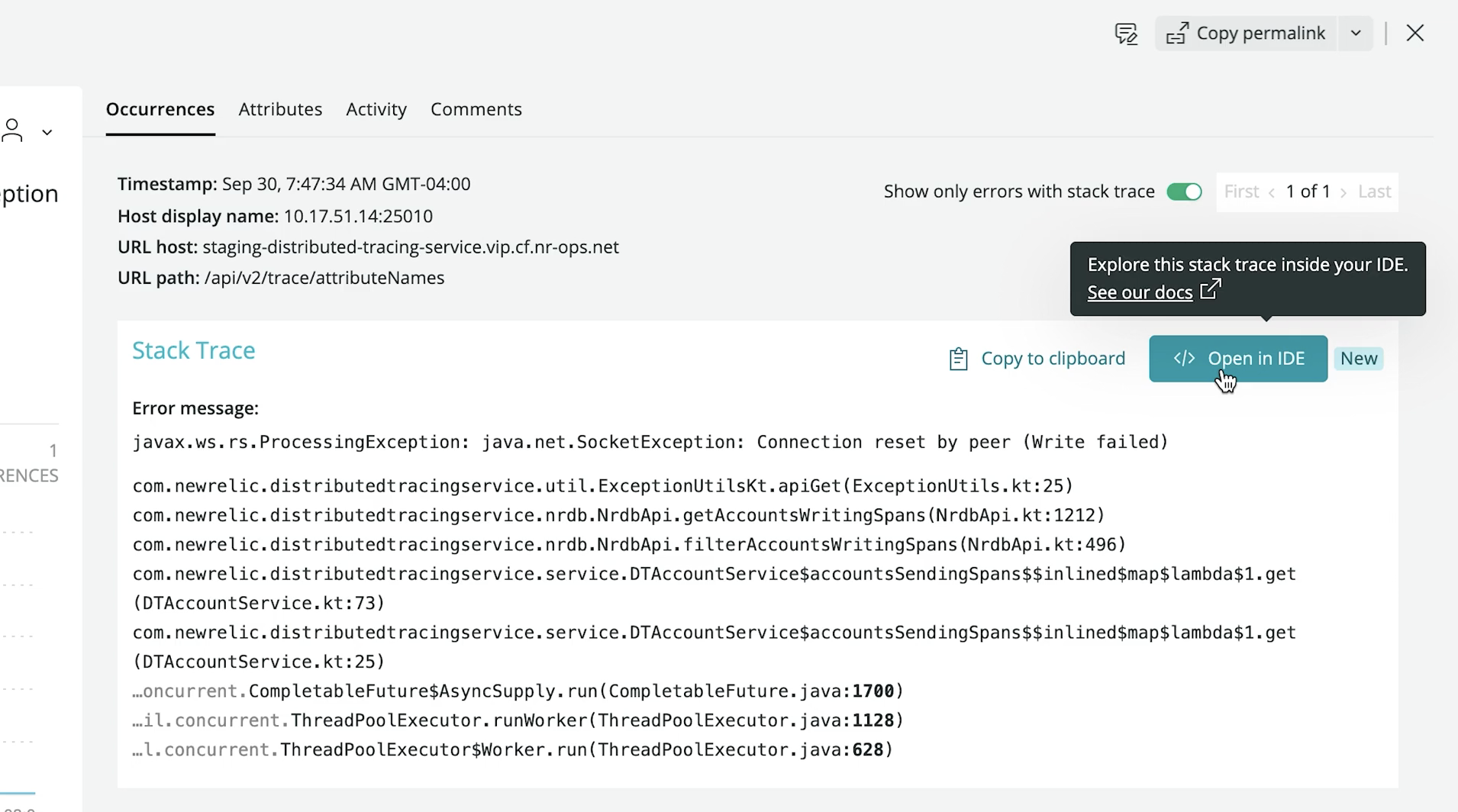
    Buddy Brewer, group vice president (GVP) and GM at New Relic said New Relic CodeStream makes application telemetry data collected via the New Relic One platform directly available within an integrated development environment (IDE), now including Microsoft VS Code. In addition, there are also integrations with Microsoft Teams and the GitHub repository.

    The goal is to close an observability gap that exists today between developers and IT operations teams that stems from a lack of developer visibility into production environments, he noted.

    Finally, New Relic is also announcing a core user pricing option for New Relic One that is aimed at developers. Starting at $49 per month, developers gain access to a core set of capabilities such as CodeStream integrations, errors inbox, logs, GraphQL application programming interfaces (APIs) and the ability to build and run custom applications on New Relic One.

    Peter Pezaris, CodeStream co-founder and CEO, now GVP and GM, strategy and developer tools at New Relic, said becoming part of New Relic will make it easier to bridge the divide that exists between most developers and IT operations teams by making it much easier for developers to see how their code is actually executing in a production environment. That capability will eliminate scenarios where code that runs just fine on a laptop executes poorly in a production environment, he added.

    Developers can also add inline code comments, trigger pull requests, request feedback and track issues directly from their IDE via integrations with a wide range of developer and communication tools. Developers also can switch from New Relic One into an IDE in a single click to navigate, triage and remediate production errors in the context of the code they wrote.

    New Relic is initially making New Relic CodeStream available for free—no credit card required—during a preview period that extends to January 12, 2022. Afterward, some of the more advanced features will require a paid user license once free tier limits are reached. Similarly, IT teams can also sign up for a free New Relic One account without entering a credit card to instrument their applications.

    As the responsibility for managing applications in production environments continues to shift left, Pezaris said it’s critical to give developers the tools they need to optimize code in a production environment.

    It’s not quite clear exactly how much responsibility for applications is shifting left toward developers; it differs from one organization to the next. Many are simply trying to reduce as much friction as possible between developers and their IT operations teams by providing more ‘connective tissue’ from New Relic that IT teams would have to otherwise write themselves, noted Pezaris.

    It may take some time to bridge the observability gap between developers and IT operations teams. Most IT operations teams are still coming to terms with what observability provides that existing IT monitoring tools don’t. Monitoring, at its core, focuses on predefined metrics to identify when a specific platform or application is performing within expectations. The metrics tracked generally focus on, for example, resource utilization. In contrast, observability combines metrics, logs and traces—a specialized form of logging—to instrument applications in a way that makes it simpler to troubleshot issues without having to rely solely on a limited set of metrics that have been pre-defined.

    In theory, at least, that level of observability should ultimately reduce the total number of incidents an IT operations team needs to fix by identifying issues long before they become an actual disruption.

  • Say Goodbye to Late-Night SRE Wake-Up Calls

    Say Goodbye to Late-Night SRE Wake-Up Calls

    Thousands of SREs, on-call engineers and DevOps pros all over the world dread nothing more than the late-night incident alert. The pager buzzing at 2:00 a.m. can cause panic for SREs and leave IT and DevOps teams with quite a mess to contain. But incident response doesn’t have to cause panic if you have the right automation tools in place. If you have ever wondered why companies like Amazon, Google and Zoom rarely suffer service outages and downtime while other companies struggle to achieve similar efficiencies, you’re not alone. In fact, you’re halfway to understanding what makes incident response automation such a vital component of your workflow. 

    Without a doubt, the best way to take back control over manual incident response and—once again—sleep through the night is to implement a powerful automation solution for incident response. We’ve listened to stories from SREs around the globe about the benefits of automated incident response. Plus, we’ve experienced them ourselves (from companies like Cisco, for example).  In the end, we’ve learned a thing or two about creating efficiency by leveraging automation and integration. Below, we’ll briefly cover how leveraging automation to remediate issues with or without a human in the loop is the best way to say goodbye to 2:00 a.m. wake-up calls.

    An Overview of Incident Response

    First, a staggering fact: In 2019, 17% of global enterprises lost more than $5 million every hour their servers were down, according to Statista. Even for smaller companies, the cost of servers going down is enormous. Following the news of Facebook’s recent outage (losing $13.3 million an hour; not counting the loss from the stock price drop), the need for minimizing downtime and reducing these costs is clear. 

    In order to fix issues faster, organizations need an easy-to-use tool that SREs and DevOps teams can implement to troubleshoot and automate incident response. For one, users should opt for a drag-and-drop system. This method is preferred over headless automation tools that too often result in data loss and extended downtimes.

    Next, IT organizations need to take the next step with automation and implement best practices. We can go from asking “How do we bring in automation?” and start to think in terms of “What are the use cases when I do?” A winning incident response toolset will help customers navigate this challenge. An automation platform should also allow users to fine-tune workflows with a library of connectors and actions that are comprehensive enough to get the job done. Ideally, your cloud stack should include several functions such as alerting (such as PagerDuty), monitoring (like Datadog) and analytics (Splunk, for example), while integrating with collaboration tools like Slack and Jira.

    What Are Some Typical Use Cases?

    Let’s dive deeper into three use cases that incident responders and engineers commonly encounter. These examples demonstrate why a powerful automated platform lets small businesses automate effectively and ensure long-term uptime just like larger enterprises.

    Incident Response Automation

    It’s all hands on deck when that 2:00 a.m. incident response alert goes off. Why rely on manual responses which can often lead to broken uptime SLAs and even drag down a company’s reputation? Automation is the key to operating any large-scale service in the cloud.

    Cost Management

    The costs of extended periods of downtime don’t stop at the checkbook. When incidents occur without drag-and-drop automation, long-term side effects can dramatically up the company’s losses.

    Orchestration

    Orchestrated automation tools provide credential management, templates, playbooks and data processing for any company size. They empower users to curate services to their liking as well.

    Want to Learn More about Automated Incident Response? 

    Sign up for this upcoming devopsy.kinsta.cloud webinar on Monday, October 25th at 3:oo p.m. Eastern. We hope you’ll join us to learn more about how to integrate automation into your workflow and stop those pesky 2:00 a.m. wake-up calls.

  • Splunk Expands Scope of Observability While Lowering Costs

    Splunk Expands Scope of Observability While Lowering Costs

    During its online .conf21 conference Splunk Inc. today revealed a bevy of updates that advance observability while at the same time reducing the total cost of deploying its platforms.

    As part of that effort, Splunk also announced it will now make workload-based pricing available to all customers.
    Previously, a select number of small customers had access to workload-based pricing while other customers licensed Splunk platforms based on how much data was loaded into the platform. That approach, however, tends to discourage IT teams from loading as much of their data as possible.

    CEO Doug Merritt said workload pricing was created to enable a value-oriented pricing model that customers could employ instead of a data-centric model that can discourage IT teams from analyzing as much data as possible to improve IT operations.

    To further lower total costs, the company is also previewing a Flex Index option for customers that choose workload-based pricing to enable longer retention for lower-value data at a lower cost. Splunk is also expanding its cloud storage to include a preview of SmartStore, which allows larger volumes of data to be stored more cost-effectively on Microsoft Azure Cloud initially with support for Amazon Web Services (AWS) and Google Cloud Platform (GCP) forthcoming.

    Other enhancements to the portfolio include a preview of a data manager, a revamped onboarding tool for data stored in Amazon Web Services (AWS) and Microsoft Office 365, and Ingest Actions, which enables IT teams to act on data in motion in addition to data at rest stored in Splunk or the S3 cloud service from AWS.

    The company is also now making it easier to find and explore data via a federated search tool and a Splunk Dashboard Studio offering, available via Splunk Mobile, that makes it easier to create dashboards.

    At the same time, the company is also making available Splunk Operator for Kubernetes to make it easier to install its platforms in cloud-native environments. There is also now Splunkbase, a curated catalog that makes it simpler to find or develop a Splunk application.

    In terms of observability, the company is providing a preview of AlwaysOn Profiling for its application performance management (APM) platform, dubbed Splunk APM. AlwaysOn Profiling extends existing tracing capabilities to provide continuous code-level visibility and analysis.

    In addition, there is now a preview of an enhanced version of Database Visibility for Splunk APM, which automatically uncovers slow queries that are causing transaction latency without having to instrument a database.

    The company also announced that its real user monitoring (RUM) for mobile applications, which makes use of open source, now is generally available alongside the Splunk Observability Cloud for Mobile platform. The company also revealed there are previews of integration between Splunk Log Observer and Splunk Enterprise and Splunk Infrastructure Monitoring AutoDetect, a tool that automatically discovers infrastructure anomalies. There are also now additional Content Packs for managing Microsoft365, third-party APM tools and synthetic monitoring.

    Finally, Splunk has expanded its security portfolio to include Splunk SOAR App Editor, which provides a way to edit, test and create security orchestration, automation and remediation (SOAR) applications. There are now more than 350 SOAR apps now available on Splunkbase. The company also launched Splunk Intelligence Management based on a platform it gained with the acquisition of TruSTAR earlier this year and that it is making available security services via a team of experts dubbed SURGe.

    It’s not clear to what degree these additions will enable Splunk to fend off what has become a larger number of rival providers of observability platforms. However, as one of the most widely used IT operations management platforms in the enterprise, it’s clear Splunk enjoys an incumbent leader status it is determined to maintain.

  • A Blueprint for Securing Software Development

    A Blueprint for Securing Software Development

    Software development has changed dramatically in recent years, as technologies like DevOps, application containers, and cloud-native transform how software is built and distributed. Unfortunately, attackers have been paying close attention to these changes, and have retooled their attack strategies to take advantage of relatively weak security controls in software development and build environments. Attackers recognize that security teams are more focused on protecting infrastructure and less focused on software development and supply chains. This is how damaging attacks like SolarWinds happen – and it’s likely that attackers will strike again to yield even more successful outcomes.

    A new approach is needed to secure the software development pipeline. What’s more, this approach needs to be put in place by the engineers developing the software—and not by information security teams. Engineering teams need to be responsible for design and implementation while giving security teams visibility and assurance that controls are operational and that policies are being enforced.

    A new blueprint for securing the pipeline centers on a flexible set of controls that secure the software build pipeline by ensuring that authentication and authorization are properly managed, that the integrity of software artifacts are tested at appropriate stages and that controls are placed on third-party and open source solutions incorporated into the software. The result: Software innovation and delivery at lower risk of supply chain tampering, and reduction of attacks during development.

    A Pragmatic Design Philosophy

    This modern software security blueprint is based on the following design philosophy:

    • Least-privilege: Only grant the access and permissions required to accomplish a job, and no more.
    • Immutability: Artifacts and infrastructure are not modified after deployment to an environment. If a change is required, it’s done in the image or script in the development environment and then promoted through the higher environments.
    • Everything-as-code: Infrastructure, security policies and other parts of the pipeline are also implemented as code and subject to the same controls as the software artifacts.
    • Traceability: All changes, whether to infrastructure or business code, are version-controlled. 

    Controls Blueprint for Software Development Pipelines

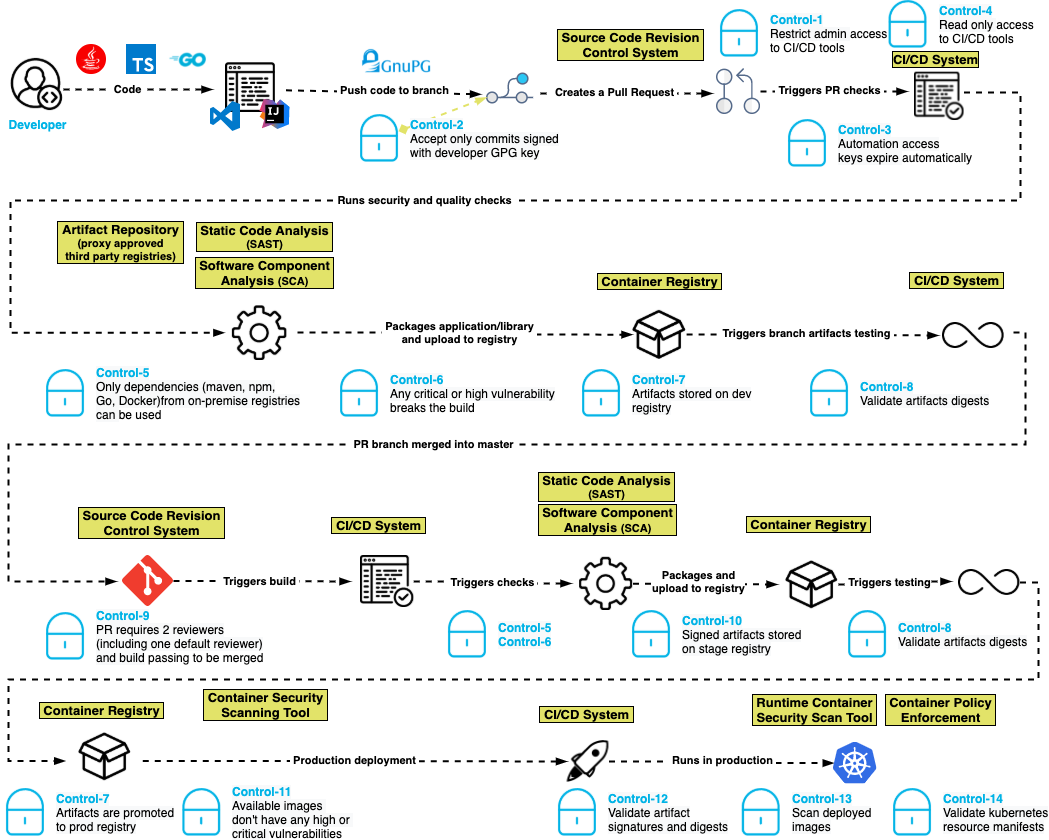
    The basis for this software security blueprint centers around a set of 15 controls that are built for modern development pipelines where developers, pipelines and execution can happen anywhere in the world.

    Control one: Restrict administrative access to CI/CD tools. Ensure that only authorized people can make administrative changes to the CI/CD system, which prevents unauthorized changes to pipeline definitions.

    Control two: Only accept commits signed with a developer GPG key. Unsigned code commits are challenging, if not impossible, to trace and pose a risk to the integrity of the codebase. 

    Control three: Automation access keys expire automatically. By ensuring that access keys used by automation expire periodically, developers create a shorter window of attack when keys are compromised.

    Control four: Reduce automation access to read-only. CI systems should have read-only access to source code repositories following the principle of least-privilege access.

    Control five: Only dependencies from trusted registries can be used. By configuring the dependency manager to only allow connections to an authorized list of registries, attacks can be blunted by keeping malicious packages in public registries from entering the pipeline.

    Control six: Any critical or high-severity vulnerability breaks the build. Supply chain attacks may introduce code with vulnerabilities into the software pipeline. Static application security testing (SAST) helps to identify serious security issues, including poor cryptographic practices, hard-coded credentials and injection vulnerabilities. 

    Control seven: Artifacts are stored in a repository in development, staging and production. This control helps to enforce the immutability of the artifacts so they can be compared in the development, staging and production repositories.

    Control eight: Validate artifact digest. Before an artifact is deployed in any environment, its digest should be validated against the artifact in the repository to ensure that it has not been compromised.

    Control nine: Pull requests require two reviewers (including one default reviewer) and a passing build to be merged. In addition to supporting good coding practices, this control also helps ensure that no commits are made without competent human oversight. 

    Control 10: Artifacts in higher repositories are signed. Requiring artifacts to be signed in a repository throughout the process ensures visibility and traceability for whatever is deployed to production. 

    Control 11: Available container images don’t have any high or critical vulnerabilities. Just as applications need to be tested for vulnerabilities before being placed in production, so do the container images into which they are packaged for deployment. Container images could have open source vulnerabilities if they contain open source software. 

    Control 12: Validate artifact signatures and digests. Validating the signature of the artifact against the digest ensures that the artifact was not tampered with in the repository and that the artifact being deployed is the same one that was tested.

    Control 13: Scan deployed images in production. This helps to ensure that the prior controls were followed for all software in production.

    Control 14: Validate Kubernetes resource manifests. If the resource manifests are tampered with, they could be tricked into deploying a container of the attacker’s choice. 

    Control 15: Ensure build environments are ephemeral and immutable. Build environments should be defined in code with automated creation and teardown and a fresh environment created for every build. Build hosts should not be accessible using interactive logins.

    We believe this blueprint provides engineering teams with an actionable architecture that security teams can rally behind and support. By adopting these standards, engineering teams are promised the delivery of assured software at lower risk of supply chain tampering, reduction of attacks during development and manipulation in staging and production.

    Here’s what it looks like:

    blueprint

    To learn more about the suggested blueprint, read our GitHub post about the project. Our goal is to prioritize speed and agility for software development while incorporating a security-always mindset.

  • Splunk Donates eBPF Telemetry Data Collector to CNCF

    Splunk Donates eBPF Telemetry Data Collector to CNCF

    Splunk Inc. announced during the KubeCon + CloudNativeCon North America conference that it donated a data collector to the OpenTelemetry project run by the Cloud Native Computing Foundation (CNCF).

    Splunk’s data collector runs as a sandbox-level program at the kernel of a Linux operating system and takes advantage of extended Berkeley Packet Filter (eBPF) technology to make it simpler to collect networking telemetry.

    The OpenTelemetry initiative itself spans a range of open source tools, application programming interfaces (APIs) and software development kits (SDKs) that are used to instrument applications. Previously, Splunk contributed the SignalFx Smart Agent and Smart Gateway to the OpenTelemetry project along with more than 64,000 code contributions.

    Morgan McLean, a director of product management for Splunk, said that while OpenTelemetry is officially in beta, some elements of the project are more mature than others. For example, tools for capturing metrics and traces are already being employed, while another set of tools for capturing log data will be ready sometime next year, he said.

    The data collector contributed by Splunk is among the first that operate at the kernel level to collect data, added McLean. That approach makes it possible for some types of data to be captured by default rather than requiring developers to always instrument their applications using agents to enable an observability platform. It will also contribute toward the eventual convergence of network operations and DevOps processes.

    Going forward, DevOps teams should expect to employ a mix of open source data collectors that operate at both the eBPF and application level, said McLean. The eventual goal is to instrument every application by default by making it much simpler to collect data. Today, most DevOps teams are employing a mix of proprietary and open source agent software to collect data that then must be deployed and then integrated with all the applications they build. Given the cost and level of effort required, the percentage of applications that are actually instrumented is, not surprisingly, fairly low.

    However, as agent software becomes more readily accessible, the percentage of applications that are instrumented should increase considerably in the years ahead. For DevOps teams that depend on that data to optimize application performance, that capability should prove to be a boon for improving overall observability in IT environments.

    Observability, in one form or another, has always been a core tenet of any DevOps best practice. Initially, DevOps teams focused on continuous monitoring as the most effective way to proactively manage application environments. However, it can still take days, sometimes weeks, to discover the root cause of an issue.

    Monitoring focuses on predefined metrics to identify when a specific platform or application is performing within expectations. The metrics tracked generally focus on, for example, resource utilization. Observability platforms combine metrics, logs and traces—a specialized form of logging—to instrument applications in a way that makes it simpler to troubleshoot issues without relying on a limited set of predefined metrics focused on a specific process or function.

    Those observability platforms then make it possible to correlate events so that it is easier to identify anomalous behavior indicative of an issue’s root cause. Armed with these insights, it becomes a lot simpler for IT teams to resolve issues faster.

    It’s unclear when OpenTelemetry tools will become more widely employed, but as more tools for collecting data become available, the impact on DevOps will be nothing short of profound.

  • Why Observability and Monitoring Matter to SREs

    Why Observability and Monitoring Matter to SREs

    Site reliability engineers, or SREs, do many things. They help developers build reliability into applications. They manage SLAs and SLOs. They play a leading role in incident management and incident response.

    For all of these tasks, SREs draw heavily on observability and monitoring. Although other parts of the IT organization also typically help to manage observability and monitoring, it’s virtually impossible for SREs to do their jobs effectively in today’s cloud-native world without observability and monitoring tools and data.

    Here’s what observability and monitoring mean, why they’re so important for SREs in particular and how SREs can systematically measure the success of their monitoring and observability practices.

    Defining Observability vs. Monitoring

    Monitoring is the collection of data from applications, infrastructure or other IT resources to track the status and performance of those resources. Monitoring has been a core IT practice since the late 1990s when the first modern monitoring tools, such as Nagios, appeared.

    When compared to monitoring, observability is more intensive. Observability is the collection of discrete types of data from multiple systems and the correlation of those data sets to achieve actionable visibility into IT resources. One thing to note: Observability has a more technical definition in the field of control theory that has to do with using external outputs to make inferences about the internal state of a system; however, when people talk about observability in the context of IT and SRE, they usually mean the collection and correlation of broad sets of data in order to understand complex systems.

    The debate about the differences between observability and monitoring is ongoing, but the consensus is that they boil down to:

    • What versus why: Monitoring helps SREs determine that a problem exists. Observability goes further by allowing them to understand why it exists.
    • Context: Observability provides context around what is wrong with a system. Monitoring, for the most part, offers surface-level information about the existence of a problem.
    • Actionability: Observability empowers SREs to respond effectively to outages, performance degradations or other problems. Monitoring merely lets them know that something is wrong and that it may require intervention.

    In most respects, monitoring is one step in the greater observability process. But observability involves additional practices, such as the correlation of various types of data, to achieve a level of context and actionability that monitoring alone can’t deliver.

    Why SREs Should Understand Observability

    Again, observability has become a core practice for engineers in a variety of roles. Developers can use observability tools to help measure and optimize application performance before deployment. IT engineers can leverage observability to gain visibility into issues that exist in a production environment. Observability tools can help QA engineers determine why an application failed a test.

    But no group has more to gain from observability than SREs. Given that maximizing the reliability and performance of systems is the core mission of SREs, the ability to not just detect problems via monitoring but also to understand them through observability is critical for modern SRE teams.

    That’s all the more true for SREs tasked with managing reliability for complex systems, like those based on microservices. In complex applications, identifying the root cause of a reliability issue—such as which specific microservice contains buggy code or which type of request triggers a performance bug—can be very difficult. By maximizing context into reliability problems, as well as allowing teams to trace requests across complex, distributed systems, observability places SREs in the strongest position to find and fix reliability problems quickly.

    What’s more, beyond detecting issues in systems that have already been deployed, SREs can also leverage observability tools to help build reliability into applications before they are put into production. By observing applications in dev/test environments, SREs may be able to identify reliability risks and then use that insight to find ways to make the application inherently more reliable. Observability might reveal reliability weaknesses that stem from an application’s architectural design, for instance, or from the orchestration tool that manages the application.

    How to Measure Observability and Monitoring

    Getting the most from observability and monitoring requires systematic measurement of observability and monitoring initiatives. It’s only by collecting metrics about observability and monitoring outcomes that SREs can ensure they are improving reliability rather than merely collecting and analyzing data to no particular end.

    While a full discussion of observability and monitoring measurement is beyond the scope of this article, consider the following types of metrics for assessing these practices:

    • Incident frequency: How often do incidents (especially severe incidents) occur that impact production systems? Ideally, SREs will see a decrease in incident frequency that correlates with increased use of observability and monitoring tools.
    • Rollback frequency: The less often an application release is rolled back to a previous version, the more effective the SRE team’s observability and monitoring practices likely are.
    • Mean-time-to-remediate (MTTR): MTTR is a measure of the overall time it takes to resolve a reliability problem. It reflects how well you monitor (which determines how quickly you detect problems) and how well you observe (which is the key to resolving problems).
    • Total data analyzed: Tracking the total volume of data that you collect and analyze through observability and monitoring tools helps you assess the overall scope and scalability of your practices.
    • Total systems analyzed: In addition to tracking total data volume, consider measuring how many discrete applications, hosting environments, CI/CD tools and other systems you are managing as part of observability and monitoring workflows.

    The ultimate goals of SREs extend beyond observability and monitoring. However, observability and monitoring serve as essential means to the broader ends that SREs are tasked with achieving: Maximizing uptime and performance. And while monitoring alone was once sufficient for supporting the goals of SREs, it’s very difficult to imagine an SRE team today that doesn’t also make extensive use of observability, which takes monitoring to the next level.

  • Energy Efficiency and the Data Center

    Energy Efficiency and the Data Center

    The IT industry has historically been a leader in the ongoing race to reduce CO2 emissions. Reducing emissions is good for the environment and for the corporate bottom line. The data center is well-known as a voracious data consumer. But the data center consumption findings keep pace with the trend. Even in the face of remarkable growth in data center capacity and performance, their energy consumption has increased only a few percentage points since the 2010s. This almost-flat rate of energy consumption is primarily the result of the shift to cloud computing as well as the shift to solar and wind energy, where it makes sense.

    Investments in renewable energy sources have helped tamp down criticism over the overall IT carbon footprint. Knowing that it takes a tremendous amount of energy to power a data center, owners and operators are always looking for ways to improve efficiency and reduce carbon expenditure. Today, there are newer and better ways for organizations to deliver the performance to properly power modern applications while keeping in mind the energy efficiency and carbon reduction the world requires.

    Minimizing Energy Use and CO2 Production

    How did we get here? Decades of semiconductor process miniaturization in concurrence with living out Moore’s Law has culminated in ongoing improvements in performance, storage capacity and device density. Today’s mobile phones are a great example of that ongoing progress. A secondary factor in the mobile phone revolution is a processor architecture optimized for efficiency and flexibility. This ARM architecture has been used to power almost all devices since the first iPhone. Over the years, ARM has also become a realistic platform for servers; often a better choice than an x86 system.

    Energy efficiency is one area where ARM systems win out over conventional server architecture. But it was not until recently that ARM processors could deliver the required performance for the data center. Today’s systems, based on Armv8 designs, have brought into play x86-class capabilities in a more energy-efficient way. The advent of the ARM-based AWS Graviton processors, which by some estimates have already captured 20% of the instance share on AWS, demonstrates that ARM can run production workloads while delivering what AWS calls “up to 40% better price performance over comparable current-generation x86-based instances for a wide variety of workloads.”

    To illustrate the impact on carbon production when a data center shifts from x86-based architecture to ARM servers, an analysis of the top elements contributing to data center energy use was undertaken. The energy savings was calculated and translated to reduced CO2 emissions based on the fuel mix used to power the electric grid in various locations. The results prove that an ARM-powered data center reduces CO2 production by 74%, equivalent to almost half a million barrels of oil.

    Power Consumption Reduced by Efficient Servers

    The premise is simple—innovative server design significantly reduces data center energy use. In this model, a server’s power draw and physical size are key factors. The energy needed for other data center subsystems was extrapolated by using ratios derived from experience and validated by estimates from other data center operators.

    Data center energy use can be divided into five categories of equipment and infrastructure: Servers, network communications, power supplies, conversion and UPS, cooling systems and storage. Servers and cooling comprise about 75% of the total.
    The calculations were based on the energy used by a medium-sized data center with 750 racks of conventional 1U servers (42 servers/rack; around 31,500 in total). Assumptions used included servers comprising two-thirds of the floor space and that the equipment space accounts for 65% of the total, translating to a 62,000 square-foot data center. For comparison, facilities operated by the major cloud vendors can be a million square feet or more. Knowing server power consumption and the ratios for the equipment categories, algebra can be used to calculate the energy consumption for each.

    The data center in this hypothetical example has, as we said, 31,500 servers. Using the 912.5W power draw of a Dell R640 as typical of 1U x86 servers, the total server usage in the ARM data center would be 251,795 MWh/year. Using this formula, the amount of energy saved by using ARM servers can be calculated. Each server requires about one-quarter the electricity of a standard server. In the formula, the assumption is that the ARM server installation would require half the equipment racks (375 instead of 750) and 52% of the power-per-system, comprising a data center using only 26% as much electricity (152,409 MWh/year) as one based on x86 systems.

    The math shows that switching one medium-sized data center to ARM servers can produce annual savings equivalent to 45,459 fewer cars on the road or 486,749 fewer barrels of oil used.

    The value in CO2 reduction is widely understood for preserving the environment. It is also advantageous from an economic standpoint. In fact, there are many technical and economic reasons to adopt energy-efficient ARM-powered servers in the next-generation cloud data center.


    To hear more about cloud-native topics, join the Cloud Native Computing Foundation and the cloud-native community at KubeCon+CloudNativeCon North America 2021 – October 11-15, 2021

  • Top 5 Must-Haves for IaC Automation Tools

    Top 5 Must-Haves for IaC Automation Tools

    These days, there are a lot of different DevOps tools to accomplish a lot of different jobs. Almost daily another startup comes out with a new and innovative product or a newer (maybe even better) version of existing tools. One of the biggest innovations has been infrastructure-as-code (IaC). Giving infrastructure admins and developers alike the ability to create, manipulate and destroy infrastructure using code files changes the way we administer our environments. Though these tools are revolutionary and can solve many problems, sometimes they come with a whole new set of issues—as can any type of tooling, really. 

    Generally, IaC tools are run locally at first. When an infrastructure admin or developer is just starting out with it, they store the files locally; maybe in a repository, then clone the files to execute locally. This is perfectly acceptable and a very common practice. The issues arise when it comes to scaling this practice to a team; for example, with regard to visibility and governance. If everyone is running their deployments locally, the team doesn’t have clear visibility into who is deploying what, when and with what variables. This is where IaC automation tools come into play.

    There are many different types of tools to solve these problems. Some are better than others. CI/CD pipeline tools, custom-built automation platforms, purpose-built IaC automation platforms—each has their pros and cons. Getting into all of that can be overwhelming and we could go on for hours about each option. But, we’re here to talk a bit more generically today. So, we’ll save all of that for another time. For now, let’s take a step back and talk about the top five must-haves for any infrastructure-as-code automation platform you’re considering. Because each company and use case is different, we’ll talk about these considerations in no particular order. 

    Role-Based Access Control (RBAC)

    This first factor is pretty important. I know I said I wasn’t discussing these in any real order, but this one should really be close to the top of the list for anyone looking into IaC automation. We talked about how automating IaC can cause visibility issues when you scale across a team. You may want to know who deployed what, when, where and why, for example. Usually, the reason you want that kind of visibility is that you would like to control all of these aspects. That way you can help limit waste, budget problems, security concerns and the like. You may want to provide self-service deployment access, but only within certain parameters; maybe only to certain people or teams. Having granular RBAC can help you design a security policy that makes the most sense for your organization and its needs. Some tools have this baked in, some take a bit of work to make it work. The point is that you should have some form of control over your deployment process. 

    Self-Hosted Agents/Runners

    Following the security thread: A lot of these IaC automation tools are SaaS platforms. SaaS can be very secure. But sometimes, for compliance or regulatory reasons, you may want to retain a bit more control over your deployments. This is where self-hosted agents or runners come in. This type of design allows you to keep your “secrets”—such as your cloud credentials and other sensitive variable information—secure in your own way. You can use whatever secrets management solution you want, be it something from your cloud provider or another third-party solution. It also allows you to keep your code secure. All of these tools, when deploying your code, have to get a copy of that code to deploy. So, they’ll do a ‘Git clone’ or some kind of file copy process to get your files from where they are stored, to execute them. If this is a SaaS solution, then they will essentially have access to your code. Again, this may not be a huge issue for some, but it very much is for others. If you don’t want to give a third party this level of access to your code and secrets, a self-hosted agent or runner can help keep it all secure and under your control. 

    Plan on Pull Request

    This feature is a big one when it comes to workflow. Some may not even know how important plan on pull request (PR) is until they realize how easy it can make their life. This feature may be called something different depending on the platform. Plan on PR, PR plan, speculative plan, etc. Essentially, this means that whenever you open a pull request against a branch, your automation platform will complete a deployment just up to the “plan” phase so that you can see exactly what this code change will do. For example, if you accidentally add an extra 0 to a variable or code file, you may end up with 100 instances instead of 10. Ideally, you’d like to know what was going to happen with a change before it is deployed, giving you the option to quickly fix a potential mistake before it actually goes through. In DevOps, you always want to ‘fail faster’ and close the loop so that big mistakes are caught before they happen. That is why this feature is so important. And if the automation platform you choose is doing this correctly, when it runs this plan phase it’ll automatically update the pull request directly with the possible changes as a comment. This way, your developers can see what is going to happen before they try to merge the deployment back to the main branch for deployment to production. And if they take it a step further by adding service checks to the pull request, you can even configure it so that if the deployment plan fails for any reason, developers are actually blocked entirely from merging the PR back until it is resolved. All of these features help to enable the ability to work in a GitOps methodology. Don’t get me started on the wildl misuse of the term GitOps—it is very specific. While one of the central pillars of GitOps is using your repository as your “single source of truth” for what should be deployed, it’s not just using Git to store your Terraform files; it is an infrastructure administration via pull request methodology. If you want more information about GitOps, you can read more here. 

    Continuous Deployment

    This feature is essential for most folks. But, depending on the workflow, it can be less important. Even if it isn’t a must-have now, it may be down the road when you evolve and grow into new workflows. Continuous deployment is the ability for your automation platform to have a webhook or other connection to your source code repository so that it can automatically trigger a deployment process whenever you commit or push to the repository. This feature goes hand-in-hand with the plan pull request feature we just spoke about. To make that feature function properly, a CD feature would be needed, as well. Now, I want to make sure I clarify. Just because you have continuous deployment enabled doesn’t mean it is just going to push to production in the middle of the day every time a commit or push is done. You should still be given the ability to pause the deployment process after the plan phase. This way you can validate that the plan looks acceptable before you approve the deployment. For some use cases, like developer sandboxes, you may “auto-approve” the deployments because you don’t care about having to get validation first. It all depends on your workflow and processes. A good platform will give you the ability to control all of this. 

    Shift Left Extensibility

    This one is a bit of a wild card. It can mean a lot of different things depending on the situation. Essentially, what I am talking about here is the ability to integrate—or at least be interoperable—with a multitude of other tools during the deployment process. There is a concept called continuous verification which means to shift some tools and processes left into the deployment process so that you can stay on top of problems before they start. In the PR plan feature section earlier, we talked about catching issues before deploying. This isn’t just for resource configuration issues. What about security issues? Compliance issues? Performance issues? Or even budget issues? If your IaC automation tool gives you the ability to integrate the processes and tools you are using to validate these things into the deployment process, they no longer have to be an afterthought. You never have to worry about going over budget if you are constantly validating the budget each time you deploy. You don’t have to worry about a security issue if you’re validating security during every deployment. This type of functionality can look and be named very differently between tools. But as long as you have the ability to get all of these other groups (security, finance, etc.) involved sooner, everyone will be better off. Like we talked about before, in DevOps, it’s always better to fail faster. And integrating these checks into your deployments can help you achieve this. 

    Conclusion

    We’ve made it through all five! We’ve talked about some basic security features. We talked about some automation workflow must-haves to make your life easier. And we even scratched the surface on some next-step-type things to look into such as continuous verification. That was a lot—hopefully this has been helpful for anyone looking into IaC automation platforms and you now have an idea what to look for. Some features may be named differently, but the ideas behind them are the same. If your platform can’t do these, it may not be the right one for you. Or, maybe it is and that feature just isn’t that important to you. As I mentioned, your mileage may vary. Every organization is different.


    To hear more about cloud-native topics, join the Cloud Native Computing Foundation and the cloud-native community at KubeCon+CloudNativeCon North America 2021 – October 11-15, 2021

  • New Relic I/O Aims to Simplify Instrumentation

    New Relic I/O Aims to Simplify Instrumentation

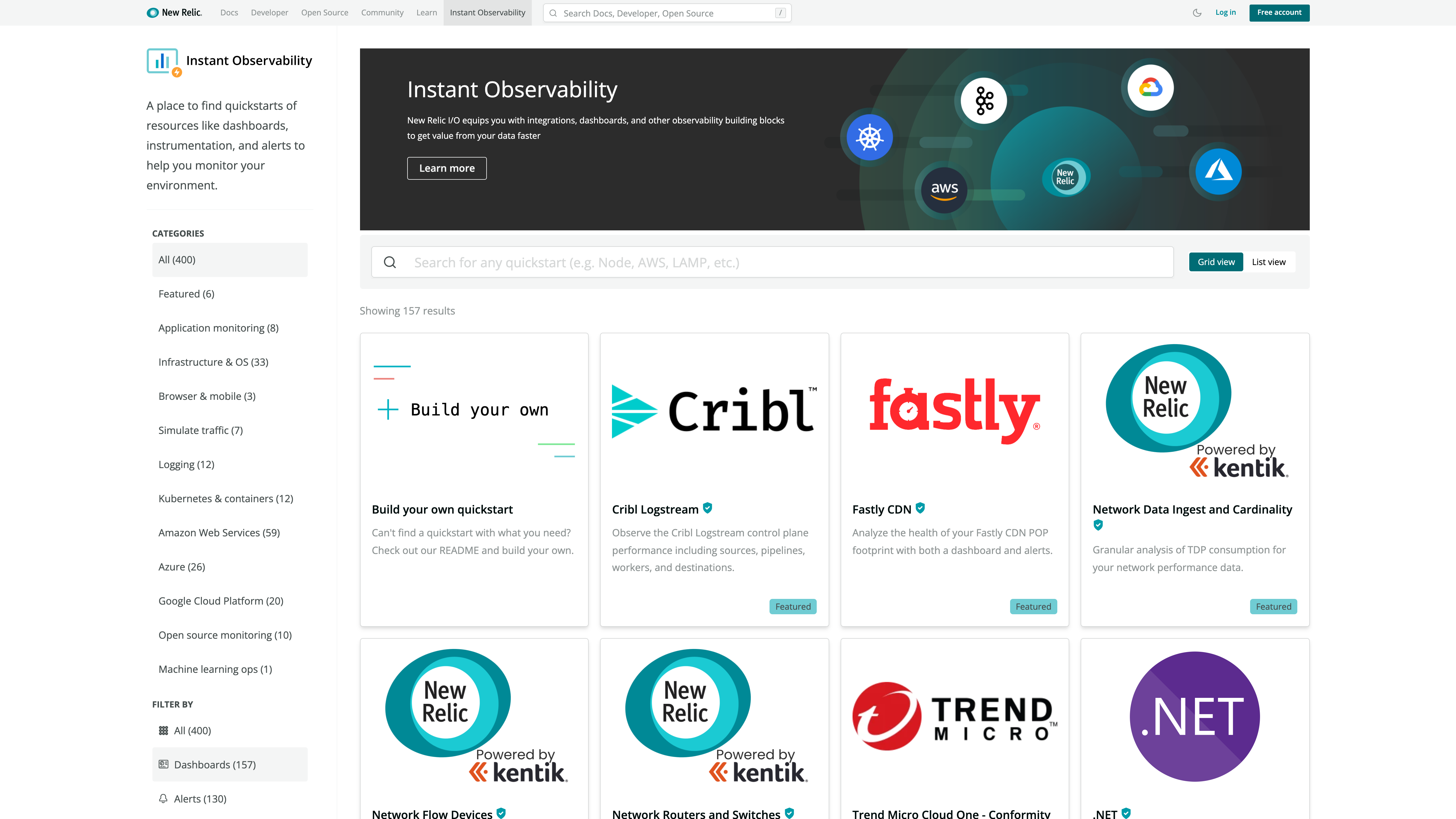
    New Relic today at the KubeCon + CloudNativeCon North America conference launched a New Relic Instant Observability (I/O) initiative through which it is making available open source tools to simplify application instrumentation.

    Marck Robinson, senior vice president for engineering at New Relic, said the catalog of tools will help DevOps teams instrument a much wider range of applications. New Relic will make those tools available as part of the free tier of its observability platform delivered via the cloud. DevOps teams will be able to use more than 400 pre-configured quickstarts to both instrument applications and create dashboards, Robinson said.

    New Relic itself is contributing quickstarts for cloud services, open source tools and platforms such as Kubernetes, Istio and Cassandra. Third-party vendors that have already contributed to the catalog include Cribl, Fastly, Gigamon, Kentik, Lacework and Trend Micro. Each contribution is being vetted by New Relic as part of an effort to foster the development of a larger open source observability ecosystem, noted Robinson.

    Robinson said overall, New Relic is trying to make it easier for DevOps teams to close an instrumentation gap that is impeding IT organizations from moving beyond monitoring to embrace true observability of their IT environments. The recent New Relic 2021 Observability Forecast report notes only a quarter of respondents (26%) have a mature observability practice, with the most commonly cited barriers to observability being a lack of resources (38%) and skills gaps (29%).

    As a result, DevOps teams often encounter a last-mile observability challenge when it comes to both instrumenting applications and then building their dashboards, said Robinson.

    As part of a larger effort to make it easier to instrument applications, New Relic has open sourced agent software, standardized on the OpenTelemetry tools being advanced under the auspices of the Cloud Native Computing Foundation (CNCF) and contributed the Pixie observability platform for Kubernetes environments to the CNCF.

    Observability in one some or another has always been a core tenet of any DevOps best practice. Initially, DevOps teams focused on continuous monitoring as the most effective way to proactively manage application environments. However, it can still take days, sometimes weeks, to discover the root cause of an issue. However, observability platforms are emerging that correlate events in a way that makes it easier for analytics tools to identify anomalous behavior indicative of a root cause of an IT issue. Armed with these insights, it becomes a lot simpler for IT teams to resolve issues faster.

    In contrast, monitoring focuses on predefined metrics to identify when a specific platform or application is performing within expectations. The metrics tracked generally focus on, for example, resource utilization. Observability, on the other hand, combines metrics, logs and traces—a specialized form of logging—to instrument applications in a way that makes it simpler to troubleshot issues without having to rely solely on a limited set of metrics that have been pre-defined to monitor a specific process.

    With the rise of microservices-based applications, the shift to the cloud and more end users than ever working remotely, the need for observability has never been more critical. The issue now is finding a way to make it much simpler to achieve.