Category: Application Performance Management/Monitoring

  • Newly Independent VMware to Focus on Multi-Cloud

    Newly Independent VMware to Focus on Multi-Cloud

    As an independent company once again, VMware will focus its efforts on providing management planes that span multiple cloud computing environments after officially spinning out of Dell Technologies.

    Ray O’Farrell, executive vice president for the cloud-native apps business unit at VMware, said the company now has a unique opportunity to work closely with providers of cloud services, builders of on-premises IT infrastructure and providers of telecommunications services.

    The terms of the spin-off included an $11.5 billion special cash dividend that resulted in a $27.40 per share dividend payment to all VMware stockholders. VMware claims the simplified financial structure that arises from the deal will provide it with additional operational and financial flexibility.

    Going forward, much of the development work will focus on providing management planes that not only span multiple clouds but also address specific cross-platform requirements such as security. It’s not likely there will ever be one single uber control plane for all of IT, noted O’Farrell. Rather, IT teams should expect VMware to deliver a series of well-integrated control planes to automate specific tasks in a way that breaks down IT silos, he said.

    VMware, however, under terms of its existing alliance, will also continue to work closely with Dell to create server environments that are optimized for VMware hypervisor platforms, O’Farrell said.

    Key to the strategy is a portfolio of observability tools that VMware plans to continue to expand, noted O’Farrell. VMware will also address the requirements of both traditional monolithic applications running on virtual machines as well as cloud-native applications running on distributions of Kubernetes, such as VMware Tanzu, that may be deployed on top of a hypervisor or on a bare-metal server, he added.

    Given the complex state of IT environments today, it’s all but inevitable something will go wrong, said O’Farrell. The challenge and the opportunity for VMware is to provide IT teams with the observability tools required to discover as many issues as possible before they adversely impact the business, he added. Once those issues are discovered, IT teams should be able to automate the remediation process using the rest of the portfolio of VMware management frameworks, he noted.

    Those management frameworks will also provide the foundation for unifying traditional approaches to IT service management (ITSM) with DevOps best practices that are now being used more widely, especially to manage cloud-native applications, said O’Farrell.

    When it comes to on-premises IT environments, VMware continues to dominate. Its hypervisor is, by far, the most widely used on servers in local data centers. VMware has spent much of the last two years expanding its reach into multiple clouds to enable IT organizations to standardize on a series of management frameworks. The goal is to reduce the total cost of IT by reducing reliance on what would otherwise be a hodgepodge of isolated management frameworks. The challenge VMware regularly encounters is the IT teams that manage cloud computing environments are not always the same ones that are managing on-premises IT environments. As such, many IT teams that have deployed cloud applications tend to embrace the management frameworks provided by their cloud services provider.

    VMware, however, is betting that as more organizations look to reduce the total cost of IT, the economic pressure to converge IT management using its frameworks will be simply too great to ignore.

  • How AI is Changing DevOps for the Better

    How AI is Changing DevOps for the Better

    Managing a DevOps environment involves a high degree of complexity. The rapid proliferation of data has made it difficult for DevOps teams to effectively onboard, ingest and unlock data and implement information to make good business decisions and deliver delightful experiences. Imagine a team poring over troves of information to identify critical factors that triggered an event—they would end up investing long hours to interpret and analyze the information.

    The future of DevOps will be AI-driven. It’s fair to say that it’s challenging for human intelligence to harness large volumes of highly complex data. Consequently, AI-powered solutions will become the number one choice for integrating and analyzing data and transforming how teams develop, deliver, deploy and manage applications.

    By 2023, 40% of DevOps teams will leverage application and infrastructure monitoring solutions with built-in AI capabilities, Gartner noted. Currently, in times of disruption, Gartner predicts the AIOps market will grow at breakneck speed, between $300 million and $500 million per year.

    Let us explore how AI and DevOps are intertwined before we explore how AI is transforming DevOps.

    DevOps and AI are Intertwined

    AI and DevOps are intertwined. Integrating AI in a DevOps environment boosts the overall performance and efficiency of an organization.

    AI and ML-powered solutions enable DevOps teams to onboard, map and integrate large volumes of customer or partner data with accuracy and speed. That is to say, business users find it easier to drive processes like data onboarding, data mapping and data integration, thus improving ease of doing business and delivering improved customer experience (CX).

    Organizations that rely on AI-powered solutions no longer need to devote long hours to custom coding and EDI mapping to analyze large volumes of data. The time saved can be used to focus on more important, innovation-driven tasks.

    AI also boosts automation, allows users to address and resolve issues in both data and applications and facilitates better cooperation among teams.

    4 Ways AI is Transforming DevOps

    The efficacy of DevOps correlates with an upward shift in AI. It can empower even non-technical business users to create connections and drive transactions at the speed of business. As a result, it brings non-technical business users to the forefront of business, thus freeing IT and developer teams to focus on more important tasks. Business users can leverage machine learning algorithms to collect data from different parts of DevOps systems and then map and integrate it in minutes through predictions.

    Here are four ways AI is transforming DevOps:

    1. Improved data access: The lack of free access to complex data streams is a challenge for DevOps teams. AI enables business users to access all the siloed data and harness its true potential for better insights delivery and decision-making. AI-powered tools can gather data from various sources for consistent and repeatable analysis.
    1. Faster data integration: AI and ML-enabled technologies enable non-technical business users to execute data mapping and data integration in minutes instead of months. As non-technical users drive operations, IT becomes free to take up governance and instead focus on more high-value tasks. Thus, not only can AI help business users integrate data faster to deliver experiences and value but also enables IT teams to drive innovation and growth.
    1. Higher implementation efficiency: With the support of AI, businesses can perform more tasks with less human intervention and minimal coding. This reduces the burden laid on IT or developer teams, enabling them to concentrate more on innovation and creativity.
    1. Better security: As security is essential to facilitate a successful software implementation, DevSecOps is a fundamental aspect of software development. Organizations must bolster their security systems to guard against an increase in threats. AI can play a vital role here. It can enhance DevSecOps and boost security by recording threats and executing ML-based anomaly detection through a central logging architecture. By combining AI and DevOps, business users can maximize performance and prevent breaches and thefts.

    Accelerating development cycles while making sure data is interpreted and analyzed properly is a challenge faced by DevOps teams today. Artificial intelligence-powered solutions are helping organizations transform every stage of DevOps building cycles without burdening IT teams or adding costs. Ergo, AI can enable users to transform the DevOps environment, deliver delightful experiences and grow revenue.

  • GraphQL’s Greatest Strength is Also its Greatest Weakness

    GraphQL’s Greatest Strength is Also its Greatest Weakness

    Michael Scott: Why don’t I tell you what my greatest weaknesses are? I work too hard, I care too much and sometimes I can be too invested in my job.
    David Wallace: Okay. And your strengths?
    Michael Scott: Well, my weaknesses are actually strengths.
    David Wallace: Oh. Yes. Very good.

    GraphQL is a new query language that offers a simple way to interact with structured data. The best thing about GraphQL’s design is its convenient data fetching process which enables the requesting party to collect limitless data and perform multiple actions, all with a single API call. This interaction method makes it super useful and very easy to use. However, from a security perspective, its greatest strength could also be its greatest weakness.

    I recently met with Elad Koren, chief product officer, Salt Security, to understand the nuances of GraphQL security. According to Koren, GraphQL affords better usability than REST APIs, yet its bundled request model may compromise systems that don’t employ proper object-level authorization checks. Also, since developers interact with GraphQL services differently than typical web APIs, hackers could avoid detection by typical firewalls, requiring a new approach to security.

    These concerns aren’t dealbreakers for adoption; rather they are a reality check for those using GraphQL in production. Below, we’ll explore some potential weaknesses and look at some general mitigations that providers can take to improve the confidentiality of their GraphQL endpoints.

    What is GraphQL?

    GraphQL was initially developed by Facebook and open sourced in 2015. It’s a query language that makes data retrieval and manipulation with external sources very easy. Instead of programming and linking together complex calls with traditional HTTP API requests, GraphQL enables a client to bundle queries into a single request. This design pattern reduces the under- and over-fetching pattern that REST APIs typically suffer from.

    “You get exactly what you need, not more or less,” described Koren. This makes GraphQL a popular choice for modern database mechanics over REST, as it’s similar to SQL querying.

    Adoption of GraphQL is steadily growing; a 2020 RapidAPI survey found GraphQL usage had quadrupled. GraphQL is now used by 22.5% of API developers. But when it comes to overall API design patterns, REST is still the dominant architectural style used by 93.4% of APIs, found Postman’s 2020 State of API Report.

    GraphQL is promising and has a number of benefits, but remains in an early adoption phase. “It’s still a technology that early adopters are starting to look into—it’s not so widespread,” said Koren. Due to its age, GraphQL security practices are immature, exposing a few potential vulnerabilities for platforms that use GraphQL.

    Unique Security Concerns

    So, what are some unique security concerns in the GraphQL paradigm? Well, according to Koren, it begins with a lack of understanding. “Security is not necessarily top-of-mind most of the time,” he said. “When developers choose to implement GraphQL, they assume that they’re not using APIs anymore and that traditional REST API vulnerabilities do not apply.”

    In fact, the opposite may be true. GraphQL APIs can easily suffer from broken object-level authorization, OWASP’s number-one API vulnerability, just as REST APIs do. But, with greater ease of access to many underlying systems, a single GraphQL query could exfiltrate much more information than a typical API request. If the GraphQL provider does not have granular authorization checks for each particular method and resource, a GraphQL endpoint could suffer from data overexposure.

    Another issue concerns spotting malicious behavior. Typically, when hackers perform reconnaissance on an API, they brute-force it with many requests; trying different namespaces and changing user agents in the process. With REST APIs, this sort of malicious behavior is easier to catch with standard web application firewalls (WAFs) since it’s easier to notice hundreds of peculiar malformed requests. However, with GraphQL, a hacker conducting query batching could completely fly under the radar of typical thresholds.

    This could easily lead to an account takeover, said Koren, who has seen this in production. He described a production payment service that used GraphQL; callers could perform mutations and capabilities they shouldn’t have been allowed to perform, such as pulling up other users’ account information and even initiating transactions.

    It’s easier to limit this type of nefarious traffic with REST APIs by assigning access parameters to each resource and handling authorization checks once at a time. But, this playbook is thrown out the door in GraphQL. “When you’re using a single point to access the data, you may have some false sense of security,” said Koren. In practice, having a single access point requires hard work to retain its integrity. A usable GraphQL frontend may also often mask a convoluted backend made of disparate API styles, Koren explained, making it much harder to correlate user authorizations to specific resources and mutations across various microservices.

    Tips to Mitigate Weaknesses

    So, with these weaknesses in mind, how should GraphQL-based platforms respond? Koren provided the following advice to protect GraphQL APIs:

    • Adopt a security mindset in development: It’s vital to start with a security culture from the beginning. Usability shouldn’t compromise security; ideally, they should complement each other.
    • Ensure proper authorization checks are in place: Whenever an asset is provided to the user, you need to consider whether the user is authorized to access it—especially if they are hitting multiple resources at once.
    • Set a new baseline specific to GraphQL: GraphQL owners need to adapt their perimeter security systems to look for new queues. These validations should consider typical REST API security checks and nuanced thresholds that consider nested queries and batch queries.
    • Know your API inventory: Maintain a clear picture of the underlying architecture of what is beneath the GraphQL endpoint. Verify the data sources and ensure they correctly correspond to user privileges.
    • Increase visibility into API calls: If possible, increase your visibility into queries, mutations, attributes, variables and underlying specifications and how they interact with each other.

    Strengthening GraphQL Endpoints

    API attacks are rapidly increasing. Gartner estimates APIs will become a top threat vector in 2022, and Salt Labs data showcased a shocking 300% growth in malicious API traffic in mid-2021.

    “Like any other innovative tech that comes into the mainstream, it will rise in popularity, but it will not surpass REST in the foreseeable future,” says Koren. Perhaps in three to four years, GraphQL’s current 20% adoption rate will rise to 30% to 50%. While GraphQL is still a relatively niche tool, its use is growing, especially among API-first cloud-native tech companies. And with this adoption will come novel security concerns.

    According to Koren, query batching makes catching malicious attacks using ordinary firewalls tricky. Thus, training a new baseline to discover anomalies unique to GraphQL will be necessary to find and limit hackers while they are still in the reconnaissance phase. Thus, we’ll likely see future security investment go into spotting these atypical GraphQL interactions.

    In general, perhaps the best advice is to treat GraphQL with the same level of intensity you would with any other type of API—if not more. As a single doorway to many underlying systems, GraphQL requires added security forethought and careful application of user authorization.

    With that squared away, hopefully, GraphQL’s greatest strength will remain just that—a great strength.

  • Choosing the Right Software Testing Metrics

    Choosing the Right Software Testing Metrics

    A software testing metric is a criterion to track the effectiveness of quality assurance efforts. First, you establish success indicators throughout the planning stage. Then, compare them with the received metric after the completion of the process.

    However, many software QA and test experts tend to focus on how the tests will be executed rather than on the actual information produced by the tests. By this I mean testers often focus on the mere satisfaction of completing all the tests. But is this always a good thing? You can have a 100% pass rate with all green indicators on your dashboard and it is still possible that your tests aren’t strong enough.

    This article will discuss five software testing metrics that might assist QA professionals in evaluating their success.

    Characteristics of a “Good” Testing Metric

    Let’s talk about the features a metric should ideally have.

    Relevant to Business Goals

    Critical KPIs should reflect the primary mission and purpose of a business; for example, monthly revenue growth or the number of new users. Each company chooses its metrics based on what they intend to achieve with their product. While it may seem attractive to succeed in all tests, focusing on the wrong goals can be deceiving. This may impact the app’s work and the entire complex system, such as headless commerce architecture.

    Allows for Growth

    Every metric should allow for improvement. What if you’ve achieved a 100% success rate? The goal may be to keep the metric at this level or to improve it further.

    Encourages Development of a Strategy

    When a metric gives a team a goal, it also motivates them to ask questions to develop a plan. Suppose you need to increase revenue. Consider whether the product requires new features to encourage more purchases. Is it necessary to create a new acquisition channel? Has the competitor launched any new products or features that are attracting new buyers?

    Trackable and Comprehensible

    Good metrics are simple to comprehend and follow. Otherwise, how will the people gathering them make informed decisions? Employees must understand what they can do to improve the outcome.

    Three Tips for Choosing and Measuring Software Testing Metrics

    1. Start by Asking Questions

    Your questions should cover three topics:
    1. What you’re measuring
    2. Strategies and tools to measure it
    3. Reasons to track it

    To avoid analyzing useless metrics, pay attention to the metrics definition process. Sometimes, a small number of backlog bugs means your QA team is doing its job. However, when you break down these bugs into high/medium/low priority issues, you’ll be able to better see the overall program quality and make the needed adjustments.

    2. Don’t Neglect Automation When Calculating QA Metrics

    Automation saves you time on manual data collection and helps ensure your metrics will always be relevant. Let’s assume you use Jira. Set up a Jira Query Language (JQL) request on your Confluence page if you need data on critical bugs every sprint. It will be updated frequently. Or you can employ other tools based on your preferred test management/task tracking system.

    3. Collect Comments and Gradually Improve Metrics

    Once you’ve set up and gathered all the metrics, the feedback and improvement processes start. Pay attention to feedback to improve the efficiency and clarity of your metrics and reports.

    Five Software Testing Metrics to Track

    Now let’s look at some specific examples. Note that different quality aspects matter to varying degrees depending on circumstances.

    1. User Satisfaction

    Here, you’ll want to see the client’s reaction to the product. You use user satisfaction surveys and support tickets that reveal bugs. If you track these quality metrics and work to improve them, the business will grow as you’ll see more satisfied and returning customers. If something’s wrong, you’ll have to do a causal problem analysis and remove the roadblocks.

    2. Process Metrics

    These are internal measurements that have a significant impact on your product quality. For example, you can track lead time and the time it takes between setting the task and code deployment and production.

    One more metric you could use is cycle time. It means time to build a feature after being given the approval to begin working on it. Finally, you can track the time it takes to solve difficulties. This could refer to the speed of resolving tickets or bugs once they’ve been reported.

    As these metrics can be hard to measure, another method to improve process efficiency is to detect where unfinished work starts to pile up in the queue. It can highlight a bottleneck that, if removed, could help your teams become more productive.

    3. Coverage Metrics

    Another indicator of test quality is test coverage. It informs us of the amount of tested code. It’s a method of ensuring that your tests check the code and how much they operate. In this case, it’s better to use a top-down strategy. The first step is analyzing module coverage. Then you consider functionality and, finally, data coverage in each functionality. It means how many different combinations of the potential data inputs you’re covering with tests.

    This group includes such metrics as:
    ● Requirements coverage percentage
    ● Unit test coverage
    ● Manual or exploratory test coverage
    ● Test cases by requirement category
    ● UI test coverage
    ● Integration and API test coverage

    4. Code Quality Metrics

    Evaluating code quality means categorizing the value of code into two categories: Good and bad. There is no single notion of quality because practically every developer defines for themselves what constitutes good code. How can you assess code quality? Tools like SonarQube let you reveal how much technical debt is in a system. You’ll need to classify issues and vulnerabilities, organize them by priority and select what you’re going to focus on.

    5. Bug or Incident Metrics

    Each issue differs in severity, so don’t give all issues equal weight. Some problems are simply suggestions for improvement. Determine which components of quality are more important than others for your company. That said, go beyond just the amount of defects when analyzing the metrics you’ll use.

    What can you extract from incident reports? These results can include:

    ● Total number of bugs
    ● Open defects
    ● Closed defects
    ● The time to close each incident report
    ● Changes since the last release

    Rules for Measuring Software Testing Metrics

    Evaluating metrics in software testing and estimating their success can be frustrating and vague. Here are some tips and suggestions you can use:

    1. Correlate your metrics with project, process and product goals. Keep in mind that a single indicator is not enough for a complete view of your software quality.
    2. Track the progress (or regress) throughout time. Streamline the data collection process through automation, store data in a collaborative resource like a Wiki/Confluence and review outcomes regularly.
    3. Report the statistics to the customer and the team to show your progress. Reports should be easy to understand, so make them helpful and user-friendly.
    4. Check to make sure if the metrics are valid. Keeping track of irrelevant metrics and displaying inaccurate data is out of the question.

    Measurement is an important activity in software testing, such as determining the number of successful tests against how many have failed. All the information you get comes to stakeholders. As a result, they can make informed decisions such as when to release an app.

    How can you monitor your test activities? You need to determine relevant software testing metrics. Choosing the correct testing metrics can be difficult. Frequently, teams opt for metrics that are out of sync with the overall business.

    What can the lack of adequate benchmarks cause? Stakeholders fail to measure progress, identify possibilities for development or control which testing tactics have the most positive impact. All things considered, QA teams need to track individual progress, skill level, and success, as well as code quality, bugs, and coverage.

  • Sustainability No Longer Just a Buzzword for Cloud IT

    Sustainability No Longer Just a Buzzword for Cloud IT

    A recent CloudBolt survey on IT sustainability finds that sustainability is no longer just a buzzword — the market is demanding real change, and it appears that environmental concerns finally are influencing large IT investments. For example, 67% say that a cloud provider’s sustainability initiatives are important in deciding whether to do business with them. A significant portion of organizations are even willing to pay a premium to support green initiatives!

    Below, I’ll review the report to find its major takeaways. We’ll see how sustainability is directing real action in cloud IT and briefly compare how the market perceives current green initiatives among three top cloud providers: AWS, GCP and Azure.

    Sustainability Gains Real-World Traction

    In June and July 2021, CloudBolt polled 256 global CxOs and tech leaders on its Pulse platform, and found that 76% of respondents now consider climate change an existential threat. Not only are IT purchasers factoring compute and cost, but a sustainability conscience is now influencing executives to direct sweeping change. In fact, 79% of respondents indicate their IT departments are expected to help their companies achieve specific sustainability initiatives driven by the board of directors of the C-suite.

    Interestingly, other studies found that a sustainability commitment results in tangible business outcomes. For instance, 88% of the research conducted by Oxford University and Arabesque showed that solid environmental, social and governance (ESG) practices result in better operational performance of firms and higher profits. This study also noted that 80% of the time, a company’s stock price is positively influenced by sustainability practices.

    Climate Conscience Guides Cloud Choices

    Most organizations now consider a cloud vendor’s sustainability initiatives when choosing whether to do business with that provider. A full 78% of respondents agree that the public/private cloud choices they make can materially affect the environment for better or worse. New environmental cloud commitments not only attempt to minimize carbon emissions from their data centers but factor in ecological ramifications and aim to erase companies’ historical carbon footprints, as well.

    Cloud consumers also want to contribute to addressing these green initiatives. An impressive 79% of respondents indicate that they will pay a premium to work with vendors who incorporate sustainability into their business. And 41% of companies are willing to pay a premium of 11 % to 15% of their current bills. This shows that sustainability is now a vital factor within the marketplace, and companies are willing to pay the price to increase their own environmental standing.

    Though this commitment is undoubtedly growing, the report did find that operational requirements such as security, cost and agility, still rank significantly higher than sustainability when comparing cloud providers. Though IT professionals recognize climate change as an existential threat, they still have day jobs and must keep operations moving.

    AWS: King of Green Clouds

    Slightly more than half (51%) of respondents agree that the industry-wide green energy commitment is real and growing among all cloud providers. However, when comparing the top three—Amazon Web Services (AWS), Azure and Google, AWS appears to be emerging as an IT sustainability leader; 41% of respondents perceived AWS as doing the most to address green initiatives.

    AWS is on track to power its entire operations with 100% renewable energy by 2025. With their solar plant investment in April 2021, Amazon became the largest corporate buyer of renewable energy in Europe. Around the globe, AWS has invested in a combination of on-site solar, solar farms and wind farms to power their data centers and Whole Foods divisions.

    To their credit, both Microsoft and Google also committed to climate pledges that affect their cloud footprint. Azure supports a similar initiative to reach 100% renewable energy by 2025, in addition to further investments to improve water, waste disposal and surrounding local ecosystems. Google Cloud’s commitment is to operate on carbon-free energy 24 hours a day by 2030, and the company has already achieved 100% renewable every year since 2017.

    Not only does AWS appear to be doing the most to address its environmental impact, it also retains the most market traction as a cloud leader. The majority of respondents (62%) said that AWS is winning the cloud wars while only 31% said Azure and just 7% said GCP.

    Final Thoughts

    It is heartening to see that ESG standards are having a measurable impact on a company’s cloud allegiances. The market now demands real change and is willing to pay the price for more ethical and sustainable cloud hosting.

    But choosing a cloud provider is only one aspect of reducing IT’s impact. As I’ve covered before, there are many ways IT can curb its climate impact. Such actions include optimizing overall infrastructure, shuttering zombie VMs, avoiding over-provisioning resources, increasing performance visibility, refactoring code and other measures. What’s great is that most of these initiatives have the added benefit of reducing cost to the business.

    The CloudBolt Industry Insights Report, The Truth About IT Sustainability: Paying More Green to Get More Green, surveyed 256 IT leaders on their perception of cloud sustainability. For additional insights, you can pick up a copy here.

  • Intel Woos DevOps Teams with API and Processor Advances

    Intel Woos DevOps Teams with API and Processor Advances

    During the online Intel Innovation 2021 event, Intel announced today a unified Developer Zone for accessing application programming interfaces (APIs) that it makes available via a oneAPI toolkit to IT teams that want to more easily invoke a wide range of processor types and classes.

    At the same time, the company also revealed it is creating a set of oneAPI centers of excellence that will make it easier for DevOps teams to consume those APIs. Partners participating in that initiative include Oak Ridge National Laboratory, University of California Berkeley, University of Durham and University of Tennessee. Intel will also make the Intel Graphics Visualization Institutes of Xellence part of this program.

    Next year, Intel is also promising to deliver oneAPI 2022 toolkits that will add 900 additional capabilities including an ability to develop applications for CPUs and graphical processor units using what Intel described as the first unified C++/SYCL/Fortran compiler.

    The company is also planning on making available Data Parallel Python tools in addition to expanding its Advisor accelerator performance modeling tools to include support for VTune Flame Graph to visualize performance hot spots.

    There will also be additional oneAPI integrations to add support for Microsoft Visual Studio Code and the Microsoft Windows Subsystem for Linux 2 platform. Intel also created an Intel oneAPI AI Analytics toolkit to enable out-of-the-box AI development that is supported by workstations running Linux from Dell Technologies, HP and Lenovo. Additionally, Microsoft and Intel have agreed to create a complete data science toolchain to Windows 11 that will become part of the Surface Laptop Studio framework for building applications.

    Greg Lavender, chief technology officer, senior vice president and general manager of the software and advanced technology group at Intel, said it’s critical to make sure that DevOps teams add support for the acceleration engine and extensions that Intel makes available within its processors to the runtime environments they deploy. Otherwise, developers will never be able to routinely invoke those capabilities to build next-generation applications.

    The company also revealed that next-generation Intel Xeon Scalable Processors, code-named Sapphire Rapids, will have additional acceleration engines to both simplify deployments at scale and optimize processors’ core utilization in a way that reduces power consumption. Overall, Intel is promising up to a 30x total performance gain for artificial intelligence (AI) applications running on these processors.

    Other hardware advances announced today include a 12th generation Intel Core family based on 7-nanometer processors and a Mount Evans project through which Intel is collaborating with Google Cloud to build processors based on application-specific integrated circuit (ASIC) chips.

    The company also unveiled an Intel ArcTM Alchemist family of graphics systems on chips (SoCs) that take advantage of machine learning algorithms to optimize performance and touted an Intel Tofino fabric processor (IFP) that adds intelligence to network switching via support for P4 programming tools.

    Finally, the company noted that an Aurora supercomputer, due out in 2022, will exceed two exaflops of peak double-precision compute performance.

    As Intel seeks to regain the processor high ground from rivals such as NVIDIA, ARM and AMD, it’s clear that the future of IT will be defined by a broad range of processor classes that all have unique capabilities. The challenge now is deciding which of those capabilities to actually make available to developers that are largely dependent on the runtime environment that DevOps teams decide to make available.

  • Observability Vs. Monitoring: What’s the Difference?

    Observability Vs. Monitoring: What’s the Difference?

    As more and more IT organizations pivot from strategies rooted in monitoring to ones that aim to achieve observability, one of the first questions that teams need to answer is, “What is the difference between the two?”

    That’s a somewhat loaded question because there are some differences of opinion out there regarding what, exactly, distinguishes monitoring from observability. But in general, the differences can be distilled into two main points, as we will explain.

    What is Observability and What is Monitoring?

    The first step in understanding the difference is to understand what each term means on its own.

    The classic definition of observability is that it is the use of external data outputs to understand the internal state of a system. In the IT industry specifically, observability could be defined as the use of logs, metrics and distributed traces to understand the state of a complex software system.

    Meanwhile, monitoring is the process by which data is collected from a system. In IT, monitoring is how teams collect logs, metrics and traces and move them to a place where they can be analyzed.

    Similarities

    There are some obvious similarities between the two. Both involve (at least in part) the collection of diverse sets of data. Both also serve the goal of helping teams identify problems within their software stacks and deliver a high-quality user experience.

    Two Key Differences

    But the similarities end there. Ultimately, monitoring and observability are distinct concepts and processes, with two main differences that distinguish them from each other.

    Monitoring collects data. Observability interprets it.

    The first is that observability focuses on interpreting and understanding data, whereas monitoring is merely the collection of data.

    In this sense, you can think of monitoring as one of the processes that makes observability possible. But observability requires more than monitoring. In addition to collecting data, observability also involves the correlation of data from multiple sources and the identification of relevant patterns or anomalies within that data.

    Monitoring Tells you What is Wrong. Observability Tells you Why it’s Wrong

    The second main difference is that monitoring simply alerts you when something goes wrong. Observability goes further by helping you understand why it’s wrong and how to fix it.

    For example, a monitoring tool might tell you that your application’s response rate is no longer adequate. But you need observability to figure out which specific microservices within the application are causing the problem. Using that information, you can plan and execute an effective response to reliability issues using an incident management platform.

    With monitoring alone, you only know that something is broken, not how to fix it.

    Observability and Monitoring: Better Together

    Although it’s common to speak in terms of “observability versus monitoring,” the reality is that you can’t have observability without monitoring. (You could monitor without observing, but doing so would significantly reduce your ability to understand and resolve problems quickly.)

    So, don’t think of it as an either/or proposition. Think of them as concepts and practices that go hand-in-hand, even if they perform different functions.

  • CircleCI Adds Test Insights Module to CI/CD Platform

    CircleCI Adds Test Insights Module to CI/CD Platform

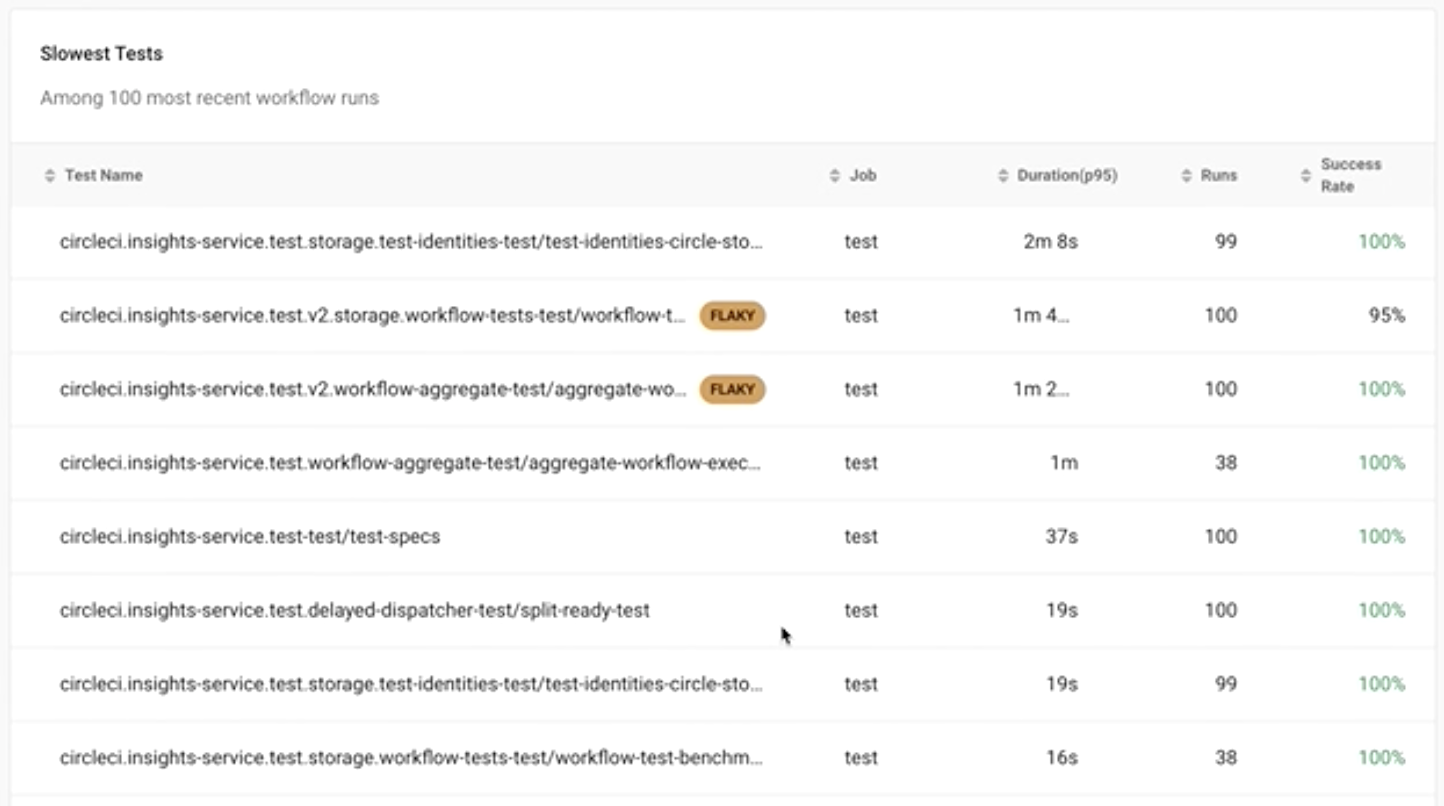
    CircleCI today announced it has added a Test Insights capability to its continuous integration/continuous delivery (CI/CD) platform to make it easier to identify tests that are either taking too long to run or simply exhibiting some form of anomalous behavior.

    Dawit Gebregziabher, product manager for data insights at CircleCI, said Test Insights is designed to make it simpler for IT organizations to shift more responsibility for testing further left toward DevOps teams that identify issues as applications are being built on the CircleCI platform.

    Each organization will still need to determine what tools to employ to create a test, but once it starts running, the Test Insights module will be able to surface the tests that, for one reason or another, are problematic to execute, he added.

    Test Insights, for example, will flag flaky tests and identify the longest-running and most failed tests. It will also enable DevOps teams to identify performance changes over time to pinpoint changes in application behavior.

    Finally, DevOps teams can track benchmarks at the organization, workflow and job level, as well as metrics for mean-time-to-recovery, throughput and durations for 24-hour, 7-day and 30-day windows of time.

    The challenge DevOps teams often encounter is a test may be run even when it’s apparent the application will fail. Test Insights makes it feasible for DevOps teams to manage the testing process much more efficiently, said Gebregziabher.

    It’s not quite clear how far testing is shifting left. There’s no doubt more developers are testing their code before it is loaded into a production environment to hopefully avoid issues that will only become more expensive to fix later. Other organizations have dedicated software engineers to create testing processes that are tightly integrated with CI/CD pipelines, noted Gebregziabher.

    However, many large enterprise organizations continue to also hire and retain dedicated application testing teams that are trained to identify issues that might either adversely affect the end-user experience or run afoul of compliance requirements.

    Regardless of who does what kind of testing, however, it’s clear there’s a lot more focus on addressing issues earlier when they are much less expensive to fix. The goal should be to make it easier to optimize when tests should run based on probabilities that ultimately reduce the time wasted running tests that either will fail or are, for one reason or another, flawed.

    Developers, of course, are all equally committed to running tests, so organizations will need to determine for themselves how far to shift that process left. However, at the very least, DevOps teams should be able to identify patterns that might indicate there is a need for additional developer training. After all, it’s unlikely a developer is going to understand there’s an issue until some meaningful metrics are shared.

    In the meantime, the more testing that occurs at a faster rate the more likely it becomes that an organization can provide a superior application experience the first time—and every time—an application is built and deployed.

  • Managing Technical Debt is a Balancing Act

    Managing Technical Debt is a Balancing Act

    Technical debt is a nightmare for product managers. It can slow down teams and inhibit response time for delivering quality products to market. Yet, there are times when technical debt can be beneficial; but turning it from a headache to a positive is a balancing act. 

    Nimble project managers and developers should strive to develop an equilibrium that balances creating, reducing and accepting technical debt. The good news is: That’s attainable.

    The Shape of Technical Debt

    It’s essential for PMs to understand how technical debt can arise so they can identify its characteristics and manage the amount to carry or avoid to the team’s advantage.

    Laying too much brick and mortar will take software features too long to develop. It risks their rollout arriving well past due dates. But fixating on speed threatens to underdeliver on functionality. Circumstances like these will diminish the ability to deliver powerful results over time.

    Similarly, ignoring the power of third-party solutions to slot in and satisfy customer needs and speed-to-market is outdated thinking. For example, software like embedded analytics can arrive off-the-shelf to complete an architecture task quickly and affordably while freeing up the team to address other challenges. Remaining agile with all options available to the team is critical.

    Overall, the project manager’s goal should be to identify the indicators of technical debt and hone their skills to address each type.

    Building Architecture

    When a team is tasked with delivering new features or functionality, building upon the existing structure to support the new capability is not unusual. Lack of foresight or diligent planning about what’s necessary to enable this function can be a critical oversight that leads to a void in need resolution, i.e., incurring debt requiring payment.

    Speed versus Quality

    Delivering at the speed of modern business often means facing time constraints that can impact the quality of work. Faced with such limitations, teams may take shortcuts. Ultimately, those shortcuts can lead to an increase in technical debt.

    Quantity versus Speed

    On the opposite end of the spectrum, eagerly attacking a project that requires significant lead time can result in overbuilding. This leads to a different form of technical debt. Longer projects can be affected by technological change—an evolution that makes some previously completed structures outdated. Debt takes the form of teams forced to return upstream to make necessary changes when they should instead remain downstream.

    Near-Sightedness

    Unlike the oversight or overbuilding described above, if the team fails to consider future needs and focuses only on current tasks alone, it risks creating debt that arises by starting from scratch. If teams don’t anticipate the next feature or prepare for future functionality while in development, they will likely pay for this near-sightedness down the road.  

    To Build or Buy

    Developers want to build. It’s what they do. But it’s not always in the organization’s best interests. When a team faces complicated requirements, is extended beyond its capabilities or is simply well outside its repertoire, debt can be avoided by looking toward existing platforms that fulfill its needs. In such instances, a third-party solution saves significant time and money. For example, an embedded analytics tool built with the latest technologies and deployed turnkey frees the development team to remain focused on its expertise and apply its talents there. Think: Does the team need to invent a new wheel, or does one already exist? While choosing the former risks taking on debt, selecting the latter holds the promise of reducing it.

    Manageable Debt

    Still, technical debt can be a benefit. 

    Consider this example: You want to roll out a platform that delivers to the customer and market, but it’s a ground-breaking product. You don’t yet know everything you want or need to know about how end users will engage with it and what they’ll ask it to do. In situations like these, it’s reasonable to get the functional framework of the software into the hands of the market so that you can absorb reams of feedback, return to the platform and then build out or fine-tune its features and functionality. Actions like these are wise. PMs haven’t mortgaged the farm for a bag of magic beans—they’ve taken on a reasonable amount of debt to fertilize team knowledge into a product that will ultimately deliver the most value.

    Recognizing technical debt and its approach, avoiding or accepting it accordingly and then managing it with deliberate efforts to pay it down within acceptable limits is where PMs want to be. If you invest in paying it down or seek and accept third-party solutions to avoid it altogether, you’ll maintain team focus and velocity on the projects they excel in. 

  • Defining Availability, Maintainability and Reliability in SRE

    Defining Availability, Maintainability and Reliability in SRE

    In the world of reliability engineering, you’ll frequently encounter the three “-ability” words: Availability, maintainability and reliability. They sound similar and have similar meanings. In fact, these words may seem so similar that it can be tempting to use them interchangeably.

    That would be a mistake. Availability, maintainability and reliability all have distinct—if related—meanings, and they each play different roles in reliability operations.

    Definitions of Availability, Maintainability and Reliability

    Let’s start by succinctly defining each of the terms.

    Availability, Defined

    Availability is the extent to which an IT resource is ready to perform a task when requested.

    Thus, an application or server that is responding to requests is available (even if it takes longer to respond than desired or otherwise operates suboptimally, in which case it may have a reliability issue but not an availability issue).

    Availability is usually measured as a percentage. A resource that has 99% availability, for example, is one that is up and responding 99% of the time.

    Maintainability, Defined

    Maintainability is a measure of how quickly and easily a resource can be fixed when something goes wrong.

    If a buggy application release can be quickly fixed by rolling back to a stable version, the application would have a high degree of maintainability. On the other hand, if you have a server that needs to be rebuilt manually after it fails, it’s not very maintainable.

    Reliability, Defined

    Reliability is the extent to which a resource functions as required upon request (as opposed to simply being available).

    For example, if your users require an application to process each transaction within one second, and it does this 99%of the time while also maintaining a 99% availability level, that would be a relatively reliable application. In contrast, an application that responds to almost all requests but that suffers from high latency or error rates would not be very reliable, although it might be highly available.

    Differences Between Availability, Maintainability and Reliability

    The simplest way to spell out the differences between availability, maintainability and reliability is to highlight what’s unique about each concept.

    Availability

    Unlike maintainability and reliability, availability is an essentially binary metric, in the sense that a system is either available or it’s not. Although availability status can change over time, there is no such thing as varying degrees of availability.

    Availability also stands out because it is often the most important metric in defining SLAs and SLOs. Contracts typically specify that resources will achieve a certain level of availability, defined in percentage terms. They may sometimes also specify metrics like response times, which are a reflection of reliability, but availability is more likely to be the most important metric within service agreements.

    Maintainability

    Maintainability is unique in that it’s a pretty subjective concept. A system that one SRE considers easy to maintain could seem difficult to maintain to another SRE. The methodologies that engineers leverage to optimize maintainability could vary, too; for instance, someone from a DevOps background may be more likely to focus on optimizing maintainability within the software delivery chain than someone trained in classic site reliability engineering, which focuses on automating IT operations through code more than on the software delivery process.

    That said, automation tools help virtually every team maximize maintainability, no matter their preferences or background.

    Reliability

    Reliability stands out because it reflects how well a system performs. Here again, this is a somewhat subjective metric, because performance requirements may vary from one user to another. Nonetheless, reliability is the most effective means of measuring whether a system meets the performance levels it needs to, even if those requirements change over time.

    Why do availability, maintainability and reliability matter?

    Because availability, maintainability and reliability each measure different aspects of a system’s status, putting them together is a useful means of gaining insight into the overall reliability of a system.

    In order to be reliable, a system requires both availability and maintainability. A system can’t be reliable if it’s not available. It’s also unlikely to be highly reliable if it takes a long time to fix issues due to low maintainability.

    At the same time, by focusing on availability, maintainability and reliability individually, you can drill down into specific issues within the IT resources you manage. For instance, you might have systems that are high-performing when they’re available, but that have low reliability rates because of availability issues. In that case, you’ll know that an investment in increased availability is likely to yield the greatest reward for increasing overall reliability.

    The Bottom Line

    The bottom line: While availability, maintainability and reliability are all reflections of the quality of an IT resource, they measure quality in different ways. Tracking each category separately is important for ensuring that you know where your weakest links exist within overall system performance and health.

    At the same time, however, it’s important to compare and correlate availability, maintainability and reliability data so that you can achieve continuous insight into a resource’s status. When you can track each item separately but also combine them together to gain a complete picture of your system, you are in the best position to optimize reliability operations.