Author: Don Macvittie

  • APIs: Automation is Great. So is Usability

    APIs: Automation is Great. So is Usability

    Many developers are not so great at documentation. Ask anyone who’s been thrown into a large code base. Changes aren’t documented well, tribal knowledge thrives in the code comments, and anyone who says, “I’m confused, what does this chunk of spaghetti code mean?” is often treated with annoyance or even disdain.

    That is something that DevOps doesn’t change. And there are, as with so many things in IT right now, complicating factors. First is APIs. In almost every shop, developers are responsible for the public-facing APIs. The same developers who don’t comment well are now documenting public-facing APIs. The other complicating factor is DevOps documentation mechanisms. Automated systems generate API documentation from developer comments. Again, the same developers that often don’t document their code well enough to efficiently on-board new developers.

    Those of us who have used more than a couple of APIs know the problem intimately. Dozens, or hundreds, or thousands of us have to search for what the allowable values for a parameter or JSON field are in an API call are because far too often that is not well-documented.

    The whole system grew naturally. APIs are the realm of developers; documentation was painful to get created because it required tech writers that were advanced enough to understand the purpose and function of the API; and development of documentation delayed API deployment—all are issues that lent themselves to automated generation and the developer in the code was best-situated to document it. In the API economy, and in light of both agile and DevOps, it just made sense to use generated documentation for this part of the project.

    But we’ve got enough experience now to know that “good enough” isn’t. Far too often users are left to figure out the details, and quite often, those users don’t bother. That’s not a benefit in the API economy; it’s a risk.

    Get Help With Your APIs

    And it’s pretty easily resolvable. Get someone not knee deep in the code to try and use your API as documented. Get their recommendations on usability, and fix the issues they find. I’ve used APIs that have a dozen JSON base parameters, none of which are documented as to what’s allowed or not. I’ve used APIs where the JSON field was text, but the values were from a specialized list that was not made public and users had to hunt for allowed values. We’ve all been through it, and it is a massive waste of time.

    If you have a customer base, use Alpha/Beta users to help with this process. Early access is generally people who know the project/product, so feedback will be more focused, but as outsiders they do not share in tribal knowledge. Without tribal knowledge, they will have solid input to improve API usability.

    And in the end, an API is a consumable that you want customers to use. Telling them how to do so is important. And the current trendy way of doing so is not good enough. So make certain your process is good enough, or accept user loss as a consequence.

    For those with established products/projects, do not wag your head and assume you have it covered. Some very cool, long-lived APIs have entire sets of JSON input values that are not well-documented. They were important enough to make them parameters (or return values for that matter), yet you didn’t document them well? Please, ask new users if they agree with your assessment of your API.

    Don’t have time/man hours/whatever to address documentation shortcomings in your API? Then don’t publish an API. The only thing worse than saying, “You can’t integrate via API with our system,” is saying, “You can integrate with our system via API,” then not documenting it well enough to do so.

    So keep the automation. But follow the new mantra:

    Now that you have generated documentation, check that you have usable documentation.

    And keep kicking it. APIs are the hard part, telling people how to use them is comparatively easy, so take the time to make your development efforts worthwhile.

    — Don Macvittie

  • Clean Up Those Ever-Fail Tests

    Clean Up Those Ever-Fail Tests

    One of the points of DevOps is to streamline development and focus on what is important. Things that don’t raise to a high enough level of importance end up in the category of backlog, and their tests are normally disabled or marked as “ignore results” in CI/CD tools.

    With CI/CD, this is a good step in moving forward, because you have a list of the things that you haven’t gotten to yet, even if that list is not currently part of validation. The problem is that it can create the very kind of cruft that we adopted CI/CD to get rid of. Many organizations keep these tests in the queue for an indefinite amount of time on the assumption that they will come in handy when priority allows for time to address the issues at hand.

    It Isn’t Simple

    The problem is, of course, that some of those tests will never—and I do mean never—be resolved. Those are cruft, sitting in the way of productivity and cluttering up the build system. It can be a corporate decision that a given bug fix/feature request will never be implemented, but more often than not it is simply that the priority will never be addressed because there are always new features, more important bugs, etc.

    Purists will already have started sweating while reading this, because the goal is supposed to be to address every single test in the system, resolve every single bug in the system, and implement every change request that made it far enough to have tests written for it. But we don’t live in a purist world. We never have. I’ve argued with purists of every possible stripe in my time in high-tech, because reality isn’t pure. It’s interruptive and ugly and prioritized.

    So we have backlogs. And we have items in the backlog that won’t ever be addressed.

    Why Old Tests Matter

    Image of binThe real problem with tests that are backlogged for more than a few sprints is, of course, the changing code base. As an abstract example, you have a dialog that asks the user for some input. The tests assume the input values that are designed in at the time the test was written. Six months later, a higher-priority test comes through that changes what fields are available on the dialog, and what data is collected. The original test is marked as ignored, so when it fails that doesn’t impact things. But now the test is invalid. And still in your system. Multiply these two requests by hundreds or even thousands, and you have the same type of flotsam that DevOps was designed to resolve, except now it is part and parcel of the CI/CD system.

    Clean Up, Acknowledge and Move On

    So what is a productive team to do? Have a frank discussion about your backlog and what will/won’t ever be implemented. Business leaders can agree that some items just never will raise to the correct level of priority, and you can identify tests that have aged out of usefulness while sitting in the backlog.

    Set up a process to review them occasionally, to run parallel to the process that updates tests when assumptions change—just not as frequently.

    Then document the tests that won’t ever succeed, and delete them. They don’t belong in version control, even as documentation, because eventually and inevitably, they will be inaccurate representations of the system. And that can create confusion.

    Of Course It’s DevOps

    This is an extension of all that DevOps did to begin with: eliminate wasteful activity and non-productive items on the list of to-dos. You prioritized once and cut with a knife, this is the same process, operationalized for CI/CD. And it’s necessary.

    A slight change, another set of choices that are no harder than the others you’ve faced, and the code base (in particular the test base) is cleaner.

    Leaving you more time to keep rocking it.

    — Don Macvittie

  • Testing What’s Important: Keep Growing Your Test Base

    Testing What’s Important: Keep Growing Your Test Base

    This project has gone on soooo long…

    In most human endeavors that take a stretch of time to complete, the idea is latched onto and people become excited about being involved. It doesn’t matter if it is building a skyscraper, inventorying a massive warehouse or even going to war. People are intrigued by the possibilities and want to get started doing the thing. After a time, though, this enthusiasm wanes, and most often is replaced by a weary determination to get the thing done. The nature of the endeavor doesn’t have to change; the reality of its implementation just becomes the dominant factor.

    IT projects in general—and continuous integration (CI) projects in particular—are no different. Whether a new project or implementing comprehensive CI on an existing project, the beginning is the most exciting part. Soon the excitement wanes and achieving the desired level of test coverage and a consistent build success rate becomes the goal that is trudged toward. It is a rare team that reaches for 100 percent code coverage with testing on initial implementation. The key becomes “testing what’s important.” And that varies by team and project.

    But testing at all levels—unit, integration, smoke, system, regression—could be better on almost every project. That improvement can be done incrementally while running through sprints. While some of the testing is managed by QA, some is managed by the developers—and in a CI/CD environment, arguably more is managed by developers. They are more involved in the testing process in CI/CD, so are more likely to be more involved in test development/management.

    The point is, good enough coverage is just that. And there is a hidden cost in getting too carried away with testing every line of code for every possible input, but improving tests is more than simply cranking out more permutations. Improving existing tests, or writing tests for functionality currently poorly tested, is increasing testing.

    So, as you strive to make your code get better, strive to make your testing get better, too. Testing after the baseline is established is one of the first things to get minimum attention, even in automated test environments. But improving it reduces the risk of releases, and that’s a benefit to the team and to the company. So it’s worth staying up on.

    Unless you have my friend, who we will only call Pete, on your staff. Then, no matter the quality of your testing, no matter the number of tools and layers of testing, he’ll find a way to break your product within 5 minutes. That made him a good tester, made him a better developer and, now, a better architect. But most of us don’t have Pete, so work on those tests.

    — Don Macvittie

  • Moving That Big Project to CI/CD

    Moving That Big Project to CI/CD

    Any organization that has been around for more than a few years (and many who haven’t) have a massive system that would cost a fortune to replace. Most midsized enterprises have several of them. Those systems are one of the reasons that enterprises don’t adopt CI/CD at the same rate as startups. Sure, any new project or small things go there, but the elephant in the room just hangs out.

    So what happens when you get called upon to move one of these systems into CI/CD?

    Lets’ start with the easy case: the rewrite. In that case, you’re almost greenfield from the start and can build CI/CD into your development and test processes as you would for any brand new project.

    The harder case is when the org has seen the benefits of CI/CD and decides it wants to apply them to the monster that slows every project it touches to a crawl. These big systems are generally mission-critical, so there’s an added layer there. But this is doable.

    Yes, It’s Daunting, But…

    First, get a copy of the app building in a separate environment. Containers are good for this, since it’s just a development environment anyway. Replicate the entirety of the system (except unscrubbed real data, whether you use that in testing or not is a per-org question) to this new environment, make sure it builds and passes the existing test environment.

    Next, configure Dev/CI/CD tools (for a project of the size we’re talking, I recommend configuring application release automation [ARA] also to help track dependencies), and get the system building and testing under them. This will take time—time to configure the CI/CD tools, time to get the build environment to work reliably under them and time to figure out how to integrate existing test structures into the CI tool. That’s okay, the point is investing now to save later. Note that this is also the time to upgrade your dev tools. If you’re on J2EE 5, for example, it is time to upgrade. It’s been a decade, and you’re working on a copy of the project.

    Once that reliably builds and passes tests, the next step is to move those pieces into a more CI/CD-friendly format. Traditional test scripts can be called out in CI, but consciously building the tests within the CI environment is more resilient. A close look at tests, what’s missing, what could be better, what needs to stay as it is and just report back are the biggest parts of this test.

    Note that change requests will have to be copied to the new environment’s change request system, too. Some projects are lucky enough to lock out changes to the source application while the new one is brought up to speed, but for most, changes made in the original will need to be replicated. Once you start modifying code, they can no longer be just pulled from the source tree.

    Then start fragmenting the app. Apps of that size inevitably have massive functions/methods that do a lot of things. Not a terrible plan in single-processing days, but if you’re moving to CI/CD and upgrading dev tools, you may as well optimize code, too. Breaking a 5,000-line subroutine into a master and four child subroutines, each of 1,000 lines (yeah, it’s never that easy, but you get the idea) might offer room for parallelization, and definitely reduces your change footprint when you have to go in there and modify code.

    Fear Pundits Bearing Advice

    It is relatively common in DevOps for someone to offer the advice, “Get the newest of X every time.” Don’t follow that advice. Pick a version and hardcode it. It is anathema to hardcode versions of tools/OS/libraries in DevOps, but the point of DevOps is to control change, and anyone offering that advice missed the havoc that their advice would have created with the release of Python 3 or RHOS/CentOS 7.0, both cases where backward compatibility was left in favor of progress. Plan updates; don’t come in to, “The entire build failed last night,” and have to fix it then.

    By this point, you’ll have a better understanding of the app, and will know (or at least suspect) where monitoring points will be best placed. Add them in to do active monitoring instead of logging. Your first set of points won’t be perfect, and you’ll want to review them to see what improvements you can make, but the weak points of the system should be monitored at a minimum, and alerting or corrective action automatically take place.

    Test, Test and More Test

    As soon as things are stable in the new CI/CD environment, bring in beta testers from the user community to help you find issues where it doesn’t behave like the original. The point here is to copy the original first, most likely to enable faster changes in the future, so just ask users to do what they would normally do when interacting with the app, and see what happens. Anywhere there are issues is a good place to add testing (I don’t know any monolithic app that has 100 percent code coverage, and honestly have only heard rumors of new apps that do, so there’s always room for more testing at known weak points).

    Before you know it, the system will be moved into CI/CD, and you’ll have a list of things you want to improve under the new environment. At that point, you’re covered, and can move the process to replace your old build process.

    Voilá!

    It is work to move a large app into CI/CD, and more work to keep from letting it get out of hand. In the new environment, it is easy to want to change everything at once. But don’t make that part of the move; build change requests for after the move to CI/CD is done, to keep project lines clean and evaluate those desired improvements in the light of all the other change requests building up.

    — Don Macvittie

  • Stop Talking About the Number of Times You’ll Deploy

    Stop Talking About the Number of Times You’ll Deploy

    40s Chrysler
    Chrysler Windsor – By Lars-Göran Lindgren Sweden – Own work, CC BY-SA 3.0 https://commons.wikimedia.org/w/index.php?curid=1385155

    It’s the late 1940s and the automobile industry is just taking off. You run one of the product marketing teams at Chrysler. Wanting to make the best of an exploding market, your marketing team says, “You’ll drive 1,200 times as much with the new Chrysler Windsor!”

    Of course, that advertising never makes it to the public, because it says nothing. So you’ll drive more, so what? It tells the customer nothing about the benefits of driving more. And some customers may make a connection between driving more and “because you want to,” but likely most won’t without context. So into the trash bin the entire ad campaign goes.

    Yet, that is what happens in CI/CD every day. Every time you read a blog, pick up a book, listen to a speaker, it’s all about how many bazillion times more you’ll deploy with CI/CD in place. And I ask the same question: So you’ll deploy more. So what?

    Most of those making these statements never get around to talking about how that can help with stability and user acceptance, a few get around to it roughly halfway through whatever they’re presenting, when the whole “You’ll deploy 70 billion times more!” statement is long gone. Very few drive the connected point home and make these statements show value.

    Particularly if your target audience is people without a strong knowledge of the topic, talk about the benefits, not the act. I can create a script that builds my source tree just as many times as I like a day, but that adds value for no one, absent any other change.

    While I’m going on about terminology, the whole “Delivery is not Deployment” topic needs to be made explicit in each and every talk/article/book. Marketing people have actually gotten better on this topic, but influencers have not. It’s time to step up the game, clarify, speak in meaningful terms.

    In Short, Pique Their Interest

    In the end, if you’re talking to people about CI/CD, you are doing so because you like to educate. So seek clarity. Many an enterprise IT person interested in what CI/CD tools and DevOps in general can offer their organization will be turned off by “You’ll deploy all the freaking time!” with no statement of benefit to them. And they’ll hear deploy and assume “to production.” Don’t do that. Education happens in clear and understandable terms; use them. Help those interested parties understand benefits; don’t confuse and disconcert them.

    Oh, sorry, I’ve accidentally found someone’s soapbox. I’ll return it now.

    — Don Macvittie

  • One Team’s Microservices Journey and CD Growth

    One Team’s Microservices Journey and CD Growth

    Dev Manager Vadim Madison published a chronicle of his team’s move from a monolithic application to a microservices model. In the process, the tools and methodologies they used for continuous integration/continuous delivery (CI/CD) had to be expanded and even changed out in several stages. It’s a long read, but with the time, as there are not a lot of people documenting the case of full-on conversion.

    One of the more interesting pieces of his work is the software infrastructure they have to build up to cover CI/CD/monitoring of the application. This is a lot more complex than the original application was, and it all must be managed. One of the benefits of DevOps is to make management of these tools easier, and he does talk a bit about scripting it out and implementing APIs to take problem instances out of the pool and determine what went wrong so they can go through the Dev/CI/CD cycle again.

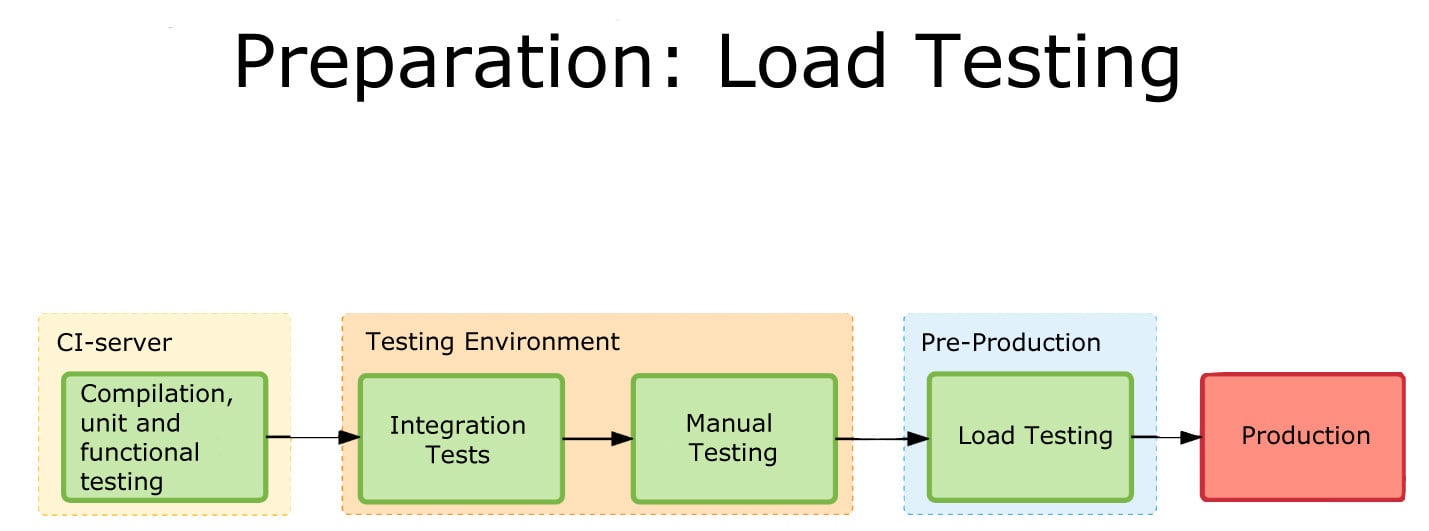
    Load Testing
    One of the graphics showing integration.

    What makes it interesting is where the team found limitations and switched tools midstream. This being a process, Madison at the end alluded to the fact that they have started eliminating TeamCity (or at least limiting what they’re using it for). I think that when most people begin to go high-rate DevOps, or even constant monitored low-rate DevOps, some of the items his team ran into escape their notice until they find an issue. The architectural growth will occur—you are automating more, building more, monitoring more and releasing more. The question is, how far ahead do you look? Until recently, the answer was pretty much, “Not far,” because we didn’t have cases like Madison’s to draw on and see parallels with what we were doing. But that is starting to change.

    CI/CD/ARA vendors can help, of course. Collectively they have a lot of knowledge about the lay of the land, and how people are using the tools to tackle the needs of new architectures. But more public documentation such as Madison’s would be great, too.

    Even though you’re moving at a much faster pace, looking ahead and increasing the steps taken in the CI/CD/ARA space can provide that added bit of resiliency, and monitoring at a level appropriate to your project’s maturity can add that extra bit of “we know, we can recover.” There have been some spectacular failures that were indicated by monitoring, but the volume of data flowing through monitoring was enough to mask it. Today, the best solution is to monitor at the appropriate level and then feed that monitoring back into the system.

    But you’ll be supporting more software infrastructure. The growth of tools is pretty inevitable: As you spread the functionality across machines/instances/containers, you will need to stretch CI/CD/ARA tools to multiple interrelated targets and monitor the overall system and its performance bottlenecks. And for now, the tools chosen will not always be widely known, so a process to bring new Dev/DevOps team members quickly up to speed on the more obscure tools should be on your list of to-dos.

    — Don Macvittie

  • It’s About Communication, not Silos

    It’s About Communication, not Silos

    Too often, when enterprise folks talk with DevOps aficionados, we get a loud chorus of “Culture Change” and “Take down the silos,” and frankly that scares any sane enterprise IT person. Not because they fear change, but because they fear that those of us who are fans of end-to-end DevOps have no clue what we’re talking about.

    Don't throw the baby out with the bath water.
    Baby vs. Bath Water – By Richfife (Own work) [Public domain], via Wikimedia Commons
    And to some extent, that impression is not misguided. There will still be a development team. There still needs to be a selection of operational specialists. Eliminating these are not changes anyone is proposing for enterprise use. Indeed, if an organization has an investment in Cisco UCS, they still need a UCS specialist. The system is complex, and the more knowledge you have of it, the better it can be managed. Sure, automating as much as possible is a worthy goal for all such specializations, but even automated, the UCS person still needs to be able to expand/modify/maintain the automation. Another good example is NetOps (or whatever we’re calling it today): The person with in-depth knowledge of your ADC will still need to have in-depth knowledge of your ADC.

    So, then, what we’re really talking about is increased communication. We’re talking about a small, cross-functional team to smooth the areas that DevOps is very good at, but specialized knowledge is still needed. Increasing communication is key to every DevOps implementation, regardless of tool set; the ability to predict future work based on updates is almost essential in any faster-moving environment. Indeed, Lori and I were discussing this morning, wondering how many of those enterprise Slack channels are being used to provide a running commentary across the team of what is happening upstream. But that’s another blog, I think.

    It is not that DevOps people are clueless, nor is it that they want to eliminate specializations (well, some claim to want to, but they have a marketing reason to do so), but rather, it seems that many of us DevOps folks have gotten so wrapped up in change (it is a big change to streamline both Dev and Ops) that the baby is being thrown out with the linguistic bathwater.

    If you’re talking DevOps, talk about increasing communication, not destroying silos. Secure DevOps is evolving now, and shows the model more clearly because of it—developers and ops are given more of a role in security and auditing, but they are taught and overseen by the security team. This does not eliminate security, but does increase the security of what is being produced.

    While we’re at it, switch from bulk “Culture Change,” too. While there is a fair amount of culture change—moving to proactive and more frequent, with roadblocks minimized or removed and non-essential changes treated as, well, non-essential. But “streamlined dev/operations” might just be a better way to talk about it. After all, the brazen voices still seem to sing of wrecking balls from on high crashing down, and that’s not an effective way to get buy-in for change.

    In the end, the point is more repeatable, more stable, more manageable processes and systems. Let’s talk more about that, and less about Destructor, shall we? Sell the concept; don’t force-feed it. There’s a lot of good to be had, and using terminology that is both confusing (Define “Culture Change” in a generic, applicable sense) and often frightening is not helping people understand (or want to understand) how it can help.

    — Don Macvittie

  • Test Driven Development, Continuous Test and Code Quality

    Test Driven Development, Continuous Test and Code Quality

    We’ve gotten a lot of good out of agile development methodologies. I’m never a “One True Way” kind of person, but agile has a ton of benefits that development needed (and Ops increasingly needs). Extending that to the Dev side of DevOps is painless, since much of agile is wrapped in DevOps clothes these days.

    From my perspective, the most impactful bit to come from Agile was test driven development. By writing the test to fulfill the requirement, then writing the code to pass the test, our small team (I was on a team of developers with no Ops people supporting us—or more accurately, we were the Ops team when I first used TDD) needed the assistance it provided. Without dedicated QA staff, we were able to perform as rigorous a test suite as our changes warranted, simply by running the tests that we’d used for development.

    Of course, this is old news to some of you, TDD has largely been consumed in the larger Agile/DevOps movements and you’re at it daily. But the shift to having developers do more of their own testing is something that I’m still pretty iffy about, to be honest.

    Devs Aren’t Necessarily Testers

    While it can work, devs certainly can understand the weak points in their code, I would argue that the person writing the code is not the correct person to write the tests for it. Particularly as you get into more the integration phase of testing, and the complexity of code inter-relationships heats up. Some developers will do well at it. My experience is, many will not. Why? Because if they don’t know of a weakness in their solution when writing the solution, they won’t know of the weakness when writing the test case. And it is a truly rare shop that has 100 percent code coverage for testing, so those weaknesses could end up being time bombs.

    Simply put, QA needs to work with Devs to write the tests. Two heads are indeed better than one when looking for faults with solution designs. But the reality of development often doesn’t allow for this type of cooperation. When you’re on a sprint and this one bit is slated for half a day, setting aside time to get together can be difficult for a problem the developer has already written the test for and solved in their head. After all, the whole point of Agile and DevOps was to speed delivery, and making the simple more complex isn’t generally part of that equation.

    Have a Plan, and Use it

    I know of a couple of shops where integration testing is pretty much an afterthought. One has a QA team that fights to make certain it is done and done well (though still as an afterthought), rather than cobbled together as a PoC (I was thinking Proof of Concept; take either use of that acronym, both are accurate) not too long before release. The others muddle through, figuring out what doesn’t work in fits and starts (too often in production), rather than following a stream. The result is, unsurprisingly, missed deadlines and ever-extending sprints.

    For all of the good that DevOps in general, and CI/CD in particular have brought us, there are a few areas—one of them being testing—where speed and/or quantity has replaced quality. We run tests a LOT. But are they the right tests? For unit tests in a TDD environment, yes—for lines that have test coverage. Outside of that narrow space, I think the answers are much more iffy, and it depends upon a lot of things.

    The best hedge is to have QA involved in writing the tests for TDD environments, even for small bits. It’s not an overhead if it shortens the overall timeline to delivery; even if it slows a piece here or there, it’s the timeline to finished product that really matters, not the timeline of a given piece of it.

    If you don’t have a QA team—as many shops do not—I recommend devs doing it for each other. That’s not to say that QA is not needed, but it does utilize the “Two heads are better than one” mantra, and keeps the ideas flowing. Otherwise, the Ops members of a DevOps team are great for that. Historically, production woes fell on them, so no doubt they’ve honed their skills in detecting problem areas.

    Don’t Be That Person

    No matter how you go about it, do not go light on the testing. Do TDD, and keep it up. Make every change request start with test modification, and then fix what fails. Document the tests, since they’re code also, and stressing what is being tested and why is as important as the code talking about what it’s doing and why.

    After all, you don’t want to end up with the difference between ‘==’ and ‘>=’ placing you in the headlines for a week, mostly with bad news. That difference is an obvious TDD test case if ever one was written; don’t be that person.

    Continuous testing works, test driven development works. You just have to think about it when implementing them, and stick to a plan that tests beginning to end. It’s about quality code quicker, not about any code quicker. Note that I’ve been focused on the process end of testing, not the smoke/load/regression end. Those are important too, but their issues are different, so I opted to throw them into a separate blog.

    So go forth, iterate quickly, but test thoroughly. I doubt most of us will achieve 100 percent code coverage anytime soon, let alone 100 percent integration nested coverage … But test what’s important, and bring what’s important to test.

    — Don Macvittie

  • It Is Not All Choice and Speed in DevOps

    It Is Not All Choice and Speed in DevOps

    One of the stumbling blocks starting to show in the agile/DevOps world is that speed of delivery and developer choice are asserting themselves as the primary worthy goals.

    I’m a developer. I have that “look what I did” attitude when I tackle a particularly tough problem and I love it when an environment lets me choose a toolset that helps me achieve my goals faster (or lets me play with tools I have been eyeing for a while). I want to solve problems quickly, and have no issue with stand-ups to show my progress.

    Creative Commons Attribution: winnifredxoxo, flicker
    http://www.flickr.com/photos/61056899@N06/

    But we’ve lost sight of the whole longevity issue, and far too many of us have lost sight of the whole “necessary restrictions” thing, too, which is related. The security environment did not change just because your team went to DevOps with Agile, and what must be supported to keep your cool app up and running didn’t change—at least it didn’t change conceptually. And that’s where we start seeing issues.

    Lori and I were talking this morning, and I came to the conclusion that Ops/DevOps teams would be warranted in saying, “Okay, you want that cool gizmo new thing that is totally outside our architecture, YOU support it.”

    Think about it. Between Agile and “Developers are Kingmakers,” we have set different Dev teams using different environments, from languages to databases to deploy targets to even load-balancers. And while there is a lot of talk about “chuck it over the wall” being gone, the truth is that the responsible Devs will be responsible for code in production, but not the infrastructure that we’re allowing them to inflict upon the Ops/DevOps team. And all of this is done with “timely delivery” as a mantra.

    The problem today is different for security. In security, it is seen by many in the DevOps crowd as inherently slowing down the process. And this, in our current fever dream of rapid delivery, is seen as inherently a problem. Time to step back and see where security can benefit from and add to DevOps. That movement is, thankfully, starting, but needs to be more prevalent. My blog about DB monitoring is an example of DevOps benefitting security, and increasingly the SecureOps movement is showing promise in integrating security with DevOps.

    Do yourself a favor. Look around your IT org. Are there apps running that are 20 years old or older? If yes, speed is still important to business agility, but you have to acknowledge that every unique database/load-balancer/whatever that you introduce is potential technical debt. If you’re working on a core system replacement and have decades-old apps running in your world, chances are pretty good that 20 years from now, someone will be figuring out what you were doing.

    Don’t make it harder than it has to be for future-you. Stick as close to standards as your development effort will allow. It’s been a long time since companies successfully enforced database standards, for example, but having a first choice means that support and training can focus on the first choice. And that 20 years from now, some poor new developer will be able to go “Oh, it’s another MariaDB app.” instead of “What the heck is SuperFastDBForMe, and why are these queries written in pig-latin?”

    And don’t make it easier for hackers by demanding that security not slow down the process. Encourage them to move faster, but it’s not all about speed. In fact, both security and ops were never about speed; they were about thoroughness. The environment and the apps that run in it need to be as secure as is reasonable, and the production environment needs to be as stable as possible. DevOps tends to find itself at odds with both of these facts, sublimating them to the desire to be “agile.” Yes, automation helps with stability, and I’m a huge fan of that. It also helps with the knowledge crunch, but it is more of a shifting of tribal knowledge than an elimination. Someone, in the end, has to be able to modify tools to face the new reality, and that person needs much the same knowledge that they need to do it manually.

    The goals and results of DevOps are great, but if you’re working for an enterprise that will have long-lived apps, just make certain you’re not sacrificing more than you’re gaining. Business agility matters, but so do both security and long-term technical debt.

    Balance, as always, is the way forward. Strive for it early, or struggle for it later.

    — Don Macvittie

  • Think of the Future When Building Delivery

    Think of the Future When Building Delivery

    We’re in a strange state of the pendulum swing right now, where speed of delivery is king and all else seems to take a back seat. Many orgs even place quality behind speed in the claim that “we’ll get it right later,” but I’m talking about the more universal rush to deploy and the infrastructures we’re building to do it.

    In short, look around your organization. Do you have apps more than 10 years old? Are you working on the same type of app? Then spin your mind ahead and consider what it will be like for someone in that time.

    Future-Proofing Delivery

    You cannot stop the advance of technology, but you can make the environment adaptable. There are some easy tricks to provide for the future when it comes to your DevOps toolset.

    COBOL Still Needed. Source: Hackerrank.com

    Virtually Perfect

    First, build your continuous integration/continuous deployment/application release automation (CI/CD/ARA) architecture on virtual machines (VMs) or cloud instances. If your standard is containers, then use them—but on top of a VM. The reason is simple: Given the vagaries of business environment and IT priorities, a fully installed VM gives you a buffer—you have everything needed to run the environment in a contained package. Containers alone won’t be good enough, as the underlying OS impacts container operations. As an extreme example, the switch to Red Hat Enterprise Linux (RHEL) 7.0 was massive and broke things. A DevOps environment based solely on containers would break with it, while a VM running RHEL  5 or 6X would keep clipping along, as long as your virtualization environment ran.

    Get Versions In-House

    While the executables for any CI/CD/ARA toolset and development languages will be in-house, there is far more to a modern development environment than just those parts. The libraries/modules your code relies on must be available. Increasingly, we pull them on build, but that becomes a problem when suddenly they are significantly changed or downright missing. There is a market of hosted, verified module vendors out there these days that guarantee availability of a given version of each module they support, and that is an option; however, a better one is to pull them once and put them into your own enterprise repository. Is it another thing to maintain? Yes. But it might save your project from having to emergency patch—and frankly, that kind of insurance is worth it.

    Choose Wisely

    Like any relatively new market, there are a lot of CI/CD/ARA toolsets out there. Do evaluations; don’t just grab the one that a team member likes or is familiar with. Look at the longevity and stability of the project/vendor as much as the tool, because we’re talking about hedging for the future. In the early days (and even occasionally today), open source aficionados would say “We have the source, we’ll do fine,” which is technically true, but most organizations aren’t in the business of maintaining their dev/deploy tools and don’t want to be, so a little research goes a long way.

    Plan as Though You Chose Poorly

    Know what you’ll do if, in spite of evaluations, the project/product you chose goes away. While it’s not CI/CD, I was on a team that selected Mambo right before the big team split that created Joomla and doomed Mambo. Our choice was intelligently made based upon available information, but things still came around to burn us. And it could happen to your choice, too, whether you choose open source or commercial. So have an idea of what you would do in that scenario and document it. If we adopt enough IT tools, it’s guaranteed that some of them will fail over time, so this is not a totally wasted exercise. And should you ever need it, knowing what the plan is before things are falling apart helps keep level heads.

    Quality Over Speed

    Remember that time to delivery is super hugely important, and for decades was not given the credence it deserves. But as I mentioned above, recognize that right now the pendulum has swung so far the other way that many shops have a “just get it out, we’ll make it better later” mentality. Don’t join in where your DevOps environment is concerned. The architecture you are constructing should be for the long run—unless you enjoy rebuilding it regularly and the delays to production code such rebuilding threatens, then ignore this point.

    Security, Security, Security

    DevOps and security has had a rough relationship, but let’s talk about your DevOps environment instead of security’s impact on rapid delivery. Once you’ve thrown all of your build into one easy-to-use tool, the risk from a successful outsider or a risky insider is commensurately larger. Use tools that support role-based access control (RBAC) and make sure application programming interfaces (APIs) are properly locked down. Give security the time it needs to build a list of recommendations for DevOps toolsets that will protect them in almost any eventuality. Because the combined ability to mess with the build process and the deployment process through one automated toolset is powerful and dangerous, make sure you’re monitoring and it’s secure.

    Consider a Modicum of Standardization

    In my entire career, “We are an X shop” has never seemed to work. I’ve been at places that tried to use a single database vendor or a single development language, and inevitably, other forces override these directives. But there is a benefit to keeping the number of languages or database variants down, and that benefit is most felt in the CI/CD space. Keeping track of which DB goes with this project, or keeping that DB up to date—or determining the new release will introduce incompatibilities—all falls on the DevOps environments. Keeping the amount of accumulated future change down is in the organization’s best interests.

    Make Cool Stuff

    Every time I think I’ve maxed out on awe, something new comes along. We are on the cusp of fully automated build/test/deploy with ARA tools calling both CI/CD tools and application provisioning tools. Keep pushing the edge, give vendors your feedback or projects your mods, and making it better. Because there’s a fundamental change here that we want to see through to the end. And I love playing with the toys.

    — Don Macvittie