Author: Don Macvittie

  • Barriers to DevOps Culture Change

    Barriers to DevOps Culture Change

    In the quest for DevOps, there are two paths organizations can take. One is to start with automation and attempt to get as much as possible out of automation tools. The other is to start with culture change and use tools to address what increased communications uncovers. Both scenarios are happening in the wild, and both have strengths and weaknesses, but there are themes across both approaches that are worth calling out.

    DevOps: Culture vs. Tools

    An extension of the above distinction is that some IT shops try to implement all changes with tools. After all, a large part of DevOps is the benefits that tools offer, so why not try to reap those benefits without changing the entire culture? This approach meets with limited success. Of course, things improve, since more automation means less room for human error. But there is a limit to how much improvement can be gained without the culture change that allows Ops to ask, “You are slating this project to use BobsEasyDatabase, but we only use the big three. Any chance we can retarget and save issues down the road?” Early and frequent communications can smooth over issues like this and allow a team to do a full-life cycle risk assessment of contentious choices.

    Do not let an aversion to culture change limit your DevOps initiatives. It can be difficult to change teams around such that management responsibility changes or is even blurred. But by increasing the authority of a cross-functional team to make the decisions needed to get reliable software out quickly, these issues can be mitigated. It will be an adjustment for many, including middle management, but it is a change that allows the full force of DevOps to improve software delivery.

    Silos vs. Culture

    In traditional IT, Development happened largely in a vacuum and Operations received the results. The place of security and infrastructure teams was generally with Operations, though they dealt a bit more with development than, say, the systems management team did. The problem was that Development often did what was best for development, with little visibility into how badly it impacted the other teams in the life cycle. The same was true of Operations, which would sometimes “just say no” to any request outside of normal operations without consideration of overall life cycle. And also for Security, which theoretically has veto power for strange implementations in more organizations. These attitudes have to change if DevOps’ strength is to be realized.

    Do not leave silos in place that reduce communications between teams. If possible, rebuild teams along application or application portfolio lines so that Dev, Ops, Security and Infrastructure are together discussing what is best for the application and the company. But if that is not possible, regular stand-up meetings to discuss contentious issues such as the security of a given library or inclusion of “Yet Another Database Management App” in a project. Barriers segment work in ways that make the lives of some easier at the expense of the overall project. Break them down as much as your organization will allow.

    Driving Home the Changes

    In the long run, the point of DevOps is to improve the product and the delivery reliability of the product. Making changes that forward these goals is paramount to success.

    Do not let inertia stop culture change. The DevOps Institute has a Certified DevOps Leader program that points out (among other things) how middle management can be the stumbling block in many DevOps implementations. We won’t give away too much of its training, but will say that the organization has good tools for dealing with the dilemma of telling middle management they must meet deadlines while the organizational structure is shifting under them.

    There always will be people who believe their role is so unique it does not belong as part of the DevOps process. To make DevOps successful at reducing time to market while simultaneously improving quality and agility, every part of the process must be visited. Quite often, the person whose job is so unique is the bottleneck in the process. If the decision is made to change culture, include everyone, even when it’s uncomfortable.
    — Don Macvittie

  • DevOps Introduces Complexity. Really

    DevOps Introduces Complexity. Really

    The larger the project, the more resources are generally dedicated to it. That is true of the vast majority of fields of human endeavor. Consider building the San Francisco Bridge versus building a crossing over a stream. Or World War II versus the Spanish Civil War. The resources dedicated scale with the size and complexity they need to support.

    This is true of IT projects also. A four-line script does not require the attention that a highly available web app with dynamic data does. It is a pretty simple concept, we all are aware of it, and methodology doesn’t much change it.

    The problem is that we are often terrible about acknowledging this concept when it comes to internal support projects. We don’t see a compiler as a tool in need of regular maintenance and locking down, and largely it isn’t. There definitely are cases where the newest compiler/interpreter should be implemented, but except for massive change such as Python 2.x to 3.x, there isn’t a driving need to have the newest and shiniest.

    It’s Complex—and Growing More So

    What happens when we apply this relaxed attitude to DevOps? A mess. The reason is simple: The automation side of DevOps is generally implemented with tools. Lots of tools. Tools that require maintenance, troubleshooting, interfacing to other tools … It gets complex fast.

    And where on the calendar is time for these things set aside? Almost always the answer to that question is “nowhere.” But these aren’t compilers and interpreters. If your Bugzilla DB goes bad, you have a major problem. Since compilers and interpreters are generally read-only—changes aren’t made to them except to upgrade—it generally requires a disk-level error or serious human failures for them to stop working as planned. That’s not true for things with constantly changing datasets. And many DevOps tools have constantly changing datasets.

    In an increasing number of organizations, the DevOps infrastructure should be listed as the largest application portfolio the organization manages. And that is where you need to be.

    Make DevOps Tools a Project

    It is that simple. Tooling is a massive bit of overhead that seems to be not so big because it streamlines the development/deployment process. In short, the tools save enough time that their cost seems smaller than it is. But that cost will not go away, and once the pipeline is fully automated with a stable toolchain, keeping it running is a cost IT will have to continue to bear. Don’t just treat it like something you can check into when it fails; give it the same treatment that you use it for. Make certain you have backups—if possible, make your DevOps environment totally dynamic—so a failed instance of X can just be replaced by a new copy. You can’t “just spin up” complete and accurate datasets, but the backups fill that void.

    It’s More Than Just DevOps

    Stay on top of tool updates and improvements, just as you would for any mission-critical software. Because once your software factory is dependent upon the DevOps toolchain, it is mission-critical software. Learn how changes will impact the environment you are using the tools in.

    And it’s more than just the tools themselves. The DevOps environment is highly complex with a lot of variables that can have a negative impact. The move from RHEL/CentOS 6.X to 7.X is a good one. Sure, it’s better by objective standards, but there is enough change that it breaks a lot of things. Mostly the change in networking, but libraries and tools also. In fact, I helped someone work through inter-process communications (IPC) issues caused by the upgrade. This is a stumbling block for the DevOps team in a RHEL/CentOS environment, even though the DevOps team may not be the one choosing to upgrade.

    It’s All Good, Though

    So there is a cost. The cost is not small. But the benefits still far outweigh the costs, and I’m not arguing otherwise. What I am arguing is that it needs to be a cost that is accounted and planned for. “When it breaks, we’ll fix it” is too relaxed for the toolchain that will run your software factory. Once it’s right, take the time each week to keep it right. Set up the policies, processes, and time to keep it clipping along smoothly.

    And keep kicking rear. This is just a cost of doing business, much the same as database maintenance. Make sure you’ve got the time set aside, so your other projects can keep moving the org forward, and all is good.

    — Don Macvittie

  • Understanding is Key to Achieving DevOps Culture

    Understanding is Key to Achieving DevOps Culture

    Historically speaking, IT has been composed of silos. This has worked out rather well over the last half century or so, as one team developed systems, another kept them running, another handled security and yet another managed the infrastructure. But it was never nirvana. Working well is not the same as cannot be improved.

    The Growth of DevOps

    Into this static hierarchy of work-performed silos came agile development. Agile addressed shortcomings in traditional development methodologies by breaking problems into smaller pieces and implementing those small pieces quickly. It allowed for a faster check on quality/completeness of those smaller pieces, and tracking the smaller pieces allowed for better prediction of timelines.

    Soon, automated testing was thrown into the mix with agile, so developers could receive faster feedback on their changes and address any issues turned up by automated testing while the chunk of code was fresh in their minds.

    This lead to teams building more and more of the build/test/deploy process into a system that became known as DevOps. As the change from Agile to DevOps occurred, it became more and more important for communications to happen between teams —Development, Ops and Test—not only to get automation into place, but also to keep things flowing smoothly.

    Which brings us to today. Today we have tools to automate just about the entire application life cycle. And while you were reading that sentence, a new tool was released.

    DevOps Culture Definition

    The problem with this plethora of tools is not that they’re useless—some of them are downright astounding in how they help us develop and deploy software faster, and some increase the quality of the code we are shipping while not increasing timelines. The problem is that in the old, siloed world, these tools are never enough—problems that occur often have Douglas Adams’s famous SEP (Somebody Else’s Problem) field wrapped around them.

    This is where DevOps culture comes in. Martin Fowler has a good discussion of culture on his blog, it’s worth a read if you haven’t seen it before. Whether an organization sets out to change its culture or sets out to automate with DevOps tools, a certain amount of culture change is going to happen. That is because lines get blurred relatively quickly if the focus is on turning out high-quality software at velocity.

    DevOps culture is teams working together to achieve the goal of delivery in ways that they would not have a decade ago. Communication is king, and is usually the start of culture change. Operations providing immediate feedback when development makes a dependency assumption might be a starting point, then Development starts including Operations in decisions to build in dependencies.

    Eventually, whether by design or need, teams become reorganized based on the application or application portfolio they are supporting, and the lines between Development and Operations blur into DevOps, where everyone on a team is working closely to achieve the goal of rapid development and deployment of software.

    Culture change can take the form of operational changes, wherein team members start to work more closely together in the absence of major restructuring with the goal of making software manufacturing and deployment better. Culture change also can be formalized, with reorgs of IT to put together teams that will manage an application for the entirety of its life cycle, and Dev/Ops/Security/Infrastructure members are all working together, not as worried about boundaries as in a traditional IT organization. Both are DevOps culture change, though most who specialize in DevOps think the first form is just the early stages, and the second is inevitable in a DevOps shop.

    The long goal of DevOps is to increase the rate of new feature development, reduce the rate of bugs and improve response time to serious issues. Culture change is the vehicle that drives these changes. Automation tools can do some, but increased collaboration means increased response rates to all of the above issues, and that’s where true improvements start to show. More advanced DevOps implementations include business unit owners in the feedback loop, giving them instant access to information about the state of the applications they are responsible for and allowing them to adjust as market conditions change. This is another increase in the mostly communications front that provides customers with more reactive/adaptive solutions.

    — Don Macvittie

  • Configuration Files and DevOps

    Configuration Files and DevOps

    When DevOps appeared on the scene, configuration file management tools already existed. They weren’t used by everyone, but a fair number of organizations saw the power of configuration file versioning/management, and were using them.

    An interesting thing seems to have happened while DevOps evolved. Those tools are more popular, but while we’ve standardized on things like Puppet and Chef for installs, and Jenkins for continuous integration/continuous delivery (CI/CD), configuration file management seems to have gotten less standardized.

    While it is easy to argue (convincingly, IMO) that most people use Git for configuration file versioning, there are a ton of other solutions out there being utilized also. And plenty of places that have no solution in the works.

    There are even a few new vendors cropping up that are basing their existence on the idea that configuration file management should be similar to using the source code git repository, but not the same as using the source code git repository.

    What Are We After?

    That brings us to the question, What is it that we hope to gain from configuration file management? Which should take us back one step further to ask, “Which configuration files?” There is a vast difference between configuration files for a piece of network gear, the configuration files for infrastructure apps such as Docker and the configuration files for your application.

    There is a valid argument that all of the above are relevant and should be stored somewhere, but that argument does not imply they should all be stored in the same manner, nor with the same frequency.

    What does make sense is standardization on a given platform with version control capabilities. The question then becomes, Which platform?

    And That’s Where We Are

    My company uses Git for this storage, right next to application code. But we use regular storage with a naming scheme for switch and router configuration backups because we want them backed up with our other file-based data. Most companies are similarly split.

    The simple answer is, “Throw it all into Git,” and I think that’s where most DevOps teams are. But I don’t think we have the long-term answer in front of us yet. A toolset that can manage and version, and is aware of the idiosyncrasies of popular hardware/software/cloud solution configuration files is likely where we’ll end up. That will offer easier use, ease of management, a centralized store for configurations and some automated check upon the inevitable manual configuration changes.

    Until Then …

    Until then, it is best not to vary too far from the best fit for your organization. We’re content that we know where to get all of our configuration files back from, even if it is split between two platforms. There is one single piece of hardware in our infrastructure that in an emergency would be lost, and that’s because it is massive and only supports backup to attached USB disk.

    For most organizations, Fit is “good enough,” and allows for spawning new copies of servers/apps with the correct configuration during the deploy process, so is probably where you want to be right now.

    For enterprise grade networking gear, the configuration files are complex, and unlikely to be hand-edited these days (though we all know that person who can). So any system that gives you a backup of the configuration file you can re-import is good enough.

    For now.

    — Don Macvittie

  • Continuous Deployment and Monitoring of Microservices

    Continuous Deployment and Monitoring of Microservices

    Continuous deployment and continuous monitoring have grown up in DevOps, and microservices have grown up as a delivery platform. While all are relatively stable concepts at this point, there are still a fair number of practitioners that are struggling with the merging of these concepts to create a holistic environment that allows for deep understanding and easy deployments.

    So I thought we could take a look at what’s out there, how it’s going, and even mention a resource or two for you.

    Continuous Deployment

    While continuous delivery (CD) and continuous integration (CI) are well in hand, continuous deployment has lagged a bit behind. There are reasons—both good and bad—why this is true, but true it is. Continuous deployment is the act of actually deploying the results of the CI/CD cycle. The whole point of continuous deployment is to speed the release of new features to market by releasing them as soon as they pass the CI/CD muster, or soon after, or for some industries, on demand. Continuous delivery is a little different from CI/CD in that the rest of the organization—sales, support, marketing, accounting, etc.—have to be ready for the release, so in the slowest case, the point is that IT is not the hold-up to releasing new features under the continuous deployment model.

    Microservices

    Simply put, microservices are decomposition of an application into smaller parts that can be run independently. There are a lot of different ideas for what “smaller parts” means, with some shops breaking their application down to the functional level similar to serverless functions, so an API named calculateSalesTax would do that and only that, given location and dollar information, while others prefer a more broad definition that includes entire groupings of APIs. In this scenario, one company split all database work into a single microservice that was scalable. Either way, you will have more instances (normally containers, but sometimes VMs or even physical servers) running to build the application than historically would be the case.

    Why Containers

    As mentioned above, normally a microservices architecture is built on containers. The portability of a container definition is one of the major reasons why companies lean this direction. The ability to say, “This container can run on our hardware, on our private cloud, on a public cloud, in a public cloud VPC or on a VM,” is a way to ensure that you can target the system to the environment most suited to the organization’s needs.

    Containers are also far lighter than VMs, meaning faster spin-up times, and an easier time expanding the microservices architecture to meet changing user needs.

    Container Management

    Speaking of containers, container management systems are used to make certain that containers are alive and responding. In advanced cases, they can be made to check that a container is doing what it is supposed to do also. While I am a fan of Apache Mesos, the world seems to have gone for Kubernetes, so we’ll focus on it, without further reference to the others out there.

    On top of making certain the correct number of a given container are running, and taking steps to spin up new ones if one disappears, Kubernetes does things such as manage secrets for containers, perform load balancing between instances in a group (these groups are generally called a service in container management speak), scaling up/down of instances as directed, and provide rolling updates to services so the service is not down while being updated.

    This makes a container management tool an important part of any continuous delivery and continuous monitoring effort.

    Taken together

    That gives us tools including Jenkins for CI and CD, and often for release management, though other tools specialize in the release portion, too. Combine Jenkins with an infrastructure-as-code solution such as Teraform or any of the others we’ve discussed in the past. Add in a tool such as Prometheus for gathering monitoring data, and a tool such as Grafana for visualizing the data, and you’re on the road to continuous delivery and continuous monitoring.

    Of course, it isn’t that simple, I’m overviewing here. While researching this blog, the people at Infostretch shared some information with me, and they too would see this as the 50,000-foot view. But that’s where we start. For a more complete picture, here is a simple diagram of continuous deployment that Infostretch shared with me:

    And as long as we’re discussing the information that Infostretch shared with me, let’s also look at a sample of what the company monitors. You’ll see it isn’t “everything under the sun,” but focused points that give them actionable intelligence. A few application-specific monitoring points from within the application, and this turns into an application performance gold mine.

    Classification Metrics
    Cluster Metrics Overall Cluster Memory Utilization
    Overall Cluster CPU Utilization
    Overall Cluster FS Utilization
    Multi-series graph for individual service CPU Utilization
    Multi-series graph for individual service Memory Utilization
    Multi-series graph for individual service FS Utilization
    Application Metrics


    Service Request rate
    Service Error rate
    Service latency

    There is so much more

    There really simply isn’t enough room in a single blog to cover all that is required and possible in continuous delivery and continuous monitoring. I’ll continue to try continuous blogging to help you out, and the other authors here on devopsy.kinsta.cloud have good things to share on the topics also.

    — Don Macvittie

  • DevOps and Data Portability

    DevOps and Data Portability

    You have a classic car. You’re in the middle of restoring it, and it looks mighty sweet. Paint is polished, wheels are stock, hubcaps (or spokes) are shiny, engine is completely restored to original spec.

    But it has no gas tank.

    A bit of a stark comparison, but that’s where we’re at with application release automation (ARA)—at least in terms of portability. And where we’re likely to stay.

    Hold on, I’m a Fan

    Before the DevOps aficionados get out the torches and pitchforks, let me be completely clear that I’m a huge fan of ARA, and explain again why.

    Tools such as Jenkins allow DevOps teams to automate the entire build/test stack—or, as much of it as their organization requires. That is a huge step forward, for all the reasons we’ve covered in the past, including the one I think is often overlooked or underemphasized. With frequent build/test feedback, the code is still fresh in the developers’ head when they learn of problems. Most of the time, they are fixing before moving on to the next task, which is a huge plus compared to waterfall, where many problems show up long after the developer in question has forgotten what the code is doing because they’re off on other things.

    Likewise, tools such as Puppet, Ansible and Chef (to name a few) allow DevOps and security to set standards via script, and use those scripts to deploy over and over. This has all the benefits we’ve discussed, too—speed of delivery, reduction of human error, repeatability that becomes stability, etc. This gives operations the ability to answer, “Is server X set up to do this new thing?” by looking in deploy scripts and quickly updating things if the answer is no, but X will be required going forward. That’s one of my favorite bits of Application Provisioning.

    Riding the Gap

    For those unfamiliar, ARA simply bridges the gap between DEVops and devOPS. Tying code being released to platforms and configurations it will be released under. It has the ability to rapidly re-target a release to a new environment, and it can do predictable and repeatable releases, offering the benefits of application provisioning for the actual release segment. Most tools do this by tying together your favorite build tools and provisioning tools, and giving Ops a control panel that can manage the process end-to-end.

    The benefits are huge. Particularly for Operations and Security (who have another place to standardize and insert essential monitoring), but also for development because it offers one further step in testing and by doing so reduces the surprises six months down the road, when you’ve forgotten what

    Bubblegum += 10

    Is in your code for.

    So don’t take my intro as offensive. I am a fan. But I’m a realist. There is no panacea.

    It’s About the Data (as Always)

    The two weakest parts of most ARA systems are server provisioning and data issues. Server provisioning is setting up OS/hardware, and many ARA systems tend to assume you magically did elsewhere, but this problem is only an issue in highly physical environments and there are tools to handle the problem; they’re just not integrated well with most ARA systems. Data issues are the bigger problem.

    It’s cool that we can drag and drop a couple boxes, and magically switch our deployment from inside the DC to a cloud provider in the time it takes the ARA to build/deploy. But we all know that’s not how the world works. Now you have an application, complete with database that is correctly configured and security that does AAA solidly … and no data.

    “Just move the data, then!” the choir sings. No, that’s really not how it works in an enterprise. Data itself is an object of security and compliance, and some source databases are so massive that moving them is a nearly impossible chore in and of itself. Amazon tips its hat to this fact with its import/export service.

    This was the reason why I gut reacted to the “No more physical data centers!” crowd back in the midst of the hype with an eye roll. The amount of data stored in data centers is staggering, and often not portable at all. Add to this the fact that such data isn’t going to reduce, and we have a quandary.

    What About Moving Forward?

    Sometimes, it is necessary to accept that the current state is not changeable, but take steps to improve the future state. I don’t see this as a reasonable approach in this case, because the rules of data aren’t changing in a way to change future state in a positive way. We’re generating more data every day, and that data will end up stored somewhere. Be careful where you store it, think long-term strategic. Having ARA doesn’t magically make that data portable, so make sure that where you store it today, while it’s small, is where you’ll want to store it in five years, when it is a massive, largely immobile asset.

    What to do … What to do

    Use ARA to multitarget all of those apps that are portable without terabytes of data, and make sure data generation/collection/analysis apps are on the architecture you will want them on moving forward. ARA offers a ton of other benefits, so data portability isn’t a deal breaker—or even a significant negative, since you probably already knew some datasets weren’t going anywhere—but don’t expect miracles out of it. It can’t make your large datasets portable, so don’t expect it will. And use it to target the platform your organization feels is most appropriate for apps that will generate or collect a lot of data.

    — Don Macvittie

  • Electric Cloud and the Deployment Dashboard

    Electric Cloud and the Deployment Dashboard

    As my regular readers know, I started a series on companies that I found intriguing who were going to Jenkins World both late (a couple weeks before the event started), and ad hoc. That meant that companies I talked to on a regular basis came to mind, simply because I knew what they were up to, and whether or not they were going to Jenkins’ World.

    It turned out to be a popular few blog posts, both with readers and customers, but I was only able to fit three in before it was late enough in the event that publishing more would not achieve the goal of the series: telling you all about interesting bits to check out.

    But as these things go, the more I paid attention, the more interesting stuff I found. So I’m going to do a few “What you might not have seen at Jenkins’ World” posts to kind of get a chance to talk about other ideas that hold interest.

    Today, I’ll focus on a vendor I’ve followed but never actually used. That’s rare for me; generally speaking, if I’m writing about the product, I’ve used it. And no doubt I’ll snag a free license and put it through the paces, or have one of my coworkers do so. But for now, I’m covering them because I find what they’re doing to be of interest.

    The vendor is Electric Cloud. For those unaware, its ElectricFlow tool is in the same application release automation/continuous delivery (ARA/CD) market space that XebiaLabs (which I also wrote about at Jenkins World) XL Deploy is in. But the point of this blog is not to compare; since I have used both of XebiaLabs’ mainstream products and not Electric Cloud’s, a comparison would be unfair. I only mention XebiaLabs to help those just starting to research understand where Electric Cloud fits.

    dashboard
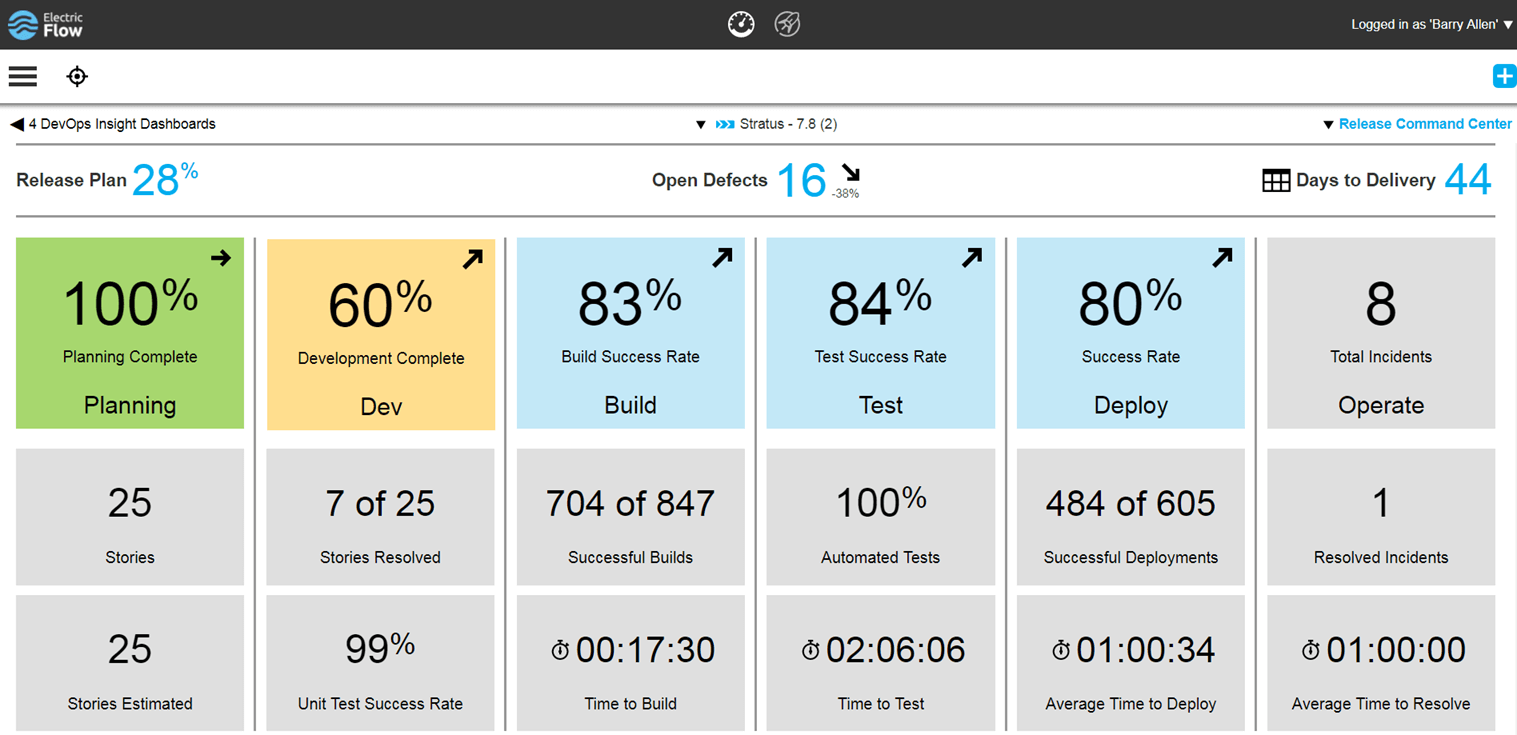
    Electric Cloud’s new dashboard

    Electric Cloud’s big bit at Jenkins’ World that intrigued me was its updates to ElectricFlow to allow better reporting. We all know when a build breaks, we have great systems on the AppDev side to notify the source of the breaks and project management of the issue. But as has traditionally been the case within IT, getting that information out to business leaders who have an interest in the application is spotty, at best. Combine that with the fact that what and how it is reported can vary project to project, and there always is a bit of confusion among the business about status of projects. This confusion translates to asking IT management about status and then, when IT management is wrong and a deadline is either missed or features are dropped from release at the last minute to meet the deadline, bad blood is created between AppDev/IT and the business. Since everyone at an org should be one team pulling toward success of the business, this bad blood is not good for anyone.

    It appears, from its release (I really wish I’d been at Jenkins’ World to poke the corners of this), that Electric Cloud has begun the process of bridging that gap. The growing number and complexity of toolchains means inputs are coming in from several vectors that can give indication of the status of a project. Instead of having IT management (or business management, at some orgs) run around and try to collect these disparate datasets and determine tracking for a project, Electric Cloud has begun the process of automating status collection/aggregation.

    The dashboard pictured above is a critical piece of this solution. Imagine giving business leaders access to a dashboard that doesn’t just cover the current step of a project, but tries to aggregate status from all of the steps in the DevOps life cycle. Basing this information upon release means that, over time, a library will build up that business leaders can reference to gauge this projects’ status against that of other projects, and make their business decisions based upon standardized inputs.

    This data already exists across IT, but this is the first solid attempt I have seen of a vendor tying it all together and presenting it in a manner that IT and the business can discuss with an eye to delivering. The more involved business leaders are in the process, the less friction will result, and this effort seems to be getting them more involved. While there is still much to do—note that unit test success rate is shown in the above screen capture, but unit test coverage isn’t, for example—this is a good solid start to setting up an easy-to-reference dashboard to show the business side what is going on with the project.

    There is also an API that can be used to set inputs to the dashboard that are not yet directly supported. While DevOps teams have plenty to do—and don’t really need to be developing plugins for tools that are supposed to improve quality while reducing workload—the ability to plug in whatever you need is useful for those shops where it is a priority.

    If you’re looking for a toolset that can give more information about what’s happening in your toolchain, it’s worth checking out the changes Electric Cloud has implemented, and I’ll be trying to make time in the next few weeks to give the tool a run and see how it works out. Though I see it as inevitable that the other ARA vendors will continue to increase their offerings also, sometimes it is worth checking into the early bird.

    — Don Macvittie

  • Automic Chart Maps Out Its DevOps Ecosystem

    Automic Chart Maps Out Its DevOps Ecosystem

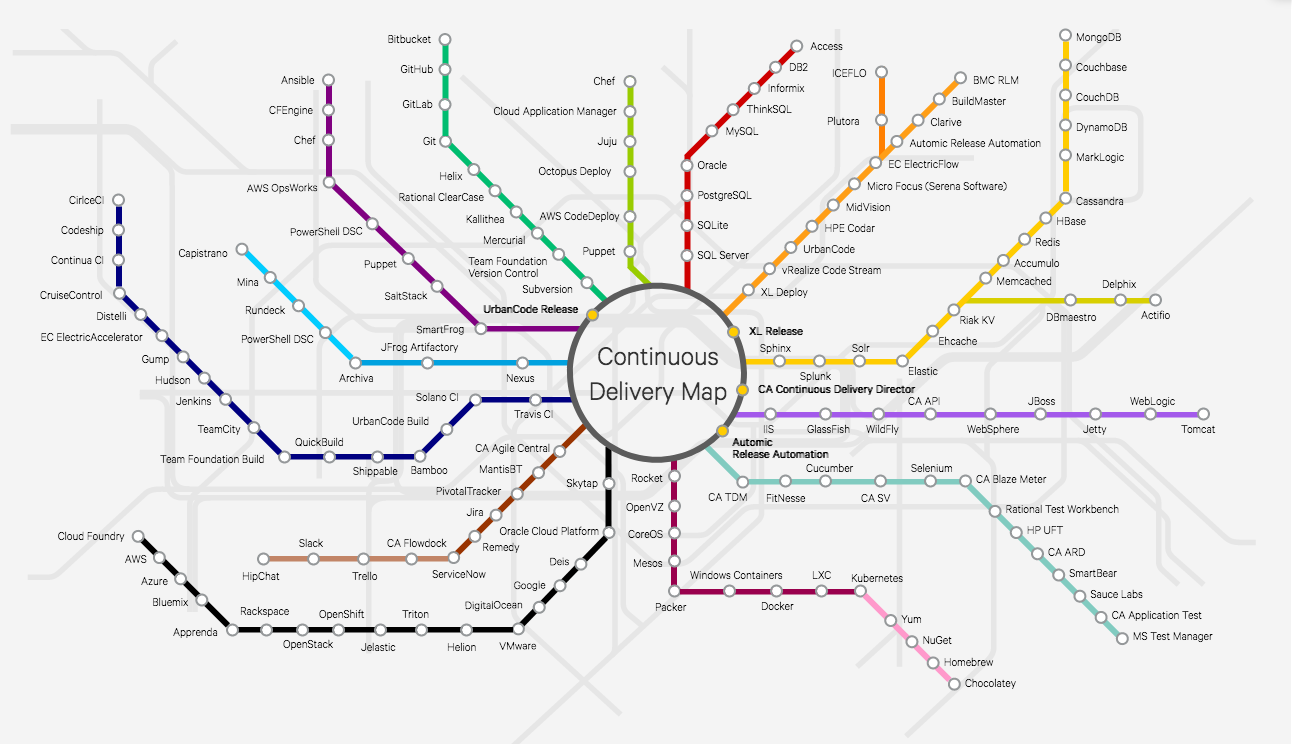
    Everyone who follows me knows that I’m a fan of XebiaLabs’ Periodic Table of DevOps Tools. It was the first attempt I am aware of to arrange things in a way that helped DevOps teams navigate the increasingly bewildering world of DevOps toolsets. In fact, my friend Colin Walker over at ExtraHop and I have been planning to pick some up for our offices for a year or so.

    (Add on note: It sounds like I’ll be getting a copy of the XebiaLabs poster. Woo hoo!)

    Visit the interactive version.

    So this week when I found out about Automic’s chart—let’s call it “The Spider” because of the way it branches out—I thought I’d let you all know that it is also out there. The cool part about The Spider, in my opinion, is the interactivity (which means I still want the XebiaLabs poster for my office). You can click on a node, get information about the tool and be presented with a link to the tools’ website—and, if they’re integrated with Automic, a link to the integration in their marketplace.

    For quick research, this is a nice chart. I wouldn’t want to have to maintain it, at the rate the market is changing, but it’s a useful starting point for “I need a tool that does X” and exploring short one or two paragraph descriptions of each of the options. It’s not complete, but it would be a full-time job to make such a chart complete and keep it up to date, and it’s pretty far along. You won’t miss any major vendors in a space by starting with The Spider.

    I clicked around and looked at the writeups for several products, and they read well. Considering that Automic is a vendor (they’re owned by CA, so kind of an über-vendor) in the space, it would not have surprised me to find they were limited or slanted in their writeups, but they weren’t. So I asked Scott Wilson, product marketing director for release automation, about that, and he told me they actually wanted to couch the details in the framing that each vendor used. Considering that Automic has a plug-in architecture that interfaces to many of these products, I suppose that makes sense. And making sense or not, it’s good for us, because we don’t have to pry apart two layers of vendor-speak to figure out how a product can help.

    If you’re trying to figure out the CD market, or a subset of that market, this is another good tool to have access to, so thought you all would be interested. The plan is to keep it up to date, so hopefully it is useful for a while moving forward.

    — Don Macvittie

  • XebiaLabs Shows Off ARA, More at Jenkins World

    XebiaLabs Shows Off ARA, More at Jenkins World

    In this third spotlight on companies attending Jenkns World, another worth checking out came to mind, so I am taking a look at what XebiaLabs intends to do while there. XebiaLabs is one of the leading application release automation (ARA) vendors, and has a long history of working with Jenkins, so it’s a little more mainstream than the other companies I’ve written about.

    But the thing is that Jenkins’ and XebiaLabs’ tools do work well together, offering an end-to-end build/deploy process that is repeatable and can be repurposed for different targets or different applications.

    While Jenkins handles CI/CD, XebiaLabs ties in the deployment pieces to complete the picture and make a streamlined system. When I experimented with XL Release and XL Deploy, I used them to call Jenkins as part of the release process. Interestingly, you can also call them from within Jenkins, which dovetails well with what another vendor I looked at—CloudCoreo—is doing. The ability to control the process from Jenkins is nice and has uses in the early development phases, but XebiaLabs raises the level of release management—something Jenkins is not doing (yet). The bit that ties CI/CD to automated deployment should be running the show, IMO. But I can imagine environments where kicking off all the build/release cycle from within a Jenkins job would be the preference.

    Anyway, on to what XebiaLabs is doing at Jenkins World!

    Key for XebiaLabs this year will be showcasing its DevOps platform, which is both XL products and talking about how the company is advancing integration between these products and Jenkins. Its recent Templates as Code (the link is to an earlier version, from January, but talks about its goals with Templates as Code, so it’s a good start if this is new to you) implementation that made it easier for developers to work with its products is being enhanced, and I’d love it if someone took a look at it and told me what they think. I can probably get someone at XebiaLabs on the phone to talk about it, but real users often have a better take on suitability in the wild.

    The important bit for many of you will be XebiaLabs’ Periodic Table of DevOps Tools, which I know several people would love to have as a poster in their office. For cool factor, it’s hard to beat. The company will have tubes with the periodic table available, so drop by to snag one. Last year it ran out of them relatively quickly, so be early. Bonus points to anyone who snags an extra and sends it to me for my office (ha ha).

    Aside from the Periodic Table of DevOps, XebiaLabs also will have copies of “The DevOps Handbook,” which I recommend. For those who haven’t read it, the format is different than “The Phoenix Project,” but it is the next logical step in that progression. Finally, the company will have its own book, “The IT Manager’s Guide to Continuous Delivery,” which I haven’t read, but having read XebiaLabs’ corporate blog for a while now, I predict will have some good ideas in it.

    I admit an interest in how recent changes to XebiaLabs’ DevOps platform improve the experience across the org (or don’t improve it). I haven’t used its tools since the new “pipeline as code” changes were introduced in January, so I honestly have no idea. If you go and stick around for a demo, let me know what you think.

    — Don Macvittie

  • CloudCoreo: Get Your Cloud Security on at Jenkins World

    CloudCoreo: Get Your Cloud Security on at Jenkins World

    I mentioned in a previous blog post that I’d take some more of the people pinging me about Jenkins World 2017 and post about them. One of the companies I’ve picked to highlight is CloudCoreo, makers of AWS security controls and auditing.

    Disclosure: My company, Ingrained Technology, has a business relationship with CloudCoreo outside of our relationship with devopsy.kinsta.cloud. That’s how I know about their attendance. But they’re a cool company for cloud security automation, so I chose to include them in my Jenkins World previews.

    CloudCoreo is based on the premise: What if you could automate and audit security settings in AWS without learning security for each of their services? I’ve used their tools, and I’ll be honest, my personal AWS account had a bunch of security violations. Since I use AWS off and on in spurts, this makes perfect sense, and I was able to clean house a bit based upon the tools’ feedback.

    CloudCoreo’s presence at Jenkins’ World will be to talk about itsr system, but will also concern its new Jenkins’ plugin. While there are tools that allow you to partially automate security generation in AWS, the cool part of the plugin is that it allows your automated system to audit the actual results of a deployment to check against standard security patterns. And those checks include things that are normally outside the build/deploy process, such as user rights and password change frequency.

    One of the directions that cloud is going is putting security configuration directly into templates. But not every template will be designed with the same level of configuration/security. By auditing the results as part of a deploy, weaknesses in templates obtained from external sources easily can be detected early in the development process. This is fully in line with the “shift left” approach currently being used in DevOps, and gives security an edge in automating one more thing. If it is just part of the deployment to kick off this Jenkins plug-in as one of the final steps of deployment, then security can shift from “pawing through tons of config code” to “reviewing results.”

    Right now, security is one of a few items (NetOps being the other) that is on the critical path for DevOps to be both responsive and controlled. Companies such as CloudCoreo are helping make certain that not only does it go out quickly, but it goes out secure.

    I haven’t tried its Jenkins plug-in yet, and don’t currently have any complex AWS projects going on, but the thought intrigues me. Someone should go stop by (the company will be giving a demo of stopping a release for violations at table T1) and see it in action, then report back what you learn. Having used CloudCoreo’s web interface, I expect the results of the Jenkins plugin will be both thorough and definitive, but verification of those suspicions would be nice.

    — Don Macvittie