Author: Don Macvittie

  • Jenkins World, Training and Infostretch

    Jenkins World, Training and Infostretch

    I’ve talked to a fair number of vendors about Jenkins World 2017, and I’ve spent a decent amount of time lately supporting DevOps training initiatives at a variety of vendors.

    The thing is, the DevOps world is changing fast enough and there are enough options out there that training is not something you need only before moving to DevOps. During one recent project, I ended up learning about a particular topic as I was developing support materials for a training session on that topic. And I’m pretty steeped in the DevOps world.

    So, while I don’t write about every vendor I’ve talked to about Jenkins World, Infostretch‘s new training program is worth talking about. Infostretch is unveiling an array of training solutions to help companies not only get a handle on DevOps needs, but also to grow their DevOps maturity.

    Among the offerings will be a DevOps maturity assessment and new Jenkins training programs. In conjunction with its visit to Jenkins World, Infostretch will be offering a free 90-minute webinar on adopting Jenkins 2.0.

    Demands of the job will keep me from attending Jenkins World, but if you’re there, it might be worth checking out Infostretch’s booth (#415) to see what there is to learn. If you do, feel free to drop me a line—I’m intrigued to learn more about the training and how it fits in with other available offerings. As an added bonus, the company is giving away “Game of Thrones”-themed DevOps Journey Maps marking various stages of DevOps journey and the “happy flow” of DevOps, and including the various tools available in the market for each stage. So you can snag that while stopping by for me to learn about Infostretch’s training.

    The other thing that interested me was a presentation. Sanil Pillai, director of Infostretch Labs, will be presenting a 15-minute demo titled, “Auto-Convert Your Freestyle Jenkins Jobs to Coded Pipeline” on Wednesday, Aug. 30, at 10:45 a.m. at the Sponsor Theater, in the Expo Hall. The variety of scripts that can make up the components of a Jenkins build environment are a problem many of us have struggled with; while better than what we had because they’re part of an automated process, the components are still technical debt with variable maintenance requirements. Someone, please go see the talk/demo and report back. It would be cool if Infostretch has an answer for this problem.

    I Reiterate: Training is Imperative

    It is human nature to make a large change and settle in with the known new world. DevOps is not designed to be that way. It is still growing and changing, so don’t get complacent. Challenge yourself and seek out training, tool enhancements and opportunities to improve. As others have said repeatedly and well, DevOps is a journey, not a destination. Learn, get better, find better ways and tools and keep improving.

    And, keep rocking it. Eliminating IT as a bottleneck is a huge step to improving product development and being more in sync with the business.

    Of course, now that I’ve written out the reasons why Infostretch’s plans for Jenkins World interested me, I am tempted to dig into some of the other offerings. Or to try and figure out how to go to Jenkins world without missing important things at work.

    You may be hearing more of Jenkins World from me before it arrives.

    — Don Macvittie

  • Don’t Underestimate the Work

    Don’t Underestimate the Work

    It is relatively common in human endeavor to attempt to figure out how much work will be involved in a project, and be wrong. The more complex the work being done and the organizational system doing it, the further off estimates can be. This was one of the drivers for both Agile and DevOps: to take smaller steps with less dependencies and complexity.

    The complexity problem is true in the path to application release automation (ARA) as well. ARA merges continuous test/continuous delivery with deployment automation, but both of these toolsets are complex and continuing to evolve. When you think about it, it is somewhat amazing that ARA can handle the breadth of functionality it is covering, while both sides are shifting and growing as well as it does.

    Construction Crane
    Construction Crane, compliments of Pixabay

    When you approach ARA, you should make certain you have a handle on the amount of work that it will take to get the system up and running. It’s not simple, even if you’re already using a full CI/CD environment. But it’s worth the work, so here are some of the things to watch out for.

    Multiple Targets

    First on the hit list is on the deployment side. One of the strengths of ARA is the ability to deploy to any environment. The ARA system has to know about each environment in enough detail to enable deployment on it. It must know how to deploy servers, where to get OS, what needs to be added on to the OS, and how to get the application onto these systems. Increasingly, programmable network elements and security configuration fall into this category also. While tools such as Chef and Terraform can help in this regard, if you’re not already using them, they’ll have to be configured if not already, and then linked into your ARA tool. Understanding the path from here to there is critical to early success with ARA.

    Databases

    This is one of the more vexing problems. While most ARA tools offer the ability to configure databases and database connections, your datasets generally don’t hop around so easily. So if you’re testing and deploying on separate networks, you’ll need to make sure that the relevant tables are on those networks. This struggle impacts moves to the cloud, changes from a fully test network to production or any other change that requires the database server be accessible when it hasn’t been in the past. The work to solve these problems is pretty wide. In some cases, such as purely internal or purely cloud, merely routing from the relevant app instances to the database server will do it; but, in the case of across-the-internet changes, it will take a lot more work. Make certain you understand what challenges you will face before moving.

    Tooling Sets

    Much of the external needs of an application are baked into the app build process through tools such as NPM or Git. But those tools don’t cover everything necessary for the entire app ecosystem. Agents, per-tool databases, small tools used occasionally—make certain you have a list of what makes the app work, and make certain they’re configured to be built in by the ARA tool. This sounds obvious, but watching a team learn by trying to deploy and fix broken parts only to do it again is not only painful, it also leaves a “Did we get everything?” impression. I saw one app break on deploy because the team didn’t include curl. Yes, curl in the deployment. Test had it in the environment, production did not.

    Get an inventory of both application development dependencies (libraries, etc.) and deployment dependencies (databases, reporting tools, agents for monitoring, etc.), and save yourself some pain.

    Decrease Your Work by Asking Questions

    ARA gives you a repeatable build/deploy process that can be used to target the environments you need while reducing manual scripting and steps. But before you throw in, sit with your vendor’s tech people and ask them to walk you through stumbling points, they likely know far more gotchas than I do, because it’s their job, and unless you got the new guy for an SE, have probably seen more. And getting ARA up and fully functional quickly allows you to focus on other DevOps needs, such as improving automated testing.

    — Don Macvittie

  • NetOps vs. DevOps: New Data is Enlightening

    NetOps vs. DevOps: New Data is Enlightening

    Traditionally, we have seen development—and, by extension, DevOps—as having a less-than-cordial relationship with network operations (NetOps). Since the goals of the two groups are sometimes at cross purposes—DevOps wants access to make everything run automated, and NetOps wants to control a production environment so that it is stable—we’ve naturally talked in those terms.

    I’m a developer who learned other skills, including operations, along the way. I can manage to get things done on F5 Networks or Cisco Systems gear, but I’ve sat with true experts while they worked their magic and have a lot of respect for the NetOps crowd. So this topic has always been of interest to me.

    Now, according to a recent survey conducted by F5 Networks, we can see that the animosity we have all been lead to believe is there really isn’t. There is also a press release here, and surprisingly, it offers more information from the survey than the blog does.

    There is a ton of interesting data about rate of automation, views of other teams and deployments in the survey results, making it well worth a read-through.

    While DevOps and NetOps remain at odds regarding how much pipeline access should be available via self-service and automation, for the most part both groups view the other as on the right track. Eighty-two percent of DevOps and 76 percent of NetOps agree that each other prioritizes “the right things.” Clearly, there is common ground across the digital divide in at least goals and focus, if not always in the organizational chart.

    This, to me, says that DevOps is having the proper impact on the organization. That what’s important is getting prioritized on both sides of the pipeline. Or it says that this was always the case, and DevOps has had little impact. Historical surveys, however, seem to indicate that there was not always this level of belief between the two groups.

    Interestingly enough, there has been a lot written about whether your DevOps methodology should be operations- or development-driven, but networking has always been a bit off to the side. Not the type of operations that historically is discussed in DevOps; it sat with teams such as Security and QA working with DevOps but not generally a part of the DevOps teams.

    The results here would indicate that network automation is occurring at a healthy clip (makes a guy want to look at vendor APIs again, and see what’s changed to enable this fact), and if the majority of DevOps people are saying the NetOps team is focused on what’s important, likely the integration into DevOps is further along than pundits have portrayed.

    Though the results indicate that many DevOps teams want more access and control of network operations than they have, this is likely the natural outgrowth of the different views these teams have always had. Network operations’ goal is rock-solid infrastructure. DevOps’ goal is speedy delivery. These two things can be at odds relatively easily.

    I’m hoping that F5 offers us more access to data than a blog and a press release, but honestly what is in those two is enough to get you pondering about the state of NetDevOps (or whatever we’re calling it this week) versus the perception.

    Disclaimer: I am a former F5 employee, and have a positive view of the company and its products. My wife is also F5’s Principal Technical Evangelist, and had a hand in this survey. While this doesn’t impact writing about survey results, you’ve been informed.

    — Don Macvittie

  • In Determining DevOps issues, Sometimes It’s the Process

    In Determining DevOps issues, Sometimes It’s the Process

    It is pretty much standard DevOps process that when a server instance starts having problems, you simply kill it and start another. This is in line with the idea that servers are cattle and there isn’t a ton of difference between them.

    But it creates a problem that no amount of CI/CD or automated provisioning can overcome. That’s the blindness problem. CI and CD miss some bugs, simply because of the wild variations possible in inputs when humans are involved, or unique issues of hardware or platform that DevOps tries to ignore as much as possible. While our tooling cannot be so over-arching that we have data points on everything, and we can track down problems to the routine that is causing them, a service degrading performance or outright crashing is indicative of one of those blind spots.

    If you’ve been in a highly dynamic DevOps environment, you know this is no simple problem. But it is one we have to resolve, because killing and restarting is simply masking a problem. Indeed, it is this very process that turned Cloudbleed from a simple and understandable programmer error into front page news. They knew their servers would occasionally have memory over-runs, even crashing on occasion; they would just spawn another instance and keep moving along. The ability to create another so easily reduced their desire/need to fix the underlying problem. But the problem was bigger than they knew.

    The problem we face is, of course, how much time and work is invested in monitoring, and how do we know what’s really important. This problem gets worse when you have an instance that stops responding, or starts hogging resources. Getting it offline is imperative, but re-creating the issues that caused it to go off the rails may not be so easy. In fact, often it is not at all easy.

    Long term, we need a way to pick up the exact problem area, create a bug report and get it back into the Dev/CI/CD system that is reliable. Short term, don’t ignore errors in production unless you know exactly what is going wrong.

    Sure, it’s easy to kill and/or restart an instance to “recover” from an error. It’s easy to chuck your app on the public internet without any security, too. Just because it’s easy doesn’t make it a good idea.

    So watch those logs, don’t mask problems and stay on top of it all, even if the complexity sometimes has you reeling a bit. Because application reliability might be impacted—and application availability is, in the end, the whole point.

    — Don Macvittie

  • Manual Intervention or Release Automation? That is the Question

    Manual Intervention or Release Automation? That is the Question

    When it comes to launching nuclear weapons, there are a variety of steps and a variety of fail-safe mechanisms, all designed to ensure that those pushing the button really want to do what the nuclear launch system is designed to do.

    I fear it is some sort of mini-Godwin argument to equate nuclear warfare with releasing code, but bear with me, since we do say, “That nuked the system!” when things go horribly wrong, so I am willing to make the argument.

    There are those in the DevOps community—and more in the ARA community specifically—who want you to automate every step between development and release. While I fully understand the mentality, there are definitely applications for which you don’t want to go live without someone saying, “Yes, this is truly ready,” just as you don’t want to launch nukes without the president (in the United States) saying, “Yes, we really intend to do this.”

    It’s a Tiny Bit

    An associate of mine pointed out the obvious fallacy of “eliminate manual intervention”: both infrastructure as code and the code itself is manual. The biggest bottleneck to release is still actually creating something. So telling people not to insert the occasional sanity check at a critical juncture in the process is kind of … silly.

    Manual Intervention is Warranted at Times

    Take the easy example. Do you want nuclear plants to release new code to their controls without final review and approval? No? Well, if your application is your breadbasket, or even has a significant impact on the business, why would you want code released without a manual approval step? You shouldn’t. The belief in DevOps circles that anything is recoverable, and speed is everything has a built-in self-destruct. Pendulums swing on the type of chaos that can be created if you release and your customers lose the ability to use your app.

    Just prioritize the approval process, and make the process push-button—a “Yes, we are ready to do this,” that authorized individuals can push and finish the deploy. We’re talking about minutes in the most well-run environments, and days (pessimistic estimate, weeks) in more complex, less-thorough environments. It’s not a huge investment, and it’s a step outside of CI/CD that really only impacts release automation. Most enterprise grade companies aren’t deploying a zillion times a day, so it won’t have to be a bottleneck.

    In short, relaxing what we tolerated, reducing short-term goals and automating large portions of the develop/test/deploy environment are all great steps forward. But take a look at your business and determine what possible impacts a given app can have on your business, and the state of the automation, before deciding whether releasing to the wild without approvals is a good idea. Quite often it is not, no matter what the pundits say. But also quite often it is. I don’t want to leave the impression I’m against full process automation; I’m just in favor of getting approvals when the organization’s livelihood is on the line and the solution is a complex one.

    Seek Balance

    As always, you have to ask yourself, Who knows your business and your business’ systems better, the pundit or you? There is a balance here; the pundits have some great ideas, but the business has balancing needs.

    As automation continues to grow, the number of apps requiring approvals before release no doubt will continue to decrease, but don’t let the fad impact your bottom line. DevOps is not about itself, but rather the business and its needs.

    — Don Macvittie

  • appOrbit: End-to-End Hypercloud

    appOrbit: End-to-End Hypercloud

    As cloud and DevOps have heated up, enterprise need for cloud portability and deeper DevOps integration have become pretty clear. The need for portability to avoid cloud lock-in has been a desire of enterprise cloud users from day one. A variety of people are attempting to address this need, but the market is still very much evolving.

    In the area of DevOps integration, the two topics currently causing struggles are security and networking. Continuous deployment inevitably requires both to be part of the DevOps package, and those are the newest additions to the field, so it is still maturing.

    Enter appOrbit

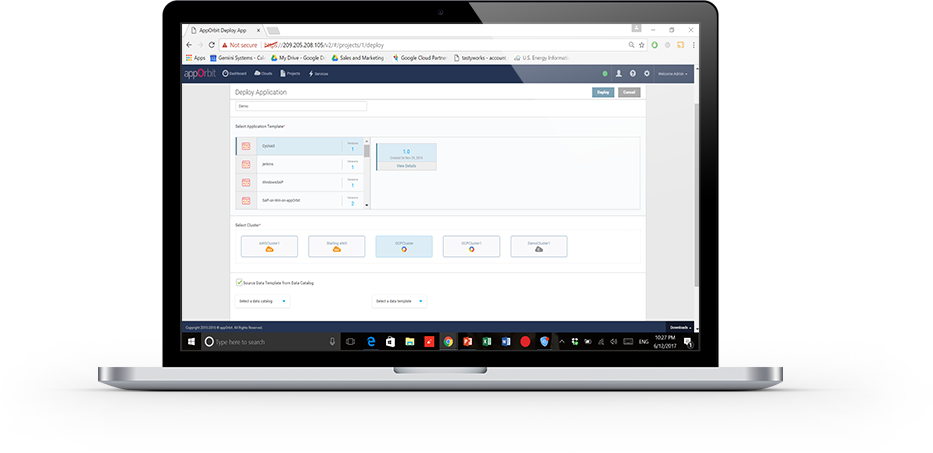
    appOrbit recently came out of stealth mode with an overarching architecture to enable hypercloud and extend the DevOps process across the entirety of the dev/test/deploy ecosystem. The idea is to offer a platform that doesn’t care what languages or deployment tools you use, or even what databases you’ve tossed data into, and covers the process from first line of code to management and monitoring post-deployment.

    That’s a big claim, so I got on the phone with appOrbit to poke around a bit. Better would be to take the time and use the toolset, but I’ll settle for our questions about the traditional weak spaces in the process, and about how they achieve some of the company’s claims. For now.

    My first impression was that this was application release automation/application release management (ARA/ARM), and Rahul Ravulur, CEO of appOrbit told me I wasn’t far off; I just wasn’t thinking big enough. A large part of the process is ARA, but additionally, appOrbit worries about networking, security policy and long-term monitoring and management, all while offering deployment portability.

    Finally, the End Game is in Sight

    From the beginnings of the Ops side of the DevOps movement (what I like to call devOPS), the end goal was pretty obvious: to improve the entirety of the process. It was clearly going to take time—good network engineers are wizards that can make a network do astounding things—and we had to figure out how to make that more repeatable. On the DEVops side, repeatable was relatively painless: We already did a predefined sequence of steps over and over; the point was to break them into smaller iterations and automate what was ripe for automation. Much of Ops was the same, but networking and security had many more variables to take into account, and less history of “here’s a prescribed sequence, do it.”

    If appOrbit can do as it claims—and its customer list includes some customers I’ve worked with that probably wouldn’t be there if the product was vaporware—then we’re seeing the culmination start. The culmination will include limitless portability, sort of a “we don’t care where you deploy, just tell us and we’ll do it”; it will include development tool agnosticism—“We don’t care what tools you used, we’ll deploy it”; and it will include complete solutions—“We’ll move your data, we’ll move your app, we’ll configure the target network, we’ll run the security checks relevant to the target platform.” It sounds like appOrbit has traveled quite far down that path already.

    What, Exactly, Did You Intend?

    One interesting bit appOrbit talked to me about and I’d like to take out for a spin is the idea of adding “intents” to security and networking. Tell it what you’re after, and through a combination of built-in functionality and plug-ins it will deploy your application as you intended. For things like opening a port, this seems pretty straightforward, but security and networking are complex topics. What is/isn’t covered by security policies/intents? What if my intent is for the system to create a VPN, lock down all the ports, then open just a few and connect the VPN back into the data center over an encrypted port? Who manages certs? Where does it get the credentials to get back into the data center? What happens if I take this whole VPN-based deployment and decide to put it inside the data center after all? Do I have to rework the networking intents to remove the VPN? The questions are endless.

    But assume this is the beginning of a road that truly can end up with “deploy anywhere, and deploy as you intended.” That’s what we’ve been waiting for, and it’s inevitable, so I for one am glad to see us set off meaningfully down the path.

    Improvement Makes Movement

    The mere act of someone talking about having pulled all this together will be good for customers. Ravulur’s stress that “a lot of what we do is ARA” will no doubt make ARA vendors step up their attempts to be as inclusive as appOrbit is, and the market will move forward. appOrbit’s use case of “legacy app migration” without changing the app alone offers an avenue for enterprises to begin to move to new platforms. That in and of itself will be a help to the huge number of enterprises that want to move to a more modern environment but aren’t ready or able to rewrite entire systems. And again, it will spur on competitors—in this case in the application provisioning space, most likely—to try and implement similar functionality in a relatively short time frame.

    Beyond Hope

    In a nutshell, I hope that appOrbit can do all that it claims, but even if it falls short in some areas (I honestly have only touched on a few of the areas it has pulled together; there’s a lot here), it is a step forward, and I think the company will drive the market more toward the end goal of application portability from both the Dev and deployment sides, while automating a more complete solution.

    To me, that’s all good. Not everyone is pure cloud, and a far fewer number want to be pure public cloud brand X. The automation tools I’ve been knee-deep in all have been massively complex under the covers, and no doubt this one is, too; simplifying automation so it is easy to adapt to a given environment is a huge part of the task these tools perform. Figuring out the weaknesses is what we customers have to do, but in the end, we’re moving forward.

    I, for one, will look for a chance to play with appOrbit’s toys, validate some of its claims, and see how well it suits enterprise needs. But I don’t have a timeline, so if you’re interested, you should check them out yourself.

    — Don Macvittie

  • NetOps: Thorn in the Side of Continuous Deployment?

    NetOps: Thorn in the Side of Continuous Deployment?

    Over the last few years, we have definitely gotten continuous integration and continuous deployment (CI/CD) down. We now can maintain a relatively constant flow of deployable code sitting and waiting for the actual deployment step to take them to production.

    Moving to production has been the point at which caution is introduced into the system, though, and that’s certainly not always a bad thing. Deployment to production seems to be following the motto our parents taught us: “Just because you can, doesn’t mean you should.” In many environments, multiple deployments a day would be a ridiculous goal; in some, even multiple deployments a month are unreasonable.

    Let’s face it, in an enterprise that had 18-month waterfalls for even mid-level projects, the ability to deploy at any time (and, thus, near-continuous test) is an improvement of nearly unimaginable proportions. And deploying three times in a day makes little sense if you need user input to adjust the project.

    Other Reasons Exist

    But there are other reasons that continuous deployment is not as pervasive as the other portions of a continuous pipeline. We’ve talked a bit about security, but let’s cover another bit today: the network.

    There are several reasons why networking slows deployment efforts, and all of them are real reasons that an organization that  aims to increase deployments over time should consider.

    First, the network is the corporate lifeblood. Operations is naturally very careful about changing settings and loads rapidly, which can result in problems for the corporate network. This concern is lighter for products deployed to the cloud, because things such as virtual private clouds (VPCs) can isolate the impact network changes have on the overall production architecture. But there are still security concerns around making rapid, automated changes to the network environment, even in the cloud. The network (and the apps it exposes) is the point of entry for a large number of security compromises, and we’ve seen some whoppers in the cloud of late.

    Second, and only barely behind standard ops network concerns is integration of networking into standard CI/CD tools. It’s coming, but we’re not there yet. On the Ops side, things have moved along better: Puppet, for example, can plug commands in to networking devices from stalwarts including Cisco Systems and F5 Networks. But the support is still somewhat limited, partially by the level of APIs the vendors offer, partially by the maturity of those APIs and partially by the implementation on the DevOps tool side.

    And That’s a Good Thing

    Even if automation came along full-bore, it is likely that networking concerns would still slow the CD pipeline, as admins want to make certain changes are not going to leave them spending the night trying to put things right.

    And I think that’s a good check on DevOps. I love DevOps and the increased delivery timelines it enables. In the end, the entire business becomes more agile because IT is able to deliver at a faster rate. But sometimes it—the pace at which things go out—feels reckless. In certain areas—security and networking primarily, but also load distribution on servers—there should be sanity-checking before rolling out. Anything that can impact the entire application, or even the entire infrastructure, is worthy of a last double-check.

    I know I’m not in the majority on this one. DevOps fever can have people saying nothing should slow the pipeline, but I know from experience. Long weekends fixing what could have been caught on the way to production have taught me to be cautious. Save rush deployments for a time when there’s a reason to rush. Sometimes it’s necessary to get it out the door today, but talking about slower deployment in a continuous environment as if it’s a fault ignores the strengths it offers as the last stop to public-land.

    Do What’s Best for Your Org

    Networking vendors will continue to improve the programmability of their devices, and what software-defined networking (SDN) has grown/is growing into will offer a different place to flip the levers for continuous deployment. So if you need to deploy many times a day, and make changes to networking, focus on security and let networking support grow on its own. If you don’t need multiple deployments per day, then relax and don’t get all pressured about how long deployment might take. You’re faster than you were, and if you need more speed, take advantage of the growing support of automation tools.

    — Don Macvittie

  • Application Release Automation: Why and Not

    Application Release Automation: Why and Not

    But what if it has no tank?

    You have a classic car. You’re in the middle of restoring it, and it looks mighty sweet. Paint is polished, wheels are stock, hubcaps (or spokes) are shiny, engine is completely restored to original spec.

    But it has no gas tank.

    A bit of a stark comparison, but that’s where we’re at with application release automation (ARA)—at least in terms of portability. And where we’re likely to stay.

    Hold on, I’m a Fan

    Before the DevOps aficionados get out the torches and pitchforks, let me be completely clear that I’m a huge fan of ARA, and explain again why.

    Tools such as Jenkins allow DevOps teams to automate the entire build/test stack—or as much of it as their organization requires. That is a huge step forward, for all the reasons we’ve covered in the past, including the one I think is often overlooked or underemphasized: With frequent build/test feedback, the code is still fresh in the developers’ head when they learn of problems. Most of the time, they are fixing before moving on to the next task, which is a huge plus compared to waterfall, where many problems show up long after the developer in question has forgotten what the code is doing because they’re off on other things.

    Likewise, tools including Puppet, Ansible and Chef (to name the top few) allow DevOps and security to set standards via script, and use those scripts to deploy over and over. This has all the benefits we’ve discussed, too: speed of delivery, reduction of human error, repeatability that becomes stability, etc. This gives operations the ability to answer, “Is server X set up to do this new thing?” by looking in deploy scripts, and quickly updating things if the answer is no, but X will be required going forward. That’s one of my favorite bits of application provisioning.

    Riding the Gap

    For those unfamiliar, ARA simply bridges the gap between DEVops and devOPS—tying code being released to platforms and configurations it will be released under. It has the ability to rapidly re-target a release to a new environment, and it can do predictable and repeatable releases, offering the benefits of application provisioning for the actual release segment. Most tools do this by tying together your favorite build tools and provisioning tools, and giving ops a control panel that can manage the process end to end.

    The benefits are huge, particularly for Operations and Security (which have another place to standardize and insert essential monitoring). And also for Development, because it offers one further step in testing and, by doing so, reduces the surprises six months down the road when you’ve forgotten what

    Bubblegum += 10

    is in your code for.

    So don’t take my intro as offensive. I am a fan. But I’m a realist. There is no panacea.

    ARA: It’s About the Data (As Always)

    The two weakest parts of most ARA systems are server provisioning and data issues. Server provisioning is setting up OS/hardware, and many ARA systems tend to assume you magically did elsewhere. This problem is only an issue in highly physical environments and there are tools to handle the problem—they’re just not integrated well with most ARA systems. Data issues are the bigger problem.

    It’s cool that we can drag and drop a couple boxes and magically switch our deployment from inside the data center to a cloud provider in the time it takes the ARA to build/deploy. But we all know that’s not how the world works. Now you have an application, complete with database that is correctly configured and security that does AAA solidly … and no data.

    “Just move the data then!” the choir sings. No, that’s really not how it works in an enterprise. Data itself is an object of security and compliance, and some source databases are so massive that moving them is a nearly impossible chore in and of itself. Amazon tips its hat to this fact with its import/export service.

    This was the reason why I gut-reacted with an eye roll to the “No more physical data centers!” crowd back in the midst of the hype. The amount of data stored in data centers is staggering, and often not portable at all. Add to this that such data isn’t going to reduce, and we have a quandary.

    What About Moving Forward?

    Sometimes, it is necessary to accept that the current state is not changeable, but take steps to improve the future state. I don’t see this as a reasonable approach in this case, because the rules of data aren’t changing in a way to change future state in a positive way. We’re generating more data every day, and that data will end up stored somewhere. Be careful where you store it; think long-term strategic. Having ARA doesn’t magically make that data portable, so make sure that where you store it today while it’s small is where you’ll want to store it in five years, when it is a massive, largely immobile asset.

    What to do … What to do

    Use ARA to multi-target all of those apps that are portable without terabytes of data, and make sure data generation/collection/analysis apps are on the architecture you will want them on moving forward. ARA offers a ton of other benefits, so data portability isn’t a deal-breaker—or even a significant negative, since you probably already knew some datasets weren’t going anywhere—but don’t expect miracles out of it. It can’t make your large datasets portable, so don’t expect it will. And use it to target the platform your organization feels is most appropriate for apps that will generate or collect a lot of data.

    — Don Macvittie

  • Culture Change: Where It Matters in DevOps

    Culture Change: Where It Matters in DevOps

    Red SquareLori and I were in Russia in the late ’90s. It was an interesting dichotomy of life in a changing country. While we were there, the government devalued the ruble—just cut three zeros off the end of everything—to bring it into historical line with other world currencies. It was odd, because there was a mass of old money and a smattering of new, and most systems were not yet reconfigured to handle the new prices. Thus we paid 180,000 rubles to fly from Moscow to Rostov.

    But the physical implications were not the issue. The cultural implications were. We stayed with a very nice host family in Moscow, and talked long with them about pretty much everything. The older generation tended toward the old system, while the younger generation toward the new. Thus, the father of the family, in his 50s, blamed the west (specifically the United States, but since we were from the United States, I think the vodka made him stress that part) for losing his job as an astrophysicist. He also blamed the west for their currency woes. If yesterday, you had half a million rubles in the bank, today it was 500, so his angst was understandable. He blamed trade issues for that. His wife agreed with him, and scolded us for buying them nice things, since they would have to pay to keep them usable.

    Their adult son—and indeed most of the younger  generation—was the polar opposite. The younger generation thrived in the new environment, saw a bright future and laughed at today’s misfortune. It would be better tomorrow, and they were adapting to the new open environment to make sure it was.

    No, this is not a “get out of the way with your old thinking” blog. It’s a “be smart with your new thinking” blog. One problem endemic to the youth of Russian culture when we were there was they believed the rules no longer applied rather than believing there were new rules and new ways to interpret the old rules. It got many into trouble.

    To Quote a Friend: Culture, It’s a Thing

    There are some in the DevOps community who like to talk only about culture, because the non-automation benefits of DevOps are most felt in culture change. This is a not-unreasonable stance, and though I am definitely an aficionado of the automation side of DevOps, I see the benefits of culture change and embrace them where they are most impactful. I also acknowledge that in a full DevOps implementation culture change is inevitable.

    One place where most organizations could put more forethought—regardless of how the project is developed/deployed— is in releases. Think this through as a customer, not as a DevOps engineer. You have been burned by companies horribly missing a deadline after announcing features that you were waiting for (most of us have, anyway). By this point you have also been burned by companies releasing with the feature you wanted, only to find that it barely (if at all) worked, but now that it was released, the company would make it better over time.

    Now switch back to being an IT professional. We know the pressures and issues around releases.

    I think the biggest improvement commercial enterprises can make is to decouple marketing releases from Dev releases—to watch a project go through CI/CT/CD/ARA until it is solid, and only then start planning a release date. While this isn’t fully in tune with rapid delivery, the marketing team has a whole set of activities to perform that are dependent upon a certain level of functionality. Weekly stand-ups and continuous delivery do not make that functionality real on the date it was promised, everyone involved in the process knows that. So planning like it will be is as inefficient as writing code before you have a product idea.

    For internal teams, it’s a little bit different. There is the opportunity for Dev/Release engineers to stay in contact with representatives of the customer (normally managers or team leads, but whoever represents the customer), and adjust everything. Expectations can be managed if a certain functionality prove difficult to get working right, or release dates can be managed except in the most politically charged environments, and slight changes can be made to requirements—things such as, “Well, if we do it this way, we can meet deadlines, but it will impact this other thing,” can be brought to the customer. Having a representative of the customers on the team is sort of like disassociating marketing release from DevOps delivery: There is the chance to make sure it’s right before it hits users’ hands.

    Oh Yeah, Culture

    But I’m not here to tell you how to manage the process, I’m really here to talk about the culture. It used to be that if a needed feature wasn’t ready, the feature was cut or the release was delayed. All that Agile and DevOps have really added at that late stage in the game is a third option—release it with a substandard feature.

    In the end, either users (in an enterprise setting) or someone looking out for users (in a commercial setting) need to make that call. Far too often, Dev and Ops are making it, and users are suffering for it. Change that. Give the power to those you are working for. The app you’re developing is aimed to serve a purpose for a set of users. If a new release does not offer them what they need—even if you can check a box and say it’s in there—then don’t release.

    The thing combined Agile and DevOps does generally give us is more predictive ability. It’s not perfect, but we do know sooner if there will be problems. Generally speaking, it is easier to slip release dates early in the process, simply because the release is not as anticipated.

    It’s About Why

    Some teams that used to cut features because they couldn’t meet deadlines are now teams that put in sub-standard features so they do meet deadlines. There are good reasons to plan a graduated rollout of a feature or feature set, but “couldn’t get it implemented” isn’t one of them. The granularity of Agile means that estimates should be tighter, because you’re estimating smaller chunks at a time. The ability of DevOps to deliver a more consistent end product and configured environment should mean there is less delay in the deployment cycle. So the correct answer is to find out what users want, go that route and then examine where you went wrong so you can do better next time. Sometimes “do better” will mean better estimates, sometimes it will mean using less new or questionable technology, sometimes it will mean controlling change in the environment outside the project—or accounting for it in estimates. But improvement should be the goal, all of the time.

    In the end, you’re creating a tool designed to serve the needs of a certain set of users. I don’t want to be sold a snappy laptop with an advertised 1TB SSD drive only to get delivered the same laptop with an external, full height, MFM encoded drive touting a whopping 110 MB. So why would it be okay to do the equivalent in software (or, in a couple cases I know the details of, firmware)? Don’t be silly, of course that’s extreme. Maybe the machine comes set up to boot from 5.25-inch floppy instead, to reduce shipping overhead.

    — Don Macvittie

  • Automated Testing: Remember Security

    Automated Testing: Remember Security

    Run down doors
    Insufficient Security.

    Between continuous integration (CI) and release automation (RA), we’ve come a long way in making testing both integral and automated. This testing has allowed QA staff and developers to spend more time adding value by looking at problem areas instead of running tests by hand. Shops that have CI well-integrated into their application processes and are using test driven development (TDD) claim they have improved both time to deployment and code quality.

    But we’re still struggling to get security adequately integrated into the overall system. Part of this is that some testing—such as application-level penetration testing—is very custom to the application being developed. There are tools to help, and they do offer some amount of automation, but they’re not yet to the point of being the only route to test. The other reason is that even today security and compliance are seen as road bumps that slow deployment. It is sad but true that the V-Tech data breach was a simple SQL injection attack. No doubt security was not involved in the deployment of that dozen or so websites/databases, or if they were, their ability to influence the product was limited.

    But automated testing can help in many of the standard attack vectors that SQL injection is just one example of. And for some reason, an automated tool informing DevOps teams that they have to fix a whole slew of vulnerabilities is taken much better than the security team doing the same thing.

    The breadth of security concerns mean that security must be involved at some level in every phase of DevOps. But tools can lighten the load, and the tools are getting better all the time.

    And the idea that a breach is a risk that should have a certain level of acceptance is no longer en vogue. Doing what you can to avoid them, and paying the price to do so, is increasingly the norm. Automation tools help to cover not just the employee time gap, but also the skills gap. If a tool can validate the entire deploy environment for your chosen cloud environment at the time of deployment, that relieves any shortage in knowledge about the security features of your given cloud environment. Of course, eventually security staff will need to know more, but just like a deployment tool can throw up an entire big data infrastructure in hours instead of weeks, leaving operations time to learn about configuration details as they need to, security automation can do the same for security teams.

    I highly recommend looking at building standardized controls into both the test environment and the deployment environment. While you won’t get perfect automation yet, you will get automation. The overall result of that automation will be increased security posture for the business, and since compromises are a business risk, that is in line with the overall point of DevOps: better serving the business. There will likely still be more work than there are hands/eyes/brains at this point (which says a whole lot about our pre-automation security posture), but you’ll be better off.

    As I and others have mentioned, a small security staff will likely have to be trainers/consultants to Dev/Test/Ops functions to properly support all of the needs of locking down an application. This is still true with a high degree of automation, simply because there is a large surface area, and we’ve traditionally gone with the “most urgent” issues first. But just as automating (with human controls/approval) updates where possible to get the newest protections has reduced workload, so can automation of other security goals. I chose the word “goals” on purpose. It’s not about today’s processes, it’s about achieving goals, so just as Dev was taken apart and re-assembled for agile, and Dev and Ops changed how they do things for DevOps, look for the best, most efficient way to achieve the goal. And like everyone else in IT, iterate on it.

    We all know we must increase the security posture of our organizations. We all know security doesn’t have the staff it needs. This is the type of conundrum that DevOps was designed to solve. Start looking into how your DevOps efforts can include security. At a minimum, look into more and newer automation (I’m currently enjoying playing with newer code scanning tools, to see how far we’ve come since last I looked close). Will it take an upfront investment? Yes. But if it saves security time every single week for several years before you have to move to new tech? It’s probably worth a learning curve or even an investment (be it CapEx or OpEx).

    — Don Macvittie