Author: Don Macvittie

  • The Postman Delivers More

    The Postman Delivers More

    Most of us use Postman during API development. The company claims 3 million users, and as one of them, that number doesn’t raise my eyebrows any. But if you are like me, you’ve figured out collections, how to back up your data and perhaps looked at tests, but not done much more. As a tool for API development, Postman is powerful and useful, but that means many of us don’t look very far beyond how quick and easy it is to set up an out-of-browser test environment to evaluate request/response.

    We use collections to separate projects, but really only as a way to group calls together and keep a single copy of each call close to hand while the history list scrolls through multiple copies.

    But for DevOps, there’s more. And they’ve just added to it again.

    Packing in the Features

    Groups can be used for grouping calls with tests, for example, and a command line tool can perform automated testing. If, like us, you use Postman to test as the API is developed, and use groups to keep those calls pulled together in one place, then testing from the source that already contains your entire API makes sense.

    And as of this week, Postman also includes the server side. Postman Mock service allows you to mock up the API calls and specify a valid return value. That means client-side developers can use Postman Mock for testing their app/page, while server-side developers are using the original Post

    man to develop the APIs that Mock emulates and testing is running tests from the real-world APIs that already are in Postman for development purposes.


    Dev, DevOps, Testing and Ops: Something for Everyone

    So a quick diagram shows that the entire development process has a bit of Postman in it if that’s your tool of choice:
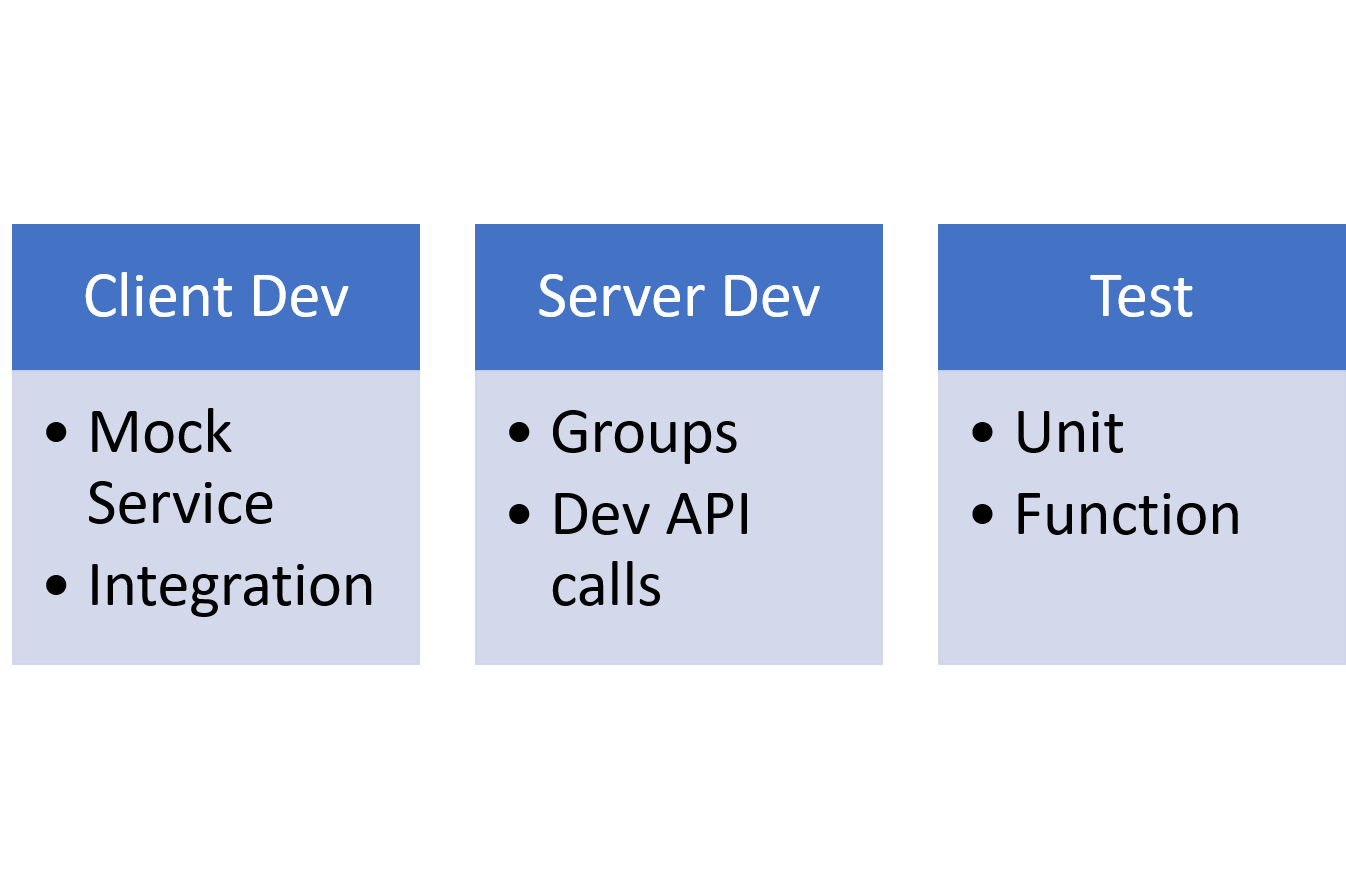
    While all assist with agile development, for DevOps, the pieces that are the most beneficial are Test combined with Groups and the new Mock service. As long as the Mock service is configured for a group of calls, test can call them and the logged output can reflect that the test succeeded but ran through the mock service. Once the service is completed and the group is directed to point at the server, testing will run tests against the real API. Using Newman, the command line tool, these tests then can be integrated with your build toolset.

    The Mock service can take imports from SOAPui, if you are converting from SOAP calls or use SOAPui for REST and are moving to Postman. I’m told the Postman toolset also supports SOAP calls, but truth in writing, I’ve never even looked to see how that would be done. I’ve used both tools, but never on the same project.

    There’s a Cost, but There’s Also Value

    This next bit sounds a bit salesy, and I try not to do that. But for the price, there aren’t a lot of value-add tools out there that deliver this kind of value. Lori and I are talking about going Pro, as we both use Postman in projects. And considering we’re regular users, I figured if we didn’t know about most of these features, many of you wouldn’t, either.

    Mock is part of Postman’s Pro package, along with sharable team collections, and API documentation tools. That means it will cost you a little bit of money, but if you’re on a team and have been cobbling together a way to share collections, team collections and associated collaboration tools are worth the price—particularly since built-in auditing will show all of the changes made to Postman collection items. That means fixing a change-based error on the Postman side is easier.

    As of this writing, the cost for Postman Pro was $8 per user per month. My guess is sharing groups (or worse, each team member re-creating/maintaining them) costs more than that per month in many cases. Consider that documentation can be generated and shared to a private URL and the fact that Mock service enables parallel development, and $8 sure seems like a steal. Finally, Pro offers API monitoring, so performance and uptime can be tracked to better adjust to the realities of production. There’s more (such as integrations with some great Dev/Ops/DevOps tools), but I’ll stop.

    Summary

    Design, Development (both client and server, in parallel), Test, Monitoring … as long as you can get it deployed, Postman can help with the rest. Postman Pro has a reasonable price for the functionality it offers, and the introduction of the mock service makes agile development, tight timelines and consistent “start to deployment” testing easier. I’d venture to say it is worth taking a look at. And if you’re developing APIs without it, pop out and get the free version, you’ll quickly find why so many of us use it.

    You can find out more about the various editions of postman on Postman’s Product page.
    — Don Macvittie

  • DevOps and Database Security

    DevOps and Database Security

    Osterman Research recently released a survey-based report on database security. The results don’t exactly instill confidence where username breaches are concerned: While more than 50 percent of respondents felt that a breach of the database would be a serious problem for their organization, 44 percent responded that it would take more than a day to detect compromised credentials and a breach of data. Considering that attackers are going to get in and get out as fast as possible, more than 24 hours is plenty of time for those compromised credentials to result in copies of tables making their way to the dark web. Some of our biggest hacks—Yahoo! springs to mind—take much, much longer to be detected.

    There are tools available to monitor database logins and activity, from free (and sometimes onerous) logging for databases including MariaDB, MongoDB and MySQL to review and analysis through things such as Splunk plugins for most database systems. Once you are tracking logins and source IPs and possibly watching for spikes in query volumes, the power of DevOps can help you manage monitoring.

    The key here is to collect the data, even if temporarily. A great first step is building a process that turns on login-attempt logging for a set period of time, then processes the resulting file to send the user a list of when they logged in and from where.

    Next, capture summary information about number of queries and response sizes. That can show abuse of credentials, by either internal or external bad actors. The issue is not the availability of tools to do these jobs; the issue is making it a priority.

    While not exposing your database to the internet is a good policy, monitoring database credentials provides in-depth defense against external attackers and a defense against internal attackers. Utilizing the tools available plus some work from DevOps (to automate the process, then to work out a way to add new application and user logins to the monitoring system) will improve your ability to detect credential issues, and the process—as so often happens when DevOps is involved—will force you to review which applications are hitting the database from where, possibly opening eyes to ideas for improvement in database usage and location.

    These are the areas of security where DevOps really can help; it is rare for any one team to control security for logins/queries on the database. Is it the DBA’s responsibility? The security team? Operations (which generally creates the accounts)? Utilizing the tools available, and sitting down to discuss which makes the most sense for your organization, you can generate a simple report to be reviewed on a regular basis and settle the responsibility question. That means there is no huge loss of time pawing through logs and no waiting weeks to find out your database has been exfiltrated. It just makes sense, and it bridges the gap where security gets direct benefit out of DevOps, instead of the indirect benefit offered by standardized processes.

    — Don Macvittie

  • Using Load Balancing in Blue/Green Deployment

    Using Load Balancing in Blue/Green Deployment

    One of the biggest pains of automating the deployment process is that final step, when everyone agrees it is time to take the accumulated changes and expose them to the public. This process is the point at which systems go down and users find themselves suddenly cut off. Scheduling such changes for off periods may be useful, but “off period” is rarely “no users impacted” period. One of the goals of DevOps should be to minimize impact to users, as the point is to make things more repeatable and consistent. Blue/Green deployment is one of the processes introduced to make the final rollout step of continuous delivery (CD) smoother.

    This process, first (to my knowledge)  proposed by Jez Humble and David Farley in the book, “Continuous Delivery,” proposes that you have two environments—one testing and one production—that mirror each other. Then, when it is time to release, the router is changed to send users to the “test” environment, and it becomes, for all intents and purposes, production. The problem with this simplistic description is that everyone on the system at the time of “cutover” is “cut off,” since the new system doesn’t know what they were doing. That’s not the best solution for users; in fact, it’s downright disruptive.

    Like Load Balancing Quiesce

    This is not that far off from the type of thing I’ve talked about using load balancing for, and F5 Networks (where I got the idea) has talked about it for a while. You can tell a good load balancer to stop offering connections to server X in the pool to let it settle and then be taken out of service for maintenance. The same technology could be used to say, “Let existing users finish off on their existing connections, but do not allow new connections to these servers,” directing all new connections/users to the new deployment while not dropping the connections of the existing users that presumably are in the middle of doing something.

    Now in load balancing, you have to consider how long to allow users to stay connected before arbitrarily ending their session, but in the world of REST APIs this is not as important as it is in longer-lived, client-server style connections. In the end, though, there must be a defined point where everyone is forced to the new systems. At that time, merely making the switch on the load balancer and taking the old production systems out of the pool will force users to connect to the new systems.

    It Works for A/B Testing, Too

    A similar process can be used to try out new features on a subset. Once there is a load balancer in place, and you know what you want to measure to determine if a new feature is enjoyed by users, an instance or two behind the load balancer can be spun up and start accepting connections. The load balancer will naturally start putting those servers to use, and soon you’ll have a subset of users seeing the new features, while most blithely continue on with the old. When testing is done, the decision of whether to withdraw the servers/instances with the new code or move all servers in the pool to the new code can be made.

    Overall, offering less deployment disruption will be required as your organization moves into more frequent releases under CD. Look for solutions like blue/green deployment to make those releases as non-disruptive as possible.

    — Don Macvittie

  • Boots and Sandals: Know the Market

    Boots and Sandals: Know the Market

    Boots and sandals are basically the same thing—something to protect your feet while you walk about. The thing is that they are intended for slightly different purposes. You wouldn’t wear sandals outside in the middle of a Wisconsin winter*, and you wouldn’t wear boots to your day off, hanging at the beach. The thing is that boots and sandals have been around forever, and it is relatively simple to gauge the merits of each in a given setting. The same is not true of DevOps tools.

    Cowboy Boot Sandals.

    * Every few years there is a news report about someone found only in sandals in sub-zero weather, they’re not the norm, and there’s a reason they’re in the news.

    Rate of Change

    The rate at which DevOps markets are maturing is a pace that few enterprises can keep up with. When both development processes and operations processes are changing, new tools are being introduced and the two groups are increasingly working in tandem to support the business, yet another market space is not what they want to study and yet another tool in the tool chain is not something that they want to just “pop in.”

    But the DevOps space is young, and there is a lot coming that can help achieve the goals. I have had reason to look into application release automation (ARA), cloud security auditing and global file systems (GFS) in the last few months, and all three bring something to the table in terms of helping IT adapt and automate. The problem is that in each case, the market is a bit muddied. ARA must explain why it does more than Jenkins alone, cloud security auditing must explain why it is better than calling the cloud vendor APIs to do the same task, and GFS must explain why it is more than a cloud storage gateway and how that helps the enterprise.

    And they can. But when considering them, you need to do the research and figure out the market and how that market applies to your organization. Which is a bit unfortunate. devopsy.kinsta.cloud and other sites can help by talking about the tools over time, and the vendors’ own promotional pages can help you understand what gap they’re filling, but it’s legwork (though, in many cases, the legwork is worth it). ARA marries app provisioning tools with CI tools, giving a unified workflow, for example. And it makes the deployment process more agile. If you are running many projects that deploy on a regular (not hourly or even weekly, but regular) basis that you may one day want to deploy to a different environment, ARA can help, along with the wealth of other functionality it provides, bridging the two sides of the DevOps coin is probably its largest driver. The same type of thing is possible with the other two toolsets I mentioned, but trying to keep this short enough to read, so will leave it to those interested in GFS or Cloud Security Auditing to research them.

    The Key is Knowing Why and Which

    In the end, if you’re building out DevOps, you want to automate the process as much as possible. That means as the markets mature, you will want to explore what’s new. These tools can help many organizations provide a smoother or more secure process, but knowing the reason the market exists is the first step, and only then can you decide if you want to evaluate products. They do not all help all customers, so seeing which are right for you—there is no need for either GFS or Cloud Security Auditing if you are a single office with no cloud presence, for example—will help you narrow which toolsets might improve your DevOps efforts.

    And whatever you do, don’t buy the “sandal cowboy boot” of IT. It might look good, but won’t be very useful in either of the environments it’s intended for. 😉

    — Don Macvittie

  • IoT Forcing the Coming DevOps Deluge

    IoT Forcing the Coming DevOps Deluge

    We can look back over the last few years and easily pick out the organizations that picked up DevOps and ran with it, forwarding the science of DevOps while benefitting the most from it. They were the large-scale, high frequency-of-change organizations. One place I worked readily called them the webmonsters, and that is not too far off the mark. Think of those that left a mark on DevOps: Google, Amazon, Netflix, Facebook. High rate of change in a high-volume environment. The key is high volume—they had hundreds or thousands of servers to manage and a shifting ground on which to manage it. So they adapted, picking up DevOps and applying it with passion.

    What Sounds Familiar Here?

    While DevOps adoption has certainly grown and offered benefits beyond these high-volume environments, their need for DevOps is still relevant. Where else are their a huge number of deployed servers that might need to be managed? The internet of things. A successful IoT product will have thousands to millions of installed devices, and those devices will be communicating back with centralized or cloud systems. Those devices no doubt also will have an update mechanism, which implies a shifting need for updates.

    ‘No, There is Too Much. Let Me Sum Up’

    Inigo Montoya said that in “The Princess Bride,” and he didn’t even realize he was talking about IoT and DevOps. Of course, a successful IoT rollout is not hiring staff to manage each and every device deployed by a customer, any more than Apple or Cisco Systems hires staff to manage devices owned by their customers. But the ability to manage all of these devices must exist, and that’s why IoT and DevOps are destined to become inseparable. IoT vendors will need all that automation to stay on top of those devices. And it would be foolhardy for developers to believe they didn’t need to stay on top of devices. If a serious vulnerability is exposed in an IoT device (think wireless Barbie vulnerabilities from 2015), it will have to be patched, or legal responsibility will no doubt follow.


    Expect More to Come in IoT

    As IoT heats up, and things such as IoT botnets become more worrisome, expect that DevOps for IoT will become more of the norm. As long as we require these devices to report in (and that’s kind of the point) and we have access to perform updates, it will require systems to know when/how/what version the updates should be. While many existing DevOps tools will work, expect more development in the IoT-specific space in the near future. And with luck, some of those developments will be applicable to the broader DevOps audience.

    Some companies, such as Mocana and Tempered Networks, are already working on the security issues, but that’s not all there is to work on. Inevitably, those devices—in a year or five—will need to be updated. When IoT includes things such as cars and refrigerators, “upgrade your device” isn’t an option, so onsite upgrades will have to be, which will mean some form of DevOps to deploy new images. Of course, eventually the hardware will be outdated, but that’s beyond the point of this blog—although something that IoT devs need to be considering also, particularly in long-lasting deployment scenarios.

    — Don Macvittie

  • When DevOps Disrupts DevOps

    When DevOps Disrupts DevOps

    As longtime readers of my blogs will know, one of my hobbies—when not writing about or playing with technology—is modeling. There is a similarity between quality tech work and quality modeling, but the brain power involved in modeling is much less, leaving me time to think about tech issues or listen to audiobooks (when I’m not listening to music, anyway).

    In modeling, as in tech, there is a process. The process varies based upon what you’re working on, but is largely the same, with some steps slightly different or skipped altogether and others taking longer. At the moment, I’m building the first day of Gettysburg from the American Civil War, but I simply enjoy modeling—and wargaming with the models, but that’s a separate story for a hobby-focused blog.

    The thing is, that process is nailed down, and to the extent it can be, is automated. One step leads reasonably to the next, and while one step is completing on a given model (glue or paint drying, etc.), there is an opportunity to advance a separate project.

    Sounds a lot like DevOps, doesn’t it?

    The thing is, every once in a while, you will get something that is so different, it totally interferes with the carefully planned flow. My current primary project is a little over 300 figures. While one unit is getting the final two coats of finish (that are basically the same or every model), the next unit is getting primed. Assembly of all the figures came first, so there is only the priming step before painting can commence.

    Picture, but you missed it.
    Piper Millin and Lord Lovat cross Pegasus Bridge.

    But here is a work-in-progress picture of Pegasus Bridge. This came as a complete set, and took a large chunk of time to get together, find the correct water for, get placed on foundation boards, etc. This is outside the normal process of assemble/paint/base figures and vehicles. The set is beautiful, and even this picture, which was taken well before completion and only to study color and weathering effects versus reality, shows how truly nice the model was. But it totally disrupted the process flow.

    DevOps and Multisystem Installations

    That’s what complex system installations such as Hadoop or OpenStack do. You’re installing across multiple systems, configuring them for load-sharing and communication, and doing it by hand is a long process that interrupts the normal DevOps flow. Crafting scripts to install them is possible but highly complex and frustrating, simply because of the complexity and interrelationship of the nodes in the system.

    Having installed both by hand, and installed both with tools designed to make it easier, I will happily tell you that yes, you will understand more if you do it by hand, and no, that immediate understanding is not necessarily worth the cost of weeks or months figuring it out and getting it installed.

    You see, to operate these systems, you will need much of the knowledge you would gain hand-installing, so you’re going to learn it either way. Your choice is a simple one: Get a working system and learn by tweaking settings or swapping nodes in and out, or have no working system and learn by the frustrating process of trying to figure out what you’re supposed to do next, and why that step is failing for your specific hardware.

    DevOps and Multisystem Maintenance

    The only real problem is that it is painful to maintain these systems. It’s not as simple as

    yum update [[packagename]]

    because that would only upgrade one package on one system. But these tools span multiple systems, and even just dependencies generates a massive list for each system in the cluster. Seeing the need, most of the traditional application provisioning tools (Puppet, Ansible, et al) have built or cobbled together solutions that will get the job done. But custom solutions exist for these products, too. The problem is that, like Pegasus Bridge, as beautiful as they are they disrupt the DevOps flow. No system goes without exceptions, and I’ll go out on a limb and say that custom solutions to install and maintain solutions such as Hadoop and OpenStack are worth having yet another tool in the DevOps tool chain. The trend is multipurpose tools to be used on many projects, but the importance of a cloud or big data cluster in your IT operations makes them worth the extra tool. As long as the extra tool reduces the amount of work and the chances for human error (which, in my opinion they do—it is kind of their selling point).

    That Leaves Time

    These tools (a good example, though in general I won’t be talking about the competing vendors here, is the Mitaka-based release of Mirantis) allow not just installation but also ongoing management of the OpenStack cloud or big data cluster. That means there is less nitty-gritty for DevOps (or operations for that matter) teams to worry about, freeing time for working on what actually gets built on top of these powerful platforms. Cloud and big data both are just enablers for more functionality when looked at in the right light, which means more work (and often more meaningful work) for DevOps teams.

    When you consider either of these technologies, check out what’s available for installation and maintenance, even if it is outside your normal DevOps tool chain. Like Pegasus Bridge, the change is likely to disrupt you for a bit, but once you have a tool and process in place, it will just be something that happened—and was going to happen with or without the tools. They just make it less painful.

    — Don Macvittie

  • DevOps Security: Stop Discussing, Start Implementing

    DevOps Security: Stop Discussing, Start Implementing

    Is it Strong DevOps? DevOps Security? Secure DevOps? DevSecOps? DevSecQAMktSalesOMGBBQOps?

    Who cares?

    Like a ton of people with an interest in information security, I was appalled when I read “The Phoenix Project.” Here was a book that portrayed DevOps, why it was required, how it could help and the benefits very well. But it served security terribly. Worse than terribly. While it did accurately portray the predominant feelings of developers and Operations toward security, it utterly failed to adequately consider the correct usage of DevOps to attain InfoSec goals. Indeed, while it is a light treatment, it certainly comes across as, “Give up on InfoSec and you’ll be happier, healthier and more popular!”

    Clearly it was not a book written by information security staff.

    The Point Is …

    Don’t get me wrong, those who follow me know that I’m a developer that learned operations and has always found himself doing security bits, because no one else was, or because I was teamed with them (as an enterprise architect, our team was EA + Infosec, so we did a lot together). But that abiding interest in InfoSec has made it easy for me to see that the bulk of the problem between Security, Dev and Operations really is communication. An example might be in order.

    When SQL injection first hit the scene in a big way, it came with simple examples and was easy (for a developer) to understand the danger. Nearly immediately, developers had worked up solutions, were sharing them and tools were being developed to scan for injection weaknesses. Things moved very quickly, because developers understood the danger and agreed that it was a big deal.

    Meanwhile, using page data—hidden fields, hard-coded values (like from a list), etc.—pose the same level of risk. Copying the page, modifying those values and submitting the page—or using any of a dozen easy to use tools to mock up the data—makes them equivalent to user input, particularly in cases where they are used directly in queries. Yet even today, many many developers still use them without user-input error checking.

    Why? Because they don’t believe the risk is equivalent. For SQL injection, all a bad actor has to do is hit a vulnerable webpage and enter the right (and, I might add, well-documented) characters to open themselves to free querying of the database—at least one table, possibly much more. They see that as a much greater risk than someone having to modify HTML to get the right field to have the correct data and submit it.

    The fact that both attackers and tools are advanced enough to make the difference negligible doesn’t change the belief unless security convinces developers through education.

    ‘Faster’ has Challenges

    By the same token, both agile and DevOps move fast. They are designed to move fast. Security is more concerned with “protected” than fast, and is designed that way. Security staff (and this is the real source of a lot of burnout) hires on with “Protect Our Systems” as a job title, with the subnote, “But don’t get in the way.” This is a set of core principals that are at odds before the InfoSec person even sits down to interview. Agile and DevOps aggravate this tension, because, “Wait, there is a problem here, give us until tomorrow to get details,” now violates “but don’t get in the way.” “The developers in question have a stand-up coming and really short, really tight deadlines to meet. And InfoSec is interfering—again,” will likely be added to that statement by Dev. The same is true in Ops. Stopping an entire deployment because InfoSec is worried about security of private keys inside the private network violates the “but don’t get in the way” rule.

    But Solutions are Available

    So how can these tensions be brought together to resolve your problems? I’ve got some suggestions (they probably aren’t in the order you would expect, so I’ll explain as I go), but honestly  they are just a starting point. Entire books have been written on these topics, and more are about to be, if the state of the DevOps/InfoSec union is any indication. We can’t even agree what to call it, so we clearly aren’t agreed as to how to achieve it. Take these as what they are—suggestions—and start moving forward with what your org needs to be successful.

    1. Automate all of the things. Yep. Go download the various OWASP security tools, or your other favorite open-source tool, or call up your preferred vendor and get the automation of security checking—from source code analysis to penetration testing—going. Do those tools have weaknesses when compared to manual security evaluation? Most of them, yes. But here’s the thing. There is a quality staffing shortage in both InfoSec and DevOps. It is time to lean a little more on those tools, even contribute to make them better. Because the security checking they can do is better than nothing, and frankly is better than spending limited resources checking by hand. And that is why this step is first on my list. You need those resources. You need them to handle the rest of the steps. Once you have a tool like Jenkins auto-running these tools, and output review being just part of the job, then you can start to consider using those freed up resources more productively, or reporting that you’ve got more testing with DevOps than you had, whichever is true.
    2. Embrace and enhance education. Because of the rate of movement in an agile-plus-DevOps world, this must become a partnership with both Dev and Ops. Focus on helping developers and admins with the why as much as the how. People are more quick to adapt if they understand the reason for doing so. And for InfoSec to keep pace, they will need to adapt quickly.
    3. Look for ways to automate beyond implementing simple tools and reviewing results. The more repetitive work is built into the process, the more InfoSec is available to tackle bigger, less scriptable problem-solving. I’ve been talking a lot with CloudCoreo, for example, and its auditing tools can help InfoSec understand the state of cloud deployments with both alerting and reporting. Infrastructure monitoring tools make a lot of sense in a world of frequent infrastructure changes initiated by both auto-scaling and more frequent deployments.
    4. Shift automation of InfoSec to the DevOps team. Security is normally a relatively small function, and open positions can sit there or bring in people who need training in an organization’s tools and processes. So once automation is in place and reliable, shift responsibility to maintaining it (software updates, etc.) to the DevOps team, because it is a part of the DevOps process. Security can continue to monitor output and validate automated security testing results, but maintaining that piece of the DevOps infrastructure should not be InfoSec’s job.
    5. Rank what’s left that’s manual. Give each an importance. If there is potential impact to the business, ask business people to help you. Then assign work based on severity rankings. We do this stuff with risk management and threat assessment; this is no different, except you have to be willing to drop low-priority things—not to let them slide because you never get to them, but to publicly say, “This is a risk we are willing to take.” Let the team know that they’re not the only ones adapting.

    Will these basic starting steps solve all of InfoSec’s problems and make security never seem to “get in the way”? Of course not. Don’t aim for hanging around the campfire singing “Kumbayah”; aim for working as a team to turn out quality secure compliant code in a more predictable (and if you are an org that needs it, much faster) manner.

    A Rose by Any Other Name

    What, then, we should call it?

    Frankly, I suggest we call it DevOps. We’re not going to add every team that is subsumed into the DevOps umbrella into the name, so just call it DevOps and have a security piece in the process.

    Because it really doesn’t matter what you call it—it matters that it is compliant and protected.

    — Don Macvittie

  • The Right Automation Tool for the Job

    The Right Automation Tool for the Job

    My father was an antique dealer, and we did a lot of furniture repair in the workshop. All of us kids took turns working for the business as we grew up, and we learned some solid lessons in the process.

    One day, when I was still pretty young and very new at working on things, he pointed out a set of screws someone had set into an otherwise beautiful oak chair and told me to remove them while he worked on another piece for the same customer. I grabbed a screwdriver from the workbench and went to work, but it was tough going: The screwdriver kept slipping, and I was new at it, but I knew enough that gouging the wood was certainly not on the list of things one wants to do with antique furniture. I took my time, got all four out, but the screw heads were pretty mangled—close to stripped—and the end of my screwdriver was also showing marks. Being new at it, I thought nothing of it, and was proud of how few scratches I’d put into the wood.

    My father was a patient man for the most part, and I was proud of having done my part. So it was a complete surprise to me when he could barely contain rage as I showed off my handiwork.

    After he pulled himself back under control, he took the time to teach me that there was a difference between a screwdriver and a wood chisel, and that I should have seen it didn’t look like a screwdriver. It turns out I had ruined his best chisel, and the “few marks” I had left in the chair were gouges that we would have to carefully repair.

    Are You Using a Chisel?

    I learned an important lesson from that day. Always be certain, despite what you think you know, that you have the right tool for the job.

    I’ve certainly said that enough in my career—in development, in ops and in my blog. It is easy to see the tool in your hand as good enough to get the job done, but it is worth stepping back for a second and making certain it is.

    Not too long ago, I worked with an automation company whose largest competitor was not any competitor; it was, “We can do that by hand.” Evidence over time showed that the company could get partway there, and then would find itself with issues that kept it from getting the features/reporting it wanted and a metric ton of code to maintain. Unsurprisingly, some called to have the tool brought in three to six months after embarking on a build project.

    Using bash scripts, Maven/Gradle/Cmake and a dose of Python to do release automation is a good example of that syndrome in action. So is cobbling an application provisioning tool into a release automation system. Like a chisel, these are all astounding tools that rock in their given area of expertise, but are far from optimal—and can even cause problems—when used to automate software releases.

    Familiar Questions

    There is almost always someone willing to say that building is better than buying. These people thrive on the creation aspects of IT and are valuable assets. But the equation has to make sense. In software development, we’ve come to the point of “core business function” as the differentiator in the build/buy equation, and it has cut down the number of systems for which we have to maintain source. But DevOps is new, and a lot of DevOps is scripting, be it command line (bash scripts/batch files/ps) or Python/Ruby/php, straight commands built in-house or scripts for use through tools such as Jenkins. We’re generating a lot of artifacts, and those artifacts will require maintenance. It’s the technical debt of the near future, because environments are not static things, and those scripts will need to change over time.

    So the questions to ask will be familiar if you went through previous build/buy cycles and include:

    • We can build it here, but should we? What long-term costs and risks are we taking on by doing so?
    • If we build it here, what are the tradeoffs? What functionality could we have today that will go missing? What functionality will we likely never have in a home-brew solution?
    • If we build it here, what flexibility will we have, and how does that compare to available tools?
    • What are the timelines? Generally speaking, CI/CD tools can be up and building in a week or less, be truly productive in six weeks or less, and be a standard part of the build/deploy process within six months, even at cautious companies. What would building it have for a timeline, and are the resources required to complete the implementation constrained?
    • DevOps is growing and changing. A dedicated product will incorporate those changes through the upgrade process. Will time be available to staff to do the same on a home-built system?

    There is a Right Tool

    My experience is that IT shops who allow someone who claims, “We can do CI/CD/ARA with the tools we have today, it’ll just take a little work” to run with that sentiment end up feeling more like my father than happy that they made the choices they did. The complexity of the process, combined with the growing functionality and integration of toolsets from different vendors (via plugins or APIs), have made the purpose-built toolsets more effective than cobbled together is likely to be. And when the home-built tools fall short or needs change, the cost in IT staff resources is not something to be dismissed lightly. While blocking off a chunk of time to make IT more effective is important, it is also important to make the most efficient use of that time possible. Having a toolset dedicated to CI/CD and even release automation means less time maintaining source that just manages builds and application deployment. Save that time for things that improve efficiency even more, not keeping the status quo. There will certainly be scripts for your server and application provisioning tools to maintain, because that’s how those tools are designed. And if you are using a tool such as Jenkins as part of your toolchain, it generally has scripts as part of the process too. Increasing beyond that just to avoid implementing the rest of the CI/CD/ARA ecosystem would be a poor investment of time.

    As I told a friend recently: Yes you can implement a full-blown end-to-end ARA system in an application provisioning tool. By the same token, you can implement a fully functional responsive web app in assembler, too.

    — Don Macvittie

  • DataDog Announces APM. Why You Should Care

    DataDog Announces APM. Why You Should Care

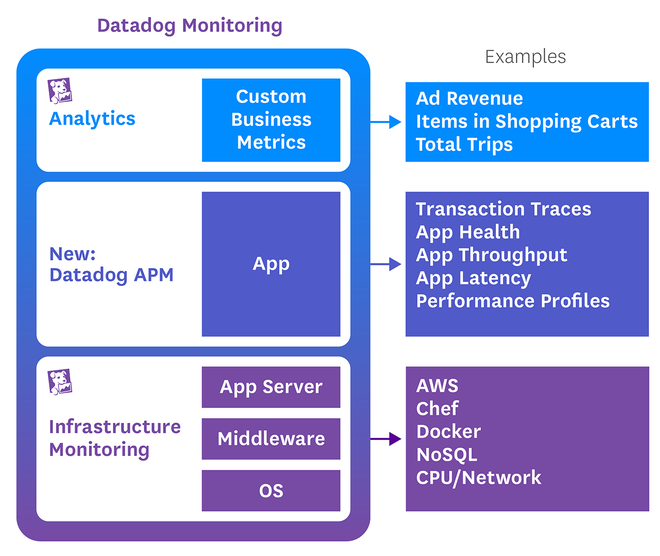
    In case you missed it, DataDog announced it has added application performance monitoring to infrastructure and business goal monitoring.

    1Part of my background includes a variety of clustered systems. First VMware, then OpenStack, Hadoop and its derivatives for a while, and these days the Mesos family. One of the many things I have learned along that journey is the inter-related nature of infrastructure and application. While we all know about that relationship, it goes further, I think, than most people recognize. A single degraded hard disk or loose network connection, which pushes work back out to the rest of the cluster, can drag an entire cluster to its knees.Since my time at F5 Networks taught me a metric ton about the nature of load balancing, I can say confidently that the same could happen to your load-balanced application.

    The biggest frustration for me in most multi-system configurations is the inability to track enough places to quickly diagnose the problem, because your application could be brought to its knees just as easily by a memory leak. But the logs are spread across multiple logs on multiple machines, between the hardware, OS, and software, and you generally have to go looking for more information. Even if you have some of the best tools in the business, you are still looking in multiple places to find information about one problem and having to do things like sort by time to correlate events between the systems.

    To be certain, other vendors are offering hardware/OS diagnostics with their APM. But DataDog’s approach, adding APM from the infrastructure side (rather than the more common reverse scenario), will offer different insights. So I’m interested in seeing how DataDog’s offering pans out.

    I obviously haven’t had the chance to play with DataDog’s new functionality, but it is a space that very much interests me and one we as an industry do need more work in. So just the fact that DataDog is integrating these three monitoring layers is important. From here, it has a platform for adding things (security monitoring? Inclusive root cause analysis?) or increasing the quality and quantity of across-the-application, metal-to-user information available to Ops and for alerting. In fact, it disappoints me that actual infrastructure isn’t a core part of the APM Conceptual Framework, because the hardware under the VM that is hosting the app server for your app really does matter when performance degrades.

    At a minimum, APM can help you get from problem to solution somewhat faster. If done well, it can alert you to the problem and show you where it is, helping you get from problem to solution even more quickly.

    — Don Macvittie

  • In DevOps, Speed Isn’t Always the Point

    In DevOps, Speed Isn’t Always the Point

    The high-tech industry has fallen into a rut and seems to be struggling to get out of it. This rut is most fervently seen when talking about DevOps, but it exists across the board.

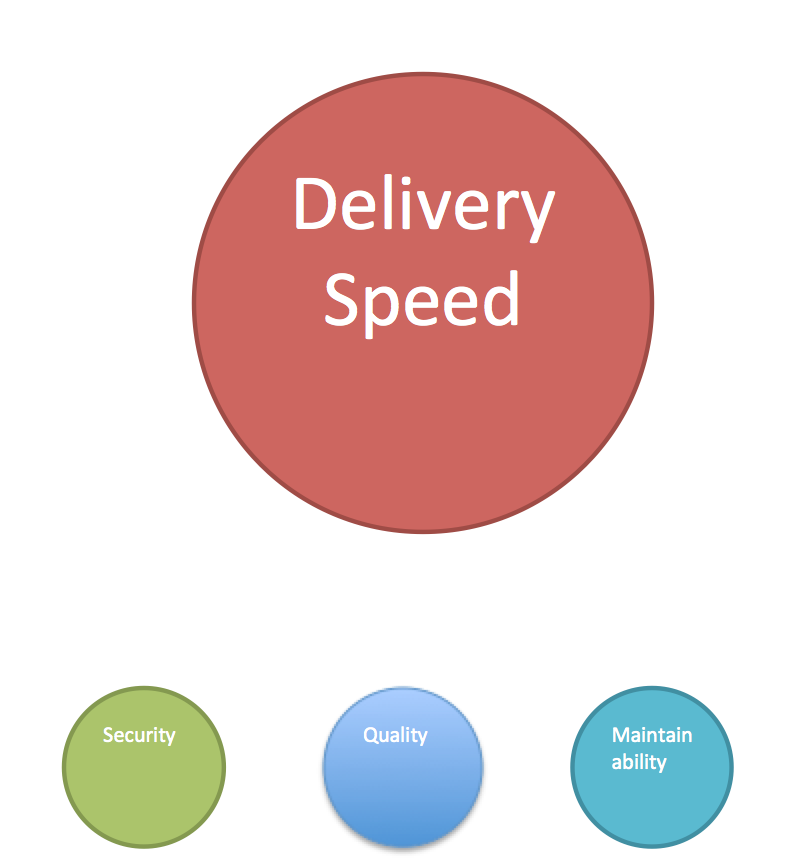
    We’ve fallen in love with the idea that faster is always better. That idea is provably false, and the assumption that everything needs to be faster is false, also.

    Early on, time to market and increased responsiveness to user needs were the driving market differentiators for agile development, DevOps and DevOps tools. There were indeed cases where IT was not responsive enough to business needs—I think most of us were acutely aware of this issue, so dwelling there for a while was not a terrible thing. But responsiveness to business needs is one piece of a much larger puzzle. And we seem to be stuck, with some lip service paid to other strengths of DevOps … as long as it’s still delivered yesterday.

    In my career I’ve worked in two industries where speed of delivery was a tertiary concern for core business systems. To be blunt, when you are putting together a system that will administer contracts expected to last a hundred years or more, you really don’t get that worked up about it being out there tomorrow and “good enough,” you worry about it being right when it does go out, so you’re not still paying for mistakes a century from now that were made by rushing today.

    Of course, there are vendors that don’t want to hear people like me say these things. Of course, there are products with other benefits that are more important than speed of delivery. But as an industry, we’re still too obsessed with speed.

    How we too often see priorities

    Most industries do not even fall into a neat category where they are all or nothing. For most, some teams need to be fast, using agile, CI/CD and fully automated deployment to drive out changes fast (not as fast as some talk—most don’t even need weekly, but fast, nonetheless), while other teams need to be more thorough and cautious and the cadence of releases really doesn’t matter as much as the final result.

    So my advice is similar to advice I’ve offered on similar “hot” topics for the last decade or so:

    You are the rock stars.

    No vendor, analyst, pundit or author knows your vertical market, organization, environment or team the way you do. Do not let them proxy their view of what is “right” over you. Yes, far too many act as though, “If you’re not doing X, you’re behind.” But again, you can look at your industry and get a better grasp of what the definition of “behind” is than someone talking in generalities.

    Know what you need, know what is most important, know how to get to what you need. Don’t do what “everyone” says you should.

    But don’t dismiss the need, either. There are other benefits to these technologies that we have only recently started discussing. Infrastructure as code is an astounding way to transfer knowledge should something happen to critical people, for example. You just have to choose the technologies for the right reasons, and what the right reasons are is dependent upon the organization, not what Vendor Y is selling today.

    We’ve come a long way, and are on the cusp of some very cool stuff, but make sure you know what you need, and how to get it, then keep doing your magic.

    — Don Macvittie